Direct answer: CVE-2026-94290 lets a Rancher user with the default user role get cluster-admin on the local cluster through Fleet. CVE-2026-88811 lets a user session or APIAPIThe official door 2 systems use to exchange data, without anybody copying it by hand.Open the glossary token go to a third-party host through the meta proxy. Today, check the version, update to 2.15.3, 2.14.7, 2.13.11, or 2.12.15, then replace tokens.
Both CVEs have CVSS 3.1 9.1 from the SUSE CNA. The Fleet advisory gives CVSS 4.0 9.4 with the critical label. Four other CVEs in the same release have scores from 6.3 to 7.9.
Main condition: You install Rancher Manager yourself, and people other than admins have accounts on it. Limit: This article has no request contents, payloads, or attack sequence.
We read the Fleet advisory GHSA-qfmw-gw96-ffcr, the Rancher advisory GHSA-x82x-2qj6-5rm2, the CVE-2026-94290 record, the CVE-2026-88811 record, the v2.15.3 release notes, and CISA KEV on 3 November 2026, from 13.35 to 14.40 WIB. We tested 3 check scripts in podman containers with the official rancher/rancher:v2.15.2 (vulnerable) and v2.15.3 (safe) images. The test containers run no pods, so we did not test helm upgrade or the Fleet controller.
The problem: 6 flaws in your Kubernetes management panel
One Rancher server usually holds the keys to every Kubernetes cluster that it manages.
Rancher Manager is an open source panel from SUSE that manages many Kubernetes clusters from 1 place. DevOps teams install it on their own cluster, which Rancher calls the local cluster. The local cluster stores the kubeconfig and credentials of every downstream cluster.
On 29 October 2026, SUSE released Rancher 2.15.3, 2.14.7, 2.13.11, 2.12.15, and 2.11.19. These releases close 6 CVEs. The CVE records with CVSS 3.1 scores from the SUSE CNA came out on 30 October and 2 November 2026.
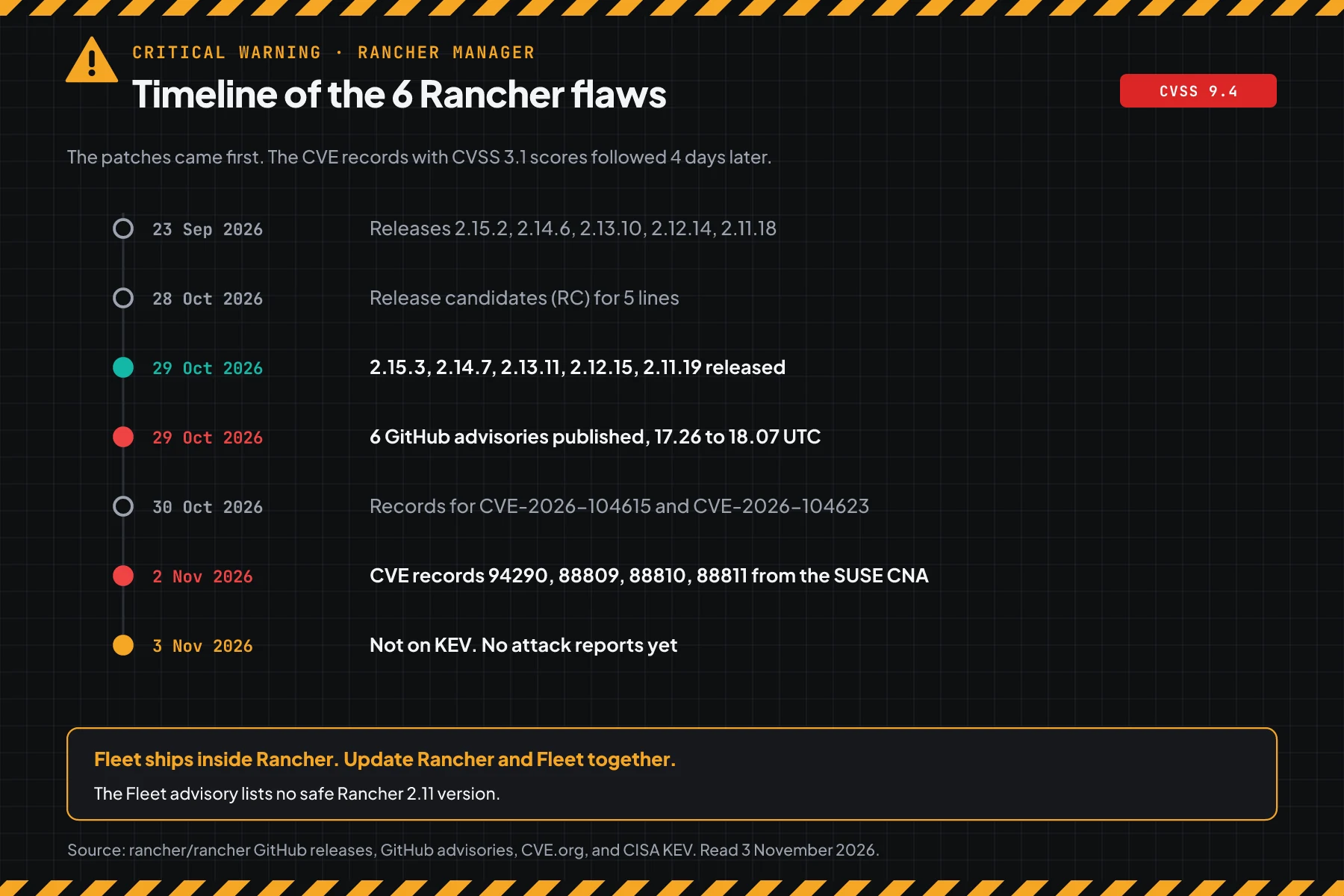
So the patches existed 5 days before this article came out. Many teams do not know yet, because the critical scores only appeared in the CVE records on 2 November.
How it works: Fleet and the meta proxy
The top 2 flaws are in 2 parts of Rancher that are on by default: Fleet and the meta proxy.
This section uses the official advisory summaries. Its purpose is to help you choose the right steps, not to explain an attack.
Summary of CVE-2026-94290 (Fleet)
Fleet is the GitOps tool built into Rancher. According to the Fleet advisory GHSA-qfmw-gw96-ffcr, the Fleet controller did not limit which kubeconfig secrets a Fleet cluster object can use. As a result, a user with the default user role and no permissions on the local cluster can get cluster-admin on the local cluster.
That access opens every secret on the local cluster, including downstream cluster credentials and API tokens. The advisory says that Fleet is on by default, and ordinary users can create a Fleet workspace by design. So a default installation is affected.
Summary of CVE-2026-88811 (meta proxy)
The meta proxy is the part of Rancher that sends UI requests to cloud provider APIs, for example when the UI reads the EC2 region list. According to the Rancher advisory GHSA-x82x-2qj6-5rm2, this proxy did not always remove the user's Rancher credentials from the requests that it forwards.
As a result, the user's browser session goes to the cloud provider host when the user opens the Amazon EC2, DigitalOcean, Linode, or phoenixNAP provisioning form. An API token can also go out when an API client calls the proxy with no credential selection header. Anyone who runs or observes the target host, including its logs and any TLS proxy in front of it, can read that credential.
Scores of the 6 CVEs
Scores differ per CVSS version and per source, so this table shows both. CVSS 3.1 comes from the SUSE CNA CVE records. CVSS 4.0 comes from the GitHub advisories.
| CVE | Area | CVSS 3.1 | CVSS 4.0 | Access | Safe in |
|---|---|---|---|---|---|
| CVE-2026-94290 | Fleet: a user with the default user role can get cluster-admin on the local cluster | 9.1 | 9.4 | Ordinary Rancher account | 2.12.15, 2.13.11, 2.14.7, 2.15.3 |
| CVE-2026-88811 | Meta proxy: a user session or API token goes to a third-party host | 9.1 | 8.8 | Normal use of the UI or API | 2.11.19 to 2.15.3 |
| CVE-2026-104615 | Fleet: the cluster identity at registration is not bound to the token | 7.9 | 7.3 | Workspace registration token | 2.12.15 to 2.15.3 |
| CVE-2026-88809 | Meta proxy: the allowlist is checked too late, requests can reach internal services | 7.6 | 7.1 | Rancher account | 2.11.19 to 2.15.3 |
| CVE-2026-88810 | WebhookWebhookAn automatic message one system sends to another the moment something happens, for example an incoming WhatsApp message.Open the glossary: the inheritedNamespacedRules field of a GlobalRole is not checked | 7.2 | 6.4 | Right to manage global roles | 2.15.3 (only 2.15.2 affected) |
| CVE-2026-104623 | Local cluster shell: the permission check is not on every API route | 6.3 | 5.3 | Rancher account | 2.11.19 to 2.15.3 |
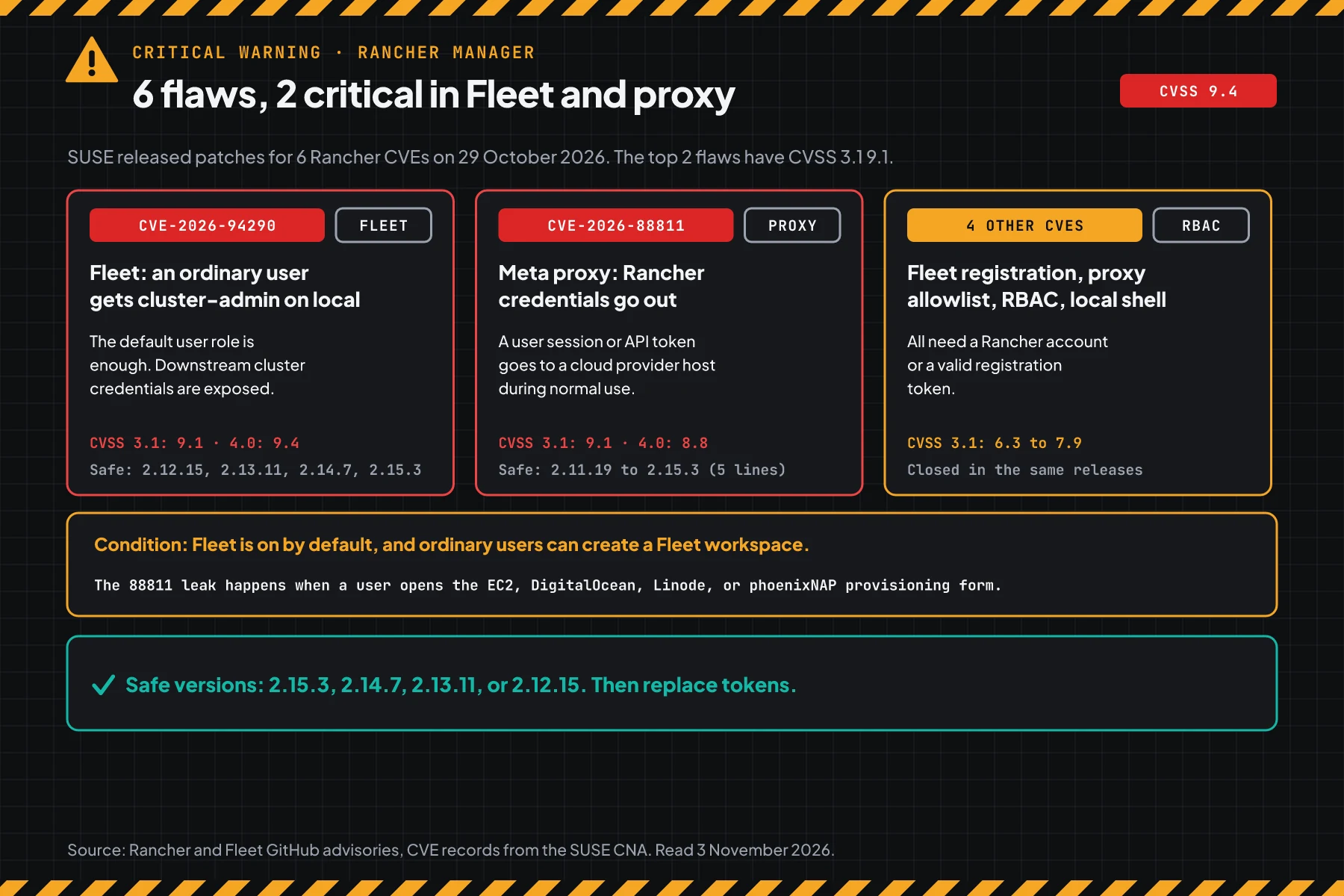
The 4 other CVEs need a Rancher account or a valid registration token: GHSA-gx8v-2929-9q95 (Fleet registration), GHSA-f9gf-wh3x-jx3v (meta proxy allowlist), GHSA-f898-2c8h-r7jc (GlobalRole validation), and GHSA-8x6f-2v58-x6p7 (local cluster shell). All of them close in the same releases.
Exploitation status on 3 November 2026
We found no attack reports, no public exploit code, and no CISA KEV entry for these 6 CVEs. CISA wrote "Exploitation: none" on the CVE-2026-94290 record and the CVE-2026-88811 record.
Rama Digital analysis: CVE-2026-88811 needs no attacker action in Rancher. The credentials go out during normal use. So treat old tokens as exposed, even with no attack reports.
Who has the highest risk
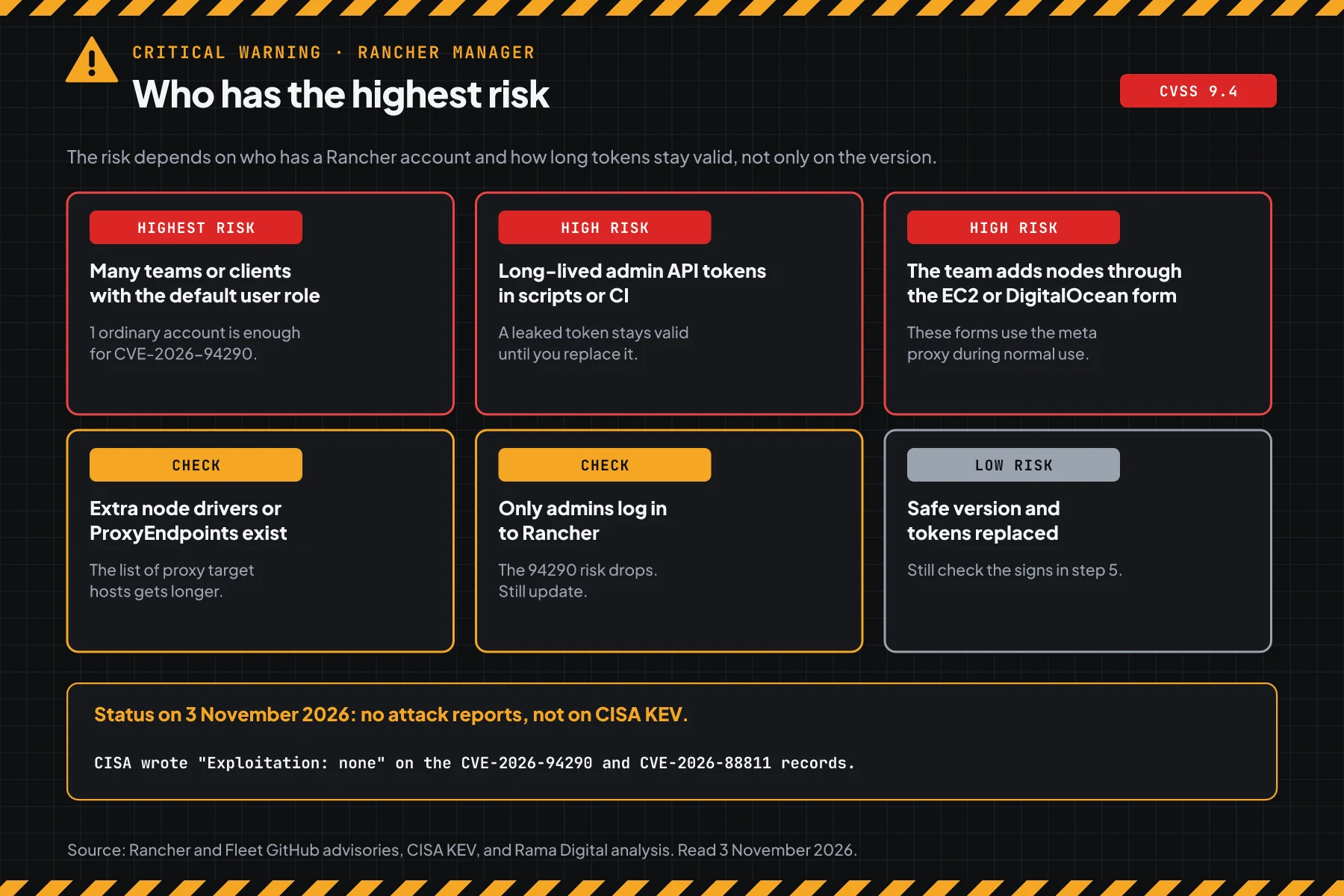
The risk depends on who has a Rancher account and how long tokens stay valid, not only on the version.
This table summarizes the Fleet advisory GHSA-qfmw-gw96-ffcr and the Rancher advisory GHSA-x82x-2qj6-5rm2.
| Rancher condition | Risk | Reason |
|---|---|---|
| Many teams, clients, or developers have accounts with the default user role | Highest | 1 ordinary account can use CVE-2026-94290 |
| Long-lived admin API tokens in scripts, Terraform, or CI | High | A token that leaks through CVE-2026-88811 stays valid until you delete it |
| The team adds nodes through the EC2, DigitalOcean, Linode, or phoenixNAP form | High | These forms use the meta proxy during normal use |
| Custom node drivers or extra ProxyEndpoints exist | Check | The list of hosts that receive proxy requests gets longer |
| Only 1 or 2 admins log in to Rancher | Check | The CVE-2026-94290 risk drops, but CVE-2026-88811 still applies |
| Safe version and tokens replaced | Low | Still look for signs from before the update |
The Rancher local cluster often runs on the same VM as other services. Kernel patches also matter on that host, for example for the Linux kernel TCP flaw CVE-2026-98432. Teams that use LXD or Incus for Kubernetes nodes should also read the LXD and Incus certificate flaw CVE-2026-112816.
Vulnerable and safe versions
Fleet ships inside Rancher, so a Rancher update also moves Fleet up. Use this table to choose the action.
| Rancher version | Status on 3 November 2026 | Action | Fleet after the update |
|---|---|---|---|
| 2.15.0 to 2.15.2 | Vulnerable to 6 CVEs (88810 only in 2.15.2) | Update to 2.15.3 | 0.16.3 |
| 2.14.0 to 2.14.6 | Vulnerable to 5 CVEs | Update to 2.14.7 | 0.15.8 |
| 2.13.0 to 2.13.10 | Vulnerable to 5 CVEs | Update to 2.13.11 | 0.14.12 |
| 2.12.0 to 2.12.14 | Vulnerable to 5 CVEs | Update to 2.12.15 | 0.13.17 |
| 2.11.0 to 2.11.18 | Vulnerable, including CVE-2026-88811 | Update to 2.11.19, then plan a move to 2.12.15 or later | Fleet 0.12, no patch |
| 2.10 and older | No 29 October release | Move to 2.12.15 or later | - |
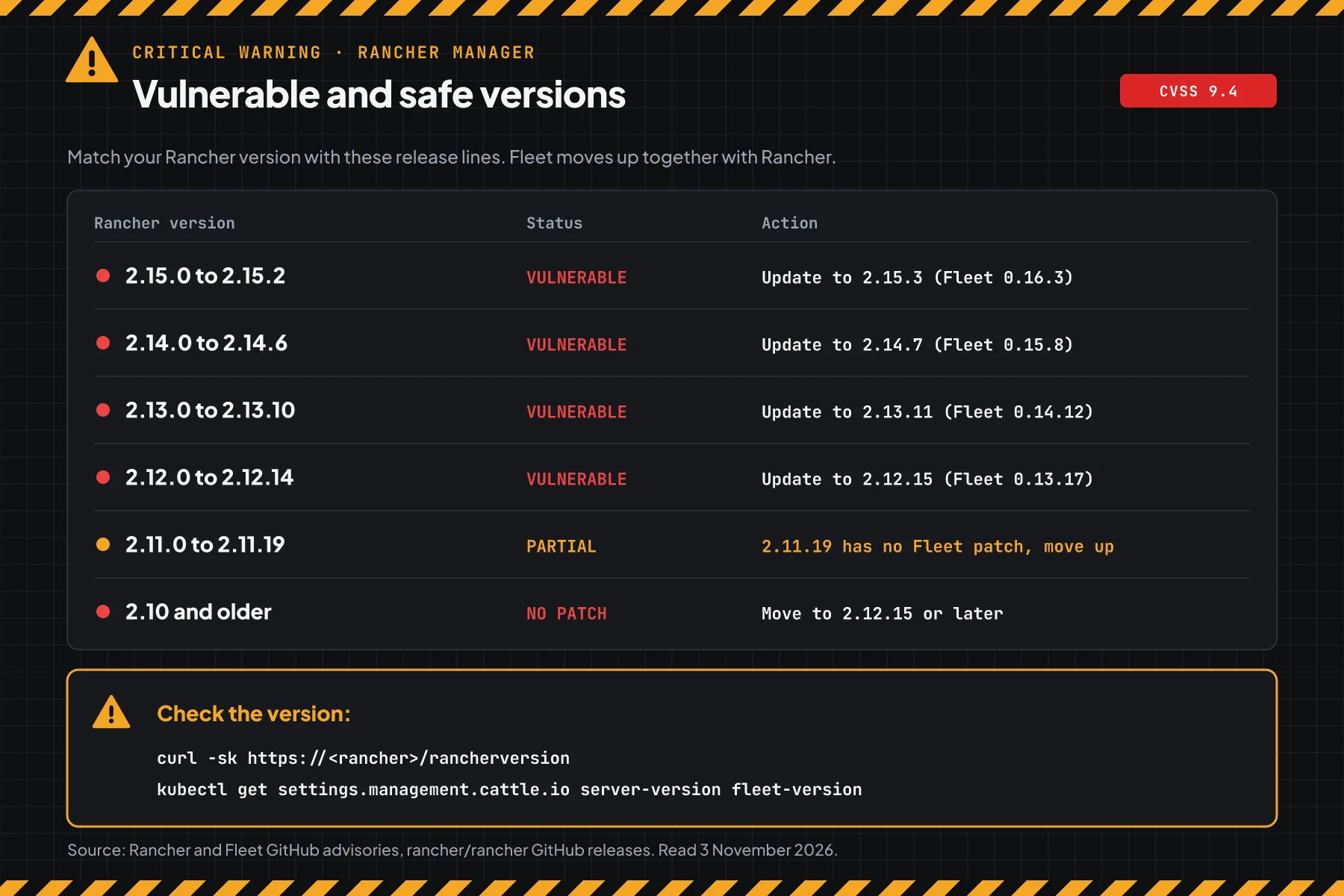
The version data comes from the 6 GitHub advisories and the v2.15.3 release notes. The Fleet advisory lists no safe Rancher 2.11 version. Check the end of support date of your line on the SUSE product lifecycle page.
Prerequisites
kubectlaccess to the Rancher local cluster with admin rights.helmaccess to thecattle-systemnamespace, when you installed Rancher with Helm.- A recent Rancher backup, for example from the Rancher Backups operator or an etcd snapshot.
- A list of scripts, CI pipelines, and Terraform tools that use Rancher API tokens.
- A 30 to 60 minute maintenance window. Every user must log in again after step 3.
Step 1: Check the Rancher and Fleet versions
Save this script as check-version-rancher.sh. The script reads the server-version and fleet-version settings with kubectl, or reads /rancherversion from the Rancher address.
#!/usr/bin/env bash
# Check the Rancher Manager and Fleet versions against 6 CVEs from the 29 October 2026 security release.
# Data: GitHub advisories for rancher/rancher, rancher/fleet, rancher/webhook, and CVE records from the SUSE CNA.
# Use with kubectl to the Rancher local cluster: bash check-version-rancher.sh
# Use with the Rancher address: bash check-version-rancher.sh https://rancher.example.com
# Use for versions that you copied: bash check-version-rancher.sh v2.15.2 v2.14.7 v2.10.12
# The script only reads. The script changes nothing.

# lower A B: true when version A is below version B.
lower() { [ "$1" != "$2" ] && [ "$(printf '%s\n%s\n' "$1" "$2" | sort -V | head -n1)" = "$1" ]; }

check() {
  local v="${1#v}" aman=""
  if ! [[ $v =~ ^2\.[0-9]+\.[0-9]+$ ]]; then
    printf '%-9s UNKNOWN, compare it by hand with the Rancher advisory\n' "$1"
    return
  fi
  case "${v%.*}" in
    2.15) aman=2.15.3 ;; 2.14) aman=2.14.7 ;; 2.13) aman=2.13.11 ;; 2.12) aman=2.12.15 ;; 2.11) aman=2.11.19 ;;
  esac
  if [ -z "$aman" ]; then
    if lower "$v" 2.11.0; then
      printf '%-9s VULNERABLE, this release is past its support date and gets no patch\n' "v$v"
      printf '%-9s -> move to v2.12.15 or later\n' ""
    else
      printf '%-9s UNKNOWN, check the advisory for this release\n' "v$v"
    fi
    return
  fi
  if lower "$v" "$aman"; then
    if [ "${v%.*}" = 2.11 ]; then
      printf '%-9s VULNERABLE, including CVE-2026-88811 (meta proxy)\n' "v$v"
    else
      printf '%-9s VULNERABLE, including CVE-2026-94290 (Fleet) and CVE-2026-88811 (meta proxy)\n' "v$v"
    fi
    printf '%-9s -> update to v%s or later\n' "" "$aman"
  elif [ "${v%.*}" = 2.11 ]; then
    printf '%-9s SAFE for CVE-2026-88811, but Fleet 0.12 has no patch\n' "v$v"
  else
    printf '%-9s SAFE for these 6 CVEs\n' "v$v"
  fi
  if [ "${v%.*}" = 2.11 ]; then
    printf '%-9s NOTE: the Fleet advisory lists no patch for 2.11. Plan a move to v2.12.15 or later.\n' ""
  fi
}

# check_fleet VALUE: VALUE is the fleet-version setting, for example 110.0.2+up0.16.2.
check_fleet() {
  local f="${1##*up}" aman=""
  case "${f%.*}" in
    0.16) aman=0.16.3 ;; 0.15) aman=0.15.8 ;; 0.14) aman=0.14.12 ;; 0.13) aman=0.13.17 ;;
  esac
  if ! [[ $f =~ ^0\.[0-9]+\.[0-9]+$ ]] || [ -z "$aman" ]; then
    printf 'Fleet     %s: compare it by hand with the Fleet advisory\n' "${1:-not readable}"
  elif lower "$f" "$aman"; then
    printf 'Fleet     %s VULNERABLE to CVE-2026-94290 -> Fleet %s comes with the Rancher update\n' "$f" "$aman"
  else
    printf 'Fleet     %s SAFE for CVE-2026-94290\n' "$f"
  fi
}

if (( $# > 0 )) && [[ $1 != http* ]]; then
  for x in "$@"; do check "$x"; done
  exit 0
fi

if (( $# > 0 )); then
  # Many Rancher servers use their own certificate, so the script uses -k. The script only reads the version.
  json=$(curl -fsSk --max-time 10 "${1%/}/rancherversion") || { echo "Cannot read ${1%/}/rancherversion"; exit 1; }
  v=$(sed -nE 's/.*"Version":"([^"]+)".*/\1/p' <<<"$json")
  echo "Source: ${1%/}/rancherversion"
  check "${v:-not-readable}"
  exit 0
fi

if ! kubectl get settings.management.cattle.io server-version >/dev/null 2>&1; then
  echo "kubectl cannot read the Rancher settings."
  echo "Use the local cluster kubeconfig, or run: bash check-version-rancher.sh https://rancher-address"
  exit 1
fi
value() {
  local v
  v=$(kubectl get settings.management.cattle.io "$1" -o jsonpath='{.value}' 2>/dev/null)
  [ -n "$v" ] || v=$(kubectl get settings.management.cattle.io "$1" -o jsonpath='{.default}' 2>/dev/null)
  echo "$v"
}
echo "Source: the server-version and fleet-version settings in the local cluster"
check "$(value server-version)"
check_fleet "$(value fleet-version)"
# With kubectl to the Rancher local cluster
bash check-version-rancher.sh
# With the Rancher address, without kubectl
bash check-version-rancher.sh https://rancher.example.com
# Check versions that you copied from other servers
bash check-version-rancher.sh v2.15.2 v2.14.6 v2.13.11 v2.11.18 v2.10.12
# Manual check without the script
curl -sk https://rancher.example.com/rancherversion
kubectl get settings.management.cattle.io server-version fleet-version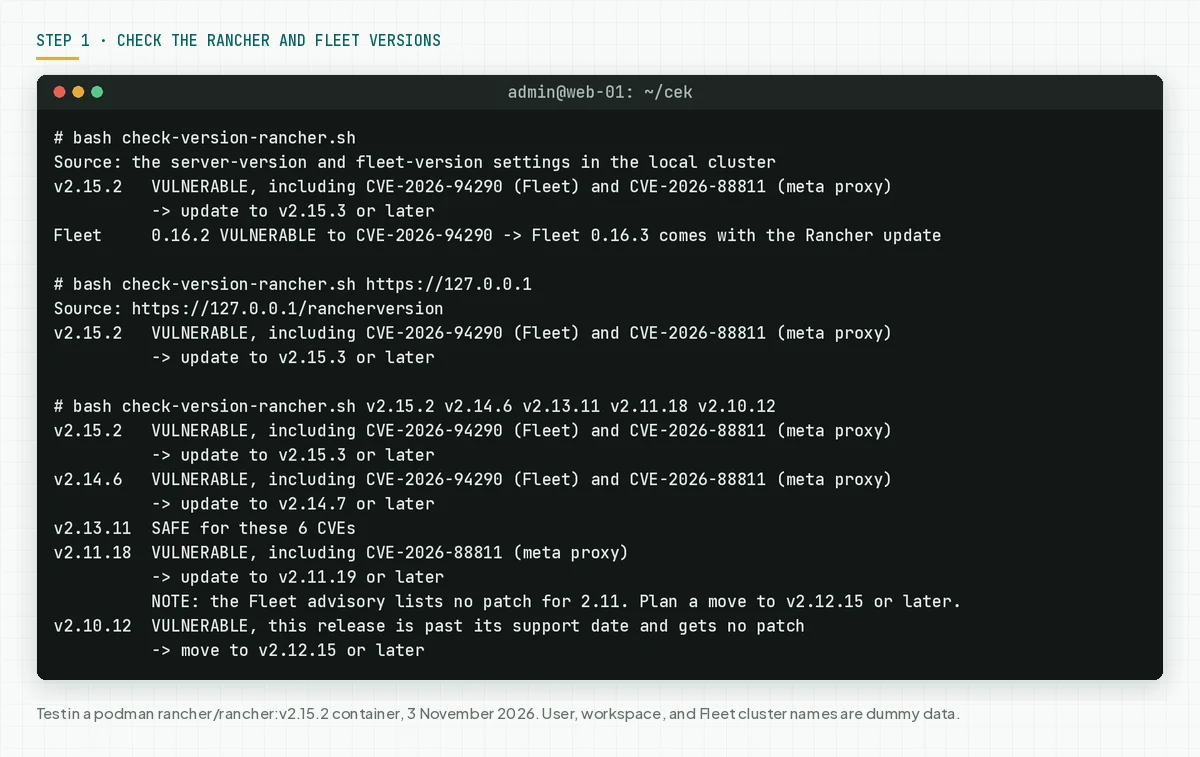
The /rancherversion endpoint answers with no login, so the address mode suits teams with no kubectl access. That mode reads only the Rancher version, not the Fleet version.
Check the result: "VULNERABLE" means go to steps 2 and 3 today. "SAFE" still means run steps 3b and 5, because old tokens can already be exposed.
Step 2: Check Fleet workspaces, the proxy, and tokens
These 3 settings set how large the impact of both flaws is on your installation.
Save this script as check-settings-rancher.sh. The script reads the global roles that can create a Fleet workspace, the meta proxy target hosts, and the session and token life.
#!/usr/bin/env bash
# Check the Rancher settings that set the impact of CVE-2026-94290 (Fleet) and CVE-2026-88811 (meta proxy).
# Data: GitHub advisories rancher/fleet GHSA-qfmw-gw96-ffcr and rancher/rancher GHSA-x82x-2qj6-5rm2.
# Use with kubectl to the Rancher local cluster: bash check-settings-rancher.sh
# The script only reads. The script changes nothing.

k() { kubectl "$@" 2>/dev/null; }
value() {
  local v
  v=$(k get settings.management.cattle.io "$1" -o jsonpath='{.value}')
  [ -n "$v" ] || v=$(k get settings.management.cattle.io "$1" -o jsonpath='{.default}')
  echo "$v"
}
k get settings.management.cattle.io server-version >/dev/null || { echo "kubectl cannot read the Rancher local cluster."; exit 1; }

echo "== 1. Permission to create a Fleet workspace (CVE-2026-94290)"
k get globalroles.management.cattle.io -o jsonpath='{range .items[*]}{.metadata.name}{"|"}{.newUserDefault}{"|"}{.rules}{"\n"}{end}' |
  grep -E '"fleetworkspaces"[^]]*\],"verbs":\[[^]]*"(create|\*)"' |
  while IFS='|' read -r name new _; do
    [ "$name" = admin ] && continue
    count=$(k get globalrolebindings.management.cattle.io -o jsonpath='{range .items[*]}{.globalRoleName}{"\n"}{end}' | grep -cx "$name")
    if [ "$new" = true ]; then
      printf '  %-12s can create a Fleet workspace, %s bindings, given to every new user\n' "$name" "$count"
    else
      printf '  %-12s can create a Fleet workspace, %s bindings\n' "$name" "$count"
    fi
  done
echo "  Fleet workspaces now: $(k get fleetworkspaces.management.cattle.io -o jsonpath='{.items[*].metadata.name}')"

echo "== 2. Meta proxy target hosts (CVE-2026-88811)"
echo "  whitelist-domain: $(value whitelist-domain)"
k get nodedrivers.management.cattle.io -o jsonpath='{range .items[?(@.spec.active==true)]}{.metadata.name}{" "}{.spec.whitelistDomains}{"\n"}{end}' |
  while read -r name domain; do
    [ -z "$domain" ] && continue
    n=$(grep -o '"[^"]*"' <<<"$domain" | wc -l)
    sample=$(grep -o '"[^"]*"' <<<"$domain" | head -n1 | tr -d '"')
    printf '  node driver %-13s %s domains, for example %s\n' "$name" "$n" "$sample"
  done
pe=$(k get proxyendpoints.management.cattle.io -o jsonpath='{range .items[*]}{.metadata.name}{"\n"}{end}')
builtin=$(grep -c '^rancher-' <<<"$pe")
extra=$(grep -v '^rancher-' <<<"$pe" | grep -c .)
echo "  ProxyEndpoint: $builtin built-in, $extra added by an admin"
cc=$(k -n cattle-global-data get secrets -o name | grep -c '/cc-')
echo "  Cloud credentials: $cc (provisioning forms use the meta proxy)"

echo "== 3. Session and token life"
echo "  auth-user-session-ttl-minutes: $(value auth-user-session-ttl-minutes) minutes"
echo "  auth-token-max-ttl-minutes:    $(value auth-token-max-ttl-minutes) minutes"
total=$(k get tokens.management.cattle.io -o name | wc -l)
long=$(k get tokens.management.cattle.io -o jsonpath='{range .items[*]}{.ttl}{"\n"}{end}' | awk '$1 == 0 || $1 > 2592000000' | wc -l)
echo "  Tokens: $total, valid more than 30 days or with no limit: $long"
bash check-settings-rancher.sh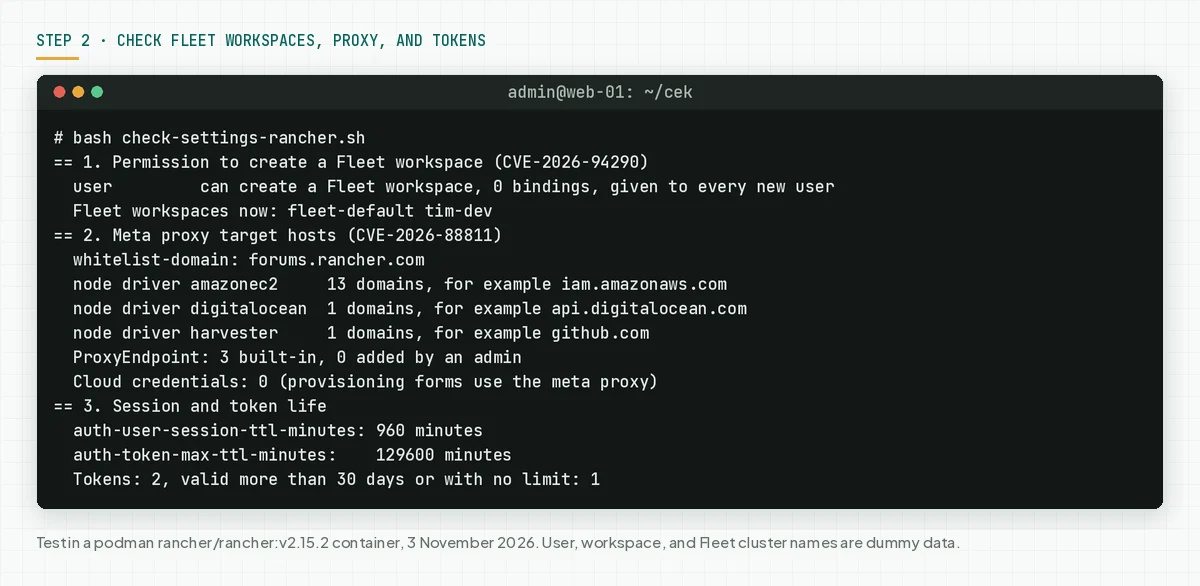
In our test, the default user role can create a Fleet workspace and applies to every new user. The default maximum token life is 129600 minutes, which is 90 days.
Check the result: write down the number of user role bindings, extra ProxyEndpoints, and tokens valid for more than 30 days. These numbers set the priority of steps 3b and 4.
Step 3: Update to a safe version
Only the update closes these 6 flaws. These commands follow the Rancher upgrade guide for Helm installations.
# 1. Make a backup first, for example with the Rancher Backups operator or an etcd snapshot of the local cluster.
# 2. Save the current Helm values
helm get values rancher -n cattle-system -o yaml > rancher-values.yaml
# 3. Get the latest chart. Check your repo name with: helm repo list
helm repo update
# 4. Update to the safe version of your line: 2.15.3, 2.14.7, 2.13.11, or 2.12.15
helm upgrade rancher rancher-stable/rancher -n cattle-system -f rancher-values.yaml --version 2.15.3
kubectl -n cattle-system rollout status deploy/rancher
# 5. Check again. Fleet moves up with the built-in Rancher chart.
bash check-version-rancher.sh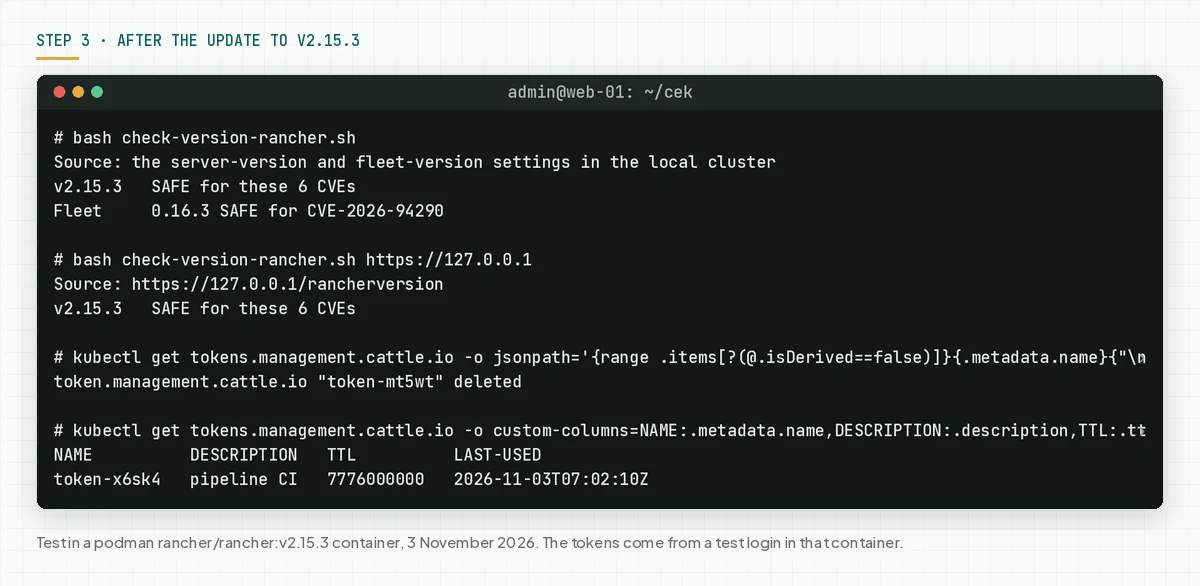
- Make a backup first. A backup is the fastest way back when the update fails.
- Choose the version in the same line as your current version. Example: 2.14.x to 2.14.7.
- Run
check-version-rancher.shagain. The correct result: "SAFE for these 6 CVEs" for Rancher and Fleet. - When you run Rancher in 1 Docker container, follow the Docker upgrade guide in the Rancher docs.
3b. Replace tokens and end all sessions after the update
The Rancher advisory GHSA-x82x-2qj6-5rm2 tells admins to treat credentials that may have gone out as exposed. Delete old API tokens and end all login sessions after the update.
# End all login sessions. Every user, including you, must log in again.
kubectl get tokens.management.cattle.io -o jsonpath='{range .items[?(@.isDerived==false)]}{.metadata.name}{"\n"}{end}' | xargs -r kubectl delete tokens.management.cattle.io
# List the API keys that remain
kubectl get tokens.management.cattle.io -o custom-columns=NAME:.metadata.name,DESCRIPTION:.description,TTL:.ttl,LAST-USED:.lastUsedAt
# Make a new key in Account & API Keys, put it in the script or CI, then delete the old key
kubectl delete tokens.management.cattle.io old-token
We tested the session delete and token list commands in the v2.15.3 container. Rancher 2.12 and later also have a new token API, tokens.ext.cattle.io. Check it too with kubectl get tokens.ext.cattle.io.
Changes that you need to know
- Fleet kubeconfig secret label: a Fleet cluster that you registered yourself with
kubeConfigSecretNamespacein another namespace is no longer imported. Add the labelfleet.cattle.io/kubeconfig-referenceable-fromto that secret. - Proxy header: an API client that sends its own
Authorizationheader through the meta proxy must now use theX-API-Auth-Headerheader. The Rancher UI already does. - Proxy allowlist: Rancher now refuses targets outside the allowlist before it opens a connection.
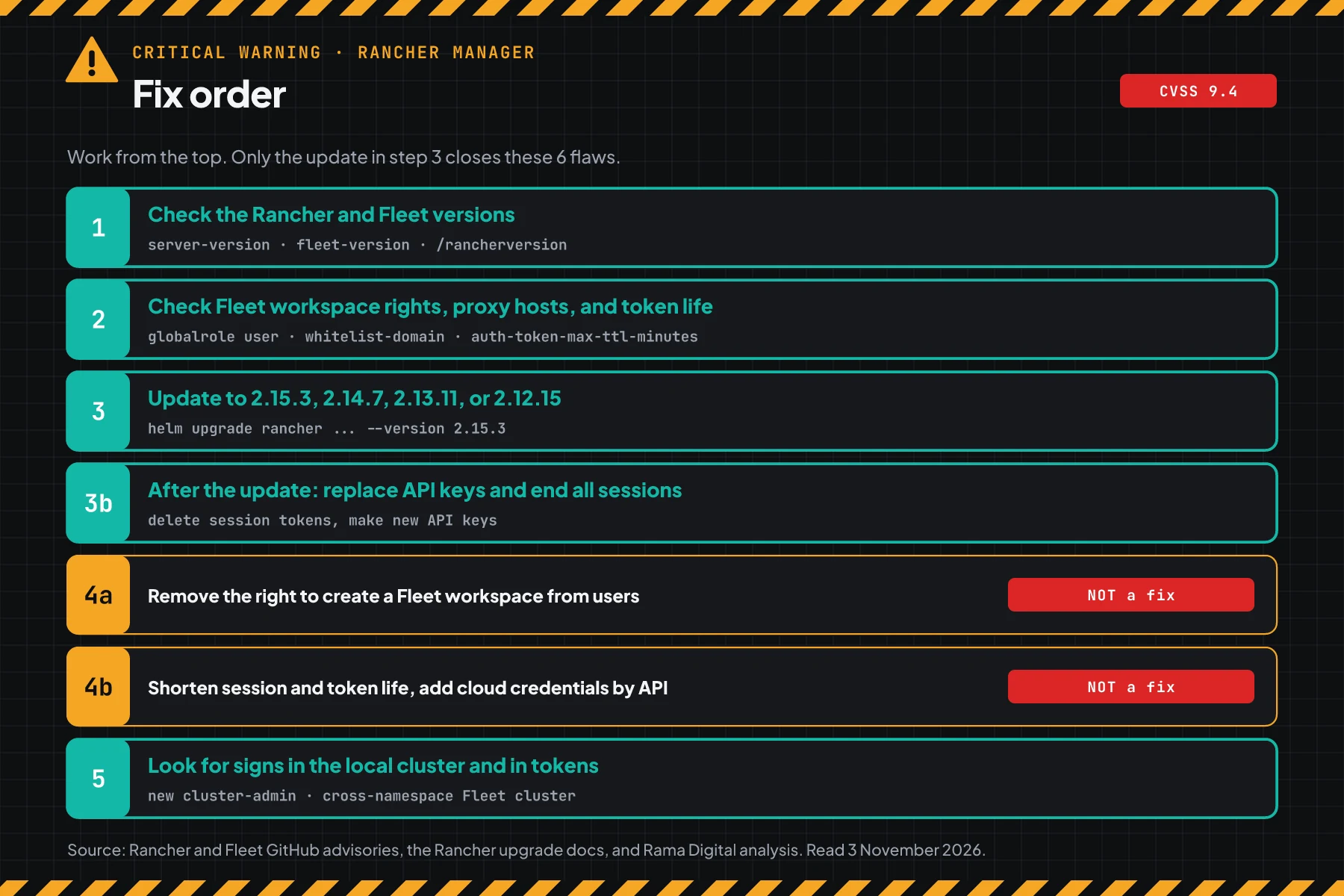
Check the result: the version script prints "SAFE", every user can log in again, and CI pipelines run with the new API keys.
Step 4: Reduce the impact until the update is done
This step reduces the impact, but it does not close the flaws.
The advisories say that no full workaround exists other than the update. Rama Digital analysis: we chose 2 steps from the Workarounds sections of both advisories. Condition: the update cannot run today. Limit: users who already have accounts can still use the other flaws in this release.
4a. Remove the right to create a Fleet workspace from ordinary users
In the Rancher UI, open Users & Authentication › Role Templates › Global. Clone the Standard User role, remove the create verb on fleetworkspaces, then make the new role the default for new users. Move existing users to the new role one by one.
The Fleet advisory GHSA-qfmw-gw96-ffcr also suggests an admission policy, for example Kubewarden, that refuses Fleet clusters with a kubeConfigSecretNamespace in another namespace. We did not test the UI step or this policy, because the test container runs no UI and no webhook.
4b. Shorten session and token life
A short life makes a leaked token stop working sooner. The values in this example are our choice: 4 hours for sessions and 1 day for tokens.
# Shorten the login session life to 4 hours and the maximum token life to 1 day
kubectl patch settings.management.cattle.io auth-user-session-ttl-minutes --type=merge -p '{"value":"240"}'
kubectl patch settings.management.cattle.io auth-token-max-ttl-minutes --type=merge -p '{"value":"1440"}'
bash check-settings-rancher.sh
# Undo: go back to the default values
# kubectl patch settings.management.cattle.io auth-user-session-ttl-minutes --type=merge -p '{"value":""}'
# kubectl patch settings.management.cattle.io auth-token-max-ttl-minutes --type=merge -p '{"value":""}'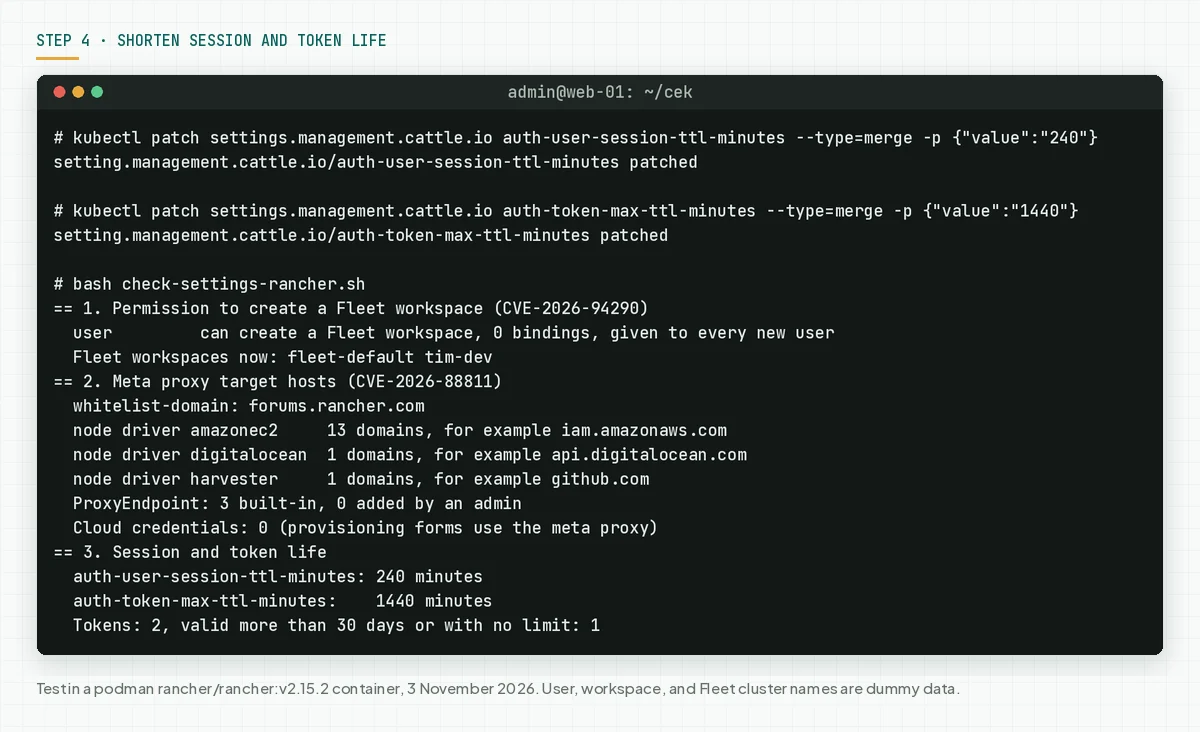
Create cloud credentials, node templates, and machine configs through the API or kubectl, not through the EC2, DigitalOcean, Linode, and phoenixNAP provisioning forms. Also remove hosts in whitelist-domain and extra ProxyEndpoints that you do not use.
Check the result: the settings script prints the new session and token life, and the ordinary user role no longer shows in part 1.
Step 5: Look for signs of use
These flaws existed before your update, so look for signs from before the update too.
Save this script as check-signs-rancher.sh. The script reads cluster-admin bindings, Fleet clusters, Fleet workspaces, fleet-agent deployments, and tokens. The script prints object names and dates, not secret contents.
#!/usr/bin/env bash
# Look for signs that CVE-2026-94290 (Fleet) or CVE-2026-88811 (meta proxy) was used.
# Data: the Workarounds section of GitHub advisories rancher/fleet GHSA-qfmw-gw96-ffcr and rancher/rancher GHSA-x82x-2qj6-5rm2.
# Use with kubectl to the Rancher local cluster: bash check-signs-rancher.sh [START-DATE]
# Example: bash check-signs-rancher.sh 2026-09-01
# The script only reads. The script prints object names and dates, not secret contents.

SINCE="${1:-2026-09-01}"
k() { kubectl "$@" 2>/dev/null; }
k get settings.management.cattle.io server-version >/dev/null || { echo "kubectl cannot read the Rancher local cluster."; exit 1; }
signs=0
checks=0
found=0
none() { (( found == 0 )) && echo "  none"; found=0; }
echo "Check objects created or used since $SINCE"

echo "== 1. New cluster-admin bindings in the local cluster"
while IFS='|' read -r time name subject; do
  [[ $time < $SINCE ]] || [ "$name" = cluster-admin ] && continue
  note=""; [[ $name == globaladmin-* ]] && note=" (Rancher global admin)"
  printf '  CHECK %s %s -> %s%s\n' "${time%%T*}" "$name" "$subject" "$note"
  checks=$((checks + 1)); found=1
done < <(k get clusterrolebindings -o jsonpath='{range .items[?(@.roleRef.name=="cluster-admin")]}{.metadata.creationTimestamp}{"|"}{.metadata.name}{"|"}{.subjects[*].name}{"\n"}{end}')
none

echo "== 2. Fleet clusters that use a kubeconfig from another namespace"
while IFS='|' read -r ns name sns; do
  [ -z "$sns" ] || [ "$sns" = "$ns" ] && continue
  if [ "$sns" = fleet-default ]; then
    printf '  CHECK %s/%s uses a secret in %s (can be valid, check the owner)\n' "$ns" "$name" "$sns"
    checks=$((checks + 1))
  else
    printf '  SIGN  %s/%s uses a secret in %s\n' "$ns" "$name" "$sns"
    signs=$((signs + 1))
  fi
  found=1
done < <(k get clusters.fleet.cattle.io -A -o jsonpath='{range .items[*]}{.metadata.namespace}{"|"}{.metadata.name}{"|"}{.spec.kubeConfigSecretNamespace}{"\n"}{end}')
none

echo "== 3. New Fleet workspaces made by users"
while IFS='|' read -r time name creator; do
  [[ $time < $SINCE ]] && continue
  printf '  CHECK %s %s, made by %s\n' "${time%%T*}" "$name" "${creator:-not recorded}"
  checks=$((checks + 1)); found=1
done < <(k get fleetworkspaces.management.cattle.io -o jsonpath='{range .items[*]}{.metadata.creationTimestamp}{"|"}{.metadata.name}{"|"}{.metadata.annotations.field\.cattle\.io/creatorId}{"\n"}{end}' | grep -vE '\|fleet-(default|local)\|')
none

echo "== 4. Fleet agents in the local cluster outside the system namespace"
while read -r ns; do
  [ -z "$ns" ] || [ "$ns" = cattle-fleet-local-system ] && continue
  printf '  SIGN  fleet-agent deployment in namespace %s\n' "$ns"
  signs=$((signs + 1)); found=1
done < <(k get deploy -A -o jsonpath='{range .items[?(@.metadata.name=="fleet-agent")]}{.metadata.namespace}{"\n"}{end}')
none

echo "== 5. Tokens used since that date (replace them after the update)"
while IFS='|' read -r name user ttl used; do
  [ -z "$used" ] || [[ $used < $SINCE ]] && continue
  if [ "$ttl" = 0 ]; then life="no expiry"
  elif (( ttl >= 172800000 )); then life="valid $((ttl / 86400000)) days"
  else life="valid $((ttl / 3600000)) hours"; fi
  printf '  REPLACE %s of %s, %s, last used %s\n' "$name" "$user" "$life" "${used%%T*}"
  found=1
done < <(k get tokens.management.cattle.io -o jsonpath='{range .items[*]}{.metadata.name}{"|"}{.userId}{"|"}{.ttl}{"|"}{.lastUsedAt}{"\n"}{end}')
none

echo "Result: SIGN $signs, CHECK $checks."
if (( signs > 0 )); then
  echo "Follow the incident response in step 5."
fi
bash check-signs-rancher.sh 2026-09-01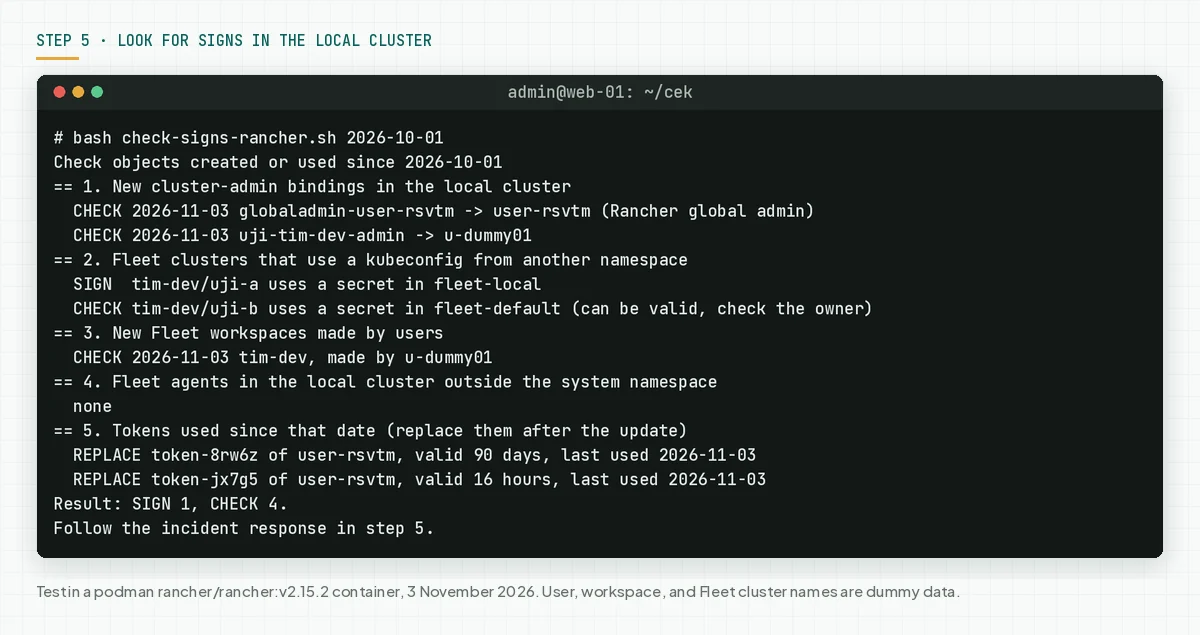
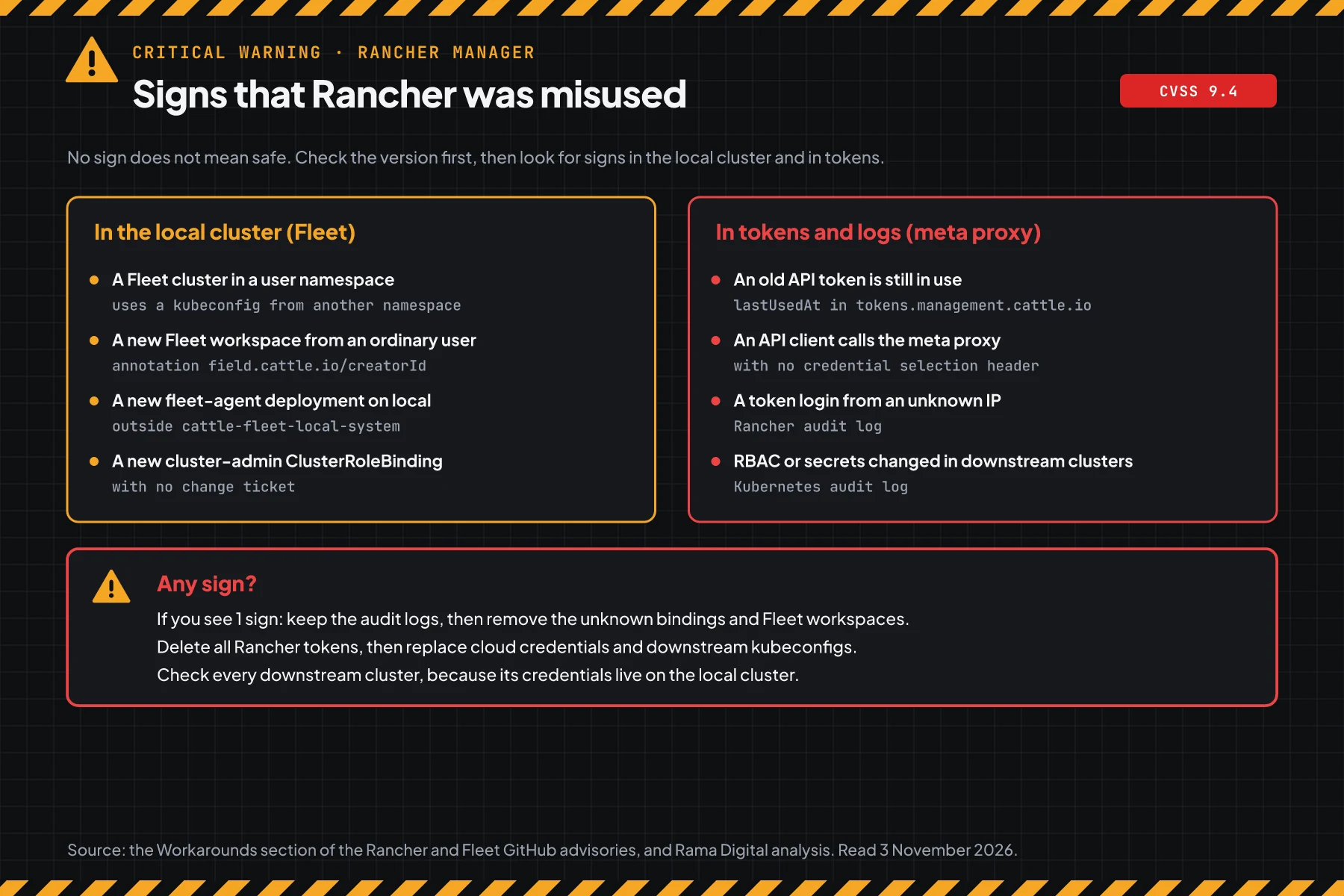
Parts 1 to 4 come from the signs that the Fleet advisory GHSA-qfmw-gw96-ffcr names in its Workarounds section. A Fleet cluster in a workspace other than fleet-default can validly use a secret in fleet-default, so the script prints CHECK for that case. A secret from fleet-local means local cluster credentials, so the script prints SIGN.
Check the result: the script prints "SIGN 0", every CHECK has an owner that you know, and every token in part 5 is replaced. An attacker can delete logs, so no sign does not mean safe.
If you find even 1 sign, keep the Rancher and Kubernetes audit logs as evidence. Remove the unknown bindings, Fleet workspaces, and Fleet clusters. Delete all Rancher tokens, then replace the cloud credentials and the kubeconfig of every downstream cluster, because those credentials live on the local cluster.
When the clusters hold customer data, Indonesian Law 27/2022 on Personal Data Protection requires written notice within 3 times 24 hours after a personal data breach. Also read the pgAdmin 4 CVE-2026-116241 warning.
Example: 1 morning of response for 3 Rancher installations
This simulation uses dummy data. The installation names, times, and results are not customer data.
| Time (WIB) | Dummy installation | What we check | Result | Action |
|---|---|---|---|---|
| 08.00 | rancher-prod (2.14.6, 40 users) | Steps 1 and 2 | VULNERABLE, user role active for 38 bindings | Step 4a, then update tonight |
| 08.30 | rancher-dev (2.15.2, EC2 provisioning) | Steps 1 and 2 | VULNERABLE, 4 cloud credentials, 90-day CI token | Update this afternoon, then step 3b |
| 09.00 | rancher-old (2.10.12) | Step 1 | VULNERABLE, no patch | Plan a line move, step 4 until then |
| 09.30 | rancher-prod | Step 5 | SIGN 1: a Fleet cluster uses a fleet-local secret | Incident response, replace all credentials |
Lesson from the simulation: a safe version does not prove a clean cluster. Step 5 is still necessary on every installation.
Who installs the patch
The patch duty differs per service type, so this table helps you know who acts today.
| Service type | Patch owner | What you do |
|---|---|---|
| Rancher that you install yourself with Helm | Your team | Steps 1 to 5 |
| Rancher Prime with SUSE support | Your team, with help from SUSE | Open a SUSE ticket when the update fails, then steps 3b and 5 |
| Rancher managed by a vendor or MSP | The vendor, per the contract | Ask for written version proof, then replace your own tokens |
| Rancher on EKS, AKS, or GKE | Your team. The cloud provider patches only Kubernetes | Steps 1 to 5 still apply |
Rama Digital recommendation: treat Rancher as the master key of every cluster. Limit who has an account, use short-lived tokens, and update other panels in the same pipeline, for example for the GitLab CVE-2026-97229 warning. Teams that run VPS hosting panels should also read the Control Web Panel CVE-2026-77876 warning.
Checklist for today
- List all Rancher installations. Owner: platform team. Evidence: a list of addresses and versions.
- Check the version with step 1. Owner: Rancher admin. Evidence: script output.
- Check the settings with step 2. Owner: Rancher admin. Evidence: script output.
- Apply step 4 on every installation that cannot update today. Owner: Rancher admin. Evidence: settings script output.
- Make a backup, then update to a safe version. Owner: Rancher admin. Evidence: script output after the update.
- Delete sessions and replace API keys. Owner: Rancher admin and pipeline owners. Evidence: the new token list.
- Look for signs with step 5. Owner: Rancher admin and security team. Evidence: script output.
Questions and answers
Has anyone used these flaws in an attack?
On 3 November 2026, we found no attack reports, and these 6 CVEs are not on CISA KEV. But CVE-2026-88811 sends credentials during normal use, so still replace tokens.
I am the only Rancher user. Must I still update?
Yes. The CVE-2026-94290 risk drops, but your session can still go out through the meta proxy. Update, then replace your API keys.
Does the Rancher update also move Fleet up?
Yes. Fleet ships in the built-in Rancher chart. Run step 1 after the update to see the new Fleet version.
Must I also update the downstream clusters?
The patch is in Rancher and Fleet on the local cluster. But downstream cluster credentials live on the local cluster, so replace them when step 5 finds a sign.
My Rancher is still on 2.11. What do I do?
Update to 2.11.19 to close the meta proxy flaw. The Fleet advisory lists no patch for 2.11, so plan a move to 2.12.15 or later.
Can a shorter token life replace the update?
No. That step only shortens the time that a leaked token stays valid. The update is still necessary.
Do the check scripts change anything in my cluster?
No. The 3 scripts only read. The commands that change something are only in steps 3 and 4, and each command is written separately.
Next step
The limits that still apply: step 4 does not close the flaws, and the update does not remove access that an attacker already used. When your Rancher shows signs in step 5, or you need help with an audit and recovery, use Vibe Code Rescue. For 1 urgent problem today, book a 30-minute session.
Sources
- Fleet advisory GHSA-qfmw-gw96-ffcr: the Fleet summary, CVSS 4.0 score 9.4, safe Fleet versions, and workarounds.
- Rancher advisory GHSA-x82x-2qj6-5rm2: the meta proxy summary, conditions, safe versions, workarounds, and the advice to replace tokens.
- CVE-2026-94290 record and CVE-2026-88811 record: CVSS 3.1 score 9.1 from the SUSE CNA and the CISA SSVC status.
- GHSA-gx8v-2929-9q95, GHSA-f9gf-wh3x-jx3v, GHSA-f898-2c8h-r7jc, and GHSA-8x6f-2v58-x6p7: the 4 other CVEs in the same release.
- v2.15.3 release notes: the security fix list and the release date of 29 October 2026.
- Rancher upgrade guide and Rancher security advisories page: the Helm upgrade commands and the official advisory list.
- SUSE product lifecycle page: the end of support date per release line.
- CISA KEV: status on 3 November 2026.
- Indonesian Law 27/2022 on Personal Data Protection: the duty to report a personal data breach.