Direct answer: CVE-2026-77876 lets the Control Web Panel (CWP) user panel run operating system commands through the Protected Directory module. The CVSS 3.1 score is 9.8. Today, check the CWP version, check the panel ports, then update to CWP 1.30 or later.
This CVE came with 9 other CVEs on 2 November 2026. CVE-2026-73696 (score 9.1) lets user panel functions run with no login in versions below 1.12. Six other CVEs are in the CWP local APIAPIThe official door 2 systems use to exchange data, without anybody copying it by hand.Open the glossary that runs as root.
Main condition: The server runs CWP below 1.30, and the user panel port 2082 or 2083 is reachable from the internet. Limit: This article has no request contents, payloads, or attack sequence.
We read the CVE-2026-77876 record, the CVE-2026-73696 record, the CVE-2026-104080 record, the VulnCheck advisory, the CWP changelog, and CISA KEV on 3 November 2026, from 06.35 to 08.30 WIB. We tested 3 check scripts in a podman AlmaLinux 9 container with official files from the CWP 1.11 and 1.30.1 packages and the CSF package from the CWP CDN. We did not install a full CWP, so we wrote the update and firewall reload commands from official CWP material, with no test.
The problem: 10 flaws in a hosting panel that you install yourself
One CWP server usually holds many websites, mailboxes, and databases at the same time.
Control Web Panel, formerly CentOS Web Panel, is a free hosting panel for Linux servers. VPS owners install it to manage WordPress sites, online shops, and business email. Hosting customers log in to the user panel on port 2082 or 2083. Admins log in to the admin panel on port 2030, 2031, 2086, or 2087.
On 2 November 2026, the VulnCheck CNA published 10 CVEs for CWP at the same time. The researcher who reported them is Valentin Lobstein. All 10 CVEs are safe in CWP 1.30, which the CWP changelog dates to 31 October 2026.
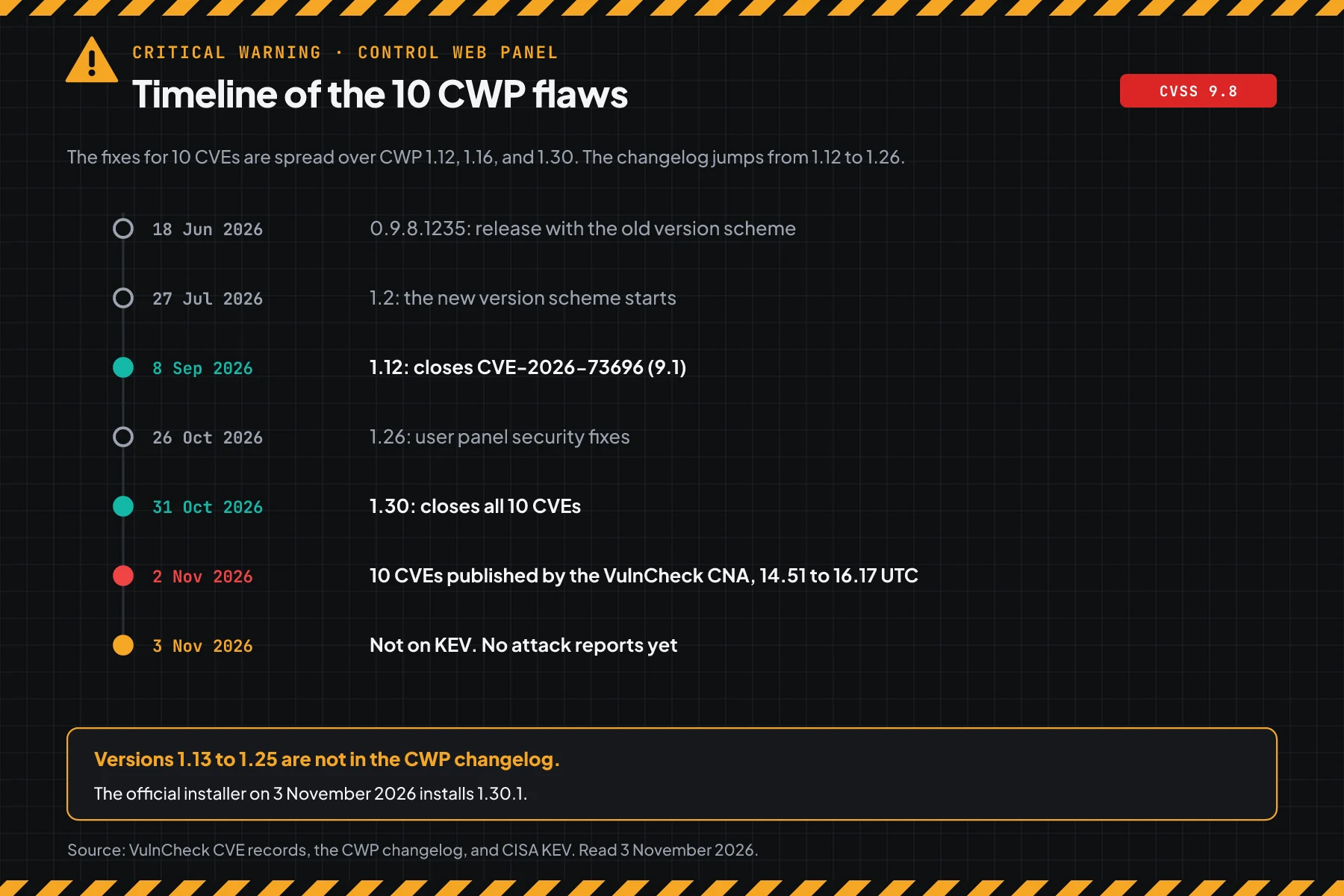
The CWP changelog lists 1.12 on 8 September, then goes straight to 1.26 on 26 October. Versions 1.13 to 1.25 are not listed, so the 1.16 limit in the CVE records has no public release date. On 3 November 2026, the official CWP installer installs version 1.30.1.
How it works: the user panel and the root local API
The 10 flaws are in 2 parts of CWP: the user panel on the network and the local API that runs as root.
This section uses the official summary from the CVE records. Its purpose is to help you choose the right steps, not to explain an attack.
Summary from the CVE records
According to the CVE-2026-77876 record, the Protected Directory module in the user panel passes a file name input to a shell command with no escaping. As a result, the command runs with user panel rights. VulnCheck gives this flaw a no-login vector (PR:N).
According to the CVE-2026-73696 record, the user panel login flow sends a redirect to the login page, but does not stop PHP execution. As a result, user panel functions still run for requests with no login. This flaw is safe from 1.12.
According to the CVE-2026-104080 record and 5 other records, the CWP local API runs as root and listens only on 127.0.0.1. Some routes do not check a token, or pass input to a shell and to MySQL queries with the root account. An attacker needs access to that server first, for example through a hosting account or a PHP site that is already broken into.
The CWP changelog for version 1.29 says that request values are now validated and never reach a shell. Some user panel actions also now need a valid session.
Scores of the 10 CVEs
Scores differ per CVSS version, so this table shows both. All scores and version limits come from the VulnCheck CNA.
| CVE | Area | CVSS 3.1 | CVSS 4.0 | Access | Safe from |
|---|---|---|---|---|---|
| CVE-2026-77876 | User panel Protected Directory module, OS command | 9.8 | 9.3 | Network, no login | 1.16 |
| CVE-2026-73696 | User panel login flow, execution after redirect | 9.1 | 9.3 | Network, no login | 1.12 |
| CVE-2026-73695 | Path traversal in the user panel, PHP file include | 8.8 | 8.7 | Network, user panel account | 1.16 |
| CVE-2026-73697 | PHP.ini editor module, file write and OS command | 8.8 | 8.7 | Network, user panel account | 1.16 |
| CVE-2026-77880 | Local API password change, command as root | 8.4 | 8.6 | Local | 1.16 |
| CVE-2026-77879 | Local API token check, SQL injection as MySQL root | 7.7 | 8.5 | Local | 1.16 |
| CVE-2026-104080 | Local API token check, command as root | 8.4 | 8.6 | Local | 1.30 |
| CVE-2026-77877 | Local API with no token for root routes | 8.4 | 8.6 | Local | 1.30 |
| CVE-2026-77878 | Local API database restore, command as root | 8.4 | 8.6 | Local | 1.30 |
| CVE-2026-77881 | Local API, blind SQL injection | 6.2 | 6.9 | Local | 1.30 |
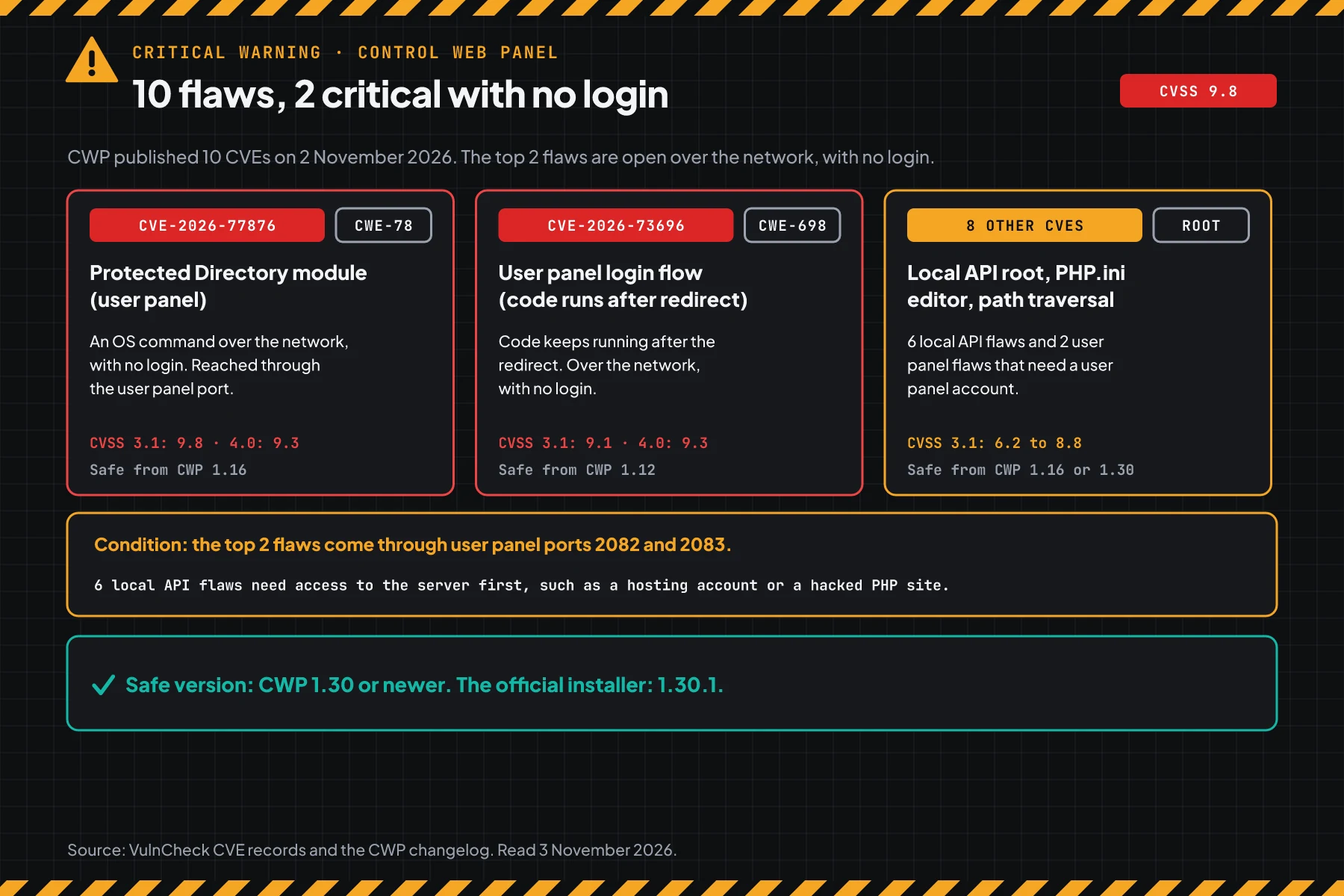
The 2 top flaws matter for servers that open the user panel port to the internet. The 4 flaws that are safe from 1.16 and 1.30 use local access, but the result is root. So servers on versions 1.16 to 1.29 must still update.
Exploitation status on 3 November 2026
We found no attack reports, no public exploit code in official sources, and no CISA KEV entry for these 10 CVEs. CISA writes "Exploitation: none" on 5 of the 10 CVE records.
Rama Digital analysis: CWP has been on CISA KEV 2 times, with CVE-2022-44877 in January 2023 and CVE-2025-48703 in November 2025. Attackers scan hosting panels automatically. Do not wait for a KEV status.
Who has the highest risk
The risk depends on who can reach the user panel and who has access to the server, not only on the version.
This table summarizes the CVE-2026-77876 record, the CVE-2026-73696 record, and the CVE-2026-104080 record.
| CWP server condition | Risk | Reason |
|---|---|---|
| Port 2082 or 2083 open to the internet, version below 1.16 | Highest | CVE-2026-77876 works over the network, with no login according to the CNA vector |
| Hosting with many customer accounts | High | 2 CVEs need a user panel account. Many accounts mean many passwords that can leak |
| The CWP daily job is off or the update failed | High | The version stays below 1.30 and you do not see it |
| Many old PHP or WordPress sites on the same server | Check | A site that is broken into gives local access to the root API |
| Panel ports open only to a VPN or office IP | Check | The network risk goes down, but the local API stays vulnerable |
| Already on 1.30.1 with the daily job on | Low | Still look for signs from the time before the update |
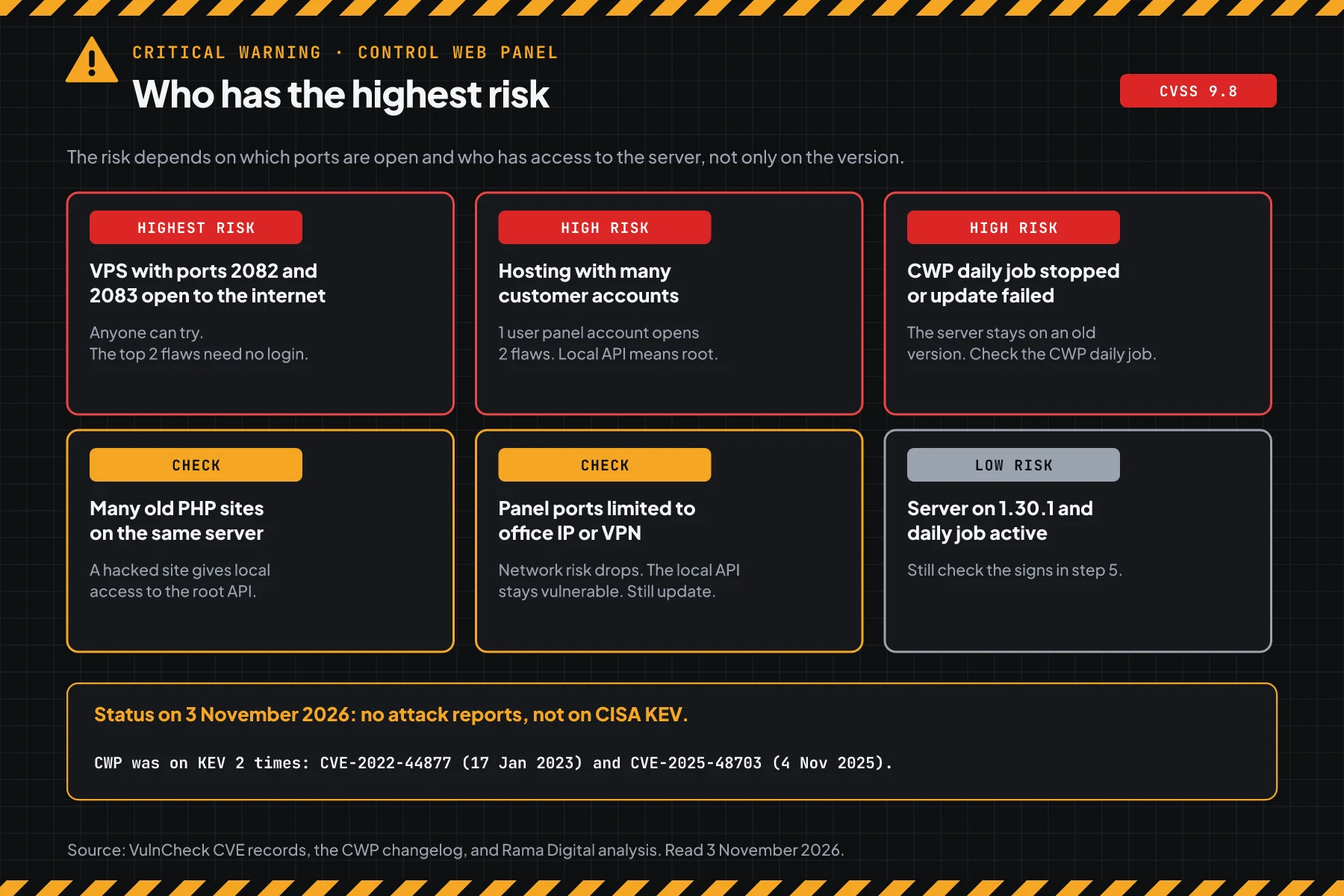
CWP servers often also run online shops and WordPress sites. A flaw in a web application, such as the Magento PolyShell flaw CVE-2026-48356 or the PHP2Shell warning, can be a door to the local API. Kernel patches also matter on the same server, for example for the Linux kernel TCP flaw CVE-2026-98432.
Vulnerable and safe versions
Every CWP version below 1.30 is vulnerable to at least 4 of these CVEs. Use this table to choose the action.
| CWP version | Status on 3 November 2026 | Action |
|---|---|---|
| 0.9.8.x (old version scheme) | Vulnerable to 10 CVEs | Update to 1.30 or later |
| 1.2 to 1.11 | Vulnerable to 10 CVEs | Update to 1.30 or later |
| 1.12 to 1.15 | Vulnerable to 9 CVEs, including CVE-2026-77876 | Update to 1.30 or later |
| 1.16 to 1.29 | Vulnerable to 4 CVEs in the root local API | Update to 1.30 or later |
| 1.30, 1.30.1 | Safe for these 10 CVEs | Step 5: look for signs |
| Cannot update today | Vulnerable | Step 4, then update as soon as possible |
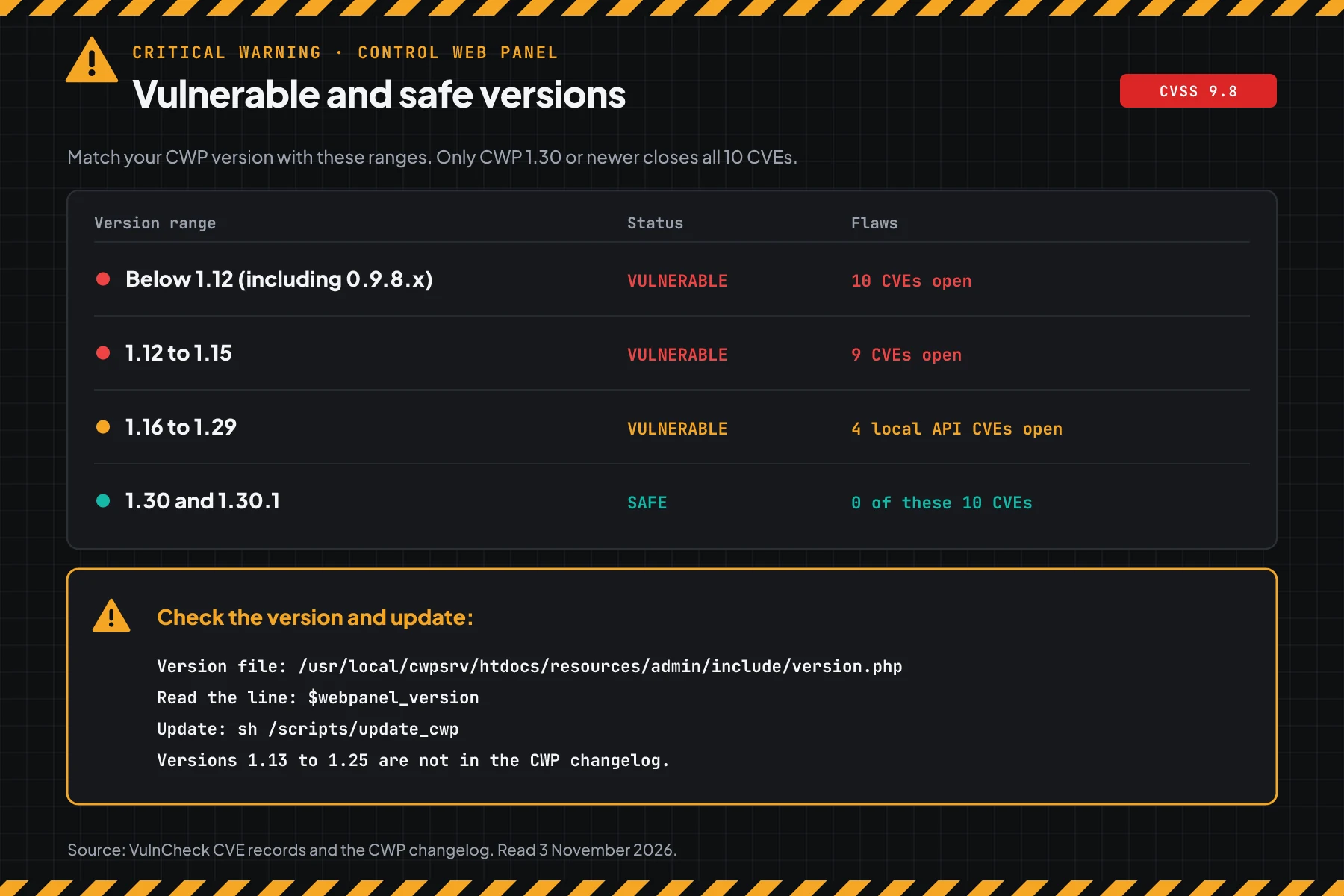
The version data comes from the CVE-2026-77876 record, the CVE-2026-73696 record, the CVE-2026-104080 record, and the CWP changelog. The CVE records use the term webpanel_version, which is the value in the CWP version file. The CVE records do not make a difference between the free edition and CWPpro.
Before you start
- Root access over SSH to every CWP server.
- Access to the VPS provider panel to make a snapshot.
- A list of the office or VPN IPs of the admin team. The examples in this article use RFC 5737 documentation IPs.
- A list of hosting accounts and their owners. For example: clients, team members, and resellers.
- A maintenance window of 15 to 30 minutes. The update can restart the web and panel services.
Step 1: Check the CWP version
Save this script as check-version-cwp.sh. The script reads the webpanel_version value from the CWP version file, then compares it with the limits 1.12, 1.16, and 1.30.
#!/usr/bin/env bash
# Check the Control Web Panel (CWP) version against the 10 CVEs published on 2 November 2026.
# Data: CVE records from the VulnCheck CNA (version limits 1.12, 1.16, and 1.30) and the CWP changelog.
# Use on a CWP server: sudo bash check-version-cwp.sh
# Use for versions that you copied from other servers: bash check-version-cwp.sh 0.9.8.1235 1.15 1.30.1
# The script only reads files. The script changes nothing.

FILE=/usr/local/cwpsrv/htdocs/resources/admin/include/version.php

# lower A B: true when version A is below version B.
lower() { [ "$1" != "$2" ] && [ "$(printf '%s\n%s\n' "$1" "$2" | sort -V | head -n1)" = "$1" ]; }

check() {
  local v="$1"
  if ! [[ $v =~ ^[0-9]+(\.[0-9]+)+$ ]]; then
    printf '%-12s UNKNOWN, compare it manually with the CWP changelog\n' "$v"
    return
  fi
  if lower "$v" 1.12; then
    printf '%-12s VULNERABLE to 10 CVEs, including CVE-2026-77876 (9.8) and CVE-2026-73696 (user panel login)\n' "$v"
  elif lower "$v" 1.16; then
    printf '%-12s VULNERABLE to 9 CVEs, including CVE-2026-77876 (9.8)\n' "$v"
  elif lower "$v" 1.30; then
    printf '%-12s VULNERABLE to 4 CVEs in the local API that runs as root\n' "$v"
  else
    printf '%-12s SAFE for these 10 CVEs\n' "$v"
    return
  fi
  printf '%-12s -> update to 1.30 or later: sh /scripts/update_cwp\n' ""
}

if (( $# > 0 )); then
  for x in "$@"; do check "$x"; done
  exit 0
fi

if [ ! -r "$FILE" ]; then
  echo "Cannot read the version file: $FILE"
  echo "This server is not a CWP server, or run the script with sudo."
  exit 1
fi
v=$(sed -nE 's/.*webpanel_version *= *"([^"]+)".*/\1/p' "$FILE" | head -n1)
echo "Version file: $FILE"
check "${v:-unreadable}"
if [ -e /etc/cron.daily/cwp ]; then
  echo "CWP daily job: PRESENT (/etc/cron.daily/cwp)"
else
  echo "CWP daily job: MISSING, so updates run only by hand"
fi
if [ -r /var/log/cwp/cwp_update.log ]; then
  echo "Last 3 lines of the CWP update log:"
  tail -n 3 /var/log/cwp/cwp_update.log
fi
# On the CWP server: read the CWP version file
sudo bash check-version-cwp.sh
# Check versions that you copied from other servers
bash check-version-cwp.sh 0.9.8.1235 1.15 1.29 1.30.1
# Manual check without the script
grep webpanel_version /usr/local/cwpsrv/htdocs/resources/admin/include/version.php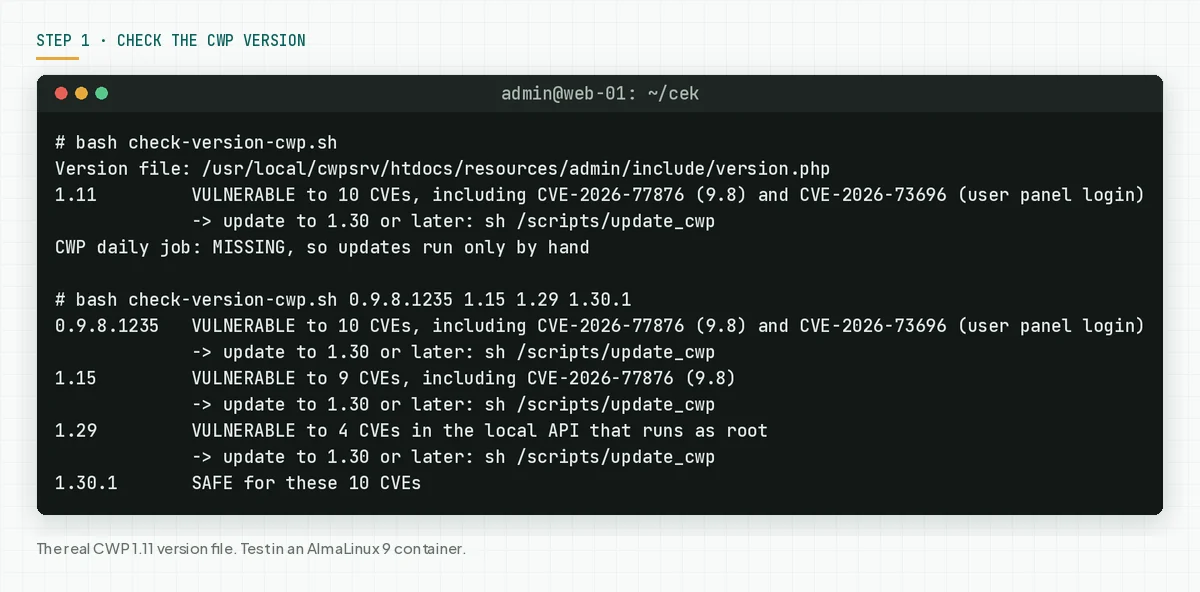
The script also checks the daily job /etc/cron.daily/cwp. This job runs the routine CWP update. The built-in /scripts/cwp_version script needs the ionCube loader, so our script reads the version file directly.
Check the result: "VULNERABLE" means go to steps 2 and 3 today. "SAFE" still means run step 5, because these flaws existed before 31 October.
Step 2: Check which panel ports are open
The 2 top flaws work over the network, so an open user panel port tells you how fast you must act.
Save this script as check-port-cwp.sh. The script reads TCP_IN in /etc/csf/csf.conf and the allow rules in /etc/csf/csf.allow. CSF is the firewall that the CWP installer sets up.
#!/usr/bin/env bash
# Check which CWP panel ports are open to every IP in the CSF firewall.
# Use on a CWP server: sudo bash check-port-cwp.sh
# The script only reads /etc/csf/csf.conf and /etc/csf/csf.allow. The script does not change the firewall.

CONF=/etc/csf/csf.conf
ALLOW=/etc/csf/csf.allow
declare -A NAME=(
  [2030]="admin panel HTTP" [2031]="admin panel HTTPS"
  [2086]="admin panel HTTP (other port)" [2087]="admin panel HTTPS (other port)"
  [2082]="user panel HTTP" [2083]="user panel HTTPS" [2304]="remote API"
)

# in_list PORT LIST: true when the port is in the CSF list, including ranges such as 30000:35000.
in_list() {
  local p=$1 item
  IFS=',' read -ra items <<< "$2"
  for item in "${items[@]}"; do
    item=${item// /}
    if [[ $item == *:* ]]; then
      (( p >= ${item%%:*} && p <= ${item##*:} )) && return 0
    elif [[ $item == "$p" ]]; then
      return 0
    fi
  done
  return 1
}

if [ ! -r "$CONF" ]; then
  echo "Cannot read the CSF file: $CONF"
  echo "Check other firewalls (firewalld, nftables, or the VPS provider firewall) by hand."
  exit 1
fi
tcp_in=$(sed -nE 's/^TCP_IN *= *"([^"]*)".*/\1/p' "$CONF")
echo "TCP_IN: $tcp_in"
open=0
for p in 2030 2031 2086 2087 2082 2083 2304; do
  allow=$(grep -cE "^[^#]*d=$p(\||[[:space:]]|$)" "$ALLOW" 2>/dev/null)
  if in_list "$p" "$tcp_in"; then
    printf '%-5s %-30s OPEN to every IP\n' "$p" "${NAME[$p]}"
    open=$((open + 1))
  elif (( ${allow:-0} > 0 )); then
    printf '%-5s %-30s LIMITED, allow rules in csf.allow: %s\n' "$p" "${NAME[$p]}" "$allow"
  else
    printf '%-5s %-30s CLOSED\n' "$p" "${NAME[$p]}"
  fi
done
if (( open > 0 )); then
  echo "Result: panel ports open to every IP: $open. See step 4."
else
  echo "Result: no panel port is open to every IP."
fi
sudo bash check-port-cwp.sh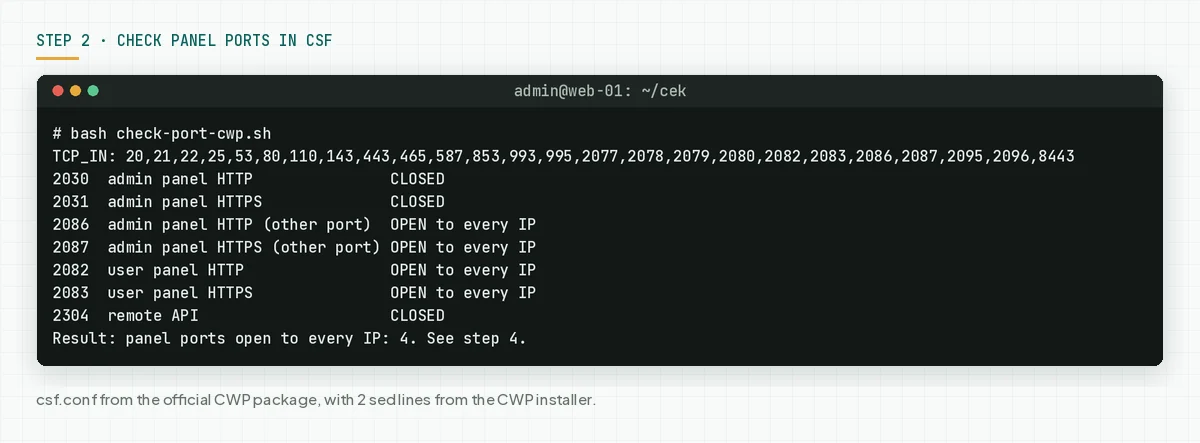
In our test, the CSF file from the CWP package opens ports 2082, 2083, 2086, and 2087 to every IP. Ports 2086 and 2087 also open the CWP admin panel. If you use another firewall, such as firewalld or the VPS provider firewall, check these ports there.
Check the result: "OPEN to every IP" on 2082 or 2083 means that anyone on the internet can reach the user panel. Put this server first in step 3.
Step 3: Update to CWP 1.30 or later
Only the update closes these 10 flaws. The official CWP installer gives sh /scripts/update_cwp as the update command.
# 1. Make a VPS snapshot in the provider panel, or back up the accounts from the CWP admin panel.
# 2. Run the CWP update as root
sudo sh /scripts/update_cwp
# 3. Check again after the update
sudo bash check-version-cwp.sh
# 4. Make sure that the CWP daily job exists
ls -l /etc/cron.daily/cwp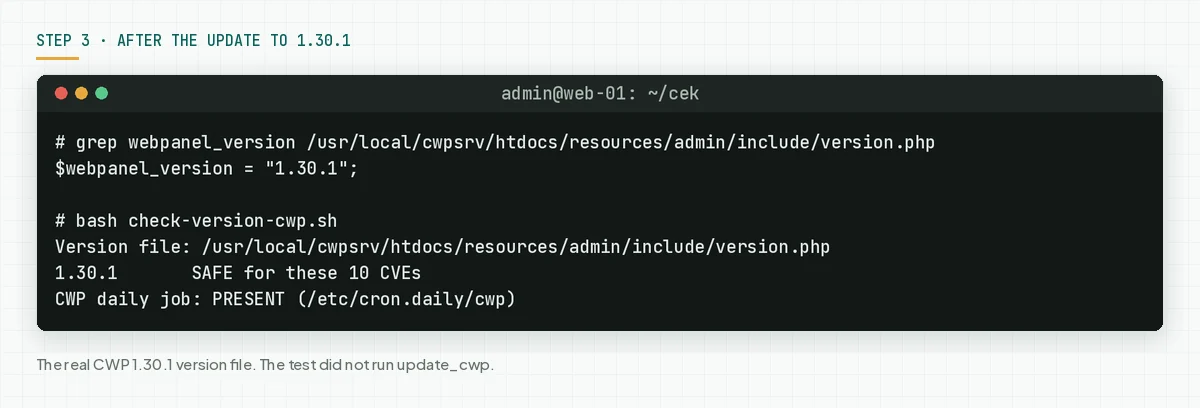
- Make a VPS snapshot first. A snapshot is the fastest way back if the update fails.
- Run the update in a stable SSH session. Use
tmuxorscreenif your connection often drops. - Run
check-version-cwp.shagain. The correct result: "SAFE for these 10 CVEs". - If the version does not go up, check the
/var/log/cwp/cwp_update.loglog, then ask the CWP forum or support team. - Do this on every CWP server. The servers that you rarely open fall behind most often.
Changes that you must know
The CWP changelog for versions 1.27 to 1.30 changes some behavior. Check these items after the update.
- ModSecurity OWASP rules: before, they only logged. The ModSecurity page now gives a button to start blocking. Check your sites for false blocks after you turn it on.
- Apache and mod_auth_form: the update turns off the
mod_auth_formline so that Apache can start. The changelog says that malware often turns this module on. - Varnish: the http and https caches are now separate, and the daily job empties the cache 1 time.
- Update channel: CWP now has an LTS channel (default) and an Edge channel in the CWP Settings menu.
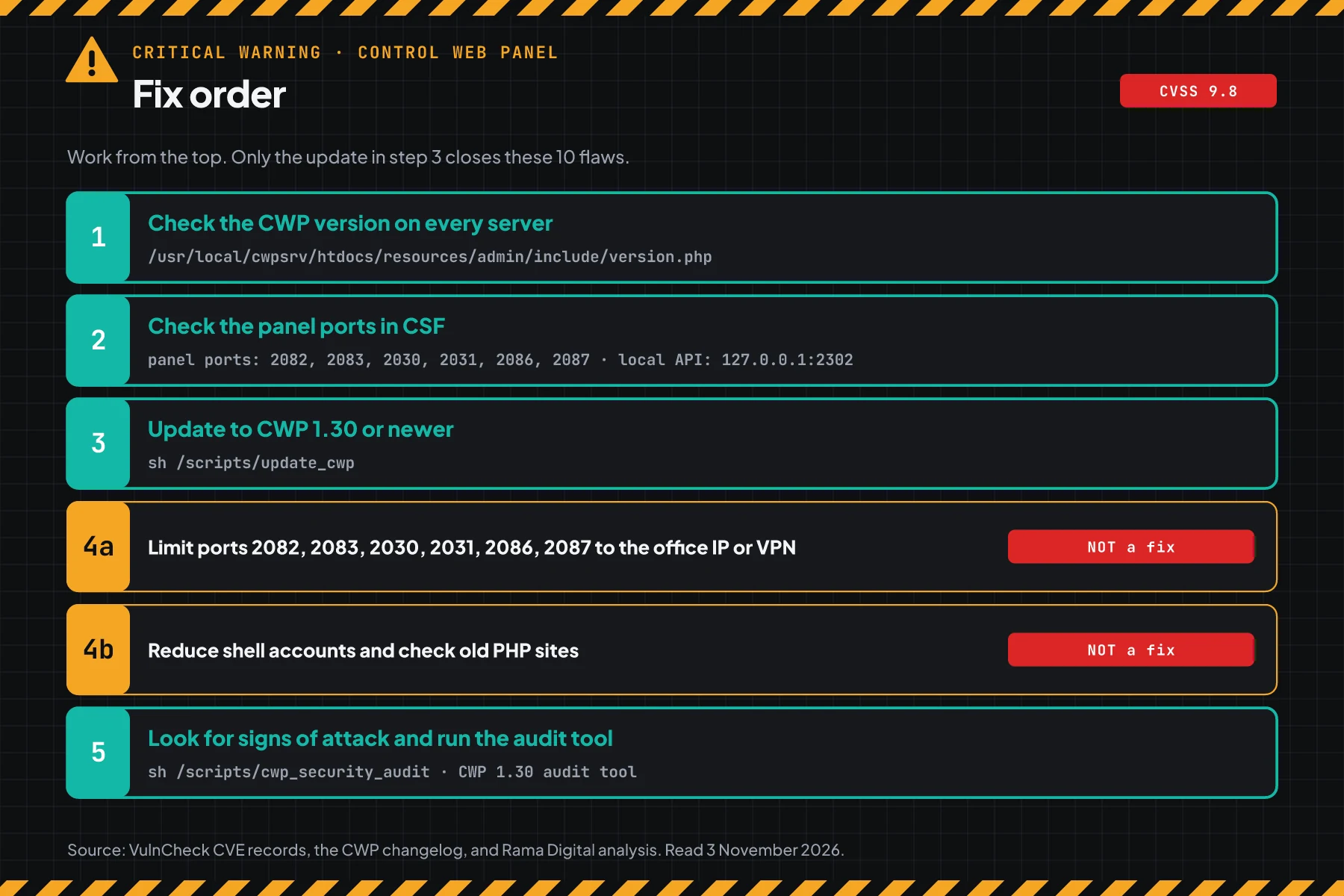
Check the result: the version script prints "SAFE" on every server, the main sites open normally, and email goes in and out.
Step 4: Limit access until the update is done
This step reduces who can reach the flaws, but it does not close them.
The CVE records and the CWP changelog give no official workaround. Rama Digital analysis: we made 2 steps from the flaw conditions. Condition: the update cannot run today. Limit: the local API flaws stay open to anyone who already has access to the server.
4a. Limit panel ports to the office or VPN IP
This step fits a VPS that belongs to 1 business. Hosting with many customers usually cannot close port 2083, so go straight to step 3.
# Run as root, for example after sudo -i. Port 22 (SSH) stays open.
cp /etc/csf/csf.conf /etc/csf/csf.conf.bak
# Remove the admin panel and user panel ports from TCP_IN and TCP6_IN
sed -i -E ':a; /^TCP6?_IN *=/ s/,(2030|2031|2082|2083|2086|2087)([,"])/\2/; ta' /etc/csf/csf.conf
# Allow those ports only from the office or VPN IP. Replace this sample IP.
for p in 2030 2031 2082 2083 2086 2087; do echo "tcp|in|d=$p|s=198.51.100.10" >> /etc/csf/csf.allow; done
# Reload CSF, then check again
csf -r
bash check-port-cwp.sh
# Undo: restore the copy, then reload
# cp /etc/csf/csf.conf.bak /etc/csf/csf.conf && csf -r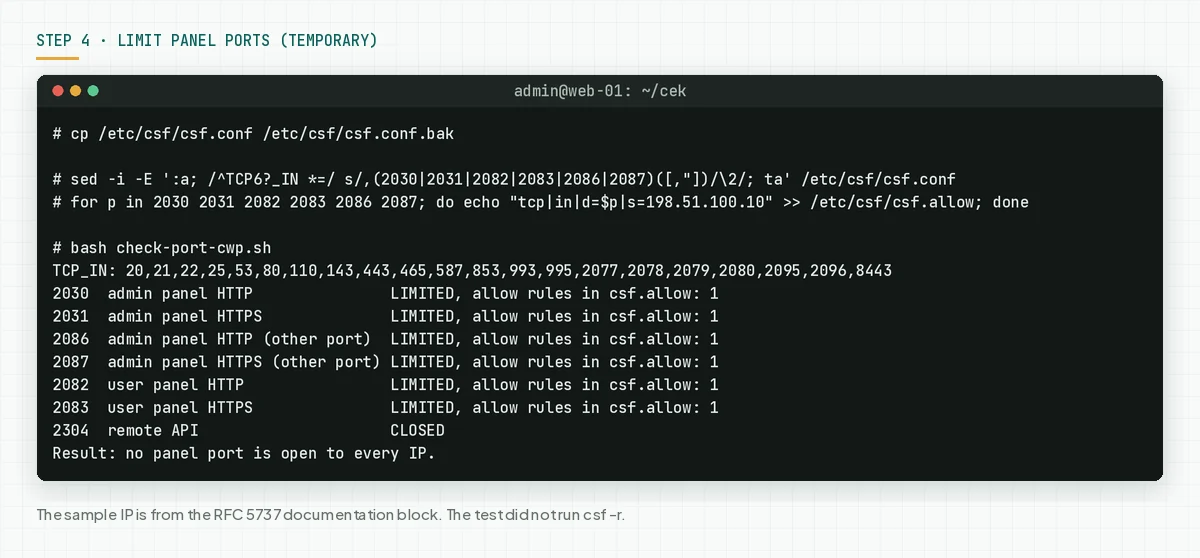
Do not remove port 22. If the office IP changes, you can still log in over SSH and restore csf.conf.bak. We tested the sed command and the csf.allow rules on the CSF file from the CWP package. We did not run csf -r, because the test container has no iptables.
4b. Reduce local access to the server
The 6 local API flaws need access to the server first. Turn off shell access for hosting accounts that do not need it, and remove accounts that you do not know. Update or turn off old PHP sites and WordPress plugins on the same server.
Check the result: the port script prints "LIMITED", the panel login page does not open from another network, for example a phone hotspot, and the list of shell accounts has only people that you know.
Step 5: Look for signs of use
These flaws existed before your update, so also look for signs from the time before the update.
Save this script as check-signs-cwp.sh. The script reads the panel log /usr/local/cwpsrv/logs/access_log, the login log /var/log/cwp_client_login.log, and httpd.conf. The script prints request counts and IPs, not request contents.
#!/usr/bin/env bash
# Look for signs of use of the CWP flaws in the panel log, the login log, and the Apache configuration.
# Use on a CWP server: sudo bash check-signs-cwp.sh
# The script only reads files. The script prints request counts and IPs, not request contents.

LOG=/usr/local/cwpsrv/logs/access_log
LOGIN=/var/log/cwp_client_login.log
HTTPD=/usr/local/apache/conf/httpd.conf
signs=0

echo "1. Requests to the user panel modules that the CVE records name (protected_directory, phpini_editor)"
if ls "$LOG"* >/dev/null 2>&1; then
  lines=$(zcat -f "$LOG"* 2>/dev/null | grep -E 'module=(protected_directory|phpini_editor)')
  count=$(printf '%s' "$lines" | grep -c .)
  echo "   requests: $count"
  if (( count > 0 )); then
    printf '%s\n' "$lines" | awk '{print $1}' | sort | uniq -c | sort -rn | head -n 5 | awk '{printf "   IP %s: %s\n", $2, $1}'
    echo "   Compare these IPs with the IPs of your customers or team."
  fi
  echo "2. Panel requests with path traversal marks (../ or %2e%2e)"
  lines=$(zcat -f "$LOG"* 2>/dev/null | grep -iE '\.\./|\.\.%2f|%2e%2e')
  count=$(printf '%s' "$lines" | grep -c .)
  if (( count > 0 )); then
    echo "   SIGN: requests: $count"
    printf '%s\n' "$lines" | awk '{print $1}' | sort | uniq -c | sort -rn | head -n 5 | awk '{printf "   IP %s: %s\n", $2, $1}'
    signs=$((signs + 1))
  else
    echo "   requests: 0"
  fi
else
  echo "   No panel log: $LOG"
fi

echo "3. Failed user panel logins"
if [ -r "$LOGIN" ]; then
  count=$(grep -c 'Failed Login from:' "$LOGIN")
  echo "   failed logins: $count"
  grep -oE 'Failed Login from: +[^ ]+' "$LOGIN" | awk '{print $NF}' | sort | uniq -c | sort -rn | head -n 5 | awk '{printf "   IP %s: %s\n", $2, $1}'
else
  echo "   No login log: $LOGIN"
fi

echo "4. The Apache module mod_auth_form (CWP does not use it, malware often turns it on)"
if [ -r "$HTTPD" ] && grep -qE '^[[:space:]]*LoadModule[[:space:]]+auth_form_module' "$HTTPD"; then
  echo "   SIGN: mod_auth_form is on in $HTTPD"
  signs=$((signs + 1))
else
  echo "   off"
fi

if [ -e /scripts/cwp_security_audit ]; then
  echo "Also run the CWP audit tool: sh /scripts/cwp_security_audit"
fi
if (( signs > 0 )); then
  echo "Result: SIGNS: $signs. Follow the incident response steps in the article."
else
  echo "Result: no SIGN from these 4 checks."
fi
# Check the panel log, the login log, and the Apache configuration
sudo bash check-signs-cwp.sh
# The audit tool from CWP 1.30 and later
sudo sh /scripts/cwp_security_audit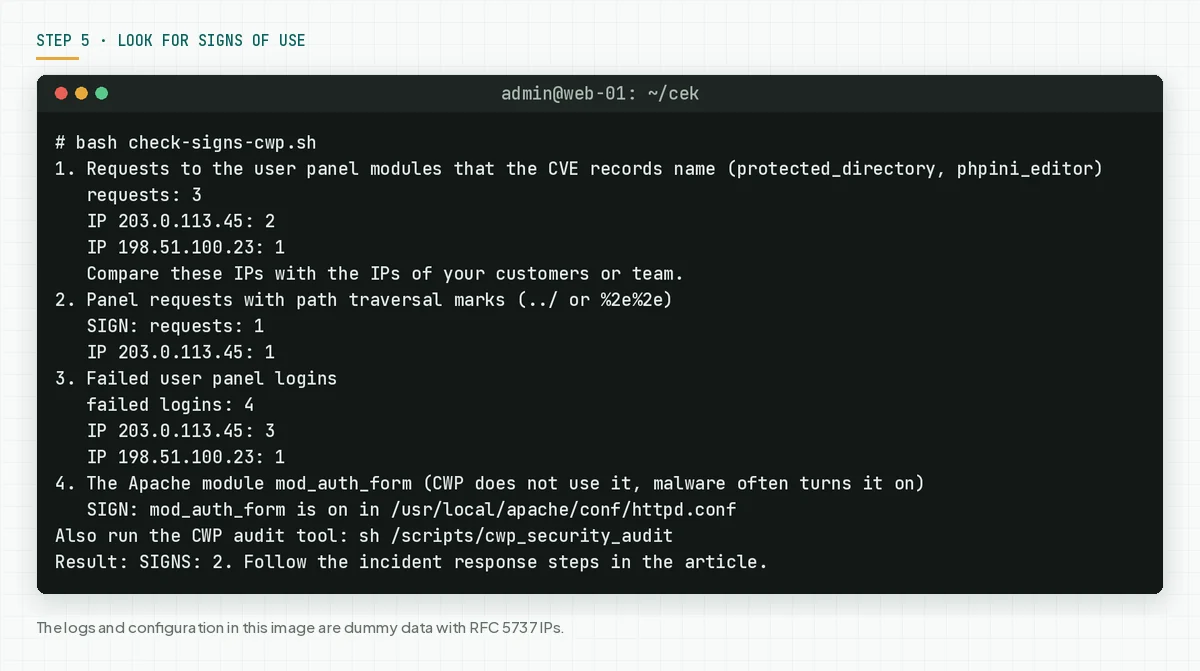
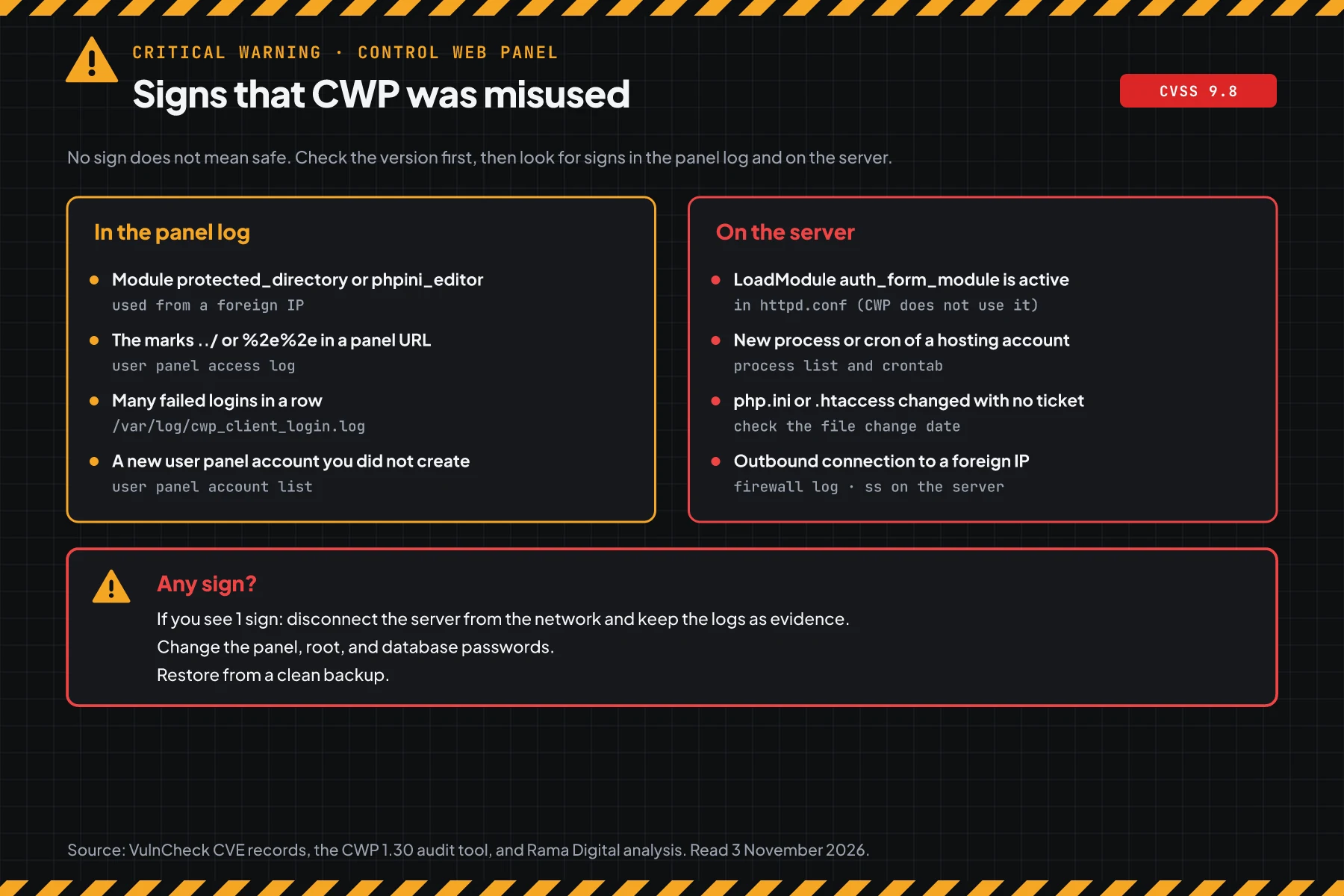
The module names protected_directory and phpini_editor come from the CVE records. Your customers also use these modules in normal work, so compare the IPs in the script result with customer IPs. The /scripts/cwp_security_audit tool from CWP 1.30 checks glibc, fake processes, Apache modules, API keys, and MySQL grants. This tool installs lsof when it is missing, and sends a notification to the admin panel when it finds a problem.
Check the result: the script prints "no SIGN", the IPs in the module list belong to your customers, and the CWP audit tool gives no warning. Attackers can delete logs, so no sign does not prove that the server is safe.
If you find even 1 sign, disconnect the server from the network through the VPS provider panel, then keep the panel log, the Apache logs, and the login log as evidence. Change the passwords for root, the admin panel, hosting accounts, databases, and email. Restore from a clean backup, or set up a new server with CWP 1.30.1, then move the data that you checked.
If the server holds customer data, Indonesian Law 27/2022 on Personal Data Protection requires a written notice no later than 3 times 24 hours after a personal data leak. Also read the LXD and Incus certificate flaw CVE-2026-112816.
Example: 1 morning of response for 3 CWP servers
This simulation uses dummy data. The server names, times, and results are not customer data.
| Time (WIB) | Dummy server | What we checked | Result | Action |
|---|---|---|---|---|
| 08.00 | vps-shop (CWP 1.11, port 2083 open) | Steps 1 and 2 | VULNERABLE to 10 CVEs, 4 open ports | Step 4a, then update |
| 08.20 | vps-client (CWP 1.29, daily job failed) | Step 1 | VULNERABLE to 4 local API CVEs | Update, then read the update log |
| 08.40 | vps-old (CentOS 7, CWP 0.9.8.1235) | Step 1 | VULNERABLE to 10 CVEs, daily job MISSING | Update, plan an OS move |
| 09.10 | vps-shop | Step 5 | 2 SIGNS: modules from an unknown IP, mod_auth_form on | Incident response, change all passwords |
The lesson from the simulation: a safe version does not prove a clean server. Vps-shop was updated, but step 5 still found signs from before the update.
Who installs the patch
The patch duty differs per service type, so this table helps you know who acts today.
| Service type | Patch owner | What you do |
|---|---|---|
| Your own VPS with CWP | Your team | Steps 1 to 5 |
| Managed VPS with CWP from a provider | The provider or your team, per the contract | Ask for written proof of the version, then step 5 |
| Shared hosting that uses CWP | The hosting provider | Ask for the CWP version, change your account password, and check your site |
| CWP reseller | The owner of the main server | Ask for the update schedule, then tell your customers |
Rama Digital recommendation: treat a hosting panel like a master key to the server. Open the panel ports only to people who need them, and follow the pgAdmin 4 CVE-2026-116241 warning for a careful review routine. Also update the runtime on the same server, for example for the PHP2Shell warning.
Checklist for today
- Make a list of all CWP servers. Owner: infrastructure team. Evidence: a list of server names and versions.
- Check the version with step 1. Owner: server admin. Evidence: the script output.
- Check the panel ports with step 2. Owner: server admin. Evidence: the script output.
- Apply step 4a on every VPS that cannot update today. Owner: server admin. Evidence: the port script prints "LIMITED".
- Make a snapshot, then update to 1.30 or later. Owner: server admin. Evidence: the script output after the update.
- Look for signs with step 5 and the CWP audit tool. Owner: server admin and security team. Evidence: the output of both tools.
- Remove hosting accounts and shell access that nobody uses.
Questions and answers
Do attackers already use these flaws?
On 3 November 2026, we found no attack reports, and these 10 CVEs are not on CISA KEV. But CWP has been on KEV 2 times, so update today.
My CWP updates automatically. Am I already safe?
Not for certain. The daily job can be off, and an update can fail with no message. Run step 1 and read the webpanel_version value yourself.
Can limiting the panel ports replace the update?
No. That step only reduces the network flaws. The 6 local API flaws stay open, and the result is root. The update to 1.30 is still required.
I am a hosting provider and cannot close port 2083. What do I do?
Update tonight in a maintenance window. Limit the admin panel ports 2030, 2031, 2086, and 2087 to your team IPs, then run step 5 after the update.
Is the paid CWPpro edition also affected?
The CVE records do not make a difference between the free edition and CWPpro. Treat both as affected, then check the version with step 1.
My server still runs CentOS 7. Can I update?
The official CWP installer still supports EL7, so the CWP update can still run. CentOS 7 itself gets no more patches, so plan a move to AlmaLinux or Rocky Linux.
Does the CWP update change my sites?
The update changes some settings, for example the Varnish cache and the ModSecurity block button. Make a snapshot first, then open the main sites after the update.
Next step
The limits that still apply: step 4 does not close the flaws, and an update does not remove access that an attacker already used. When your CWP server shows a sign in step 5, or you need help with an audit and recovery, use Vibe Code Rescue. For 1 urgent issue today, book a 30-minute session.
Sources
- CVE-2026-77876 record: technical summary, CVSS 3.1 score 9.8 and CVSS 4.0 score 9.3, CWE-78, and the 1.16 version limit.
- CVE-2026-73696 record: the user panel login flow, CVSS 3.1 score 9.1 and CVSS 4.0 score 9.3, the 1.12 version limit.
- CVE-2026-104080 record: the root local API, CVSS 3.1 score 8.4, the 1.30 version limit. The records for CVE-2026-73695, 73697, and 77877 to 77881 use the same source on CVE.org.
- VulnCheck advisory: the researcher, the publication date of 2 November 2026, and the link to the CWP changelog.
- CWP changelog: release dates for 1.12 and 1.26 to 1.30, and the security changes.
- CISA KEV: status on 3 November 2026, and CVE-2022-44877 and CVE-2025-48703 as the CWP history in that catalog.
- RFC 5737: the documentation IP blocks for the examples in this article.
- Indonesian Law 27/2022 on Personal Data Protection: the duty to report a personal data leak.