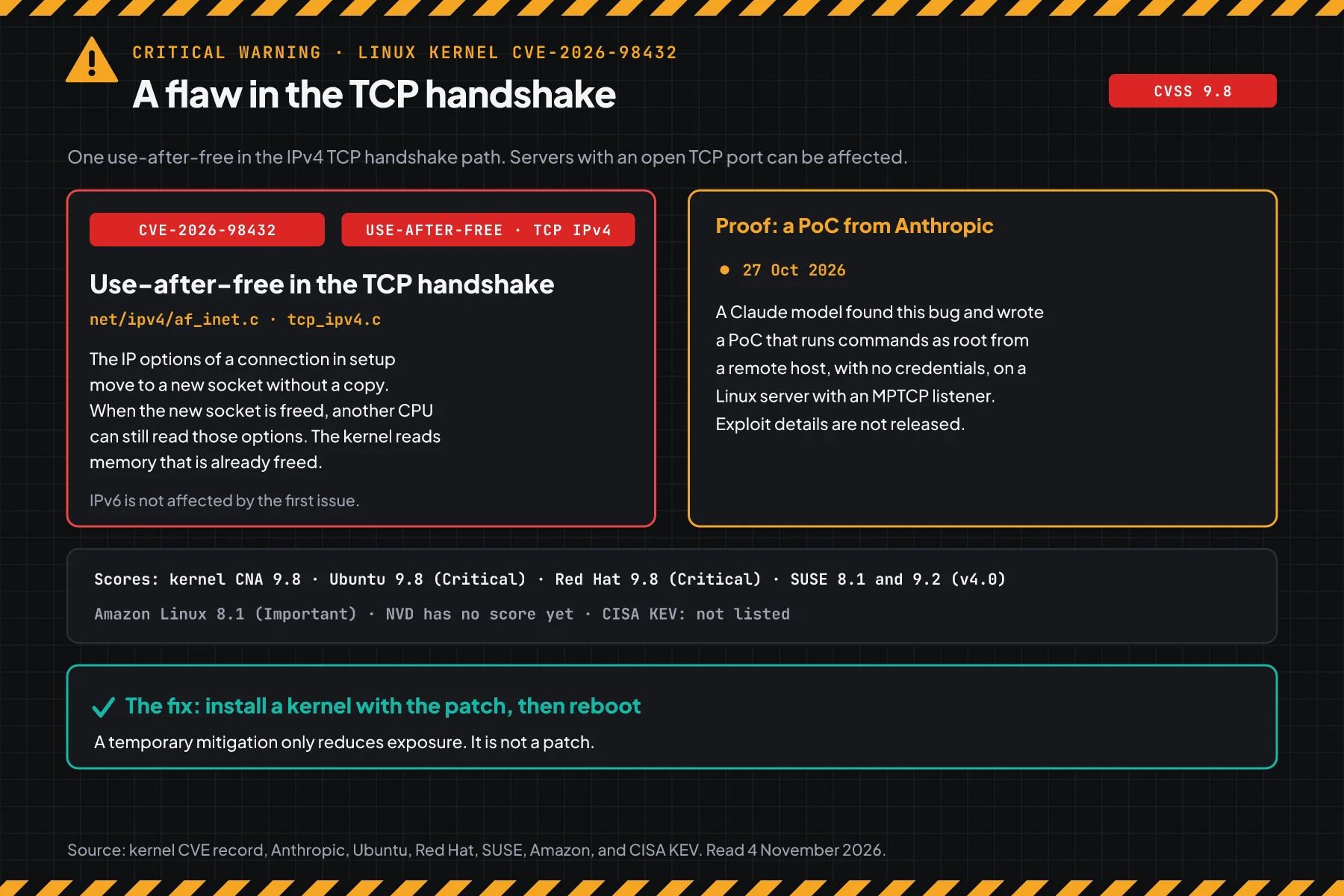
Direct answer: CVE-2026-98432 is a use-after-free flaw in the IPv4 TCP handshake path of Linux kernel 4.4 and newer. The kernel team gives it CVSS 9.8, and Ubuntu now gives it Critical priority. On 7 November 2026, a fix is available for RHEL 8, 9, 10 with the kernel-rt and for Ubuntu 26.10, but not for Ubuntu LTS. Today, update and reboot the servers that have a fix, then apply the temporary mitigation on Ubuntu LTS servers.
Update 7 November 2026: Ubuntu now marks the Ubuntu 26.10 fix as released in kernel 7.3.0-10.10, so update and reboot those servers. The LTS releases have no fix yet, and 20.04, 18.04, and 16.04 moved from "needed" to "pending".
Update 6 November 2026: Red Hat now lists the RHEL 9 kernel-rt fix in RHSA-2026:93412 of 1 November, so an update and a reboot replace step 4 on those servers. Red Hat also released the RHEL 8.6 AUS and EUS Long-Life fix on 4 November in RHSA-2026:94996.
Update 4 November 2026: On 3 November, Ubuntu raised its priority from High to Critical and prepared the HWE 7.0 fix for 24.04, but has not released it. Red Hat released fixes for RHEL EUS, AUS, TUS, and E4S on 2 and 3 November, and the step 2 script now identifies those kernels.
Update 3 November 2026: Red Hat released the kernel fix for NVIDIA for RHEL 10 on 2 November 2026 in RHSA-2026:93775, which is kernel 6.12.0-265.31.el10nv. The step 2 script now compares el10nv kernels with that version.
Update 2 November 2026: Red Hat released the kernel fix on 1 November 2026 for RHEL 8 (RHSA-2026:93414), RHEL 9 (RHSA-2026:93412), and RHEL 10 (RHSA-2026:93413). The RHEL 9 kernel-rt and Ubuntu have no fix yet, so step 4 still applies to those servers.
Update 31 October 2026, 08.10 WIB: Amazon Linux released the fix for all Amazon Linux 2 and Amazon Linux 2023 kernels, dated 30 October. Red Hat raised its score to 9.8 (Critical) and published bulletin RHSB-2026-016 with an nftables mitigation, but RHEL still has no fix.
Anthropic researchers reported this flaw. According to the Anthropic report of 27 October, a ClaudeClaude ProThe paid subscription for the Claude AI assistant from Anthropic. It unlocks connectors to outside tools.Open the glossary model wrote a PoC that runs commands as root from a remote location, with no credentials, on servers with an MPTCP listener. Go 1.24 and newer programs create MPTCP listeners by default.
Main condition: Debian, SUSE, Amazon Linux, RHEL 8, 9, 10, and Ubuntu 26.10 have kernels with the fix, so you update and reboot. Ubuntu LTS does not, so you apply the mitigation in step 4. Limit: The mitigation only reduces exposure. This article has no exploit code and no attack sequence.
We read the kernel CVE record, the Ubuntu CVE page, the Debian tracker, the Red Hat CVE page, SUSE, Amazon Linux, the Anthropic report of 27 October, and the Go Security Team warning on 31 October 2026, at about 01.00 WIB. We ran the commands of steps 1, 2, 4, and 5 in podman containers with the official golang, Ubuntu 24.04, Debian 12 and 13, AlmaLinux 9, and Fedora 44 images, and on 1 Fedora 44 test host, on the same date. The test server holds no customer data.
The problem: an upstream fix exists, but Ubuntu LTS has not released one
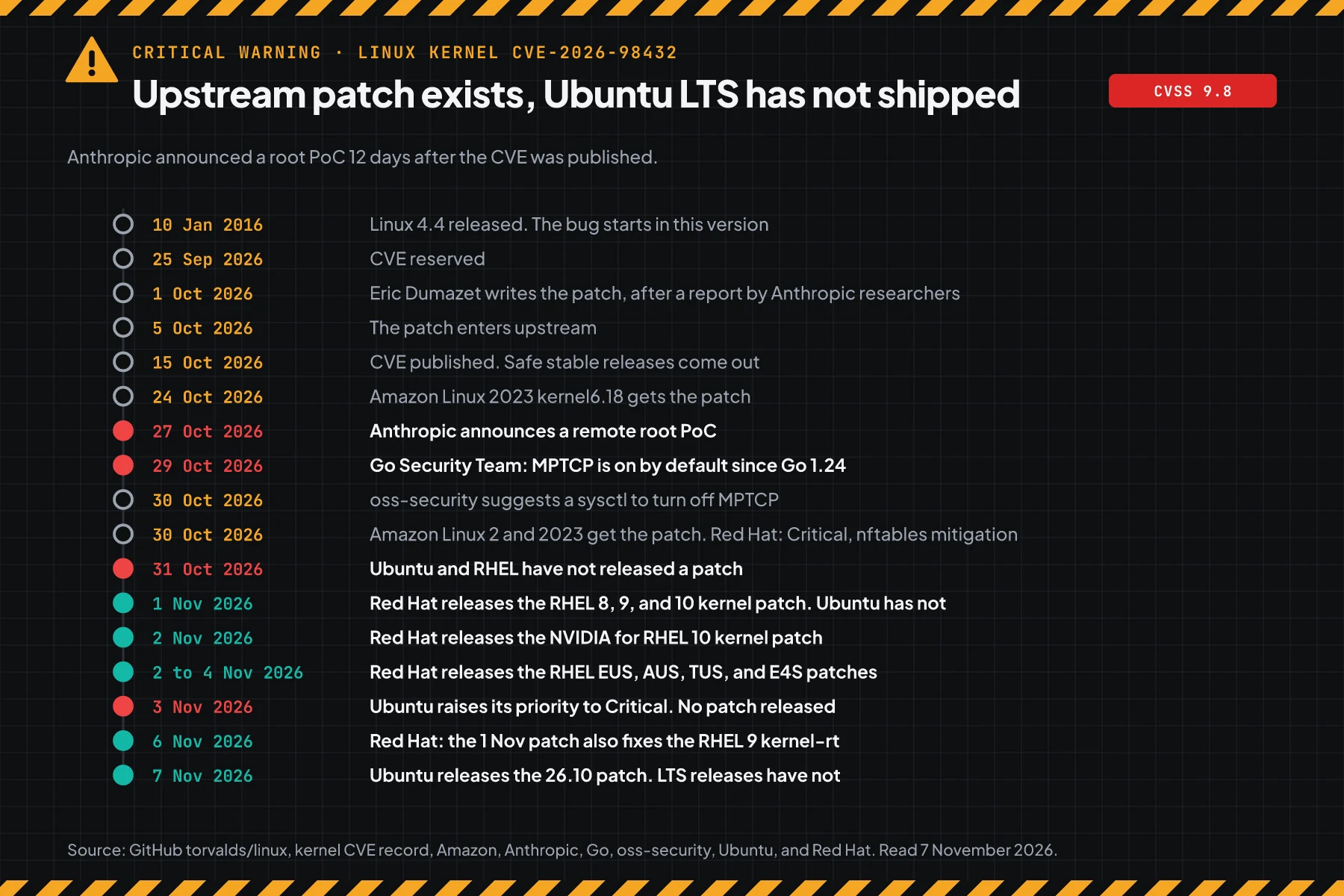
The upstream fix was merged on 5 October 2026, but on 7 November 2026 Ubuntu has a released fix only for 26.10, not for LTS.
According to the fix commit e3f33b0a1d89, Eric Dumazet wrote the fix on 1 October 2026 from a report by an Anthropic researcher. The kernel team published the CVE on 15 October and listed the safe stable versions.
On 27 October, Anthropic announced a remote root PoC. 2 days later, the Go Security Team warning went out to all Go users. On 30 October, Amazon Linux released the fix for all Amazon Linux 2 and 2023 kernels.
When this article was published, the Ubuntu CVE page showed "pending" for 22.04, 24.04, 26.04, and 26.10. This means that the fix was prepared, but the package was not released. Ubuntu 20.04 and older showed "needed" with no version at that time.
When this article was published, the Red Hat CVE page said that RHEL 8, 9, and 10 were affected, with no fix and no mitigation that met its criteria. On 30 October, bulletin RHSB-2026-016 gave a Critical label, a 9.8 score, and 1 nftables rule as a mitigation. On 1 November, Red Hat released the kernel fix for RHEL 8, 9, and 10.
On 2 November, Red Hat released the kernel fix for NVIDIA for RHEL 10 in RHSA-2026:93775. At that time, the Red Hat CVE page still showed the RHEL 9 kernel-rt as affected.
From 2 to 4 November, Red Hat released fixes for minor releases with long support: RHEL 8.4, 8.6, 8.8, 9.2, 9.4, 9.6, and 10.0. On 3 November, Ubuntu raised its priority to Critical and prepared the HWE 7.0 fix for 24.04, but Ubuntu has still not released a fix.
On 6 November, the Red Hat CVE page no longer shows the RHEL 9 kernel-rt as affected. Erratum RHSA-2026:93412 of 1 November has the kernel-rt 5.14.0-687.64.1.el9_8 packages.
On 7 November, the Ubuntu CVE page marks 26.10 as "released" in kernel 7.3.0-10.10. Ubuntu 20.04, 18.04, and 16.04 moved to "pending", and 16.04 targets 4.4.0-293.327. Those releases are past standard support, so their fixes come through Ubuntu Pro.
This is the second kernel flaw on our blog this month. Also read about the PwnEscape kernel flaw from VM to host. The difference: CVE-2026-98432 can start from the network, not only from a VM on the same host.
How it works: the kernel reads IP options from freed memory
The kernel gives IP options to a new socket without a copy, so another CPU can read them after their memory is freed.
This section uses the official summary. It helps you choose the correct steps. It does not explain how to attack.
Summary from the CVE record
According to the kernel CVE record, the function tcp_v4_syn_recv_sock() gives the IP options of the request socket to the child socket without a copy. Another CPU can still use those options to send a SYN-ACK. When the child socket is freed first, the kernel reads freed memory in ip_options_build().
A second path goes through request socket migration. That path is on when net.ipv4.tcp_migrate_req=1 or when a BPF_SK_REUSEPORT_SELECT_OR_MIGRATE BPF program exists. The fix replaces kfree() with kfree_rcu() in 2 functions. IPv6 is not affected by the first issue.
The CVSS scenario from the kernel team says that the trigger data comes from the IPv4 Record Route or Timestamp header options in a SYN packet. All of this occurs during the handshake, before the app asks for a login.
Scores from each body
Scores differ per source, so write each score with its source. The difference is in 1 metric: attack complexity.
| Source | Score | Attack complexity | Label |
|---|---|---|---|
| Kernel team (CNA) | CVSS 3.1 9.8 | Low (AC:L) | Critical |
| Ubuntu | CVSS 3 9.8 | Low | Critical priority (up from High on 3 November) |
| Red Hat | CVSS 3.1 9.8 (up from 8.1 on 30 October) | Low (AC:L) | Critical |
| SUSE | CVSS 3.1 8.1, CVSS 4.0 9.2 | High | Important |
| Amazon Linux | CVSS 3.1 8.1 | High | Important |
NVD has no score of its own and still shows the Received status. SUSE and Amazon think that the race is hard to trigger. The kernel team thinks that an attacker can try again with no limit, and Red Hat now also gives low complexity.
Exploitation status on 31 October 2026
CISA KEV did not list this CVE in its catalog of 30 October 2026. We found no report of attacks in the wild from a primary source. The Anthropic PoC is not public, and Anthropic writes that it did not release exploit details.
Rama Digital analysis: a working PoC from a large research lab changes the priority. Other groups can rebuild an exploit from the public fix. For the Node2Shell flaw in the Brotli decoder, the gap from the fix to the first attack attempt was 5 days.
Who is most at risk
Servers that accept IPv4 TCP connections from the internet are most at risk, mainly servers with MPTCP listeners from Go 1.24+ programs.
This table summarizes the kernel CVE record, the Anthropic report of 27 October, the Go Security Team warning, and the Red Hat CVE page.
| Server condition | Risk | Reason |
|---|---|---|
| Public port with an MPTCP listener, for example an APIAPIThe official door 2 systems use to exchange data, without anybody copying it by hand.Open the glossary, proxy, or self-hosted tool built with Go 1.24+ | Highest | The path that the Anthropic PoC used |
| Public TCP port over IPv4: web, SSH, API, database | High | The flaw is in the handshake, before login. The Go team writes that the bug is not specific to MPTCP |
| Docker or Kubernetes host | High | All containers use the host kernel |
| Cloud VM or VPS | Same as a normal server | A VM has its own kernel. A fix on the provider host does not fix your VM |
net.ipv4.tcp_migrate_req=1 or a BPF migrate program | Additional | The second path in the CVE record |
| IPv6 only, kernels older than 4.4, RHEL 6 and 7 | Low or not affected | CVE record and Red Hat |
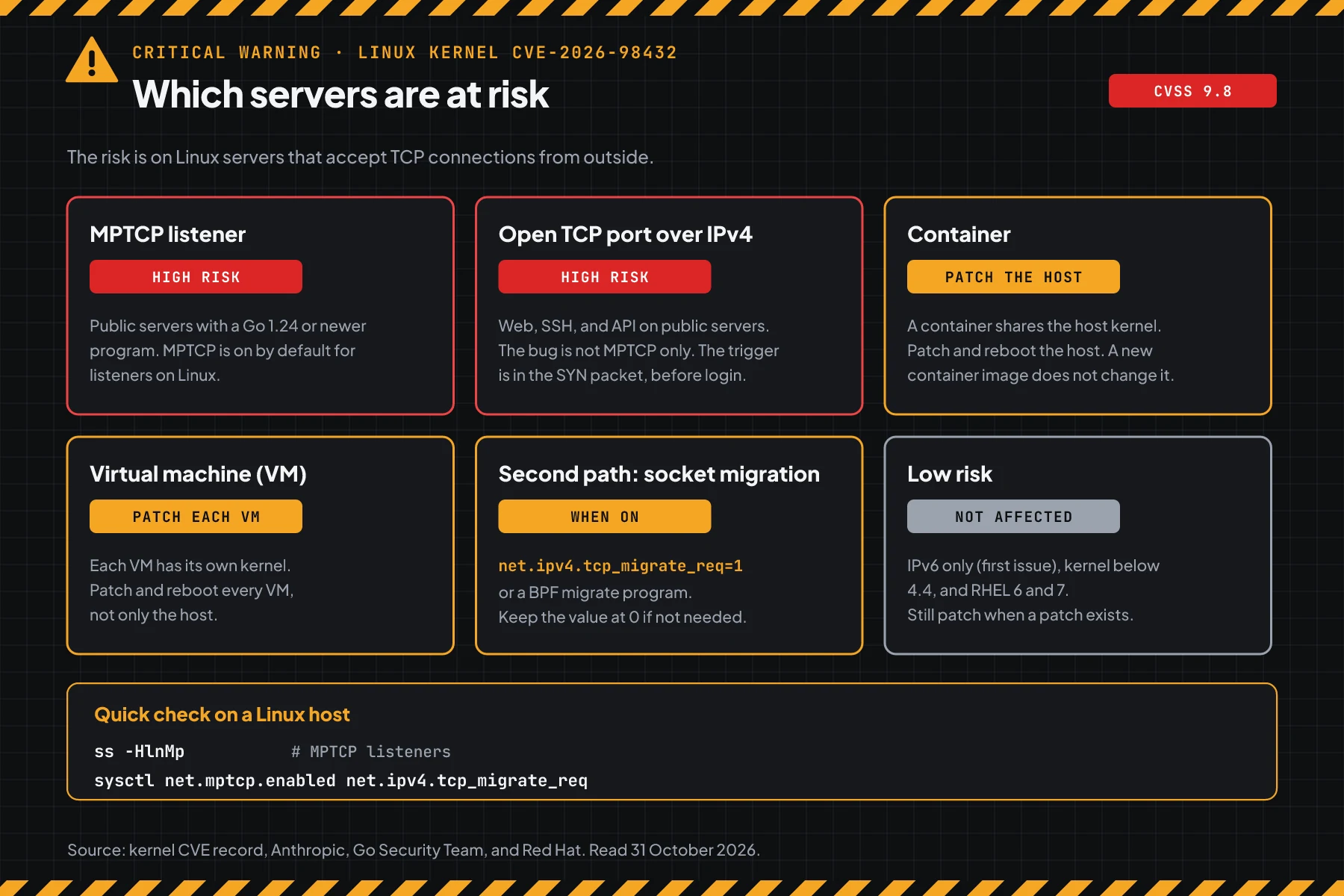
A [::] or * listener usually accepts IPv4 connections too. So count that listener as an IPv4 listener when you read the step 1 output.
Fix status per distro
Use the distro table, not the upstream kernel number, because distros fix old kernels without a change to the main version number.
| Release | Status on 7 November 2026 | Version or note |
|---|---|---|
| Debian 12 (bookworm) | Fix available | linux 6.1.190-1, linux-6.12 6.12.113-1~deb12u1 |
| Debian 13 (trixie) | Fix available | linux 6.12.113-1 |
| SUSE SLES 15 SP4, SP5, SP6 LTSS, SLES 16.0 | Fix available | SP7 still in progress |
| Amazon Linux 2023 | Fix available | Default kernel 6.1 (ALAS2023-2026-3365), kernel6.12, kernel6.18 |
| Amazon Linux 2 | Fix available | Core kernel (ALAS2-2026-4065) and Extra kernels 5.4, 5.10, 5.15 |
| RHEL 8 | Fix available | kernel 4.18.0-553.182.1.el8_10 (RHSA-2026:93414), kernel-rt (RHSA-2026:93415) |
| RHEL 9 | Fix available | kernel and kernel-rt 5.14.0-687.64.1.el9_8 (RHSA-2026:93412) |
| RHEL 10 | Fix available | kernel 6.12.0-211.72.1.el10_2 (RHSA-2026:93413) |
| NVIDIA for RHEL 10 | Fix available | kernel 6.12.0-265.31.el10nv (RHSA-2026:93775) |
| RHEL 8.4 and 8.6 AUS and EUS Long-Life, 8.8 TUS and E4S | Fix available | kernel 4.18.0-305.218.1.el8_4 (RHSA-2026:94623), 4.18.0-372.227.1.el8_6 (RHSA-2026:94996), 4.18.0-477.178.1.el8_8 (RHSA-2026:94303) |
| RHEL 9.2 E4S, 9.4 E4S, 9.6 EUS | Fix available | kernel 5.14.0-284.202.1.el9_2 (RHSA-2026:94477, kernel-rt RHSA-2026:94558), 5.14.0-427.161.1.el9_4 (RHSA-2026:94109), 5.14.0-570.154.1.el9_6 (RHSA-2026:94438) |
| RHEL 10.0 EUS | Fix available | kernel 6.12.0-55.117.1.el10_0 (RHSA-2026:94508) |
| Ubuntu 26.10 | Fix available | kernel 7.3.0-10.10, status released on 7 November |
| Ubuntu 22.04 LTS | Prepared, not released | 5.15.0-203.213 (lowlatency 5.15.0-198.208), HWE 6.8.0-149.149~22.04.1 |
| Ubuntu 24.04 LTS | Prepared, not released | 6.8.0-149.149, HWE 7.0.0-43.43~24.04.1. HWE 6.17 has no plan yet |
| Ubuntu 26.04 LTS | Prepared, not released | 7.0.0-43.43 |
| Ubuntu 20.04, 18.04, 16.04 | Prepared, not released | Through Ubuntu Pro. 16.04: 4.4.0-293.327. HWE 20.04: 5.15.0-203.213~20.04.1. Kernels of 20.04 and 18.04 with no version. HWE of 18.04 and 16.04 has no plan yet |
| RHEL 6 dan 7 | Not affected | According to Red Hat |
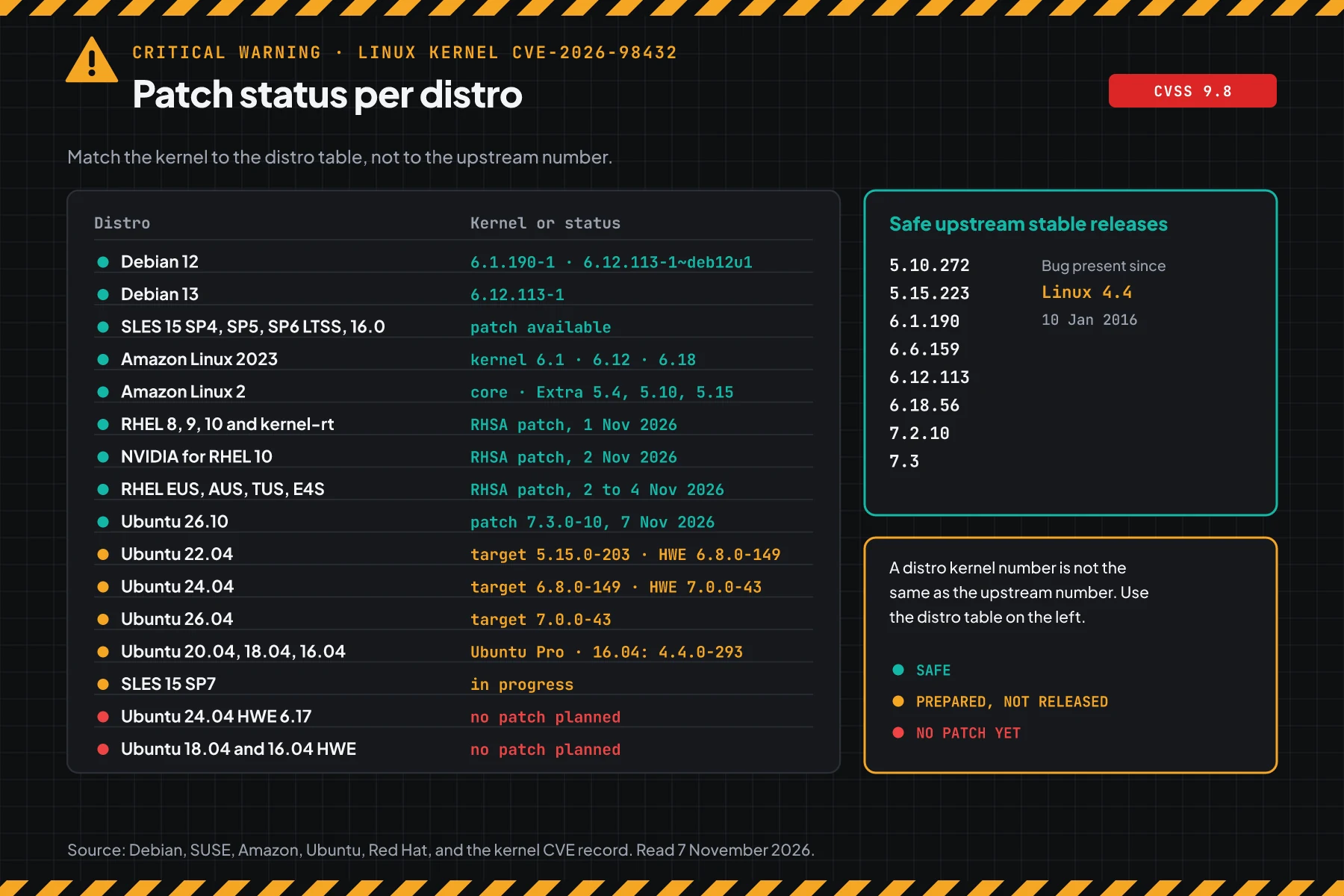
The table data comes from the Ubuntu CVE page, the Debian tracker, the Red Hat CVE page, SUSE, and Amazon Linux. For upstream kernels, or distros that follow upstream numbers such as Fedora and Arch, the safe stable versions in the kernel CVE record are 5.10.272, 5.15.223, 6.1.190, 6.6.159, 6.12.113, 6.18.56, 7.2.10, and 7.3.
Prerequisites
- SSH access with
sudorights to each Linux server and container host. - A list of all servers that accept connections from the internet, including VPS, Docker hosts, and Kubernetes nodes.
- The
iproute2(thesscommand) andnftablespackages. When thenftcommand is missing, runsudo apt install nftablesorsudo dnf install nftables. - A short reboot window for each server.
- Backup console access from your server provider, in case a firewall rule cuts SSH.
Step 1: Check exposure, which means TCP listeners, MPTCP listeners, and 2 kernel settings
Save this script as check-exposure.sh. The script reads 2 kernel settings, the TCP ports open to the network, and the MPTCP listeners.
# CVE-2026-98432 exposure: 2 kernel settings, TCP listeners, and MPTCP listeners.
echo "net.mptcp.enabled        = $(sysctl -n net.mptcp.enabled 2>/dev/null || echo missing)"
echo "net.ipv4.tcp_migrate_req = $(sysctl -n net.ipv4.tcp_migrate_req)"
echo "TCP listeners open to the network:"
ss -Hltnp | awk '$4 !~ /^(127\.|\[::1\]|\[::ffff:127\.)/ {print "  " $4, $6}' | sort -u
echo "MPTCP listeners (first priority):"
ss -HlnMp | awk '{print "  " $4, $6}' | sort -u | grep . || echo "  none"
Run the script on the host. For Docker containers, read the listeners in the network namespace of each container.
sudo bash check-exposure.sh    # host, sudo so process names show
# Docker container: read MPTCP listeners in the container network namespace.
sudo nsenter -t $(docker inspect -f '{{.State.Pid}}' container-name) -n ss -HlnMp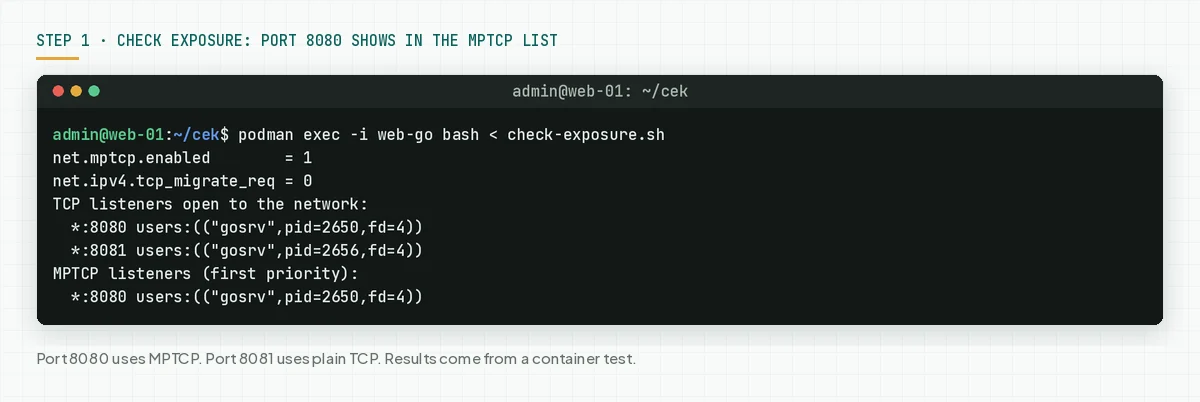
Check the result: Each MPTCP listener is the first priority in step 4. The net.ipv4.tcp_migrate_req value must be 0. A server with no port open to the network still needs the fix, but it can wait for the next reboot window.
Step 2: Check the running kernel and the distro fix status
Save this script as check-kernel.sh. The script reads the distro and the running kernel, then compares them with the fix status on 7 November 2026.
# CVE-2026-98432 status for the running kernel. Data of 7 November 2026.
krel=${KREL:-$(uname -r)}; kver=${KVER:-$(uname -v)}; . /etc/os-release
os=$ID; case $ID in ubuntu|debian|rhel|rocky|almalinux|centos) ;; *) for x in $ID_LIKE; do case $x in ubuntu|debian|rhel) os=$x; break;; esac; done;; esac
lt() { [ "$1" != "$2" ] && [ "$(printf '%s\n' "$1" "$2" | sort -V | head -1)" = "$1" ]; }
case $os in
  ubuntu)
    abi=${krel%-*}; flav=${krel##*-}; rel=${UBUNTU_CODENAME:-$VERSION_CODENAME}; st=pending
    case $rel/${abi%-*}/$flav in
      stonking/7.3.0/*) fix=10 st=released;; jammy/5.15.0/lowlatency|focal/5.15.0/lowlatency) fix=198;;
      jammy/5.15.0/*|focal/5.15.0/*) fix=203;; jammy/6.8.0/*|noble/6.8.0/*) fix=149;; resolute/7.0.0/*|noble/7.0.0/*) fix=43;;
      xenial/4.4.0/*) fix=293;; focal/5.4.0/*|bionic/4.15.0/*) fix=p;; noble/6.17.0/*|focal/*|bionic/*|xenial/*) fix=0;; *) fix=;; esac
    if [ -z "$fix" ] || { [ "$flav" != generic ] && [ "$flav" != lowlatency ]; }; then echo "$krel: check the Ubuntu table for this kernel."
    elif [ "$fix" = 0 ]; then echo "$krel: VULNERABLE. Ubuntu has no fix planned for this kernel yet. Apply step 4."
    elif [ "$fix" = p ]; then echo "$krel: VULNERABLE. Ubuntu prepares a fix, no version yet. Apply step 4."
    elif [ "${abi##*-}" -ge "$fix" ]; then echo "$krel: has the Ubuntu fix (ABI ${abi%-*}-$fix)."
    elif [ "$st" = released ]; then echo "$krel: VULNERABLE. Update to ABI ${abi%-*}-$fix, then reboot."
    else echo "$krel: VULNERABLE. Ubuntu prepares the fix in ABI ${abi%-*}-$fix, not released yet. Apply step 4."; fi ;;
  debian)
    cur=$(echo "$kver" | grep -oE 'Debian [^ ]+' | cut -d' ' -f2)
    case $cur in 6.1.*) fix=6.1.190-1;; 6.12.*~deb12*) fix=6.12.113-1~deb12u1;; 6.12.*) fix=6.12.113-1;; 7.2.*) fix=7.2.10-1;; *) fix=;; esac
    if [ -z "$fix" ]; then echo "$cur: check the Debian tracker."
    elif dpkg --compare-versions "$cur" lt "$fix"; then echo "$cur: VULNERABLE. Update to $fix, then reboot."
    else echo "$cur: has the fix (minimum $fix)."; fi ;;
  rhel|rocky|almalinux|centos)
    kv=$(echo "$krel" | sed -E 's/\.(x86_64|aarch64|ppc64le|s390x).*$//')
    case $ID/${VERSION_ID%%.*}/$krel in
      */6/*|*/7/*) fix=-;; centos/*) fix=;;
      */*/*el10nv*) fix=6.12.0-265.31.el10nv rhsa=RHSA-2026:93775;;
      */8/*rt*) fix=4.18.0-553.182.1.rt7.523.el8_10 rhsa=RHSA-2026:93415;;
      */8/*el8_4*) fix=4.18.0-305.218.1.el8_4 rhsa=RHSA-2026:94623;; */8/*el8_6*) fix=4.18.0-372.227.1.el8_6 rhsa=RHSA-2026:94996;;
      */8/*el8_8*) fix=4.18.0-477.178.1.el8_8 rhsa=RHSA-2026:94303;;
      */8/*) fix=4.18.0-553.182.1.el8_10 rhsa=RHSA-2026:93414;;
      */9/*rt*el9_2*) fix=5.14.0-284.202.1.rt14.487.el9_2 rhsa=RHSA-2026:94558;;
      */9/*el9_2*) fix=5.14.0-284.202.1.el9_2 rhsa=RHSA-2026:94477;; */9/*el9_4*) fix=5.14.0-427.161.1.el9_4 rhsa=RHSA-2026:94109;;
      */9/*el9_6*) fix=5.14.0-570.154.1.el9_6 rhsa=RHSA-2026:94438;; */9/*) fix=5.14.0-687.64.1.el9_8 rhsa=RHSA-2026:93412;;
      */10/*el10_0*) fix=6.12.0-55.117.1.el10_0 rhsa=RHSA-2026:94508;; */10/*) fix=6.12.0-211.72.1.el10_2 rhsa=RHSA-2026:93413;; *) fix=;; esac
    if [ "$fix" = - ]; then echo "$krel: not affected according to Red Hat."
    elif [ -z "$fix" ]; then echo "$krel: check the distro advisory for this kernel."
    elif lt "$kv" "$fix"; then echo "$krel: VULNERABLE. Update to $fix ($rhsa), then reboot."
    else echo "$krel: has the fix (minimum $fix, $rhsa)."; fi ;;
  ol|amzn|sles|opensuse*) echo "$krel: check the $NAME advisory for CVE-2026-98432." ;;
  *)
    base=${krel%%-*}
    case ${base%.*} in 5.10) fix=5.10.272;; 5.15) fix=5.15.223;; 6.1) fix=6.1.190;; 6.6) fix=6.6.159;; 6.12) fix=6.12.113;; 6.18) fix=6.18.56;; 7.2) fix=7.2.10;; *) fix=;; esac
    if lt "$base" 4.4; then echo "$base: not affected."
    elif [ -n "$fix" ]; then if lt "$base" "$fix"; then echo "$base: VULNERABLE. Update to $fix, then reboot."; else echo "$base: has the fix (minimum $fix)."; fi
    elif lt "$base" 7.3; then echo "$base: branch without a stable fix. Move to an LTS branch."
    else echo "$base: has the fix (7.3 or newer)."; fi ;;
esac
Run bash check-kernel.sh on each server and container host. In the test capture of 2 November 2026, we set KREL and KVER to copy the uname output of other servers.
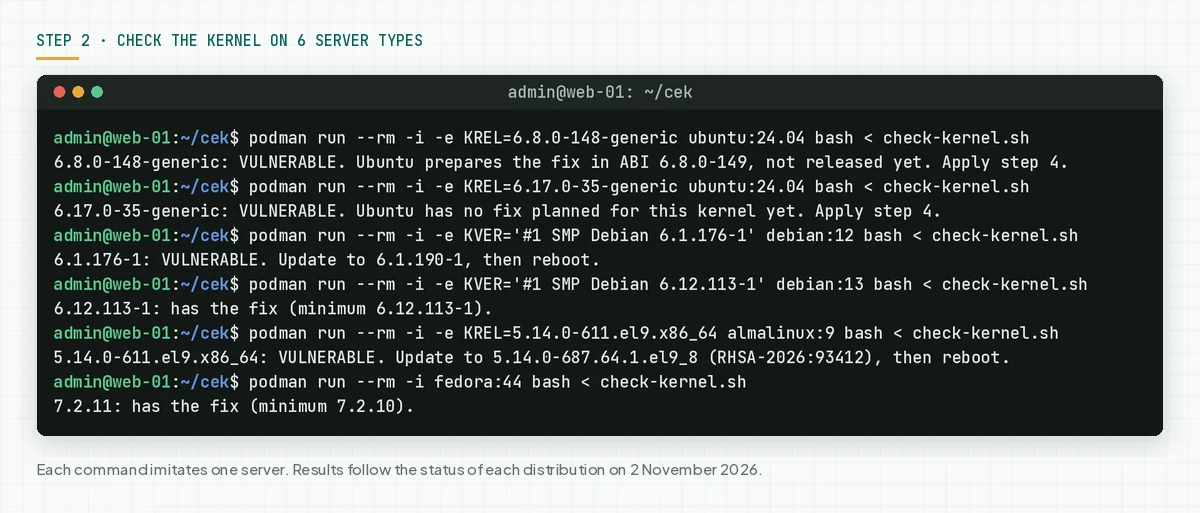
The Ubuntu status can change each day. Run this command to read the latest status from Ubuntu.
curl -s https://ubuntu.com/security/cves/CVE-2026-98432.json \
  | jq -r '.packages[] | select(.name=="linux") | .statuses[] | "\(.release_codename) \(.status) \(.description)"'
On 7 November 2026 at 08.14 WIB, the command printed this output. A "released" line means that you can install the fix now.
stonking released 7.3.0-10.10
jammy pending 5.15.0-203.213
noble pending 6.8.0-149.149
focal pending
xenial pending 4.4.0-293.327
resolute pending 7.0.0-43.43
trusty not-affected 3.11.0-12.19
upstream released 7.3~rc7, 6.8.y, 6.17.y, 7.0.y
bionic pending
Check the result: "has the fix" means that the server is safe from this flaw. "VULNERABLE. Update to" means that a fix exists, so go to step 3. "VULNERABLE. Apply step 4" means that the distro has no fix yet.
Step 3: Update the kernel, then reboot
Update the kernel package from your distro, then reboot, because the new kernel runs only after a reboot.
# Debian 12 and 13
sudo apt update && sudo apt full-upgrade
# SUSE Linux Enterprise
sudo zypper patch
# Amazon Linux 2023, all kernels
sudo dnf upgrade --releasever=latest
# Amazon Linux 2
sudo yum update kernel
# RHEL 8, 9, 10, then Rocky and AlmaLinux when their packages come out
sudo dnf upgrade kernel
# Ubuntu: run this command when the status changes to released
sudo apt update && sudo apt full-upgrade
# All distros: the new kernel runs only after a reboot
sudo reboot
For Amazon Linux 2023, Amazon Linux lists the fix in the default 6.1 kernel (ALAS2023-2026-3365), kernel6.12 (ALAS2023-2026-3335), and kernel6.18 (ALAS2023-2026-3251). For Amazon Linux 2, the fix is in the core kernel (ALAS2-2026-4065) and the Extra kernels 5.4, 5.10, and 5.15. For SUSE, SUSE lists the fix in SLES 15 SP4 to SP6 LTSS and SLES 16.0.
For Ubuntu 26.10, Ubuntu lists the fix in kernel 7.3.0-10.10. Ubuntu LTS releases have no fix yet, so use step 4 until the status changes to released.
For RHEL, Red Hat lists the fix in kernel 4.18.0-553.182.1.el8_10 (RHEL 8), 5.14.0-687.64.1.el9_8 (RHEL 9), 6.12.0-211.72.1.el10_2 (RHEL 10), and 6.12.0-265.31.el10nv (NVIDIA for RHEL 10). The RHEL 8 kernel-rt fix is in RHSA-2026:93415, and the RHEL 9.2 E4S kernel-rt fix is in RHSA-2026:94558. For RHEL 9.4, 9.6, 9.8, and 10, the kernel-rt is in the same erratum as the kernel, with the same version. For RHEL EUS, AUS, TUS, and E4S, use the versions in the fix status table. Rocky Linux and AlmaLinux rebuild the Red Hat packages, so check the advisory of your distro.
After the reboot, check that the new kernel runs.
uname -r
bash check-kernel.sh
[ -f /var/run/reboot-required ] && echo "Reboot not done yet."   # Debian and Ubuntu
sudo needs-restarting -r                                          # RHEL, Rocky, AlmaLinux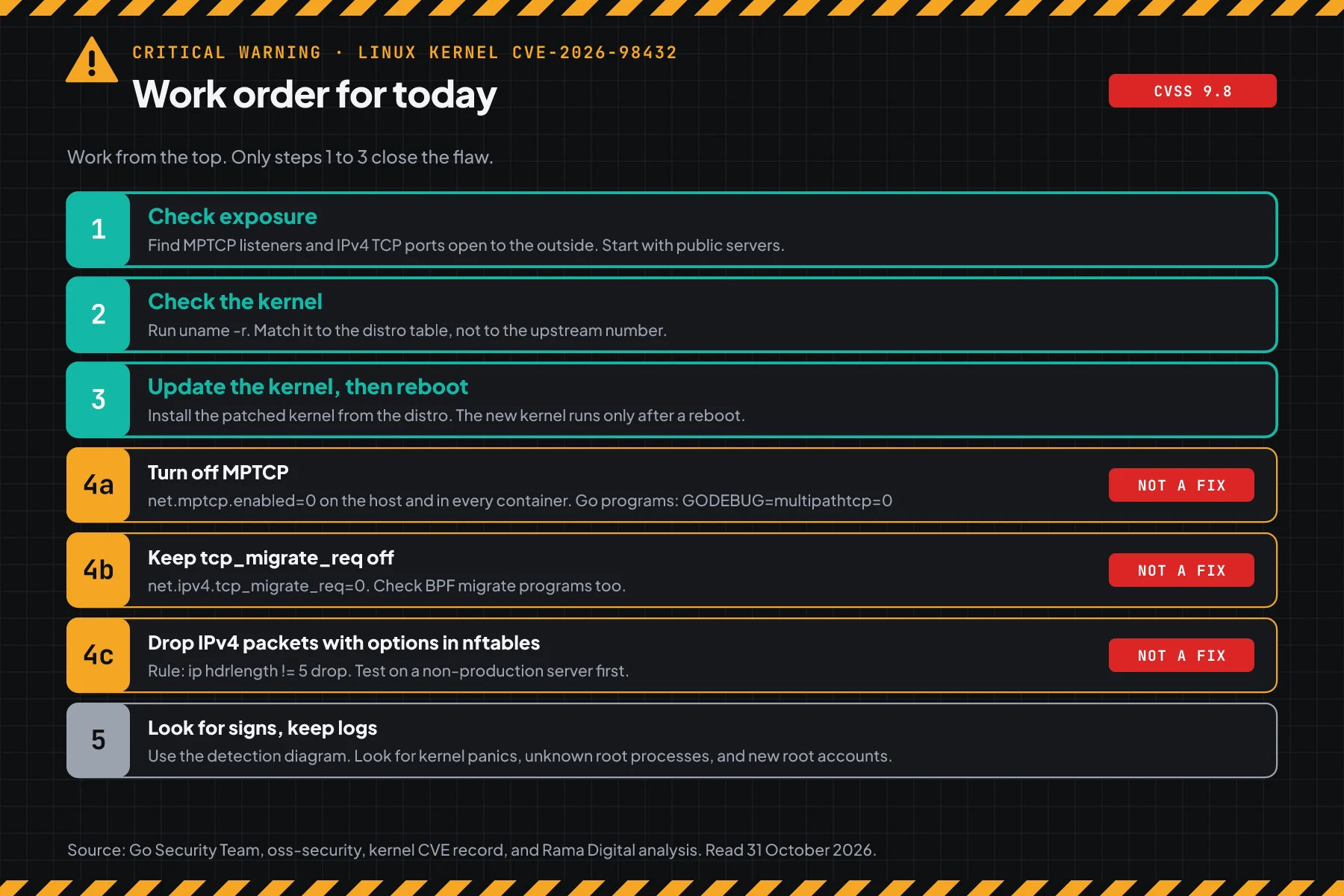
A reboot of a container host stops all containers on that host. Reboot Kubernetes nodes one at a time with kubectl drain. On a VPS, you update the kernel yourself, because the provider only fixes the physical host.
Check the result: check-kernel.sh prints "has the fix", and the reboot-required command prints nothing.
Step 4: Apply a temporary mitigation when your distro has no fix
This step is for Ubuntu LTS and other distros with no fix on 7 November 2026. The mitigation reduces exposure, but it does not close the flaw.
Rama Digital analysis: We built 3 steps from primary sources. Condition: the server cannot update its kernel yet. Limit: each step closes only 1 path.
4a and 4b. Turn off MPTCP and request migration
The oss-security thread of 30 October suggests net.mptcp.enabled=0 for the whole system. The Go Security Team warning suggests GODEBUG=multipathtcp=0 for Go programs. The default value of net.ipv4.tcp_migrate_req is 0, so make sure that it stays 0.
# 1. Turn off MPTCP and request migration, now and after a reboot.
sudo sysctl -w net.mptcp.enabled=0 net.ipv4.tcp_migrate_req=0
printf 'net.mptcp.enabled = 0\nnet.ipv4.tcp_migrate_req = 0\n' | sudo tee /etc/sysctl.d/90-cve-2026-98432.conf
# 2. Restart the services that had an MPTCP listener, then do step 1 again.
sudo systemctl restart service-name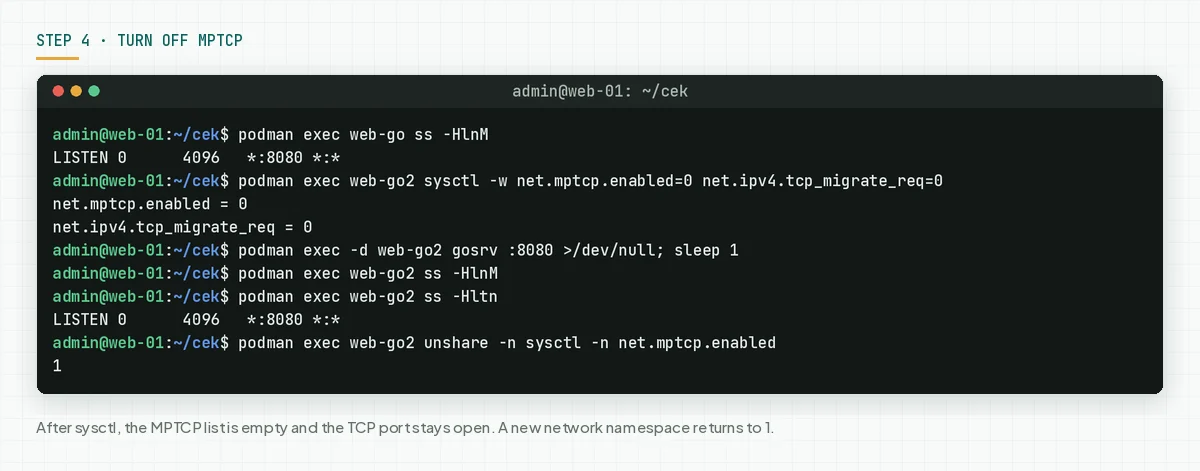
The net.mptcp.enabled setting applies per network namespace. A container with its own network does not get the host setting. Set it in each container, or turn off MPTCP in the Go program.
# docker run
docker run --sysctl net.mptcp.enabled=0 ...
# docker-compose.yml
services:
  api:
    sysctls:
      net.mptcp.enabled: 0
# Go programs without sysctl access: turn off MPTCP per program
GODEBUG=multipathtcp=0 ./app
# or write it in the go.mod of the main module, then rebuild
godebug multipathtcp=0
Limit: apps that need MPTCP stop using MPTCP. In our test, Go programs fell back to plain TCP with no error. The Go team writes that the bug is not specific to MPTCP, so steps 4a and 4b alone do not close all paths.
4c. Drop IPv4 packets with header options in nftables
The CVE record says that the trigger data comes from IPv4 header options in a SYN packet. This rule drops all incoming IPv4 packets that carry header options, which means a header longer than 20 bytes.
Red Hat gives a similar official rule in bulletin RHSB-2026-016: ip protocol tcp ip hdrlength > 5 counter drop in the input hook. The difference: the rule below drops all IPv4 packets with options in the prerouting hook. Red Hat also writes that its rule reduces exposure but cannot fully prevent the flaw.
Save this rule as cve-2026-98432.nft.
table inet cve98432 {
  chain pre {
    type filter hook prerouting priority raw; policy accept;
    ip hdrlength != 5 counter drop comment "IPv4 with header options"
  }
}
Save this unit as cve-2026-98432-nft.service, so that the rule comes back after a reboot.
[Unit]
Description=Drop IPv4 packets with header options (CVE-2026-98432)
Wants=network-pre.target
Before=network-pre.target

[Service]
Type=oneshot
ExecStart=/usr/sbin/nft -f /etc/cve-2026-98432.nft
RemainAfterExit=yes

[Install]
WantedBy=multi-user.target
Install the rule and the unit, then check the chain.
sudo cp cve-2026-98432.nft /etc/cve-2026-98432.nft
sudo cp cve-2026-98432-nft.service /etc/systemd/system/
sudo systemctl daemon-reload
sudo systemctl enable --now cve-2026-98432-nft
sudo nft list chain inet cve98432 pre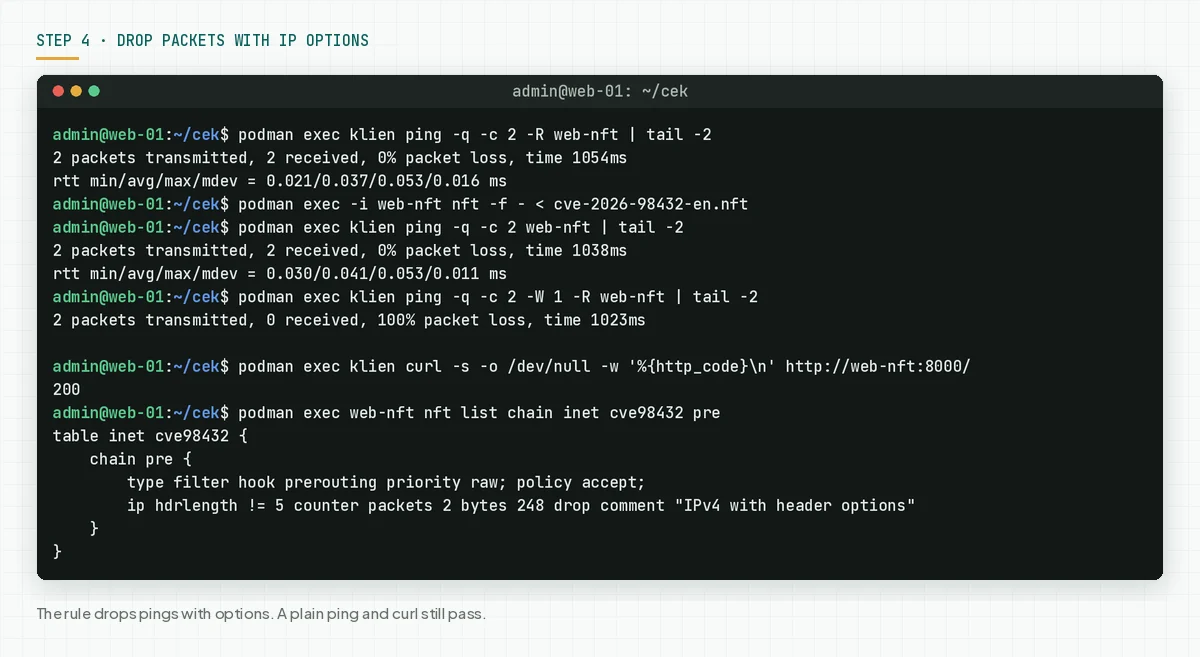
The rule uses the prerouting hook, so it also stops packets for containers before they enter the container network namespace. The rule lives in its own table, so it does not change ufw, firewalld, or Docker rules.
Limit: this rule is not a fix. It also drops ping -R, traceroute with IP options, and old apps that use IP options. Web, SSH, and normal APIs do not use IP options, and our curl test still got HTTP 200. Apply it on 1 server first, then check your services.
Check the result: check-exposure.sh prints "none" in the MPTCP list, tcp_migrate_req is 0, and nft list chain inet cve98432 pre shows the rule with a counter.
Step 5: Look for signs that someone touched the server
A failed attack often makes the kernel crash or reboot, while a successful attack gives root access with no clear trace.
Save this script as check-signs.sh and run it with sudo.
# CVE-2026-98432 signs since the CVE was published on 15 October 2026.
n=$(nft list chain inet cve98432 pre 2>/dev/null | grep -oE 'packets [0-9]+' | cut -d' ' -f2)
echo "Suspicious kernel messages  : $(journalctl -k --since 2026-10-15 | grep -ciE 'use-after-free|KASAN|skb_under_panic|ip_options_build|general protection fault|Oops')"
echo "Boots since 15 October      : $(journalctl --list-boots --no-pager | awk '$4 ~ /^20/ && $4 >= "2026-10-15"' | wc -l)"
echo "Dropped IP-option packets   : ${n:-0}"
echo "Accounts with UID 0         : $(awk -F: '$3 == 0 {print $1}' /etc/passwd | xargs)"
Then read the kernel messages, crash dumps, and root SSH keys.
sudo bash check-signs.sh
sudo journalctl -k --since 2026-10-15 | grep -iE 'use-after-free|KASAN|skb_under_panic|ip_options_build|Oops' | tail -20
ls -lt /var/crash /var/lib/systemd/coredump 2>/dev/null | head
sudo ls -l /root/.ssh/authorized_keys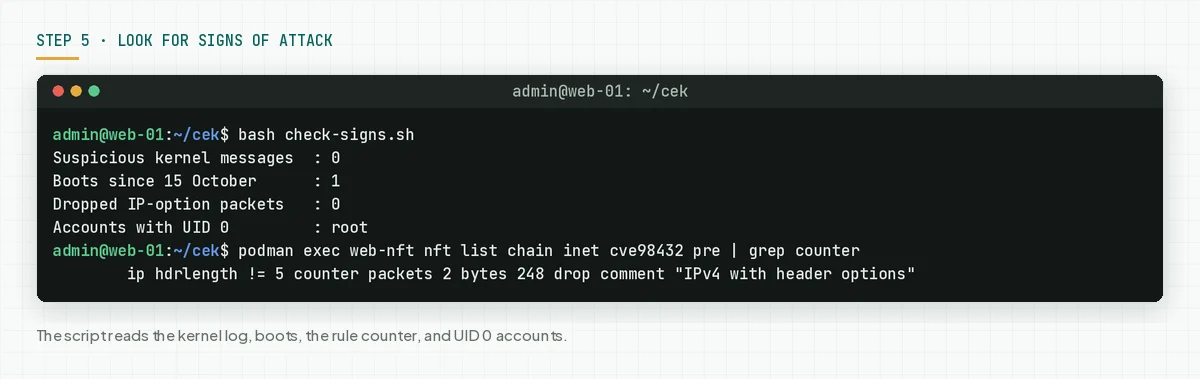
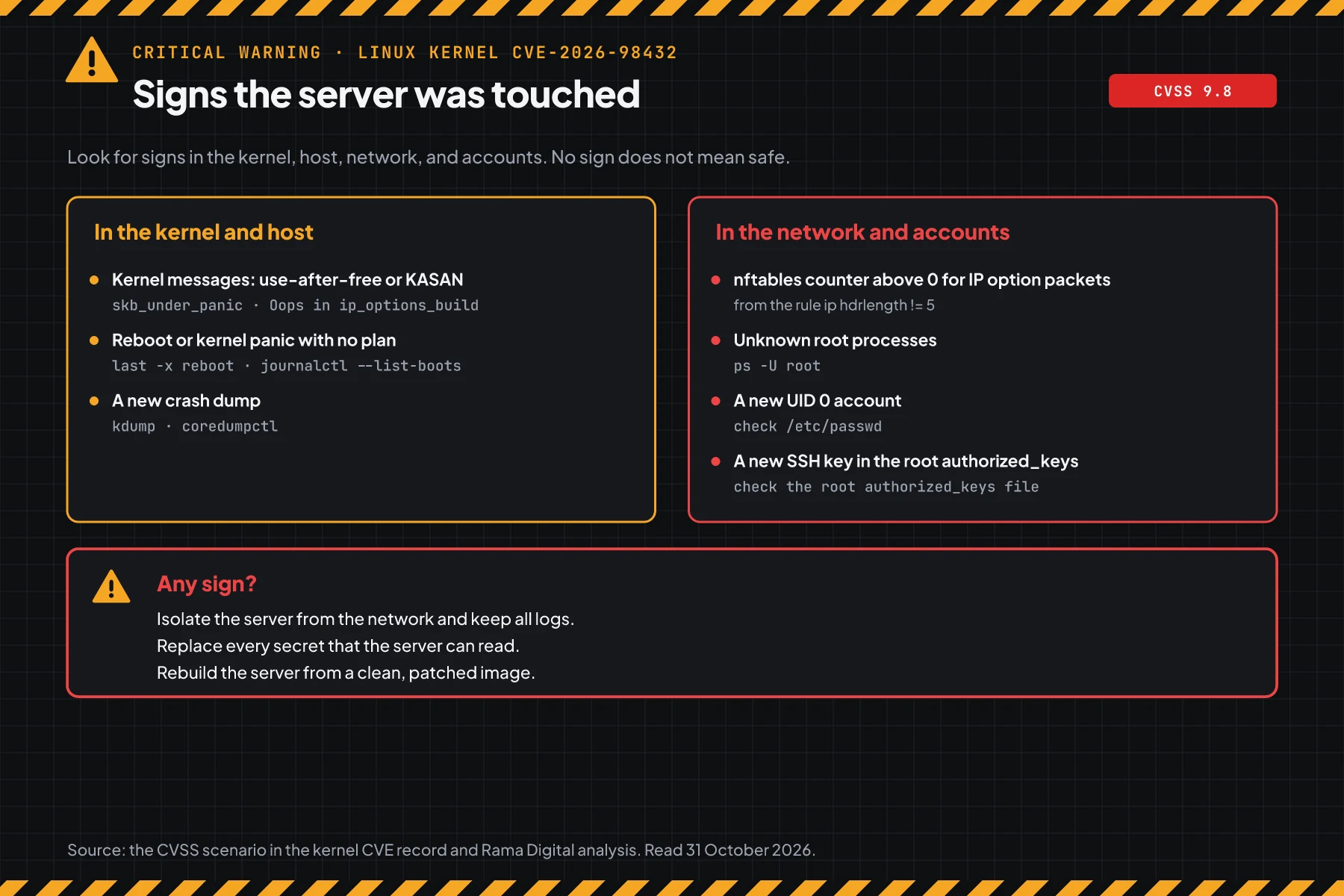
The CVSS scenario from the kernel team names 2 visible effects: skb_under_panic and an Oops in ip_options_build(). A kernel that panics usually reboots on its own, so each boot since 15 October that you did not plan needs a check.
Check the result: 0 suspicious kernel messages, all boots match your schedule, and root is the only UID 0 account. A rising nftables counter means that IP-option packets arrived, so keep the logs and check the kernel messages. When you see a sign of attack, isolate the server and keep the logs. Then replace all secrets on that server and rebuild it from a clean image.
Example: 1 night of response for 4 servers
This simulation uses dummy data. The server names, times, and results are not customer data.
| Time (WIB) | Dummy server | Check | Result | Action |
|---|---|---|---|---|
| 21.00 | vps-store (Ubuntu 24.04, 6.8.0-148, Go 1.25 API on port 443) | Steps 1 and 2 | MPTCP listener :443, VULNERABLE | Steps 4a to 4c, restart the API |
| 21.40 | db-main (Debian 12, 6.1.176-1) | Step 2 | VULNERABLE, fix exists | apt full-upgrade, reboot at 22.00 |
| 22.20 | erp-old (RHEL 9) | Step 2 | VULNERABLE, fix exists | dnf upgrade kernel, reboot at 22.40 |
| 22.50 | docker-host (Ubuntu 22.04, 3 Go containers) | Step 1 per container | 2 MPTCP listeners | sysctls in compose, step 4c on the host |
| 23.30 | All servers | Step 5 | 0 kernel messages, boots match the schedule | Record, repeat step 2 each morning |
Lesson from the simulation: a Docker host needs the MPTCP setting in each container, not only on the host. Ubuntu servers still need a reboot when the fix comes out, even with the mitigation in place.
Who applies the fix
The owner of the kernel fix differs per hosting type, so this table helps you know who must act today.
| Hosting type | Fix owner | Your work |
|---|---|---|
| VPS or own server | Your IT team | Steps 1 to 5 |
| Managed Kubernetes (node pool) | The provider builds the node image, you upgrade the nodes | Read the provider notice, upgrade the node pool, then step 5 |
| Shared hosting or PaaS | The provider | Ask for written proof of the kernel version |
| Vendor-managed app on your server | Your IT team for the kernel, the vendor for the app | Steps 1 to 5, then ask the vendor to check MPTCP listeners |
Rama Digital recommendation: when your server holds payment tokens, WhatsApp tokens, or AI model API keys, treat each sign in step 5 as an incident. For MCPMCPA standard that lets an AI program use your tools and data under clear permissions.Open the glossary servers, also read about access rights, approval, and audit logs for an MCP server.
Checklist for today
- List all Linux servers and container hosts that accept connections from the internet. Owner: DevOps team. Evidence: the host list.
- Check exposure with step 1. Owner: server admin. Evidence: script output per host and per container.
- Check the kernel with step 2. Owner: server admin. Evidence: script output per host.
- Update and reboot Debian, SUSE, Amazon Linux, RHEL 8, 9, 10, and Ubuntu 26.10 servers. Owner: server admin. Evidence: step 2 output after the reboot.
- Apply step 4 on Ubuntu LTS servers. Owner: server admin. Evidence: step 1 output and the nftables counter.
- Look for signs with step 5. Owner: server admin. Evidence: command output, kept with the logs.
- Check the Ubuntu status each morning. When the fix comes out, do step 3 and remove the temporary rule when you no longer need it.
Frequently asked questions
My server does not use MPTCP. Is my server safe?
Not always. The flaw is in the normal IPv4 TCP path. The Anthropic PoC used MPTCP, but the Go team writes that the bug is not specific to MPTCP. You still need the kernel fix.
Ubuntu LTS has not released a fix. What do I do now?
Apply steps 4a to 4c. Then check the Ubuntu status each day with the command in step 2. When the status changes to released, do step 3.
My container images are up to date. Are my containers protected?
No. Containers use the host kernel, and an image update does not change the kernel. Fix and reboot the host, then set the MPTCP setting in each container.
Does a kernel package update without a reboot close the flaw?
No. The old kernel keeps running until the reboot. Check uname -r after the reboot, then run check-kernel.sh again.
SUSE and Amazon give 8.1, but the kernel team gives 9.8. Which one is correct?
Both scores are the same except for attack complexity. SUSE and Amazon think the race is hard to trigger. The kernel team thinks an attacker can keep trying, Red Hat moved to 9.8 on 30 October, and Anthropic reports a working PoC.
Does the nftables rule in step 4c break my website?
The rule only drops IPv4 packets with header options. In our test, normal HTTP still got 200 and only ping -R was dropped. Apply it on 1 server first, then check your services.
Does my cloud provider fix my VPS on its own?
No. A VPS has its own kernel, and that kernel is your responsibility. The provider only fixes the physical host. Run step 2 inside each VPS.
How do I know whether the server was broken into?
Look for kernel messages, unplanned reboots, new UID 0 accounts, and new SSH keys with step 5. Clean logs do not prove that the server is safe.
Next step
The limit that still applies: the step 4 mitigation does not close the flaw, and a fix does not remove access that an attacker may have planted. When your server shows a sign in step 5, or you need help to check servers and secrets, use Vibe Code Rescue for an audit and stabilisation. For 1 urgent issue today, book a 30-minute session.
Sources
- kernel CVE record: flaw summary, affected versions, safe stable versions, and the CVSS scenario.
- fix commit e3f33b0a1d89: author, date, and reporter of the fix.
- NVD: Received status with no NVD score.
- Ubuntu CVE page: Critical priority (High before), fix status per Ubuntu release, and the 26.10 fix on 7 November 2026.
- Debian tracker: Debian kernel versions with the fix.
- Red Hat CVE page: the 9.8 score (8.1 before), the Critical label, and RHEL status.
- bulletin RHSB-2026-016: the official Red Hat mitigation with an nftables rule, 30 October 2026.
- RHSA-2026:93414, RHSA-2026:93412, and RHSA-2026:93413: the RHEL 8, 9, and 10 kernel fix, 1 November 2026.
- RHSA-2026:93775: the NVIDIA for RHEL 10 kernel fix, 2 November 2026.
- RHSA-2026:94623, RHSA-2026:94996, RHSA-2026:94303, RHSA-2026:94477, RHSA-2026:94558, RHSA-2026:94109, RHSA-2026:94438, and RHSA-2026:94508: the RHEL EUS, AUS, TUS, and E4S kernel fixes, 2 to 4 November 2026.
- SUSE: the 8.1 and 9.2 scores, and SUSE product status.
- Amazon Linux: the 8.1 score and Amazon Linux kernel package status.
- Anthropic report of 27 October: remote root PoC on servers with an MPTCP listener.
- Go Security Team warning: MPTCP default in Go 1.24 and newer, and GODEBUG.
- oss-security thread of 30 October: the net.mptcp.enabled setting for the whole system.
- CISA KEV: CVE-2026-98432 not in the catalog on 30 October 2026.