Direct answer: CVE-2026-116241 lets a normal pgAdmin 4 account run operating system commands on the pgAdmin server through the Import/Export Data tool. The CVSS 3.1 score is 9.9. Today, check the version, check who has the Import/Export Data permission, then update to pgAdmin 4 v9.19.
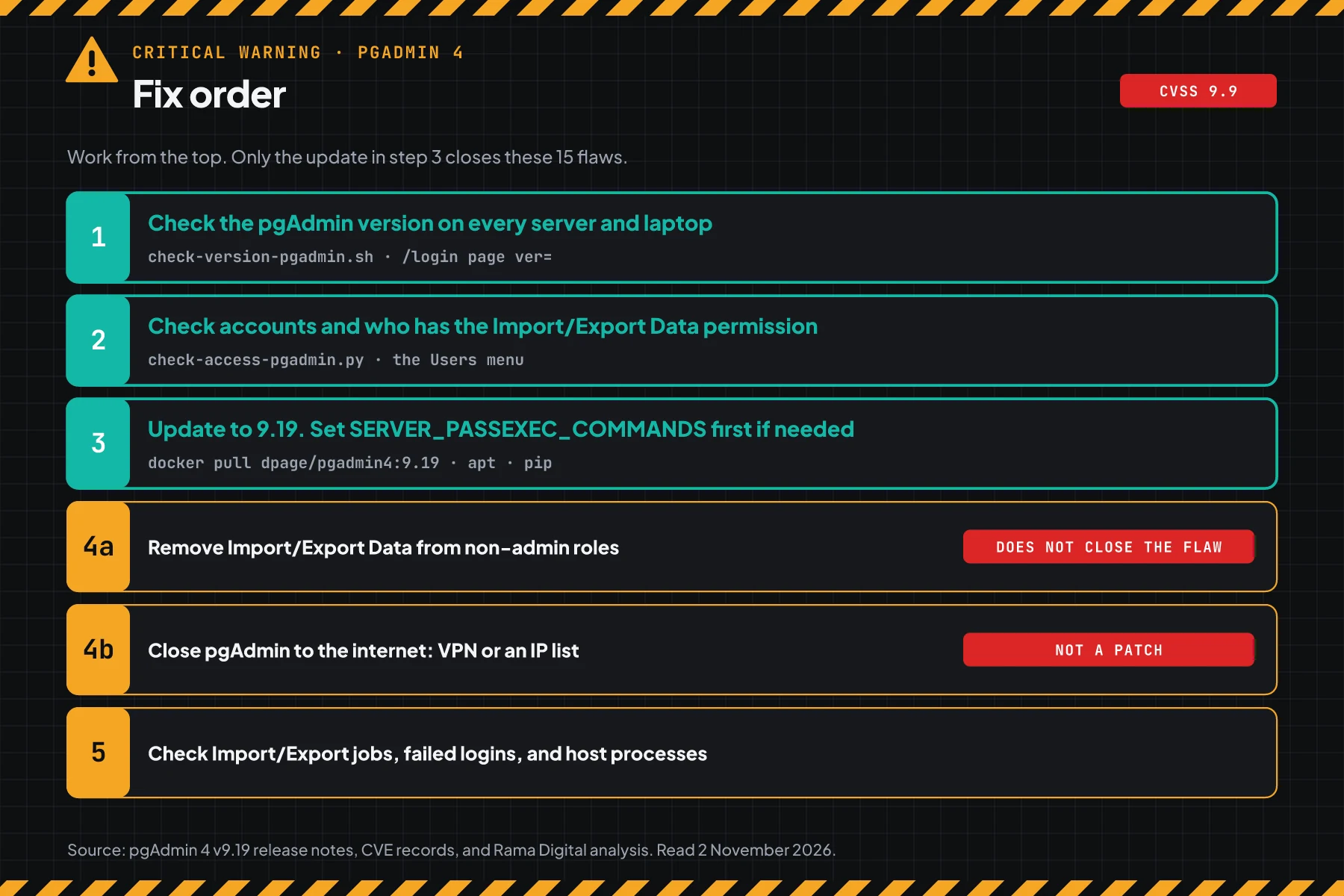
Release 9.19 closes 15 CVEs at once, CVE-2026-116238 to CVE-2026-116252. One of them, CVE-2026-116238, lets an attacker bypass the failed login limit. According to the CVE-2026-116241 record, the command runs as the OS account that runs pgAdmin.
Main condition: The attacker needs 1 pgAdmin account with the Import/Export Data permission. The default User role has that permission. Limit: This article has no query content, no payload, and no attack sequence.
We read the CVE-2026-116241 record, the CVE-2026-116238 record, the pgAdmin 4 v9.19 release notes, the release announcement on postgresql.org, issue #10663, the dpage/pgadmin4 image page on Docker Hub, and CISA KEV on 2 November 2026, from 06.35 to 07.40 WIB. We tested 3 scripts in podman containers with the official dpage/pgadmin4 9.18 and 9.19 images, including an upgrade with the same volume. We wrote the apt, dnf, pip, and desktop paths from the pgAdmin download pages, with no test.
The problem: a normal pgAdmin account can run commands on the server
One leaked pgAdmin account or one dishonest employee is enough to get into the pgAdmin server.
pgAdmin 4 is a web-based admin tool for PostgreSQL. Many teams install it on a server with Docker, then give accounts to developers, analysts, or vendors. A normal account should only work in the databases that it owns. This flaw lets a normal account run commands on the pgAdmin host itself.
According to the CVE-2026-116241 record, CVE-2026-116241 is a bypass of the CVE-2026-17566 fix. The same tool also got the CVE-2026-7816 fix in version 9.15. So the pgAdmin 9.18 that you installed in September is still vulnerable.
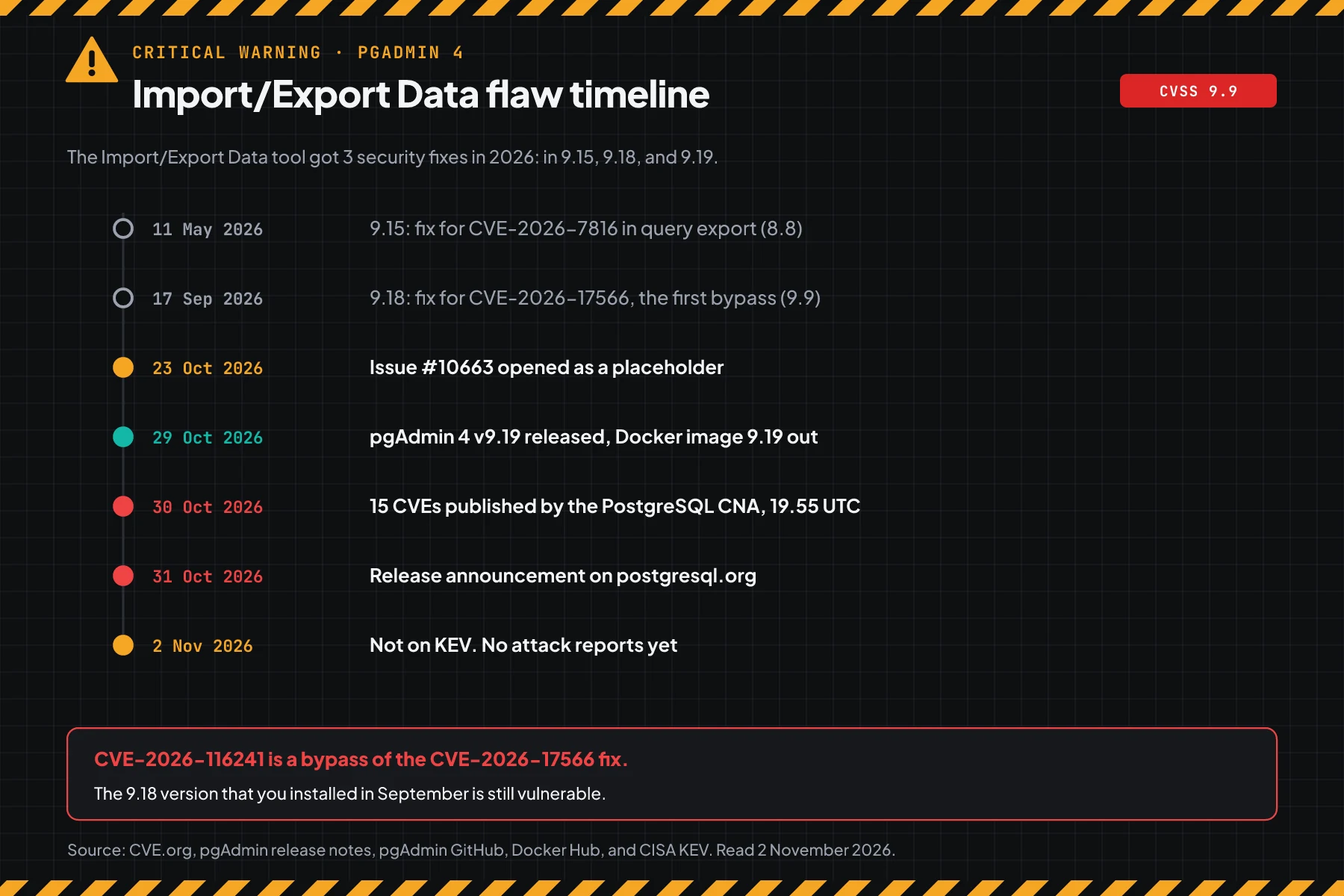
The dpage/pgadmin4 image page on Docker Hub shows that the 9.19 and latest tags came out on 29 October 2026, at 15.29 UTC. The CVE records came out on 30 October 2026, at 19.55 UTC, from the PostgreSQL CNA. On 2 November 2026, the pgAdmin security page does not show these 15 CVEs yet.
How it works: 1 export tool, commands on the host
The query export check in pgAdmin and the psql parser read quote marks in different ways.
This section uses the official summary. Its purpose is to help you choose the correct steps, not to explain an attack.
Summary from the CVE record
According to the CVE-2026-116241 record, the Import/Export Data tool wraps the user's export query in a psql \copy command, then checks that query. The check refuses a backslash inside a single-quoted string, but not inside a double-quoted identifier. When a specific database setting changes, psql can run a command on the pgAdmin host before the database server refuses the query.
The CVE record also gives 2 important facts. A normal database role can change that setting for itself. The Import/Export Data permission goes to non-admins by default. The fix in 9.19 refuses every backslash inside a double-quoted identifier.
Scores of the 15 CVEs in release 9.19
The score is different for each CVSS version, so this table gives both. All scores come from the PostgreSQL CNA.
| CVE | Area | CVSS 3.1 | CVSS 4.0 |
|---|---|---|---|
| CVE-2026-116241 | The Import/Export Data tool runs an OS command on the pgAdmin host | 9.9 | 9.4 |
| CVE-2026-116238 | The failed login limit and password checks can be bypassed | 8.1 | 9.2 |
| CVE-2026-116239 | An LDAP or Kerberos login enters another account with the same name | 8.5 | 8.9 |
| CVE-2026-116249 | Connection file paths escape the user storage folder | 8.4 | 7.2 |
| CVE-2026-116242, 116244, 116245, 116247 | SSH, Kerberos, services, and password files use the pgAdmin service account identity | 8.2 | 7.1 |
| CVE-2026-116243 | The utility binary path can point to shared storage | 7.5 | 7.7 |
| CVE-2026-116248 | A normal user can share a server with every user | 6.8 | 6.0 |
| CVE-2026-116240, 116250, 116252, 116246 | File Manager, symlink races, materialized view refresh, and passwords in the environment | 6.5 | 7.0 to 7.3 |
| CVE-2026-116251 | Other sessions stay alive after a password change | 4.2 | 2.3 |
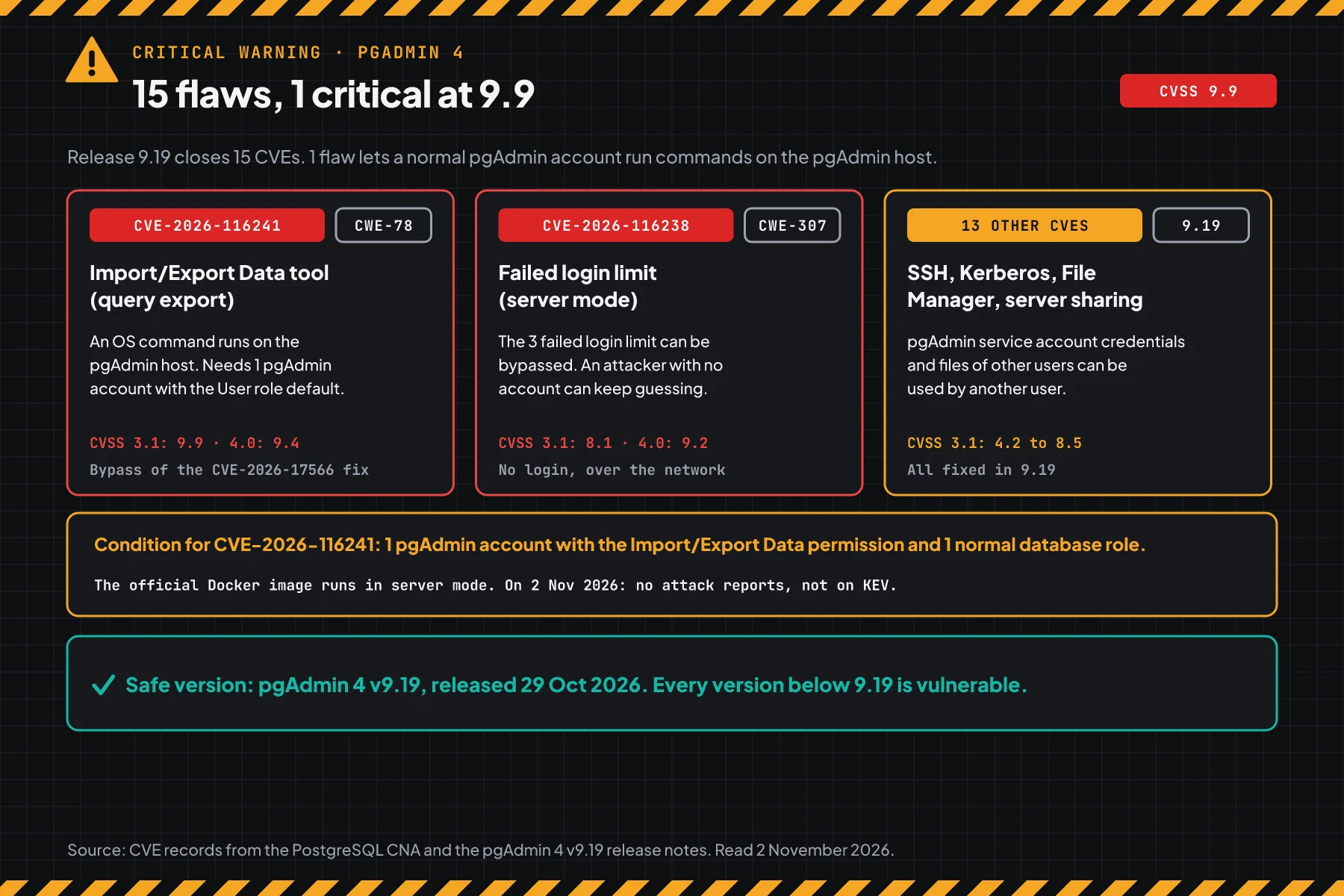
CVE-2026-116238 is important for servers that are open to the internet. According to the CVE-2026-116238 record, pgAdmin locks an account after 3 failed logins, but some login paths do not count the tries. As a result, an attacker with no account can guess passwords with no limit, including the admin password.
Exploitation status on 2 November 2026
We found no attack reports, no public exploit code in official sources, and no CISA KEV entry. issue #10663 only had a placeholder until release 9.19.
Rama Digital analysis: the pgAdmin login page shows the version number to anyone, for example ver=91800 for 9.18. Automatic scanners can find vulnerable servers fast. Do not wait for the KEV status.
Who has the highest risk
The risk depends on who can log in to pgAdmin, not only on the version.
This table summarises the CVE-2026-116241 record, the CVE-2026-116238 record, and the pgAdmin 4 v9.19 release notes.
| pgAdmin condition | Risk | Reason |
|---|---|---|
| Server mode open to the internet | Highest | Anyone can try to log in, and the failed login limit can be bypassed |
| Many non-admin accounts: team, interns, vendors | High | The default User role has the Import/Export Data permission |
| LDAP or Kerberos login | High | CVE-2026-116239 can log a user in to another account with the same name |
| pgAdmin on the same host as a database or application | Check | Commands run as the pgAdmin OS account, so secrets on the host are open too |
| 1 admin, VPN access only | Check | An attacker needs an account first, but the update is still required |
| Desktop mode on a laptop | Low | Only 1 local user |
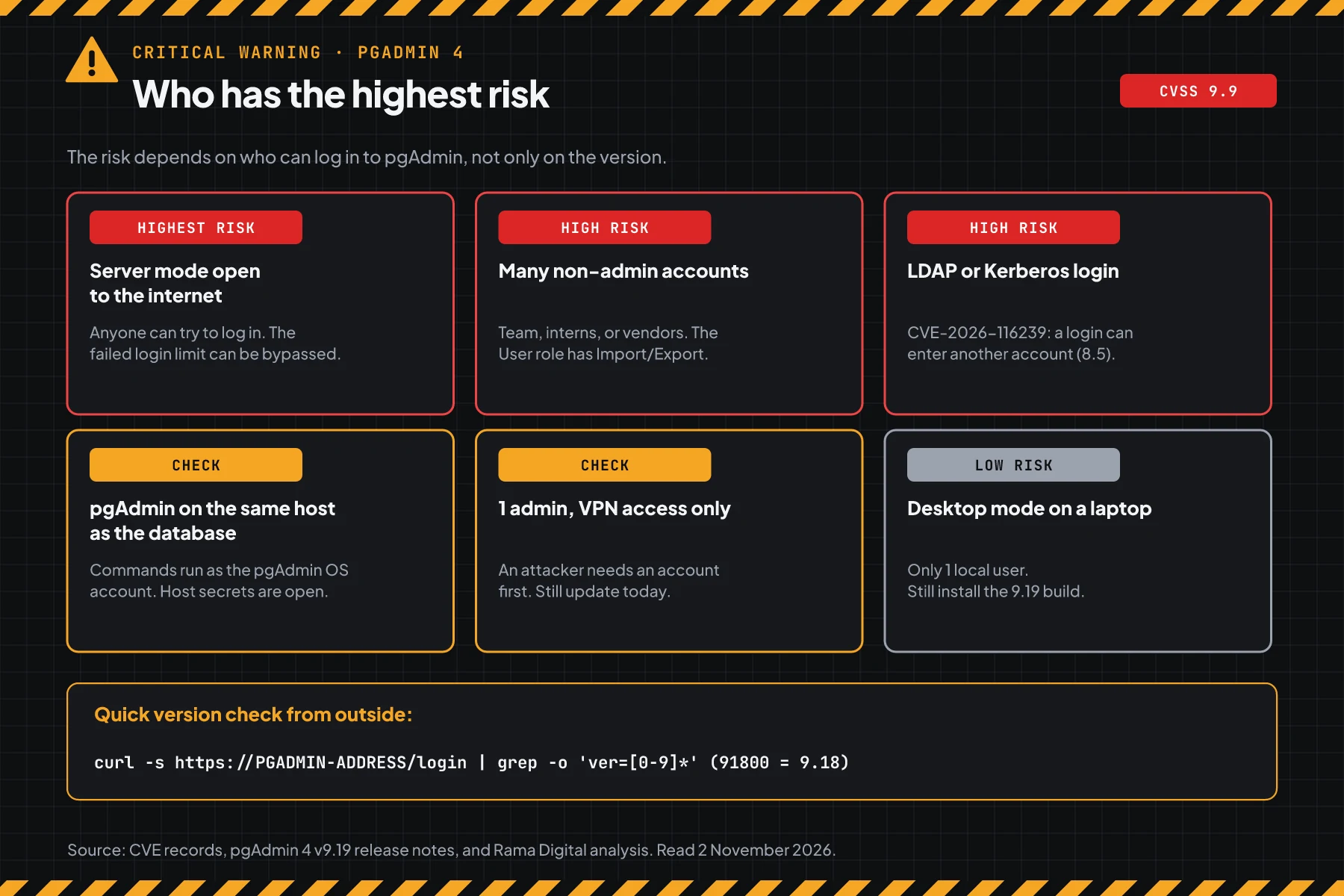
A pgAdmin server often keeps production database passwords. One pgAdmin host under attacker control can open every database that is registered there. The same risk pattern is in the LXD and Incus certificate flaw CVE-2026-112816: an admin tool that holds many servers is an asset with the highest patch priority.
Vulnerable and safe versions
Every pgAdmin 4 version below 9.19 is vulnerable to these 15 CVEs. Use this table to find the update step for your install type.
| Install type | Status on 2 November 2026 | Move to |
|---|---|---|
| Docker image dpage/pgadmin4 | Vulnerable up to tag 9.18 | Tag 9.19, out on 29 October |
| The latest tag | Vulnerable if pulled before 29 October | Pull again, then check the version |
| apt or dnf package from the pgAdmin repository | Vulnerable below 9.19 | The 9.19 package |
| Python wheel pgadmin4 | Vulnerable below 9.19 | pgadmin4==9.19 |
| Desktop for Windows and macOS | Vulnerable, lower risk because of 1 user | The 9.19 installer |
| Cannot update today | Vulnerable | Step 4, then update as soon as possible |
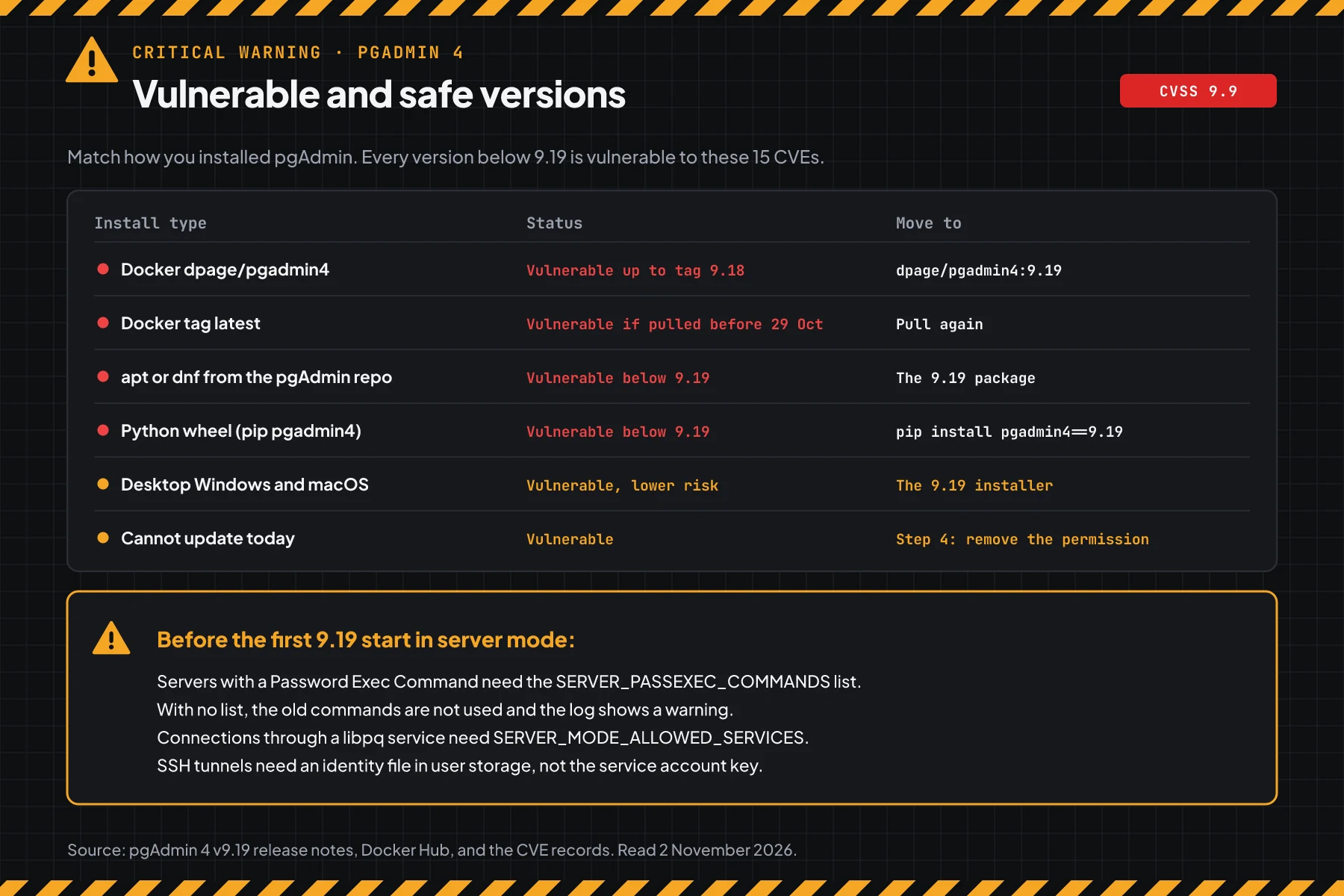
The version data comes from the CVE-2026-116241 record, the pgAdmin 4 v9.19 release notes, and the dpage/pgadmin4 image page on Docker Hub. The CVE records give the affected range "before 9.19" for all 15 CVEs. We found no backport to older branches, so do not wait for a 9.18.x version.
Prerequisites
sudoaccess or Docker access to every server that runs pgAdmin.- A pgAdmin admin account to open the Users menu.
- A list of the people who really need a pgAdmin account. Examples: database admins, developers, and analysts.
- A backup of the
/var/lib/pgadminvolume or folder before the update. - A maintenance window of 10 to 15 minutes. The container is made again, so active sessions stop.
Step 1: Check the pgAdmin version
Save this script as check-version-pgadmin.sh. The script reads the version from Docker or Podman containers, apt or dnf packages, the version.py file, or the login page.
#!/usr/bin/env bash
# Check the pgAdmin 4 version for CVE-2026-116241 and 14 other CVEs in release 9.19.
# Use:   sudo bash check-version-pgadmin.sh                (containers, packages, and files on this machine)
#        bash check-version-pgadmin.sh --url https://PGADMIN-ADDRESS
#        bash check-version-pgadmin.sh 9.14 9.18 9.19         (versions that you copied from other servers)
SAFE_VERSION=9.19

result() {
  if [ -z "$2" ]; then echo "$1: version not readable"; return; fi
  if [ "$(printf '%s\n%s\n' "$SAFE_VERSION" "$2" | sort -V | head -n1)" = "$SAFE_VERSION" ]; then
    echo "$1: pgAdmin $2 -> SAFE (fixed since $SAFE_VERSION)"
  else
    echo "$1: pgAdmin $2 -> VULNERABLE, update to $SAFE_VERSION or later"
  fi
}

# URL mode: the login page shows the version as a number, for example ver=91800 for 9.18.
if [ "$1" = "--url" ]; then
  fetch() { if command -v curl >/dev/null 2>&1; then curl -fsSL -m 10 "$1"; else wget -qO- -T 10 "$1"; fi; }
  num=$(fetch "${2%/}/login" | grep -o 'ver=[0-9]*' | head -n1 | cut -d= -f2)
  if [ -z "$num" ]; then echo "$2: version not readable from the login page"; exit 1; fi
  result "$2" "$((num / 10000)).$(((num % 10000) / 100))"
  exit 0
fi

# Manual mode: each argument is 1 version.
if [ $# -gt 0 ]; then
  for v in "$@"; do result "typed version" "$v"; done
  exit 0
fi

found=0
seen=" "
# Docker or Podman containers with a pgadmin4 image. The podman-docker package makes docker call podman, so skip a name seen before.
for rt in docker podman; do
  command -v "$rt" >/dev/null 2>&1 || continue
  while read -r name image; do
    case "$image" in *pgadmin4*) ;; *) continue ;; esac
    case "$seen" in *" $name "*) continue ;; esac
    seen="$seen$name "
    v=$("$rt" exec "$name" python3 -c 'import sys; sys.path.insert(0, "/pgadmin4"); import version; print(version.APP_VERSION)' 2>/dev/null)
    result "container $name ($image)" "$v"; found=1
  done < <("$rt" ps --format '{{.Names}} {{.Image}}' 2>/dev/null)
done

# apt or dnf packages from the official pgAdmin repository.
for p in pgadmin4-server pgadmin4-web pgadmin4-desktop; do
  v=""
  command -v dpkg-query >/dev/null 2>&1 && v=$(dpkg-query -W -f='${Version}' "$p" 2>/dev/null)
  [ -z "$v" ] && command -v rpm >/dev/null 2>&1 && v=$(rpm -q --qf '%{VERSION}' "$p" 2>/dev/null | grep -v 'not installed')
  [ -n "$v" ] && { result "package $p" "${v%%[-~]*}"; found=1; }
done

# The version.py file from a package or a container.
for d in /usr/pgadmin4/web /pgadmin4; do
  [ -f "$d/version.py" ] || continue
  v=$(cd "$d" && python3 -c 'import version; print(version.APP_VERSION)' 2>/dev/null)
  result "file $d/version.py" "$v"; found=1
done

[ "$found" = 0 ] && echo "pgAdmin not found on this machine. For pip: pip show pgadmin4. For desktop: the Help menu, About pgAdmin 4."
exit 0
# On the server: read the version from containers, packages, or the version.py file
sudo bash check-version-pgadmin.sh
# From a laptop: read the version from the pgAdmin login page
bash check-version-pgadmin.sh --url https://PGADMIN-ADDRESS
# Check versions that you copied from other servers
bash check-version-pgadmin.sh 9.14 9.18 9.19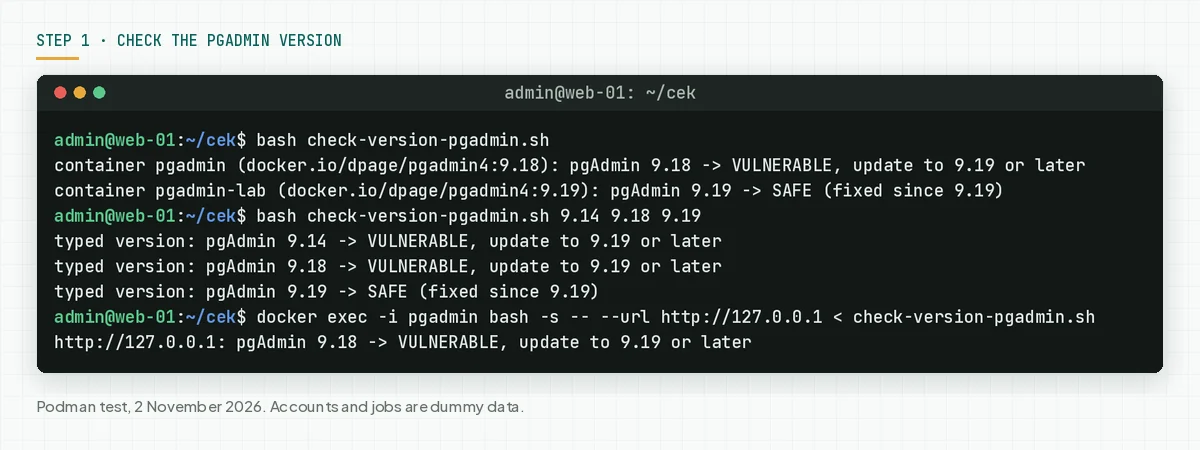
For pip, run pip show pgadmin4 in the pgAdmin virtualenv. For desktop, open the Help menu, then About pgAdmin 4.
Check the result: "VULNERABLE" means go to steps 2 and 3 today. "SAFE" still means do step 5, because this flaw is in every version before 29 October.
Step 2: Check who can use Import/Export Data
This flaw needs 1 account with the Import/Export Data permission, so the account list sets how fast you must act.
Save this script as check-access-pgadmin.py. The script only reads the pgAdmin configuration database in read-only mode.
# Check who can use the Import/Export Data tool in pgAdmin 4 (CVE-2026-116241).
# Docker:  docker exec -i pgadmin python3 - < check-access-pgadmin.py
# Package: sudo python3 check-access-pgadmin.py /var/lib/pgadmin/pgadmin4.db
# The script only reads the pgAdmin configuration database. It changes nothing.
import sqlite3
import sys

db = sys.argv[1] if len(sys.argv) > 1 else '/var/lib/pgadmin/pgadmin4.db'
c = sqlite3.connect(f'file:{db}?mode=ro', uri=True)
PERM = 'tools_import_export_data'

roles = {rid: (name, perms) for rid, name, perms in c.execute('SELECT id, name, permissions FROM role')}
accounts = list(c.execute(
    'SELECT u.email, u.auth_source, u.active, r.name, r.permissions FROM user u '
    'JOIN roles_users ru ON ru.user_id = u.id JOIN role r ON r.id = ru.role_id ORDER BY u.id'))
admins = [a for a in accounts if a[3] == 'Administrator']
print(f'Configuration database: {db}')
print(f'pgAdmin accounts: {len(accounts)} (admin {len(admins)}, non-admin {len(accounts) - len(admins)})')

for name, perms in roles.values():
    if name == 'Administrator':
        continue
    on = PERM in (perms or '').split(',')
    status = 'ON -> accounts with this role can use the vulnerable tool' if on else 'removed -> OK'
    print(f'Role {name}: Import/Export Data permission {status}')

can = [a for a in accounts if a[3] != 'Administrator' and PERM in (a[4] or '').split(',')]
if can:
    print('Non-admin accounts with that permission:')
    for email, source, active, role, _ in can:
        print(f'  - {email} (role {role}, login {source}, {"active" if active else "inactive"})')

cols = [r[1] for r in c.execute('PRAGMA table_info(server)')]
if 'passexec_cmd' in cols:
    n = c.execute("SELECT COUNT(*) FROM server WHERE COALESCE(passexec_cmd, '') <> ''").fetchone()[0]
    note = ' -> set SERVER_PASSEXEC_COMMANDS before the first 9.19 start' if n else ''
    print(f'Servers with a Password Exec Command: {n}{note}')
# Docker or Podman. Replace pgadmin with the name of your container.
docker exec -i pgadmin python3 - < check-access-pgadmin.py
# apt or dnf package, web mode
sudo python3 check-access-pgadmin.py /var/lib/pgadmin/pgadmin4.db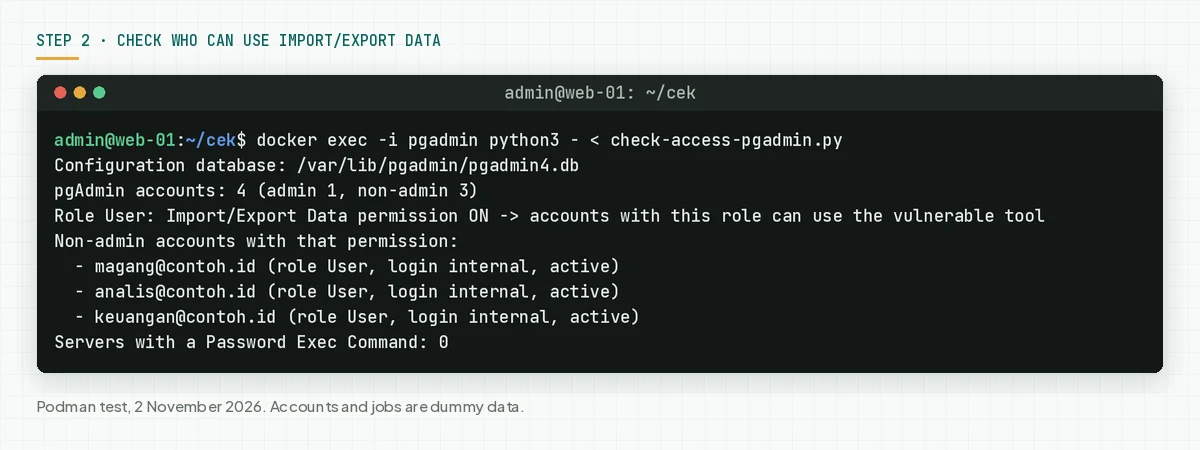
This script reads the default SQLite database. When your pgAdmin uses PostgreSQL as its configuration database, check accounts and roles in the Users menu.
Check the result: "ON" and a list of non-admin accounts means that every account in the list can use the vulnerable tool. Compare that list with the people who really need pgAdmin. Turn off accounts that you do not know.
Step 3: Update to pgAdmin 4 v9.19
Only the update closes these 15 flaws. Choose the commands for your install type from step 1.
# Docker: pull the new image, then make the container again with your old options
docker pull dpage/pgadmin4:9.19
docker stop pgadmin && docker rm pgadmin
docker run -d --name pgadmin [old options: -p, -e, -v] dpage/pgadmin4:9.19

# Docker Compose: change the image tag in compose.yaml to dpage/pgadmin4:9.19
docker compose pull pgadmin
docker compose up -d pgadmin

# apt package (Ubuntu, Debian) from the pgAdmin repository
sudo apt update
sudo apt install --only-upgrade pgadmin4 pgadmin4-web pgadmin4-server pgadmin4-desktop
sudo systemctl restart apache2

# dnf package (RHEL, Rocky, Fedora) from the pgAdmin repository
sudo dnf upgrade 'pgadmin4*'
sudo systemctl restart httpd

# Python wheel in a virtualenv
pip install --upgrade pgadmin4==9.19

# Check again after the update
sudo bash check-version-pgadmin.sh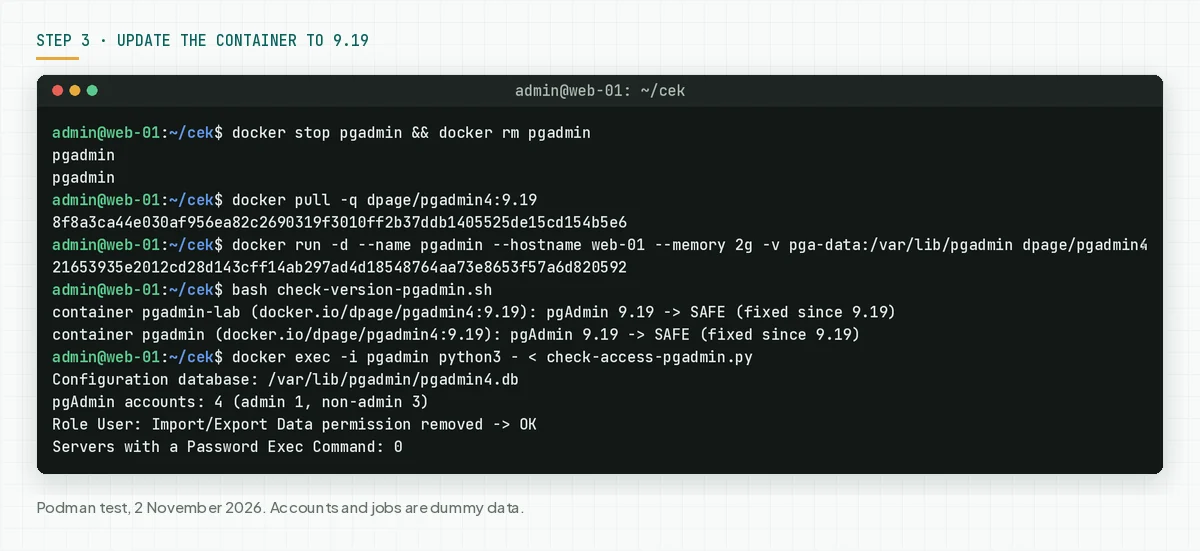
- Back up the
/var/lib/pgadminvolume first. This volume keeps accounts, registered servers, and settings. - Use the same
docker runoptions as the old container: ports, env, and volumes. Change only the image tag. - Do not use the
latesttag without a version check. A tag that you pulled before 29 October is still 9.18. - For the apt package, follow the pgAdmin apt download page. The web package uses Apache, so restart Apache after the update.
- Run
check-version-pgadmin.shagain on every server.
Before the first 9.19 start in server mode
The pgAdmin 4 v9.19 release notes change 4 behaviours in server mode. Check these items before the update, because some connections can stop.
- Password Exec Command: free-text commands are replaced by the
SERVER_PASSEXEC_COMMANDSlist. Fill in that list before the first start. When it is empty, the old commands are not used and the log shows a warning. - libpq services: a server that uses a service works only when the service name is in
SERVER_MODE_ALLOWED_SERVICES. - SSH tunnels: tunnels no longer use the SSH key of the pgAdmin service account. Keep an identity file in user storage.
- Password files and client certificates: libpq no longer uses the files of the service account. Set those files on each server.
Step 2 counts the servers with a Password Exec Command. When the number is more than 0, add this list. We tested this Docker env line in a 9.19 container, and the container started normally.
# Docker: add this env to the 9.19 container. The value uses Python syntax.
-e PGADMIN_CONFIG_SERVER_PASSEXEC_COMMANDS="{'vault': ['/usr/local/bin/get-pg-password', '--ttl', '300']}"

# Package: write it in /usr/pgadmin4/web/config_local.py
SERVER_PASSEXEC_COMMANDS = {
    'vault': ['/usr/local/bin/get-pg-password', '--ttl', '300'],
}
Check the result: the version script prints "SAFE" on every server, and the access script shows the same number of accounts as before the update.
Step 4: Restrict access until the update is done
This step reduces who can use the flaw, but it does not close the flaw.
The CVE record and the release notes give no official workaround. Rama Digital analysis: we made 2 steps from the flaw conditions. Condition: the update cannot run today. Limit: admins keep full permissions, and a leaked admin account is still dangerous.
4a. Remove Import/Export Data from non-admin roles
According to the User Management documentation, an admin manages accounts, roles, and permissions in the Users, Roles, and Permissions tabs. Log in as an admin, open the account menu at the top right, then choose Users. In the Permissions tab, search for Import/Export Data, then remove that permission from the User role and from your own roles.
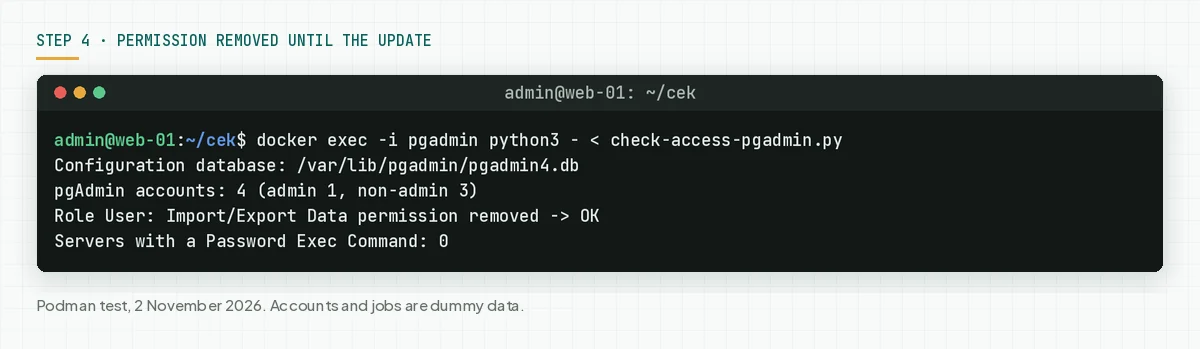
Run check-access-pgadmin.py again. Give the permission back after the update to 9.19 if your team needs the export tool.
4b. Close pgAdmin to the internet
pgAdmin does not need to be open to the internet. Open the port only on 127.0.0.1, then get access through an SSH tunnel or a VPN. Another method is to allow only the office IP in the reverse proxy.
# Docker: open the pgAdmin port only on 127.0.0.1 of the server
docker run -d --name pgadmin -p 127.0.0.1:5050:80 [other options] dpage/pgadmin4:9.19
# From the admin laptop: make an SSH tunnel, then open http://127.0.0.1:5050
ssh -L 5050:127.0.0.1:5050 admin@SERVER-ADDRESS

# Nginx in front of pgAdmin: allow only the office or VPN IP
location / {
    allow 198.51.100.10;
    deny all;
    proxy_pass http://127.0.0.1:5050;
}
The sample IP uses the RFC 5737 documentation block. We did not run this port example in the test, because our test rules do not allow open ports. Also turn on pgAdmin two-factor authentication for admin accounts.
Check the result: the access script prints "removed", and the pgAdmin login page does not open from another network, for example a phone hotspot.
Step 5: Look for signs of use
The attacker uses a valid pgAdmin account, so compare activity with team records.
Save this script as check-signs-pgadmin.py. The script shows Import/Export Data jobs per account, marks jobs that have the word PROGRAM, and shows accounts with failed logins. The script does not print the job commands.
# Check for signs of Import/Export Data use and password guessing in pgAdmin 4.
# Docker:  docker exec -i pgadmin python3 - < check-signs-pgadmin.py
# Package: sudo python3 check-signs-pgadmin.py /var/lib/pgadmin/pgadmin4.db
# The script only reads the process history and account data. It does not print the commands.
import sqlite3
import sys

db = sys.argv[1] if len(sys.argv) > 1 else '/var/lib/pgadmin/pgadmin4.db'
c = sqlite3.connect(f'file:{db}?mode=ro', uri=True)
admins = {u for (u,) in c.execute(
    "SELECT ru.user_id FROM roles_users ru JOIN role r ON r.id = ru.role_id WHERE r.name = 'Administrator'")}

jobs = [j for j in c.execute(
    'SELECT p.user_id, u.email, p.start_time, p.exit_code, p.command, p.arguments '
    'FROM process p LEFT JOIN user u ON u.id = p.user_id ORDER BY p.start_time')
    if (j[4] or '').endswith('psql') and 'copy' in (j[5] or '').lower()]
print(f'Import/Export Data jobs in the process history: {len(jobs)} (UTC time)')
for uid, email, start, code, _, args in jobs:
    signs = []
    if 'program' in (args or '').lower():
        signs.append('SIGN: the command has the word PROGRAM')
    if uid not in admins:
        signs.append('non-admin account')
    print(f'  {(start or "?")[:16]}  {email}  exit code {code}  {", ".join(signs) or "normal"}')

failed = list(c.execute('SELECT email, login_attempts, locked FROM user WHERE login_attempts > 0 OR locked = 1'))
print(f'Accounts with failed logins or a lock: {len(failed)}')
for email, n, lock in failed:
    print(f'  - {email}: {n} failed{", LOCKED" if lock else ""}')
# Import/Export Data job history and accounts with failed logins
docker exec -i pgadmin python3 - < check-signs-pgadmin.py
# Requests to the Import/Export tool and to other login views in the container access log
docker logs pgadmin 2>&1 | grep -E '"POST /import_export/job/' | tail -n 20
docker logs pgadmin 2>&1 | grep -E '"POST /(login|verify|change|reset)' | tail -n 20
# Processes in the container. Normal: python3, master, pickup, qmgr.
docker exec pgadmin ps -o user,pid,ppid,comm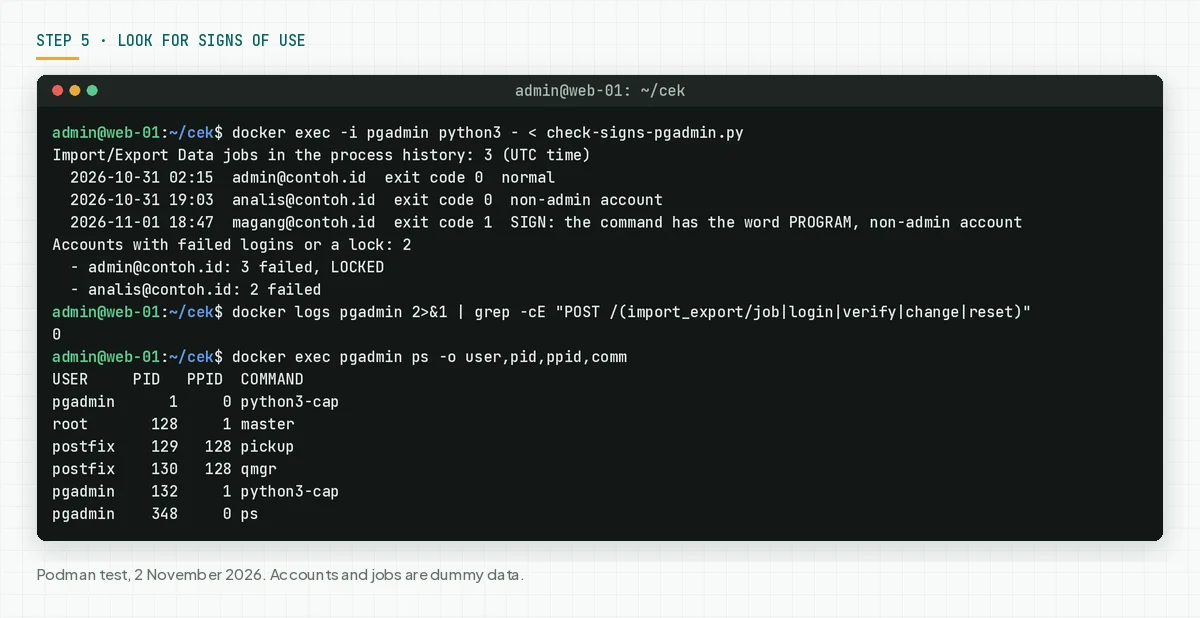
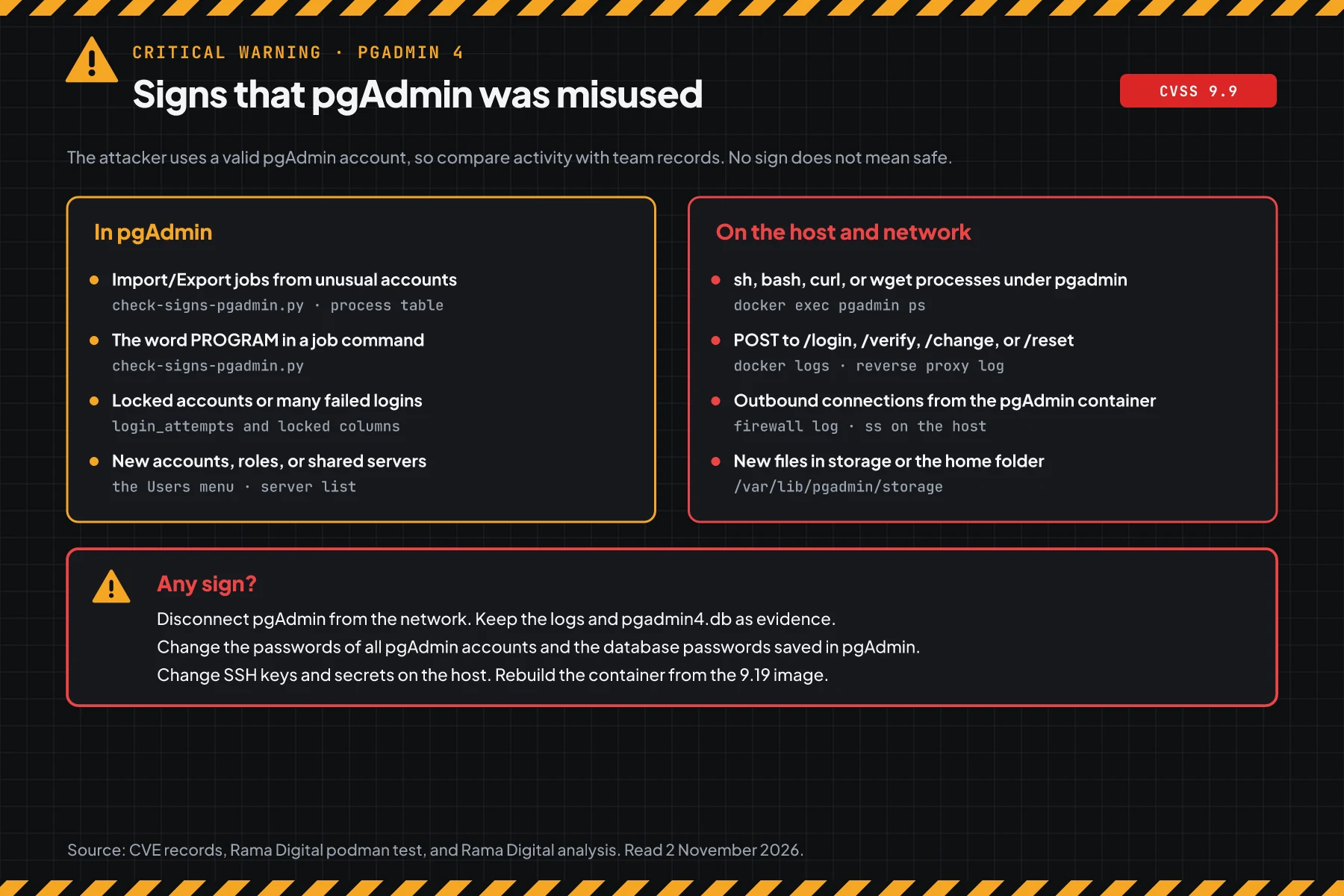
The official Docker image writes the access log to stdout, so docker logs has every request. The pgAdmin login form sends data to /authenticate/login. Rama Digital analysis: a POST to /login, /verify, /change, or /reset is not the usual form flow, so check its source IP.
Check the result: all jobs come from accounts that you know, there is no "SIGN" label, and the container has only normal processes. The job history can be deleted from the UI, so no sign does not mean safe.
When you find even 1 sign, disconnect pgAdmin from the network, then keep the logs and pgadmin4.db as evidence. Change the passwords of all pgAdmin accounts and the database passwords saved in pgAdmin. Change SSH keys and secrets on the host, then rebuild the container from the 9.19 image.
When the database holds customer data, Indonesian Law 27/2022 on Personal Data Protection requires a written notice within 3 times 24 hours after a personal data leak. Also read the GitLab CVE-2026-97229 warning.
Example: 1 morning of response for 3 pgAdmin servers
This simulation uses dummy data. Server names, times, and results are not customer data.
| Time (WIB) | Dummy server | Check | Result | Action |
|---|---|---|---|---|
| 08.00 | pga-team (Docker 9.18, open to the internet) | Steps 1 and 2 | VULNERABLE, 6 non-admin accounts | Steps 4a and 4b, then update |
| 08.30 | pga-lab (Docker latest, pulled in August) | Step 1 | VULNERABLE, old latest tag | Pull 9.19 again |
| 09.00 | dba-laptop (desktop 9.14) | Step 1 | VULNERABLE, 1 user | Install the 9.19 build |
| 09.30 | pga-team | Step 5 | 1 job from a vendor account at 02.14 | Incident response, change database passwords |
The lesson from the simulation: a safe version does not prove that a server is clean. Pga-team was updated, but step 5 still found a job from before the update.
Who applies the patch
The patch responsibility is different for each install type, so this table shows who acts today.
| Install type | Patch owner | What you do |
|---|---|---|
| Docker container on your own server | Your team pulls the 9.19 image | Steps 1 to 5 |
| apt or dnf package from the pgAdmin repository | Your team runs the package update | Steps 1 to 5 |
| pgAdmin from a hosting panel or a ready-made VPS image | The hosting provider or your team | Ask for written proof of the version, then steps 2 and 5 |
| Desktop on an admin laptop | The laptop owner | Install the 9.19 build |
Rama Digital recommendation: treat pgAdmin like a master key to your databases. Limit accounts with the least privilege rule, as in the guide to access rights, approvals, and audit logs. Also update the runtime on the same server, for example for the PHP2Shell warning. For a wider review standard, read the GitLab CVE-2026-97229 warning.
Checklist for today
- Make a list of all pgAdmin installs: servers, containers, and laptops. Owner: infrastructure team. Evidence: a list of names and versions.
- Check the version with step 1. Owner: server admin. Evidence: the script output.
- Check accounts and permissions with step 2. Owner: pgAdmin admin. Evidence: the script output.
- Apply step 4 on every pgAdmin that cannot update today. Owner: pgAdmin admin. Evidence: the access script prints "removed".
- Update to 9.19. Set
SERVER_PASSEXEC_COMMANDSfirst if needed. Owner: server admin. Evidence: the script output after the update. - Check for signs with step 5. Owner: server admin and security team. Evidence: the script output and the access log.
- Remove accounts that nobody uses, and turn on two-factor authentication for admins.
Questions and answers
I use pgAdmin desktop on a laptop. Am I safe?
Your risk is low, because desktop mode has only 1 local user. Still install the 9.19 build, because this release closes 15 flaws.
Can an attacker with no account use CVE-2026-116241?
Not directly. This flaw needs 1 pgAdmin account with the Import/Export Data permission. But CVE-2026-116238 allows password guesses with no limit, so a pgAdmin that is open to the internet still has a high risk.
Do attackers already use this flaw?
On 2 November 2026, we found no attack reports, and this flaw is not on CISA KEV. The login page shows the version number, so vulnerable servers are easy to find.
I updated to 9.18 in September. Why is it still vulnerable?
Version 9.18 fixed CVE-2026-17566. CVE-2026-116241 is a bypass of that fix, so every version below 9.19 is vulnerable.
Can removing the Import/Export Data permission replace the update?
No. That step closes only 1 of the 15 flaws, and admin accounts keep the permission. The update to 9.19 is still required.
Do I lose accounts and registered servers when I make the container again?
No, when you use the same volume for /var/lib/pgadmin. Our test moved a container from 9.18 to 9.19, and the 4 accounts stayed. Back up that volume first.
I use pgAdmin from a hosting provider. What do I do?
Ask the provider for written proof of the version. Then check the version from the login page with step 1, and check your accounts in the Users menu.
Next step
The limits that still apply: step 4 does not close the flaw, and an update does not remove access that an attacker already used. When your pgAdmin shows a sign in step 5, or you need help with an audit and recovery, use Vibe Code Rescue. For 1 urgent issue today, book a 30-minute session.
Sources
- CVE-2026-116241 record: technical summary, CVSS 3.1 score 9.9 and CVSS 4.0 score 9.4, CWE-78, the default permission, and affected versions.
- CVE-2026-116238 record: the failed login limit, CVSS 3.1 score 8.1 and CVSS 4.0 score 9.2.
- pgAdmin 4 v9.19 release notes: release date 29 October 2026, the list of 15 CVEs, and server mode changes.
- release announcement on postgresql.org: the release announcement of 31 October 2026 and the supported platforms.
- issue #10663 and the fix commit: tracking and code change for CVE-2026-116241.
- dpage/pgadmin4 image page on Docker Hub and the pgAdmin container documentation: the 9.19 tag and the
PGADMIN_CONFIG_*env. - User Management documentation: the Users, Roles, and Permissions tabs.
- CISA KEV: status on 2 November 2026.
- Indonesian Law 27/2022 on Personal Data Protection: the duty to report a personal data leak.