Direct answer: CVE-2026-118066 lets an attacker with no login take over a customer account in the LatePoint booking plugin. The CVSS 3.1 score is 9.1. The flaw is not yet in CISA KEV and has no attack reports, but the CVE record is public. Today, check the LatePoint version, update to 5.7.8, then look for signs in the logs and the accounts.
The flaw is in LatePoint 5.7.0 to 5.7.6. The is_scalar hardening in 5.7.5 did not close it. LatePoint released 5.7.7 on 2 November 2026 that closes the main flaw, then 5.7.8 on 3 November 2026 with other fixes. Use 5.7.8.
Main condition: The site runs LatePoint 5.7.6 or older with a public booking page. Limit: This article has no request contents, payloads, or attack sequence.
We read the CVE-2026-118066 record, the Wordfence advisory, the LatePoint plugin page, and the CVE record API on 8 November 2026, from 06.35 to 07.05 WIB. We tested 3 check scripts, a plugin update, and a deactivation step in podman containers with the official WordPress, WP-CLI, and MariaDB images. We did not test an attack.
The problem: a customer account taken with no login
LatePoint manages appointments, customer accounts, and often payments too. This flaw opens the door to those customer accounts with no password.
According to the CVE-2026-118066 record, this flaw is the CWE-287 class, improper authentication. The CVSS vector has AC:L and PR:N, which means that the attack is easy and needs no login. The impact is C:H and I:H, which means that an attacker can read and change account data.
LatePoint notified the vendor on 27 October 2026 through the Wordfence advisory. The vendor released 5.7.7 on 2 November and 5.7.8 on 3 November. The CVE record came out on 7 November 2026.
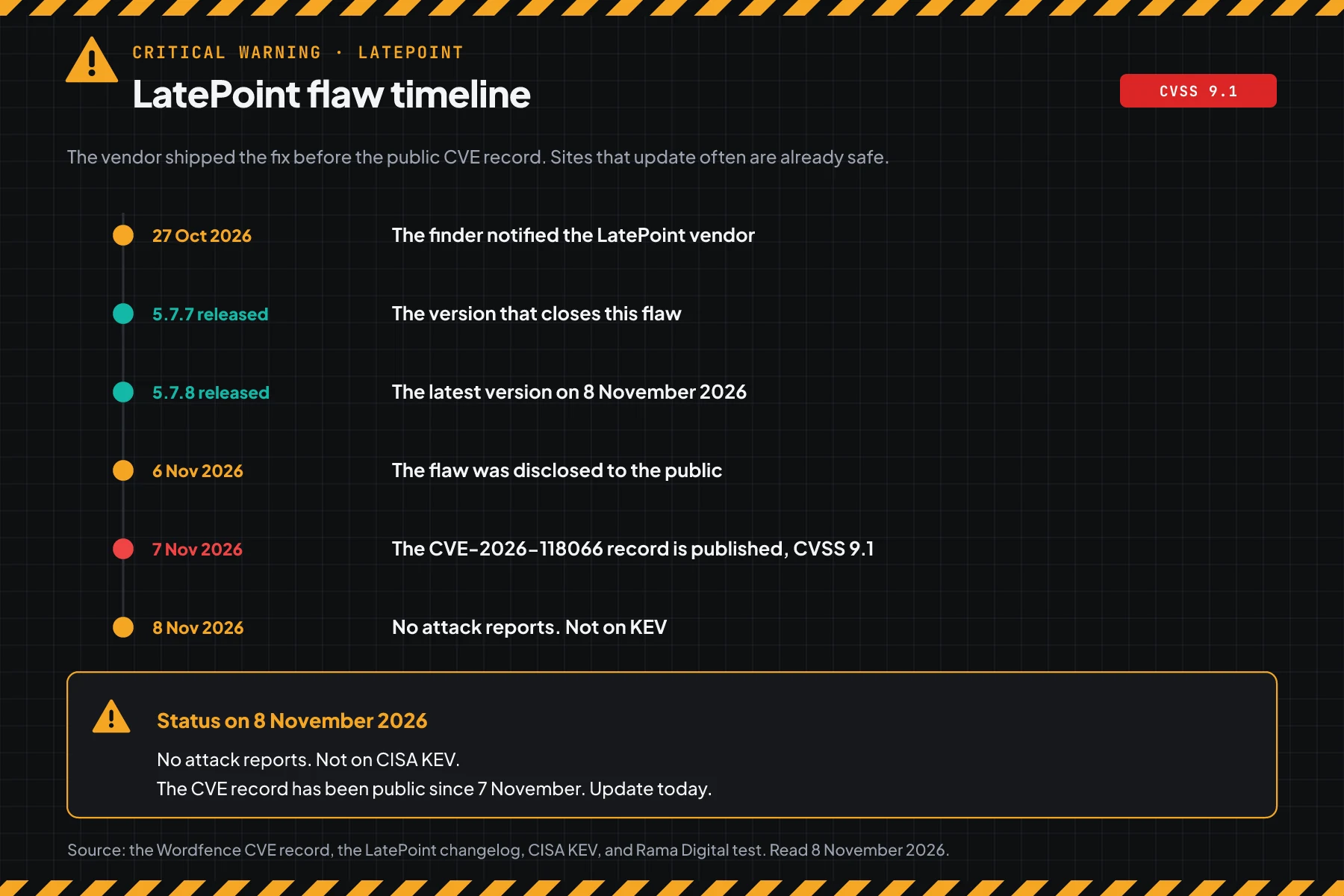
On 8 November 2026, this flaw is not yet in CISA KEV and has no field attack reports. But the CVE record is public, so the gap between disclosure and the first attack can be short.
How it works: a comparison that can be tricked
This section uses the official summary and the patch contents. It helps you choose the steps. It does not explain how to attack.
Summary from the CVE record
According to the CVE-2026-118066 record and the Wordfence advisory, the flaw is in how LatePoint builds database query conditions. The condition builder compares a value from the request with fixed marker text, then uses the result directly in the query. The right value can pass this check, so account authentication is bypassed.
The WordPress text sanitizer and the is_scalar hardening in 5.7.5 did not close the flaw, because the marker value passes through unchanged. This is why version 5.7.5 is still vulnerable.
What the patch changes
We compared the code in the official 5.7.6 and 5.7.7 packages. The patch makes 2 core changes:
- In
lib/models/model.php, the empty and not-empty condition branches now match a marker object, not text. A value from the request is always text or an array, so it is never identical to the marker object. - In
lib/controllers/customer_cabinet_controller.php, the password reset handler accepts a token only when it passesctype_alnum. A value with spaces or operators is rejected before the database lookup.
Rama Digital analysis: both changes reject a harmful value before it reaches the query. The patch also touches other controllers and helpers for similar hardening. Limit: we read the code and did not test an attack.
Exploitation status on 8 November 2026
| Source | Status |
|---|---|
| CISA KEV | Not yet listed on 8 November 2026 |
| CVE record (CVSS 3.1) | Score 9.1, Critical class, CWE-287 |
| Wordfence | Disclosed 6 November 2026, no attack reports yet |
| LatePoint | The flaw is closed in 5.7.7, the current version is 5.7.8 |
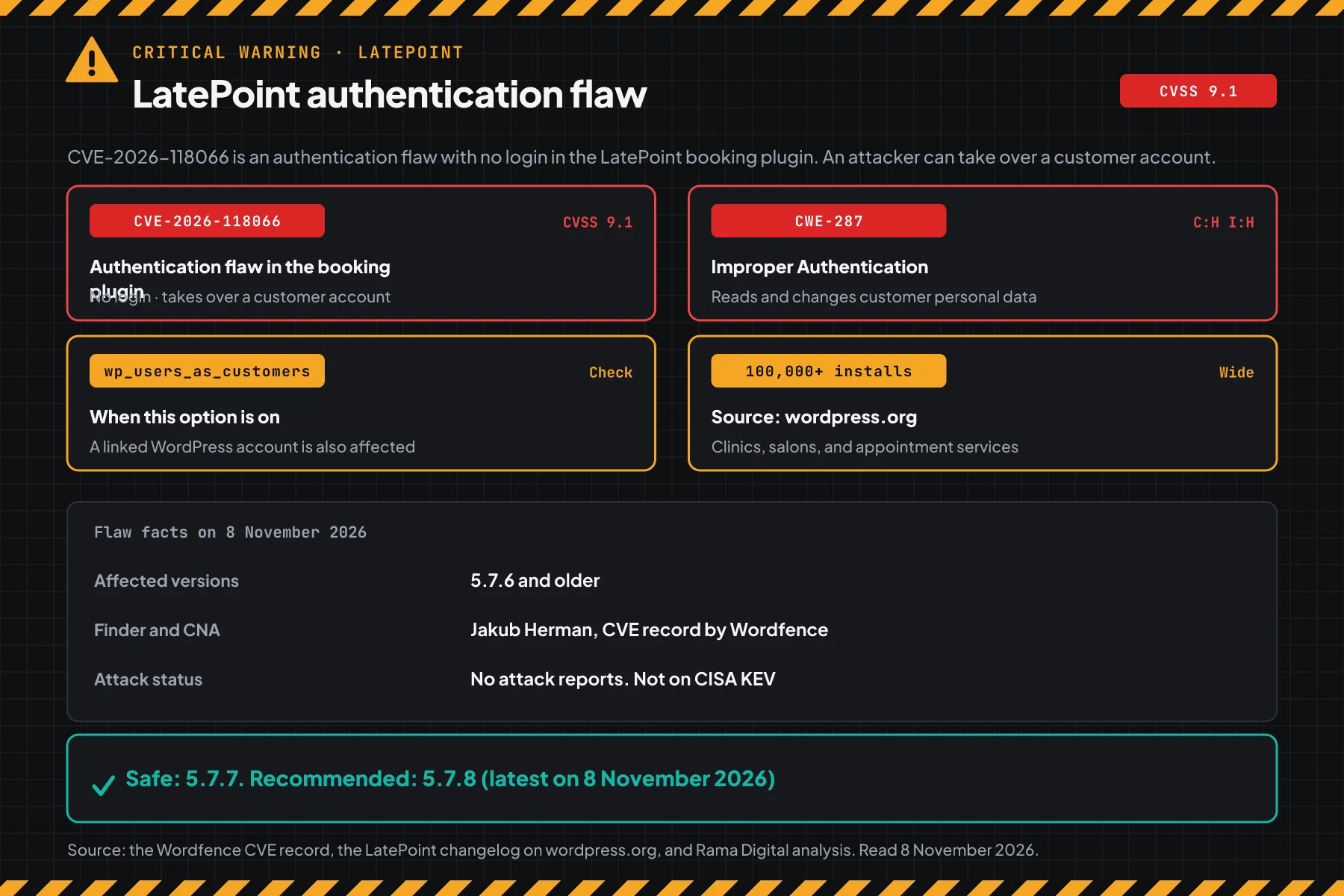
A score of 9.1 is in the Critical class. This flaw needs no login, it is easy, and it ends in access to a customer account. We write a critical warning even with no attack reports yet.
Who has the highest risk
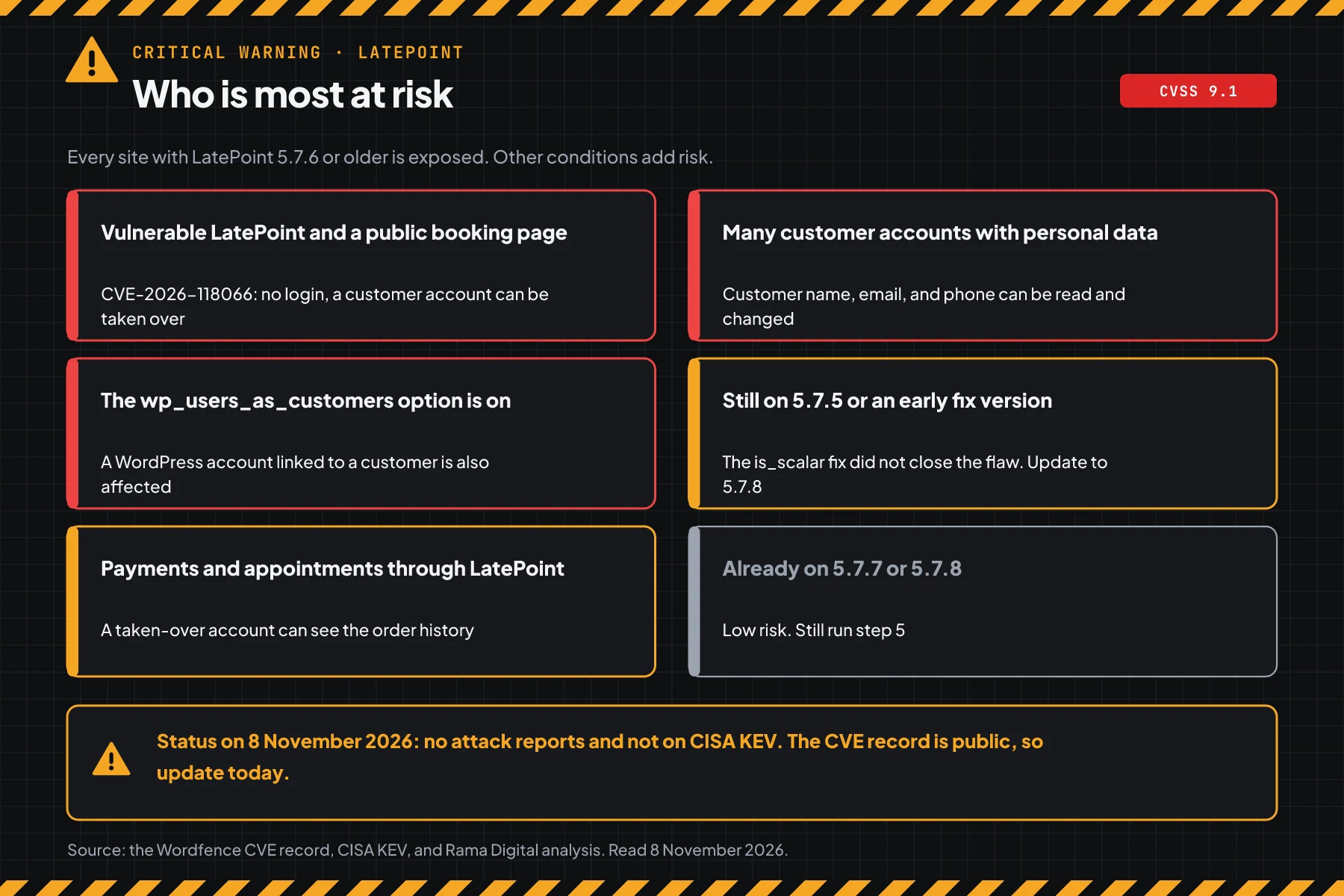
The risk depends on the LatePoint version, the stored data, and the account option.
| Site condition | Risk | Reason |
|---|---|---|
| LatePoint 5.7.6 or older, public booking | Highest | The flaw is open with no login, a customer account can be taken over |
| Many customer accounts with personal data | High | Customer name, email, and phone can be read and changed |
The wp_users_as_customers option is on | High | A WordPress subscriber or customer account is also affected |
| Still on 5.7.5 or an early fix | Check | The is_scalar hardening did not close the flaw |
| Payments and appointments through LatePoint | Check | A taken-over account can see the order history |
| Already on 5.7.7 or 5.7.8 | Low | Still look for signs from before the update |
A WordPress server often also runs the PHP runtime and a hosting panel. Patch those components too, for example for the PHP2Shell warning and the Control Web Panel flaw CVE-2026-77876. Patch the WordPress core too, for example for the WordPress core update flaw CVE-2026-119977.
Vulnerable and safe versions
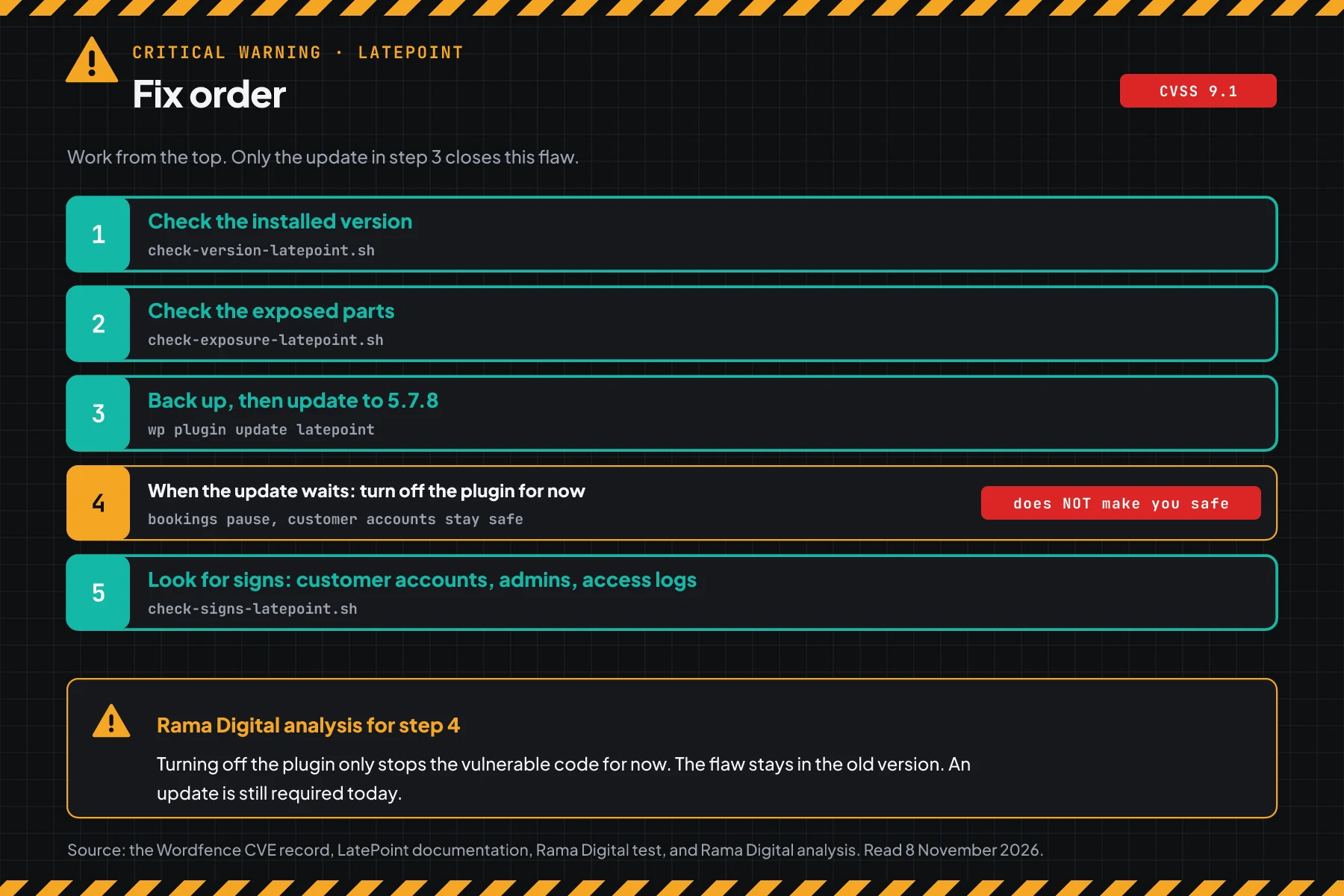
All versions from 5.7.0 to 5.7.6 are vulnerable. Version 5.7.7 closes the main flaw, and 5.7.8 adds other fixes. Use this table to choose the action.
| LatePoint version | Status on 8 November 2026 | Safe release |
|---|---|---|
| 5.7.0 to 5.7.6 | Vulnerable | 5.7.7 or 5.7.8 |
| 5.7.5 (is_scalar hardening) | Still vulnerable | 5.7.8 |
| 5.7.7 | Main flaw closed | 5.7.8 for other fixes |
| 5.7.8 | Safe on 8 November 2026 | Use this version |
| Below 5.7.0 | Vulnerable, and hit by other CVEs | 5.7.8 |
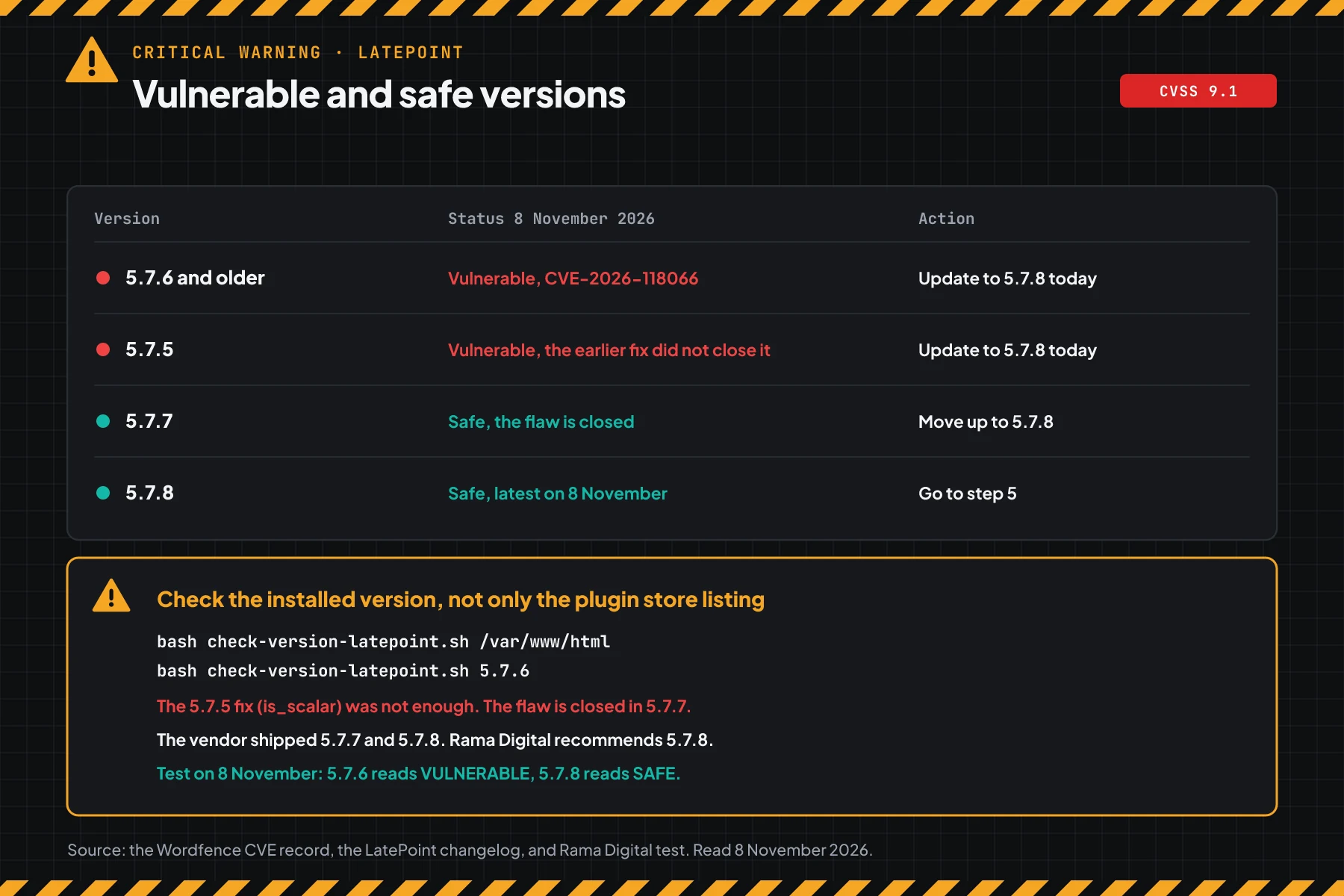
The version data comes from the CVE-2026-118066 record, the Wordfence advisory, and the changelog on the LatePoint plugin page. The 5.7.7 changelog says that the vendor hardened the plugin security after the Wordfence report.
Prerequisites
- SSH access with sudo to the server, or an administrator account in the WordPress dashboard.
- WP-CLI on the server when you use the
wpcommands. Steps 1 and 3 also work in the dashboard. - A recent backup of the database and files, for example a VPS snapshot or a hosting panel backup.
- Access to the web server access log, for example
/var/log/apache2/or/var/log/nginx/. - A list of all WordPress sites that use LatePoint, including staging sites and old sites.
Step 1: Check the LatePoint version
Save this script as check-version-latepoint.sh in the ~/cek folder. The script reads the Version header from latepoint.php, then compares it with the safe release 5.7.7 and the recommended version 5.7.8.
#!/usr/bin/env bash
# Check the LatePoint plugin version against CVE-2026-118066 (account takeover with no login, CVSS 3.1 9.1).
# Data: the CVE record from CNA Wordfence and the official changelog on wordpress.org.
# On the server: sudo bash check-version-latepoint.sh /var/www/html
# For versions you copied: bash check-version-latepoint.sh 5.7.6 5.7.7 5.7.8
# The script only reads files. It changes nothing.

# First safe version: 5.7.7 closes the main flaw, 5.7.8 adds other fixes.
SAFE=5.7.7
RECOMMENDED=5.7.8

# smaller A B: true when version A is below version B.
smaller() { [ "$1" != "$2" ] && [ "$(printf '%s\n%s\n' "$1" "$2" | sort -V | head -n1)" = "$1" ]; }

check() {
  local v="$1"
  if ! [[ $v =~ ^[0-9]+\.[0-9]+(\.[0-9]+)?$ ]]; then
    printf '%-9s UNKNOWN, match it manually with the safe version table\n' "$v"
    return
  fi
  if smaller "$v" "$SAFE"; then
    printf '%-9s VULNERABLE CVE-2026-118066 -> update to %s\n' "$v" "$RECOMMENDED"
  else
    printf '%-9s SAFE for CVE-2026-118066 (flaw closed from %s)\n' "$v" "$SAFE"
  fi
}

DIR=/var/www/html
VERSIONS=()
for x in "$@"; do
  if [ -d "$x" ]; then DIR="$x"; else VERSIONS+=("$x"); fi
done

if (( ${#VERSIONS[@]} > 0 )); then
  for v in "${VERSIONS[@]}"; do check "$v"; done
  exit 0
fi

FILE="$DIR/wp-content/plugins/latepoint/latepoint.php"
if [ ! -r "$FILE" ]; then
  echo "Plugin file not readable: $FILE"
  echo "Pass the WordPress folder as an argument, for example: sudo bash check-version-latepoint.sh /var/www/html"
  echo "If LatePoint is not installed, you have nothing to do for this CVE."
  exit 1
fi
v=$(sed -nE 's/^[[:space:]]*\*?[[:space:]]*Version:[[:space:]]*([0-9.]+).*/\1/p' "$FILE" | head -n1)
echo "WordPress folder: $DIR"
check "${v:-not-readable}"
# On the server: read the version from the plugin folder
sudo bash check-version-latepoint.sh /var/www/html
# Check versions that you noted from other sites
bash check-version-latepoint.sh 5.7.4 5.7.5 5.7.6 5.7.7 5.7.8
# Manual check without the script
grep -i "Version:" /var/www/html/wp-content/plugins/latepoint/latepoint.php
cd /var/www/html && sudo -u www-data wp plugin get latepoint --field=version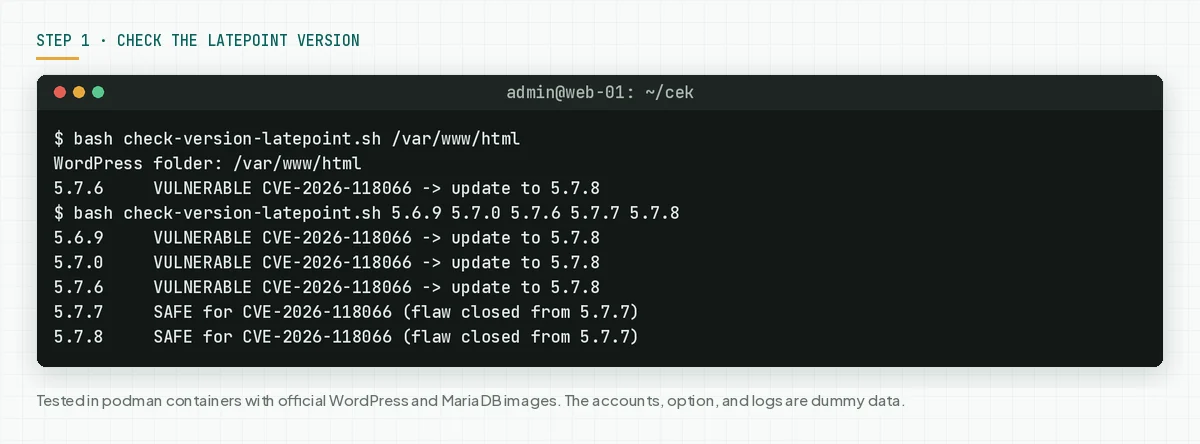
In the dashboard, open Plugins > Installed Plugins. The LatePoint row shows your version.
Check the result: "VULNERABLE" means go to steps 2 and 3 today. "SAFE" still means run step 5, because the flaw was public before you updated.
Step 2: Check the exposed parts
This script answers 3 questions: is LatePoint active, is the wp_users_as_customers option on, and how many customer accounts are stored.
Save this script as check-exposure-latepoint.sh. The script reads the plugin status and 1 option, then counts the rows in the customer table. The script does not change data.
#!/usr/bin/env bash
# Check CVE-2026-118066 exposure: is LatePoint active, its version, the wp_users_as_customers option, and the customer count.
# Use: sudo -u www-data bash check-exposure-latepoint.sh /var/www/html
# The script uses WP-CLI to read data. It only reads. It sends no attack request.

DIR="${1:-/var/www/html}"
WP() { wp --path="$DIR" --skip-themes --skip-plugins "$@" 2>/dev/null; }

if ! command -v wp >/dev/null 2>&1; then
  echo "WP-CLI is not present. Use step 1 to check the version, then check the option in LatePoint > Settings > General."
  exit 0
fi

echo "1. LatePoint plugin status"
line=$(WP plugin get latepoint --field=status 2>/dev/null)
ver=$(WP plugin get latepoint --field=version 2>/dev/null)
if [ -z "$ver" ]; then
  echo "   LatePoint is not installed. No action for this CVE."
  exit 0
fi
echo "   Version: $ver  ·  Status: ${line:-unknown}"
case "$ver" in
  5.7.7|5.7.8|5.7.9) echo "   Version SAFE for CVE-2026-118066." ;;
  *) echo "   CHECK: a version below 5.7.7 is vulnerable. Update in step 3." ;;
esac

echo "2. Use WordPress users as customers option (wp_users_as_customers)"
prefix=$(WP db prefix 2>/dev/null)
# Note: wp db query is silent when its stdout is a pipe. Capture to a variable first, then process.
opt_raw=$(WP db query "SELECT value FROM ${prefix}latepoint_settings WHERE name='wp_users_as_customers' LIMIT 1" --skip-column-names 2>/dev/null)
opt=$(printf '%s' "$opt_raw" | tail -n1 | tr -d '[:space:]')
case "$opt" in
  on|1|true) echo "   ON. The flaw also covers a linked WordPress subscriber or customer-role account." ;;
  off|0|""|false) echo "   Off or default. The impact stays within LatePoint customer accounts." ;;
  *) echo "   Value: ${opt:-not readable}. Check it manually in the dashboard." ;;
esac

echo "3. LatePoint customer account count"
count_raw=$(WP db query "SELECT COUNT(*) FROM ${prefix}latepoint_customers" --skip-column-names 2>/dev/null)
count=$(printf '%s' "$count_raw" | tail -n1 | tr -d '[:space:]')
echo "   ${count:-not readable} accounts. Each account holds customer personal data."

echo
echo "Result: if the version is below 5.7.7, go to step 3 today."
# Check the plugin status, version, the wp_users_as_customers option, and the customer count
sudo bash check-exposure-latepoint.sh /var/www/html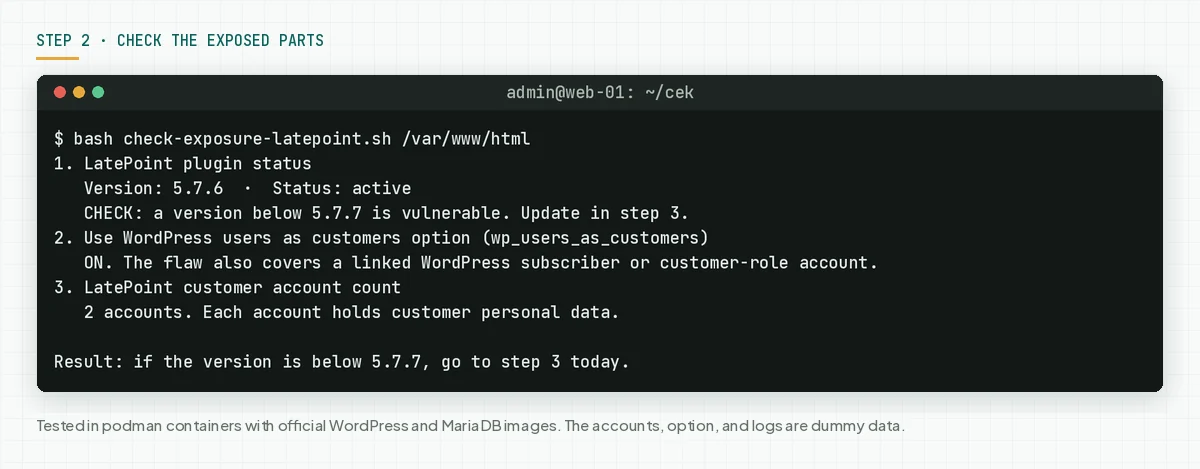
The wp_users_as_customers option links a WordPress account with a LatePoint customer. When this option is on, the flaw can reach a low-role WordPress account, not only a customer account.
Check the result: "EXPOSED" means update today. The customer count shows how much personal data is at risk.
Step 3: Update to 5.7.8
Only the update closes this flaw. Make a backup first, then update.
# 1. Make a backup of the database and files in the hosting panel or a VPS snapshot first.
cd /var/www/html
# 2. Update the plugin to the safe version (5.7.8)
sudo -u www-data wp plugin update latepoint
# 3. Check the version again
sudo bash ~/cek/check-version-latepoint.sh /var/www/html
# 4. Open the booking page, then confirm appointments and payments work normally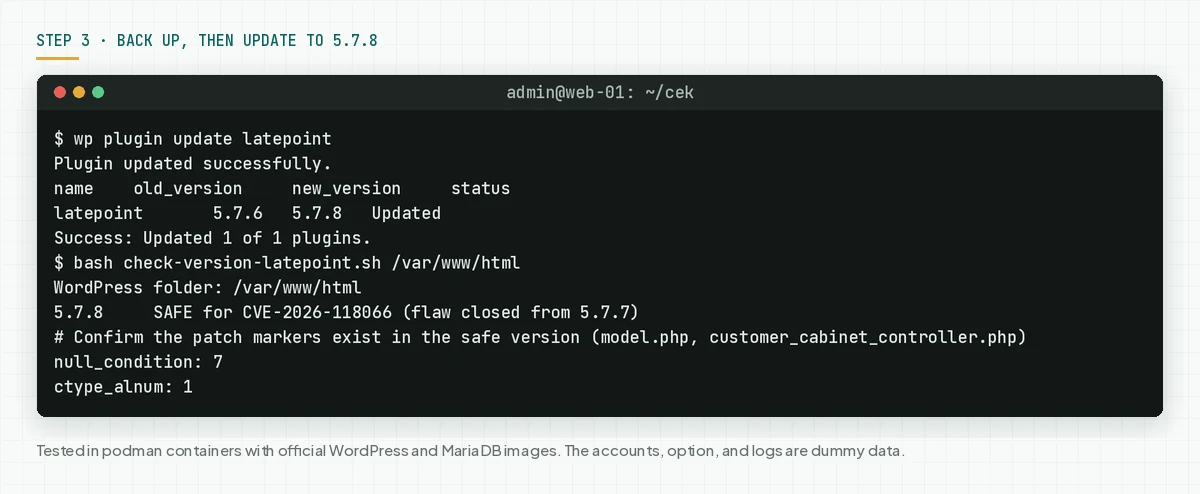
- Make a backup of the database and files first.
- Update through Plugins > Installed Plugins, or through WP-CLI.
- Run
check-version-latepoint.shagain. The correct result: "SAFE". - Open the booking page, then confirm appointments and payments work normally.
- Repeat on every site, including staging and old sites.
In our test, the update from 5.7.6 to 5.7.8 worked through wp plugin update latepoint. After the update, we found the patch markers null_condition in model.php and ctype_alnum in customer_cabinet_controller.php.
Check the result: the version script prints "SAFE" on every site, and the booking page opens normally.
Step 4: Turn off the plugin for now when the update waits
This step is not a fix. This step stops the vulnerable code for now, when you cannot update today. Bookings pause while the plugin is off.
# A temporary layer when you cannot update today: stop the vulnerable code
cd /var/www/html
sudo -u www-data wp plugin deactivate latepoint
sudo -u www-data wp plugin list --name=latepoint --fields=name,status,version
# Turn it on again only after the update to 5.7.8
# sudo -u www-data wp plugin activate latepoint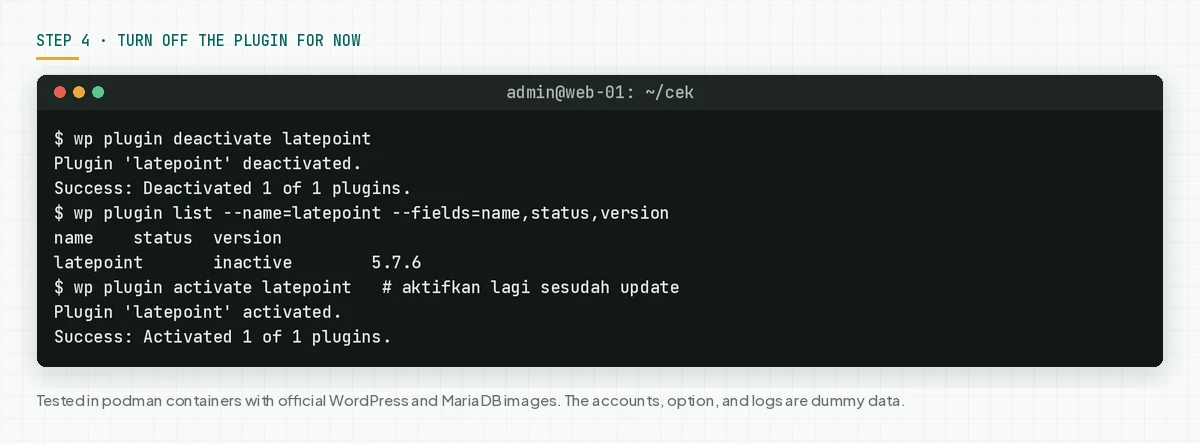
Rama Digital analysis: deactivation removes the vulnerable code from the web path, so customer accounts stay safe while the plugin is off. But the version stays 5.7.6, and this step does not clean an account that attackers already entered. The update to 5.7.8 is still required today.
Check the result: the plugin list prints inactive, and the booking page shows an off message. Turn it on again only after the version is "SAFE".
Step 5: Look for signs of use
The flaw is public, so look for signs from the past few days, especially when your booking is busy.
Save this script as check-signs-latepoint.sh. The script reads the web access log, customer accounts with a new change time, and the WordPress admin list. The script prints counts and IPs, not request contents.
#!/usr/bin/env bash
# Look for signs of CVE-2026-118066 use in customer accounts, WordPress accounts, and the web access log.
# Use: sudo -u www-data bash check-signs-latepoint.sh /var/www/html [other log files ...]
# The script only reads. It prints counts and times, not request contents.

DIR="${1:-/var/www/html}"
shift 2>/dev/null
CAND=("$@")
if (( ${#CAND[@]} == 0 )); then
  for f in /var/log/apache2/access.log* /var/log/nginx/access.log* /var/log/httpd/access_log*; do
    CAND+=("$f")
  done
fi
# Use only regular files. Skip a symlink to a device such as /dev/stdout, so the script does not hang.
LOGS=()
for f in "${CAND[@]}"; do [ -f "$f" ] && LOGS+=("$f"); done
WP() { wp --path="$DIR" --skip-themes --skip-plugins "$@" 2>/dev/null; }
sign=0

echo "1. LatePoint customer accounts with a password changed in the last 14 days"
if command -v wp >/dev/null 2>&1; then
  prefix=$(WP db prefix 2>/dev/null)
  rows=$(WP db query "SELECT id, email, updated_at FROM ${prefix}latepoint_customers WHERE updated_at >= DATE_SUB(NOW(), INTERVAL 14 DAY) AND updated_at > created_at ORDER BY updated_at DESC LIMIT 10" --skip-column-names 2>/dev/null)
  count=$(printf '%s' "$rows" | grep -c .)
  if (( count > 0 )); then
    echo "   CHECK: $count accounts changed. Confirm every change came from the customer:"
    printf '%s\n' "$rows" | sed 's/^/   /'
    sign=$((sign + 1))
  else
    echo "   0 accounts changed in 14 days."
  fi
else
  echo "   WP-CLI is not present. Check manually: customer accounts with a recent change time in the LatePoint dashboard."
fi

echo "2. WordPress administrator accounts and new registrations"
if command -v wp >/dev/null 2>&1; then
  echo "   Administrators:"
  WP user list --role=administrator --fields=user_login,user_registered --format=csv | sed 's/^/   /'
  echo "   Registrations in the last 14 days:"
  new=$(WP user list --fields=user_login,user_registered,roles --format=csv 2>/dev/null | awk -F, -v d="$(date -d '14 days ago' '+%Y-%m-%d' 2>/dev/null || date '+%Y-%m-%d')" 'NR>1 {t=$2; gsub(/"/,"",t); if (t >= d) print}')
  [ -n "$new" ] && printf '%s\n' "$new" | sed 's/^/   /' || echo "   none"
else
  echo "   WP-CLI is not present. Check manually: Users > All Users, sort by newest."
fi

echo "3. LatePoint admin-ajax.php requests in the web access log"
if (( ${#LOGS[@]} == 0 )); then
  echo "   No access log. Pass a log path as an argument."
else
  lines=$(zcat -f "${LOGS[@]}" 2>/dev/null | grep -F 'admin-ajax.php' | grep -F 'latepoint')
  count=$(printf '%s' "$lines" | grep -c .)
  if (( count > 0 )); then
    post=$(printf '%s\n' "$lines" | grep -c 'POST')
    echo "   $count LatePoint requests, $post POST. This mixes with normal traffic."
    echo "   Top 5 IPs:"
    printf '%s\n' "$lines" | awk '{print $1}' | sort | uniq -c | sort -rn | head -n 5 | awk '{printf "   IP %s: %s\n", $2, $1}'
    echo "   Compare these IP times with the account change times in check 1."
  else
    echo "   0 LatePoint requests."
  fi
fi

echo
if (( sign > 0 )); then
  echo "Result: $sign sign to review. Start incident response if a change did not come from the customer."
else
  echo "Result: no sign from these checks. An attacker can delete logs, so still update and watch."
fi
# Check the access log, changed customer accounts, and new admins
sudo bash check-signs-latepoint.sh /var/www/html
# Logs in another location, for example a log per site
sudo bash check-signs-latepoint.sh /var/www/html /var/log/nginx/example.com.access.log*
# Check the WordPress admin list
cd /var/www/html
sudo -u www-data wp user list --role=administrator --fields=user_login,user_registered
# Plugin update time: the change time of the plugin file
date -r wp-content/plugins/latepoint/latepoint.php '+%Y-%m-%d %H:%M'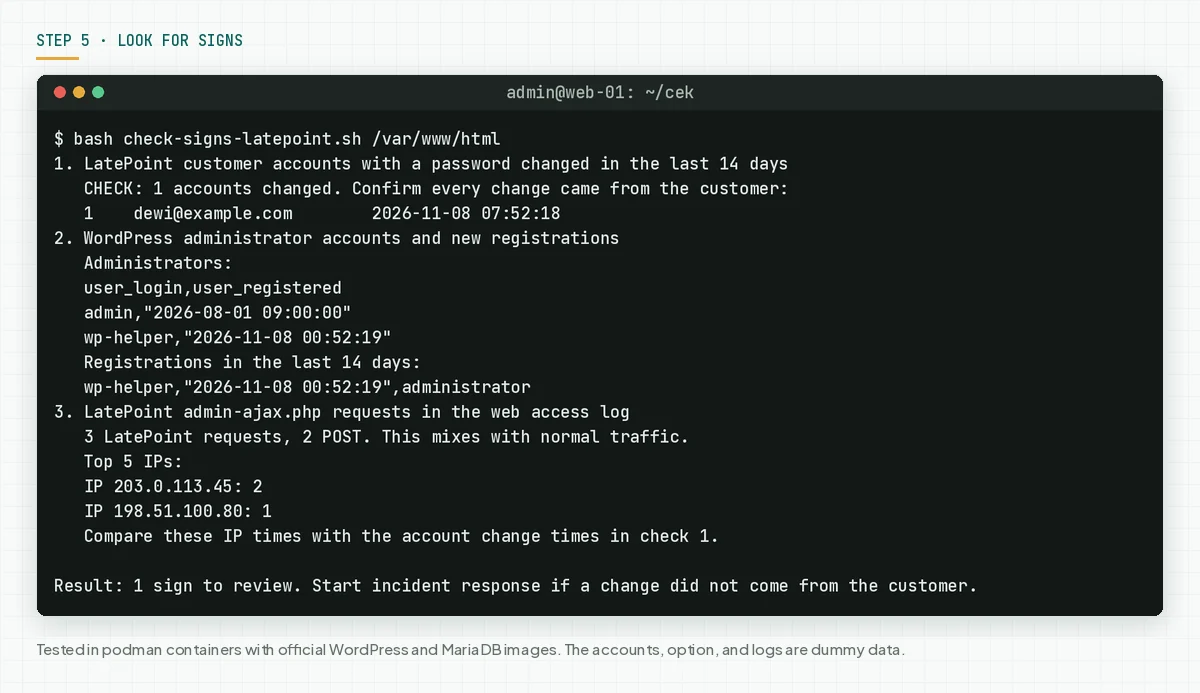
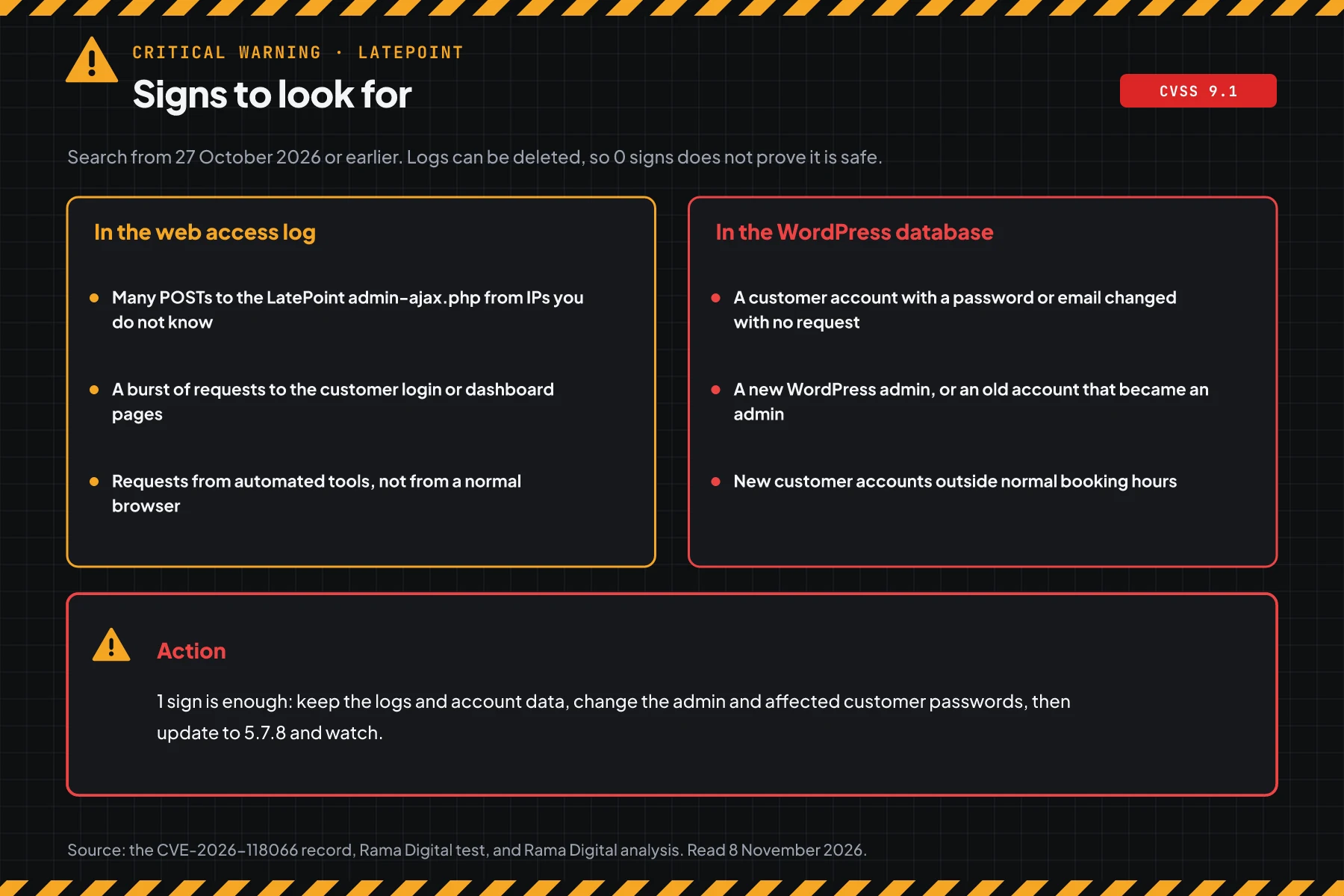
Normal visitors rarely request the LatePoint AJAX handler many times from 1 unknown IP. So a failed-then-success request pattern to that handler is worth a check. Compare the request times with the customer account change times.
Check the result: the script prints "no SIGNS", and the admin list has only people you know. Attackers can delete logs, so no sign does not prove that the site is safe.
When you find even 1 sign, turn off LatePoint first, then keep the web log and the customer account list as evidence. Reset the passwords of all customer and admin accounts, change the salts with wp config shuffle-salts so that all login sessions end, then update to 5.7.8 before the plugin is active again.
When the site holds customer data, Indonesian Law 27/2022 on Personal Data Protection requires a written notice within 3 times 24 hours after a personal data leak. Also read our security, privacy, and data protection guide.
Example: 1 morning of response for 3 LatePoint sites
This simulation uses dummy data. The site names, times, and results are not customer data.
| Time (WIB) | Dummy site | What we check | Result | Action |
|---|---|---|---|---|
| 08.00 | clinic-a (5.7.6, public booking) | Steps 1, 2, and 5 | VULNERABLE, 1 customer account changed, 3 handler requests from an unknown IP | Incident response, then update |
| 08.30 | salon-b (5.7.5, manual update) | Steps 1 and 2 | VULNERABLE, wp_users_as_customers option on | Turn off, then update to 5.7.8 |
| 09.00 | studio-c (5.7.8, automatic update) | Steps 1 and 5 | SAFE, clean log | Record the version and the next check date |
The lesson from the simulation: a vulnerable version with busy bookings needs step 5 first, not only an update. The update closes the flaw, but it does not remove access that was already used.
Who installs the patch
Patch responsibility changes with the type of service, so this table shows who must act today.
| Service type | Patch owner | What you do |
|---|---|---|
| Shared hosting with cPanel or another panel | You | Check the version in the dashboard, update the plugin, and ask the provider for the access log |
| Managed WordPress hosting | The provider and you | Update the plugin, then ask for written log proof |
| Your own VPS | Your team | Steps 1 to 5 |
| A site built by an agency or a freelancer | As in the maintenance contract | Ask for the version today, then ask for the update schedule |
Rama Digital recommendation: turn on automatic updates for the booking plugin, because this plugin holds customer data. When automatic updates are off, schedule a weekly version check and patch critical flaws within 24 hours.
Checklist for today
- List all sites with LatePoint. Owner: the web team. Evidence: a list of sites and versions.
- Check the version with step 1. Owner: the site admin. Evidence: the script output.
- Check the exposure with step 2. Owner: the site admin. Evidence: the script output.
- Make a backup, then update to 5.7.8. Owner: the site admin. Evidence: the version script output after the update.
- When the update waits, turn off the plugin with step 4. Owner: the site admin. Evidence: the inactive plugin list.
- Look for signs with step 5. Owner: the site admin and the security team. Evidence: the script output and the admin list.
- Turn on booking plugin automatic updates when they are off with no written reason.
Questions and answers
Do attackers already use this flaw?
On 8 November 2026, there are no attack reports and the flaw is not in CISA KEV. But the CVE record is public with a score of 9.1, so update today.
My site is on 5.7.5. Does 5.7.5 not already have a security fix?
The is_scalar hardening in 5.7.5 did not close this flaw. The CVE record marks all versions up to 5.7.6 as vulnerable. Update to 5.7.8.
I do not use the wp_users_as_customers option. Am I safe?
No. That option adds impact to a WordPress account, but a LatePoint customer account can still be taken over without the option. The update is still required.
Is it enough to turn off the plugin?
Deactivation stops the vulnerable code for now, and bookings stop too. The flaw stays in the old version, so this step is only a temporary layer, not a fix.
Can a firewall plugin replace the update?
No. A firewall can block some requests, but only the update closes the flaw in the plugin code. Use both.
How do I know a customer account was taken over?
Run step 5. Check customer accounts with a new change time, new WordPress admins, and repeated requests to the LatePoint AJAX handler from an unknown IP.
Next step
The limits that still apply: deactivation is not a fix, and an update does not remove access that an attacker already used. When your site shows a sign in step 5, or you need help with an audit and recovery, use Vibe Code Rescue. For 1 urgent issue today, book a 30-minute session.
Sources
- CVE-2026-118066 record: the technical summary, CVSS 3.1 score 9.1, CWE-287, the vulnerable version range, and the code references.
- Wordfence advisory: the researcher Jakub Herman, the 6 November 2026 disclosure date, and the safe version list.
- LatePoint plugin page: the 5.7.7 and 5.7.8 changelog, and the active install count.
- the CVE record API: the raw CVE record data, including the vendor timeline.
- CISA KEV: the CISA KEV status on 8 November 2026.
- RFC 5737: the documentation IP blocks for the dummy data in this article.
- Indonesian Law 27/2022 on Personal Data Protection: the duty to report a personal data leak.