Direct answer: PHP2Shell is the nickname for 2 critical flaws in the PHP engine: CVE-2026-109618 and CVE-2026-109619. Both can allow remote code execution (RCE) without a login, with a CVSS v4.0 score of 9.2. Update PHP to 8.5.12, 8.4.27, 8.3.36, or 8.2.35 tonight, then restart every PHP worker.
The flaws are in the PHP engine, not in your application code. So a WordPress site, a Laravel app, or an online store with clean code is still affected when the server runs an old PHP version.
Main condition: The risk applies to every PHP installation that serves web requests: PHP-FPM, Apache mod_php, php-cgi, FrankenPHP, and LiteSpeed. The php.net security advisory rates mod_php the highest risk. Limit: The temporary measures in this article only reduce exposure. They do not make a server safe. This article also contains no exploit code.
We read the php.net security advisory, the advisories GHSA-w8hw-w9fx-j79w and GHSA-6wmf-4rv5-p3rp, NVD, CVE.org, Ubuntu USN-8948-1, Sansec research, the Huntress write-up, the watchTowr FAQ, and the Palo Alto Networks Unit 42 brief on 21 October 2026, at about 15:00 UTC. We ran the commands in steps 1, 2, and 4 in test containers on the same date. Package status can change within hours, so repeat step 2 before you decide.
The problem: the flaws leaked before the patch
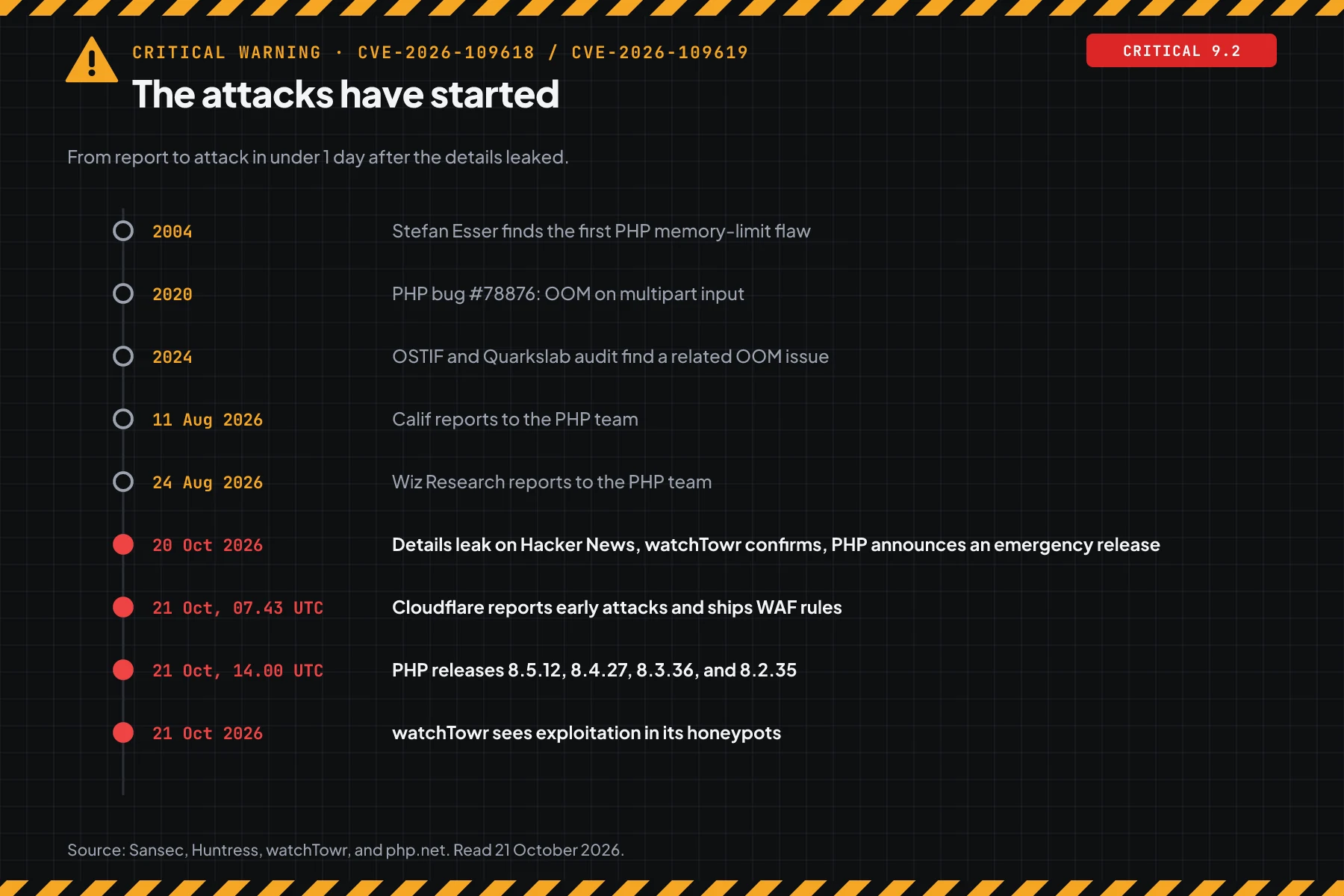
The details leaked on 20 October 2026, and early attacks came before the patch. Do not wait for the next maintenance window.
Usually the patch comes first and the details follow. This time the order was reversed. On the morning of 20 October 2026, a Hacker News post announced 2 critical PHP flaws, then it was removed. The Huntress write-up records that watchTowr confirmed the leak within a few hours.
The PHP team then moved the release 1 day ahead of the embargo date. According to Sansec research, Cloudflare reported early attacks on PHP sites on 21 October at 07:43 UTC, before the patch. The watchTowr FAQ reports exploitation in its honeypot network on the same day.
The scale is large. The Palo Alto Networks Unit 42 brief says Cortex Xpanse found more than 22.6 million exposed instances that are potentially vulnerable. Sansec research says Calif tests got into WordPress 7.1.2, Laravel 13.11, Magento 2.4.9, Drupal 11.4.3, phpMyAdmin 5.2.3, and Nextcloud 35.0.1 without a login.
Last week we covered the PwnEscape kernel flaw, which hits the kernel layer. PHP2Shell hits the layer above it: the runtime behind most small business websites.
How it works: unguarded request memory
An update to PHP 8.5.12, 8.4.27, 8.3.36, or 8.2.35 closes both flaws. Other measures only reduce exposure.
This section uses the summary from the official advisories. Its purpose is to help you pick the right measure, not to explain an attack.
CVE-2026-109618: RCE via OOM corruption
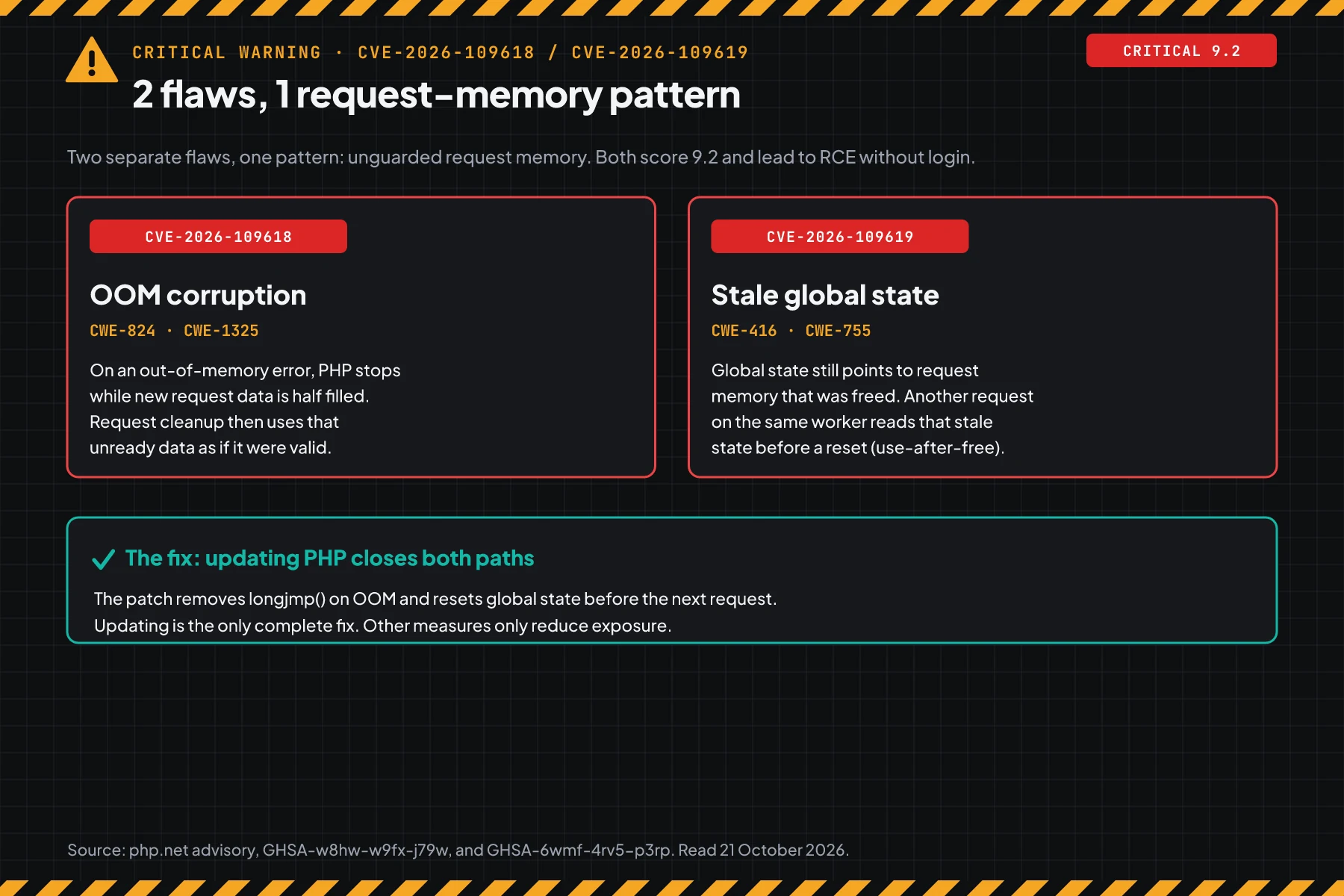
According to GHSA-w8hw-w9fx-j79w, PHP uses longjmp() to leave the current context when memory runs out (out of memory, OOM). In some contexts, new request data is only half filled at that moment. Request cleanup then reads that unready data as if it were valid.
The advisory says the OOM trigger can come from a multipart/form-data request body, which PHP parses before the application code runs. That is why many temporary measures target the memory limit and multipart requests.
CVE-2026-109619: RCE via stale global state
According to GHSA-6wmf-4rv5-p3rp, PHP keeps global state, such as error, session, and object state, that points into request memory for a short time. When a fatal error or an OOM stops a request, that state can stay without a reset. The next request on the same worker then reads the stale state (use-after-free).
The advisory names 2 confirmed cases: the session.upload_progress feature, which is on by default, and fatal_error_backtraces on PHP 8.5, which is also on by default. Both setting names come back in step 4.
What the patch changes
The patch for CVE-2026-109618 removes longjmp() on OOM. Instead, PHP stops cleanly at the next safe point, and stops hard with _exit() when memory reaches a second, higher limit. The patch for CVE-2026-109619 resets global state before the next request.
The php.net security advisory is clear: no complete measure exists other than an update. That is why every work order in this article starts with the update.
Who is at the highest risk
Apache mod_php has the highest risk. PHP-FPM is also vulnerable, and on shared hosting the provider installs the patch.
The risk level depends on how PHP runs on the server (the SAPI). This table summarises the php.net security advisory and both GHSA advisories.
| PHP run mode | Advisory status | What is proven | Typical place |
|---|---|---|---|
| Apache mod_php | Highest risk | Full RCE over HTTP with default limits, before any application code runs | Older VPS, hosting panels with Apache prefork |
| PHP-FPM | Vulnerable | RCE through the session upload progress path (109619) is validated | nginx + PHP-FPM, most modern VPS setups |
| FrankenPHP | Likely vulnerable | Source analysis, not validated | Laravel Octane, modern containers |
| LiteSpeed (LSAPI) | Candidate | Like FPM, a per-application exploit is not validated | Shared hosting with LiteSpeed or CyberPanel |
| php-cgi | At risk | Listed as affected by php.net | Windows servers and older setups |
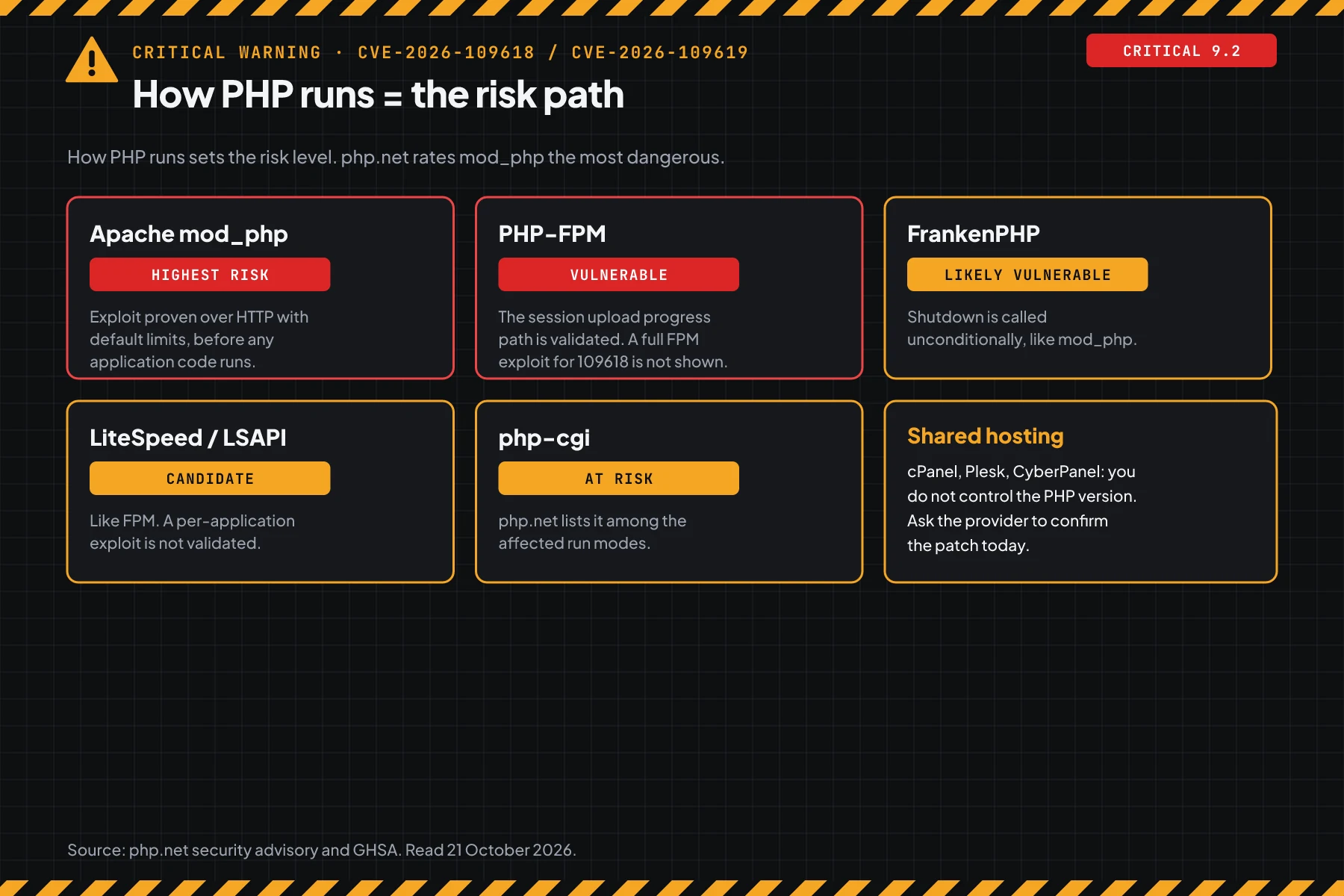
On shared hosting, you do not control the PHP version. The provider must install the patch. You can still check the version with step 1, then ask the provider for a written confirmation.
Versions that carry the fix
The PHP team released 4 versions on 21 October 2026. For branches past their support period, the PHP team gives only a minimal source backport, with no official binary.
| Branch | Fixed version | Status | Note |
|---|---|---|---|
| 8.5 | 8.5.12 | Supported | Also set fatal_error_backtraces=0 until you update. |
| 8.4 | 8.4.27 | Supported | Update now. |
| 8.3 | 8.3.36 | Supported | Ubuntu 24.04: 8.3.6-0ubuntu0.24.04.13. |
| 8.2 | 8.2.35 | Security fixes until 31 December 2026 | Plan a move to 8.4 or 8.5. |
| 8.1, 8.0, 7.4 | No official release | Source backport from the PHP team | Ubuntu 22.04 php8.1: 8.1.2-1ubuntu2.28. |
| 7.3 and older, 5.x | No patch | End of life | Upgrade the branch, or take the site off the internet. |
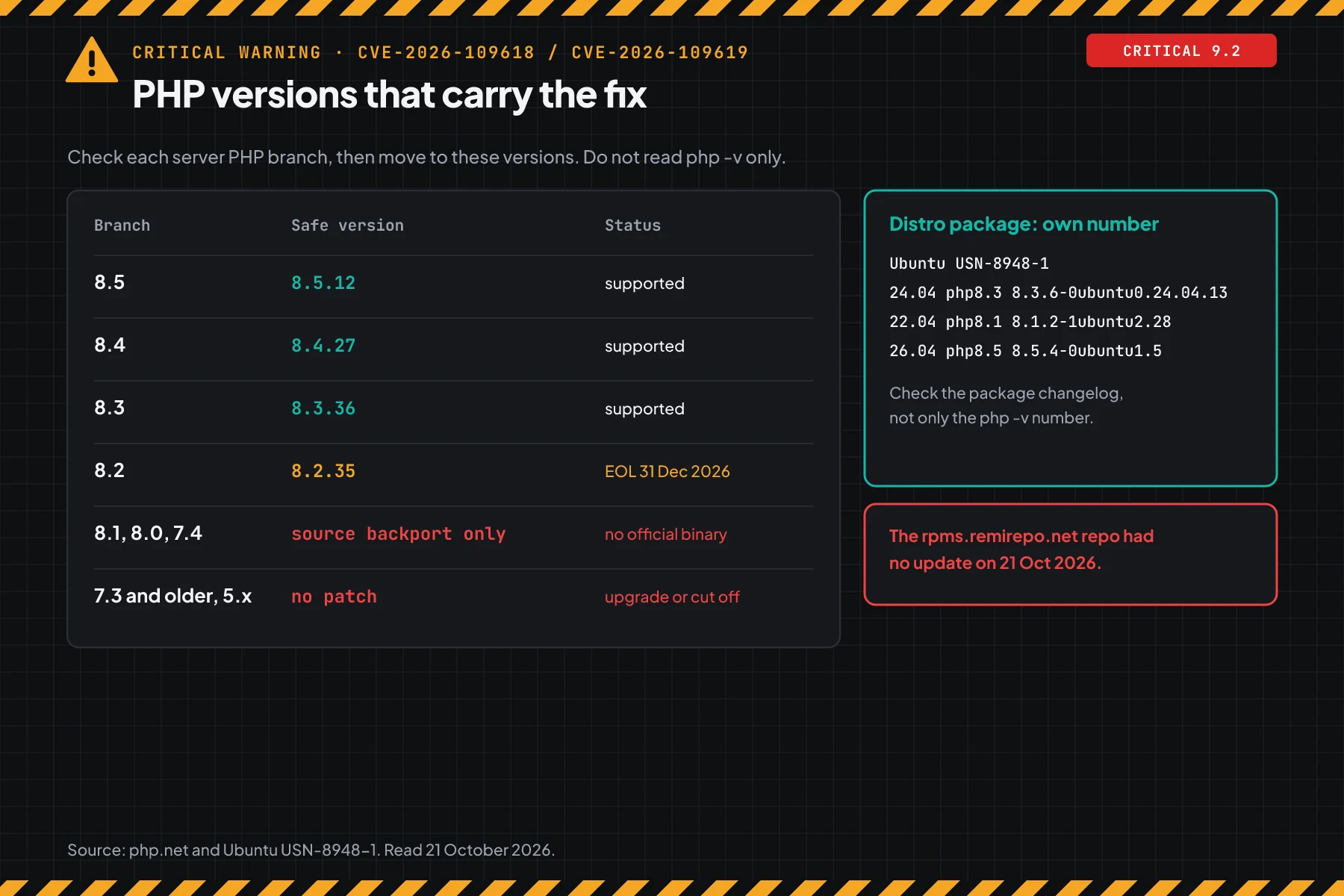
Linux distro packages use their own version numbers. Ubuntu USN-8948-1 came out on 21 October 2026 at 13:56 UTC for php8.1 (22.04), php8.3 (24.04), and php8.5 (26.04). Those numbers differ from the upstream numbers, so step 2 shows how to prove the fix.
At 15:00 UTC, the Debian tracker page for this CVE was not available yet. The php.net security advisory also says the rpms.remirepo.net repo had no update on release day, and it recommends distro packages or a source build.
Prerequisites
- SSH access to every server that runs PHP, with
sudorights. - A list of every place where PHP runs: VPS, containers, hosting panels, staging servers, and vendor applications.
- Access to the web server configuration (nginx or Apache) and the PHP-FPM pools.
- A fresh backup or snapshot of the server before you change packages.
- The support contact of your hosting provider, when you use shared or managed hosting.
Step 1: Check the PHP version that serves the web
Open a terminal on the server, then run the commands below. The second command compares the PHP version with the fixed version for its branch, then prints the result on 1 line.
php -v | head -1
php -r '$fix = ["8.2"=>"8.2.35", "8.3"=>"8.3.36", "8.4"=>"8.4.27", "8.5"=>"8.5.12"];
  $b = PHP_MAJOR_VERSION.".".PHP_MINOR_VERSION; $v = PHP_VERSION;
  if (!isset($fix[$b])) { echo "$v: branch without an official release. Upgrade.\n"; }
  elseif (version_compare($v, $fix[$b], "<")) { echo "$v: VULNERABLE. Update to $fix[$b].\n"; }
  else { echo "$v: has the upstream fix.\n"; }'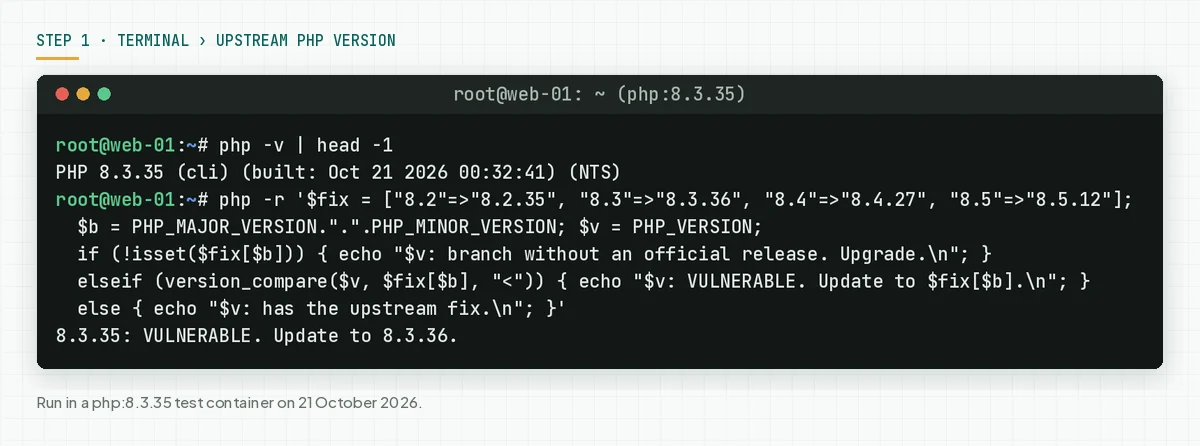
The CLI and the web can use different PHP builds. To confirm the version that serves the site, put a temporary file in the web root, open it in a browser, then delete the file at once.
<?php // check.php: open it in a browser, then delete this file
echo PHP_VERSION, ' ', PHP_SAPI, "\n";
Check the result: The last line says "has the upstream fix", or you continue to step 2 when PHP comes from a distro package. A "VULNERABLE" result on a distro package can be wrong, because distros install backports without a change to the version number.
Step 2: Check the fix in the distro package
On Ubuntu and Debian, check the package number and its changelog. The changelog of a fixed package contains both CVE numbers.
dpkg-query -W -f='${Package} ${Version}\n' 'php*-common'
zgrep -o 'CVE-2026-10961[89]' /usr/share/doc/php8.3-common/changelog.Debian.gz | sort -u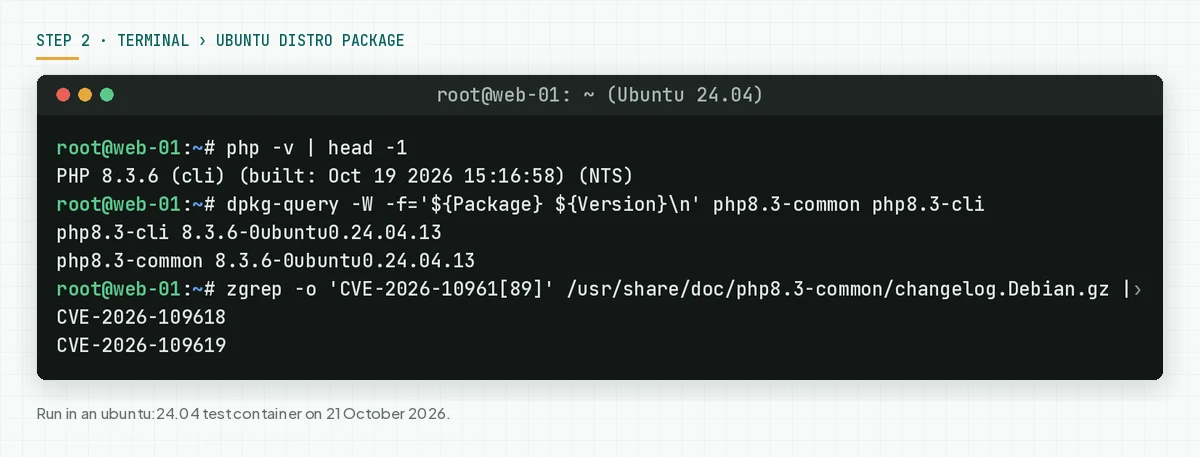
On Rocky Linux, AlmaLinux, or RHEL, use these commands.
rpm -q php-common
rpm -q --changelog php-common | grep -m2 -o 'CVE-2026-10961[89]'
Check the result: The changelog contains CVE-2026-109618 and CVE-2026-109619, and the package number is equal to or newer than Ubuntu USN-8948-1. When the changelog is empty, your package does not carry the fix.
Users of third-party repos, such as the ondrej/php PPA, must check that changelog too. Do not assume safety before both CVEs appear.
Step 3: Update PHP and restart every worker
Update the PHP packages, then restart every PHP service. Old workers keep the old code until they restart.
sudo apt update
sudo apt install --only-upgrade 'php8.3*'
sudo systemctl restart php8.3-fpm
sudo systemctl restart apache2   # when you use mod_php
On the RHEL family, use these commands.
sudo dnf upgrade 'php*'
sudo systemctl restart php-fpm httpd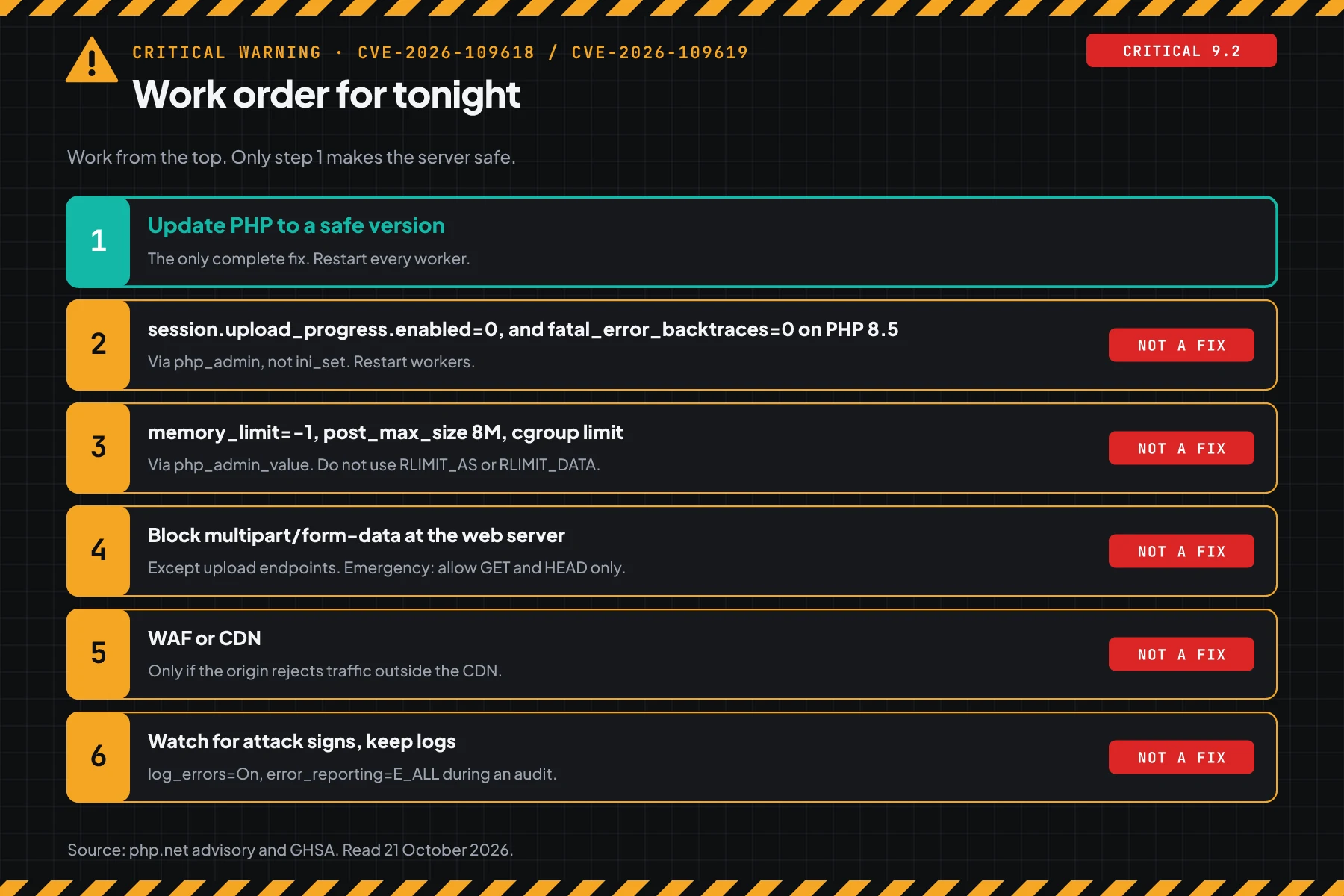
For containers, rebuild the image from a base image that has the fixed version. In our test at 15:00 UTC, the latest php:8.3 tag on Docker Hub was still 8.3.35, so wait for the new tag or build from source. For Windows, download the new binaries from php.net.
For cPanel, Plesk, or CyberPanel, update through the panel or ask the provider. The Plesk advisory holds the Plesk PHP build status.
Check the result: Repeat steps 1 and 2. The result must say "has the upstream fix", or the changelog must contain both CVEs. Also confirm that systemctl status shows a start time after the update.
Step 4 (optional): Apply temporary measures when you cannot update yet
Use this step only for a short gap until the update is done. The php.net security advisory says these measures reduce exposure on specific paths, but they do not make an installation safe.
Write the settings in a PHP-FPM pool file, for example /etc/php/8.3/fpm/pool.d/zz-php2shell.conf. Use php_admin_*, so the application cannot change them. Do not rely on ini_set() or .user.ini.
[www]
php_admin_flag[session.upload_progress.enabled] = off
php_admin_value[memory_limit] = -1
php_admin_value[post_max_size] = 8M
; PHP 8.5 only:
php_admin_flag[fatal_error_backtraces] = off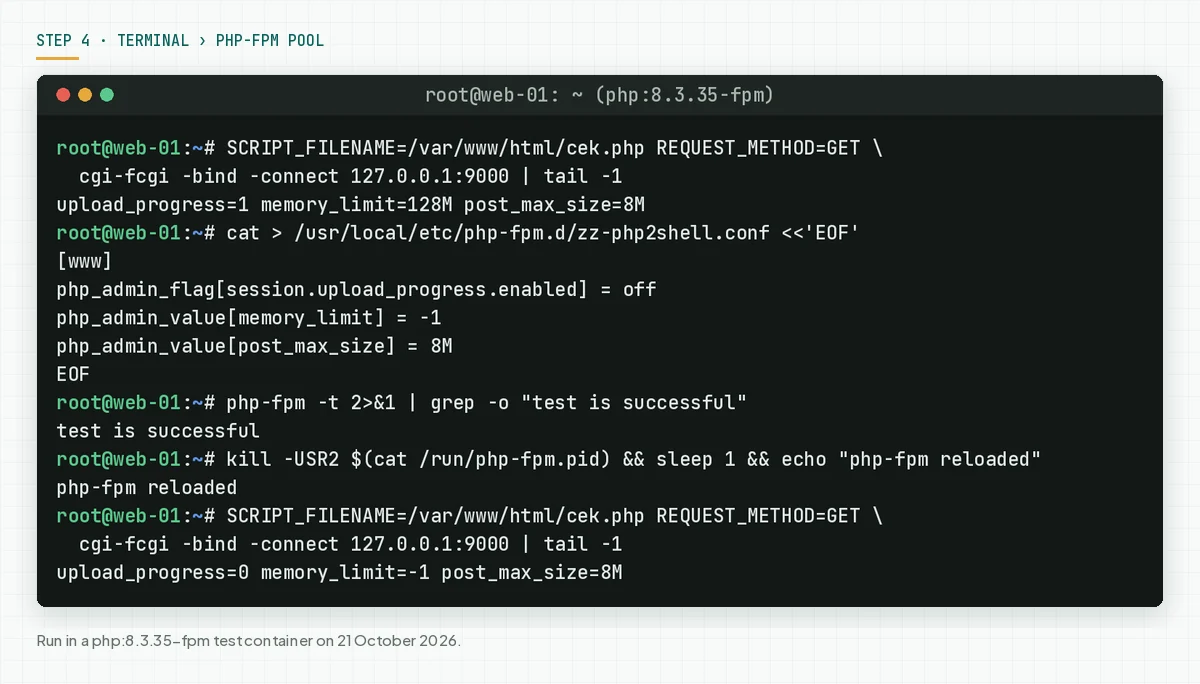
The value memory_limit=-1 lets 1 request use all server memory. The php.net security advisory recommends a container or cgroup limit instead, and it forbids RLIMIT_AS or RLIMIT_DATA. For mod_php, write the same values in php.ini, then restart Apache.
When the application does not use uploads, block multipart requests at the web server. nginx example from Sansec research:
if ($http_content_type ~* "multipart/form-data") {
    return 403;
}
Apache example, in every VirtualHost that runs PHP:
RewriteEngine On
RewriteCond %{HTTP:Content-Type} multipart/form-data [NC]
RewriteRule ^ - [F]
This block can break uploads and some checkout forms. Test 1 order after you apply it. The Mattias Geniar mitigation notes add that on mod_php, this block alone is not enough.
curl -s -o /dev/null -w '%{http_code}\n' -F a=b https://your-domain.com/Check the result: A request through an FPM worker shows upload_progress=0, and the curl command above returns 403. Read the values from a web request, not from php -i in the CLI.
Step 5: Check for signs that the server was touched
These attacks run below the application layer, so application logs can stay quiet. Sansec research and the Huntress write-up list signs in the web server log, in processes, and in files.
grep -h -E 'Allowed memory size|PHP Fatal error' /var/log/php*-fpm.log /var/log/apache2/error.log | tail -50
awk '$9 == 500' /var/log/nginx/access.log | wc -l
ps -eo pid,ppid,user,etime,cmd --forest | grep -A3 -E 'php-fpm|apache2|httpd'
find /var/www -name '*.php' -newermt '2026-10-20' -ls
crontab -l -u www-data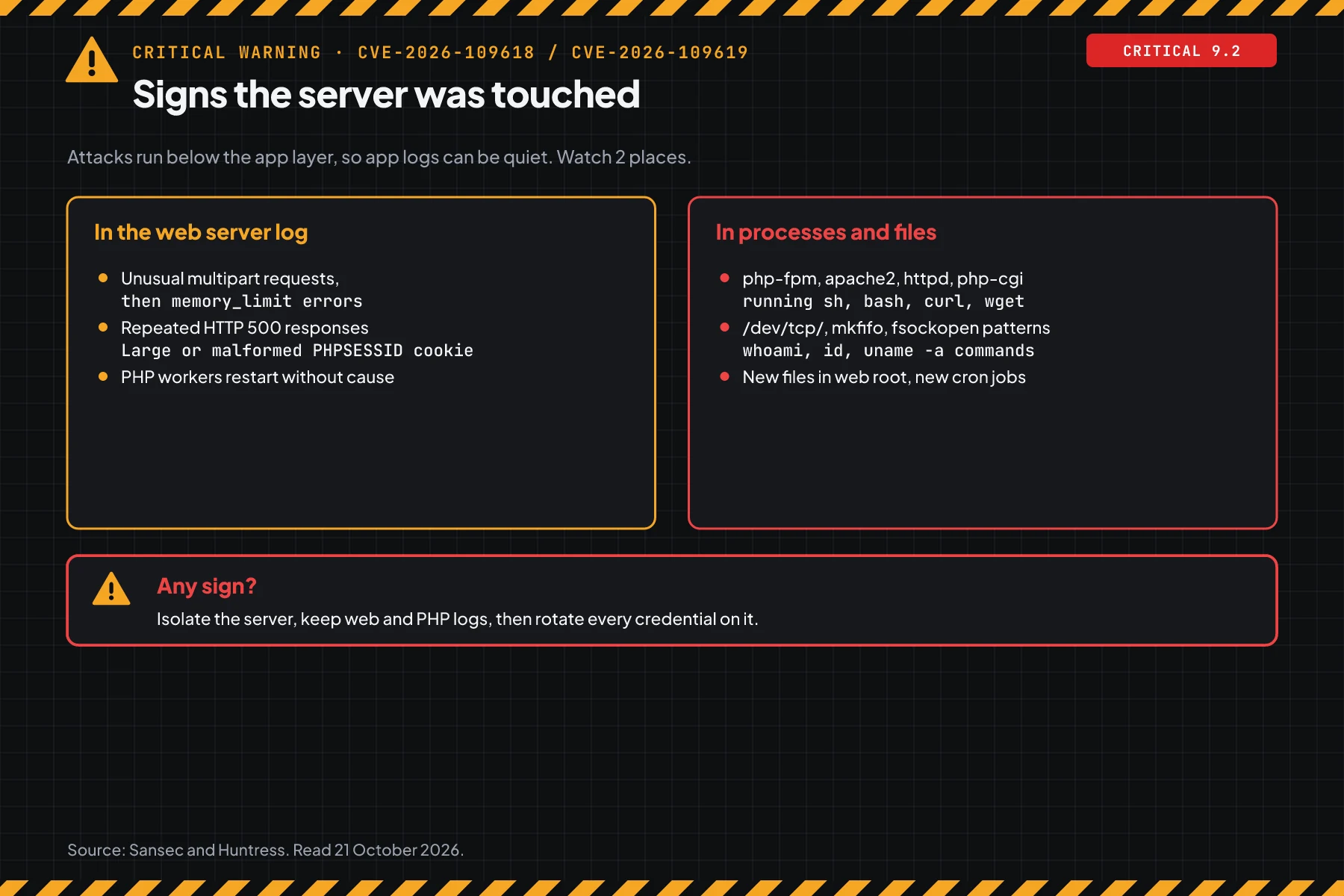
Look for 4 patterns. First, unusual multipart requests followed by memory_limit errors or repeated HTTP 500 responses. Second, PHP workers that run sh, bash, curl, or wget.
Third, new PHP files in the web root since 20 October 2026. Fourth, new cron jobs or accounts that belong to the web user.
Check the result: No shell process comes from a PHP worker, and no unknown PHP file is new. When you see a sign, isolate the server, keep the web and PHP logs, then rotate every credential stored on that server.
Example: 1 night of response for 3 servers
This simulation uses dummy data. Server names, times, and results are not customer data.
| Time (UTC+7) | Dummy server | What we check | Result | Action |
|---|---|---|---|---|
| 21:15 | web-shop (Ubuntu 24.04, FPM) | Step 2: changelog | Both CVEs missing | apt upgrade, restart php8.3-fpm |
| 21:30 | web-shop | Repeat step 2 | 8.3.6-0ubuntu0.24.04.13, both CVEs present | Done, keep the proof |
| 21:40 | web-blog (shared hosting) | Step 1: check.php | 8.2.30, VULNERABLE | Ticket to the provider, ask for a written patch time |
| 21:50 | web-legacy (CentOS 7, PHP 7.4) | Step 1 | Branch without an official release | Step 4 measures, read-only mode, migration date |
| 22:10 | All | Step 5 | No shell process from workers | Keep the output as proof |
The lesson from the simulation: servers with distro packages finish first. Servers with an old PHP branch need a business decision, not only a terminal command.
Who installs the patch
The patch owner differs by hosting type. This table tells you who must act tonight.
| Hosting type | Owner of the PHP version | What you do |
|---|---|---|
| VPS or own server | You | Steps 1 to 5 |
| Shared hosting (cPanel, CyberPanel, Plesk) | Provider | Step 1, then ask for a written patch confirmation |
| Managed WordPress or managed hosting | Provider | Ask for a written confirmation, then step 5 with the logs you can see |
| Container (Docker, Kubernetes) | The team that builds the image | Rebuild the image, redeploy, then step 1 inside the container |
| Vendor application with bundled PHP | Vendor | Ask the vendor, and limit internet access until a patch exists |
Rama Digital recommendation: when your site handles payments or customer data and the provider does not answer within a few hours, switch to read-only mode or take the site down for a short time. Also read about access rights, approval, and audit logs for a server tool for related controls.
Checklist for tonight
- List every PHP server. Owner: server admin. Proof: a host list with the PHP branch.
- Check the web version with step 1. Owner: server admin. Proof: command output per host.
- Check the package changelog with step 2. Owner: server admin. Proof: 2 CVE lines per host.
- Update and restart every worker. Owner: server admin. Proof: the service start time after the update.
- Get a written confirmation from the hosting provider. Owner: business owner. Proof: an email or a support ticket.
- Apply the step 4 measures on servers that cannot update yet. Owner: server admin. Proof: the FPM request output and the 403 code.
- Check for attack signs with step 5. Owner: server admin. Proof: command output, kept with the logs.
- Stop when every server passes step 2 and step 5 finds no sign. When you find a sign, stop the patch work and start incident response.
Frequently asked questions
Is my WordPress site affected when the plugins are up to date? Yes, when the server PHP version does not carry the fix. The flaws are in the PHP engine, so WordPress and plugin updates do not close them. Check the PHP version with step 1.
Does php -v with 8.3.6 mean my server is vulnerable? Not always. Ubuntu 24.04 keeps the 8.3.6 number with backported fixes. Check the package number and changelog with step 2 for real proof.
Is a WAF or Cloudflare enough protection? No. Sansec research calls a WAF a stopgap for some request shapes, not a fix. A WAF also helps only when the origin rejects traffic that does not come through the CDN.
My server still runs PHP 7.4. What are my options? The PHP team gives only source backports for 7.4, 8.0, and 8.1, with no official binaries. Your options: a backported package from an LTS vendor, a PHP branch upgrade, or removing the server from the internet.
Is it enough to turn off session.upload_progress? No. Sansec research quotes a warning that this setting alone is not enough. It closes 1 confirmed path, not every variant.
How do I know whether the server was broken into? Look for shell processes from PHP workers, new PHP files in the web root, and new cron jobs of the web user, as in step 5. Clean logs do not prove that the server is safe.
Next step
The limit that still applies: an update closes these 2 flaws, but it does not remove access that an attacker may have planted before the patch. When your server shows a sign in step 5, or you need help to check a PHP application after an incident, use Vibe Code Rescue for an audit and stabilisation. For 1 urgent issue tonight, Book a 30-minute session. Also read about where a server process should run for further checks.
Sources
- php.net security advisory, 20 and 21 October 2026.
- GHSA-w8hw-w9fx-j79w: RCE via OOM corruption, CVE-2026-109618.
- GHSA-6wmf-4rv5-p3rp: RCE via stale global state, CVE-2026-109619.
- NVD and CVE.org: CVE records, CVSS v4.0 9.2.
- Ubuntu USN-8948-1: Ubuntu PHP packages.
- Sansec research: timeline, affected applications, measures, and attack signs.
- Huntress write-up: the leak, detection signs, and inventory.
- watchTowr FAQ: exploitation in honeypots.
- Palo Alto Networks Unit 42 brief: 22.6 million exposed instances.
- Mattias Geniar mitigation notes: web server measure tests.
- Help Net Security: patch release summary.
- Plesk advisory: PHP status on Plesk.