Direct answer: CVE-2026-19868 lets SonicOS SSL VPN accept logins that skip SAML and MFA. The flaw only affects firewalls that use SAML for SSL VPN logins. CISA added it to the KEV catalog on 6 November 2026. Today, check the SonicOS version, move to 7.3.4-7013 (Gen7) or 8.2.3-8015 (Gen8), then find SSL VPN logins that skip the IdP.
According to the SonicWall advisory SNWLID-2026-0014, a user with valid credentials for another login method can skip the SAML controls. The MFA that the IdP asks for through SAML is skipped too. SonicWall writes that its PSIRT team examined a report that this flaw is used in attacks.
Main condition: The SonicWall score for CVE-2026-19868 is 7.1, below 9. We still write this warning because the flaw is on KEV and skips the login and MFA. Limit: This article has no request content, no payload, and no attack sequence.
We read the SonicWall advisory SNWLID-2026-0014, the CVE-2026-19868 record, CISA KEV, the SonicOS 7.3.4-7013 release notes, and the SonicOS 8.2.3-8015 release notes on 7 November 2026, from 06.35 to 06.57 WIB. We ran the scripts of steps 1 and 5 in a podman container with the official Debian image on the same date. We do not have a SonicWall firewall, so we wrote the web interface steps from the SonicWall documentation.
The problem: SAML and MFA do not guard every way in
Teams that set up SAML and MFA for SSL VPN think that every login goes through the IdP. This flaw breaks that idea.
Many offices use SAML so that SSL VPN logins go through Microsoft Entra ID, Okta, or Google, with MFA. According to the SonicWall KB on SAML for SSL VPN, the admin selects SAML as the Authentication Type in the SSL VPN server settings. The default group for SSL VPN access is SSLVPN Services.
The same firewall can also keep local users, LDAP users, or RADIUS users. According to the SonicWall advisory SNWLID-2026-0014, valid credentials for another login method can skip the SAML controls on SSL VPN. Rama Digital analysis: an old leaked password from one of those methods can become a way in with no MFA.
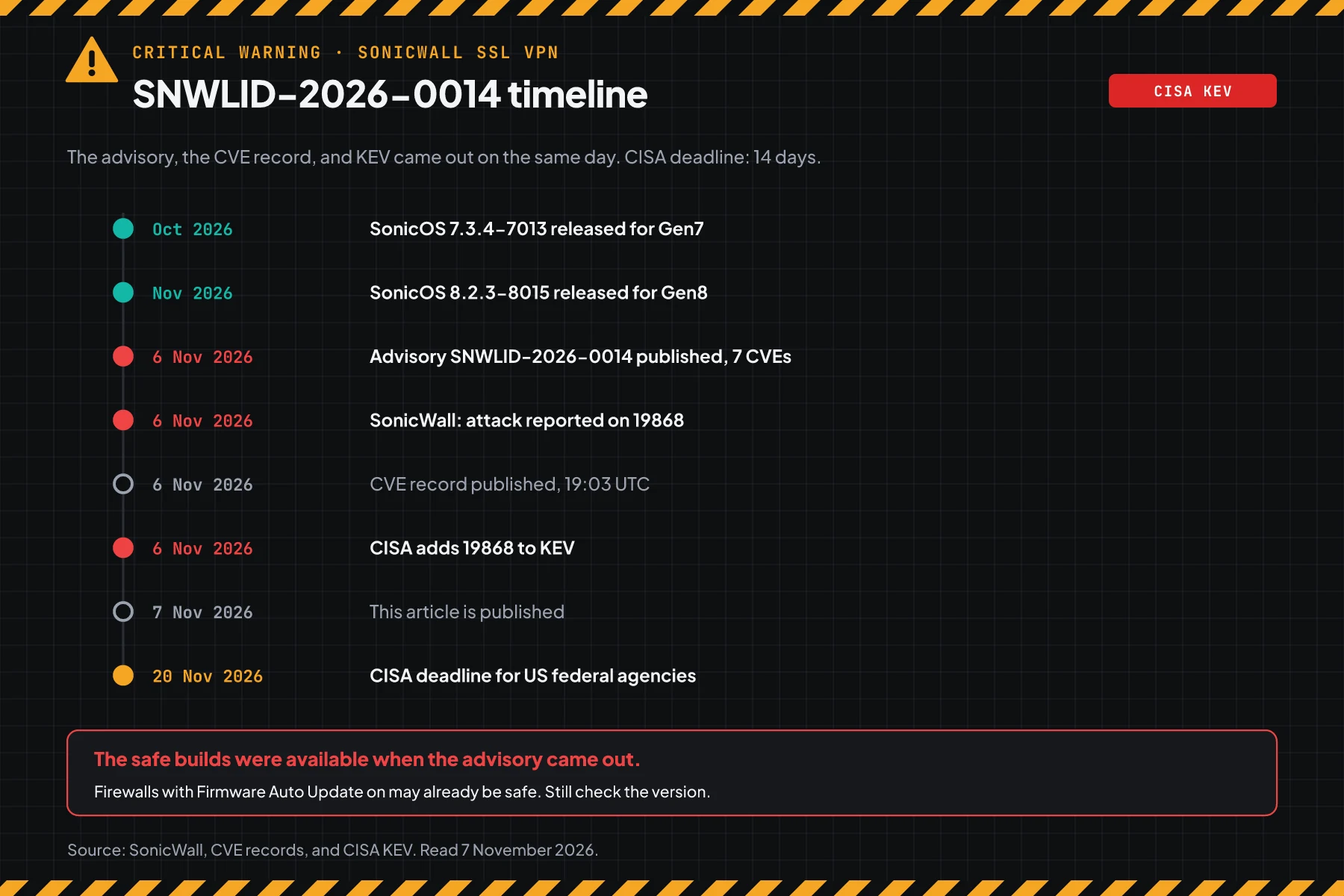
The advisory, the CVE record, and the KEV entry came out on 6 November 2026. The CISA deadline for US federal agencies is 20 November 2026. The safe builds were there when the advisory came out: 7.3.4-7013 from October 2026 and 8.2.3-8015 from November 2026.
How it works: a side-door login
SAML only guards the door that uses SAML. This flaw lets credentials for another method open the same SSL VPN.
This section uses the official summary. Its purpose is to help you choose the correct steps, not to explain an attack.
Summary from SonicWall and CISA
According to the SonicWall advisory SNWLID-2026-0014, CVE-2026-19868 is an authentication enforcement flaw in the SonicOS SSL VPN service. Its type is CWE-308, the use of single-factor authentication. A successful exploit can also skip the MFA that SAML enforces.
SonicWall writes that this flaw only affects the SSL VPN interface or service when SAML is on for SSL VPN logins. CISA KEV uses the same description. The KEV ransomware use status is "Unknown".
7 CVEs in the same advisory
Advisory SNWLID-2026-0014 holds 7 CVEs. The same upgrade closes all of them.
| CVE | Flaw type | SonicWall CVSS 3.1 | Note |
|---|---|---|---|
| CVE-2026-19868 | SAML and MFA skipped on SSL VPN (CWE-308) | 7.1 | On CISA KEV, used in attacks |
| CVE-2026-107155 | Permissive cross-domain policy in the management interface (CWE-942) | 8.8 | No login, needs user interaction |
| CVE-2026-107154 | Session validation in the management interface (CWE-291) | 8.8 | No login, needs user interaction |
| CVE-2026-82308 | Heap overflow in SSL VPN before login (CWE-122) | 7.5 | DoS |
| CVE-2026-77708 | Stack overflow in the TACACS+ client (CWE-121) | 5.9 | DoS |
| CVE-2026-77709 | Heap overflow in the TACACS+ client (CWE-122) | 5.9 | DoS |
| CVE-2026-19703 | Weak password hash on NSv (CWE-916, CWE-798) | 5.2 | Needs local access |
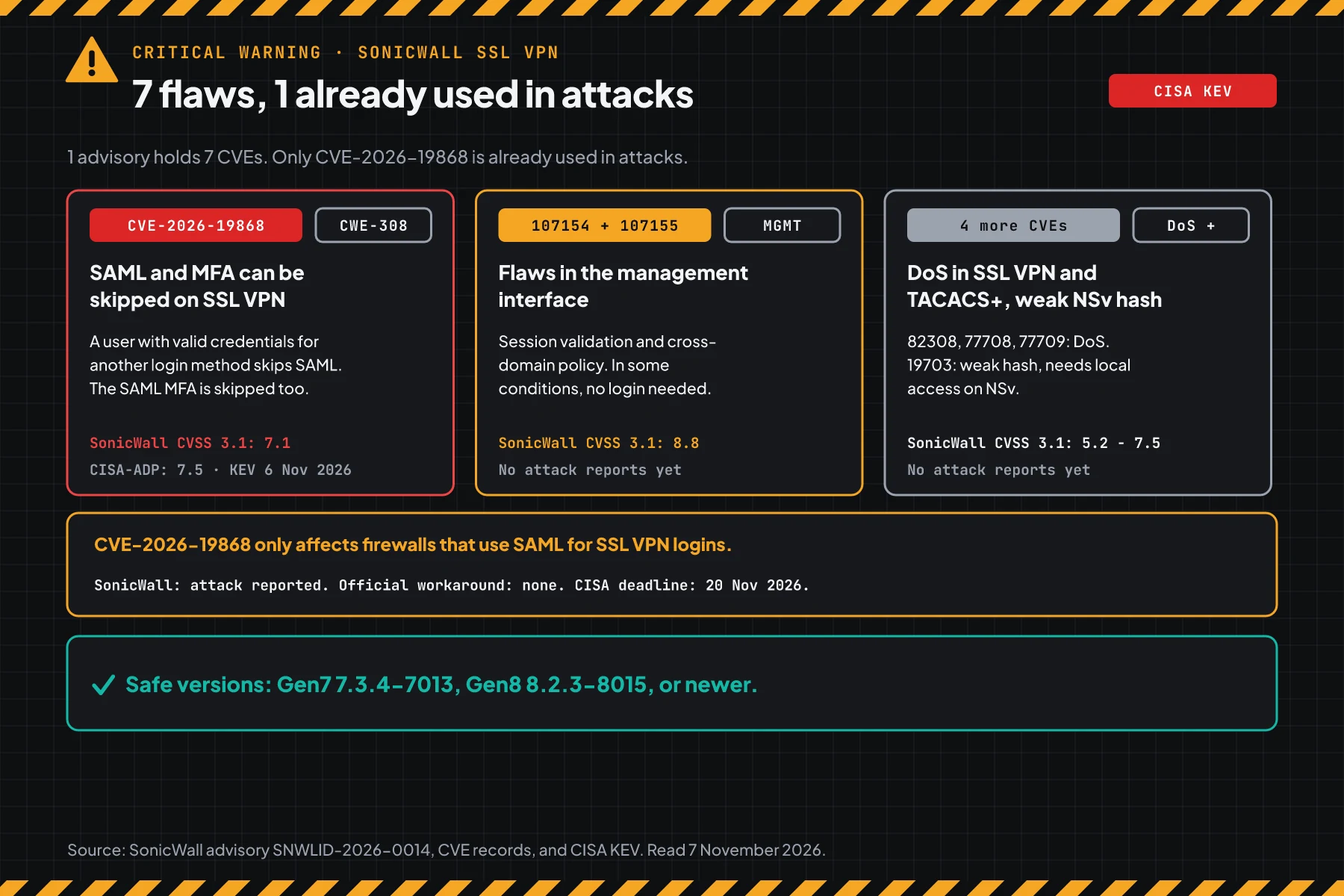
The score is different for each source. SonicWall gives CVE-2026-19868 a score of 7.1 with low privileges required (PR:L). CISA-ADP in the CVE-2026-19868 record gives 7.5 with no privileges required (PR:N). Write the score with its source.
Exploitation status on 7 November 2026
SonicWall asks customers to upgrade to the latest release as soon as possible. CISA records the SSVC status "Exploitation: active", "Automatable: no", and "Technical Impact: partial". The advisory and KEV give no IOCs, no actor name, and no victim count.
Rama Digital analysis: the 7.1 score misleads you when you read it alone. This flaw skips the login and MFA on an edge device, and attackers already use it. Use the KEV status to set the priority, not a single score.
Who has the highest risk
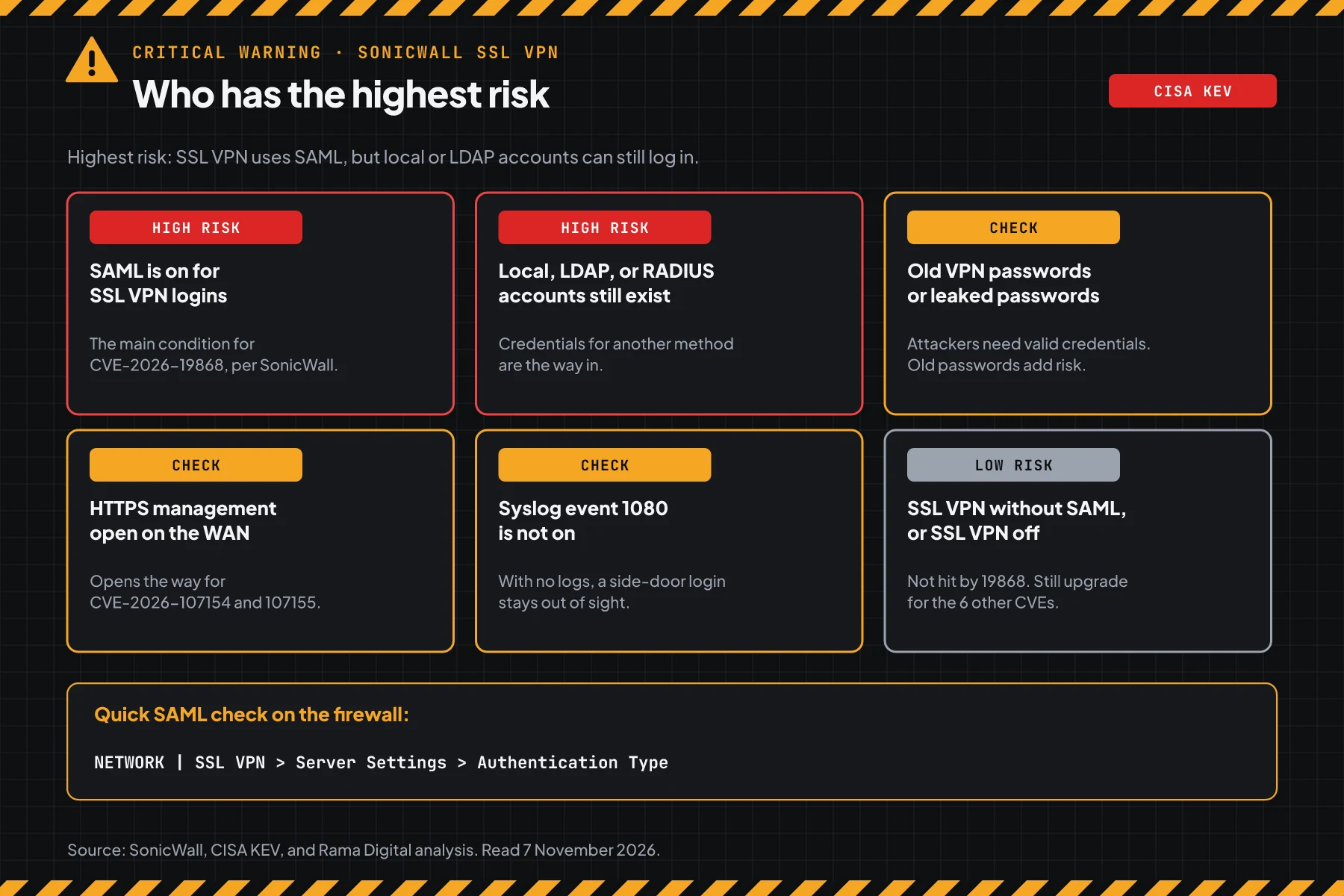
Offices that open SonicWall SSL VPN to the internet and use SAML for the login have the highest risk.
This table summarises the SonicWall advisory SNWLID-2026-0014 and our analysis.
| Firewall condition | Risk | Reason |
|---|---|---|
| SAML is on for SSL VPN logins | High | The main condition for CVE-2026-19868, per SonicWall |
| Local, LDAP, or RADIUS users are still in the SSLVPN Services group | High | Rama Digital analysis: credentials for another method are the way in |
| Old VPN passwords, or leaked passwords | Check | Attackers need valid credentials |
| HTTPS management open on the WAN | Check | The way in for CVE-2026-107154 and CVE-2026-107155 |
| Event 1080 is not sent to syslog | Check | A side-door login stays out of sight |
| SSL VPN without SAML, or SSL VPN off | Low | Not hit by CVE-2026-19868, still upgrade for the 6 other CVEs |
Firewalls and VPNs sit at the edge of the network. One login that gets through gives access to the office network from outside. The same pattern shows in the Ivanti Connect Secure VPN chain and in the Keycloak SAML flaw CVE-2026-117691: a login flaw on an edge system is the first target.
Vulnerable and safe versions
The advisory uses 2 version lines: 7.3.x for Gen7 and 8.2.x for Gen8. Match your model and version to this table.
| Model | Status on 7 November 2026 | Move to |
|---|---|---|
| Gen7 TZ, NSa, NSsp (TZ 270 to 670, NSa 2700 to 6700, NSsp 10700 to 15700) | 7.3.3-7015 and older: vulnerable | 7.3.4-7013 or newer |
| Gen7 NSv 270, 470, 870 (ESX, KVM, Hyper-V, AWS, Azure) | 7.3.3-7015 and older: vulnerable | 7.3.4-7013, check availability in MySonicWall |
| Gen8 TZ, NSa (TZ 80 to 680, NSa 2800 to 5800) | 8.2.2-8015 and older: vulnerable | 8.2.3-8015 or newer |
| Gen8 NSv XS, S, M, L (ESX, KVM, Hyper-V, AWS, Azure) | 8.2.2-8015 and older: vulnerable | 8.2.3-8015 or newer |
| Gen6 and SonicOS 6.5 | Not listed in the advisory | Check the support status of the device |
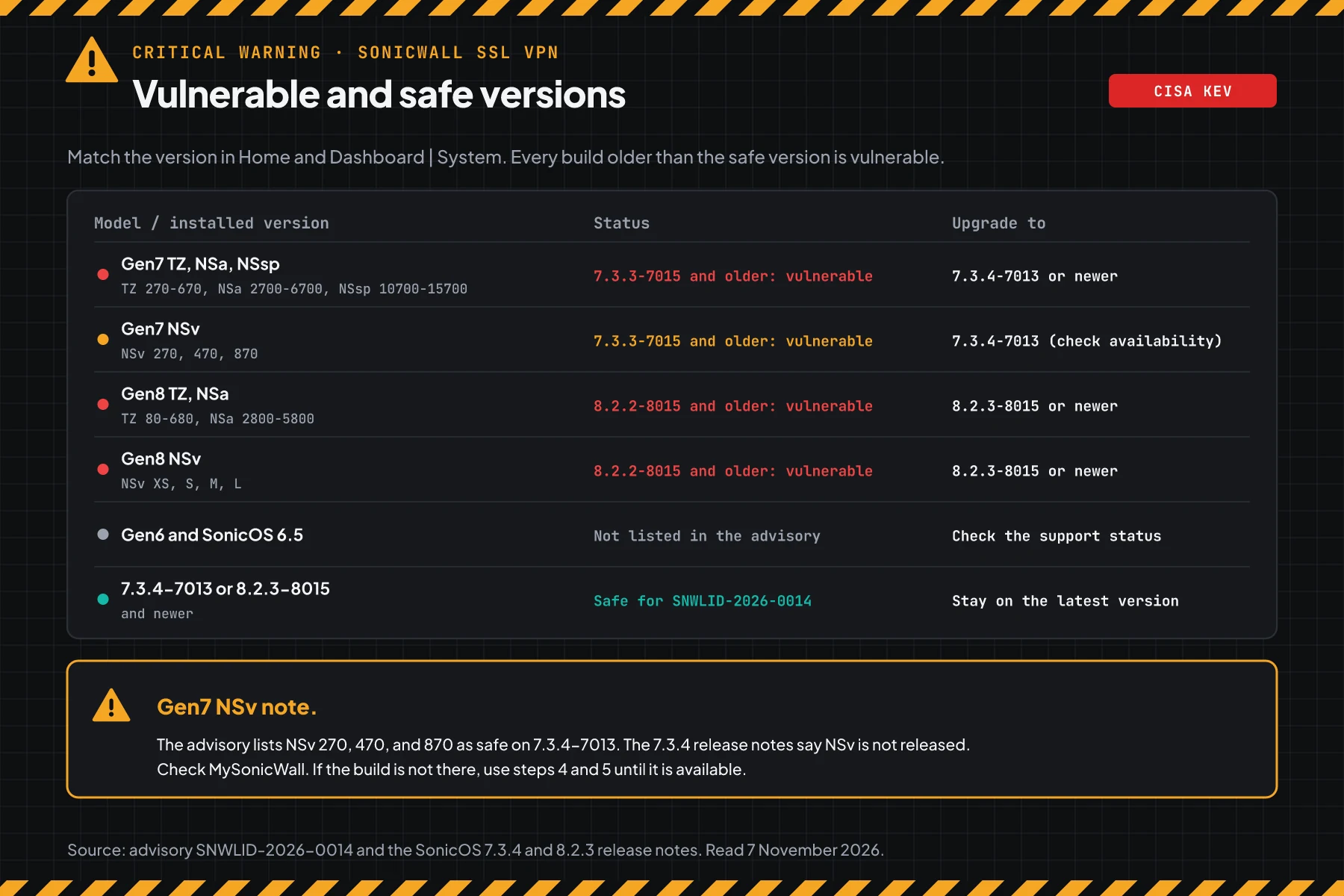
The table data comes from the SonicWall advisory SNWLID-2026-0014. Gen7 is safe on 7.3.4-7013 and newer. Gen8 is safe on 8.2.3-8015 and newer. The advisory does not list Gen6 or SonicOS 6.5.
Gen7 NSv note: The advisory lists NSv 270, 470, and 870 in the 7.3.4-7013 safe builds. The SonicOS 7.3.4-7013 release notes say that SonicOS 7.3.4 for NSv is not released and is planned for later. Rama Digital analysis: check MySonicWall before the maintenance window. If the NSv build is not there, use steps 4 and 5 until it is available.
Before you start
- Admin access to the web interface of each SonicWall firewall, including standby units and NSv.
- A MySonicWall account to download firmware 7.3.4-7013 or 8.2.3-8015.
- A maintenance window. The reboot ends the active SSL VPN sessions.
- Access to the syslog server or SIEM that receives the firewall logs.
- Access to the IdP sign-in log (Entra ID, Okta, or Google) for the SSL VPN app.
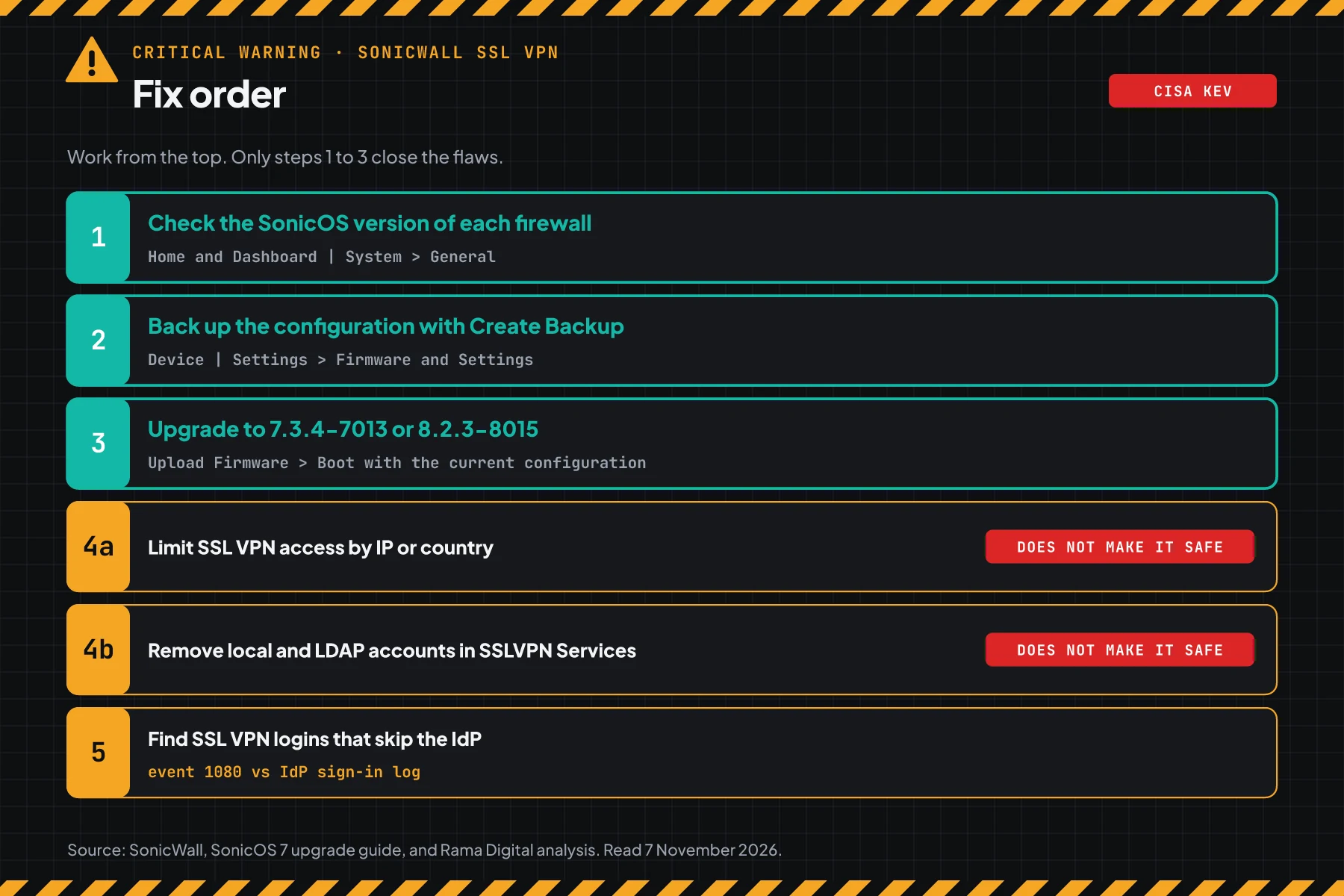
Step 1: Check the SonicOS version of each firewall
Log in to the firewall web interface, then open Home and Dashboard | System. Write down the model and the SonicOS version in the General section. The official guide is the SonicWall firmware version KB.
For many firewalls, save this script as check-version-sonicos.sh. The script compares each version with the advisory table and prints the target version. The script does not contact the firewall.
#!/usr/bin/env bash
# Check SonicOS versions against SonicWall advisory SNWLID-2026-0014 (CVE-2026-19868 and 6 more CVEs).
# Data: SonicWall advisory of 6 November 2026, SonicOS 7.3.4-7013 and 8.2.3-8015 release notes.
# Use: bash check-version-sonicos.sh "TZ 470 7.3.3-7015" "NSa 2800 8.2.3-8015"
#   or: bash check-version-sonicos.sh < firewalls.txt   (1 firewall per line: model, then version)
# Copy the version from Home and Dashboard | System, General section.

SAFE7="7.3.4-7013"
SAFE8="8.2.3-8015"

# True when version $1 is lower than version $2. "-" becomes "." so that sort -V reads the build number.
is_lower() {
  local a="${1//-/.}" b="${2//-/.}"
  [ "$a" != "$b" ] && [ "$(printf '%s\n%s\n' "$a" "$b" | sort -V | head -n 1)" = "$a" ]
}

check() {
  local raw="$1" v model status move="" note=""
  v=$(printf '%s' "$raw" | grep -oE '[0-9]+\.[0-9]+\.[0-9]+(\.[0-9]+)?-[0-9]+[a-z]?' | tail -n 1)
  model=$(printf '%s' "$raw" | sed -E 's/SonicOS//I; s/[0-9]+\.[0-9]+\.[0-9]+(\.[0-9]+)?-[0-9]+[a-z]?//; s/[[:space:]]+/ /g; s/^ //; s/ $//')
  [ -z "$(printf '%s' "$raw" | tr -d '[:space:]')" ] && return
  if [ -z "$v" ]; then
    status="UNKNOWN, compare by hand with advisory SNWLID-2026-0014"
  else
    case "$v" in
      7.*)
        if is_lower "$v" "$SAFE7"; then
          status="VULNERABLE (Gen7, SNWLID-2026-0014)"; move="$SAFE7 or later"
          if printf '%s' "$model" | grep -qi '^nsv'; then
            note="Gen7 NSv: the 7.3.4-7013 release notes do not list NSv. Check MySonicWall, use step 4 first."
          fi
        else
          status="SAFE for SNWLID-2026-0014"
        fi ;;
      8.*)
        if is_lower "$v" "$SAFE8"; then
          status="VULNERABLE (Gen8, SNWLID-2026-0014)"; move="$SAFE8 or later"
        else
          status="SAFE for SNWLID-2026-0014"
        fi ;;
      5.*|6.*)
        status="NOT LISTED (advisory covers Gen7 and Gen8 only), check the support status" ;;
      *)
        status="UNKNOWN, compare by hand with advisory SNWLID-2026-0014" ;;
    esac
  fi
  printf '%-26s %-14s %s\n' "${model:--}" "${v:--}" "$status"
  [ -n "$move" ] && printf '%-26s %-14s -> move to %s\n' "" "" "$move"
  [ -n "$note" ] && printf '%-26s %-14s    %s\n' "" "" "$note"
  return 0
}

printf '%-26s %-14s %s\n' "MODEL" "VERSION" "STATUS"
if (( $# > 0 )); then
  for x in "$@"; do check "$x"; done
else
  while IFS= read -r line || [ -n "$line" ]; do check "$line"; done
fi
Write 1 firewall per line: the model, then the version. A sample file with dummy data:
TZ 470 SonicOS 7.3.3-7015
NSa 2700 SonicOS 7.1.3-7015
TZ 370 SonicOS 7.3.4-7013
NSv 270 SonicOS 7.3.3-7015
TZ 280 SonicOS 8.2.2-8015
NSa 2800 SonicOS 8.2.3-8015
NSv M SonicOS 8.2.1-8010
NSa 3650 SonicOS 6.5.4.15-117n
# 1 firewall per line: model, then the version from Home and Dashboard | System
nano firewalls.txt
bash check-version-sonicos.sh < firewalls.txt
# Or pass them as arguments
bash check-version-sonicos.sh "TZ 470 7.3.3-7015" "NSa 2800 8.2.3-8015"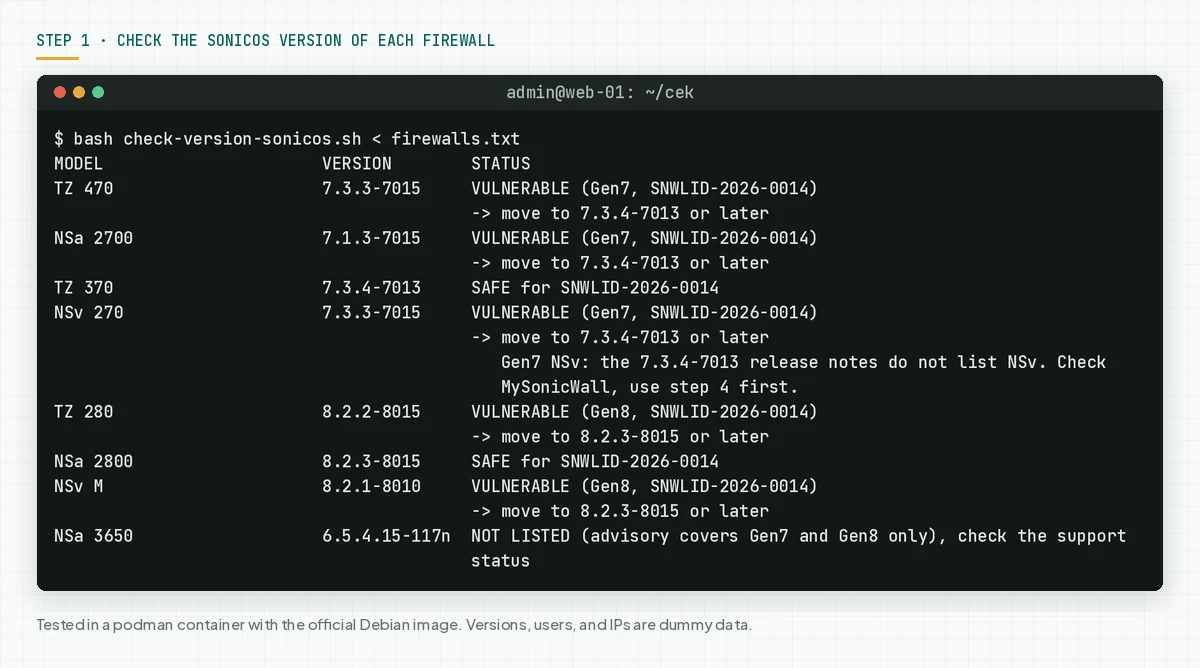
Check the result: "VULNERABLE" means the firewall needs steps 2 and 3 today. "SAFE" means the version closes all 7 CVEs, but still run step 5. "NOT LISTED" means the advisory does not cover that version.
Then check SAML. Open NETWORK | SSL VPN > Server Settings and look at Authentication Type. If the value is SAML, this firewall is hit by CVE-2026-19868. The SonicWall KB on SAML for SSL VPN shows this menu path.
Step 2: Back up the configuration before the upgrade
The SonicOS 7.3.4-7013 release notes say that a downgrade from 7.3.4 is not supported. So the backup is your way back.
- Open Device | Settings > Firmware and Settings.
- Click Create Backup to make a configuration backup on the firewall.
- Also keep a copy of the configuration outside the firewall through the export menu. Name it with the date, model, and version.
- Write down the local users, the LDAP users, and the members of the SSLVPN Services group. Steps 4 and 5 need this list.
Check the result: the backup shows in the Firmware and Settings list, and a copy of the configuration is outside the firewall.
Step 3: Upgrade to 7.3.4-7013 or 8.2.3-8015
Only a SonicWall build closes this flaw. The advisory lists the workaround as none.
- Download the firmware from MySonicWall. Choose 7.3.4-7013 or newer for Gen7, and 8.2.3-8015 or newer for Gen8.
- Open Device | Settings > Firmware and Settings, then click Upload Firmware.
- Click the Boot icon of the new firmware, then select Boot firmware with Current Configuration.
- Wait for the reboot. According to the SonicOS 7 upgrade guide, it takes about 5 to 8 minutes.
- After the reboot, open Home and Dashboard | System again, then run
check-version-sonicos.shwith the new version. - If the firewall does not come up, use SafeMode as the upgrade guide shows.
Check the result: the script prints "SAFE for SNWLID-2026-0014" for each firewall, including standby units.
The SonicOS 7.3.4-7013 release notes recommend Firmware Auto Update. If this feature is on, some firewalls may already run a new version. Still check the version with step 1.
Step 4: Apply temporary mitigations until the upgrade is done
These steps reduce the chance of an attack, but they do not close the flaw.
Rama Digital analysis: SonicWall lists the workaround as none. We made 3 steps from the flaw description and standard SonicOS features. Condition: you cannot upgrade today, or the NSv build is not available. Limit: an attacker with valid credentials from an allowed IP can still get in.
4a. Limit who can open the SSL VPN
Use the Geo-IP Filter or access rules to limit where connections to the SSL VPN port come from. The default SSL VPN port in the SonicWall KB on SAML for SSL VPN is 4433. Allow only the countries or office IPs that you need.
4b. Reduce other-method users in the SSLVPN Services group
This flaw needs credentials for another login method. So remove the local, LDAP, or RADIUS users that you do not need from the SSLVPN Services group. Change the passwords of the users that must stay. For 1 emergency account, set a new long password and watch its logins in step 5.
4c. Close HTTPS management on the WAN
CVE-2026-107154 and CVE-2026-107155 are in the management interface. Turn off HTTPS management on the WAN interface, then manage the firewall from the internal network. The SonicOS 8.2.3-8015 release notes say that Security Insights in 8.2.3 detects HTTPS management that is open on the WAN.
Check the result: SSL VPN connections from countries that you do not allow are refused, the SSLVPN Services group holds only the users that you need, and the admin login page does not open from the internet.
Step 5: Find SSL VPN logins that skip the IdP
The upgrade closes the flaw, but it does not end sessions or change passwords that an attacker already used. So compare the SSL VPN logins on the firewall with the logins at the IdP.
According to the SonicWall KB on SSL VPN login logs, event 1080 is "Successful SSLVPN User Login". Turn on this event in Device | Log | Settings, Users category, then send it to the syslog server.
Save this script as check-log-sslvpn.sh. The script reads event 1080 from syslog, then finds SSL VPN logins that have no IdP login by the same user within 10 minutes.
#!/usr/bin/env bash
# Find SonicOS SSL VPN logins that have no matching login at the SAML IdP (a sign of CVE-2026-19868).
# Use: bash check-log-sslvpn.sh SYSLOG [IDP-LOGINS.csv]
#  SYSLOG          SonicOS syslog (key=value format) from a syslog server or SIEM.
#                  Event 1080 = Successful SSLVPN User Login.
#  IDP-LOGINS.csv  2 columns time_utc,user from the IdP sign-in log (Entra ID, Okta, Google) for the SSL VPN app.
# Requirement: both files use UTC time. The script only reads files. It does not contact the firewall.
set -u
[ $# -lt 1 ] && { echo "Use: bash check-log-sslvpn.sh SYSLOG [IDP-LOGINS.csv]"; exit 1; }
LOG="$1"; IDP="${2:-}"; GAP=600   # maximum time difference: 10 minutes
logins=$(mktemp); idp=$(mktemp); trap 'rm -f "$logins" "$idp"' EXIT

# Read the time, user, and source IP of each event 1080.
awk '
function val(k,   p) {
  p = " " k "=\""
  if (match($0, " " k "=\"[^\"]*\"")) return substr($0, RSTART + length(p), RLENGTH - length(p) - 1)
  if (match($0, " " k "=[^ ]+")) return substr($0, RSTART + length(k) + 2, RLENGTH - length(k) - 2)
  return ""
}
/(^|[ \t])m=1080([ \t]|$)/ {
  t = val("time"); sub(/ UTC$/, "", t)
  u = tolower(val("usr")); if (u == "") u = "(no-usr)"
  s = val("src"); sub(/:.*/, "", s)
  gsub(/[[:cntrl:]]/, "", t); gsub(/[[:cntrl:]]/, "", u); gsub(/[[:cntrl:]]/, "", s)
  if (t == "") t = "no-time"; if (s == "") s = "no-ip"
  print t "\t" u "\t" s
}' "$LOG" > "$logins"

total=$(wc -l < "$logins")
echo "== 1. Successful SSL VPN logins (event 1080) per user and source IP"
if (( total == 0 )); then
  echo "No event 1080. Turn on event 1080, send the Users category to syslog, then run again."
  exit 0
fi
cut -f2,3 "$logins" | sort | uniq -c | sort -rn | head -n 10
echo "Total: $total logins from $(cut -f3 "$logins" | sort -u | wc -l) IPs"

if [ -z "$IDP" ]; then
  echo "Result: not compared with the IdP yet. Run again with the IDP-LOGINS.csv file."
  exit 0
fi

# Change the IdP time to epoch seconds. The script skips the header line and broken lines.
while IFS=, read -r w u _; do
  w=${w//\"/}; u=${u//\"/}; u=${u%$'\r'}
  e=$(date -u -d "$w" +%s 2>/dev/null) || continue
  printf '%s\t%s\n' "$e" "$(printf '%s' "$u" | tr '[:upper:]' '[:lower:]')"
done < "$IDP" > "$idp"

echo "== 2. SSL VPN logins with no IdP login within 10 minutes"
n=0; x=0
while IFS=$'\t' read -r t u s; do
  e=""; [ -n "$t" ] && e=$(date -u -d "$t" +%s 2>/dev/null)
  if [ -z "$e" ]; then echo "$t  $u  from $s  time not readable"; x=$((x + 1)); continue; fi
  if ! awk -F'\t' -v u="$u" -v e="$e" -v j="$GAP" '$2 == u && $1 - e <= j && e - $1 <= j { f = 1 } END { exit !f }' "$idp"; then
    echo "$t UTC  $u  from $s"
    n=$((n + 1))
  fi
done < "$logins"
(( n == 0 && x == 0 )) && echo "None"

if (( n > 0 )); then
  echo "Result: SIGNS FOUND. $n SSL VPN logins did not go through the IdP. Keep the logs, end the sessions, change the passwords."
  (( x > 0 )) && echo "Note: $x other logins have a time that is not readable. Also examine those lines."
elif (( x > 0 )); then
  echo "Result: CANNOT DECIDE. $x logins have a time that is not readable. Fix the syslog time format, then run again."
else
  echo "Result: every login has a match at the IdP. A clean log does not prove that the firewall is clean."
fi
Prepare 2 files. File 1: the firewall syslog for the last 30 days. File 2: an export of the IdP sign-in log for the SSL VPN app with 2 columns, UTC time and user. A sample IdP file with dummy data:
time_utc,user
2026-11-05T01:01:40Z,rina@contoh.co.id
"2026-11-05T01:15:02Z","andi@contoh.co.id"
# File 1: firewall syslog for the last 30 days from the syslog server or SIEM
# File 2: IdP sign-in log for the SSL VPN app, 2 columns time_utc,user
bash check-log-sslvpn.sh sonicwall-30-days.log idp-logins.csv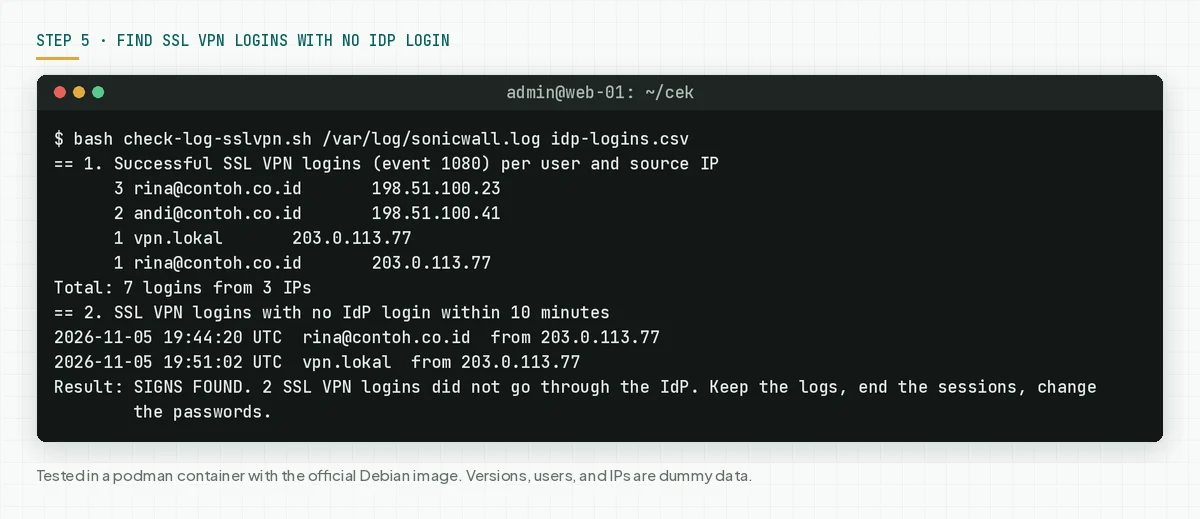
Script limit: The script reads the m=, time=, usr=, and src= fields from key=value syslog. We tested the script with dummy logs, not with real firewall logs. If your logs use other field names, change the field names in the val function.
the Elastic detection rule for SonicWall logins uses a close idea: it flags a user and source IP pair that logs in for the first time. Part 1 of this script gives you the same list of pairs to check.
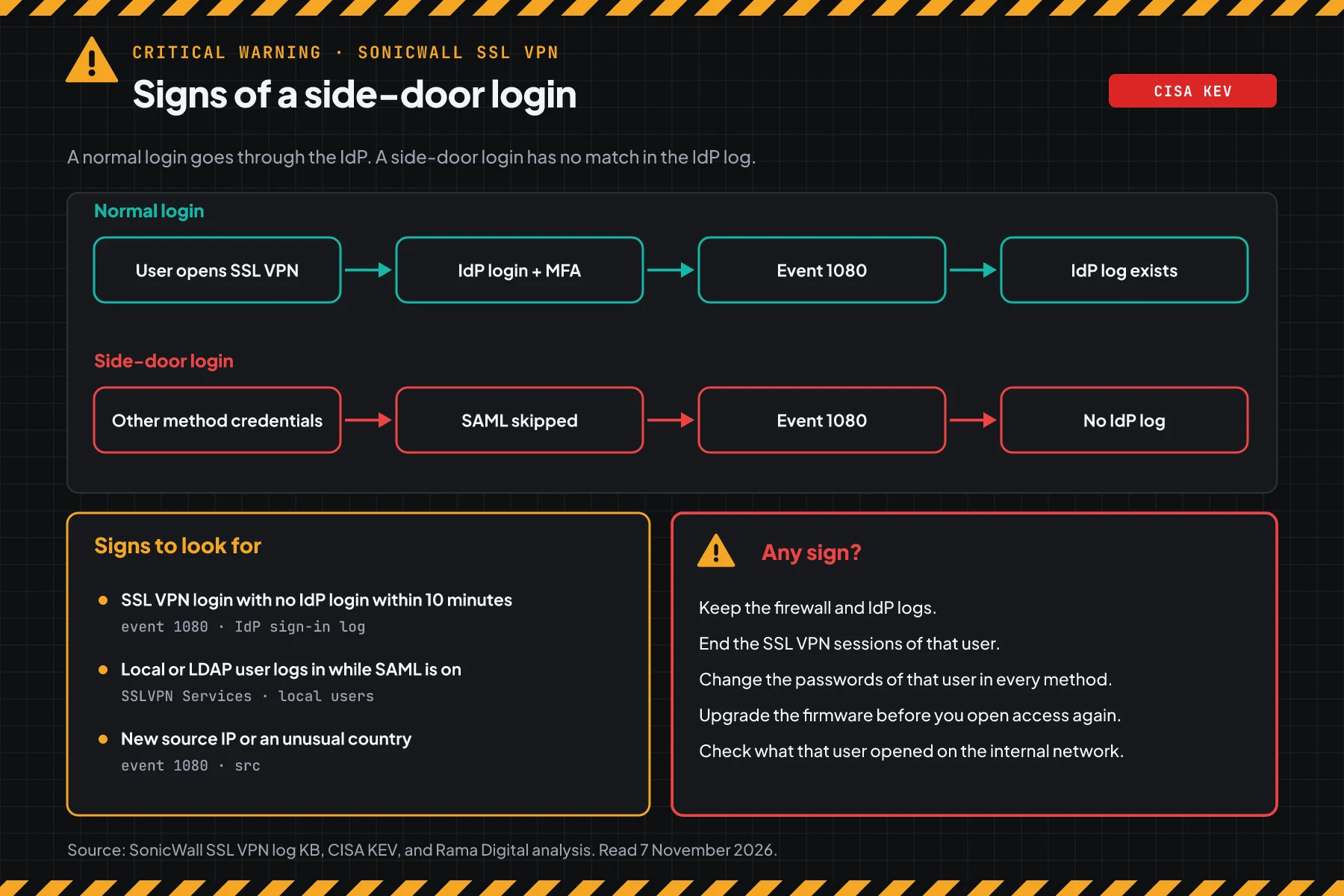
Check the result: "every login has a match at the IdP" means no sign in that log range. A clean log does not prove that the firewall is clean. "CANNOT DECIDE" means that some logins have a time that is not readable. Fix the syslog time format, then run the script again. "SIGNS FOUND" means you follow this order:
- Keep a copy of the firewall syslog and the IdP log before the logs rotate.
- End the SSL VPN sessions of that user.
- Change the passwords of that user in every login method: local, LDAP, and RADIUS.
- Upgrade the firmware before you open access again.
- Check the servers and files that the user opened on the internal network.
If personal data leaks, Indonesian Law 27/2022 on Personal Data Protection requires written notice within 3 times 24 hours. Also read the Keycloak SAML flaw CVE-2026-117691.
Example: 1 morning of response for 3 firewalls
This simulation uses dummy data. The firewall names, times, and results are not customer data.
| Time (WIB) | Dummy firewall | What we check | Result | Action |
|---|---|---|---|---|
| 07.00 | fw-hq (NSa 2700, 7.3.3-7015) | Step 1 | VULNERABLE, SAML on | Step 4 this morning, upgrade tonight |
| 07.20 | fw-branch (TZ 280, 8.2.2-8015) | Step 1 | VULNERABLE, no SAML | Close HTTPS management on the WAN today, upgrade tomorrow |
| 08.00 | fw-hq | Step 5 | 2 SSL VPN logins with no IdP login from 1 IP on 5 November | End sessions, change passwords, start incident response |
| 09.30 | fw-dc (NSv 270, 7.3.3-7015) | Step 1 and MySonicWall | No 7.3.4 NSv build yet | Steps 4a and 4b, check MySonicWall each day |
The lesson from the simulation: MFA at the IdP does not prove that every login goes through the IdP. Fw-hq uses SAML and MFA, but step 5 still finds 2 logins with no match at the IdP.
Who applies the patch
The patch duty is different for each way of management, so this table helps you know who acts today.
| Way of management | Patch owner | What you do |
|---|---|---|
| Physical TZ, NSa, or NSsp firewall in the office | Your IT team | Steps 1 to 5 |
| NSv on VMware, Hyper-V, KVM, AWS, or Azure | Your IT team | Steps 1 to 5, and a VM snapshot before the upgrade |
| Managed by a partner or MSP | The partner, per the contract | Ask for written proof of the version and the step 5 result |
| Firmware Auto Update on | SonicWall sends the build, your team still checks | Step 1 and step 5 |
Rama Digital recommendation: treat firewalls and VPNs as the assets with the highest patch priority, equal to domain servers. Keep VPN login logs for at least 90 days so that step 5 has data.
Checklist for today
- List every SonicWall firewall, including standby units and NSv. Owner: IT team. Proof: a list of models and versions.
- Check the version and the SSL VPN login type with step 1. Owner: network admin. Proof: the script output.
- Back up the configuration with step 2. Owner: network admin. Proof: the backup and a copy outside the firewall.
- Apply step 4 on each firewall that cannot upgrade today. Owner: network admin. Proof: the access rules and the group list.
- Upgrade to 7.3.4-7013 or 8.2.3-8015. Owner: network admin. Proof: the script output after the upgrade.
- Find logins with no IdP login with step 5. Owner: network admin and IdP admin. Proof: the script output.
- Change the passwords of the local and LDAP users still in the SSLVPN Services group, even with no sign.
Frequently asked questions
My firewall does not use SAML for SSL VPN. Am I safe?
You are not hit by CVE-2026-19868, per SonicWall. But the 6 other CVEs in the same advisory still apply, including 2 management interface flaws with a score of 8.8. You still must upgrade.
The CVE-2026-19868 score is only 7.1. Why is this a critical warning?
The flaw skips the login and MFA on an edge device. CISA already added it to KEV, and SonicWall received an attack report. That status matters more for the priority than a single score.
MFA is on at my IdP. Does MFA protect the SSL VPN?
Not for this flaw. According to SonicWall, a successful exploit can also skip the MFA that SAML enforces. MFA at the IdP only guards logins that go through the IdP.
I use Gen7 NSv. Which build do I install?
The advisory lists 7.3.4-7013, but the 7.3.4 release notes say the NSv version is not released. Check MySonicWall. If the build is not there, apply step 4 and run step 5 each day until the build is available.
Are Gen6 firewalls with SonicOS 6.5 affected?
The advisory does not list Gen6. Check the support status of your device in MySonicWall, and plan a move to a device that still gets patches.
Can I go back to the old version if 7.3.4 has problems?
The 7.3.4 release notes say that a downgrade is not supported. That is why step 2 is required before the upgrade.
Does the upgrade remove the attacker's access?
The upgrade closes the flaw. It does not change leaked passwords and it does not check the internal network. Run step 5, then change the passwords of users with signs.
Next step
The limits that still apply: the step 4 mitigation does not close the flaw, and an upgrade does not change leaked passwords. When your firewall shows a sign in step 5, or you need help with an audit and recovery, use Vibe Code Rescue. For 1 urgent issue today, book a 30-minute session.
Sources
- SonicWall advisory SNWLID-2026-0014: summary of the 7 CVEs, SonicWall scores, CWE, affected models and versions, safe builds, and workaround status.
- CVE-2026-19868 record: CNA description, publish time 6 November 2026 19:03 UTC, CISA-ADP score, and SSVC status.
- CISA KEV: CVE-2026-19868 added on 6 November 2026, deadline 20 November 2026.
- SonicOS 7.3.4-7013 release notes: the NSv note, no downgrade support, and the Firmware Auto Update advice.
- SonicOS 8.2.3-8015 release notes: the models that get 8.2.3-8015 and the Security Insights feature.
- SonicWall firmware version KB, SonicOS 7 upgrade guide, and SonicWall KB on SAML for SSL VPN: menu paths for the version check, upgrade, and SAML.
- SonicWall KB on SSL VPN login logs and the Elastic detection rule for SonicWall logins: event 1080 and the idea to detect new logins.
- Indonesian Law 27/2022 on Personal Data Protection: the duty to report a personal data leak.