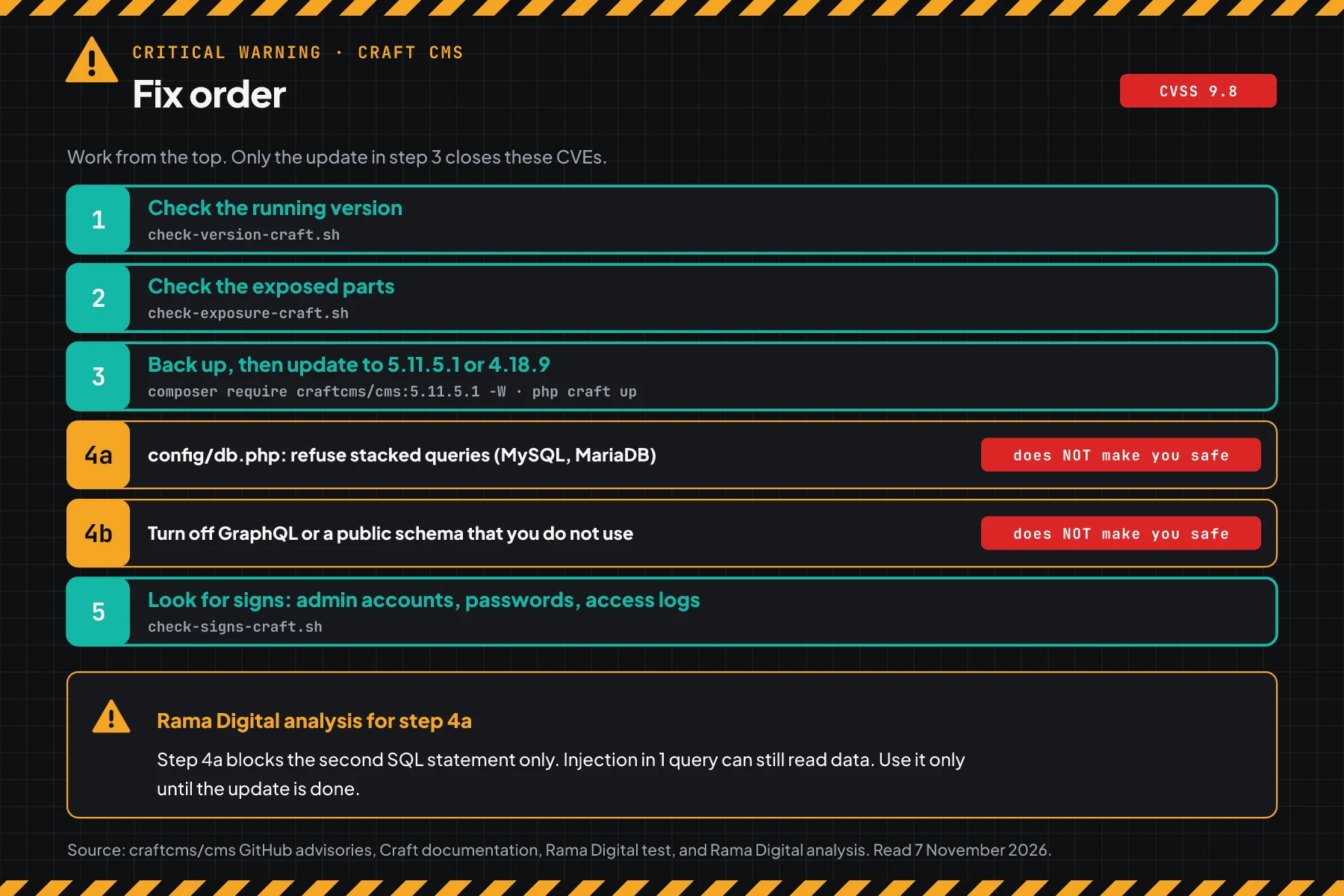
Short answer: Craft CMS 4.0.0 to 4.18.8 and 5.0.0 to 5.11.1 have an SQL injection with no login, CVE-2026-123488. An attacker can make any account an admin. Today, check the version, then update to 5.11.5.1 or 4.18.9.
VulnCheck gives CVSS 3.1 9.8 and CVSS 4.0 9.3. The patch came out on 17 September 2026, 50 days before the CVE record.
Main condition: a vulnerable Craft 4 or 5 site that the internet can reach. Limit: this article contains no payload, attack code, or attack sequence.
We read the CVE-2026-123488 record, CVE-2026-123491 record, CVE-2026-123490 record, CVE-2026-123489 record, GitHub advisory GHSA-qcvp-ggx3-97r6, GitHub advisory GHSA-mjj9-pjh4-r48g, craftcms/cms security advisory list, VulnCheck advisory, release history on Packagist, and CISA KEV on 7 November 2026, from 13.30 to 14.10 WIB. We tested 3 check scripts and 2 temporary steps in a podman pod with the official craftcms/cli image 8.2 and MariaDB 11.8, on Craft 5.11.1 and 5.11.5.1. We did not test PostgreSQL, Craft 4 in a container, or attacks.
The problem: 1 request with no login can make a new admin
Craft CMS holds content, editor accounts, and often customer data too. So 1 flaw in the database opens the whole site.
Craft CMS is a PHP CMS from PixelPixelA piece of code on a web page that tells the ad platform somebody opened the page or took an action.What is the Meta Pixel? & Tonic. Agencies and marketing teams use Craft for company sites, product catalogs, and Craft Commerce shops. The Craft database holds admin accounts, password hashes, and form entries.
The CVE records came out on 6 November 2026 at 15.00 UTC. The GitHub advisories have been public since 22 October, and the patch has existed since 17 September.
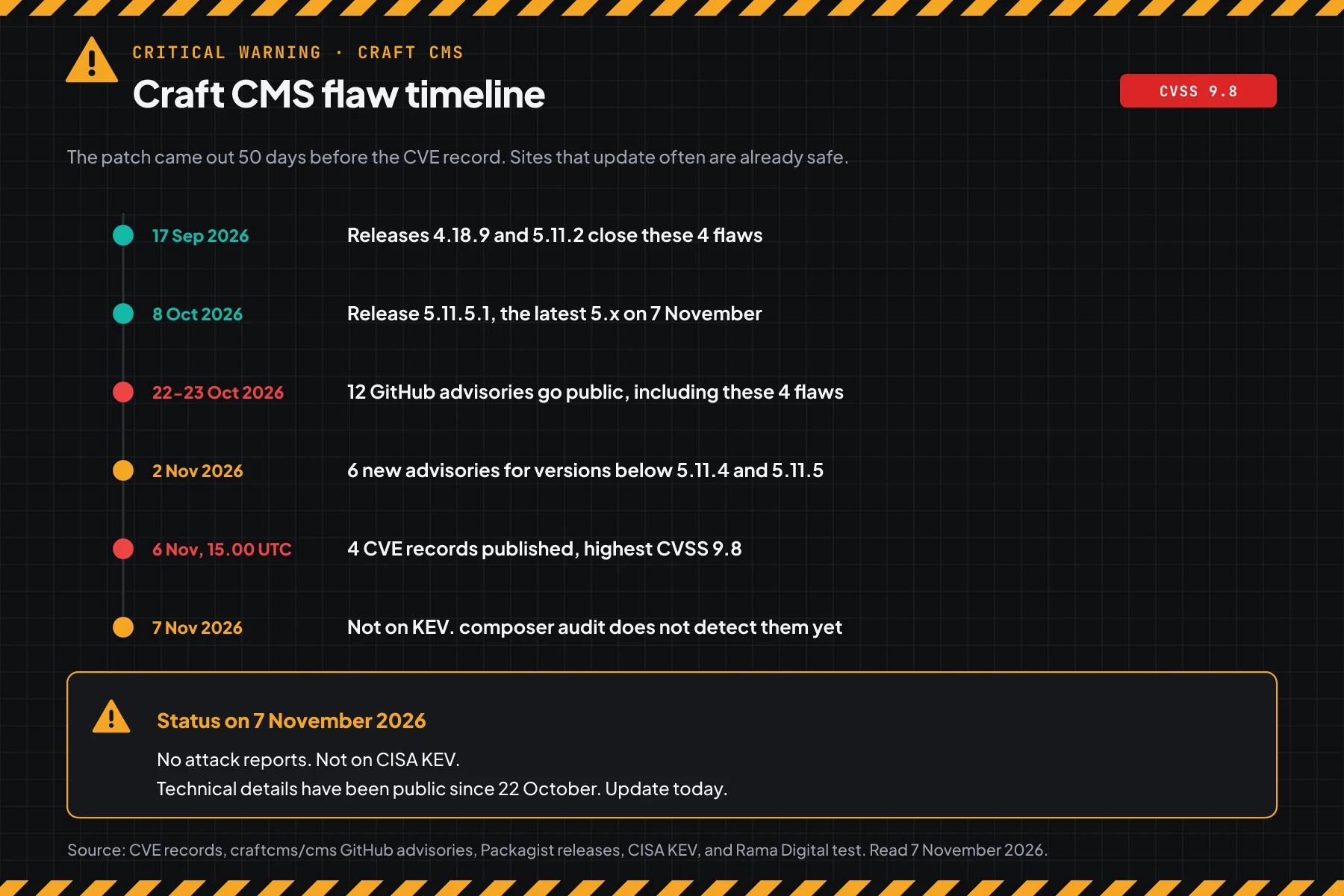
This means that sites that update often are already safe. Sites with no update since early September are still vulnerable, and the technical details have been public for 16 days.
How it works: the advisory summary
This section uses the official summary from the CVE record. It helps you choose the correct steps. It does not explain how to attack.
CVE-2026-123488 summary
According to the CVE-2026-123488 record, the element search endpoint joins the attribute parameter into the SQL query with no cleaning. PDO emulated prepares allow more than 1 SQL statement in 1 query. As a result, an attacker with no account can read and write the database, then become an admin.
The GitHub advisory GHSA-qcvp-ggx3-97r6 has the title "SQL injection leading to privilege escalation". The advisory gives no condition other than a reachable site.
3 other CVEs in the same release
| CVE | Summary | CVSS 3.1 | CVSS 4.0 |
|---|---|---|---|
| CVE-2026-123488 | SQL injection in the element search endpoint. With no login, an attacker can change the users table | 9.8 | 9.3 |
| CVE-2026-123491 | SQL injection through GraphQL eager-loading. With no login, an attacker can read password hashes and session tokens | 8.2 | 8.8 |
| CVE-2026-123490 | Admin privilege escalation through getOwners(). Needs a control panel account, only 5.8.17 to 5.11.1 | 8.8 | 8.7 |
| CVE-2026-123489 | Blind SQL injection through getNext() and getPrev(). Needs a control panel account | 7.1 | 7.1 |
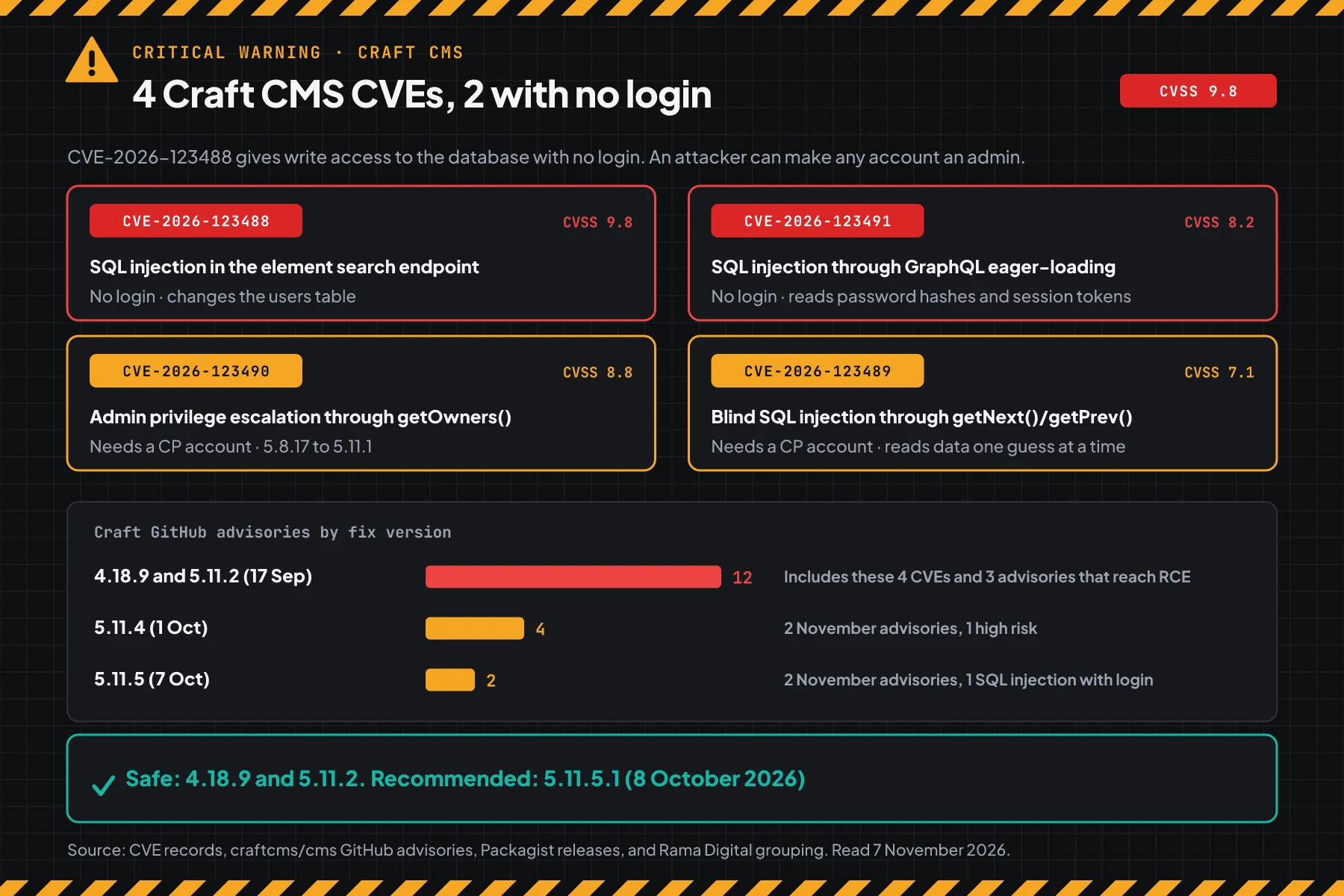
Releases 4.18.9 and 5.11.2 close 12 GitHub advisories. 3 of them reach RCE, but they need a control panel account. CVE-2026-123490 exists only in 5.8.17 to 5.11.1.
Exploitation status on 7 November 2026
We found no attack reports and no public attack code. The 4 CVEs are not on CISA KEV. CISA writes "Exploitation: none" for CVE-2026-123489 and CVE-2026-123491, and "Automatable: yes" for CVE-2026-123491.
Rama Digital analysis: 4 other Craft CVEs are on CISA KEV: CVE-2024-56145, CVE-2025-23209, CVE-2025-35939, and CVE-2025-32432. The last one went on the list on 20 March 2026. Attackers target Craft again and again, so treat this flaw as urgent.
Who has the highest risk
Every vulnerable Craft 4 and 5 site is exposed to CVE-2026-123488. The conditions below increase the impact.
| Craft condition | Risk | Reason |
|---|---|---|
| A vulnerable site that the public can reach | Highest | CVE-2026-123488: no login, any account can become an admin |
| A MySQL or MariaDB database | High | Advisory: stacked queries can run, so data can be written |
| The public GraphQL schemaSchemaExtra description inside page code that tells a search engine what the page is, for example an article, a service, or a question and answer.Open the glossary is on | High | CVE-2026-123491: no login, password hashes and session tokens can be read |
| Many control panel accounts (editors, authors) | Check | CVE-2026-123489 and CVE-2026-123490: a CP account can become an admin |
| Already on 5.11.2 to 5.11.4 | Check | 6 advisories of 2 November, 2 high risk |
| Already on 5.11.5.1 or 4.18.9 | Low | Still look for signs from the time before the update |
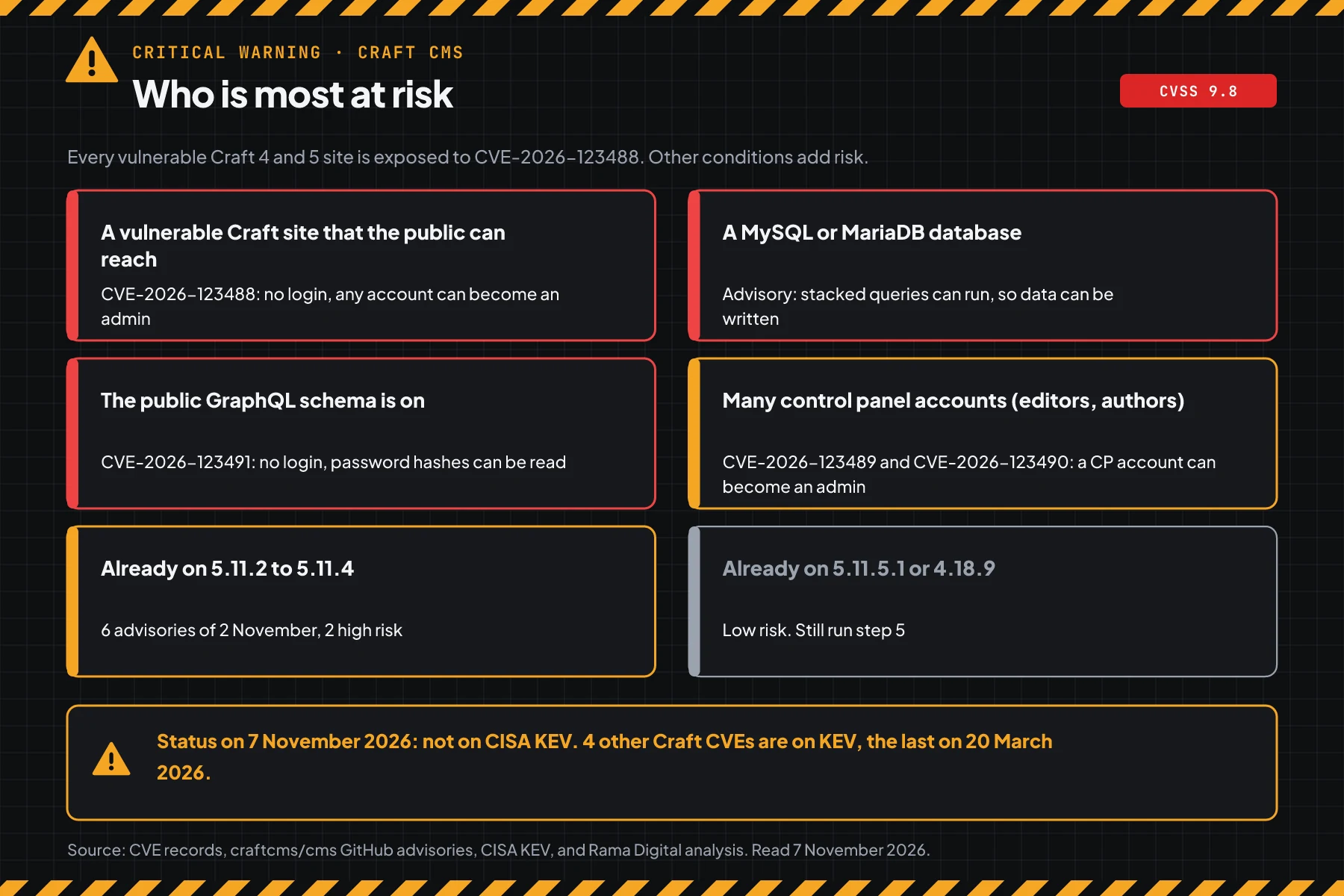
The public GraphQL schema is off by default. According to the Craft GraphQL documentation, an admin must turn on the public token and give read permissions. Headless sites and mobile apps often turn it on.
Vulnerable and safe versions
What counts is the Craft version that runs from vendor/, not the version in composer.json.
| Version | Status on 7 November 2026 | Action |
|---|---|---|
| 5.8.17 to 5.11.1 | Vulnerable, 4 CVEs | Update to 5.11.5.1 today |
| 5.0.0 to 5.8.16 | Vulnerable, 3 CVEs | Update to 5.11.5.1 today |
| 4.0.0 to 4.18.8 | Vulnerable, 3 CVEs | Update to 4.18.9 today |
| 5.11.2 to 5.11.4 | Safe for the 4 CVEs. Hit by the 2 November advisories | Update to 5.11.5.1 this week |
| 3.x and older | Outside the advisory. No security patches | Plan a move to Craft 5 |
| 5.11.5.1 and 4.18.9 | Safe for the 4 CVEs | Run step 5 |
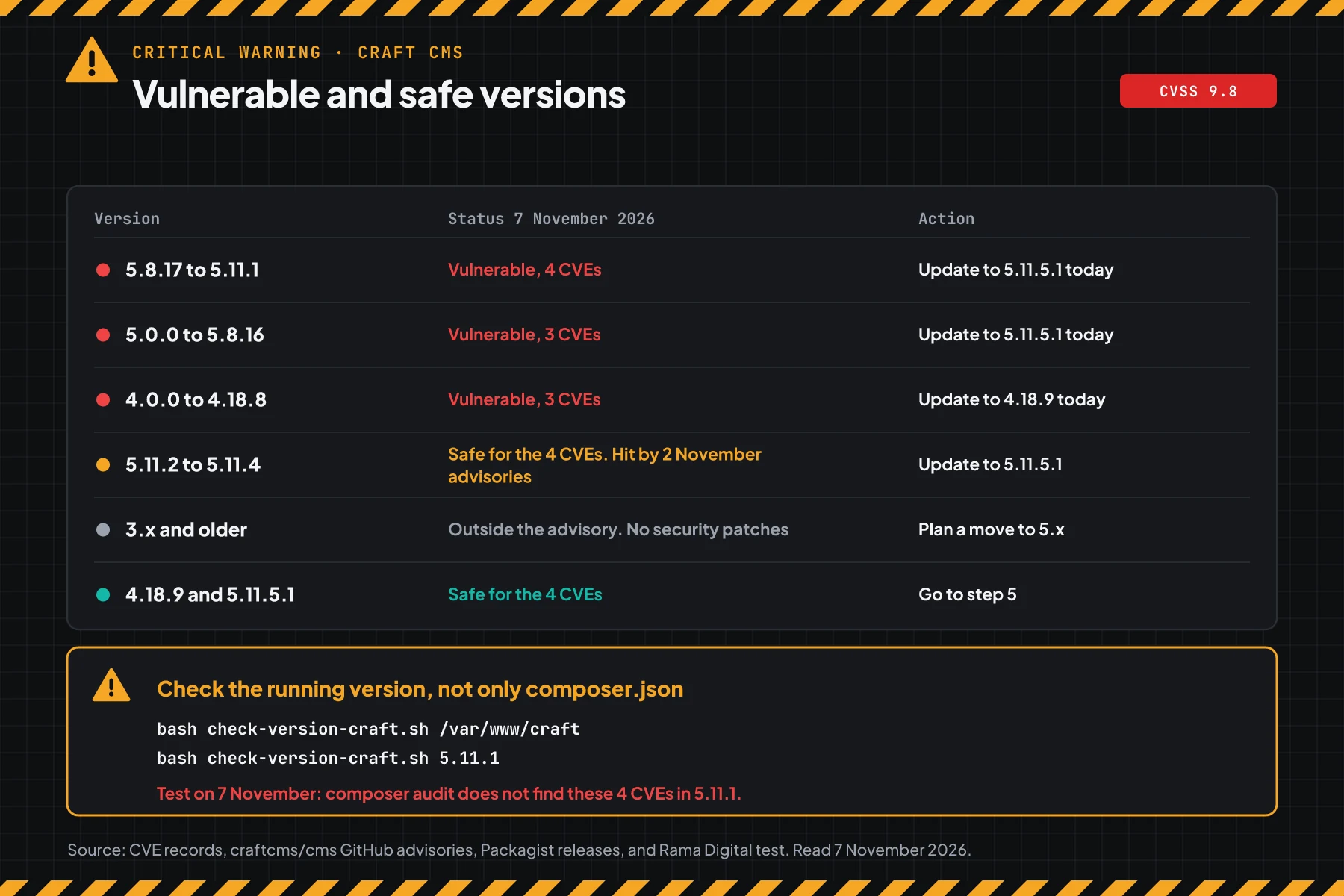
According to the release history on Packagist, 4.18.9 and 5.11.2 came out on 17 September 2026. 5.11.4 came out on 1 October, 5.11.5 on 7 October, and 5.11.5.1 on 8 October. We recommend 5.11.5.1, because that version also closes the 6 advisories of 2 November.
Rama Digital analysis: composer audit reads the Packagist advisory database. In our test on 7 November 2026, that command did not find these 4 CVEs in 5.11.1. Do not use that empty result as proof of safety.
Prerequisites
- SSH access to the Craft server, or access to the repo if the site deploys from git.
- PHP CLI and Composer on the server or on your work machine.
bash,curl, and amysqlormariadbclient for the check scripts.- Disk space for a database backup and a copy of the project folder.
- A list of your Craft plugins and their versions. Plugins can block a Composer update.
- An update window of 15 to 30 minutes. The site can show errors for a short time during the migration.
Step 1: Check the Craft version
Save this script as check-version-craft.sh. The script reads the version in the vendor/ folder and in composer.lock, or a version that you type.
#!/usr/bin/env bash
# Check the Craft CMS version for CVE-2026-123488 (SQL injection without login) and 3 more CVEs fixed in 4.18.9 and 5.11.2.
# The script only reads. It needs bash, grep, and sort.
# Use: bash check-version-craft.sh /var/www/craft    (Craft project folder)
#   or type a version: bash check-version-craft.sh 5.11.1
set -u
SAFE4=4.18.9
SAFE5=5.11.2
LATEST5=5.11.5.1

# older A B: true when A < B
older() { [ "$1" != "$2" ] && [ "$(printf '%s\n%s\n' "$1" "$2" | sort -V | head -n 1)" = "$1" ]; }

verdict() {
  local v
  v=$(printf '%s' "$1" | grep -oE '^[0-9]+\.[0-9]+\.[0-9]+(\.[0-9]+)?' | head -n 1)
  [ -z "$v" ] && { echo "CHECK: version ${1:-empty} is not known"; return; }
  case "$v" in
    5.*)
      if older "$v" 5.8.17; then echo "VULNERABLE: 3 CVEs, including CVE-2026-123488. Update to $LATEST5"
      elif older "$v" $SAFE5; then echo "VULNERABLE: 4 CVEs, including CVE-2026-123488. Update to $LATEST5"
      elif older "$v" 5.11.5; then echo "SAFE for these 4 CVEs. Update to $LATEST5 for the 2 November advisories"
      else echo "SAFE for these 4 CVEs"; fi ;;
    4.*)
      if older "$v" $SAFE4; then echo "VULNERABLE: 3 CVEs, including CVE-2026-123488. Update to $SAFE4"
      else echo "SAFE for these 4 CVEs"; fi ;;
    3.*|2.*) echo "OUTSIDE ADVISORY: the advisory names only 4.x and 5.x. Plan a move to $LATEST5" ;;
    *) echo "CHECK: version $v is outside branch 4 and 5" ;;
  esac
}

ARG=${1:-.}
if printf '%s' "$ARG" | grep -qE '^[0-9]+\.[0-9]+'; then
  echo "Craft $ARG: $(verdict "$ARG")"; exit 0
fi
[ -d "$ARG" ] || { echo "Folder $ARG does not exist"; exit 1; }
DIR=$(cd "$ARG" && pwd)
echo "== Folder: $DIR"
# The running code is in vendor. composer.lock can differ when composer install did not run.
RUN=$(grep -oE "'version' => '[^']+'" "$DIR/vendor/craftcms/cms/src/config/app.php" 2>/dev/null | head -n 1 | cut -d"'" -f4)
LOCK=$(grep -A 1 '"name": "craftcms/cms"' "$DIR/composer.lock" 2>/dev/null | grep -oE '"version": "[^"]+"' | cut -d'"' -f4)
[ -z "$RUN$LOCK" ] && { echo "This folder is not a Craft project (no vendor/craftcms/cms and no composer.lock)"; exit 1; }
echo "vendor/craftcms/cms: ${RUN:-missing}"
echo "composer.lock: ${LOCK:-missing}"
[ -n "$RUN" ] && [ -n "$LOCK" ] && [ "$RUN" != "$LOCK" ] && echo "CHECK: vendor and composer.lock differ. Run composer install, then check again"
echo "Craft ${RUN:-$LOCK}: $(verdict "${RUN:-$LOCK}")"
# Craft project folder (it holds the craft file, composer.lock, and vendor/)
bash check-version-craft.sh /var/www/craft
# A version that you copied from Utilities > System Report in the control panel
bash check-version-craft.sh 4.18.8
# composer audit does not know these 4 CVEs yet. In our test, it found nothing for 5.11.1.
composer audit --locked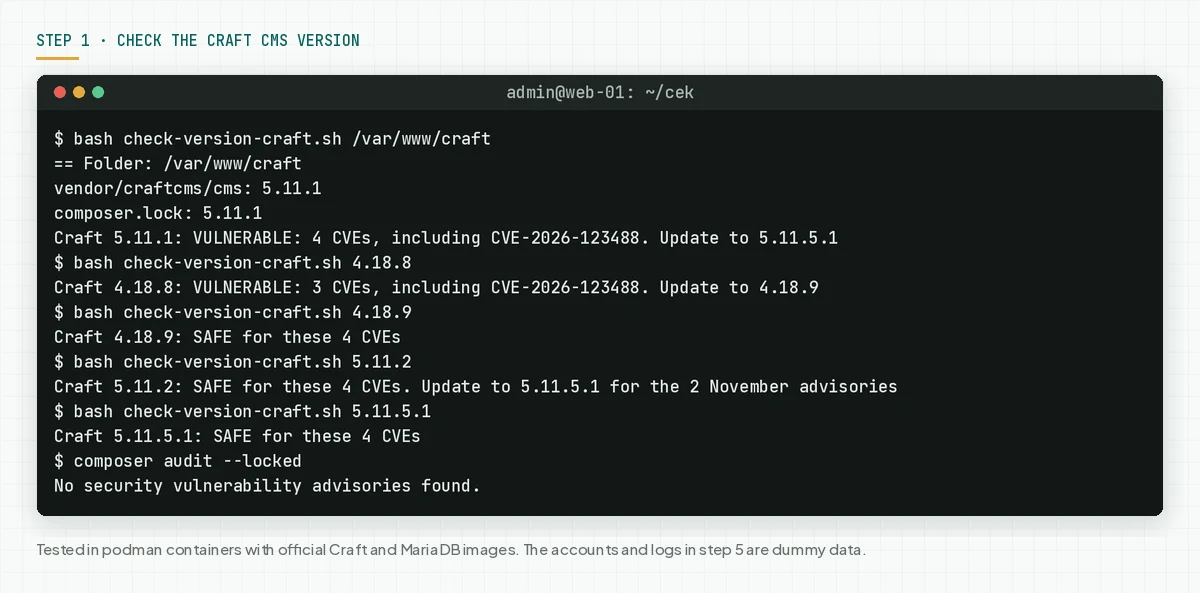
Check the result: "VULNERABLE" means go to steps 2 and 3 today. "SAFE ... Update to 5.11.5.1" means plan the update this week. "SAFE" still means run step 5, because the flaw existed before your update.
Step 2: Check the exposed parts
This step answers 4 questions: can the public reach the site, which database does it use, does GraphQL answer with no token, and how many admin accounts exist.
Save this script as check-exposure-craft.sh. The script only reads .env and sends 2 {ping} queries to GraphQL. The script sends no payload.
#!/usr/bin/env bash
# Check which Craft CMS parts the 4 CVEs fixed in 4.18.9 and 5.11.2 can reach. The script only reads. It needs bash, curl, and php.
# Use: bash check-exposure-craft.sh <Craft project folder> <public site URL>
# Example: bash check-exposure-craft.sh /var/www/craft https://www.example.com
set -u
DIR=${1:?Craft project folder, for example /var/www/craft}
URL=${2:?public site URL, for example https://www.example.com}
URL=${URL%/}
EXPOSED=0; CHECK=0
exposed() { echo "  EXPOSED: $1"; EXPOSED=$((EXPOSED + 1)); }
check() { echo "  CHECK: $1"; CHECK=$((CHECK + 1)); }
info() { echo "  INFO: $1"; }
# Read 1 value from .env without running the file.
envval() { grep -E "^$1=" "$DIR/.env" 2>/dev/null | tail -n 1 | cut -d= -f2- | tr -d '"'"'"; }
[ -f "$DIR/craft" ] || { echo "Folder $DIR is not a Craft project (no craft file)"; exit 1; }

echo "== 1. Element search (CVE-2026-123488, no login)"
exposed "every vulnerable version. The advisory gives no condition other than a reachable site"

echo "== 2. Database"
DRIVER=$(envval CRAFT_DB_DRIVER); DRIVER=${DRIVER:-mysql}
info "driver: $DRIVER"
if [ "$DRIVER" = mysql ]; then
  if grep -qs 'MYSQL_ATTR_MULTI_STATEMENTS' "$DIR/config/db.php"; then
    info "config/db.php refuses more than 1 SQL statement in 1 query (step 4a is in place)"
  else
    check "MySQL or MariaDB without step 4a. The advisory says stacked queries can run"
  fi
fi

echo "== 3. Public GraphQL (CVE-2026-123491, no login)"
GQL=$(envval CRAFT_ENABLE_GQL)
[ "$GQL" = false ] && info "CRAFT_ENABLE_GQL=false in .env"
for P in /actions/graphql/api /api; do
  BODY=$(curl -s -m 15 -X POST "$URL$P" -H 'Content-Type: application/json' --data '{"query":"{ping}"}' 2>/dev/null | head -c 300)
  case "$BODY" in
    *pong*) exposed "$URL$P answers a query without a token. Check the public schema in step 4b" ;;
    *) info "$URL$P does not answer a query without a token" ;;
  esac
done

echo "== 4. Control panel (CVE-2026-123489 and CVE-2026-123490, need a CP account)"
CP=$(envval CRAFT_CP_TRIGGER); CP=${CP:-admin}
CODE=$(curl -s -o /dev/null -m 15 -w '%{http_code}' "$URL/$CP/login" 2>/dev/null)
if [ "$CODE" = 200 ]; then check "login page $URL/$CP/login opens from this machine (HTTP 200)"
else info "login page $URL/$CP/login answers HTTP ${CODE:-000}"; fi
ADMINS=$(cd "$DIR" && php craft users/list-admins 2>/dev/null | grep -cE '^ *- ')
info "admin accounts: ${ADMINS:-not readable}"

echo "== Result: EXPOSED $EXPOSED, CHECK $CHECK"
exit 0
# Run on the Craft server. The script reads .env and calls the public site URL.
bash check-exposure-craft.sh /var/www/craft https://www.example.com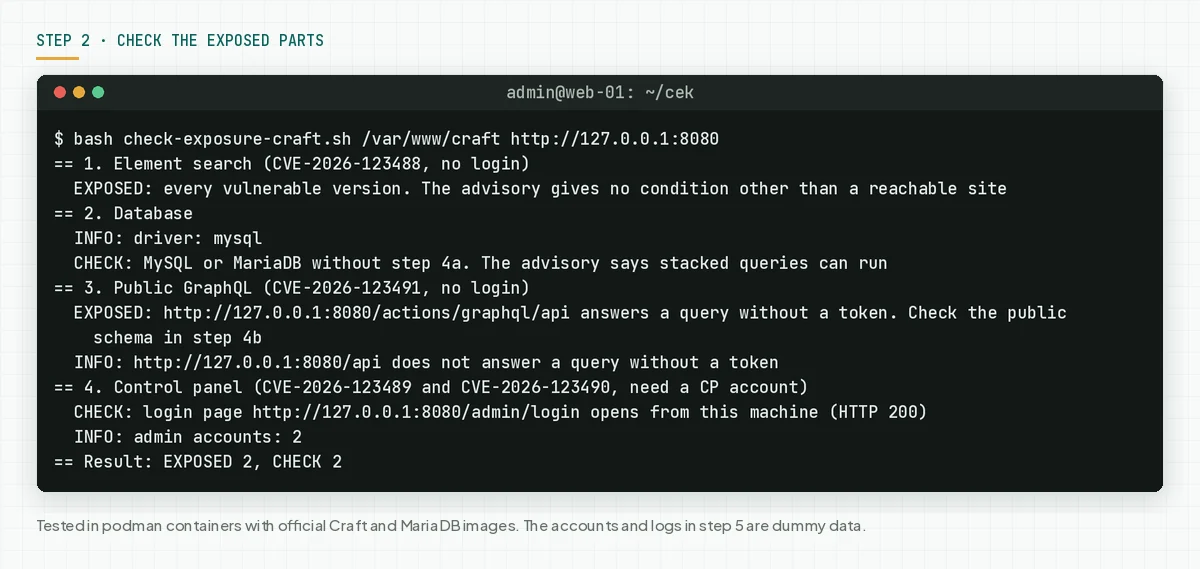
Check the result: write down each "EXPOSED" and "CHECK" line. If you cannot update today, apply step 4a for the database line and step 4b for the GraphQL line.
Step 3: Back up, then update to 5.11.5.1 or 4.18.9
The update is the only step that closes these 4 CVEs. Read the Craft update guide if you skip many versions.
# 3a. Back up the database. Also keep a copy of the project folder and .env.
php craft db/backup
# 3b. Craft 5: update to 5.11.5.1 (tested)
composer require craftcms/cms:5.11.5.1 -W
# Craft 4: update to 4.18.9 (not tested)
composer require craftcms/cms:4.18.9 -W
# 3c. Run the migrations and clear the caches
php craft up --interactive=0
# 3d. Check the running version again
bash check-version-craft.sh /var/www/craft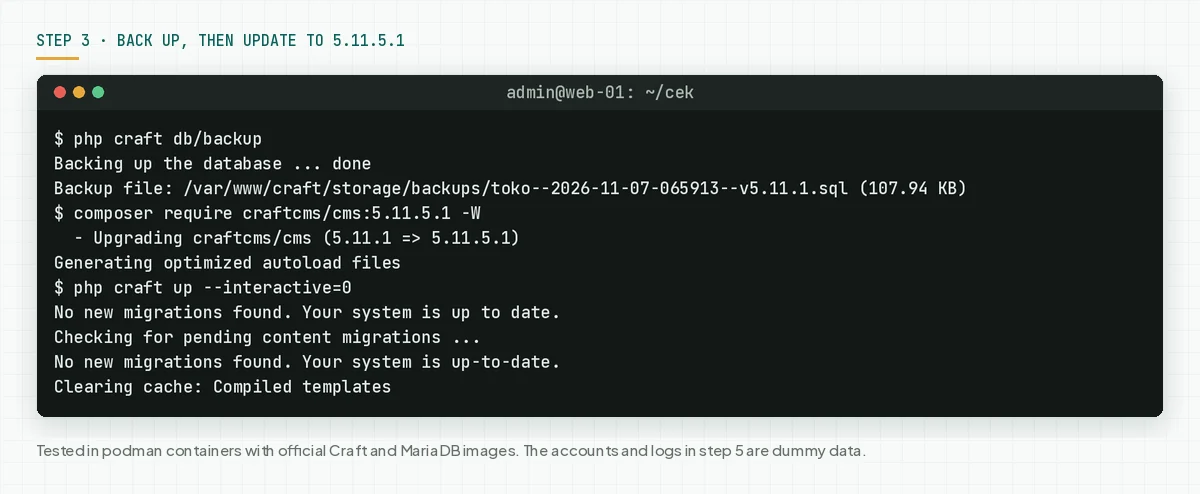
In our test, the update from 5.11.1 to 5.11.5.1 finished with no new database migrations, and the home page still answered 200. The -W option lets Composer move other dependencies too. If Composer refuses, read the plugin version limits in the error message.
Sites that deploy from git
Many agencies run Composer on a work machine, then deploy through git. In this flow, the Craft version on the server follows composer.lock in the repo.
# Sites that deploy from git: update on your work machine, then ship composer.lock
git add composer.json composer.lock
git commit -m "Update Craft CMS to 5.11.5.1 for CVE-2026-123488"
# After the deploy, on the server:
composer install --no-dev && php craft up --interactive=0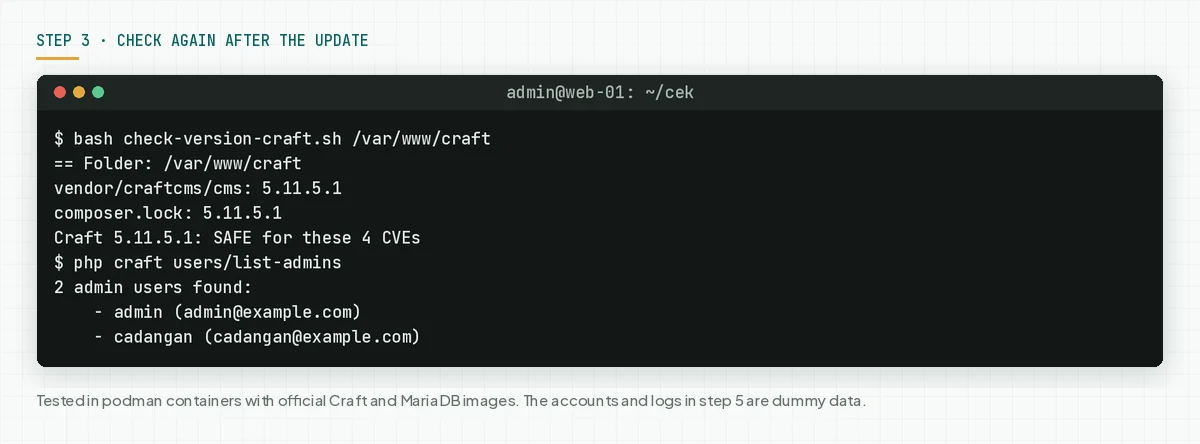
Check the result: the version script prints "SAFE for these 4 CVEs", vendor and composer.lock match, and the home page answers 200. Also open the control panel and 1 page with a form.
Step 4: Reduce the impact until the update is done
This step reduces the impact, but it does not make the site safe. The CVEs stay open until you update.
4a. Refuse stacked queries on the MySQL or MariaDB connection
Rama Digital analysis: the advisory says that emulated prepares allow more than 1 statement in 1 query. We turn off that PDO option through pdoAttributes in the DbConfig source code. Condition: you cannot update today, and the database is MySQL or MariaDB. Limit: an injection in 1 SELECT statement can still read data.
Save this file as db-craft.en.php. If config/db.php already exists, add the ->pdoAttributes(...) line to the existing DbConfig::create(). We tested only the file below, on Craft 5.11.1.
<?php
// config/db.php: step 4a, temporary until the update is done (MySQL and MariaDB).
// The connection refuses more than 1 SQL statement in 1 query. The CRAFT_DB_* values in .env stay in use.
return craft\config\DbConfig::create()
    ->pdoAttributes([PDO::MYSQL_ATTR_MULTI_STATEMENTS => false]);
# 4a. Test before and after. The result "1" means stacked queries still run.
php craft exec 'count(Craft::$app->getDb()->createCommand("SELECT 1; SELECT 2")->queryAll())'
# Install the file above as config/db.php. The correct result: Error SQLSTATE[42000] ... 1064.
cp db-craft.en.php config/db.php
# A normal query must still run
php craft exec 'Craft::$app->getDb()->createCommand("SELECT COUNT(*) FROM {{%users}}")->queryScalar()'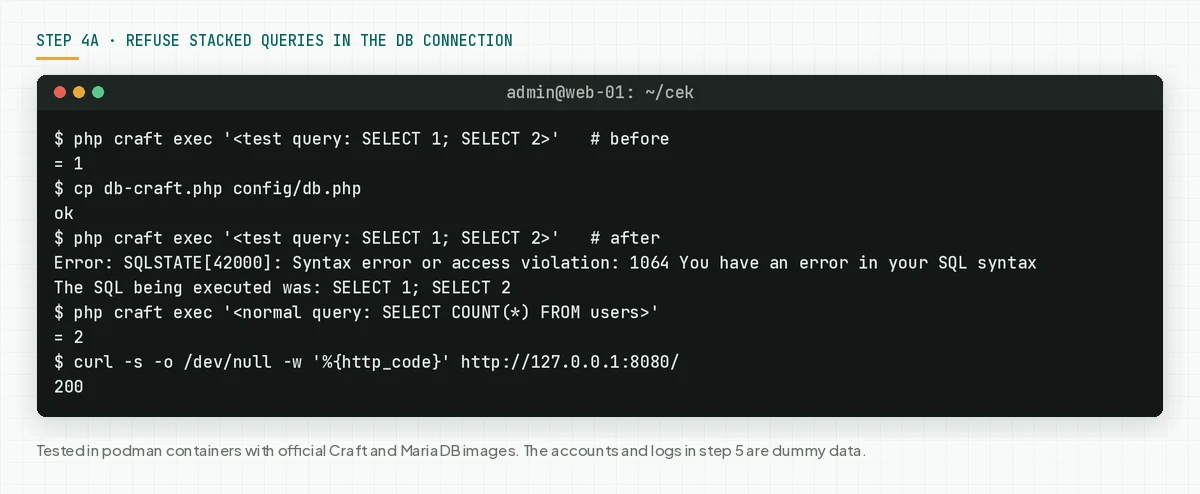
In our test, the stacked test query gave 1 before this file, then SQLSTATE[42000] 1064 after it. A normal query still gave 2, and the home page still answered 200. Remove this step after the update if you do not need it.
4b. Turn off GraphQL if the site does not use it
# 4b. The site does not use GraphQL: turn off the GraphQL endpoint
echo CRAFT_ENABLE_GQL=false >> .env
# Check again. The correct result: 2 lines "does not answer a query without a token".
bash check-exposure-craft.sh /var/www/craft https://www.example.com | sed -n '/== 3/,/== 4/p'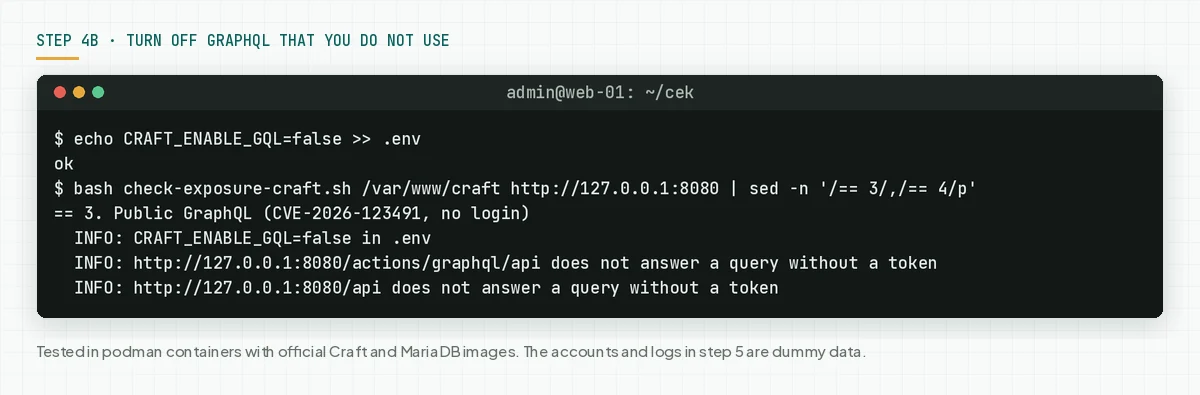
According to the Craft general config reference, enableGql controls the GraphQL endpoint, and Craft reads that value from the CRAFT_ENABLE_GQL env. Headless sites must not use this step. Turn off the public token in GraphQL > Schemas, then use private tokens. We did not test that menu path.
4c. Reduce control panel accounts
CVE-2026-123489 and CVE-2026-123490 need a control panel account. Suspend editor accounts that are not active, and turn on 2FA for all admins. This step does not touch CVE-2026-123488.
Check the result: the exposure script prints "step 4a is in place" and 2 GraphQL lines "does not answer a query without a token".
Step 5: Look for signs of use
This flaw existed before your update, so also look for signs from the time before the update. Start from 17 September 2026 at the latest, or earlier if you still have the logs.
Save this script as check-signs-craft.sh. The script reads admin accounts, new users, and password changes in the Craft database. It also looks for SQL words and semicolons in the query strings of the access logs.
#!/usr/bin/env bash
# Find signs of abuse of CVE-2026-123488 and 3 more CVEs in Craft CMS. The script only reads.
# It needs bash, awk, zcat, and a mysql or mariadb client. It reads MySQL or MariaDB only.
# Use: bash check-signs-craft.sh <Craft project folder> <date YYYY-MM-DD> [access log folder]
# Access log: access.log* files (also .gz) from nginx or Apache, combined format.
set -u
DIR=${1:?Craft project folder, for example /var/www/craft}
SINCE=${2:?start date, for example 2026-09-01}
LOGDIR=${3:-}
printf '%s' "$SINCE" | grep -qE '^[0-9]{4}-[0-9]{2}-[0-9]{2}$' || { echo "The date must be YYYY-MM-DD"; exit 1; }
SIGN=0; CHECK=0; BLIND=0
sign() { echo "  SIGN: $1"; SIGN=$((SIGN + 1)); }
check() { echo "  CHECK: $1"; CHECK=$((CHECK + 1)); }
blind() { echo "  CANNOT CONFIRM: $1"; BLIND=$((BLIND + 1)); }
# Remove control characters and cut long lines, so log text cannot change the terminal.
clean() { LC_ALL=C tr -d '\000-\010\013-\037\177' | cut -c1-160; }
envval() { grep -E "^$1=" "$DIR/.env" 2>/dev/null | tail -n 1 | cut -d= -f2- | tr -d '"'"'"; }

echo "== 1. Accounts in the database (since $SINCE)"
CLI=$(command -v mariadb || command -v mysql || true)
DRIVER=$(envval CRAFT_DB_DRIVER)
if [ -n "$DRIVER" ] && [ "$DRIVER" != mysql ]; then
  blind "driver $DRIVER. This script reads MySQL or MariaDB only"
elif [ -z "$CLI" ]; then
  blind "no mysql or mariadb client"
else
  P=$(envval CRAFT_DB_TABLE_PREFIX); PORT=$(envval CRAFT_DB_PORT); PORT=${PORT:-3306}
  # The password goes in the MYSQL_PWD env, not in an argument. Arguments show in the process list (ps).
  q() { MYSQL_PWD="$(envval CRAFT_DB_PASSWORD)" "$CLI" -N -B -h "$(envval CRAFT_DB_SERVER)" -P "$PORT" \
    -u "$(envval CRAFT_DB_USER)" "$(envval CRAFT_DB_DATABASE)" -e "$1" 2>/dev/null; }
  if ! q "SELECT 1" >/dev/null; then
    blind "database login failed. Check CRAFT_DB_* in .env"
  else
    while IFS=$'\t' read -r id user mail login ip; do
      [ "$login" = NULL ] && login=""; [ "$ip" = NULL ] && ip=""
      check "admin id $id $user <$mail>, last login ${login:-none}, IP ${ip:-not recorded}. Make sure you know this account"
    done < <(q "SELECT id, username, email, lastLoginDate, lastLoginAttemptIp FROM ${P}users WHERE admin = 1 ORDER BY id" | clean)
    while IFS=$'\t' read -r id user tgl adm; do
      [ "$adm" = 1 ] && sign "new admin id $id $user created $tgl" || check "new user id $id $user created $tgl"
    done < <(q "SELECT id, username, dateCreated, admin FROM ${P}users WHERE dateCreated >= '$SINCE' ORDER BY dateCreated" | clean)
    while IFS=$'\t' read -r id user tgl; do
      check "password of id $id $user changed $tgl"
    done < <(q "SELECT id, username, lastPasswordChangeDate FROM ${P}users WHERE lastPasswordChangeDate >= '$SINCE' ORDER BY lastPasswordChangeDate" | clean)
    info=$(q "SELECT COUNT(*) FROM ${P}users WHERE admin = 1")
    echo "  INFO: $info admin accounts"
  fi
fi

echo "== 2. Access log (${LOGDIR:-no folder given}, since $SINCE)"
if [ -n "$LOGDIR" ]; then
  FILES=$(find "$LOGDIR" -type f -name 'access.log*' 2>/dev/null | sort)
  echo "  $(printf '%s' "$FILES" | grep -c .) access.log files"
  # awk reads the date [07/Nov/2026:10:00:00 +0700]. Lines without a readable date are counted apart.
  RESULT=$(printf '%s\n' "$FILES" | xargs -r zcat -f 2>/dev/null | awk -v since="${SINCE//-/}" '
    BEGIN { split("Jan Feb Mar Apr May Jun Jul Aug Sep Oct Nov Dec", m, " "); for (i = 1; i <= 12; i++) mon[m[i]] = sprintf("%02d", i) }
    {
      if (!match($0, /\[[0-9][0-9]\/[A-Z][a-z][a-z]\/[0-9][0-9][0-9][0-9]:/)) { print "BLIND"; next }
      d = substr($0, RSTART + 1, 11); day = substr(d, 8, 4) mon[substr(d, 4, 3)] substr(d, 1, 2)
      if (day < since) next
      if (!match($0, /"[A-Z]+ [^ "]+/)) next
      req = substr($0, RSTART + 1, RLENGTH - 1); low = tolower(req)
      if (low ~ /graphql|\/api/ && req ~ /^POST/) { print "GQL " $1; next }
      q = index(low, "?"); if (q == 0) next
      qs = substr(low, q)
      if (qs ~ /(union|select|sleep|benchmark|information_schema|extractvalue|updatexml)(\+|%20|%09|%0a|%28|\(|\/\*|%2f\*)/ || qs ~ /%3b|;/)
        print "SQL " $1 " " substr(req, 1, 120)
    }')
  N_BLIND=$(printf '%s\n' "$RESULT" | grep -c '^BLIND')
  [ "$N_BLIND" -gt 0 ] && blind "$N_BLIND log lines without a readable date. Read those lines by hand"
  while IFS= read -r l; do sign "SQL pattern in query: ${l#SQL }"; done < <(printf '%s\n' "$RESULT" | grep '^SQL ' | clean | head -n 10)
  echo "  GraphQL POST per IP (top 5):"
  printf '%s\n' "$RESULT" | grep '^GQL ' | awk '{print $2}' | sort | uniq -c | sort -rn | head -n 5 | clean | sed 's/^ */  INFO: /'
fi

echo "== Result: SIGN $SIGN, CHECK $CHECK, CANNOT CONFIRM $BLIND"
[ "$BLIND" -gt 0 ] && echo "The result is not complete. 0 signs does not mean clean."
[ "$SIGN" -gt 0 ] && echo "Keep the logs and a database dump as evidence, then follow step 5 in the article."
exit 0
# The Craft database and nginx access logs, from 1 September 2026
bash check-signs-craft.sh /var/www/craft 2026-09-01 /var/log/nginx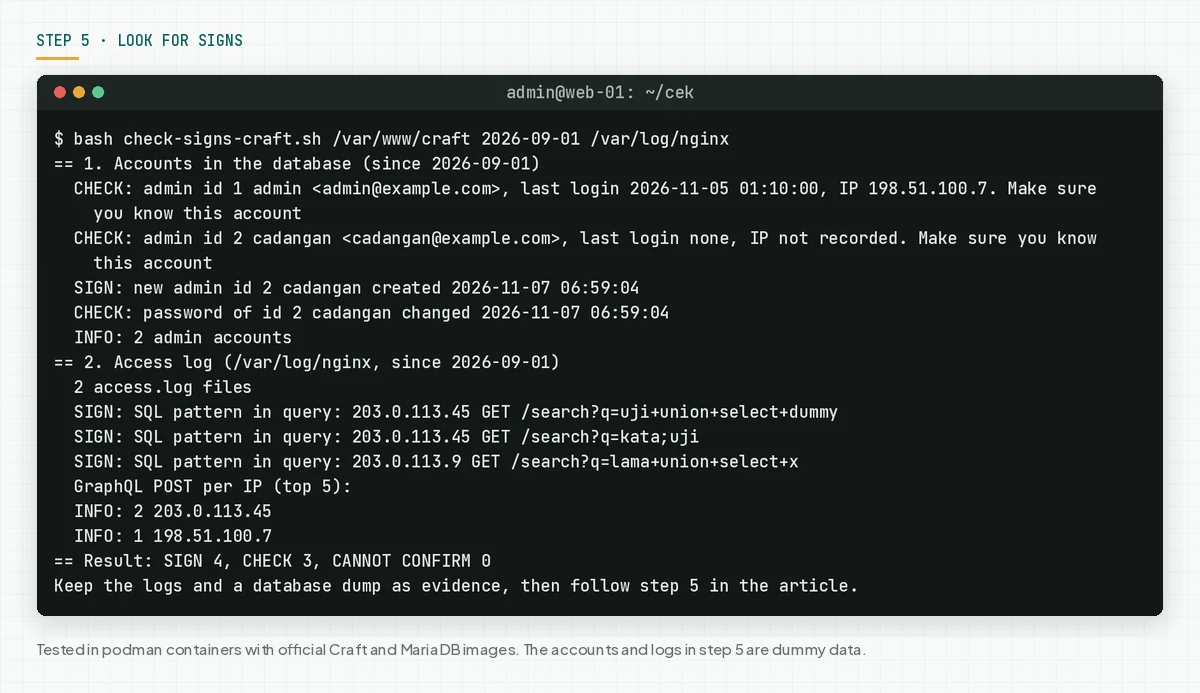
In this test, the script found 4 SIGNS: 1 dummy new admin and 3 query strings with SQL patterns from 2 dummy IPs. 1 of those 3 lines was in a .gz file. The script also printed 3 CHECK lines for 2 admins and 1 password change.
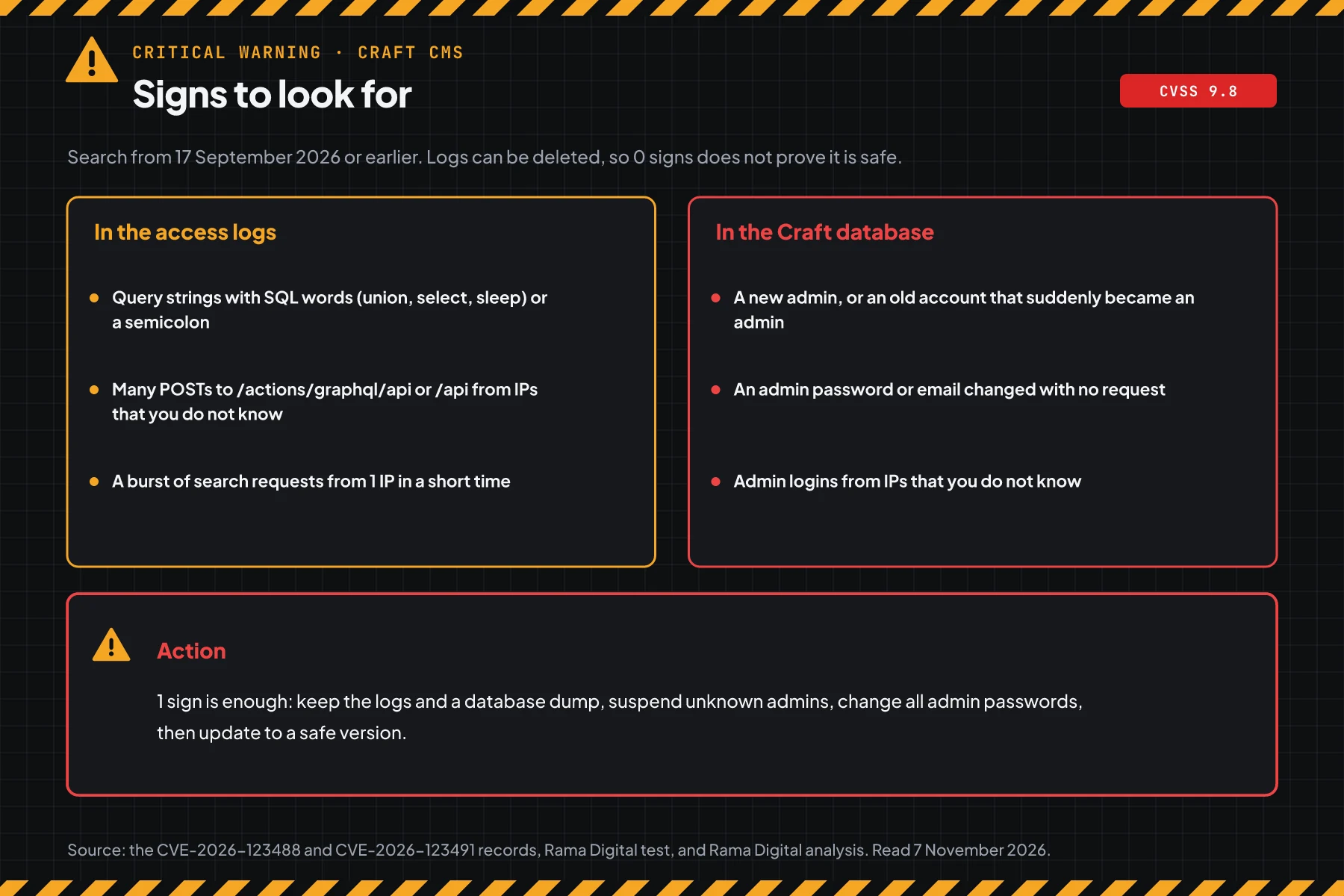
Rama Digital analysis: an SQL injection through a GraphQL POST does not show in a normal access log, because the log does not record the body. So the script only counts GraphQL POSTs per IP. Examine a spike from 1 unknown IP.
Check the result: the script prints "SIGN 0", and your team can explain each CHECK line. An attacker can delete logs, so 0 signs does not prove that the site is clean.
If you find even 1 sign, keep the logs and a database dump as evidence. Then delete admins that you do not know, change the passwords of all CP accounts, change the database password and APIAPIThe official door 2 systems use to exchange data, without anybody copying it by hand.Open the glossary keys in .env, and update to 5.11.5.1.
If the site holds customer data, Indonesian Law 27/2022 on Personal Data Protection requires written notice no later than 3 times 24 hours after a personal data breach. Also read the PHP2Shell CVE-2026-109618 warning.
Example: 1 afternoon of response for 3 agency Craft sites
This simulation uses dummy data. The site names, times, and results are not customer data.
| Time (WIB) | Dummy site | What we check | Result | Action |
|---|---|---|---|---|
| 13.00 | company-profile (Craft 5.11.1, MySQL) | Steps 1 and 2 | VULNERABLE, EXPOSED 1, CHECK 2 | Step 3 now |
| 13.30 | headless-catalog (Craft 5.9.3, public GraphQL) | Steps 1 and 2 | VULNERABLE, EXPOSED 2 | Step 4a now, update this afternoon |
| 14.00 | old-shop (Craft 4.16.2) | Step 1 | VULNERABLE, 3 CVEs | Update to 4.18.9 |
| 16.00 | All 3 sites | Steps 3 and 5 | SAFE, 1 unknown admin on old-shop | Keep evidence, change passwords |
Lesson from the simulation: a headless site cannot use step 4b, so the update must run on the same day.
Who applies the patch
Craft is a Composer package in your project, so the hosting provider usually does not apply this patch.
| Service type | Patch owner | What you do |
|---|---|---|
| Craft on a VPS or shared hosting | Your team | Steps 1 to 5 |
| Craft that deploys from git (including Craft Cloud) | Your team, through composer.lock | Update on the work machine, deploy, then step 5 |
| An agency site with a maintenance contract | The agency, as the contract says | Ask for the Craft version in writing and the step 5 result |
| A site with no maintenance contract | The site owner | Find a developer today, or apply step 4 first |
Rama Digital recommendation: watch the security releases of all your PHP CMS sites on a fixed schedule. This week we also wrote the WordPress CVE-2026-119977 warning, the PolyShell Magento CVE-2026-48356 warning, the PHP2Shell CVE-2026-109618 warning, and the Rails Active Storage CVE-2026-122006 warning.
Checklist for today
- List all Craft sites, including staging. Owner: IT team or agency. Evidence: a list of names and versions.
- Check the version with step 1. Owner: developer. Evidence: script output.
- Check exposure with step 2. Owner: developer. Evidence: script output.
- Apply step 4 on every site that cannot update today. Owner: developer. Evidence: exposure script output.
- Back up, then update to 5.11.5.1 or 4.18.9. Owner: developer. Evidence: version script output after the update.
- Look for signs with step 5. Owner: developer and security team. Evidence: script output.
- Suspend CP accounts that are not active and turn on admin 2FA. Owner: site admin. Evidence: an account list.
Questions and answers
Has this flaw been used in attacks?
On 7 November 2026, we found no attack reports, and these 4 CVEs are not on CISA KEV. But the advisory details have been public since 22 October, so update today.
My site does not use GraphQL. Am I safe?
No. CVE-2026-123488 is in the element search endpoint, not in GraphQL. Turning off GraphQL closes only the CVE-2026-123491 path.
I use PostgreSQL. Does step 4a apply?
No. The option in step 4a is only for MySQL and MariaDB, and we did not test PostgreSQL. The update to 5.11.5.1 or 4.18.9 is your path.
composer audit says there is no problem. Why am I still vulnerable?
In our test on 7 November 2026, composer audit did not find these 4 CVEs in 5.11.1. Use the step 1 script, because it reads the running version.
I am still on Craft 3. What do I do?
The advisory names only Craft 4 and 5, and Craft 3 no longer gets security patches. Plan a move to Craft 5, and limit access to the site until the migration is done.
Does the update delete my content or plugins?
No, if you use the same database and folder. In our test, the update from 5.11.1 to 5.11.5.1 brought no new migrations. Still make a backup first.
Do the check scripts change anything on my server?
No. The 3 scripts only read. The commands that change something are only in steps 3 and 4, and each command is written separately.
Next steps
Limits that still apply: step 4 does not replace the update, and the update does not undo access that already happened. If your Craft site shows signs in step 5, or you need help with the update and an audit, use Vibe Code Rescue. For 1 urgent problem today, book a 30-minute session.
Sources
- CVE-2026-123488 record: the official description, affected versions, CVSS 3.1 9.8 and CVSS 4.0 9.3, 6 November 2026.
- CVE-2026-123491 record, CVE-2026-123490 record, and CVE-2026-123489 record: descriptions and scores of the 3 other CVEs.
- GitHub advisory GHSA-qcvp-ggx3-97r6 and GitHub advisory GHSA-mjj9-pjh4-r48g: the Craft advisories for the 2 flaws with no login.
- craftcms/cms security advisory list: 12 advisories of 22 and 23 October, and 6 advisories of 2 November.
- VulnCheck advisory: the VulnCheck summary as CNA.
- release history on Packagist: release dates of 4.18.9, 5.11.2, 5.11.4, 5.11.5, and 5.11.5.1.
- DbConfig source code, Craft general config reference, Craft GraphQL documentation, and Craft update guide: the basis for steps 3, 4a, and 4b.
- CISA KEV: the status of these 4 CVEs and 4 older Craft CVEs on 7 November 2026.
- Indonesian Law 27/2022 on Personal Data Protection: the duty to report a personal data breach.