Direct answer: CVE-2026-112816 makes the LXD and MicroCloud HTTPS APIAPIThe official door 2 systems use to exchange data, without anybody copying it by hand.Open the glossary accept a false client with no login. Canonical gives it a CVSS score of 10.0. Incus has the same flaw, GHSA-xg75-xf37-cph9. Today, check the version, check if port 8443 is open, then update to LXD 6.10.1, 5.21.9, 5.0.11, 4.0.15, or Incus 7.6.0.
According to the Canonical advisory, an attacker with only the public certificate of a trusted client can gain the trust of the daemon. Depending on the rights of the victim, the impact can reach root access on the host.
Main condition: This flaw can only be used through the HTTPS API. By default, LXD opens only a local socket, but clusters, MicroCloud, the LXD UI, and remote clients always open that API. Limit: This article has no method to make a certificate chain and no attack sequence.
We read the Canonical advisory, the Incus advisory GHSA-xg75-xf37-cph9, the CVE-2026-112816 record, the LXD release page, the Incus 7.6 release notes, the Snap Store channel data, and the Debian security tracker on 1 November 2026, from 13.35 to 14.30 WIB. We tested 4 scripts in a podman Debian 13 container with Incus 6.0.4, Incus 7.6, and LXD 5.0.2. The LXD snap cannot run in a container, so we wrote the snap steps from the Canonical documentation.
The problem: the HTTPS API accepts a false client
An LXD or Incus server that opens its API to the network can be taken over by a person who has no client key.
LXD and Incus use TLS client certificates as the login. A client whose certificate is in the trust store gets access to instances, VMs, storage, and the cluster. This flaw breaks that check, so the trust store no longer protects the server.
The Incus advisory GHSA-xg75-xf37-cph9 says that this flaw exists since the first release. Canonical says that the report came from the Incus project and that it was confirmed for LXD. The Canonical advisory came out on 28 October 2026, and the Incus advisory came out on 29 October 2026.
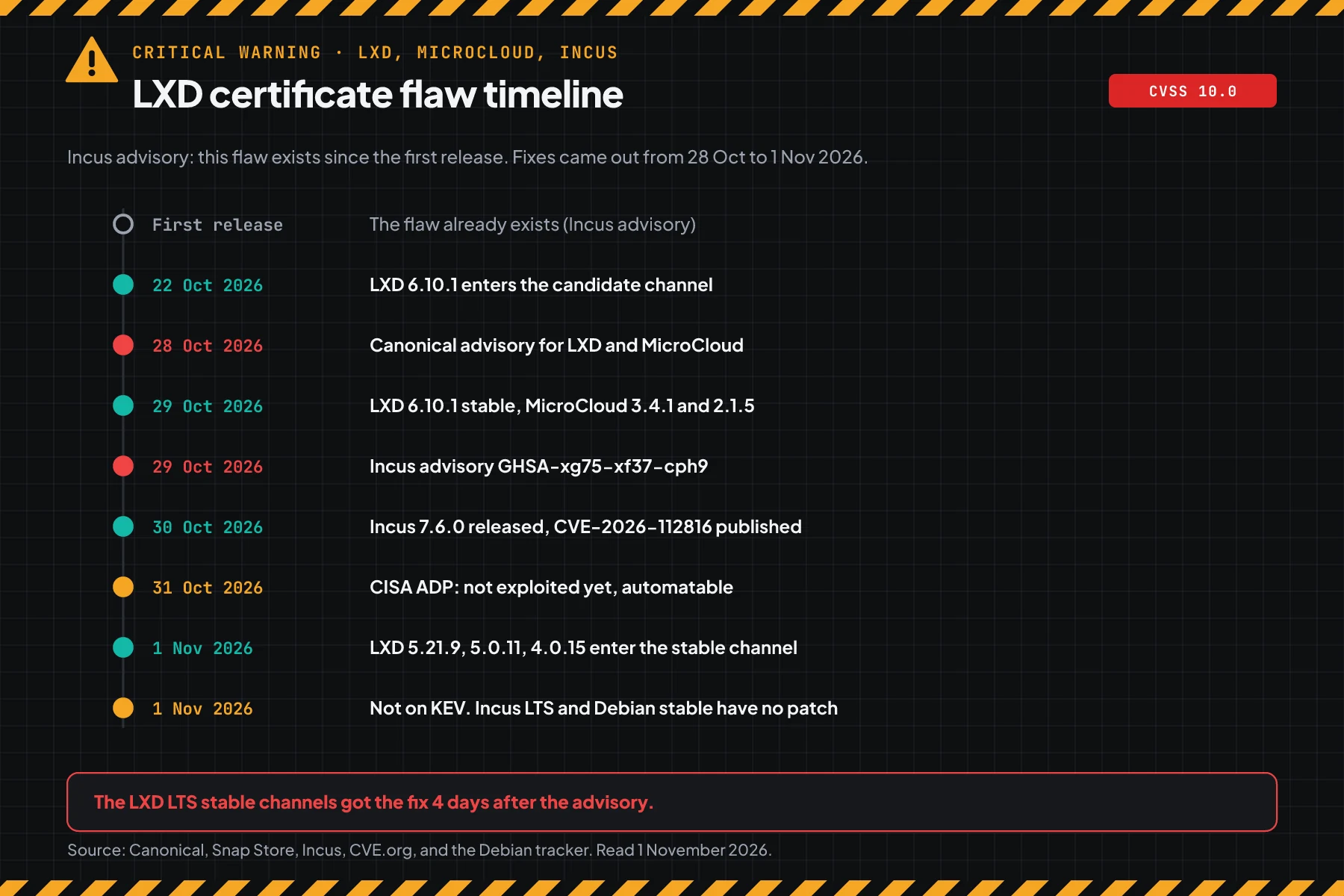
The Snap Store data on 1 November 2026 shows one important point. The 6/stable channel got 6.10.1 on 29 October. The LTS channels 5.21/stable, 5.0/stable, and 4.0/stable got the safe version only on 1 November 2026, at 05.10 UTC.
How it works: 1 certificate flaw, full access
The daemon compares the wrong certificates with the list of trusted clients.
This section uses the official summary. Its purpose is to help you choose the correct steps, not to explain an attack.
Summary from Canonical and Incus
According to the Incus advisory GHSA-xg75-xf37-cph9, the HTTPS listener asks for client certificates but does not verify them. The TLS handshake only proves that the client holds the key of the first certificate in the chain. The login check compares every certificate in the chain with the trust store, so a client can pass as another trusted client.
According to the Canonical advisory, the flaw is also in MicroCloud when a new member joins a cluster. Incus adds that the agentAI agentAn AI program that performs work steps by itself, for example reading a message, drafting a reply, and recording the result.Open the glossary connection between the host and VMs is also affected. The flaw class is CWE-295, improper certificate validation.
Scores from each source
The score is different for each CVSS version, so write the score with its source.
| ID | Product | Score | Status on 1 November 2026 |
|---|---|---|---|
| CVE-2026-112816 | LXD, MicroCloud | CVSS 4.0 10.0, from Canonical as the CNA | Published 30 October. Not on CISA KEV |
| GHSA-xg75-xf37-cph9 | Incus | CVSS 3.1 10.0, from the Incus team | No CVE ID yet |
| CISA ADP (SSVC) | LXD | Exploitation: none. Automatable: yes. Technical impact: total | Update of 31 October |
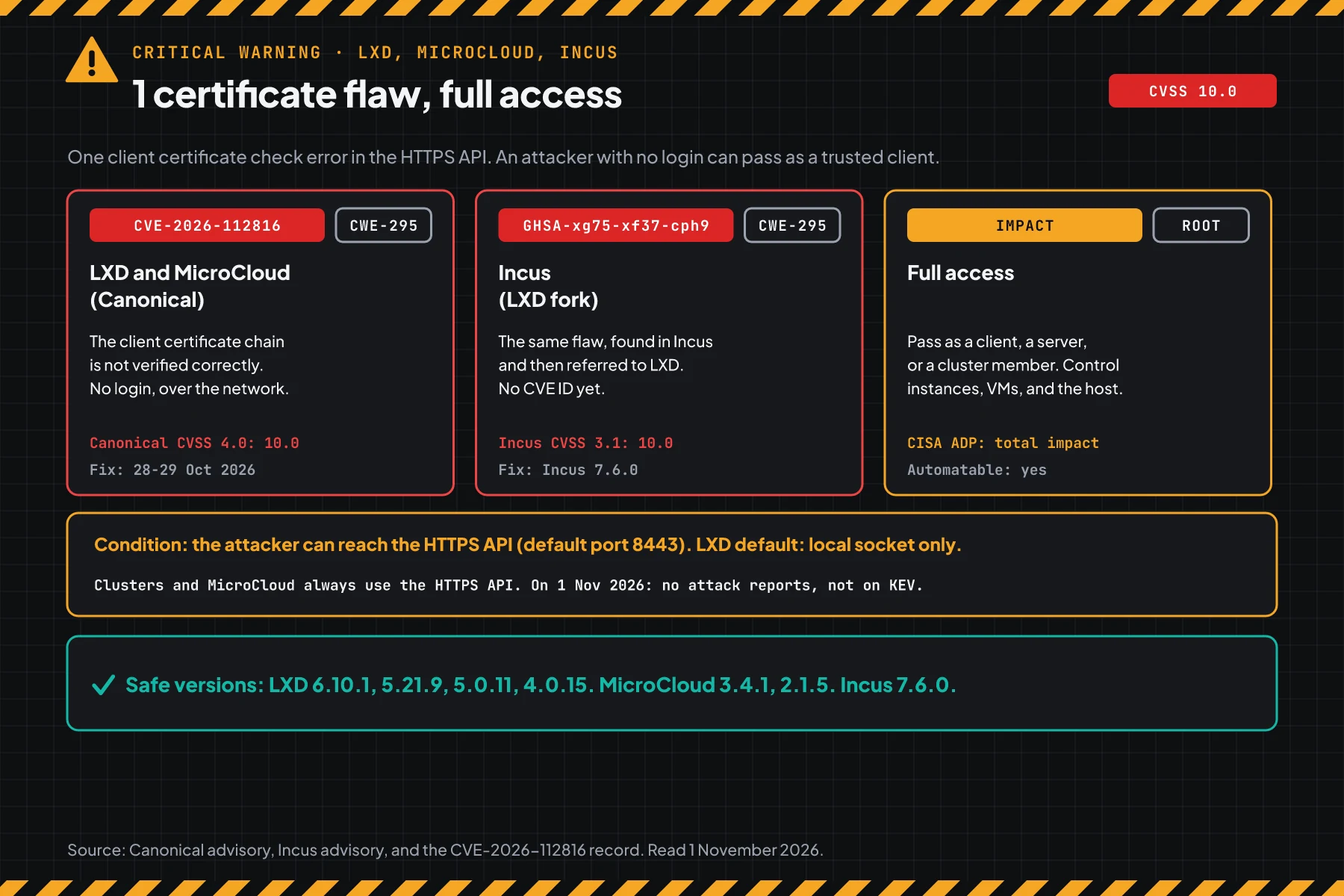
Exploitation status on 1 November 2026
We found no attack reports, no public exploit code in official sources, and no CISA KEV entry. CISA ADP says that this flaw is automatable and that its technical impact is total.
Rama Digital analysis: a flaw with no login, where the server certificate shows in every TLS handshake, is an easy target for automatic scanners. Do not wait for the KEV status. Update servers with an open API today.
Who has the highest risk
The risk depends on who can reach the API port, not only on the version.
This table summarises the Canonical advisory, the Incus advisory GHSA-xg75-xf37-cph9, and the LXD documentation on network access.
| Server condition | Risk | Reason |
|---|---|---|
core.https_address on a public IP or :8443 | Highest | Anyone on the internet can reach the API |
| LXD cluster or MicroCloud | High | Cluster members always talk through the HTTPS API |
| API open to the office LAN or VPN | High | One compromised laptop on the network can reach the API |
Uses the LXD UI or an lxc remote client | Check | LXD documentation: the UI needs LXD to be open to the network |
| Incus LTS or a Debian package | Check | No fix on 1 November 2026 |
Local socket only, the lxd init default | Low | LXD documentation: the default is for local users through a Unix socket only |
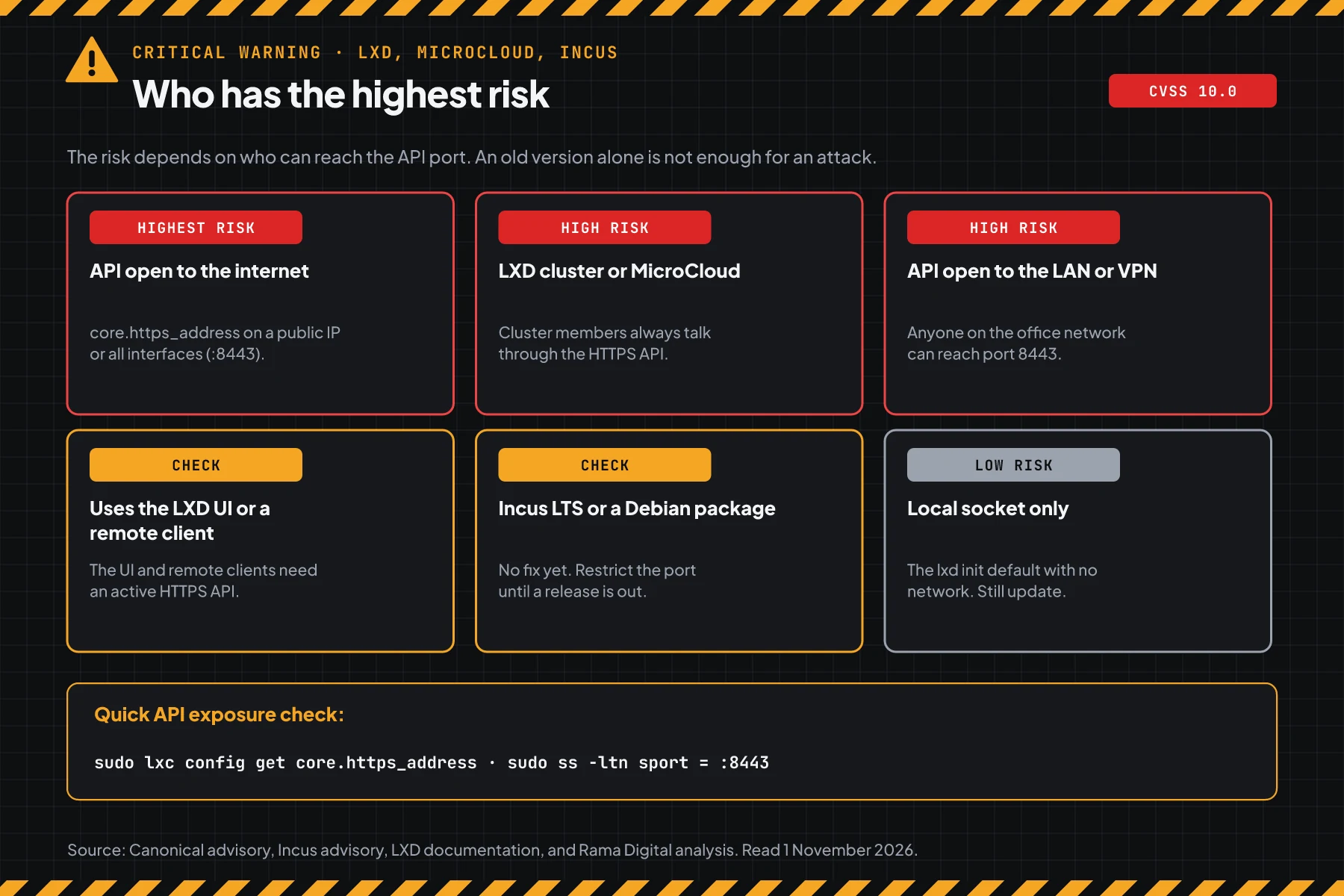
An LXD or Incus host often runs many customer servers at the same time. So one host that an attacker controls opens every instance on it. The same risk pattern shows in the PwnEscape kernel flaw on KVM hosts: a virtualisation host is the asset with the highest patch priority.
Vulnerable and safe versions
Use this table of products and channels, because LXD uses snap channels and Incus uses monthly and LTS releases.
| Product and channel | Status on 1 November 2026 | Move to |
|---|---|---|
| LXD 6/stable and latest/stable | Vulnerable below 6.10.1 | 6.10.1, in the stable channel since 29 October |
| LXD 5.21/stable (LTS) | Vulnerable below 5.21.9 | 5.21.9, in the stable channel since 1 November |
| LXD 5.0/stable (LTS) | Vulnerable below 5.0.11 | 5.0.11, in the stable channel since 1 November |
| LXD 4.0/stable | Vulnerable below 4.0.15 | 4.0.15, in the stable channel since 1 November |
| MicroCloud 3/stable and 2/stable | Vulnerable below 3.4.1 and 2.1.5 | 3.4.1 and 2.1.5, since 29 October |
| Incus 7.x monthly releases | Vulnerable below 7.6.0 | 7.6.0, released on 30 October |
| Incus 7.0 LTS and 6.0 LTS | Vulnerable, no point release with the fix yet | Step 4, then the next LTS release |
| Debian packages lxd 5.0.2 and incus 6.0.4 | No Debian patch yet | Step 4, then the Debian update or a move to snap or Zabbly |
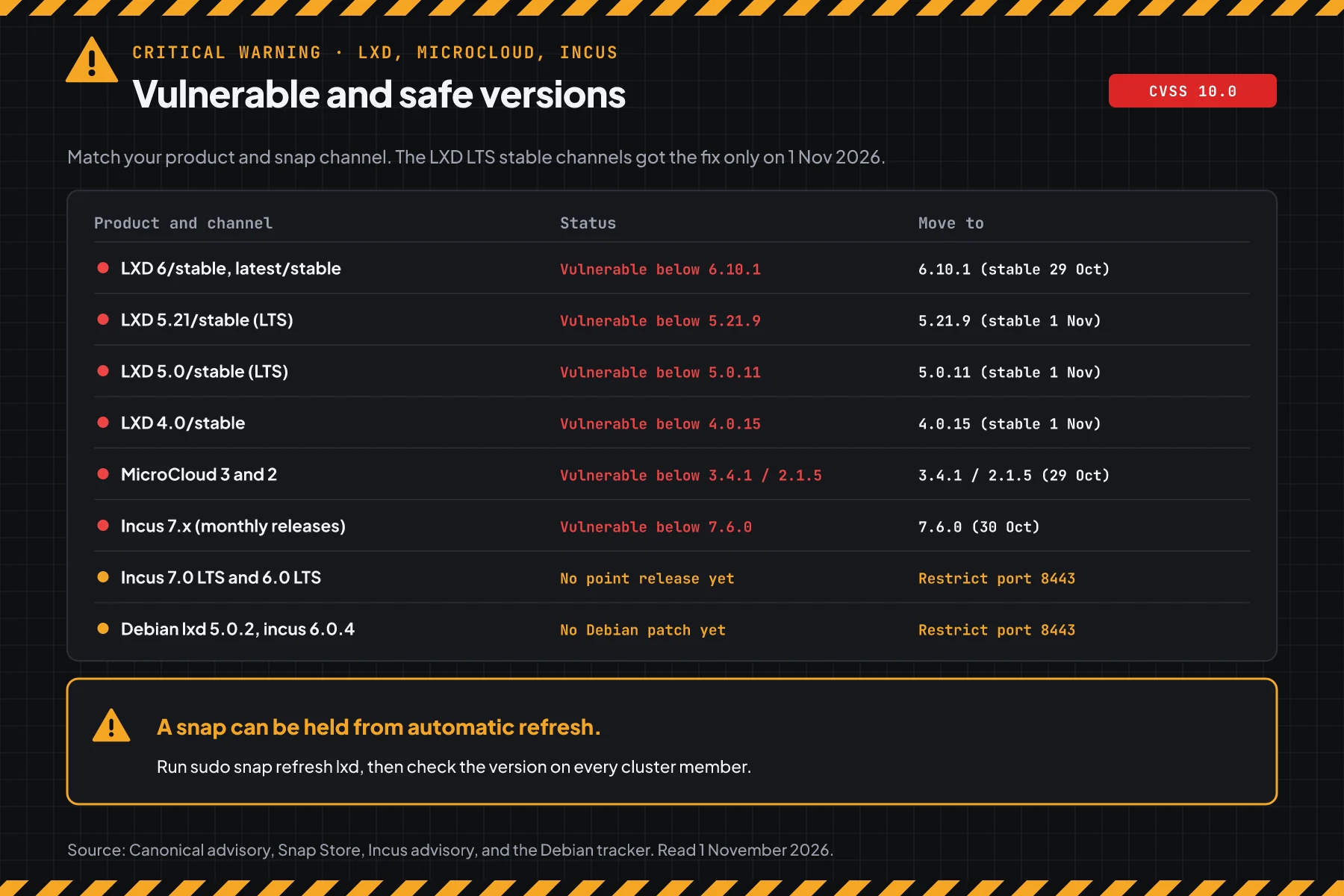
The LXD and MicroCloud data comes from the Canonical advisory and the Snap Store channel data on 1 November 2026. The Incus data comes from the Incus advisory GHSA-xg75-xf37-cph9 and the Incus 7.6 release notes. The Incus advisory lists only versions below 7.6.0 as vulnerable.
For Incus 7.0 LTS and 6.0 LTS, the last tags are v7.0.2 (16 October) and v6.0.7. Both came out before the fix. According to the Debian security tracker, Debian sid has a patch in incus 7.0.2-3, but trixie and forky are still vulnerable. We do not invent a safe LTS version.
Prerequisites before you start
sudoaccess to every LXD or Incus server, including all cluster members.- A list of trusted client IPs: admin laptops, CI servers, the LXD UI, and cluster members.
- A maintenance window. A snap refresh restarts the daemon, and the API stops for a short time.
- Access to the firewall or reverse proxy logs in front of the server, if there are any.
- The
nftablespackage for step 4. Modern Ubuntu and Debian include it.
Step 1: Check the LXD, MicroCloud, or Incus version
Save this script as check-version-lxd.sh. The script reads the version from snap, the package, or the incus command, then compares it with the table of safe versions.
#!/usr/bin/env bash
# Check LXD, MicroCloud, and Incus versions for CVE-2026-112816 (LXD) and GHSA-xg75-xf37-cph9 (Incus).
# Data: Canonical advisory of 28 October 2026 and Incus advisory of 29 October 2026.
# Use: sudo bash check-version-lxd.sh              (read the versions on this machine)
#      bash check-version-lxd.sh lxd 5.21.8 incus 7.5.1   (check versions that you type)

newer_or_equal() { [ "$(printf '%s\n%s\n' "$1" "$2" | sort -V | head -1)" = "$2" ]; }   # $1 >= $2

rate() {
  local product="$1" v="${2%% *}" safe=""
  v="${v%%-*}"
  [[ $v =~ ^[0-9]+\.[0-9]+$ ]] && v="$v.0"   # 7.6 equals 7.6.0
  case "$product:$v" in
    lxd:6.*)        safe=6.10.1 ;;
    lxd:5.21.*)     safe=5.21.9 ;;
    lxd:5.0.*)      safe=5.0.11 ;;
    lxd:4.0.*)      safe=4.0.15 ;;
    microcloud:3.*) safe=3.4.1 ;;
    microcloud:2.*) safe=2.1.5 ;;
    incus:6.0.*|incus:7.0.*)
      printf '%-11s %-9s VULNERABLE. No LTS fix release yet. Restrict the API port (step 4).\n' "$product" "$v"
      return ;;
    incus:*)        safe=7.6.0 ;;
  esac
  if [ -z "$safe" ]; then
    printf '%-11s %-9s UNKNOWN. This line is no longer supported, move to an LTS line.\n' "$product" "$v"
  elif newer_or_equal "$v" "$safe"; then
    printf '%-11s %-9s SAFE (fixed since %s)\n' "$product" "$v" "$safe"
  else
    printf '%-11s %-9s VULNERABLE -> move to %s or newer\n' "$product" "$v" "$safe"
  fi
}

if (( $# > 0 )); then
  while (( $# > 1 )); do rate "$1" "$2"; shift 2; done
  exit 0
fi

found=0
if command -v snap >/dev/null 2>&1; then
  for p in lxd microcloud; do
    v=$(snap list "$p" 2>/dev/null | awk 'NR==2 {print $2}')
    [ -n "$v" ] && { rate "$p" "$v"; found=1; }
  done
fi
if command -v lxd >/dev/null 2>&1 && ! snap list lxd >/dev/null 2>&1; then
  rate lxd "$(lxd --version)"; found=1
fi
if command -v incus >/dev/null 2>&1; then
  v=$(incus version 2>/dev/null | awk -F': ' '/^Server version/ {print $2}')
  [ -z "$v" ] || [ "$v" = unreachable ] && v=$(incus version 2>/dev/null | awk -F': ' '/^Client version/ {print $2}')
  rate incus "$v"; found=1
fi
for p in lxd incus; do
  d=$(dpkg-query -W -f='${Version}' "$p" 2>/dev/null)
  [ -n "$d" ] && echo "Package: $p $d. For a distro package, also check the distro security tracker."
done
(( found )) || echo "No LXD, MicroCloud, or Incus found on this machine."
exit 0
# On the server: read the version from snap, the package, or the incus command
sudo bash check-version-lxd.sh
# On a laptop: check versions that you copied from other servers
bash check-version-lxd.sh lxd 5.21.8 microcloud 2.1.4 incus 7.5.1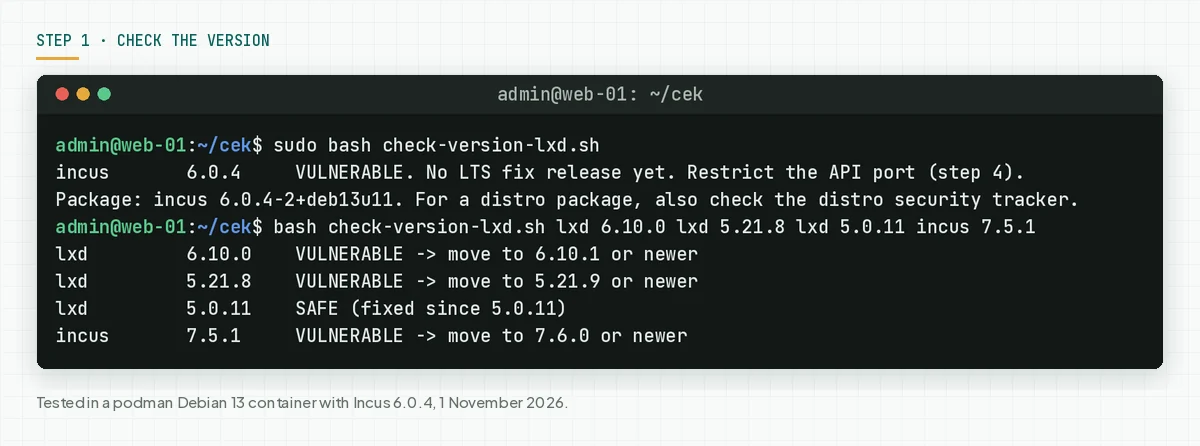
Check the result: "VULNERABLE" means go to steps 2 and 3 today. "VULNERABLE. No LTS fix release yet" means step 4 is required until a release is out. "SAFE" still means run step 5, because this flaw has existed for a long time.
Step 2: Check if the HTTPS API is open to the network
This flaw can only be used through the HTTPS API, so this step tells you how fast you must act.
Save this script as check-exposure-lxd.sh. The script reads core.https_address and cluster.https_address, then shows the sockets on port 8443.
#!/usr/bin/env bash
# Check if the LXD or Incus HTTPS API is open to the network. CVE-2026-112816 can only be used through this API.
# Use: sudo bash check-exposure-lxd.sh

for c in lxc incus; do
  command -v "$c" >/dev/null 2>&1 || continue
  if ! "$c" info >/dev/null 2>&1; then
    echo "$c: cannot reach the daemon. Run the script with sudo."
    continue
  fi
  for key in core.https_address cluster.https_address; do
    address=$("$c" config get "$key" 2>/dev/null)
    if [ -z "$address" ]; then
      printf '%-6s %-22s empty\n' "$c" "$key"
    elif [[ $address == 127.* || $address == "[::1]"* || $address == localhost* ]]; then
      printf '%-6s %-22s %-18s local only\n' "$c" "$key" "$address"
    else
      printf '%-6s %-22s %-18s OPEN TO THE NETWORK\n' "$c" "$key" "$address"
    fi
  done
done
echo "Sockets that listen on port 8443 (the default API port):"
ss -ltnH '( sport = :8443 )' | awk '{print "  " $4}'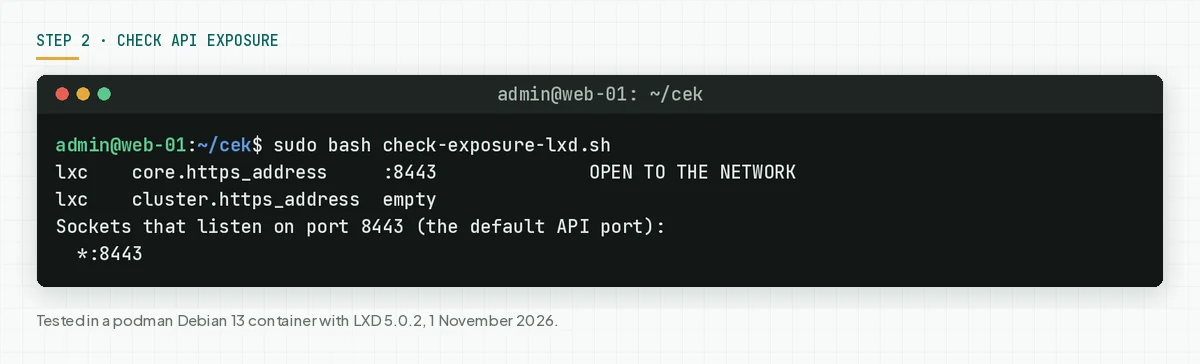
Then test from outside. This command only asks for the public server information at /1.0.
# Run it from another network, for example a phone hotspot. Replace the sample address.
curl -sk -o /dev/null -w '%{http_code}\n' -m 5 https://SERVER-ADDRESS:8443/1.0
# 200 = the API is reachable from that network. 000 = not reachable.
Check the result: "empty" for both keys means low risk. "local only" means the API is only for that machine. "OPEN TO THE NETWORK" and code 200 from another network mean update in step 3 today, and apply step 4 until the update is done.
Step 3: Update to a safe version
Only the update closes the flaw. The Canonical advisory asks all users to move to the latest version in their channel.
# LXD and MicroCloud from snap. Do this on every cluster member.
snap list lxd microcloud
sudo snap refresh lxd
sudo snap refresh microcloud
# When the snap is held from automatic refresh, remove the hold, then refresh again.
sudo snap refresh --unhold lxd
sudo snap refresh lxd

# Incus from the Zabbly repository
sudo apt update && sudo apt install --only-upgrade incus

# Check again after the update
sudo bash check-version-lxd.sh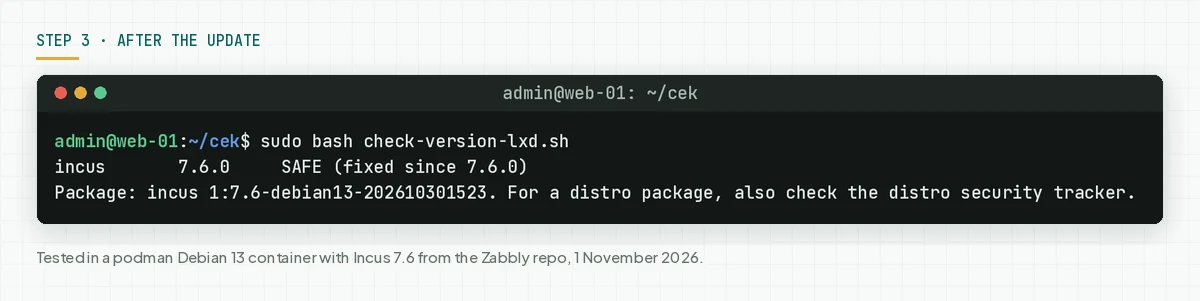
- Refresh all cluster members in 1 work window. The LXD cluster documentation asks that all members use the same version. Do not upgrade when a member is offline.
- Check if the snap is held with
snap refresh --listandsnap info lxd. A held snap does not receive the safe version. - For Incus from the official Zabbly repository, move to 7.6.0. For Incus LTS, apply step 4 and watch for the next point release.
- For the Debian
lxdorincuspackage, watch the Debian security tracker. When you need the fix today, plan a move to the LXD snap or to Incus from Zabbly. - Run
check-version-lxd.shagain on every machine.
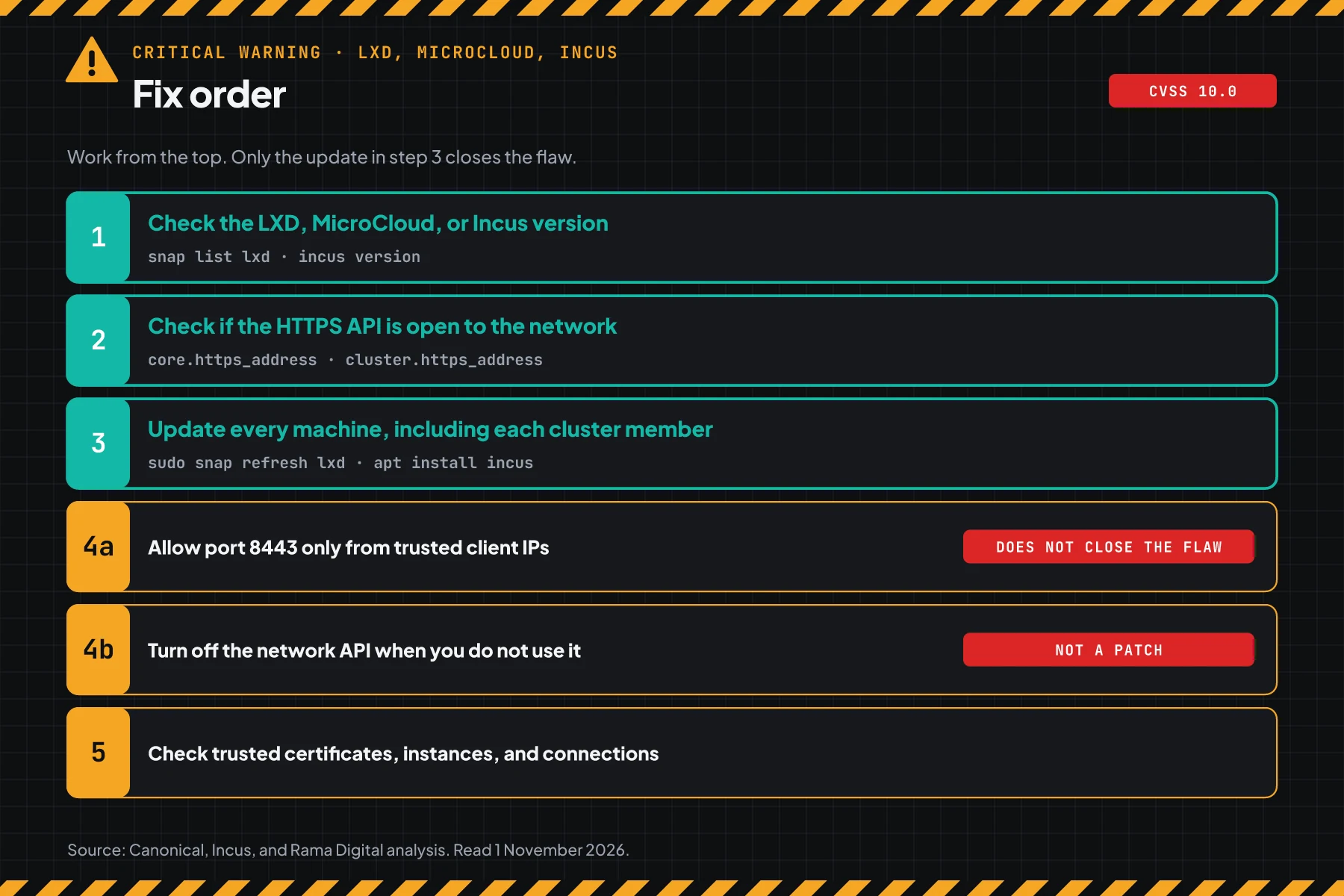
Check the result: the script prints "SAFE" for every machine, including cluster members and standby servers.
Step 4: Restrict the API port until the update is done
This step reduces who can reach the API, but it does not close the flaw.
The Incus advisory GHSA-xg75-xf37-cph9 gives 1 workaround: restrict network access to the HTTPS listener to trusted hosts only. There is no configuration workaround. Rama Digital analysis: we turned that workaround into an nftables rule and an option to turn off the API. Condition: the update cannot run today. Limit: a trusted client that is compromised can still reach the API.
4a. Allow port 8443 only from trusted client IPs
Save this rule as lxd-8443-en.nft. Replace the sample IPs with your trusted client IPs and all cluster members. When you use another port, replace the number 8443.
#!/usr/sbin/nft -f
# Allow the LXD or Incus API port (8443) only from trusted client IPs and cluster members.
# Replace the sample IPs with your IPs. Apply: sudo nft -f lxd-8443-en.nft
table inet lxd_api
delete table inet lxd_api
table inet lxd_api {
  set trusted_clients {
    type ipv4_addr
    elements = { 198.51.100.10, 198.51.100.11 }
  }
  chain input {
    type filter hook input priority -10; policy accept;
    tcp dport 8443 ip saddr @trusted_clients accept
    tcp dport 8443 counter drop
  }
}
sudo nft -f lxd-8443-en.nft
sudo nft list chain inet lxd_api input
# Test from a trusted client IP (must be 200) and from another network (must be 000)
curl -sk -o /dev/null -w '%{http_code}\n' -m 5 https://SERVER-ADDRESS:8443/1.0
# Remove the rule after the update, if you do not want to keep it
sudo nft delete table inet lxd_api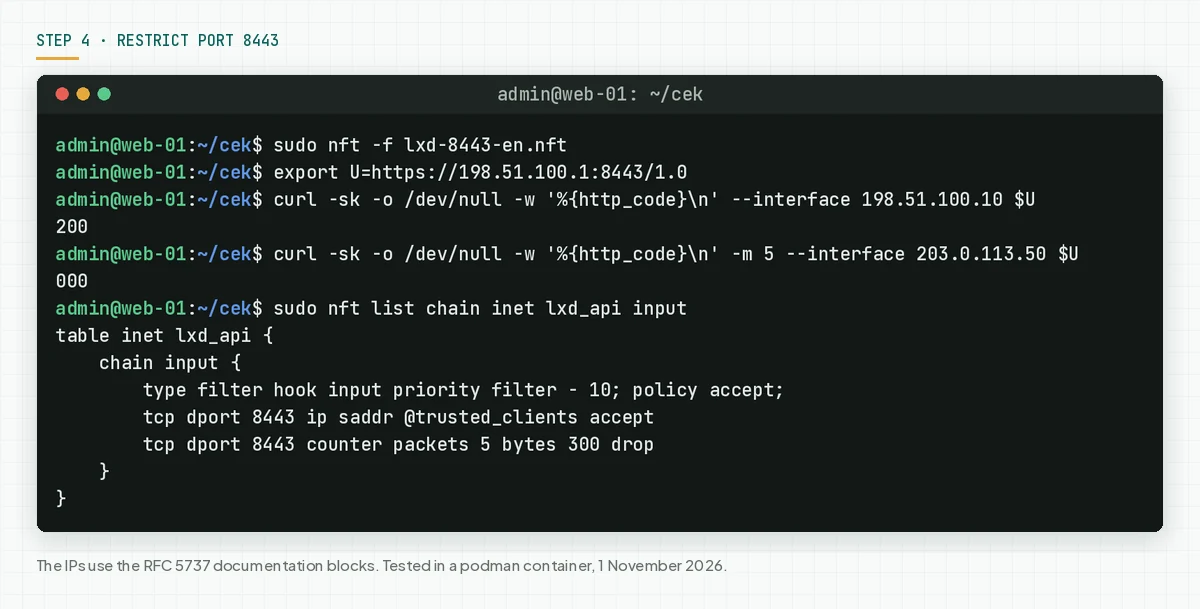
This rule does not stay after a reboot. For a permanent rule, add its content to /etc/nftables.conf. When you use a cloud firewall or a security group, make the same rule there.
4b. Turn off the network API when you do not use it
A single server that you manage only from the machine itself does not need the network API. This step turns off the LXD UI and remote clients. Do not use this step on a cluster member.
# LXD
sudo lxc config unset core.https_address
# Incus
sudo incus config unset core.https_address
# Check: the address is empty and no socket listens on port 8443
sudo bash check-exposure-lxd.sh
We tested the Incus command in a container. After that command, the exposure script prints "empty" and no socket listens on port 8443.
Check the result: a trusted client gets 200, another IP gets 000, and the drop counter goes up. Or both addresses are empty and port 8443 does not listen.
Step 5: Look for signs that the server was touched
The attacker looks like a trusted client, so compare the server with your records.
Save this script as check-signs-lxd.sh. The script shows the trusted certificates, the instances in all projects, the recent operations, and the active connections to port 8443 per IP.
#!/usr/bin/env bash
# Collect data to look for signs of foreign access to LXD or Incus. Compare the result with your records.
# Use: sudo bash check-signs-lxd.sh lxc "198.51.100.10,198.51.100.11"
#      (lxc for LXD, incus for Incus; the second argument = trusted client IPs, separated by commas)
C="${1:-lxc}"
ALLOW=",${2:-},"

echo "== 1. Trusted certificates. Remove the ones that you do not know."
"$C" config trust list --format csv
echo "== 2. Instances in all projects. Look for ones that you did not create."
"$C" list --all-projects --format csv -c ens
echo "== 3. Recent operations."
"$C" operation list --format csv
echo "== 4. Active connections to port 8443 per IP."
ss -tnH state established '( sport = :8443 )' | awk '{print $4}' \
  | sed -E 's/^\[?(::ffff:)?//; s/\]?:[0-9]+$//' | sort | uniq -c \
  | while read -r count ip; do
      if [[ $ALLOW == *",$ip,"* ]]; then status="trusted client"; else status="UNKNOWN"; fi
      printf '   %-16s %3s connections  %s\n' "$ip" "$count" "$status"
    done
# LXD: first argument lxc. Incus: first argument incus.
sudo bash check-signs-lxd.sh lxc "198.51.100.10,198.51.100.11"
# Extra checks on a cluster
sudo lxc cluster list
sudo lxc cluster list-tokens
# Look for privileged instances or mounts from the host
sudo lxc list --all-projects -c n,e -f csv | while IFS=, read -r n p; do
sudo lxc config show "$n" --project "$p" --expanded | grep -E 'security.privileged: "true"|source: /$' && echo " -> $p/$n"
done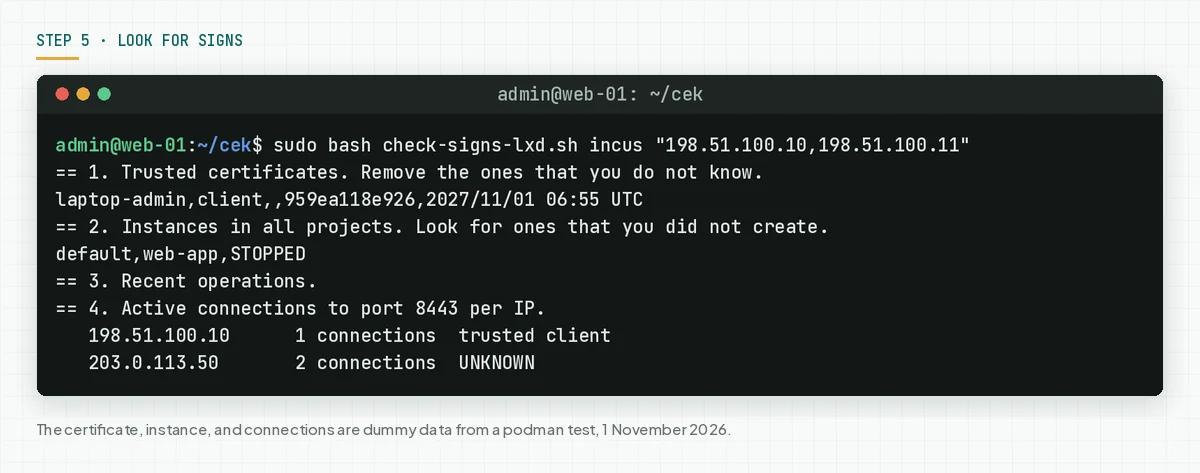
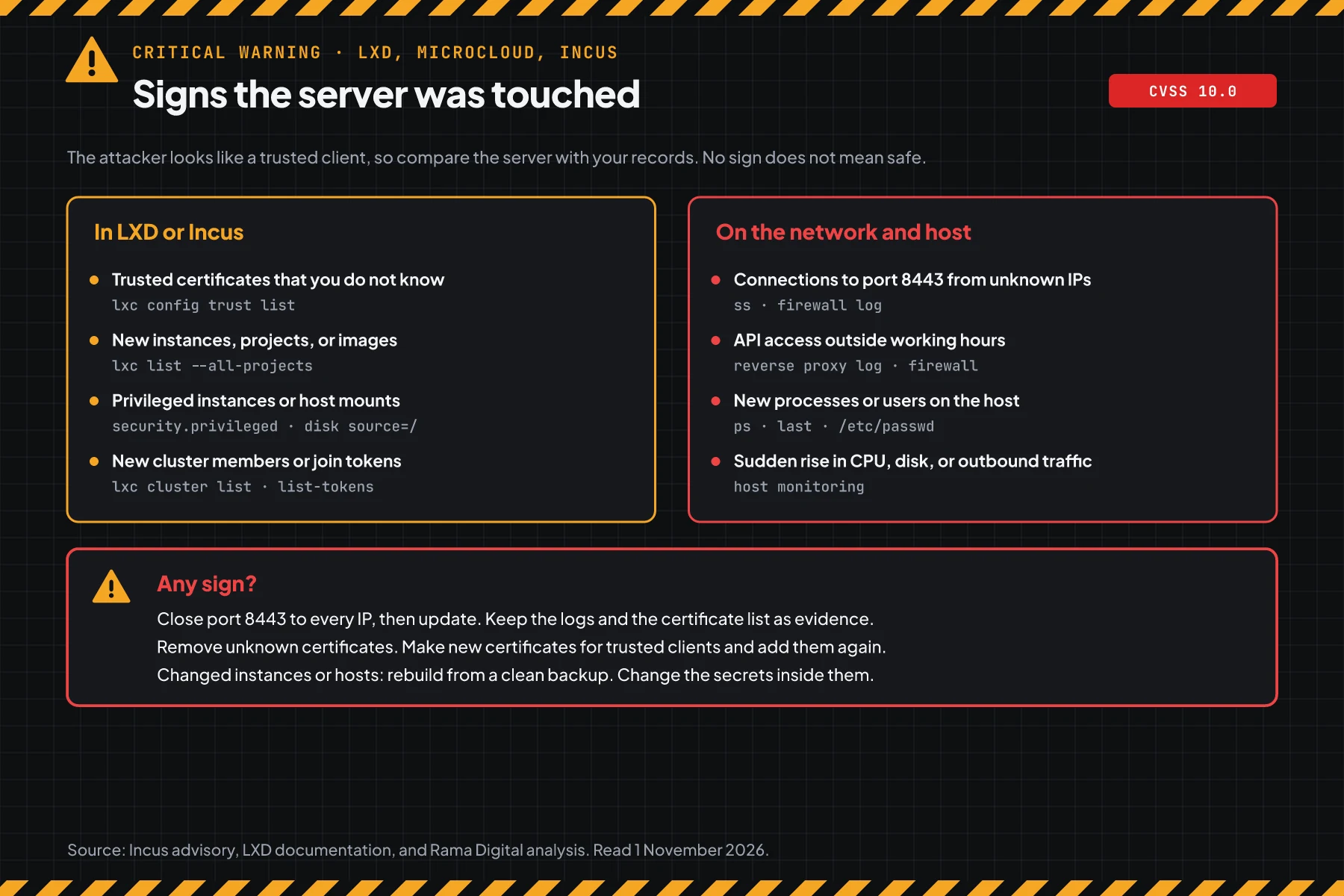
Then check the host. Look for new processes, users, or SSH keys, and for a rise in CPU, disk, or outbound traffic. Also read the firewall or reverse proxy logs for access to port 8443 from unknown IPs since 28 October or earlier.
Check the result: you know every certificate, instance, and cluster member, and every connection comes from a trusted client. When you find even 1 sign, close port 8443 to every IP, then update. Keep the logs and the certificate list as evidence. Remove unknown certificates, make new certificates for trusted clients, then rebuild changed instances or hosts from a clean backup.
When instances hold customer data, Indonesian Law 27/2022 on Personal Data Protection requires a written notice no later than 3 times 24 hours after a personal data leak. Also read the GitLab CVE-2026-97229 warning.
Example: 1 afternoon of response for 3 servers
This simulation uses dummy data. The server names, times, and results are not customer data.
| Time (WIB) | Dummy server | What we checked | Result | Action |
|---|---|---|---|---|
| 13.00 | host-a (LXD 5.21.8 snap, API :8443) | Steps 1 and 2 | VULNERABLE, OPEN TO THE NETWORK | Step 4a, then refresh |
| 13.20 | cluster-b (3 members, LXD 6.10.0) | Step 1 | VULNERABLE on 3 members | Refresh all 3 members in 1 window |
| 13.45 | dev-c (Incus 6.0.4 Debian) | Steps 1 and 2 | VULNERABLE, no LTS fix yet | Step 4b, API turned off |
| 14.30 | host-a | Step 5 | 1 certificate that the team does not know | Incident response, remove the certificate, audit the instances |
Lesson from the simulation: a safe version does not prove a clean server. Host-a is updated, but step 5 still finds a sign from before the update.
Who applies the patch
The patch duty is different for each install method, so this table helps you know who acts today.
| Install method | Patch owner | What you do |
|---|---|---|
| LXD or MicroCloud snap on your own server | Canonical through the snap channel, your team runs the refresh | Steps 1 to 5 |
| Incus from the Zabbly repository | The Incus team, your team runs apt | Steps 1 to 5 |
| Debian or another distro package | The distro security team | Step 4, then watch the distro tracker |
| VPS or container from a hosting provider | The hosting provider | Ask for written proof of the version and the step 5 result |
Rama Digital recommendation: treat a virtualisation host like a domain server. Update the host kernel too, for example for the Linux kernel TCP flaw CVE-2026-98432. For a wider check standard, read the GitLab CVE-2026-97229 warning.
Checklist for today
- List every LXD, MicroCloud, and Incus server, including cluster members. Owner: infrastructure team. Evidence: a list of names and versions.
- Check the version with step 1. Owner: server admin. Evidence: script output.
- Check API exposure with step 2. Owner: server admin. Evidence: script output and the outside test.
- Apply step 4 on every server with an open API that cannot update today. Owner: server admin. Evidence: the 200 and 000 test.
- Update to a safe version. Owner: server admin. Evidence: script output after the update.
- Check for signs with step 5. Owner: server admin and security team. Evidence: script output and firewall logs.
- Record the trusted client IPs and keep the port 8443 rule as a permanent rule.
Questions and answers
My server uses LXD only through the local socket. Am I safe?
Your risk is low, because this flaw can only be used through the HTTPS API. Still update to a safe version, because the configuration can change and old versions also hold other flaws.
Why did my LXD snap not update automatically?
The LTS stable channels got the safe version only on 1 November 2026. An admin can also hold the snap. Run sudo snap refresh lxd, then check again with step 1.
Is Incus affected?
Yes. The Incus advisory GHSA-xg75-xf37-cph9 lists versions below 7.6.0 as vulnerable. Incus 7.0 LTS and 6.0 LTS have no point release with the fix on 1 November 2026.
Do attackers already use this flaw?
On 1 November 2026, we found no attack reports, and this flaw is not on CISA KEV. CISA ADP says that this flaw is automatable.
Is a firewall rule enough instead of the update?
No. The rule reduces who can reach the API. A trusted client that is compromised can still reach the API, so the update is still required.
Do my instances stop during an LXD snap refresh?
The LXD cluster documentation says that running instances keep running while a cluster member waits for the other members to finish the upgrade. The API of that member stops until all members use the same version. Use a maintenance window.
I use a VPS from a hosting provider. What do I do?
When you installed LXD or Incus yourself on the VPS, you apply the patch. When the provider runs LXD under your VPS, ask the provider for written proof of the version.
Next step
The limits that still apply: the port rule in step 4 does not close the flaw, and an update does not remove unknown certificates that are already in the trust store. When your server shows a sign in step 5, or you need help with an audit and recovery, use Vibe Code Rescue. For 1 urgent issue today, book a 30-minute session.
Sources
- Canonical advisory: affected products, MicroCloud, impact, safe versions per channel, and the refresh command.
- Incus advisory GHSA-xg75-xf37-cph9: technical summary, impact, CVSS 3.1 score 10.0, safe version 7.6.0, and the workaround.
- CVE-2026-112816 record: CVSS 4.0 score 10.0, CWE-295, and the CISA ADP assessment.
- LXD release page and Incus 7.6 release notes: release dates of 6.10.1, 5.21.9, 5.0.11, 4.0.15, and 7.6.0.
- LXD documentation on network access: the local socket default, the
core.https_addressexample, and the LXD UI need. - The LXD cluster documentation: the same version on all members and the blocked state during an upgrade.
- Debian security tracker: incus package status in trixie, forky, and sid.
- Indonesian Law 27/2022 on Personal Data Protection: the duty to report a personal data leak.