Direct answer: Self-managed GitLab has 2 flaws with a CVSS score of 10.0: CVE-2026-97229 and CVE-2026-110264. Both can run code on the server without a login. CVE-2026-97229 is already used in attacks and entered CISA KEV on 29 October 2026. Update GitLab to the 29 October release today: 19.5.3, 19.4.5, 19.3.7, 19.2.10, 19.1.10, 19.0.11, or 18.11.14.
The flaws exist only in the GitLab that you install yourself. GitLab patched GitLab.com and GitLab Dedicated.
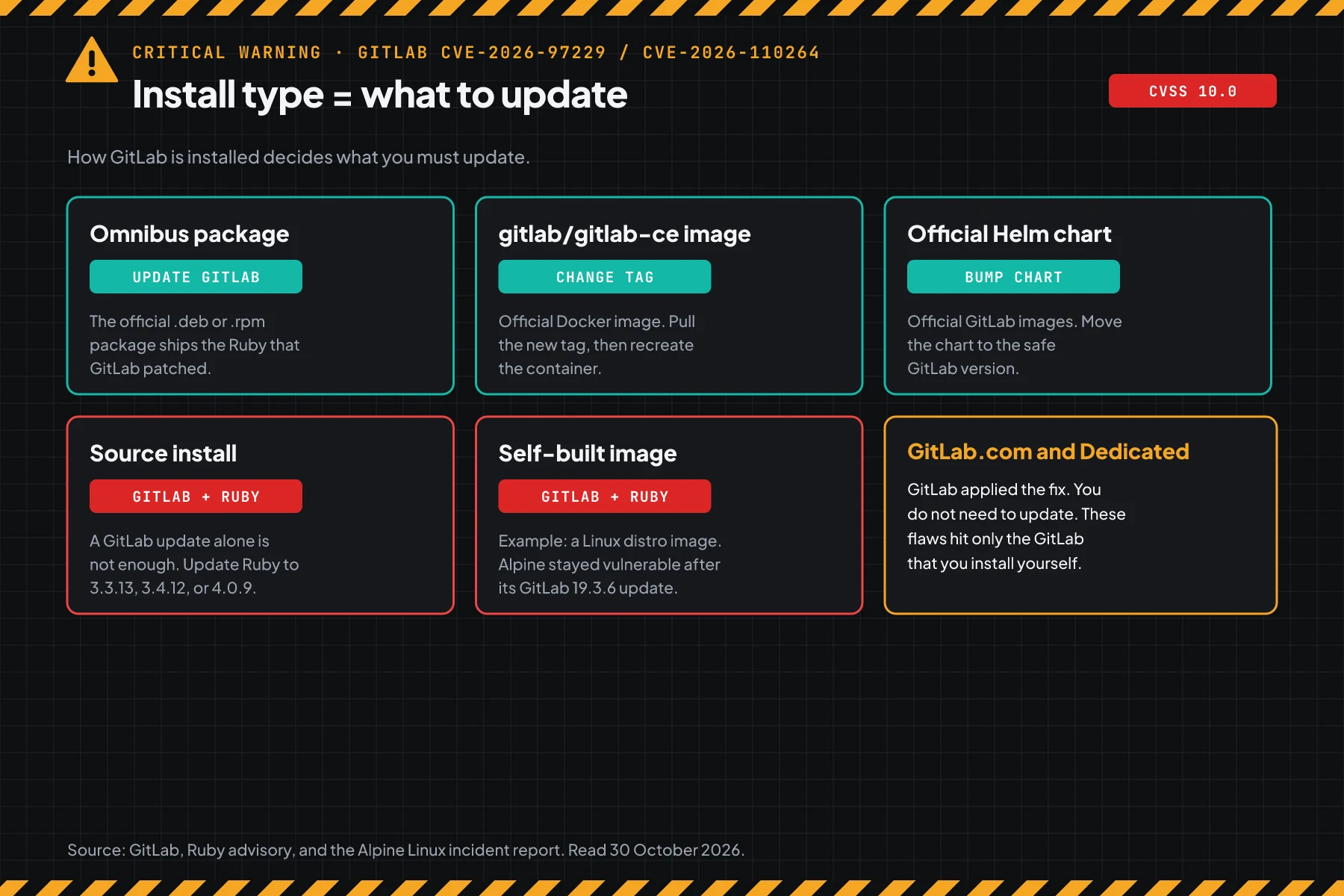
Main condition: Omnibus packages, the official Docker image, and the official Helm chart need only a GitLab update. Source installs and self-built images also need Ruby 3.3.13, 3.4.12, or 4.0.9. Limit: The temporary steps in this article only reduce exposure. This article contains no exploit code.
We read the GitLab patch release of 12 October, the GitLab patch release of 21 October, the GitLab release of 29 October, the Ruby advisory of 23 October, the Alpine Linux incident report, and CISA KEV on 30 October 2026, at about 10:00 UTC. We ran the commands in steps 1, 2, 4, and 5 in podman containers with the official GitLab 19.3.4, GitLab 19.5.3, Ruby 3.3.12, and Ruby 3.3.13 images on the same date. The test server holds no customer data.
The problem: the first patch does not close every flaw, and a GitLab update alone can fail
A server patched on 12 October is still vulnerable to CVE-2026-110264. A server with its own Ruby can stay vulnerable after a GitLab update.
GitLab released the fix for CVE-2026-97229 on 12 October 2026. 9 days later, the GitLab patch release of 21 October closed a second flaw, CVE-2026-110264, which exists in every version since 7.0. So an admin who patched on 12 October must update again.
The second problem is harder to see. According to the Alpine Linux incident report, a new account probed the Alpine Linux GitLab on 20 October, then attacked on 21 October. GitLab workers crashed 8 times. Alpine had moved to GitLab 19.3.6, but its image used standard Ruby, so the flaw stayed open.
Alpine closed GitLab, rebuilt the server from scratch, reset every password, and replaced the GitLab secrets on 27 to 28 October. Alpine found no proof that attacker code ran, but wrote that it cannot rule it out. One day later, CISA KEV added CVE-2026-97229 to its list of exploited flaws.
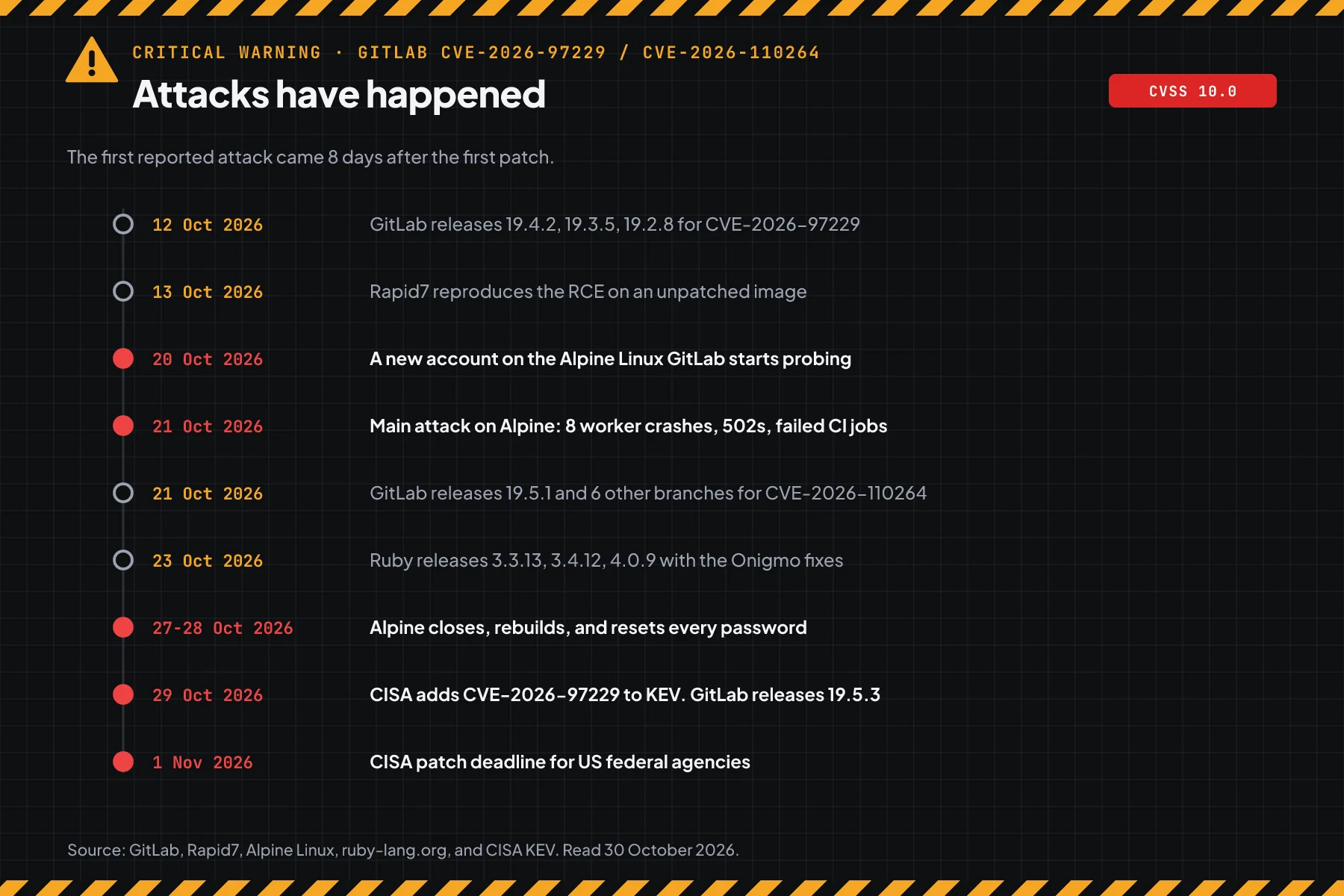
This month we also covered the PHP2Shell flaws and the PwnEscape kernel flaw. The same pattern came back: the gap from patch to attack was only a few days. For GitLab, BleepingComputer noted on 22 October that CISA had flagged 5 GitLab flaws as exploited since November 2021.
How it works: a crafted regex triggers an integer overflow
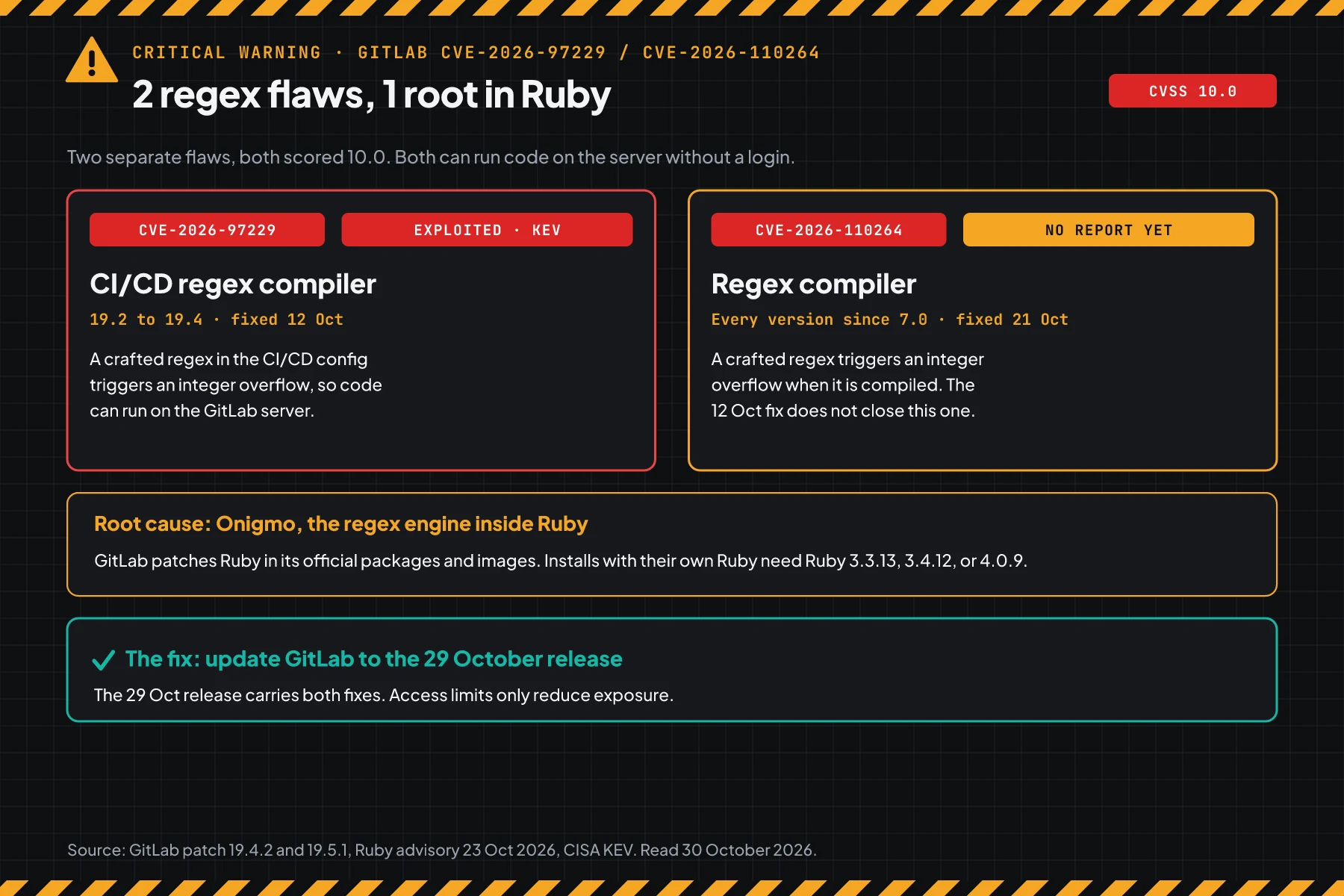
Both flaws use the same pattern: a crafted regex pushes a number in the regex compiler past its limit. An update to the 29 October release closes both.
This section uses the summary from the official advisories. Its purpose is to help you pick the right step, not to explain an attack.
CVE-2026-97229: the CI/CD regex compiler
According to the GitLab patch release of 12 October, regex validation in the CI/CD configuration was not strict enough. A crafted regex triggers an integer overflow (CWE-190), and code can then run on the GitLab server. Affected versions: 19.2 before 19.2.8, 19.3 before 19.3.5, and 19.4 before 19.4.2.
Rapid7 reproduced code execution on an unpatched GitLab CE image. Rapid7 also notes the condition: the attacker must be able to plant a CI/CD configuration. An instance with open public sign-up removes that condition.
CVE-2026-110264: the regex compiler, every version since 7.0
According to the GitLab patch release of 21 October, under certain conditions, a user without a login could run code on the server with a regex that triggers an integer overflow when it is compiled. GitLab has not disclosed the exact conditions. The flaw exists in every version since 7.0, so GitLab patched 7 branches.
As of 22 October, eSecurityPlanet quoted Censys: no confirmed exploitation and no verified PoC for CVE-2026-110264. This status can change fast, because its root cause is the same as the flaw already under attack.
Root cause: Onigmo inside Ruby
According to the Ruby advisory of 23 October, both flaws come from bugs in Onigmo, the regex engine inside Ruby. GitLab patches Ruby in its official packages and images. Ruby released 3.3.13, 3.4.12, and 4.0.9 with the same fixes on 23 October 2026.
The Ruby advisory says that other Ruby applications are also affected when they compile a regex from user input, for example Regexp.new(input). Regexp.timeout and pattern length limits do not protect. The KEV entry also notes that other products can be affected by the same Ruby bug.
What the patch changes
The Ruby patch fixes 3 bugs: a double free when parsing fails, an integer overflow in the pattern size, and an overflow of internal IDs in patterns with many repeats. The GitLab release of 29 October carries all of those fixes, plus the removal of trust for 8 eMudhra CA certificates with leaked keys (CVE-2026-111943).
Who is at the highest risk
A GitLab instance on the internet with open sign-up has the highest risk. Installs with their own Ruby need 2 updates.
How GitLab is installed decides what you must update. This table summarises GitLab, the Ruby advisory of 23 October, and the Alpine Linux incident report.
| Install type | What you update | Proof of safety |
|---|---|---|
| Omnibus package (.deb, .rpm) | GitLab | GitLab version in step 1 |
| Docker image gitlab/gitlab-ce or gitlab-ee | Image tag, then recreate the container | GitLab version in step 1 |
| Official Helm chart | Chart version and GitLab images | GitLab version on the Help page |
| Source install | GitLab and Ruby | Step 1 and step 2 |
| Self-built or distro image | GitLab and the Ruby in the image | Step 1 and step 2 |
| GitLab.com and GitLab Dedicated | Nothing | GitLab applied the fix |
The exposure is large. eSecurityPlanet quoted Censys: 81,820 GitLab hosts were visible from the internet on 21 October. BleepingComputer quoted Shadowserver: more than 2,700 GitLab CE instances are exposed. The 2 numbers measure different things, so do not add them up.
Versions that carry the fix
GitLab released fixes for 7 branches. The middle column closes both CVEs. The right column is the target today, because it also carries the 29 October fixes.
| Branch | Minimum for both CVEs (21 Oct) | Latest release (29 Oct) |
|---|---|---|
| 19.5 | 19.5.1 | 19.5.3 |
| 19.4 | 19.4.3 | 19.4.5 |
| 19.3 | 19.3.6 | 19.3.7 |
| 19.2 | 19.2.9 | 19.2.10 |
| 19.1 | 19.1.9 | 19.1.10 |
| 19.0 | 19.0.10 | 19.0.11 |
| 18.11 | 18.11.13 | 18.11.14 |
| 18.10 and older | No fix in this branch | Upgrade to a supported branch |
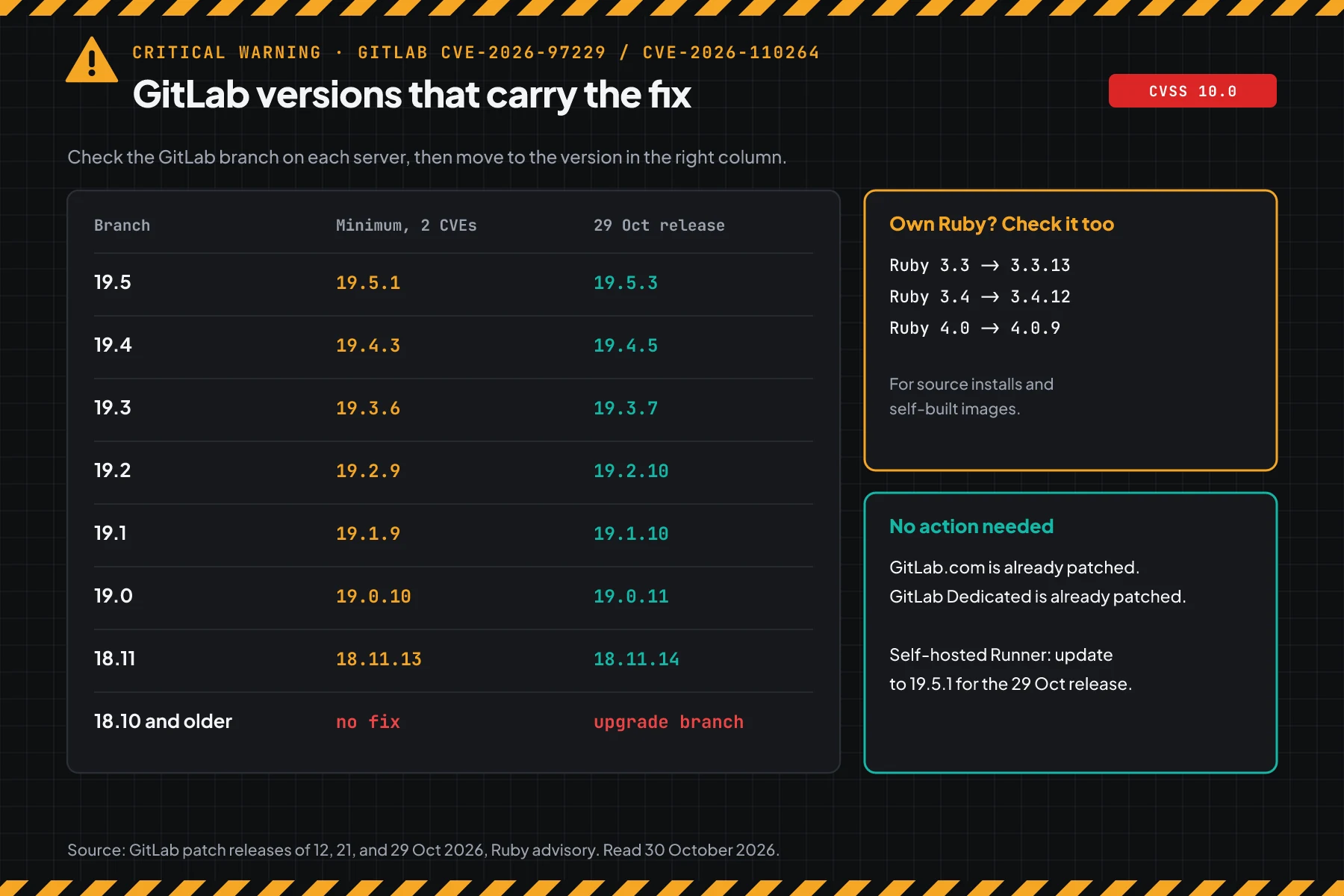
Branches 18.10 and older get no fix. Use the GitLab Upgrade Path tool to see the upgrade order to a supported branch. A large jump across branches needs several stages and migration time.
The 29 October release also asks you to update a self-hosted GitLab Runner to 19.5.1. Runner checks certificates on its own, so a GitLab update does not change it.
Prerequisites
- SSH access with
sudorights to the GitLab server, ordocker execaccess to the GitLab container. - A GitLab admin account for the Admin area.
- A list of every GitLab instance: production, staging, mirrors, and GitLab inside vendor products.
- Disk space for a backup, and a short downtime window for a single-node server.
- A list of the tokens and secrets stored in GitLab: CI/CD variables, deploy keys, and Runner tokens.
Step 1: Check the GitLab version on each server
Save this script as check-gitlab.sh. The script reads the GitLab version, then compares it with the minimum and the latest version for its branch.
v=$(cat /opt/gitlab/embedded/service/gitlab-rails/VERSION); v=${v%%-*}
case ${v%.*} in
  19.5) min=19.5.1 new=19.5.3;;  19.4) min=19.4.3 new=19.4.5;;
  19.3) min=19.3.6 new=19.3.7;;  19.2) min=19.2.9 new=19.2.10;;
  19.1) min=19.1.9 new=19.1.10;; 19.0) min=19.0.10 new=19.0.11;;
  18.11) min=18.11.13 new=18.11.14;;
  *) echo "$v: branch without a fix. Upgrade to 18.11 or newer."; exit;;
esac
lt() { [ "$1" != "$2" ] && [ "$(printf '%s\n' "$1" "$2" | sort -V | head -1)" = "$1" ]; }
if lt "$v" "$min"; then echo "$v: VULNERABLE to 2 CVSS 10 CVEs. Update to $new."
elif lt "$v" "$new"; then echo "$v: safe from the 2 CVEs. Update to $new for the 29 Oct release."
else echo "$v: latest version as of 29 Oct 2026."; fi
Run the script on an Omnibus server, or send it into a Docker container.
sudo bash check-gitlab.sh                 # Omnibus package
docker exec -i gitlab bash < check-gitlab.sh   # Docker container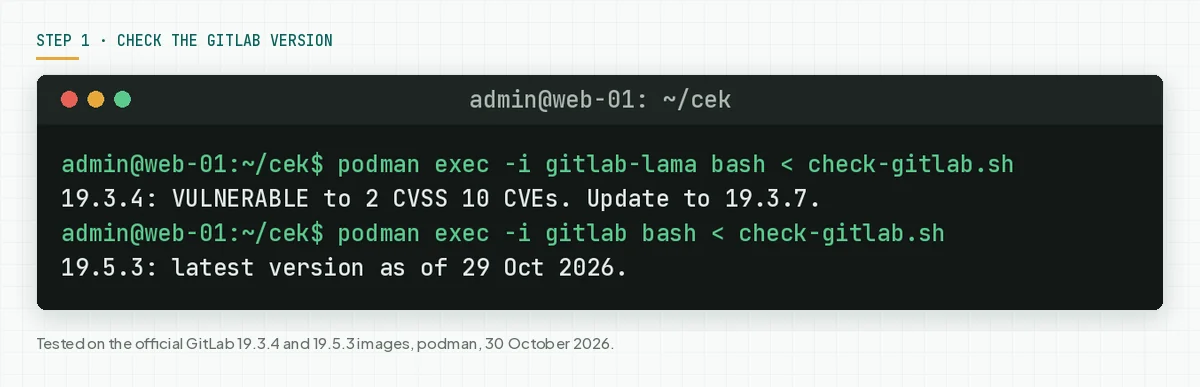
For a source install, change the path on the first line to /home/git/gitlab/VERSION. You can also open the GitLab Help page, which shows the version to signed-in users.
Check the result: The output says "latest version as of 29 Oct 2026". A "VULNERABLE" result means the server must update today. A "safe from the 2 CVEs" result means both flaws are closed, but the 29 October release is not installed yet.
Step 2: Check Ruby when GitLab uses its own Ruby
This step is only for source installs and self-built images. Save this script as check-ruby.sh, then run it with the Ruby that runs GitLab.
ruby -e 'fix = { "3.3" => "3.3.13", "3.4" => "3.4.12", "4.0" => "4.0.9" }
  v = RUBY_VERSION; f = fix[v[/\A\d+\.\d+/]]
  if f.nil? then puts "#{v}: branch outside the Ruby advisory. Upgrade Ruby."
  elsif Gem::Version.new(v) < Gem::Version.new(f) then puts "#{v}: VULNERABLE. Update Ruby to #{f}."
  else puts "#{v}: has the Onigmo fix." end'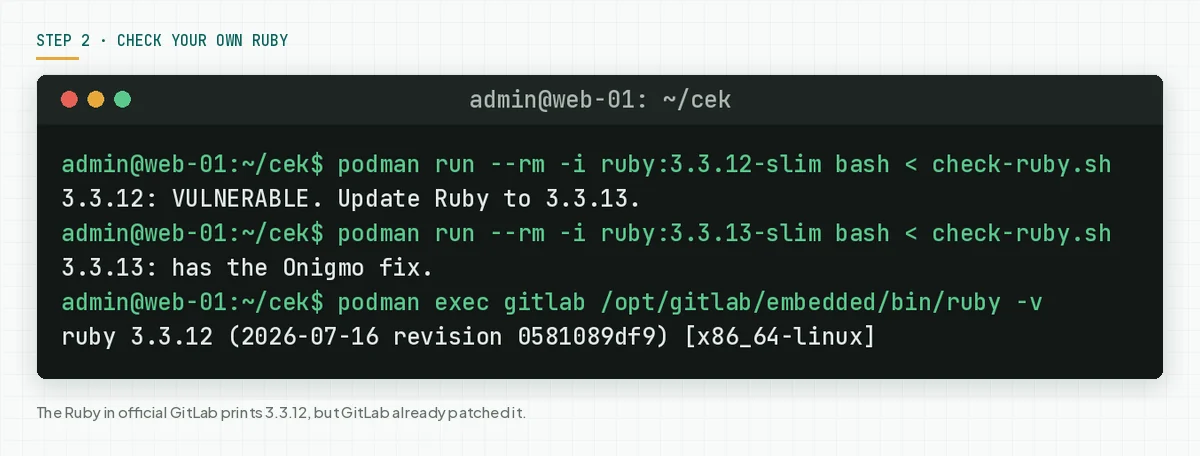
In our test, the Ruby inside the official GitLab 19.3.4 and 19.5.3 images both print 3.3.12. The libruby files in the 2 images differ, which matches the Alpine note that GitLab patches Ruby at build time. So do not run step 2 on official packages. It would print VULNERABLE, although the GitLab version is safe.
Check the result: For your own Ruby, the output says "has the Onigmo fix". When you use the alpinelinux/gitlab image, the Alpine Linux incident report asks you to pull the 19.3.6 tag again. Images pulled before 27 October are still vulnerable.
Step 3: Back up, then update GitLab
Back up the configuration and data first, then install the patch version in the same branch. A patch version in the same branch needs no special upgrade order.
sudo tar -czf /root/gitlab-config-$(date +%F).tgz /etc/gitlab
sudo gitlab-backup create
sudo apt update
sudo apt install gitlab-ce=19.3.7-ce.0   # use your branch version, gitlab-ee for EE
On the RHEL family, use this command.
sudo dnf install 'gitlab-ce-19.3.7*'For Docker Compose, change the image tag, then recreate the container.
# docker-compose.yml: image: gitlab/gitlab-ce:19.3.7-ce.0
docker compose pull
docker compose up -d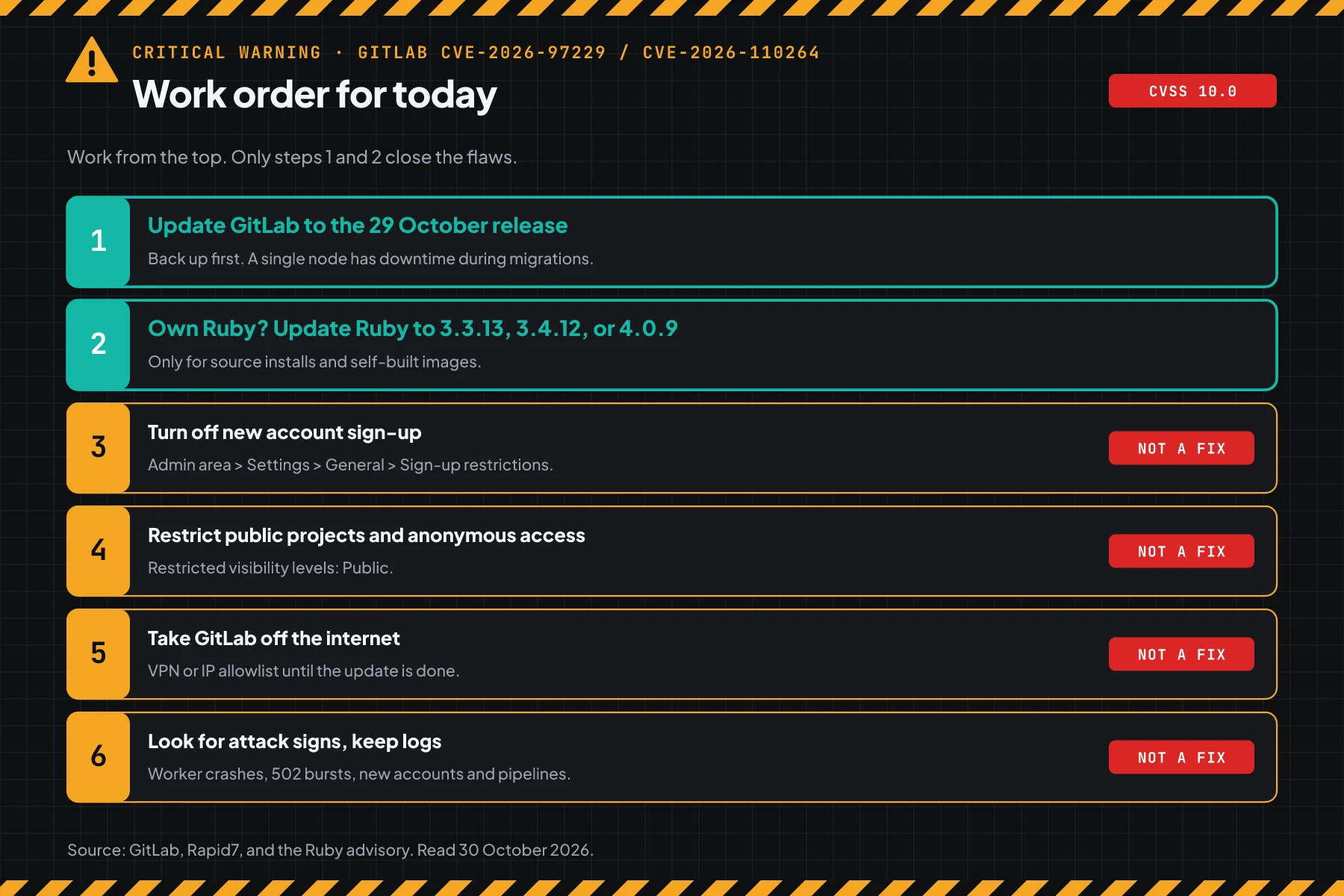
The /etc/gitlab archive keeps gitlab.rb and gitlab-secrets.json, which the data backup does not include. The GitLab backup guide has the details. This release carries database migrations, so a single-node server has downtime until the migrations finish.
For a source install, update Ruby first to the version in step 2, then update GitLab. For a self-built image, rebuild the image with a patched Ruby.
Check the result: Repeat step 1. The output must say "latest version as of 29 Oct 2026". Then run sudo gitlab-ctl status and confirm that every service runs.
Step 4 (optional): Lock down access when you cannot update yet
This step is only for a short gap until the update is done. Rapid7 says that access limits only close the path that was demonstrated, not the bug.
Turn off new account sign-up and restrict the Public level. In the UI, open Admin area > Settings > General, then change Sign-up restrictions and Visibility and access controls. In a terminal, use this command.
sudo gitlab-rails runner '
  Gitlab::CurrentSettings.update!(signup_enabled: false,
    restricted_visibility_levels: [Gitlab::VisibilityLevel::PUBLIC])
  s = Gitlab::CurrentSettings.current_application_settings
  puts "signup_enabled=#{s.signup_enabled} restricted=#{s.restricted_visibility_levels}"
  puts "public projects: #{Project.where(visibility_level: Gitlab::VisibilityLevel::PUBLIC).count}"'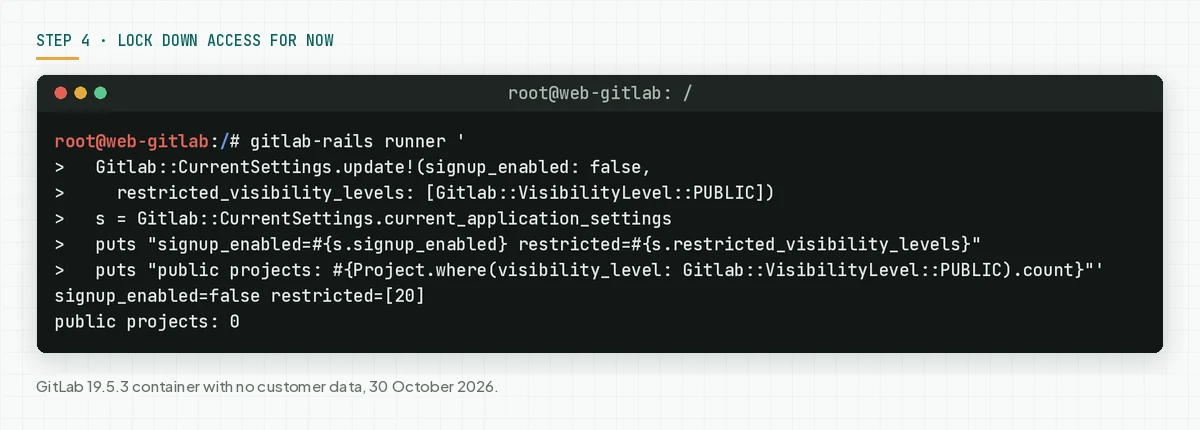
A restricted Public level only blocks new public projects. Existing public projects stay public, so change projects that do not need to be public to Internal or Private. The sign-up restrictions docs and the visibility docs explain the effect of each setting.
When GitLab does not need internet access, close it with a VPN or an IP allowlist until the update is done. This is the strongest of the temporary steps.
Check the result: The output says signup_enabled=false and restricted=[20]. The sign-in page no longer shows a link to register.
Step 5: Look for signs that the server was touched
A failed attack leaves crashes. A successful attack can leave no trace in the web logs, as the Alpine Linux incident report says. Run these commands for the period since 12 October 2026.
sudo zgrep -cE '\[BUG\]|Segmentation fault' /var/log/gitlab/puma/puma_stderr.log*
sudo zcat -f /var/log/gitlab/nginx/gitlab_access.log* | awk '$9 == 502' | wc -l
sudo gitlab-rails runner '
  t = Time.utc(2026, 10, 12)
  fresh = User.where("created_at > ?", t)
  fresh.find_each { |u| puts "account #{u.username} #{u.created_at.to_date} #{u.state}" }
  Ci::Pipeline.where("created_at > ?", t).where(user_id: fresh.select(:id))
    .find_each { |p| puts "pipeline #{p.id} #{p.project.full_path} #{p.user.username}" }'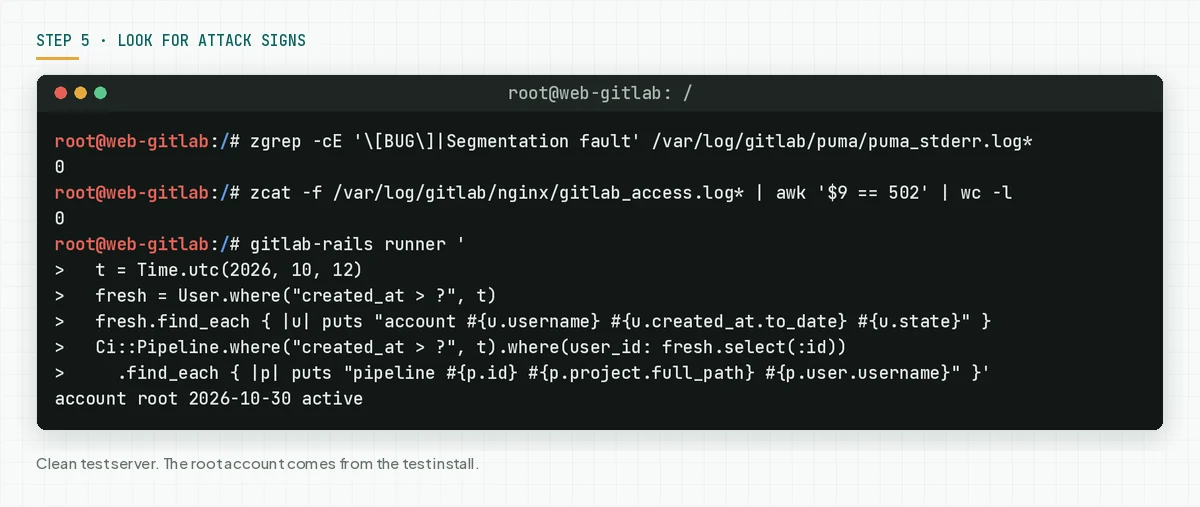
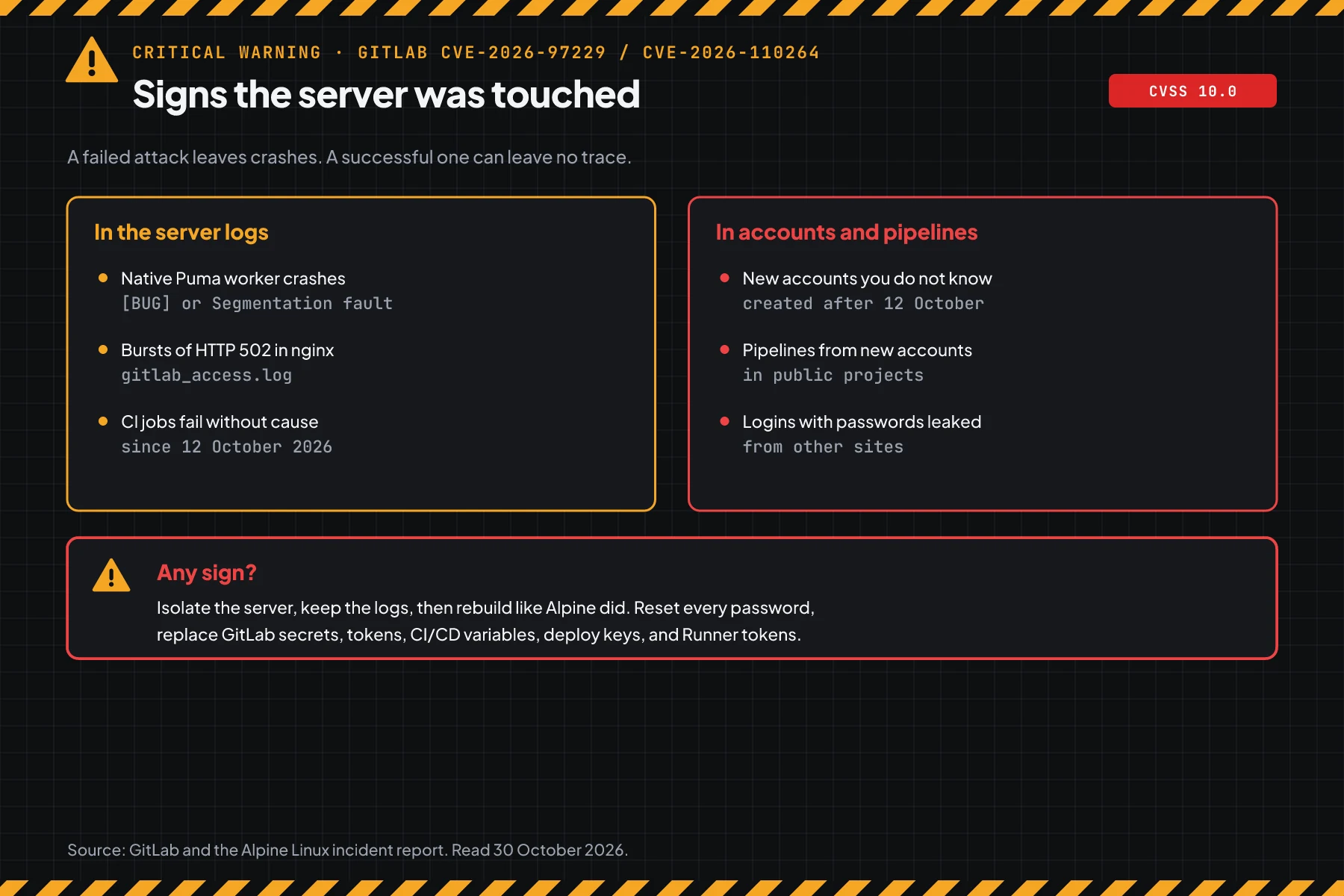
Look for 4 patterns. First, native Puma worker crashes, which Ruby writes as [BUG] or Segmentation fault. Second, bursts of HTTP 502 and CI jobs that fail without cause. The location of each log is in the GitLab log docs.
Third, new accounts that you do not know. Fourth, pipelines from those new accounts. GitLab also released official detections for both CVEs, for example "Onigmo native worker crash" and "Org mode render error burst".
Check the result: The crash count is 0, there is no 502 burst, and you know every new account. When you see a sign, isolate the server and keep the logs. Then follow the Alpine steps: rebuild the server, reset every password, replace the GitLab secrets, and rotate tokens, CI/CD variables, deploy keys, and Runner tokens.
Example: 1 afternoon of response for 3 GitLab servers
This simulation uses dummy data. The server names, times, and results are not customer data.
| Time (UTC) | Dummy server | Check | Result | Action |
|---|---|---|---|---|
| 08:00 | git-office (Omnibus 19.3.4) | Step 1 | VULNERABLE to 2 CVEs | Back up, then apt install 19.3.7 |
| 08:40 | git-office | Repeat step 1 | Latest as of 29 Oct | Go to step 5 |
| 09:00 | git-client (Docker 19.4.2) | Step 1 | VULNERABLE, open sign-up | Step 4, then change the tag to 19.4.5 |
| 09:30 | git-lab (source, Ruby 3.3.12) | Steps 1 and 2 | GitLab 19.3.6, Ruby VULNERABLE | Update Ruby to 3.3.13, then GitLab 19.3.7 |
| 10:30 | git-client | Step 5 | 2 unknown accounts, 1 pipeline from an unknown account | Isolate, keep logs, start incident response |
The lesson from the simulation: servers with official packages finish fastest. A server with open sign-up needs an account review, not only an update.
Who installs the patch
The patch duty depends on the hosting type. This table helps you see who must act today.
| Hosting type | Patch owner | What you do |
|---|---|---|
| Own VM or server | Your IT team | Steps 1 to 5 |
| Container or Kubernetes | The team that owns the image and chart | Change the tag or chart, then steps 1 and 5 |
| GitLab run by a vendor or consultant | The vendor | Ask for written proof of the version, then the step 5 results |
| GitLab.com | GitLab | Nothing for these 2 CVEs |
Rama Digital recommendation: when your GitLab holds product code and production secrets, treat every sign in step 5 as an incident. Leaked source code opens a path to other servers. Read about access rights, approval, and audit logs for a server tool for further checks.
Checklist for today
- List every GitLab instance. Owner: server admin. Evidence: a host list with the install type.
- Check the version with step 1. Owner: server admin. Evidence: script output per host.
- Check Ruby with step 2 for source installs and own images. Owner: server admin. Evidence: script output.
- Back up, then update to the 29 October release. Owner: server admin. Evidence: step 1 output after the update.
- Update self-hosted GitLab Runner to 19.5.1. Owner: DevOps team. Evidence: the Runner version in the Admin area.
- Apply step 4 on servers that cannot update yet. Owner: GitLab admin. Evidence: runner output.
- Look for signs with step 5. Owner: server admin. Evidence: command output, kept with the logs.
- Stop when every server says "latest version" and step 5 is clean. When you see a sign, stop the patch work and start incident response.
Frequently asked questions
Do GitLab.com users need to do anything? Not for these 2 CVEs. GitLab patched GitLab.com and GitLab Dedicated. The steps in this article are for the GitLab that you install yourself.
I updated on 12 October. Is my server safe? Not yet. The 12 October fix closes only CVE-2026-97229. Update again to the 21 October or 29 October release to close CVE-2026-110264.
Why does the Ruby in official GitLab still print 3.3.12? GitLab patches Ruby at build time without a change to its version number. For official packages, the GitLab version is the proof. Check Ruby only for source installs and self-built images.
Is turning off sign-up enough to close the flaws? No. That step closes 1 demonstrated path. GitLab has not disclosed the conditions for CVE-2026-110264, so only an update closes the flaws.
Is my Ruby on Rails application also affected? It can be, when the application compiles a regex from user input. The Ruby advisory asks for an update to 3.3.13, 3.4.12, or 4.0.9. Applications that use only developer-written regexes are not affected.
How do I know whether the server was broken into? Look for worker crashes, bursts of HTTP 502, new accounts, and pipelines from new accounts, as in step 5. Clean logs do not prove that the server is safe.
Next step
The limit that still applies: an update closes these 2 flaws, but it does not remove access that an attacker may have planted before the patch. When your server shows a sign in step 5, or you need help to check pipelines and secrets after an incident, use Vibe Code Rescue for an audit and stabilisation. For 1 urgent issue today, Book a 30-minute session.
Sources
- GitLab patch release of 12 October: CVE-2026-97229, CVSS 10.0, affected versions.
- GitLab patch release of 21 October: CVE-2026-110264, CVSS 10.0, 7 patched branches, detections.
- GitLab release of 29 October: the latest release, CVE-2026-111943, and Runner 19.5.1.
- Ruby advisory of 23 October: 3 Onigmo bugs and the safe Ruby versions.
- Alpine Linux incident report: attack and response timeline, 28 and 30 October 2026.
- CISA KEV: CVE-2026-97229 added to KEV, 29 October 2026.
- CVE-2026-97229 and CVE-2026-110264: CVE records, CWE-190.
- Rapid7: reproduction and temporary measures.
- SecurityWeek: summary of the attack on Alpine.
- BleepingComputer: Shadowserver numbers and the GitLab KEV history.
- eSecurityPlanet: Censys numbers and the exploitation status of CVE-2026-110264.
- Upgrade Path, GitLab backup guide, sign-up restrictions docs, visibility docs, and GitLab log docs.