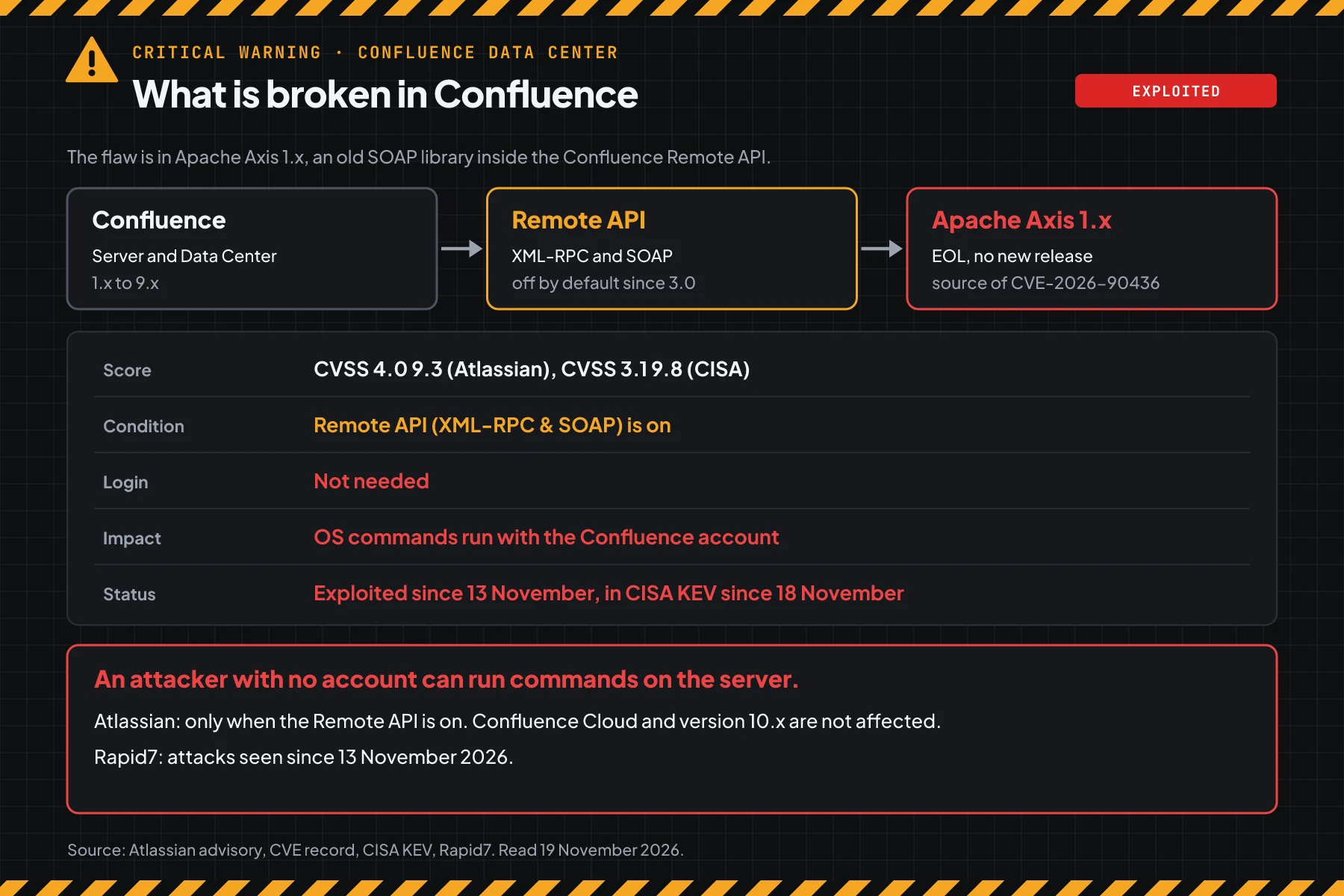
Direct answer: CVE-2026-90436 is a critical flaw in Confluence Data Center and Server. The flaw is in Apache Axis 1.x, an old library inside the Remote APIAPIThe official door 2 systems use to exchange data, without anybody copying it by hand.Open the glossary (XML-RPC & SOAP). An attacker with no login can run commands on the server.
Today, check the version and the Remote API status on each server. Then install 9.2.28, or move to 10.x. Until the patch is on, turn off the Remote API.
Main condition: this flaw is under attack. Rapid7 saw the first exploitation on 13 November 2026. CISA KEV lists this CVE since 18 November 2026, with a fix due date of 21 November 2026 for US federal agencies. Limit: this article contains no payload and no attack sequence.
We read the Atlassian advisory, Jira CONFSERVER-104610, the CVE-2026-90436 record, the Apache notice, CISA KEV, and the Rapid7 report on 19 November 2026. We ran the scripts in steps 1, 2, and 5 in podman containers with the official atlassian/confluence image on Docker Hub, versions 9.2.27 and 9.2.28.
Important limits of our test: Confluence in the container ran in setup mode, because a full setup needs a license and a database. For step 2, a dummy server copies 3 answers that Atlassian describes. We did not test a Confluence with a completed setup, a real Remote API that is on, the upgrade, Windows, or a reverse proxy.
The problem: an internal wiki can be taken over with no login
Confluence holds the internal documents of a team: SOPs, project notes, server runbooks, and sometimes passwords or tokens that people write on pages. Many companies run Confluence Data Center on their own server or on a VPS.
This flaw lets an attacker run commands on the Confluence server with no account. From that server, the attacker can read the wiki content and steal the credentials that the server keeps.
Rama Digital analysis: teams often treat a wiki server as an internal app, so it rarely gets a patch slot. The same pattern shows in the Apache OFBiz flaw CVE-2026-83542 and the WebLogic flaw CVE-2026-91569.
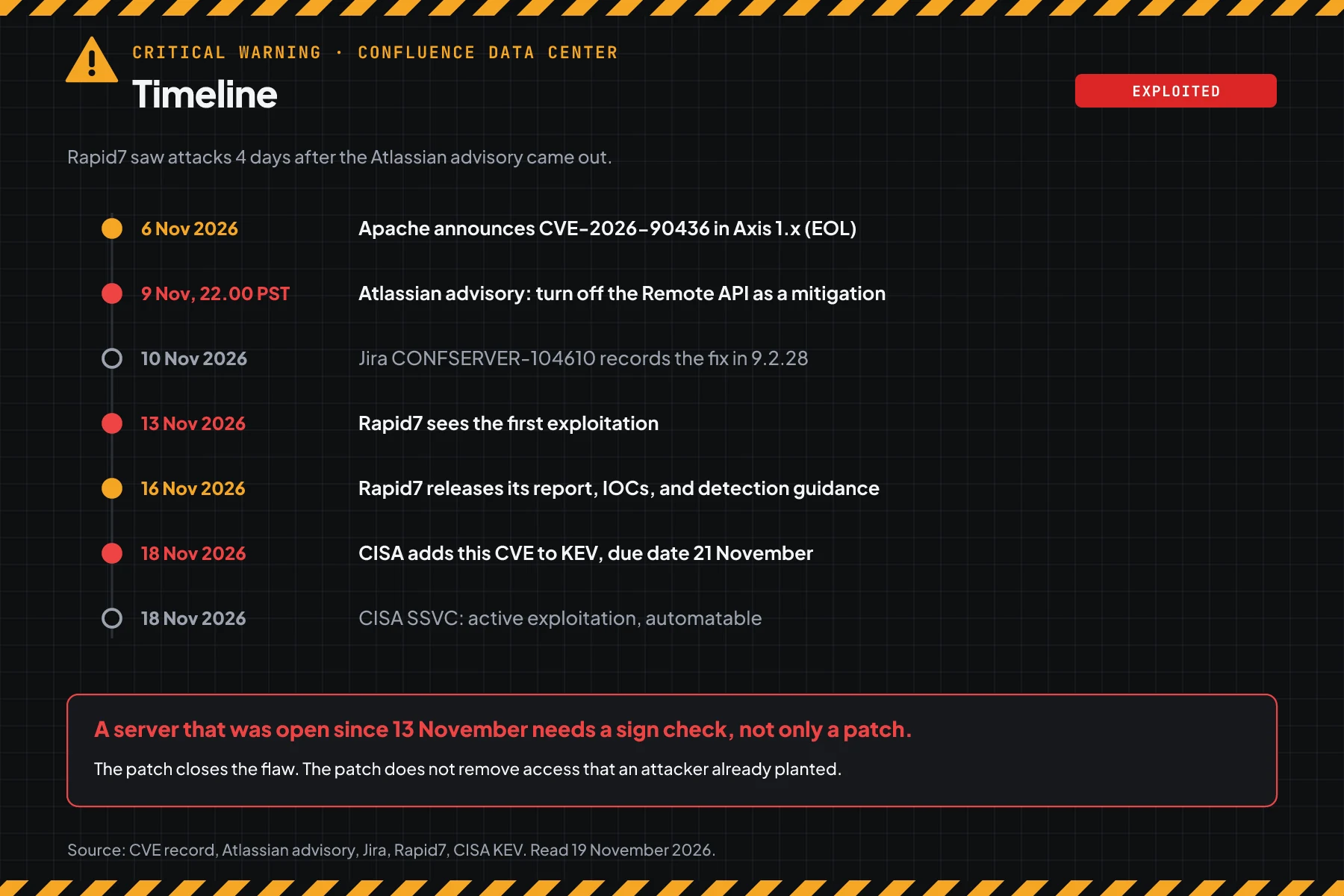
Apache announced the flaw in Axis 1.x on 6 November 2026, through the Apache notice and oss-security. Atlassian released its advisory on 9 November 2026 at 22.00 PST. Jira CONFSERVER-104610 was created on 10 November and records the fix in 9.2.28. Rapid7 saw attacks 4 days after the Atlassian advisory came out.
How it works: a flaw in an old SOAP library
This section uses the official vendor summary. The goal is to help you pick the correct steps, not to explain how to attack.
Summary from the vendor
Per the Atlassian advisory, Confluence Data Center and Server use Apache Axis 1.x for the Remote API. The flaw in Axis 1.x lets an attacker with no login run commands with the Confluence OS account. The flaw is reachable only when "Remote API (XML-RPC & SOAP)" is on.
Atlassian gives a CVSS 4.0 score of 9.3. CISA gives a CVSS 3.1 score of 9.8 with the vector AV:N/AC:L/PR:N/UI:N/S:U/C:H/I:H/A:H. This means: over the network, easy, no account, no victim click, and full impact. We do not write other technical details.
| Item | Value |
|---|---|
| CVE | CVE-2026-90436, CNA Apache Software Foundation |
| Component | Apache Axis 1.x to 1.4, inside the Confluence Remote API (XML-RPC & SOAP) |
| Score | CVSS 4.0 9.3 from Atlassian. CVSS 3.1 9.8 from CISA |
| Type | CWE-470. KEV: Apache Axis Unsafe Reflection Vulnerability |
| Condition | The Remote API is on. The attacker needs no login |
| Impact | OS commands run with the Confluence account |
| Status | Exploited since 13 November 2026. In CISA KEV since 18 November 2026, due date 21 November 2026 |
| Patch | 9.2.28. Version 10.x has no Remote API |
What the Remote API is
The Remote API is an old Confluence API for scripts and integrations. It uses XML-RPC and SOAP, on the paths /rpc/xmlrpc, /rpc/soap-axis/, and /plugins/servlet/soap-axis1/. The REST API replaces this function in new versions.
Per Atlassian, the Remote API is off by default since version 3.0. Rama Digital analysis: a server upgraded from an old version, or a server that once used XML-RPC scripts, can still keep the setting on. So do not guess. Check it in step 2.
Apache Axis 1.x is EOL
Axis 1.x is a SOAP library for Java. Per the Apache notice, the 1.x branch is EOL and will get no new release. Apache gives the Axis 1.x fix commit in the source repo and recommends a move to Axis2.
Rama Digital analysis: other Java applications can also carry Axis 1.x. Look for axis-1*.jar or axis.jar files on old application servers, then ask the vendor of that application. This article covers Confluence only.
Exploitation status as of 19 November 2026
Per the Rapid7 report, the first exploitation was seen on 13 November 2026. Rapid7 saw the Confluence java process start a shell and curl. After that, the attacker used service account credentials to sign in to other systems, including Microsoft 365 through legacy authentication.
CISA added this CVE to CISA KEV on 18 November 2026. The CISA SSVC rating on the same day: active exploitation, automatable, and total technical impact. So treat every server with the Remote API on as a target.
Related note: the same Rapid7 report also covers exploitation of the Legacy API in N-able N-central. The fix is in 2026.4 HF3 (2026.4.1.39). If your team uses N-central, check that version too.
Who is most at risk
Every server from 1.x to 9.x with the Remote API on needs action. The order in this table helps you pick the server to work on first.
| Server setup | Risk | Reason |
|---|---|---|
| Open to the internet with the Remote API on | Highest | No login needed. Attacks have run since 13 November 2026 |
| Remote API on, server only on the internal network or VPN | High | A hacked laptop or another server can reach it |
| EOL version 7.x, 8.x, 9.0, or 9.1 | High | No patch. The only fast option is to turn off the Remote API |
| Remote API off, or version 9.2.28 or 10.x | Lower | The flaw is not reachable. Still check for signs if the server was open |
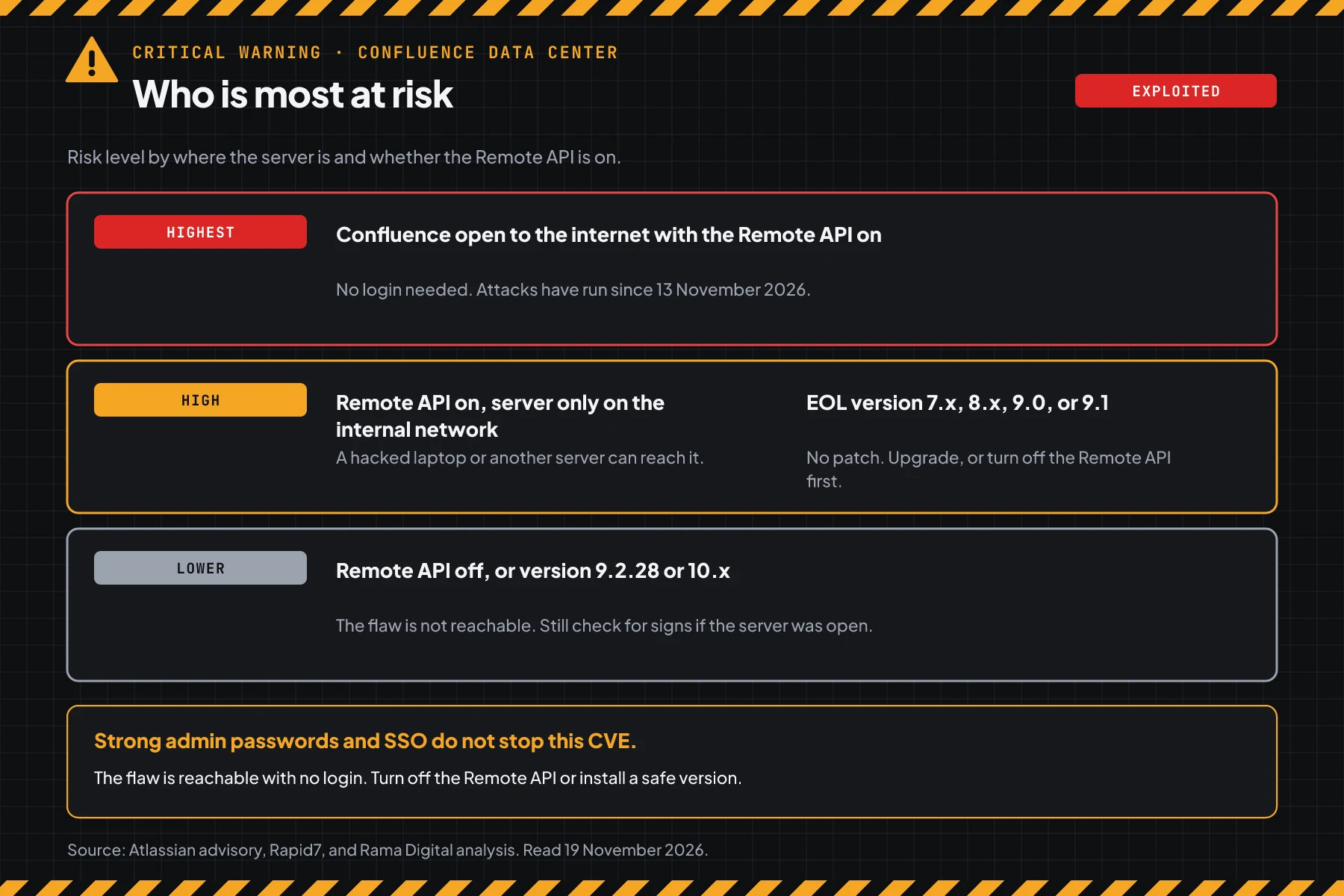
Rama Digital analysis: SSO, strong admin passwords, and 2FA do not stop this CVE, because the flaw is reachable before login. A reverse proxy also does not protect the server by itself, because the proxy forwards Remote API requests to Confluence. Another example of an edge flaw is the NetScaler flaw CVE-2026-120868.
Affected versions and safe versions
Match the version of each server with this table. One team can run more than 1 Confluence, for example a production server, a test server, and an old container.
| Version | Status for CVE-2026-90436 | Action |
|---|---|---|
| 9.2.0 to 9.2.27 | AFFECTED if the Remote API is on | Install 9.2.28 today |
| 9.3.x to 9.5.x | AFFECTED if the Remote API is on. This branch gets no patch | Turn off the Remote API today, then move to the latest 10.x |
| 1.x to 8.x, 9.0, 9.1 (EOL) | AFFECTED if the Remote API is on. No patch | Turn off the Remote API today, then move to 9.2.28 or 10.x |
| 9.2.28 or newer in the 9.2 branch | SAFE | Keep it |
| 10.x | NOT AFFECTED | Keep it. Version 10.0 removed the Remote API |
| Confluence Cloud | NOT AFFECTED | Nothing |
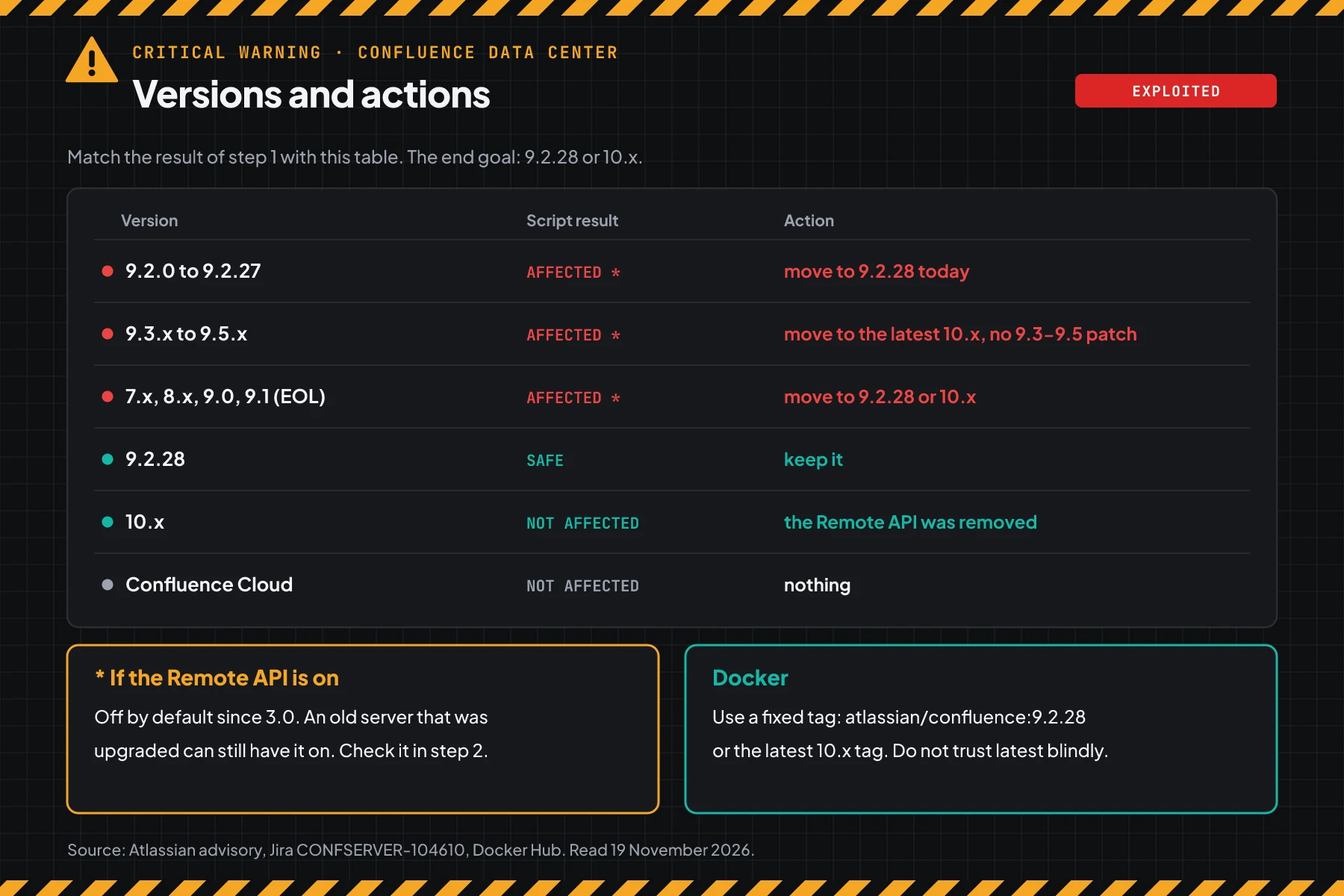
Branches 9.3 to 9.5: Jira CONFSERVER-104610 lists the Fix Version as 9.2.28 only. Jira lists 9.3.1, 9.3.2, 9.4.0, 9.4.1, and 9.5.1 to 9.5.4 as affected. There is no patch for these branches, so the end goal is 10.x.
EOL versions: Atlassian ended support for Confluence Server on 15 February 2024. Servers on 7.x and 8.x will get no patch. Turn off the Remote API today, then plan the upgrade.
Version 10.x: version 10.0 removed the Remote API. Scripts and add-ons that use XML-RPC or SOAP stop working after the upgrade to 10.x. Move those scripts to the REST API first.
Prerequisites before you start
- Shell access to the Confluence server, or
docker execaccess to the container. - A Confluence administrator account, for step 4.
- The location of the install folder (default
/opt/atlassian/confluence) and the home folder (default/var/atlassian/application-data/confluence). - Access to the Confluence database, for a backup before the upgrade.
- A laptop outside the server network with bash and curl, for step 2.
- A list of office, VPN, and approved integration IPs, for step 5.
Step 1: Check the Confluence version on each server
The basic command. The main jar name contains the Confluence version. We tested this command in the official 9.2.27 and 9.2.28 images.
# Linux package: the default install folder is /opt/atlassian/confluence
ls /opt/atlassian/confluence/confluence/WEB-INF/lib | grep -E '^(com\.atlassian\.confluence\.)?confluence-[0-9.]+\.jar$'
# Docker: a container with the name confluence
docker exec confluence ls /opt/atlassian/confluence/confluence/WEB-INF/lib | grep -E '^(com\.atlassian\.confluence\.)?confluence-[0-9.]+\.jar$'
For many servers, save this script as check-confluence.sh. The script reads the version from the main jar name and the SOAP Axis plugin version. The script changes nothing.
#!/bin/sh
# Check the Confluence Data Center or Server version against CVE-2026-90436 (Apache Axis in the Remote API).
# Use: sh check-confluence.sh [--dir install-folder]   (default: $CONFLUENCE_INSTALL_DIR or /opt/atlassian/confluence)
# Container: docker exec -i <name> sh -s < check-confluence.sh
# The script only reads file names. It changes nothing.
set -u
DIR="${CONFLUENCE_INSTALL_DIR:-/opt/atlassian/confluence}"
while [ $# -gt 0 ]; do
  case "$1" in
    --dir) [ $# -ge 2 ] || { echo "Give a path after --dir" >&2; exit 2; }; DIR="$2"; shift 2 ;;
    -h|--help) echo "Use: sh check-confluence.sh [--dir install-folder]"; exit 0 ;;
    *) echo "Unknown option: $1" >&2; exit 2 ;;
  esac
done
LIB="$DIR/confluence/WEB-INF/lib"
[ -d "$LIB" ] || { echo "Folder $LIB does not exist. Use --dir with the Confluence install folder." >&2; exit 2; }
# Main jar: confluence-X.Y.Z.jar (old versions) or com.atlassian.confluence.confluence-X.Y.Z.jar.
JAR=$(ls "$LIB" | grep -E '^(com\.atlassian\.confluence\.)?confluence-[0-9]+\.[0-9]+\.[0-9]+\.jar$' | head -n 1)
[ -n "$JAR" ] || { echo "No main Confluence jar in $LIB" >&2; exit 2; }
VER=$(printf '%s\n' "$JAR" | sed -E 's/.*confluence-([0-9]+\.[0-9]+\.[0-9]+)\.jar$/\1/')
MAJ=${VER%%.*}; REST=${VER#*.}; MIN=${REST%%.*}; PAT=${REST#*.}
SOAP=$(ls "$DIR/confluence/WEB-INF/atlassian-bundled-plugins" 2>/dev/null | sed -n -E 's/.*confluence-axis-soap-plugin-([0-9.]+)\.jar$/\1/p' | head -n 1)

printf '%-18s: %s (folder %s)\n' "Confluence" "$VER" "$DIR"
printf '%-18s: %s\n' "SOAP Axis plugin" "${SOAP:-none}"
if [ "$MAJ" -ge 10 ]; then
  echo "Result: NOT AFFECTED. Version $VER has no Remote API. Atlassian removed it in 10.0."; exit 0
fi
if [ "$MAJ" -eq 9 ] && [ "$MIN" -eq 2 ] && [ "$PAT" -ge 28 ]; then
  echo "Result: SAFE. Version $VER contains the CVE-2026-90436 patch."; exit 0
fi
if [ "$MAJ" -eq 9 ] && [ "$MIN" -ge 3 ]; then ADVICE="Move to the latest 10.x"; else ADVICE="Move to 9.2.28 or 10.x"; fi
echo "Result: AFFECTED if the Remote API is on. Version $VER has no patch. Check the Remote API (step 2). $ADVICE (step 3)."
exit 1
# Linux package: run it on the Confluence server.
sh check-confluence.sh --dir /opt/atlassian/confluence
# Docker: send the script into the container with the name confluence.
docker exec -i confluence sh -s < check-confluence.sh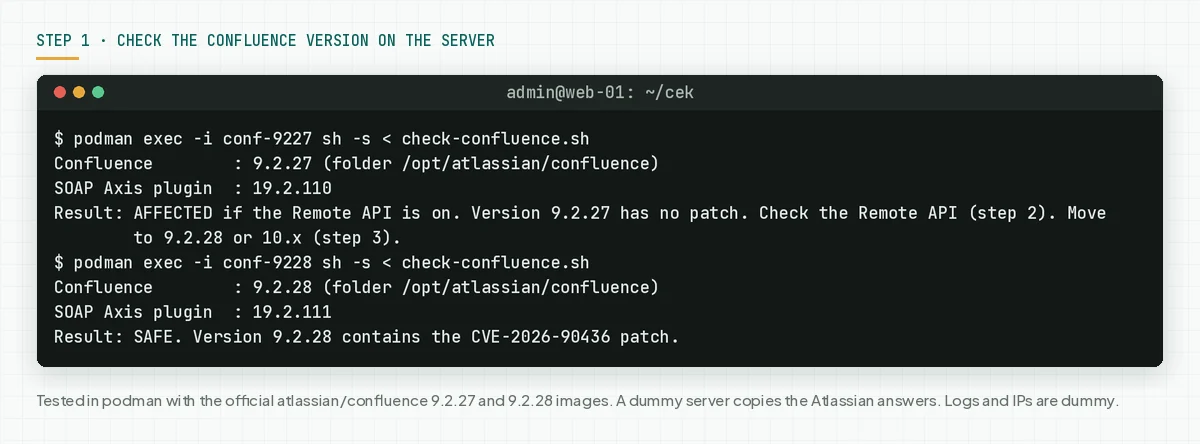
Check the result:
- "AFFECTED if the Remote API is on": a version below 9.2.28, or the 9.3 to 9.5 branches. Do step 2 now.
- "SAFE": version 9.2.28 or newer in the 9.2 branch.
- "NOT AFFECTED": version 10.x. This version has no Remote API.
- Exit code 2: wrong folder or no main jar. Run it again with
--dir.
We tested the script with copy folders for versions 7.19.30, 8.5.20, 9.1.1, 9.2.0, 9.2.29, 9.5.4, and 10.2.20. We also tested a missing folder and a wrong option. Each test gave the correct result or stopped with exit code 2.
Step 2: Check if the Remote API is still open
This step shows if the flaw is reachable from the test point. Atlassian gives 1 check URL. The basic command with curl:
# The check URL from Atlassian. Change wiki.example.com to your Confluence address.
curl -s -o /dev/null -w '%{http_code}\n' https://wiki.example.com/plugins/servlet/soap-axis1/confluenceservice-v2
# 403: the Remote API is off. A page about the AXIS service or confluenceservice-v2: the Remote API is on.
For many servers, save this script as check-remote-api.sh. The script also reads the version from the login page and explains other HTTP codes. The script sends only GET requests to the Atlassian check URL. The script sends no SOAP or XML-RPC requests.
#!/usr/bin/env bash
# Check if the Confluence Remote API (XML-RPC & SOAP) answers. The script uses the validation URL from Atlassian.
# Use: bash check-remote-api.sh [-k] <base-url> [base-url ...]   Example: bash check-remote-api.sh https://wiki.example.com
# Include the context path if you have one, for example https://example.com/confluence. -k: skip the TLS certificate check.
# The script only sends GET, the same as the Atlassian validation. Run it only against your own servers.
set -u
K=()
if [ "${1:-}" = "-k" ]; then K=(-k); shift; fi
[ $# -ge 1 ] || { echo "Give a base URL. Example: bash check-remote-api.sh https://wiki.example.com" >&2; exit 2; }
command -v curl >/dev/null 2>&1 || { echo "curl is missing. Install curl first." >&2; exit 2; }
API=/plugins/servlet/soap-axis1/confluenceservice-v2
BODY=$(mktemp) || exit 2
trap 'rm -f "$BODY"' EXIT
OPEN=0 UNSURE=0
for URL in "$@"; do
  case "$URL" in http://*|https://*) ;; *) echo "Bad URL: $URL (start with http:// or https://)" >&2; exit 2 ;; esac
  case "$URL" in *[!A-Za-z0-9._:/-]*) echo "Bad URL: $URL" >&2; exit 2 ;; esac
  URL=${URL%/}
  VER=$(curl -s --max-time 10 ${K[@]+"${K[@]}"} "$URL/login.action" | sed -n 's/.*name="ajs-version-number" content="\([0-9.]*\)".*/\1/p' | head -n 1)
  OUT=$(curl -s -o "$BODY" -w '%{http_code} %{redirect_url}' --max-time 10 ${K[@]+"${K[@]}"} "$URL$API"); RC=$?
  CODE=${OUT%% *}; TO=${OUT#* }
  if [ "$CODE" = 403 ]; then RES="CLOSED. HTTP 403, the Remote API is off."
  elif grep -qiE 'axis service|confluenceservice-v2' "$BODY"; then RES="OPEN. The SOAP Axis service answers (HTTP $CODE)."; OPEN=$((OPEN + 1))
  elif [ "$CODE" = 404 ]; then RES="NOT FOUND (HTTP 404). Version 10.x, wrong context path, or not Confluence."; UNSURE=$((UNSURE + 1))
  elif [ "${CODE#3}" != "$CODE" ]; then RES="UNSURE. The server redirects to ${TO:-another place} (HTTP $CODE)."; UNSURE=$((UNSURE + 1))
  elif [ "$CODE" != 000 ]; then RES="UNSURE (HTTP $CODE). Check the Remote API box in the admin menu."; UNSURE=$((UNSURE + 1))
  elif [ "$RC" = 7 ]; then RES="NOT REACHABLE (connection refused)."
  elif [ "$RC" = 28 ]; then RES="NO ANSWER (timeout, maybe filtered)."
  elif [ "$RC" = 6 ]; then RES="FAILED (unknown host name)."
  elif [ "$RC" = 60 ]; then RES="FAILED (TLS certificate refused). Run again with -k."
  else RES="FAILED (curl code $RC)."; fi
  printf '%-18s: %s\n' "URL" "$URL"
  printf '%-18s: %s\n' "Version on page" "${VER:-not readable}"
  printf '%-18s: %s\n' "Remote API" "$RES"
done
if [ "$OPEN" -gt 0 ]; then
  echo "Result: OPEN on $OPEN URL(s). Turn off the Remote API now (step 4), then install the patch (step 3)."; exit 1
fi
if [ "$UNSURE" -gt 0 ]; then
  echo "Result: UNSURE on $UNSURE URL(s). Check the Remote API box in the Confluence admin menu."; exit 3
fi
echo "Result: no Remote API answers from this point. Run again from another network."; exit 0
# From an outside network, for example a phone hotspot. Test only servers that you own.
bash check-remote-api.sh https://wiki.example.com
# Confluence with a context path, and 2 servers at once
bash check-remote-api.sh https://example.com/confluence https://wiki2.example.com
# Internal TLS certificate
bash check-remote-api.sh -k https://wiki.internal.example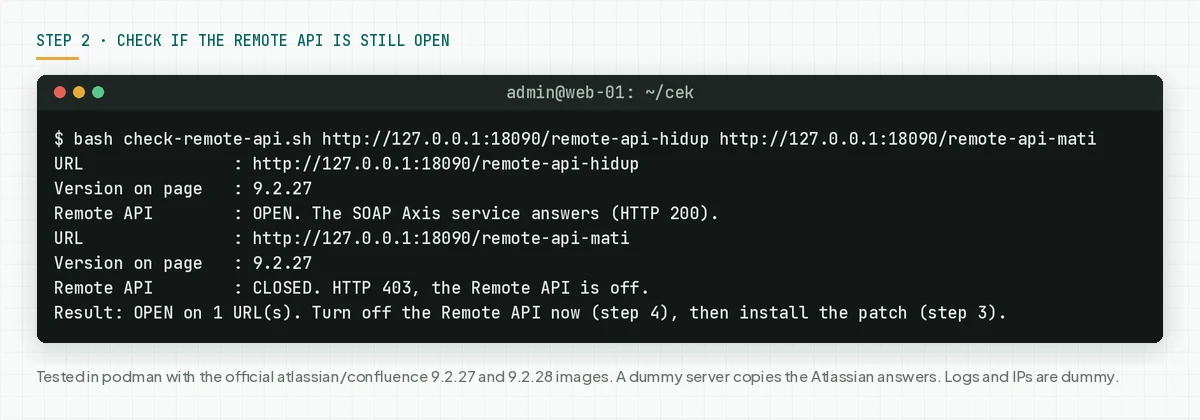
Check the result:
- "OPEN": the SOAP Axis service answers. Do step 4 now, then steps 3 and 5.
- "CLOSED": HTTP 403. Per Atlassian, the Remote API is off.
- "NOT FOUND": HTTP 404. Version 10.x, a wrong context path, or not Confluence.
- "UNSURE": the server redirects or gives another code. Check the Remote API box in the admin menu, as in step 4.
In our test, Confluence 9.2.27 in setup mode redirected the check URL to the setup page (HTTP 302). The script reads this as "UNSURE". A "CLOSED" result from outside is also not enough, because devices on the internal network can still reach the server. The box in the admin menu is the main proof.
Step 3: Back up the data, then move to 9.2.28 or 10.x
Only a new version closes the flaw. Back up the database and the home folder first, because the upgrade changes the database schemaSchemaExtra description inside page code that tells a search engine what the page is, for example an article, a service, or a question and answer.Open the glossary and is hard to undo.
# Sample for PostgreSQL. We did not test this step. Change the database name and the user.
pg_dump -U confluence -Fc confluence > confluence-db-$(date +%F).dump
# The Confluence home folder (default for the Linux package and the Docker image)
sudo tar czf confluence-home-$(date +%F).tgz /var/atlassian/application-data/confluence
# The config in the install folder
sudo tar czf confluence-conf-$(date +%F).tgz /opt/atlassian/confluence/conf /opt/atlassian/confluence/bin/setenv.sh
3a. Docker and Docker Compose
The 9.2.28 tag is on the official atlassian/confluence image on Docker Hub as of 19 November 2026. We pulled this tag for our test. Use the same home volume, so the data and config stay. We did not test an upgrade of real data.
docker pull atlassian/confluence:9.2.28
# Docker Compose: change the image line to atlassian/confluence:9.2.28, then
docker compose pull
docker compose up -d
docker exec -i confluence sh -s < check-confluence.sh
3b. Linux installer
Download the 9.2.28 installer from the official Atlassian download page. Run the installer in upgrade mode, and follow the Atlassian upgrade guide for your version. After that, run step 1 again.
3c. Branches 9.3 to 9.5 and EOL versions
Branches 9.3 to 9.5 get no patch. Plan an upgrade to the latest 10.x. The latest 10.x tag that we saw on Docker Hub as of 19 November 2026 is 10.2.20.
A major upgrade takes time: check add-on compatibility, test on a copy server, and move XML-RPC scripts to the REST API. During that time, turn off the Remote API with step 4.
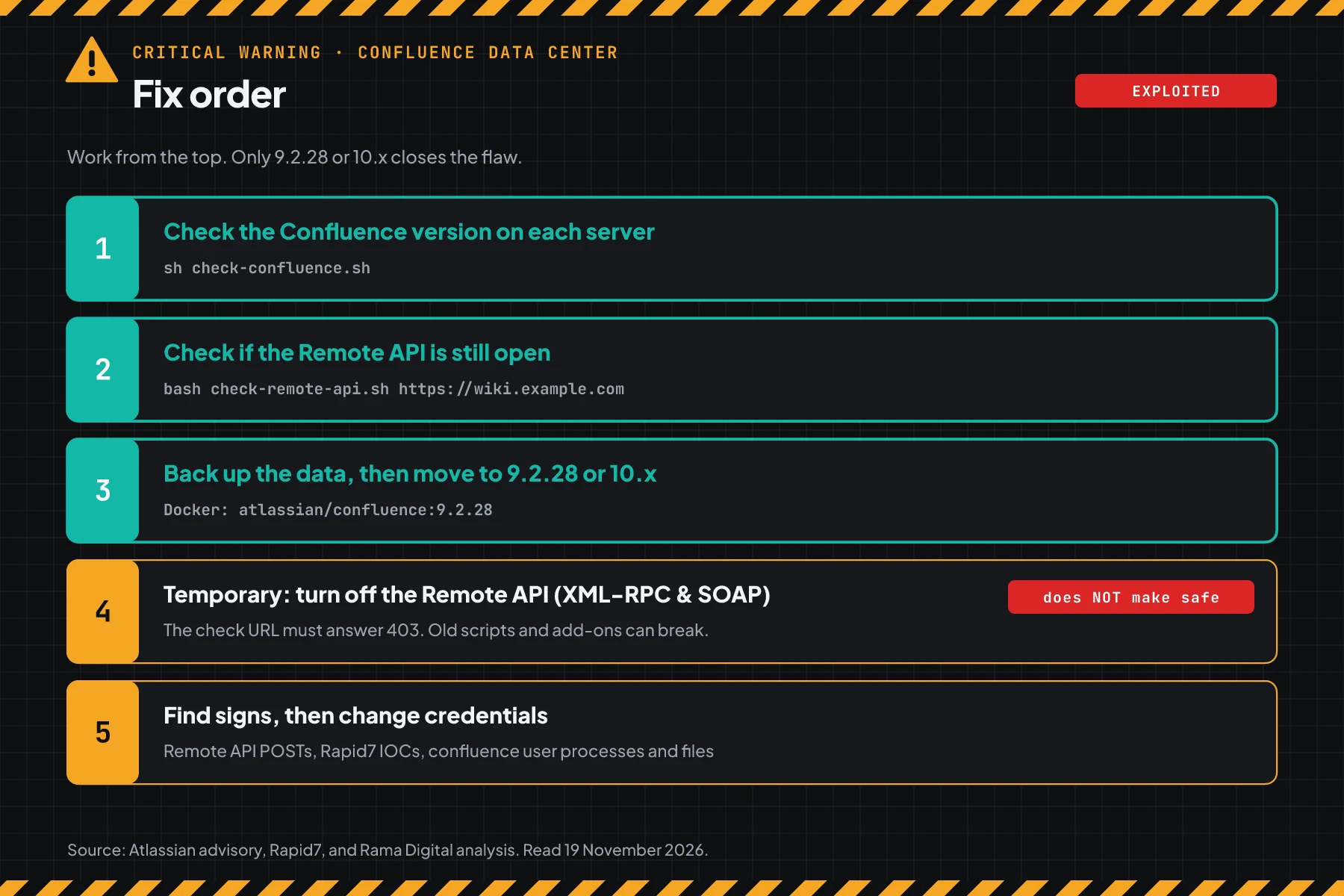
Check the result: the step 1 script prints "SAFE" or "NOT AFFECTED" on each server. The step 2 script no longer prints "OPEN".
Step 4: Temporary mitigation, does NOT make you safe
Use this step until the patch is on. This step closes the path of the flaw while the Remote API box stays clear. The vulnerable code stays on the server, and an admin, a script, or an add-on can turn the box on again.
4a. Turn off the Remote API in the admin menu
These are the steps from the Atlassian advisory:
- Log in as a Confluence administrator.
- Click the gear icon, then General Configuration > Further Configuration. Or open
<base_url>/admin/viewspacesconfig.action. - Click Edit.
- Clear the "Remote API (XML-RPC & SOAP)" box.
- Click Save. Make sure that the box stays clear.
Per Atlassian, this change needs no restart. Check it with the URL in step 2: the answer must be "HTTP Status 403 - Forbidden". A message about "confluenceservice-v2" or "AXIS service" means that the mitigation failed.
Impact: scripts, automations, and add-ons that use XML-RPC or SOAP stop working. Atlassian recommends a test on a non-production server first. For a server that is open to the internet, turn it off first, then fix the integrations.
4b. Limit Confluence access to known networks
Rama Digital analysis: open Confluence only from the VPN or the office network until the patch is on. We give no sample of a path block rule on a reverse proxy. A rule like that is easy to get around with a different path form.
Check the result: the step 2 script prints "CLOSED" for each URL, from inside and from outside the network.
Step 5: Find signs of an attack on Confluence
The patch closes the flaw. The patch does not remove processes, files, accounts, or credentials that the attacker already took. So look for these traces on each server that ever had the Remote API on.
Atlassian has not released IOCs. the Rapid7 report gives these IOCs (written with [.] so they do not become links): 192.238.253[.]176, 5.133.47[.]243, 163.182.68[.]109, 104.13.106[.]166, trycloudflare[.]com, pinggy[.]net, webhook[.]site. Rapid7 also suggests 2 checks: POSTs with no login to /plugins/servlet/soap-axis1/confluenceservice-v2 that get HTTP 500, and a Confluence java process that starts a shell or curl.
Save this script as check-signs-confluence.sh. The script checks 4 things: POSTs to Remote API paths, Rapid7 IOCs in logs and processes, other processes of the confluence user, and new files in temp folders and the application folder. The script only reads. The script changes, deletes, and sends nothing.
#!/bin/sh
# Find signs of CVE-2026-90436 attacks in Confluence access logs, processes, and files.
# Use: KNOWN_IPS="198.51.100." sh check-signs-confluence.sh [--log file-or-folder] [--dir install-folder] [--ps file] [--days 14]
# Default logs: <install-folder>/logs (conf_access_log*, confluence_access*). --ps file: ps -eo user:20,pid,ppid,args
# The script only reads. An empty result does not prove that the server is clean.
set -u
DIR="${CONFLUENCE_INSTALL_DIR:-/opt/atlassian/confluence}" LOG="" PSF="" DAYS=14 CU="${CONF_USER:-confluence}"
while [ $# -gt 0 ]; do
  case "$1" in
    --log|--dir|--ps|--days) [ $# -ge 2 ] || { echo "Give a value after $1" >&2; exit 2; } ;;
  esac
  case "$1" in
    --log) LOG="$2"; shift 2 ;;
    --dir) DIR="$2"; shift 2 ;;
    --ps) PSF="$2"; shift 2 ;;
    --days) case "$2" in ''|*[!0-9]*) echo "Bad day count: $2" >&2; exit 2 ;; esac; DAYS="$2"; shift 2 ;;
    -h|--help) echo "Use: KNOWN_IPS=\"198.51.100.\" sh check-signs-confluence.sh [--log file-or-folder] [--dir folder] [--ps file] [--days 14]"; exit 0 ;;
    *) echo "Unknown option: $1" >&2; exit 2 ;;
  esac
done
[ -n "$LOG" ] || LOG="$DIR/logs"
if [ -d "$LOG" ]; then
  FILES=$(find "$LOG" -maxdepth 1 -type f \( -name 'conf_access_log*' -o -name 'confluence_access*' -o -name '*access*.log' \) -mtime -"$DAYS" 2>/dev/null | sort)
elif [ -r "$LOG" ]; then FILES="$LOG"
else echo "Cannot read $LOG" >&2; exit 2; fi
all_logs() { printf '%s\n' "$FILES" | while IFS= read -r f; do [ -n "$f" ] && tr -d '\r' < "$f"; done; }
SIGNS=0
printf '%-18s: %s files (%s), %s days\n' "Access logs" "$(printf '%s' "$FILES" | grep -c .)" "$LOG" "$DAYS"

# 1. POST to Remote API paths. Rapid7 saw POST without login that got HTTP 500.
POST=$(all_logs | grep -E 'POST /([^ ]*/)?(plugins/servlet/soap-axis1|rpc/soap-axis|rpc/xmlrpc)' | awk '{
  ip = "-"; st = "-"
  for (i = 1; i <= NF; i++) {
    if (ip == "-" && ($i ~ /^[0-9]+\.[0-9]+\.[0-9]+\.[0-9]+$/ || $i ~ /^[0-9a-fA-F]*:[0-9a-fA-F:]+$/)) ip = $i
    if ($i ~ /^HTTP\/[0-9.]+"?$/ && i < NF) { st = $(i + 1); break }
  }
  print ip, st }')
if [ -z "$POST" ]; then
  printf '%-18s: none\n' "Remote API POST"
else
  N500=$(printf '%s\n' "$POST" | awk '$2 == "500"' | grep -c .)
  printf '%-18s: %s requests, %s answered HTTP 500\n' "Remote API POST" "$(printf '%s\n' "$POST" | grep -c .)" "$N500"
  [ "$N500" -gt 0 ] && SIGNS=$((SIGNS + 1))
  UNKNOWN=0
  SUMMARY=$(printf '%s\n' "$POST" | awk '{ n[$1]++; if ($2 == "500") e[$1]++ } END { for (ip in n) print n[ip], e[ip] + 0, ip }' | sort -rn)
  while read -r n e ip; do
    tag=""; ok=0
    for pre in ${KNOWN_IPS:-}; do case "$ip" in "$pre"*) ok=1 ;; esac; done
    [ "$ok" = 0 ] && { tag="UNKNOWN"; UNKNOWN=$((UNKNOWN + 1)); }
    printf '  %-20s %4s POST %4s x 500  %s\n' "$ip" "$n" "$e" "$tag"
  done <<EOT
$SUMMARY
EOT
  [ "$UNKNOWN" -gt 0 ] && SIGNS=$((SIGNS + 1))
fi

# 2. IOCs from Rapid7 (17 November 2026) in access logs and process arguments.
IOC="192.238.253[.]176 5.133.47[.]243 163.182.68[.]109 104.13.106[.]166 trycloudflare[.]com pinggy[.]net webhook[.]site"
PATTERNS=$(for i in $IOC; do printf '%s\n' "$i" | sed 's/\[\.\]/./g'; done)
if [ -n "$PSF" ]; then
  [ -r "$PSF" ] || { echo "Cannot read $PSF" >&2; exit 2; }
  PSDATA=$(tr -d '\r' < "$PSF")
else
  PSDATA=$(ps -eo user:20,pid,ppid,args 2>/dev/null)
fi
HL=$(all_logs | grep -cF "$PATTERNS")
HP=$(printf '%s\n' "$PSDATA" | grep -cF "$PATTERNS")
printf '%-18s: %s log lines, %s processes\n' "Rapid7 IOCs" "$HL" "$HP"
[ $((HL + HP)) -gt 0 ] && { { all_logs; printf '%s\n' "$PSDATA"; } | grep -oF "$PATTERNS" | sort | uniq -c | awk '{printf "  %-22s %s hits\n", $2, $1}'; SIGNS=$((SIGNS + 1)); }

# 3. Processes of the confluence user other than java. Rapid7: the Confluence java ran a shell and curl.
OTHER=$(printf '%s\n' "$PSDATA" | awk -v u="$CU" '
  NR == 1 && $1 == "USER" { next }
  { k = $1; sub(/\+$/, "", k); n = split($4, a, "/"); cmd[NR] = a[n]; own[NR] = ($1 == u || (length(k) >= 7 && index(u, k) == 1)); pp[NR] = $3; line[NR] = $0
    if (own[NR] && a[n] == "java") java[$2] = 1 }
  END { for (i = 1; i <= NR; i++) if (own[i] && cmd[i] != "java") print (pp[i] in java ? "java-child" : "-"), line[i] }')
NO=$(printf '%s' "$OTHER" | grep -c .)
NJ=$(printf '%s\n' "$OTHER" | grep -c '^java-child ')
printf '%-18s: %s other processes of %s, %s java child processes\n' "Processes" "$NO" "$CU" "$NJ"
[ "$NO" -gt 0 ] && { printf '%s\n' "$OTHER" | head -n 4 | tr -s ' ' | cut -c1-100 | sed 's/^/  /'; SIGNS=$((SIGNS + 1)); }

# 4. New files: owned by the confluence user in temp folders, and jsp, jspx, war, sh in the app folder.
TMPF=$(find /tmp /var/tmp /dev/shm -xdev -type f -user "$CU" -mtime -"$DAYS" 2>/dev/null | grep -v '/hsperfdata_')
NT=$(printf '%s' "$TMPF" | grep -c .)
printf '%-18s: %s files of %s in /tmp, /var/tmp, /dev/shm\n' "Temp files" "$NT" "$CU"
[ "$NT" -gt 0 ] && { printf '%s\n' "$TMPF" | head -n 3 | sed 's/^/  /'; SIGNS=$((SIGNS + 1)); }
LIB="$DIR/confluence/WEB-INF/lib"
JAR=$(ls "$LIB" 2>/dev/null | grep -E '^(com\.atlassian\.confluence\.)?confluence-[0-9]+\.[0-9]+\.[0-9]+\.jar$' | head -n 1)
if [ -n "$JAR" ]; then
  APPF=$(find "$DIR/confluence" "$DIR/webapps" -xdev -type f \( -name '*.jsp' -o -name '*.jspx' -o -name '*.war' -o -name '*.sh' \) -newer "$LIB/$JAR" 2>/dev/null)
  NF=$(printf '%s' "$APPF" | grep -c .)
  printf '%-18s: %s jsp, jspx, war, sh files newer than the main jar\n' "App folder" "$NF"
  [ "$NF" -gt 0 ] && { printf '%s\n' "$APPF" | head -n 3 | sed 's/^/  /'; SIGNS=$((SIGNS + 1)); }
else
  printf '%-18s: skipped (no main jar in %s)\n' "App folder" "$LIB"
fi

if [ "$SIGNS" -gt 0 ]; then
  echo "Result: SIGNS FOUND ($SIGNS). Keep the logs, cut the server from the internet, then do the response in step 5."; exit 1
fi
echo "Result: no signs in this data. This does not prove that the server is clean."; exit 0
A sample of 8 access log lines with dummy data:
[18/Nov/2026:09:12:01 +0700] admin http-nio-8090-exec-1 198.51.100.20 GET /index.action HTTP/1.1 200 120ms 20480 https://wiki.contoh.co.id/ Mozilla/5.0
[18/Nov/2026:09:15:44 +0700] - http-nio-8090-exec-7 198.51.100.20 POST /rpc/xmlrpc HTTP/1.1 200 35ms 512 - Python-xmlrpc/3.12
[18/Nov/2026:09:15:46 +0700] - http-nio-8090-exec-2 198.51.100.20 POST /rpc/xmlrpc HTTP/1.1 200 31ms 498 - Python-xmlrpc/3.12
[18/Nov/2026:23:40:58 +0700] - http-nio-8090-exec-3 203.0.113.45 GET /plugins/servlet/soap-axis1/confluenceservice-v2 HTTP/1.1 200 12ms 310 - python-requests/2.32
[18/Nov/2026:23:41:02 +0700] - http-nio-8090-exec-3 203.0.113.45 POST /plugins/servlet/soap-axis1/confluenceservice-v2 HTTP/1.1 500 48ms 1210 - python-requests/2.32
[18/Nov/2026:23:41:09 +0700] - http-nio-8090-exec-5 203.0.113.45 POST /plugins/servlet/soap-axis1/confluenceservice-v2 HTTP/1.1 500 51ms 1210 - python-requests/2.32
[18/Nov/2026:23:41:15 +0700] - http-nio-8090-exec-6 203.0.113.45 POST /plugins/servlet/soap-axis1/confluenceservice-v2 HTTP/1.1 500 47ms 1210 - python-requests/2.32
[18/Nov/2026:23:52:40 +0700] admin http-nio-8090-exec-8 198.51.100.20 GET /dashboard.action HTTP/1.1 200 210ms 30120 - Mozilla/5.0
# Linux package: run it as root, so the script can read the logs and /tmp.
KNOWN_IPS="198.51.100. 203.0.113.10" sh check-signs-confluence.sh --dir /opt/atlassian/confluence
# Docker: send the script into the container with the name confluence.
docker exec -i -e KNOWN_IPS="198.51.100." confluence sh -s < check-signs-confluence.sh
# Reverse proxy log, so the real client IP shows. We did not test the nginx format.
KNOWN_IPS="198.51.100." sh check-signs-confluence.sh --log /var/log/nginx/access.log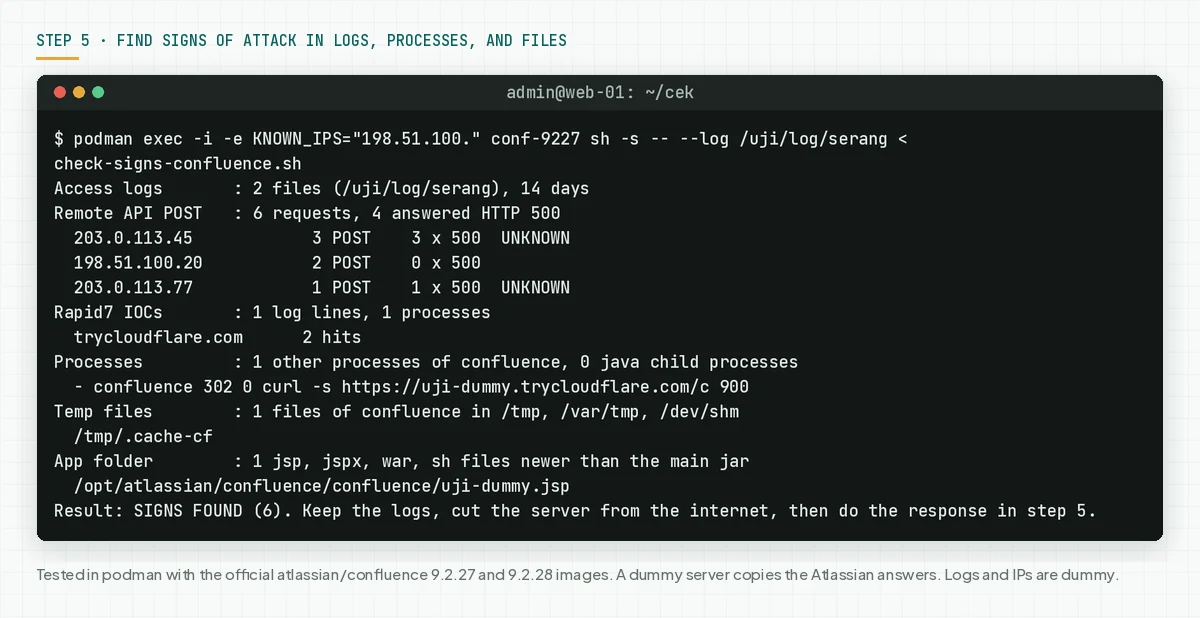
Script limits: the script reads the 2 Confluence access log formats that we tested. Behind a reverse proxy, the Confluence log can show the proxy IP, not the attacker IP. Use the proxy log with --log for the real IP. Logs that were rotated out or deleted cannot be read.
The result of this step also shows approved IPs that still use the Remote API, for example 198.51.100.20 in the sample. Use that list to find the scripts that will break in step 4.
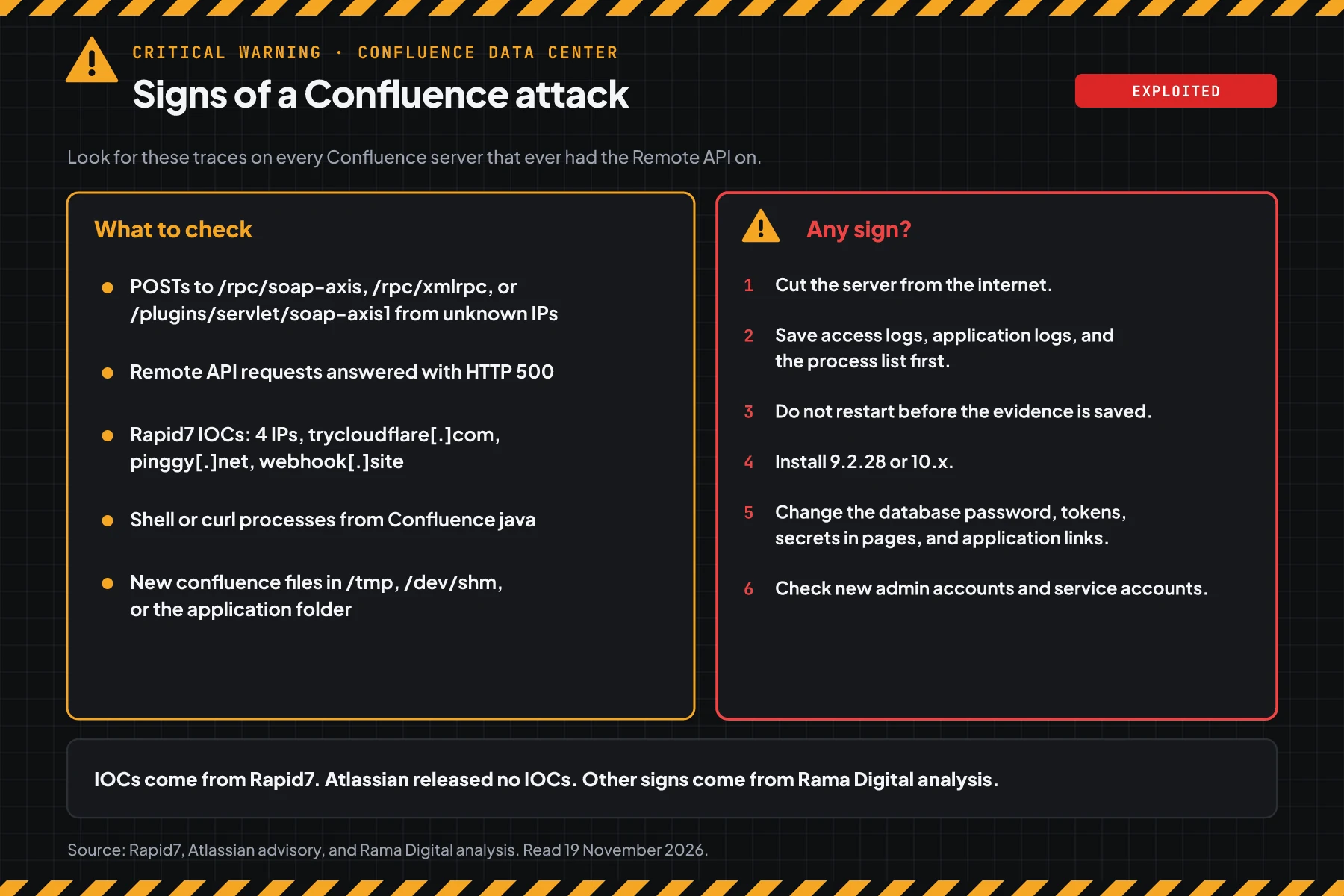
Check the result: "no signs in this data" does not prove that the server is clean. "SIGNS FOUND" means: check each line, then follow this order for each sign that you do not know:
- Cut the server from the internet.
- Save the access logs, the application logs, and the process list first.
- Do not restart the server before the evidence is saved.
- Install 9.2.28 or 10.x.
- Change the database password, tokens, secrets in pages, and application link credentials.
- Check new admin accounts and service account activity.
The database password is in confluence.cfg.xml in the Confluence home folder. Rapid7 saw the attacker use service accounts to reach a cloud data warehouse and Microsoft 365. So also check the sign-in logs of service accounts, and turn off legacy authentication in Microsoft 365.
If personal data leaks through this server and you serve users in Indonesia, Indonesian Law 27/2022 on Personal Data Protection requires a written notice within 3 times 24 hours. Also read the Puppet flaw CVE-2026-115731.
Example: 1 night of response for 3 servers
This simulation uses dummy data. The server names, times, and results are not customer data.
| Time (WIB) | Dummy server | What we check | Result | Action |
|---|---|---|---|---|
| 19.00 | wiki-main (9.2.27 Linux package, open to the internet) | Steps 1 and 2 | AFFECTED, Remote API OPEN | Turn off the Remote API at 19.10, install 9.2.28 at 21.00 |
| 19.30 | wiki-project (9.5.4 Docker, VPN only) | Steps 1 and 2 | AFFECTED, Remote API CLOSED | Keep the Remote API box clear, schedule the upgrade to 10.x |
| 19.50 | wiki-old (7.19 EOL) | Steps 1 and 2 | AFFECTED, no patch | Turn off the Remote API, open it only from the VPN, plan the upgrade |
| 20.30 | wiki-main | Step 5 | 4 POSTs answered 500 from 2 unknown IPs, 1 file in /tmp | Keep the evidence, cut the server, change credentials |
The lesson from this simulation: work on the server that is open to the internet first. The patch does not remove attacker traces, so step 5 is still necessary.
Who does the work
The Confluence admin owns the admin menu and the upgrade. The infrastructure team owns the server, the firewall, and the backups. Script and integration owners move XML-RPC scripts to the REST API. The IT lead decides the downtime window.
Rama Digital recommendation: do not open Confluence directly to the internet. Put Confluence behind a VPN or identity-based access. A similar lesson is in the Mosquitto flaw CVE-2026-110486.
Checklist for today
- List every Confluence server, including test servers and old containers. Owner: IT team. Proof: a list of names, versions, and locations.
- Check the version with step 1. Owner: server admin. Proof: script output.
- Check the Remote API with step 2 from inside and outside the network. Owner: network team. Proof: script output.
- Turn off the Remote API on each server without the patch. Owner: Confluence admin. Proof: a 403 answer.
- Back up, then install 9.2.28 or 10.x. Owner: server admin. Proof: step 1 output after the upgrade.
- Find signs with step 5. Owner: server admin. Proof: script output and a copy of the logs.
- Record EOL servers and the 9.3 to 9.5 branches, then schedule the upgrade. Owner: IT lead. Proof: a written date.
Questions and answers
We use Confluence Cloud. Are we affected?
No. Per Atlassian, Confluence Cloud is not affected by CVE-2026-90436. This flaw exists only in Data Center and Server 1.x to 9.x with the Remote API on.
Our Remote API is off. Are we safe?
The flaw is not reachable while the Remote API box stays clear. The vulnerable code stays, so install 9.2.28 or 10.x. If the box was on at any time since 13 November, run step 5.
We use SSO and strong admin passwords. Does that stop this flaw?
No. The flaw is reachable with no login. SSO, passwords, and 2FA protect only the login path.
We use 9.4 or 9.5. Why is there no patch?
Jira CONFSERVER-104610 records the fix only in 9.2.28. For the 9.3 to 9.5 branches, turn off the Remote API today, then move to the latest 10.x.
We still use Confluence Server 7.x or 8.x. What must we do?
Turn off the Remote API today and open the server only from the VPN. EOL versions get no patch, so plan the upgrade to 9.2.28 or 10.x with a clear date.
Our scripts use XML-RPC. What is the impact of turning off the Remote API?
Those scripts stop working. Move the scripts to the REST API. This work is also necessary before the upgrade to 10.x, because 10.x has no Remote API.
Does the upgrade remove attacker access?
No. The upgrade closes the flaw. The upgrade does not remove processes, files, accounts, or credentials that the attacker took. Run step 5, then change the credentials.
Next steps
The limits still apply: step 4 does not make the server safe, and the upgrade does not clean a server that was taken over. If your server shows signs in step 5, or you need help with an audit and recovery, use Vibe Code Rescue. For 1 urgent problem today, book a 30 minute session.
Sources
- the Atlassian advisory: affected versions, the Remote API condition, the mitigation, the check, and the CVSS 4.0 score, released 9 November 2026.
- Jira CONFSERVER-104610: Fix Version 9.2.28 and the list of affected versions.
- the CVE-2026-90436 record: CNA Apache, CVSS 3.1 and SSVC from CISA.
- the Apache notice and oss-security: the EOL status of Axis 1.x, 6 November 2026.
- CISA KEV: added on 18 November 2026, due date 21 November 2026.
- the Rapid7 report: the date of the first exploitation, IOCs, and detection guidance, 16 November 2026, updated 17 November 2026.
- the official atlassian/confluence image on Docker Hub: the 9.2.27 and 9.2.28 tags that we used for the test.
- Indonesian Law 27/2022 on Personal Data Protection: the duty to report a personal data leak.