Direct answer: CVE-2026-110486 is a flaw with a score of 9.8 in Eclipse Mosquitto 2.1.0 to 2.1.2. The flaw is in the built-in websockets listener and works before login. Today, check the version and listeners of each broker, then install 2.1.4.
The first patch is in 2.1.3, released on 17 November 2026. Version 2.1.4 came out on the same day and fixes a password regression in 2.1.3. Thus, pick 2.1.4.
Main condition: On 18 November 2026, the vendor reports no exploitation, and CISA KEV does not list this CVE. We found no public PoC. Limit: this article contains no payload or attack chain.
We read the CVE-2026-110486 record, GHSA-6j8m-r32v-4h38, the Mosquitto ChangeLog, and CISA KEV on 18 November 2026. We ran the scripts in steps 1, 2, and 5 in podman containers with the official eclipse-mosquitto image on Docker Hub, versions 2.1.2 and 2.1.4.
Important limit: We did not test Linux distro packages, a broker with TLS, a real libwebsockets build, or Windows. The scripts send no MQTT packet. The exposure script only opens a websockets handshake.
Problem: an MQTT broker for IoT has a flaw with no login
Eclipse Mosquitto is an open source MQTT broker. It moves messages between sensors, factory gateways, smart home devices, apps, and live dashboards.
Many web dashboards read MQTT data directly in the browser. A browser cannot use plain MQTT, so the broker opens a websockets listener. That listener carries CVE-2026-110486.
Rama Digital analysis: MQTT brokers often run on gateways or small VMs that few people check. Another sample of a server open to the internet is in the Apache OFBiz flaw CVE-2026-83542.
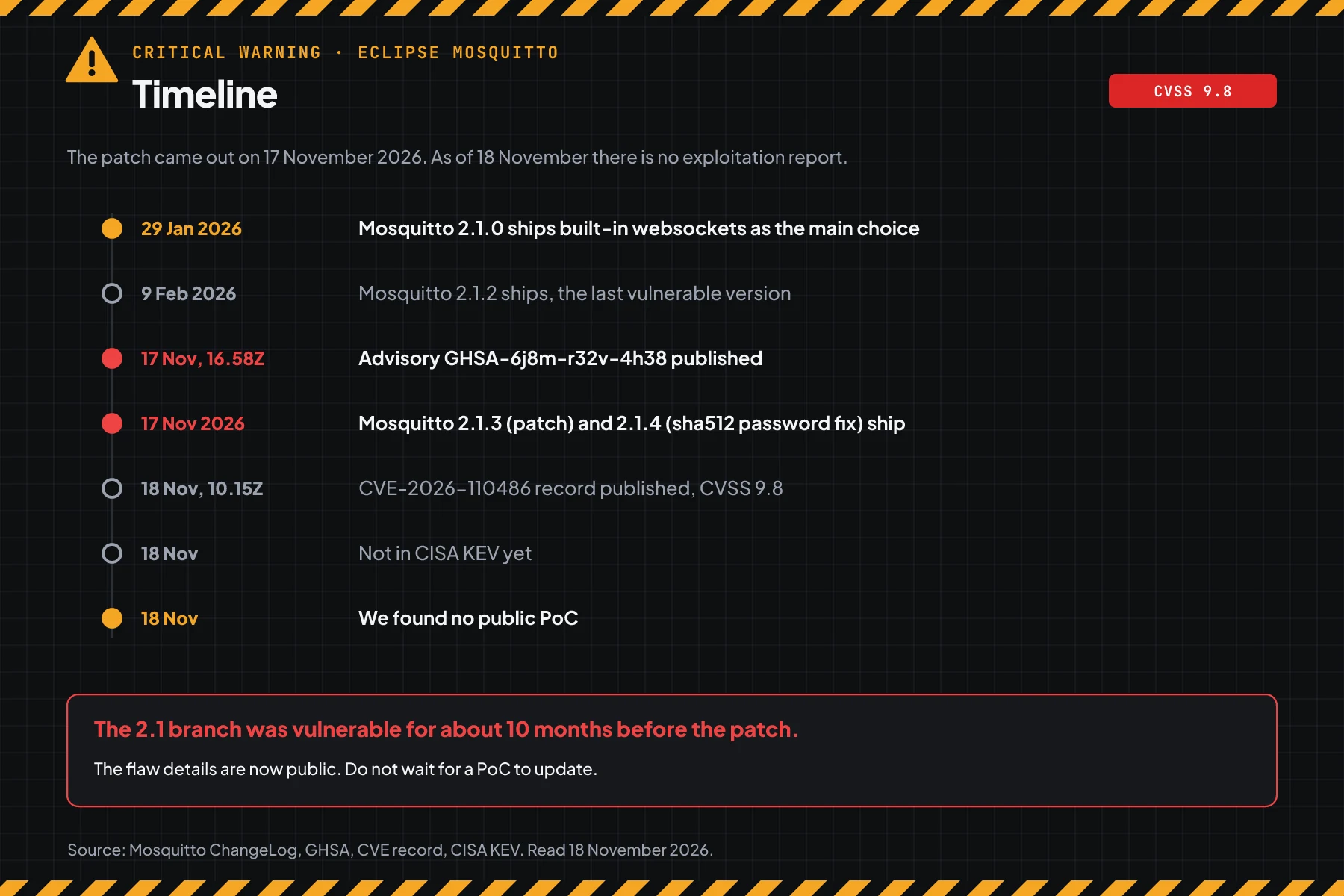
Release 2.1.0 came out on 29 January 2026 and uses built-in websockets as the main choice. Thus a 2.1 broker with a websockets listener had this flaw for about 10 months. The GHSA came out on 17 November 2026 at 16.58 UTC. The CVE record came out on 18 November 2026 at 10.15 UTC.
How it works: a flaw in the built-in websockets listener
This section uses the official vendor summary. Its purpose is to help you pick the right step, not to explain an attack.
Summary from the vendor
Per GHSA-6j8m-r32v-4h38, brokers 2.1.0 to 2.1.2 with a built-in websockets listener are "vulnerable to an out of bounds write and potential remote code execution". The researcher orosec reported the flaw. The vendor gives 2 ways to decrease the risk: turn off websockets support, or build the broker with libwebsockets.
The CVE-2026-110486 record adds 3 facts. The vulnerable point is reachable from the CONNECT packet, before the login check. The broker can crash even with allow_anonymous false. A memory leak plus a memory write can become code execution as the broker user.
We give no other technical details. The CVSS 3.1 vector: AV:N/AC:L/PR:N/UI:N/S:U/C:H/I:H/A:H. This means: over the network, easy, no account, no victim click, and full impact.
What a websockets listener is
Plain MQTT uses port 1883, or 8883 with TLS. Websockets let a browser speak MQTT over an HTTP connection. An admin opens this listener with 2 config lines: listener and protocol websockets.
The admin picks the port number. Sample configs often use 9001. Before 2.1, websockets support used the libwebsockets library. Since 2.1.0, Mosquitto has its own implementation, and this flaw is in that implementation.
5 CVEs in 1 release
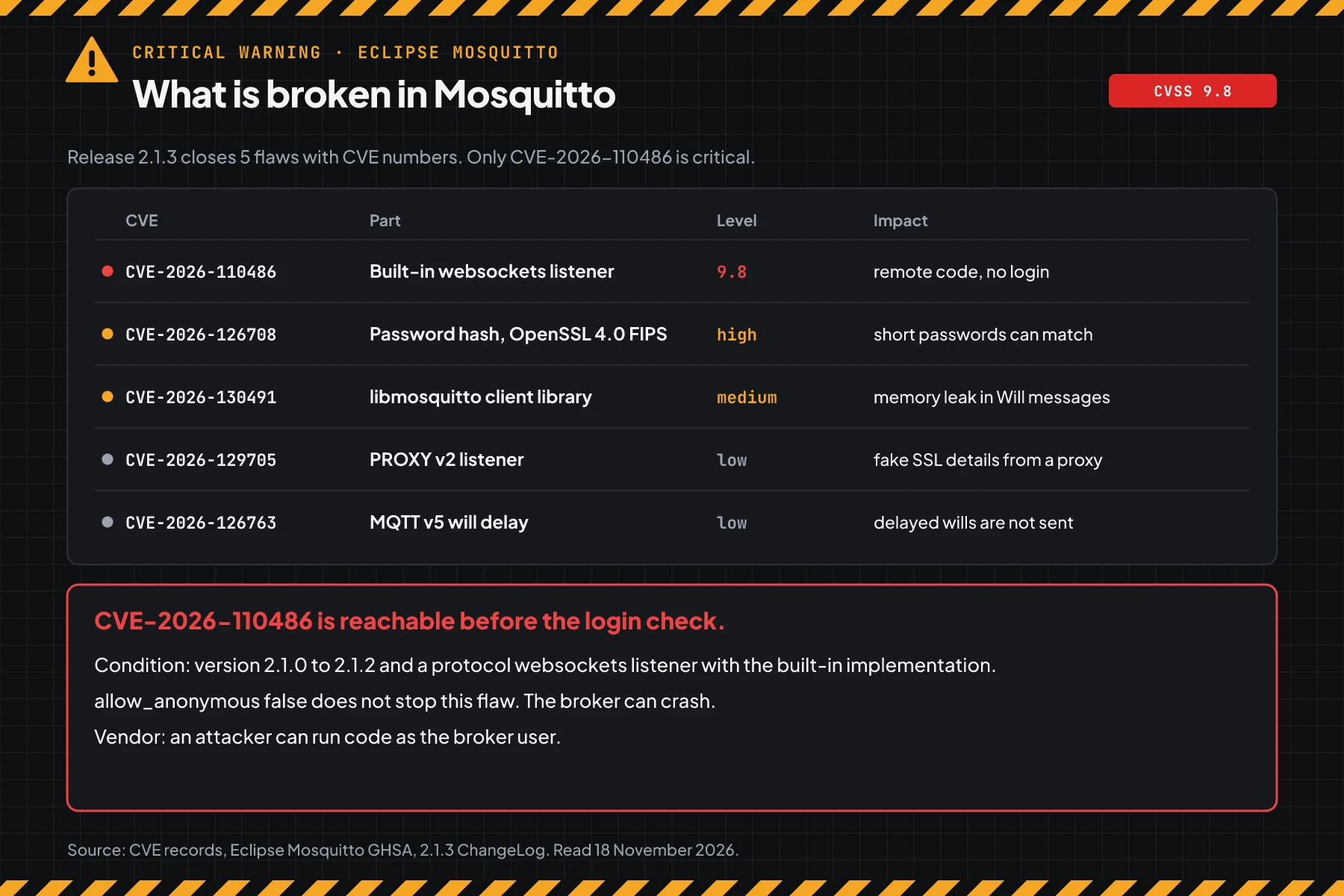
Release 2.1.3 closes 5 CVEs that we confirmed from their GHSAs. The level of the other CVEs comes from the GHSAs. Only CVE-2026-110486 has a CVSS score in its CVE record.
| CVE | Part | Level | Problem per the vendor | Affected |
|---|---|---|---|---|
| CVE-2026-110486 | Built-in websockets listener | CVSS 9.8 | Out of bounds memory write, potential code execution with no login | 2.1.0 to 2.1.2 |
| CVE-2026-126708 | Password hash with OpenSSL 4.0 FIPS | high | A short password can match another short password | 2.0.0 to 2.0.22, 2.1.0 to 2.1.2 |
| CVE-2026-130491 | libmosquitto client library | medium | Heap memory leaks when a Will payload is more than 65535 bytes | 1.5 to 1.6.13, 2.0.0 to 2.0.22, 2.1.0 to 2.1.2 |
| CVE-2026-129705 | PROXY v2 listener | low | An untrusted proxy can give false SSL details | 2.1.0 to 2.1.2 |
| CVE-2026-126763 | MQTT v5 will delay | low | A specific will delay holds all delayed wills | 1.6 to 2.0.22, 2.1.0 to 2.1.2 |
The Mosquitto ChangeLog for 2.1.3 also lists crash fixes in the dynamic security plugin and in mosquitto_ctrl. We give no CVE numbers for those 2 fixes, because we did not read their records.
Exploitation status on 18 November 2026
The CVE record has no CISA rating yet. CISA KEV lists no Mosquitto CVE. We found no public PoC or exploit. This status can change, so do not wait for attack reports.
Who is most at risk
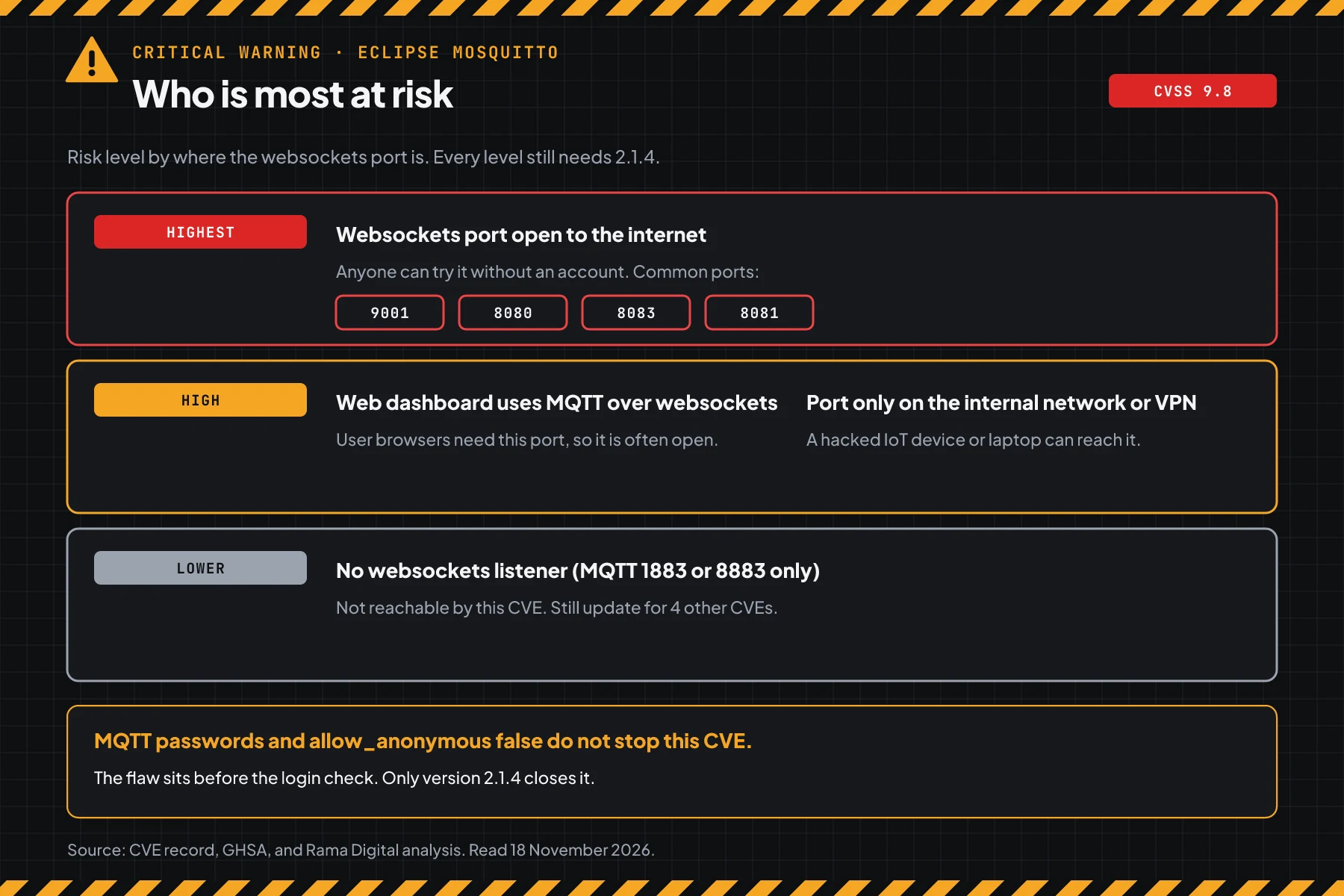
All brokers 2.1.0 to 2.1.2 need the update. The order in this table helps you pick the broker to do first.
| Broker setup | Risk | Reason |
|---|---|---|
| Websockets port open to the internet | Highest | Anyone can reach the vulnerable point with no account |
| Web dashboard uses MQTT over websockets | High | User browsers need this port, so the port is often open |
| Websockets port only on the internal network or VPN | High | A hacked IoT device or laptop can reach it |
| No websockets listener | Lower | Not reachable by this CVE. 4 other CVEs still need the update |
Rama Digital analysis: a reverse proxy in front of the broker does not protect the broker by itself. A proxy that forwards websockets also forwards the CONNECT packet to the broker. Thus, treat each websockets path that reaches the broker as a risk.
Affected versions and safe versions
Compare the version and setup of each broker with this table. One server can run more than 1 broker, for example a Linux package and a Docker container.
| Version and setup | Status for CVE-2026-110486 | Action |
|---|---|---|
| 2.1.0 to 2.1.2 with a built-in websockets listener | VULNERABLE | Install 2.1.4 today |
| 2.1.0 to 2.1.2 with no websockets listener | NOT REACHABLE NOW | Install 2.1.4 this week for 4 other CVEs |
| 2.1.0 to 2.1.2 libwebsockets build | NOT AFFECTED BY THIS CVE | Install 2.1.4 for 4 other CVEs |
| 2.1.3 | PATCHED | Move to 2.1.4. Version 2.1.3 rejects old sha512 password hashes |
| 2.1.4 or newer | SAFE | Keep it |
| 2.0.x and older | NOT AFFECTED BY THIS CVE | Plan the move to 2.1.4 |
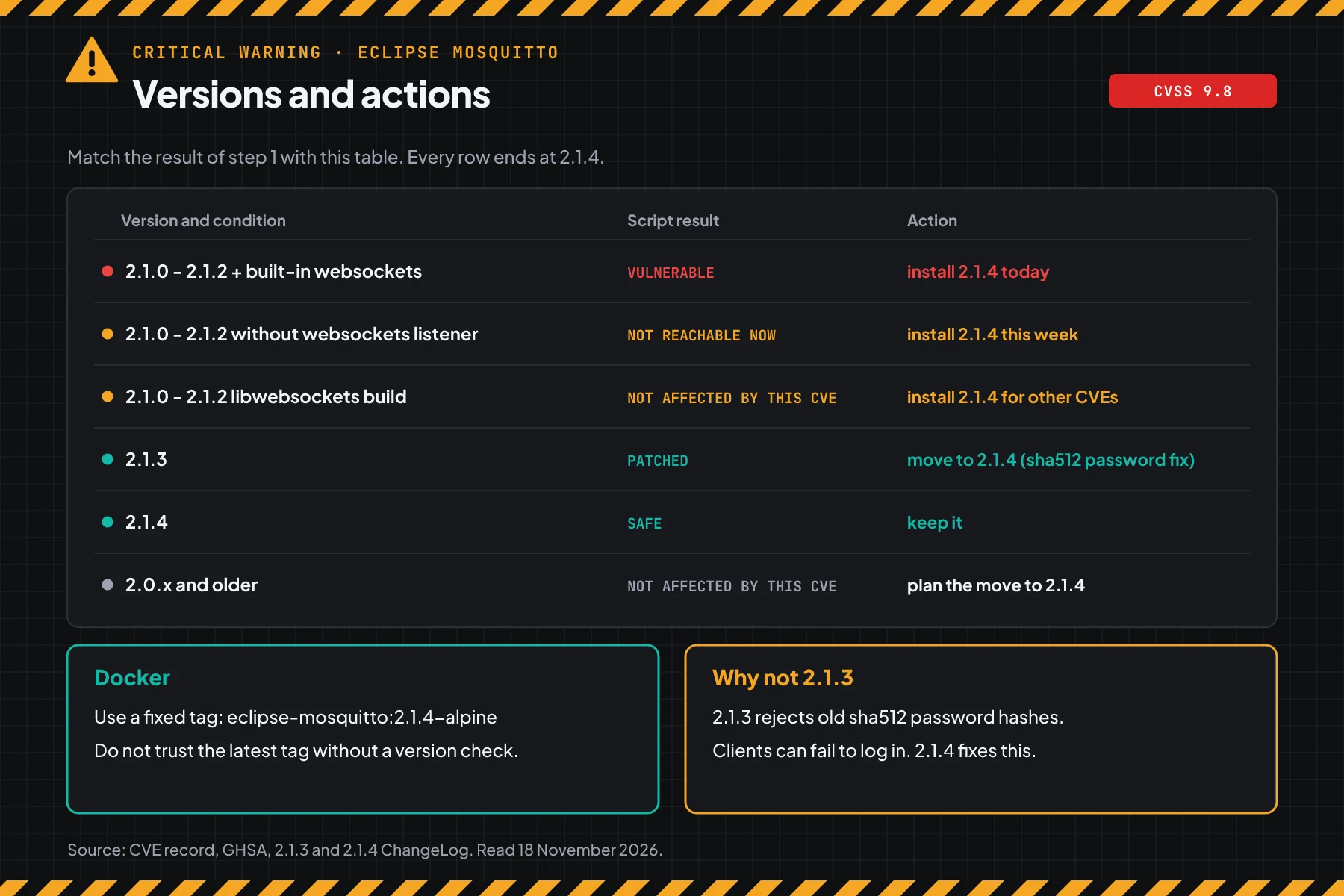
Why 2.1.4, not 2.1.3: per the Mosquitto ChangeLog, version 2.1.3 rejects old sha512 password hashes. Clients with old passwords can fail to log in. Version 2.1.4 fixes that regression.
Note on the 2.0 branch: the CVE-2026-110486 record lists only 2.1.0 to 2.1.2. The GHSAs for 3 other CVEs list the 2.0 branch up to 2.0.22. We did not test 2.0.23. The clear path is to move to 2.1.4.
Before you start
- Shell access to the broker server, or
docker execaccess to the broker container. - The location of the config file, the password file (
password_file), and the ACL file. - A list of devices and dashboards that use the broker, so you know the effect of a restart.
- Access to the firewall in front of the broker.
- A laptop or server outside the broker network with bash and curl, for step 2.
- A list of known IP addresses, for step 5.
Step 1: Check the version and websockets listeners on each broker
Basic commands. We tested the version and ldd lines in the official image. The /etc/mosquitto path for distro packages is a Rama Digital estimate.
/usr/sbin/mosquitto -h | head -n 1
grep -rnE '^[[:space:]]*(listener|protocol)' /etc/mosquitto/
ldd /usr/sbin/mosquitto | grep libwebsockets
# Docker: a container with the name mqtt
docker exec mqtt /usr/sbin/mosquitto -h | head -n 1
A libwebsockets line in the ldd output means that the broker uses libwebsockets and is not affected by this CVE. Empty output means that the broker uses built-in websockets.
For many brokers, save this script as check-mosquitto.sh. The script reads the version, the websockets implementation, the config file, and the *.conf files from include_dir. The script changes nothing.
#!/bin/sh
# Check the Eclipse Mosquitto version and websockets listeners against CVE-2026-110486.
# Usage: sh check-mosquitto.sh [--conf file.conf] [--bin path/mosquitto]
# Container: docker exec -i <name> sh -s -- --conf /mosquitto/config/mosquitto.conf < check-mosquitto.sh
# The script only reads the version and the config files. It changes nothing.
set -u
CONF="" BIN=""
while [ $# -gt 0 ]; do
  case "$1" in
    --conf) [ $# -ge 2 ] || { echo "Give a path after --conf" >&2; exit 2; }; CONF="$2"; shift 2 ;;
    --bin) [ $# -ge 2 ] || { echo "Give a path after --bin" >&2; exit 2; }; BIN="$2"; shift 2 ;;
    -h|--help) echo "Usage: sh check-mosquitto.sh [--conf file.conf] [--bin path/mosquitto]"; exit 0 ;;
    *) echo "Unknown option: $1" >&2; exit 2 ;;
  esac
done

# Find the mosquitto program. /usr/sbin is often not in the PATH of a normal user.
if [ -z "$BIN" ]; then
  for b in "$(command -v mosquitto 2>/dev/null)" /usr/sbin/mosquitto /usr/local/sbin/mosquitto; do
    [ -n "$b" ] && [ -x "$b" ] && { BIN="$b"; break; }
  done
fi
[ -n "$BIN" ] && [ -x "$BIN" ] || { echo "The mosquitto program was not found. Use --bin." >&2; exit 2; }
VER=$("$BIN" -h 2>&1 | sed -n 's/^mosquitto version \([0-9][0-9]*\.[0-9][0-9]*\.[0-9][0-9]*\).*/\1/p' | head -n 1)
[ -n "$VER" ] || { echo "Cannot read the version from $BIN -h" >&2; exit 2; }

# Websockets implementation: a build with libwebsockets is not affected by this CVE.
IMPL="unknown (no ldd)"
if command -v ldd >/dev/null 2>&1; then
  if ldd "$BIN" 2>/dev/null | grep -qF 'libwebsockets'; then IMPL="libwebsockets"; else IMPL="built-in"; fi
fi

# The main config file, then the *.conf files from include_dir.
if [ -z "$CONF" ]; then
  for c in /mosquitto/config/mosquitto.conf /etc/mosquitto/mosquitto.conf; do
    [ -r "$c" ] && { CONF="$c"; break; }
  done
fi
LIST=""
if [ -n "$CONF" ] && [ -r "$CONF" ]; then
  set -- "$CONF"
  INC=$(tr -d '\r' < "$CONF" | awk '$1 == "include_dir" && NF >= 2 { print $2 }')
  LAMA_IFS=$IFS; IFS='
'
  for d in $INC; do
    IFS=$LAMA_IFS
    for f in "$d"/*.conf; do [ -f "$f" ] && [ -r "$f" ] && set -- "$@" "$f"; done
  done
  IFS=$LAMA_IFS
  NFILE=$#
  # One line for each listener: port, address, protocol. A # line is a comment.
  LIST=$(cat "$@" | tr -d '\r' | awk '
    /^[ \t]*#/ || NF == 0 { next }
    $1 == "listener" { n++; port[n] = $2; bind[n] = (NF >= 3 ? $3 : "all-addresses"); proto[n] = "mqtt"; next }
    $1 == "port" && n == 0 { dport = $2; next }
    $1 == "protocol" { if (n == 0) dproto = $2; else proto[n] = $2; next }
    $1 == "allow_anonymous" { anon = $2 }
    END {
      if (dport != "" || dproto != "") print (dport == "" ? "1883" : dport), "all-addresses", (dproto == "" ? "mqtt" : dproto)
      for (i = 1; i <= n; i++) print port[i], bind[i], proto[i]
      if (n == 0 && dport == "" && dproto == "") print "1883", "127.0.0.1", "mqtt"
      print "#anon", (anon == "" ? "not-set" : anon)
    }')
fi

printf '%-18s: %s (%s)\n' "Mosquitto" "$VER" "$BIN"
printf '%-18s: %s\n' "Websockets" "$IMPL"
WS="" BACA=0
if [ -n "$LIST" ]; then
  BACA=1
  printf '%-18s: %s (%s files)\n' "Config" "$CONF" "$NFILE"
  printf '%s\n' "$LIST" | while read -r p b pr; do
    [ "$p" = "#anon" ] && { printf '%-18s: %s (does not stop this CVE)\n' "allow_anonymous" "$b"; continue; }
    if [ "$b" = "all-addresses" ]; then a="all addresses"; else a="address $b"; fi
    printf '%-18s: port %s, %s, %s\n' "Listener" "$p" "$a" "$pr"
  done
  WS=$(printf '%s\n' "$LIST" | awk '$3 == "websockets" { printf "%s%s", s, $1; s = " " }')
else
  printf '%-18s: %s\n' "Config" "not readable (use --conf)"
fi

case "$VER" in
  2.1.0|2.1.1|2.1.2)
    if [ "$BACA" = 0 ]; then echo "Result: CHECK. Version $VER is affected. The config is not readable, so the websockets listeners are unknown."; exit 1
    elif [ -z "$WS" ]; then echo "Result: NOT REACHABLE NOW. No websockets listener. Still install 2.1.4 this week for the other CVEs in the same release."; exit 1
    elif [ "$IMPL" = "libwebsockets" ]; then echo "Result: NOT AFFECTED by CVE-2026-110486 (libwebsockets build). Still install 2.1.4 for the other CVEs."; exit 1
    else echo "Result: VULNERABLE. Version $VER with a websockets listener on port $WS. Do step 3 today."; exit 1; fi ;;
  2.1.3) echo "Result: PATCHED. Move to 2.1.4: version 2.1.3 rejects old sha512 password hashes."; exit 0 ;;
  2.0.*) echo "Result: NOT AFFECTED by CVE-2026-110486. The CVE record lists only 2.1.0 to 2.1.2. Plan an update to 2.1.4."; exit 0 ;;
esac
MAJ=${VER%%.*}; REST=${VER#*.}; MIN=${REST%%.*}; PAT=${REST#*.}
if [ "$MAJ" -gt 2 ] || { [ "$MAJ" -eq 2 ] && [ "$MIN" -gt 1 ]; } || { [ "$MAJ" -eq 2 ] && [ "$MIN" -eq 1 ] && [ "$PAT" -ge 4 ]; }; then
  echo "Result: SAFE. Version $VER contains the CVE-2026-110486 patch."; exit 0
fi
echo "Result: UPGRADE. Version $VER is not in this CVE list, but it is old. Install 2.1.4."; exit 1
# Linux package: run it on the broker server.
sh check-mosquitto.sh --conf /etc/mosquitto/mosquitto.conf
# Docker: send the script into the container with the name mqtt.
docker exec -i mqtt sh -s -- --conf /mosquitto/config/mosquitto.conf < check-mosquitto.sh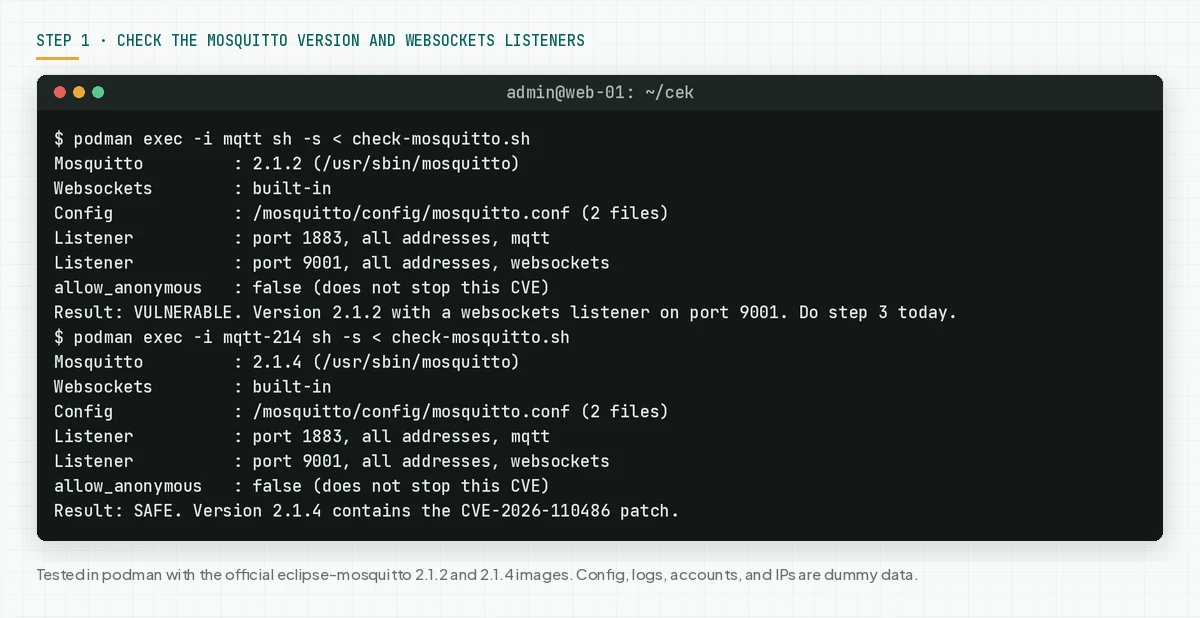
Check the result:
- "VULNERABLE": version 2.1.0 to 2.1.2 with a built-in websockets listener. Do step 3 today.
- "NOT REACHABLE NOW": no websockets listener. Install 2.1.4 this week for 4 other CVEs.
- "NOT AFFECTED by CVE-2026-110486": a libwebsockets build or the 2.0 branch. Still plan 2.1.4.
- "PATCHED": version 2.1.3. Move to 2.1.4. "SAFE": version 2.1.4 or newer.
- "UPGRADE": a version below 2.0. "CHECK": the config is not readable, so run it again with
--conf.
We tested the scripts with 25 edge cases, for example missing files, wrong options, versions 1.6, 2.0, and 2.1.3, and a fake libwebsockets build. The scripts give the correct result or stop with exit code 2. Limit: the script reads only files from include_dir, not from other include methods.
Step 2: Check the websockets ports from an outside network
This step shows if the internet can reach a websockets listener. A closed result does not replace the update, because devices on the internal network can still reach the broker.
Save this script as check-exposure-mosquitto.sh. With no port list, the script tests 9001, 8080, 8083, and 8081. Use the ports from the step 1 result.
#!/usr/bin/env bash
# Check from outside the network: does a Mosquitto websockets port answer.
# Usage: bash check-exposure-mosquitto.sh [--tls] <host> [port ...]   (default ports: 9001 8080 8083 8081)
# Run it from a laptop or a server outside the broker network, only against a broker that you own.
# The script only opens a websockets handshake. It sends no MQTT packet.
set -u
SKEMA=http TLS=()
if [ "${1:-}" = "--tls" ]; then SKEMA=https; TLS=(-k); shift; fi   # -k: no certificate check, the script only checks the port.
[ $# -ge 1 ] || { echo "Give a host. Example: bash check-exposure-mosquitto.sh mqtt.example.com 9001" >&2; exit 2; }
HOST="$1"; shift
case "$HOST" in ''|-*|*[!A-Za-z0-9.:_-]*) echo "Invalid host: $HOST" >&2; exit 2 ;; esac
command -v curl >/dev/null 2>&1 || { echo "curl is missing. Install curl first." >&2; exit 2; }
if [ $# -gt 0 ]; then PORTS=("$@"); else PORTS=(9001 8080 8083 8081); fi
URLHOST="$HOST"; case "$HOST" in *:*) URLHOST="[$HOST]" ;; esac

BUKA=""
for p in "${PORTS[@]}"; do
  case "$p" in ''|*[!0-9]*) echo "Invalid port: $p" >&2; exit 2 ;; esac
  [ "$p" -ge 1 ] && [ "$p" -le 65535 ] || { echo "Invalid port: $p" >&2; exit 2; }
  KODE=$(curl -s -o /dev/null -w '%{http_code}' --http1.1 --max-time 5 ${TLS[@]+"${TLS[@]}"} \
    -H 'Connection: Upgrade' -H 'Upgrade: websocket' -H 'Sec-WebSocket-Version: 13' \
    -H 'Sec-WebSocket-Key: dGhlIHNhbXBsZSBub25jZQ==' -H 'Sec-WebSocket-Protocol: mqtt' \
    "$SKEMA://$URLHOST:$p/mqtt"); RC=$?
  if [ "$KODE" = 101 ]; then HASIL="OPEN. An MQTT websockets listener answers."; BUKA="$BUKA $p"
  elif [ "$KODE" != 000 ]; then HASIL="OPEN, not MQTT websockets (HTTP $KODE)."
  elif [ "$RC" = 7 ]; then HASIL="CLOSED (connection refused)."
  elif [ "$RC" = 28 ]; then HASIL="NO ANSWER (timeout, maybe filtered)."
  elif [ "$RC" = 52 ] || [ "$RC" = 56 ]; then HASIL="OPEN, not HTTP (maybe plain MQTT)."
  else HASIL="FAILED (curl code $RC)."; fi
  printf 'Port %-6s : %s\n' "$p" "$HASIL"
done
if [ -n "$BUKA" ]; then
  echo "Result: OPEN on port${BUKA}. Close this port to the internet until 2.1.4 is installed (step 4)."; exit 1
fi
echo "Result: no websockets port answers from this point. Repeat from another network."; exit 0
# From an outside network, for example a phone hotspot. Test only brokers that you own.
bash check-exposure-mosquitto.sh 203.0.113.10
bash check-exposure-mosquitto.sh 203.0.113.10 9001 1883
# A websockets listener with TLS
bash check-exposure-mosquitto.sh --tls 203.0.113.10 8081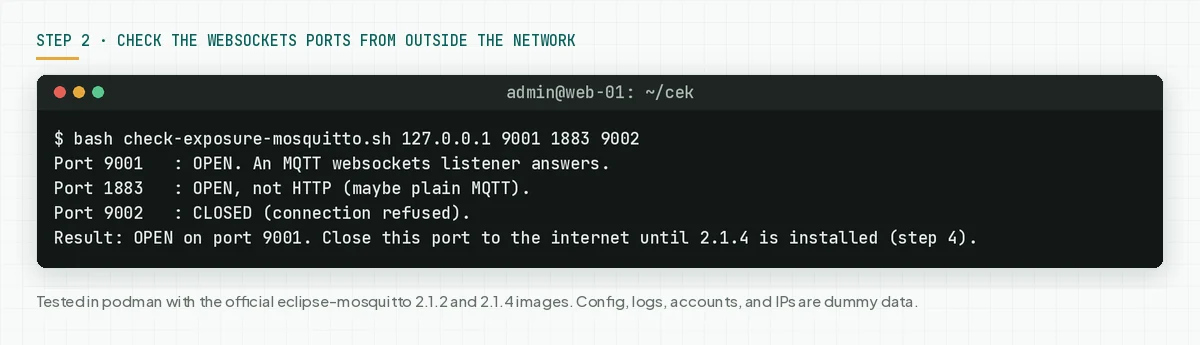
Check the result: "OPEN. An MQTT websockets listener answers" means that the test point can reach that port. Close that port with step 4 until 2.1.4 is installed. "OPEN, not HTTP" is usually a plain MQTT port. That port is not affected by this CVE.
"CLOSED" or "NO ANSWER" means that the port does not answer from that test point. Test only IP addresses that you own.
Step 3: Back up the config, install 2.1.4, then restart
Only the new version closes the flaw. Back up first, because the update replaces the broker program and can change login behavior.
# Linux package
sudo tar czf mosquitto-backup-$(date +%F).tgz /etc/mosquitto
# Docker: the config folder that you mount, for example ./mosquitto/config
tar czf mosquitto-backup-$(date +%F).tgz ./mosquitto/config
3a. Docker and Docker Compose
The 2.1.4-alpine tag is on the official eclipse-mosquitto image on Docker Hub on 18 November 2026. We pulled this tag for our test. Use the same volumes, so the config, password file, and data stay.
docker pull eclipse-mosquitto:2.1.4-alpine
# Docker Compose: change the image line to eclipse-mosquitto:2.1.4-alpine, then
docker compose pull
docker compose up -d
docker exec mqtt /usr/sbin/mosquitto -h | head -n 1
3b. Linux package
Update the package from the source that you use. If your package source does not give 2.1.4 yet, use step 4 until the package is available, or move to the official image.
# Sample for Debian or Ubuntu. We did not test this step.
sudo apt update
apt-cache policy mosquitto
sudo apt install --only-upgrade mosquitto
sudo systemctl restart mosquitto
/usr/sbin/mosquitto -h | head -n 1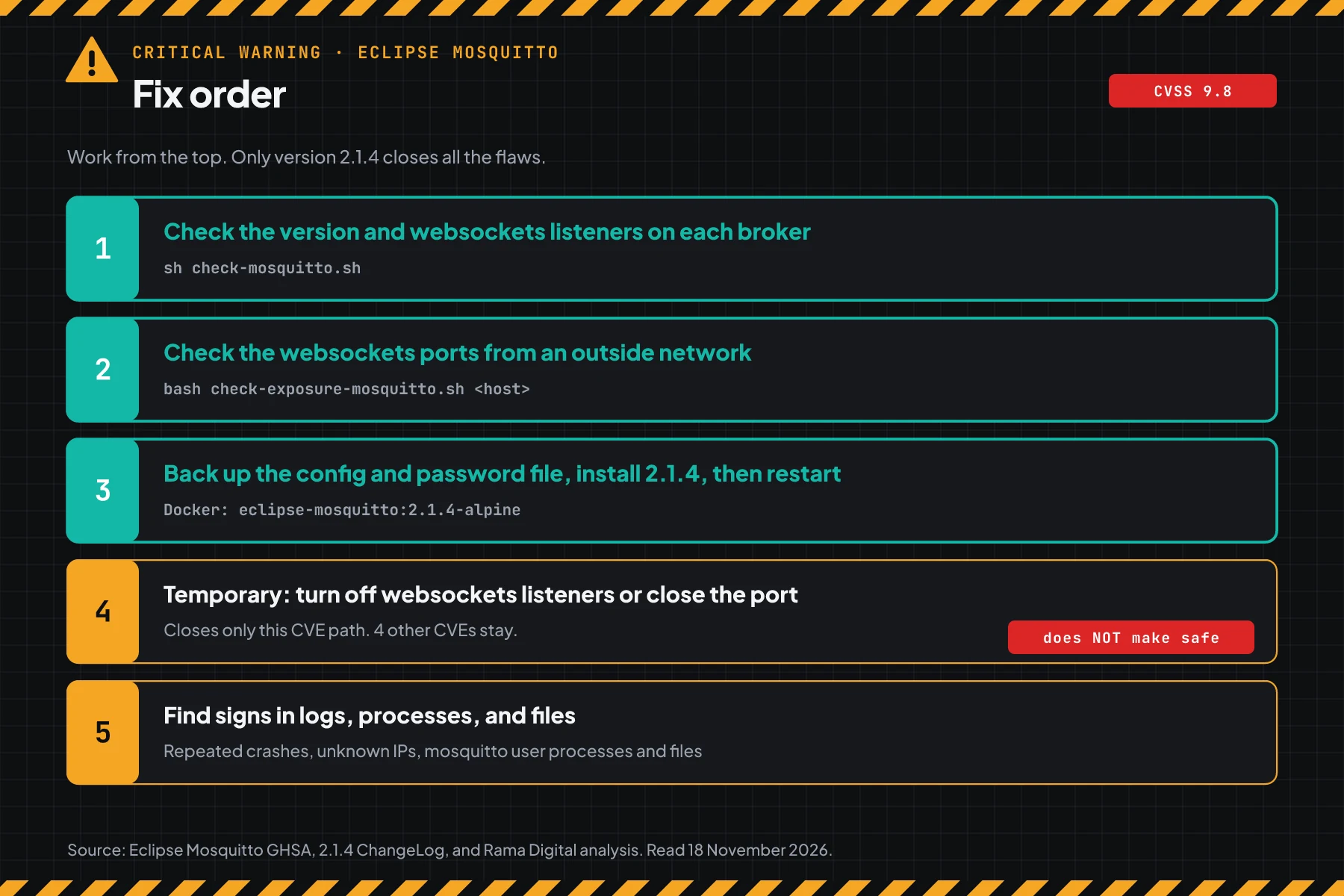
Check the result: the step 1 script prints "SAFE" on each broker. If clients fail to log in after the update, check if you installed 2.1.3, then move to 2.1.4.
Step 4: Temporary mitigation, does NOT make it safe
Use this step only until 2.1.4 is installed. This step closes only the CVE-2026-110486 path. The 4 other CVEs in the table stay.
4a. Turn off the websockets listener
This is the first vendor option. Change both websockets listener lines to comments, then restart the broker.
# Before: the websockets listener is on
listener 9001
protocol websockets

# After: both lines are comments
#listener 9001
#protocol websockets
Change both lines. If only the protocol websockets line becomes a comment, port 9001 stays open as a plain MQTT listener. Restart with sudo systemctl restart mosquitto or docker restart mqtt.
Effect: web dashboards that use MQTT over websockets stop getting data. Step 1 after this change gives "NOT REACHABLE NOW". We tested this result in a container with no websockets listener.
4b. Limit the websockets port to known IP addresses
Rama Digital analysis: if the dashboard must keep running, allow the websockets port only from the office network or VPN. Sample:
# Sample for ufw. We did not test this step. Change 198.51.100.0/24 to your network.
sudo ufw allow from 198.51.100.0/24 to any port 9001 proto tcp
sudo ufw deny 9001/tcp
Ports that Docker publishes do not go through ufw rules. For Docker, limit the port in the cloud firewall or in front of the server, or publish the port only to 127.0.0.1 behind a proxy with a login.
4c. Build with libwebsockets
This is the second vendor option. We did not test this option. For most teams, installing 2.1.4 is faster than a new build.
Check the result: step 2 from outside finds no open websockets port. Plain MQTT clients on port 1883 or 8883 keep running.
Step 5: Find signs that the broker was attacked
The update closes the flaw, but it does not remove the processes, files, or access that an attacker left. Thus, look for those traces before and after the update.
Rama Digital analysis: the vendor has not released IOCs. The script looks for common signs of a memory flaw: repeated crashes, connections from unknown IPs to the websockets port, protocol errors, and new processes and files of the mosquitto user.
Save this script as check-signs-mosquitto.sh. The script only reads. It does not change, delete, or send anything.
#!/bin/sh
# Find signs of CVE-2026-110486 attacks in Mosquitto logs, processes, and temporary files.
# Usage: KNOWN_IPS="198.51.100." sh check-signs-mosquitto.sh --log file [--port 9001] [--ps file] [--days 14]
# Docker: docker logs <name> > broker.log 2>&1, then use --log broker.log. Journal: journalctl -u mosquitto > broker.log
# The script only reads. An empty result does not prove that the server is clean.
set -u
LOG="" PSF="" PORTS="" HARI=14 MQU="${MQ_USER:-mosquitto}"
while [ $# -gt 0 ]; do
  case "$1" in
    --log|--ps|--port|--days) [ $# -ge 2 ] || { echo "Give a value after $1" >&2; exit 2; } ;;
  esac
  case "$1" in
    --log) LOG="$2"; shift 2 ;;
    --ps) PSF="$2"; shift 2 ;;
    --port) case "$2" in ''|*[!0-9]*) echo "Invalid port: $2" >&2; exit 2 ;; esac; PORTS="$PORTS $2"; shift 2 ;;
    --days) case "$2" in ''|*[!0-9]*) echo "Invalid days: $2" >&2; exit 2 ;; esac; HARI="$2"; shift 2 ;;
    -h|--help) echo "Usage: KNOWN_IPS=\"198.51.100.\" sh check-signs-mosquitto.sh --log file [--port 9001] [--ps file] [--days 14]"; exit 0 ;;
    *) echo "Unknown option: $1" >&2; exit 2 ;;
  esac
done
[ -n "$LOG" ] || { echo "Give --log. Example: docker logs mqtt > broker.log 2>&1" >&2; exit 2; }
[ -r "$LOG" ] || { echo "Cannot read $LOG" >&2; exit 2; }
TANDA=0

# 1. Crashes and restarts. A broker that crashes again and again is a sign of attack attempts.
CRASH=$(tr -d '\r' < "$LOG" | grep -ciF -e 'segfault' -e 'segmentation fault' -e 'status=11/SEGV' -e 'core dumped' -e 'code=dumped')
START=$(tr -d '\r' < "$LOG" | grep -c 'mosquitto version [0-9.]* starting')
printf '%-18s: %s crash line(s), broker started %s time(s) (%s, %s lines)\n' "Crash and restart" "$CRASH" "$START" "$LOG" "$(wc -l < "$LOG" | tr -d ' ')"
[ "$CRASH" -gt 0 ] && TANDA=$((TANDA + 1))
[ "$START" -gt 1 ] && TANDA=$((TANDA + 1))
[ "$CRASH" -gt 0 ] && tr -d '\r' < "$LOG" | grep -iF -e 'segfault' -e 'segmentation fault' -e 'status=11/SEGV' -e 'core dumped' -e 'code=dumped' | tail -n 3 | cut -c1-120 | sed 's/^/  /'

# 2. Connections to websockets ports for each IP. An IP outside KNOWN_IPS gets the UNKNOWN tag.
KONEKSI=$(tr -d '\r' < "$LOG" | sed -n 's/.*New connection from \([0-9A-Fa-f:.]*\):[0-9]* on port \([0-9]*\)\..*/\1 \2/p')
if [ -n "$PORTS" ]; then
  KONEKSI=$(printf '%s\n' "$KONEKSI" | awk -v daftar="$PORTS" 'BEGIN { n = split(daftar, a, " "); for (i = 1; i <= n; i++) ok[a[i]] = 1 } ($2 in ok)')
fi
LABEL="Connections"; [ -n "$PORTS" ] && LABEL="Conn. port$PORTS"
if [ -z "$KONEKSI" ]; then
  printf '%-18s: none\n' "$LABEL"
else
  RINGKAS=$(printf '%s\n' "$KONEKSI" | awk '{ print $1 }' | sort | uniq -c | sort -rn)
  ASING=0 JML=0 BARIS=""
  while read -r n ip; do
    JML=$((JML + 1)); tag=""
    sah=0; for pre in ${KNOWN_IPS:-}; do case "$ip" in "$pre"*) sah=1 ;; esac; done
    [ "$sah" = 0 ] && { tag="UNKNOWN"; ASING=$((ASING + 1)); }
    BARIS="$BARIS$(printf '  %-20s %5s connections  %s' "$ip" "$n" "$tag")
"
  done <<EOF
$RINGKAS
EOF
  printf '%-18s: %s IPs, %s IPs outside KNOWN_IPS\n' "$LABEL" "$JML" "$ASING"
  printf '%s' "$BARIS" | head -n 6
  [ "$ASING" -gt 0 ] && TANDA=$((TANDA + 1))
fi
PROTO=$(tr -d '\r' < "$LOG" | grep -c -F -e 'Protocol error from' -e 'disconnected: protocol error')
printf '%-18s: %s lines (read them, a broken client can also cause them)\n' "Protocol error" "$PROTO"

# 3. Processes of the mosquitto user other than the mosquitto program.
if [ -n "$PSF" ]; then
  [ -r "$PSF" ] || { echo "Cannot read $PSF" >&2; exit 2; }
  PSDATA=$(tr -d '\r' < "$PSF")
else
  PSDATA=$(ps -eo user:20,pid,args 2>/dev/null || ps -o user,pid,args 2>/dev/null)
fi
LAIN=$(printf '%s\n' "$PSDATA" | awk -v u="$MQU" '
  # ps cuts the user name: busybox "mosquitt", procps "mosquit+".
  { k = $1; sub(/\+$/, "", k) }
  ($1 == u || $1 == "1883" || (length(k) >= 7 && index(u, k) == 1)) { n = split($3, a, "/"); if (a[n] != "mosquitto") print }')
JLAIN=$(printf '%s' "$LAIN" | grep -c .)
printf '%-18s: %s other process(es) of user %s\n' "Processes" "$JLAIN" "$MQU"
[ "$JLAIN" -gt 0 ] && { printf '%s\n' "$LAIN" | head -n 4 | cut -c1-100 | sed 's/^/  /'; TANDA=$((TANDA + 1)); }

# 4. New files of the mosquitto user in temporary folders.
BERKAS=$(find /tmp /var/tmp /dev/shm -xdev -type f -user "$MQU" -mtime -"$HARI" 2>/dev/null)
JB=$(printf '%s' "$BERKAS" | grep -c .)
printf '%-18s: %s file(s) of user %s in /tmp, /var/tmp, /dev/shm (%s days)\n' "New files" "$JB" "$MQU" "$HARI"
[ "$JB" -gt 0 ] && { printf '%s\n' "$BERKAS" | head -n 4 | sed 's/^/  /'; TANDA=$((TANDA + 1)); }

if [ "$TANDA" -gt 0 ]; then
  echo "Result: SIGNS FOUND ($TANDA). Keep the logs, cut the websockets port, then do the response in step 5."; exit 1
fi
echo "Result: no signs in this data. This does not prove that the server is clean."; exit 0
Sample of the first 8 journal lines with dummy data:
Nov 17 08:00:04 web-01 systemd[1]: Starting mosquitto.service - Mosquitto MQTT Broker...
Nov 17 08:00:05 web-01 mosquitto[812]: 1794877205: mosquitto version 2.1.2 starting
Nov 17 08:00:05 web-01 mosquitto[812]: 1794877205: Opening ipv4 listen socket on port 1883.
Nov 17 08:00:05 web-01 mosquitto[812]: 1794877205: Opening ipv4 listen socket on port 9001.
Nov 17 08:00:05 web-01 mosquitto[812]: 1794877205: mosquitto version 2.1.2 running
Nov 17 08:00:31 web-01 mosquitto[812]: 1794877231: New connection from 198.51.100.10:50122 on port 1883.
Nov 17 08:01:12 web-01 mosquitto[812]: 1794877272: New connection from 198.51.100.24:41870 on port 9001.
Nov 17 09:15:40 web-01 mosquitto[812]: 1794881740: New connection from 198.51.100.24:41902 on port 9001.
# Linux package with systemd: run it on the broker server.
journalctl -u mosquitto --since "14 days ago" > broker.log
KNOWN_IPS="198.51.100." sh check-signs-mosquitto.sh --log broker.log --port 9001
# Docker: run it on the host, then check the files in the container.
docker logs mqtt > broker.log 2>&1
KNOWN_IPS="198.51.100." sh check-signs-mosquitto.sh --log broker.log --port 9001
docker exec mqtt find /tmp /var/tmp /dev/shm -xdev -type f -user mosquitto -mtime -14
docker inspect -f '{{.RestartCount}}' mqttIf the broker writes logs to a file with log_dest file, use that file with --log. Rama Digital analysis: we did not test the Docker commands above on a real Docker host. On the host, container processes show uid 1883, and the script knows that uid.
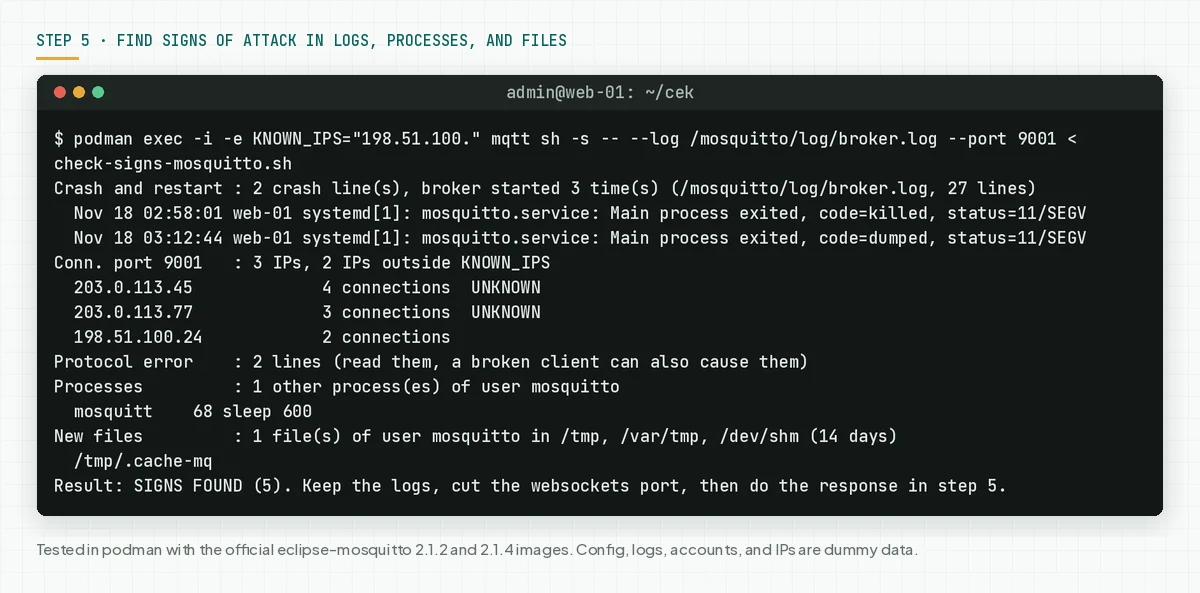
Script limits: the script needs the New connection from lines in the log. Those lines show when connection_messages is on, and the Mosquitto default turns it on. The script does not read changes to the password or ACL files. Compare those files with the backup by hand.
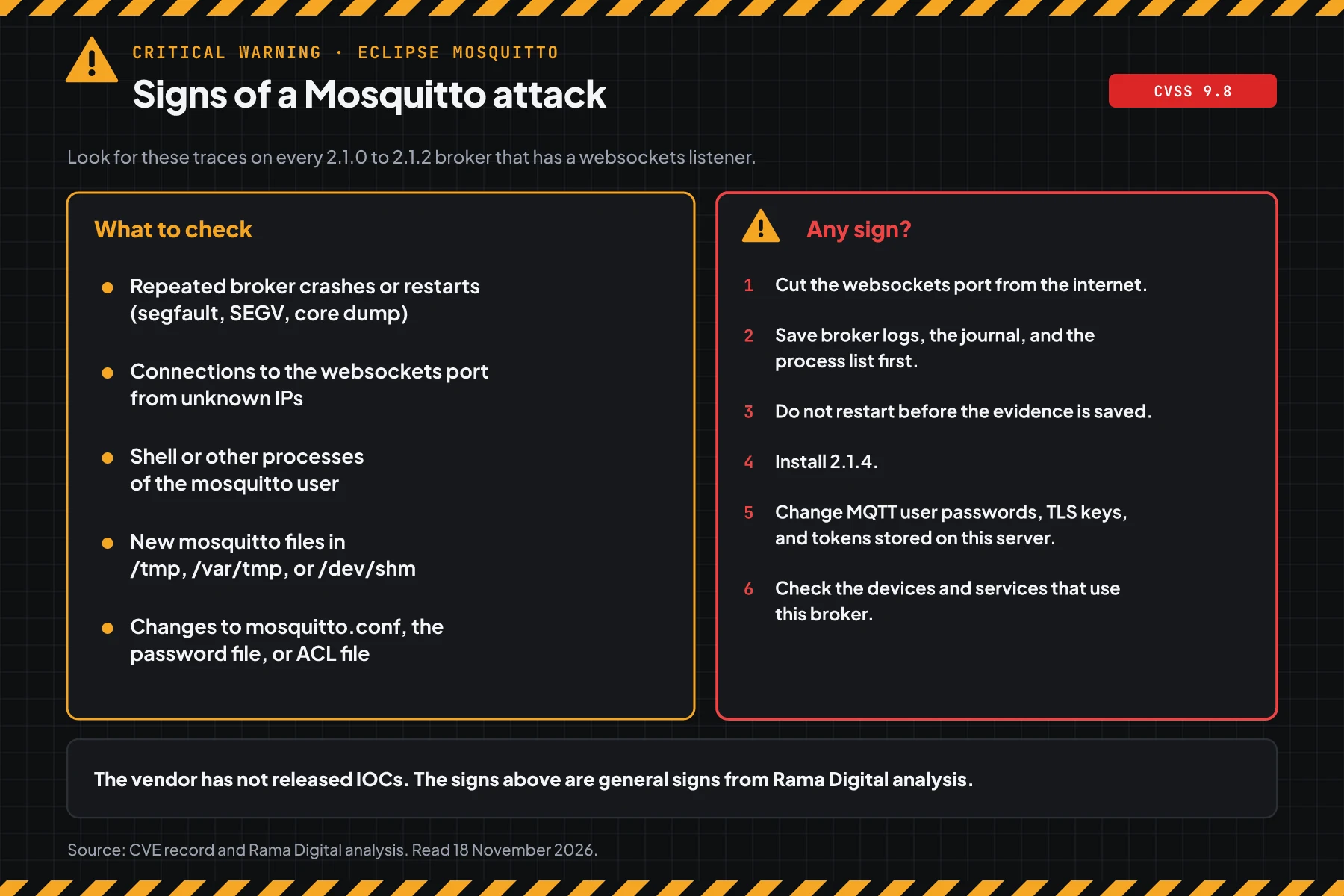
Check the result: "no signs in this data" does not prove that the broker is clean. "SIGNS FOUND" means: check each line, then follow this order for each sign that you do not know:
- Cut the websockets port from the internet.
- Save the broker logs, the journal, and the process list first, before you change anything.
- Do not restart the broker before the evidence is saved.
- Install 2.1.4.
- Change the MQTT user passwords, TLS keys, and tokens stored on this server.
- Check the devices and services that use this broker.
If personal data leaks through this broker, Indonesian Law 27/2022 on Personal Data Protection requires a written notice within 3 times 24 hours. Also read about the Puppet flaw CVE-2026-115731.
Example: 1 night of response for 3 brokers
This simulation uses dummy data. The broker names, times, and results are not customer data.
| Time (WIB) | Dummy broker | What we check | Result | Action |
|---|---|---|---|---|
| 19.00 | mqtt-factory (2.1.2 Docker, port 9001 for a dashboard) | Steps 1 and 2 | VULNERABLE, port 9001 open from outside | Limit port 9001 tonight, install 2.1.4 at 20.00 |
| 19.20 | mqtt-warehouse (2.1.1 Linux package, port 1883 on VPN) | Step 1 | NOT REACHABLE NOW | Install 2.1.4 this week |
| 19.40 | mqtt-old (2.0.18) | Step 1 | NOT AFFECTED by CVE-2026-110486 | Plan the move to 2.1.4 |
| 20.30 | mqtt-factory | Step 5 | 2 SEGV crashes, 2 unknown IPs on port 9001 | Save evidence, change MQTT passwords, check devices |
Lesson from this simulation: do the broker with an open websockets port first. The update does not remove attacker traces, so step 5 stays necessary.
Who does the work
The IoT team, the factory team, or the dashboard developers usually own the MQTT broker. The network team owns the firewall and VPN. The IT lead decides the restart window, because a restart cuts all devices for a short time.
Rama Digital recommendation: do not open broker ports directly to the internet. Put the broker on the internal network, and open websockets only through a proxy with a login. The web server in front of the dashboard also needs patches, as in the Apache HTTP/2 flaw CVE-2026-119618. Similar lessons are in the NetScaler flaw CVE-2026-120868 and the WebLogic flaw CVE-2026-91569.
Checklist for today
- List all Mosquitto brokers, including containers, gateways, and test brokers. Owner: IT team. Evidence: a list of names, versions, and locations.
- Check the version and listeners with step 1. Owner: broker admin. Evidence: script output.
- Check the websockets ports from outside with step 2. Owner: network team. Evidence: script output.
- Back up, then install 2.1.4. Owner: broker admin. Evidence: step 1 output after the update.
- Turn off or limit the websockets listener until the update is done. Owner: broker admin and network team. Evidence: config and step 2 result.
- Find signs with step 5. Owner: broker admin. Evidence: script output and a copy of the logs.
- List the 2.0 branch brokers and plan the move to 2.1.4. Owner: IT lead. Evidence: a written date.
Questions and answers
We use Mosquitto 2.0.x. Are we affected?
Not by CVE-2026-110486. The CVE record lists only 2.1.0 to 2.1.2. The GHSAs for 3 other CVEs list the 2.0 branch up to 2.0.22, so plan the move to 2.1.4.
Our broker uses passwords and allow_anonymous false. Does that stop this flaw?
No. Per the CVE record, the vulnerable point is reachable before the login check. The broker can crash even when anonymous login is off.
Does closing the websockets port make the broker safe?
No. That step only closes this CVE path from outside. Devices on the internal network can still reach the port, and 4 other CVEs stay until 2.1.4.
Why 2.1.4 and not 2.1.3?
Version 2.1.3 closes the flaw, but it rejects old sha512 password hashes. Version 2.1.4 fixes that regression, so clients with old passwords can still log in.
We use the Docker latest tag. Are we safe now?
Not always. An old container keeps the old image until you pull the new image and create the container again. Run step 1 to see the version that runs.
There are no attack reports yet. Why must we update today?
The score is 9.8, the flaw works with no login, and brokers are often open to the internet for dashboards. A public patch also helps attackers find the vulnerable point.
Does the update remove the attacker's access?
No. The update closes the flaw. It does not remove the processes, files, or passwords that an attacker took. Run step 5, then change the MQTT passwords and TLS keys.
Next step
The limits that still apply: step 4 does not make the broker safe, and an update does not clean a broker that was taken over. When your broker shows a sign in step 5, or you need help with an audit and recovery, use Vibe Code Rescue. For 1 urgent issue today, book a 30-minute session.
Sources
- The CVE-2026-110486 record: Eclipse CNA description, CVSS 3.1 vector, CWE, affected versions, and publish time of 18 November 2026.
- GHSA-6j8m-r32v-4h38: summary, patched version, ways to decrease the risk, and credit, 17 November 2026.
- The Mosquitto ChangeLog: contents of releases 2.1.0, 2.1.3, and 2.1.4.
- CISA KEV: lists no Mosquitto CVE on 18 November 2026.
- The official eclipse-mosquitto image on Docker Hub: the 2.1.2-alpine and 2.1.4-alpine tags that we used for the test.
- Indonesian Law 27/2022 on Personal Data Protection: the duty to report a personal data leak.