Direct answer: CVE-2026-132891 is a flaw in JetBrains TeamCity with CVSS 3.1 score 9.8. Through an external pull request, an outside person can run code with no login. Today, check the version of each TeamCity server, then install 2026.1.6 or 2026.2.2.
The first fixed versions are 2026.2, 2026.1.4, and 2025.11.8. All came out on 2 September 2026. Thus a server with no update since August is still vulnerable.
Main status: As of 20 November 2026, the JetBrains security bulletin does not mention exploitation, CISA KEV does not list this CVE, and we found no public PoC. CISA rates this attack as automatable with total impact. Limit: this article has no attack code or attack steps.
We read the JetBrains security bulletin, the CVE-2026-132891 record, the 2026.2.2 release notes, the 2026.1.4 release notes, the Pull Requests docs, the TeamCity upgrade notes, and CISA KEV on 20 November 2026. We ran the scripts in steps 1, 2, and 5 in a podman container with the official TeamCity 2026.1.3 and 2026.1.6 images.
Important limit: We did not test the flaw itself and did not build a pull request from outside. We did not run a backup through the UI, a .tar.gz upgrade, or the Windows installer. We mark each step that we did not run.
Problem: build agents hold your production keys
TeamCity is a CI/CD server. TeamCity gets code from a repo, then a build agentAI agentAn AI program that performs work steps by itself, for example reading a message, drafting a reply, and recording the result.Open the glossary compiles it, tests it, and often also deploys it.
To deploy, a build agent needs secrets: VCS tokens, SSH deploy keys, container registry tokens, database passwords, and cloud keys. Thus code that runs on an agent can use all of those secrets.
Rama Digital analysis: for this reason, a CI/CD server is a high-value target. As of 20 November 2026, CISA KEV lists 4 TeamCity CVEs. All carry the ransomware label Known.
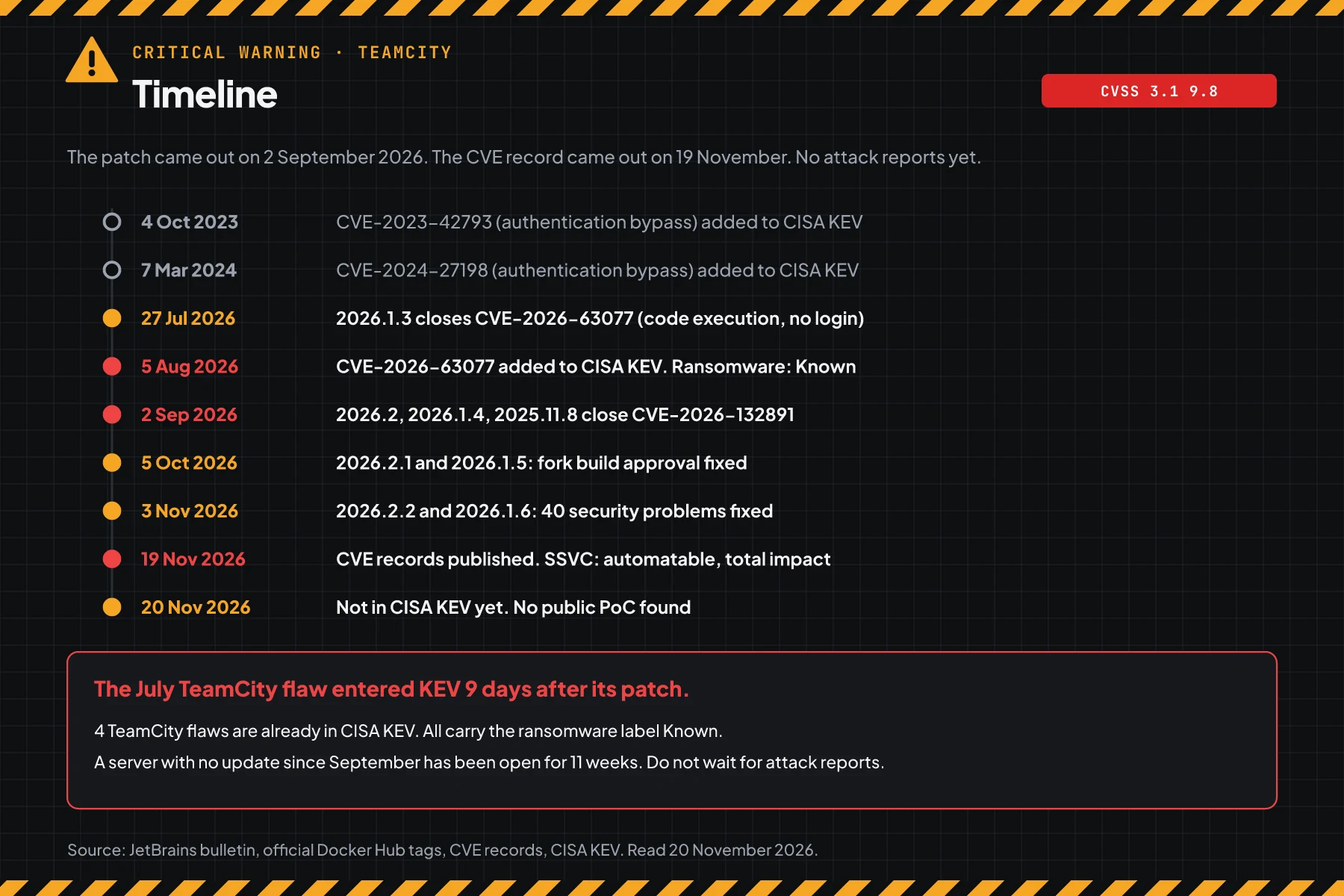
Per the official Docker Hub tags, JetBrains released 2026.2, 2026.1.4, and 2025.11.8 on 2 September 2026. The CVE record came out on 19 November 2026 at 10.32 UTC. The reporter is Antoni Tremblay, with the issue number TW-102506.
The earlier pattern: CVE-2026-63077, code execution with no login in TeamCity, entered CISA KEV on 5 August 2026. That was 9 days after the patch of 27 July. Do not wait for attack reports to act.
How it works: code from external pull requests
This section uses the official vendor summary. Its goal is to help you choose the correct steps, not to explain how to attack.
Summary from the vendor
Per the JetBrains security bulletin, in TeamCity before 2026.2, 2026.1.4, and 2025.11.8, remote code execution was possible through external pull requests. JetBrains gives no other technical details.
An external pull request is a proposed code change from a person outside the team, for example from a fork of a public repo. TeamCity can build that pull request automatically through the Pull Requests feature or through a refs/pull branch spec.
CVSS 3.1 vector: AV:N/AC:L/PR:N/UI:N/S:U/C:H/I:H/A:H. This means: over the network, low complexity, no account, no victim click, with full impact. Weakness type: CWE-696, incorrect behavior order.
We do not write other technical details. If the vendor releases details, we will not add attack steps.
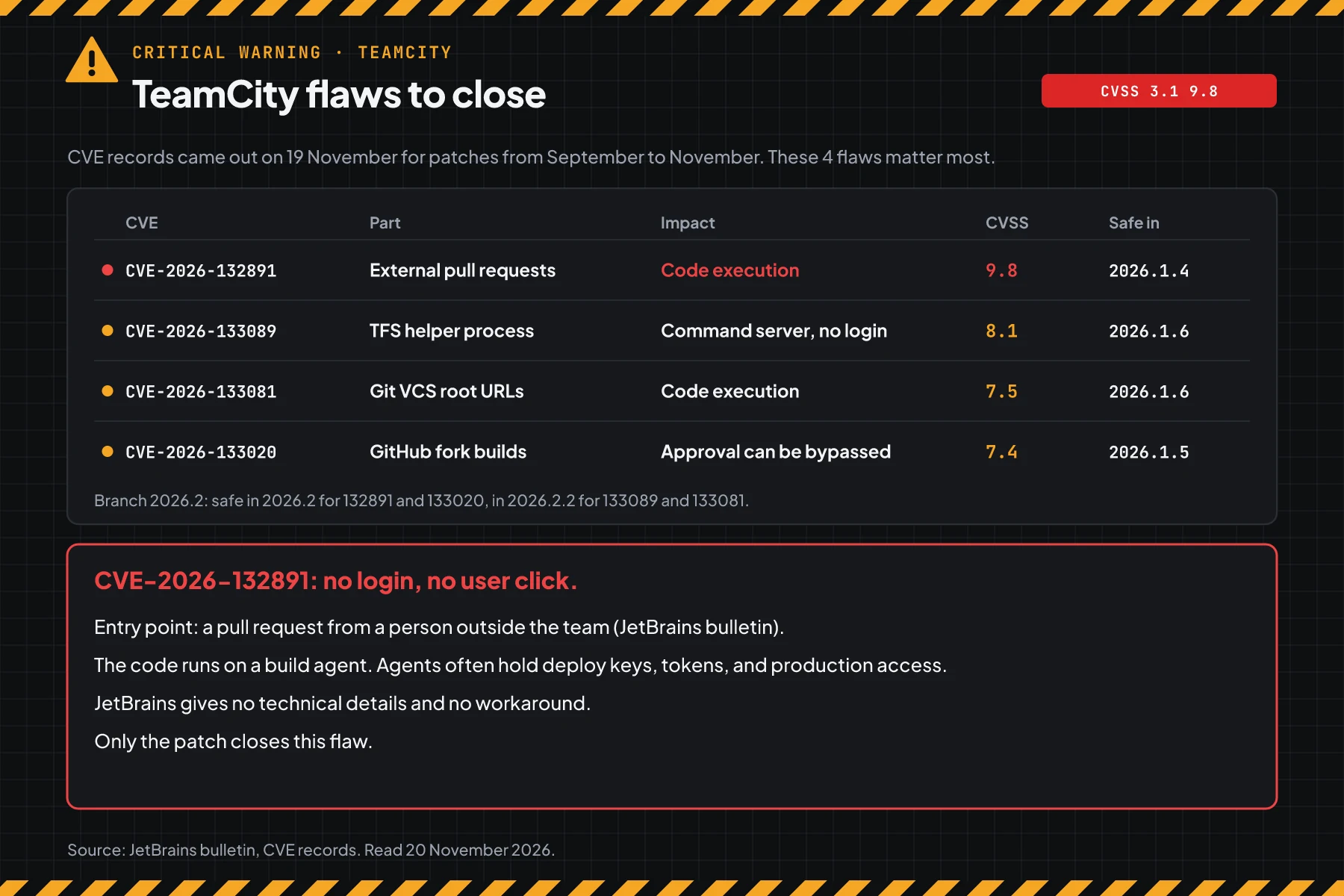
4 TeamCity flaws to close
CVE-2026-132891 is the only Critical flaw in its group. Later releases close 3 other flaws that touch builds and agents.
| CVE | Part | Impact | CVSS 3.1 | Safe in |
|---|---|---|---|---|
| CVE-2026-132891 | External pull requests | Remote code execution | 9.8 | 2026.2, 2026.1.4, 2025.11.8 |
| CVE-2026-133089 | TFS helper process | Command server with no authentication | 8.1 | 2026.2.2, 2026.1.6 |
| CVE-2026-133081 | Git VCS root URLs | Remote code execution | 7.5 | 2026.2.2, 2026.1.6 |
| CVE-2026-133020 | Builds of GitHub fork pull requests | The untrusted build approval can be bypassed | 7.4 | 2026.1.5 (2026.2 not affected) |
Exploitation status as of 20 November 2026
This status can change. Do not wait for field attack reports before you upgrade.
| Source | Status |
|---|---|
| JetBrains security bulletin | No mention of exploitation. No workaround or technical details |
| CVE record (CISA SSVC) | Exploitation: none. Automatable: yes. Technical impact: total |
| CISA KEV | Not on the list yet |
| Public PoC | We found none |
| TeamCity history in CISA KEV | 4 TeamCity CVEs, all with the ransomware label Known |
A sample of other flaws in CI/CD and source code systems is in the GitLab flaws CVE-2026-97229 and CVE-2026-110264.
Who is at the highest risk
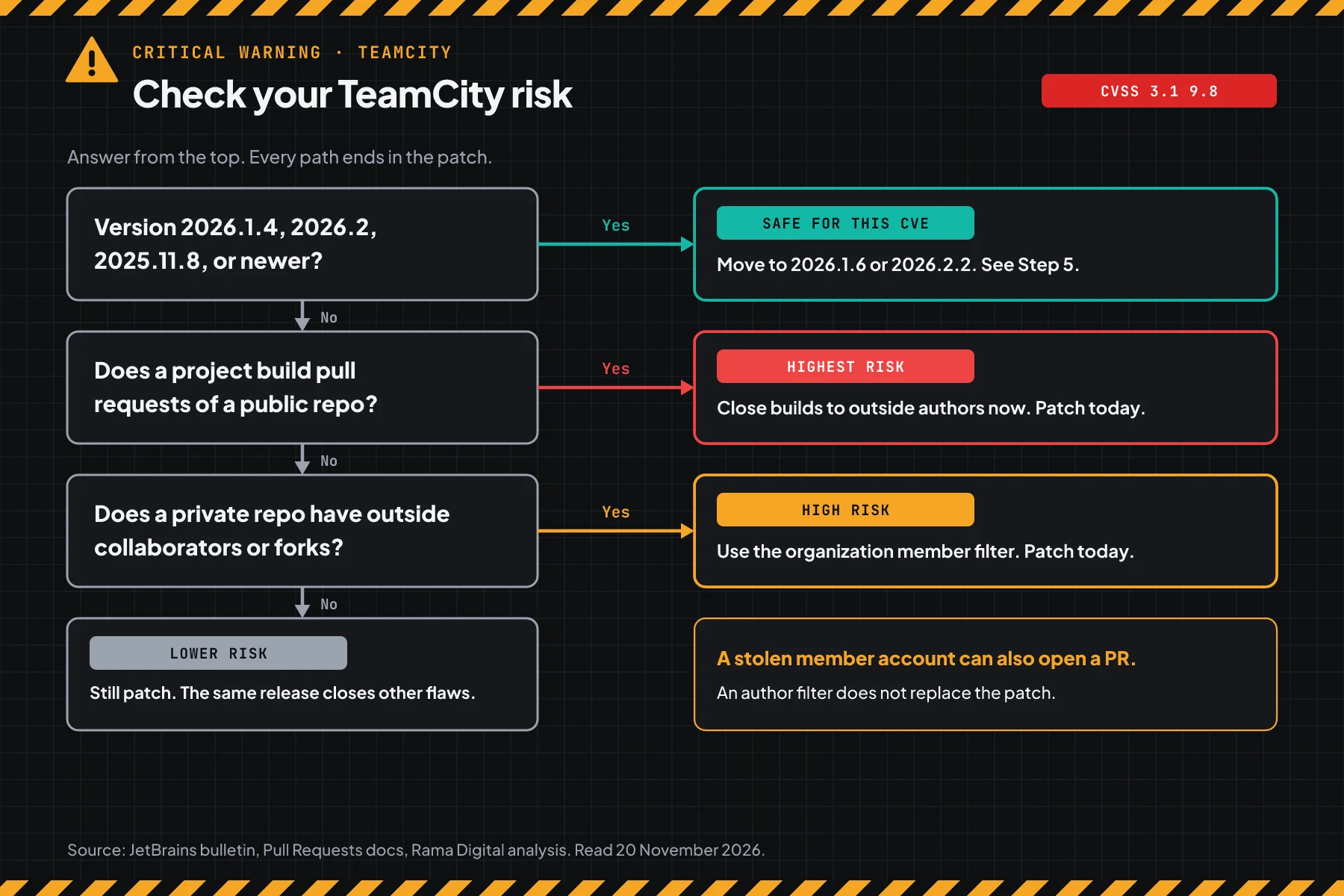
Each server below the fixed version of its branch needs an upgrade. The order in this table helps you choose which server to do first.
| TeamCity setup | Risk | Reason |
|---|---|---|
| A vulnerable version that builds pull requests of a public repo | Highest | Anyone with a GitHub account can open a pull request |
| A vulnerable version, a private repo with outside collaborators or forks | High | People outside the team can still open a pull request |
| A vulnerable version with no pull request builds | Lower | The entry point of this CVE is not open. The same release closes other flaws |
| A version equal to or above the fix of its branch | Safe for this CVE | Still look for signs in step 5, because the server was vulnerable before the patch |
In the TeamCity 2026.1.6 UI, the Pull Requests feature shows a warning for the Everybody choice. It says that this choice "may allow arbitrary users to execute malicious code on your build agents". Thus check the real settings with step 2.
Rama Digital analysis: a stolen member account can also open a pull request. Thus an author filter reduces the risk, but it does not close the flaw.
Affected versions and fixed versions
Compare the version of each server with this table. The version shows at the bottom of each TeamCity page. Sources: the JetBrains security bulletin, the 2026.2.2 release notes, and the official Docker Hub tags.
| Branch | Fix for this CVE | Latest release | Action |
|---|---|---|---|
| 2026.2.x | 2026.2 | 2026.2.2 (3 November 2026) | Install 2026.2.2 |
| 2026.1.x | 2026.1.4 | 2026.1.6 (3 November 2026) | Install 2026.1.6. Below 2026.1.4: today |
| 2025.11.x | 2025.11.8 | 2025.11.8 (2 September 2026) | Upgrade to 2026.1.6 or 2026.2.2. Below 2025.11.8: today |
| Below 2025.11 | None | - | Upgrade to 2026.1.6 or 2026.2.2 today |
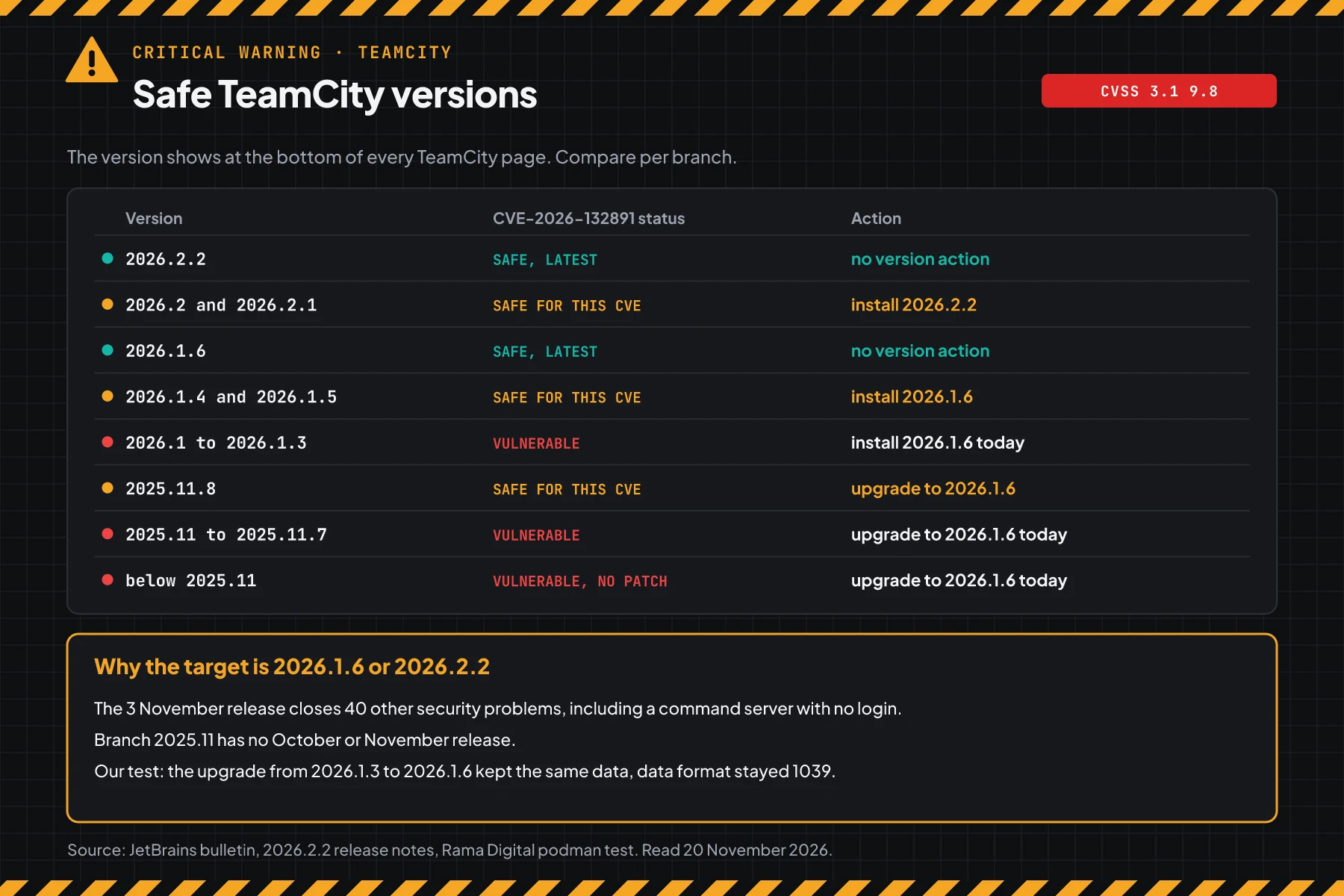
Why the target is 2026.1.6 or 2026.2.2
- 2026.1.4 closes CVE-2026-132891. The 2026.1.4 release notes list 94 fixed security problems.
- 2026.1.5 and 2026.2.1, released on 5 October 2026, close 11 High code execution flaws. 2026.1.5 also closes CVE-2026-133020.
- 2026.1.6 and 2026.2.2, released on 3 November 2026, close CVE-2026-133089 and CVE-2026-133081. The 2026.2.2 release notes list 40 security problems.
- Branch 2025.11 has no October or November release. Upgrade to 2026.1.6 or 2026.2.2.
Our test: the upgrade from 2026.1.3 to 2026.1.6 used the same data directory. The server log shows data format 1039 before and after the upgrade.
Prerequisites before you start
- Admin access to the TeamCity UI.
- Shell access to the TeamCity server, or
docker execaccess to the TeamCity container. - A list of all TeamCity servers, including test servers and standby servers.
- A list of the GitHub or GitLab repos that TeamCity builds, with their public or private status.
- A list of the secrets that builds use: tokens, deploy keys, and passwords.
- A change window. The upgrade stops the server for a few minutes. Agents usually update automatically after the server upgrade.
Step 1: Check the version of each TeamCity server
By hand: open any TeamCity page, then read the version at the bottom of the page. For many servers, use the script.
Save this script as check-version-teamcity.sh. The script reads the address /app/rest/server/version, the server log, or a version text, then compares the version per branch. In our test, that address gave the version with no login.
#!/usr/bin/env bash
# Check the TeamCity version against CVE-2026-132891 (RCE through external pull requests, CVSS 9.8).
# Use: bash check-version-teamcity.sh https://ci.example.com     (reads /app/rest/server/version, no login)
#   or: bash check-version-teamcity.sh --log /opt/teamcity/logs/teamcity-server.log
#   or: bash check-version-teamcity.sh "2026.1.3 (build 222742)"
# Fix for CVE-2026-132891: 2026.2, 2026.1.4, 2025.11.8.
# Latest fixes (release of 3 November 2026): 2026.2.2 and 2026.1.6. Branch 2025.11 has no such release.
# Exit code: 0 SAFE, 1 VULNERABLE or UPDATE, 2 CANNOT CONFIRM.
set -u
PATTERN='[0-9]{4}\.[0-9]{1,2}(\.[0-9]{1,2})? \(build [0-9]{5,7}\)'
clean() { printf '%s' "$1" | LC_ALL=C tr -cd '[:print:]' | cut -c1-90; }
fail() { echo "Result : CANNOT CONFIRM. $1"; echo "Without a version that you can read, treat the server as not safe."; exit 2; }

rate() {
  local ver=$1 y m p br
  ver=${ver%% *}; IFS=. read -r y m p <<< "$ver"; p=${p:-0}
  y=$((10#$y)); m=$((10#$m)); p=$((10#$p)); br="$y.$m"
  if [ "$br" = 2026.2 ]; then
    (( p >= 2 )) && { echo "Result : SAFE for CVE-2026-132891, with the release of 3 November."; return 0; }
    echo "Result : SAFE for CVE-2026-132891, without the release of 3 November. Install 2026.2.2."; return 1
  elif [ "$br" = 2026.1 ]; then
    (( p >= 6 )) && { echo "Result : SAFE for CVE-2026-132891, with the release of 3 November."; return 0; }
    (( p >= 4 )) && { echo "Result : SAFE for CVE-2026-132891, without the release of 3 November. Install 2026.1.6."; return 1; }
    echo "Result : VULNERABLE to CVE-2026-132891 (CVSS 9.8). Install 2026.1.6 today."; return 1
  elif [ "$br" = 2025.11 ]; then
    (( p >= 8 )) && { echo "Result : SAFE for CVE-2026-132891. Branch 2025.11 has no October or November release. Upgrade to 2026.1.6 or 2026.2.2."; return 1; }
    echo "Result : VULNERABLE to CVE-2026-132891 (CVSS 9.8). Upgrade to 2026.1.6 or 2026.2.2 today."; return 1
  elif (( y * 100 + m < 202511 )); then
    echo "Result : VULNERABLE. Old version with no patch. Upgrade to 2026.1.6 or 2026.2.2 today."; return 1
  fi
  echo "Result : CHECK. Version is newer than the JetBrains bulletin. Read the release notes of this version."; return 2
}

[ $# -ge 1 ] || fail "Give a server URL, --log <file>, or a version text."
if [ "$1" = "--log" ]; then
  [ $# -eq 2 ] || fail "Use: --log <teamcity-server.log file>."
  [ -r "$2" ] || fail "Log file $(clean "$2") does not exist or cannot be read."
  src="log $(clean "$2")"
  ver=$(grep -aoE "TeamCity version: $PATTERN" "$2" | tail -n 1 | sed 's/^TeamCity version: //')
elif [[ $1 =~ ^https?://[A-Za-z0-9.:_-]+(/[A-Za-z0-9._/-]*)?$ ]]; then
  url=${1%/}/app/rest/server/version; src=$url
  code=$(curl -s -o /dev/null --max-time 15 -w '%{http_code}' "$url")
  [ "$code" = 000 ] && fail "The connection to the server failed."
  [ "$code" = 200 ] || fail "The server answered HTTP $(clean "$code"). Use --log, or read the version at the bottom of a TeamCity page."
  ver=$(curl -s --max-time 15 "$url" | head -c 200 | head -n 1 | grep -oE "^$PATTERN$")
elif [[ $1 =~ ^-- ]]; then
  fail "Option $(clean "$1") is not known."
else
  src="text"; ver=$(printf '%s' "$1" | grep -oE "^$PATTERN$")
fi
echo "Source : $src"
[ -n "$ver" ] || fail "The version cannot be read."
echo "Version: $ver"
rate "$ver"; exit $?
# From an admin laptop. Change the URL to the address of your TeamCity.
bash check-version-teamcity.sh https://ci.example.com
# If the server answers 401, read the version from the server log
bash check-version-teamcity.sh --log /opt/teamcity/logs/teamcity-server.log
# Or write the version from the bottom of a TeamCity page
bash check-version-teamcity.sh "2026.1.3 (build 222742)"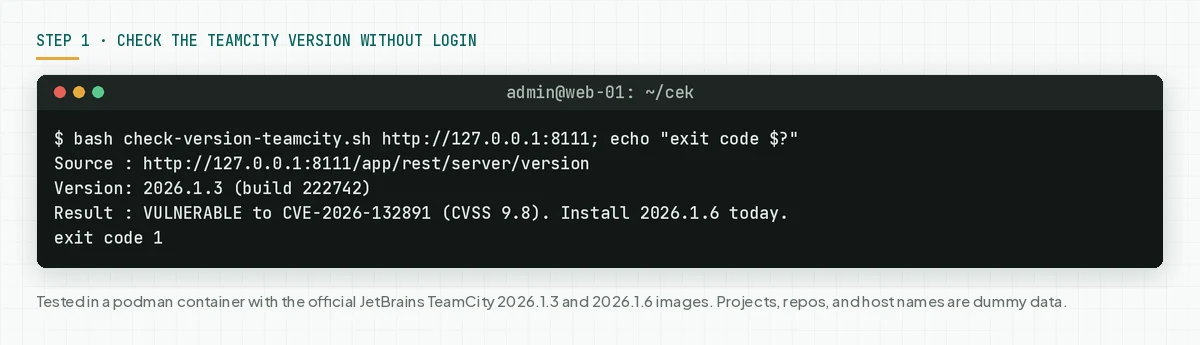
Check the result:
- "VULNERABLE": the version is below the fix of its branch. Do step 4 now and step 3 today.
- "SAFE for CVE-2026-132891, without the release of 3 November": this flaw is closed. Schedule the upgrade to 2026.1.6 or 2026.2.2.
- "SAFE for CVE-2026-132891, with the release of 3 November": no version action. Still run steps 2 and 5.
- "CHECK" or "CANNOT CONFIRM": the branch is not listed or the version is not readable. Check it by hand at the bottom of a page.
We tested the scripts with edge cases: version 2026.3, the text "abc", a missing log, a wrong address, control characters, strange arguments, and a wrong date. The scripts give the correct result or stop with exit code 2.
Step 2: Find builds open to outside pull requests
The entry point of this flaw is an external pull request. Thus find each build configuration that builds pull requests from people outside the team.
Save this script as check-pr-teamcity.sh. The script reads XML files in the data directory: the Pull Requests feature of each build configuration, and the branch spec of each VCS root. The script changes nothing.
#!/usr/bin/env bash
# Check the TeamCity pull request settings that open builds to outside authors.
# The script only reads XML files in the data directory. The script changes nothing.
# Use: bash check-pr-teamcity.sh /data/teamcity_server/datadir
#   (official Docker image: /data/teamcity_server/datadir; normal install: ~/.BuildServer or TEAMCITY_DATA_PATH)
# Exit code: 0 no DANGER, 1 DANGER found, 2 CANNOT CONFIRM.
set -u
d=${1:-}; d=${d%/}
clean() { printf '%s' "$1" | LC_ALL=C tr -cd '[:print:]' | cut -c1-60; }
if [ -z "$d" ] || [ ! -d "$d/config/projects" ]; then
  echo "CANNOT CONFIRM: the folder config/projects is not in that data directory."; exit 2
fi
danger=0; check=0; good=0; nf=0; ns=0
row() { printf '  %-7s %-26s %s\n' "$1" "$(clean "$2")" "$3"; }

echo "Data directory: $(clean "$d")"
echo "Pull Requests feature:"
while IFS= read -r f; do
  id=$(basename "$f" .xml)
  while IFS='|' read -r prov role; do
    prov=$(clean "$prov"); role=$(clean "$role"); nf=$((nf + 1))
    if [ "$prov" != github ]; then
      row CHECK "$id" "${prov:-?}: no author filter. Make sure the repo is private or build approval is on."; check=$((check + 1))
    elif [ "$role" = EVERYBODY ]; then
      row DANGER "$id" "github, By authors = Everybody"; danger=$((danger + 1))
    elif [ "$role" = MEMBER_OR_COLLABORATOR ]; then
      row CHECK "$id" "github, By authors = Members and external collaborators"; check=$((check + 1))
    elif [ "$role" = MEMBER ]; then
      row GOOD "$id" "github, By authors = Members of the same organization"; good=$((good + 1))
    else
      row CHECK "$id" "github, no author filter is recorded"; check=$((check + 1))
    fi
  done < <(awk '
    /<extension[^>]*type="pullRequests"/ { inx = 1; prov = ""; role = ""; next }
    inx && /name="providerType"/ { match($0, /value="[^"]*"/); prov = substr($0, RSTART + 7, RLENGTH - 8) }
    inx && /name="filterAuthorRole"/ { match($0, /value="[^"]*"/); role = substr($0, RSTART + 7, RLENGTH - 8) }
    inx && /<\/extension>/ { print prov "|" role; inx = 0 }' "$f")
done < <(find "$d/config/projects" -path '*/buildTypes/*' -name '*.xml' -type f | sort)
(( nf )) || echo "  (none)"

echo "VCS root branch spec:"
while IFS= read -r f; do
  id=$(basename "$f" .xml)
  spec=$(awk '/name="teamcity:branchSpec"/ { inb = 1 } inb { print } inb && /(<\/param>|\/>)/ { inb = 0 }' "$f" \
    | grep -oE '\+:[^] "<>]*refs/(pull|pull-requests|merge-requests)/[^] "<>]*' | head -n 3 | tr '\n' ' ' | sed 's/ $//')
  if [ -n "$spec" ]; then row DANGER "$id" "contains $(clean "$spec")"; danger=$((danger + 1)); ns=$((ns + 1)); fi
done < <(find "$d/config/projects" -path '*/vcsRoots/*' -name '*.xml' -type f | sort)
(( ns )) || echo "  (none)"

echo "Summary: $danger DANGER, $check CHECK, $good GOOD."
if (( danger + check + good == 0 )); then echo "No Pull Requests feature and no pull request branch spec."; fi
if (( danger )); then echo "Do step 4 for each DANGER. That step does not replace the patch."; exit 1; fi
exit 0
# Normal install: the data directory is in ~/.BuildServer or in TEAMCITY_DATA_PATH
bash check-pr-teamcity.sh /home/teamcity/.BuildServer
# Official Docker image: copy the script into the container, then run it there
docker cp check-pr-teamcity.sh teamcity-server:/tmp/
docker exec teamcity-server bash /tmp/check-pr-teamcity.sh /data/teamcity_server/datadir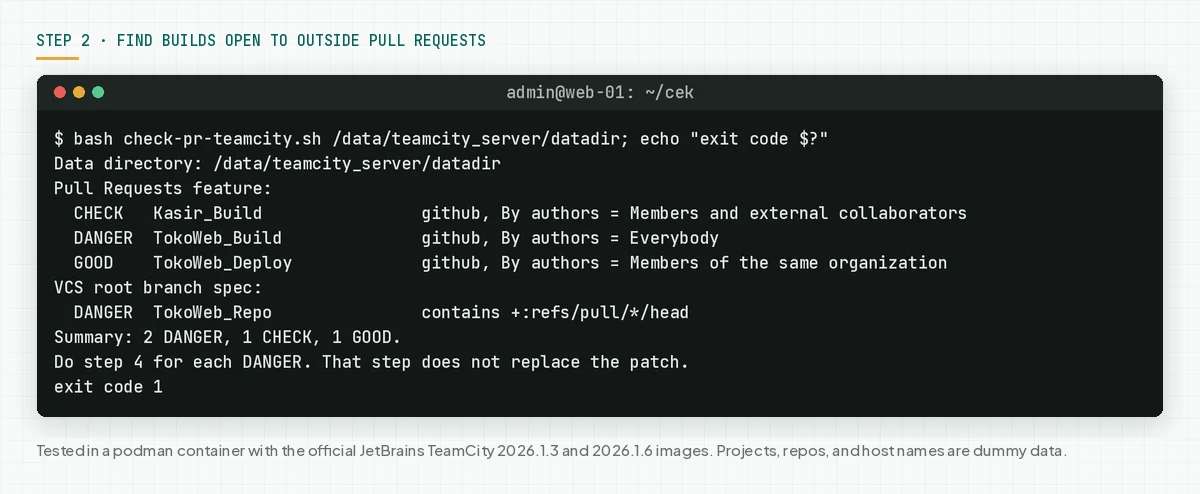
Check the result:
- "DANGER, By authors = Everybody": anyone with a GitHub account can start a build. Do step 4 now.
- "DANGER, contains +:refs/pull/...": the VCS root builds all pull requests with no author filter. Do step 4 now.
- "CHECK": outside collaborators can start builds, or the provider has no author filter. Decide if that is necessary.
- "GOOD": only organization members can start builds. Still upgrade.
Script limit: the script reads the settings in the XML files. Kotlin DSL settings that are not applied yet, or triggers from other scripts, are not read. Also check by hand in the UI.
Step 3: Back up, then upgrade to 2026.1.6 or 2026.2.2
Only the upgrade closes the flaw. Back up first: open Administration, then Backup, then make a full backup. Also keep a copy of the data directory. We did not run the backup through the UI.
3a. Official Docker image
This is the path that we tested with podman: 2026.1.3 stopped, then 2026.1.6 started with the same volumes.
# Official Docker image. Back up first. Change the container and volume names to yours.
docker pull jetbrains/teamcity-server:2026.1.6
docker stop teamcity-server
# Keep the old container for a rollback. Do not remove it yet.
docker rename teamcity-server teamcity-server-2026.1.3
docker run -d --name teamcity-server \
  -v teamcity-data:/data/teamcity_server/datadir \
  -v teamcity-logs:/opt/teamcity/logs \
  -p 8111:8111 jetbrains/teamcity-server:2026.1.6
3b. A .tar.gz install or the Windows installer
Open Administration, then Updates. That menu can download and install a new version. If it cannot, download 2026.1.6 from the JetBrains site, then follow the TeamCity upgrade notes. We did not run this path.
3c. Branch 2025.11 and old versions
Branch 2025.11 and versions below it must move to a new branch. Read the TeamCity upgrade notes for each version between your version and 2026.1.6. An upgrade to a new branch can change the data format, so a backup is required.
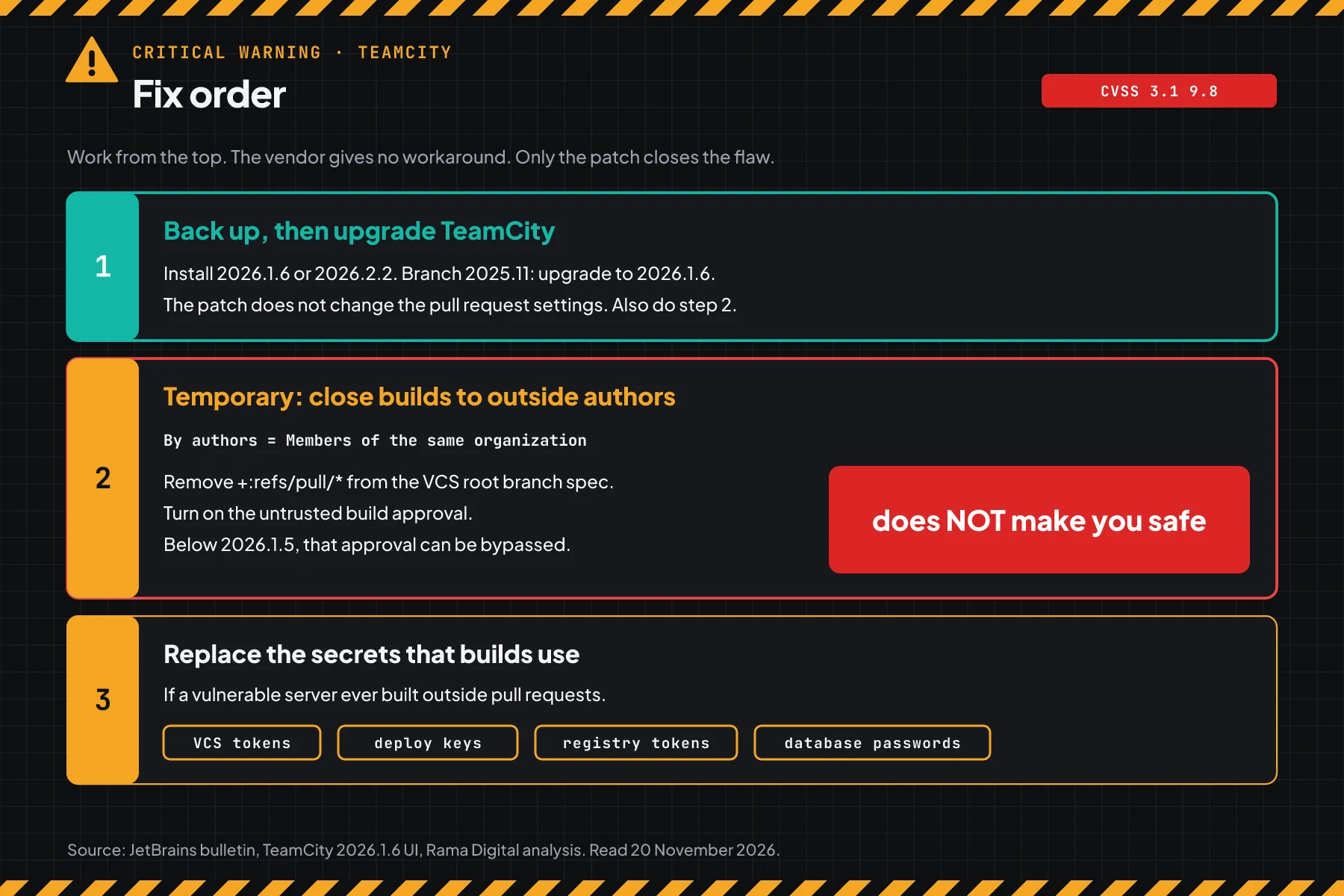
Check the result: run the step 1 script again. Each server must print "SAFE for CVE-2026-132891, with the release of 3 November". Then open the Agents page and make sure that all agents are connected.
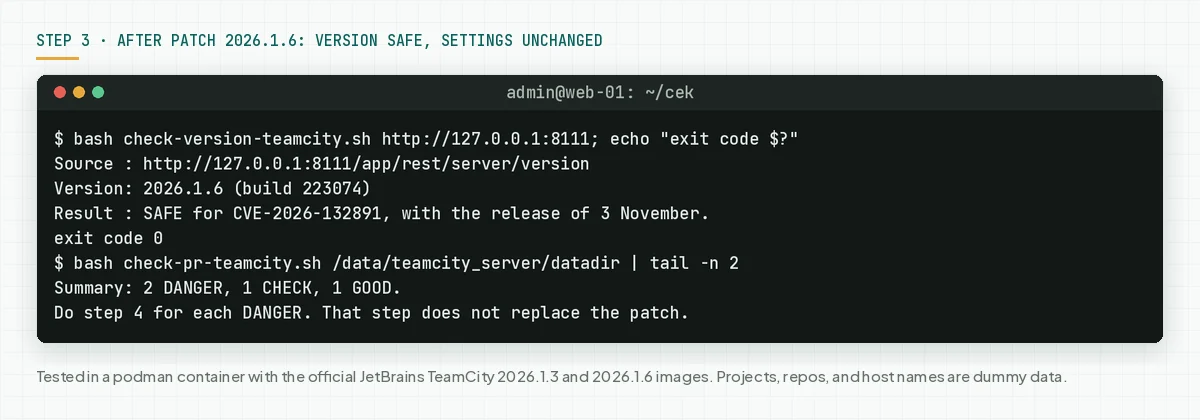
Look at the last line in the image. The upgrade does not change the pull request settings. Builds that are open to outside authors stay open, so also do step 4.
Step 4: Close builds to outside authors, does NOT make it safe
Use this step until the upgrade is done, and after that as CI/CD hygiene. This step does NOT make TeamCity safe. A stolen member account can still open a pull request.
The JetBrains security bulletin gives no workaround. Thus this step is Rama Digital analysis of the TeamCity UI and the Pull Requests docs, not vendor advice for this CVE.
- Open the build configuration, then Build Features, then Pull Requests. Set By authors to Members of the same organization.
- Open the VCS root. Remove
+:refs/pull/*/headand+:refs/pull/*/mergefrom the Branch specification. If the team needs pull request builds, use the Pull Requests feature with an author filter. - Turn on the untrusted build approval in the project settings. Below 2026.1.5, the approval for GitHub forks can be bypassed (CVE-2026-133020).
- Turn off automatic triggers for pull request builds from forks.
- Run pull request builds on a separate agent pool with no production secrets. Do not give deploy tokens to that build configuration.
TeamCity also shows a health report for a VCS root that builds pull requests with no filter. That health report gives the same advice: remove refs/pull from the branch spec and use the untrusted build approval.
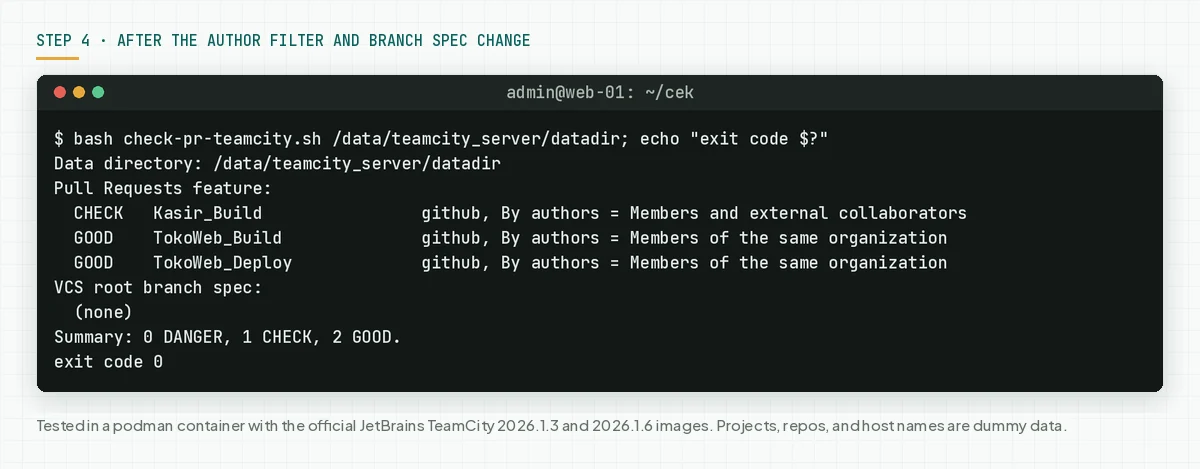
Check the result: run step 2 again. The summary must print 0 DANGER. Remember: the server stays vulnerable until step 3 is done.
Step 5: Find signs of TeamCity misuse
The upgrade closes the flaw, but it does not remove the plugins, accounts, tokens, or agents that an attacker made. Thus look for those traces before and after the upgrade.
Rama Digital analysis: the JetBrains security bulletin gives no IoCs. The signs below are changes that an attacker usually makes after getting into a CI/CD server: a new plugin, a new admin, a new token, and changed project settings.
Save this script as check-signs-teamcity.sh. The script only reads file change times in the data directory. It does not change, delete, or send anything.
#!/usr/bin/env bash
# Find changes in the TeamCity data directory since a date. Rama Digital analysis: JetBrains gives no IoC.
# The script only reads file change times. The script does not change, delete, or send anything.
# Use: bash check-signs-teamcity.sh /data/teamcity_server/datadir 2026-09-01
# Exit code: 0 NO SIGNS YET, 1 CHECK, 2 CANNOT CONFIRM.
set -u
d=${1:-}; d=${d%/}; since=${2:-}
clean() { printf '%s' "$1" | LC_ALL=C tr -cd '[:print:]' | cut -c1-70; }
if [ -z "$d" ] || [ ! -d "$d/config" ]; then echo "CANNOT CONFIRM: the folder config is not in that data directory."; exit 2; fi
if ! [[ $since =~ ^[0-9]{4}-[0-9]{2}-[0-9]{2}$ ]] || ! date -d "$since" >/dev/null 2>&1; then
  echo "CANNOT CONFIRM: write the date as YYYY-MM-DD, for example 2026-09-01."; exit 2
fi
signs=0
list() { # title, then the list of files
  local title=$1 n; shift
  n=$(printf '%s\n' "$@" | grep -c .)
  echo "$title: $n"
  (( n )) || return 0
  signs=$((signs + n))
  for f in "$@"; do printf '  CHECK  %s  %s\n' "$(date -r "$f" '+%Y-%m-%d %H:%M')" "$(clean "${f#"$d"/}")"; done | sort -r | head -n 10
}

echo "Data directory: $(clean "$d"), since $since"
mapfile -t P < <(find "$d/plugins" -mindepth 1 -maxdepth 1 ! -name '.*' -newermt "$since" 2>/dev/null)
list "New or changed plugins" "${P[@]}"
mapfile -t S < <(find "$d/config" -maxdepth 1 -type f \( -name '*.xml' -o -name '*.properties' \) -newermt "$since" 2>/dev/null)
list "Changed server settings" "${S[@]}"
mapfile -t K < <(find "$d/config/projects" -type f \( -name '*.xml' -o -name '*.kts' \) -newermt "$since" 2>/dev/null)
list "Changed project settings" "${K[@]}"

if (( signs )); then
  echo "Result: CHECK. Compare each line with the changes that your team made. A line that nobody knows is an incident."; exit 1
fi
echo "Result: NO SIGNS YET in the files. This does not prove that the server is clean. Also check users, tokens, agents, and Audit."
exit 0
# Use a date before 2 September 2026, the day the patch came out.
bash check-signs-teamcity.sh /home/teamcity/.BuildServer 2026-09-01
# Official Docker image
docker cp check-signs-teamcity.sh teamcity-server:/tmp/
docker exec teamcity-server bash /tmp/check-signs-teamcity.sh /data/teamcity_server/datadir 2026-09-01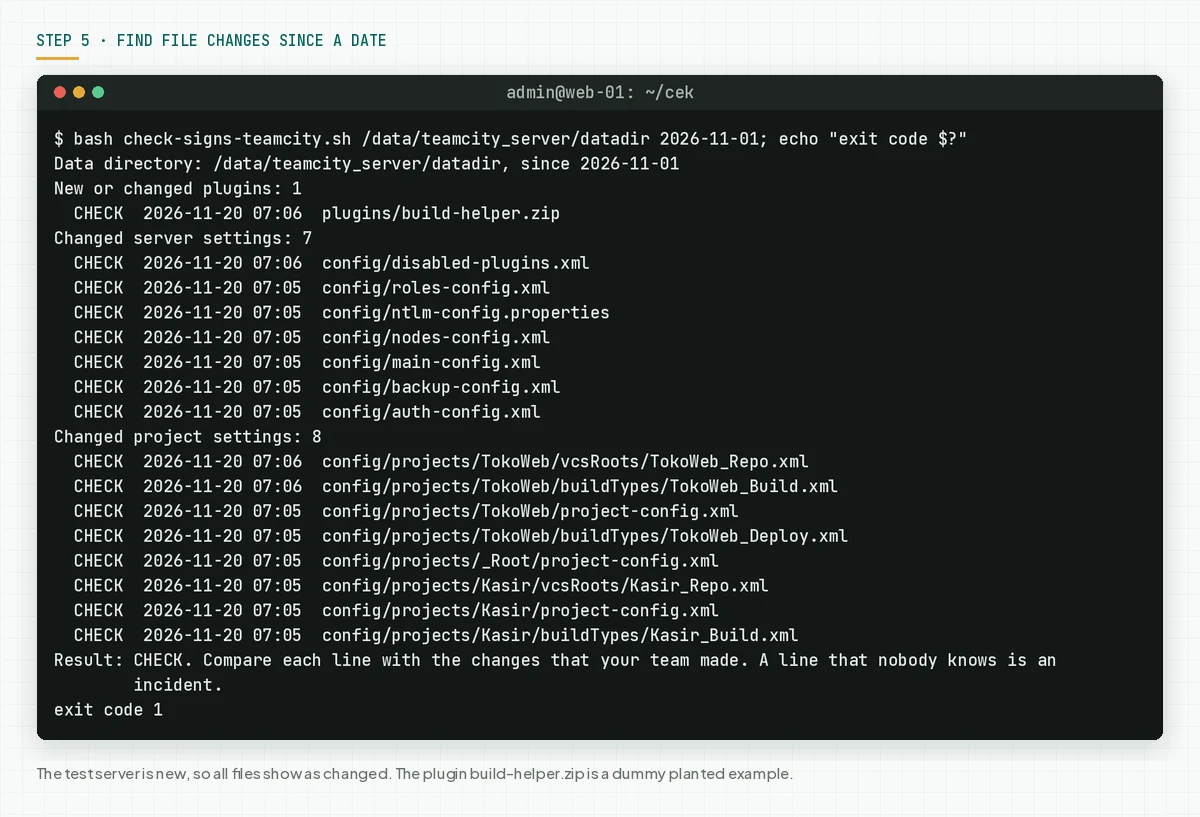
Script limits: file change times can be faked, and an upgrade also changes files. Code that runs on a build agent may not touch the server at all. Thus also check by hand.
Check by hand in the UI and on the agents
- Open Administration, then Users. Look for new admins or accounts that the team does not know.
- Open Administration, then Audit. Look for role, plugin, and project changes that the team did not make.
- Open the profile of each admin, then Access Tokens. Look for new tokens.
- Open Agents. Look for new agents or agents that the team does not know.
- Open the build history. Look for builds of
pull/*branches by authors outside the team since August 2026. - On the agent machines, look for processes, cron jobs, or SSH keys that the team does not know.
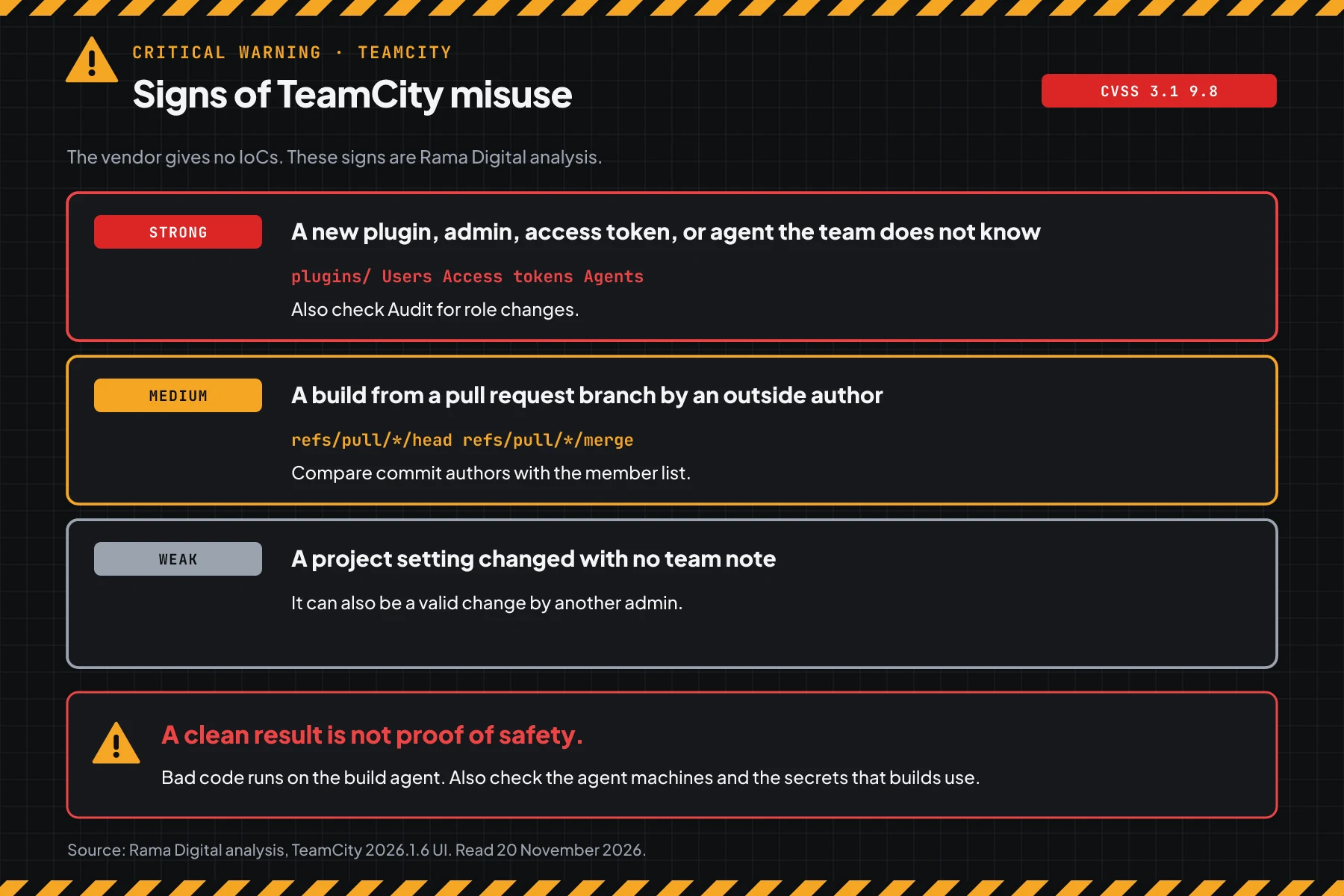
Check the result: "NO SIGNS YET" does not prove that the server is clean. "CHECK" means: match each line with the changes that the team made. A line nobody knows is an incident. Follow this order:
- Close builds to outside authors, as in step 4.
- Save the logs folder and a copy of the data directory first, before you change anything.
- Do not delete a strange account, token, or plugin before the evidence is saved. Disable it first.
- Upgrade to 2026.1.6 or 2026.2.2.
- Replace the VCS tokens, deploy keys, registry tokens, database passwords, and cloud keys that builds use.
- Reinstall the agent machines that ran outside pull request builds.
Example: 1 morning of response for 2 TeamCity servers
This simulation uses dummy data. The server names, times, and results are not customer data.
| Time (WIB) | Dummy server | What we check | Result | Action |
|---|---|---|---|---|
| 09.00 | ci-toko (2026.1.3, Docker) | Steps 1 and 2 | VULNERABLE, 1 build with By authors = Everybody | Change the filter at 09.15, upgrade to 2026.1.6 at 10.00 |
| 09.30 | ci-internal (2025.11.8) | Steps 1 and 2 | SAFE for this CVE, no November release, 0 DANGER | Schedule the upgrade to 2026.1.6 this week |
| 10.40 | ci-toko | Step 5 | 1 plugin that the team does not know, made on 14 October | Save evidence, disable the plugin, replace the deploy token, reinstall the agent |
Lesson from this simulation: do the server that builds public pull requests first. A version that is safe for this CVE still needs the November release. A strange plugin is an incident, not a test leftover.
Who does the work
The DevOps or platform team usually owns TeamCity and the build agents. The GitHub organization owner owns the member and collaborator list. The IT lead decides the upgrade window.
Rama Digital recommendation: record each CI/CD server, its version, the repos it builds, and the secrets that builds use. Other core systems need the same list, as in the vCenter flaw CVE-2026-123890 and the Confluence flaw CVE-2026-90436.
A sample of another login flaw that gives access with no account is in the Keycloak SAML flaw CVE-2026-117691.
Checklist for today
- List all TeamCity servers. Owner: DevOps team. Evidence: a list of names, versions, and builds.
- Check the version with step 1. Owner: TeamCity admin. Evidence: script output.
- Check the pull request settings with step 2. Owner: TeamCity admin. Evidence: script output.
- Close builds to outside authors with step 4. Owner: TeamCity admin. Evidence: step 2 output with 0 DANGER.
- Back up, then upgrade to 2026.1.6 or 2026.2.2. Owner: TeamCity admin. Evidence: step 1 output after the upgrade.
- Run step 5 and the checks by hand. Owner: TeamCity admin. Evidence: script output and check notes.
- Replace the secrets if a vulnerable server ever built outside pull requests. Owner: DevOps team. Evidence: a list of the replaced secrets.
Questions and answers
We do not use the Pull Requests feature. Must we still upgrade?
Yes. A refs/pull branch spec also builds pull requests. The 2026.1.4 release notes list 94 fixed security problems, and the November release closes 40 more.
Does the Members of the same organization filter make TeamCity safe?
No. The filter only reduces who can start a build. A stolen member account can still open a pull request. Only the upgrade closes the flaw.
Why is the target 2026.1.6, not only 2026.1.4?
2026.1.4 closes CVE-2026-132891. 2026.1.5 closes the approval bypass CVE-2026-133020. 2026.1.6 closes CVE-2026-133089 and CVE-2026-133081.
Our server uses 2025.11.8. Is it safe?
It is safe for CVE-2026-132891. Branch 2025.11 has no October or November release, so upgrade to 2026.1.6 or 2026.2.2.
Does the upgrade change the pull request settings?
No. In our test, the 2 DANGER settings stayed after the upgrade to 2026.1.6. Do step 4 as a separate task.
Does the upgrade remove the build history?
Not in our test. The upgrade from 2026.1.3 to 2026.1.6 used the same data directory, and the data format stayed 1039. Still back up before the upgrade.
There are no attack reports yet. Why must we upgrade today?
The score is 9.8, with no login and no click. CISA rates this attack as automatable. The July TeamCity flaw entered CISA KEV 9 days after its patch, and 4 TeamCity flaws in KEV carry the ransomware label.
Does a clean signs script result prove that the server is safe?
No. Bad code can run on a build agent and not touch the data directory. Also check the agent machines and replace the secrets that builds use.
Next step
The limits that still apply: step 4 does not make TeamCity safe, and an upgrade does not clean a server or agent that was already entered. When your server shows a sign in step 5, or you need help with a CI/CD audit and recovery, use Vibe Code Rescue. For 1 urgent issue today, book a 30-minute session.
Sources
- The JetBrains security bulletin: CVEs, scores, descriptions, fixed versions, and the reporter.
- The CVE-2026-132891 record: CWE-696, the CVSS vector, the CISA SSVC rating, and the publish time of 19 November 2026.
- The 2026.1.4 release notes and the 2026.2.2 release notes: the number of fixed security problems.
- The official Docker Hub tags: the release dates of 2026.1.3, 2026.1.4, 2026.1.5, 2026.1.6, 2026.2, 2026.2.1, and 2026.2.2.
- The Pull Requests docs: the Pull Requests feature and the By authors filter.
- The TeamCity upgrade notes: upgrade notes between versions.
- CISA KEV: does not list this CVE on 20 November 2026, and lists 4 other TeamCity CVEs.