Direct answer: CVE-2026-40217 is a flaw in LiteLLM Proxy with CVSS 3.1 score 8.8. With a proxy admin key, an attacker can run Python code as root on the proxy server. Today, check the version of each LiteLLM proxy, then install 1.83.11 or later.
CISA added this flaw to CISA KEV on 18 November 2026. This means that attackers use it now. The fix exists since 22 April 2026, so a proxy with no update since April is still vulnerable.
Main status: On 23 November 2026, the latest release is 1.110.2. We recommend that release. Limit: this article has no attack code, no payload, and no attack steps.
We read the BerriAI GHSA advisory, the CVE-2026-40217 record, NVD, CISA KEV, the PyPI release history, and the Custom Code Guardrail docs on 23 November 2026. We ran the scripts in steps 1, 2, 4, and 5 in a podman pod with no network, with the official LiteLLM v1.83.7-stable and v1.110.2 images and nginx 1.29.
Important limit: We did not test the flaw itself and did not send code to the route. We did not test a database migration between versions, an upgrade through pip, or a reverse proxy other than nginx. We mark each step that we did not run.
Problem: the LiteLLM proxy holds all your AI keys
LiteLLM Proxy is an open source AI gateway. Teams use it as 1 door to OpenAI, Anthropic, Gemini, and local models. Apps call the proxy, then the proxy calls the model provider.
For this, the proxy keeps secrets: the master key, the APIAPIThe official door 2 systems use to exchange data, without anybody copying it by hand.Open the glossary key of each model provider, virtual keys for teams, and the database password. Thus code that runs in the proxy process can read all those secrets.
Rama Digital analysis: for this reason, an AI gateway is a high value target. A stolen provider API key can cause a large bill and open the data that apps send to the model.
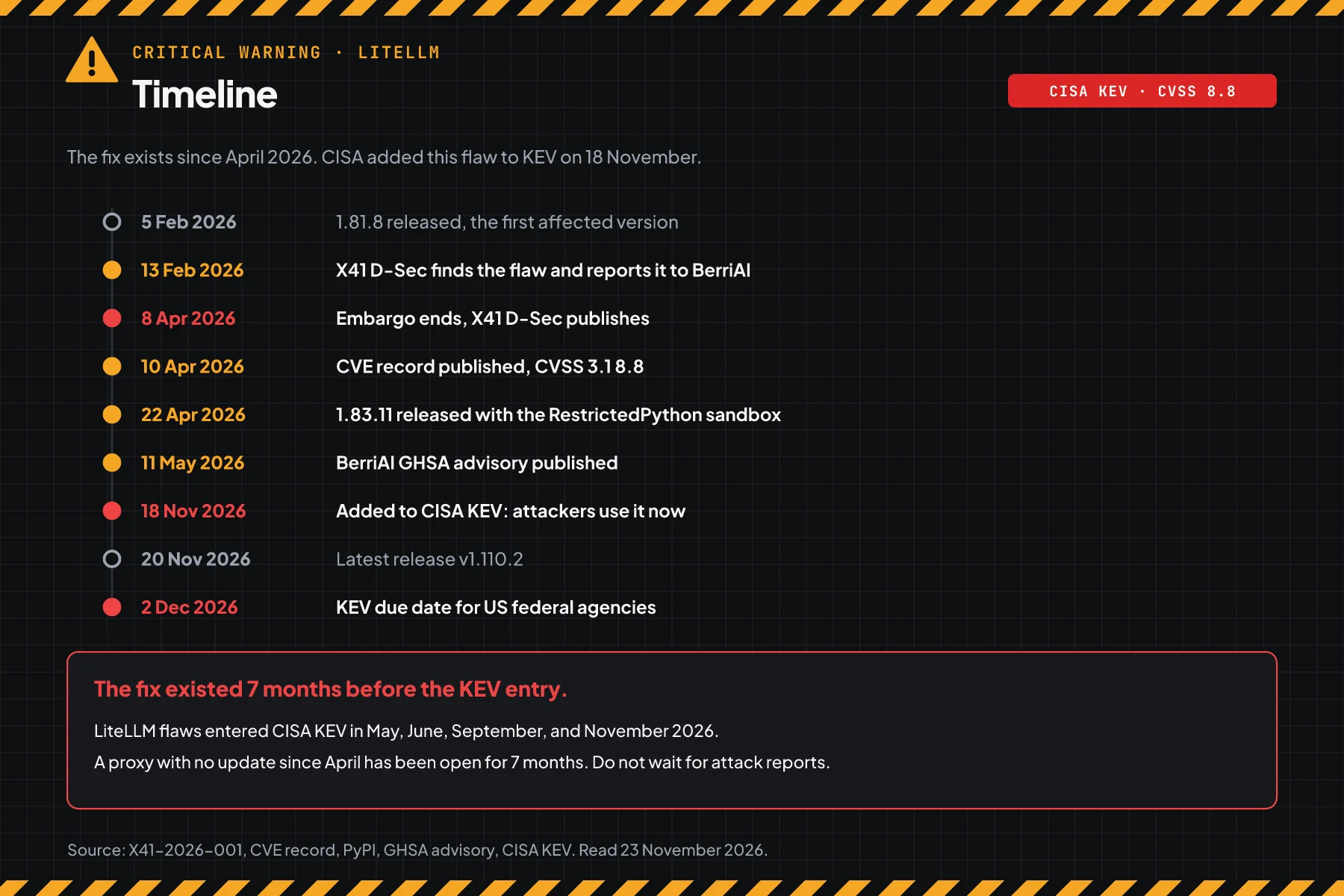
The PyPI release history shows that LiteLLM 1.81.8 came out on 5 February 2026. That is the first version in the affected range. X41 D-Sec found the issue on 13 February and reported it to BerriAI. The reporter is Markus Vervier of X41 D-Sec.
The 1.83.11 package came out on 22 April 2026, and the BerriAI GHSA advisory came out on 11 May 2026. CISA added this flaw to KEV on 18 November, 7 months after the fix. Do not wait for attack reports before you act.
How it works: the guardrail code test route
This section uses the official vendor summary. Its purpose is to help you pick the right steps, not to explain how to attack.
Vendor summary
The BerriAI GHSA advisory says that the route POST /guardrails/test_custom_code runs Python code from the user in a home-made sandbox. That sandbox can be escaped, then the code runs in the proxy process. In the default Docker image, the proxy process runs as root.
In the default configuration, this route needs proxy-admin credentials. The X41 researcher writes that users who are logged in can use it. Thus treat each key with admin rights as an entry point.
CVSS 3.1 vector: AV:N/AC:L/PR:L/UI:N/S:U/C:H/I:H/A:H. This means: over the network, low complexity, an account with low rights, no victim click, and full impact. Weakness types: CWE-420 and CWE-913.
The Custom Code Guardrail feature itself is an official feature. The Custom Code Guardrail docs say that admins use it to write filter rules in Python. The code test route helps admins test a rule before they use it.
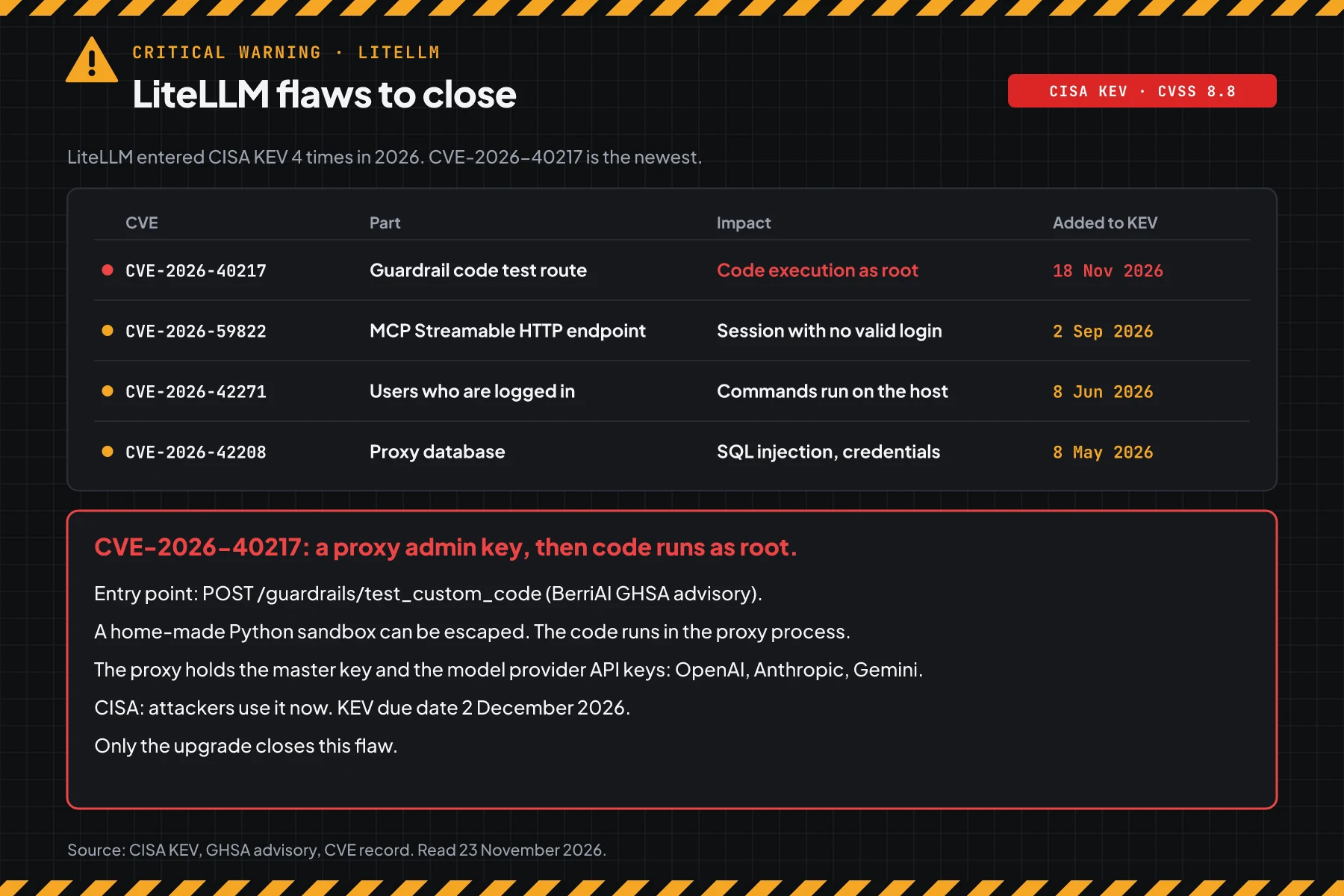
4 LiteLLM flaws in CISA KEV in 2026
CVE-2026-40217 is the 4th LiteLLM flaw in KEV this year. A proxy that is behind on versions is probably also open to other flaws in this table.
| CVE | Part | Impact | Added to KEV |
|---|---|---|---|
| CVE-2026-40217 | Guardrail code test route | Code execution as root | 18 November 2026 |
| CVE-2026-59822 | MCPMCPA standard that lets an AI program use your tools and data under clear permissions.Open the glossary Streamable HTTP endpoint | A session with no valid login | 2 September 2026 |
| CVE-2026-42271 | Users who are logged in | Commands run on the host | 8 June 2026 |
| CVE-2026-42208 | Proxy database | SQL injection, credentials | 8 May 2026 |
Exploitation status on 23 November 2026
This status can change. Attackers use this flaw now, so do steps 1 to 3 today.
| Source | Status |
|---|---|
| CISA KEV | Added on 18 November 2026. Due date for US federal agencies: 2 December 2026. Ransomware: Unknown |
| CVE record (CISA SSVC, 19 November) | Exploitation: active. Automatable: no. Technical impact: total |
| BerriAI GHSA advisory | Fix in 1.83.11. Temporary step: block the code test route at the reverse proxy |
| Public PoC | It is in the researcher advisory. We do not link or quote it |
| LiteLLM history in CISA KEV | 4 LiteLLM CVEs entered KEV in 7 months of 2026 |
Another flaw in an AI server that gives admin access is in the GPUStack flaw CVE-2026-102895.
Who has the highest risk
All proxies below 1.83.11 need the upgrade. The order in this table helps you pick the proxy to do first.
| LiteLLM setup | Risk | Reason |
|---|---|---|
| A vulnerable version, the proxy port or admin UI open to the internet | Highest | An attacker can use a leaked admin key from anywhere |
| A vulnerable version, the master key used by many people or apps, or kept in a repo | High | One key leak opens code execution as root |
| A vulnerable version, internal network only, the master key with 1 to 2 admins | Lower | CISA records active attacks. An admin key can leak from a laptop |
| Version 1.83.11 or later | Safe for this CVE | Still look for signs in step 5, because the proxy was vulnerable since February |
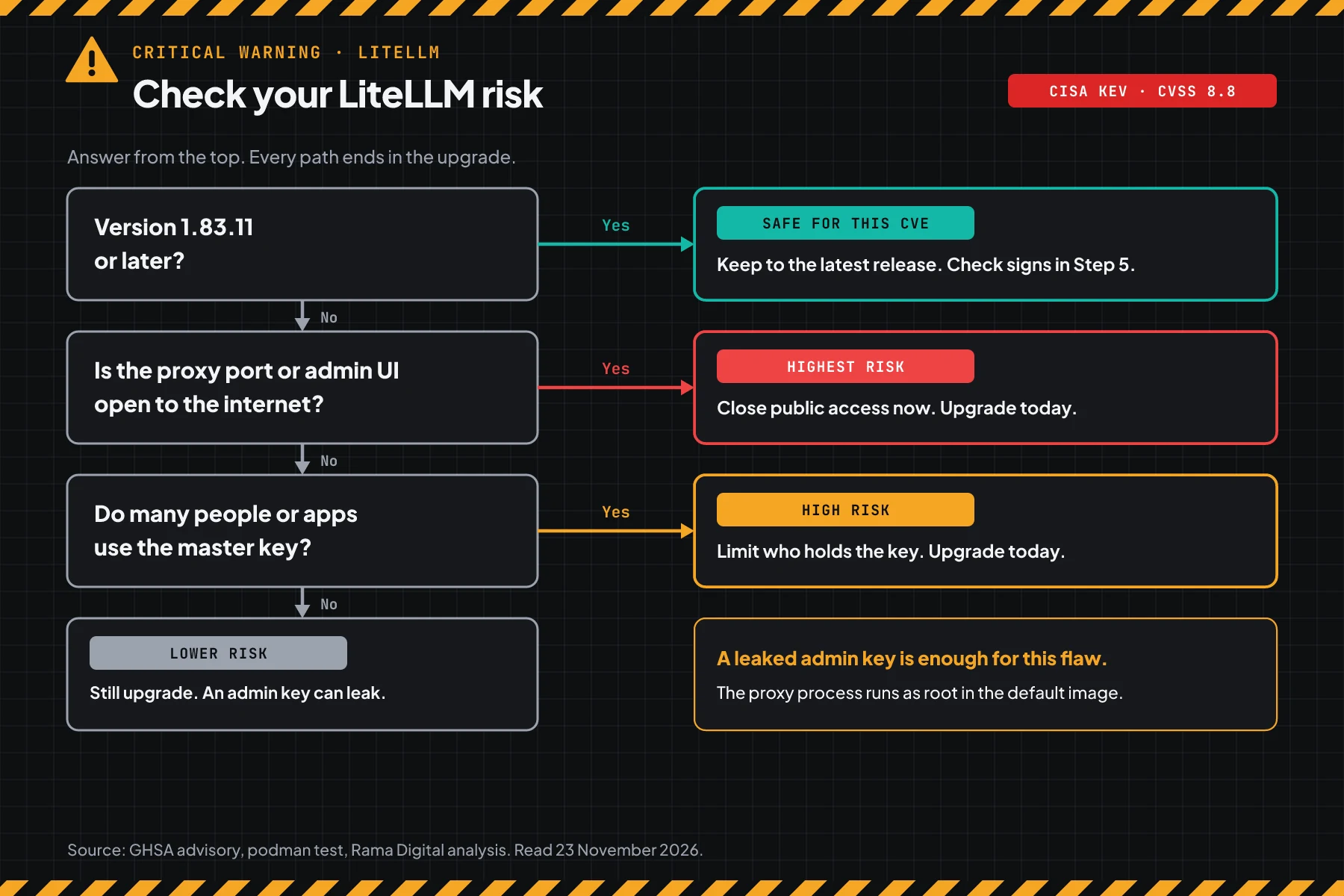
Rama Digital analysis: the master key is often in a .env file, in an app repo, on a developer laptop, and in automation tools. Each copy is a chance for a leak. Thus a score of 8.8 with a login condition is still a real risk.
LiteLLM that runs only as a Python library in app code does not run the proxy server. This route is in the proxy server. Still update the package, because other flaws can touch the library.
Affected versions and fixed versions
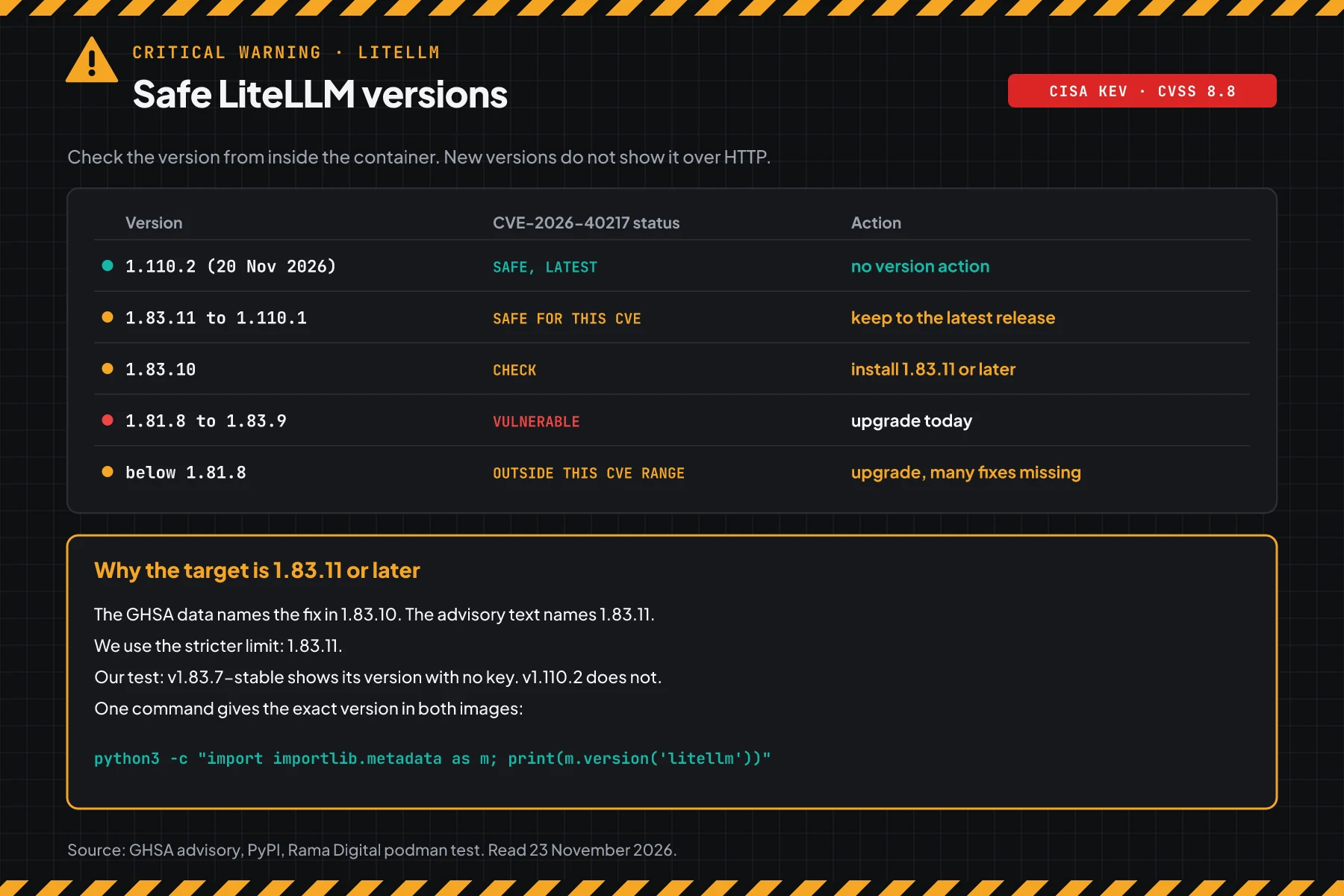
Compare the version of each proxy with this table. Sources: the BerriAI GHSA advisory, the PyPI release history, and the official image on GHCR.
| Version | CVE-2026-40217 status | Action |
|---|---|---|
| 1.110.2 (20 November 2026) | Safe, the latest release | No version action |
| 1.83.11 to 1.110.1 | Safe for this CVE | Keep to the latest release |
| 1.83.10 | Check: the GHSA data says safe, the advisory text says 1.83.11 | Install 1.83.11 or later |
| 1.81.8 to 1.83.9 | Vulnerable | Upgrade today |
| Below 1.81.8 | Outside the range of this CVE | Upgrade: many security fixes are missing |
Why the target is 1.83.11 or later
- The GHSA data gives the affected range 1.81.8 to before 1.83.10, with the first fix in 1.83.10.
- The text of the same advisory puts the fix in 1.83.11 and asks for an upgrade to 1.83.11 or later. Its release link is the v1.83.10-stable release.
- We use the stricter limit: 1.83.11. We mark version 1.83.10 as CHECK.
- Our advice is still the latest release, 1.110.2 on 23 November 2026. LiteLLM entered CISA KEV 4 times in 2026.
Our test: the v1.83.7-stable image shows its version over HTTP with no key. The v1.110.2 image does not. The command python3 -c "import importlib.metadata as m; print(m.version('litellm'))" gives the exact version in both images.
Before you start
- Shell access to the LiteLLM server, or
docker execaccess to the LiteLLM container. - A list of all LiteLLM proxies, with test proxies, data team proxies, and proxies on laptops that are open to the network.
- Access to the reverse proxy in front of LiteLLM, for example nginx, if you have one.
- A list of the secrets that the proxy holds: the master key, the model provider API keys, and the database password.
- Access to the model provider dashboards to replace API keys and read usage.
- A change window. The upgrade stops the proxy for some minutes, so AI apps stop too.
Step 1: Check the version of each LiteLLM proxy
Manual way: read the image tag in docker ps, or run pip show litellm in the proxy venv. For many proxies, use the script.
Save this script as check-version-litellm.sh. The script reads the version from the Python package, from the /health/readiness address, or from text, then compares it with the 1.83.11 limit. The script changes nothing.
#!/usr/bin/env bash
# Check the LiteLLM version against CVE-2026-40217 (custom code guardrail sandbox escape, CISA KEV 18 November 2026).
# Use: bash check-version-litellm.sh http://127.0.0.1:4000   (reads /health/readiness, no key)
#   or: bash check-version-litellm.sh --python                (inside the LiteLLM container or venv)
#   or: bash check-version-litellm.sh 1.83.7
# Affected (GHSA-wxxx-gvqv-xp7p): 1.81.8 up to before 1.83.10. Advisory text: fixed in 1.83.11.
# Latest release on 23 November 2026: 1.110.2.
# Exit code: 0 SAFE, 1 VULNERABLE or UPDATE, 2 CANNOT CONFIRM.
set -u
export LC_ALL=C
clean() { local x=${1//[![:print:]]/}; printf '%s' "${x:0:90}"; }
fail() { echo "Result : CANNOT CONFIRM. $1"; echo "Without a version, treat the proxy as not safe."; exit 2; }

rate() {
  local a b c n
  IFS=. read -r a b c <<< "$1"
  n=$(( 10#$a * 1000000 + 10#$b * 1000 + 10#$c ))
  if (( n < 1081008 )); then
    echo "Result : UPDATE. This version is outside the CVE-2026-40217 range, but it misses many security fixes."
    echo "         Upgrade to the latest release."; return 1
  elif (( n < 1083010 )); then
    echo "Result : VULNERABLE to CVE-2026-40217 (CISA KEV, attackers use it now)."
    echo "         Upgrade to 1.83.11 or later today."; return 1
  elif (( n < 1083011 )); then
    echo "Result : UPDATE. The GHSA data names 1.83.10, the advisory text names 1.83.11."
    echo "         Install 1.83.11 or later."; return 1
  fi
  echo "Result : SAFE from CVE-2026-40217. Keep to the latest release: LiteLLM entered CISA KEV 4 times in 2026."
  return 0
}

[ $# -ge 1 ] || fail "Give a proxy URL, --python, or a version text."
if [ "$1" = "--python" ]; then
  src="Python package"
  raw=$(python3 -c 'import importlib.metadata as m; print(m.version("litellm"))' 2>/dev/null) \
    || fail "This Python has no litellm package. Run it inside the LiteLLM container or venv."
elif [[ $1 =~ ^https?://[A-Za-z0-9.:_-]+(/[A-Za-z0-9._/-]*)?$ ]]; then
  command -v curl >/dev/null || fail "This machine has no curl. Use --python inside the container."
  url=${1%/}/health/readiness; src=$url
  code=$(curl -s -o /dev/null --max-time 15 -w '%{http_code}' "$url")
  [ "$code" = 000 ] && fail "The connection to the proxy failed."
  [ "$code" = 200 ] || fail "The proxy answered HTTP $(clean "$code"). Use --python inside the container."
  raw=$(curl -s --max-time 15 "$url" | head -c 2000 | grep -oE '"litellm_version": *"[^"]{1,40}"' | head -n 1 | sed -E 's/.*"([^"]*)"$/\1/')
  [ -n "$raw" ] || fail "The proxy does not show its version. New versions hide it. Use --python inside the container."
elif [[ $1 =~ ^-- ]]; then
  fail "Unknown option $(clean "$1")."
else
  src="text"; raw=$1
fi
echo "Source : $(clean "$src")"
[[ $raw =~ ^v?([0-9]{1,3}\.[0-9]{1,4}\.[0-9]{1,4})([.+-][A-Za-z0-9.+-]*)?$ ]] || fail "Cannot read version $(clean "$raw")."
ver=${BASH_REMATCH[1]}
echo "Version: $ver"
rate "$ver"; exit $?
# The sure way: read the package version inside the container. Change litellm to the name of your container.
docker cp check-version-litellm.sh litellm:/tmp/
docker exec litellm bash /tmp/check-version-litellm.sh --python
# Old versions also show the version over HTTP with no key
bash check-version-litellm.sh http://127.0.0.1:4000
# Or write the version from the image tag or from pip
bash check-version-litellm.sh 1.83.7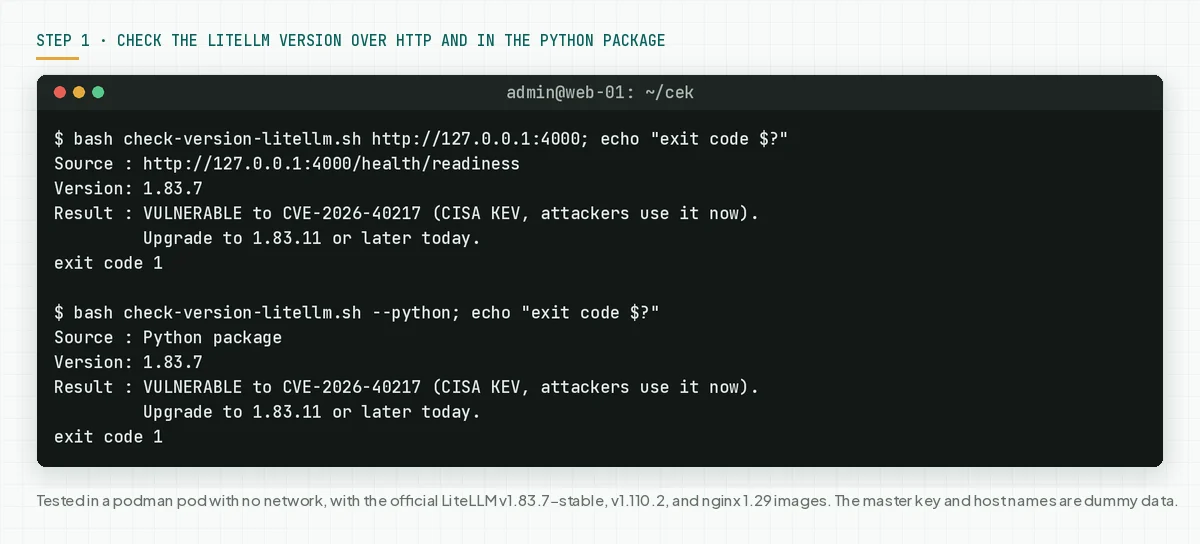
Check the result:
- "VULNERABLE": version 1.81.8 to 1.83.9. Do steps 2 and 4 now, then step 3 today.
- "UPDATE": version 1.83.10, or a version below 1.81.8. Plan the upgrade to the latest release.
- "SAFE from CVE-2026-40217": no version action for this CVE. Still run step 5.
- "CANNOT CONFIRM": the version is not readable. Use
--pythoninside the container.
We tested the script with edge cases: a version with a v prefix, a -stable suffix, the text "abc", a wrong address, control characters, unknown options, and a machine with no curl. The script gives the correct result or exits with code 2.
Step 2: Check if the code test route answers from the network
This flaw needs an admin key, but the route must be reachable first. Thus check if that route answers from the internet and from the office network.
Save this script as check-exposure-litellm.sh. The script sends a POST with no key and the body {} to 5 path forms. The script sends no code and uses no key.
#!/usr/bin/env bash
# Check if the LiteLLM code test route (CVE-2026-40217) answers from the network where this script runs.
# The script sends a POST with no key and the body {} to 5 path forms. The script sends no code.
# Use: bash check-exposure-litellm.sh https://ai.example.test   (proxy or reverse proxy address)
# Run it 2 times: from the server itself and from outside the office network (for example a laptop on mobile data).
# Exit code: 0 CLOSED, 1 OPEN or CHECK, 2 CANNOT CONFIRM.
set -u
export LC_ALL=C
clean() { local x=${1//[![:print:]]/}; printf '%s' "${x:0:90}"; }
[ $# -eq 1 ] && [[ $1 =~ ^https?://[A-Za-z0-9.:_-]+(/[A-Za-z0-9._/-]*)?$ ]] \
  || { echo "Result: CANNOT CONFIRM. Give 1 address, for example https://ai.example.test"; exit 2; }
command -v curl >/dev/null || { echo "Result: CANNOT CONFIRM. This machine has no curl. Run it from the host or another machine."; exit 2; }
b=${1%/}
PATHS=("/guardrails/test_custom_code" "//guardrails/test_custom_code" "/guardrails/test_custom_code/" \
       "/guardrails/test_custom_code?cek=1" "/guardrails/%74est_custom_code")
open=0 check=0 down=0
echo "Proxy: $(clean "$b")"
for p in "${PATHS[@]}"; do
  k=$(curl -s -o /dev/null --max-time 10 --path-as-is -X POST -H 'Content-Type: application/json' --data '{}' -w '%{http_code}' "$b$p")
  case $k in
    403) s="BLOCKED" ;;
    404|405) s="NOT FOUND" ;;
    30[1278]) s="REDIRECT" ;;
    401|422|2??|500) s="OPEN"; open=$((open + 1)) ;;
    000) s="NO ANSWER"; down=$((down + 1)) ;;
    *) s="CHECK"; check=$((check + 1)) ;;
  esac
  printf '  %-36s HTTP %s  %s\n' "$p" "$(clean "$k")" "$s"
done
if (( open )); then
  echo "Result: OPEN. The code test route answers from this network ($open of ${#PATHS[@]} path forms)."
  echo "        Only the master key stops it. Upgrade, then block this route at the reverse proxy."; exit 1
elif (( down == ${#PATHS[@]} )); then
  echo "Result: CANNOT CONFIRM. The proxy does not answer from this network."; exit 2
elif (( check || down )); then
  echo "Result: CHECK. Some answers are unusual. Read the reverse proxy log for the paths above."; exit 1
fi
echo "Result: CLOSED from this network. Repeat from outside the office network. A block rule does not replace the upgrade."
exit 0
# Run it from the host or an admin laptop. The LiteLLM image has no curl.
# 1. From outside the office network, for example a laptop on mobile data, to the public proxy address
bash check-exposure-litellm.sh https://ai.example.com
# 2. From the server itself, straight to the LiteLLM port
bash check-exposure-litellm.sh http://127.0.0.1:4000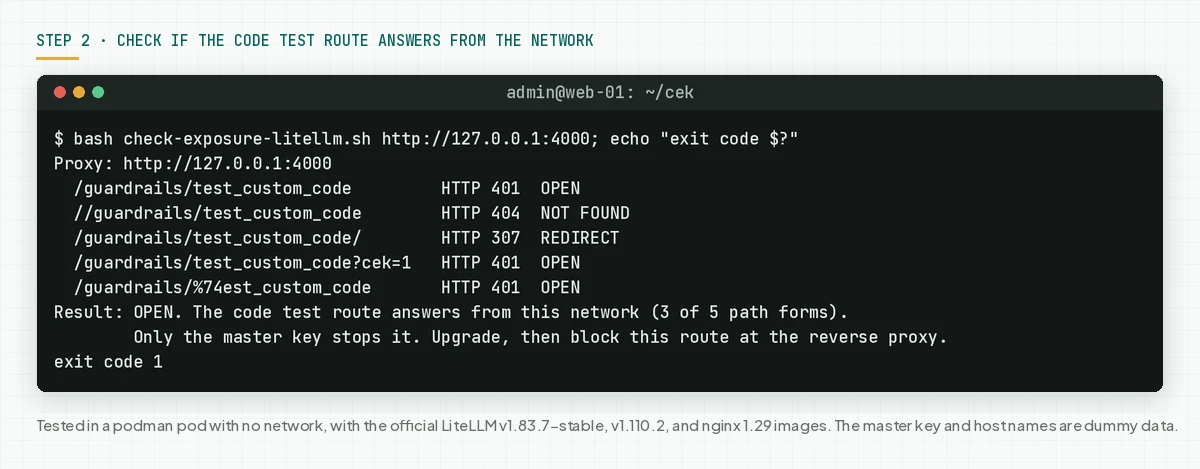
Check the result:
- "OPEN": the route answers 401, 422, or 2xx. Only the master key stops it. Do step 4 now.
- "CHECK": an answer is not usual. Read the HTTP code on each line.
- "CLOSED": all path forms answer 403, 404, or 405. Repeat from outside the office network.
- "CANNOT CONFIRM": the proxy does not answer from this network. That is a good result for a check from the internet.
In our test, LiteLLM answered 401 directly for 3 of 5 path forms. Thus this route is still in all versions. In v1.110.2, the route uses the RestrictedPython sandbox.
Step 3: Back up, then upgrade to 1.83.11 or later
Only the upgrade closes the flaw. Back up first: copy config.yaml, the .env file, and a dump of the proxy database. A new version can change the database schemaSchemaExtra description inside page code that tells a search engine what the page is, for example an article, a service, or a question and answer.Open the glossary, so the database backup is necessary.
3a. Official Docker image
Change the image tag to v1.110.2. Keep the old container with another name, because you need its log in step 5. Also follow the LiteLLM deploy docs.
# Official Docker image. Back up config.yaml, the .env file, and the database first.
# Change the container name, paths, and port to yours.
docker pull ghcr.io/berriai/litellm:v1.110.2
docker stop litellm
# Keep the old container for a rollback and for the step 5 logs. Do not remove it yet.
docker rename litellm litellm-old
# The port listens only on 127.0.0.1. Outside access goes through the reverse proxy.
docker run -d --name litellm \
  -v /opt/litellm/config.yaml:/app/config.yaml \
  --env-file /opt/litellm/.env \
  -p 127.0.0.1:4000:4000 \
  ghcr.io/berriai/litellm:v1.110.2 --config /app/config.yaml --port 4000
3b. docker compose and pip
For docker compose, change the image tag, then pull and start again. For a pip install, install the new version in the same venv. We did not run the pip path.
# docker compose: change the image tag in docker-compose.yml to ghcr.io/berriai/litellm:v1.110.2, then
docker compose pull litellm
docker compose up -d litellm
# pip or venv
pip install --upgrade "litellm[proxy]==1.110.2"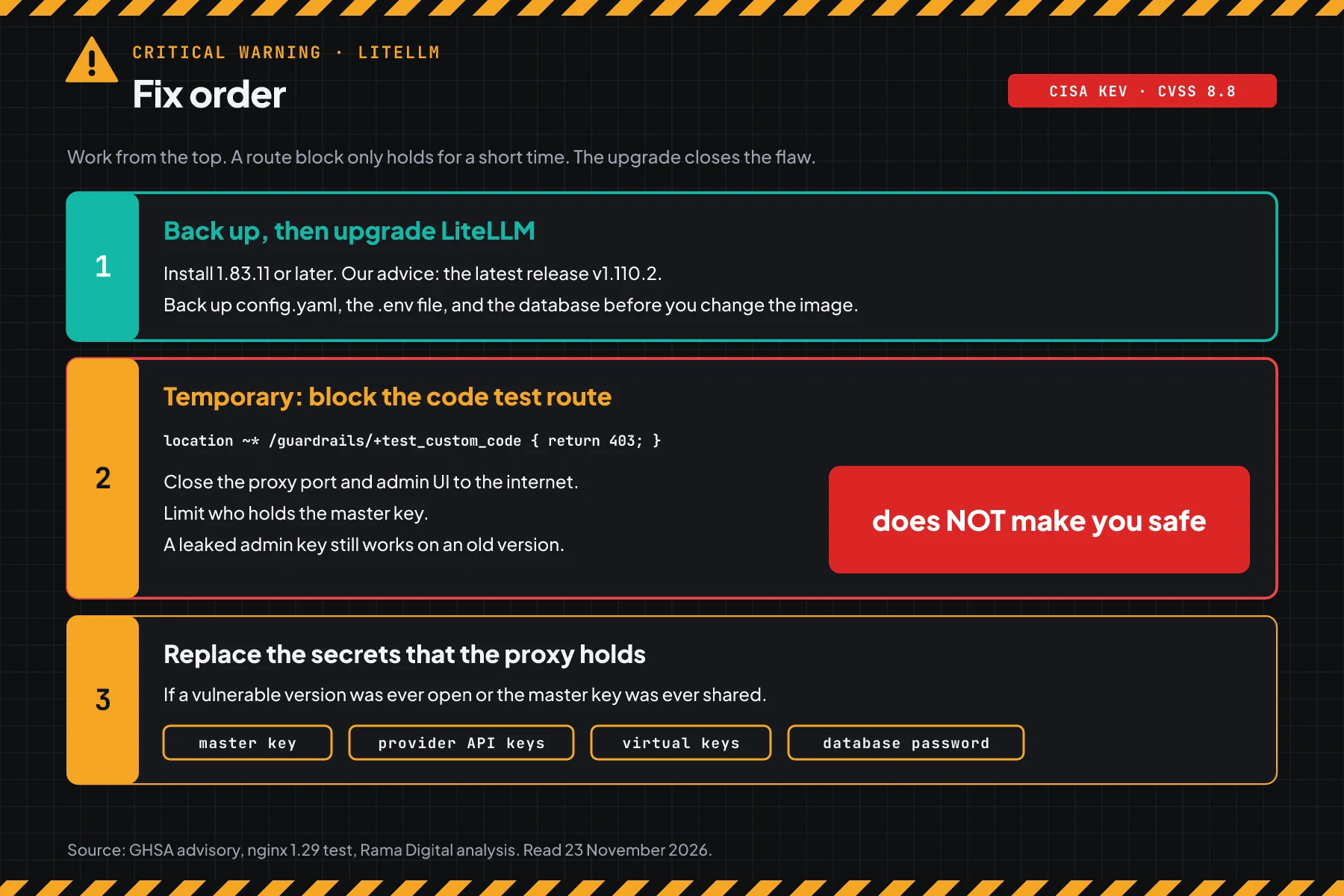
Check the result: run the step 1 script with --python in the new container. Each proxy must print "SAFE from CVE-2026-40217". Then send 1 model request from an app to make sure that the proxy works.
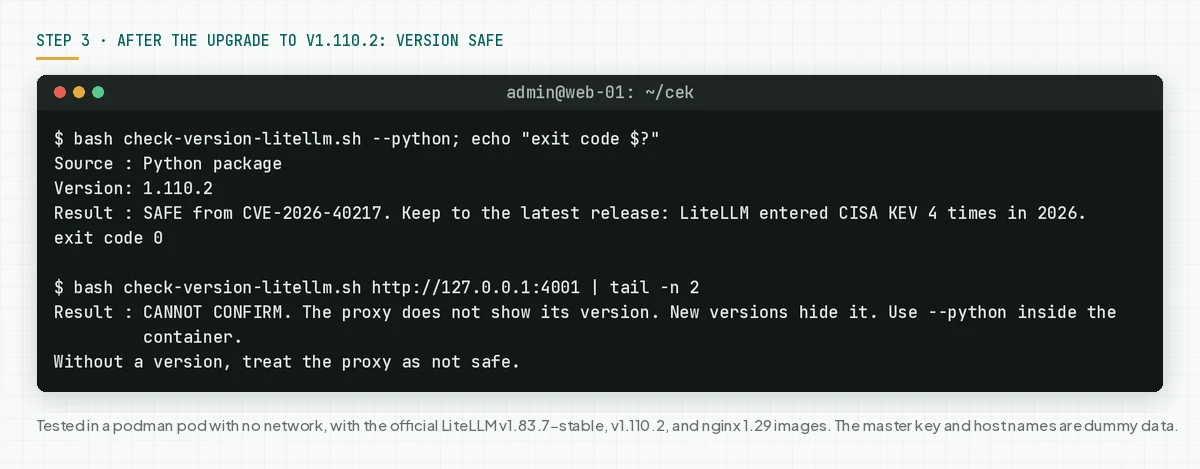
Look at the last line in the image. The check over HTTP cannot read the new version. This is normal for v1.110.2, not an upgrade failure.
Step 4: Block the code test route, does NOT make you safe
Use this step until the upgrade is done. This step does NOT make LiteLLM safe. Requests that go straight to the LiteLLM port do not go through the reverse proxy, so this rule does not stop them.
The BerriAI GHSA advisory advises to block POST /guardrails/test_custom_code at the reverse proxy or API gateway if the upgrade is not possible yet. In nginx, add this rule.
# In the nginx server block that forwards to LiteLLM, above location /
location ~* /guardrails/+test_custom_code { return 403; }
# Test the configuration, then reload nginx
nginx -t && systemctl reload nginx
# Check again from outside the office network
bash check-exposure-litellm.sh https://ai.example.com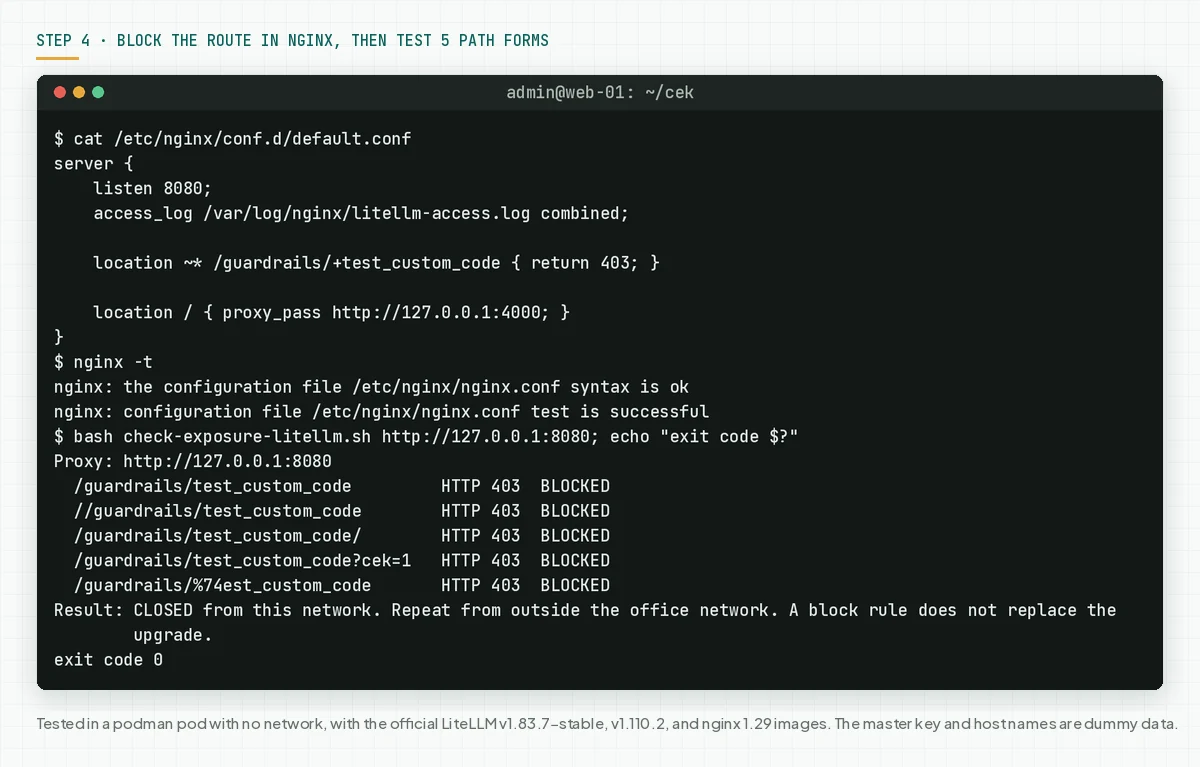
In our test, this rule blocked 8 path variants, with double slashes, a trailing slash, a query, and encoded letters. We only tested nginx 1.29. For Caddy, Traefik, or Cloudflare, test again with the step 2 script.
Rama Digital analysis: also do these steps.
- Bind the LiteLLM port to 127.0.0.1, as in the step 3 command. Outside access goes only through the reverse proxy.
- Close the admin UI and the admin API to the internet. Use a VPN or a list of office IPs.
- Limit the holders of the master key to 1 or 2 admins. Give apps a virtual key, not the master key.
- Remove the master key from repos, chats, and shared notes.
The same pattern applies to other servers behind nginx. A flaw in nginx itself is in the nginx HTTP/2 flaw CVE-2026-123007.
Check the result: run step 2 again from outside the office network. The result must be CLOSED or CANNOT CONFIRM. Remember: the proxy stays vulnerable until step 3 is done.
Step 5: Find signs of LiteLLM misuse
The upgrade closes the flaw, but it does not cancel keys that were already stolen. Thus look for attack traces before and after the upgrade.
Rama Digital analysis: the vendor gives no IoCs. The strongest sign is a POST to the code test route that passed login. Admins seldom use that route, so each line needs an explanation.
Save this script as check-signs-litellm.sh. The script reads the LiteLLM logs and the nginx log, then looks for requests to the code test route and guardrail changes. The script does not change, remove, or send anything.
#!/usr/bin/env bash
# Look for signs of CVE-2026-40217 in the LiteLLM log and the reverse proxy log. Rama Digital analysis: the vendor gives no IoC.
# The script only reads logs. The script does not change, delete, or send anything.
# Use: docker logs -t litellm > litellm.log 2>&1
#      bash check-signs-litellm.sh litellm.log /var/log/nginx/access.log
# Exit code: 0 NO SIGNS YET, 1 CHECK, 2 CANNOT CONFIRM.
set -u
export LC_ALL=C
clean() { local x=${1//[![:print:]]/}; printf '%s' "${x:0:70}"; }
[ $# -ge 1 ] || { echo "Result: CANNOT CONFIRM. Give at least 1 log file."; exit 2; }
read_n=0 denied=0 passed=0 changed=0
P=() T=()
for f in "$@"; do
  if [ ! -f "$f" ] || [ ! -r "$f" ]; then echo "Skip: $(clean "$f") does not exist or cannot be read."; continue; fi
  read_n=$((read_n + 1))
  while IFS= read -r l; do
    l=${l//[![:print:]]/}
    [[ $l =~ \"([A-Z]{3,7})\ ([^\"\ ]*)\ HTTP/[0-9.]+\"\ ([0-9]{3}) ]] || continue
    m=${BASH_REMATCH[1]} p=${BASH_REMATCH[2]} k=${BASH_REMATCH[3]}
    d=${p//%/\\x}; d=$(printf '%b' "$d"); d=${d//[![:print:]]/}; d=${d,,}
    if [[ $l =~ \[([0-9]{2}/[A-Za-z]{3}/[0-9]{4}:[0-9:]{8}) ]]; then w=${BASH_REMATCH[1]}
    elif [[ $l =~ ^([0-9]{4}-[0-9]{2}-[0-9]{2}T[0-9:]{8}) ]]; then w=${BASH_REMATCH[1]}
    else w="no-time"; fi
    if [[ $l =~ ^([0-9a-fA-F.:]+)\ -\  ]]; then s=${BASH_REMATCH[1]}
    elif [[ $l =~ INFO:\ +([0-9a-fA-F.:]+):[0-9]+\ - ]]; then s=${BASH_REMATCH[1]}
    else s="?"; fi
    line=$(printf '%-20s %-15s %s %s %s' "$w" "${s:0:15}" "$m" "$(clean "$p")" "$k")
    if [[ $d == *guardrails*test_custom_code* ]]; then
      case $k in
        401|403|404|405|30?) denied=$((denied + 1)); T+=("$line") ;;
        *) passed=$((passed + 1)); P+=("$line  <- passed login") ;;
      esac
    elif [[ $d =~ ^/+guardrails(/|\?|$) && $d != *apply_guardrail* && $d != *validate_blocked_words_file* && $m =~ ^(POST|PUT|PATCH)$ && $k == 2?? ]]; then
      changed=$((changed + 1)); P+=("$line  <- guardrail changed")
    fi
  done < <(grep -a -i 'guardrails' "$f")
done
(( read_n )) || { echo "Result: CANNOT CONFIRM. No log could be read."; exit 2; }
echo "Logs read                    : $read_n files"
echo "Code test route, denied      : $denied"
echo "Code test route, passed login: $passed"
echo "Guardrail created or changed : $changed"
for x in "${P[@]:0:10}"; do echo "  CHECK   $x"; done
for x in "${T[@]:0:5}"; do echo "  DENIED  $x"; done
if (( passed + changed )); then
  echo "Result: CHECK. Match each CHECK line with team work. A line nobody knows is an incident:"
  echo "        replace the master key and every model provider API key."; exit 1
elif (( denied )); then
  echo "Result: CHECK. There were tries on the code test route, all denied. Check the sources and confirm a safe version."; exit 1
fi
echo "Result: NO SIGNS YET in this log. A short or rotated log does not prove the proxy is clean."
exit 0
# Save the LiteLLM log with timestamps. Change litellm to the name of your container.
docker logs -t litellm > litellm.log 2>&1
# After the upgrade, the old log is in the litellm-old container
docker logs -t litellm-old > litellm-old.log 2>&1
# Read the LiteLLM logs and the nginx log together
bash check-signs-litellm.sh litellm.log litellm-old.log /var/log/nginx/access.log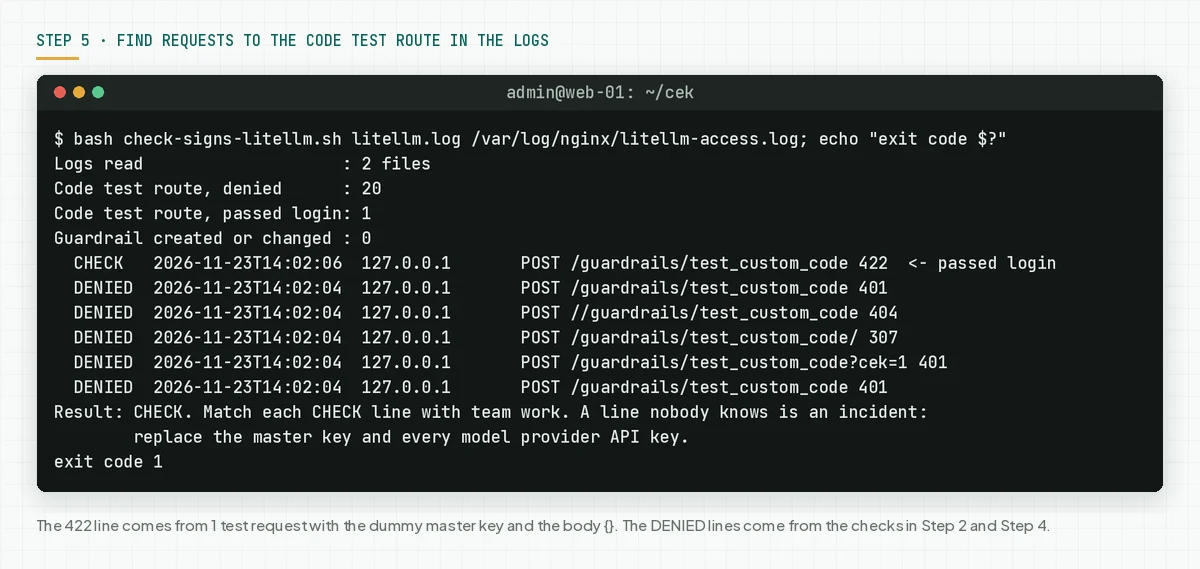
Script limits: the script reads the default uvicorn log format and the nginx combined format. It cannot read other log formats. A container log is lost when the container is removed, and old nginx logs can be rotated.
Manual checks in the admin UI and at the model provider
- Open the LiteLLM admin UI. Look for new keys, users, or teams that the team does not know.
- Open the guardrail list. Look for custom code guardrails that the team did not make.
- Open the dashboard of each model provider. Look for usage peaks, unknown models, or bills that went up since February 2026.
- Run
docker top litellm. Look for processes other than the proxy process. - Check outbound connections from the proxy server to addresses other than the model providers.
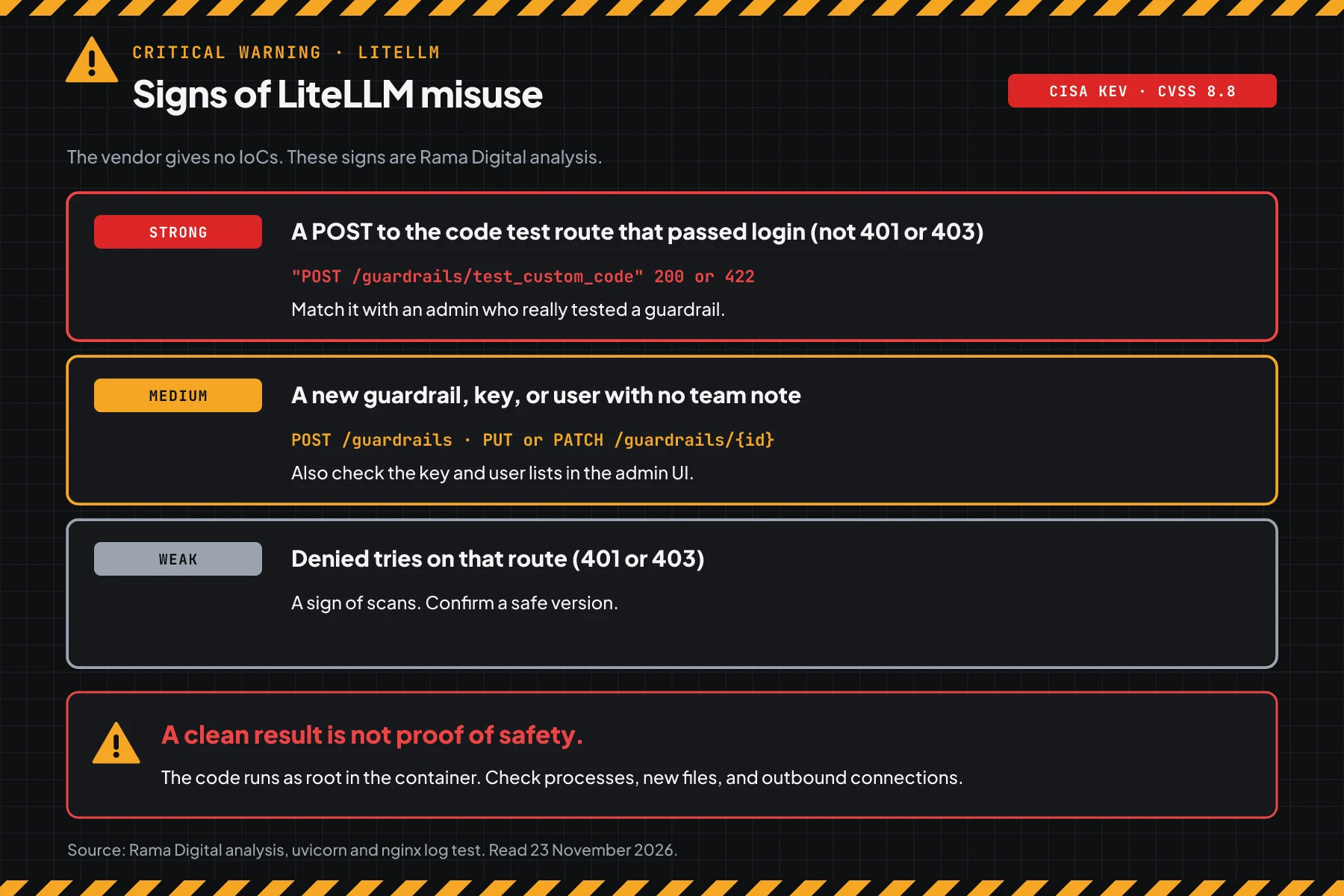
Check the result: "NO SIGNS YET" does not prove that the proxy is clean. "CHECK" means that you match each line with team work. A line that nobody knows is an incident. Follow this order:
- Block the code test route, as in step 4.
- Save the old container log, the nginx log, and a database dump first, before you change anything.
- Make a new container from the official 1.110.2 image. Do not clean the old container, because unknown code ran as root there.
- Replace the master key and all model provider API keys.
- Replace the virtual keys, the database password, and other secrets in the
.envfile. - Check the model provider bills and report unknown usage to the provider.
Example: 1 morning of response for 2 LiteLLM proxies
This simulation uses dummy data. The proxy names, times, and results are not customer data.
| Time (WIB) | Dummy proxy | Checked | Result | Action |
|---|---|---|---|---|
| 08.30 | ai-gateway (v1.83.7-stable, Docker) | Steps 1 and 2 | VULNERABLE, the route answers 401 from the internet | Block the route in nginx at 08.45, upgrade to v1.110.2 at 10.00 |
| 09.00 | ai-internal (1.83.11, pip) | Step 1 | SAFE from this CVE | Plan the upgrade to the latest release this week |
| 10.30 | ai-gateway | Step 5 | 1 POST passed login from an address that the team does not know, 3 November | Save the logs, replace the master key and provider API keys, check the model bill |
Lessons from this simulation: do the proxy that is open to the internet first. A route block buys time, not safety. One unknown CHECK line means that all keys must change.
Who does the work
The platform or DevOps team usually holds the LiteLLM container and the reverse proxy. The owner of the model provider accounts holds the API keys and the bills. The IT lead decides the upgrade window.
Rama Digital advice: record each AI gateway, its version, the apps that use it, and the keys it holds. Other core systems need the same list, as in the TeamCity flaw CVE-2026-132891.
Checklist for today
- List all LiteLLM proxies. Owner: platform team. Proof: a list of names, versions, and apps.
- Check the version with step 1. Owner: LiteLLM admin. Proof: the script output.
- Check route exposure with step 2 from outside the network. Owner: LiteLLM admin. Proof: the script output.
- Block the route with step 4. Owner: reverse proxy admin. Proof: step 2 output with the result CLOSED.
- Back up, then upgrade to 1.110.2. Owner: LiteLLM admin. Proof: step 1 output after the upgrade.
- Run step 5 and the manual checks. Owner: LiteLLM admin. Proof: the script output and check notes.
- Replace the keys if a vulnerable version was ever open. Owner: the model provider account owner. Proof: a list of replaced keys.
Questions and answers
Our proxy is only on the internal network. Must we still upgrade?
Yes. CISA records active attacks. This flaw needs an admin key, and a key can leak from a laptop, a repo, or an automation tool on the internal network.
Does a route block in nginx make LiteLLM safe?
No. The nginx rule only stops requests that go through nginx. Requests straight to the LiteLLM port do not go through nginx. Only the upgrade closes the flaw.
Why is the target 1.83.11, not 1.83.10?
The GHSA data says 1.83.10, but the advisory text says 1.83.11. We use the stricter limit. Our advice is still the latest release 1.110.2.
Why does the version check over HTTP fail after the upgrade?
In our test, v1.110.2 does not show its version at /health/readiness with no key. Use --python inside the container.
This flaw needs a login. Why is the score still 8.8?
After login, the code runs as root in the process that holds all API keys. The impact is full on confidentiality, integrity, and availability.
Must we replace the model provider API keys after the upgrade?
Yes, if a vulnerable version was ever open to the internet, the master key was ever shared, or step 5 prints CHECK. The upgrade does not cancel keys that were already stolen.
We use LiteLLM as a Python library, not as a proxy. Are we affected?
This route is in the proxy server. Code that only calls the library does not open this route. Still update the package to the latest release.
Does a clean signs script result prove that the proxy is safe?
No. A container log is lost when the container is removed, and old logs can be rotated. Also check the admin UI and the model provider dashboards.
Next step
The limits that still apply: step 4 does not make LiteLLM safe, and the upgrade does not cancel keys that were already stolen. When your proxy shows a sign in step 5, or you need help with an AI gateway audit and recovery, use Vibe Code Rescue. For 1 urgent issue today, book a 30-minute session.
Sources
- The BerriAI GHSA advisory: the description, the version range, the fixed version, the proxy-admin condition, the root process, and the temporary step.
- The CVE-2026-40217 record: the CVSS score, the CWEs, and the CISA SSVC rating on 19 November 2026.
- NVD: the CVSS 3.1 score and vector.
- CISA KEV: the date added 18 November 2026, the due date 2 December 2026, and 3 other LiteLLM CVEs.
- The PyPI release history: the release dates of 1.81.8, 1.83.10, 1.83.11, and 1.110.2.
- The v1.83.10-stable release and the official image on GHCR: the image tags that we tested.
- The Custom Code Guardrail docs and the LiteLLM deploy docs: the guardrail feature and the deploy method.
- The X41-2026-001 advisory from X41 D-Sec: the report timeline. This advisory has an attack sample, so we do not link it.