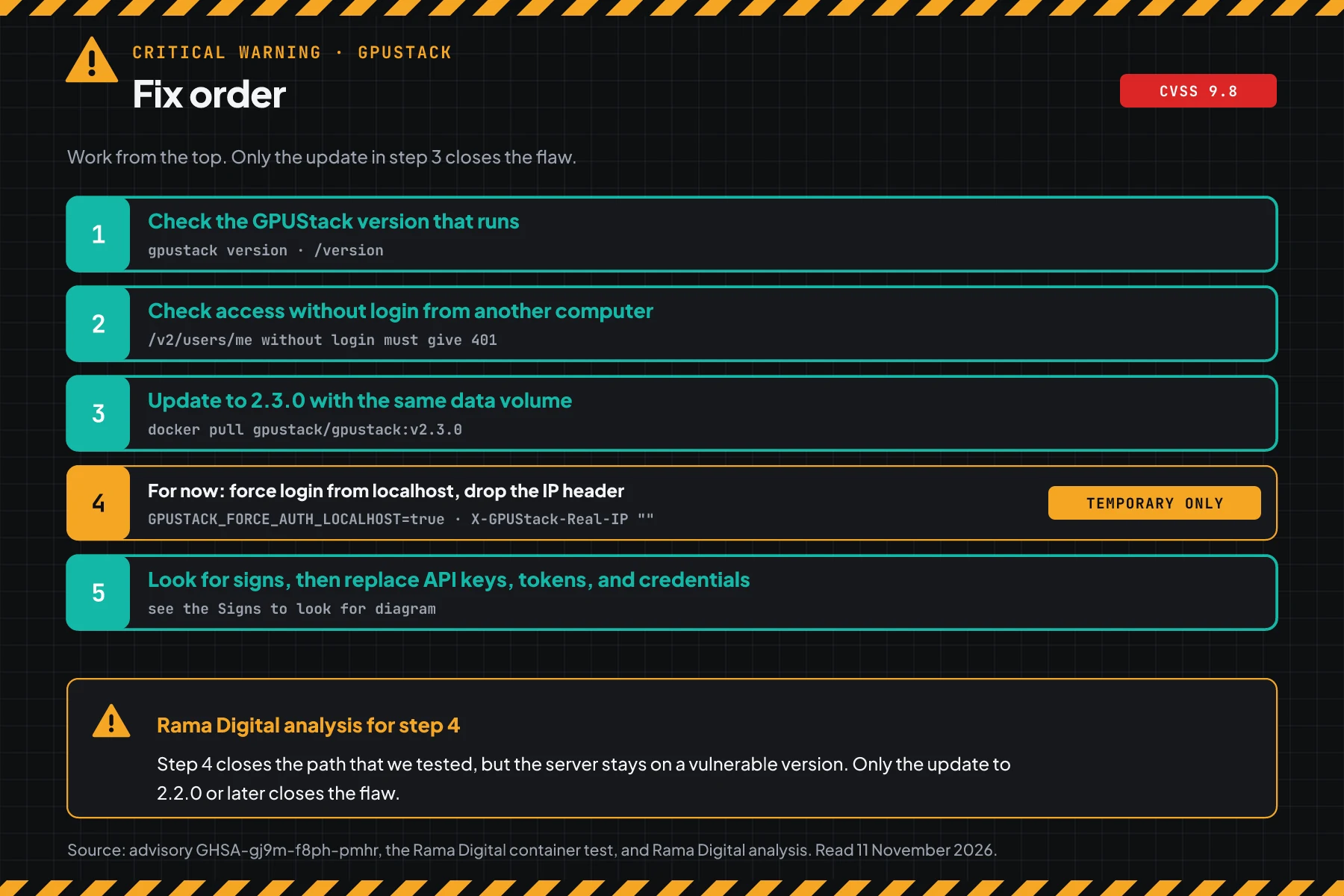
Direct answer: GPUStack below version 2.2.0 has the flaw CVE-2026-102895 with a CVSS 3.1 score of 9.8. The server gives admin rights without login to requests that it thinks come from localhost. Today, check the version, update to 2.3.0, then look for signs and replace all keys.
Attackers already use this flaw. CISA added it to KEV on 9 November 2026, with a patch deadline of 12 November 2026 for US federal agencies. The fix has been out since version 2.2.0 on 18 June 2026.
Main condition: The highest risk is a server with a reverse proxy on the same host, for example nginx, Caddy, or Traefik. That proxy forwards requests from 127.0.0.1, so visitors can get admin rights. Limit: This article has no forged header content, payloads, or attack sequences.
We read the CVE-2026-102895 record, advisory GHSA-gj9m-f8ph-pmhr, the GPUStack 2.2.0 release notes, the GPUStack 2.3.0 release notes, and the CVE record API on 11 November 2026. We tested 3 check scripts, the temporary mitigation, and the update from 2.1.1 to 2.3.0 in podman with the official GPUStack and nginx images. The test network had no internet. We sent no forged header and tested no attack.
Problem: admin rights without login through localhost
GPUStack is open source software that manages GPU clusters and runs AI models, for example LLMs, embeddings, and image models. Teams use it for internal chatbots, RAG, and their own model APIs. Its official repository has more than 6,000 stars on GitHub.
The CVE-2026-102895 record puts CVE-2026-102895 in the classes CWE-287, CWE-290, and CWE-346. These are the classes for incorrect authentication and a weak check of the request origin. The score of 9.8 uses the vector AV:N, AC:L, PR:N, and UI:N, so the attack goes over the network, is easy, and needs no login.
PR #5346 was merged on 19 May 2026, and release 2.2.0 came out on 18 June 2026. The advisory GHSA-gj9m-f8ph-pmhr came out on 31 July, but the CVE record came only on 4 November 2026, 96 days later. The GPUStack 2.2.0 release notes also do not list this fix as a security item.
Rama Digital analysis: the 96-day gap and release notes with no security label make this update easy to miss. Limit: we have no data on how many servers still run old versions.
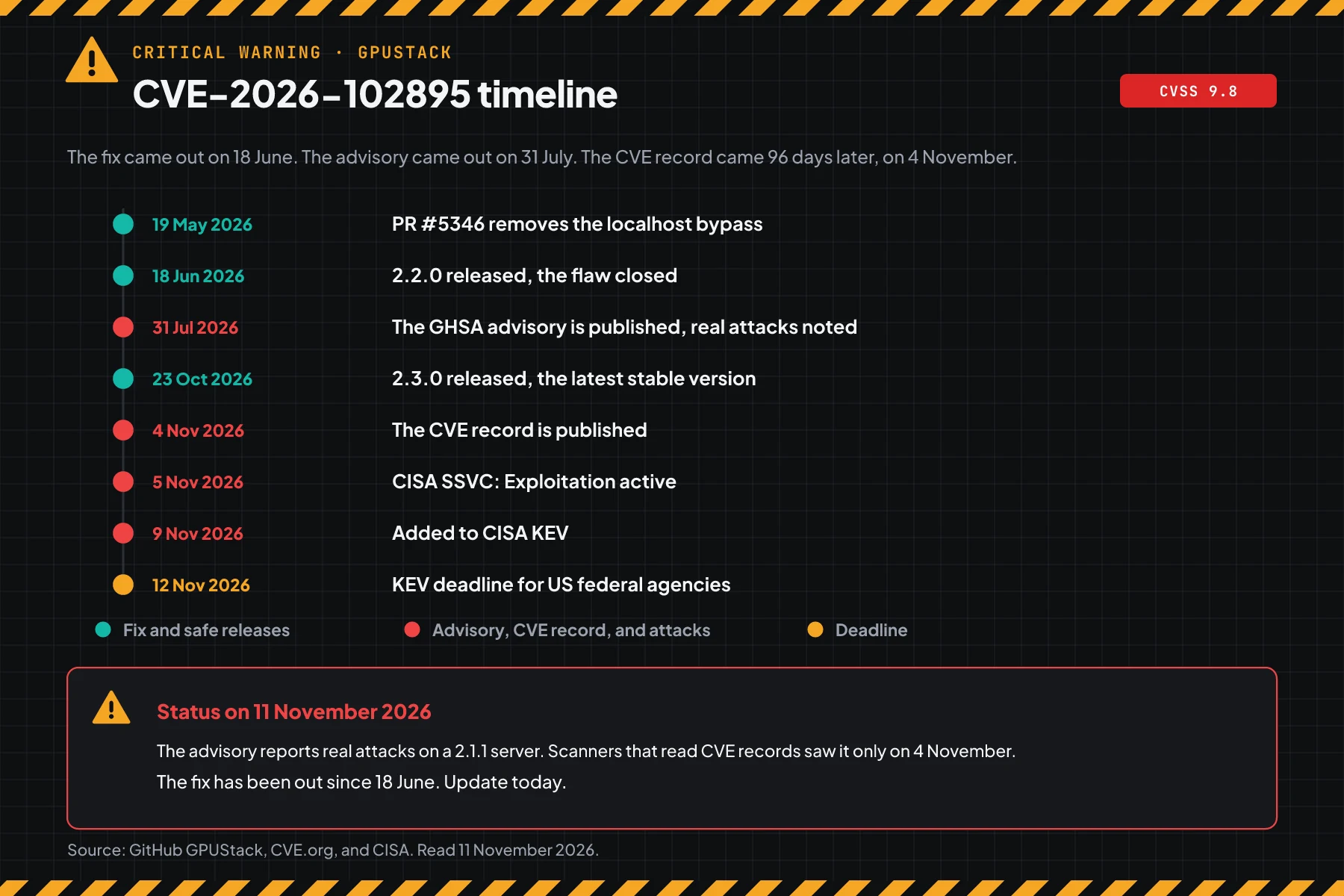
On 11 November 2026, this flaw is in CISA KEV (catalog 2026.11.09). The CISA SSVC rating of 5 November says Exploitation active, Automatable yes, and Technical Impact total. This means attacks already occur, can run automatically, and have full impact.
How it works: requests from localhost become admin
This section uses the official summary and the patch content. Its purpose is to help you choose steps, not to explain how to attack.
Summary from the official advisory
The advisory says that a GPUStack server below 2.2.0 accepts requests without login when the client address is 127.0.0.1. The server then uses the first admin account. The option force_auth_localhost controls this behavior, and its default value is false.
The impact in the advisory: full admin control. An outsider can make admin users and APIAPIThe official door 2 systems use to exchange data, without anybody copying it by hand.Open the glossary keys, read worker secrets and cloud credentials, then run commands on worker hosts through a custom inference backend.
The advisory also reports 1 real attack on a 2.1.1 server. The attacker made a custom inference backend that ran a shell on a worker. Javier Sixto reported that attack.
The settings that open the path
- A reverse proxy on the same host. nginx, Caddy, or Traefik forwards requests from 127.0.0.1, so the server sees all visitors as localhost.
- The
embeddedgateway mode, the Docker image default. In this mode the server reads the client address from theX-GPUStack-Real-IPheader. The advisory says that the server also accepts that header from the client. - The option
force_auth_localhostis not set, so its value isfalse. - The API port is open to the internet or to a large office network.
What release 2.2.0 changed
PR #5346 shows that release 2.2.0 removes the automatic admin path for localhost. The option --force-auth-localhost is still accepted, but it has no effect now. The same release makes changes to the server configuration admin-only.
Rama Digital analysis: in our test, the 2.1.1 image behind nginx on the same host gave the admin account without login through the proxy. The direct GPUStack port gave 401. So the address that users open every day is the open address. Limit: our test sent no forged header.
The finders in the advisory: Nikko Enggaliano, an Indonesian researcher, and Wei Yunzhou, Rui Yang, and Haoyu Wang. Rui Yang and Haoyu Wang are from Johns Hopkins.
Exploitation status on 11 November 2026
| Source | Status |
|---|---|
| CISA KEV | Added on 9 November 2026, US federal agency patch deadline 12 November 2026 |
| CVE-2026-102895 record (CVSS 3.1 from CNA GitHub) | Score 9.8, class Critical, CWE-287, CWE-290, and CWE-346 |
| CISA SSVC (5 November 2026) | Exploitation active, Automatable yes, Technical Impact total |
| GPUStack advisory | A real attack was seen on a 2.1.1 server |
| Vendor | Flaw closed in 2.2.0. The latest stable version is 2.3.0 on 11 November 2026 |
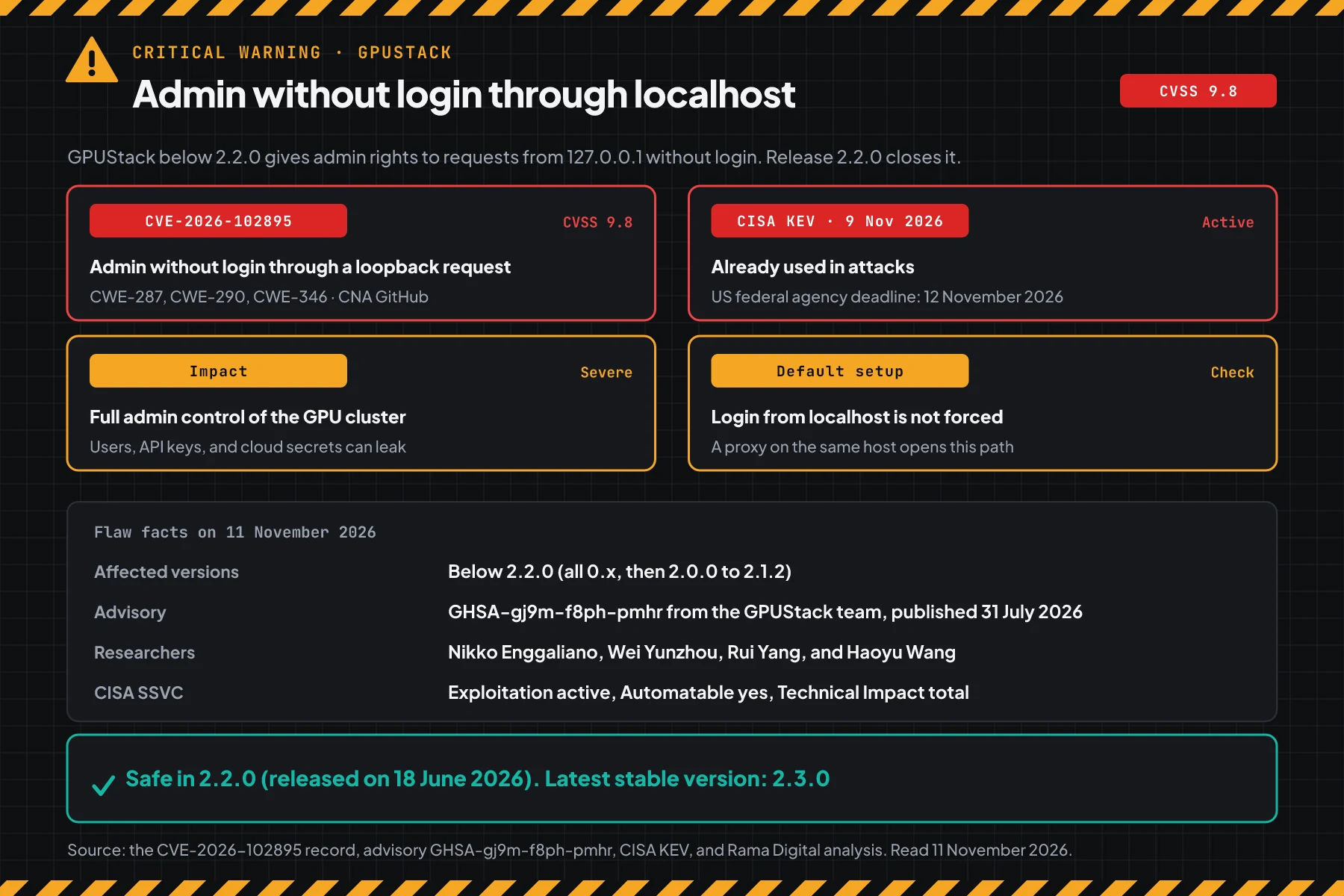
A score of 9.8, the KEV status, and active attacks put this flaw in the emergency class. A GPUStack server keeps models, API keys, worker tokens, and cloud credentials. With admin rights, an outsider can also run workloads on your GPUs, and you get the bill.
Who is most at risk
The risk depends on the version, how the server is open, and what the workers hold. This table helps you sort servers when you manage many GPU servers.
| Server condition | Risk | Reason |
|---|---|---|
| Version below 2.2.0 behind a reverse proxy on the same host | Highest | Every visitor of the proxy gets admin rights |
| Version below 2.2.0, port open to the internet | Highest | The server also accepts a client address header. A 401 answer does not prove it is safe |
| Workers with costly GPUs and cloud credentials | High | An admin can run commands on workers and read credentials |
| Open only on the office network or VPN | High | 1 breached device on that network can use this path |
A Docker latest image pulled before 18 June 2026 | High | That image is still below 2.2.0 |
| Already on 2.2.0 or later | Low | Still look for signs when the server was open before the update |
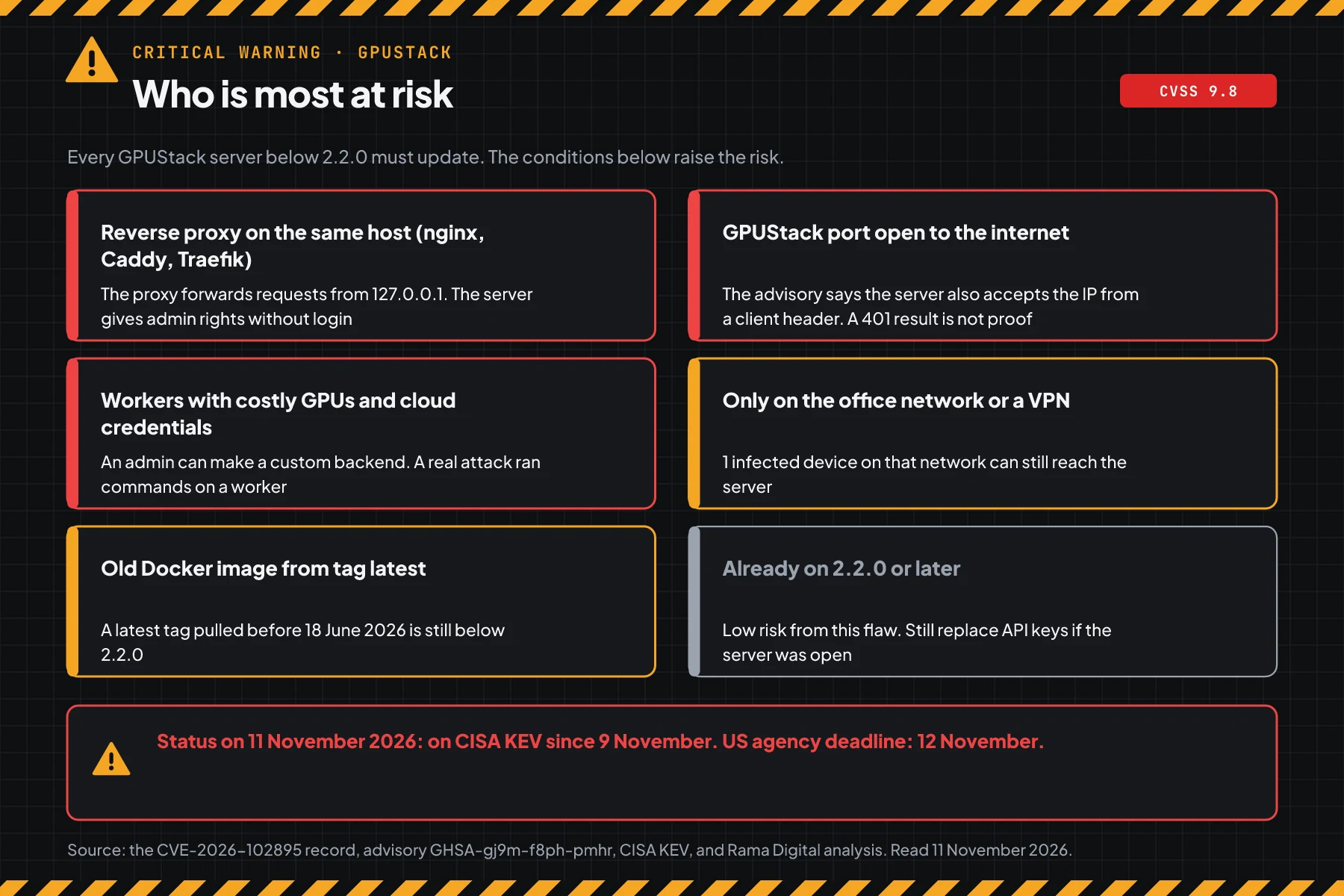
Rama Digital analysis: nginx on the same server for HTTPS and a domain is the riskiest setup. That setup is fast to install, so check GPU servers with that setup first. Close that address to the internet until the update is done.
Other cluster admin panels have the same risk when they are open to the internet. Also check the Rancher Manager flaw CVE-2026-94290, the LXD and Incus certificate flaw CVE-2026-112816, and the pgAdmin 4 flaw CVE-2026-116241. Also patch the Linux kernel on the same GPU server, for example the Linux kernel TCP flaw CVE-2026-98432. For phone servers, read the FreeSWITCH SIP flaw CVE-2026-116779.
Vulnerable and safe versions
All GPUStack versions below 2.2.0 are vulnerable to CVE-2026-102895. This range covers all of the 0.x line and 2.0.0 to 2.1.2. Version 2.2.0 closes the flaw, and 2.3.0 is the latest stable version on 11 November 2026.
| GPUStack version | Status on 11 November 2026 | Update to |
|---|---|---|
| 0.x (all) | Vulnerable to CVE-2026-102895 (9.8) | 2.3.0 today |
| 2.0.0 to 2.1.2 | Vulnerable to CVE-2026-102895 (9.8) | 2.3.0 today |
| 2.2.0 | Safe, released on 18 June 2026 | 2.3.0 at the next patch window |
| 2.3.0 | Safe, the latest stable version on 11 November 2026 | Use this version |
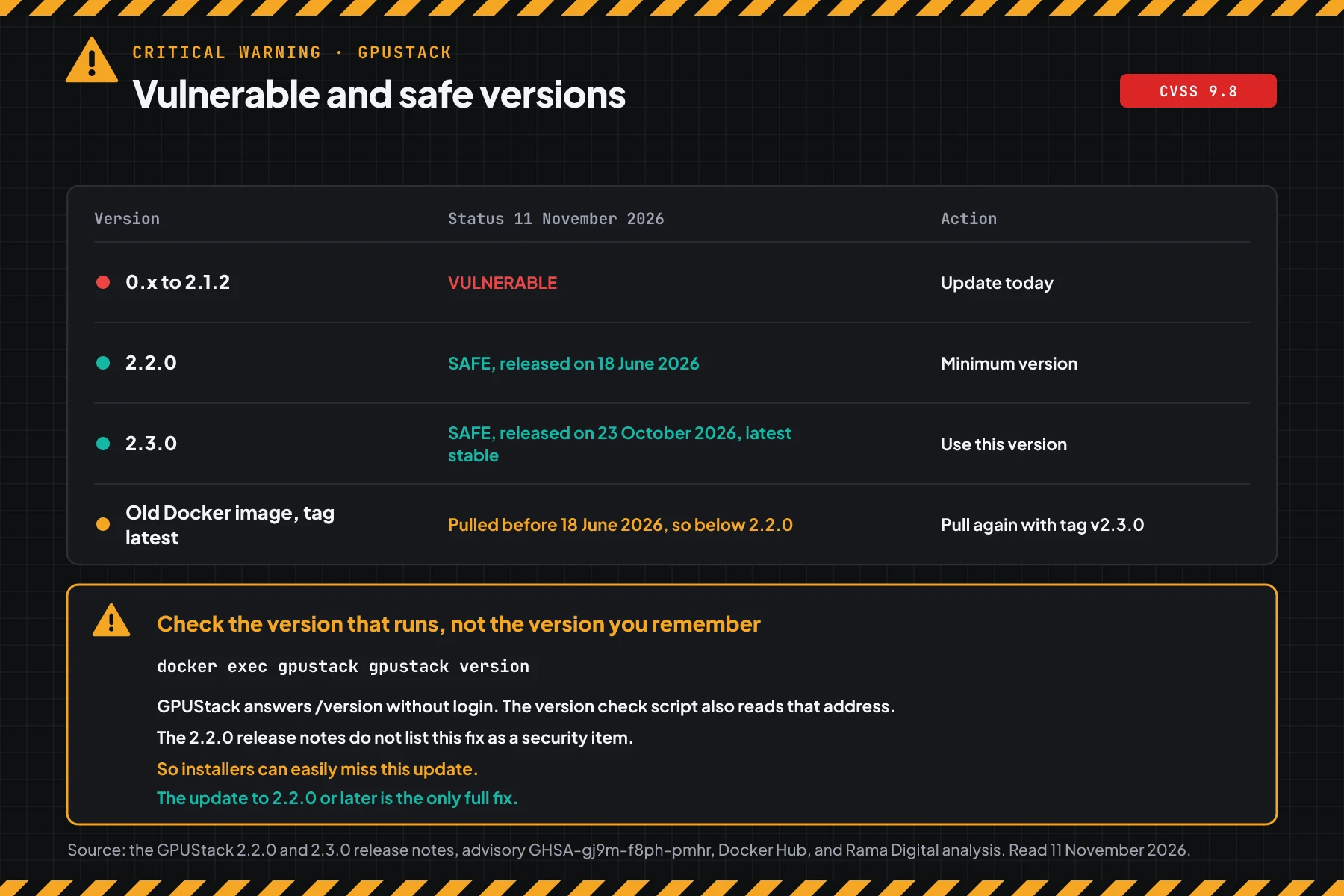
The version data comes from the advisory GHSA-gj9m-f8ph-pmhr, the GPUStack 2.2.0 release notes, and the GPUStack 2.3.0 release notes. The /version address answers without login, so you can check the version from a laptop. An image with the latest tag pulled before 18 June 2026 is still below 2.2.0, so pull it again with the v2.3.0 tag.
Docker Hub shows that the v2.3.0 image is about 1.89 GB, and v2.1.1 is about 3.27 GB. Prepare disk space and download time before the update window.
Before you start
- SSH access with sudo to the GPUStack server, or access to the docker command on that server.
- A GPUStack admin account to make 1 API key only for step 5.
- A laptop or another server outside the GPUStack server for step 2.
curlandpython3on the computer that runs the scripts.- A quiet-hours window. A container restart stops inference that is running.
- A list of all GPUStack servers and workers, including test servers and old servers.
Step 1: Check the GPUStack version
Save this script as check-version-gpustack.sh in the folder ~/cek. The script reads the version from the gpustack version command, from a docker or podman container named gpustack, or from the server address. The script then compares the version with 2.2.0.
#!/usr/bin/env bash
# Check the GPUStack version against CVE-2026-102895 (admin without login through a loopback request, CVSS 3.1 9.8).
# Data: the CVE record, CISA KEV, and advisory GHSA-gj9m-f8ph-pmhr. Versions below 2.2.0 are vulnerable.
# Use on the server:           bash check-version-gpustack.sh
# Use with the server address: bash check-version-gpustack.sh https://gpu.example.com
# Use for versions you copy:   bash check-version-gpustack.sh 0.7.1 2.1.1 2.3.0
# The script only reads. It changes nothing and needs no login.

SAFE=2.2.0

less_than() { [ "$1" != "$2" ] && [ "$(printf '%s\n%s\n' "$1" "$2" | sort -V | head -n1)" = "$1" ]; }

check() {
  local v="${1#v}" base tail
  if ! [[ $v =~ ^([0-9]+\.[0-9]+\.[0-9]+)(.*)$ ]]; then
    printf '%-10s UNKNOWN, compare it manually with the version table\n' "$1"
    return
  fi
  base="${BASH_REMATCH[1]}"; tail="${BASH_REMATCH[2]}"
  if less_than "$base" "$SAFE"; then
    printf '%-10s VULNERABLE to CVE-2026-102895 (9.8) -> update to 2.3.0 today\n' "$v"
  elif [ "$base" = "$SAFE" ] && [ -n "$tail" ] && ! [[ $tail =~ ^(\.post|\+) ]]; then
    printf '%-10s TEST RELEASE of 2.2.0, use stable 2.2.0 or later\n' "$v"
  else
    printf '%-10s SAFE from CVE-2026-102895\n' "$v"
  fi
}

from_url() {
  # GPUStack serves /version without login. Example answer: {"version":"2.1.1","git_commit":"..."}
  local u="${1%/}" body
  body=$(curl -sS -m 15 "$u/version" 2>/dev/null)
  sed -n 's/.*"version"[ ]*:[ ]*"\([^"]*\)".*/\1/p' <<<"$body" | head -n1 | LC_ALL=C tr -cd '[:alnum:]._+-' | cut -c1-40
}

if (( $# > 0 )); then
  for a in "$@"; do
    if [[ $a =~ ^https?:// ]]; then
      v=$(from_url "$a")
      if [ -z "$v" ]; then echo "$a: no version found. Check the address or run the script on the server."; continue; fi
      echo "Source: $a/version"
      check "$v"
    else
      check "$a"
    fi
  done
  exit 0
fi

found=0
if command -v gpustack >/dev/null 2>&1; then
  v=$(timeout 30 gpustack version 2>/dev/null | grep -oE '[0-9]+\.[0-9]+\.[0-9]+[0-9A-Za-z.+]*' | head -n1)
  if [ -n "$v" ]; then echo "Source: the gpustack command on this host"; check "$v"; found=1; fi
fi
for rt in docker podman; do
  command -v $rt >/dev/null 2>&1 || continue
  while read -r name image; do
    [ -z "$name" ] && continue
    v=$(timeout 30 $rt exec "$name" gpustack version 2>/dev/null | grep -oE '[0-9]+\.[0-9]+\.[0-9]+[0-9A-Za-z.+]*' | head -n1)
    [ -z "$v" ] && continue
    echo "Source: container $name ($image)"
    check "$v"; found=1
  done < <($rt ps --format '{{.Names}} {{.Image}}' 2>/dev/null | grep -i gpustack)
done
if (( found == 0 )); then
  echo "No GPUStack found on this host."
  echo "Try: bash check-version-gpustack.sh https://your-server-address, or give the version as an argument."
  exit 1
fi
# On the server: read the version from the gpustack command or from the gpustack container
bash check-version-gpustack.sh
# From a laptop: read the version through the server address
bash check-version-gpustack.sh https://gpu.example.com
# Check versions that you noted from other servers
bash check-version-gpustack.sh 0.7.1 2.1.2 2.3.0
# Manual check without the script
docker exec gpustack gpustack version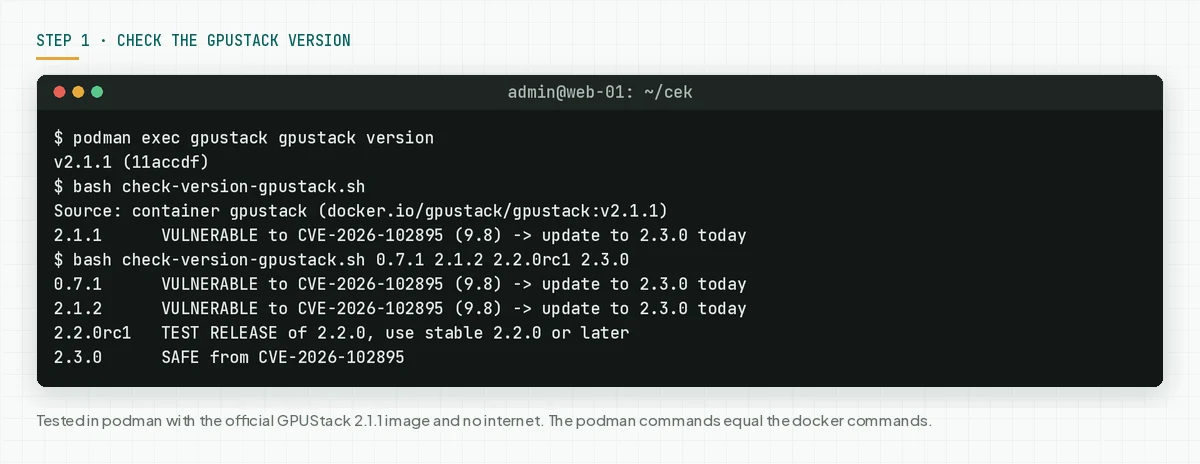
Manual check in a browser: open https://your-server-address/version. The JSON answer shows the version number.
Check the result: "VULNERABLE" means go to steps 2 and 3 today. "TEST RELEASE" means move to a stable release. "SAFE" still means run step 5, because attackers could use the server before the update.
Step 2: Check access without login from a laptop
This script answers 1 question: does the server address give an account without login. Run the script from a laptop or another server, not from the GPUStack server, so that the result is the same as what visitors see.
Save this script as check-exposure-gpustack.sh. The script sends 2 plain GET requests with no login to each address. The script sends no forged header, does not log in, and changes no data.
#!/usr/bin/env bash
# Check whether a GPUStack address gives an account without login (CVE-2026-102895).
# Use from another computer, not from the server itself:
#   bash check-exposure-gpustack.sh https://gpu.example.com http://203.0.113.10:80
# Give every address that other people can open: the reverse proxy domain, the public IP, and the direct port.
# The script sends 2 plain GET requests without login to each address: /version and /v2/users/me.
# The script sends no forged header, does not log in, and changes nothing.

(( $# > 0 )) || { echo "Give at least 1 address. Example: bash $0 https://gpu.example.com"; exit 2; }
open=0; total=0

for a in "$@"; do
  u="${a%/}"; total=$((total + 1))
  echo "Address: $u"
  host=$(sed -E 's#^https?://([^/:]+).*#\1#' <<<"$u")
  if [[ $host =~ ^(127\.|localhost$|\[?::1\]?$) ]]; then
    echo "   Loopback address. Below 2.2.0, an admin answer from here is the default behaviour."
    echo "   Test from another computer to see what visitors see."
  fi
  v=$(curl -sS -m 15 "$u/version" 2>/dev/null | sed -n 's/.*"version"[ ]*:[ ]*"\([^"]*\)".*/\1/p' | head -n1 | LC_ALL=C tr -cd '[:alnum:]._+-' | cut -c1-40)
  echo "   Version from /version: ${v:-not found}"
  body=$(curl -sS -m 15 -o - -w '\n%{http_code}' "$u/v2/users/me" 2>/dev/null)
  code=$(tail -n1 <<<"$body"); data=$(sed '$d' <<<"$body")
  case "$code" in
    401|403)
      echo "   /v2/users/me without login: $code, login required. Good." ;;
    200)
      name=$(sed -n 's/.*"username"[ ]*:[ ]*"\([^"]*\)".*/\1/p' <<<"$data" | head -n1 | LC_ALL=C tr -cd '[:alnum:]._@-' | cut -c1-40)
      if grep -qE '"is_admin"[ ]*:[ ]*true' <<<"$data"; then role=admin; else role=user; fi
      echo "   /v2/users/me without login: 200, the server gives account ${name:-?} ($role)."
      echo "   OPEN: anyone who opens this address gets $role rights without a password."
      open=$((open + 1)) ;;
    000|"")
      echo "   Not reachable from this computer." ;;
    *)
      echo "   /v2/users/me without login: code $code. Check manually." ;;
  esac
done
echo
if (( open > 0 )); then
  echo "Result: $open of $total addresses OPEN. Close those addresses now, then do steps 3 to 5."
else
  echo "Result: 0 of $total addresses give an account without login."
  echo "Still update to 2.2.0 or later. This result covers only the addresses you tested."
fi
# From a laptop: write every address that other people can open
bash check-exposure-gpustack.sh https://gpu.example.com http://203.0.113.10:80
# On the server: see the processes that listen on open ports
sudo ss -ltnp | grep -E 'nginx|caddy|traefik|docker-proxy|gpustack'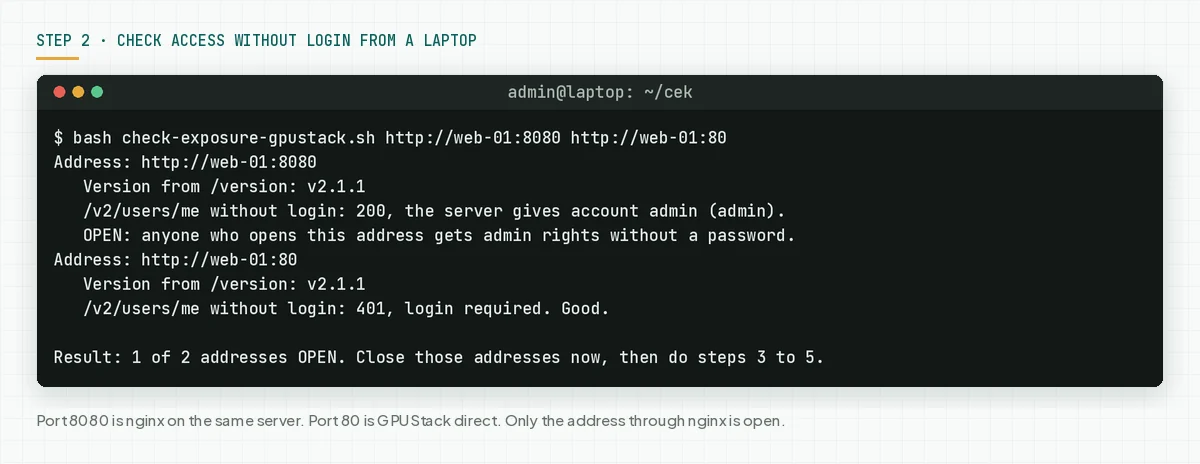
In our test, GPUStack 2.1.1 ran behind nginx on the same host. The address through nginx on port 8080 gave the admin account without login. Port 80 direct to GPUStack gave 401. The result was 1 of 2 addresses OPEN.
Limit: the script tests only the path with no header. The advisory says that a server below 2.2.0 also accepts a client address header, so a 401 answer does not prove it is safe. The version from step 1 stays the deciding fact.
Check the result: "OPEN" means close that address now, then update within 1 hour or use step 4. "0 of N addresses" still means update today.
Step 3: Update to 2.3.0 with the same data volume
Only the update closes the flaw. The data volume keeps the database, users, and API keys, so use the same volume when the new container runs.
# Docker. Run it in quiet hours, because a restart stops running inference.
# 1. Note the image and the volumes of the old container
docker inspect gpustack --format '{{.Config.Image}}'
docker inspect gpustack --format '{{range .Mounts}}{{.Name}} {{.Source}} -> {{.Destination}}{{println}}{{end}}'
# 2. Pull the safe image first (about 1.89 GB)
docker pull gpustack/gpustack:v2.3.0
# 3. Stop and remove the old container. The data volume stays.
docker stop gpustack && docker rm gpustack
# 4. Run it again with your first run options. Only the image tag changes.
docker run -d --name gpustack --restart unless-stopped \
  <port, GPU, and env options from your first command> \
  -v gpustack-data:/var/lib/gpustack \
  gpustack/gpustack:v2.3.0
# 5. Check the version again on the server, then check access from a laptop
bash ~/cek/check-version-gpustack.sh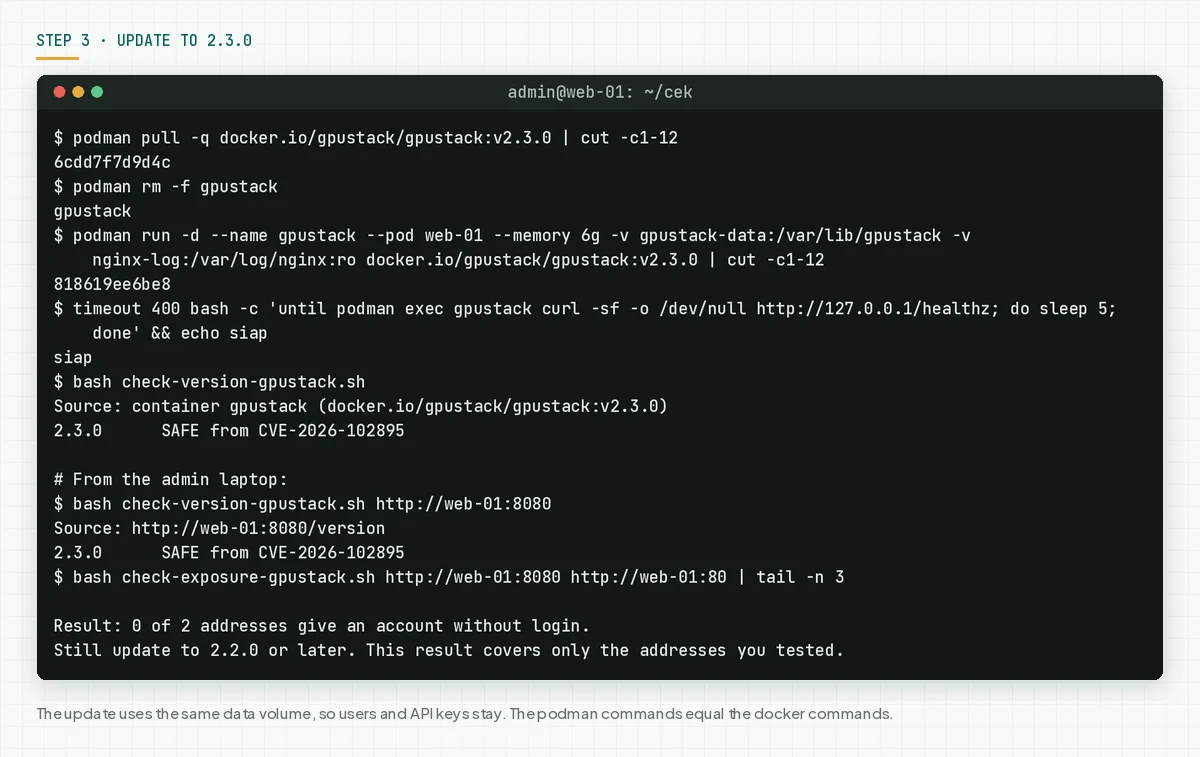
- Note the run options of the old container: volumes, ports, environment variables, and GPU options.
- Pull the image
gpustack/gpustack:v2.3.0before you stop the old container, so that the downtime is short. - Stop and remove the old container. The data volume stays.
- Run the new container with the same options. Only the image tag changes.
- Run
check-version-gpustack.shagain. The correct result: "SAFE from CVE-2026-102895". - Run step 2 again from a laptop, then send 1 test inference request.
In our test, the 2.3.0 container used the data volume from 2.1.1. Users and API keys stayed, the version script printed SAFE, and the address through nginx gave 401 without login.
When you use Docker Compose, change the image tag in the compose file to v2.3.0. Then run docker compose pull and docker compose up -d.
For a pip install, update the package in the same Python environment, then restart the GPUStack service. We did not test this path.
# pip install (we did not test this): check the installed version first
pip show gpustack | grep -i '^version'
# Update in the same Python environment as the first install
pip install --upgrade 'gpustack>=2.2.0'
# Restart the GPUStack service in the same way as at install time, for example:
sudo systemctl restart gpustack
Rama Digital recommendation: also update each worker to the same version as the server. Then check that each worker is active again on the Workers page.
Check the result: the version script prints "SAFE" on each server, the exposure script prints 0 addresses OPEN, and 1 test inference request works.
Step 4: Force login from localhost when the update must wait
This step is only a temporary layer. Use this step when you cannot update today, for example because disk space is low or you must test on a standby server first.
The advisory gives 3 temporary steps. Set force_auth_localhost to true. Clear the X-GPUStack-Real-IP header from clients at the proxy. Close the API to untrusted networks. Use all 3 together.
# Temporary, when the update must wait. The version stays vulnerable until step 3.
# 1. Run the container again with login forced from localhost. Other options stay the same.
docker stop gpustack && docker rm gpustack
docker run -d --name gpustack --restart unless-stopped \
  <port, GPU, and env options from your first command> \
  -e GPUSTACK_FORCE_AUTH_LOCALHOST=true \
  -v gpustack-data:/var/lib/gpustack \
  gpustack/gpustack:<your old tag>
# pip install: add --force-auth-localhost to the gpustack start command.
# 2. nginx: clear this header in each location block that forwards to GPUStack:
#    proxy_set_header X-GPUStack-Real-IP "";
sudo grep -rn 'X-GPUStack-Real-IP' /etc/nginx/
sudo nginx -t && sudo systemctl reload nginx
# 3. From a laptop: check access again
bash check-exposure-gpustack.sh https://gpu.example.com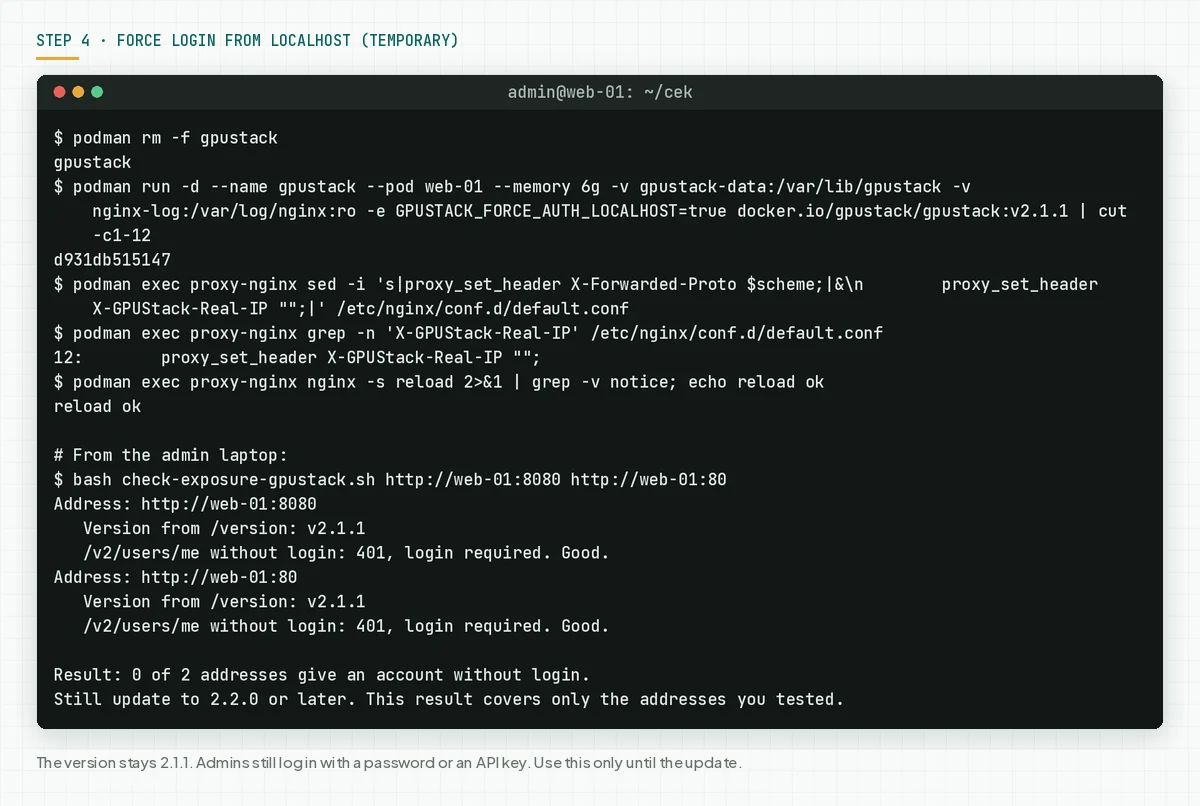
In our test, the 2.1.1 container ran again with GPUSTACK_FORCE_AUTH_LOCALHOST=true, and nginx cleared that header. The address through nginx changed from OPEN to 401. Admins still logged in with an API key, and the version stayed 2.1.1.
For Caddy, write header_up -X-GPUStack-Real-IP in the reverse_proxy block. For Traefik, use a headers middleware with customRequestHeaders that gives that header an empty value. We did not test Caddy and Traefik.
Rama Digital analysis: this step only reduces the ways in. The flaw stays in the code until version 2.2.0. After the update, the empty header line can stay, because in our test 2.3.0 still answered normally through that proxy.
Check the result: grep finds the header line in the nginx conf, nginx -t passes, and the exposure script from a laptop prints 0 addresses OPEN.
Step 5: Look for signs and replace all keys
All versions up to 2.1.2 are vulnerable, and attacks are already seen. Look for signs on each server, including servers that you updated today.
The script needs an admin API key. Make 1 new API key in the GPUStack UI only for this check, then save it to a file. Do not give the key as a command argument, because the ps command can show arguments to other users.
# Make 1 new API key in the GPUStack UI only for this check.
# Save it to a file with mode 600: paste the key, press Enter, then press Ctrl+D.
umask 077; cat > ~/.gpustack-admin.key
ls -l ~/.gpustack-admin.key
Save this script as check-signs-gpustack.sh. The script reads 4 items with GET: admins and new users, new API keys, custom inference backends, and log lines for new API keys, new users, and backends from YAML.
The script replaces control characters in log lines with a question mark, so that text from an attacker cannot change your terminal. The script runs no command from a custom backend.
#!/usr/bin/env bash
# Look for signs of CVE-2026-102895 use in GPUStack: new admins, new API keys, custom backends, and log lines.
# Use: bash check-signs-gpustack.sh <server-address> [days] [log-file]
#   Example: GPUSTACK_KEY_FILE=~/.gpustack-admin.key bash check-signs-gpustack.sh https://gpu.example.com 30 /var/log/nginx/access.log
#   Container log: docker logs gpustack > server.log 2>&1, then give server.log as the log file.
# The script reads the admin API key from GPUSTACK_API_KEY or from the file GPUSTACK_KEY_FILE (default ~/.gpustack-admin.key).
# Do not give the key as an argument. The ps command can show arguments to other users.
# The script only reads with GET. The script needs curl and python3.

U="${1:-}"; DAYS="${2:-30}"; LOG="${3:-}"
[ -n "$U" ] || { echo "Give the server address. Example: bash $0 https://gpu.example.com 30"; exit 2; }
U="${U%/}"; [[ $DAYS =~ ^[0-9]+$ ]] || DAYS=30
KEY="${GPUSTACK_API_KEY:-}"
if [ -z "$KEY" ]; then
  F="${GPUSTACK_KEY_FILE:-$HOME/.gpustack-admin.key}"
  [ -r "$F" ] || { echo "No admin API key found. Save it in $F (chmod 600) or set GPUSTACK_API_KEY."; exit 2; }
  KEY=$(tr -d '\r\n' < "$F")
fi
TMP=$(umask 077; mktemp -d); trap 'rm -rf "$TMP"' EXIT
printf 'Authorization: Bearer %s\n' "$KEY" > "$TMP/h"; unset KEY
get() { curl -sS -m 30 -H @"$TMP/h" -o "$TMP/$2" -w '%{http_code}' "$U$1" 2>/dev/null; }

c1=$(get '/v2/users/me' me.json)
[ "$c1" = 200 ] || { echo "Login with the key failed (code $c1). Use an API key that an admin owns."; exit 1; }
c2=$(get '/v2/users?perPage=100' users.json)
c3=$(get '/v2/api-keys?perPage=100' keys.json)
c4=$(get '/v2/inference-backends?perPage=100' backends.json)

python3 -I - "$TMP" "$DAYS" "$c2" "$c3" "$c4" <<'PY'
import json, sys, datetime as dt
tmp, days, c2, c3, c4 = sys.argv[1], int(sys.argv[2]), *sys.argv[3:6]
now = dt.datetime.now(dt.timezone.utc); limit = now - dt.timedelta(days=days)
def clean(s, n=40): return ''.join(c if c.isprintable() else '?' for c in str(s))[:n]
def when(s):
    try:
        t = dt.datetime.fromisoformat(str(s).replace('Z', '+00:00'))
        return t if t.tzinfo else t.replace(tzinfo=dt.timezone.utc)
    except ValueError: return None
def utc(s):
    t = when(s)
    return t.astimezone(dt.timezone.utc).strftime('%Y-%m-%d %H:%M UTC') if t else '-'
def items(name):
    d = json.load(open(f'{tmp}/{name}'))
    return d.get('items', d if isinstance(d, list) else [])
signs = 0
print(f'1. Admin users and users new in {days} days')
if c2 == '200':
    us = items('users.json')
    for u in us:
        t = when(u.get('created_at')); new = t and t >= limit
        if u.get('is_admin') or new:
            note = 'NEW, CHECK' if new else 'old'
            print(f"   {clean(u.get('username'),24):24} admin={str(bool(u.get('is_admin'))).lower():5} active={str(bool(u.get('is_active'))).lower():5} created {utc(u.get('created_at'))}  {note}")
            if new: signs += 1
    print(f'   Total users: {len(us)}')
else: print(f'   Cannot read the user list (code {c2}).')
print(f'2. API keys of this admin in {days} days')
if c3 == '200':
    ks = items('keys.json'); n = 0
    for k in ks:
        t = when(k.get('created_at'))
        if t and t >= limit:
            n += 1; signs += 1
            exp = k.get('expires_at') or 'never'
            print(f"   CHECK: {clean(k.get('name'),24):24} created {utc(k.get('created_at'))}  expires {utc(exp) if k.get('expires_at') else exp}")
    print(f'   New keys: {n} of {len(ks)}. The key that you made for this script also counts.')
else: print(f'   Cannot read the API key list (code {c3}).')
print('3. Custom inference backends (not built in)')
if c4 == '200':
    bs = items('backends.json'); cus = [b for b in bs if not b.get('is_built_in')]
    for b in cus:
        signs += 1
        print(f"   CHECK: {clean(b.get('backend_name'),30):30} version {clean(b.get('default_version') or '-',12)}")
    if cus: print('   Compare them with your team notes. Open the details in the UI. Do not run their commands.')
    print(f'   Custom backends: {len(cus)} of {len(bs)}')
else: print(f'   Cannot read the backend list (code {c4}).')
open(f'{tmp}/signs', 'w').write(str(signs))
PY
signs=$(cat "$TMP/signs" 2>/dev/null || echo 0)

echo "4. Log lines: from-yaml, new API keys, new users"
if [ -z "$LOG" ]; then
  echo "   No log file given. Give the reverse proxy log or the server log as the third argument."
elif [ ! -r "$LOG" ]; then
  echo "   Cannot read the file $LOG."
else
  hits=$(zcat -f "$LOG" 2>/dev/null | LC_ALL=C tr '\001-\011\013-\037\177-\237' '[?*]' | grep -E 'inference-backends/from-yaml|POST /v2/api-keys|POST /v2/users[ ?"]')
  n=$(printf '%s' "$hits" | grep -c .)
  echo "   Matching lines: $n"
  if (( n > 0 )); then printf '%s\n' "$hits" | cut -c1-140 | tail -n 8 | sed 's/^/   /'; signs=$((signs + 1)); fi
fi
echo
if (( signs > 0 )); then
  echo "Result: $signs signs to check. Treat the server as breached until you prove it clean."
  echo "Replace all API keys, worker tokens, and cloud credentials after the update."
else
  echo "Result: 0 signs. Still replace API keys and tokens if the server was open before the update."
fi
# Server address, a range of 30 days, and the nginx access log
bash check-signs-gpustack.sh https://gpu.example.com 30 /var/log/nginx/access.log
# A range of 120 days (since the advisory on 31 July 2026) with the GPUStack container log
(umask 077; docker logs gpustack > server.log 2>&1)
bash check-signs-gpustack.sh https://gpu.example.com 120 server.log
# After the check: remove the key file and the log, then delete that key in the UI
rm ~/.gpustack-admin.key server.log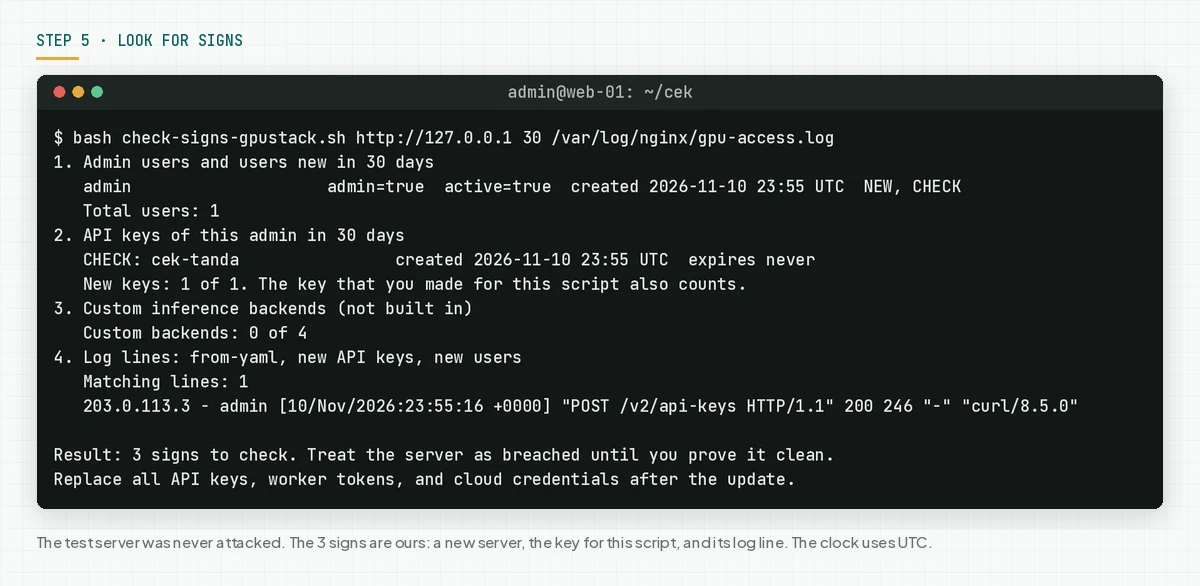
In our test, nobody attacked the server. The script still printed 3 signs: a new server, the key for this script, and the log line for that key. Match each sign with the notes of your team.
Check the result: the script prints "0 signs", or each sign matches a change by your team. An attacker can delete logs, so 0 signs does not prove that the server is safe.
Replace keys after the update, also when the result is 0 signs, because the server was open before the update. The advisory says to replace admin API keys, worker tokens, registration tokens, and the cloud credentials that the server keeps. Also change the admin password.
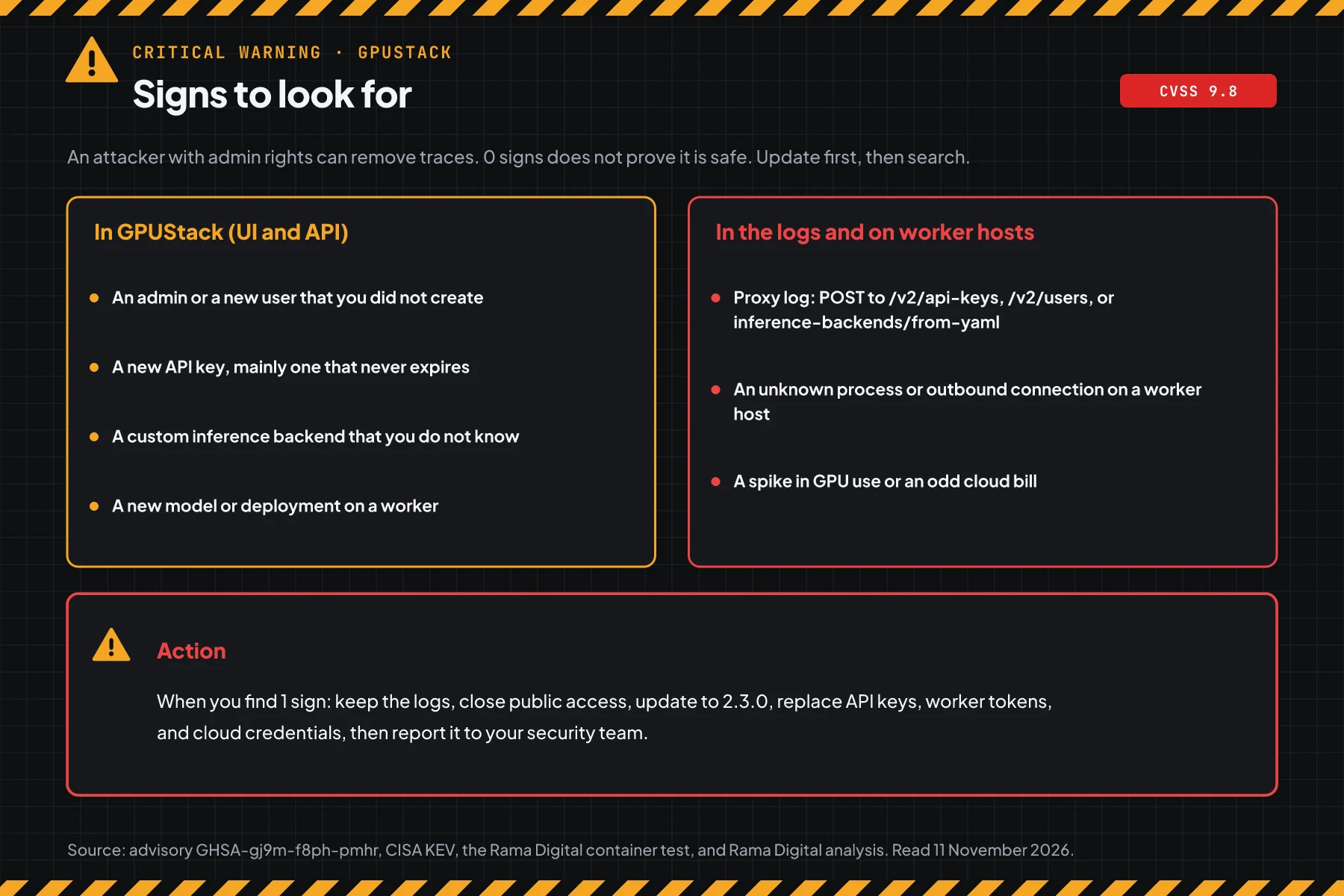
When you find even 1 sign, keep the proxy log, the container log, and the backend list as evidence. Delete unknown users, API keys, and backends. Check processes and outbound connections on each worker, because custom backends run there.
A GPU server can process customer data, for example chatbot prompts and RAG documents. When personal data leaks, Indonesian Law 27/2022 on Personal Data Protection requires a written notice within 3 times 24 hours after the leak.
Example: 1 response morning for 3 GPU servers
This simulation uses dummy data. The server names, times, and results are not customer data.
| Time (WIB) | Dummy server | Checks | Result | Action |
|---|---|---|---|---|
| 08.00 | gpu-lab-a (2.1.1, nginx on the same host, public domain) | Steps 1, 2, and 5 | OPEN, 1 unknown admin API key that never expires | Incident response, then update |
| 08.30 | gpu-office-b (0.7.1, VPN only) | Steps 1 and 2 | VULNERABLE, 0 addresses OPEN from the VPN | Step 4 this morning, update to 2.3.0 at 12.00 |
| 09.00 | gpu-c (2.3.0) | Steps 1 and 5 | SAFE, 0 signs | Replace keys, keep the output as evidence |
The lesson from the simulation: a server that is open to the internet needs step 5 first, not only the update. The update closes the flaw, but it does not remove users, API keys, or backends that an attacker already made.
Who installs the patch
The patch duty is different for each service type, so this table helps you know who acts today.
| Service type | Patch owner | What you do |
|---|---|---|
| GPUStack on your own GPU server or VPS | Your team | Steps 1 to 5 |
| GPUStack installed by a vendor or integrator | As in the maintenance contract | Ask for the version today, then ask for the output of steps 1 and 5 as evidence |
| A GPUStack template at a cloud GPU provider | Your team, because you run that instance | Check the image tag, then update to v2.3.0 |
| An AI platform from a provider that uses GPUStack | The provider | Ask if the service uses GPUStack and when the patch is in place |
Rama Digital recommendation: put GPUStack in your monthly patch schedule, the same as the operating system. Patch critical flaws within 24 hours, and flaws in CISA KEV on the same day.
Checklist for today
- Make a list of all GPUStack servers and workers. Owner: the IT team. Evidence: the server list and versions.
- Check the version with step 1. Owner: the GPU server admin. Evidence: the script output.
- Check access without login from a laptop with step 2. Owner: the GPU server admin. Evidence: the script output.
- Update to 2.3.0 with the same data volume. Owner: the GPU server admin. Evidence: the version script output after the update.
- When the update must wait, apply step 4. Owner: the GPU server admin. Evidence: the exposure script output.
- Look for signs with step 5, then replace all keys. Owner: the GPU server admin and the security team. Evidence: the script output and the list of new keys.
- Close the GPUStack API to the internet for addresses that do not need access.
Questions and answers
Do attackers already use this flaw?
Yes. The GPUStack advisory reports a real attack on a 2.1.1 server. CISA added this flaw to KEV on 9 November 2026.
My server uses no reverse proxy. Am I safe?
No. The advisory says that a server below 2.2.0 also accepts a client address header in the embedded gateway mode, the Docker default. You must still update to 2.3.0.
The exposure script prints 401. Is my server safe?
Not for certain. The script tests only the path with no header. Versions below 2.2.0 stay vulnerable, so the version from step 1 is the deciding fact.
Does force_auth_localhost close this flaw?
Only for a short time. That option forces login from localhost on old versions. Use it with the empty header at the proxy, then update to 2.3.0 as soon as possible.
Does the update delete my users and API keys?
No, when the new container uses the same data volume. In our test, users and API keys stayed after the update from 2.1.1 to 2.3.0.
How do I know if someone misused this flaw?
Run step 5. Check new admins and users, API keys that never expire, custom inference backends, and log lines for new keys. Also check unknown processes and GPU bills on the workers.
Next step
The limits that still apply: force_auth_localhost is not a fix, and an update does not remove users, API keys, or backends that already exist. When your server shows a sign in step 5, or you need help with an audit and recovery, use Vibe Code Rescue. For 1 urgent issue today, book a 30-minute session.
Sources
- CVE-2026-102895 record: the official summary, CWE-287, CWE-290, CWE-346, the vulnerable range, and the CVSS 3.1 score of 9.8.
- advisory GHSA-gj9m-f8ph-pmhr: the affected settings, the safe version, the temporary steps, the attack report, and the finders.
- PR #5346: the removal of the automatic admin path for localhost.
- GPUStack 2.2.0 release notes: the 2.2.0 release date.
- GPUStack 2.3.0 release notes: the 2.3.0 release date, the latest stable version.
- Docker Hub: the Docker image tags and sizes.
- CVE record API: the raw CVE record data and the CISA SSVC rating.
- CISA KEV: the CISA KEV status on 11 November 2026.
- Indonesian Law 27/2022 on Personal Data Protection: the duty to report a personal data leak.