Direct answer: CVE-2026-76954 is an SQL injection flaw in the Synology DSM Auth APIAPIThe official door 2 systems use to exchange data, without anybody copying it by hand.Open the glossary with a CVSS 3.1 score of 9.8. An attacker on the network, with no login and no user click, can read and write any file on the NAS. Today, check the DSM version, move to a safe build, then close DSM access from the internet until the upgrade is done.
Synology published the Synology advisory Synology-SA-26:19 on 10 November 2026. The same advisory has CVE-2026-85101 in the rsync service with a score of 8.6. Synology writes mitigation: None, so only an upgrade closes both flaws.
Main condition: On 12 November 2026, Synology reports no attacks, and CISA KEV does not list this flaw. We still write this warning because the score is 9.8 and the flaw works before login. Limit: This article has no request content, no payload, and no attack sequence.
We read the Synology advisory Synology-SA-26:19, the CVE-2026-76954 record, the CVE-2026-85101 record, CISA KEV, and the Synology KB on 12 November 2026, from 13.35 to 13.59 WIB. We ran the scripts of steps 1 and 5 in a podman container with the official Debian image and dummy DSM files. DSM has no container image, so we wrote the DSM interface steps from the Synology KB.
The problem: office NAS units are often open to the internet
Many small offices and small businesses use a Synology NAS for work files, laptop backups, and product photos. To open the NAS from outside the office, admins often forward ports on the router or use QuickConnect.
According to the Synology service ports list, DSM uses port 5000 for HTTP and 5001 for HTTPS. The rsync service uses port 873. Rama Digital analysis: the Auth API is part of the DSM web service, so the Auth API is open when the DSM login page is open. The advisory does not name a port.
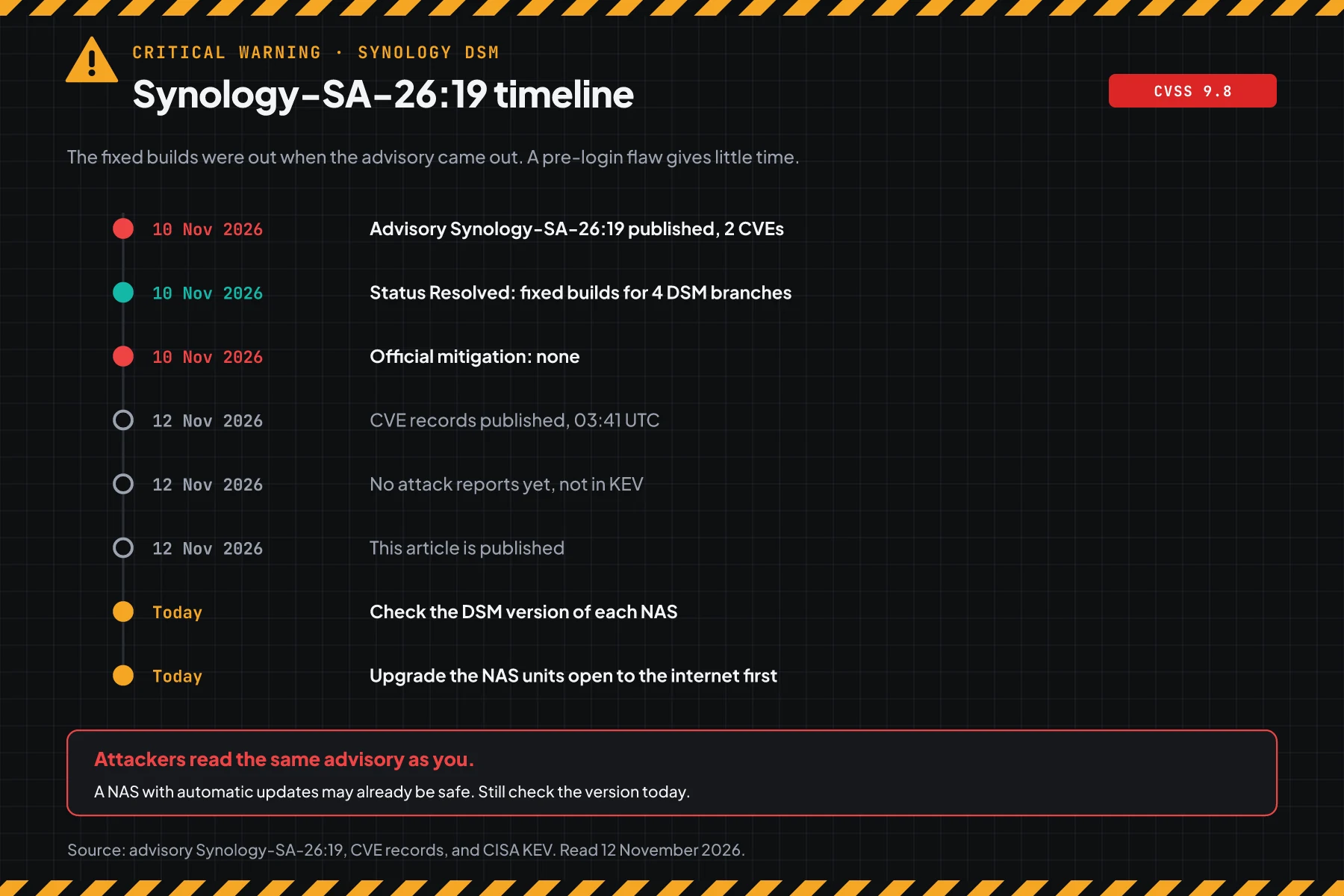
The advisory came out on 10 November 2026 with the status Resolved. The CVE records came out on 12 November 2026 at 03:41 UTC. Fixed builds for 4 DSM branches were there when the advisory came out.
How it works: a flaw before login
Both flaws work before login, so a strong password and MFA do not guard the NAS from these flaws.
This section uses the official summary. Its purpose is to help you choose the correct steps, not to explain an attack.
Summary from Synology
According to the Synology advisory Synology-SA-26:19, CVE-2026-76954 is an "improper neutralization of special elements used in an SQL command" flaw in the DSM Auth API. Its type is CWE-89, SQL injection. A remote attacker can read or write any file and cause a denial of service.
CVE-2026-85101 is an authentication flaw that is skipped through another path in the DSM rsync service. Its type is CWE-288. A remote attacker can read specific files, write any file, and cause a limited denial of service.
2 CVEs in the same advisory
Advisory Synology-SA-26:19 has 2 CVEs. The same upgrade closes both.
| CVE | Flaw type | Synology CVSS 3.1 | Effect |
|---|---|---|---|
| CVE-2026-76954 | SQL injection in the DSM Auth API (CWE-89) | 9.8 Critical | No login. Read and write any file, then DoS. |
| CVE-2026-85101 | rsync login skipped through another path (CWE-288) | 8.6 Important | No login. Read specific files, write any file, limited DoS. |
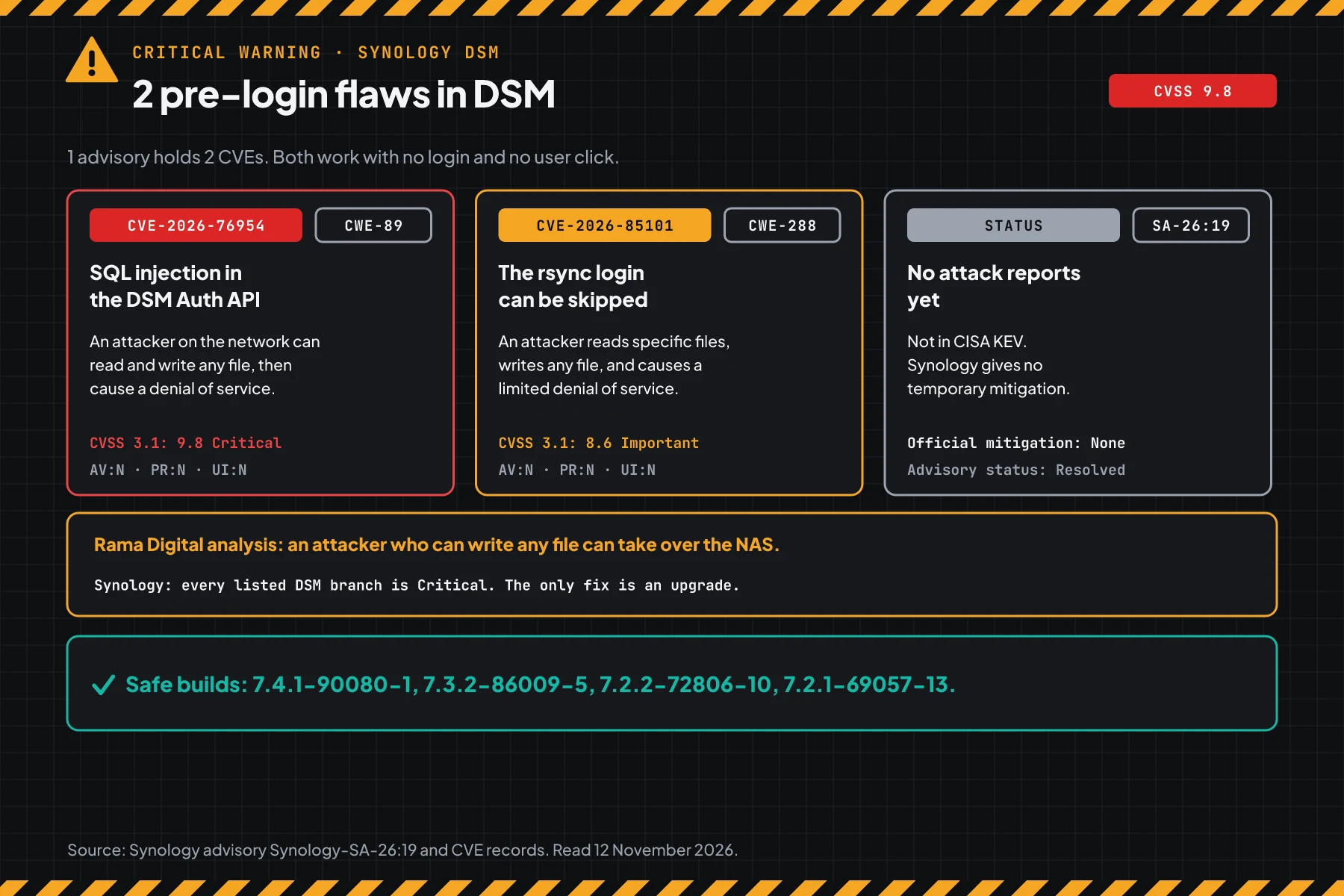
The 9.8 score comes from Synology as the CNA. The vector AV:N/AC:L/PR:N/UI:N means an attack over the network, with low effort, no access rights, and no user action.
Exploitation status on 12 November 2026
Synology reports no attacks and gives no IOCs. CISA KEV does not list CVE-2026-76954 or CVE-2026-85101. Synology names researchers from Viettel Cyber Security and Warisse Valentin as the reporters.
Rama Digital analysis: files that can be written with no login can become a way to take over the NAS or encrypt data. Condition: the NAS is open to the internet and is not upgraded. Limit: the advisory only names file read, file write, and DoS, not code execution.
Who is most at risk
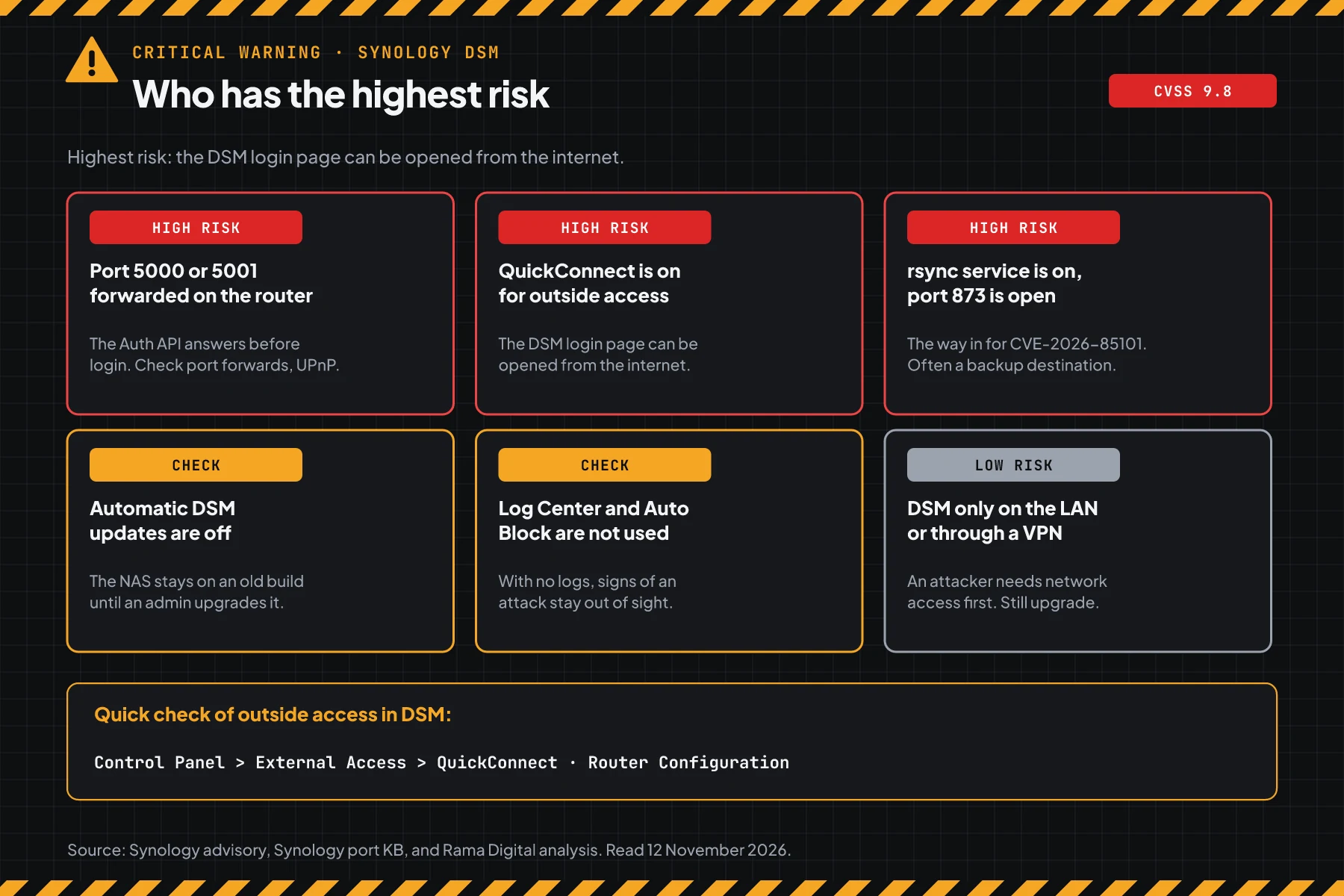
Offices that open the DSM login page to the internet and did not upgrade are most at risk.
This table sums up the Synology advisory Synology-SA-26:19, the Synology service ports list, and our analysis.
| NAS condition | Risk | Reason |
|---|---|---|
| Port 5000 or 5001 forwarded on the router, or a UPnP rule is on | High | Rama Digital analysis: the Auth API answers from the internet before login |
| QuickConnect is on for outside access | High | Rama Digital analysis: DSM can be opened from the internet with no port forward |
| The rsync service is on and port 873 is open | High | The way in for CVE-2026-85101 |
| Automatic DSM updates are off | Check | The NAS stays vulnerable until an admin upgrades it |
| Log Center and Auto Block are not used | Check | Signs of an attack stay out of sight |
| DSM opens only from the LAN or through a VPN | Low | An attacker needs network access first. Still upgrade. |
A NAS keeps work files and backups, so 1 NAS that is taken over can remove your way to recover. The same pattern shows in the SonicWall SSL VPN flaw CVE-2026-19868: services that are open to the internet are the first target. An SQL injection flaw with no login also shows in the Craft CMS SQL injection flaw CVE-2026-123488.
Vulnerable and safe versions
The advisory uses 4 DSM branches. Match the branch and version of your NAS with this table.
| DSM branch | Status on 12 November 2026 | Move to |
|---|---|---|
| DSM 7.4 | Older than 7.4.1-90080-1: vulnerable | 7.4.1-90080-1 or newer |
| DSM 7.3, including 7.3.1 | Older than 7.3.2-86009-5: vulnerable | 7.3.2-86009-5 or newer |
| DSM 7.2.2 | Older than 7.2.2-72806-10: vulnerable | 7.2.2-72806-10 or newer |
| DSM 7.2.1 | Older than 7.2.1-69057-13: vulnerable | 7.2.1-69057-13 or newer |
| DSM 7.2.0, 7.1, 7.0, and 6.x | Not listed in the advisory, treat as vulnerable | A branch above, if your model supports it |
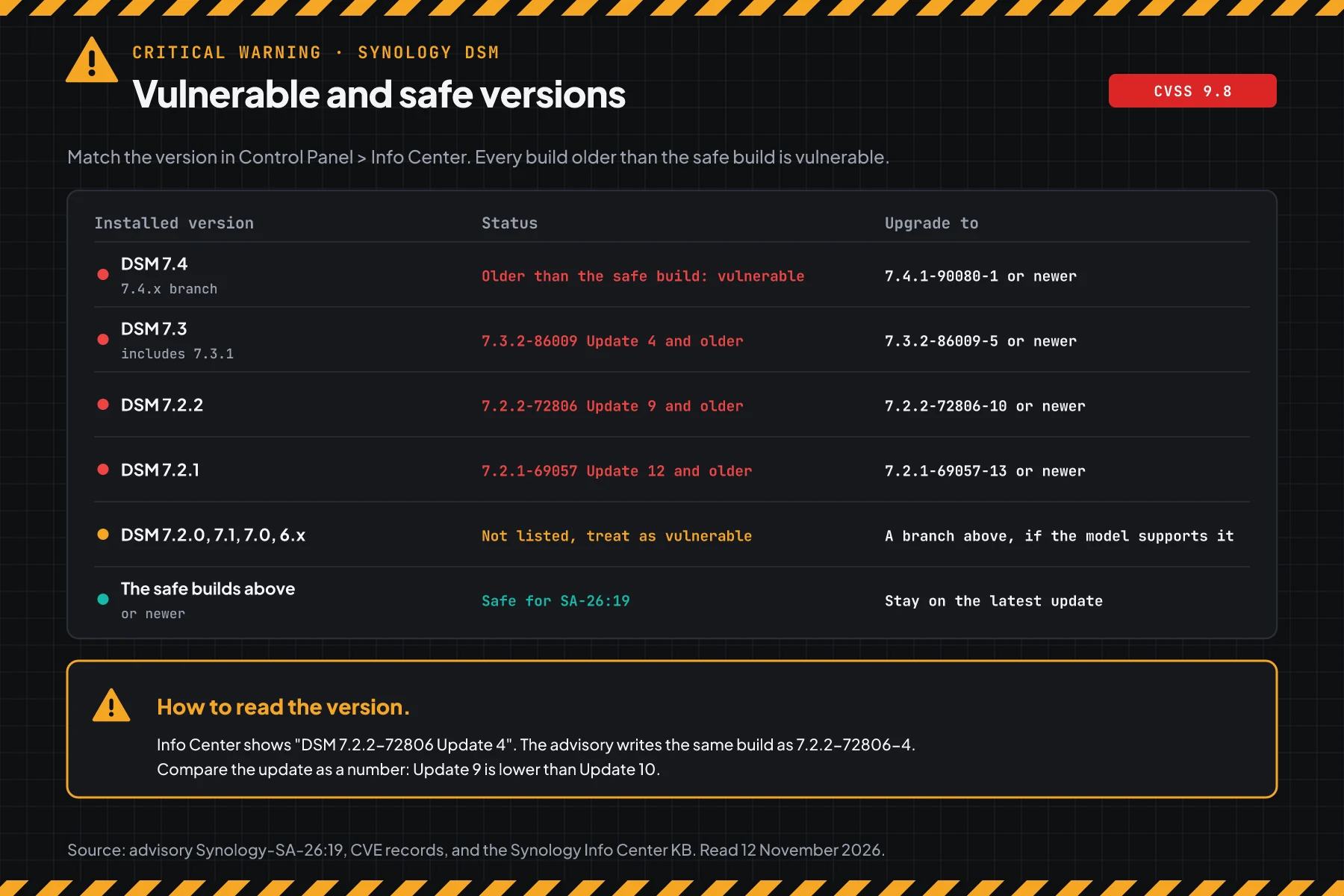
The table data comes from the Synology advisory Synology-SA-26:19. Info Center shows a version such as "DSM 7.2.2-72806 Update 4". The number "Update 4" is the same as the "-4" suffix in the advisory, so that version is older than 7.2.2-72806-10.
Note on old versions: The advisory does not list DSM 7.2.0, 7.1, 7.0, and 6.x. The CVE-2026-76954 record lists the affected versions below 7.2.1 as "unknown". Rama Digital analysis: treat those versions as vulnerable, then check in the Download Center if your model can move to a listed branch.
Before you start
- An account in the administrators group for each Synology NAS, including backup and branch NAS units.
- Access to the Synology Download Center for your NAS model.
- A maintenance window. The NAS restarts during a DSM update, so shared folders and backups stop for a short time.
- Admin access to the office router to check port forwards and UPnP.
- A list of the valid admin accounts and the public IPs of the office or VPN. Step 5 needs this list.
Step 1: Check the DSM version of each NAS
Log in to DSM, then open Control Panel > Info Center > General. Write down the NAS name and the DSM version line. The official guide is the Synology KB on Info Center.
For many NAS units, save this script as check-version-dsm.sh. The script compares the version with the advisory table and prints the target version. The list mode does not contact the NAS.
#!/usr/bin/env bash
# Check the DSM version against Synology advisory Synology-SA-26:19 (CVE-2026-76954 and CVE-2026-85101).
# Data: Synology advisory of 10 November 2026. The script only reads text and does not contact the NAS.
# Use on a laptop: bash check-version-dsm.sh "NAS-office DSM 7.2.2-72806 Update 4"
#              or: bash check-version-dsm.sh < nas-list.txt   (1 NAS per line: name, then the version from Info Center)
# Use on the NAS over SSH: bash check-version-dsm.sh --nas   (reads /etc.defaults/VERSION)
# "Update 4" in Info Center is the same as the "-4" suffix in the advisory.
set -u

# First safe build for each DSM branch, from the advisory.
safe_for() {
  case "$1" in
    7.4.*) echo "7.4.1-90080-1" ;;
    7.3.*) echo "7.3.2-86009-5" ;;
    7.2.2) echo "7.2.2-72806-10" ;;
    7.2.1) echo "7.2.1-69057-13" ;;
    *) echo "" ;;
  esac
}

# True when version $1 is lower than version $2. "-" becomes "." so that sort -V reads version, build, then update.
is_lower() {
  local a="${1//-/.}" b="${2//-/.}"
  [ "$a" != "$b" ] && [ "$(printf '%s\n%s\n' "$a" "$b" | sort -V | head -n 1)" = "$a" ]
}

header() { printf '%-14s %-16s %s\n' "NAS" "VERSION" "STATUS"; }

# $1 name, $2 product version (7.2.2), $3 build (72806), $4 update (4)
rate() {
  local name="${1:--}" p="$2" b="$3" u="$4" v safe status move=""
  [[ $p =~ ^[0-9]+\.[0-9]+$ ]] && p="$p.0"
  if [[ ! $p =~ ^[0-9]+\.[0-9]+\.[0-9]+$ || ! $b =~ ^[0-9]+$ || ! $u =~ ^[0-9]+$ ]]; then
    printf '%-14s %-16s %s\n' "$name" "-" "UNKNOWN, compare by hand with advisory SA-26:19"
    return 0
  fi
  v="$p-$b-$u"
  safe=$(safe_for "$p")
  if [ -n "$safe" ]; then
    if is_lower "$v" "$safe"; then
      status="VULNERABLE (SA-26:19)"; move="$safe or newer"
    else
      status="SAFE for SA-26:19"
    fi
  else
    case "$p" in
      7.2.0|7.1.*|7.0.*|6.*)
        status="NOT LISTED, treat as vulnerable"
        move="a branch in the advisory, if your model supports it" ;;
      *)
        status="UNKNOWN, compare by hand with advisory SA-26:19" ;;
    esac
  fi
  printf '%-14s %-16s %s\n' "$name" "$v" "$status"
  [ -n "$move" ] && printf '%-14s %-16s -> move to %s\n' "" "" "$move"
  return 0
}

# Read 1 line of text: NAS name, then a version such as "DSM 7.2.2-72806 Update 4" or "7.2.2-72806-4".
line() {
  local text name
  # Remove control characters and limit the length, so file content cannot change the terminal display.
  text=$(printf '%s' "$1" | tr -cd '[:alnum:] ._-' | cut -c1-80)
  [ -z "${text// /}" ] && return 0
  if [[ $text =~ ([0-9]+\.[0-9]+(\.[0-9]+)?)-([0-9]+)(-([0-9]+)|[[:space:]]+[Uu]pdate[[:space:]]+([0-9]+))? ]]; then
    name=${text%%"${BASH_REMATCH[0]}"*}
    name=$(printf '%s' "$name" | sed -E 's/(^| )DSM( |$)/ /g; s/  +/ /g; s/^ //; s/ $//' | cut -c1-14)
    rate "$name" "${BASH_REMATCH[1]}" "${BASH_REMATCH[3]}" "${BASH_REMATCH[5]:-${BASH_REMATCH[6]:-0}}"
  else
    printf '%-14s %-16s %s\n' "$(printf '%s' "$text" | cut -c1-14)" "-" "UNKNOWN, compare by hand with advisory SA-26:19"
  fi
}

if [ "${1:-}" = "--nas" ]; then
  f=/etc.defaults/VERSION
  [ -r "$f" ] || { echo "Cannot read $f. Run --nas mode on the NAS over SSH."; exit 1; }
  get() { sed -n "s/^$1=\"\{0,1\}\([^\"]*\)\"\{0,1\}\$/\1/p" "$f" | head -n 1 | tr -cd '[:alnum:]._-' | cut -c1-20; }
  p=$(get productversion); b=$(get buildnumber); u=$(get smallfixnumber)
  [ -z "$p" ] && p="$(get majorversion).$(get minorversion)"
  header
  rate "$(hostname | tr -cd '[:alnum:]._-' | cut -c1-14)" "$p" "$b" "${u:-0}"
  exit 0
fi

header
if (( $# > 0 )); then
  for x in "$@"; do line "$x"; done
else
  while IFS= read -r x || [ -n "$x" ]; do line "$x"; done
fi
Write 1 NAS per line: the name, then the version from Info Center. A sample file with dummy data:
NAS-office DSM 7.2.2-72806 Update 4
NAS-archive DSM 7.3.2-86009 Update 3
NAS-photo DSM 7.4.1-90080 Update 1
NAS-backup DSM 7.2.1-69057 Update 13
NAS-warehouse DSM 7.1.1-42962 Update 9
NAS-branch DSM 7.2.2-72806 Update 11
# 1 NAS per line: name, then the version from Control Panel > Info Center > General
nano nas-list.txt
bash check-version-dsm.sh < nas-list.txt
# Or pass them as arguments
bash check-version-dsm.sh "NAS-office DSM 7.2.2-72806 Update 4"
# On the NAS over SSH: the script reads the version from /etc.defaults/VERSION
bash check-version-dsm.sh --nas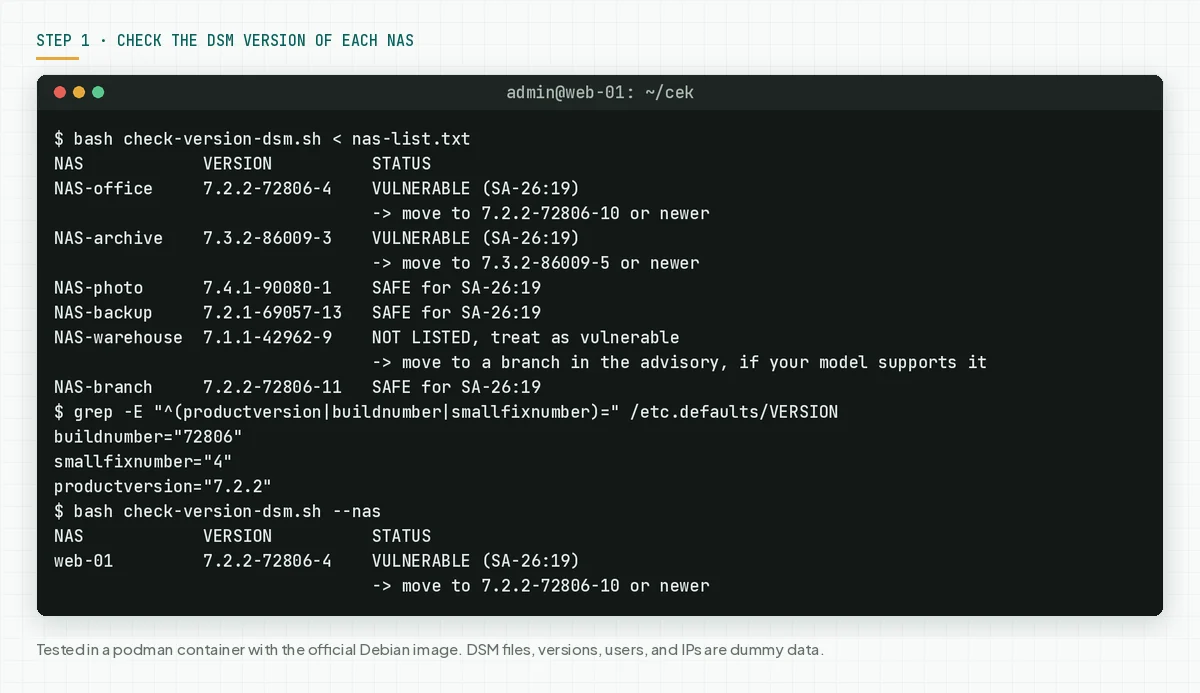
Check the result: "VULNERABLE" means the NAS needs steps 2 and 3 today. "SAFE for SA-26:19" means the version closes both CVEs, but still run step 5. "NOT LISTED" means the advisory does not cover that branch, so treat it as vulnerable.
The --nas mode reads /etc.defaults/VERSION on the NAS over SSH. Rama Digital analysis: we tested the key names productversion, buildnumber, and smallfixnumber on a dummy file, not on a real NAS. If this mode gives a different result than Info Center, use the Info Center numbers.
Step 2: Back up before the upgrade
According to the Synology KB on DSM Update, a DSM update cannot be reversed. So the backup is your way back.
- Open Control Panel > Update & Restore > Configuration Backup, then export the DSM configuration to a laptop.
- Run a Hyper Backup task for the important shared folders, or make a snapshot if the NAS uses Snapshot Replication.
- Keep a backup copy outside this NAS. Name it with the date, model, and DSM version.
- Write down the members of the administrators group and the tasks in Task Scheduler. Step 5 needs this list.
Check the result: the configuration file is on the laptop, and the last Hyper Backup task shows success.
Step 3: Upgrade to a safe build
Only a Synology build closes both flaws. The advisory writes mitigation: None.
- Open Control Panel > Update & Restore > DSM Update. If DSM shows a new update, download and install it.
- If no update shows, download the DSM file for your model from the Synology Download Center.
- Click Manual DSM Update, click Browse, select that file, then follow the steps on the screen.
- Wait for the NAS to restart. Do not cut the power during the update.
- After the restart, open Info Center again, then run
check-version-dsm.shwith the new version.
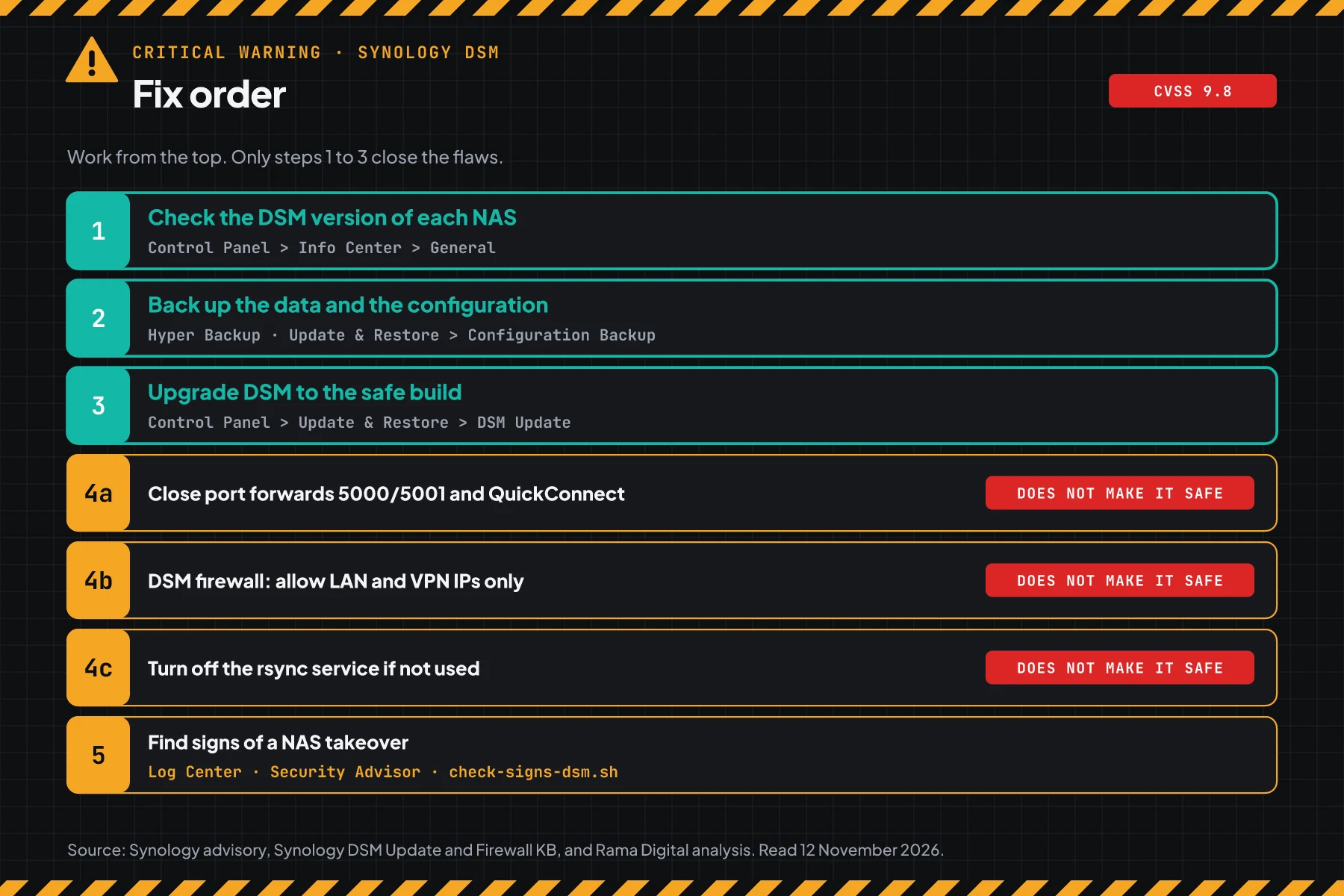
Check the result: the script prints "SAFE for SA-26:19" for each NAS, including the backup NAS.
The Synology KB on DSM Update also has the option Automatically install important updates in Update Settings. Rama Digital advice: turn on that option for NAS units with no daily admin, then still check the version with step 1.
Step 4: Apply temporary mitigation until the upgrade is done
These steps lower the chance of an attack, but they do not close the flaws.
Rama Digital analysis: Synology writes mitigation: None. We built 3 steps from standard DSM features. Condition: the upgrade cannot run today, or your model gets no safe build. Limit: an attacker on a network that you allow can still use these flaws.
4a. Close DSM access from the internet
Remove the port forwards to 5000 and 5001 on the office router, then turn off UPnP if you do not use it. Check the rules that DSM made in Control Panel > External Access > Router Configuration, per the Synology KB on Router Configuration. Also turn off QuickConnect in Control Panel > External Access > QuickConnect, per the Synology KB on QuickConnect.
4b. Allow only LAN and VPN IPs in the DSM firewall
Open Control Panel > Security > Firewall, turn on the firewall, then create Allow rules for the LAN subnet and the VPN subnet. Select Deny for requests that match no rule. These steps are in the Synology KB on the Firewall.
Also turn on Auto Block in Control Panel > Security > Protection. According to the Synology KB on Auto Block, Auto Block blocks public IPs that fail to log in many times on DSM, SSH, and rsync.
4c. Turn off rsync if you do not use it
CVE-2026-85101 is in the rsync service. If the NAS is not an rsync backup destination, open Control Panel > File Services > rsync and clear the rsync service box. If you still need rsync, limit the users in Application Privileges > rsync and allow port 873 only from the backup source IP, per the Synology KB on rsync.
Check the result: the DSM login page does not open from a mobile network, QuickConnect is off, and port 873 does not answer from outside the office.
Step 5: Find signs of a NAS takeover
The upgrade closes the flaws, but it does not remove the accounts, schedules, or files that an attacker left. So look for those traces after the upgrade.
Rama Digital analysis: Synology has not published IOCs, and an attack before login may leave no login log. That is why the script looks for traces after an attack: unknown admins, schedules outside Synology KB on Task Scheduler, new scripts in the web folder, and logins from unknown IPs.
This script runs on the NAS over SSH. Turn on SSH for a short time in Control Panel > Terminal & SNMP > Terminal, then turn it off after the check. According to the Synology KB on Terminal, only accounts in the administrators group can log in over SSH, then become root with sudo -i.
Save this script as check-signs-dsm.sh. The script only reads files. It does not change, delete, or send anything.
#!/usr/bin/env bash
# Find signs of a NAS takeover after CVE-2026-76954 and CVE-2026-85101 (Synology-SA-26:19).
# Synology has not released IOCs. These checks are Rama Digital analysis: unknown admins,
# schedules outside Task Scheduler, new scripts in web and temporary folders, and logins from unknown IPs.
# Use on the NAS over SSH: sudo bash check-signs-dsm.sh [CONNECTION-LOG.csv]
#   KNOWN_ADMINS="admin-it rina"   admin accounts that you know
#   KNOWN_IPS="198.51.100.10"      public IPs of your office or VPN
#   DAYS=14                        day range for new files
# The script only reads files. It does not change, delete, or send anything.
set -u
ADMIN="${KNOWN_ADMINS:-}"; IPS="${KNOWN_IPS:-}"; DAYS="${DAYS:-14}"; LOG="${1:-}"
[[ $DAYS =~ ^[0-9]+$ ]] || DAYS=14
found=0
# Remove control characters and limit the line length, so file content cannot change the terminal display.
clean() { tr -cd '[:print:]\n' | cut -c1-110; }
is_in() { [[ " $2 " == *" $1 "* ]]; }

echo "== 1. Members of the administrators group"
members=$(sed -n 's/^administrators:[^:]*:[^:]*://p' /etc/group 2>/dev/null | head -n 1 | tr ',' ' ' | clean)
[ -z "${members// /}" ] && echo "The administrators group is empty or cannot be read."
read -r -a list <<< "$members"
for a in "${list[@]}"; do
  if [ -z "$ADMIN" ]; then echo "$a"
  elif is_in "$a" "$ADMIN"; then echo "$a  known"
  else echo "CHECK: $a is not in KNOWN_ADMINS"; found=$((found + 1)); fi
done
[ -z "$ADMIN" ] && echo "Note: set KNOWN_ADMINS so that the script can compare."

echo "== 2. Schedules in /etc/crontab outside DSM and Task Scheduler"
if [ -r /etc/crontab ]; then
  t=0; n=0
  pola='^/usr/syno/s?bin/[A-Za-z0-9_.-]+( [A-Za-z0-9_=.,:/-]+)*$'
  while IFS= read -r b; do
    b=$(printf '%s' "$b" | tr '\t' ' ' | tr -cd '[:print:]')
    [[ $b =~ ^[[:space:]]*($|#|[A-Za-z_]+=) ]] && continue
    t=$((t + 1))
    cmd=$(printf '%s\n' "$b" | awk '{ for (i = 7; i <= NF; i++) printf "%s%s", $i, (i < NF ? " " : "") }')
    # Only a DSM program with plain arguments passes. A ; | & $ > or .. is marked.
    if [[ $cmd =~ $pola && $cmd != *..* ]]; then :
    else s=$(printf '%s' "$b" | cut -c1-110); [ ${#b} -gt 110 ] && s="$s ..."
      echo "CHECK: $s"; n=$((n + 1)); fi
  done < /etc/crontab
  echo "$t schedule lines: $((t - n)) from DSM or Task Scheduler, $n outside them"
  found=$((found + n))
else
  echo "Cannot read /etc/crontab. Run the script with sudo."
fi

echo "== 3. New scripts in web and temporary folders (last $DAYS days)"
n=0
for d in /volume*/web /tmp /var/tmp; do
  [ -d "$d" ] || continue
  while IFS= read -r f; do
    echo "CHECK: $(date -r "$f" '+%F %H:%M')  $(printf '%s' "$f" | clean)"
    n=$((n + 1))
  done < <(find "$d" -xdev -type f -mtime -"$DAYS" \( -name '*.php' -o -name '*.sh' -o -name '*.cgi' \
             -o -name '*.py' -o -name '*.pl' -o -name '*.so' \) 2>/dev/null | head -n 50)
done
(( n == 0 )) && echo "None"
found=$((found + n))

echo "== 4. DSM logins from the connection log"
if [ -z "$LOG" ]; then
  echo "Not checked. Export the connection log from Log Center as CSV, then run again with that file."
elif [ ! -r "$LOG" ]; then
  echo "Cannot read $(printf '%s' "$LOG" | clean)."
else
  ok=$(grep -i 'signed in to' "$LOG" | grep -iv 'failed' \
       | sed -nE 's/.*User \[([^]]*)\] from \[([^]]*)\].*/\1 \2/p' | tr -cd '[:alnum:] .:@_\n-' | cut -c1-80)
  if [ -z "$ok" ]; then
    echo "No successful logins in this file. Compare the words \"signed in\" with your export."
  else
    echo "Successful logins per user and IP:"
    printf '%s\n' "$ok" | sort | uniq -c | sort -rn | head -n 10
    if [ -z "$IPS" ]; then
      echo "Note: set KNOWN_IPS so that the script can mark unknown IPs."
    else
      n=0
      while read -r u ip; do
        is_in "$ip" "$IPS" && continue
        echo "CHECK: $u logged in from $ip, this IP is not in KNOWN_IPS"; n=$((n + 1))
      done < <(printf '%s\n' "$ok" | sort -u)
      found=$((found + n))
    fi
  fi
  failed=$(grep -ic 'failed to sign in' "$LOG"); blocked=$(grep -ic 'was blocked' "$LOG")
  echo "Failed logins: $failed. Hosts blocked by Auto Block: $blocked."
fi

if (( found > 0 )); then
  echo "Result: FINDINGS ($found). Check each CHECK line. For a line that you do not know: cut the NAS from the internet."
else
  echo "Result: no findings. A clean result does not prove that the NAS is clean."
fi
Export the connection log from Log Center as CSV. According to the Synology KB on Log Center, Log Center can export logs as HTML or CSV. The first 3 lines of a sample CSV file with dummy data:
Level,Time,User,Event
Info,2026/11/11 08:02:11,admin-it,"User [admin-it] from [198.51.100.10] signed in to [DSM] successfully via [password]."
Info,2026/11/11 09:15:40,rina,"User [rina] from [198.51.100.11] signed in to [DSM] successfully via [password]."
# 1. Log in to the NAS over SSH with an account in the administrators group, then become root
sudo -i
# 2. Go to the folder where you keep the script and the CSV export, then run it
KNOWN_ADMINS="admin-it rina" KNOWN_IPS="198.51.100.10 198.51.100.11" bash check-signs-dsm.sh connection-log.csv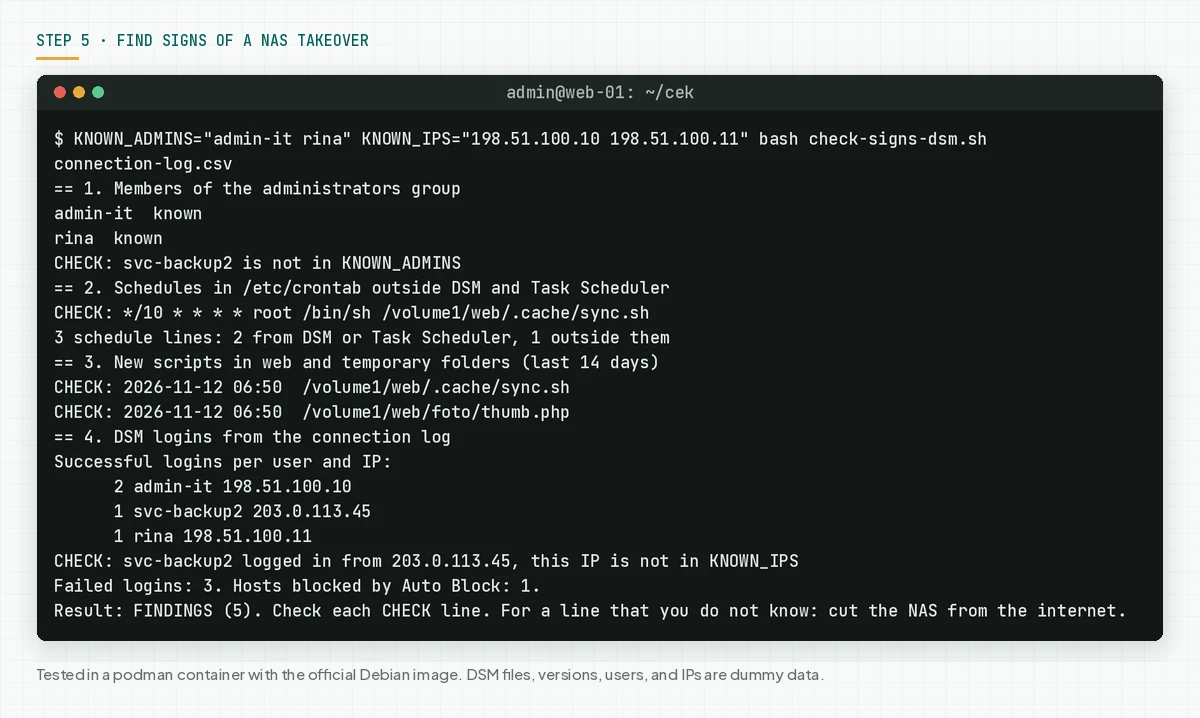
Script limits: The script reads message text such as "signed in to" and "failed to sign in", not column names. We tested those message patterns on a dummy log, not on a real NAS export. Valid crontab lines outside /usr/syno, or with signs such as ; and >, also show as CHECK. This check does not find a new program that an attacker puts in /usr/syno/bin.
For 14-day login patterns, open Security Advisor and use Login Analysis, per the Synology KB on Login Analysis. This feature needs 14 days of data.
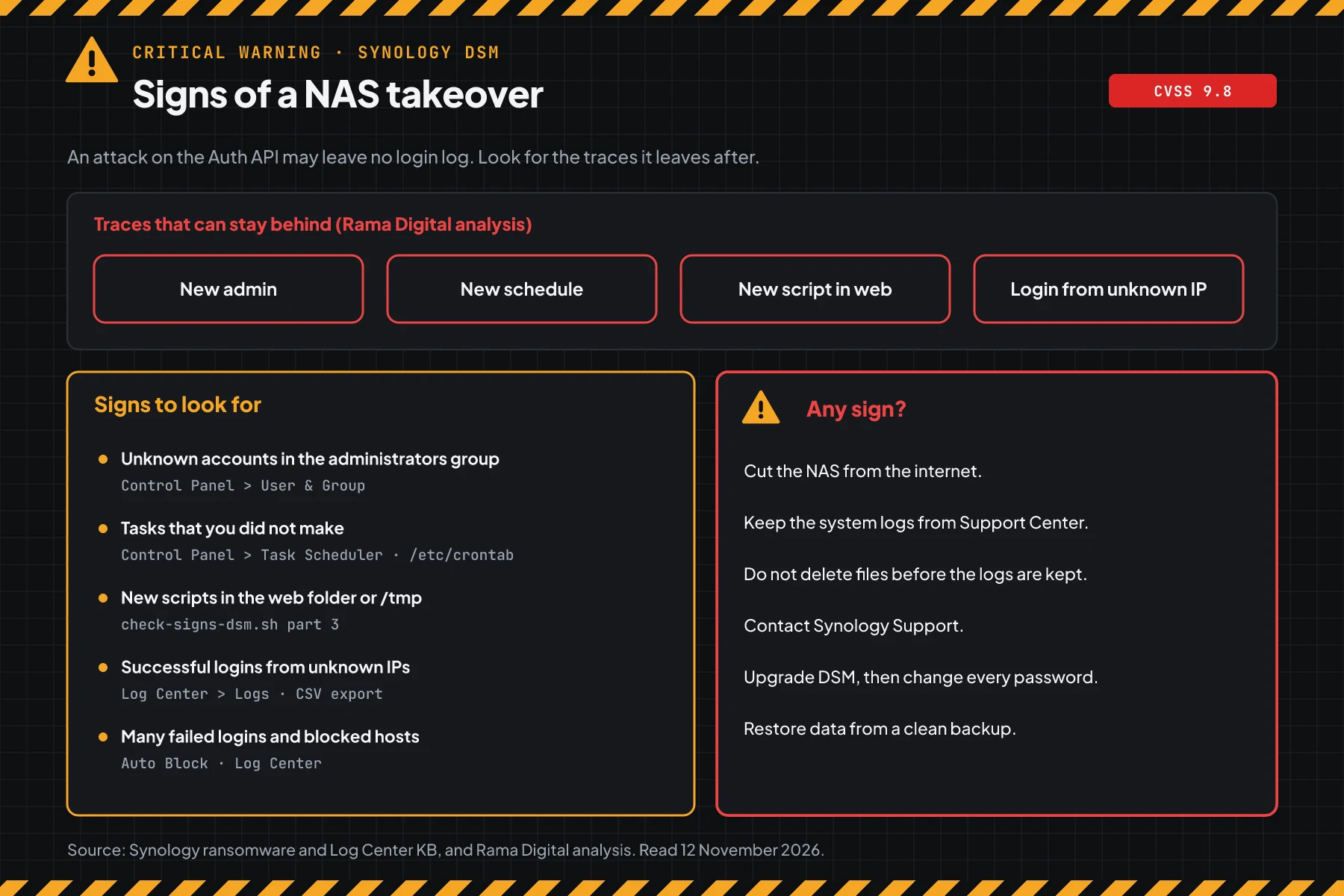
Check the result: "no findings" means the script found no signs. A clean result does not prove that the NAS is clean. "FINDINGS" means check each CHECK line, then follow this order from the Synology ransomware guide for each line that you do not know:
- Cut the NAS from the internet. Turn off the power only if you must, because the data in memory is lost.
- Generate the system logs from Support Center before you change anything.
- Do not delete unknown accounts or files before the logs are saved.
- Contact Synology Support with those logs.
- Upgrade DSM, then change the passwords of all accounts on the NAS.
- Restore data from a clean backup or snapshot. Think about a DSM reinstall.
If personal data leaked, Indonesian Law 27/2022 on Personal Data Protection requires written notice no later than 3 times 24 hours. Also read the Ivanti Connect Secure VPN chain.
Example: 1 response morning for 4 NAS units
This simulation uses dummy data. The NAS names, times, and results are not customer data.
| Time (WIB) | Dummy NAS | Check | Result | Action |
|---|---|---|---|---|
| 08:00 | NAS-office (7.2.2-72806-4, port 5001 forwarded) | Step 1 | VULNERABLE | Step 4a this morning, upgrade this afternoon |
| 08:20 | NAS-archive (7.3.2-86009-3, QuickConnect on) | Step 1 | VULNERABLE | Turn off QuickConnect, upgrade tonight |
| 09:00 | NAS-office | Step 5 | svc-backup2 in the administrators group, login from 203.0.113.45 | Cut from the internet, keep the logs, contact Synology Support |
| 10:00 | NAS-warehouse (7.1.1-42962-9) | Step 1 and Download Center | NOT LISTED | LAN access only, plan an upgrade or a device change |
Lesson from the simulation: a strong admin password does not prove that a NAS is safe. NAS-office uses a strong password, but step 5 still found an admin that nobody knew.
Who installs the patch
The patch duty changes with the management model, so this table helps you know who acts today.
| Management model | Patch owner | What you do |
|---|---|---|
| NAS in the office, managed by your own IT team | Your IT team | Steps 1 to 5 |
| NAS managed by an IT vendor or MSP | The partner, per the contract | Ask for written version proof and the step 5 result |
| Automatic install of important updates is on | Synology sends the build, your team still checks | Step 1 and step 5 |
| NAS at an employee's home that keeps office data | The NAS owner with the IT team | Steps 1, 3, and 4a |
Rama Digital advice: do not open the DSM login page to the internet. Use a VPN for outside access, and keep 1 backup copy outside the NAS.
Checklist for today
- List all Synology NAS units, including backup and branch units. Owner: IT team. Proof: a list of names and versions.
- Check the DSM version with step 1. Owner: NAS admin. Proof: script output.
- Back up the configuration and data with step 2. Owner: NAS admin. Proof: the configuration file and the Hyper Backup status.
- Close DSM access from the internet with step 4a. Owner: network admin. Proof: the port forward list on the router.
- Upgrade to a safe build. Owner: NAS admin. Proof: script output after the upgrade.
- Find signs with step 5. Owner: NAS admin. Proof: script output and the connection log export.
- Turn off rsync and SSH if you do not use them, even with no signs.
Questions and answers
My NAS only opens from the office network. Am I safe?
Your risk is lower, but not zero. An infected laptop on the office network can use this flaw, because the flaw needs no login. You still must upgrade.
I use QuickConnect, not a port forward. Is my NAS open?
Rama Digital analysis: QuickConnect lets DSM open from the internet with no port forward. Turn off QuickConnect until the upgrade is done, then use a VPN for outside access.
There are no attack reports yet. Why must I upgrade today?
The score is 9.8 and the flaw works with no login. The advisory is public since 10 November 2026, so attackers read the same information as you.
My NAS runs DSM 7.1 or 6.2. Which build do I install?
The advisory does not list those branches, and the CVE record lists the status below 7.2.1 as "unknown". Check the Download Center for your model. If the model cannot move to 7.2.1 or newer, open the NAS only from the LAN and plan a device change.
Can I go back to the old version if the DSM update has problems?
The DSM Update KB writes that updates cannot be reversed. That is why step 2 is required before the upgrade.
Does turning off rsync close CVE-2026-76954?
No. rsync is only the way in for CVE-2026-85101. CVE-2026-76954 is in the DSM Auth API, so only the upgrade closes it.
Does the upgrade remove the attacker's access?
The upgrade closes the flaws. It does not remove the admins, schedules, or files that an attacker made. Run step 5, then change the passwords of all accounts.
Next step
The limits that still apply: the step 4 mitigation does not close the flaws, and an upgrade does not clean a NAS that was taken over. When your NAS shows a sign in step 5, or you need help with an audit and recovery, use Vibe Code Rescue. For 1 urgent issue today, book a 30-minute session.
Sources
- Synology advisory Synology-SA-26:19: summary of the 2 CVEs, Synology scores, CWE, affected DSM branches, safe builds, mitigation None, and revision 1 of 10 November 2026.
- CVE-2026-76954 record and CVE-2026-85101 record: CNA description, publish time 12 November 2026 03:41 UTC, and affected versions.
- CISA KEV: does not list either CVE on 12 November 2026.
- Synology KB on Info Center, Synology KB on DSM Update, and Synology KB on Terminal: menu paths for the version check, update, and SSH.
- Synology KB on Router Configuration, Synology KB on QuickConnect, Synology KB on the Firewall, Synology KB on Auto Block, and Synology KB on rsync: menu paths for the temporary mitigation.
- the Synology service ports list: ports 5000, 5001, and 873.
- Synology KB on Log Center, Synology KB on Login Analysis, Synology KB on Task Scheduler, and the Synology ransomware guide: logs, login analysis, schedules, and the response order.
- Indonesian Law 27/2022 on Personal Data Protection: the duty to report a personal data leak.