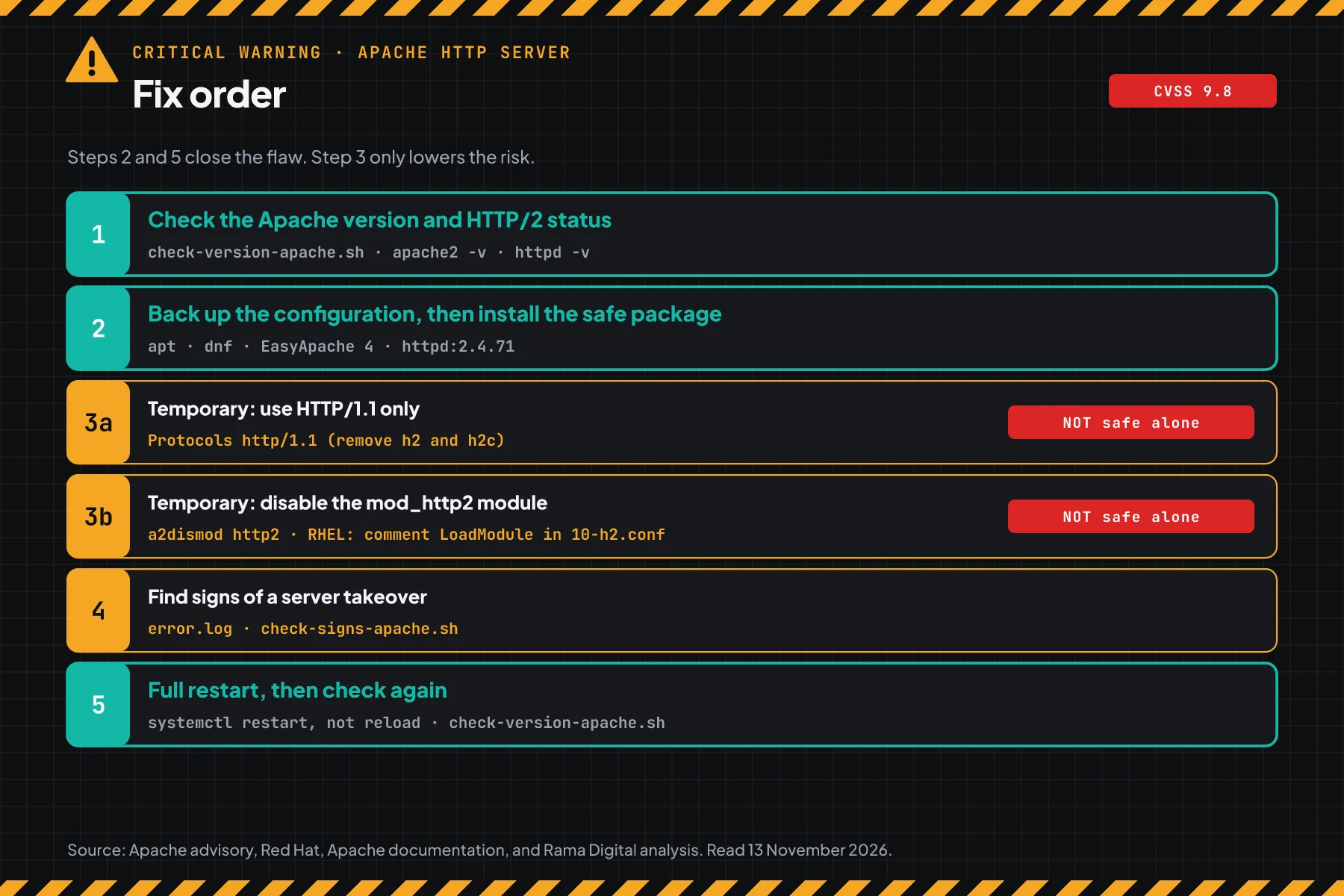
Direct answer: CVE-2026-119618 is a race condition flaw in mod_http2, the HTTP/2 module of Apache HTTP Server. Red Hat gives it a CVSS 3.1 score of 9.8: an attacker on the network, with no login, can run code on the server. Today, check the Apache version and the HTTP/2 status, install the safe package, then do a full restart of Apache.
Apache released httpd 2.4.71 on 11 November 2026. Versions 2.4.55 to 2.4.70 are vulnerable when HTTP/2 is on. The same release also fixes CVE-2026-106023 in mod_md and CVE-2026-109163 in mod_vhost_alias.
Main condition: According to the Red Hat CVE page, a server is affected only when mod_http2 is loaded and the Protocols directive has h2 or h2c. Red Hat also writes that public research shows a reliable exploit on a default configuration with mod_http2 on.
Limit: On 13 November 2026, CISA KEV does not list this flaw, and we found no attack reports. This article has no request content, no payload, and no attack sequence.
We read the Apache httpd 2.4 security advisory, the CVE-2026-119618 record, the Red Hat CVE page, the Debian security tracker, USN-9090-1, the cPanel EasyApache 4 changelog, and CISA KEV on 13 November 2026, from 13:30 to 14:05 WIB. We tested the scripts of steps 1, 3, 4, and 5 in podman containers with the official httpd, Debian, Ubuntu, and UBI 9 images. We did not test cPanel EasyApache 4, because it has no official image.
The problem: HTTP/2 is on for many Apache servers
Apache HTTP Server runs sites on VPS hosts, office servers, Docker images, and cPanel shared hosting. Admins turn on HTTP/2 so pages with many files load faster.
In our test on Debian and Ubuntu, the a2enmod http2 command adds the line Protocols h2 h2c http/1.1 at once. The official httpd image and RHEL 9 do not add an h2 line by default. So the HTTP/2 status is different per server, and you must check each server.
Rama Digital analysis: a server with port 443 open and HTTP/2 on can be reached by an attacker from the internet before login. Condition: a vulnerable version with the module loaded. Limit: the advisory names no port, because HTTP/2 can run on any port.
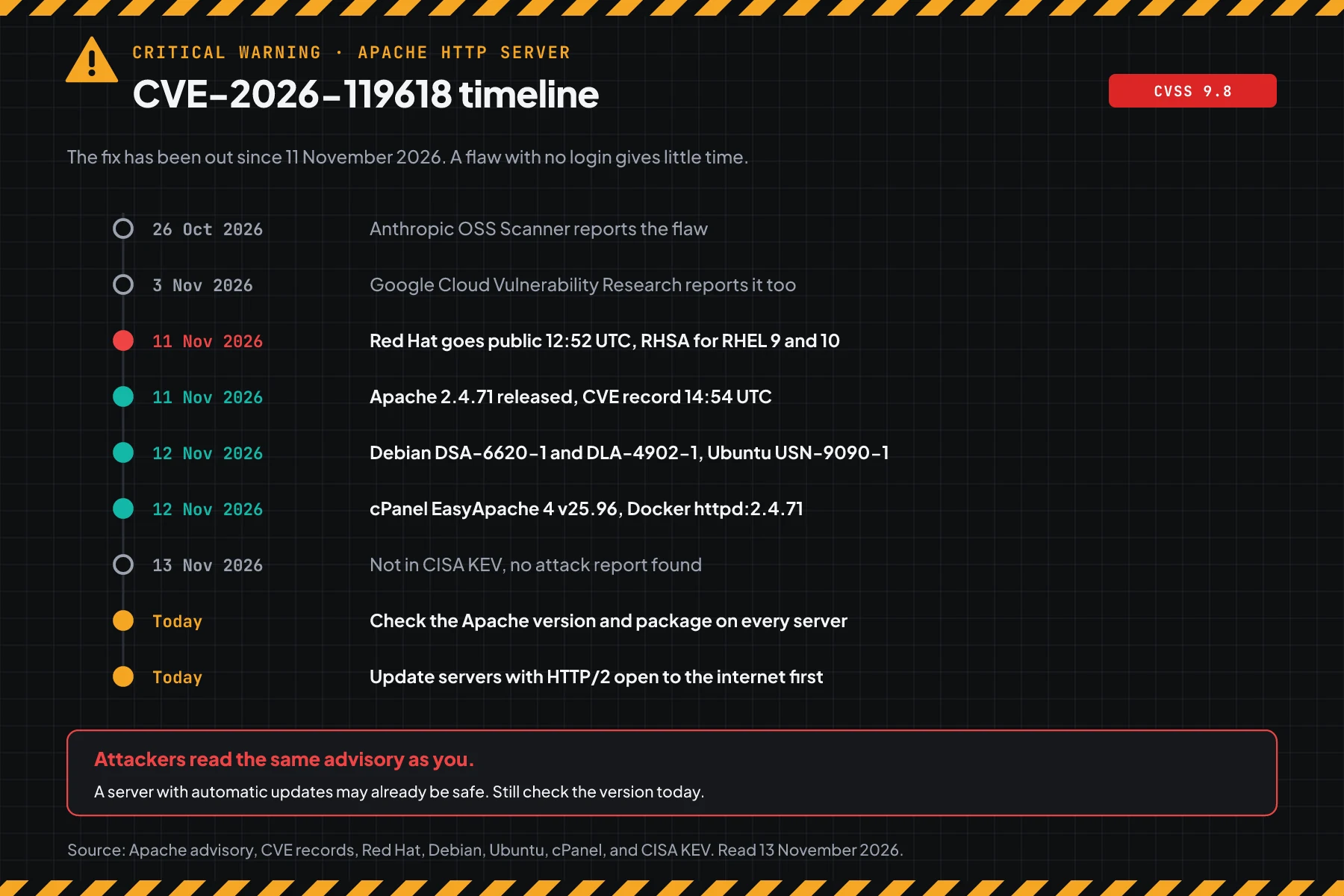
Anthropic OSS Scanner reported this flaw on 26 October 2026, then Google Cloud Vulnerability Research reported it on 3 November. Red Hat made it public on 11 November at 12:52 UTC, and the CVE record came out at 14:54 UTC. Debian, Ubuntu, cPanel, and the httpd:2.4.71 Docker image followed on 12 November.
How it works: a race condition in mod_http2
This flaw works before login, so a strong password and MFA do not guard the server from this flaw.
This part uses the official summary. Its goal is to help you choose the correct steps, not to explain how to attack.
Summary from Apache and Red Hat
According to the Apache httpd 2.4 security advisory, a race condition on a shared resource in the assign_headers() function of mod_http2 can lead to remote code execution. The type is CWE-362, which is concurrent execution with incorrect synchronization.
The Red Hat CVE page writes that the root cause is a thread-safety defect when mod_http2 handles HTTP/2 requests that run at the same time. The result is a corrupted heap, and an attacker can run code.
3 CVEs in release 2.4.71
Release 2.4.71 has 3 CVEs. The safe packages in the version table close CVE-2026-119618. Check your distro changelog for the 2 other CVEs.
| CVE | Flaw type | Score or label | Vulnerable | Effect |
|---|---|---|---|---|
| CVE-2026-119618 | Race condition in mod_http2 (CWE-362) | Red Hat CVSS 3.1 9.8, Apache critical | 2.4.55 to 2.4.70 | Remote code execution with no login when HTTP/2 is on |
| CVE-2026-106023 | NULL pointer dereference in mod_md | Apache important | 2.4.30 to 2.4.70 | An Apache child process crashes |
| CVE-2026-109163 | 1 byte out-of-bounds stack write, mod_vhost_alias | Apache low | 2.4.69 to 2.4.70 | Overwrites 1 byte on the stack |
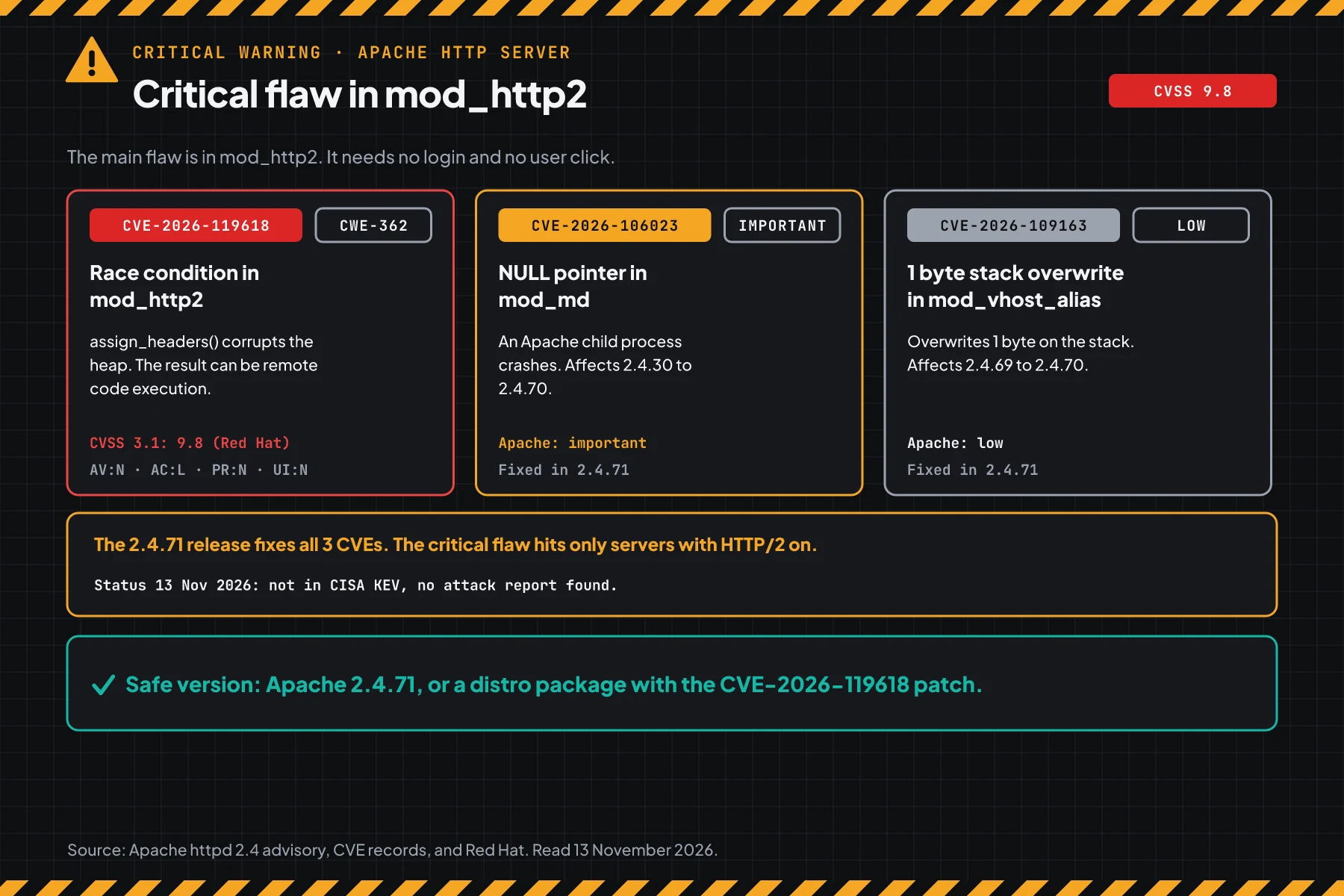
The score of 9.8 comes from Red Hat. Apache gives the label critical. The vector AV:N/AC:L/PR:N/UI:N means an attack over the network, easy, with no access rights, and with no user action.
Exploitation status on 13 November 2026
The Red Hat CVE page writes that public research shows a reliable exploit on servers with a default configuration and mod_http2 on. CISA KEV does not list CVE-2026-119618, and we found no reports of attacks on the internet.
Rama Digital analysis: public exploit research shortens the time until mass attacks. Condition: the server is open to the internet, HTTP/2 is on, and the patch is not in place. Limit: we did not read or test that exploit.
Who has the highest risk
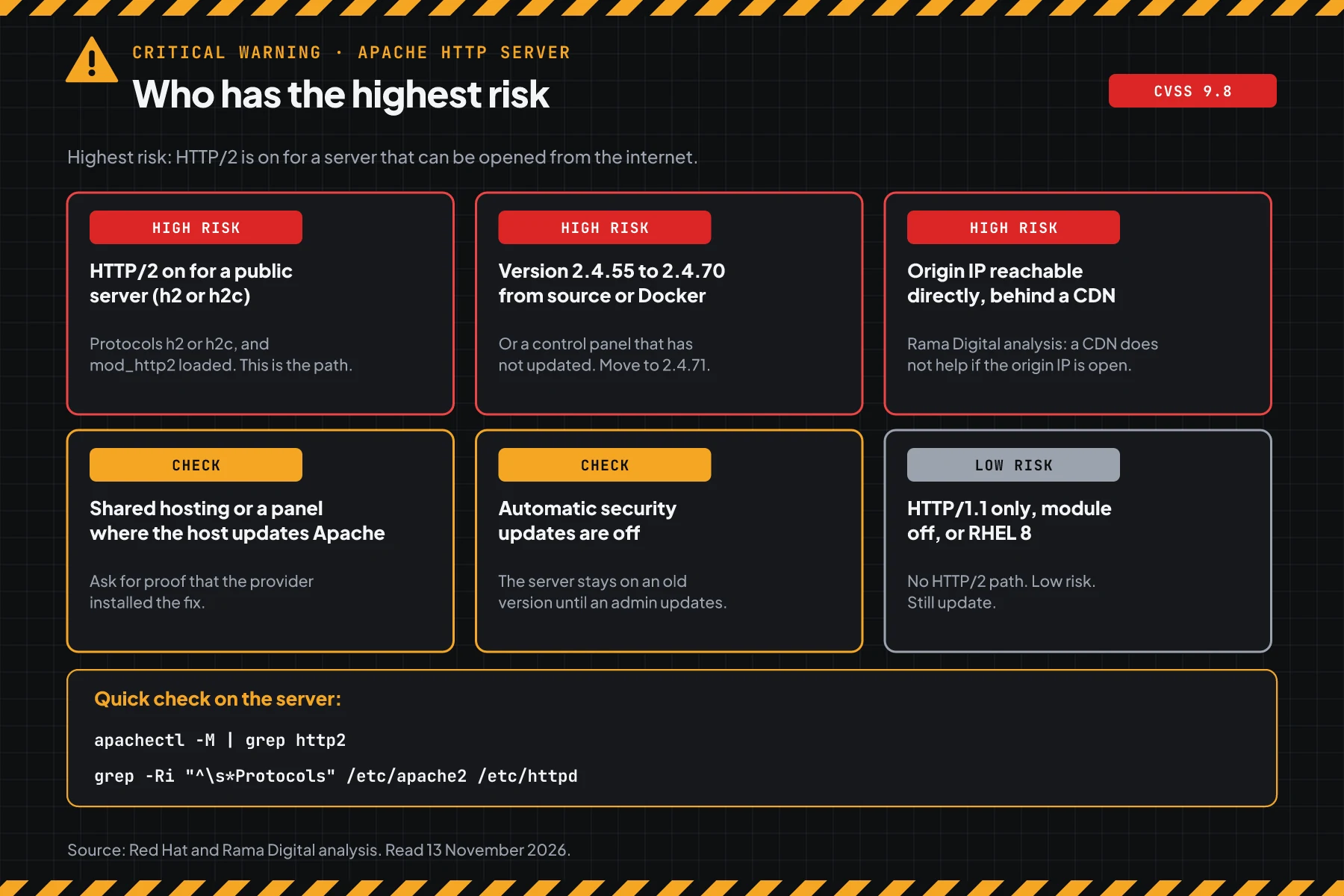
Public servers with HTTP/2 on and an old package have the highest risk.
This table sums up the Red Hat CVE page, the Protocols directive documentation, and our analysis.
| Server condition | Risk | Reason |
|---|---|---|
| HTTP/2 on (Protocols h2 or h2c) for a server open to the internet | High | This is the flaw path, per Red Hat |
| Apache 2.4.55 to 2.4.70 from source or a Docker image | High | Distro updates do not replace this Apache |
| The origin IP opens directly, even with the site behind a CDN | High | Rama Digital analysis: an attacker can go around the CDN |
| Shared hosting or a cPanel reseller | Check | The provider holds the patch and the restart time |
| Automatic security updates are off | Check | The server stays on the old package |
| HTTP/1.1 only, http2 module not loaded, or RHEL 8 | Low | No HTTP/2 path. Still update for other CVEs. |
The same pattern shows in the SonicWall SSL VPN flaw CVE-2026-19868: services that are open to the internet are the first targets. For another Apache product, also read the Apache OFBiz flaw CVE-2026-83542.
A note on the prefork MPM
According to the Apache HTTP/2 guide, HTTP/2 is supported in all MPMs that come with httpd, with severe restrictions in prefork. In our test, httpd 2.4.70 with prefork and Protocols h2 h2c http/1.1 answered curl with HTTP/1.1.
Rama Digital analysis: do not treat prefork as safe. The step 1 script still writes VULNERABLE when the module is loaded and Protocols has h2 or h2c, so install the patch.
Vulnerable and safe versions
Match your Apache package source with this table. Distro packages keep old version numbers, so compare the full package number.
| Package source | Vulnerable on 13 November 2026 | Safe version |
|---|---|---|
| Apache from source, httpd Docker image | 2.4.55 to 2.4.70 | 2.4.71 or the httpd:2.4.71 image |
| Debian 13 trixie | Older than 2.4.71-1~deb13u1 | 2.4.71-1~deb13u1 (DSA-6620-1) |
| Debian 12 bookworm | Older than 2.4.71-1~deb12u1 | 2.4.71-1~deb12u1 (DLA-4902-1) |
| Ubuntu 26.10 | Older than 2.4.68-1ubuntu6.2 | 2.4.68-1ubuntu6.2 (USN-9090-1) |
| Ubuntu 26.04 | Older than 2.4.66-2ubuntu2.8 | 2.4.66-2ubuntu2.8 (USN-9090-1) |
| Ubuntu 24.04 | Older than 2.4.58-1ubuntu8.19 | 2.4.58-1ubuntu8.19 (USN-9090-1) |
| Ubuntu 22.04 | Older than 2.4.52-1ubuntu4.27, affected through a backport | 2.4.52-1ubuntu4.27 (USN-9090-1) |
| Ubuntu 20.04 | Older than 2.4.41-4ubuntu3.23+esm11 | 2.4.41-4ubuntu3.23+esm11, only through Ubuntu Pro |
| RHEL 10 | mod_http2 older than the safe one | mod_http2-2.0.29-5.el10_3.1 (RHSA-2026:98978) |
| RHEL 9 | mod_http2 older than the safe one | mod_http2-2.0.26-7.el9_9.1 (RHSA-2026:98981) |
| RHEL 8 and older | Not affected, per Red Hat | Still install updates for other CVEs |
| cPanel EasyApache 4 | ea-apache24 2.4.70 | ea-apache24 2.4.71 (EA4 25.96) |
| Standalone mod_h2 from GitHub | 2.0.8 to 2.0.42 | A mod_h2 release that names CVE-2026-119618 |
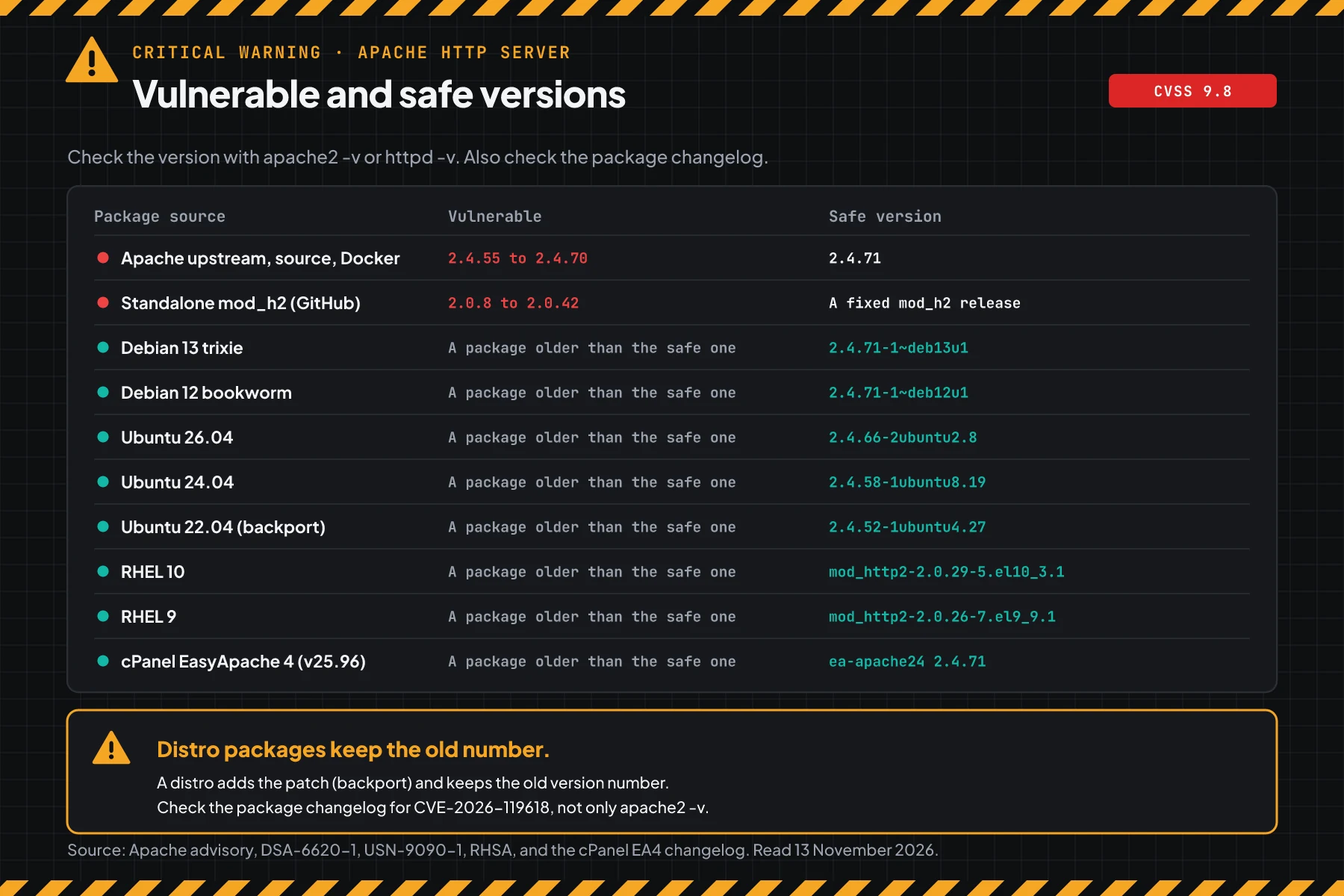
The table data comes from the Apache httpd 2.4 security advisory, the Debian security tracker, USN-9090-1, the Red Hat CVE page, and the cPanel EasyApache 4 changelog. For RHEL EUS streams, follow the RHSA per stream on the Red Hat CVE page.
Note on Ubuntu 22.04 and 20.04: The upstream numbers 2.4.52 and 2.4.41 are below 2.4.55. But USN-9090-1 writes that both releases are affected, because their packages have a mod_http2 backport. Ubuntu 20.04 gets the safe package only through Ubuntu Pro.
Note on Docker images: According to the official httpd image on Docker Hub, the 2.4.71 and 2.4.71-alpine tags came out on 12 November 2026. Write the exact version tag in compose. A running container keeps the old image until you create it again.
Before you start
- sudo or root access to each Apache server, including staging and standby servers.
- A list of the servers that run Apache, including Docker containers and reverse proxies.
- A maintenance window. An Apache restart cuts open connections for a few seconds.
- A backup of the Apache configuration and a recent backup of the site data.
- For shared hosting: the provider support contact and your ticket number.
Step 1: Check the Apache version and the HTTP/2 status
A server is affected when its version or package is vulnerable and HTTP/2 is on. Run this manual check on each server:
# Apache version
apache2 -v      # Debian and Ubuntu
httpd -v        # RHEL, AlmaLinux, Rocky, and the httpd Docker image
# Is the HTTP/2 module loaded?
apachectl -M 2>/dev/null | grep http2
# All Protocols lines. The -R option also reads symlinks in mods-enabled and sites-enabled.
sudo grep -Rn "^\s*Protocols" /etc/apache2 /etc/httpd /usr/local/apache2/conf 2>/dev/null
# Distro package version
dpkg-query -W apache2-bin   # Debian and Ubuntu
rpm -q mod_http2            # RHEL 9 and 10
According to the mod_http2 documentation, you must turn on HTTP/2 with the Protocols directive. The value h2 means HTTP/2 over TLS, and h2c means HTTP/2 over plain TCP.
For many servers, save this script as check-version-apache.sh. The script reads the Apache version, the package changelog, the module, the Protocols lines, and the process start time. The script only reads and does not change the configuration.
#!/usr/bin/env bash
# Check Apache HTTP Server for CVE-2026-119618 (mod_http2, Apache advisory of 11 November 2026).
# Vulnerable: Apache 2.4.55 to 2.4.70 with HTTP/2 on. Safe: Apache 2.4.71, or a distro package that has the patch.
# Ubuntu 20.04 and 22.04 are also affected according to USN-9090-1, because their packages have a backport.
# Use on a server: sudo bash check-version-apache.sh
# Many servers:    for h in web-01 web-02; do ssh "$h" 'sudo bash -s' < check-version-apache.sh; done
# The script only reads. It does not change the configuration and does not restart Apache.
# Exit code: 0 safe or not affected, 2 action needed, 1 Apache not found.
set -u
CVE=CVE-2026-119618
PATH="$PATH:/usr/sbin:/sbin:/usr/local/apache2/bin:/usr/local/apache/bin"
# Remove control characters and limit the length, so file content cannot change the terminal display.
bersih() { tr -cd '[:print:]\n' | cut -c1-"${1:-90}"; }
baris() { printf '%-14s%s\n' "$1" "$2"; }
lebih_rendah() { [ "$1" != "$2" ] && [ "$(printf '%s\n%s\n' "$1" "$2" | sort -V | head -n 1)" = "$1" ]; }
# Upstream version: old (below 2.4.55), vulnerable (2.4.55 to 2.4.70), or safe (2.4.71 and later).
kelas_upstream() { if lebih_rendah "$1" 2.4.55; then echo lama; elif lebih_rendah "$1" 2.4.71; then echo rentan; else echo aman; fi; }
deb_versi() { [ "$(dpkg-query -W -f='${db:Status-Abbrev}' "$1" 2>/dev/null)" = "ii " ] && dpkg-query -W -f='${Version}' "$1"; }
rpm_lebih_rendah() { [ "$(rpm --eval "%{lua: print(rpm.vercmp('$1', '$2'))}" 2>/dev/null)" = "-1" ]; }
# Process start time in epoch seconds, from /proc/PID/stat (field 22) and btime in /proc/stat.
mulai_proses() {
  local s t b hz
  s=$(sed 's/^.*) //' "/proc/$1/stat" 2>/dev/null) || return 1
  t=$(printf '%s' "$s" | awk '{print $20}'); b=$(awk '/^btime/ {print $2}' /proc/stat)
  hz=$(getconf CLK_TCK 2>/dev/null || echo 100)
  echo $(( b + t / hz ))
}

CTL=""
if command -v apache2ctl >/dev/null 2>&1; then CTL=apache2ctl
else for b in httpd apache2; do command -v "$b" >/dev/null 2>&1 && { CTL=$b; break; }; done; fi
if [ -z "$CTL" ]; then echo "Apache was not found on this server."; exit 1; fi
VER=$("$CTL" -v 2>/dev/null | sed -n 's|.*Apache/\([0-9][0-9.]*\).*|\1|p' | head -n 1)
if [ -z "$VER" ]; then echo "Cannot read the Apache version from $CTL -v."; exit 1; fi
MPM=$("$CTL" -V 2>/dev/null | sed -n 's/^Server MPM: *//p' | head -n 1 | tr -cd '[:alnum:]_')

# 1. Version and package. Distros add the patch and keep the version number, so the script reads the changelog first.
KELAS=""; PAKET="none, built from source or a Docker image"; BUKTI="Apache version $VER"
PATCH="move to Apache 2.4.71, or the httpd:2.4.71 image"
if command -v dpkg-query >/dev/null 2>&1 && PV=$(deb_versi apache2-bin) && [ -n "$PV" ]; then
  PAKET="apache2-bin $PV"; PATCH="sudo apt update && sudo apt install --only-upgrade apache2"
  if zcat /usr/share/doc/apache2-bin/changelog.Debian.gz /usr/share/doc/apache2/changelog.Debian.gz 2>/dev/null | grep -q "$CVE"; then
    KELAS=aman; BUKTI="the package changelog names $CVE"
  else
    UP=$(printf '%s' "$PV" | sed -E 's/^[0-9]+://; s/-[^-]*$//; s/[~+].*$//')
    KELAS=$(kelas_upstream "$UP"); BUKTI="upstream version $UP"
    # Ubuntu fixed versions from USN-9090-1, for servers that do not keep the changelog.
    case "$PV" in
      2.4.41-4ubuntu3*) FIX=2.4.41-4ubuntu3.23+esm11 ;;
      2.4.52-1ubuntu4*) FIX=2.4.52-1ubuntu4.27 ;;
      2.4.58-1ubuntu8*) FIX=2.4.58-1ubuntu8.19 ;;
      2.4.66-2ubuntu2*) FIX=2.4.66-2ubuntu2.8 ;;
      2.4.68-1ubuntu6*) FIX=2.4.68-1ubuntu6.2 ;;
      *) FIX="" ;;
    esac
    # Ubuntu 20.04 and 22.04 have a mod_http2 backport, so the USN table applies even below upstream 2.4.55.
    if [ -n "$FIX" ]; then
      if dpkg --compare-versions "$PV" ge "$FIX"; then KELAS=aman; BUKTI="the package version is equal to or above the fix $FIX"
      else KELAS=rentan; BUKTI="the package version is below the fix $FIX (USN-9090-1)"; fi
      case "$FIX" in *esm*) PATCH="turn on Ubuntu Pro, then sudo apt update && sudo apt install --only-upgrade apache2" ;; esac
    fi
  fi
elif command -v rpm >/dev/null 2>&1 && rpm -q ea-apache24 >/dev/null 2>&1; then
  PV=$(rpm -q --qf '%{VERSION}-%{RELEASE}' ea-apache24); PAKET="ea-apache24 $PV (cPanel EasyApache 4)"
  KELAS=$(kelas_upstream "${PV%%-*}"); BUKTI="upstream version ${PV%%-*}"; PATCH="update EasyApache 4 to ea-apache24 2.4.71"
elif command -v rpm >/dev/null 2>&1 && rpm -q httpd >/dev/null 2>&1; then
  PATCH="sudo dnf update mod_http2"
  if PV=$(rpm -q --qf '%{VERSION}-%{RELEASE}' mod_http2 2>/dev/null); then
    PAKET="mod_http2 $PV"
    if rpm -q --changelog mod_http2 2>/dev/null | grep -q "$CVE"; then KELAS=aman; BUKTI="the package changelog names $CVE"
    else
      case "$PV" in
        1.*) FIX=lama ;;
        *.el10_3*|*.el10) FIX=2.0.29-5.el10_3.1 ;;
        *.el9_9*|*.el9) FIX=2.0.26-7.el9_9.1 ;;
        *) FIX="" ;;
      esac
      if [ "$FIX" = lama ]; then KELAS=lama; BUKTI="mod_http2 1.x, below 2.0.8"
      elif [ -z "$FIX" ]; then KELAS=tidak_pasti; BUKTI="the package version is not in the script table"
      elif rpm_lebih_rendah "$PV" "$FIX"; then KELAS=rentan; BUKTI="the package version is below the fix $FIX"
      else KELAS=aman; BUKTI="the package version is equal to or above the fix $FIX"; fi
    fi
  else
    PAKET="httpd $(rpm -q --qf '%{VERSION}-%{RELEASE}' httpd)"; KELAS=tanpa_modul; BUKTI="the mod_http2 package is not installed"
  fi
fi
[ -z "$KELAS" ] && KELAS=$(kelas_upstream "$VER")

# 2. HTTP/2 is on when the http2 module is loaded and Protocols has h2 or h2c. MPM prefork still serves HTTP/2 (Apache HTTP/2 guide).
FILES=$("$CTL" -t -D DUMP_INCLUDES 2>/dev/null | sed -n 's/^ *([0-9*]*) \(\/.*\)$/\1/p')
[ -z "$FILES" ] && FILES=$(find /etc/apache2 /etc/httpd /usr/local/apache2/conf -name '*.conf' 2>/dev/null)
if "$CTL" -M 2>/dev/null | grep -qE '^ *http2_module '; then MOD=loaded; else MOD="not loaded"; fi
n=0; H2BARIS=""
while IFS= read -r f; do
  [ -r "$f" ] || continue
  while IFS= read -r l; do
    printf '%s' "${l#*:}" | grep -qwE 'h2|h2c' || continue
    n=$((n + 1))
    (( n <= 3 )) && H2BARIS+="$(printf '%s:%s  %s' "$f" "${l%%:*}" "$(printf '%s' "${l#*:}" | sed 's/^[[:space:]]*//')" | bersih 92)"$'\n'
  done < <(grep -nE '^[[:space:]]*Protocols[[:space:]]' "$f" 2>/dev/null)
done <<< "$FILES"
if [ "$MOD" = loaded ] && (( n > 0 )); then H2=aktif; else H2=mati; fi

# 3. The running process must be newer than the mod_http2 file. If not, the patch is not in use yet.
RUN=$("$CTL" -t -D DUMP_RUN_CFG 2>/dev/null)
PIDF=$(printf '%s\n' "$RUN" | sed -n 's/^PidFile: "\(.*\)"$/\1/p' | head -n 1)
SR=$(printf '%s\n' "$RUN" | sed -n 's/^ServerRoot: "\(.*\)"$/\1/p' | head -n 1)
MODF=$(printf '%s\n' "$FILES" | xargs -d '\n' grep -hE '^[[:space:]]*LoadModule[[:space:]]+http2_module[[:space:]]' 2>/dev/null \
       | awk '{print $3}' | tr -d '"' | head -n 1)
case "$MODF" in /*|"") ;; *) MODF="$SR/$MODF" ;; esac
PID=$( { tr -cd '0-9' < "$PIDF"; } 2>/dev/null )
RESTART=0; PROSES="Apache is not running, or the PID file cannot be read"
if [ -n "$PID" ] && [ -r "/proc/$PID/stat" ]; then
  MULAI=$(mulai_proses "$PID"); PROSES="running since $(date -d "@$MULAI" '+%F %H:%M')"
  if [ -f "$MODF" ] && [ "$(stat -c %Y "$MODF")" -gt "$MULAI" ]; then RESTART=1; fi
fi

echo "$CVE Apache mod_http2 (vulnerable: 2.4.55 to 2.4.70 with HTTP/2 on)"
baris "Server" "$(uname -n | bersih 40)"
baris "Apache" "$VER, MPM ${MPM:-unknown}"
baris "Package" "$PAKET"
baris "Evidence" "$BUKTI"
baris "HTTP/2 module" "$MOD"
baris "Protocols h2" "$n line$( (( n == 1 )) || echo s)"
[ -n "$H2BARIS" ] && printf '%s' "$H2BARIS" | sed 's/^/              /'
baris "Process" "$PROSES"
(( RESTART == 1 )) && baris "" "CHECK: the mod_http2 file is newer than the running process."

kode=0
case "$KELAS" in
  aman)
    if (( RESTART == 1 )); then ST="PATCH ON DISK, OLD PROCESS"; LG="do a full restart of Apache, so the new module is in use."; kode=2
    else ST="SAFE for $CVE"; LG="no patch is needed for this CVE."; fi ;;
  lama) ST="NOT AFFECTED by $CVE"; LG="this version is below 2.4.55. Still install distro updates for other CVEs." ;;
  tanpa_modul) ST="NOT AFFECTED by $CVE"; LG="mod_http2 is not installed. Install only a patched version." ;;
  tidak_pasti) ST="NOT CERTAIN"; LG="compare the package version with the errata of your vendor."; kode=2 ;;
  *)
    kode=2
    if [ "$H2" = aktif ]; then ST="VULNERABLE, HTTP/2 ON"; LG="install the patch today. Until then, turn off HTTP/2 (Step 3)."
    else ST="VULNERABLE, HTTP/2 OFF"; LG="the risk is lower. Still install the patch, because 1 Protocols line turns HTTP/2 on again."; fi ;;
esac
baris "STATUS" "$ST"
baris "Next" "$LG"
(( kode == 2 )) && [ "$KELAS" != aman ] && baris "Patch" "$PATCH"
exit "$kode"
# 1 server: save the script, then run it with sudo
sudo bash check-version-apache.sh
echo $? # 0 safe or not affected, 2 needs action, 1 Apache not found
# Many servers over SSH
for h in web-01 web-02; do ssh "$h" 'sudo bash -s' < check-version-apache.sh; done
# A container named web, from the Debian-based httpd image
docker exec -i web bash -s < check-version-apache.sh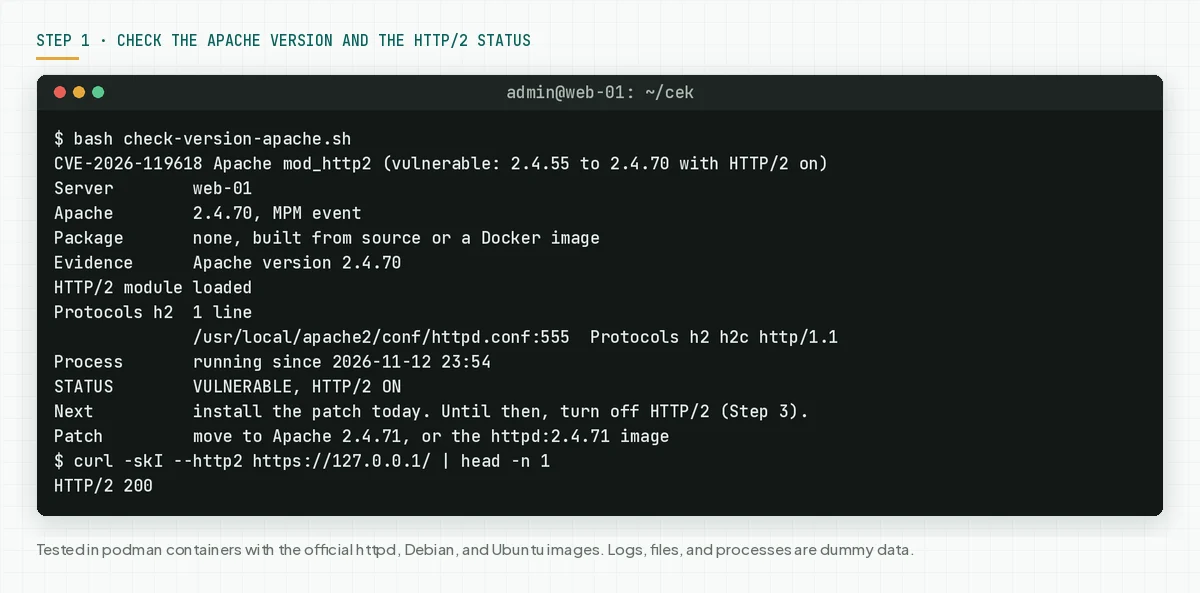
Check the result: "VULNERABLE, HTTP/2 ON" means install the patch today and do step 3 while you wait. "VULNERABLE, HTTP/2 OFF" means the risk is lower, but still install the patch. "SAFE for CVE-2026-119618" means the package has the patch.
"PATCH ON DISK, OLD PROCESS" means the new package is installed, but Apache has not done a full restart. Do step 5. "NOT SURE" means the script found no proof in the changelog, so ask your package vendor.
Step 2: Back up the configuration, then install the safe package
Save the Apache configuration first. This backup is your way back if the update changes how the server works.
# Debian and Ubuntu
sudo tar czf apache-config-$(date +%F).tgz /etc/apache2
# RHEL, AlmaLinux, and Rocky
sudo tar czf httpd-config-$(date +%F).tgz /etc/httpd
# Record the loaded modules before the update
apachectl -M > modules-before.txt 2>&1
Then install the safe package for your package source in the version table:
# Debian 12, Debian 13, and Ubuntu 22.04 to 26.10
sudo apt update && sudo apt install --only-upgrade apache2
# Ubuntu 20.04: the safe package is only in Ubuntu Pro (ESM)
sudo pro attach YOUR-TOKEN
sudo apt update && sudo apt install --only-upgrade apache2
# RHEL 9 and 10. AlmaLinux and Rocky: follow the distro errata, then check the changelog.
sudo dnf upgrade --refresh mod_http2 httpd
rpm -q --changelog mod_http2 | grep -m 1 CVE-2026-119618
# cPanel EasyApache 4 (not tested by us)
sudo dnf upgrade 'ea-apache24*'
# Docker: change the image tag to httpd:2.4.71 in compose.yaml, then create the container again
docker pull httpd:2.4.71
docker compose up -d
Build from source: download httpd 2.4.71 from the Apache download page, check the file signature or hash, then build with the same configure options. mod_h2 from GitHub: install a mod_h2 release that names CVE-2026-119618 in its release notes.
cPanel: According to the cPanel EasyApache 4 changelog, EasyApache 4 version 25.96 of 12 November 2026 moves ea-apache24 to 2.4.71. We did not test cPanel, so check the result with step 1.
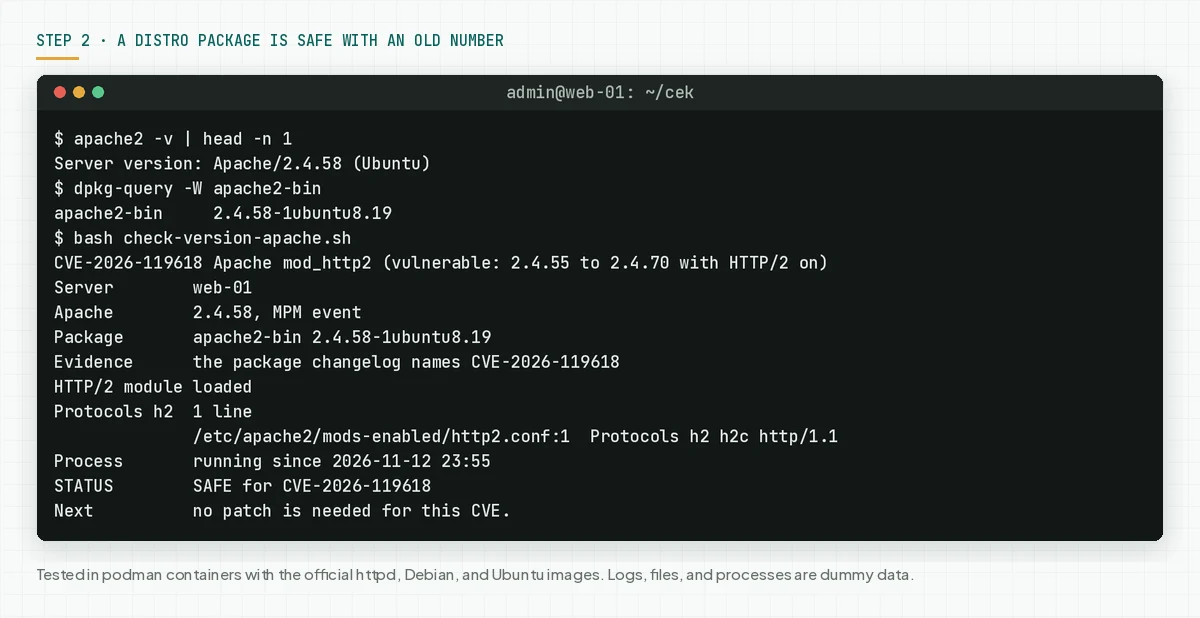
Check the result: run check-version-apache.sh again. The correct result is "SAFE for CVE-2026-119618", or "PATCH ON DISK, OLD PROCESS" when Apache has not done a full restart.
Step 3: Turn off HTTP/2 for now
This step lowers the risk until the patch is in place. This step does not close the flaw.
Rama Digital analysis: Apache and Red Hat give no workaround. We made 2 options from the Red Hat statement that a server with HTTP/1.1 only is not affected. Limit: 1 other Protocols line in a virtual host can turn HTTP/2 on again.
3a. Use HTTP/1.1 only
According to the Protocols directive documentation, a Protocols directive in a virtual host overrides the server-level value. So change every line with h2 or h2c, not only 1 line.
# 1. Find all Protocols lines
sudo grep -Rn "^\s*Protocols" /etc/apache2 /etc/httpd /usr/local/apache2/conf 2>/dev/null
# 2. Change each line with h2 or h2c to: Protocols http/1.1
#    The example that we tested on the httpd:2.4.70 image:
sudo sed -i 's|^Protocols h2 h2c http/1.1$|Protocols http/1.1|' /usr/local/apache2/conf/httpd.conf
# 3. Test the configuration. Continue only when the result is Syntax OK.
sudo apachectl configtest
# 4. Restart Apache. RHEL: sudo systemctl restart httpd
sudo systemctl restart apache2
# 5. Check from the server
curl -skI --http2 https://127.0.0.1/ | head -n 1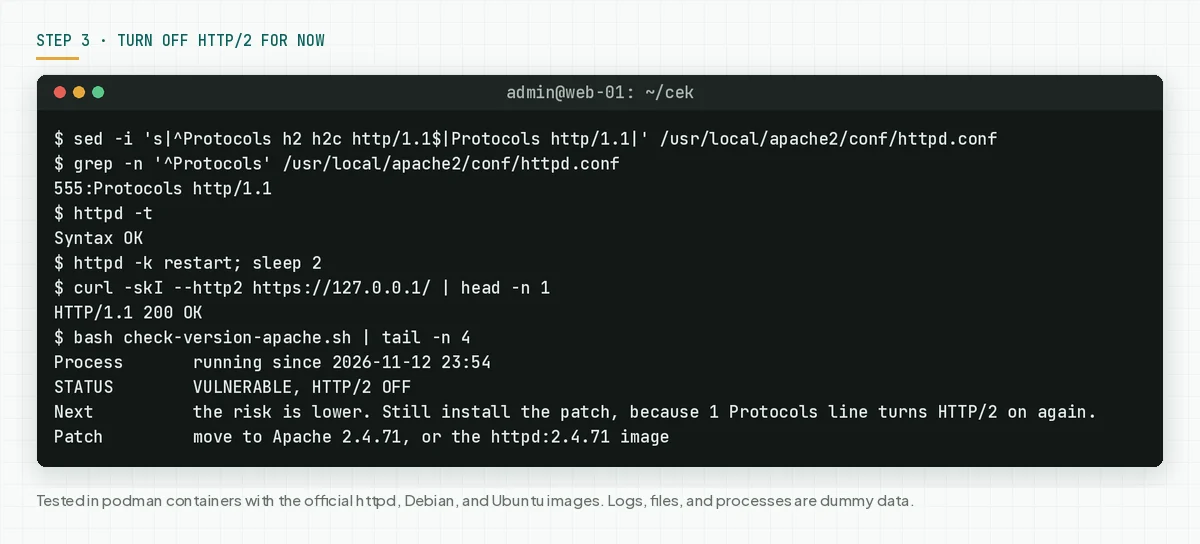
3b. Turn off the mod_http2 module
This option closes all Protocols lines at once. We did not test 3b in a container, so run the configuration test first.
# Debian and Ubuntu
sudo a2dismod http2
sudo apachectl configtest && sudo systemctl restart apache2
# RHEL 9 and 10: put a # in front of the LoadModule http2_module line
sudo sed -i 's|^LoadModule http2_module|#LoadModule http2_module|' /etc/httpd/conf.modules.d/10-h2.conf
sudo apachectl configtest && sudo systemctl restart httpd
If the configuration test fails, for example because another module needs mod_http2, undo the change and use 3a.
Check the result: curl with --http2 answers HTTP/1.1, and the script writes "VULNERABLE, HTTP/2 OFF". The site still runs on HTTP/1.1. Turn HTTP/2 on again after step 5 gives SAFE.
Step 4: Find signs of a server takeover
The patch closes the flaw, but it does not remove the webshells, processes, or cron jobs that an attacker left. So look for those traces after the patch.
Rama Digital analysis: Apache has not released IOCs. An attack on mod_http2 can crash a child process, so the script looks for worker crashes in the error log, new scripts in web folders, unknown processes of the web user, and cron jobs of the web user.
Save this script as check-signs-apache.sh. The script only reads files. It does not change, delete, or send anything.
#!/usr/bin/env bash
# Find signs of an attack on an Apache server through CVE-2026-119618 (mod_http2).
# Apache has not released IOCs. These checks are Rama Digital analysis: Apache workers that crash,
# new scripts in web folders, unknown processes of the web user, and cron jobs of the web user.
# Use on a server: sudo bash check-signs-apache.sh [ERROR-LOG ...]
#   DAYS=14              number of days for crashes and new files
#   WEB_USERS="www-data" the user that runs Apache, if the script guesses wrong
# Docker: save the log first (docker logs web 2> error-web.log), then give that file to the script.
# The script only reads files. It does not change, delete, or send anything.
set -u
HARI="${DAYS:-14}"; [[ $HARI =~ ^[0-9]+$ ]] || HARI=14
PATH="$PATH:/usr/sbin:/sbin:/usr/local/apache2/bin:/usr/local/apache/bin"
temuan=0
# Remove control characters and limit the line length, so file content cannot change the terminal display.
bersih() { tr -cd '[:print:]\n' | cut -c1-"${1:-100}"; }
[ "$(id -u)" -ne 0 ] && echo "Note: run with sudo, so the script can read all files."

CTL=""; FILES=""
if command -v apache2ctl >/dev/null 2>&1; then CTL=apache2ctl
else for b in httpd apache2; do command -v "$b" >/dev/null 2>&1 && { CTL=$b; break; }; done; fi
[ -n "$CTL" ] && FILES=$("$CTL" -t -D DUMP_INCLUDES 2>/dev/null | sed -n 's/^ *([0-9*]*) \(\/.*\)$/\1/p')
konfig() { [ -n "$FILES" ] && printf '%s\n' "$FILES" | xargs -d '\n' grep -hE "$1" 2>/dev/null; }

echo "== 1. Apache worker crashes in the error log (last $HARI days)"
LOGS=("$@")
if (( ${#LOGS[@]} == 0 )); then
  for f in /var/log/apache2/error.log* /var/log/httpd/error_log* /usr/local/apache2/logs/error_log* \
           /etc/apache2/logs/error_log* /usr/local/apache/logs/error_log*; do
    [ -f "$f" ] && LOGS+=("$f")
  done
fi
baca=(); for f in "${LOGS[@]}"; do
  if [ -r "$f" ]; then baca+=("$f"); else echo "Cannot read the file $(printf '%s' "$f" | bersih 80)."; fi
done
if (( ${#baca[@]} == 0 )); then
  echo "No error log found. Give the error log path as an argument."
else
  batas=$(date -d "-$HARI days" +%F); n=0; akhir=""; declare -A per=()
  while IFS= read -r l; do
    t=$(printf '%s' "$l" | sed -nE 's/^\[[A-Za-z]{3} ([A-Za-z]{3}) +([0-9]{1,2}) [0-9:.]+ ([0-9]{4})\].*/\1 \2 \3/p')
    [ -z "$t" ] && continue
    d=$(date -d "$t" +%F 2>/dev/null) || continue
    [[ $d < $batas ]] && continue
    per[$d]=$(( ${per[$d]:-0} + 1 )); n=$((n + 1))
    akhir="$d $(printf '%s' "$l" | sed -nE 's/^\[[A-Za-z]{3} [A-Za-z]{3} +[0-9]{1,2} ([0-9:]{8}).*/\1/p')  ${l##*AH00052: }"
  done < <(zcat -f "${baca[@]}" 2>/dev/null | grep -aE 'exit signal (Segmentation fault|Aborted|Bus error)' | bersih 300)
  if (( n > 0 )); then
    echo "CHECK: $n worker crashes. A crash can have other causes, but a crash spike needs a check."
    for d in $(printf '%s\n' "${!per[@]}" | sort); do c=${per[$d]}; printf '  %s  %s crash%s\n' "$d" "$c" "$( (( c == 1 )) || echo es)"; done
    echo "  Last: $(printf '%s' "$akhir" | cut -c1-96)"
    temuan=$((temuan + 1))
  else
    echo "No worker crash in ${#baca[@]} log files."
  fi
fi

echo "== 2. New scripts in web folders (last $HARI days)"
DIRS=()
while IFS= read -r d; do [ -n "$d" ] && [ -d "$d" ] && DIRS+=("$d"); done < <(
  { konfig '^[[:space:]]*DocumentRoot[[:space:]]' | awk '{print $2}' | tr -d '"' | grep -v '^\$'
    printf '%s\n' /var/www /usr/local/apache2/htdocs /home/*/public_html; } | sort -u)
n=0
if (( ${#DIRS[@]} > 0 )); then
  while IFS= read -r f; do
    echo "CHECK: $(date -r "$f" '+%F %H:%M')  $(printf '%s' "$f" | bersih 90)"; n=$((n + 1))
  done < <(find "${DIRS[@]}" -xdev -type f -mtime -"$HARI" \( -name '*.php' -o -name '*.phtml' -o -name '*.phar' \
             -o -name '*.cgi' -o -name '*.pl' -o -name '*.py' -o -name '*.sh' -o -name '*.jsp' -o -name '.htaccess' \) \
             2>/dev/null | sort -u | head -n 30)
fi
(( n == 0 )) && echo "None (${#DIRS[@]} web folders checked)"
temuan=$((temuan + n))

echo "== 3. Processes of the web user other than Apache and PHP"
if [ -n "${WEB_USERS:-}" ]; then UW=$WEB_USERS
else
  UW=$(konfig '^[[:space:]]*User[[:space:]]' | awk '{print $2}' | tr -d '"' | head -n 1)
  case "$UW" in '${'*)
    v=${UW#\$\{}; v=${v%\}}
    UW=$(sed -n "s/^export $v=\(.*\)$/\1/p" /etc/apache2/envvars 2>/dev/null | tr -d "\"'" | head -n 1) ;;
  esac
  [ -z "$UW" ] && UW="www-data apache daemon nobody"
fi
UW=$(printf '%s' "$UW" | tr -cd '[:alnum:] ._-')
uids=" "; for u in $UW; do i=$(id -u "$u" 2>/dev/null) && uids+="$i "; done
echo "Web user: $UW"
n=0
for p in /proc/[0-9]*; do
  uid=$(awk '/^Uid:/ {print $2; exit}' "$p/status" 2>/dev/null)
  [ -n "$uid" ] && [[ $uids == *" $uid "* ]] || continue
  c=$(tr -cd '[:print:]' < "$p/comm" 2>/dev/null)
  case "$c" in apache2|httpd|php-fpm*|php-cgi*|php[0-9]*|lsphp*|rotatelogs|htcacheclean|suexec) continue ;; esac
  a=$(tr '\0' ' ' < "$p/cmdline" 2>/dev/null | bersih 60)
  echo "CHECK: pid ${p#/proc/}  $(getent passwd "$uid" | cut -d: -f1)  $c  $a"; n=$((n + 1))
done
(( n == 0 )) && echo "None"
temuan=$((temuan + n))

echo "== 4. Cron jobs of the web user"
n=0
for u in $UW; do
  for f in "/var/spool/cron/crontabs/$u" "/var/spool/cron/$u"; do
    [ -r "$f" ] || continue
    while IFS= read -r b; do
      [[ $b =~ ^[[:space:]]*($|#) ]] && continue
      echo "CHECK: $u  $(printf '%s' "$b" | bersih 90)"; n=$((n + 1))
    done < "$f"
  done
done
(( n == 0 )) && echo "None"
temuan=$((temuan + n))

if (( temuan > 0 )); then
  echo "Result: FINDINGS ($temuan). Check each CHECK line. For a line you do not know: disconnect the server from the internet."
else
  echo "Result: no findings. A clean result does not prove that the server is clean."
fi
According to the Apache log documentation, the error log records problems while Apache processes requests. The first 3 lines of the dummy error log that we used:
[Thu Sep 03 08:14:22.410211 2026] [core:notice] [pid 1:tid 1] AH00052: child pid 77 exit signal Segmentation fault (11)
[Wed Nov 11 22:01:05.118312 2026] [mpm_event:notice] [pid 1:tid 1] AH00489: Apache/2.4.70 (Unix) OpenSSL/3.5.4 configured -- resuming normal operations
[Wed Nov 11 22:01:05.118377 2026] [core:notice] [pid 1:tid 1] AH00094: Command line: 'httpd -D FOREGROUND'
# A normal server: the script finds the Apache error log itself
sudo bash check-signs-apache.sh
# A log at another path, a 30-day range, and the RHEL web user
sudo DAYS=30 WEB_USERS="apache" bash check-signs-apache.sh /var/log/httpd/error_log
# Docker: save the container log first, then give that file to the script
docker logs web 2> error-web.log
sudo bash check-signs-apache.sh error-web.log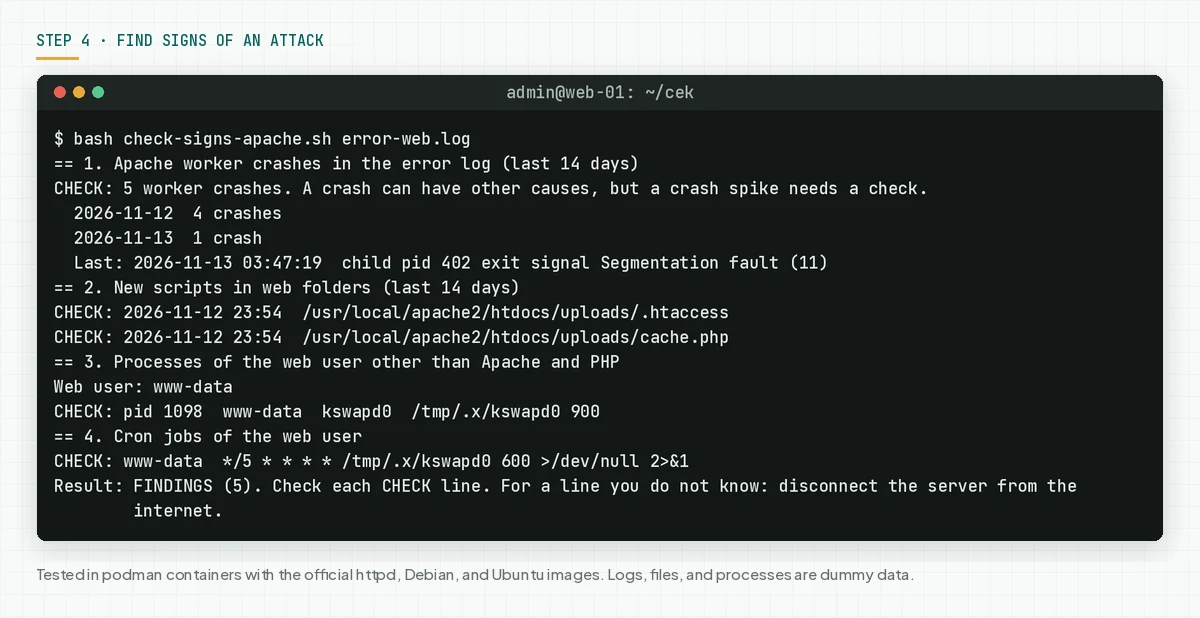
Script limits: a crash can have other causes, for example a broken PHP module. A valid PHP-FPM or CGI process can also show as CHECK. This check does not find a program that an attacker put outside the web folders and outside the web user.
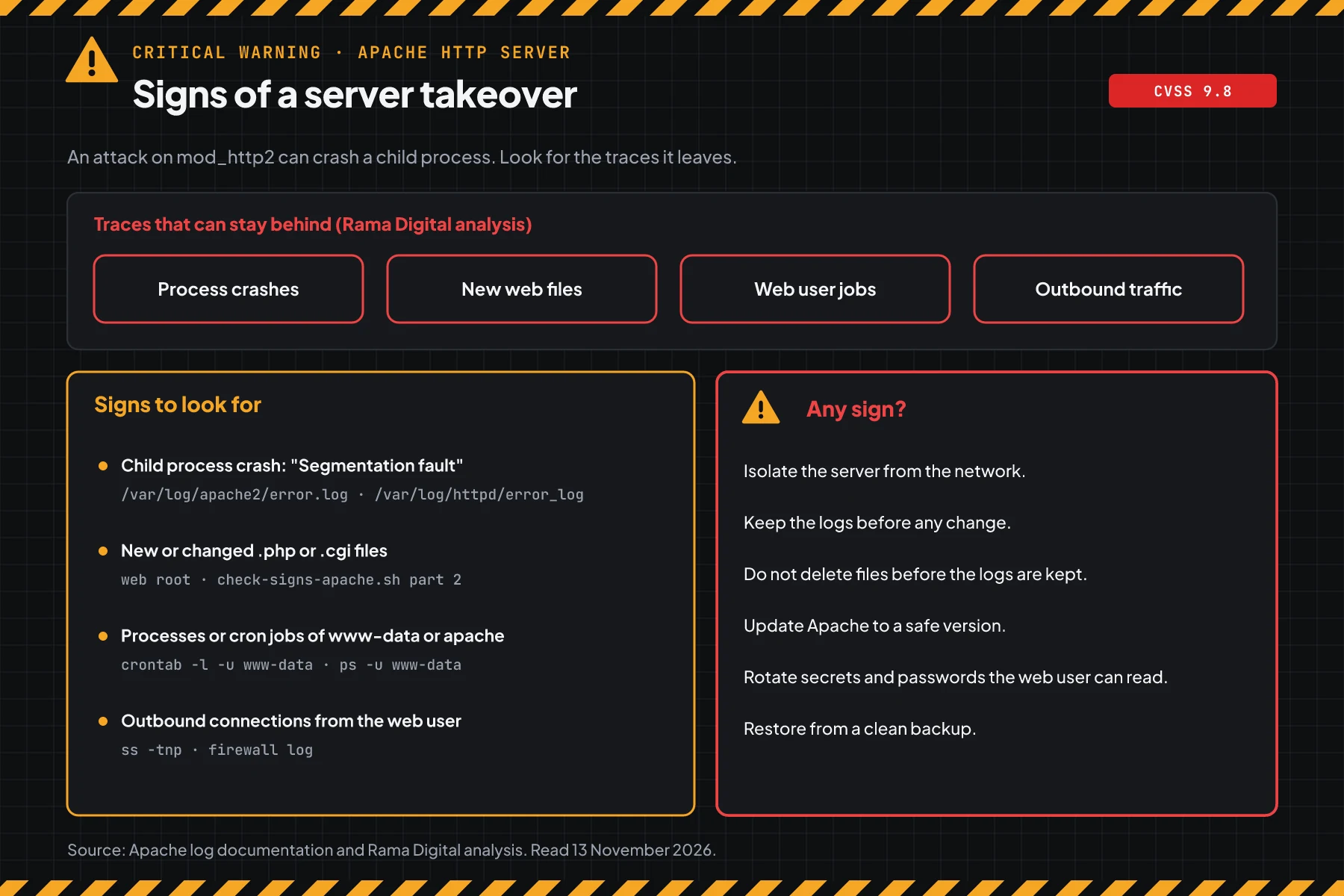
Check the result: "no findings" means the script found no signs. A clean result does not prove that the server is clean. "FINDINGS" means check each CHECK line, then follow this order for each line that you do not know:
- Isolate the server from the network. Turn off the power only if you must, because the data in memory is lost.
- Copy the error log, the access log, and the process list before you change anything.
- Do not delete unknown files before the logs are saved.
- Update Apache to a safe version, then do a full restart.
- Rotate the secrets, APIAPIThe official door 2 systems use to exchange data, without anybody copying it by hand.Open the glossary keys, and database passwords that the web user can read.
- Restore the site from a clean backup. Think about a new server.
If personal data leaked, Indonesian Law 27/2022 on Personal Data Protection requires written notice no later than 3 times 24 hours. Also read the Ivanti Connect Secure VPN chain.
Step 5: Do a full restart, then check again
A new package on disk is not active until the Apache parent process changes. According to the Apache stop and restart documentation, a graceful restart and a normal restart keep the parent process alive.
Rama Digital analysis: systemctl restart stops and then starts Apache, so the parent process changes. The script compares the time of the mod_http2 file with the start time of the parent process. Limit: a graceful restart can also load the new module, but the script cannot prove it.
# Debian and Ubuntu
sudo systemctl restart apache2
# RHEL, AlmaLinux, and Rocky
sudo systemctl restart httpd
# Check again
sudo bash check-version-apache.sh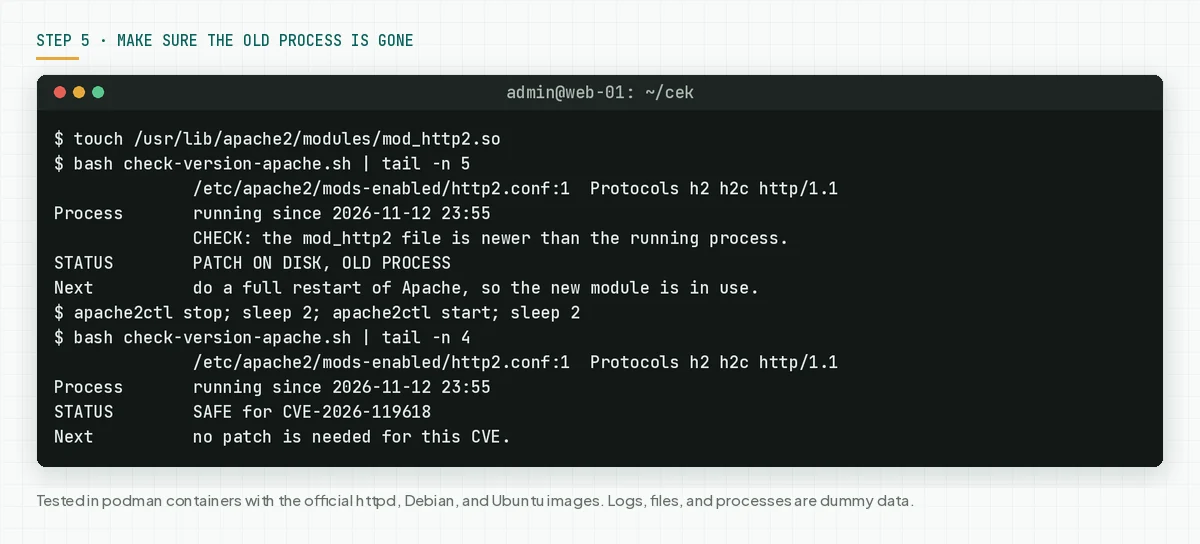
For Docker, step 2 already created a new container from the httpd:2.4.71 image, so the parent process is new. For a control panel, use the Apache service restart menu of that panel.
Check the result: the script writes "SAFE for CVE-2026-119618" on each server. After that, put back the Protocols lines from step 3a or run a2enmod http2 if you want HTTP/2 again.
Example: 1 response morning for 4 servers
This simulation uses dummy data. The server names, times, and results are not customer data.
| Time (WIB) | Dummy server | Check | Result | Action |
|---|---|---|---|---|
| 08:00 | web-01 (Docker httpd:2.4.70, h2 on) | Step 1 | VULNERABLE, HTTP/2 ON | Step 3a this morning, move to httpd:2.4.71 this afternoon |
| 08:20 | web-02 (Ubuntu 22.04, apache2 2.4.52-1ubuntu4.20) | Step 1 | VULNERABLE, HTTP/2 ON | apt install --only-upgrade apache2, then step 5 |
| 09:00 | web-03 (RHEL 9, after dnf upgrade) | Step 1 | PATCH ON DISK, OLD PROCESS | systemctl restart httpd, then check again: SAFE |
| 09:30 | web-01 | Step 4 | 5 worker crashes, a new cache.php in uploads | Isolate the server, keep the logs, follow the response order |
| 10:00 | Shop site on cPanel shared hosting | Ticket to the provider | ea-apache24 2.4.71 installed | Ask for written proof and the restart time |
Lesson from the simulation: the Ubuntu version number 2.4.52 does not prove that a server is safe. The web-02 package is affected through a backport, and web-03 is safe only after a full restart.
Who installs the patch
The patch duty changes with the hosting model, so this table helps you know who acts today.
| Hosting model | Patch owner | What you do |
|---|---|---|
| A VPS or your own server | Your IT team or developer | Steps 1 to 5 |
| An httpd Docker image | The team that builds the image and the container | Move the tag to httpd:2.4.71, then steps 1 and 4 |
| Shared hosting or a cPanel reseller | The hosting provider | Ask for proof of the ea-apache24 version and the restart time |
| A server managed by an IT vendor or MSP | The partner, per the contract | Ask for the step 1 and step 4 output in writing |
Rama Digital advice: turn on automatic security updates for distro packages, and let only the CDN reach the origin IP when the site uses a CDN.
Checklist for today
- List all Apache servers and containers. Owner: IT team. Proof: a list of server names and package sources.
- Check the version and HTTP/2 with step 1. Owner: server admin. Proof: script output.
- Turn off HTTP/2 with step 3 on servers that cannot get the patch today. Owner: server admin. Proof: curl output.
- Back up the configuration, then install the safe package with step 2. Owner: server admin. Proof: the package version.
- Do a full restart with step 5. Owner: server admin. Proof: the script writes SAFE.
- Find signs with step 4. Owner: server admin. Proof: script output and a copy of the error log.
- Ask the provider for written proof for each site on shared hosting.
Questions and answers
My server runs Ubuntu 22.04 with Apache 2.4.52. Is it affected?
Yes. USN-9090-1 writes that Ubuntu 22.04 is affected through a mod_http2 backport, even with an upstream number below 2.4.55. Install apache2 2.4.52-1ubuntu4.27 or newer.
My site is behind a CDN. Is my server safe?
Not always. Rama Digital analysis: if the origin IP opens directly, an attacker can go around the CDN. Let only the CDN reach the origin IP, then still install the patch.
Does turning off HTTP/2 break my site?
No. The site still runs on HTTP/1.1. Pages with many files can load a little slower, so turn HTTP/2 on again after the patch.
Does a reload make the patch active after the update?
Not always. A reload and a graceful restart keep the parent process. Use systemctl restart, then run step 1 until the script writes SAFE.
I use shared hosting. What do I do?
The provider holds Apache. Send a ticket, then ask for the Apache or ea-apache24 package version and the restart time. For cPanel, the safe version is ea-apache24 2.4.71.
Is an exploit for this flaw public?
Red Hat writes that public research shows a reliable exploit on a default configuration with mod_http2 on. On 13 November 2026, CISA KEV does not list this flaw, and we found no attack reports.
My server runs RHEL 8. Must I act?
According to Red Hat, RHEL 8 and older are not affected by CVE-2026-119618. Still install the routine security updates for other CVEs.
Does the patch remove the attacker's access?
No. The patch closes the flaw, but it does not remove the webshells, processes, or cron jobs that an attacker made. Run step 4, then rotate the secrets that the web user can read.
Next step
The limits that still apply: step 3 does not close the flaw, and a patch does not clean a server that was taken over. When your server shows a sign in step 4, or you need help with an audit and recovery, use Vibe Code Rescue. For 1 urgent issue today, book a 30-minute session.
Another flaw that we covered: the Craft CMS SQL injection flaw CVE-2026-123488.
Sources
- Apache httpd 2.4 security advisory: the 3 CVEs in 2.4.71, the critical label, the vulnerable versions, and the reporters.
- CVE-2026-119618 record: the Apache CNA description, CWE-362, and the publish time of 11 November 2026 14:54 UTC.
- Red Hat CVE page: CVSS 3.1 9.8, the h2 or h2c condition, the exploit status, and the RHSA per RHEL version.
- Debian security tracker and USN-9090-1: the safe Debian and Ubuntu packages.
- cPanel EasyApache 4 changelog and the official httpd image on Docker Hub: ea-apache24 2.4.71 and the httpd:2.4.71 image.
- CISA KEV: does not list CVE-2026-119618 on 13 November 2026.
- the mod_http2 documentation, the Protocols directive documentation, the Apache HTTP/2 guide, the Apache stop and restart documentation, and the Apache log documentation: HTTP/2, Protocols, MPM, restart, and logs.
- the Apache download page: the httpd 2.4.71 source download.
- Indonesian Law 27/2022 on Personal Data Protection: the duty to report a personal data leak.