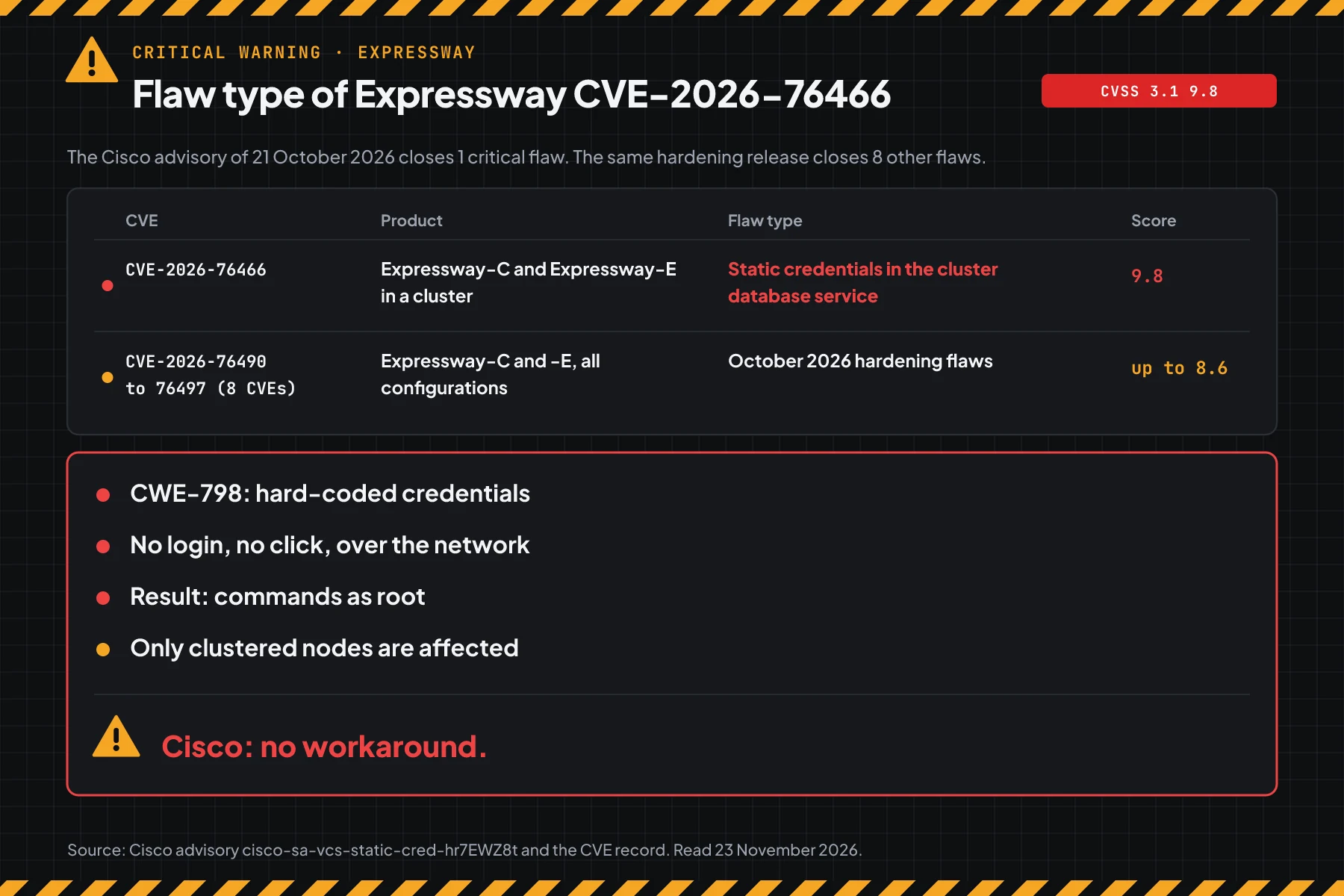
Direct answer: CVE-2026-76466 is a static credential flaw in the cluster database service of Cisco Expressway, with CVSS 3.1 score 9.8. An attacker who can reach a clustered Expressway node can run commands as root with no login. Today, check the version and cluster mode of each node, then upgrade all nodes to X15.5.20.
Attackers already use this flaw. CISA added it to the KEV catalog on 20 November 2026. Cisco writes that there is no workaround. A limit on the cluster ports only reduces who can try, so that step does not make a node safe.
Main condition: On 23 November 2026, the Cisco advisory cisco-sa-vcs-static-cred-hr7EWZ8t version 1.0 records no attacks. CISA KEV and the CVE-2026-76466 record record active exploitation. The F6 report describes an attack on 2 internet-facing X15.5.3 nodes, then on 2 internal nodes. Limit: this article has no exploit code, no credential values, and no attack steps.
We read the Cisco advisory cisco-sa-vcs-static-cred-hr7EWZ8t, the October 2026 Expressway hardening advisory, the CVE-2026-76466 record, CISA KEV, the Expressway upgrade checklist, the Expressway cluster guide, the F6 report summary on secure.com, and SecurityAffairs on 23 November 2026. We ran the scripts in steps 1, 2, and 5 in a podman container with the official Python image and dummy data.
Important limit: Our lab has no Expressway, and Cisco publishes no container image for this product. We did not run an upgrade, a backup, a snapshot, or an Expressway root shell. We mark every command that we did not run.
The problem: Expressway sits at the network edge and connects video calls
Cisco Expressway connects video devices, Webex, Jabber, and SIP calls from outside the office to the call system inside the office. Expressway-E usually sits in the DMZ and faces the internet. Expressway-C usually sits on the internal network.
Many companies run Expressway in a cluster, so the service stays up when 1 node stops. The nodes in 1 cluster trust each other and copy the configuration through the cluster database service.
Rama Digital analysis: this position makes Expressway an attractive door for attackers. 1 hacked node in the DMZ can become a path to the internal nodes, then to other servers on the office network.
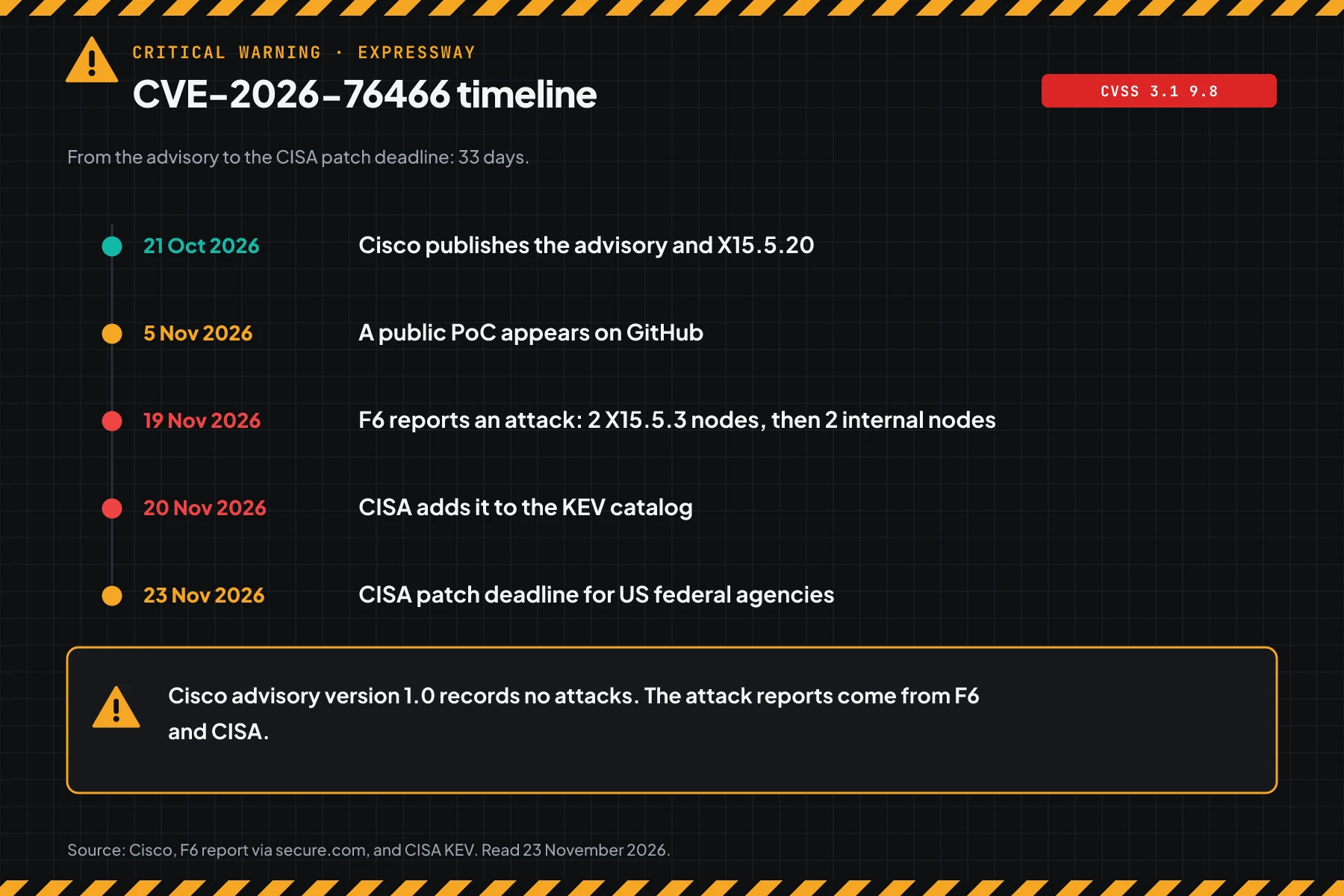
Cisco published the advisory and X15.5.20 on 21 October 2026. The reporter is Stefan Aleksic of Jane Street. According to the F6 report summary on secure.com, public exploit code appeared on GitHub on 5 November 2026. We do not link to that code.
F6 reported the first known attack on 19 November 2026. CISA added this CVE to KEV on 20 November, with a patch deadline of 23 November for US federal agencies. The time from the advisory to that deadline is 33 days.
How it works: static credentials in the cluster database service
This section uses the official vendor summary. Its purpose is to help you choose the correct steps, not to explain how to attack.
Summary from the vendor
According to the Cisco advisory cisco-sa-vcs-static-cred-hr7EWZ8t, the cause is the use of persistent cookies. Also, client certificates are not validated when TLS Verify Mode is set to Enabled for clustering. An attacker who has these cookies can connect to the database service and run commands as root.
Cisco writes that the flaw affects Expressway-C and Expressway-E, virtual and appliance, that run a vulnerable release and are configured in a cluster. A standalone node with no cluster is not affected by this CVE.
CVSS 3.1 vector: AV:N/AC:L/PR:N/UI:N/S:U/C:H/I:H/A:H. This means: over the network, low complexity, no account, no victim click, and full impact. Weakness type: CWE-798, hard-coded credentials. Cisco bug ID: CSCww27732.
We do not write other technical details, for example cookie values or command order. Those details do not help you close the flaw.
9 CVEs in 1 fixed release
X15.5.20 also closes 8 flaws from the October 2026 Expressway hardening advisory. Cisco found these 8 flaws in an internal review and records no attacks. These 8 flaws affect all configurations, including nodes with no cluster.
| CVE | CWE | Flaw type | CVSS 3.1 | Fixed in |
|---|---|---|---|---|
| CVE-2026-76466 | CWE-798 | Static credentials in the cluster database service, only clustered nodes | 9.8 | X15.5.20 |
| CVE-2026-76490 | CWE-787 | Out-of-bounds write | 8.6 | X15.5.20 |
| CVE-2026-76491 | CWE-617 | Reachable assertion | 8.6 | X15.5.20 |
| CVE-2026-76492 | CWE-476 | NULL pointer dereference | 8.6 | X15.5.20 |
| CVE-2026-76493 | CWE-248 | Uncaught exception | 8.6 | X15.5.20 |
| CVE-2026-76494 | CWE-94 | Code injection | 7.8 | X15.5.20 |
| CVE-2026-76495 | CWE-732 | Incorrect permission assignment | 7.8 | X15.5.20 |
| CVE-2026-76496 | CWE-59 | Link following | 7.8 | X15.5.20 |
| CVE-2026-76497 | CWE-377 | Insecure temporary file | 7.8 | X15.5.20 |
Exploitation status on 23 November 2026
The official sources do not agree yet. Cisco advisory version 1.0 of 21 October records no attacks. The attack reports came later from F6 and CISA. Treat this flaw as exploited.
| Source | Status |
|---|---|
| Cisco advisory version 1.0, 21 October | PSIRT is not aware of attacks. No workaround |
| CVE record (CISA SSVC) | Exploitation: active. Automatable: yes. Technical impact: total |
| CISA KEV | Added 20 November. Due 23 November. Forensic triage: yes |
| Public exploit code | On GitHub since 5 November. We do not link to it |
| F6 report, 19 November | 4 nodes entered at 1 organization in Russia |
The same pattern occurred on other edge devices, for example the NetScaler flaw CVE-2026-120868 and the Ivanti Connect Secure flaw CVE-2026-111357. The time from public code to real attacks is often only a few days.
Who has the highest risk
All clustered nodes below X15.5.20 need the upgrade. The order in this table helps you choose which nodes to do first.
| Node setup | Risk | Reason |
|---|---|---|
| A vulnerable clustered node with TCP 4371 or 4372 reachable from the internet | Highest | Public exploit code exists. F6 saw 2 nodes like this entered first |
| A vulnerable internal node in a cluster with an exposed node | High | F6 saw the attackers move to 2 internal nodes through the cluster |
| A vulnerable clustered node, cluster ports from peers only | Lower | An attacker must get into 1 peer first. The upgrade stays required |
| A standalone node with no cluster | Not hit by this CVE | Still hit by 8 hardening CVEs with scores up to 8.6 |
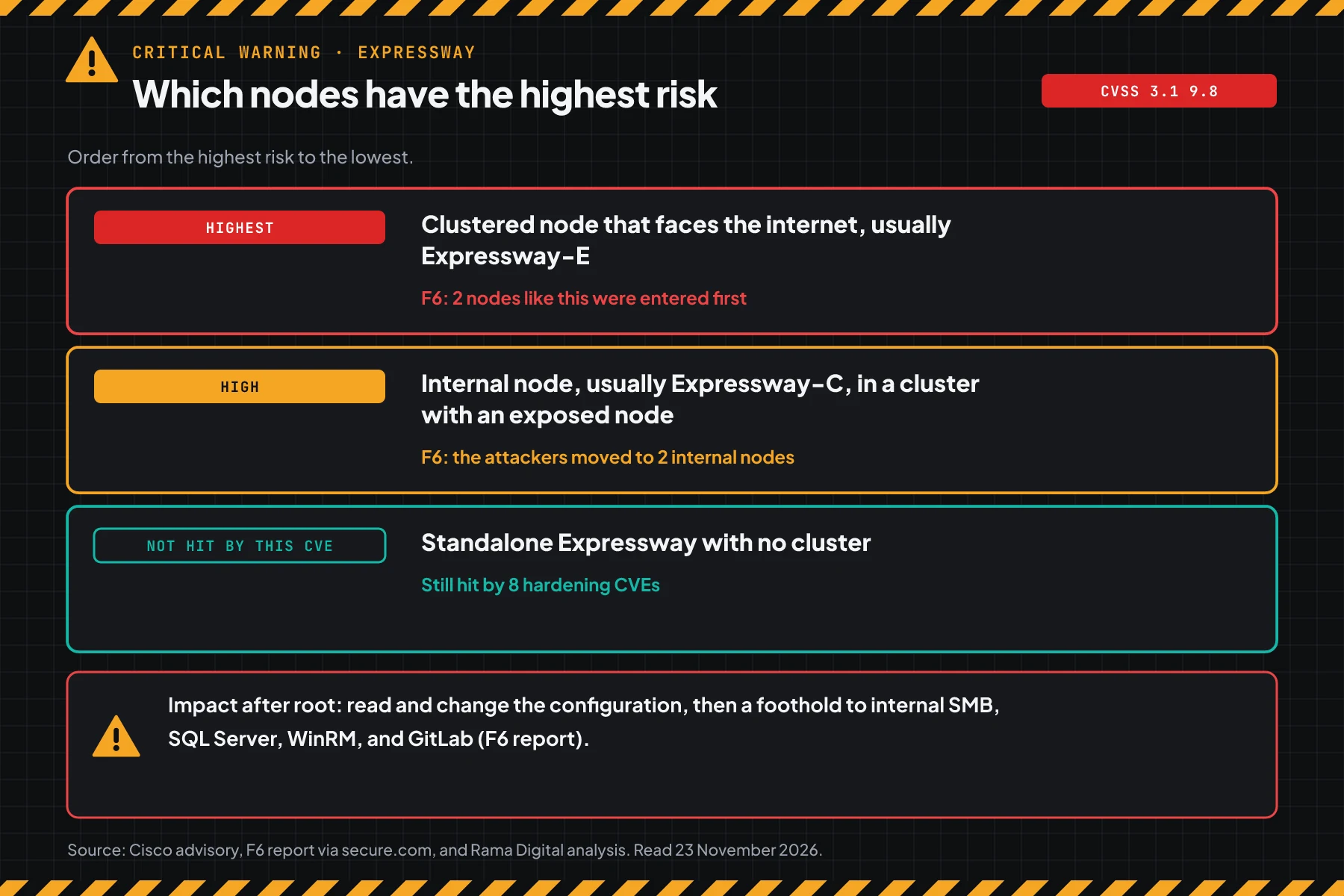
Rama Digital analysis: teams often think that Expressway-C is safe because it does not face the internet. The F6 report shows the opposite. The attackers got in through 2 exposed nodes, then moved to 2 internal nodes in the same cluster.
According to the F6 report summary on secure.com, after they got in, the attackers ran Python scripts that looked for SMB shares and probed SQL Server and WinRM. The attackers also pulled credentials from internal GitLab repositories. So 1 video gateway can become a foothold into the whole network.
Affected versions and fixed versions
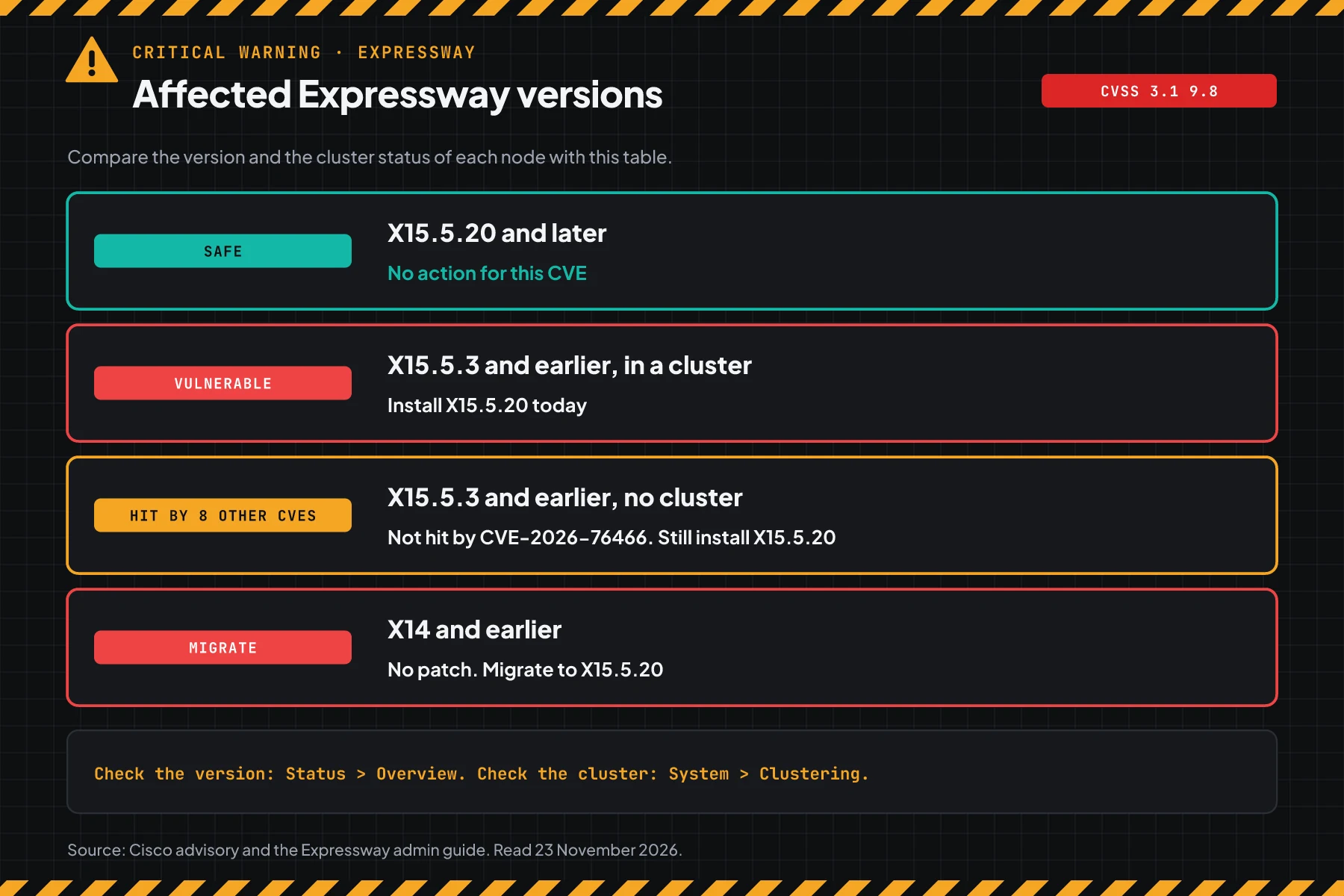
Compare the version and cluster mode of each node with this table. Source: the Cisco advisory cisco-sa-vcs-static-cred-hr7EWZ8t and the October 2026 Expressway hardening advisory.
| Release | Mode | Status for CVE-2026-76466 | Action |
|---|---|---|---|
| X15.5.20 and later | All | Safe | Still look for signs in step 5 |
| X15.5.3 and earlier | Cluster | Vulnerable | Upgrade all nodes to X15.5.20 today |
| X15.5.3 and earlier | Standalone | Not affected, but hit by 8 hardening CVEs | Upgrade to X15.5.20 |
| X14 and earlier | All | Vulnerable if clustered, no patch | Migrate to a fixed release |
Important notes:
- Cisco gives no workaround. Cisco calls any mitigation only a temporary solution until the upgrade.
- All nodes in 1 cluster must move to X15.5.20. 1 old node still opens a path to its peers.
- X14 and earlier get no patch. Cisco asks you to migrate to a fixed release.
- A standalone node still needs X15.5.20 because of the 8 hardening CVEs, with scores up to 8.6.
- The Expressway cluster guide shows how to identify a cluster: the System > Clustering page lists the peer addresses.
Before you start
- Admin access to the web admin of each Expressway node.
- A list of all nodes, including lab, DR, Expressway-C, and Expressway-E nodes.
- A list of the peer IPs of each cluster, from System > Clustering.
- A laptop with bash on a network that is NOT a cluster peer, for step 2.
- Access to the firewalls in front of Expressway-E and Expressway-C.
- Access to the X15.5.20 release files from Cisco, through a service contract or TAC.
- An emergency change window. CISA set a deadline of 23 November 2026 for US federal agencies.
Step 1: Check the version and cluster mode of each node
Manual method: log in to the web admin of each node. Write down the software version from the status page. Then open System > Clustering. If that page lists peer addresses, the node is in a cluster.
Save this script as check-version-expressway.sh. The script reads a text list, 1 node per line: name, version, then cluster or standalone. The script does not connect to Expressway.
#!/usr/bin/env bash
# Check Cisco Expressway versions against CVE-2026-76466 (cisco-sa-vcs-static-cred-hr7EWZ8t).
# The script only reads text. It does not connect to Expressway.
# Use: bash check-version-expressway.sh list.txt    (1 node per line: name version cluster|standalone)
#  or: bash check-version-expressway.sh "exp-e-01 X15.5.3 cluster" "exp-c-01 X15.5.20 cluster"
#  or: bash check-version-expressway.sh -            (read from stdin)
# Version from Status > Overview. Cluster from System > Clustering: a peer address means cluster.
# Fixed release: X15.5.20. X14 and earlier: migrate. This CVE affects only nodes in a cluster.
set -u
vuln=0; safe=0; other=0; total=0

header() { printf '%-18s %-10s %-8s %s\n' "NODE" "VERSION" "CLUSTER" "STATUS"; }

# $1 name, $2 version without X, $3 cluster mode (yes, no, or ?)
rate() {
  local name="$1" ver="$2" cl="$3" ma mi pa st
  IFS=. read -r ma mi pa <<< "$ver"; ma=$((10#$ma)); mi=$((10#${mi:-0})); pa=$((10#${pa:-0}))
  if (( ma < 15 )); then
    st="MIGRATE, X$ma has no patch, move to X15.5.20"; vuln=$((vuln + 1))
  elif (( ma > 15 )); then
    st="CHECK, version not listed in the advisory"; other=$((other + 1))
  elif (( mi > 5 || (mi == 5 && pa >= 20) )); then
    st="SAFE for CVE-2026-76466"; safe=$((safe + 1))
  elif [ "$cl" = yes ]; then
    st="VULNERABLE, install X15.5.20 today"; vuln=$((vuln + 1))
  elif [ "$cl" = no ]; then
    st="NOT AFFECTED BY THIS CVE, still install X15.5.20 (8 other CVEs)"; other=$((other + 1))
  else
    st="CHECK cluster in System > Clustering, if cluster: VULNERABLE"; other=$((other + 1))
  fi
  printf '%-18s %-10s %-8s %s\n' "$(printf '%s' "$name" | cut -c1-18)" "X$ver" "$cl" "$st"
}

# 1 line: name, version (X15.5.3 or 15.5.3), then cluster or standalone.
line() {
  local text name="" i j ver="" cl="?" vi=-1 w
  local -a T
  [[ $1 =~ ^[[:space:]]*# ]] && return 0
  text=$(printf '%s' "$1" | tr -d '\r"' | tr -cd '[:alnum:] .,:_-' | cut -c1-120)
  [[ -z ${text// /} ]] && return 0
  total=$((total + 1))
  read -r -a T <<< "${text//,/ }"
  for i in "${!T[@]}"; do
    if [[ ${T[i]} =~ ^[Xx]?([0-9]{1,2}(\.[0-9]{1,3}){1,2})$ ]]; then vi=$i; ver=${BASH_REMATCH[1]}; break; fi
  done
  if (( vi < 0 )); then
    printf '%-18s %-10s %-8s %s\n' "$(printf '%s' "$text" | cut -c1-18)" "-" "-" "CANNOT CONFIRM, version not readable"
    other=$((other + 1)); return 0
  fi
  for ((j = 0; j < vi; j++)); do name="$name${name:+ }${T[j]}"; done
  for ((j = vi + 1; j < ${#T[@]}; j++)); do
    w=${T[j],,}
    case "$w" in cluster|clustered|ya|yes) cl=yes; break ;; tunggal|standalone|tidak|no) cl=no; break ;; esac
  done
  rate "${name:--}" "$ver" "$cl"
}

summary() {
  if (( total == 0 )); then echo "CANNOT CONFIRM: no data lines."; return 2; fi
  echo "Summary: $vuln VULNERABLE or MIGRATE, $safe SAFE, $other other."
  echo "Every node in 1 cluster must move to X15.5.20. 1 old node still opens a path to its peers."
  return 0
}

header
if [ "${1:-}" = "-" ] || (( $# == 0 )); then
  while IFS= read -r x || [ -n "$x" ]; do line "$x"; done
elif (( $# == 1 )) && [ -f "$1" ]; then
  if [ ! -r "$1" ]; then echo "CANNOT CONFIRM: file not readable."; exit 2; fi
  while IFS= read -r x || [ -n "$x" ]; do line "$x"; done < "$1"
elif (( $# == 1 )) && [[ $1 != *[[:space:]]* ]]; then
  echo "CANNOT CONFIRM: file $(printf '%s' "$1" | tr -cd '[:print:]' | cut -c1-80) does not exist."; exit 2
else
  for x in "$@"; do line "$x"; done
fi
summary; exit $?
A sample list with dummy data:
# name version cluster|standalone (dummy data)
exp-e-01 X15.5.3 cluster
exp-e-02 X15.5.3 cluster
exp-c-01 X15.5.20 cluster
exp-c-02 X15.0.4 cluster
exp-lab X15.5.3 standalone
exp-old X14.3.2 cluster
# On Linux, macOS, or WSL
bash check-version-expressway.sh list-expressway.txt
# Or write the nodes directly as arguments
bash check-version-expressway.sh "exp-e-01 X15.5.3 cluster" "exp-c-01 X15.5.20 cluster"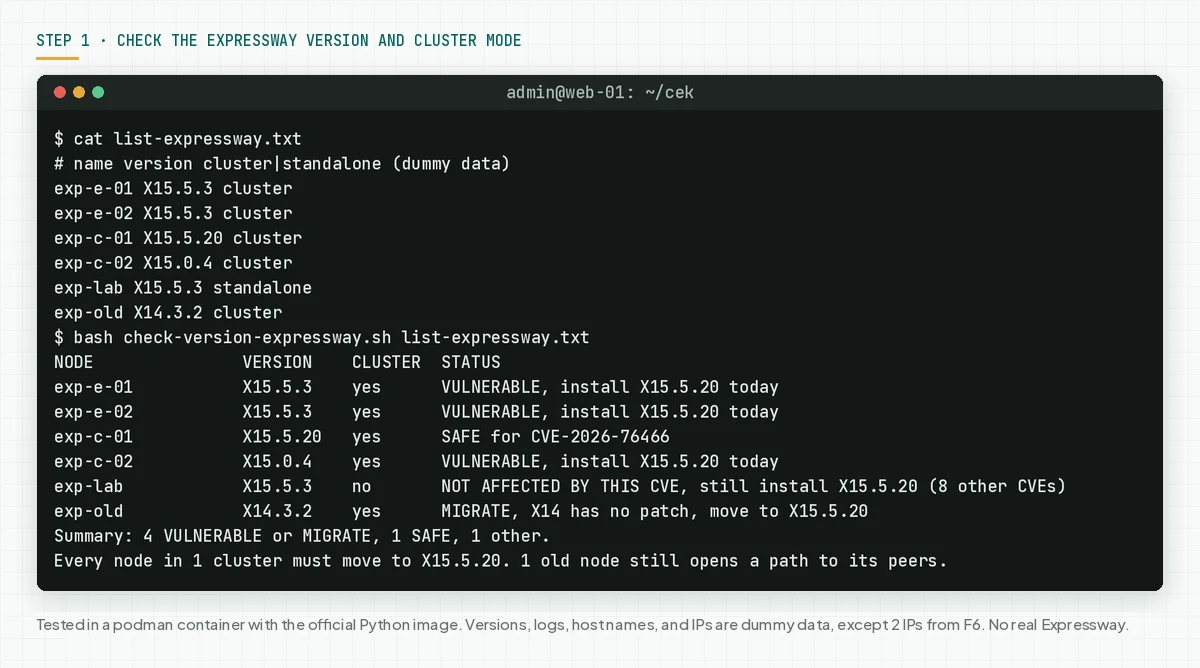
Check the result:
- "VULNERABLE, install X15.5.20 today": a clustered node below X15.5.20. Do step 3 today, and step 4 until the upgrade is complete.
- "MIGRATE": X14 or earlier. No patch. Plan the migration, and do step 4 now.
- "NOT AFFECTED BY THIS CVE": a standalone node below X15.5.20. Still upgrade, because of the 8 hardening CVEs.
- "SAFE for CVE-2026-76466": X15.5.20 or later. Still run step 5, because the flaw can be used before the upgrade.
- "CHECK" or "CANNOT CONFIRM": the cluster mode is empty, the version is not listed, or the version is not readable. Check it manually in the web admin.
We tested the script with edge cases: CRLF line ends, control characters, empty stdin, a missing file, an unreadable file, versions X15.5.19, X15.6.0, X16.0.1, and numbers with a leading zero. The script gives the correct result or stops with exit code 2.
Limit: the script trusts the version and cluster mode that you enter. The script rates only CVE-2026-76466 and reminds you of the 8 hardening CVEs.
Step 2: Check who can reach the cluster ports
The F6 report names the cluster database service on TCP 4371 and 4372. These ports must be open only to peer nodes. Run this step from a point that is NOT a cluster peer.
Save this script as check-exposure-expressway.sh. The script opens a TCP connection to ports 4371, 4372, 443, and 22, then closes it. The script sends no data.
#!/usr/bin/env bash
# Check from a network that is NOT a cluster peer: which Expressway ports it can reach.
# CVE-2026-76466 uses the cluster database service. F6 advises TCP 4371 and 4372 from peer IPs only.
# Use: bash check-exposure-expressway.sh <Expressway host>
# The script only opens a TCP connection and closes it. It sends no data.
set -u
[ $# -eq 1 ] || { echo "Use: bash check-exposure-expressway.sh <host>" >&2; exit 2; }
HOST=$1
case "$HOST" in -*|*[!A-Za-z0-9.:-]*|"") echo "Invalid host: $HOST" >&2; exit 2 ;; esac
command -v timeout >/dev/null 2>&1 || { echo "The timeout program is missing." >&2; exit 2; }

cluster=0; admin=0
printf '%-6s %-10s %s\n' "PORT" "STATUS" "SERVICE"
for p in "4371:cluster database" "4372:cluster database" "443:web admin" "22:SSH admin"; do
  port=${p%%:*}; name=${p#*:}
  if timeout 3 bash -c "exec 3<>/dev/tcp/$HOST/$port" 2>/dev/null; then
    printf '%-6s %-10s %s\n' "$port" "OPEN" "$name"
    case "$port" in 437?) cluster=$((cluster + 1)) ;; *) admin=$((admin + 1)) ;; esac
  else
    printf '%-6s %-10s %s\n' "$port" "CLOSED" "$name"
  fi
done
if (( cluster > 0 )); then
  echo "Result: cluster port OPEN from this network. If this point is not a peer, restrict it today and install X15.5.20."; exit 1
fi
if (( admin > 0 )); then
  echo "Result: cluster ports CLOSED, admin port OPEN. Limit admin to the admin network. Still install X15.5.20."; exit 0
fi
echo "Result: all ports CLOSED from this network. Repeat from the internet and the VPN. Still install X15.5.20."; exit 0
# Run it from a point that is NOT a cluster peer: the internet, the user network, or the VPN.
# Test only an Expressway that you own.
bash check-exposure-expressway.sh exp-e-01.contoh.test
bash check-exposure-expressway.sh 203.0.113.10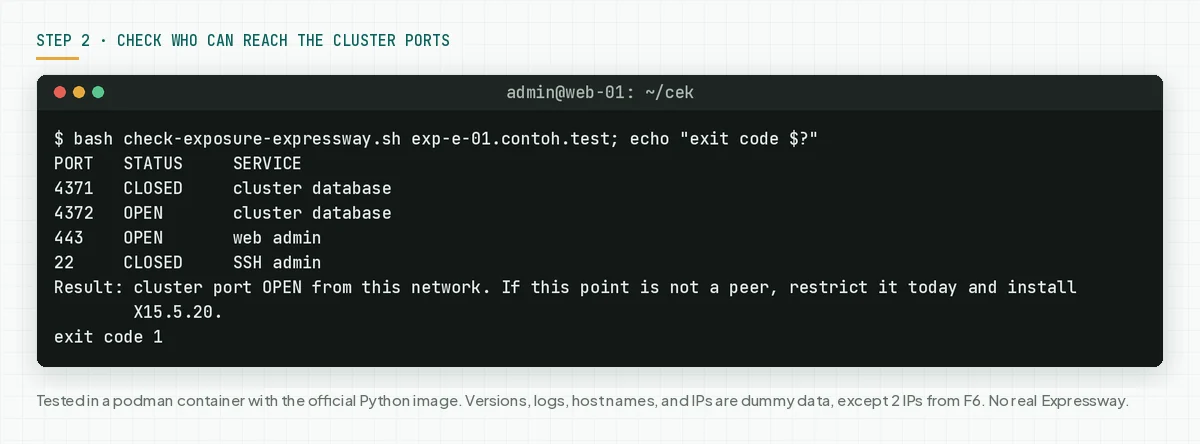
Check the result: "OPEN" on port 4371 or 4372 means the test point can reach the cluster database service. If the test point is not a peer, do step 4 today, then upgrade.
"CLOSED" on all ports means this test point cannot reach the node. Repeat the test from the internet and from the VPN. Still upgrade.
Rama Digital analysis: the test from the internet matters most for Expressway-E. For Expressway-C, test from the user network and the VPN. This script gives a quick view, not a firewall audit.
Step 3: Back up, then upgrade all nodes to X15.5.20
Only X15.5.20 closes the flaw. The Cisco Expressway upgrade checklist asks for a current backup and a rollback plan for each node before the upgrade window.
- Make a configuration backup of each node through the backup menu in Maintenance. Keep the backup file off the node.
- Upgrade the nodes in turn, 1 node at a time. Go to the next node only after that node is healthy again.
- Do not upgrade other nodes if 1 node stops in the middle of its upgrade. Complete or roll back that node first.
- After all nodes are done, check that each peer is active in the cluster and that replication is healthy. Then make a new backup.
We did not run this step, because our lab has no Expressway. The order above comes from the Expressway upgrade checklist. Also follow the X15.5.20 release notes for the upgrade path from your version.
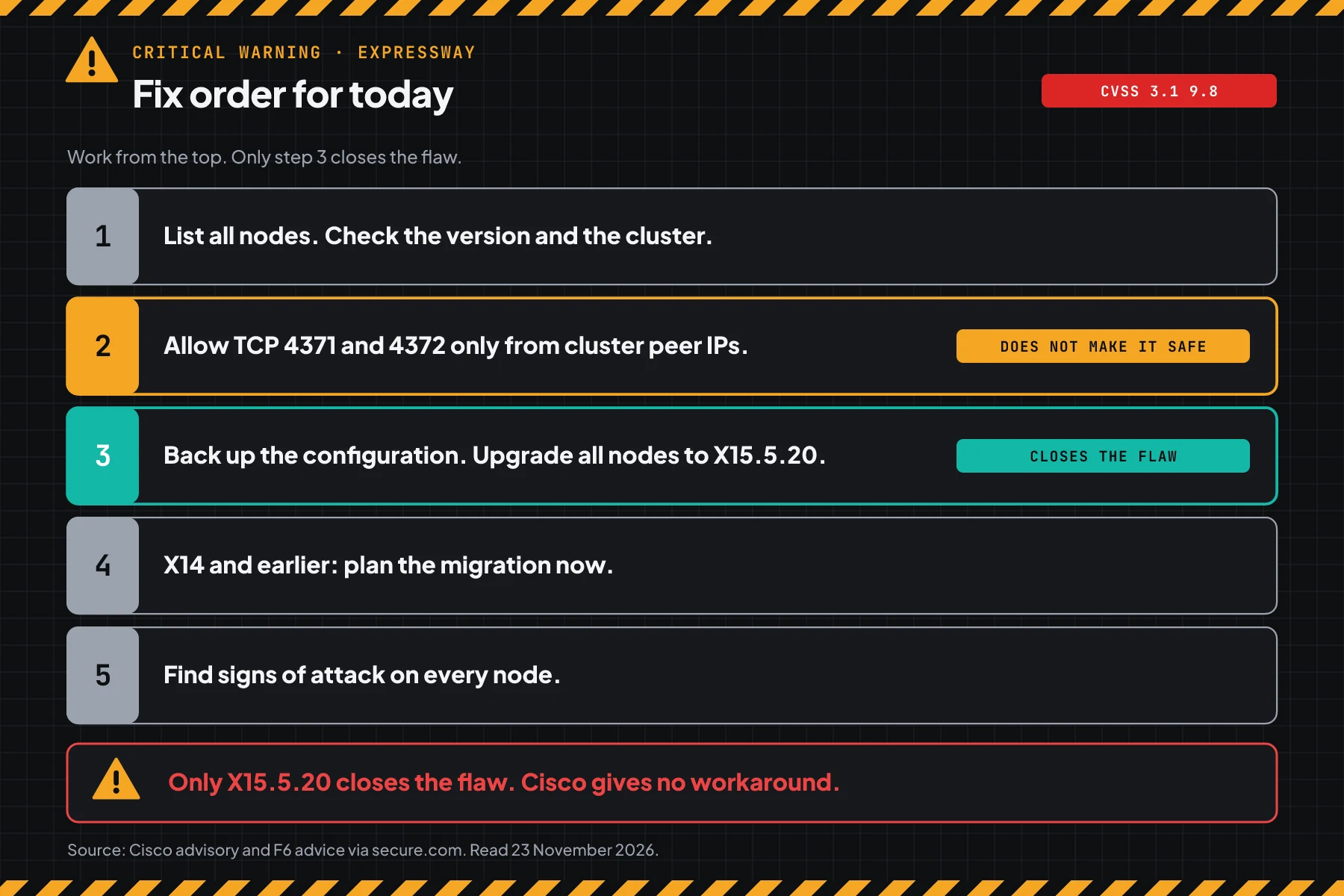
Check the result: run the step 1 script again with the new versions. Each node must print "SAFE for CVE-2026-76466". Then make a test call from outside the office and from inside the office.
TLS note: the Cisco checklist for X15.5.20 includes mutual TLS on ports 4371 and 4372, and TLS verify mode Enforcing after the upgrade. Do not use Enforcing mode on an old version as a replacement for the upgrade. Cisco does not call it a workaround.
Step 4: Limit the cluster ports to peer IPs, this does NOT make it safe
Use this step today, until the upgrade is complete. After that, keep it as network hygiene. This step does NOT make a node safe. An attacker who is already in 1 peer can still reach the other peers.
The Cisco advisory cisco-sa-vcs-static-cred-hr7EWZ8t writes that there is no workaround. The advice to limit the ports comes from F6 through the F6 report summary on secure.com. So this is a temporary mitigation, not a vendor fix.
# Sample rules for the firewall in front of each Expressway node (order from the top)
ALLOW  other cluster peer IPs   -> node  TCP 4371, 4372
DENY   all other addresses      -> node  TCP 4371, 4372
ALLOW  admin network            -> node  TCP 443, 22
DENY   all other addresses      -> node  TCP 443, 22
# Call, media, and remote access ports still follow the Cisco port guide.
Put the rules on the firewall in front of each node. For Expressway-E, the DMZ firewall is the correct place. Do not block the call and media ports, or calls from outside the office can stop.
Check the result: run step 2 again from the internet and from the user network. Ports 4371 and 4372 must be "CLOSED". Remember: the node stays vulnerable until step 3 is complete.
Step 5: Find signs that a node was entered
The upgrade closes the flaw, but it does not remove the scripts, accounts, or credentials that an attacker took. So look for traces before and after the upgrade. CISA marks this CVE with forensic triage.
The signs below come from the F6 report for 1 incident, through the F6 report summary on secure.com and SecurityAffairs:
- A
nodeupline for nodewombat@127.0.0.1in the Erlang log. - Connections from IP 66.179.31[.]32 or 18.130.47[.]116.
- Python scripts in a folder
/mnt/harddisk/i+ 4 digits + 1 optional letter. - TCP 4371 or 4372 connections from an IP that is not a peer, or an unknown peer in System > Clustering.
Collect data from each node. Make a log snapshot through Maintenance, Diagnostics, then System snapshot. Download it and extract it to 1 folder per node. The button names can change between versions.
The list of Python scripts needs a root shell on the node. Rama Digital analysis: run this command only if your team has valid root access, or ask TAC for help. We ran it only on a dummy file tree in the container, not on a real Expressway.
# Root shell on the Expressway node. We did not run this command on a real Expressway.
find /mnt/harddisk -type f -name "*.py" > daftar-py.txt
Copy daftar-py.txt into the snapshot folder of that node. Then save this script as check-signs-expressway.sh. The script only reads files. The script does not change, delete, or send anything.
#!/usr/bin/env bash
# Find signs of CVE-2026-76466 in copies of Expressway logs and file lists, with the IOCs from the F6 report.
# Signs: a nodeup line for node wombat@127.0.0.1, 2 IPs from F6, and Python scripts in /mnt/harddisk/i + 4 digits.
# Use: bash check-signs-expressway.sh <folder>   (folder with logs, snapshots, or find output)
# The script only reads files. It does not change, delete, or send anything.
set -u
[ $# -eq 1 ] || { echo "Use: bash check-signs-expressway.sh <folder>" >&2; exit 2; }
D=$1
[ -d "$D" ] && [ -r "$D" ] && [ -x "$D" ] || { echo "CANNOT CONFIRM: folder not readable." >&2; exit 2; }
NODE='wombat@127.0.0.1'
PAT='/i[0-9]{4}[A-Za-z]?/[^/[:space:]]*\.py'

clean() { tr -d '\r' | tr -cd '[:print:]\n' | cut -c1-110; }
sign=0; check=0
printf '%-8s %-12s %s\n' "SIGN" "TYPE" "DETAIL"
report() { printf '%-8s %-12s %s\n' "$1" "$2" "$(printf '%s' "$3" | clean)"; }

# 1. Erlang log: nodeup line for the node from the F6 report. Fixed-text search (-F), not a regex.
while IFS= read -r b; do
  if printf '%s' "$b" | grep -qF 'nodeup'; then report SIGN "Erlang log" "$b"; sign=$((sign + 1))
  else report CHECK "Erlang log" "$b"; check=$((check + 1)); fi
done < <(grep -rIhF -- "$NODE" "$D" 2>/dev/null | head -n 20)

# 2. IPs from the F6 report. -w rejects other IPs that hold the same digits, for example 166.179.31.32.
while IFS= read -r b; do
  report SIGN "F6 IP" "$b"; sign=$((sign + 1))
done < <(grep -rIcwF -e '66.179.31.32' -e '18.130.47.116' "$D" 2>/dev/null | grep -v ':0$' | sed 's/:\([0-9]*\)$/ (\1 lines)/' | head -n 20)

# 3a. Python files in a folder i + 4 digits + 1 optional letter, inside the folder you check.
while IFS= read -r b; do
  report SIGN "Python file" "$b"; sign=$((sign + 1))
done < <(find "$D" -type f -name '*.py' 2>/dev/null | grep -E -- "$PAT" | head -n 20)

# 3b. The same path in saved find output.
while IFS= read -r b; do
  report SIGN "Python file" "$b (in file list)"; sign=$((sign + 1))
done < <(grep -rIhoE -- "/mnt/harddisk$PAT" "$D" 2>/dev/null | sort -u | head -n 20)

echo "Summary: $sign SIGN, $check CHECK."
if (( sign > 0 )); then
  echo "Result: SIGNS FOUND. Treat this node as entered. Isolate it, keep evidence, then follow the response steps."; exit 1
fi
if (( check > 0 )); then
  echo "Result: CHECK. The F6 node name appears without nodeup. Compare with other logs."; exit 1
fi
echo "Result: NO SIGNS YET in this data. A clean result is not proof of safety. These IOCs come from 1 incident."; exit 0
A dummy log sample. The real Expressway log format can be different, so the script looks for the node name text and the word nodeup, not for a line format.
2026-11-18 21:02:11 [info] nodeup exp-e-02@198.51.100.12
2026-11-18 21:14:07 [info] nodeup wombat@127.0.0.1
2026-11-18 21:40:55 [info] nodedown exp-e-02@198.51.100.12
# 1 folder per node: the log snapshot content, plus daftar-py.txt
bash check-signs-expressway.sh snapshot-exp-e-01
bash check-signs-expressway.sh snapshot-exp-c-01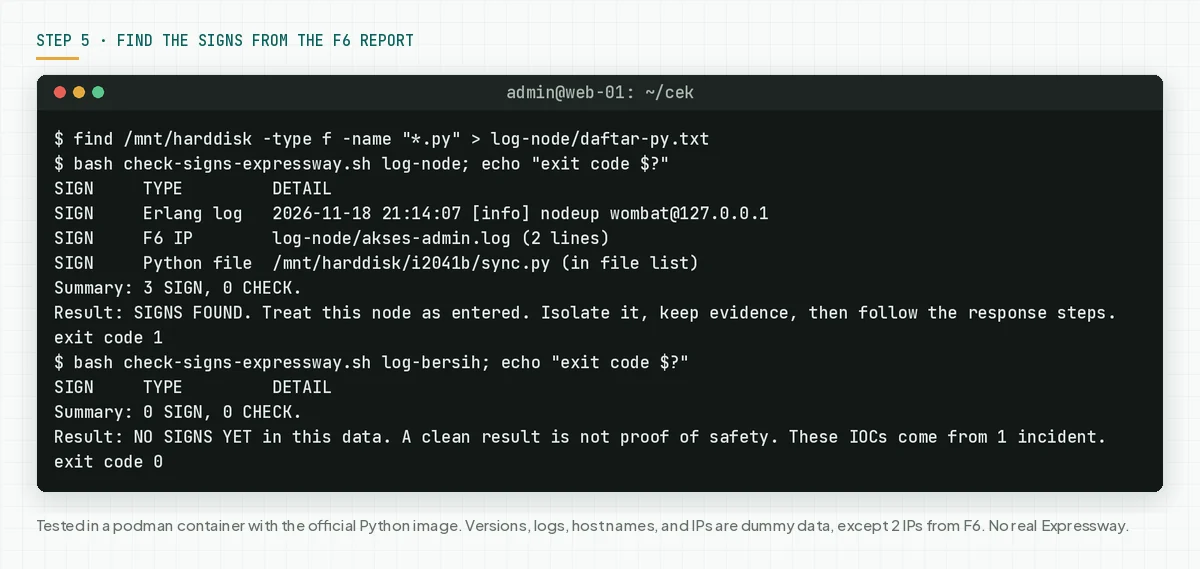
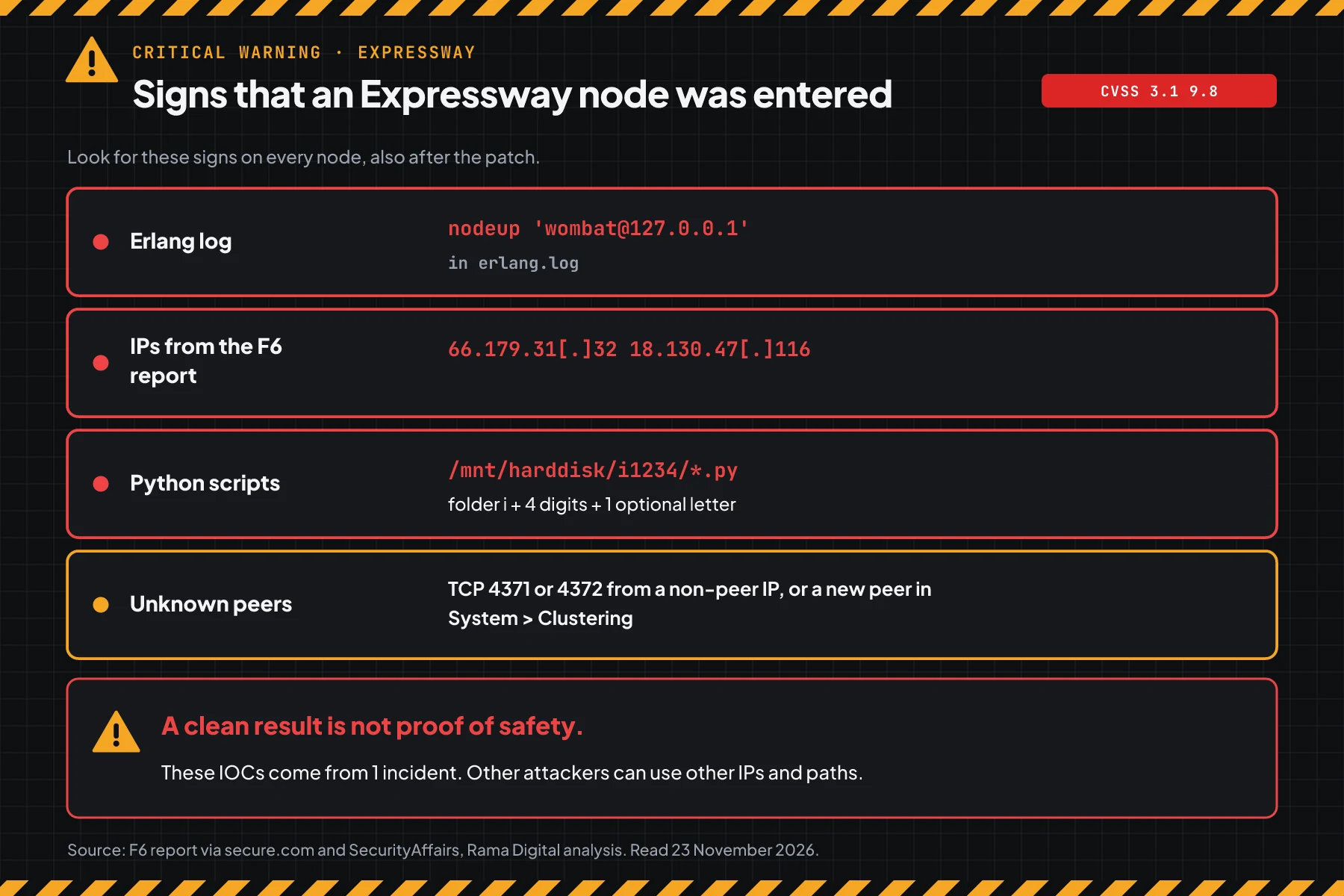
Script limit: these IOCs come from 1 incident. Other attackers can use other IPs, file names, and folders. Old logs can also be rotated or deleted. A clean result is not proof of safety.
If you find SIGNS, follow this order:
- Cut the node from the network at the firewall. Do not shut the node down yet, so the evidence stays.
- Keep a full snapshot and the logs before you change anything.
- Check the peers in System > Clustering. Write down the peers that the team does not know.
- Upgrade the node to X15.5.20, or rebuild the node from a clean release as TAC advises.
- Change the Expressway admin and root passwords, then all credentials that the node keeps or can reach.
- Look for SMB, SQL Server, and WinRM connections from the Expressway node IPs to other servers.
- Change the tokens and credentials in internal code repositories, as in the F6 incident.
Example: 1 night of response for 4 nodes
This simulation uses dummy data. The node names, times, and results are not customer data.
| Time (WIB) | Dummy node | What we check | Result | Action |
|---|---|---|---|---|
| 19.00 | exp-e-01 and exp-e-02 (X15.5.3, cluster, DMZ) | Steps 1 and 2 | VULNERABLE, TCP 4372 open from the internet | Close 4371 and 4372 except for peers at 19.20 |
| 19.40 | exp-c-01 and exp-c-02 (X15.5.3, cluster, internal) | Step 1 | VULNERABLE | Add to the rolling upgrade queue |
| 20.30 | All nodes | Step 5 | NO SIGNS YET in the snapshots | Keep the snapshots as first evidence |
| 21.00 | 4 nodes, 1 node at a time | Step 3 | Rolling upgrade to X15.5.20 | Check that the cluster is healthy after each node |
| 23.30 | All nodes | Steps 1 and 2 again | SAFE, cluster ports closed from the internet | New backup, watch the logs for 14 days |
Lessons from this simulation: close the cluster ports first, because an upgrade of 4 nodes takes time. Keep the snapshots before the upgrade, so the evidence is not lost.
Who does the work
The collaboration or voice team usually owns Expressway. The network team owns the DMZ firewall. IT leadership decides the emergency change window and the X14 migration plan.
Rama Digital recommendation: record each device at the network edge, its version, and who can reach it. The same list helps when a new flaw appears, as with the FortiMail flaw CVE-2026-126147 and the vCenter flaw CVE-2026-123890.
Checklist for today
- List all Expressway-C and Expressway-E nodes, including lab and DR. Owner: collaboration team. Evidence: a list of names, versions, and cluster modes.
- Check the version and cluster with step 1. Owner: Expressway admin. Evidence: the script output.
- Check the reach of the cluster ports from the internet and the user network with step 2. Owner: network team. Evidence: the script output.
- Limit TCP 4371 and 4372 to peer IPs with step 4. Owner: network team. Evidence: the firewall rules and the step 2 result.
- Keep snapshots and run step 5 on each node. Owner: Expressway admin. Evidence: the script output.
- Back up, then upgrade all nodes to X15.5.20 in turn. Owner: Expressway admin. Evidence: the step 1 output after the upgrade.
- Plan the migration for X14 and earlier nodes. Owner: IT leadership. Evidence: a migration date.
Questions and answers
Our Expressway is not in a cluster. Are we safe?
A standalone node is not affected by CVE-2026-76466. That node is still hit by 8 hardening CVEs with scores up to 8.6. So still upgrade to X15.5.20.
Does a limit on ports 4371 and 4372 make the node safe?
No. Cisco writes that there is no workaround. The limit only reduces who can try. An attacker who is already in 1 peer can still reach the other peers.
Does TLS verify mode Enforcing close this flaw?
Cisco does not call it a workaround. The Cisco upgrade checklist uses Enforcing mode after X15.5.20. So upgrade first, then follow that checklist.
The Cisco advisory says there are no attacks. Which is correct?
Advisory version 1.0 came out on 21 October, before the attacks were known. F6 reported attacks on 19 November, and CISA recorded active exploitation on 20 November. Treat this flaw as exploited.
We still use X14. What must we do?
X14 and earlier get no patch. Cisco asks you to migrate to a fixed release. While you prepare the migration, limit the cluster ports with step 4 and look for signs with step 5.
Does the upgrade stop video calls?
The node that you upgrade restarts. With a rolling upgrade, the other nodes keep the service up. Schedule the upgrade in a change window, and test calls after each node.
Our Expressway-C has no internet connection. Is it still at risk?
Yes, if that node is in 1 cluster with an exposed node. In the F6 report, the attackers moved from 2 exposed nodes to 2 internal nodes through the cluster.
Does a clean signs script result prove that the node is safe?
No. These IOCs come from 1 incident, and old logs can already be deleted. Check the peers in System > Clustering and watch the logs after the upgrade.
Next step
These limits still apply: step 4 does not make a node safe, and the upgrade does not clean a node that was already entered. If your node shows signs in step 5, or you need help with audit and recovery, use Vibe Code Rescue. For 1 urgent problem today, book a 30-minute session.
Sources
- The Cisco advisory cisco-sa-vcs-static-cred-hr7EWZ8t: the flaw summary, affected products, fixed versions, bug ID, reporter, and the no workaround statement.
- The October 2026 Expressway hardening advisory: the 8 hardening CVEs, scores, and the no attacks status.
- The CVE-2026-76466 record: CWE-798, the CVSS vector, and the CISA SSVC rating with active exploitation.
- CISA KEV: the date added of 20 November 2026, the due date of 23 November 2026, and forensic triage.
- The Expressway upgrade checklist: backup, rolling upgrade, cluster check, and TLS after the upgrade.
- The Expressway cluster guide: how to identify and manage a cluster in System > Clustering.
- The F6 report summary on secure.com: the public code timeline, attack path, impact, and IOCs from F6.
- SecurityAffairs: a summary of the F6 report and the KEV entry.