Direct answer: CVE-2026-123039 is a local privilege escalation to root in Check Point Gaia, with CVSS 7.8 according to Check Point. Check Point reports real attacks, and CISA added this CVE to KEV on 13 November 2026. Today, check the version and Jumbo take, install the fixed take, then look for signs of attack.
Check Point published advisory sk1000362 on 12 November 2026. Fixed takes: R82.20 take 14, R82.10 take 52, R82 take 132, R81.20 take 174. R81.10 and R81 are already EOS and have no fix, so those units must upgrade.
Main condition: This flaw needs local code execution first. In real attacks, the way in was PHP2Shell in the gateway web portal, which we cover in our article on PHP2Shell. Limit: This article has no payload, no socket request format, and no step-by-step attack sequence.
We read advisory sk1000362, advisory sk1000302, advisory sk1000291, Check Point blog, Check Point Research, CVE-2026-123039 record, and CISA KEV on 14 November 2026, from 06.35 to 06.55 WIB.
We ran the scripts in steps 1 and 5 in a podman container with the official Debian image and dummy Gaia files. Gaia has no container image, so we did not run real Gaia commands. The section "What we tested" below gives the details.
The problem: the firewall sits at the network edge
Check Point Gaia is the operating system on a Check Point firewall. Many banks, companies, and agencies in Indonesia use this firewall at the network edge. All traffic in and out passes through that unit.
So root on this unit gives large control. An attacker can see the traffic that passes, change rules, or move to other servers. In real attacks, the attacker moved from the gateway to ESXi hosts.
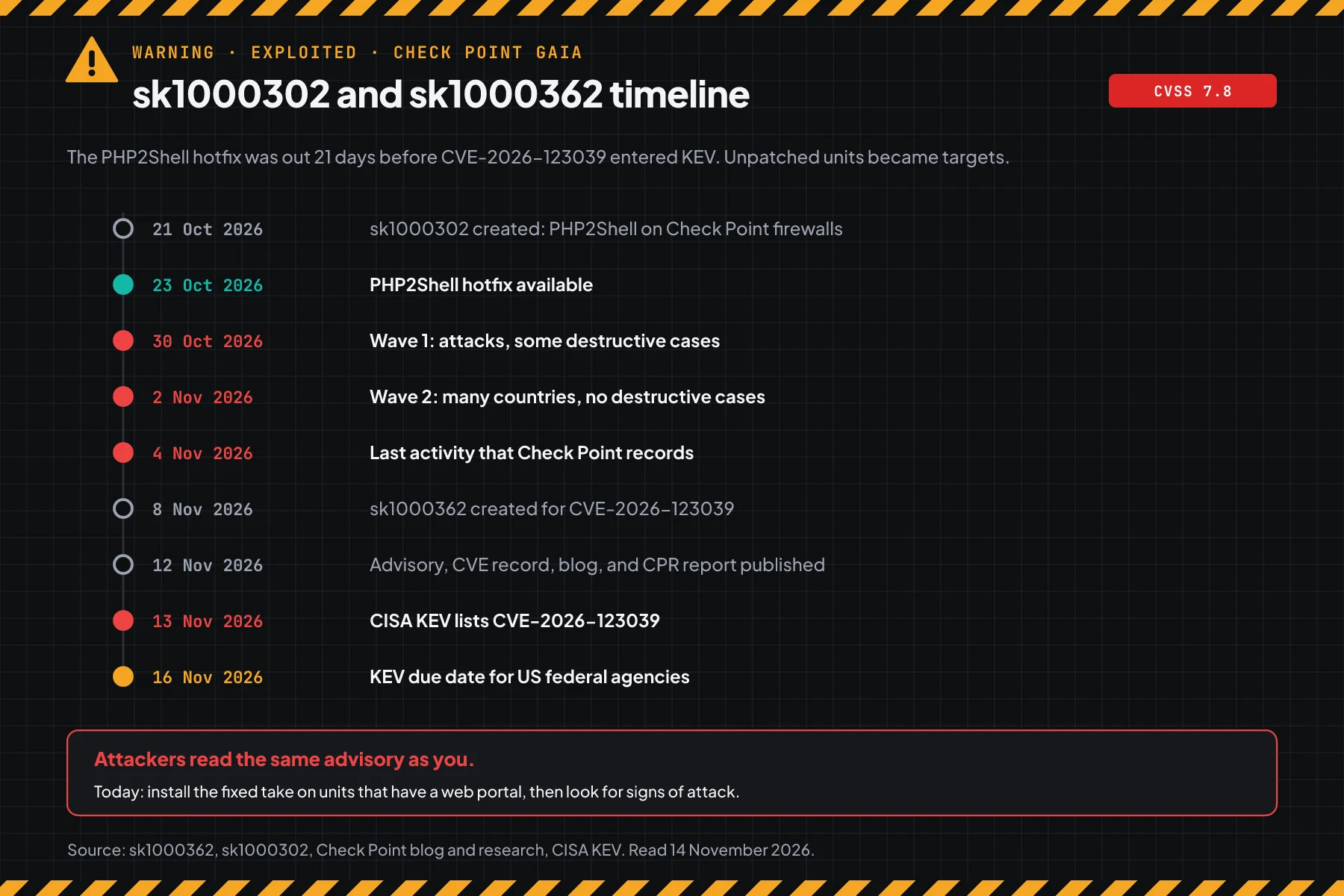
advisory sk1000302 was created on 21 October 2026, and the PHP2Shell hotfix became available on 23 October 2026. Check Point reports attacks from 30 October to 4 November 2026 on units that were not patched. advisory sk1000362 was created on 8 November 2026, the advisory and CVE record appeared on 12 November 2026, and KEV listed this CVE on 13 November 2026.
How it works: 1 root flaw and 1 way in
CVE-2026-123039 is not a flaw you reach from the internet. The attacker must already run code on the unit. So this flaw works together with another flaw that gives first access.
This part uses the official Check Point summary. The goal is to help you pick the right step, not to explain how to attack.
Summary from Check Point
According to advisory sk1000362, the root process dynamic_server listens on the local socket /tmp/dynamic_socket. The socket has permission 0777, and the process does not check who connects. The process runs the commands it receives as root.
The fix changes the socket to 0660 owned by root and group config, blocks unprivileged calls, and logs them.
2 CVE groups, 2 advisories
This table separates the root flaw from the way-in flaw. The same Jumbo take has the fix for both.
| CVE | Advisory | Flaw type | Check Point CVSS | Effect |
|---|---|---|---|---|
| CVE-2026-123039 | sk1000362 | Local privilege escalation to root in the Dynamic CLI service | 7.8 High | Needs local code execution first. The result is any command as root. |
| CVE-2026-109618, CVE-2026-109619 | sk1000302 | PHP2Shell in the gateway web portal | 9.2 Critical | The way in during real attacks. The hotfix has been available since 23 October 2026. |
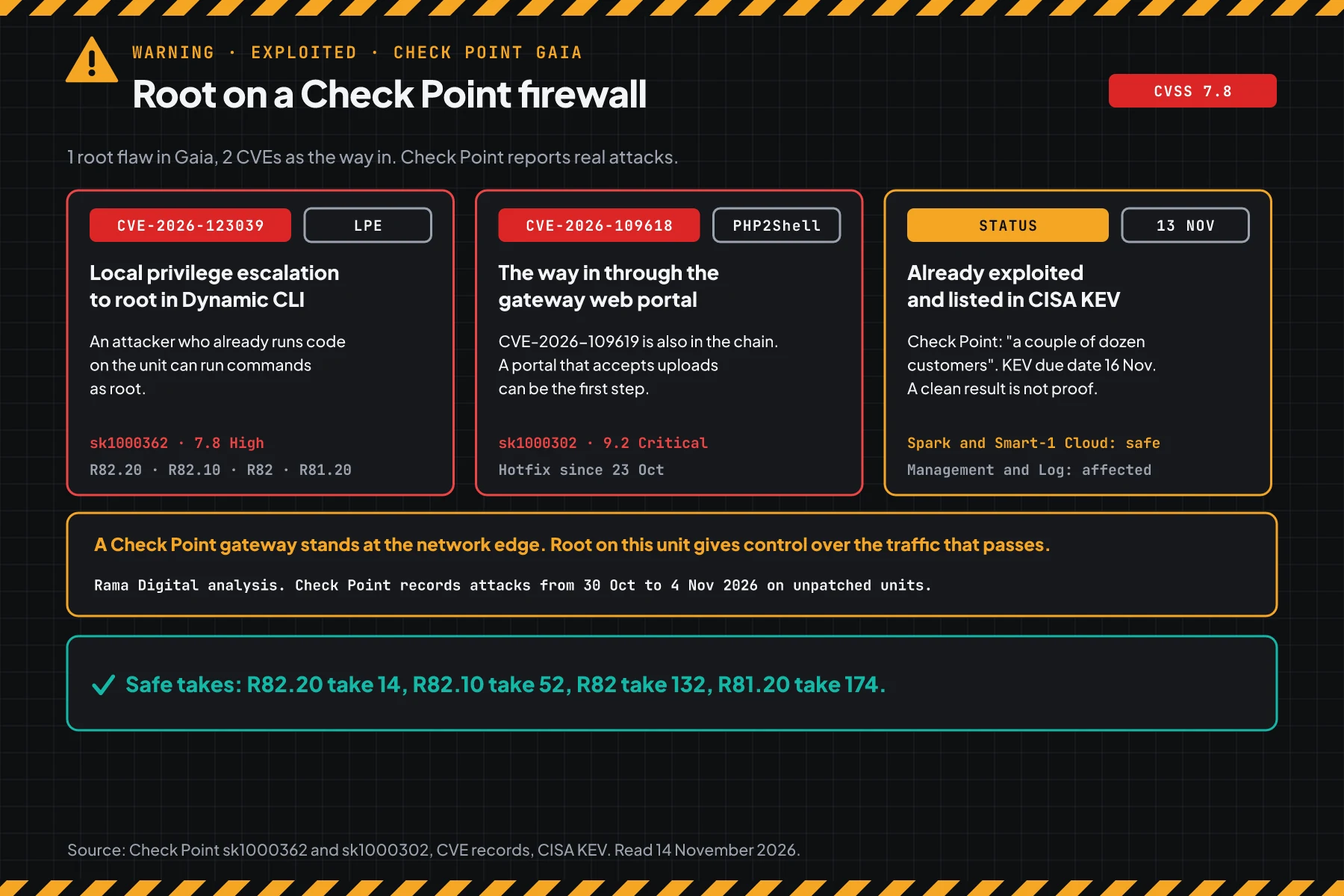
Exploitation status on 14 November 2026
advisory sk1000362 says Check Point sees "an active exploit of this vulnerability against a couple of dozen customers". That means about 24 customers. Check Point blog and Check Point Research report that the PHP2Shell chain followed by CVE-2026-123039 was active from 30 October to 4 November 2026, on units that were not patched.
Wave 1 on 30 October hit one region and had some destructive cases. Wave 2 on 2 November touched many countries with no destructive cases. CISA KEV has listed CVE-2026-123039 since 13 November 2026, with a due date of 16 November 2026 for US federal agencies.
Rama Digital analysis: the KEV due date applies to US agencies, not to you. But the date shows that CISA treats this flaw as urgent.
Who is most at risk
Units with a web portal open to the internet and a Jumbo take below the fixed take are at the highest risk.
This table summarizes advisory sk1000362, advisory sk1000302, Check Point Research, and our analysis.
| Check Point unit condition | Risk | Reason |
|---|---|---|
| Web portal feature active: Mobile Access, SNX, SAML, Captive Portal, UserCheck, or Zero Phishing | High | PHP2Shell affects these features, the way in during real attacks |
| Jumbo take below the fixed take | High | The PHP2Shell hotfix and the 123039 fix are in the same take |
| Unit still on R81.10 or R81 | High | EOS. No Jumbo has the fix |
| SSH or Gaia Portal open from many networks | Check | Rama Digital analysis: local access is the condition for 123039, so limit admin access |
| ESXi hosts connected to the gateway | Check | Real attacks moved from the gateway to ESXi |
| Management Server or Log Server | Lower | Affected by 123039, not affected by PHP2Shell. Still install the fixed take |
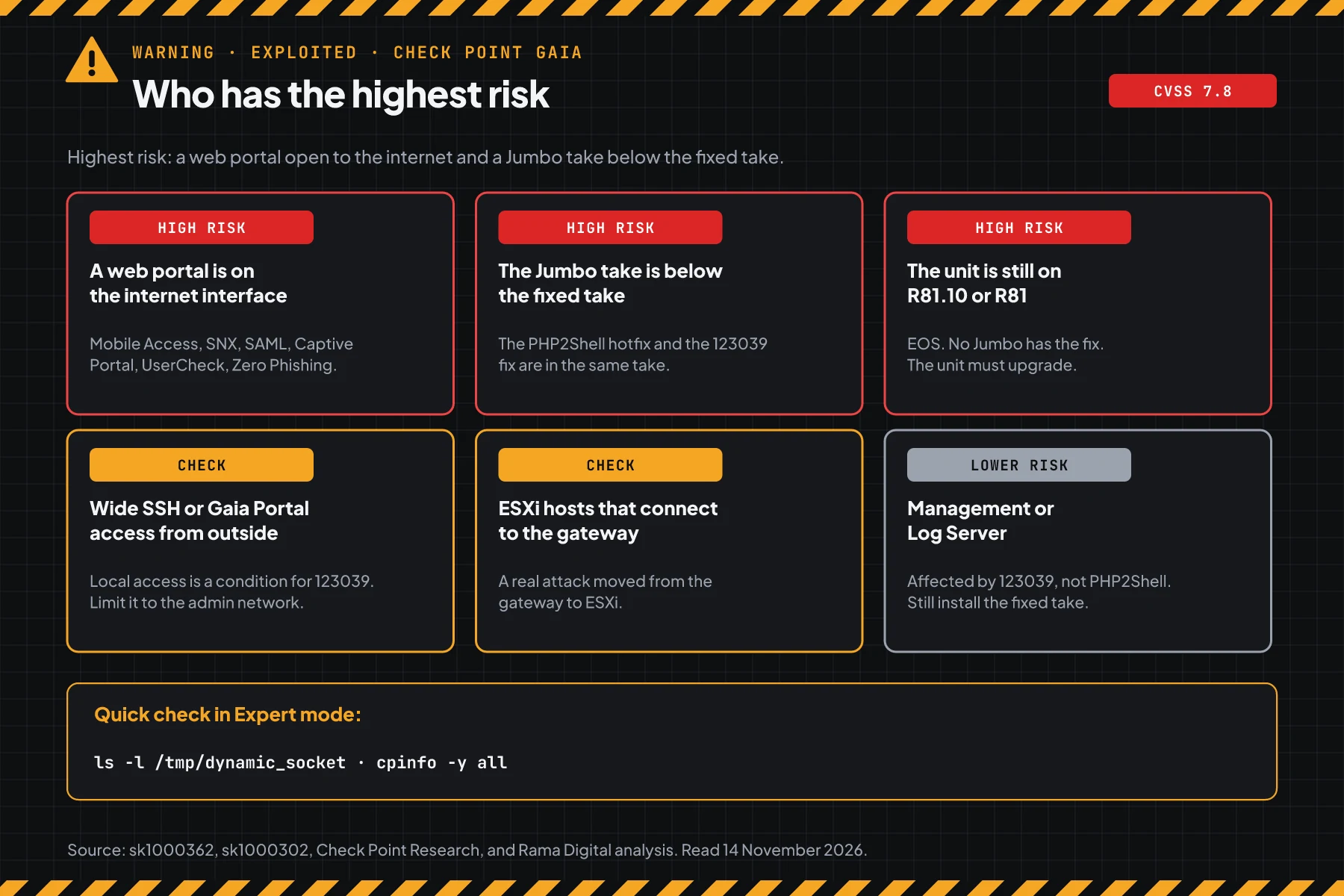
Rama Digital analysis: a unit with no web portal has no PHP2Shell way in. But CVE-2026-123039 still exists for anyone who already has local access, so we do not write that a unit with no portal is safe. A similar pattern of edge devices as targets appears in the FortiMail flaw CVE-2026-126147.
Vulnerable and safe versions
advisory sk1000362 lists 4 versions with a fix and 2 EOS versions. Match the Gaia version and Jumbo take of your unit with this table.
| Gaia version | CVE-2026-123039 | Fixed (advisory sk1000362) | CVE record |
|---|---|---|---|
| R82.20 | Affected | Take 14 or newer | Take 10 or below |
| R82.10 | Affected | Take 52 or newer | Take 50 or below |
| R82 | Affected | Take 132 or newer | Take 130 or below |
| R81.20 | Affected | Take 174 or newer | Take 173 or below |
| R81.10, R81 | Affected, already EOS | No Jumbo has the fix. Upgrade to a supported version | Not listed |
| Spark Firewalls | Not affected | No action needed | Not listed |
| Smart-1 Cloud | Not affected | No action needed | Not listed |
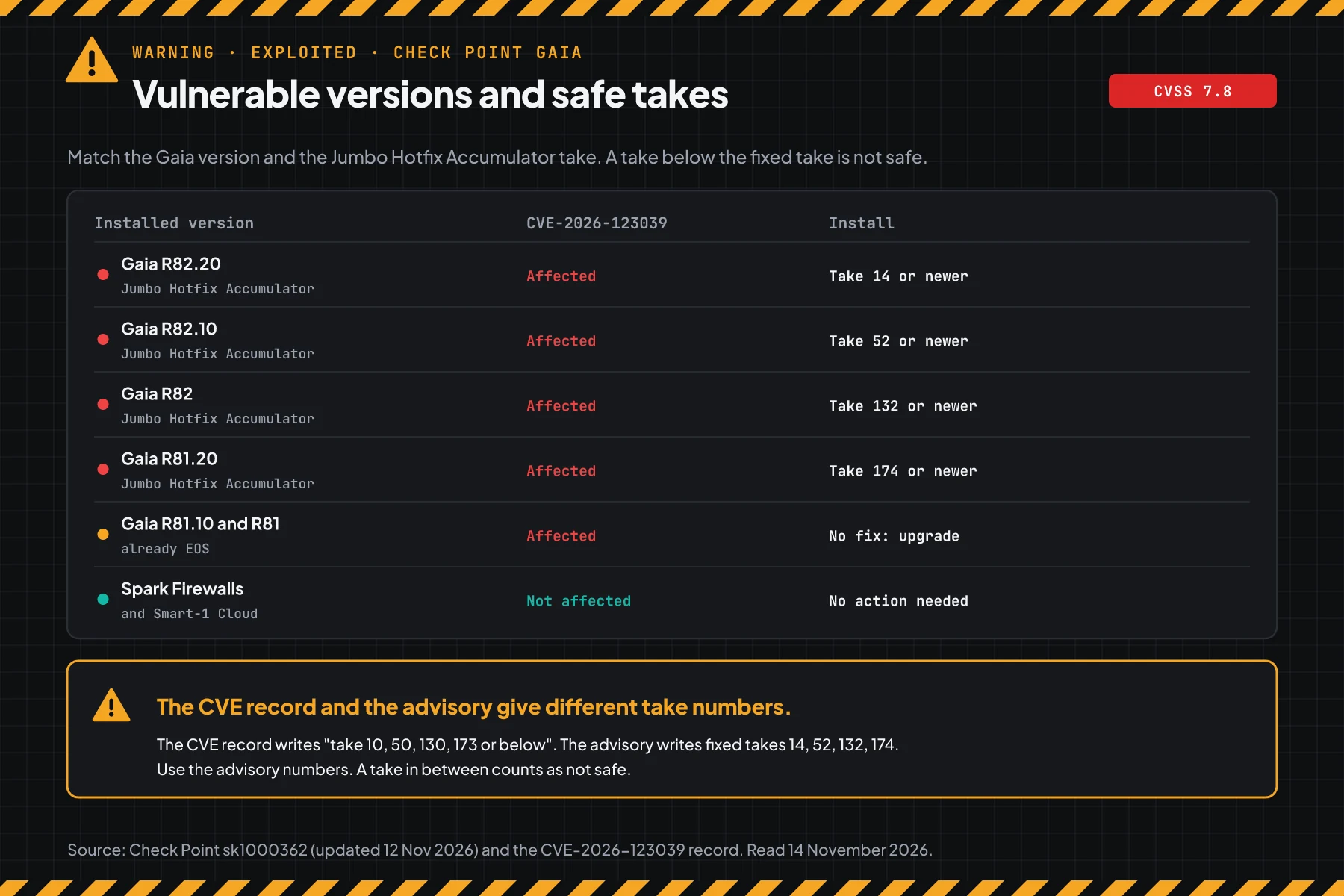
Note on take numbers: CVE-2026-123039 record says "Take 10, 50, 130, 173 or below". The advisory says the fixed takes are 14, 52, 132, 174, and we use the advisory numbers. A take between the two numbers is not safe until the fixed take is installed.
Note on other versions: Spark Firewalls and Smart-1 Cloud are not affected by advisory sk1000362. Management Server and Log Server are affected by 123039, but not by PHP2Shell.
Prerequisites before you start
- A Gaia admin account with Expert mode access for each gateway, including the second cluster member.
- Access to the Check Point Support Center to download the Jumbo Hotfix Accumulator.
- A maintenance window. The unit restarts during installation, so traffic can stop for a short time.
- SmartConsole access to see the active portal features on each gateway.
- A copy of the web portal logs and authentication logs. Step 5 needs these copies.
Step 1: Check the Gaia version and Jumbo take
Sign in to the gateway over SSH, then enter Expert mode. Run this command to see the version and take:
cpinfo -y allRama Digital analysis: we did not find a take command from Check Point that we can confirm.
Community examples of cpinfo -y all output have a version line and a JUMBO_HF_MAIN Take: N line. We tested the script only on dummy samples, not on real Gaia. Compare the result with SmartConsole.
This is Check Point CPinfo Build 914000236 for GAIA
[IDS]
No licenses were found
[SUMMARY]
Hostname: fw-jkt-01
This is Check Point's software version R82.10 - Build 042
HOTFIX_R82_10_JUMBO_HF_MAIN Take: 51
For many units, save this script as check-version-checkpoint.sh. The script compares the version and take with the advisory table. The script does not contact Check Point.
#!/usr/bin/env bash
# Check the Gaia version and the Jumbo Hotfix take against sk1000362 (CVE-2026-123039).
# Data: Check Point advisory sk1000362, updated 12 November 2026. The script reads text only and does not contact Check Point.
# Use: bash check-version-checkpoint.sh devices.txt    (1 unit per line: name, version, take, for example "fw-01 R82.20 11")
#   or: bash check-version-checkpoint.sh "fw-01 R82.20 11" "fw-02 R81.20 174"
#   or: bash check-version-checkpoint.sh -             (read from stdin)
#   or: bash check-version-checkpoint.sh --cpinfo cpinfo.txt   (a copy of the output of "cpinfo -y all" in Expert mode)
# Fixed takes: R82.20 = 14, R82.10 = 52, R82 = 132, R81.20 = 174. R81.10 and R81 are EOS and have no fix.
set -u
vuln=0; upgrade=0; safe=0; other=0; total=0

# Remove control characters and limit the length, so file content cannot change the terminal display.
clean() { tr -cd '[:print:]\n' | cut -c1-110; }

header() { printf '%-14s %-8s %-6s %s\n' "UNIT" "VERSION" "TAKE" "STATUS"; }

# $1 name, $2 major, $3 minor, $4 take (a number, may be empty)
rate() {
  local name="$1" ma=$((10#$2)) mi=$((10#$3)) tk="$4" ver need="" st
  ver="R$ma"; (( mi > 0 )) && ver="R$ma.$mi"
  case "$ver" in R82.20) need=14 ;; R82.10) need=52 ;; R82) need=132 ;; R81.20) need=174 ;; esac
  if [ -n "$need" ]; then
    if [ -z "$tk" ]; then st="CANNOT CONFIRM, take not readable"; other=$((other + 1))
    elif (( 10#$tk >= need )); then st="SAFE"; safe=$((safe + 1))
    else st="VULNERABLE, install take $need or newer"; vuln=$((vuln + 1)); fi
  elif [ "$ver" = R81.10 ] || [ "$ver" = R81 ] || (( ma < 81 )); then
    st="UPGRADE, EOS with no fix"; upgrade=$((upgrade + 1))
  else
    st="NOT LISTED, read sk1000362"; other=$((other + 1))
  fi
  printf '%-14s %-8s %-6s %s\n' "$name" "$ver" "${tk:--}" "$st"
}

# Read 1 line: name, version (R82.20, 82.20), then take (89, Take 89, Take: 89).
line() {
  local text name="" i j t ver_i=-1 tk=""
  local -a T
  [[ $1 =~ ^[[:space:]]*# ]] && return 0
  text=$(printf '%s' "$1" | tr -cd '[:alnum:] .,:_-' | cut -c1-110)
  [[ -z ${text// /} ]] && return 0
  total=$((total + 1))
  read -r -a T <<< "${text//,/ }"
  for i in "${!T[@]}"; do
    if [[ ${T[i]} =~ ^[Rr]([0-9]{2})(\.([0-9]{1,3}))?$ ]] || [[ ${T[i]} =~ ^([0-9]{2})\.([0-9]{1,3})$ ]]; then ver_i=$i; break; fi
  done
  if (( ver_i < 0 )); then
    printf '%-14s %-8s %-6s %s\n' "$(printf '%s' "$text" | cut -c1-14)" "-" "-" "CANNOT CONFIRM, version not readable"
    other=$((other + 1)); return 0
  fi
  for ((j = 0; j < ver_i; j++)); do name="$name${name:+ }${T[j]}"; done
  local ma mi
  if [[ ${T[ver_i]} =~ ^[Rr]([0-9]{2})(\.([0-9]{1,3}))?$ ]]; then ma=${BASH_REMATCH[1]}; mi=${BASH_REMATCH[3]:-0}
  else [[ ${T[ver_i]} =~ ^([0-9]{2})\.([0-9]{1,3})$ ]]; ma=${BASH_REMATCH[1]}; mi=${BASH_REMATCH[2]}; fi
  for ((j = ver_i + 1; j < ${#T[@]}; j++)); do
    t=${T[j]}; t=${t,,}; t=${t#take}; t=${t#:}
    if [[ $t =~ ^[0-9]{1,5}$ ]]; then tk=$t; break; fi
  done
  rate "${name:--}" "$ma" "$mi" "$tk"
}

summary() {
  if (( total == 0 )); then echo "CANNOT CONFIRM: no data lines."; return 2; fi
  echo "Summary: $vuln VULNERABLE, $upgrade UPGRADE, $safe SAFE, $other other."
  (( upgrade )) && echo "UPGRADE: R81.10 and R81 are EOS. No Jumbo has the fix. Move to a supported version."
  (( other )) && echo "Other lines: check them yourself. With no readable take, treat the unit as not safe."
  echo "A take below the fixed take counts as not safe, also when the CVE record names a lower take."
  return 0
}

if [ "${1:-}" = "--cpinfo" ]; then
  f="${2:-}"
  if [ -z "$f" ] || [ ! -r "$f" ] || [ ! -f "$f" ]; then
    echo "CANNOT CONFIRM: file $(printf '%s' "$f" | clean) is not readable."; exit 2
  fi
  body=$(tr -d '\r' < "$f" | tr -cd '[:print:]\n')
  v=$(printf '%s\n' "$body" | sed -nE 's/.*[Ss]oftware version +(R[0-9]{2}(\.[0-9]{1,3})?).*/\1/p' | head -n 1)
  tk=$(printf '%s\n' "$body" | grep -i jumbo | sed -nE 's/.*[Tt]ake:? *([0-9]+).*/\1/p' | head -n 1)
  h=$(printf '%s\n' "$body" | sed -nE 's/^[Hh]ost ?[Nn]ame:? *([A-Za-z0-9._-]+).*/\1/p' | head -n 1 | cut -c1-14)
  if [ -z "$v" ]; then echo "CANNOT CONFIRM: no software version line in the file."; exit 2; fi
  if (( ${#tk} > 5 )); then tk=""; fi
  echo "Version: $v. Jumbo take: ${tk:-not readable}."
  header
  line "${h:-gateway} $v ${tk:+Take $tk}"
  summary; exit $?
fi

header
if [ "${1:-}" = "-" ] || (( $# == 0 )); then
  while IFS= read -r x || [ -n "$x" ]; do line "$x"; done
elif (( $# == 1 )) && [ -f "$1" ]; then
  if [ ! -r "$1" ]; then echo "CANNOT CONFIRM: file is not readable."; exit 2; fi
  while IFS= read -r x || [ -n "$x" ]; do line "$x"; done < "$1"
elif (( $# == 1 )) && [[ $1 != *[[:space:]]* ]]; then
  echo "CANNOT CONFIRM: file $(printf '%s' "$1" | clean) does not exist."; exit 2
else
  for x in "$@"; do line "$x"; done
fi
summary; exit $?
Write 1 unit per line: name, version, then take. Example file content with dummy data:
# name version take (dummy data)
fw-jkt-01 R82.20 11
fw-jkt-02 R82.20 14
fw-sby-01 R82.10 51
fw-bdg-01 R82 132
fw-dr-01 R81.20 160
fw-lama R81.10 99
# 1 unit per line: name, version, then take. Data from cpinfo -y all
nano devices.txt
bash check-version-checkpoint.sh devices.txt
# Or pass them as arguments
bash check-version-checkpoint.sh "fw-jkt-01 R82.20 11" "fw-sby-01 R81.20 174"
# Or use a copy of the output of cpinfo -y all
bash check-version-checkpoint.sh --cpinfo cpinfo-checkpoint.txt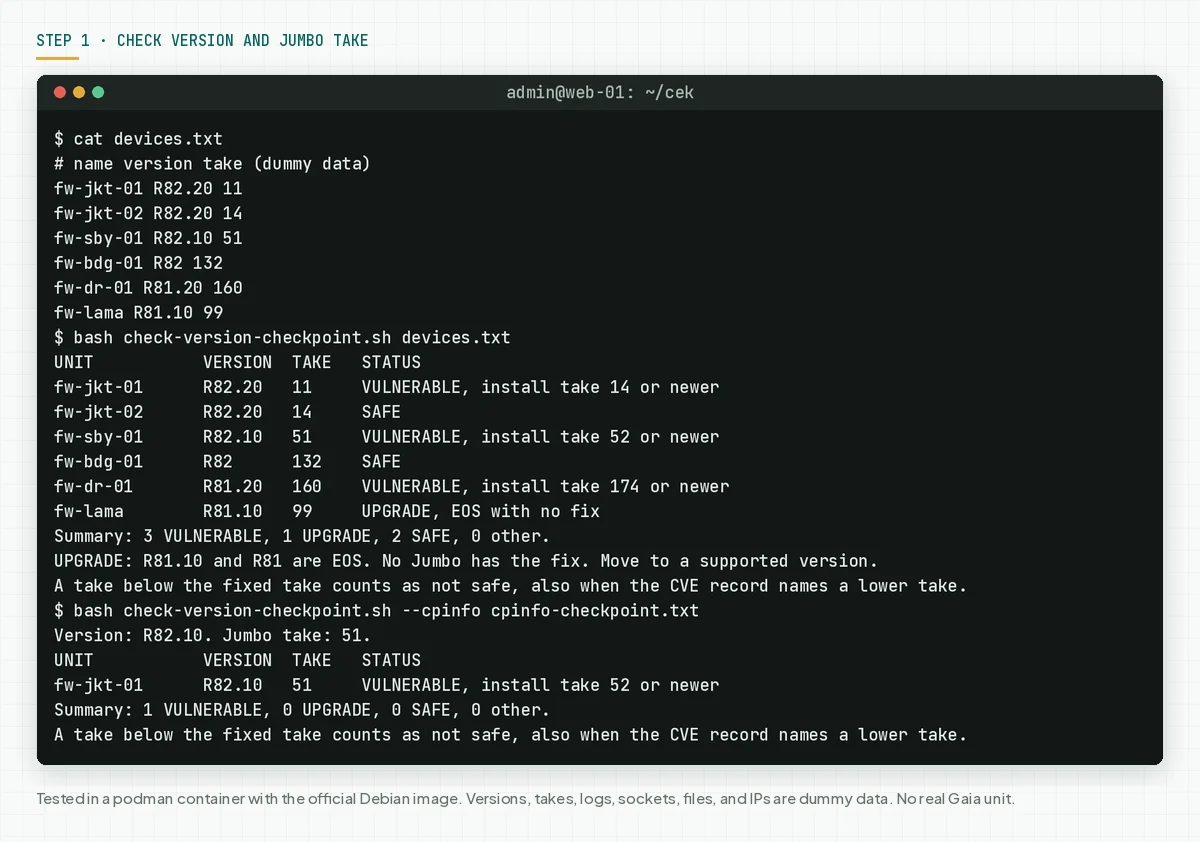
Check the result: "VULNERABLE" means the unit needs step 3 today.
"UPGRADE" means the unit is on R81.10 or R81 with no fix. "SAFE" means the take closes the flaw, but still run step 5. "CANNOT CONFIRM" means the version or take is not readable, so treat the unit as at risk.
Step 2: Check active portal features and the socket mode
This step answers 2 questions. Does the unit have a PHP2Shell way in? Is the Dynamic CLI socket still open to all users?
First, open SmartConsole and look at each gateway. Note whether one of these features is active: Mobile Access Portal, Remote Access VPN with SSL Network Extender, Remote Access VPN with SAML Realm, Identity Awareness Captive Portal, UserCheck Portal, or Zero Phishing. The feature list is in advisory sk1000302.
Second, run this command in Expert mode, as in advisory sk1000362:
ls -l /tmp/dynamic_socketA fixed unit shows srw-rw---- root config (0660). A vulnerable unit shows srwxrwxrwx (0777). If the socket file does not exist, dynamic_server may be stopped, and that is not proof of a fix.
Check the result: You have a list of gateways with active portal features, and the socket mode of each unit. A unit with an active portal and a low take is the first priority.
Step 3: Install the fixed Jumbo Hotfix take
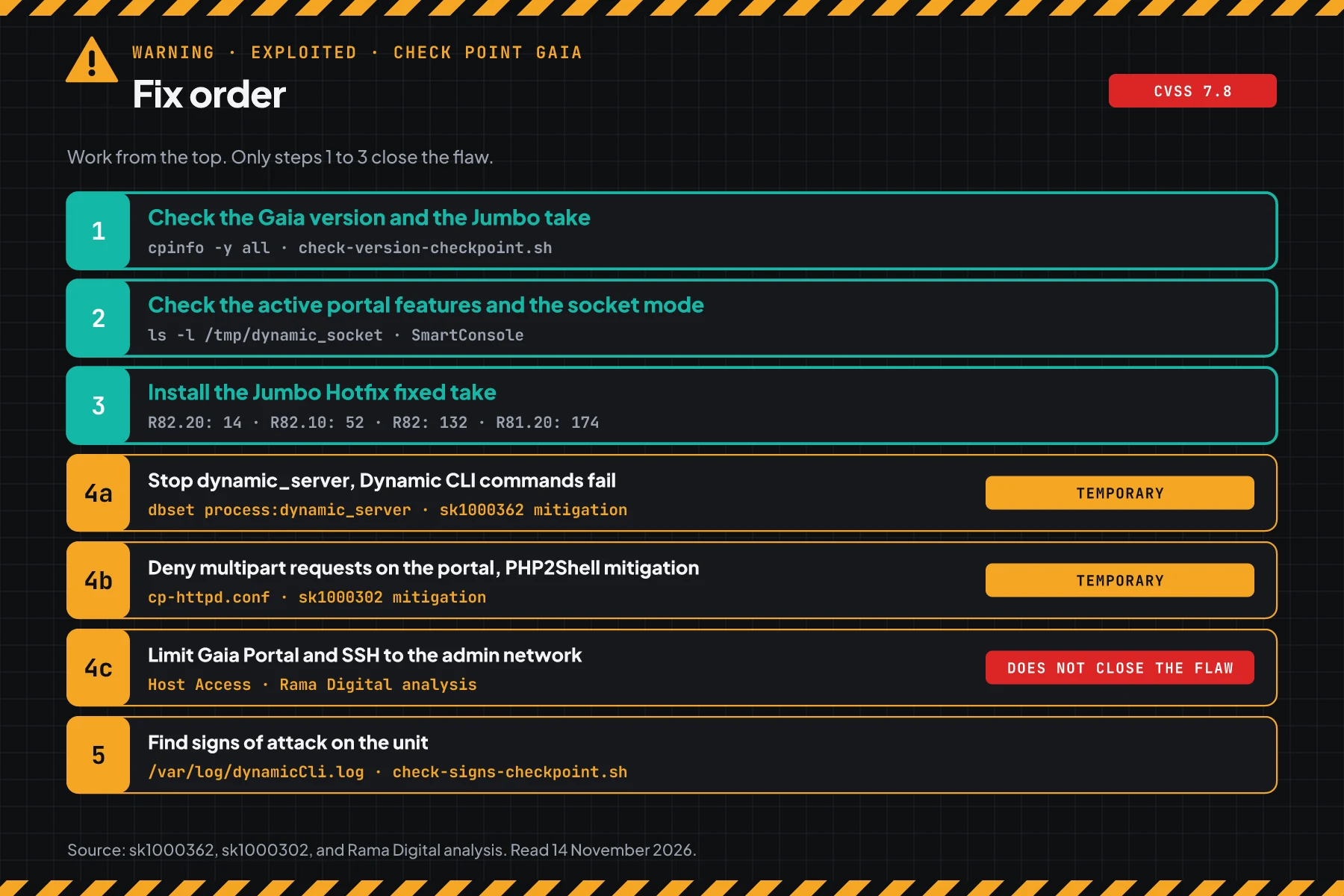
Only the fixed take closes the flaw. R82.20 needs take 14, R82.10 take 52, R82 take 132, and R81.20 take 174. R81.10 and R81 units must upgrade to a supported version.
- Download the Jumbo Hotfix Accumulator for your version from the Check Point Support Center. Pick the fixed take or a newer one.
- Rama Digital analysis: take a snapshot or backup of the unit before installation, and prepare console access.
- Install the take on the gateway, with Gaia Portal (CPUSE) or another method in the Jumbo guide for your version.
- In a cluster, install on one member first, then the next member. Follow the ClusterXL guide for your version.
- After the restart, run
cpinfo -y allagain, then runcheck-version-checkpoint.shwith the new take. - Run
ls -l /tmp/dynamic_socket. The correct result issrw-rw---- root config. - If you installed the PHP2Shell mitigation in step 4b, remove those lines from
cp-httpd.confbefore installation, as in advisory sk1000302.
The fix also blocks unprivileged calls to Dynamic CLI and logs them. To see those logs, run this command from advisory sk1000362:
grep "Rejected connection from unauthorized uid" /var/log/dynamicCli.logExample line: [DynamicCLI]: Rejected connection from unauthorized uid 99 (pid 123456). UID 99 is nobody. A UID that is not zero or not expected means a blocked attempt, so compare spikes of these lines with the web portal logs and authentication logs.
Check the result: the script prints "SAFE" for each gateway and cluster member, and the socket shows 0660 root config.
Step 4: Temporary mitigation, some steps DO NOT close the flaw
This step lowers the chance of attack until the take is installed. Steps 4a and 4b are mitigations from Check Point. Step 4c DOES NOT close the flaw.
4a. Stop dynamic_server (sk1000362 mitigation)
According to advisory sk1000362, this command stops the process and prevents a restart:
dbset process:dynamic_server
dbset :save
Side effect: Dynamic CLI commands fail while the process is stopped. To start it again, run this command:
dbset process:dynamic_server t
dbset :save
To check the process in Expert mode, run this command:
ps auxw | grep -v grep | grep 'dynamic_server'4b. PHP2Shell mitigation in the web portal (sk1000302 mitigation)
Summary from advisory sk1000302: an R82.20 firewall protects itself with the IPS signature "PHP Remote Code Execution", even when IPS is off. For other versions, follow these manual steps.
- Back up the file
$CPDIR/web/Apache/conf/cp-httpd.conf. - Add this block 1 time at the end of the file:
<If "req('Content-Type') =~ /multipart/i">
    Require all denied
</If>- Restart the portal with the
mpclientcommand for your version. The full commands are in advisory sk1000302. - In ClusterXL, repeat on each member. In VSX, run
vsenv 0first.
That block rejects requests with a multipart body to the portal. Portal features that use uploads can fail. Remove the block before you install the hotfix.
4c. Limit admin access (Rama Digital analysis, DOES NOT close the flaw)
Rama Digital analysis: limit Gaia Portal and SSH to the admin network with Host Access, as advisory sk1000291 advises for another flaw. This step reduces the local access path. This step DOES NOT close CVE-2026-123039.
Check the result: the ps command does not show dynamic_server if you used 4a, the multipart block appears 1 time in cp-httpd.conf if you used 4b, and admin access comes only from the admin network if you used 4c.
Step 5: Look for signs that the unit was taken over
The fixed take closes the flaw, but it does not remove files or access that the attacker left. So look for those traces after installation.
Check Point writes that a clean result does not prove a clean unit. The script only looks for traces that the vendor names. Run it on each gateway and cluster member.
3 log checks from sk1000362
The daemon logs each command in /var/log/dynamicCli.log. Legitimate commands use the Clish wrapper. advisory sk1000362 gives these 3 checks:
grep "Received =" /var/log/dynamicCli.log | grep -vF "CPprofile.sh >> /dev/null; export SP_DISTRIBUTE=0; set -o noglob;"grep -F "Received = #return_value#" /var/log/dynamicCli.loggrep -EI "Received =.*( id;| whoami| /etc/shadow| ncat| nc -| /dev/tcp| curl | wget | base64| useradd| authorized_keys)" /var/log/dynamicCli.logCheck 1 looks for commands without the Clish wrapper. Check 2 looks for Received = #return_value#, which is rare or absent in legitimate traffic. Check 3 looks for suspect command words.
Other traces from Check Point and CPR
Check Point blog and Check Point Research list these traces:
- PHP session files that contain
upload_progress_pwn, in/opt/CPcvpn-R81.20/tmp/. - Template files
zz*.tpl,challenge_render.tpl, or/tmp/.up.tplin the portal template folder. - The files
/tmp/CPconfigdaemon,/tmp/.bd.log,slot_CPconfigdaemon,/lib/libcpfwcommon.so, and the socket/tmp/.p_sock. - TCP port 11072 that listens on all IPv4 interfaces.
- Scanner IPs 130.94.19[.]204 and 130.94.19[.]168.
- Segmentation faults in Apache or PHP portal workers, and gaps in the firewall traffic log.
- SSH from the gateway to an ESXi host as
vpxuser, a wiper on ESXi, and the fileDREAM_ANNEXATION.txt.
Save this script as check-signs-checkpoint.sh. The script only reads files and does not change, delete, or send anything. It checks the socket, the 3 log checks, Rejected lines, IoC files, portal templates, PHP sessions, port 11072, and scanner IPs.
#!/usr/bin/env bash
# Look for signs of attack on a Check Point Gaia gateway: CVE-2026-123039 (sk1000362) and the PHP2Shell chain (sk1000302).
# Run in Expert mode (bash) on each gateway or cluster member. The script only reads. It does not change anything.
# Use: bash check-signs-checkpoint.sh [--log DIR] [--root DIR] [--listen FILE]
#   --log DIR      folder of web portal logs or authentication logs that you copied, to look for the 2 scanner IPs
#   --root DIR     folder prefix, to test the script on a copy of the files (default: the root folder of the unit)
#   --listen FILE  a copy of the output of "ss -lnt" or "netstat -lnt" (default: the script runs ss or netstat)
# Checks: socket, Dynamic CLI log (the 3 sk1000362 checks and Rejected lines), IoC files, portal templates,
# PHP sessions, TCP port 11072, and scanner IPs. A clean result does not prove the unit is clean (vendor note).
set -u
ROOT=""; LOGD=""; LISTEN=""; root_set=0
while (( $# > 0 )); do
  case "$1" in
    --root) ROOT="${2:-}"; root_set=1; shift 2 || shift ;;
    --log) LOGD="${2:-}"; shift 2 || shift ;;
    --listen) LISTEN="${2:-}"; shift 2 || shift ;;
    *) echo "Use: bash check-signs-checkpoint.sh [--log DIR] [--root DIR] [--listen FILE]"; exit 2 ;;
  esac
done
ROOT="${ROOT%/}"
found=0; unsure=0
# Remove control characters and limit the line length, so file content cannot change the terminal display.
clean() { tr -cd '[:print:]\n' | cut -c1-110; }
cannot() { echo "CANNOT CONFIRM: $1"; unsure=$((unsure + 1)); }
check() { echo "CHECK: $1"; found=$((found + 1)); }
rel() { local x; while IFS= read -r x; do printf '  %s\n' "${x#"$ROOT"}"; done | clean; }

if (( root_set )) && { [ -z "$ROOT" ] || [ ! -d "$ROOT" ]; }; then
  echo "CANNOT CONFIRM: the --root folder does not exist."; exit 2
fi
shopt -s nullglob

echo "== 1. Dynamic CLI socket (/tmp/dynamic_socket)"
S="$ROOT/tmp/dynamic_socket"
if [ ! -e "$S" ]; then
  cannot "the socket does not exist. Normal if dynamic_server is stopped as a mitigation. This is not proof of a fix."
else
  info=$(stat -c '%a %A %U %G' "$S" 2>/dev/null | clean)
  read -r mode sym own grp <<< "$info"
  if [ -z "${mode:-}" ] || ! [[ $mode =~ ^[0-7]+$ ]]; then cannot "the socket mode is not readable."
  else
    echo "$sym $own $grp (mode $mode)"
    [ -S "$S" ] || echo "Note: this file is not a socket."
    if (( (8#$mode & 8#002) != 0 )); then
      check "any user can write to the socket. This is the VULNERABLE state in sk1000362."
    elif [ "$mode" = 660 ] && [ "$own" = root ] && [ "$grp" = config ]; then
      echo "Matches the fixed state: srw-rw---- root config."
    else
      cannot "socket $mode $own:$grp differs from 0660 root:config. Compare with sk1000362."
    fi
  fi
fi

echo "== 2. Dynamic CLI log (/var/log/dynamicCli.log and its rotations)"
ok=()
for f in "$ROOT"/var/log/dynamicCli.log*; do
  if [ ! -r "$f" ] || [ ! -f "$f" ]; then cannot "file $(basename "$f" | clean) is not readable."; continue; fi
  case "$f" in
    *.gz) if gzip -t "$f" 2>/dev/null; then ok+=("$f"); else cannot "file $(basename "$f" | clean) is damaged."; fi ;;
    *) ok+=("$f") ;;
  esac
done
read_all() { local f; for f in "${ok[@]}"; do case "$f" in *.gz) gzip -dc "$f" 2>/dev/null ;; *) cat "$f" 2>/dev/null ;; esac; done | tr -d '\r'; }
if (( ${#ok[@]} == 0 )); then
  cannot "no readable Dynamic CLI log."
else
  echo "Files read: ${#ok[@]}"
  WRAP='CPprofile.sh >> /dev/null; export SP_DISTRIBUTE=0; set -o noglob;'
  n_all=$(read_all | grep -a 'Received =' | grep -c .)
  if (( n_all == 0 )); then cannot "the log has no Received = lines."
  else
    echo "Received lines: $n_all"
    c1=$(read_all | grep -a 'Received =' | grep -avF "$WRAP" | grep -c .)
    c2=$(read_all | grep -aF 'Received = #return_value#' | grep -c .)
    c3=$(read_all | grep -aE 'Received =.*( id;| whoami| /etc/shadow| ncat| nc -| /dev/tcp| curl | wget | base64| useradd| authorized_keys)' | grep -c .)
    if (( c1 > 0 )); then check "check 1: commands without the Clish wrapper: $c1. Examples:"; read_all | grep -a 'Received =' | grep -avF "$WRAP" | head -n 3 | clean | sed 's/^/  /'
    else echo "Check 1: 0 commands without the Clish wrapper."; fi
    if (( c2 > 0 )); then check "check 2: lines with Received = #return_value#: $c2."; else echo "Check 2: 0 #return_value# lines."; fi
    if (( c3 > 0 )); then check "check 3: lines with a suspect command word: $c3."; else echo "Check 3: 0 lines with a suspect command word."; fi
  fi
  rj=$(read_all | grep -aF 'Rejected connection from unauthorized uid' | grep -c .)
  if (( rj > 0 )); then
    check "lines with Rejected connection from unauthorized uid: $rj. The fix blocks these calls. UIDs by count:"
    read_all | grep -aF 'Rejected connection from unauthorized uid' | sed -nE 's/.*unauthorized uid ([0-9]+).*/\1/p' | sort | uniq -c | sort -rn | head -n 5 | clean | sed 's/^/  /'
  else echo "Rejected lines: 0."; fi
fi

echo "== 3. Files named as IoC"
n=0
for p in /tmp/CPconfigdaemon /tmp/.bd.log /tmp/.up.tpl /tmp/.p_sock /lib/libcpfwcommon.so; do
  if [ -e "$ROOT$p" ] || [ -L "$ROOT$p" ]; then check "file $p exists."; n=$((n + 1)); fi
done
sl=$(find "$ROOT/opt" "$ROOT/etc" -maxdepth 4 -name 'slot_CPconfigdaemon*' 2>/dev/null)
if [ -n "$sl" ]; then check "a slot_CPconfigdaemon file exists:"; printf '%s\n' "$sl" | rel; n=$((n + 1)); fi
(( n == 0 )) && echo "No IoC file from the list."

echo "== 4. Portal templates and PHP sessions"
cv=("$ROOT"/opt/CPcvpn-*)
if (( ${#cv[@]} == 0 )); then
  echo "No /opt/CPcvpn-*. A unit with no web portal, or a different path."
else
  tp=""
  for d in "${cv[@]}"; do
    while IFS= read -r td; do
      [ -n "$td" ] && tp="$tp$(find "$td" -maxdepth 3 -type f \( -name 'zz*.tpl' -o -name 'challenge_render.tpl' \) 2>/dev/null)"$'\n'
    done < <(find "$d" -maxdepth 8 -type d -iname '*templ*' 2>/dev/null)
  done
  tp=$(printf '%s' "$tp" | sed '/^$/d')
  if [ -n "$tp" ]; then check "zz*.tpl or challenge_render.tpl templates exist. Compare with other units:"; printf '%s\n' "$tp" | head -n 10 | rel
  else echo "No zz*.tpl or challenge_render.tpl in the template folders."; fi
  ss_=""
  for d in "${cv[@]}"; do
    [ -d "$d/tmp" ] && ss_="$ss_$(grep -rlaF upload_progress_pwn "$d/tmp" 2>/dev/null)"$'\n'
  done
  ss_=$(printf '%s' "$ss_" | sed '/^$/d')
  if [ -n "$ss_" ]; then check "PHP session files with upload_progress_pwn:"; printf '%s\n' "$ss_" | head -n 10 | rel
  else echo "No PHP session with upload_progress_pwn."; fi
fi

echo "== 5. TCP port 11072"
src=""
if [ -n "$LISTEN" ]; then
  if [ -r "$LISTEN" ] && [ -f "$LISTEN" ]; then src=$(tr -d '\r' < "$LISTEN" | tr -cd '[:print:]\n'); else cannot "the --listen file is not readable."; fi
elif command -v ss >/dev/null 2>&1; then src=$(ss -lnt 2>/dev/null)
elif command -v netstat >/dev/null 2>&1; then src=$(netstat -lnt 2>/dev/null)
else cannot "ss and netstat are missing. Run on the unit or use --listen."; fi
if [ -n "$src" ]; then
  hit=$(printf '%s\n' "$src" | grep -aE ':11072[[:space:]]')
  if [ -n "$hit" ]; then check "a listener is on TCP 11072:"; printf '%s\n' "$hit" | head -n 3 | clean | sed 's/^/  /'
  else echo "No listener on TCP 11072."; fi
elif [ -z "$LISTEN" ] && command -v ss >/dev/null 2>&1; then cannot "ss returned no data."
fi

echo "== 6. Scanner IPs in the logs that you copied"
if [ -z "$LOGD" ]; then
  echo "Note: no --log DIR. The scanner IP check is skipped."
elif [ ! -d "$LOGD" ] || [ ! -r "$LOGD" ]; then
  cannot "the log folder is not readable."
else
  if [ -n "$(find "$LOGD" -type f ! -readable 2>/dev/null | head -n 1)" ]; then cannot "a file in the log folder is not readable."; fi
  for s in '130.94.19[.]204' '130.94.19[.]168'; do
    ip=${s//\[.\]/.}
    fl=$(grep -rlaFw -- "$ip" "$LOGD" 2>/dev/null)
    if [ -n "$fl" ]; then check "IP $s is in $(printf "%s\n" "$fl" | grep -c .) file(s):"; printf '%s\n' "$fl" | head -n 3 | sed "s|^$LOGD/||" | clean | sed 's/^/  /'
    else echo "IP $s: not found."; fi
  done
fi

if (( found > 0 )); then
  echo "Result: FINDINGS ($found). Check each CHECK line. Follow Step 5, and do not reboot or reset before the evidence is kept."
  (( unsure > 0 )) && echo "Also: $unsure items CANNOT CONFIRM."
elif (( unsure > 0 )); then
  echo "Result: CANNOT CONFIRM ($unsure items). Complete the input, then run again."
else
  echo "Result: NO FINDINGS. A clean result does not prove the unit is clean (vendor note)."
fi
Copy the web portal logs and authentication logs to 1 folder, then run the script with the --log option:
# In Expert mode, in the folder where you keep the script. Copy the portal logs to the log-portal folder first.
bash check-signs-checkpoint.sh --log log-portal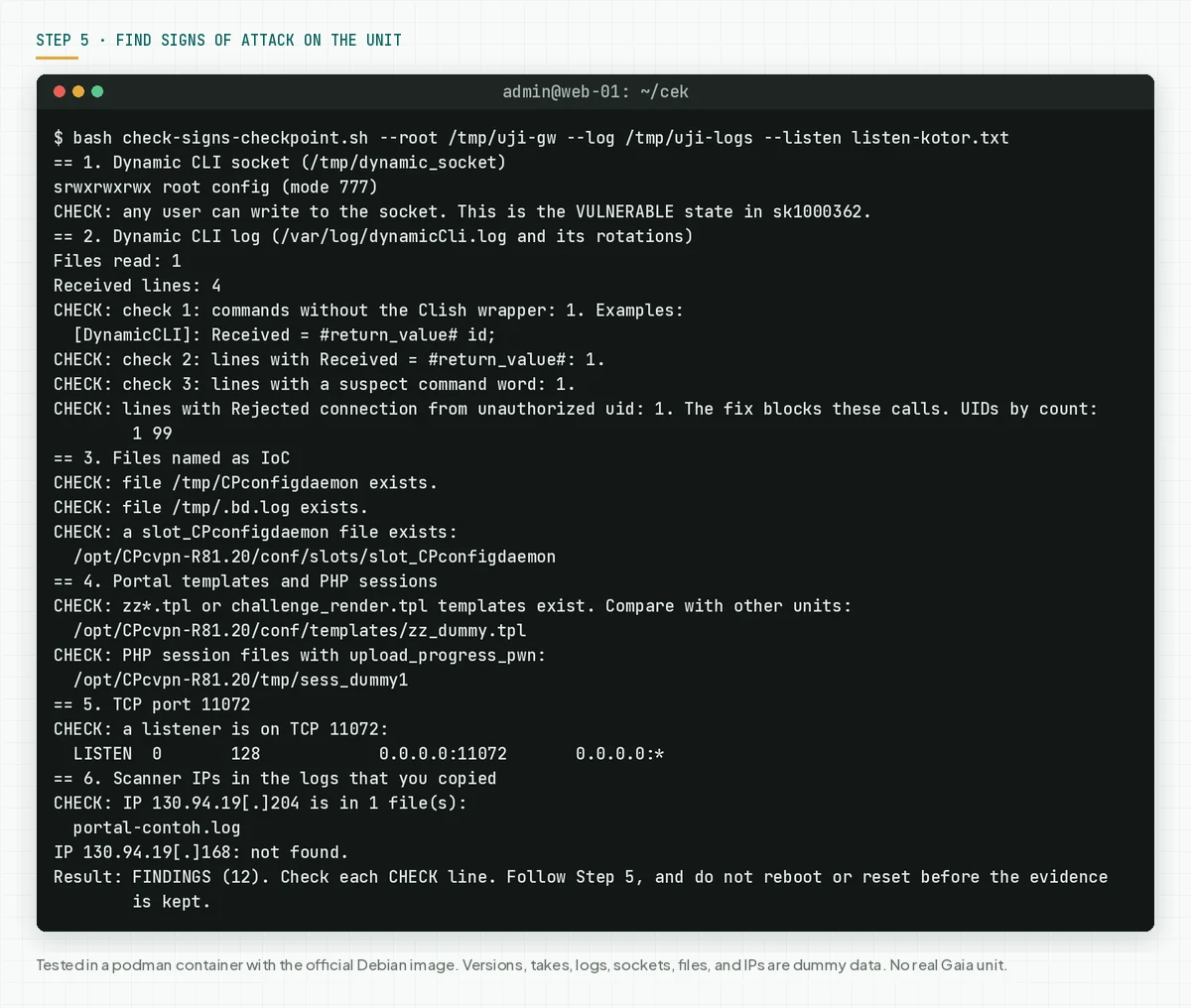
Script limits: The script does not read the firewall traffic log, does not check segmentation faults, and does not check ESXi hosts.
Rama Digital analysis: the word list in check 3 is the vendor list, and an attacker can use other words. Port 11072 is read from ss or netstat, or from a file with the --listen option.
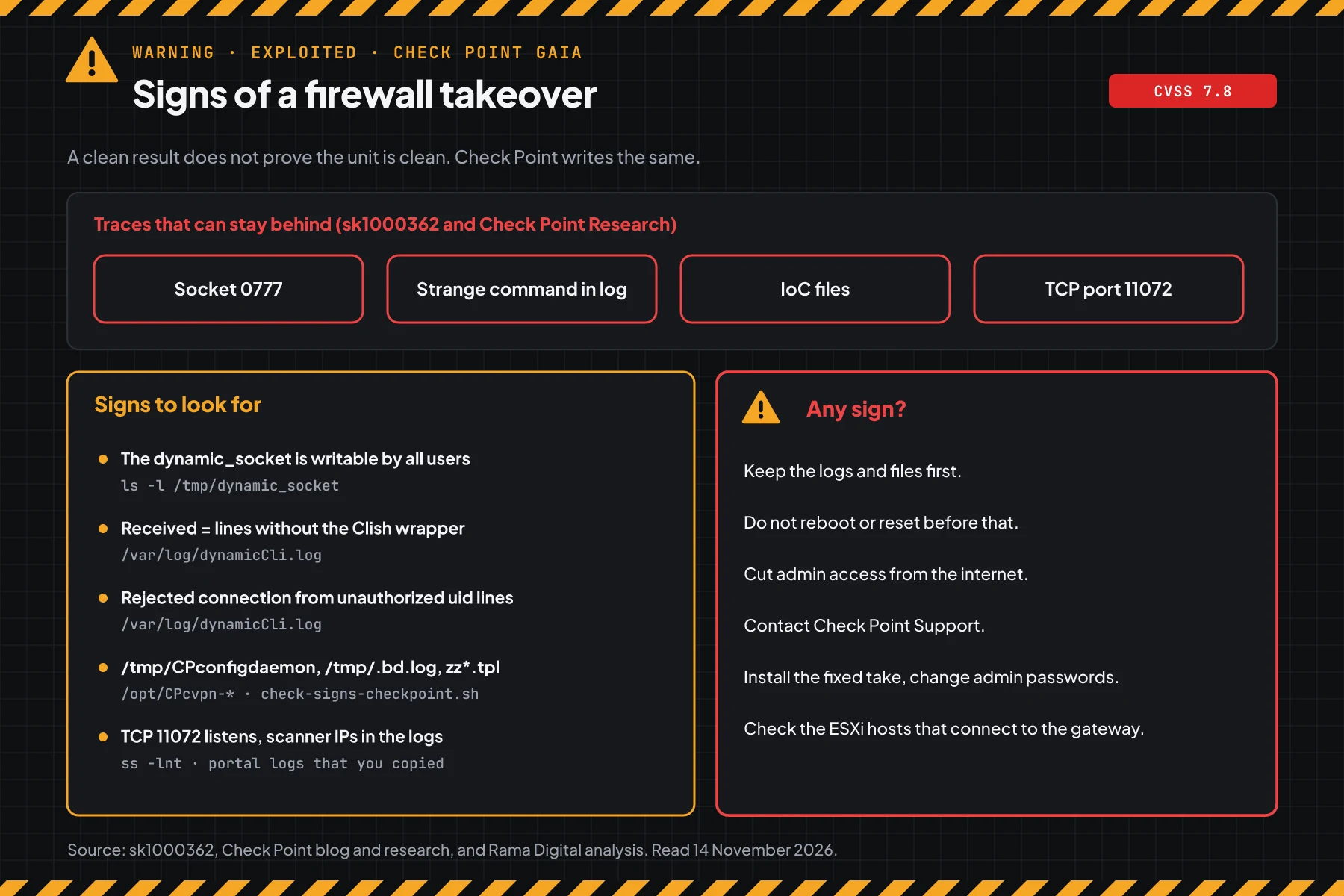
Check the result: "NO FINDINGS" means the script found no signs. A clean result does not prove a clean unit. "FINDINGS" means check each CHECK line, then follow this order:
- Keep the logs and the relevant files first, before you change anything.
- Do not reboot or reset the unit before the evidence is kept.
- Cut admin access from the internet.
- Contact Check Point Support with that evidence.
- Install the fixed take, then change the passwords of all admins.
- Rama Digital analysis: check the ESXi hosts connected to the gateway, because real attacks moved there.
If personal data leaks, Indonesian Law 27/2022 on Personal Data Protection requires written notice within 3 times 24 hours.
What we tested and what we did not
We tested the scripts in steps 1 and 5 on 14 November 2026. Gaia has no container image, so the test data is dummy files.
| Part | Status | Method |
|---|---|---|
| Version check script (ID and EN) | Tested | 11 edge cases: version format, empty take, missing file, file permission |
| Signs check script (ID and EN) | Tested | 15 cases: dirty and clean unit, rotated logs, damaged gz, control characters, no socket |
Commands cpinfo, dbset, mpclient, CPUSE | Not run | No real Gaia. The commands come from the advisory |
| SmartConsole and Jumbo installation | Not run | Steps 2 and 3 are written from the advisory |
| Mitigations 4a and 4b | Not run | No real Gaia |
| ClusterXL and VSX clusters | Not run | Advisory summary only |
Example: 1 night of response for 4 gateways
This simulation uses dummy data. The unit names, times, and results are not customer data.
| Time (WIB) | Dummy unit | What was checked | Result | Action |
|---|---|---|---|---|
| 19.00 | fw-jkt-01 (R82.20 take 11, Mobile Access active) | Steps 1 and 2 | VULNERABLE, socket 0777 | Step 4a tonight, install take 14 after a snapshot |
| 19.30 | fw-sby-01 (R82.10 take 51) | Step 1 | VULNERABLE | Install take 52 |
| 20.00 | fw-jkt-01 | Step 5 | /tmp/CPconfigdaemon exists, port 11072 listens | Cut admin access, keep logs, contact Check Point Support |
| 21.00 | fw-old (R81.10) | Step 1 | UPGRADE | Schedule an upgrade to a supported version, apply step 4 |
Lesson from the simulation: a unit with an active portal and a low take needs action first. Step 5 is still needed, even when the take is correct.
Who installs the patch
Patch responsibility differs by management model, so this table helps you know who moves today.
| Management model | Patch owner | What you do |
|---|---|---|
| Check Point firewall managed by your own IT team | Your IT team | Steps 1 to 5 |
| Firewall managed by an IT vendor or MSP | The partner under contract | Ask for written proof of the version and take, and the result of step 5 |
| Virtual firewall in a public cloud | Your IT team, not the cloud provider | Steps 1 to 5, plus security group rules |
| Spark Firewalls and Smart-1 Cloud | Check Point | No action needed for sk1000362 |
Checklist for today
- List all gateways, cluster members, Management Servers, and Log Servers. Owner: IT team. Proof: a list of names, versions, and takes.
- Check the version with step 1. Owner: network admin. Proof: the script output.
- Check portal features and socket mode with step 2. Owner: network admin. Proof: the feature list and the
ls -lresult. - Install the fixed take with step 3. Owner: network admin. Proof: the script output after installation.
- Apply mitigation 4a or 4b if installation cannot happen today. Owner: network admin. Proof: the
psresult and the content ofcp-httpd.conf. - Look for signs with step 5. Owner: network admin. Proof: the script output and the kept logs.
- Schedule an upgrade for each R81.10 or R81 unit. Owner: head of IT. Proof: a written upgrade date.
Questions and answers
Our unit has no web portal. Are we safe?
Not always. A unit with no web portal has no PHP2Shell way in, but CVE-2026-123039 still exists for anyone who already has local access. Install the fixed take.
We use Spark Firewalls or Smart-1 Cloud. Must we act?
Not for sk1000362. The advisory says both products are not affected.
Our unit is on R81.10. Why is there no patch?
R81.10 and R81 are already EOS. The advisory says no Jumbo has the fix. Upgrade to a supported version, and apply step 4 until the upgrade is done.
Our take is 12 on R82.20. The CVE record says take 10 or below. Are we safe?
No. The fixed take in the advisory is 14. Take 12 is between the two numbers, so treat it as not safe until take 14 is installed.
Does stopping dynamic_server close the flaw?
This mitigation closes the CVE-2026-123039 path, according to advisory sk1000362. The side effect: Dynamic CLI commands fail. Install the fixed take as the permanent fix.
Does the fixed take remove the attacker's access?
No. The take closes the flaw, but it does not remove files or access that the attacker made. Run step 5, then change the passwords of all admins.
The script is clean. Is our unit clean?
Not always. Check Point writes that a clean result does not prove a clean unit. The script only looks for traces that the vendor names.
Next step
These limits still apply: step 4c DOES NOT close the flaw, mitigations 4a and 4b are temporary, and the fixed take does not clean a unit that was already taken over. If your gateway shows signs in step 5, or you need help with an audit and recovery, use Vibe Code Rescue. For 1 urgent problem today, book a 30-minute session.
Sources
- advisory sk1000362: summary, CVSS 7.8, affected versions, fixed takes, the dynamic_server mitigation, IoC checks, and the quote "a couple of dozen customers".
- advisory sk1000302: PHP2Shell in Check Point firewalls, CVSS 9.2, affected features, the 23 October 2026 hotfix, and the manual mitigation.
- advisory sk1000291: Host Access for Gaia Portal.
- Check Point blog and Check Point Research: attack timeline, waves 1 and 2, IoCs, and the path to ESXi hosts, 12 November 2026.
- CVE-2026-123039 record: CNA description, CVSS 7.8, and the take numbers in the record, published 12 November 2026.
- CISA KEV: CVE-2026-123039 entered the catalog on 13 November 2026, due date 16 November 2026.
- our article on PHP2Shell and the FortiMail flaw CVE-2026-126147: context for attacks on edge devices.
- Indonesian Law 27/2022 on Personal Data Protection: the duty to give notice of a personal data breach.