Direct answer: CVE-2026-126147 and CVE-2026-126148 are 2 critical flaws in Fortinet FortiMail with a CVSS 3 score of 9.8. An attacker on the network, with no login, can run code or commands on a FortiMail unit. Today, check the version and the HA status, move to 8.0.2, 7.6.7, or 7.4.9, then remove admin access from the internet until the upgrade is done.
Fortinet published advisory FG-IR-26-199 and advisory FG-IR-26-200 on 10 November 2026. Neither advisory gives a workaround, so only an upgrade closes the flaws. Branch 7.2 has no fix. A 7.2 unit must migrate to another branch.
Main condition: On 13 November 2026, both advisories write Known Exploited: No, and CISA KEV does not list either CVE. FortiMail Cloud customers need no action, because Fortinet fixed it on 5 October 2026. Limit: This article has no request content, no payload, and no attack sequence.
We read advisory FG-IR-26-199, advisory FG-IR-26-200, the CVE-2026-126147 record, the CVE-2026-126148 record, CISA KEV, and the FortiMail 7.6.7 documents on docs.fortinet.com on 13 November 2026, from 22.29 to 22.54 WIB. We ran the scripts of steps 1 and 5 in a podman container with the official Debian image and dummy FortiMail files. FortiMail has no container image, so we wrote the GUI and CLI steps from the Fortinet documents.
The problem: an email gateway stands in front of the internet
FortiMail is an email security gateway from Fortinet. Many companies in Indonesia put FortiMail in front of their mail server to filter spam, malware, and phishing. The unit comes as an appliance, a VM, and a cloud service.
Because its job is to receive email from the internet, FortiMail always has an interface that connects to the internet. According to the CLI Reference on system interface, HTTPS access on an interface also serves webmail, per-recipient quarantine, and the REST APIAPIThe official door 2 systems use to exchange data, without anybody copying it by hand.Open the glossary. Rama Digital analysis: many teams open HTTPS on the internet interface so users can open the quarantine, and that door also opens the API component.
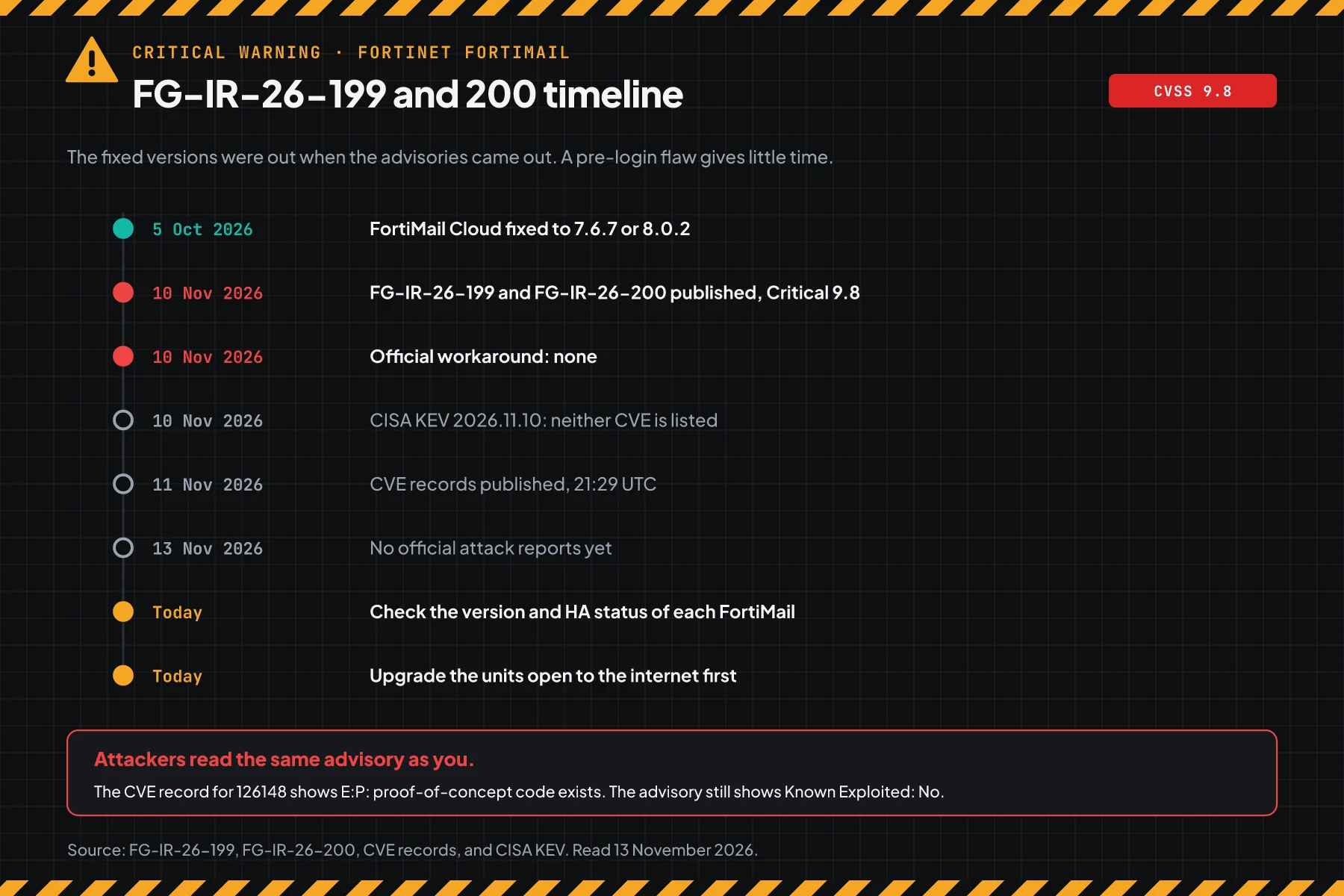
Fortinet fixed FortiMail Cloud on 5 October 2026, before the advisories. The advisories came out on 10 November 2026. The CVE records came out on 11 November 2026 at 21:29 UTC.
How it works: 2 flaws before login
Both flaws work before login, so a strong password and 2FA do not guard the unit from these flaws.
This section uses the official Fortinet summary. Its purpose is to help you choose the correct steps, not to explain an attack.
Summary from Fortinet
According to advisory FG-IR-26-199, CVE-2026-126147 is a path traversal flaw (CWE-22) in the FortiMail API component. An attacker with no login can "execute unauthorized code or commands via crafted requests".
According to advisory FG-IR-26-200, CVE-2026-126148 is a command injection flaw in the FortiMail CLI component. An attacker with no login can run code or commands "via crafted HA join-request packets". HA is the high availability feature that connects 2 FortiMail units.
2 CVEs, 2 advisories, 1 upgrade
Each CVE has its own advisory. Versions 8.0.2 and 7.6.7 close both. Branch 7.4 is only affected by CVE-2026-126147, and version 7.4.9 closes it.
| CVE | Advisory | Flaw type | Fortinet CVSS 3 | Effect |
|---|---|---|---|---|
| CVE-2026-126147 | FG-IR-26-199 | Path traversal in the API component (CWE-22) | 9.8 Critical | No login. Run code or commands through crafted requests. |
| CVE-2026-126148 | FG-IR-26-200 | Command injection in the CLI component | 9.8 Critical | No login. Run code or commands through crafted HA join-request packets. |
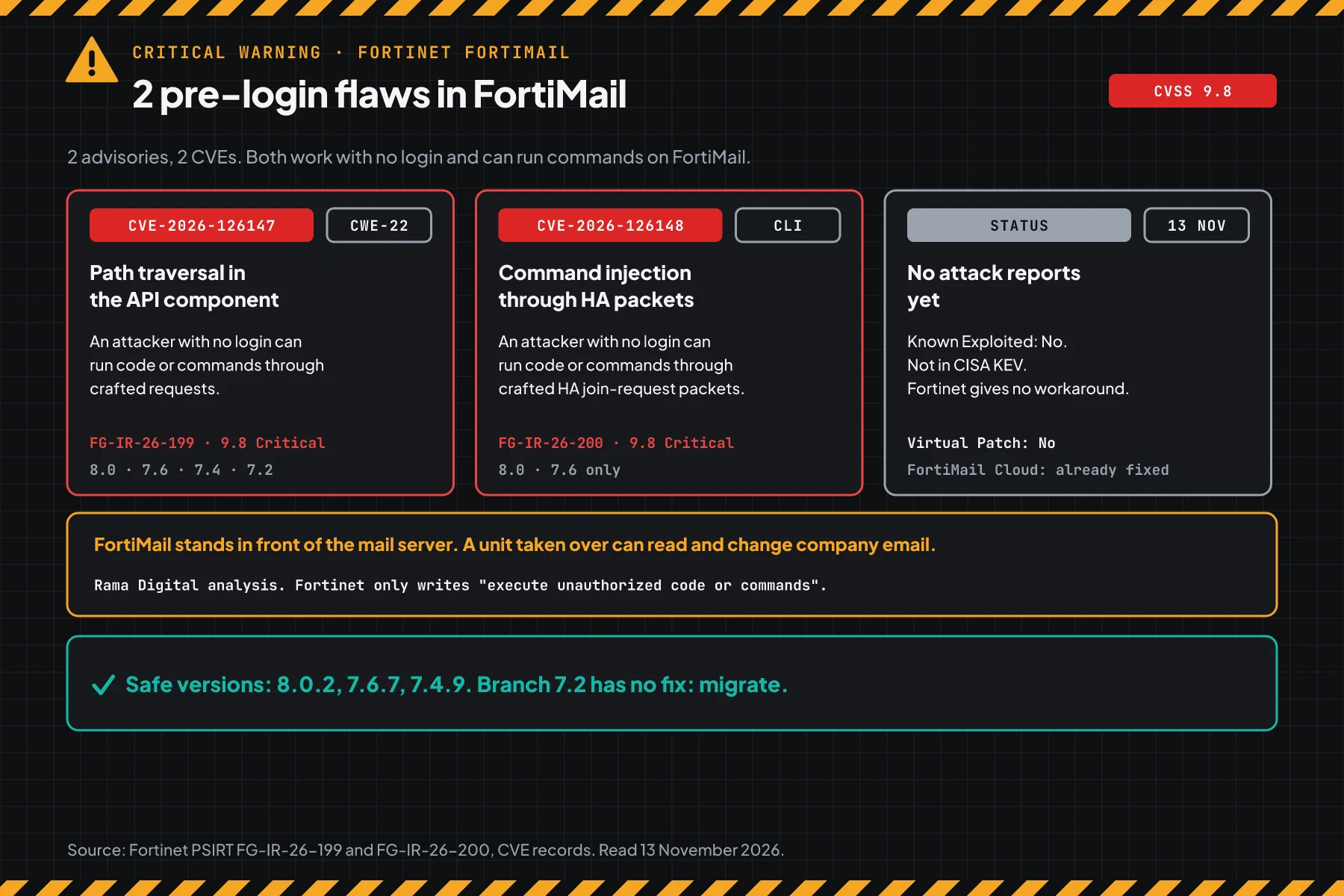
Advisory 200 writes CWE-77. The CVE-2026-126148 record writes CWE-78. Both are types of command injection, so this article uses the term command injection with no CWE number for CVE-2026-126148.
Exploitation status on 13 November 2026
Both advisories write Known Exploited: No and Virtual Patch: No. CISA KEV version 2026.11.10 does not list either CVE. The CVSS vector in the CVE-2026-126148 record has E:P. This means that, per the CNA, proof-of-concept code exists. The vector in the CVE-2026-126147 record has E:U.
Fortinet names Sam Mckee and Theo Leleu as the reporters of CVE-2026-126147, with the help of the frontier AI model ClaudeClaude ProThe paid subscription for the Claude AI assistant from Anthropic. It unlocks connectors to outside tools.Open the glossary Mythos. For CVE-2026-126148, Fortinet names Theo Leleu with the help of frontier AI models.
Rama Digital analysis: another FortiMail flaw, CVE-2026-104286 in FG-IR-26-175, went into CISA KEV on 1 October 2026. So attackers already aim at FortiMail this year. Condition: the unit is open to the internet and is not upgraded. Limit: that fact does not prove attacks on these 2 new CVEs.
Who is most at risk
Units that open HTTPS or SSH on the internet interface and did not upgrade are most at risk.
This table sums up advisory FG-IR-26-199, advisory FG-IR-26-200, the FortiMail security tuning guide, and our analysis.
| FortiMail condition | Risk | Reason |
|---|---|---|
| HTTPS, HTTP, or SSH is on at the internet interface | High | Rama Digital analysis: the API component and the admin login can be reached from outside |
| HA is on, with the heartbeat on a shared network or the internet interface | High | Rama Digital analysis: HA packets can come from a network that you do not trust |
| The unit is still on branch 7.2 | High | There is no fixed version. The unit must migrate |
| Admins with no trusted host | Check | The default 0.0.0.0/0.0.0.0 means any IP |
| Logs go only to a remote server, or local log storage is off | Check | Remote logs do not show in the GUI, so signs of an attack stay out of sight |
| Admin only through VPN or the LAN | Low | An attacker needs network access first. Still upgrade. |
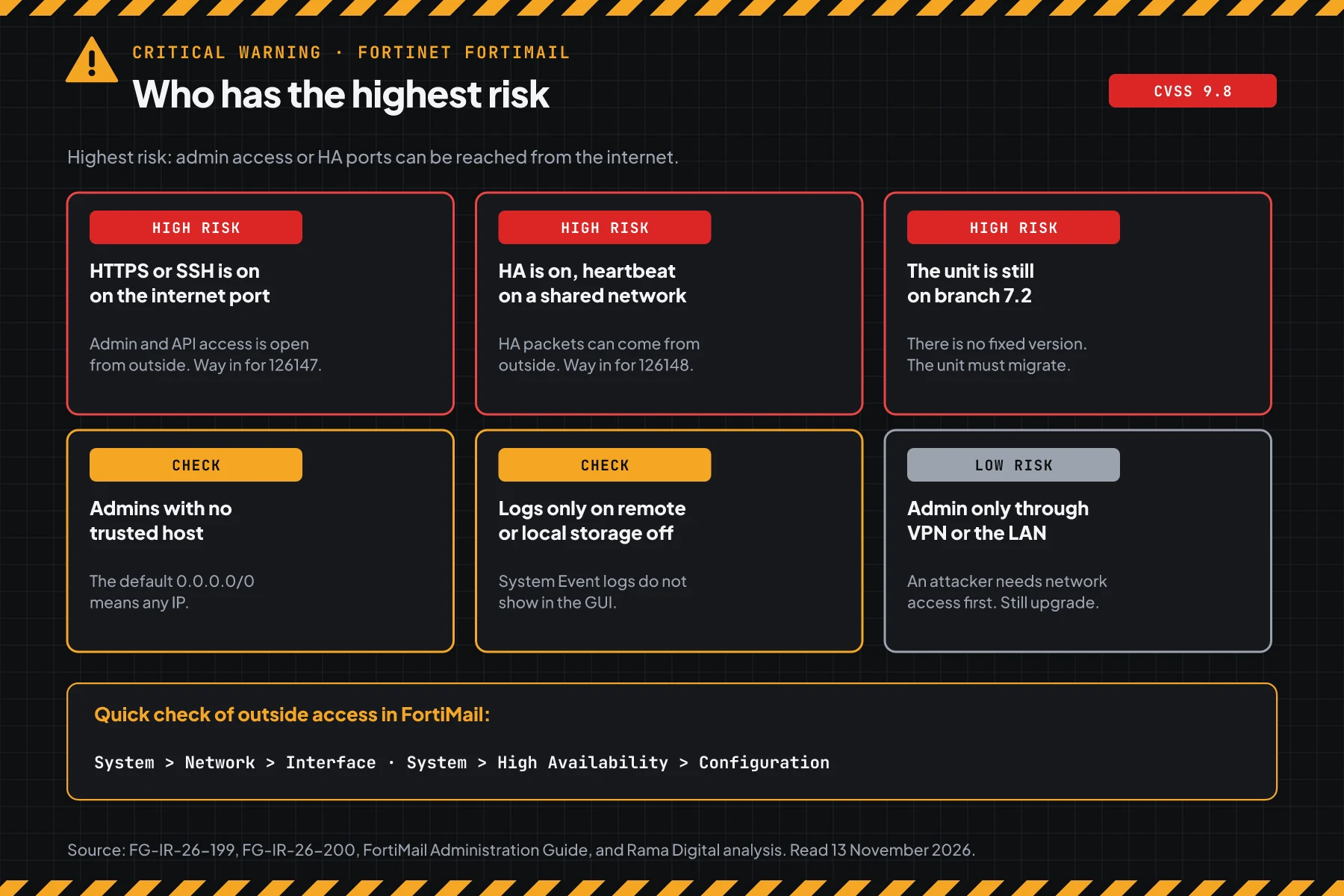
FortiMail sees all incoming and outgoing email, so 1 unit that is taken over can read or redirect office email. The same pattern shows in the SonicWall SSL VPN flaw CVE-2026-19868: devices at the network edge are the first target. A flaw before login also shows in the Synology DSM flaw CVE-2026-76954.
Vulnerable and safe versions
Both advisories use 4 FortiMail branches. Match the branch and version of your unit with this table.
| Branch | CVE-2026-126147 | CVE-2026-126148 | Upgrade to |
|---|---|---|---|
| FortiMail 8.0 | 8.0.0 to 8.0.1: vulnerable | 8.0.0 to 8.0.1: vulnerable | 8.0.2 or newer |
| FortiMail 7.6 | 7.6.0 to 7.6.6: vulnerable | 7.6.0 to 7.6.6: vulnerable | 7.6.7 or newer |
| FortiMail 7.4 | 7.4.0 to 7.4.8: vulnerable | Not affected | 7.4.9 or newer |
| FortiMail 7.2 | All versions: vulnerable | Not affected | Migrate to a branch with a fix |
| Below 7.2 | Not listed, treat as at risk | Not listed | Migrate |
| FortiMail Cloud | Fixed by Fortinet on 5 October 2026 | Fixed by Fortinet on 5 October 2026 | No action needed |
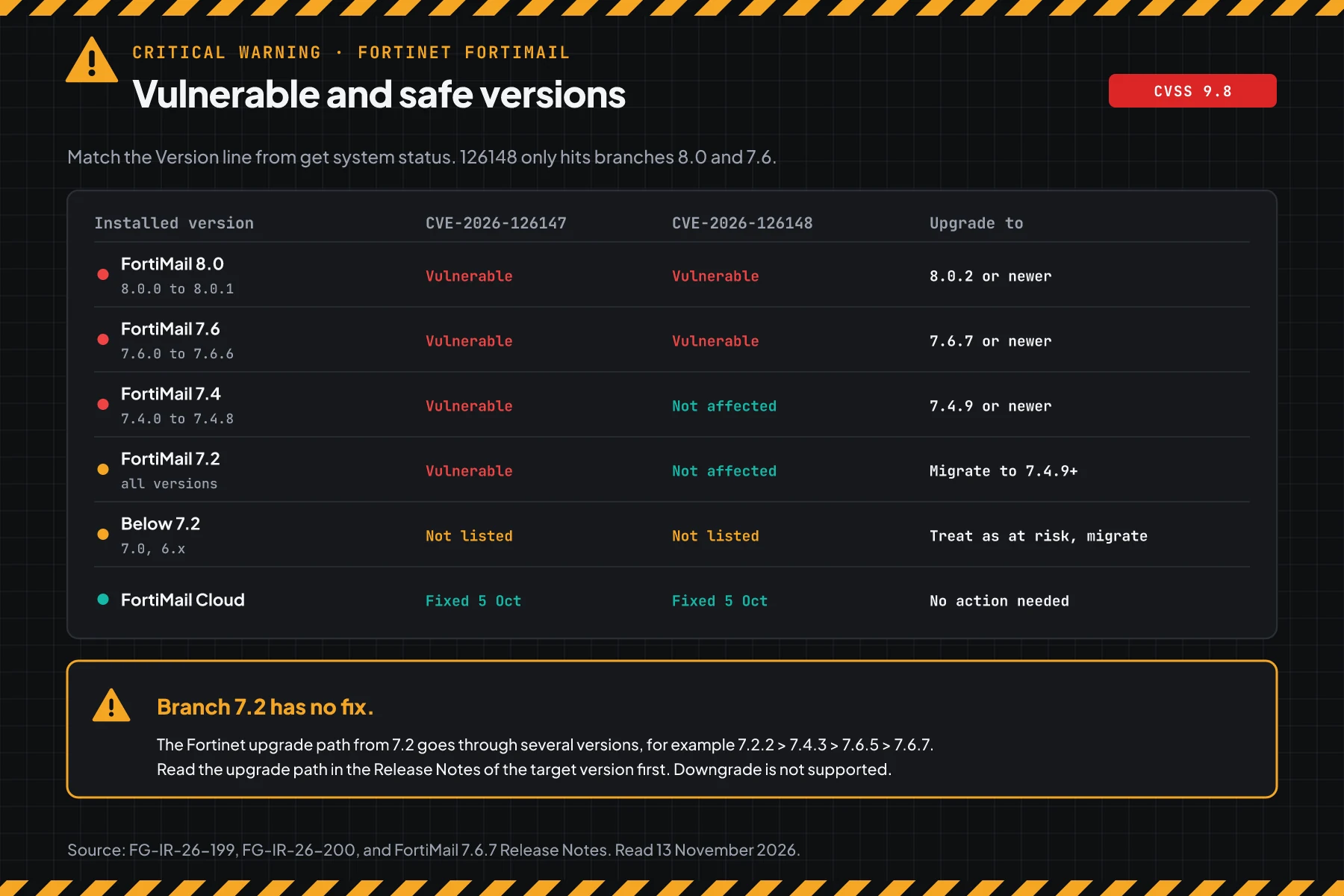
The table data comes from advisory FG-IR-26-199 and advisory FG-IR-26-200. The command get system status shows a version such as "FortiMail-VM v7.6.5, build832". The number after the letter v is the version that you match.
Note on branch 7.2: Advisory 199 writes "Migrate to a fixed release" for 7.2. The CVE-2026-126147 record lists 7.2.0 to 7.2.9. According to the FortiMail 7.6.7 Release Notes on upgrade and downgrade, the path to 7.6.7 is 7.2.2 (build 380), then 7.4.3 (build 600), then 7.6.5 (build 832), then 7.6.7 (build 858). The path to 7.4.9 is 7.2.2 (build 380), then 7.4.9 (build 630).
Note on old versions: The advisories do not list branches below 7.2. Rama Digital analysis: treat such a unit as at risk, then plan a migration to a branch with a fix.
Before you start
- A FortiMail admin account with full rights for each unit, including the second HA unit and spare units.
- Access to Fortinet Technical Support to download the firmware image.
- A maintenance window. The unit restarts during the upgrade, so incoming email waits for a short time at the sending servers.
- Access to the firewall in front of FortiMail, to check the rules that open HTTPS, SSH, and HA.
- A list of the valid admin accounts, the trusted admin IPs, and the names of the FortiMail ports that connect to the internet. Step 5 needs this list.
Step 1: Check the version and HA status of each FortiMail
Log in to the FortiMail GUI, then open Dashboard > Status. Write down the unit name and the Firmware version line in the System Information panel. In the CLI, run this command, per the CLI Reference on get system status:
get system statusThe command prints the Version: line, the Hostname: line, and 3 HA lines. A sample output with dummy data:
Version: FortiMail-VM v7.6.5, build832, 2026.05.21
Serial-Number: FEVMxxxxxxxxxxxx
Hostname: mx-jkt-01
HA type: Off
HA member mode: Off
HA member role: configured: Off; effective: Off
For many units, save this script as check-version-fortimail.sh. The script compares the version with the advisory table and prints the target version. The script does not contact FortiMail.
#!/usr/bin/env bash
# Check FortiMail versions against FG-IR-26-199 (CVE-2026-126147) and FG-IR-26-200 (CVE-2026-126148).
# Data: Fortinet advisories of 10 November 2026. The script reads text only and does not contact FortiMail.
# Use: bash check-version-fortimail.sh devices.txt     (1 device per line: name, then version, for example "mx-01 7.6.5")
#   or: bash check-version-fortimail.sh "mx-01 7.6.5" "mx-02 v7.4.8,build622"
#   or: bash check-version-fortimail.sh --status status.txt   (a copy of the CLI output of "get system status")
# FortiMail Cloud needs no action. Fortinet fixed it on 5 October 2026.
set -u
vuln=0; migrate=0; safe=0; other=0; has_old=0; has_72=0

# Remove control characters and limit the length, so file content cannot change the terminal display.
clean() { tr -cd '[:print:]\n' | cut -c1-110; }

header() { printf '%-14s %-8s %-22s %s\n' "DEVICE" "VERSION" "CVE-2026-126147" "CVE-2026-126148"; }

# $1 name, $2 major, $3 minor, $4 patch
rate() {
  local name="$1" ma=$((10#$2)) mi=$((10#$3)) pa=$((10#$4)) s47 s48
  case "$ma.$mi" in
    8.0) if (( pa < 2 )); then s47="VULNERABLE, go 8.0.2"; s48="VULNERABLE, go 8.0.2"; vuln=$((vuln + 1))
         else s47="SAFE"; s48="SAFE"; safe=$((safe + 1)); fi ;;
    7.6) if (( pa < 7 )); then s47="VULNERABLE, go 7.6.7"; s48="VULNERABLE, go 7.6.7"; vuln=$((vuln + 1))
         else s47="SAFE"; s48="SAFE"; safe=$((safe + 1)); fi ;;
    7.4) if (( pa < 9 )); then s47="VULNERABLE, go 7.4.9"; vuln=$((vuln + 1))
         else s47="SAFE"; safe=$((safe + 1)); fi
         s48="NOT AFFECTED" ;;
    7.2) s47="MIGRATE to 7.4.9+"; s48="NOT AFFECTED"; migrate=$((migrate + 1)); has_72=1 ;;
    *) if (( ma < 7 )) || { (( ma == 7 )) && (( mi < 2 )); }; then
         s47="NOT LISTED *"; s48="NOT LISTED *"; has_old=1
       else
         s47="UNKNOWN"; s48="compare with advisory"
       fi
       other=$((other + 1)) ;;
  esac
  printf '%-14s %-8s %-22s %s\n' "$name" "$ma.$mi.$pa" "$s47" "$s48"
}

# Read 1 line: device name, then a version such as "7.6.5", "v7.6.5,build832", or the CLI "Version:" line.
line() {
  local text name
  [[ $1 =~ ^[[:space:]]*# ]] && return 0
  text=$(printf '%s' "$1" | tr -cd '[:alnum:] .,:()_-' | cut -c1-110)
  [[ -z ${text// /} ]] && return 0
  if [[ $text =~ (^|[[:space:]v])([0-9]+)\.([0-9]+)\.([0-9]+) ]]; then
    name=${text%%"${BASH_REMATCH[0]}"*}
    name=$(printf '%s' "$name" | sed -E 's/Version://; s/FortiMail-[A-Za-z0-9]+//; s/ +/ /g; s/^ //; s/ $//' | cut -c1-14)
    rate "${name:--}" "${BASH_REMATCH[2]}" "${BASH_REMATCH[3]}" "${BASH_REMATCH[4]}"
  else
    printf '%-14s %-8s %s\n' "$(printf '%s' "$text" | cut -c1-14)" "-" "UNKNOWN, version not readable"
    other=$((other + 1))
  fi
}

summary() {
  echo "Summary: $vuln VULNERABLE, $migrate MIGRATE, $safe SAFE, $other other."
  (( has_72 )) && echo "MIGRATE: 7.2 has no fix. Fortinet upgrade path: 7.2.2 > 7.4.3 > 7.6.5 > 7.6.7."
  (( has_old )) && echo "* This branch is not in the advisory. Treat it as at risk and plan a migration."
  return 0
}

if [ "${1:-}" = "--status" ]; then
  f="${2:-}"
  if [ -z "$f" ] || [ ! -r "$f" ]; then
    echo "CANNOT CONFIRM: file $(printf '%s' "$f" | clean) is not readable."; exit 2
  fi
  v=$(grep -m1 '^Version:' "$f" | clean)
  h=$(grep -m1 '^Hostname:' "$f" | sed 's/^Hostname:[[:space:]]*//' | tr -cd '[:alnum:]._-' | cut -c1-14)
  if [ -z "$v" ]; then echo "CANNOT CONFIRM: the file has no Version: line."; exit 2; fi
  echo "$v"
  header
  line "${h:--} ${v#Version:}"
  grep -E '^HA (type|member mode|member role):' "$f" | clean
  if grep -Eq '^HA type:[[:space:]]*Off[[:space:]]*$' "$f"; then
    echo "HA is off. CVE-2026-126148 uses HA join-request packets."
  elif grep -q '^HA type:' "$f"; then
    echo "CHECK: HA is on. Make sure no heartbeat port is open to the internet (Step 4)."
  fi
  summary
  exit 0
fi

header
if (( $# == 1 )) && [ -f "$1" ]; then
  if [ ! -r "$1" ]; then echo "CANNOT CONFIRM: the file is not readable."; exit 2; fi
  while IFS= read -r x || [ -n "$x" ]; do line "$x"; done < "$1"
elif (( $# == 1 )) && [[ $1 != *[[:space:]]* ]]; then
  echo "CANNOT CONFIRM: file $(printf '%s' "$1" | clean) does not exist."; exit 2
elif (( $# > 0 )); then
  for x in "$@"; do line "$x"; done
else
  while IFS= read -r x || [ -n "$x" ]; do line "$x"; done
fi
summary
Write 1 unit per line: the name, then the version. A sample file with dummy data:
# name version (dummy data)
mx-jkt-01 7.6.5
mx-jkt-02 v7.6.7,build858
mx-sby-01 7.4.8
mx-bdg-01 7.2.9
mx-dr-01 8.0.1
mx-old 7.0.6
# 1 unit per line: name, then the version from get system status or Dashboard > Status
nano devices.txt
bash check-version-fortimail.sh devices.txt
# Or pass them as arguments
bash check-version-fortimail.sh "mx-jkt-01 7.6.5" "mx-sby-01 v7.4.8,build622"
# Or use a copy of the CLI output of get system status
bash check-version-fortimail.sh --status status-fortimail.txt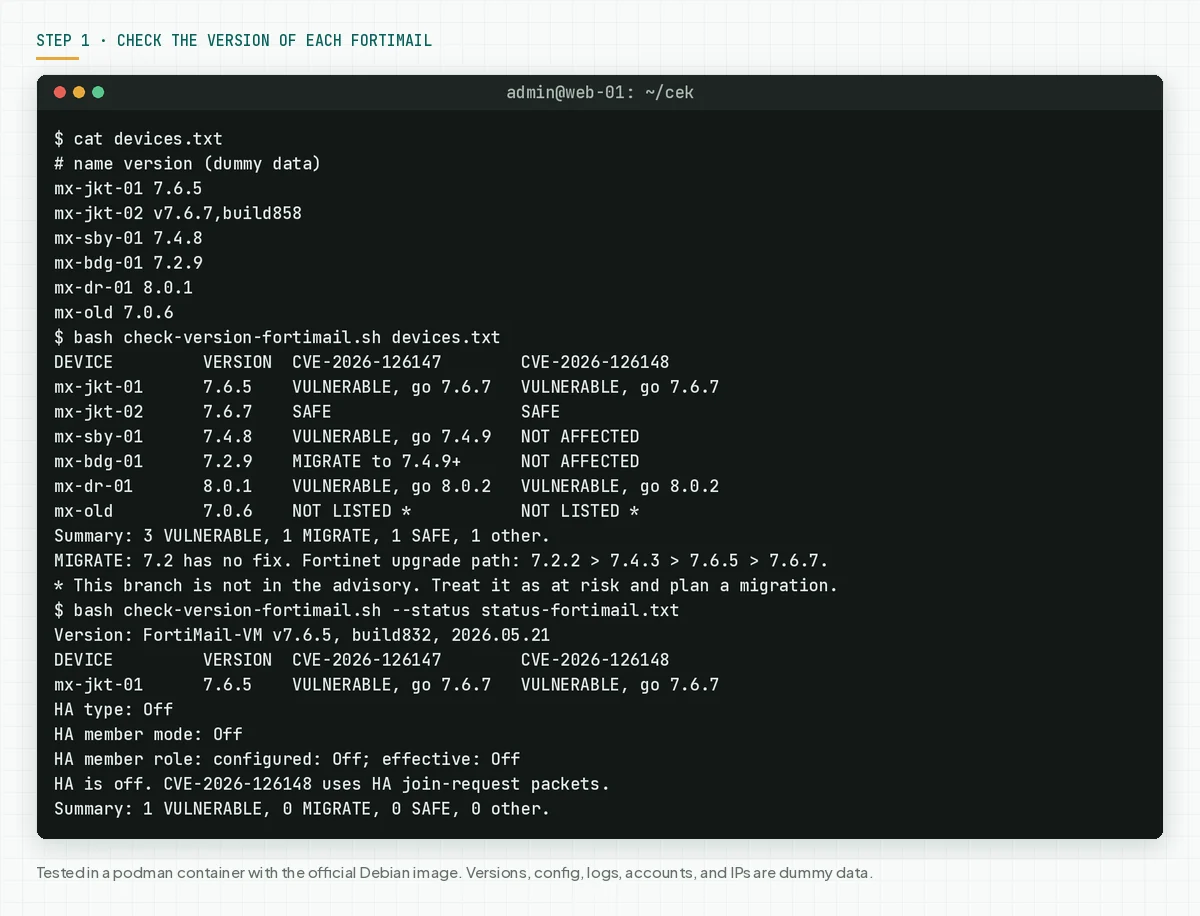
Check the result: "VULNERABLE" means the unit needs steps 2 and 3 today. "MIGRATE" means the unit is on branch 7.2 with no fix. "SAFE" means the version closes the flaws, but still run step 5. "NOT LISTED" means the advisories do not cover that branch, so treat it as at risk.
The --status mode also reads the HA lines. Rama Digital analysis: a unit with HA off has a smaller attack path for CVE-2026-126148, but CVE-2026-126147 still applies. We only tested the sample HA type: Off from the documents, not a unit with HA on.
Step 2: Back up the configuration before the upgrade
According to the FortiMail 7.6.7 Release Notes on upgrade and downgrade, FortiMail does not support a downgrade. So the backup is your way back.
- Log in as admin, then open System > Maintenance > Configuration, per the Fortinet guide on configuration backup.
- Select System configuration. Also select User configuration if the unit keeps user settings.
- Click Backup, then save the file on a laptop. Name it with the date, the unit name, and the version.
- Back up the block list, the safe list, the dictionaries, and the Bayesian database as separate items. According to the Fortinet guide on configuration backup, the configuration backup does not include that data.
- Write down the admin list in System > Administrator > Administrator. Step 5 needs this list.
If you use a TFTP server, the Fortinet guide on configuration backup gives this CLI command:
execute backup full-config tftp <file-name_str> <server_ipv4> [<backup-password_str>]Check the result: the configuration file is on the laptop or the TFTP server, and the block list and safe list files are kept as separate files.
Step 3: Upgrade to 8.0.2, 7.6.7, or 7.4.9
Only Fortinet firmware closes both flaws. The advisories give no workaround.
- Download the firmware image for your model from Fortinet Technical Support. Check the image hash before you use it, per the Fortinet guide on firmware install.
- Check the upgrade path in the FortiMail 7.6.7 Release Notes on upgrade and downgrade. A 7.2 unit cannot jump directly to 7.6.7.
- Open Dashboard > Status, then in the System Information panel, on the Firmware version line, click Update.
- Select the image file, then follow the steps on the screen. Wait for the unit to restart.
- For HA, follow the HA upgrade order in the Fortinet guide on firmware install.
- After the restart, clear the browser cache, then log in again. The Release Notes ask for this step so that the GUI shows correctly.
- Update the antivirus signatures, per the FortiMail 7.6.7 Release Notes on upgrade and downgrade.
- Run
get system statusagain, then runcheck-version-fortimail.shwith the new version.
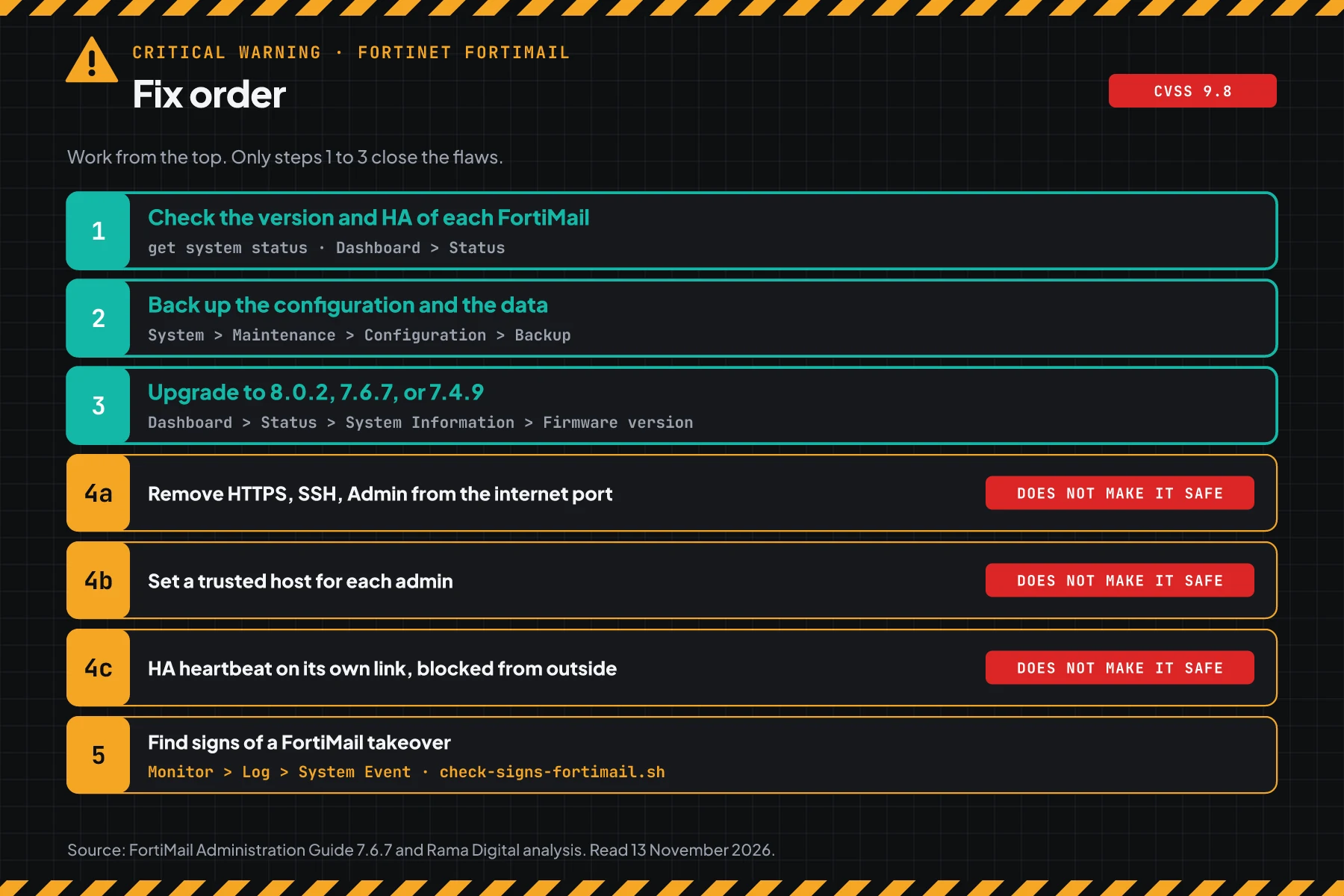
Check the result: the script prints "SAFE" for both CVEs on each unit, including the second HA unit.
Step 4: Temporary mitigation that does not make it safe
These steps lower the chance of an attack, but they do not make the unit safe. Only an upgrade closes the flaws.
Rama Digital analysis: Fortinet gives no workaround. We built 3 steps from the FortiMail security tuning guide. Condition: the upgrade cannot run today, or a 7.2 unit waits for migration. Limit: an attacker on a network that you allow can still use these flaws.
4a. Remove admin access from the internet interface
Open System > Network > Interface, then edit the interface that connects to the internet. Clear HTTPS, HTTP, SSH, and TELNET in Access, then turn off Admin in Web access. These steps are in the Fortinet guide on network settings.
In the CLI, the same setting is set allowaccess {ping http https snmp ssh telnet} in config system interface, per the CLI Reference on system interface. the FortiMail security tuning guide asks for admin access only from a private network, or through IPsec or SSL VPN.
Warning: HTTPS also serves webmail, per-recipient quarantine, and the REST API. If you close HTTPS on the internet interface, users can lose access to webmail and the quarantine. Tell the users first, or open those services only through a VPN.
4b. Set a trusted host for each admin
Open System > Administrator > Administrator, edit each account, then fill in Trusted host with the admin IP or subnet. According to the Fortinet guide on admin accounts, each account can hold up to 10 trusted hosts. In the CLI, the command is, per the CLI Reference on system admin:
config system admin
    edit <name_str>
        set trusted-hosts <host_ipv4mask>
    next
end
The default 0.0.0.0/0.0.0.0 means the account can log in from any IP. the FortiMail security tuning guide also has set admin-lockout-threshold and set admin-lockout-duration in config system global to lock out repeated failed logins.
4c. Keep the HA heartbeat away from other networks
CVE-2026-126148 uses HA packets. Open System > High Availability > Configuration, then make sure the heartbeat runs on 2 dedicated links: a crossover cable or a separate local switch. This advice is in the Fortinet guide on HA and the CLI Reference on system ha. In the CLI, the heartbeat ports show as set heartbeat-status in config system ha.
Rama Digital analysis: block HA traffic from networks that you do not trust at the firewall in front of FortiMail. Condition: HA is on. Limit: we do not write HA port numbers, because the advisories do not write them.
Check the result: the admin login page does not open from a mobile network, each admin has a trusted host, and the heartbeat ports are not internet ports.
Step 5: Find signs of a FortiMail takeover
The upgrade closes the flaws, but it does not remove the accounts, settings, or access that an attacker left. So look for those traces after the upgrade.
Rama Digital analysis: Fortinet has not published IOCs, and an attack before login may leave no login log. That is why the script looks for traces after an attack: unknown admins, admin access on internet ports, HA heartbeat on internet ports, and admin logins from unknown IPs.
Get 2 files on a laptop. First, the System Event log: open Monitor > Log, the System Event tab, then download it in Normal Format, per the Fortinet guide on viewing logs. Logs that you send to a remote server do not show in the GUI. Second, a config copy: run these commands in the CLI and save the output, per the CLI Reference on show:
show full-configuration system admin
show full-configuration system interface
show full-configuration system ha
Save this script as check-signs-fortimail.sh. The script only reads files. It does not change, delete, or send anything.
#!/usr/bin/env bash
# Look for signs of attack on FortiMail after CVE-2026-126147 and CVE-2026-126148 (FG-IR-26-199, FG-IR-26-200).
# Fortinet has not released IOCs. These checks are Rama Digital analysis: admin logins from unknown IPs,
# unknown admin accounts, admin access on internet ports, and HA heartbeat on internet ports.
# Use on a laptop: bash check-signs-fortimail.sh --log event.log --config config.txt
#   event.log   System Event log from Monitor > Log, Download, Normal Format (.gz also works)
#   config.txt  a copy of the CLI output: show full-configuration system admin, system interface, system ha
#   KNOWN_ADMINS="admin noc-rina"   admin accounts that you know
#   KNOWN_IPS="198.51.100.10 198.51.100."   admin IPs that you trust. A final dot means 1 /24 block
#   INTERNET_PORTS="port1"          FortiMail ports that connect to the internet
# The script reads files only. It does not change, delete, or send anything.
set -u
ADMIN="${KNOWN_ADMINS:-}"; IPS="${KNOWN_IPS:-}"; PORTS="${INTERNET_PORTS:-}"; LOG=""; CFG=""
while (( $# > 0 )); do
  case "$1" in
    --log) LOG="${2:-}"; shift 2 || shift ;;
    --config) CFG="${2:-}"; shift 2 || shift ;;
    *) echo "Use: bash check-signs-fortimail.sh --log event.log --config config.txt"; exit 2 ;;
  esac
done
findings=0; unsure=0
# Remove control characters and limit the line length, so file content cannot change the terminal display.
clean() { tr -cd '[:print:]\n' | cut -c1-110; }
is_in() { [[ " $2 " == *" $1 "* ]]; }
ip_known() { local s; for s in $IPS; do
  if [[ $s == *. ]]; then [[ $1 == "$s"* ]] && return 0; else [[ $1 == "$s" ]] && return 0; fi; done; return 1; }
cannot() { echo "CANNOT CONFIRM: $1"; unsure=$((unsure + 1)); }

# Turn the config text into lines: path, entry name, key, value.
parse() {
  tr -d '\r' < "$1" | awk '
    { sub(/^[ \t]+/, ""); sub(/[ \t]+$/, "") }
    /^config / { d++; p[d] = substr($0, 8); e[d] = ""; next }
    /^edit / { v = substr($0, 6); gsub(/"/, "", v); e[d] = v; print path() "\t" v "\t_edit\t"; next }
    /^next$/ { e[d] = ""; next }
    /^end$/ { if (d > 0) d--; next }
    /^set / { v = ""; for (i = 3; i <= NF; i++) v = v (i > 3 ? " " : "") $i; gsub(/"/, "", v)
              print path() "\t" e[d] "\t" $2 "\t" v }
    function path(  s, i) { s = p[1]; for (i = 2; i <= d; i++) s = s "/" p[i]; return s }' \
  | tr -cd '[:alnum:][:space:]._/:@,-' | cut -c1-200
}

echo "== 1. Admin accounts in the config"
cfg_ok=0
if [ -z "$CFG" ]; then cannot "no --config. Save the show full-configuration output, then run again."
elif [ ! -r "$CFG" ]; then cannot "file $(printf '%s' "$CFG" | clean) is not readable."
else cfg_ok=1; data=$(parse "$CFG"); fi
if (( cfg_ok )); then
  accounts=$(printf '%s\n' "$data" | awk -F'\t' '$1 == "system admin" && $3 == "_edit" { print $2 }' | sort -u)
  if [ -z "$accounts" ]; then cannot "the file has no config system admin block."
  else
    while IFS= read -r a; do
      th=$(printf '%s\n' "$data" | awk -F'\t' -v a="$a" '$1 == "system admin" && $2 == a && $3 == "trusted-hosts" { print $4 }' | head -n 1)
      if [ -z "$ADMIN" ]; then echo "$a"
      elif is_in "$a" "$ADMIN"; then echo "$a  known"
      else echo "CHECK: account $a is not in KNOWN_ADMINS"; findings=$((findings + 1)); fi
      [[ -z $th || $th == 0.0.0.0/0* ]] && echo "  note: $a has no trusted host, login is open from any IP"
    done <<< "$accounts"
    [ -z "$ADMIN" ] && echo "Note: set KNOWN_ADMINS so the script can compare."
  fi
fi

echo "== 2. Admin access on internet ports"
if (( cfg_ok )); then
  if [ -z "$PORTS" ]; then cannot "INTERNET_PORTS is empty. Set the names of the ports that connect to the internet."
  else
    for pt in $PORTS; do
      found=$(printf '%s\n' "$data" | awk -F'\t' -v p="$pt" '$1 == "system interface" && $2 == p { print "yes"; exit }')
      if [ -z "$found" ]; then cannot "port $pt is not in the config system interface block."; continue; fi
      acc=$(printf '%s\n' "$data" | awk -F'\t' -v p="$pt" '$1 == "system interface" && $2 == p && $3 == "allowaccess" { print $4 }' | head -n 1)
      bad=""; for t in $acc; do case "$t" in http|https|ssh|telnet) bad="$bad $t" ;; esac; done
      if [ -n "$bad" ]; then echo "CHECK: $pt (internet) allows:$bad"; findings=$((findings + 1))
      else echo "$pt (internet): no HTTP, HTTPS, SSH, or TELNET"; fi
    done
  fi
fi

echo "== 3. HA and heartbeat ports"
if (( cfg_ok )); then
  st=$(printf '%s\n' "$data" | awk -F'\t' '$1 == "system ha" && $3 == "state" { print $4; exit }')
  if [ -z "$st" ]; then cannot "config system ha has no set state line. Use show full-configuration."
  elif [ "$st" != "enable" ]; then echo "HA: $st"
  else
    hb=$(printf '%s\n' "$data" | awk -F'\t' '$1 == "system ha/interface" && $3 == "heartbeat-status" && $4 == "enable" { print $2 }' | sort -u | tr '\n' ' ' | sed 's/ $//')
    echo "HA: enable. Heartbeat ports: ${hb:-none}"
    for pt in $hb; do
      if [ -n "$PORTS" ] && is_in "$pt" "$PORTS"; then
        echo "CHECK: HA heartbeat is on at $pt, this port connects to the internet"; findings=$((findings + 1)); fi
    done
    [ -z "$PORTS" ] && cannot "INTERNET_PORTS is empty, so the heartbeat position cannot be rated."
  fi
fi

echo "== 4. Admin logins from the System Event log"
if [ -z "$LOG" ]; then cannot "no --log. Download the System Event log, then run again."
elif [ ! -r "$LOG" ]; then cannot "file $(printf '%s' "$LOG" | clean) is not readable."
else
  case "$LOG" in *.gz) readlog() { gzip -dc "$LOG" 2>/dev/null; } ;; *) readlog() { cat "$LOG"; } ;; esac
  logins=$(readlog | tr -d '\r' | grep 'type=kevent' | grep 'subtype=admin' | grep 'action=login' \
    | sed -nE 's/.*user="?([^" ]*)"? .*ui="?[^ (]*\(([^)]*)\).*status="?([^" ]*).*/\1 \2 \3/p' \
    | tr -cd '[:alnum:] .:@_\n-' | cut -c1-80)
  if [ -z "$logins" ]; then cannot "the log has no admin login lines (type=kevent subtype=admin)."
  else
    ok=$(printf '%s\n' "$logins" | awk '$3 == "success" { print $1, $2 }')
    echo "Successful logins per account and IP:"
    if [ -n "$ok" ]; then printf '%s\n' "$ok" | sort | uniq -c | sort -rn | head -n 10; else echo "  none"; fi
    if [ -z "$IPS" ]; then echo "Note: set KNOWN_IPS so the script can flag unknown IPs."
    elif [ -n "$ok" ]; then
      while read -r u ip; do
        ip_known "$ip" && continue
        echo "CHECK: $u logged in from $ip, this IP is not in KNOWN_IPS"; findings=$((findings + 1))
      done < <(printf '%s\n' "$ok" | sort -u)
    fi
    if [ -n "$ADMIN" ] && [ -n "$ok" ]; then
      while read -r u; do
        is_in "$u" "$ADMIN" || { echo "CHECK: successful login by account $u, which is not in KNOWN_ADMINS"; findings=$((findings + 1)); }
      done < <(printf '%s\n' "$ok" | awk '{ print $1 }' | sort -u)
    fi
    failed=$(printf '%s\n' "$logins" | awk '$3 != "success"' | grep -c .)
    echo "Failed logins: $failed."
  fi
fi

if (( findings > 0 )); then
  echo "Result: FINDINGS ($findings). Review every CHECK line. For a line that you do not know: follow Step 5."
  (( unsure > 0 )) && echo "Also: $unsure parts CANNOT CONFIRM."
elif (( unsure > 0 )); then
  echo "Result: CANNOT CONFIRM ($unsure parts). Complete the input, then run again."
else
  echo "Result: no findings. A clean result does not prove that FortiMail is clean."
fi
The first 3 lines of a sample System Event log with dummy data. The line format follows the Fortinet guide on the log format:
date=2026-11-11 time=08:02:11 log_id=0001001623 type=kevent subtype=admin pri=information user=admin ui=GUI(198.51.100.10) action=login status=success reason=none msg="User admin login successfully from GUI(198.51.100.10)"
date=2026-11-11 time=09:15:40 log_id=0001001623 type=kevent subtype=admin pri=information user=noc-rina ui=ssh(198.51.100.11) action=login status=success reason=none msg="User noc-rina login successfully from ssh(198.51.100.11)"
date=2026-11-11 time=09:20:02 log_id=0001001624 type=kevent subtype=config pri=information user=noc-rina ui=ssh(198.51.100.11) action=update status=success reason=none msg="dummy config change"
# On a laptop, in the folder where you keep the script, the log, and the config copy
KNOWN_ADMINS="admin noc-rina" KNOWN_IPS="198.51.100.10 198.51.100.11" INTERNET_PORTS="port1" bash check-signs-fortimail.sh --log event-fortimail.log --config config-fortimail.txt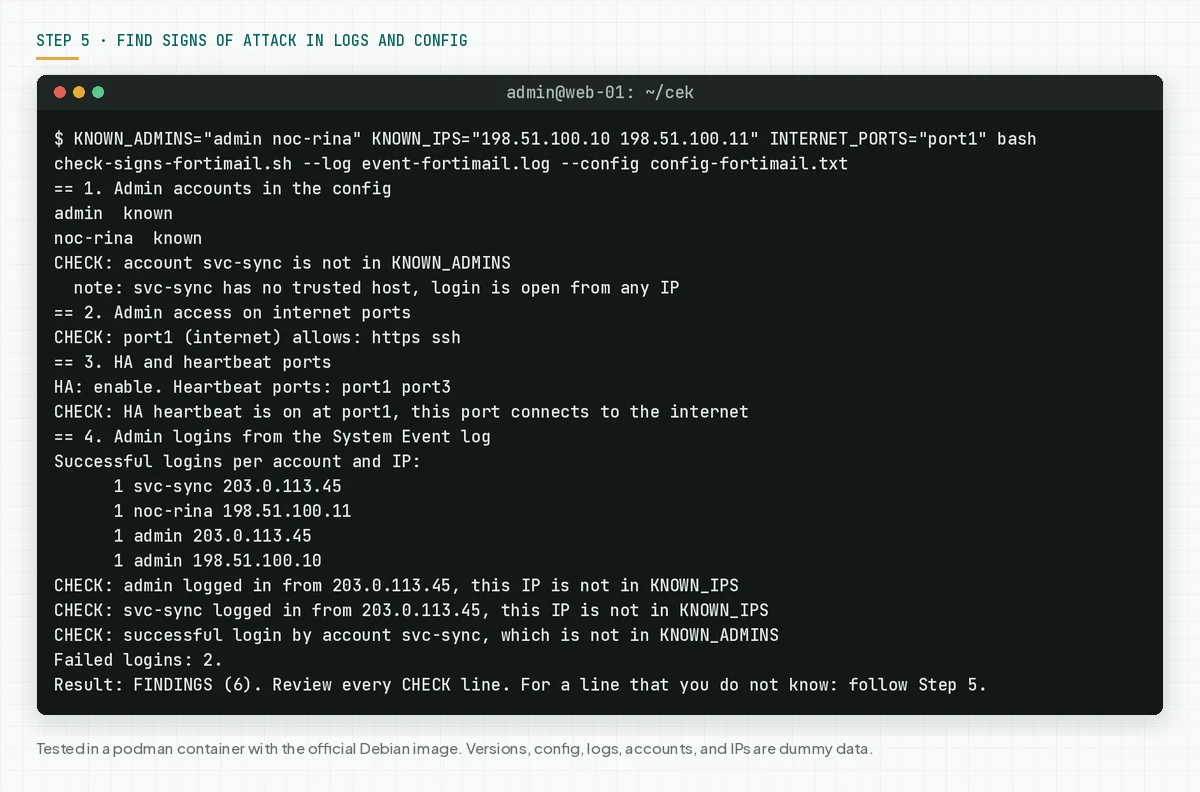
Script limits: The script reads the patterns type=kevent subtype=admin, action=login, and ui=GUI(...) from the Fortinet document sample. Rama Digital analysis: we wrote the patterns ui=ssh(...) and status=failure from an estimate, not from a real unit. The script does not read CSV exports.
Also check the Fortinet guide on log settings in Log & Report > Log Setting. Make sure the System Event log is on, so that the next signs are recorded.
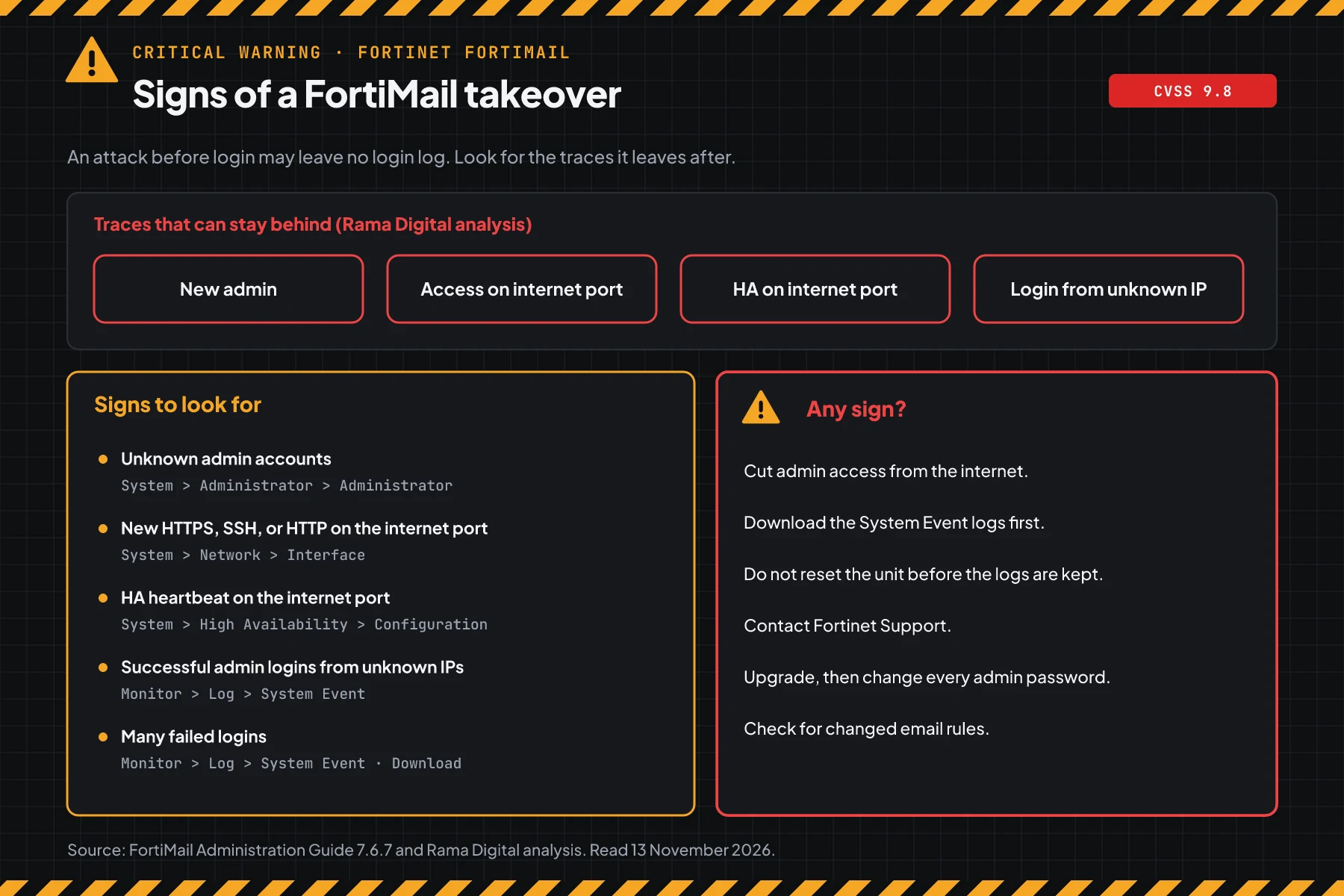
Check the result: "no findings" means the script found no signs. A clean result does not prove that the unit is clean. "FINDINGS" means check each CHECK line, then follow this order for each line that you do not know:
- Cut admin access from the internet with step 4a.
- Download the System Event log first, before you change anything.
- Do not reset the unit or delete unknown accounts before the logs are kept.
- Contact Fortinet Support with those logs.
- Upgrade, then change the passwords of all admins.
- Rama Digital analysis: check for changed email rules, for example a rule that forwards email to an outside address.
If personal data leaked through email, Indonesian Law 27/2022 on Personal Data Protection requires written notice no later than 3 times 24 hours. Also read the Ivanti Connect Secure VPN chain.
Example: 1 response evening for 4 FortiMail units
This simulation uses dummy data. The unit names, times, and results are not customer data.
| Time (WIB) | Dummy unit | Check | Result | Action |
|---|---|---|---|---|
| 19:00 | mx-jkt-01 (7.6.5, HTTPS on port1) | Step 1 | VULNERABLE for both CVEs | Step 4a tonight, upgrade to 7.6.7 after the backup |
| 19:20 | mx-sby-01 (7.4.8) | Step 1 | VULNERABLE for CVE-2026-126147 | Upgrade to 7.4.9 |
| 20:00 | mx-jkt-01 | Step 5 | svc-sync with no trusted host, login from 203.0.113.45 | Cut admin access, keep the logs, contact Fortinet Support |
| 21:00 | mx-bdg-01 (7.2.9) | Step 1 and Release Notes | MIGRATE | Steps 4a to 4c, schedule the migration through 7.2.2 and 7.4.3 |
Lesson from the simulation: a unit with a vulnerable version and HTTPS on an internet port needs action first. mx-jkt-01 uses a strong admin password, but step 5 still found an account that nobody knew.
Who installs the patch
The patch duty changes with the management model, so this table helps you know who acts today.
| Management model | Patch owner | What you do |
|---|---|---|
| FortiMail appliance or VM, managed by your own IT team | Your IT team | Steps 1 to 5 |
| FortiMail managed by an IT vendor or MSP | The partner, per the contract | Ask for written version proof and the step 5 result |
| FortiMail VM on a public cloud | Your IT team, not the cloud provider | Steps 1 to 5, plus the security group rules |
| FortiMail Cloud | Fortinet, done on 5 October 2026 | No action needed, per the advisories |
Rama Digital advice: do not open FortiMail admin access to the internet. Use a VPN for admin access from outside, as the FortiMail security tuning guide advises. A similar lesson is in the Ivanti Connect Secure VPN chain.
Checklist for today
- List all FortiMail units, including the second HA unit and spare units. Owner: IT team. Proof: a list of names, versions, and HA status.
- Check the version with step 1. Owner: email admin. Proof: script output.
- Back up the configuration with step 2. Owner: email admin. Proof: the configuration file and the list files.
- Remove admin access from the internet interface with step 4a. Owner: network admin. Proof: the Access settings on each interface.
- Upgrade to 8.0.2, 7.6.7, or 7.4.9. Owner: email admin. Proof: script output after the upgrade.
- Find signs with step 5. Owner: email admin. Proof: script output and the System Event log.
- Schedule a migration for each 7.2 unit. Owner: head of IT. Proof: a written migration date.
Questions and answers
We use FortiMail Cloud. Must we act?
No. Both advisories write that Fortinet fixed FortiMail Cloud on 5 October 2026 to 7.6.7 or 8.0.2. FortiMail Cloud customers need no action.
Our FortiMail does not use HA. Are we safe?
No. CVE-2026-126147 is in the API component and does not need HA. Rama Digital analysis: a unit with no HA has a smaller attack path for CVE-2026-126148, but still upgrade.
Our unit runs 7.2. Why is there no patch?
Advisory 199 writes "Migrate to a fixed release" for branch 7.2. Follow the path in the Release Notes: 7.2.2, then 7.4.3 or 7.4.9, then the next branch. Until the migration is done, apply step 4.
There are no attack reports yet. Why must I upgrade today?
The score is 9.8 and both flaws work with no login. The CVE-2026-126148 record has E:P, so per the CNA proof-of-concept code exists. The advisories are public since 10 November 2026.
Does closing HTTPS on the internet port stop webmail?
It can. According to the CLI Reference, HTTPS on an interface also serves webmail, per-recipient quarantine, and the REST API. Tell the users first, or open those services through a VPN.
Can I go back to the old version if the upgrade has problems?
The FortiMail 7.6.7 Release Notes write that a downgrade is not supported. That is why step 2 is required before the upgrade.
Does the upgrade remove the attacker's access?
The upgrade closes the flaws. It does not remove the admins, settings, or rules that an attacker made. Run step 5, then change the passwords of all admins.
Next step
The limits that still apply: the step 4 mitigation does not make the unit safe, and an upgrade does not clean a unit that was taken over. When your FortiMail shows a sign in step 5, or you need help with an audit and recovery, use Vibe Code Rescue. For 1 urgent issue today, book a 30-minute session.
Sources
- advisory FG-IR-26-199 and advisory FG-IR-26-200: summary, CWE, score, affected versions, safe versions, FortiMail Cloud, Known Exploited, and reporters, 10 November 2026.
- CVE-2026-126147 record and CVE-2026-126148 record: CNA description, CWE, the E:U and E:P vectors, and the publish time of 11 November 2026.
- CISA KEV: does not list either CVE on 13 November 2026. CVE-2026-104286 went into the catalog on 1 October 2026.
- CLI Reference on get system status, CLI Reference on get, and CLI Reference on show: commands for the version check and the config copy.
- Fortinet guide on configuration backup, the System > Maintenance page, Fortinet guide on firmware install, and the FortiMail 7.6.7 Release Notes on upgrade and downgrade: backup, upgrade, upgrade path, and downgrade.
- the FortiMail security tuning guide, Fortinet guide on network settings, CLI Reference on system interface, Fortinet guide on admin accounts, CLI Reference on system admin, Fortinet guide on HA, and CLI Reference on system ha: the base of the temporary mitigation.
- Fortinet guide on viewing logs, Fortinet guide on the log format, and Fortinet guide on log settings: the System Event log, the log format, and the log settings.
- Indonesian Law 27/2022 on Personal Data Protection: the duty to report a personal data leak.