Direct answer: CVE-2026-123890 is an authentication bypass in the VMware Directory Service (vmdir) of vCenter, with a CVSS 3.1 score of 9.8. An attacker who can reach vCenter over the network can get in with no login. Today, check the build of each vCenter, then install 8.0 U3m, 9.0.2.0200, or 9.1.1.0200.
The vendor writes that this flaw has no workaround. A network limit only reduces who can try. Thus that step does not make vCenter safe.
Main condition: On 20 November 2026, VMSA-2026-0009 mentions no exploitation, CISA KEV does not list this CVE yet, and we found no public PoC. CISA rates this attack as automatable with total impact. Limit: this article contains no attack code or attack steps.
We read VMSA-2026-0009, the VMSA-2026-0009 FAQ, the CVE-2026-123890 record, the 8.0 U3m release notes, the 9.1.1.0200 release notes, the 9.0.2.0200 release notes, and CISA KEV on 20 November 2026. We ran the scripts in steps 1, 2, and 5 in a podman container with the official Python image and dummy data.
Important limit: Our lab has no vCenter. We did not run the patch, VAMI, the appliance shell, or PowerCLI. We mark each command that we did not run.
Problem: vCenter holds the keys to all your VMs
vCenter manages the ESX hosts, VMs, networks, and storage in vSphere. A vCenter admin account can start, stop, copy, and delete VMs.
Thus 1 unauthorized access to vCenter opens a path to many servers at once. Those servers can hold databases, ERPERPOne system that keeps the sales, purchasing, stock, and finance of a company in one set of data.AI-native ERP build, email, and company files.
Rama Digital analysis: ransomware gangs like vCenter for this reason. On 20 November 2026, CISA KEV lists 12 vCenter CVEs. 4 of them are marked as used in ransomware campaigns.
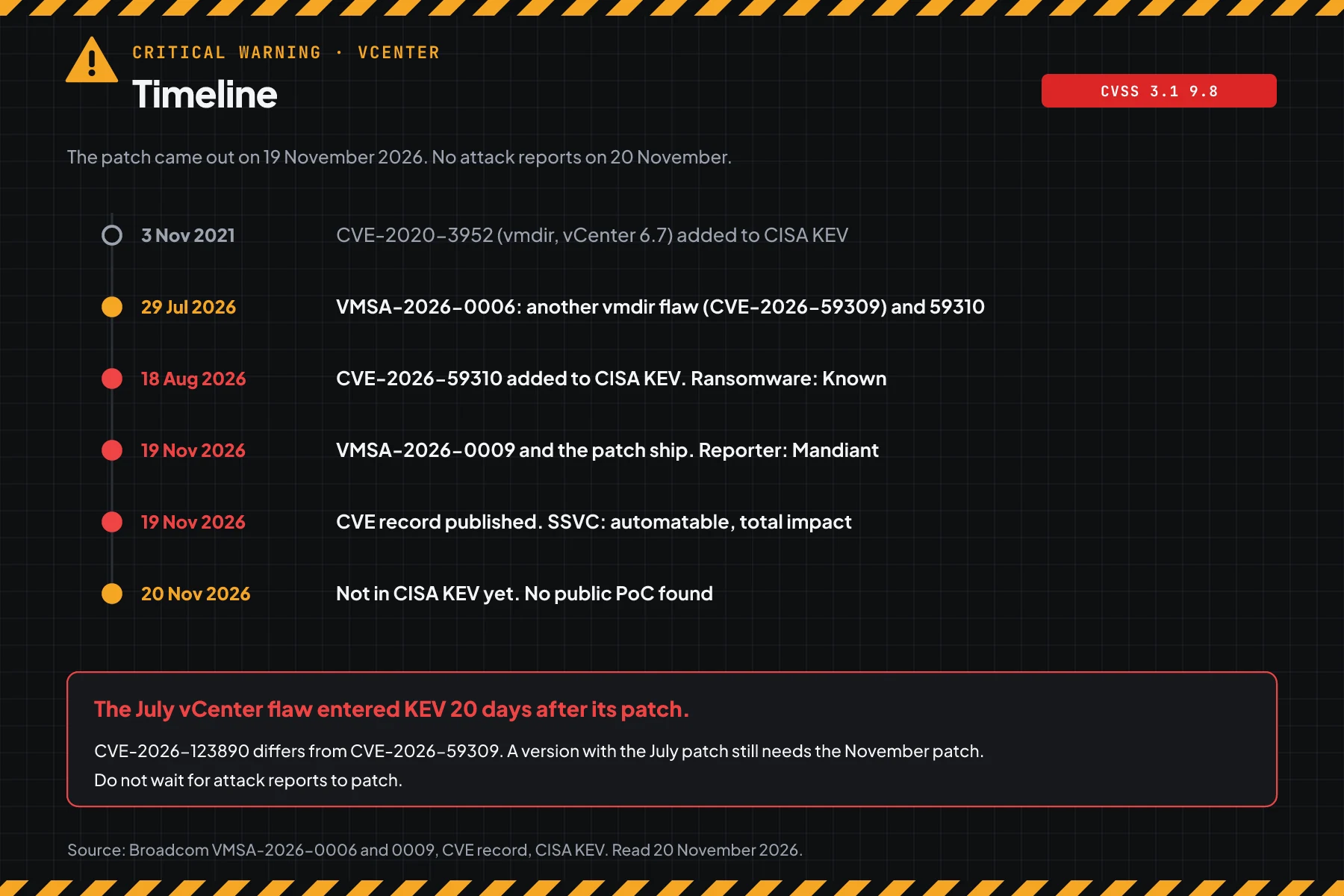
Broadcom released VMSA-2026-0009 and the patch on 19 November 2026. The flaw reporter is Mandiant. The CVE record came out on 19 November at 14.02 UTC.
The earlier pattern: a vCenter flaw from VMSA-2026-0006 on 29 July 2026 entered CISA KEV on 18 August 2026, 20 days after the patch. Do not wait for attack reports to act.
How it works: an authentication bypass in vmdir
This section uses the official vendor summary. Its purpose is to help you pick the right step, not to explain an attack.
Summary from the vendor
Per VMSA-2026-0009, an attacker with network access to vCenter can bypass authentication and get unauthorized access to the system. The flaw is in the VMware Directory Service (vmdir).
vmdir is the directory service inside vCenter. It keeps the Single Sign-On identity data, for example the vsphere.local accounts and groups. Thus a flaw in vmdir touches the login door of vCenter.
The CVSS 3.1 vector: AV:N/AC:L/PR:N/UI:N/S:U/C:H/I:H/A:H. This means: over the network, low complexity, no account, no victim click, and full impact. Weakness type: CWE-288, an authentication bypass through another path.
We give no other technical details. The vendor also released no technical details.
5 CVEs in 1 advisory
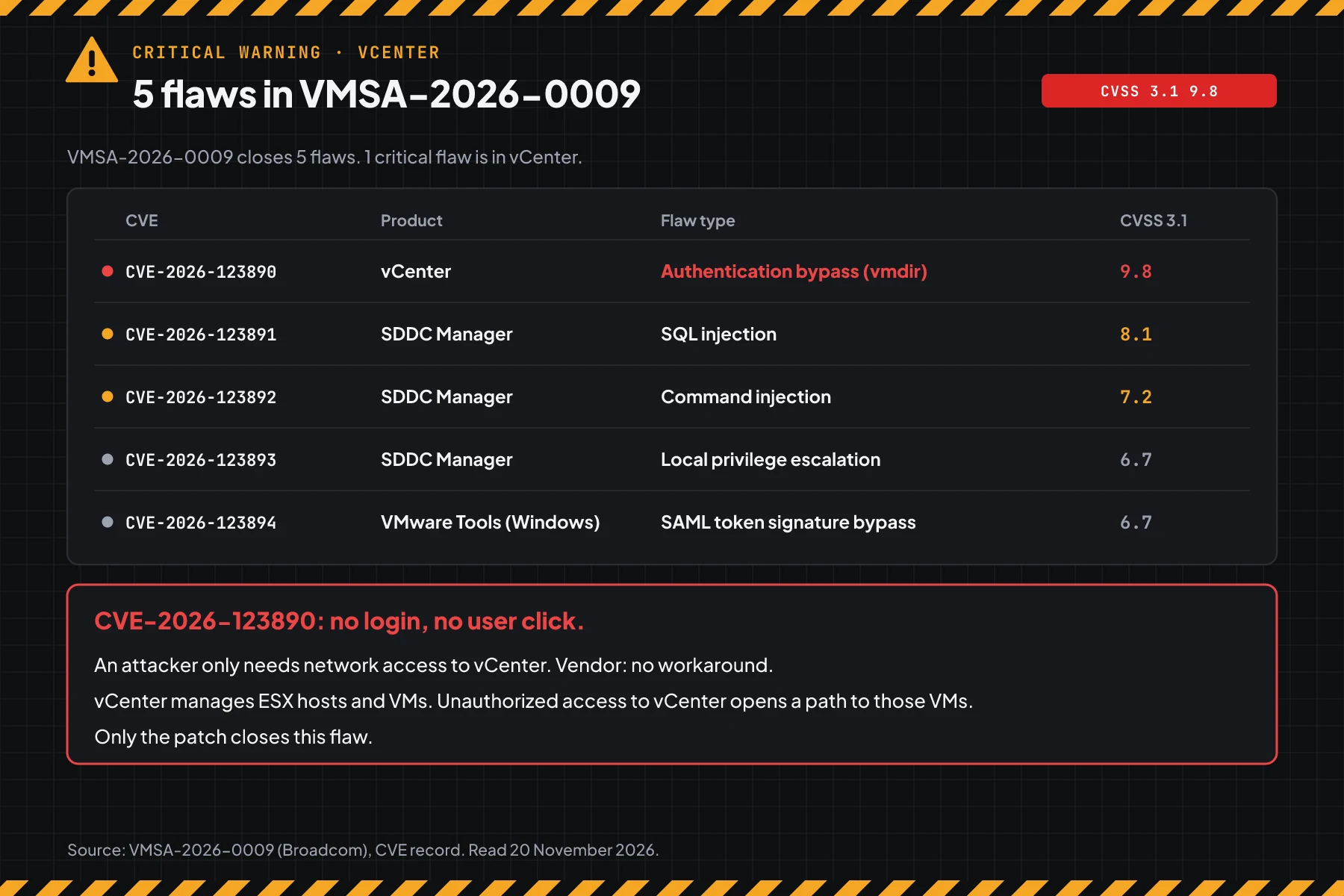
VMSA-2026-0009 closes 5 CVEs. Only 1 is critical, and that flaw is in vCenter. The 4 other CVEs are in SDDC Manager and VMware Tools for Windows, with their own patches.
| CVE | Product | Flaw type | CVSS 3.1 | Fixed in |
|---|---|---|---|---|
| CVE-2026-123890 | vCenter | Authentication bypass in vmdir | 9.8 | 8.0 U3m, 9.0.2.0200, 9.1.1.0200 |
| CVE-2026-123891 | SDDC Manager | SQL injection | 8.1 | 9.1.1.0200, 9.0.2.0100, 5.2.5 |
| CVE-2026-123892 | SDDC Manager | Command injection | 7.2 | 9.1.1.0200, 9.0.2.0100, 5.2.5 |
| CVE-2026-123893 | SDDC Manager | Local privilege escalation | 6.7 | 9.1.1.0200, 9.0.2.0100, 5.2.5 |
| CVE-2026-123894 | VMware Tools for Windows | SAML token signature bypass | 6.7 | 13.1.5.0 and 12.5.5 (12.4.10 for 32-bit) |
This flaw is not the July 2026 flaw
VMSA-2026-0006 on 29 July 2026 also closed an authentication bypass in vmdir with score 9.8, which is CVE-2026-59309. The VMSA-2026-0009 FAQ writes that CVE-2026-123890 is a different flaw.
Thus a vCenter with the July patch is still vulnerable. A version with the July patch still needs the November patch.
Exploitation status on 20 November 2026
This status can change. Do not wait for attack reports from the wild before you patch.
| Source | Status |
|---|---|
| VMSA-2026-0009 | No mention of exploitation. No workaround |
| CVE record (CISA SSVC) | Exploitation: none. Automatable: yes. Technical impact: total |
| CISA KEV | Not on the list yet |
| Public PoC | We found none |
| vCenter history in CISA KEV | 12 vCenter CVEs, 4 marked as used by ransomware |
Another sample of a login flaw that gives access with no account is in the Keycloak SAML flaw CVE-2026-117691.
Who is most at risk
All vCenters below the fixed build of their branch need the patch. The order in this table helps you pick the vCenter to do first.
| vCenter setup | Risk | Reason |
|---|---|---|
| A vulnerable build that the internet can reach | Highest | Anyone on the internet can try. CISA rates this attack as automatable |
| A vulnerable build that the user network, Wi-Fi, or VPN can reach | High | 1 hacked laptop or VPN account can reach vCenter |
| A vulnerable build that only the admin network can reach | Lower | An attacker must get into the admin network first. The patch stays required |
| A build equal to or above the fixed build of its branch | Safe for this CVE | Still look for signs in step 5, because the flaw can be used before the patch |
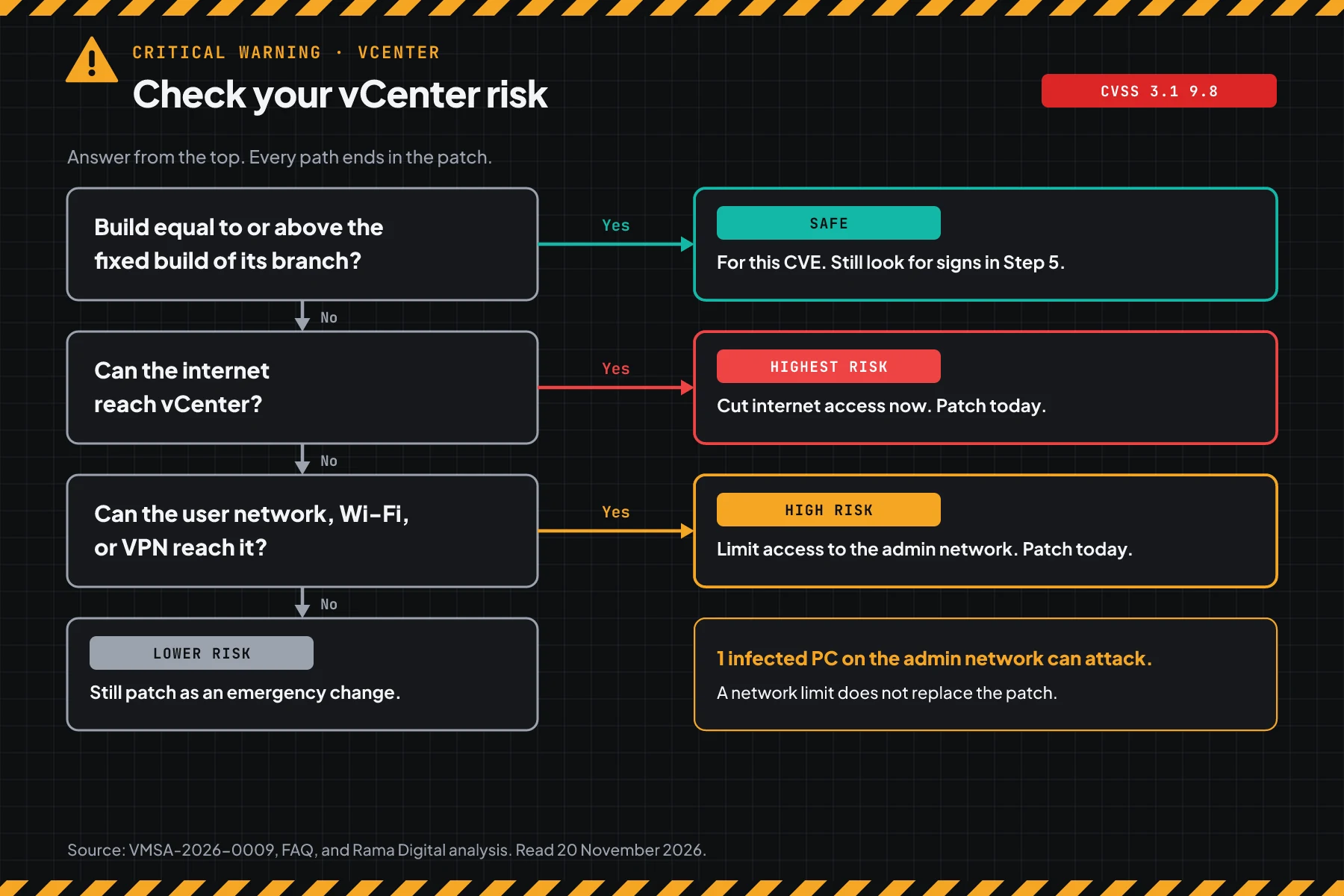
Rama Digital analysis: many teams put vCenter on the same server network as their applications, or open it to all VPN accounts. In those two setups, 1 hacked laptop can reach vCenter. Check the real reach with step 2.
Affected versions and fixed builds
Compare the version and build of each vCenter with this table. Build sources: the 8.0 U3m release notes, the 9.1.1.0200 release notes, the 9.0.2.0200 release notes, and KB 326316.
| Branch | Fixed version | Fixed build | Action |
|---|---|---|---|
| vCenter 9.1.x | 9.1.1.0200 | 25901347 | Install today if the build is below 25901347 |
| vCenter 9.0.x | 9.0.2.0200 | 25901331 | Install today if the build is below 25901331 |
| vCenter 8.0 (U1, U2, U3) | 8.0 U3m (8.0.3.01200) | 25934264 | Move to 8.0 U3m. The patch is only on U3 |
| vCenter 7.0 | No public patch | - | Patch through Broadcom extended support, or upgrade |
| vCenter 6.7 and 6.5 | No patch | - | Treat as affected. Upgrade to a supported version |
| VCF 5.x | Through KB 88287 | - | Follow KB 88287, then install SDDC Manager 5.2.5 |
| Telco Cloud Platform and Infrastructure | Through KB463116 | - | Follow KB463116 |
| ESX, NSX | Not affected | - | No action for this CVE |
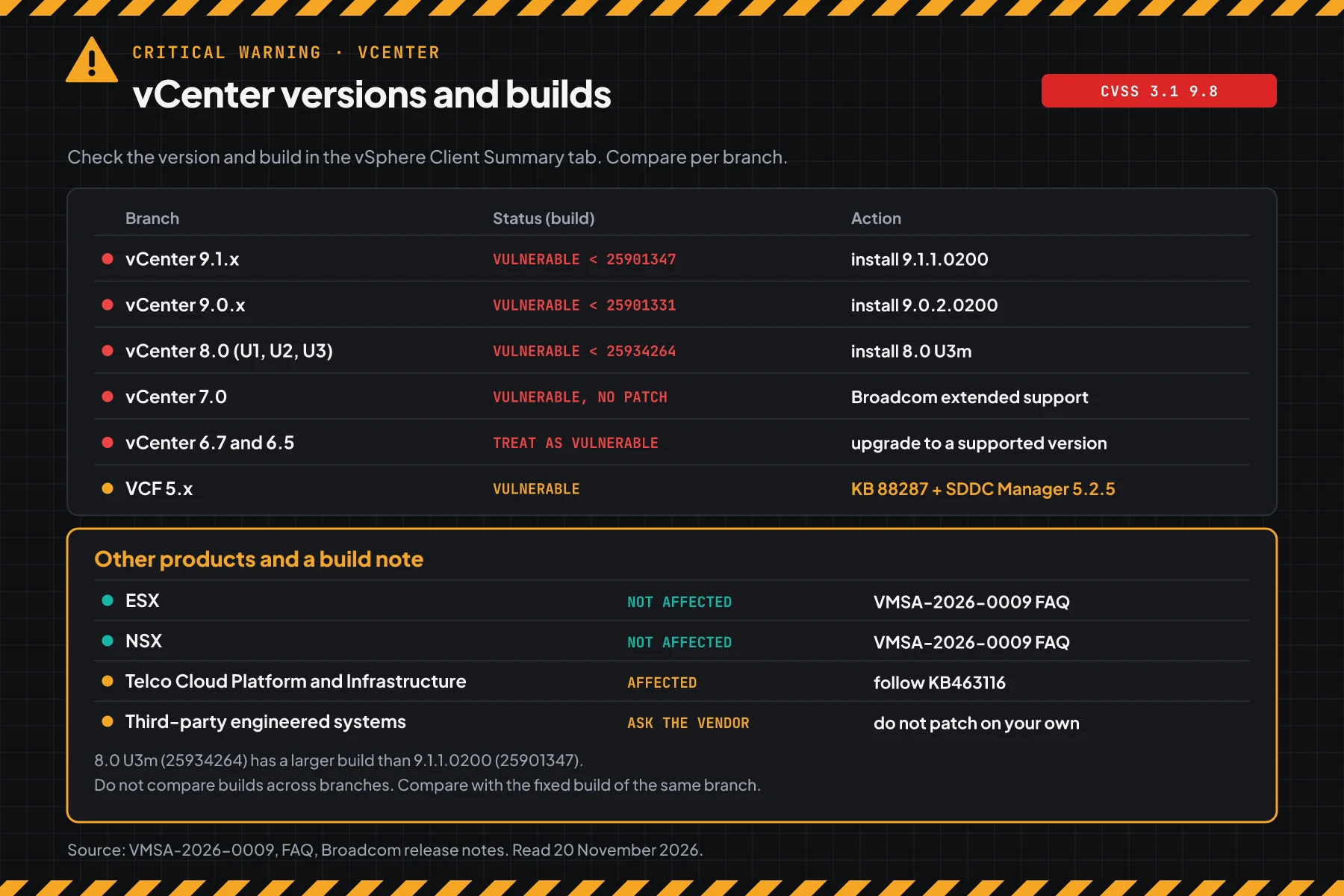
Build note: build numbers cross between branches. The 8.0 U3m build (25934264) is larger than the 9.1.1.0200 build (25901347). Thus compare a build with the fixed build of its own branch, not with the largest number.
Other notes from the VMSA-2026-0009 FAQ:
- ESX and NSX are not affected by this CVE.
- Enhanced Linked Mode does not change the status. Each vCenter in the group needs the patch.
- The patches are cumulative.
- vCenter 7.0 is affected. General support for 7.0 ended on 2 October 2025, so a patch is only available through Broadcom extended support.
- For VCF 5.x, follow KB 88287, then install SDDC Manager 5.2.5 from the VCF 5.2.5 release notes.
- For Telco Cloud Platform and Telco Cloud Infrastructure, follow KB463116.
- For third-party engineered systems, contact the vendor of that system. Do not patch on your own.
Upgrade note: per KB 67077, 8.0 U3m and 9.0.2.0200 cannot upgrade to VCF 9.1.1 yet. An upgrade to the 9.1 branch must wait for 9.1.2. Still install the patch on your branch now.
Before you start
- Admin access to the vSphere Client and root access to VAMI on port 5480.
- A list of all vCenters, including lab, DR, and the vCenters inside VCF.
- A list of the admin networks, jump hosts, backup servers, and monitoring servers that use vCenter.
- A laptop on the user network or user VPN with bash, for step 2.
- PowerCLI, or access to see events in the vSphere Client, for steps 1 and 5.
- An emergency change window. The FAQ classifies this patch as an emergency change.
Step 1: Check the version and build of each vCenter
Manual way: open the vSphere Client, select the vCenter, then open the Summary tab. Write down the version and build. For many vCenters, export the list with PowerCLI.
# PowerCLI, after Connect-VIServer to each vCenter.
# We did not run this command, because our lab has no vCenter.
$global:DefaultVIServers | Select-Object Name,Version,Build | Export-Csv -NoTypeInformation -Path vcenter.csv
Save this script as check-version-vcenter.sh. The script reads the CSV from PowerCLI or a text list, then compares the build per branch. The script does not contact vCenter.
#!/usr/bin/env bash
# Check vCenter builds against VMSA-2026-0009 (CVE-2026-123890). The script only reads text and does not contact vCenter.
# Use: bash check-version-vcenter.sh vcenter.csv     (PowerCLI Export-Csv output: "Name","Version","Build")
#  or: bash check-version-vcenter.sh list.txt        (1 vCenter per line: name version build, e.g. "vc-01 8.0.3 25600417")
#  or: bash check-version-vcenter.sh -               (read from stdin)
# Fixed builds: 9.1 = 25901347 (9.1.1.0200), 9.0 = 25901331 (9.0.2.0200), 8.0 = 25934264 (8.0 U3m).
# Build numbers cross between branches. The script compares the build per branch, not globally.
set -u
bad=0; safe=0; other=0; total=0

head_row() { printf '%-22s %-12s %-9s %s\n' "VCENTER" "VERSION" "BUILD" "STATUS"; }

# $1 name, $2 version, $3 build
rate() {
  local name="$1" ver="$2" bd="$3" br need="" fix="" st ma mi
  ma=${ver%%.*}; mi=${ver#*.}; mi=${mi%%.*}; br="$((10#$ma)).$((10#$mi))"
  case "$br" in 9.1) need=25901347; fix="9.1.1.0200" ;; 9.0) need=25901331; fix="9.0.2.0200" ;; 8.0) need=25934264; fix="8.0 U3m" ;; esac
  if [ -n "$need" ]; then
    if [ -z "$bd" ]; then st="CANNOT CONFIRM, build not readable"; other=$((other + 1))
    elif (( 10#$bd >= need )); then st="SAFE for CVE-2026-123890"; safe=$((safe + 1))
    else st="VULNERABLE, install $fix (build $need) or newer"; bad=$((bad + 1)); fi
  elif [ "$br" = 7.0 ]; then st="VULNERABLE, no public patch for 7.0, ask Broadcom"; bad=$((bad + 1))
  elif (( 10#$ma < 7 )); then st="VULNERABLE, end of general support, upgrade"; bad=$((bad + 1))
  else st="CHECK, branch not listed in VMSA-2026-0009"; other=$((other + 1)); fi
  printf '%-22s %-12s %-9s %s\n' "$(printf '%s' "$name" | cut -c1-22)" "$ver" "${bd:--}" "$st"
}

# 1 line: name, version (8.0.3 or 8.0.3.01000), then build (6 to 9 digits).
line() {
  local txt name="" i j ver="" bd="" vi=-1
  local -a T
  [[ $1 =~ ^[[:space:]]*# ]] && return 0
  txt=$(printf '%s' "$1" | tr -d '\r"' | tr -cd '[:alnum:] .,:_-' | cut -c1-120)
  [[ -z ${txt// /} ]] && return 0
  [[ ${txt,,} == name,version,build* ]] && return 0
  total=$((total + 1))
  read -r -a T <<< "${txt//,/ }"
  for i in "${!T[@]}"; do
    if [[ ${T[i]} =~ ^[0-9]{1,2}\.[0-9]{1,2}(\.[0-9]{1,6}){0,2}$ ]]; then vi=$i; ver=${T[i]}; break; fi
  done
  if (( vi < 0 )); then
    printf '%-22s %-12s %-9s %s\n' "$(printf '%s' "$txt" | cut -c1-22)" "-" "-" "CANNOT CONFIRM, version not readable"
    other=$((other + 1)); return 0
  fi
  for ((j = 0; j < vi; j++)); do name="$name${name:+ }${T[j]}"; done
  for ((j = vi + 1; j < ${#T[@]}; j++)); do
    if [[ ${T[j]} =~ ^[0-9]{6,9}$ ]]; then bd=${T[j]}; break; fi
  done
  rate "${name:--}" "$ver" "$bd"
}

summary() {
  if (( total == 0 )); then echo "CANNOT CONFIRM: no data lines."; return 2; fi
  echo "Summary: $bad VULNERABLE, $safe SAFE, $other other."
  (( other )) && echo "Other lines: check them in the vSphere Client Summary tab. With no readable build, treat the vCenter as not safe."
  echo "SAFE covers CVE-2026-123890 only. Also check SDDC Manager and VMware Tools for Windows in VMSA-2026-0009."
  return 0
}

head_row
if [ "${1:-}" = "-" ] || (( $# == 0 )); then
  while IFS= read -r x || [ -n "$x" ]; do line "$x"; done
elif (( $# == 1 )) && [ -f "$1" ]; then
  if [ ! -r "$1" ]; then echo "CANNOT CONFIRM: file not readable."; exit 2; fi
  while IFS= read -r x || [ -n "$x" ]; do line "$x"; done < "$1"
elif (( $# == 1 )) && [[ $1 != *[[:space:]]* ]]; then
  echo "CANNOT CONFIRM: file $(printf '%s' "$1" | tr -cd '[:print:]' | cut -c1-80) does not exist."; exit 2
else
  for x in "$@"; do line "$x"; done
fi
summary; exit $?
Sample text list with dummy data:
# name version build (dummy data, from the Summary tab)
vc-jkt-01 8.0.3.01000 25600417
vc-sby-01 9.0.2.0100 25629525
vc-new 9.1.1.0200 25901347
# On Linux, macOS, or WSL
bash check-version-vcenter.sh vcenter.csv
# With no PowerCLI: write 1 line per vCenter from the Summary tab
bash check-version-vcenter.sh list-vcenter.txt
bash check-version-vcenter.sh "vc-jkt-01 8.0.3.01000 25600417"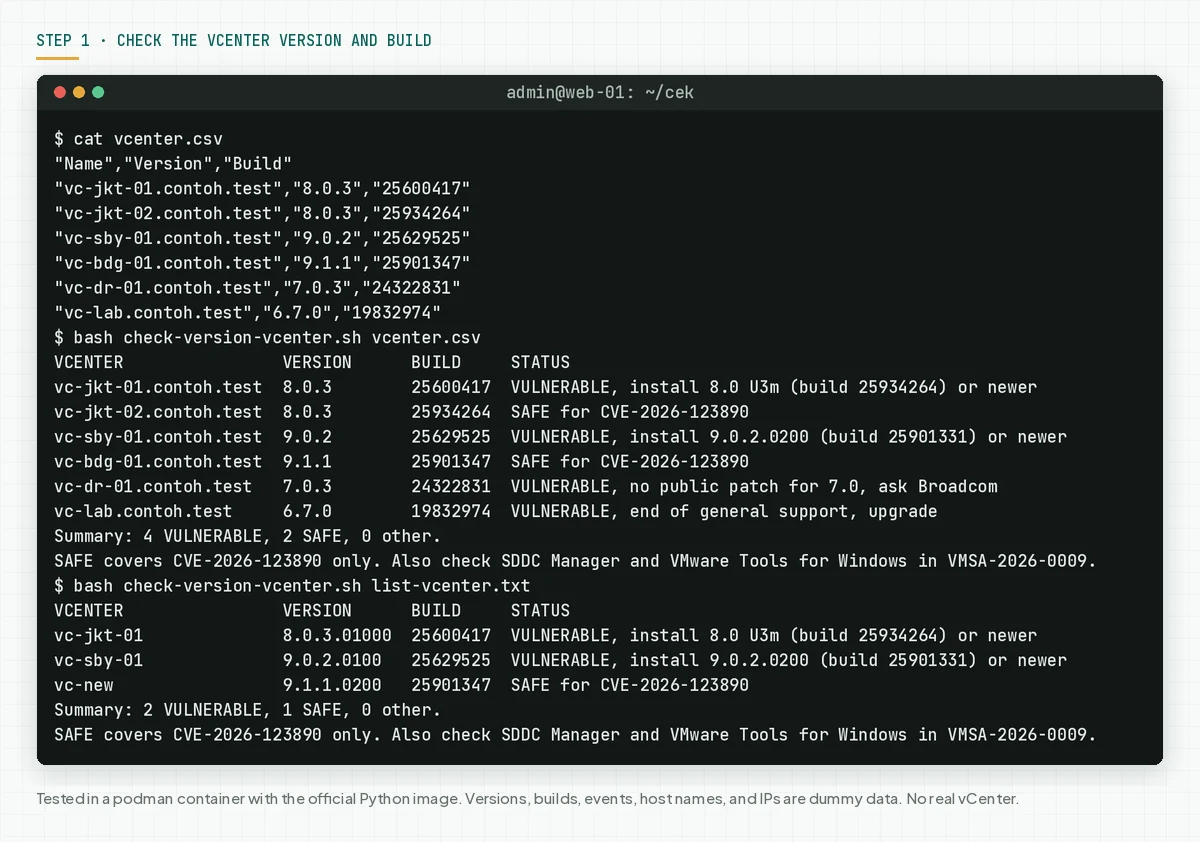
Check the result:
- "VULNERABLE, install ...": the build is below the fixed build of its branch. Do step 3 today.
- "VULNERABLE, no public patch for 7.0": contact Broadcom for extended support, or upgrade to 8.0 U3m. Do step 4 while you wait.
- "VULNERABLE, end of general support": 6.7 or 6.5. Upgrade to a supported version.
- "SAFE for CVE-2026-123890": the build is equal to or above the fixed build. Still run step 5.
- "CHECK" or "CANNOT CONFIRM": the branch is not listed or the build is not readable. Check it by hand in the Summary tab.
We tested the scripts with edge cases: CRLF line ends, control characters, empty stdin, a missing file, a build that is not a number, the 9.2 branch, and numbers with a leading zero. The scripts give the correct result or stop with exit code 2.
Limit: the script trusts the version and build that you give it. The script also rates only CVE-2026-123890. SDDC Manager and VMware Tools for Windows have their own fixed versions.
Step 2: Check who can reach vCenter
The vendor only needs "network access to vCenter" for this flaw. Thus each vCenter port that is open from the user network is a path. Run this step from a network that is NOT the admin network.
Save this script as check-exposure-vcenter.sh. The script opens a TCP connection to 6 vCenter ports from KB 326184, then closes it. The script sends no data.
#!/usr/bin/env bash
# Run from a network that is NOT the admin network: which vCenter ports can it reach?
# VMSA-2026-0009 only needs "network access to vCenter". Each port open from here is a path.
# Use: bash check-exposure-vcenter.sh <vCenter host>
# The script only opens a TCP connection, then closes it. It sends no data.
set -u
[ $# -eq 1 ] || { echo "Use: bash check-exposure-vcenter.sh <host>" >&2; exit 2; }
HOST=$1
case "$HOST" in -*|*[!A-Za-z0-9.:-]*|"") echo "Host not valid: $HOST" >&2; exit 2 ;; esac
command -v timeout >/dev/null 2>&1 || { echo "Program timeout is missing." >&2; exit 2; }

open=0
printf '%-6s %-8s %s\n' "PORT" "STATUS" "SERVICE"
for p in "443:vSphere Client and API" "80:HTTP, redirects to 443" "5480:VAMI, appliance management" \
         "389:LDAP directory service" "636:LDAPS directory service" "22:appliance SSH"; do
  port=${p%%:*}; name=${p#*:}
  if timeout 3 bash -c "exec 3<>/dev/tcp/$HOST/$port" 2>/dev/null; then
    printf '%-6s %-8s %s\n' "$port" "OPEN" "$name"; open=$((open + 1))
  else
    printf '%-6s %-8s %s\n' "$port" "CLOSED" "$name"
  fi
done
if (( open > 0 )); then
  echo "Result: $open ports OPEN from this network. If this is not the admin network, limit access today and patch."; exit 1
fi
echo "Result: all ports CLOSED from this network. Repeat from another network. Patch anyway."; exit 0
# Run it from the user network, office Wi-Fi, or user VPN. Not from the admin network.
# Test only a vCenter that you own.
bash check-exposure-vcenter.sh vc-01.contoh.test
bash check-exposure-vcenter.sh 203.0.113.10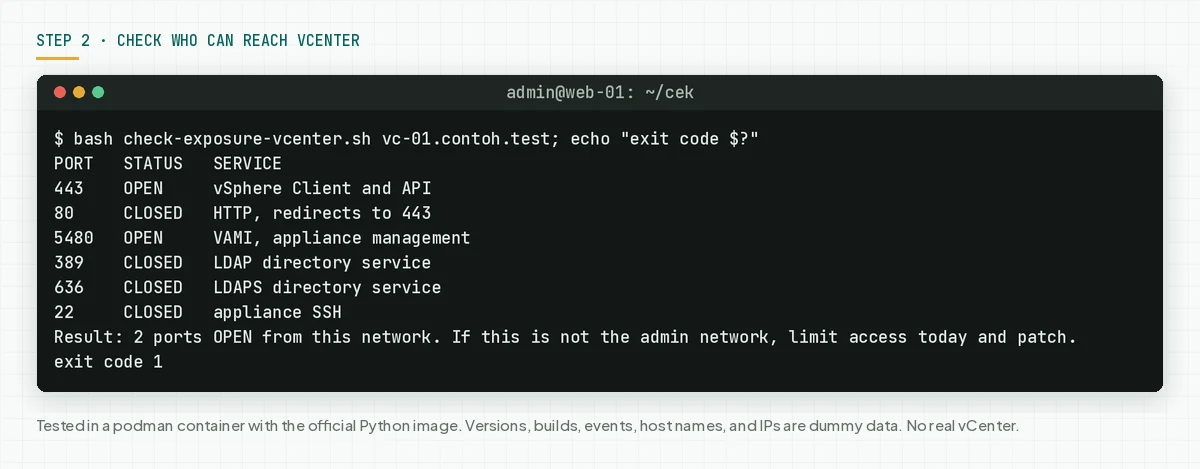
Check the result: "OPEN" means that the test point can reach the port. If the test point is the user network, Wi-Fi, or user VPN, do step 4 today and patch.
"CLOSED" on all ports means that this test point cannot reach vCenter. Repeat it from other networks, for example the VPN and the internet. Still patch.
Rama Digital analysis: this port list is not complete. Other ports can be open, per version and config. This script gives only a quick picture, not a firewall audit.
Step 3: Back up, then patch vCenter
Only the patch closes the flaw. Back up first, because the patch replaces vCenter components. Make a file-based backup in VAMI, then a snapshot of the vCenter VM per your team's backup procedure.
Per the VMSA-2026-0009 FAQ, a vCenter update does not stop VMs. The vSphere Client is not available during the update. This patch is not eligible for Quick Patch, so use VAMI or the appliance shell.
3a. Through VAMI
Open VAMI on port 5480 and log in as root. Open the Update menu, then check for updates from the online repository or from the patch ISO in the CD-ROM of the vCenter VM. Install 8.0 U3m, 9.0.2.0200, or 9.1.1.0200 per branch. We did not run this step.
3b. Through the appliance shell
Patch ISO files: VMware-vCenter-Server-Appliance-8.0.3.01200-25934264-patch-FP.iso, VMware-vCenter-Server-Appliance-9.0.2.0200.25901331-patch-FP.iso, and VMware-vCenter-Server-Appliance-9.1.1.0200.25901347-patch-FP.iso.
# vCenter appliance shell, after the patch ISO is in the CD-ROM of the vCenter VM.
# Sample from the vCenter documentation. We did not run this step.
software-packages stage --iso --acceptEulas
software-packages list --staged
software-packages install --staged
3c. VCF, 7.0, and old versions
For VCF 5.x, follow KB 88287 and install SDDC Manager 5.2.5. For 7.0, ask for the patch through Broadcom extended support, or upgrade to 8.0 U3m. For 6.7 and 6.5, plan the upgrade and do step 4 now.
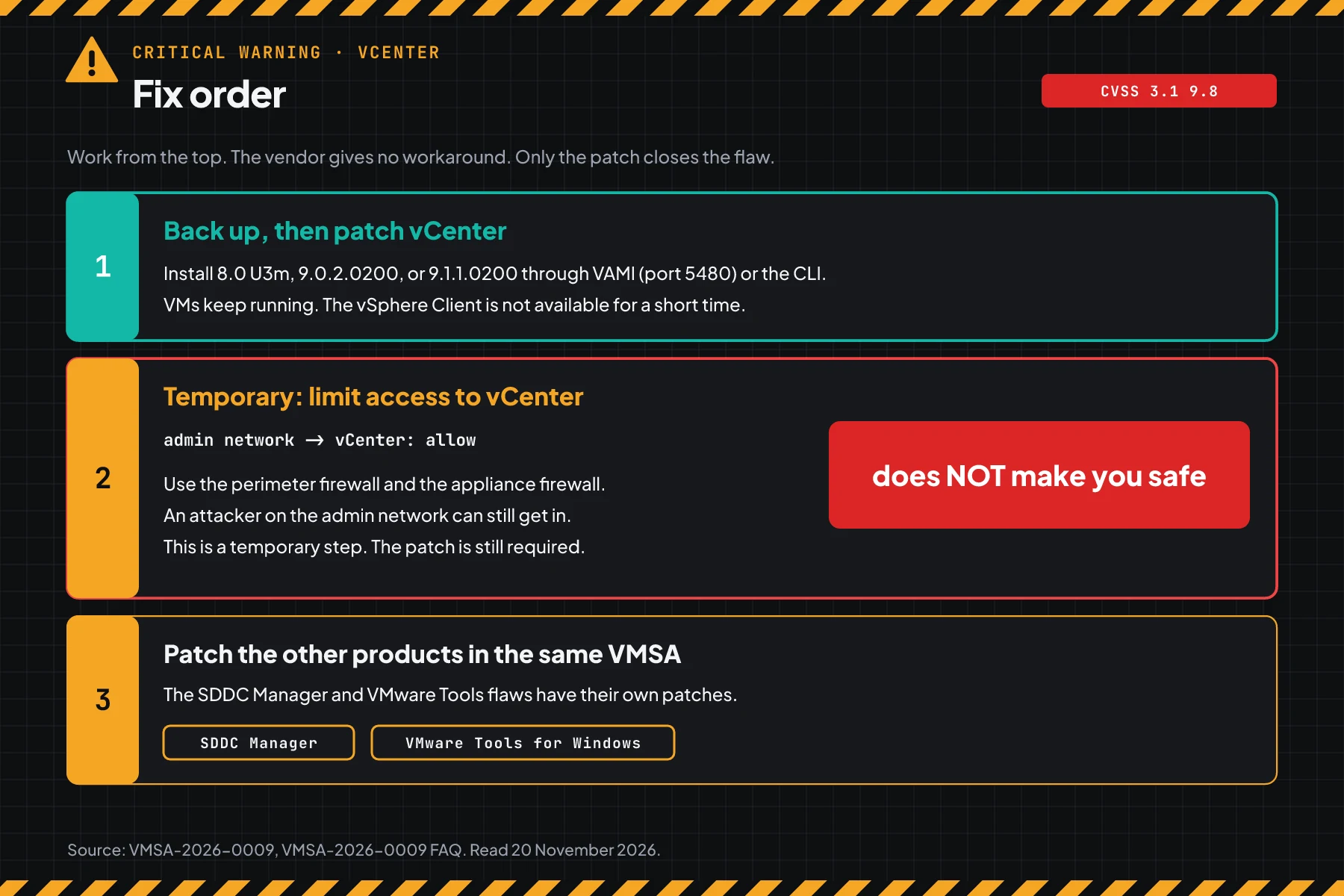
Check the result: run the step 1 script again. Each vCenter must print "SAFE for CVE-2026-123890". Then log in to the vSphere Client and make sure the ESX hosts and VMs show as normal.
Also install the SDDC Manager and VMware Tools for Windows patches from the same advisory. The SDDC Manager flaws have scores of 8.1 and 7.2.
Step 4: Limit access to vCenter, does NOT make it safe
Use this step until the patch is installed, and after that as network hygiene. This step does NOT make vCenter safe. An attacker on the admin network can still try.
VMSA-2026-0009 writes that there is no workaround. The VMSA-2026-0009 FAQ writes that firewall controls as compensation are a decision of the organization. Thus this is Rama Digital analysis, not vendor advice.
# Sample rules for the firewall in front of vCenter (order from the top)
ALLOW  admin network or jump host     -> vCenter  TCP 443, 5480, 22
ALLOW  ESX hosts                      -> vCenter  per KB 326184
ALLOW  backup and monitoring servers  -> vCenter  TCP 443
ALLOW  other vCenters in the ELM group -> vCenter  per KB 326184
DENY   all other networks             -> vCenter  all ports
Put the rules on the perimeter firewall or the firewall between networks. As a second layer, use the Firewall settings in VAMI. Allow the ESX hosts, backup, monitoring, and other vCenters in the ELM group, or those services stop.
Samples of services at the edge that also need an access limit are in the Ivanti Connect Secure flaw CVE-2026-111357 and the NetScaler flaw CVE-2026-120868.
Check the result: run step 2 again from the user network. All ports must show "CLOSED". Remember: vCenter is still vulnerable until step 3 is done.
Step 5: Find signs of unauthorized vCenter access
The patch closes the flaw, but it does not remove the accounts, permissions, or roles that an attacker made. Thus look for those traces before and after the patch.
Rama Digital analysis: VMSA-2026-0009 gives no IoCs. The signs below are changes that an attacker usually makes after getting in: a login from a strange place, a new role, and a new permission.
Export the events with PowerCLI. The CSV columns must be CreatedTime, Type, UserName, IpAddress, Principal, and Role.
# PowerCLI: export the events of the last 30 days. We did not run this command.
Get-VIEvent -Start (Get-Date).AddDays(-30) -MaxSamples 200000 |
  Where-Object { $_ -is [VMware.Vim.UserLoginSessionEvent] -or $_ -is [VMware.Vim.PermissionAddedEvent] -or
                 $_ -is [VMware.Vim.PermissionUpdatedEvent] -or $_ -is [VMware.Vim.RoleAddedEvent] } |
  Select-Object @{N='CreatedTime';E={$_.CreatedTime.ToString('yyyy-MM-dd HH:mm:ss')}},
                @{N='Type';E={$_.GetType().Name}}, UserName, IpAddress,
                @{N='Principal';E={$_.Principal}}, @{N='Role';E={$_.Role.Name}} |
  Export-Csv -NoTypeInformation -Path vc-event.csv
Save this script as check-signs-vcenter.sh. The script only reads the CSV file. It does not change, delete, or send anything.
#!/usr/bin/env bash
# Find signs of unauthorized access in a vCenter event export (Get-VIEvent, see the article). Rama Digital analysis:
# VMSA-2026-0009 gives no IoCs. The script flags logins from outside the admin network, new permissions, and new roles.
# Use: bash check-signs-vcenter.sh --admin 198.51.100.0/24[,other CIDR] vc-event.csv
# CSV columns: CreatedTime, Type, UserName, IpAddress, Principal, Role. The script only reads the file.
set -u
[ $# -eq 3 ] && [ "$1" = "--admin" ] || { echo "Use: bash check-signs-vcenter.sh --admin <CIDR[,CIDR]> <file.csv>" >&2; exit 2; }
ADMIN=$2 F=$3
[ -f "$F" ] && [ -r "$F" ] || { echo "CANNOT CONFIRM: file not readable." >&2; exit 2; }

ip2int() { # IPv4 to a number. Fails when the value is not IPv4.
  [[ $1 =~ ^([0-9]{1,3})\.([0-9]{1,3})\.([0-9]{1,3})\.([0-9]{1,3})$ ]] || return 1
  local o n=0; for o in "${BASH_REMATCH[@]:1}"; do (( 10#$o <= 255 )) || return 1; n=$(( n * 256 + 10#$o )); done; echo "$n"
}
declare -a NET MASK
for c in ${ADMIN//,/ }; do
  b=${c#*/}; [[ $c == */* && $b =~ ^[0-9]{1,2}$ ]] && (( b <= 32 )) && n=$(ip2int "${c%/*}") || { echo "CIDR not valid: $c" >&2; exit 2; }
  m=$(( b == 0 ? 0 : (0xFFFFFFFF << (32 - b)) & 0xFFFFFFFF )); NET+=($(( n & m ))); MASK+=("$m")
done
in_admin() { local x i; x=$(ip2int "$1") || return 1; for i in "${!NET[@]}"; do (( (x & MASK[i]) == NET[i] )) && return 0; done; return 1; }

check=0; read_n=0; internal=0; hdr=0; declare -A K
printf '%-7s %-16s %-5s %-28s %s\n' "SIGN" "TIME" "KIND" "USER" "DETAIL"
flag() { printf '%-7s %-16s %-5s %-28s %s\n' "CHECK" "${1:0:16}" "$2" "${3:0:28}" "$4"; check=$((check + 1)); }
while IFS= read -r x || [ -n "$x" ]; do
  x=$(printf '%s' "$x" | tr -d '\r' | tr -cd '[:print:]'); x=${x#\"}; x=${x%\"}
  IFS=$'\x1f' read -r -a C <<< "${x//\",\"/$'\x1f'}"
  if (( hdr == 0 )); then for i in "${!C[@]}"; do K[${C[i]}]=$i; done; hdr=1; continue; fi
  [ -n "${K[Type]:-}" ] || { echo "CANNOT CONFIRM: column Type is missing." >&2; exit 2; }
  read_n=$((read_n + 1))
  t=${C[${K[CreatedTime]:-99}]:-}; ty=${C[${K[Type]}]:-}; u=${C[${K[UserName]:-99}]:-}
  ip=${C[${K[IpAddress]:-99}]:-}; pr=${C[${K[Principal]:-99}]:-}; ro=${C[${K[Role]:-99}]:-}
  case "$ty" in
    UserLoginSessionEvent)
      if [[ $ip == 127.* || $ip == ::1 ]]; then internal=$((internal + 1))
      elif ! ip2int "$ip" >/dev/null; then flag "$t" LOGIN "$u" "IP not readable: ${ip:-empty}"
      elif ! in_admin "$ip"; then flag "$t" LOGIN "$u" "login from $ip, outside admin network"; fi ;;
    PermissionAddedEvent|PermissionUpdatedEvent) flag "$t" PERM "$u" "grant to $pr, role ${ro:-?}" ;;
    RoleAddedEvent) flag "$t" ROLE "$u" "new role: ${ro:-?}" ;;
  esac
done < "$F"
(( read_n > 0 )) || { echo "CANNOT CONFIRM: no event lines."; exit 2; }
echo "Summary: $read_n events read, $check CHECK, $internal internal logins (127.0.0.1) skipped."
if (( check > 0 )); then echo "Result: CHECK. Match each line with the admin team work schedule. A line nobody knows is an incident."
else echo "Result: NO SIGN YET in this data. A clean result is not proof of safety. This flaw may leave no normal login event."; fi
Sample of the first 4 CSV lines with dummy data:
"CreatedTime","Type","UserName","IpAddress","Principal","Role"
"2026-11-19 08:01:12","UserLoginSessionEvent","VSPHERE.LOCAL\Administrator","198.51.100.21","",""
"2026-11-19 08:01:13","UserLoginSessionEvent","VSPHERE.LOCAL\vpxd-extension-1a2b","127.0.0.1","",""
"2026-11-19 21:47:05","UserLoginSessionEvent","VSPHERE.LOCAL\Administrator","203.0.113.77","",""
# Change 198.51.100.0/24 to your admin network. Separate more networks with a comma.
bash check-signs-vcenter.sh --admin 198.51.100.0/24 vc-event.csv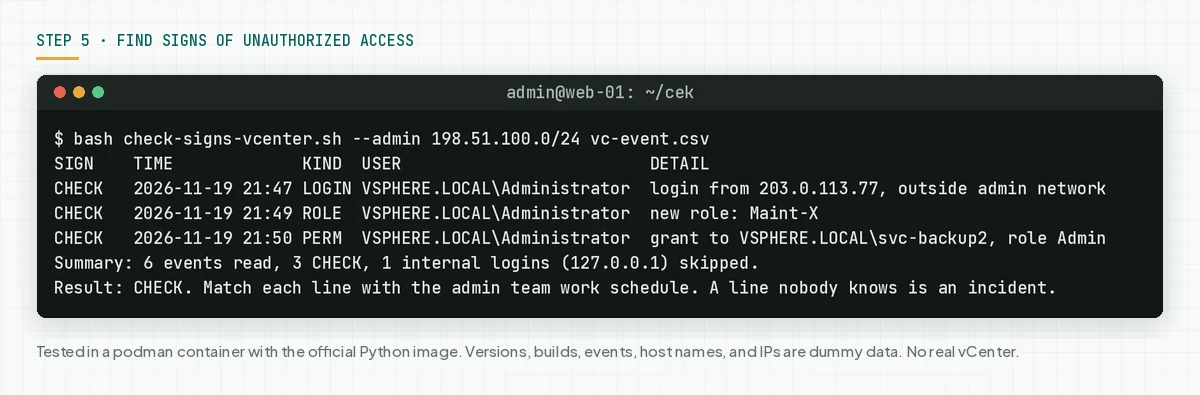
Script limits: an authentication bypass may leave no normal login event. vCenter also removes old events per its retention setting. Thus also check by hand.
Check by hand in the vSphere Client
- Open Administration, then Single Sign On, then Users and Groups. Look for new accounts in the
vsphere.localdomain. - Open the Administrators group. Look for members that the team does not know.
- Open Administration, then Roles. Look for new roles with full rights.
- Open Administration, then Global Permissions. Look for new permissions for accounts that the team does not know.
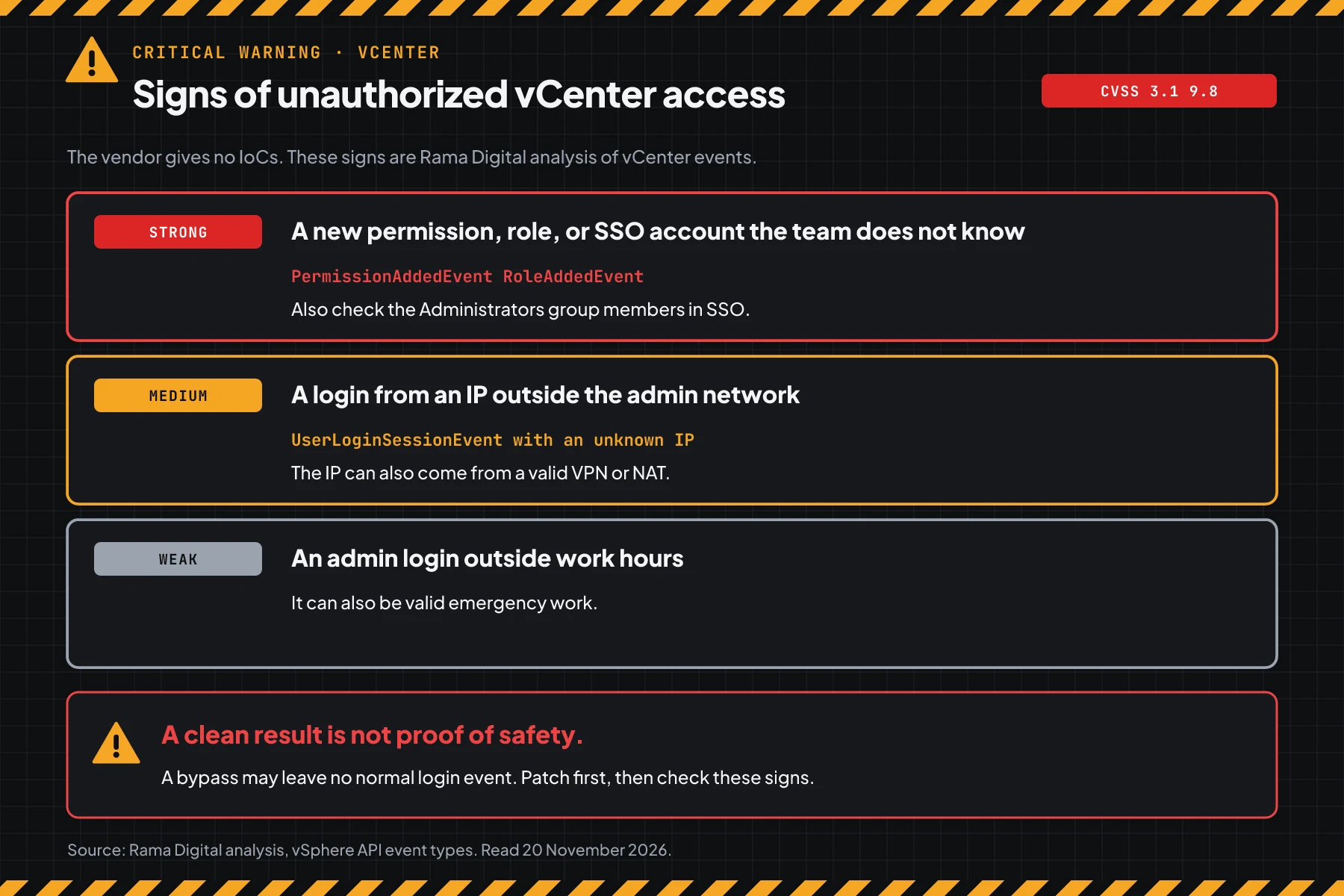
Check the result: "NO SIGNS YET" does not prove that vCenter is clean. "CHECK" means: match each line with the admin team work schedule. A line nobody knows is an incident. Follow this order:
- Limit network access to vCenter to the admin network only, as in step 4.
- Save the vCenter logs and a support bundle first, before you change anything.
- Do not delete a strange account before the evidence is saved. Disable it first.
- Install the vCenter patch.
- Change the passwords of
administrator@vsphere.local, the VAMI root account, and other admin accounts. - Check the ESX hosts and VMs: new VMs, strange snapshots, or VMs that stopped with no schedule.
Example: 1 night of response for 3 vCenters
This simulation uses dummy data. The vCenter names, times, and results are not customer data.
| Time (WIB) | Dummy vCenter | What we check | Result | Action |
|---|---|---|---|---|
| 19.00 | vc-jkt-01 (8.0 U3k, production) | Steps 1 and 2 | VULNERABLE, port 443 open from the user VPN | Close user VPN access at 19.20, patch to 8.0 U3m at 21.00 |
| 19.30 | vc-sby-01 (9.0.2.0100) | Step 1 | VULNERABLE | Patch to 9.0.2.0200 tonight. Hold the upgrade to 9.1 until 9.1.2 |
| 19.50 | vc-dr-01 (7.0 U3) | Steps 1 and 2 | VULNERABLE, no public patch | Limit to the admin network, open a Broadcom extended support ticket |
| 22.10 | vc-jkt-01 | Step 5 | 1 login from a strange IP, no new role or permission | Match it with the admin team, save the logs, watch for 14 days |
Lesson from this simulation: do the vCenter that the user VPN can reach first. vCenter 7.0 needs its own plan. A strange login needs a match, not a skip.
Who does the work
The infrastructure or virtualization team usually owns vCenter. The network team owns the firewall and VPN. The IT lead decides the emergency change window and the extended support path.
Rama Digital recommendation: record each vCenter, its version, its build, and who can reach it. Flaws in other core company systems need the same list, as in the Confluence flaw CVE-2026-90436.
Checklist for today
- List all vCenters, including lab, DR, and VCF. Owner: infrastructure team. Evidence: a list of names, versions, and builds.
- Check the build with step 1. Owner: vCenter admin. Evidence: script output.
- Check the reach from the user network and VPN with step 2. Owner: network team. Evidence: script output.
- Back up, then install 8.0 U3m, 9.0.2.0200, or 9.1.1.0200. Owner: vCenter admin. Evidence: step 1 output after the patch.
- Limit access to vCenter to the admin network only. Owner: network team. Evidence: firewall rules and the step 2 result.
- Export the events and run step 5, then check SSO by hand. Owner: vCenter admin. Evidence: script output and check notes.
- Patch SDDC Manager and VMware Tools for Windows. Owner: vCenter admin. Evidence: the versions after the patch.
Questions and answers
Must we also patch ESX and NSX for this flaw?
Not for CVE-2026-123890. The VMSA-2026-0009 FAQ writes that ESX and NSX are not affected. Still install the ESX and NSX patches on your normal schedule.
We still use vCenter 7.0. What must we do?
vCenter 7.0 is affected, and its general support ended on 2 October 2025. Ask for the patch through Broadcom extended support, or upgrade to 8.0 U3m. In the meantime, limit access with step 4.
Does a network limit make vCenter safe?
No. The vendor writes that this flaw has no workaround. A limit only reduces who can try. An attacker on the admin network can still get in.
Does the vCenter patch stop the VMs?
No. Per the FAQ, VMs keep running during a vCenter update. The vSphere Client is not available for a short time, so schedule the patch in an emergency change window.
Our 8.0 U3m build is larger than the 9.1.1.0200 build. Is that wrong?
No. Build numbers cross between branches. Compare an 8.0 build only with 25934264, a 9.0 build with 25901331, and a 9.1 build with 25901347.
We installed the July 2026 patch. Is this flaw closed?
No. The July patch closes CVE-2026-59309 from VMSA-2026-0006. CVE-2026-123890 is a different flaw, so install the November patch.
There are no attack reports yet. Why must we patch today?
The score is 9.8, with no login and no click. CISA rates this attack as automatable with total impact. The July vCenter flaw entered CISA KEV 20 days after its patch, and ransomware used it.
Does a clean signs script result prove that vCenter is safe?
No. A bypass may leave no normal login event, and old events can be gone. Check SSO by hand and watch vCenter after the patch.
Next step
The limits that still apply: step 4 does not make vCenter safe, and a patch does not clean a vCenter that was already entered. When your vCenter shows a sign in step 5, or you need help with an audit and recovery, use Vibe Code Rescue. For 1 urgent issue today, book a 30-minute session.
Sources
- VMSA-2026-0009: CVEs, scores, affected versions, fixed versions, and the no workaround statement.
- The VMSA-2026-0009 FAQ: ESX and NSX, vCenter 7.0, Enhanced Linked Mode, Quick Patch, and the update effect.
- The CVE-2026-123890 record: CWE-288, the CVSS vector, the CISA SSVC rating, and the publish time of 19 November 2026.
- The 8.0 U3m release notes, the 9.1.1.0200 release notes, and the 9.0.2.0200 release notes: build numbers and ISO names.
- KB 326316: the list of old vCenter builds.
- KB 326184: the ports that vCenter uses.
- KB 88287, the VCF 5.2.5 release notes, and KB463116: the patch paths for VCF 5.x and Telco.
- KB 67077: the upgrade limit from 8.0 U3m and 9.0.2.0200.
- CISA KEV: does not list this CVE on 20 November 2026, and lists 12 other vCenter CVEs.