Direct answer: CVE-2026-123007 is a flaw in the nginx HTTP/2 module with a CVSS 4.0 score of 9.2 (CVSS 3.1 8.1). The flaw is in nginx 1.9.5 to 1.31.8. Today, check the version and HTTP/2 on each server, then install 1.30.7 or 1.31.9, and restart.
The same release closes 4 other nginx CVEs with the same score. Turning off HTTP/2 stops only 2 of the 5 CVEs. Thus that mitigation does not make the server safe.
Main condition: On 19 November 2026, CISA KEV does not list this CVE, and CERT-EU 2026-022 has not seen exploitation in the wild. A public PoC exists from the Rapid7 blog. The Xint researchers chained this flaw with a Linux kernel flaw to root. Limit: this article contains no attack code or attack steps.
We read the CVE-2026-123007 record, the nginx.org security advisories list, the nginx 1.31.9 CHANGES, the Xint write-up, CERT-EU 2026-022, and the Rapid7 blog on 19 November 2026. We ran the scripts in steps 1, 2, 3, and 5 in podman containers with the official nginx 1.30.6 and 1.30.7 images.
Important limit: We did not test distro packages, builds from source, NGINX Plus, HTTP/3, or Windows. The scripts send no HTTP request. The exposure script only opens a TLS connection.
Problem: nginx sits in front of many sites, and its 5 flaws are open
nginx is a web server, reverse proxy, and load balancer. It receives traffic from the internet first, then passes it to your application.
Thus a flaw in nginx touches the outer edge of your network. CVE-2026-123007 is in the HTTP/2 module, which is on in many HTTPS servers.
Rama Digital analysis: nginx often runs behind the scenes, for example on an application server or inside a container image. Teams rarely count those servers when a new advisory comes out. Another sample of a web server flaw is in the Apache HTTP/2 flaw CVE-2026-119618.
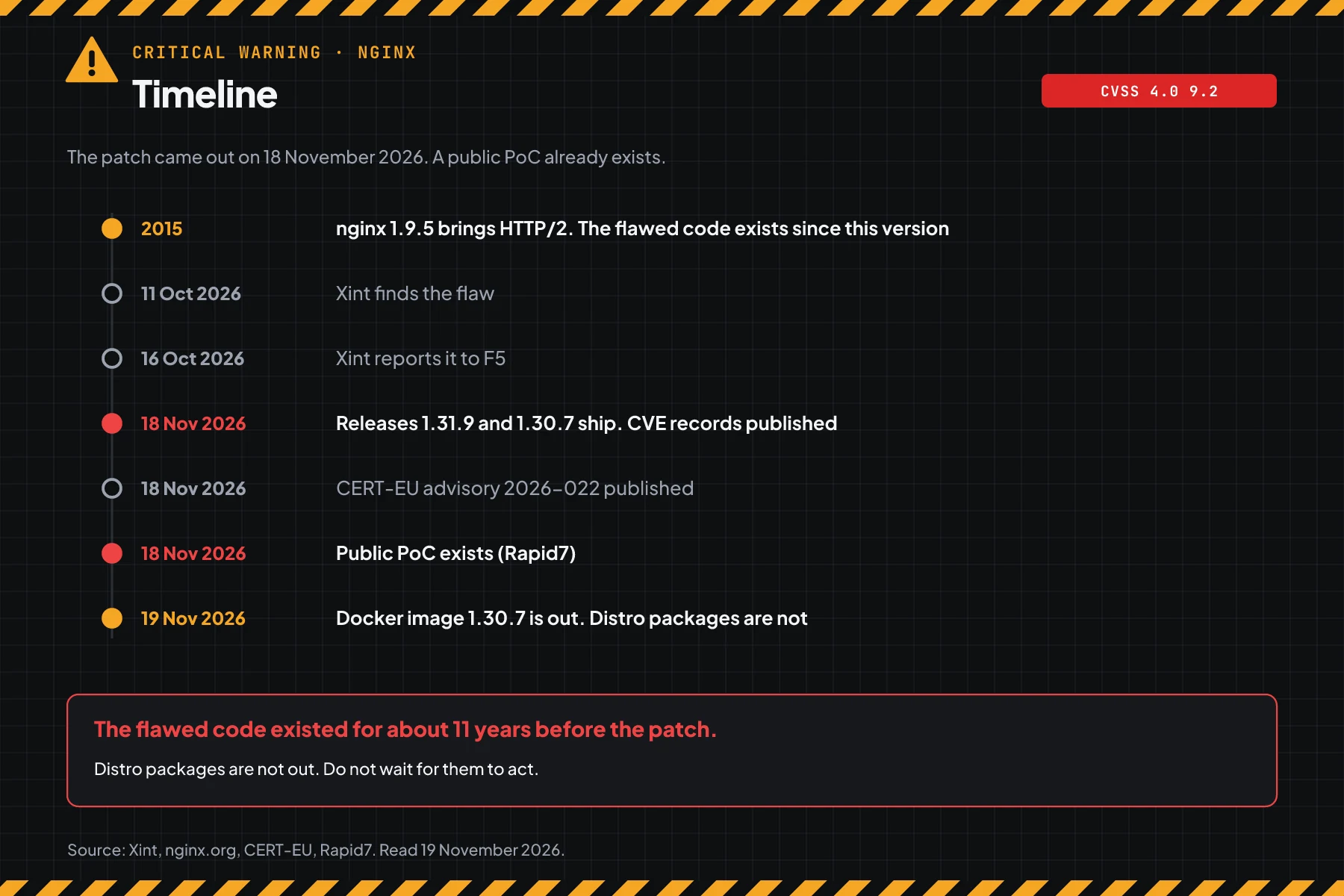
Xint found the flaw on 11 October 2026 and reported it to F5 on 16 October. Releases 1.31.9 and 1.30.7 came out on 18 November 2026. The CVE record came out on 18 November at 15.23 UTC.
On 19 November 2026, the Docker tag 1.30.7 is out, but the Ubuntu and Debian packages are not. Do not wait for distro packages to act.
How it works: a flaw in the HTTP/2 module
This section uses the official vendor summary. Its purpose is to help you pick the right step, not to explain an attack.
Summary from the vendor
Per the CVE-2026-123007 record, the ngx_http_v2_module module has a flaw that can cause a heap buffer overflow. The mildest result is a crashed nginx worker. Code execution is possible when ASLR is off or can be bypassed. The flaw touches only the data plane, not the control plane.
The CVSS 4.0 vector: AV:N/AC:H/AT:N/PR:N/UI:N/VC:H/VI:H/VA:H/SC:N/SI:N/SA:N. The CVSS 3.1 vector: AV:N/AC:H/PR:N/UI:N/S:U/C:H/I:H/A:H. This means: over the network, no account, no victim click, and full impact. The attack complexity is high. Weakness types: CWE-191 and CWE-787.
We give no other technical details. We also give no link to PoC code.
What HTTP/2 in nginx is
HTTP/2 is a newer version of the web protocol. Browsers use it to load many files over 1 connection. nginx has had HTTP/2 support since version 1.9.5.
In old configs, an admin turns it on with the word http2 on the listen line. Since 1.25.1, an admin uses the directive http2 on; or http2 off; in the server block.
5 CVEs in 1 release
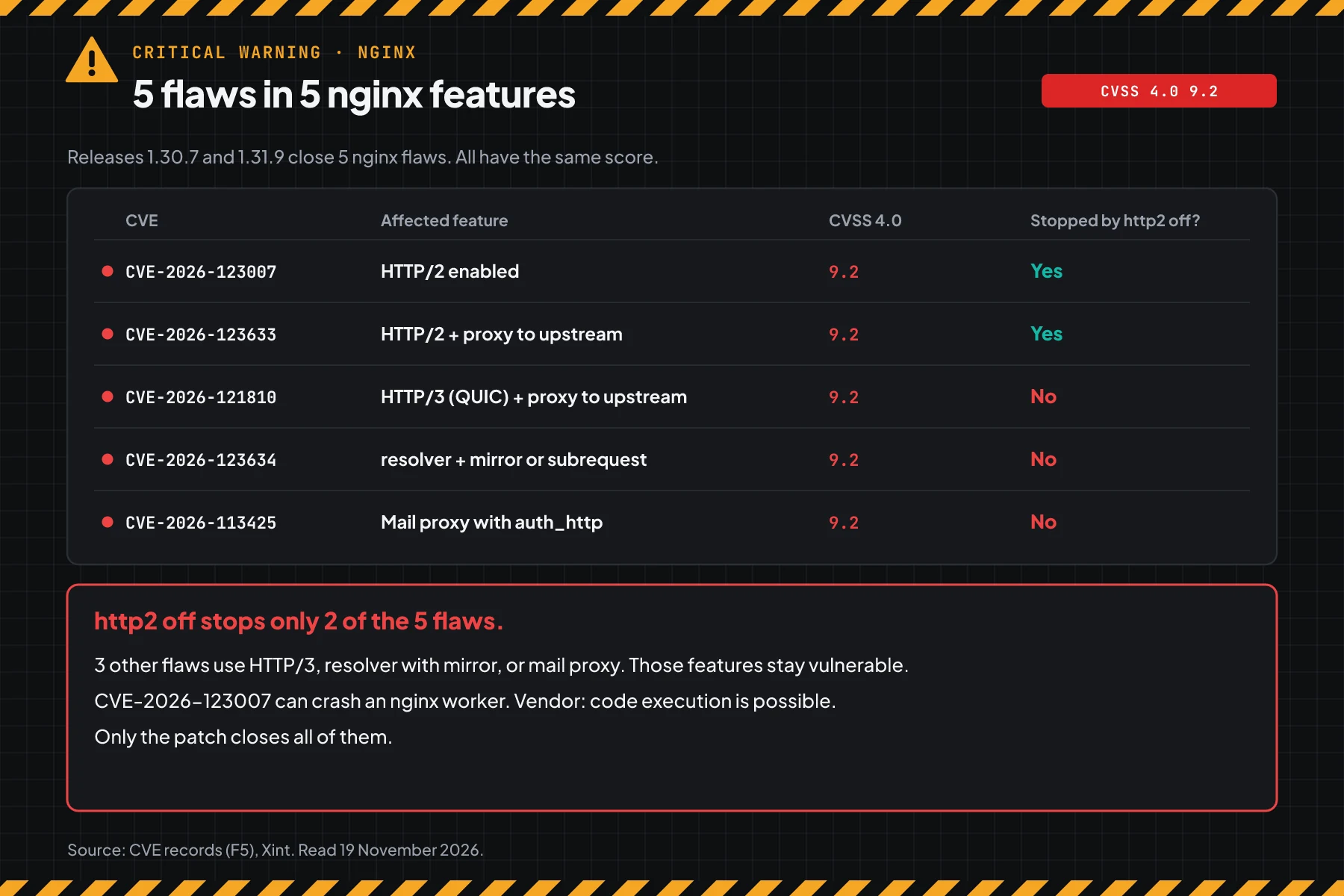
Releases 1.30.7 and 1.31.9 close 5 nginx CVEs with the same score. Only 2 CVEs need HTTP/2. The 3 other CVEs use different features, so turning off HTTP/2 does not stop them.
| CVE | Affected setup | Vulnerable versions | Stopped by http2 off? | F5 article |
|---|---|---|---|---|
| CVE-2026-123007 | HTTP/2 on a listening port | 1.9.5 - 1.31.8 | Yes | K000163926 |
| CVE-2026-123633 | HTTP/2 and requests passed to an upstream | 1.19.7 - 1.31.8 | Yes | K000163928 |
| CVE-2026-121810 | HTTP/3 (QUIC) and requests passed to an upstream | 1.25.0 - 1.31.8 | No | K000163927 |
| CVE-2026-123634 | resolver with a proxy_pass target from the request, and subrequests such as mirror | 0.6.18 - 1.31.8 | No | K000163925 |
| CVE-2026-113425 | Mail proxy with auth_http | 0.5.33 - 1.31.8 | No | K000163931 |
The same release also closes CVEs with lower scores: CVE-2026-118899, CVE-2026-125283, CVE-2026-120967, CVE-2026-120993, and CVE-2026-123640. We only name their numbers. The same patch closes all of them.
The set is called NGINX2Root, from the Xint researchers. It has 5 nginx CVEs and 1 Linux kernel CVE. We give no number for that kernel CVE because we did not verify it. Another sample of a kernel flaw is in the Linux kernel TCP flaw CVE-2026-98432.
Exploitation status on 19 November 2026
This status can change. Do not wait for attack reports from the wild before you update.
| Source | Status |
|---|---|
| CISA KEV | Not on the list |
| CERT-EU 2026-022 | No exploitation in the wild yet. Advice: update now |
| Rapid7 | A public PoC exists. A test needs large HTTP/2 traffic and certain conditions |
| Xint | The researchers chained this flaw with a Linux kernel flaw to root on the host, also from a Docker container |
| Red Hat | Severity Critical |
Xint writes that this chain also works from inside a Docker container, and the researchers showed it on a public cloud. Also install the kernel update from your distro, not only the nginx update.
Who is most at risk
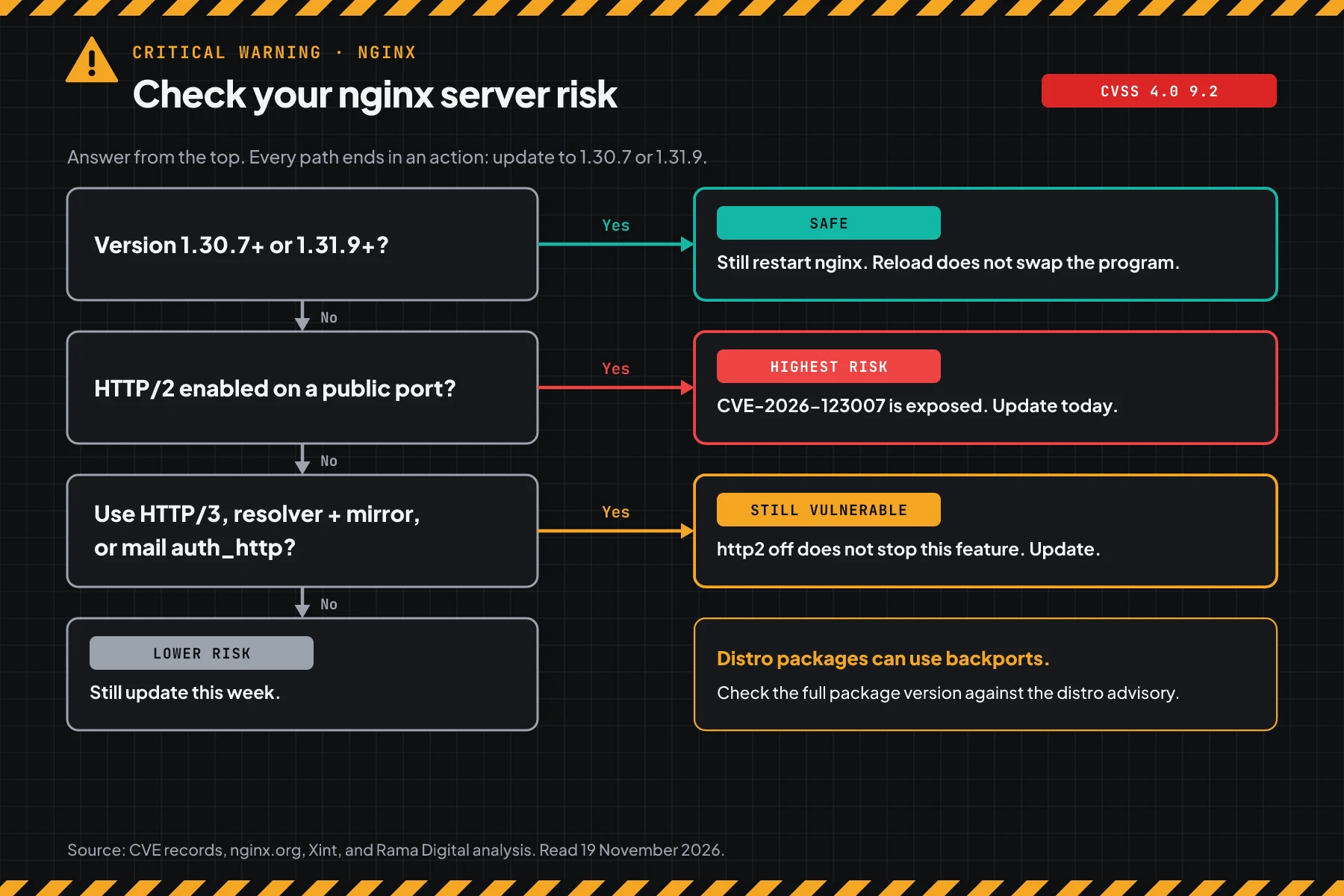
All nginx servers 1.30.6 and below on stable and 1.31.8 and below on mainline need the update. The order in this table helps you pick the server to do first.
| Server setup | Risk | Reason |
|---|---|---|
| A vulnerable version with HTTP/2 on a public port | Highest | A public PoC exists and researchers chained it to root. Anyone on the internet can try |
| A vulnerable version with HTTP/2 on the internal network only | High | A hacked device or laptop on the internal network can reach it |
| A vulnerable version with HTTP/2 off, but HTTP/3, mirror, or mail auth_http on | High | http2 off does not stop these 3 CVEs |
| A vulnerable version with all 5 features off | Lower | The CVE paths are not reachable now. A feature can come back after a config change, so the patch stays required |
Rama Digital analysis: a reverse proxy or CDN in front of nginx does not protect nginx by itself. If that layer forwards HTTP/2 to nginx, the flaw is still reachable. Thus check HTTP/2 directly on the nginx server, not only on the public domain.
Affected versions, safe versions, and distro package status
Compare the version and setup of each server with this table. One host can run more than 1 nginx, for example a Linux package and a Docker container.
| Version and setup | Status for CVE-2026-123007 | Action |
|---|---|---|
| 1.9.5 to 1.30.6 with HTTP/2 on | VULNERABLE | Install 1.30.7 today |
| 1.31.0 to 1.31.8 with HTTP/2 on | VULNERABLE | Install 1.31.9 today |
| A vulnerable version, HTTP/2 off | NOT REACHABLE NOW | Install the patch this week. 3 other CVEs can stay active |
| Before 1.9.5 | NOT AFFECTED BY THIS CVE | No HTTP/2 yet. This old version still has 2 other CVEs, so move to 1.30.7 |
| 1.30.7 or newer on stable | SAFE | Keep it. Make sure you restarted |
| 1.31.9 or newer on mainline | SAFE | Keep it. Make sure you restarted |
| NGINX Plus | VULNERABLE: R33 to 37.0.8, and 37.1.0 to before 37.3.0.1 | Install the patch release from F5 |
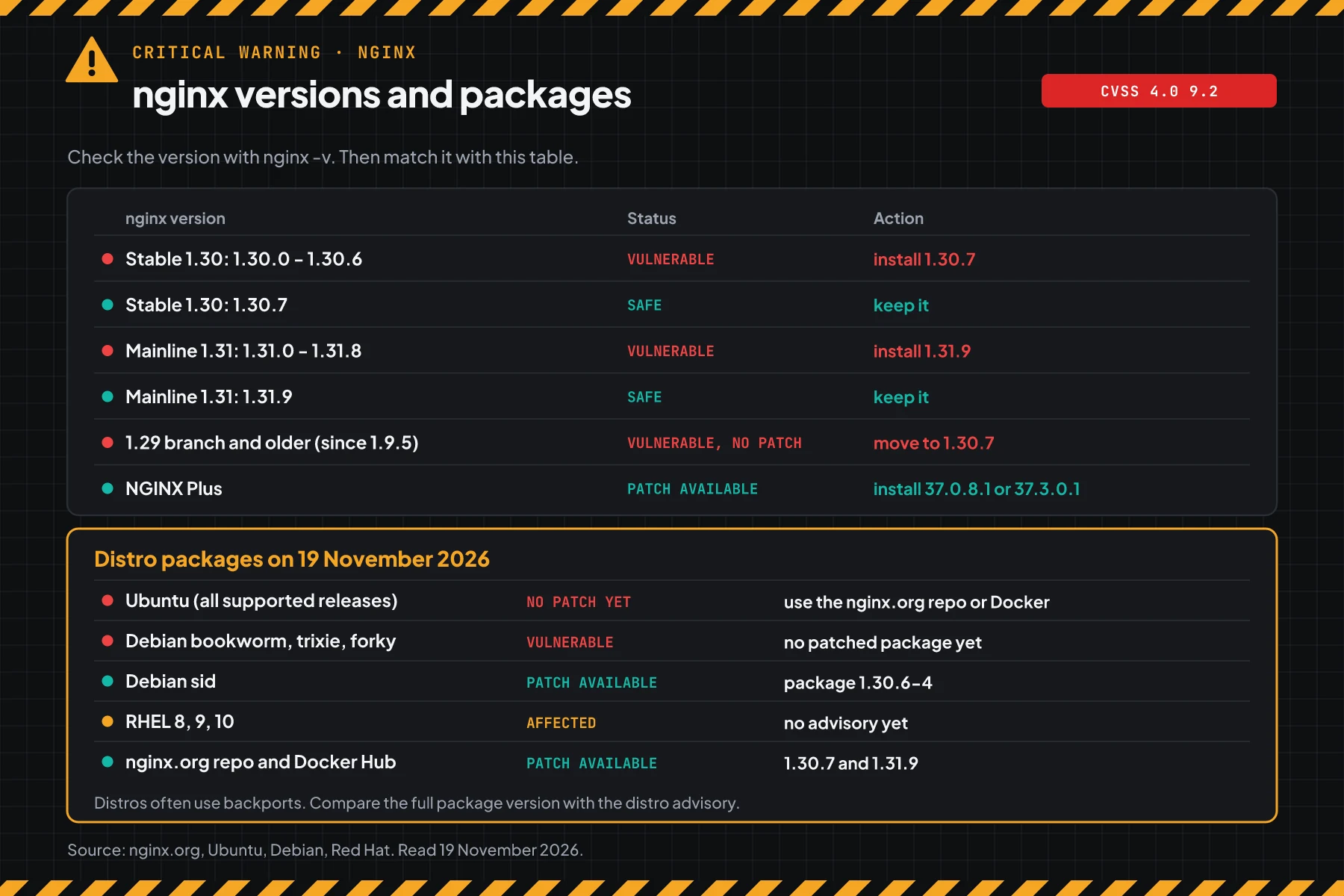
The distro package table on 19 November 2026. Sources: the Ubuntu page, the Debian security tracker, and the Red Hat page.
| Source | Status on 19 November 2026 |
|---|---|
| Ubuntu (all supported releases) | Needed, high priority. No patched package yet |
| Debian bookworm (1.22.1-9+deb12u10) | VULNERABLE. No patched package yet |
| Debian trixie (1.26.3-3+deb13u10) | VULNERABLE. No patched package yet |
| Debian forky (1.30.6-3) | VULNERABLE. No patched package yet |
| Debian sid (1.30.6-4) | FIXED |
| Red Hat Enterprise Linux 8, 9, 10 | Affected, severity Critical. No advisory yet |
| Official nginx.org repo | Packages 1.30.7 and 1.31.9 are out |
| Docker Hub nginx | Tags 1.31.9 and 1.30.7 are out |
Note on backports: Xint writes that distro packages often use backports. The version from nginx -v can stay the same even when the patch is in. Compare the full package version with the distro advisory.
Rama Digital analysis: while distro packages are not out, the fastest path is the official nginx.org repo or the official Docker image 1.30.7 or 1.31.9. The other choice: turn off HTTP/2 first, then install the distro package when it comes out. Remember that the second choice does not close the 3 other CVEs.
Before you start
- Shell access with sudo to the nginx server, or
docker execaccess to the nginx container. - The location of the config files, usually
/etc/nginx, and the folders that you mount into the container. - A list of sites and applications behind nginx, so you know the effect of a restart.
- A list of other products that carry nginx inside, for example container images.
- A laptop or server outside your network with openssl, for step 2.
- Access to see the nginx error log and the process list, for step 5.
Step 1: Check the version, package, and features on each nginx server
Basic commands. We tested the nginx -v, nginx -V, and dpkg-query lines in the official image. We did not test the rpm command and other distro paths.
nginx -v
sudo nginx -V 2>&1 | tr ' ' '\n' | grep -E 'http_v2|http_v3|mail'
sudo nginx -T 2>/dev/null | grep -nE 'http2|http3|quic|auth_http|resolver|mirror'
# Debian or Ubuntu: the full package version
dpkg-query -W -f='${Version}\n' nginx
# RHEL: rpm -q nginx
# Docker: a container with the name web-01
docker exec web-01 nginx -v
For many servers, save this script as check-nginx.sh. The script reads the version, the package version, the build modules, and the active config from nginx -T. The script changes nothing.
#!/bin/sh
# Check the nginx version, package, modules, and config features against CVE-2026-123007 and 4 other nginx CVEs.
# Usage: sudo sh check-nginx.sh [--bin path/nginx] [--conf-dump nginx-T-output-file]
# Container: docker exec -i <name> sh -s < check-nginx.sh
# The script only reads the version and the config. The script changes nothing.
set -u
BIN="" DUMP=""
while [ $# -gt 0 ]; do
  case "$1" in
    --bin) [ $# -ge 2 ] || { echo "Give a path after --bin" >&2; exit 2; }; BIN="$2"; shift 2 ;;
    --conf-dump) [ $# -ge 2 ] || { echo "Give a path after --conf-dump" >&2; exit 2; }; DUMP="$2"; shift 2 ;;
    -h|--help) echo "Usage: sudo sh check-nginx.sh [--bin path/nginx] [--conf-dump file]"; exit 0 ;;
    *) echo "Unknown option: $1" >&2; exit 2 ;;
  esac
done

# Find the nginx program. /usr/sbin is often not in the PATH of a normal user.
if [ -z "$BIN" ]; then
  for b in "$(command -v nginx 2>/dev/null)" /usr/sbin/nginx /usr/local/nginx/sbin/nginx; do
    [ -n "$b" ] && [ -x "$b" ] && { BIN="$b"; break; }
  done
fi
[ -n "$BIN" ] && [ -x "$BIN" ] || { echo "nginx program not found. Use --bin." >&2; exit 2; }
VER=$("$BIN" -v 2>&1 | sed -n 's|.*nginx/\([0-9][0-9]*\.[0-9][0-9]*\.[0-9][0-9]*\).*|\1|p' | head -n 1)
[ -n "$VER" ] || { echo "Cannot read the version from $BIN -v" >&2; exit 2; }
BUILD=$("$BIN" -V 2>&1)
modul() { case "$BUILD" in *"$1"*) echo yes ;; *) echo no ;; esac; }

# Package version. A distro package can carry a backport, so nginx -v alone is not enough.
PKG="" ASAL="own build or not readable"
if command -v dpkg-query >/dev/null 2>&1; then PKG=$(dpkg-query -W -f='${Version}' nginx 2>/dev/null)
elif command -v rpm >/dev/null 2>&1; then PKG=$(rpm -q --qf '%{VERSION}-%{RELEASE}' nginx 2>/dev/null) || PKG=""
fi
case "$PKG" in
  "") ;;
  *~bpo*) ASAL="distro package (check the distro advisory)" ;;
  *-[0-9]~*|*.ngx*) ASAL="official nginx.org repo" ;;
  *) ASAL="distro package (check the distro advisory)" ;;
esac

# Active config from nginx -T, without comments.
if [ -n "$DUMP" ]; then CONF=$(cat "$DUMP" 2>/dev/null); else CONF=$("$BIN" -T 2>/dev/null); fi
CONF=$(printf '%s\n' "$CONF" | sed 's/#.*//')
has() { printf '%s\n' "$CONF" | grep -cE "$1"; }
H2=$(has 'listen[[:space:]][^;]*http2|^[[:space:]]*http2[[:space:]]+on[[:space:]]*;')
H3=$(has 'listen[[:space:]][^;]*quic|^[[:space:]]*http3[[:space:]]+on[[:space:]]*;')
PX=$(has '^[[:space:]]*(proxy|grpc|fastcgi|uwsgi|scgi)_pass[[:space:]]')
RS=$(has '^[[:space:]]*resolver[[:space:]]')
MR=$(has '^[[:space:]]*(mirror[[:space:]]+/|ssi[[:space:]]+on)')
ML=$(has '^[[:space:]]*auth_http[[:space:]]')

ya() { [ "$1" -gt 0 ] && echo yes || echo no; }
BACA=1; [ -n "$(printf '%s' "$CONF" | tr -d '[:space:]')" ] || BACA=0
printf '%-20s: %s (%s)\n' "nginx" "$VER" "$BIN"
printf '%-20s: %s\n' "Package" "${PKG:-none} ($ASAL)"
printf '%-20s: HTTP/2 %s, HTTP/3 %s, mail %s\n' "Modules" "$(modul with-http_v2_module)" "$(modul with-http_v3_module)" "$(modul with-mail)"
if [ "$BACA" = 1 ]; then
  P1=0; [ "$H2" -gt 0 ] && P1=1
  P2=0; [ "$H2" -gt 0 ] && [ "$PX" -gt 0 ] && P2=1
  P3=0; [ "$H3" -gt 0 ] && [ "$PX" -gt 0 ] && P3=1
  P4=0; [ "$RS" -gt 0 ] && [ "$MR" -gt 0 ] && P4=1
  P5=0; [ "$ML" -gt 0 ] && P5=1
  printf '%-20s: %s\n' "HTTP/2 on" "$(ya $P1)  -> CVE-2026-123007"
  printf '%-20s: %s\n' "HTTP/2 + proxy" "$(ya $P2)  -> CVE-2026-123633"
  printf '%-20s: %s\n' "HTTP/3 + proxy" "$(ya $P3)  -> CVE-2026-121810"
  printf '%-20s: %s\n' "resolver + mirror" "$(ya $P4)  -> CVE-2026-123634"
  printf '%-20s: %s\n' "mail auth_http" "$(ya $P5)  -> CVE-2026-113425"
  JALUR=$((P1 + P2 + P3 + P4 + P5))
else
  printf '%-20s: %s\n' "Config" "not readable (run with sudo or use --conf-dump)"
fi

MAJ=${VER%%.*}; REST=${VER#*.}; MIN=${REST%%.*}; PAT=${REST#*.}
AMAN=0
if [ "$MAJ" -gt 1 ] || { [ "$MIN" -gt 31 ]; } || { [ "$MIN" -eq 31 ] && [ "$PAT" -ge 9 ]; } || { [ "$MIN" -eq 30 ] && [ "$PAT" -ge 7 ]; }; then AMAN=1; fi
if [ "$AMAN" = 1 ]; then
  echo "Result: SAFE. Version $VER has the patch for these 5 CVEs. Make sure nginx restarted after the update."; exit 0
fi
case "$ASAL" in
  distro*) echo "Result: CHECK DISTRO. Version $VER comes from distro package $PKG. Compare it with the distro advisory, or use the nginx.org repo."; exit 1 ;;
esac
if [ "$BACA" = 0 ]; then echo "Result: CHECK. Version $VER is affected. The config is not readable, so the active features are unknown."; exit 1; fi
if [ "$P1" = 1 ]; then echo "Result: VULNERABLE. Version $VER with HTTP/2 on. Update to 1.30.7 or 1.31.9 today."; exit 1; fi
if [ "$JALUR" -gt 0 ]; then echo "Result: VULNERABLE. Version $VER with $JALUR affected features. HTTP/2 off is not enough. Update today."; exit 1; fi
echo "Result: UPDATE. The 5 features above are off, but version $VER is still affected. A mitigation does not make you safe. Update to 1.30.7 or 1.31.9."; exit 1
# Linux package: run it on the nginx server.
sudo sh check-nginx.sh
# Docker: send the script into the container with the name web-01.
docker exec -i web-01 sh -s < check-nginx.sh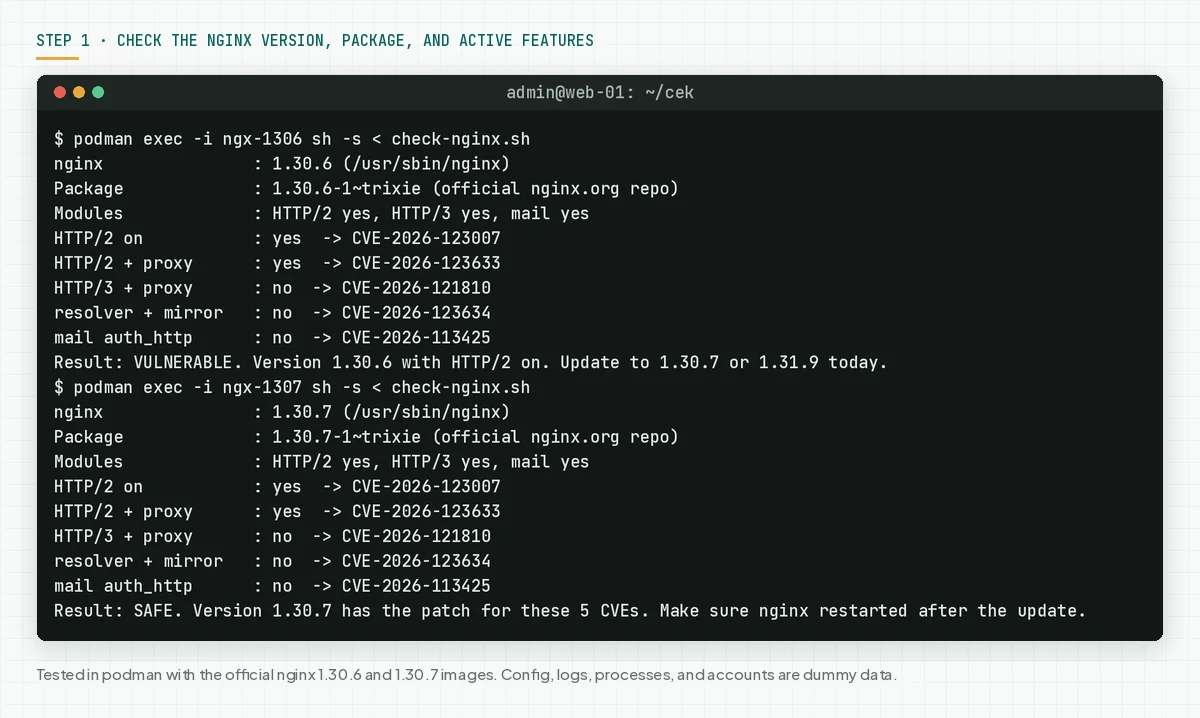
Check the result:
- "VULNERABLE": a version below 1.30.7 (or 1.31.8 and below on mainline) with HTTP/2 on. Do step 3 today.
- "UPDATE": the version is still affected, even when the 5 features are off. A mitigation does not make you safe. Do step 3.
- "CHECK DISTRO": a distro package. Compare the full package version with the distro advisory, or use the nginx.org repo.
- "SAFE": version 1.30.7, 1.31.9, or newer. Make sure nginx restarted.
- "CHECK": the config is not readable. Run it again with sudo or with
--conf-dump.
We tested the scripts with edge cases, for example versions 1.9.4, 1.28.2, 1.30.7, 1.31.8, 1.31.9, and 1.32.0, wrong options, a missing program, and an unreadable config. The scripts give the correct result or stop with exit code 2.
Limit: the script counts features from config lines that match a pattern. The pattern can miss an unusual config. Treat a "SAFE" result as valid for the version, and treat the feature results as a hint.
Step 2: Check HTTP/2 from an outside network
This step shows if the HTTPS port accepts HTTP/2. A closed result does not replace the update, because the 3 other CVEs do not need HTTP/2.
Save this script as check-exposure-nginx.sh. The script opens 1 TLS connection and closes it. The script sends no HTTP request. A plain HTTP port with http2 is not covered, because the script tests only TLS ports.
#!/bin/sh
# Check from outside the network: does the HTTPS port accept HTTP/2 (ALPN h2)? CVE-2026-123007 needs HTTP/2.
# Usage: sh check-exposure-nginx.sh <host> [port, default 443]
# The script opens 1 TLS connection and closes it. The script sends no HTTP request.
set -u
[ $# -ge 1 ] && [ $# -le 2 ] || { echo "Usage: sh check-exposure-nginx.sh <host> [port]" >&2; exit 2; }
HOST=$1 PORT=${2:-443}
case "$HOST" in -*|*[!A-Za-z0-9.:-]*|"") echo "Invalid host: $HOST" >&2; exit 2 ;; esac
case "$PORT" in *[!0-9]*|"") echo "Invalid port: $PORT" >&2; exit 2 ;; esac
[ "$PORT" -ge 1 ] && [ "$PORT" -le 65535 ] || { echo "Invalid port: $PORT" >&2; exit 2; }
command -v openssl >/dev/null 2>&1 || { echo "The openssl program is missing." >&2; exit 2; }

OUT=$(timeout 10 openssl s_client -connect "$HOST:$PORT" -servername "$HOST" -alpn h2,http/1.1 </dev/null 2>&1)
ALPN=$(printf '%s\n' "$OUT" | sed -n 's/^ALPN protocol: //p' | head -n 1)
printf '%-12s: %s\n' "Target" "$HOST:$PORT"
if printf '%s\n' "$OUT" | grep -q '^ALPN protocol: \|No ALPN negotiated'; then
  printf '%-12s: %s\n' "TLS" "connected"
else
  printf '%-12s: %s\n' "TLS" "failed (port closed, not TLS, or blocked)"
  echo "Result: CHECK. The TLS connection failed. Try again from an outside network, or check another port."; exit 2
fi
if [ "$ALPN" = "h2" ]; then
  printf '%-12s: %s\n' "HTTP/2" "accepted (ALPN h2)"
  echo "Result: HTTP/2 OPEN. Make sure the version is 1.30.7 or 1.31.9. If not, update today."; exit 1
fi
printf '%-12s: %s\n' "HTTP/2" "refused (${ALPN:-no ALPN})"
echo "Result: HTTP/2 CLOSED on this port. CVE-2026-123007 is not reachable from here. Still update for the 3 other CVEs."; exit 0
# From an outside network, for example a phone hotspot. Test only servers that you own.
sh check-exposure-nginx.sh 203.0.113.10
sh check-exposure-nginx.sh 203.0.113.10 8443
# Manual way with openssl
openssl s_client -connect 203.0.113.10:443 -alpn h2 </dev/null 2>/dev/null | grep 'ALPN protocol'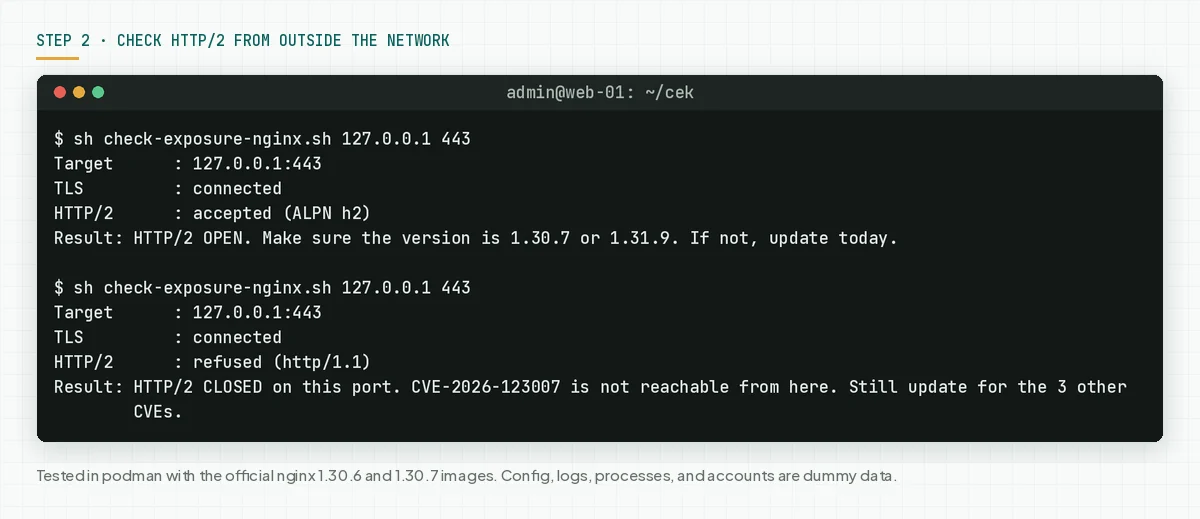
Check the result: "HTTP/2 OPEN" means that the port accepts HTTP/2 from the test point. Make sure the version is 1.30.7 or 1.31.9, or do step 4 until the patch is installed.
"HTTP/2 CLOSED" means that the port picks http/1.1. The CVE-2026-123007 path is not reachable from that port. Still update for the other CVEs. "CHECK" means that the TLS connection failed. Test only IP addresses that you own.
Step 3: Back up, update to 1.30.7 or 1.31.9, then restart
Only the new version closes all 5 flaws. Back up first, because the update replaces the nginx program. Pick 1.30.7 if you are on stable, or 1.31.9 if you are on mainline.
# Linux package
sudo tar czf nginx-backup-$(date +%F).tgz /etc/nginx
sudo nginx -t
# Docker: the config folder that you mount, for example ./nginx/conf.d
tar czf nginx-backup-$(date +%F).tgz ./nginx/conf.d
3a. The official nginx.org repo
Rama Digital analysis: while distro packages are not out, the official nginx.org repo is the fastest path. Packages 1.30.7 and 1.31.9 are there on 19 November 2026. An nginx.org package can use a different file layout from a distro package. Thus run nginx -t before the restart.
# Sample for the official nginx.org repo. We did not test this step on a distro host.
# Debian or Ubuntu
sudo apt update
apt-cache policy nginx
sudo apt install --only-upgrade nginx
# RHEL, Rocky, or Alma
sudo dnf upgrade nginx
# Check the config, then RESTART. A reload does not swap the running program.
sudo nginx -t
sudo systemctl restart nginx
nginx -v
Restart, not reload. A reload only reads the new config. A reload does not swap the program that is running. The command nginx -v reads the program on disk, so it does not prove that the running process is new.
3b. Docker and Docker Compose
The tags 1.30.7 and 1.31.9 are on Docker Hub on 19 November 2026. We pulled the 1.30.7 tag for our test. Use the same volumes, so the config stays. An old container keeps the old image until you create the container again.
docker pull nginx:1.30.7
# Docker Compose: change the image line to nginx:1.30.7 (or nginx:1.31.9), then
docker compose pull
docker compose up -d
docker exec web-01 nginx -v
3c. NGINX Plus
Per the CVE-2026-123007 record, NGINX Plus R33 to 37.0.8 and 37.1.0 to before 37.3.0.1 are affected. Install 37.3.0.1 or newer if you are on the 37.1 branch or above. For other branches, follow the F5 article K000163926 for the patch release number.
3d. Distro packages
On 19 November 2026, the patched Ubuntu and Debian stable packages are not out. Check the distro advisory each day. When the package comes out, compare the full package version, then update and restart.
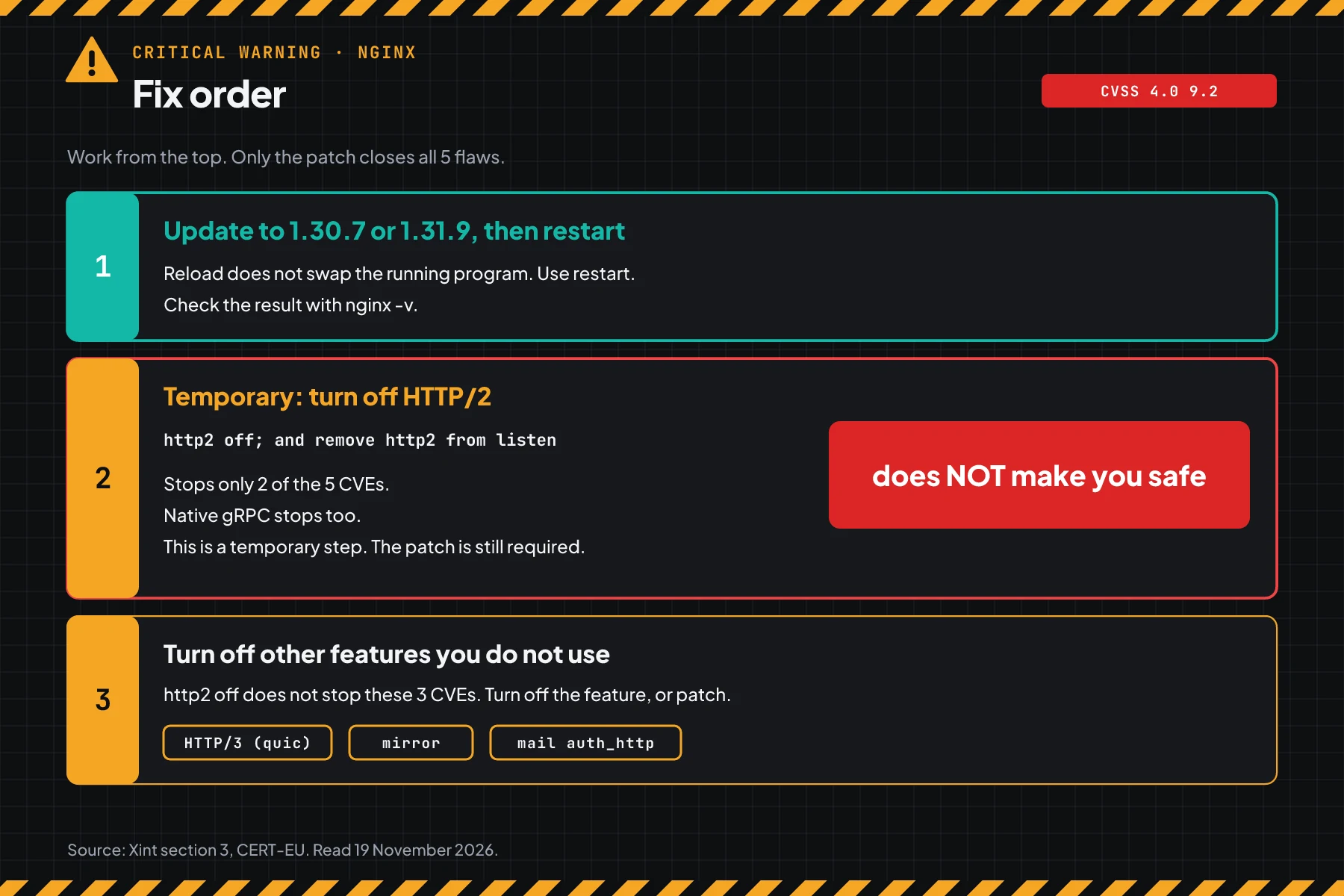
Check the result: the step 1 script prints "SAFE" on each server, and your sites stay open. If nginx does not start, restore the config from the backup and read nginx -t.
Step 4: Temporary mitigation, does NOT make it safe
Use this step only until the patch is installed. This step does NOT make the server safe. It stops only 2 of the 5 CVEs, which are CVE-2026-123007 and CVE-2026-123633.
4a. Turn off HTTP/2
This is the advice of Xint and CERT-EU. Write http2 off; in the server block (nginx 1.25.1 or newer). Then remove the word http2 from the listen line. Do it on each public port.
# Before: HTTP/2 is on
server {
    listen 443 ssl http2;
    server_name web-01;
}

# After (nginx 1.25.1 or newer)
server {
    listen 443 ssl;
    http2 off;
    server_name web-01;
}
sudo nginx -t
sudo systemctl reload nginx
grep -rn "http2" /etc/nginx/Effect: services that must have HTTP/2, such as native gRPC, stop too. Browsers can still load the site over HTTP/1.1, but it can be slower.
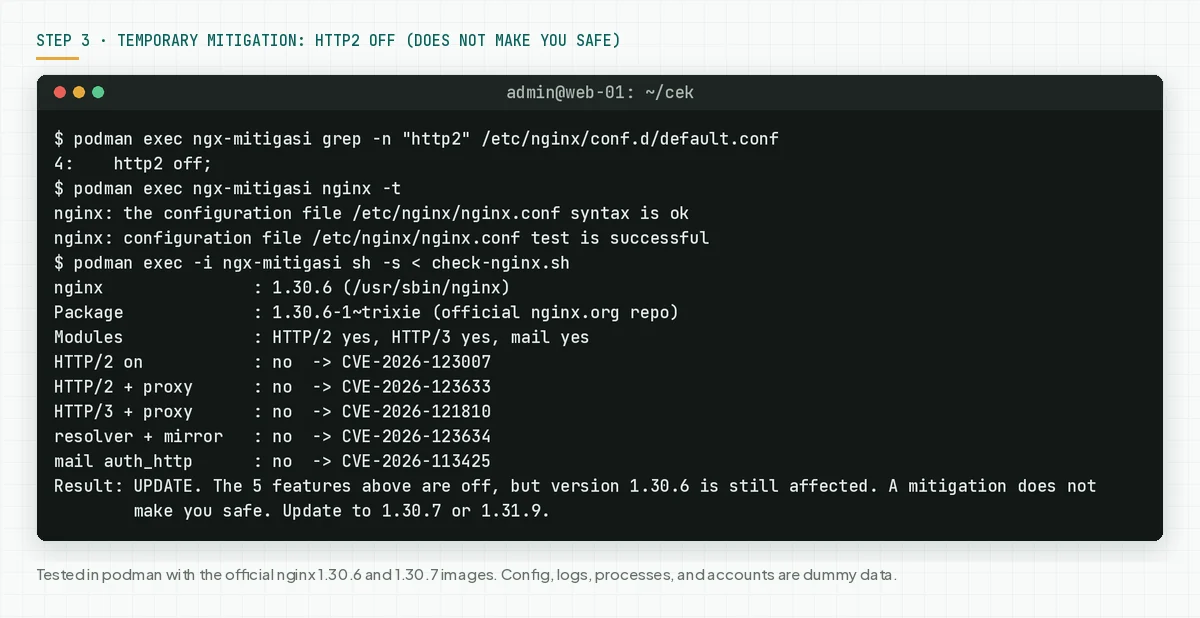
We tested this change in a 1.30.6 container. The line http2 off; passes nginx -t. The step 2 script gives "HTTP/2 CLOSED". The step 1 script still gives "UPDATE", because version 1.30.6 is still affected.
4b. Turn off other features that you do not use
The 3 other CVEs do not stop with http2 off. Turn off the related feature if you do not use it: HTTP/3, mirror and subrequests with resolver, and mail proxy with auth_http.
# HTTP/3: turn it off if you do not use it
#listen 443 quic reuseport;
#http3 on;

# Mirror: turn it off if you do not use it
#mirror /mirror;

# Mail proxy: turn off the mail block that uses auth_http if you do not use it
If you use those features, turning them off is not possible. The only path that closes the flaw is the patch.
Check the result: step 2 from outside gives "HTTP/2 CLOSED". Remember: the server is still vulnerable until step 3 is done.
Step 5: Find signs that the server was attacked
The update closes the flaw, but it does not remove the processes or access that an attacker left. Thus look for those traces before and after the update.
Rama Digital analysis: the vendor has not released IOCs. The signs below come from the Xint write-up and CERT-EU 2026-022. CERT-EU writes that crash signs are not high quality, so also check the process creation logs.
Save this script as check-signs-nginx.sh. The script only reads the log and the process list. It does not change, delete, or send anything.
#!/bin/sh
# Find signs of attack on nginx: programs that a worker starts, worker crashes, and auditd rules.
# Usage: sudo sh check-signs-nginx.sh [--log error.log] [--ps ps-output-file]
# The --ps file holds the output of: ps -eo pid,ppid,user,args
# The script only reads logs and the process list. A clean result does not prove the server is safe.
set -u
LOG=/var/log/nginx/error.log PSF=""
while [ $# -gt 0 ]; do
  case "$1" in
    --log) [ $# -ge 2 ] || { echo "Give a path after --log" >&2; exit 2; }; LOG="$2"; shift 2 ;;
    --ps) [ $# -ge 2 ] || { echo "Give a path after --ps" >&2; exit 2; }; PSF="$2"; shift 2 ;;
    -h|--help) echo "Usage: sudo sh check-signs-nginx.sh [--log error.log] [--ps file]"; exit 0 ;;
    *) echo "Unknown option: $1" >&2; exit 2 ;;
  esac
done
[ -r "$LOG" ] || { echo "Cannot read the log: $LOG" >&2; exit 2; }

# Process list: pid ppid user command. Without ps, read /proc directly.
if [ -n "$PSF" ]; then PS=$(sed 1d "$PSF")
elif command -v ps >/dev/null 2>&1; then PS=$(ps -eo pid,ppid,user,args | sed 1d)
else
  PS=$(for d in /proc/[0-9]*; do
    [ -r "$d/stat" ] || continue
    pp=$(sed 's/.*) //' "$d/stat" 2>/dev/null | cut -d' ' -f2)
    uid=$(awk '/^Uid:/ { print $2 }' "$d/status" 2>/dev/null)
    u=$(awk -F: -v u="$uid" '$3 == u { print $1; exit }' /etc/passwd)
    a=$(tr '\0' ' ' < "$d/cmdline" 2>/dev/null)
    [ -n "$a" ] && echo "${d#/proc/} $pp ${u:-$uid} $a"
  done)
fi
WORKER=$(printf '%s\n' "$PS" | awk '/nginx: worker process/ { printf "%s ", $1 }')
ANAK=$(printf '%s\n' "$PS" | awk -v w=" $WORKER" 'index(w, " " $2 " ") && $0 !~ /nginx: / { print }')
CRASH=$(grep -Ec 'worker process [0-9]+ exited on signal|segfault' "$LOG")
AUDIT=no
command -v auditctl >/dev/null 2>&1 && auditctl -l 2>/dev/null | grep -q nginx && AUDIT=yes

NW=$(echo $WORKER | wc -w)
printf '%-22s: %s processes\n' "nginx workers" "$NW"
printf '%-22s: %s\n' "Programs from worker" "$([ -n "$ANAK" ] && echo found || echo none)"
[ -n "$ANAK" ] && printf '%s\n' "$ANAK" | sed 's/^/  /'
printf '%-22s: %s lines (%s)\n' "Worker crashes in log" "$CRASH" "$LOG"
[ "$CRASH" -gt 0 ] && grep -E 'worker process [0-9]+ exited on signal|segfault' "$LOG" | tail -n 3 | sed 's/^/  /'
printf '%-22s: %s\n' "auditd rule for nginx" "$AUDIT"

if [ -n "$ANAK" ]; then echo "Result: STRONG SIGN. An nginx worker started another program. Isolate the server and start incident response."; exit 1; fi
if [ "$CRASH" -gt 0 ]; then echo "Result: INVESTIGATE. Found $CRASH worker crashes. Match the crash times with large connections from 1 IP."; exit 1; fi
echo "Result: NO SIGNS YET. A clean result does not prove safety. Add an auditd rule for the worker user."; exit 0
Sample of the first 5 error log lines with dummy data:
2026/11/19 02:10:03 [notice] 1#1: start worker processes
2026/11/19 02:41:17 [alert] 1#1: worker process 31 exited on signal 11 (core dumped)
2026/11/19 02:41:17 [notice] 1#1: start worker process 36
2026/11/19 02:44:52 [alert] 1#1: worker process 36 exited on signal 11 (core dumped)
2026/11/19 02:44:52 [notice] 1#1: start worker process 41
# Linux package: run it on the nginx server.
sudo sh check-signs-nginx.sh --log /var/log/nginx/error.log
# Docker: save the log, then run it on the host.
docker logs web-01 > error.log 2>&1
sudo sh check-signs-nginx.sh --log error.logRama Digital analysis: we did not test the Docker commands above on a real Docker host. On the host, container worker processes show with the user from the container.
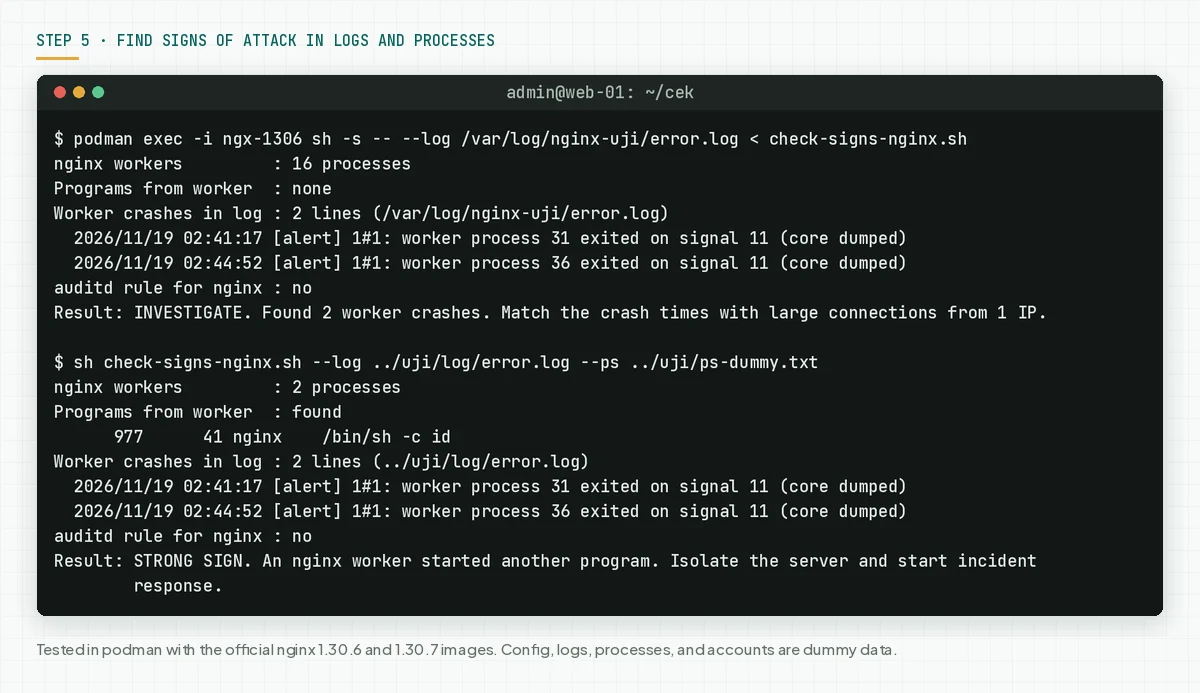
Script limits: the script only sees processes that run when the script runs. It does not see programs that already ended. A crash log is only a weak sign, because a crash can have other causes.
Record programs that a worker starts with auditd
The strongest sign is a program, for example sh or bash, that the nginx worker user starts. A normal nginx worker starts no other program. Add an auditd rule so the system records those programs from now on.
# Find the UID of the worker user. The nginx.org package uses the user nginx. The Debian package uses www-data.
id -u nginx
# Record each program that the worker user starts, from now on. Change <UID>.
sudo auditctl -a always,exit -F arch=b64 -S execve,execveat -F euid=<UID> -k nginx_worker_exec
# Read the result
sudo ausearch -k nginx_worker_exec -i
A rule from auditctl is lost at reboot. Save the same rule in /etc/audit/rules.d/ if you want it to stay. Auditd does not record the past. This rule only helps for events after the rule is active.
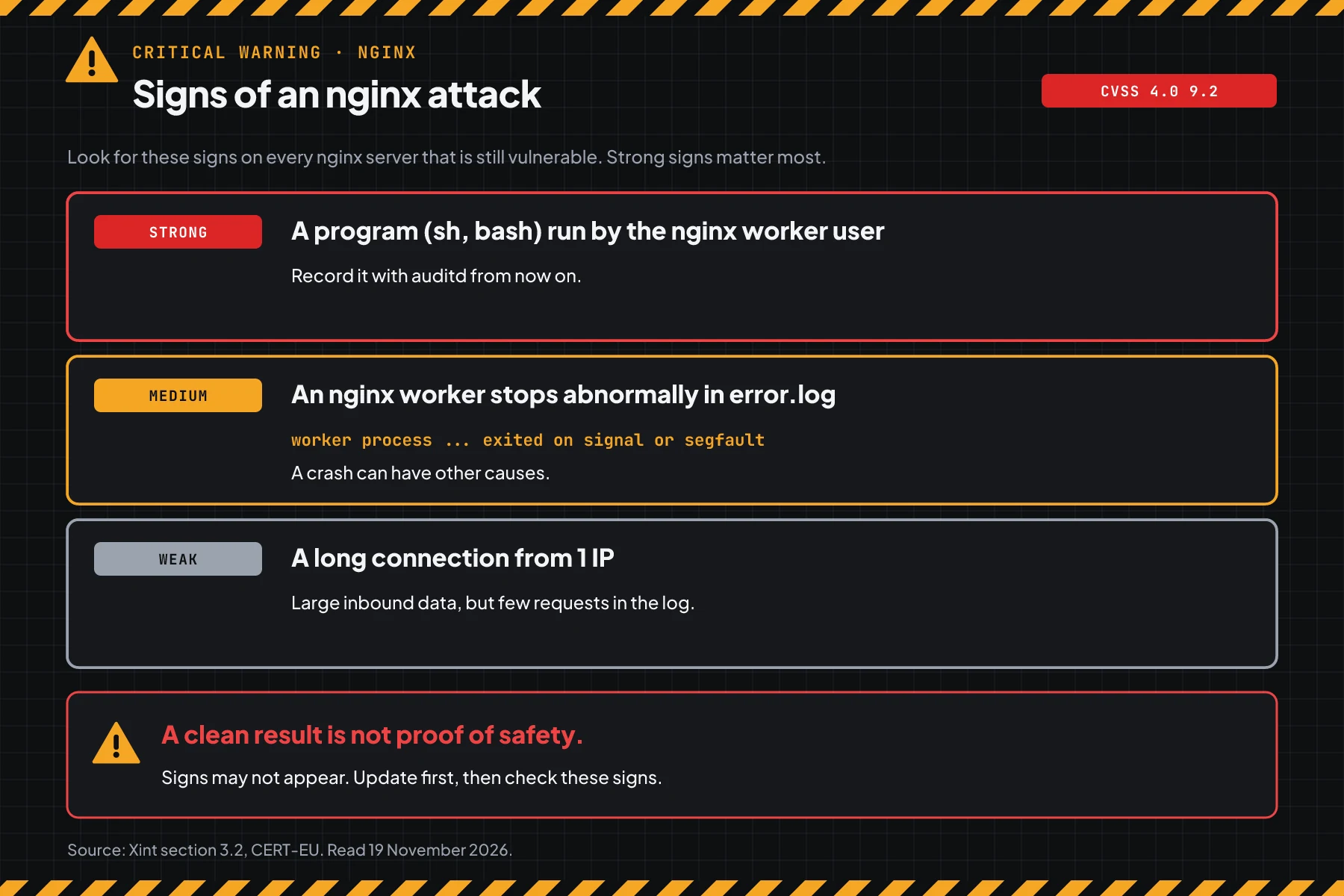
Check the result: "NO SIGNS YET" does not prove that the server is clean. "STRONG SIGN" or "INVESTIGATE" means: check each line, then follow this order:
- Cut the server from the internet if you see a foreign program from a worker.
- Save the nginx logs, the system logs, and the process list first, before you change anything.
- Do not restart before the evidence is saved.
- Install the nginx patch and the kernel update.
- Change the TLS keys, tokens, and passwords stored on this server.
- Check the applications behind nginx and other connected servers.
Example: 1 night of response for 3 servers
This simulation uses dummy data. The server names, times, and results are not customer data.
| Time (WIB) | Dummy server | What we check | Result | Action |
|---|---|---|---|---|
| 19.00 | web-01 (nginx.org 1.30.6, HTTPS with HTTP/2 and proxy) | Steps 1 and 2 | VULNERABLE, HTTP/2 open | Write http2 off, then update to 1.30.7 at 20.00 |
| 19.30 | web-02 (Ubuntu distro package) | Step 1 | CHECK DISTRO | No patched package yet, move to the nginx.org repo this week |
| 19.50 | gw-01 (Docker nginx:1.31.9) | Step 1 | SAFE, but the container has run since yesterday | Create the container again, then check again |
| 20.40 | web-01 | Step 5 | 2 worker crashes, no foreign program | Save the logs, add an auditd rule, watch for 14 days |
Lesson from this simulation: do the server with open HTTP/2 first. A "SAFE" result still needs a restart. An auditd rule helps only for events after it.
Who does the work
The infrastructure or DevOps team usually owns nginx. The network team owns the firewall and CDN. The IT lead decides the restart window, because a restart cuts the connections that are running.
Rama Digital recommendation: do not keep many nginx versions on different hosts with no list. Record each server, its version, and how you update it. Other servers at the outer edge also need patches, as in the Confluence flaw CVE-2026-90436 and the Mosquitto flaw CVE-2026-110486.
Checklist for today
- List all nginx servers, including containers and images of other products. Owner: IT team. Evidence: a list of names, versions, and locations.
- Check the version and features with step 1. Owner: server admin. Evidence: script output.
- Check HTTP/2 from outside with step 2. Owner: network team. Evidence: script output.
- Back up, update to 1.30.7 or 1.31.9, then restart. Owner: server admin. Evidence: step 1 output after the update.
- If you cannot install the patch yet, turn off HTTP/2 and other features that you do not use. Owner: server admin. Evidence: config and step 2 result.
- Add the auditd rule and run step 5. Owner: server admin. Evidence: script output and a copy of the logs.
- Watch the Ubuntu, Debian, and Red Hat advisories for patched packages. Owner: IT lead. Evidence: a written check date.
Questions and answers
We use Ubuntu with the default nginx package. What must we do?
On 19 November 2026, Ubuntu has no patched package. Install nginx from the official nginx.org repo or the official Docker image, or turn off HTTP/2 until the package comes out. The second choice does not close the 3 other CVEs.
Does turning off HTTP/2 make the server safe?
No. That step stops only CVE-2026-123007 and CVE-2026-123633. The 3 other CVEs use HTTP/3, resolver with mirror, or mail auth_http. Only the patch closes all of them.
Must we restart, or is a reload enough?
Restart. A reload does not swap the program that is running, so the old process keeps the old code. Schedule the restart in a safe window.
We use Cloudflare or a CDN in front of nginx. Are we safe?
Not always. If that layer forwards HTTP/2 to nginx, the flaw is still reachable. Check HTTP/2 directly on the nginx server, then update.
There are no attack reports from the wild yet. Why must we update today?
A public PoC exists, and researchers already chained this flaw to root. The score is 9.2. A public patch also helps attackers find the vulnerable point.
Does the update remove the attacker's access?
No. The update closes the flaw. It does not remove the processes, keys, or tokens that an attacker took. Run step 5, then change the TLS keys and tokens.
Does a clean script result prove that the server is safe?
No. A crash or a foreign process can leave no trace that the script sees. Add an auditd rule and watch the server after the update.
Next step
The limits that still apply: step 4 does not make the server safe, and an update does not clean a server that was taken over. When your server shows a sign in step 5, or you need help with an audit and recovery, use Vibe Code Rescue. For 1 urgent issue today, book a 30-minute session.
Sources
- The CVE-2026-123007 record: F5 CNA description, CVSS vectors, CWE, affected versions, and publish time of 18 November 2026.
- The nginx.org security advisories list and the nginx 1.31.9 CHANGES: vulnerable versions and patch versions.
- The Xint write-up: research summary, mitigation, and attack signs.
- CERT-EU 2026-022: exploitation status and advice.
- The Rapid7 blog: public PoC status.
- CISA KEV: does not list this CVE on 19 November 2026.
- The Ubuntu page, the Debian security tracker, and the Red Hat page: distro package status on 19 November 2026.
- The F5 article K000163926: the F5 page for the main flaw.