Direct answer: Oracle closed CVE-2026-91569, a flaw with a score of 10.0 in Oracle WebLogic Server, in the November 2026 Critical Security Patch Update (CSPU). The same release closes 6 more WebLogic CVEs with scores of 9.4 to 9.8. All of them work with no login.
Affected versions: 12.2.1.4.0, 14.1.1.0.0, 14.1.2.0.0, and 15.1.1.0.0. Today, check the version and patches of each server, then apply the November 2026 CSPU patch. The patch numbers are in My Oracle Support Note CPU454 and Doc ID KA1182.
Main condition: On 18 November 2026, Oracle reports no exploitation, and CISA KEV does not list these CVEs. CISA rates 5 of these CVEs as automatable with total impact. Limit: Oracle gives no technical details. This article contains no payload or attack chain.
We read the Oracle CSPU November 2026 advisory, the CVE records on cve.org, CISA KEV, and the Oracle connection filter documentation on 18 November 2026. We ran the scripts in steps 1, 2, and 5 in a podman container with the official Python image (Debian 13) and dummy WebLogic files. WebLogic has no public image without an Oracle login, so we did not test a real server.
Important limit: We did not test opatch apply, a real connection filter, or a server restart. The OPatch, config.xml, and log formats in the samples are Rama Digital estimates. Compare them with the output of your server before you trust the scripts.
Problem: a business Java application server has flaws with no login
Oracle WebLogic Server runs Java applications for businesses. Examples are internal apps of banks, insurers, logistics firms, and public offices. Many Oracle Fusion Middleware products also run on WebLogic.
Attackers can reach CVE-2026-91569 over HTTP. A server that opens a WebLogic port to the internet is the easiest target. The attacker needs no account, and the victim does not need to click anything.
Rama Digital analysis: WebLogic has a long history in CISA KEV. The catalog lists 12 WebLogic CVEs from 2015 to 2024, and ransomware used 2 of them. The same pattern of a Java app open to the internet is in the Apache OFBiz flaw CVE-2026-83542.
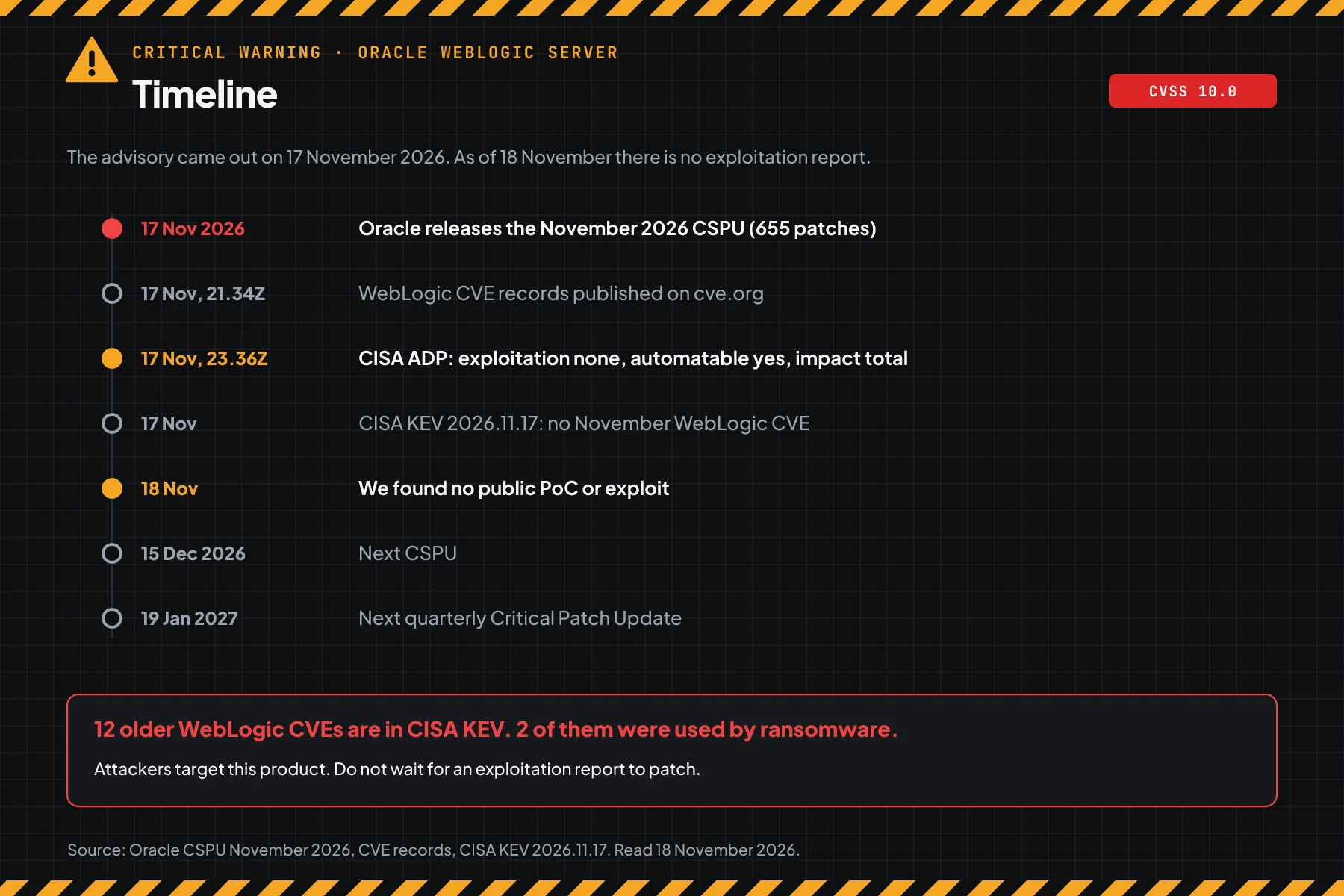
Oracle released the November 2026 CSPU on 17 November 2026, with 655 patches. The WebLogic CVE records came out on cve.org on the same day, at about 21.34 UTC. CISA added its SSVC rating at about 23.36 UTC.
How it works: 7 WebLogic CVEs and 1 OPSS CVE
This section uses the official Oracle summary. Its purpose is to help you pick the right step, not to explain an attack.
Summary from Oracle
Per the CVE-2026-91569 record, the flaw is in the TopLink Integration component. The Oracle text: "Easily exploitable vulnerability allows unauthenticated attacker with network access via HTTP to compromise Oracle WebLogic Server." The 10.0 score uses a changed scope, so an attack can affect other products.
Oracle gives no other technical details. We add no claim beyond that text and the CVSS vector in the CVE record.
8 critical CVEs in 1 advisory
This table sums up the WebLogic and OPSS CVEs with a score of 9.4 or higher. All of them need only network access, with no login and no user action.
| CVE | Component | Protocol | CVSS 3.1 | Impact per Oracle |
|---|---|---|---|---|
| CVE-2026-91569 | TopLink Integration | HTTP | 10.0 (scope changed) | WebLogic takeover. The attack can affect other products |
| CVE-2026-114824 | OPSS, Centralized Thirdparty Jars | HTTP | 10.0 (scope changed) | OPSS takeover on 12.2.1.4.0 and 14.1.2.0.0 |
| CVE-2026-91570 | TopLink Integration | HTTP | 9.8 | WebLogic takeover |
| CVE-2026-91583 | TopLink Integration | HTTP | 9.8 | WebLogic takeover |
| CVE-2026-91456 | Core | SOAP | 9.8 | WebLogic takeover |
| CVE-2026-91470 | Core | T3, IIOP | 9.8 | WebLogic takeover |
| CVE-2026-91585 | TopLink Integration | TCP | 9.8 | WebLogic takeover |
| CVE-2026-91469 | Core | HTTP | 9.4 | Change or delete data, read some data, DoS |
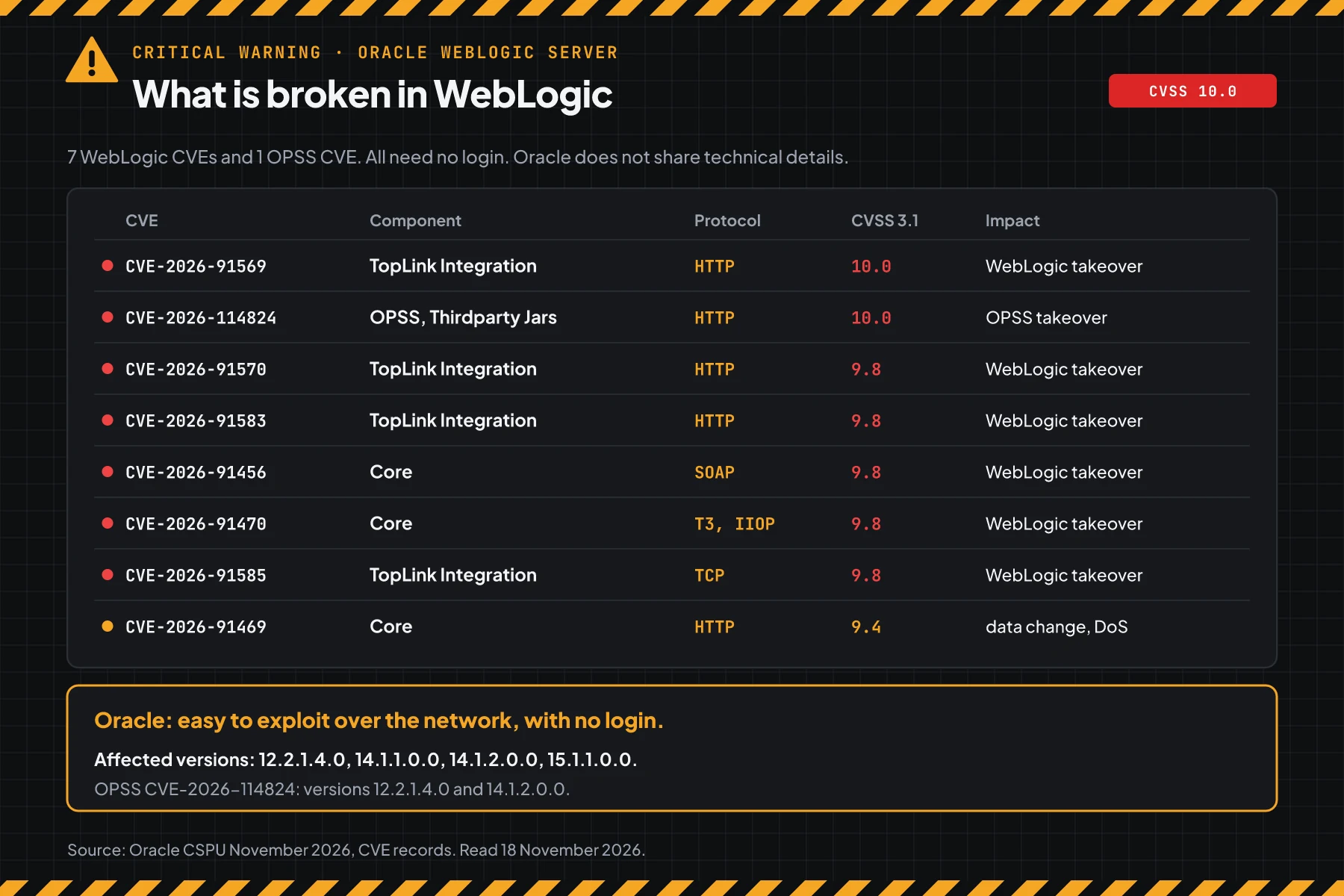
Per the CVE-2026-114824 record, CVE-2026-114824 is in Oracle Platform Security for Java (OPSS), in Centralized Thirdparty Jars. It affects 12.2.1.4.0 and 14.1.2.0.0. OPSS is part of the Fusion Middleware ORACLE_HOME, so its patch is on the Fusion Middleware list.
What T3 and IIOP are
T3 is the Oracle protocol between WebLogic servers and Java clients. IIOP is the CORBA protocol. The default WebLogic port accepts HTTP, T3, and IIOP on the same port number. Per the CVE-2026-91470 record, attackers can reach CVE-2026-91470 over T3 and IIOP.
Rama Digital analysis: so a firewall that opens port 7001 for a web app also opens T3. Step 2 checks this.
CSPU and CPU
A CSPU is the monthly security patch release from Oracle. A CSPU is smaller and adds to the quarterly Critical Patch Update (CPU). The next CSPU comes out on 15 December 2026. The next CPU comes out on 19 January 2027.
Exploitation status on 18 November 2026
The Oracle advisory states no exploitation status for these CVEs. CISA KEV version 2026.11.17 lists no WebLogic CVE from November. We found no public PoC or exploit.
CISA added an SSVC rating to 5 CVE records: Exploitation none, Automatable yes, Technical Impact total. This means: no exploitation yet, but an attack can run automatically, and the impact is a full takeover. CVE-2026-91569 had no CISA rating when we read it.
Who is most at risk
Every server on an affected version needs the patch. The order in this table helps you pick which server to do first.
| Server condition | Risk | Reason |
|---|---|---|
| WebLogic HTTP port open to the internet | Highest | Hit by CVE-2026-91569, CVE-2026-91570, CVE-2026-91583, and CVE-2026-91469 over HTTP |
| T3 or IIOP port reachable from outside | High | CVE-2026-91470. The default HTTP port also accepts T3 |
| SOAP or TCP service open | High | CVE-2026-91456 over SOAP and CVE-2026-91585 over TCP |
| Version 12.2.1.3.0, 10.3.6, or older | High | Oracle does not test these versions and writes that older versions are likely affected |
| WebLogic on the internal network only | Lower | An attacker needs network access first. Still apply the patch. |
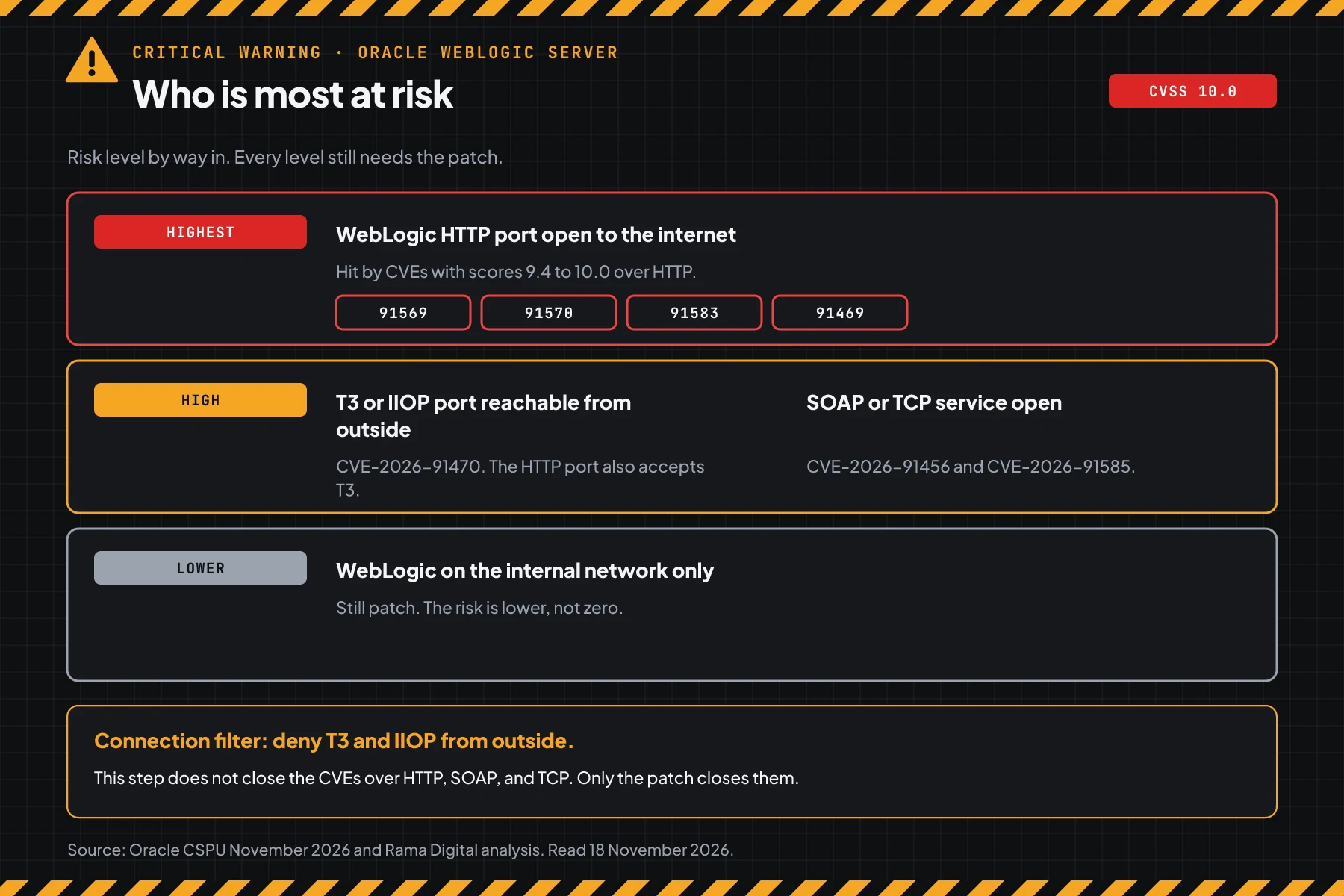
Rama Digital analysis: a reverse proxy in front of WebLogic does not protect the server by itself. Oracle does not name the HTTP path that these flaws use. So treat every HTTP port that forwards traffic to WebLogic as at risk.
Affected versions and patches
Match the version in each ORACLE_HOME with this table. One machine can have more than 1 ORACLE_HOME, so check all of them.
| Version | Status | Action |
|---|---|---|
| WebLogic 15.1.1.0.0 | Affected | Apply the November 2026 CSPU patch |
| WebLogic 14.1.2.0.0 | Affected, including OPSS | Apply the November 2026 CSPU patch |
| WebLogic 14.1.1.0.0 | Affected | Apply the November 2026 CSPU patch |
| WebLogic 12.2.1.4.0 | Affected, including OPSS | Apply the November 2026 CSPU patch |
| 12.2.1.3.0, 10.3.6, and other old versions | Not tested by Oracle, likely affected | Migrate to a supported version |
| Java SE 8u511, 11.0.33, 17.0.21, 21.0.13, 25.0.5, 27.0.1 | In the Java SE list | Update the JDK to the November 2026 release |
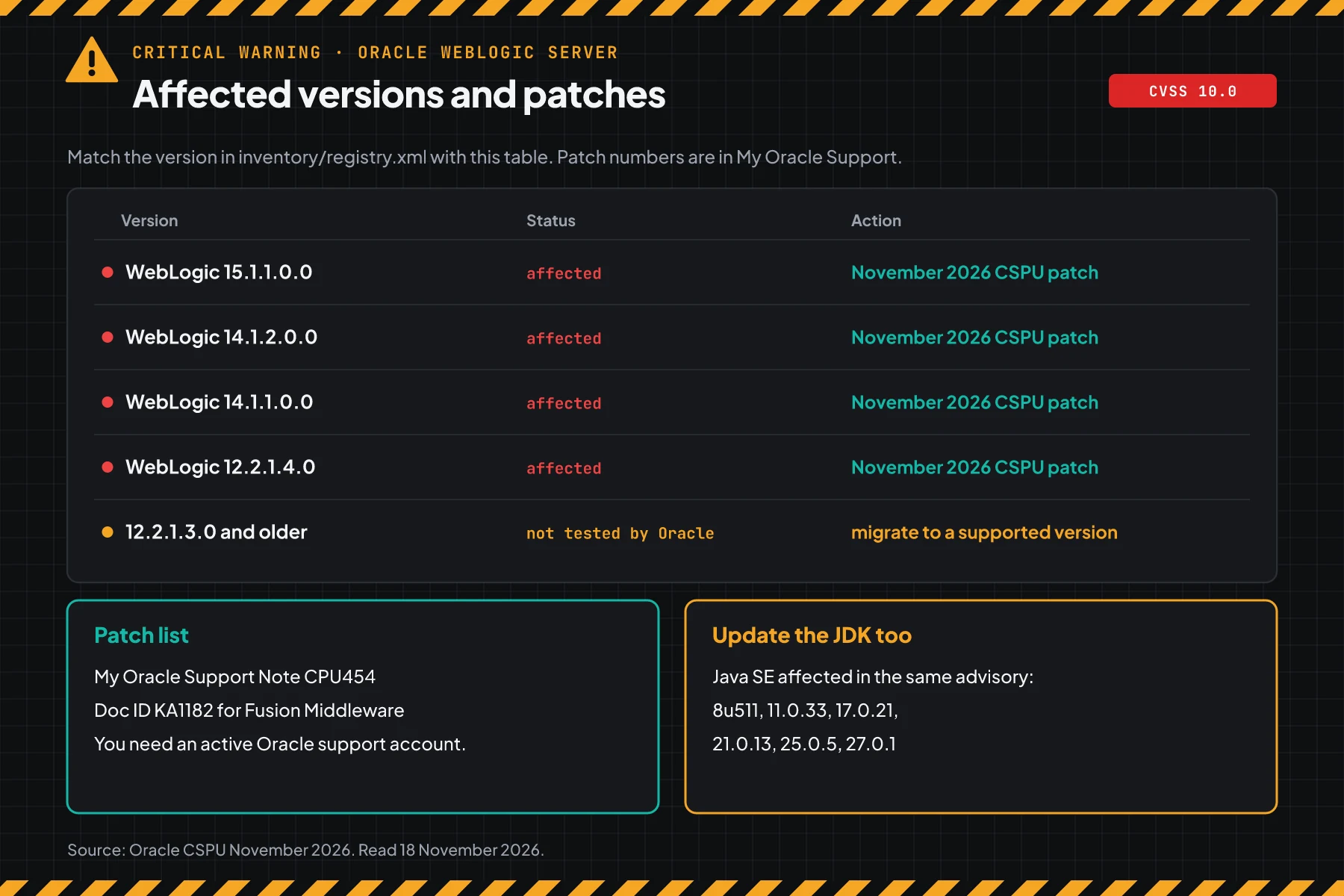
Oracle tests only the versions that it still supports. For older versions, Oracle writes: "it is likely that earlier versions of affected releases are also affected". Oracle recommends an upgrade to a supported version.
Patch number note: We do not list patch numbers in this article. The patch list is in My Oracle Support Note CPU454 and Doc ID KA1182 for Fusion Middleware. You need an active Oracle support account. The number 12345678 in the samples is only a sample.
Before you start
- Shell access to each WebLogic server, as the user that owns the ORACLE_HOME.
- An active My Oracle Support account to read CPU454 and KA1182 and to download patches.
- A maintenance window. The servers must stop for the patch, so the apps stop for a short time.
- Access to the firewall in front of the server, to check who can reach the WebLogic ports.
- A list of valid apps and trusted admin IPs. Step 5 needs this list.
Step 1: Check the version, patches, and JDK in each ORACLE_HOME
Basic commands from the Oracle documentation. Run them in each ORACLE_HOME:
$ORACLE_HOME/OPatch/opatch lsinventory
grep 'name="WebLogic Server"' $ORACLE_HOME/inventory/registry.xml
$JAVA_HOME/bin/java -version
Sample opatch lsinventory output with dummy data. Rama Digital analysis: we wrote the shape of this output from an estimate, not from a real server.
Oracle Home       : /u01/oracle/middleware
Central Inventory : /u01/oracle/oraInventory
OPatch version    : dummy
--------------------------------------------------------------------------------
Interim patches (2) :

Patch  10000002     : applied on Tue Aug 25 10:12:40 UTC 2026
Unique Patch ID:  20000002
Patch description:  "WLS PATCH SET UPDATE 14.1.1.0.260812"
   Created on 12 Aug 2026, 08:01:12 hrs UTC

Patch  10000001     : applied on Tue May 26 09:40:02 UTC 2026
Unique Patch ID:  20000001
Patch description:  "WLS PATCH SET UPDATE 14.1.1.0.260514"
   Created on 14 May 2026, 07:22:51 hrs UTC
For many servers, save this script as check-version-weblogic.sh. The script reads the version from registry.xml, reads the patch list, then looks for the November patch numbers that you give. It also reads the JDK version.
#!/usr/bin/env bash
# Check the Oracle WebLogic Server version, patches, and JDK against the Oracle CSPU of November 2026.
# Usage: PATCH_NOV="<patch number from MOS CPU454>" bash check-version-weblogic.sh <ORACLE_HOME> [--lsinv file] [--java JAVA_HOME]
# Without --lsinv, the script runs <ORACLE_HOME>/OPatch/opatch lsinventory.
# The script only reads files. It changes nothing.
set -u
OH="" LSINV="" JH="${JAVA_HOME:-}"
while [ $# -gt 0 ]; do
  case "$1" in
    --lsinv) LSINV="${2:-}"; shift 2 ;;
    --java) JH="${2:-}"; shift 2 ;;
    -h|--help) sed -n '2,5p' "$0"; exit 0 ;;
    -*) echo "Unknown option: $1" >&2; exit 2 ;;
    *) OH="$1"; shift ;;
  esac
done
OH="${OH:-${ORACLE_HOME:-}}"
[ -n "$OH" ] || { echo "Set ORACLE_HOME. Example: bash check-version-weblogic.sh /u01/oracle/middleware" >&2; exit 2; }
REG="$OH/inventory/registry.xml"
[ -r "$REG" ] || { echo "Cannot read $REG" >&2; exit 2; }

VER=$(tr -d '\r' < "$REG" | grep 'name="WebLogic Server"' | sed -n 's/.*version="\([0-9.]*\)".*/\1/p' | head -n 1)
[ -n "$VER" ] || { echo "No WebLogic Server version in $REG" >&2; exit 2; }

# Patch list: from a file, or from OPatch in this ORACLE_HOME.
INV="" SRC=""
if [ -n "$LSINV" ]; then
  [ -r "$LSINV" ] || { echo "Cannot read $LSINV" >&2; exit 2; }
  INV=$(tr -d '\r' < "$LSINV"); SRC="$LSINV"
elif [ -x "$OH/OPatch/opatch" ]; then
  INV=$("$OH/OPatch/opatch" lsinventory -oh "$OH" 2>&1 | tr -d '\r'); SRC="opatch lsinventory"
fi
IDS=$(printf '%s\n' "$INV" | sed -n 's/^Patch  *\([0-9][0-9]*\) *:.*/\1/p')
CNT=$(printf '%s\n' "$IDS" | grep -c '[0-9]')
PSU=$(printf '%s\n' "$INV" | grep -o 'WLS PATCH SET UPDATE [0-9.]*' | sort -t. -k5,5n | tail -n 1)

printf '%-18s: %s\n' "WebLogic Server" "$VER (registry.xml)"
if [ -n "$SRC" ]; then
  printf '%-18s: %s patches (%s)\n' "Installed patches" "$CNT" "$SRC"
  printf '%-18s: %s\n' "Latest WLS PSU" "${PSU:-none}"
else
  printf '%-18s: %s\n' "Installed patches" "unreadable (no OPatch, use --lsinv)"
fi

MISSING=""
if [ -n "${PATCH_NOV:-}" ] && [ -n "$SRC" ]; then
  for p in $PATCH_NOV; do
    if printf '%s\n' "$IDS" | grep -qxF -- "$p"; then printf '%-18s: %s present\n' "Nov CSPU patch" "$p"
    else printf '%-18s: %s MISSING\n' "Nov CSPU patch" "$p"; MISSING="$MISSING $p"; fi
  done
fi

# JDK: read the release file in JAVA_HOME.
JV=""
if [ -n "$JH" ] && [ -r "$JH/release" ]; then
  JV=$(tr -d '\r' < "$JH/release" | sed -n 's/^JAVA_VERSION="\([^"]*\)".*/\1/p')
fi
printf '%-18s: %s\n' "JDK" "${JV:-unreadable (use --java)}${JV:+ ($JH)}"

CODE=0
case "$VER" in
  12.2.1.4.0|14.1.1.0.0|14.1.2.0.0|15.1.1.0.0)
    if [ -z "$SRC" ]; then echo "Result: CHECK. The patch list is unreadable. Run opatch lsinventory."; CODE=1
    elif [ -z "${PATCH_NOV:-}" ]; then echo "Result: CHECK. Set PATCH_NOV to the patch number from MOS CPU454 for $VER."; CODE=1
    elif [ -n "$MISSING" ]; then echo "Result: VULNERABLE. The November 2026 CSPU patch is not installed. Do step 3."; CODE=1
    else echo "Result: PATCHED. The November 2026 CSPU patch for $VER is installed."; fi ;;
  *) echo "Result: MIGRATE. Version $VER is not in the CSPU list. Oracle writes that older versions are likely affected too."; CODE=1 ;;
esac

if [ -n "$JV" ]; then
  MAJ=$(printf '%s' "$JV" | sed -n 's/^1\.\([0-9]*\)\..*/\1/p'); MAJ=${MAJ:-${JV%%.*}}
  if [ "$MAJ" = 8 ]; then UPD=$(printf '%s' "$JV" | sed -n 's/.*_\([0-9]*\).*/\1/p')
  else UPD=$(printf '%s' "$JV" | awk -F. '{print ($3 == "" ? 0 : $3)}' | sed 's/[^0-9].*//'); fi
  case "$MAJ" in 8) LIMIT=511 ;; 11) LIMIT=33 ;; 17) LIMIT=21 ;; 21) LIMIT=13 ;; 25) LIMIT=5 ;; 27) LIMIT=1 ;; *) LIMIT="" ;; esac
  if [ -z "$LIMIT" ]; then echo "JDK result: REPLACE. Java $MAJ is not in the Java SE support list."; CODE=1
  elif [ "${UPD:-0}" -le "$LIMIT" ]; then echo "JDK result: UPDATE. Java $JV is in the Java SE list of the November 2026 CSPU."; CODE=1
  else echo "JDK result: OK. Java $JV is newer than the Java SE list of the November 2026 CSPU."; fi
fi
exit "$CODE"
# Patch numbers come from MOS Note CPU454 or Doc ID KA1182 for your version. 12345678 is only a sample.
PATCH_NOV="12345678" bash check-version-weblogic.sh /u01/oracle/middleware --java /u01/jdk
# With no OPatch on this machine, use a copy of the opatch lsinventory output
PATCH_NOV="12345678" bash check-version-weblogic.sh /u01/oracle/middleware --lsinv lsinventory.txt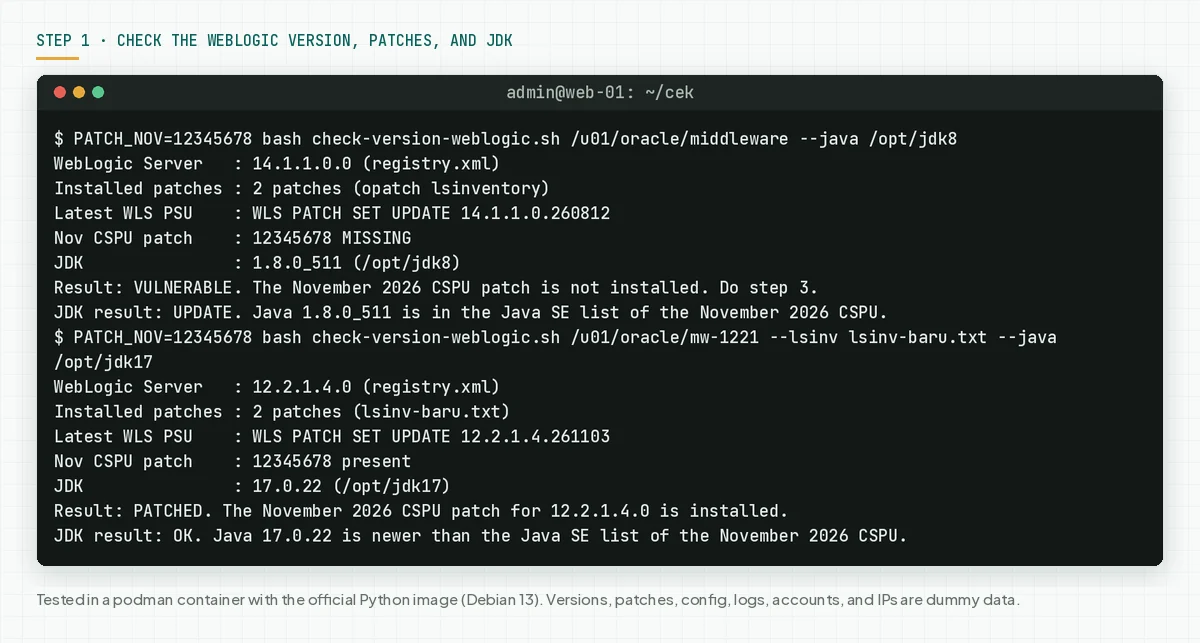
Check the result: "VULNERABLE" means the November patch is not installed, so do step 3 today. "PATCHED" means the patch numbers that you gave are installed. "MIGRATE" means the version is not on the Oracle list. "CHECK" means the script cannot read the patches or you did not set PATCH_NOV.
The JDK line shows "UPDATE" when Java is on the Java SE list of the November 2026 CSPU, and "OK" when Java is newer. We tested 33 edge cases, for example a missing file, a CRLF file, a file with no read permission, and a wrong option. The script gives the correct result or exits with code 2.
Step 2: Check T3 and IIOP ports and the connection filter
This step shows the open paths in your domain. The HTTP flaws still apply, so this step does not replace the patch.
2a. Read the domain config.xml
Save this script as check-exposure-weblogic.sh. The script reads config/config.xml in the DOMAIN_HOME. It prints the port of each server, the IIOP status, extra channels, and the connection filter rules.
#!/usr/bin/env bash
# Check ports, the T3 and IIOP protocols, and the connection filter in the config.xml of a WebLogic domain.
# Usage: bash check-exposure-weblogic.sh <DOMAIN_HOME or config.xml>
#        bash check-exposure-weblogic.sh --test <public IP> <port> [port ...]   (run from an outside network)
# The script only reads files. It changes nothing.
set -u
if [ "${1:-}" = "--test" ]; then
  [ $# -ge 3 ] || { echo "Usage: --test <IP> <port> [port ...]" >&2; exit 2; }
  H="$2"; shift 2; OPEN=0
  for P in "$@"; do
    if timeout 5 bash -c "exec 3<>/dev/tcp/$H/$P" 2>/dev/null; then echo "$H:$P OPEN"; OPEN=$((OPEN + 1))
    else echo "$H:$P CLOSED"; fi
  done
  if [ "$OPEN" -gt 0 ]; then echo "Result: reachable ports from this machine: $OPEN. Close T3 and IIOP ports to the internet."; exit 1; fi
  echo "Result: no port is reachable from this machine."; exit 0
fi
[ $# -eq 1 ] || { echo "Usage: bash check-exposure-weblogic.sh <DOMAIN_HOME or config.xml>" >&2; exit 2; }
CFG="$1"; [ -d "$CFG" ] && CFG="$CFG/config/config.xml"
[ -r "$CFG" ] || { echo "Cannot read $CFG" >&2; exit 2; }
grep -q '<domain' "$CFG" || { echo "$CFG is not the config.xml of a WebLogic domain" >&2; exit 2; }

tr -d '\r' < "$CFG" | awk '
  function val(s) { sub(/^[^>]*>/, "", s); sub(/<.*/, "", s); return s }
  /<server>/ { ins = 1; nm = ""; lp = ""; sp = "-"; iiop = "default"; kanal = ""; next }
  /<\/server>/ { if (lp == "") dflt = 1
                 printf "%-14s %-10s %-9s %-8s %s\n", nm, (lp == "" ? "7001*" : lp), sp, iiop, (kanal == "" ? "-" : kanal)
                 if (iiop != "false") niiop++
                 ins = 0; next }
  ins && /<ssl>/ { inssl = 1 }
  ins && /<\/ssl>/ { inssl = 0 }
  ins && /<network-access-point>/ { innap = 1; nn = ""; np = ""; npt = "" }
  ins && /<\/network-access-point>/ { innap = 0; kanal = kanal (kanal == "" ? "" : ", ") nn " " np " " npt
                                       if (np ~ /^(t3|t3s|iiop|iiops)$/) { nkanal++; kl[nkanal] = nn " (" np ", port " npt ", server " nm ")" } }
  ins && innap && /<name>/ { nn = val($0) }
  ins && innap && /<protocol>/ { np = val($0) }
  ins && innap && /<listen-port>/ { npt = val($0) }
  ins && !innap && !inssl && nm == "" && /<name>/ { nm = val($0) }
  ins && !innap && !inssl && /<listen-port>/ { lp = val($0) }
  ins && inssl && /<listen-port>/ { sp = val($0) }
  ins && /<iiop-enabled>/ { iiop = val($0) }
  /<administration-port-enabled>/ { adm = val($0) }
  /<connection-filter>/ { cf = val($0) }
  /<connection-filter-rule>/ { r = val($0); nr++; n = split(r, f, /[ \t]+/)
                                if (r ~ /deny/ && (r ~ /t3/ || n == 4)) dt3 = 1
                                if (r ~ /deny/ && (r ~ /giop/ || n == 4)) dgiop = 1 }
  BEGIN { printf "%-14s %-10s %-9s %-8s %s\n", "SERVER", "PORT", "SSL PORT", "IIOP", "EXTRA CHANNELS" }
  END {
    print ""
    printf "%-21s: %s\n", "Separate admin port", (adm == "true" ? "yes" : "no")
    printf "%-21s: %s\n", "Connection filter", (cf == "" ? "none" : cf " (" nr + 0 " rules)")
    t = 0
    if (!dt3) { t++; m[t] = "No deny rule for T3. The HTTP port of each server also accepts T3 (CVE-2026-91470)." }
    if (niiop && !dgiop) { t++; m[t] = "Servers with IIOP on: " niiop ". There is no deny rule for giop." }
    for (i = 1; i <= nkanal; i++) { t++; m[t] = "Channel " kl[i] ". Make sure the internet cannot reach this channel." }
    if (t == 0) { print "Result: NO FINDINGS in config.xml. Still test the ports from outside with --test."; exit 0 }
    print "Result: " t " FINDINGS"
    for (i = 1; i <= t; i++) print "- " m[i]
    if (dflt) print "* not set, the default port 7001 applies."
    exit 1
  }'
bash check-exposure-weblogic.sh /u01/oracle/domains/prod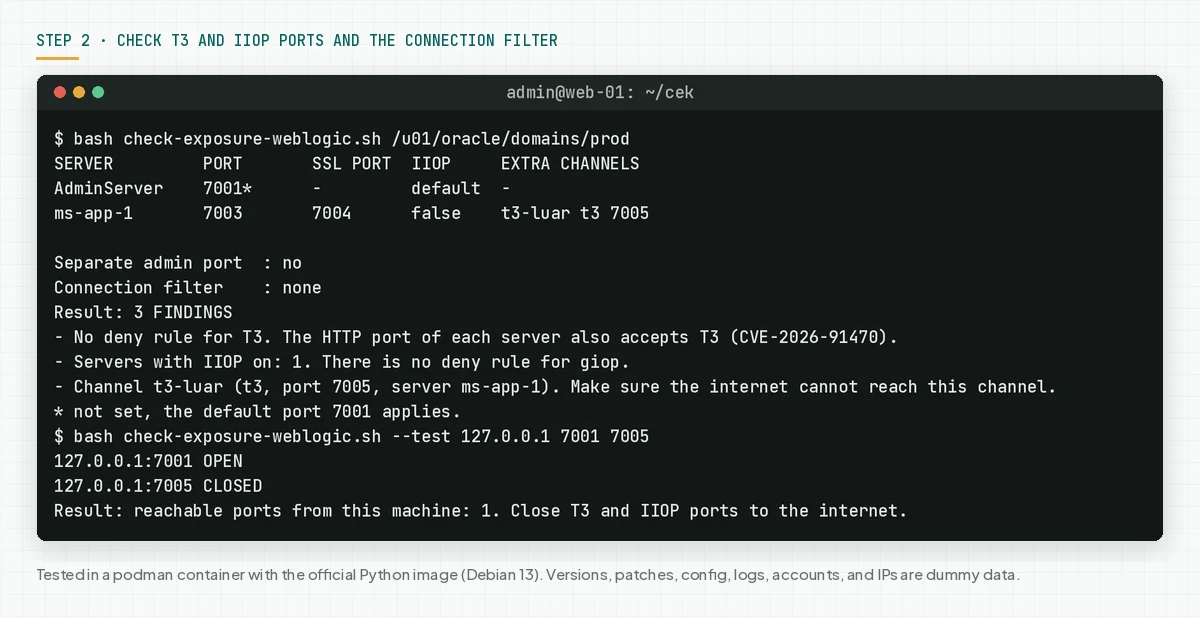
2b. Test from outside your network
From a mobile network or a server outside your network, test the public WebLogic address that you own. Use the ports from 2a.
# From an outside network, for example a phone hotspot. Test only IP addresses that you own.
bash check-exposure-weblogic.sh --test 203.0.113.10 7001 7002 7005
The result "OPEN" means the internet can reach that port. Test only IP addresses that you own.
Check the result: You have a list of ports, the IIOP status, and the filter rules for each domain, plus the outside test result. "No deny rule for T3" means the HTTP port also accepts T3 from any address.
Step 3: Back up the domain, apply the CSPU patch, then restart
Only an Oracle patch closes the flaws. Oracle gives no workaround that closes them.
- Back up the DOMAIN_HOME and ORACLE_HOME to a place outside the server. For a VM, make a snapshot.
- Open MOS Note CPU454 and Doc ID KA1182. Write down the WebLogic, OPSS, and other patch numbers for your version.
- Download the patches and read the README of each patch. The README gives the minimum OPatch version and the install order.
- Stop all servers in the domain, including the Admin Server and Node Manager.
- Apply the patch with
opatch applyas the README tells you. - Start the servers again, then run step 1 with the real patch numbers in
PATCH_NOV. - Update the JDK when step 1 shows "UPDATE", then restart the servers with the new JDK.
# Sample flow from a patch README. Follow the README of your patch. We did not test this step.
cd /u01/patch/12345678
$ORACLE_HOME/OPatch/opatch apply
$ORACLE_HOME/OPatch/opatch lsinventory
Rama Digital analysis: we did not test opatch apply, because we have no real WebLogic. For a cluster, follow the Oracle rolling patch guide for your version.
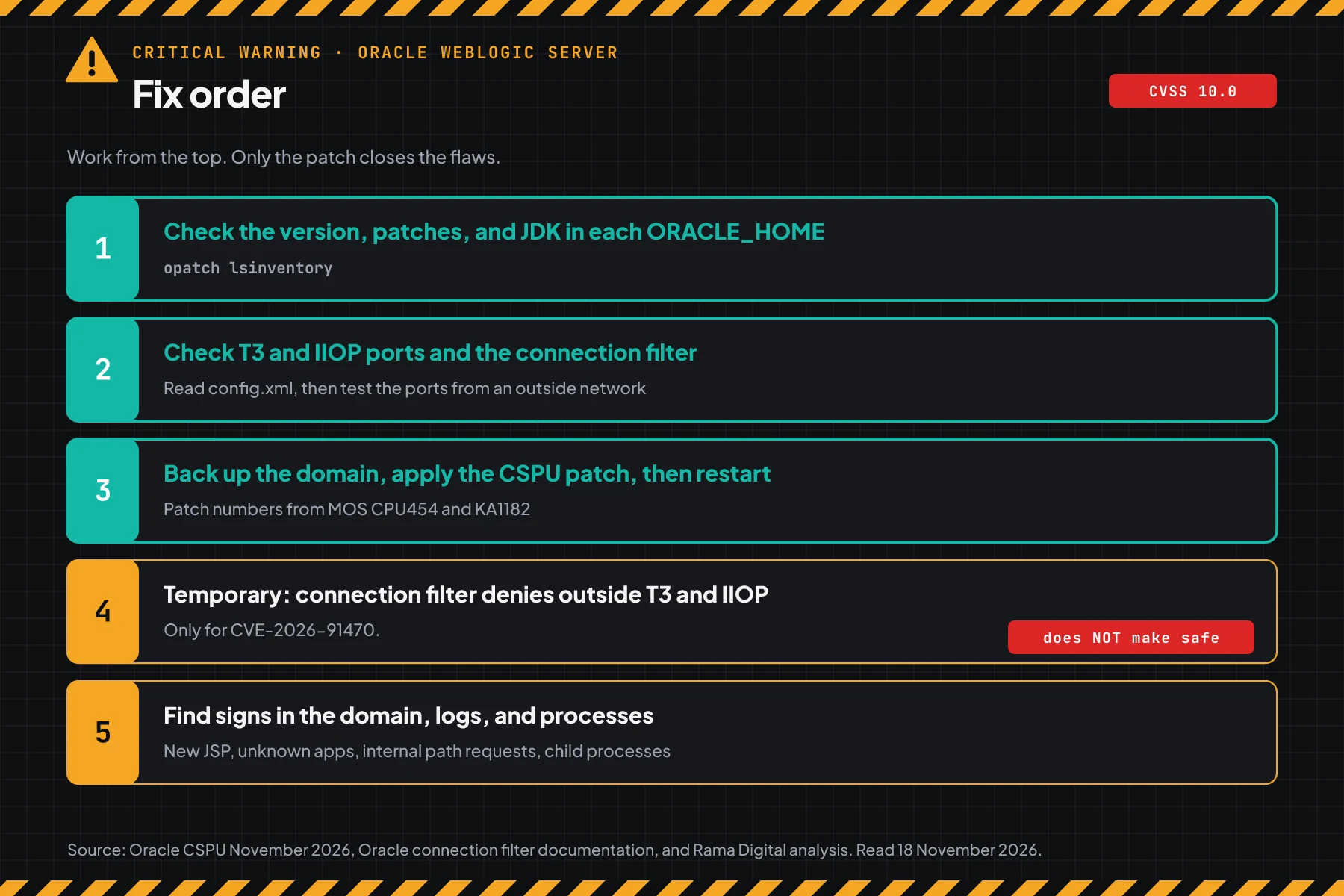
Check the result: the step 1 script prints "PATCHED" for each ORACLE_HOME. A server on 12.2.1.3.0 or older needs a migration plan.
Step 4: Temporary mitigation, does NOT make the server safe
Oracle writes: "Until you apply the Critical Security Patch Update patches, it may be possible to reduce the risk of successful attack by blocking network protocols required by an attack." Oracle also writes that this step can break app functions.
4a. Deny T3 and IIOP from outside with a connection filter
Per the Oracle connection filter documentation, WebLogic has a built-in connection filter with the class weblogic.security.net.ConnectionFilterImpl. Rule format: target, local address, local port, action, then protocols. The first rule that matches wins. With no rules, WebLogic accepts all connections.
Sample rules. Replace 198.51.100.0/24 with your admin network and all servers in your domain:
127.0.0.1 * * allow
198.51.100.0/24 * * allow t3 t3s giop giops
0.0.0.0/0 * * deny t3 t3s giop giops
Line 1 allows the server itself. Line 2 allows T3 and IIOP from the admin network. Line 3 denies T3 and IIOP from other addresses. HTTP connections match no rule, so WebLogic still accepts HTTP.
Rama Digital analysis: set the rules in the WebLogic console, in the Security and Filter settings of the domain. The menu names can differ per version. The Admin Server, managed servers, Node Manager, and JMS clients need T3, so put all of those addresses on the allow line.
Limit: this filter reduces the risk of CVE-2026-91470 only. It does NOT close the CVEs over HTTP, SOAP, and TCP. CVE-2026-91569, with a score of 10.0, stays open until the patch.
4b. Close the console and unused ports to the internet
Rama Digital analysis: allow access to the WebLogic console and admin port only from the admin network or an admin VPN. Close extra channels that you do not use. Condition: the port was open in step 2b. Limit: this step does not close the flaws on the app port.
Check the result: the outside test in step 2b finds no open T3 port or console. Apps and T3 clients from the admin network still work.
Step 5: Find signs of an attack
The patch closes the flaws, but it does not remove files, apps, or accounts that an attacker left. So look for those traces before and after the patch.
Rama Digital analysis: Oracle has not released IOCs. So the script looks for traces from older WebLogic attacks in CISA KEV, for example CVE-2017-10271 and CVE-2019-2725. The traces: new JSP or WAR files, unknown apps, requests to internal paths, and shell child processes of WebLogic.
Save this script as check-signs-weblogic.sh. The script only reads. It does not change, delete, or send anything.
#!/usr/bin/env bash
# Find signs of attack in a WebLogic domain: new JSP files, unknown apps, access logs, and child processes.
# Usage: KNOWN_APPS="app1 app2" KNOWN_IPS="198.51.100." bash check-signs-weblogic.sh --domain <DOMAIN_HOME> \
#          [--access access.log ...] [--ps file] [--days 14]
# Without --ps, the script reads processes from ps. The script only reads. It changes nothing.
set -u
DOM="" PSF="" DAYS=14 ACCESS=()
while [ $# -gt 0 ]; do
  case "$1" in
    --domain) DOM="${2:-}"; shift 2 ;;
    --access) ACCESS+=("${2:-}"); shift 2 ;;
    --ps) PSF="${2:-}"; shift 2 ;;
    --days) DAYS="${2:-14}"; shift 2 ;;
    *) echo "Unknown option: $1" >&2; exit 2 ;;
  esac
done
[ -n "$DOM" ] || [ ${#ACCESS[@]} -gt 0 ] || [ -n "$PSF" ] || { echo "Usage: bash check-signs-weblogic.sh --domain <DOMAIN_HOME> [--access log] [--ps file]" >&2; exit 2; }
case "$DAYS" in ''|*[!0-9]*) echo "--days must be a number" >&2; exit 2 ;; esac
T=0
finding() { T=$((T + 1)); echo "  FINDING: $*"; }
# Compare each app name as a whole word, not as a pattern. The name "toko.web" does not pass as "toko-web".
read -r -a KNOWN <<< "${KNOWN_APPS:-}"
known() { local x; for x in "${KNOWN[@]}"; do [ "$x" = "$1" ] && return 0; done; return 1; }

if [ -n "$DOM" ]; then
  [ -r "$DOM/config/config.xml" ] || { echo "Cannot read $DOM/config/config.xml" >&2; exit 2; }
  echo "1. New JSP or WAR files (${DAYS} days) in internal app folders and autodeploy"
  N=0
  while IFS= read -r f; do finding "$f"; N=$((N + 1)); done < <(
    find "$DOM/servers" "$DOM/autodeploy" \( -path '*/tmp/_WL_internal/*' -o -path '*/autodeploy/*' \) \
      -type f \( -name '*.jsp' -o -name '*.jspx' -o -name '*.war' \) -mtime "-$DAYS" 2>/dev/null | sort)
  [ "$N" -eq 0 ] && echo "  none"
  echo "2. Apps in config.xml"
  while IFS= read -r a; do
    [ -n "$a" ] || continue
    if [ ${#KNOWN[@]} -gt 0 ] && ! known "$a"; then finding "unknown app: $a"
    else echo "  $a"; fi
  done < <(tr -d '\r' < "$DOM/config/config.xml" | awk '/<app-deployment>/ { a = 1; next } a && /<name>/ { s = $0; sub(/^[^>]*>/, "", s); sub(/<.*/, "", s); print s; a = 0 }')
fi

if [ ${#ACCESS[@]} -gt 0 ]; then
  echo "3. Requests to internal paths and the console from IPs outside KNOWN_IPS"
  N=0
  for L in "${ACCESS[@]}"; do
    [ -r "$L" ] || { echo "  cannot read $L"; continue; }
    case "$L" in *.gz) READER=(zcat -- "$L") ;; *) READER=(cat -- "$L") ;; esac
    while IFS= read -r line; do finding "$line"; N=$((N + 1)); done < <("${READER[@]}" | tr -d '\r' |
      awk -v sah="${KNOWN_IPS:-}" '
        BEGIN { n = split(sah, s, " ") }
        { ok = 0; for (i = 1; i <= n; i++) if (index($1, s[i]) == 1) ok = 1
          if (ok) next
          if (match($0, /"(GET|POST|PUT) [^ ]+/)) { p = substr($0, RSTART + 1, RLENGTH - 1); sub(/^[A-Z]+ /, "", p) } else next
          if (p ~ /^\/(wls-wsat|_async|bea_wls_internal|bea_wls_deployment_internal|console|management)(\/|$)/) {
            split(p, q, "/"); k = $1 " /" q[2] "/"; c[k]++ } }
        END { for (k in c) print k " requests: " c[k] }' | sort)
  done
  [ "$N" -eq 0 ] && echo "  none"
fi

echo "4. Shell or download processes that are children of WebLogic"
if [ -n "$PSF" ]; then [ -r "$PSF" ] || { echo "Cannot read $PSF" >&2; exit 2; }; PSO=$(tr -d '\r' < "$PSF")
else PSO=$(ps -eo pid=,ppid=,user=,args= 2>/dev/null); fi
N=0
while IFS= read -r line; do finding "$line"; N=$((N + 1)); done < <(printf '%s\n' "$PSO" | awk '
  { pid[NR] = $1; ppid[NR] = $2; usr[NR] = $3; a = $0; sub(/^ *[0-9]+ +[0-9]+ +[^ ]+ +/, "", a); arg[NR] = a
    if (a ~ /weblogic\.Server/) wl[$1] = 1 }
  END { for (i = 1; i <= NR; i++) if (ppid[i] in wl) { c = arg[i]; split(c, w, " "); b = w[1]; sub(/.*\//, "", b)
          if (b ~ /^(sh|bash|dash|ksh|zsh|curl|wget|python[0-9.]*|perl|nc|ncat|socat|powershell|cmd\.exe)$/)
            print "pid " pid[i] " (" usr[i] "): " c } }')
[ "$N" -eq 0 ] && echo "  none"

echo
if [ "$T" -gt 0 ]; then echo "Result: FINDINGS ($T). Save the evidence first. Do not restart before the evidence is saved."; exit 1; fi
echo "Result: NO FINDINGS. This result does not prove that the server is clean."
The first 3 lines of a sample access log with dummy data:
198.51.100.10 - - [18/Nov/2026:05:12:01 +0700] "GET /console/login/LoginForm.jsp HTTP/1.1" 200 4123
203.0.113.45 - - [18/Nov/2026:05:41:07 +0700] "POST /wls-wsat/CoordinatorPortType HTTP/1.1" 500 1201
203.0.113.45 - - [18/Nov/2026:05:41:09 +0700] "POST /wls-wsat/CoordinatorPortType HTTP/1.1" 500 1201
# On the WebLogic server, as the user that runs WebLogic. Without --ps, the script reads the process list.
KNOWN_APPS="toko-web portal-hr" KNOWN_IPS="198.51.100." bash check-signs-weblogic.sh \
--domain /u01/oracle/domains/prod \
--access /u01/oracle/domains/prod/servers/AdminServer/logs/access.log --days 14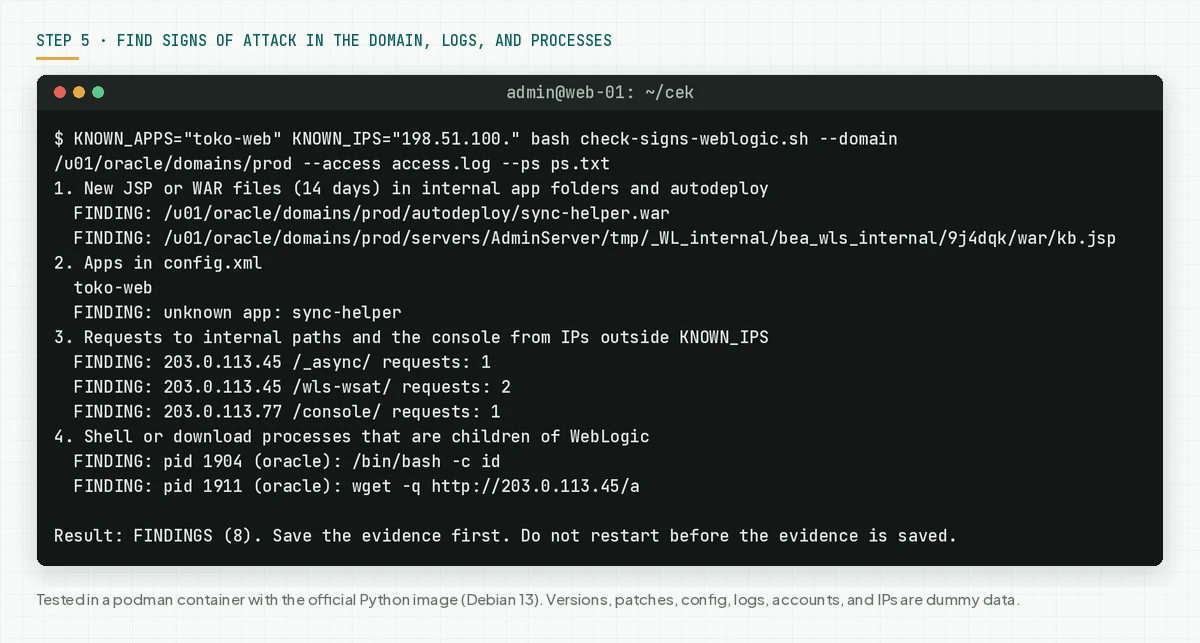
Script limits: Rama Digital analysis: the script reads access logs in the common format, and it reads .gz files. The paths /wls-wsat/ and /_async/ come from older attacks, not from the November CVEs. The script does not check for new admin accounts. Check the accounts in the WebLogic console by hand.
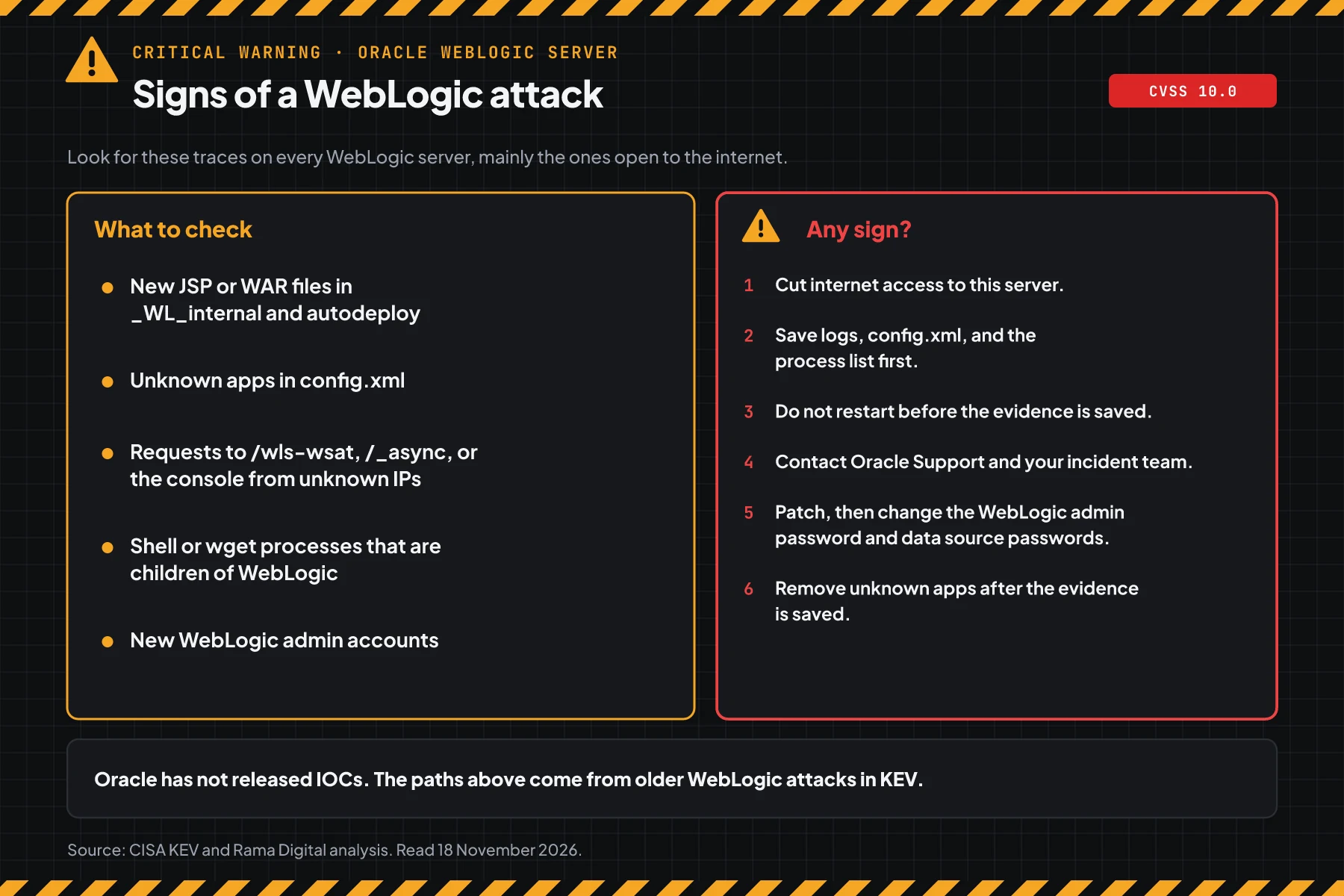
Check the result: "NO FINDINGS" means the script found no sign. A clean result does not prove a clean server. "FINDINGS" means check each FINDING line, then follow this order for any line that you do not know:
- Cut internet access to this server at the firewall.
- Save the logs, config.xml, the server
tmpfolder, and the process list first, before you change anything. - Do not restart the server before the evidence is saved.
- Contact Oracle Support and your incident team with that evidence.
- Apply the patch, then change the WebLogic admin password and the data source passwords.
- Remove unknown apps after the evidence is saved.
When personal data leaks through this server, Indonesian Law 27/2022 on Personal Data Protection requires a written notice within 3 times 24 hours. Another server tool case is the Puppet flaw CVE-2026-115731.
Example: 1 night of response for 3 servers
This simulation uses dummy data. The server names, times, and results are not customer data.
| Time (WIB) | Dummy server | What we checked | Result | Action |
|---|---|---|---|---|
| 19.00 | wls-app-01 (14.1.1.0.0, port 7001 to the internet) | Steps 1 and 2 | VULNERABLE, no filter, port 7001 open from outside | Step 4 tonight, patch at 21.00 |
| 19.30 | wls-hr-01 (12.2.1.4.0, internal network) | Step 1 | VULNERABLE, JDK 8u511 needs an UPDATE | Patch and update the JDK tomorrow morning |
| 20.00 | wls-old-01 (12.2.1.3.0) | Step 1 | MIGRATE | Limit access to the admin network, schedule the migration |
| 20.30 | wls-app-01 | Step 5 | A new JSP in _WL_internal, requests to /_async/ from 203.0.113.45 | Cut access, save evidence, contact Oracle Support |
The lesson from this simulation: do the server with a port open to the internet first. The patch does not remove the unknown JSP, so step 5 stays necessary.
Who does the work
The middleware team or the app admin usually owns WebLogic. The network team owns the firewall and access rules. The head of IT decides the maintenance window and the migration plan for old versions.
Rama Digital advice: do not open WebLogic ports directly to the internet. Keep the app server on the internal network, and open only the ports that the app needs. The web server in front of WebLogic also needs patches, as in the Apache HTTP/2 flaw CVE-2026-119618. A similar lesson for edge devices is in the NetScaler flaw CVE-2026-120868.
Checklist for today
- List all WebLogic servers and each ORACLE_HOME, including DR and test servers. Owner: IT team. Proof: a list of names, versions, and locations.
- Check the version, patches, and JDK with step 1. Owner: middleware admin. Proof: script output.
- Check ports, IIOP, and the filter with step 2. Owner: middleware admin. Proof: script output and the outside test result.
- Back up, then apply the November 2026 CSPU patch and update the JDK. Owner: middleware admin. Proof: step 1 output after the patch.
- Set the connection filter and close the console to the internet. Owner: network team. Proof: the filter rules, the firewall rules, and the outside test result.
- Find signs with step 5. Owner: middleware admin. Proof: script output and a copy of the logs.
- Schedule a migration for each server on 12.2.1.3.0 or older. Owner: head of IT. Proof: a written migration date.
Questions and answers
We use WebLogic 12.2.1.3.0 or 10.3.6. Are we affected?
Oracle does not test these versions, but writes that older versions are likely affected. There is no CSPU patch for them. Limit access to the admin network, then migrate to a supported version.
Our WebLogic servers are on the internal network only. Must we still patch?
Yes. The risk is lower, but an attacker inside the internal network can use these flaws with no login. Apply the patch in the next maintenance window.
Does a connection filter make the server safe until the patch?
No. The filter only denies T3 and IIOP, so it reduces the risk of CVE-2026-91470 only. The CVEs over HTTP, SOAP, and TCP stay open until the patch.
There are no attack reports yet. Why must we patch today?
The score is 10.0, the flaws work with no login, and CISA rates the attack as automatable. CISA KEV lists 12 older WebLogic CVEs, and ransomware used 2 of them.
Where do we find the patch numbers?
In My Oracle Support Note CPU454 and Doc ID KA1182 for Fusion Middleware. You need an active Oracle support account. Put those numbers in PATCH_NOV when you run step 1.
Does a JDK update close the WebLogic flaws?
No. The JDK and WebLogic have separate patches. Only the WebLogic patch closes the WebLogic flaws. The JDK update closes the Java SE flaws in the same advisory.
Does the patch remove the attacker's access?
The patch closes the flaws. It does not remove the JSP files, apps, or accounts that an attacker made. Run step 5, then change the admin and data source passwords.
Next step
The limits that still apply: step 4 does not make the server safe, and a patch does not clean a server that was taken over. When your server shows a sign in step 5, or you need help with an audit and recovery, use Vibe Code Rescue. For 1 urgent issue today, book a 30-minute session.
Sources
- The Oracle CSPU November 2026 advisory: CVE list, scores, components, protocols, affected versions, MOS numbers, and workaround text, 17 November 2026.
- The CVE-2026-91569 record, CVE-2026-91470 record, and CVE-2026-114824 record: CNA description, CVSS 3.1 vector, CISA SSVC rating, and publish time of 17 November 2026.
- CISA KEV: lists no WebLogic CVE from November on 18 November 2026, and lists 12 older WebLogic CVEs.
- The Oracle connection filter documentation: rule format, rule order, and protocol names.
- Indonesian Law 27/2022 on Personal Data Protection: the duty to report a personal data leak.