Direct answer: CVE-2026-133469 is a flaw in Xen Orchestra (XO) with a CVSS score of 9.8. With no password, an attacker can log in to XO with Admin rights, then control the XCP-ng pools that XO manages. Today, update XO to 6.9.2 (stable) or 6.10.1 (latest), then look for attack signs.
On 10 November 2026, Vates VSA-2026-062 wrote that attackers already use this flaw. The CVE number came out only on 23 November. Thus scanners that only read CVE feeds were 13 days late.
Main condition: As of 24 November 2026, this flaw is not in CISA KEV. Do not wait for KEV. Limit: this article has no attack cookie value, no attack code, and no attack steps.
We read Vates VSA-2026-062, the GHSA advisory, the CVE-2026-133469 record, the fix commit 50166fe, and the XO CHANGELOG on 24 November 2026. We ran the scripts in steps 1, 2, 4, and 5 in podman with the official nginx 1.30.7 and Debian trixie-slim images.
Important limit: Vates gives no official XO container image. Thus the XO login page and the XCP-ng host in our test are stand-ins, but the authentication.mjs files come from the XO GitHub. We did not test the flaw itself, the XOA update, or iptables on an XCP-ng host.
Problem: XO holds the keys to every XCP-ng pool
Xen Orchestra is the Vates web console to manage, back up, and delegate XCP-ng or XenServer pools. Xen Orchestra Appliance (XOA) is a ready VM from Vates. Many teams run XO from sources, with no XOA.
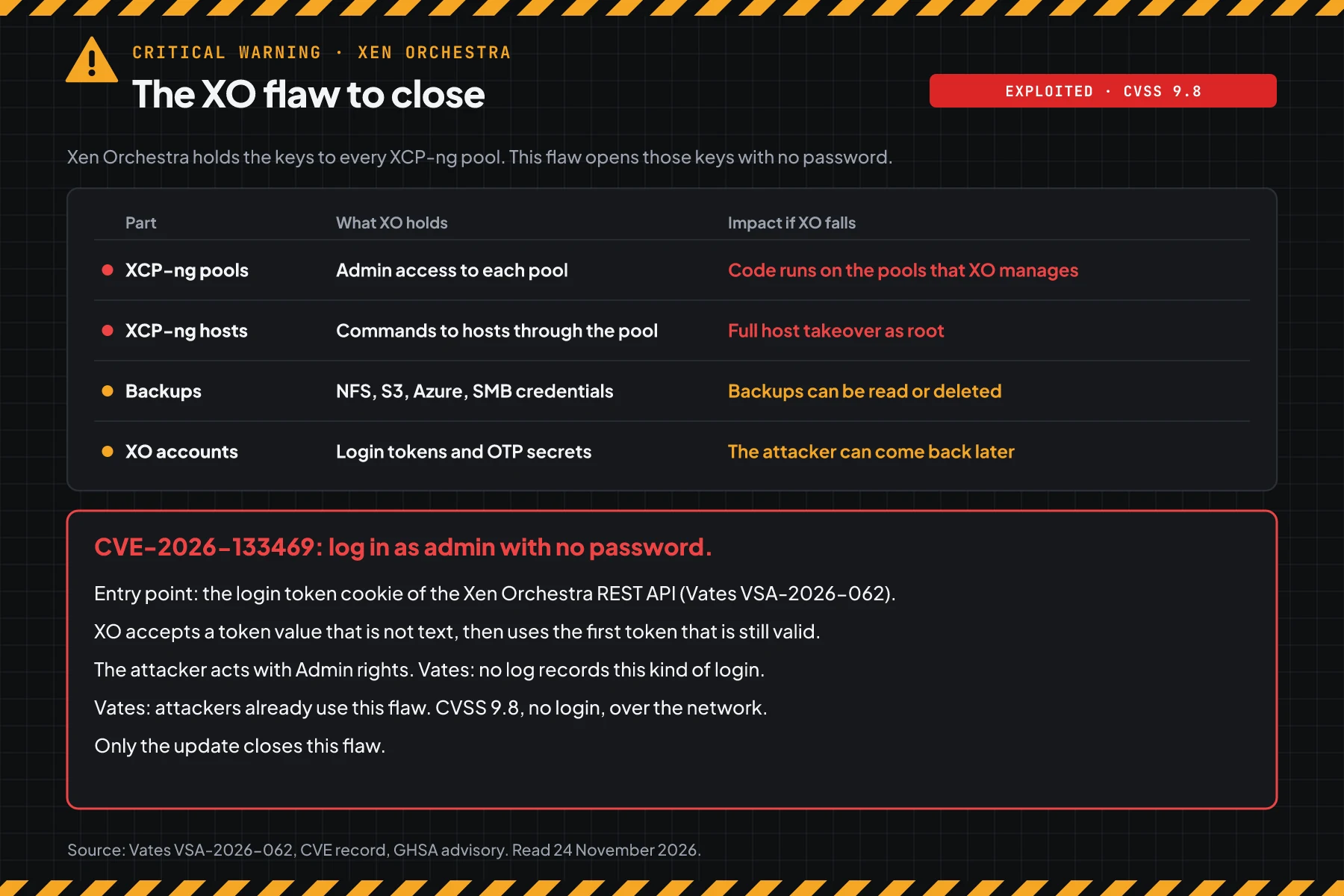
In Indonesia, hosting providers, VPS sellers, campuses, and IT teams that left VMware use XCP-ng. XO is the door to all of those hosts. This table shows what is behind that door.
| Part | What XO holds | Impact if XO falls |
|---|---|---|
| XCP-ng pools | Admin access to each pool | Code runs on the pools that XO manages |
| XCP-ng hosts | Commands to hosts through the pool | Full host takeover as root |
| Backups | NFS, S3, Azure, and SMB credentials | Backups can be read or deleted |
| XO accounts | Login tokens and OTP secrets | The attacker can come back later |
Rama Digital analysis: for this reason, a virtualization console is a high value target. The same pattern shows in the vCenter flaw CVE-2026-123890. One admin login can open every VM, every backup, and every host.
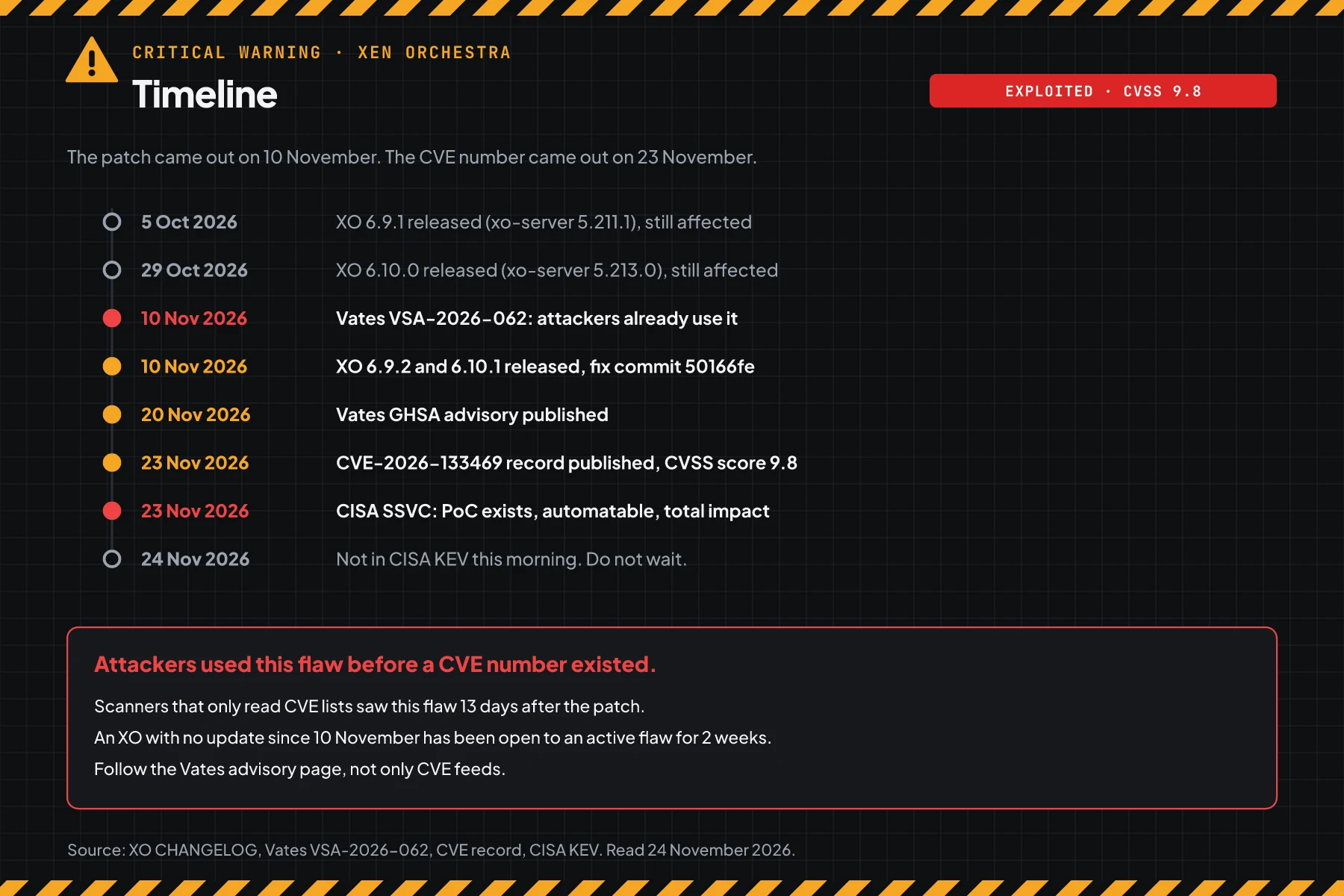
The XO CHANGELOG shows XO 6.9.1 on 5 October and XO 6.10.0 on 29 October 2026. Both are still affected. XO 6.9.2 and 6.10.1 came out on 10 November, the same day as the Vates advisory.
The GHSA advisory came out on 20 November, and the CVE record came out on 23 November. The CISA SSVC rating on the same day says that attacks can be automated. The "attacks first, CVE number later" pattern also shows in the LiteLLM flaw CVE-2026-40217.
How it works: a login token that XO does not check
This part uses the official vendor summary. Its purpose is to help you pick the correct steps, not to explain an attack.
Summary from the vendor
Vates VSA-2026-062 says that the cookie parser in the XO REST APIAPIThe official door 2 systems use to exchange data, without anybody copying it by hand.Open the glossary turns a specific login token value into an empty object. REST authentication passes that object on with no check that the token is text. The token collection then returns the first token that is still valid.
XO then treats the attacker as the owner of that token, with Admin rights. A token route in the REST API then gives login token IDs that the attacker can use again. We do not write that cookie value in this article.
CVSS 3.1 vector: AV:N/AC:L/PR:N/UI:N/S:U/C:H/I:H/A:H. This means: over the network, low complexity, no account, no victim click, with full impact. Weakness types: CWE-287 and CWE-1287.
The VSA says that an XO compromise can lead to code execution on the pools that XO manages and a full XCP-ng host takeover as root. Vates also writes that a login through this flaw leaves no log in XO.
Rama Digital analysis: this flaw needs 1 login token that is still valid. An XO in daily use almost always has that token, because admins log in for daily work.
Exploit status as of 24 November 2026
This status can change. Vates already saw real attacks, so do steps 1 to 3 today.
| Source | Status |
|---|---|
| Vates VSA-2026-062 (10 November) | Critical. Attackers already use it. Vates gives 8 C2 IPs and 1 Tor address |
| CVE record (23 November) | CVSS 3.1 9.8, over the network, no login, no victim click. CWE-287 and CWE-1287 |
| CISA SSVC (23 November) | Exploitation: poc. Automatable: yes. Technical impact: total |
| CISA KEV | Not in the list on the morning of 24 November 2026 |
| Public attack sample | CISA SSVC records that a PoC exists. We do not link or quote it |
Who is at highest risk
Every XO below 6.9.2, and XO 6.10.0, needs the update. The order in this table helps you pick which XO to do first.
| XO setup | Risk | Reason |
|---|---|---|
| A vulnerable version, the XO login page open to the internet | Highest | With no password, anyone can try from anywhere |
| A vulnerable version, the XO network shared with many people, guest VMs, or vendors | High | 1 hacked device on that network can open XO |
| A vulnerable version, XO on a dedicated management network or VPN | Lower | Still update. VPN accounts and admin laptops can leak |
| XO 6.9.2, 6.10.1, or later | Safe for this CVE | Still look for signs in step 5, because attacks ran before the update |
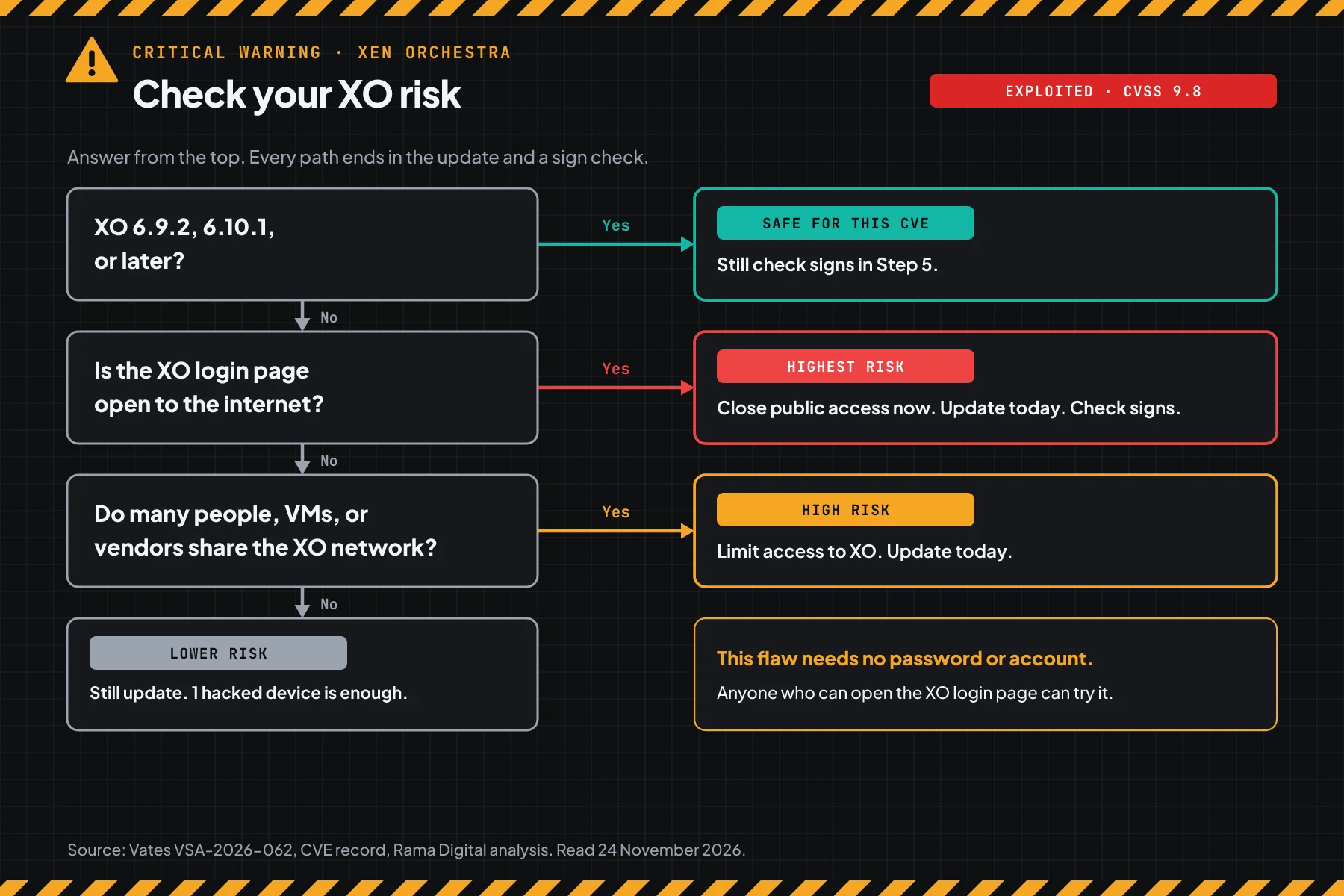
Rama Digital analysis: this flaw needs no password and no account. Thus the only condition is network access to the XO login page. Each device on the same network as XO is an entry point.
The XCP-ng host itself does not have this flaw. The flaw is in XO. But an XO that falls opens every host that it manages, so step 5 still runs on each host.
Affected versions and fixed versions
Match the version of each XO with this table. Source: the CVE-2026-133469 record and Vates VSA-2026-062.
| Version | CVE-2026-133469 status | Action |
|---|---|---|
| XO 6.10.1, xo-server 5.213.1 | Safe, latest channel | Look for signs in step 5 |
| XO 6.9.2, xo-server 5.211.2 | Safe, stable channel | Look for signs in step 5 |
| XO 6.10.0, xo-server 5.213.0 | Vulnerable | Update today |
| XO before 6.9.2, xo-server before 5.211.2 | Vulnerable | Update today |
| XOA | Vulnerable until the update to 6.9.2 or 6.10.1 | Update from the Updates menu |
| XO from sources (git) | Check the file content, not the version number | Pull master, build again, restart |
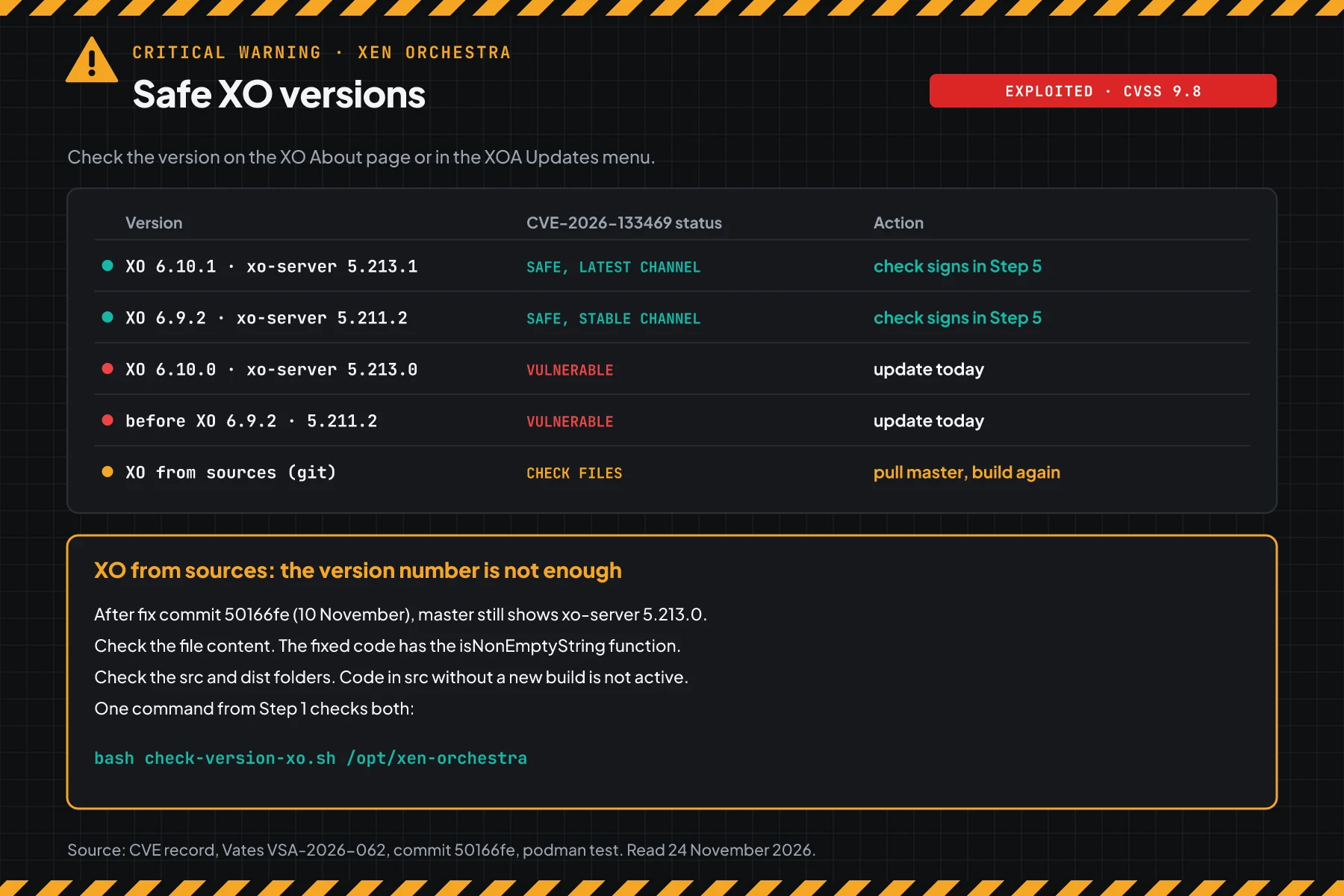
XO from sources: the version number is not enough proof
- Vates asks users of XO from sources to update to the latest master.
- In the fix commit 50166fe, the xo-server
package.jsonfile still shows 5.213.0. Thus a fixed XO from sources and an unfixed one show the same version. - The fixed version uses the
isNonEmptyStringfunction inxo-mixins/authentication.mjs. The file before the fix does not use it. - The xo-server process reads the
distfolder fromyarn build. New code insrcwith no build is not active.
Rama Digital analysis: for this reason, the step 1 script reads the file content in src and dist, not only the version number.
Before you start
- Admin access to XO, or shell access to the XO VM.
- A list of every XO and XOA, including test XO and lab XO.
- Root access to each XCP-ng host for step 5.
- Access to the reverse proxy or firewall in front of XO.
- A list of the secrets that XO holds: host root passwords, the pool secret, backup remote credentials, user accounts, OTP secrets, and the mail server password.
- A change window. An xo-server restart cuts console sessions for a few minutes. VMs on the hosts keep running.
Step 1: Check the XO version and the xo-server code
The manual way: open the About page in XO, or the Updates menu in XOA, then read the version. For XO from sources and for many XO servers, use the script.
Save this script as check-version-xo.sh. The script reads an XO version, an xo-server version, or an XO folder, then compares the result with the vendor data. The script changes nothing.
#!/usr/bin/env bash
# Check Xen Orchestra for CVE-2026-133469 (Vates VSA-2026-062, login without a password, CVSS 9.8).
# Use: bash check-version-xo.sh 6.10.0                (XO release version)
#   or: bash check-version-xo.sh 5.213.0               (xo-server version from the About page)
#   or: bash check-version-xo.sh /opt/xen-orchestra    (XO from sources folder, or xo-server package folder)
# Affected (CVE record and VSA): XO before 6.9.2, and 6.10.0. xo-server before 5.211.2, and 5.213.0.
# Fix: XO 6.9.2 (stable) and 6.10.1 (latest), xo-server 5.211.2 and 5.213.1.
# Folder mode looks for the isNonEmptyString function from fix commit 50166fe. Rama Digital analysis.
# Exit code: 0 SAFE, 1 VULNERABLE or UPDATE, 2 CANNOT CONFIRM.
set -u
export LC_ALL=C
clean() { local x=${1//[![:print:]]/}; printf '%s' "${x:0:90}"; }
fail() { echo "Result : CANNOT CONFIRM. $1"; echo "         Without proof of the fix, treat XO as not safe."; exit 2; }
vulnerable() {
  echo "Result : VULNERABLE to CVE-2026-133469. Vates: attackers already use this flaw."
  echo "         Update to XO 6.9.2 (stable) or 6.10.1 (latest) today."
}

rate() {
  local a b c
  IFS=. read -r a b c <<< "$1"
  a=$((10#$a)) b=$((10#$b)) c=$((10#$c))
  if (( a == 6 )); then
    if (( b < 9 || (b == 9 && c < 2) || (b == 10 && c < 1) )); then vulnerable; return 1; fi
  elif (( a == 5 )); then
    if (( b == 213 && c == 0 )); then
      vulnerable
      echo "         Note: XO from sources after 10 November also shows 5.213.0. Check the folder."; return 1
    fi
    if (( b < 211 || (b == 211 && c < 2) )); then vulnerable; return 1; fi
    if (( b == 212 )); then echo "Result : UPDATE. xo-server 5.212 is not in the vendor data. Install 5.213.1 or later."; return 1; fi
  elif (( a < 5 )); then
    vulnerable; return 1
  fi
  echo "Result : SAFE for CVE-2026-133469. Still look for attack signs in Step 5."
  return 0
}

folder() {
  local d=${1%/} p f ver s fixed=0 missing=0 src=-1 dist=-1
  if [ -f "$d/packages/xo-server/package.json" ]; then p=$d/packages/xo-server; else p=$d; fi
  [ -r "$p/package.json" ] && grep -q '"name": *"xo-server"' "$p/package.json" \
    || fail "Folder $(clean "$d") is not XO from sources or an xo-server package."
  ver=$(grep -m 1 -oE '"version": *"[^"]{1,30}"' "$p/package.json" | sed -E 's/.*"([^"]*)"$/\1/')
  echo "Source : folder $(clean "$d")"
  echo "Package: xo-server $(clean "$ver")"
  for f in src dist; do
    [ -r "$p/$f/xo-mixins/authentication.mjs" ] || continue
    if grep -q 'isNonEmptyString' "$p/$f/xo-mixins/authentication.mjs"; then s="fix present"; fixed=$((fixed + 1)); [ $f = src ] && src=1 || dist=1
    else s="fix MISSING"; missing=$((missing + 1)); [ $f = src ] && src=0 || dist=0; fi
    printf 'File   : %-34s %s\n' "$f/xo-mixins/authentication.mjs" "$s"
  done
  (( fixed + missing )) || fail "No authentication.mjs file in this folder."
  if (( missing == 0 )); then
    echo "Result : SAFE for CVE-2026-133469. Make sure xo-server restarted after the build."; return 0
  elif (( src == 1 && dist == 0 )); then
    echo "Result : UPDATE. The source code has the fix, the build output does not."
    echo "         Run yarn build, then restart xo-server."; return 1
  fi
  vulnerable
  echo "         XO from sources: pull the latest master, yarn, yarn build, then restart xo-server."; return 1
}

[ $# -ge 1 ] || fail "Give an XO version, an xo-server version, or an XO folder."
if [ -d "$1" ]; then
  folder "$1"; exit $?
elif [[ $1 =~ ^- ]]; then
  fail "Unknown option $(clean "$1")."
fi
echo "Source : text"
[[ $1 =~ ^v?([0-9]{1,3}\.[0-9]{1,4}\.[0-9]{1,4})([.+-][A-Za-z0-9.+-]*)?$ ]] || fail "Cannot read version $(clean "$1")."
ver=${BASH_REMATCH[1]}
echo "Version: $ver"
rate "$ver"; exit $?
# XOA or packaged XO: write the version from the XO About page, or from the XOA Updates menu
bash check-version-xo.sh 6.10.0
# The xo-server version also works
bash check-version-xo.sh 5.213.0
# XO from sources: give the XO clone folder. The script reads the file content, not the version number.
bash check-version-xo.sh /opt/xen-orchestra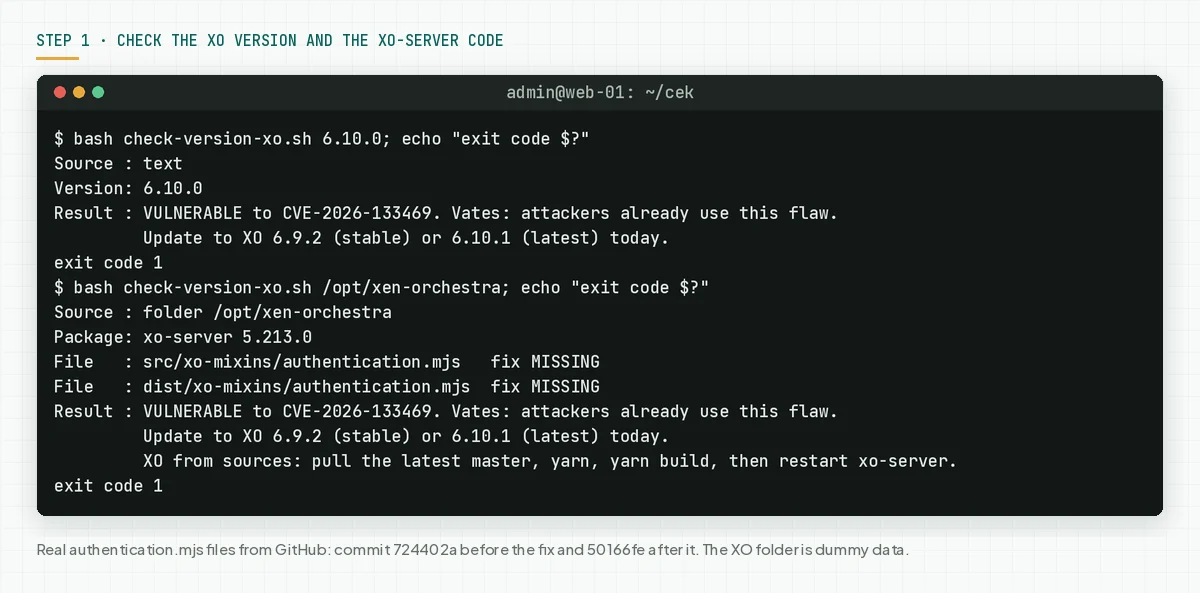
Check the result:
- "VULNERABLE": a version or files with no fix. Do steps 2 and 4 now, then step 3 today.
- "UPDATE": the source code has the fix but the build does not, or the version is not in the vendor data. Finish step 3.
- "SAFE for CVE-2026-133469": no version action for this CVE. Still run step 5.
- "CANNOT CONFIRM": the version or folder is not readable. Treat XO as not safe.
We tested the script with 21 version cases and 4 folder cases: a v prefix, a -beta suffix, broken text, control characters, a folder with no fix, src only, and a folder that is not XO. All results were correct.
Step 2: Check if the XO login page answers from outside
This flaw needs no password. Thus the most important question is who can open the XO login page.
Save this script as check-exposure-xo.sh. The script opens the /signin page with GET and reads its title. The script sends no token, cookie, or password.
#!/usr/bin/env bash
# Check if the Xen Orchestra login page answers from the network where this script runs (CVE-2026-133469).
# The script only opens the /signin page with GET. It sends no token, cookie, or password.
# Use: bash check-exposure-xo.sh https://xo.example.test   (XO address or the reverse proxy in front of it)
# Run it 2 times: from the management network and from outside the office network (a laptop on mobile data).
# Exit code: 0 CLOSED or UNREACHABLE, 1 OPEN or CHECK, 2 CANNOT CONFIRM.
set -u
export LC_ALL=C
clean() { local x=${1//[![:print:]]/}; printf '%s' "${x:0:90}"; }
[ $# -eq 1 ] && [[ $1 =~ ^https?://[A-Za-z0-9.:_-]+/?$ ]] \
  || { echo "Result: CANNOT CONFIRM. Give 1 address, for example https://xo.example.test"; exit 2; }
command -v curl >/dev/null || { echo "Result: CANNOT CONFIRM. This machine has no curl."; exit 2; }
b=${1%/}
# XO often uses a self-signed certificate, so -k. The script only reads the page title.
body=$(curl -sk -L --max-redirs 3 --max-time 10 -w '\n%{http_code}' "$b/signin" | head -c 200000)
k=${body##*$'\n'}
[[ $k =~ ^[0-9]{3}$ ]] || k=000
xo=0; [[ ${body%$'\n'*} == *"<title>Xen Orchestra"* ]] && xo=1
echo "Address: $(clean "$b")/signin"
echo "Answer : HTTP $k"
if [ "$k" = 000 ]; then
  echo "Result : UNREACHABLE from this network. From outside the office, this is the correct result."
  echo "         From the management network, check the address and port."; exit 0
elif [ "$k" = 200 ] && (( xo )); then
  echo "Result : OPEN. The XO login page answers from this network."
  echo "         If this is an outside network, anyone can try this flaw. Update, then close access."; exit 1
elif [ "$k" = 403 ]; then
  echo "Result : CLOSED. A reverse proxy or firewall denies this network."; exit 0
elif [ "$k" = 401 ]; then
  echo "Result : CLOSED. An extra login sits in front of XO. Still update XO."; exit 0
fi
echo "Result : CHECK. Unusual answer. Open this address in a browser from the same network."
exit 1
# 1. From outside the office network, for example a laptop on mobile data, to the public XO address
bash check-exposure-xo.sh https://xo.example.test
# 2. From the management network, to the same XO address
bash check-exposure-xo.sh https://xo.example.test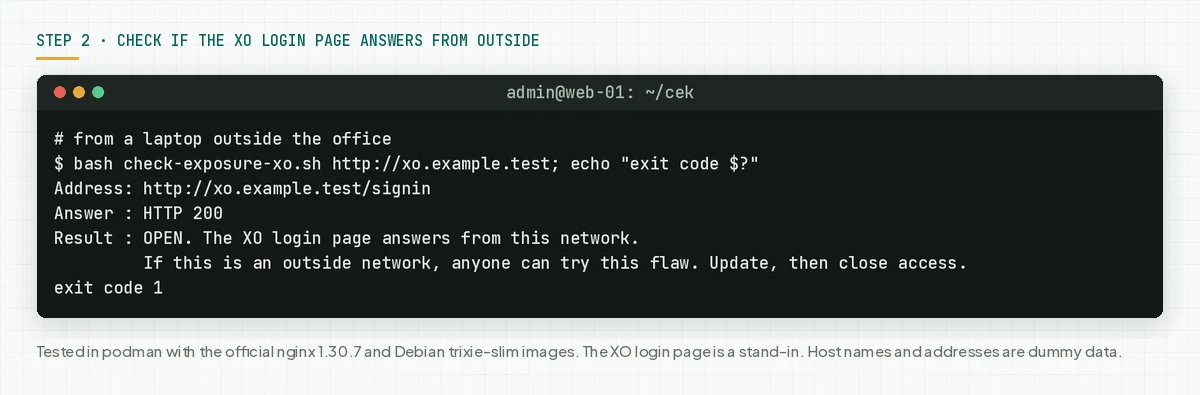
Check the result:
- "OPEN" from outside the office: the highest risk. Do step 4 now.
- "OPEN" from the management network: a normal result. Make sure that only admins are on that network.
- "CLOSED" or "UNREACHABLE" from outside the office: the correct result. Still update XO.
- "CHECK": an unusual answer. Open that address in a browser from the same network.
Step 3: Update XO to 6.9.2 or 6.10.1, then check again
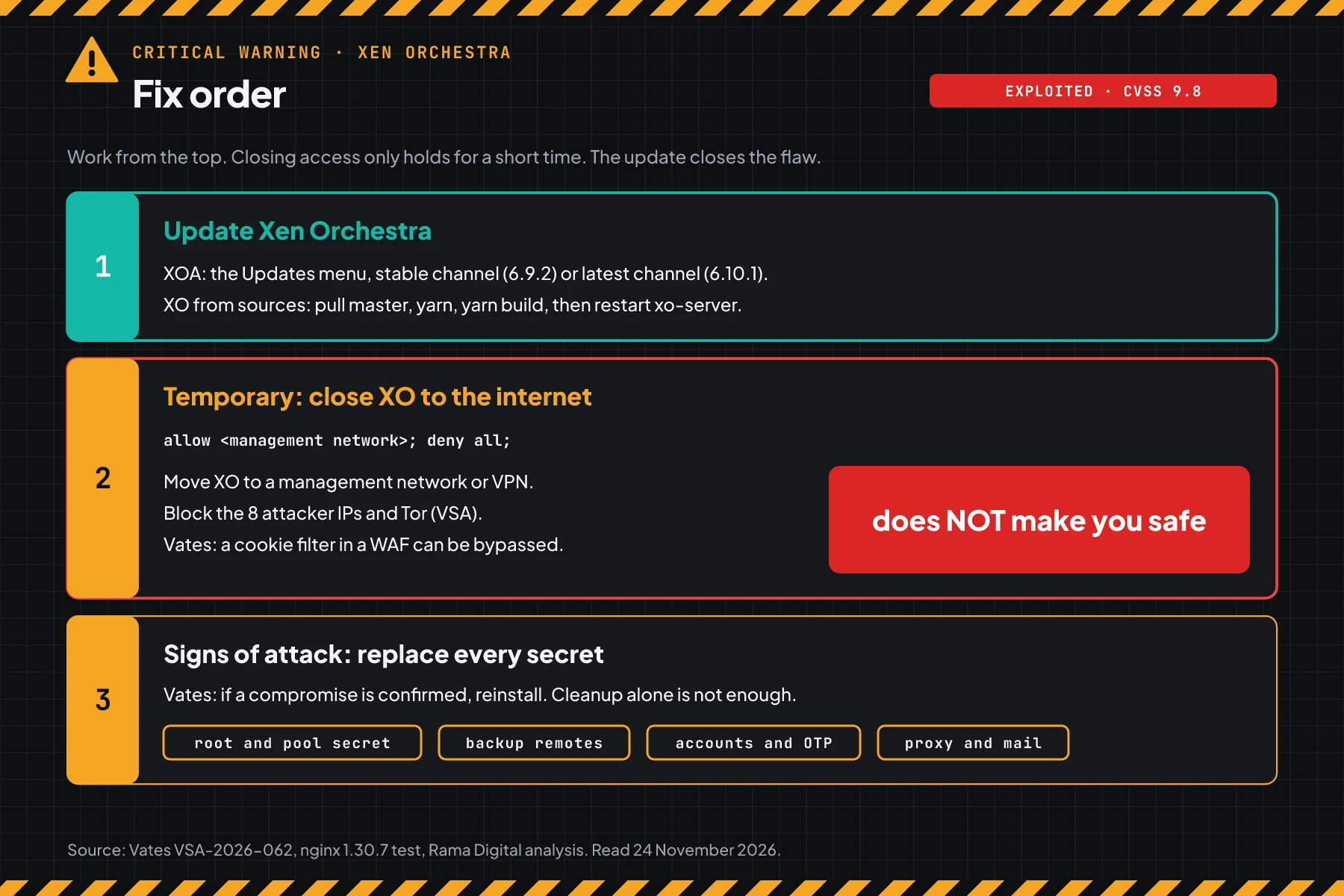
Only the update closes the flaw. Vates ships the fix in the stable channel (6.9.2) and the latest channel (6.10.1). Back up the XO configuration first.
3a. XOA
In XO, open the XOA menu, then Updates. Make sure that the channel is stable or latest, then run the update. After the update, read the version again and run the step 1 script. We did not run an XOA update in our test.
3b. XO from sources
Pull the latest master, install the dependencies, build again, then restart xo-server. If a third party script installed XO, run the update mode of that script, then check the build folder with the step 1 script.
# XO from sources. Back up the XO folder and the xo-server configuration file first.
cd /opt/xen-orchestra
git checkout master
git pull --ff-only
yarn
yarn build
# Restart xo-server. The service name can be different on your server.
systemctl restart xo-server
# Check again. The result must be SAFE.
bash check-version-xo.sh /opt/xen-orchestra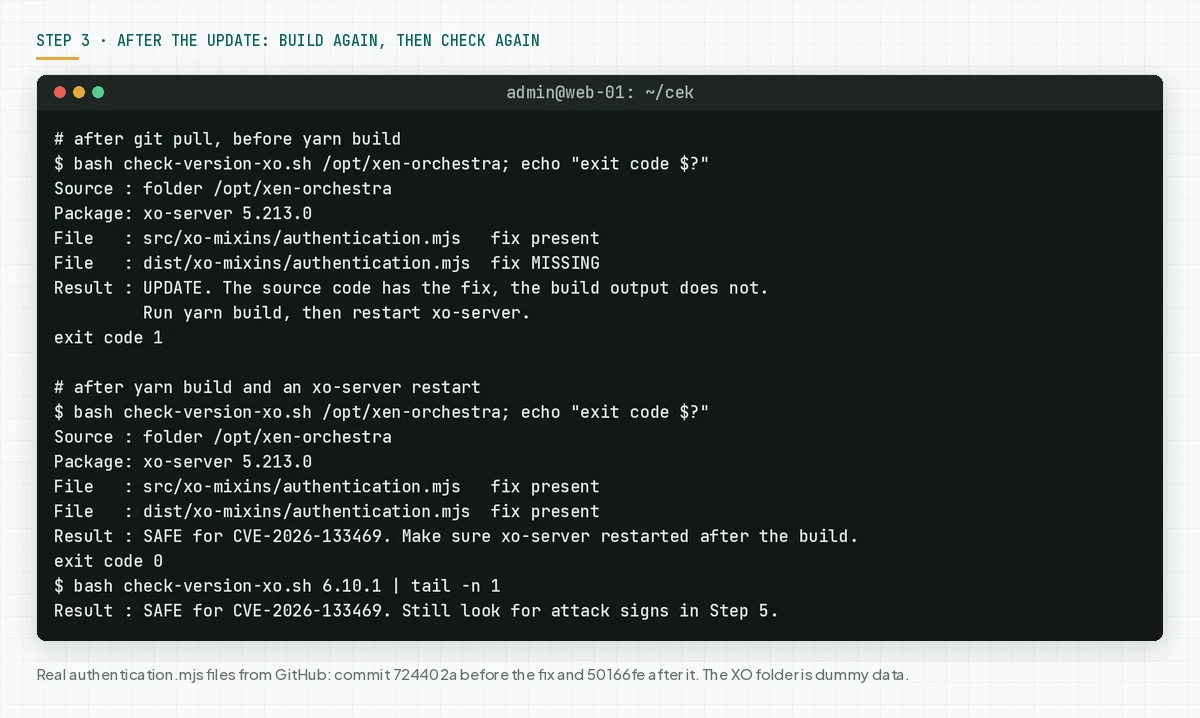
Look at the first block in the image. After git pull, the code in src has the fix, but dist does not. XO stays vulnerable until yarn build and the restart are done.
Check the result: run the step 1 script again. Each XO must print "SAFE for CVE-2026-133469". Then log in to XO and open 1 pool to make sure that the console works.
Step 4: Close XO to the internet, this does NOT make it safe
Use this step until the update is done, and keep it after. This step does NOT make an old XO version safe. Devices that are still allowed in can still use this flaw.
Vates VSA-2026-062 asks for 3 things: do not expose XO to the internet, put XO on a dedicated management network, and block the attacker infrastructure. In nginx, use the allow list from the nginx access module documentation.
# Example: /etc/nginx/conf.d/xo-proxy.conf. Change 198.51.100.0/24 to your management network.
server {
    listen 8080;
    access_log /var/log/nginx/xo-access.log combined;

    allow 198.51.100.0/24;
    deny  all;

    location / {
        proxy_pass http://127.0.0.1:80;
        proxy_http_version 1.1;
        proxy_set_header Upgrade $http_upgrade;
        proxy_set_header Connection "upgrade";
        proxy_set_header Host $host;
    }
}
# Test the configuration, then reload nginx
nginx -t && systemctl reload nginx
# Check again from outside the office network. The result must be CLOSED or UNREACHABLE.
bash check-exposure-xo.sh https://xo.example.test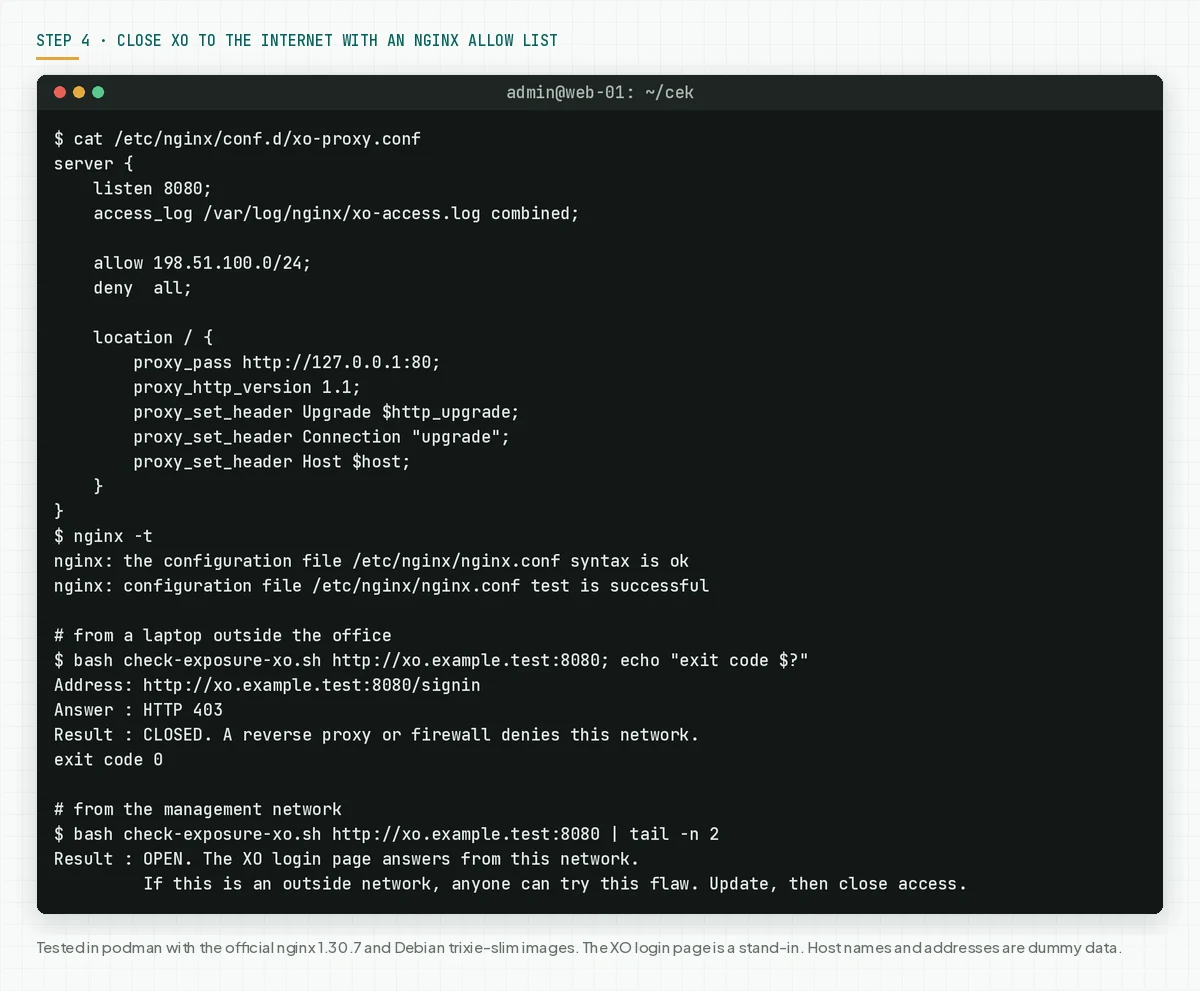
The allow list in nginx only stops access through nginx. If the xo-server port itself is open to other networks, close that port with the XO VM firewall. Another flaw in nginx itself is in the nginx HTTP/2 flaw CVE-2026-123007.
Block the attacker IPs and Tor
The VSA gives 8 C2 IPs and 1 Tor address. Vates asks you to block traffic in and out to those addresses, and to block Tor. We did not test these iptables commands on an XCP-ng host.
# 8 attacker IPs from VSA-2026-062. Block them in and out on the XO VM and on each XCP-ng host.
# These iptables rules go away at reboot. Also add them to the edge firewall.
for ip in 91.211.251.112 193.148.56.72 37.221.208.216 45.66.35.11 64.65.0.120 64.65.62.160 89.47.51.90 92.60.37.247; do
  iptables -I INPUT -s "$ip" -j DROP
  iptables -I OUTPUT -d "$ip" -j DROP
done
Vates also mentions a filter for the empty token in a WAF or reverse proxy. Vates gives a warning: other formats can get past that rule. If you add that filter, take the patterns directly from the VSA, and still update.
Check the result: run step 2 again from outside the office network. The result must be CLOSED or UNREACHABLE. Remember: XO stays vulnerable until step 3 is done.
Step 5: Look for attack signs on the XCP-ng hosts
The update closes the flaw, but it does not remove a backdoor that is already in place. Thus look for attack signs on each XCP-ng host.
Vates gives patterns from the known campaign: a VM named pivot2, a VM with the hvm_serial: file parameter, -serial file: traces in the xensource log, and ustar files. Rama Digital analysis: this script also looks for live TCP connections to the 8 attacker IPs.
Save this script as check-signs-xo.sh. Run it on each XCP-ng host as root. The script changes, deletes, or sends nothing.
#!/usr/bin/env bash
# Look for attack signs of CVE-2026-133469 on an XCP-ng host. Patterns from Vates VSA-2026-062 (the known campaign).
# The check for connections to attacker IPs is a Rama Digital analysis addition.
# The script only reads. It changes, deletes, or sends nothing.
# Use (on each XCP-ng host, as root): bash check-signs-xo.sh
# Exit code: 0 NO SIGNS YET, 1 CHECK, 2 CANNOT CONFIRM.
set -u
export LC_ALL=C
clean() { local x=${1//[![:print:]]/}; printf '%s' "${x:0:70}"; }
C2="91.211.251.112 193.148.56.72 37.221.208.216 45.66.35.11 64.65.0.120 64.65.62.160 89.47.51.90 92.60.37.247"
P=() skip=0
[ "$(id -u)" = 0 ] || echo "Note: not root. Some files may not be readable."

# 1. VMs with hvm_serial file, and a VM named pivot2 (Vates).
if command -v xe >/dev/null 2>&1; then
  list=$(xe vm-list params=name-label,platform 2>/dev/null)
  ser=0 piv=0
  while IFS= read -r n; do ser=$((ser + 1)); P+=("VM $(clean "$n") uses hvm_serial file"); done \
    < <(printf '%s\n' "$list" | grep -B1 'hvm_serial: file' | grep 'name-label' | sed 's/^[^:]*: //')
  while IFS= read -r n; do piv=$((piv + 1)); P+=("VM named $(clean "$n")"); done \
    < <(printf '%s\n' "$list" | grep 'name-label' | sed 's/^[^:]*: //' | grep -i 'pivot2')
  echo "VMs with hvm_serial file  : $ser"
  echo "VMs named pivot2          : $piv"
else
  echo "VMs                       : SKIPPED, no xe command. Run this on the XCP-ng host."; skip=1
fi

# 2. -serial file: traces in the xensource log (Vates).
n=0
for f in /var/log/xensource.log*; do
  [ -r "$f" ] || continue
  c=$(zgrep -c -- '-serial file:' "$f" 2>/dev/null); c=${c:-0}
  (( c )) && { n=$((n + c)); P+=("$(clean "$f") has -serial file: ($c)"); }
done
if compgen -G '/var/log/xensource.log*' >/dev/null; then echo "Log lines, -serial file:  : $n"
else echo "Log lines, -serial file:  : SKIPPED, no /var/log/xensource.log."; skip=1; fi

# 3. Files that the attacker leaves (Vates).
n=0
for f in /etc/ld.so.preload /.ustar* /etc/cron.d/zz-ustar*; do
  [ -e "$f" ] || continue
  n=$((n + 1)); P+=("file $(clean "$f")")
done
echo "ustar and preload files   : $n"

# 4. Live TCP connections to the attacker IPs from the VSA (Rama Digital analysis).
n=0
for ip in $C2; do
  IFS=. read -r a b c d <<< "$ip"
  h=$(printf '%02X%02X%02X%02X' "$d" "$c" "$b" "$a")
  k=$(awk -v h="$h" 'NR > 1 && toupper(substr($3, 1, 8)) == h' /proc/net/tcp 2>/dev/null | wc -l)
  (( k )) && { n=$((n + k)); P+=("$k connections to $ip"); }
done
echo "Connections to attacker IP: $n"

for x in "${P[@]:0:12}"; do echo "  CHECK  $x"; done
if (( ${#P[@]} )); then
  echo "Result: CHECK. Signs of the campaign that Vates reports. Cut the host from the internet and keep evidence."
  echo "        Vates: if a compromise is confirmed, reinstall and change all passwords and secrets."; exit 1
elif (( skip )); then
  echo "Result: CANNOT CONFIRM. Some checks were skipped. Run as root on the XCP-ng host."; exit 2
fi
echo "Result: NO SIGNS YET of the known campaign. Vates: without these signs, the host is not proven clean."
exit 0
# Run it on each XCP-ng host, as root. The script only reads.
bash check-signs-xo.sh
# Manual check from the VSA: look for a VM named pivot2 in the list of running VMs
xe vm-list power-state=running params=name-label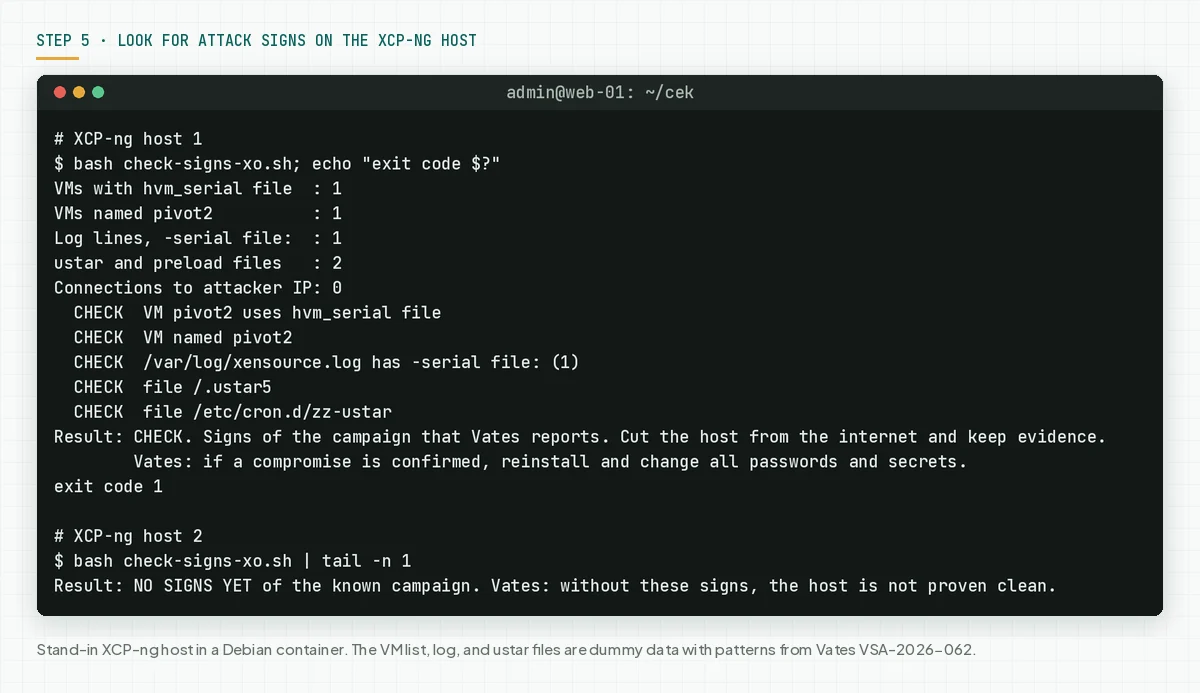
Script limits: old xensource logs can be rotated already. Other attackers can use other tools and addresses. Vates writes that without these signs, the host is not proven clean.
Manual checks in XO
- Open the XO user list. Look for accounts that the team does not know.
- Open the login token list. Look for tokens that the team did not make.
- Look for new VMs, snapshots, backup jobs, or backup remotes that the team did not make.
- Vates gives HTTP request patterns for tcpdump or Wireshark. The default nginx log does not record cookies, so those patterns need a traffic capture.
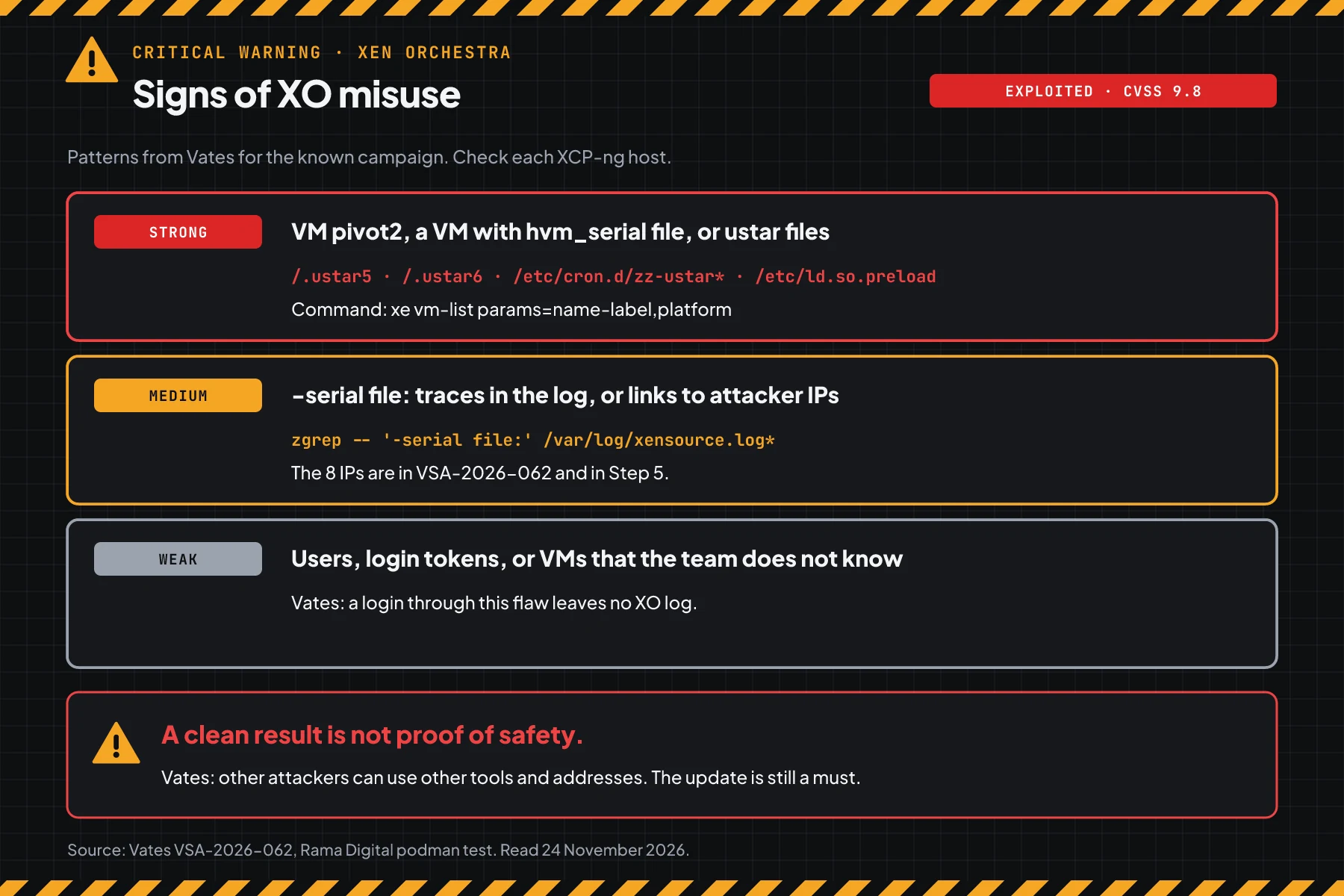
Check the result: "NO SIGNS YET" does not prove that the host is clean. "CHECK" means: match each line with team work. A line that nobody knows is an incident. Follow this order:
- Cut the host and the XO VM from the internet. Do not shut them down yet.
- Keep the xensource log, the VM list, and the ustar files as evidence, before you change anything.
- Block the 8 attacker IPs and Tor, as in step 4.
- Update XO to 6.9.2 or 6.10.1.
- Replace all passwords and secrets: root, the pool secret, backup remotes, user accounts, OTP secrets, proxy, and the mail server.
- Reinstall each host with a confirmed compromise. Vates says that cleanup alone does not remove every backdoor for certain.
Example: 1 morning of response for 2 XO servers and 2 hosts
This simulation uses dummy data. The XO names, hosts, times, and results are not customer data.
| Time (WIB) | Dummy system | What was checked | Result | Action |
|---|---|---|---|---|
| 08.30 | xo-office (XOA 6.10.0, latest channel) | Steps 1 and 2 | VULNERABLE, XO login open from the internet | nginx allow list at 08.45, update to 6.10.1 at 09.30 |
| 09.00 | xo-lab (XO from sources, master of 1 November) | Step 1 | VULNERABLE, files with no fix | git pull, yarn build, and restart at 10.00, then check again: SAFE |
| 10.30 | xcp-01 | Step 5 | NO SIGNS YET | Record the result, check again tomorrow |
| 10.45 | xcp-02 | Step 5 | CHECK, ustar files found | Cut from the internet, keep evidence, replace all secrets, reinstall the host |
Lessons from this simulation: do the XO that is open to the internet first. XO from sources needs a new build, not only a git pull. One host with signs means that every pool secret must be replaced.
Who does the work
The infrastructure team or virtualization team usually owns XO and the XCP-ng hosts. The network team owns the reverse proxy and firewall. The storage owner holds the backup credentials.
Rama Digital advice: record each virtualization console, its version, the networks that can open it, and the secrets that it holds. A flaw in another virtualization layer is in the LXD and Incus certificate flaw CVE-2026-112816.
Checklist for today
- List every XO and XOA. Owner: infrastructure team. Proof: a list of names, versions, and install methods.
- Check the version and files with step 1. Owner: XO admin. Proof: the script output.
- Check exposure with step 2 from outside the network. Owner: XO admin. Proof: the script output.
- Close XO to the internet with step 4. Owner: network team. Proof: the step 2 output with the result CLOSED.
- Update to 6.9.2 or 6.10.1. Owner: XO admin. Proof: the step 1 output after the update.
- Run step 5 on each XCP-ng host. Owner: XCP-ng admin. Proof: the script output for each host.
- Replace secrets if a vulnerable XO was ever open or signs exist. Owner: infrastructure team. Proof: a list of the replaced secrets.
Questions and answers
Our XO is only on the internal network. Must we still update?
Yes. This flaw needs no password. Each device that can open the XO login page can try it, including a laptop or VM that is already hacked.
Does a cookie filter in a WAF or nginx close this flaw?
No. Vates writes that other formats can get past that rule. Only the update to 6.9.2 or 6.10.1 closes the flaw.
Why does XO from sources still show 5.213.0 after the update?
Master after the fix commit still shows xo-server 5.213.0. Check the file content with the step 1 script, then make sure that the build and restart ran.
Do the XCP-ng hosts also need an update for this flaw?
This flaw is in XO, not in the hosts. The XO update closes the flaw. Still run step 5 on each host, because an XO that falls can run code on the hosts.
Why does the XO log not record this attack?
Vates writes that a login through this flaw leaves no log in XO. Thus look for signs on the XCP-ng hosts and in network traffic.
Must we change passwords after the update?
Yes, if a vulnerable XO was ever open to a wide network or step 5 printed CHECK. Replace root, the pool secret, backup remotes, accounts, OTP, proxy, and mail.
This flaw is not in CISA KEV yet. Is it still urgent?
Yes. Vates itself reported active attacks on 10 November 2026. CISA SSVC rates the attack as automatable. KEV can follow at any time.
Does a clean result from the signs script prove that the host is safe?
No. Those patterns come from 1 campaign. Other attackers can use other tools and addresses, and old logs can be rotated already.
Next step
The limits that still apply: step 4 does not make XO safe, and the update does not remove a backdoor that is already in place. If your hosts show signs in step 5, or you need help with a server audit and recovery, use Vibe Code Rescue. For 1 urgent problem today, book a 30 minute session.
Sources
- Vates VSA-2026-062: the flaw summary, impact, affected versions, fixed package versions, detection patterns, C2 IPs, temporary steps, and the reinstall advice.
- The GHSA advisory: the GitHub advisory for xen-orchestra, published on 20 November 2026.
- The CVE-2026-133469 record: the CVSS 3.1 score and vector, the CWEs, the version ranges, and the CISA SSVC rating on 23 November 2026.
- The fix commit 50166fe: the
isNonEmptyStringfunction and the xo-server version on master. - The XO CHANGELOG: the release dates of XO 6.9.1, 6.10.0, 6.9.2, and 6.10.1.
- CISA KEV: the status as of 24 November 2026, this CVE is not in the list.
- The nginx access module documentation: the allow and deny rules.