Direct answer: CVE-2026-130169 is a flaw in AutoGPT Platform with CVSS score 10.0. The .env.default file carries the same JWT key in every install, so anyone with that key can log in as a user or an admin. Today, upgrade to 0.8.0 or later.
The 0.8.0 fix came out on 19 September 2026. The GHSA-24q6-6h89-f9p7 advisory came out on 5 October. The CVE number came out only on 23 November, so scanners that only read CVE feeds are 7 weeks late.
Main condition: On 24 November 2026, this flaw is not in CISA KEV, and official sources report no attacks in the wild. But the default key is in the public repo. Limit: this article has no key value, no token sample, and no attack steps.
We read the GHSA-24q6-6h89-f9p7 advisory, the CVE-2026-130169 record, the fix PR #14519, the 0.8.0 release notes, and the AutoGPT install guide on 24 November 2026. We ran the scripts in steps 1, 2, 4, and 5 in podman with real AutoGPT code from the GitHub tags 0.7.4 and 0.12.0.
Important limit: The rest_server container and the outside server in our test are stand-ins. The autogpt_libs code in them comes from the GitHub tags. We did not run a full docker compose build, the vendor upgrade steps, an upgrade from Supabase, or cloud firewall rules.
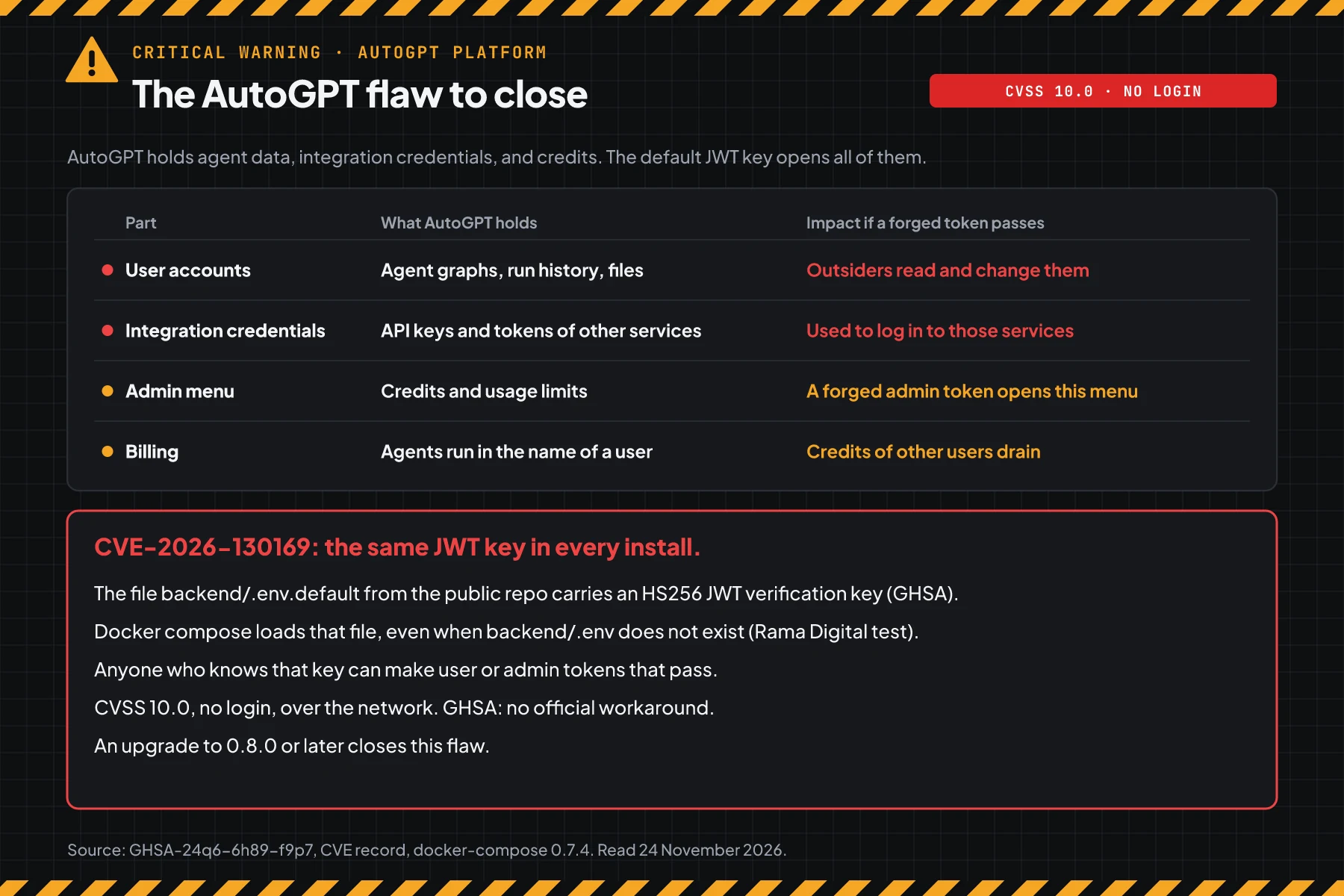
Problem: AutoGPT holds the keys to other services
AutoGPT Platform is an open source platform from Significant Gravitas to build and run AI agents. Many teams install it on a VPS with Docker Compose, from the GitHub repo.
In Indonesia, its users are teams that run their own AI agents, agencies, and startups that sell automation. Agents need access to other services, so AutoGPT stores the credentials of those services. This table shows what it holds.
| Part | What AutoGPT holds | Impact if a forged token passes |
|---|---|---|
| User accounts | AgentAI agentAn AI program that performs work steps by itself, for example reading a message, drafting a reply, and recording the result.Open the glossary graphs, run history, workspace files | Outsiders read and change them |
| Integration credentials | APIAPIThe official door 2 systems use to exchange data, without anybody copying it by hand.Open the glossary keys and OAuth tokens of other services | Used to log in to those services |
| Admin menu | Credits and usage limits | A forged admin token opens this menu |
| Billing | Agents run in the name of a user | User credits and API quota drain |
Rama Digital analysis: an AI agent platform is a high-value target, because 1 account opens many API keys. The same pattern is in the LiteLLM flaw CVE-2026-40217 and the GPUStack flaw CVE-2026-102895.
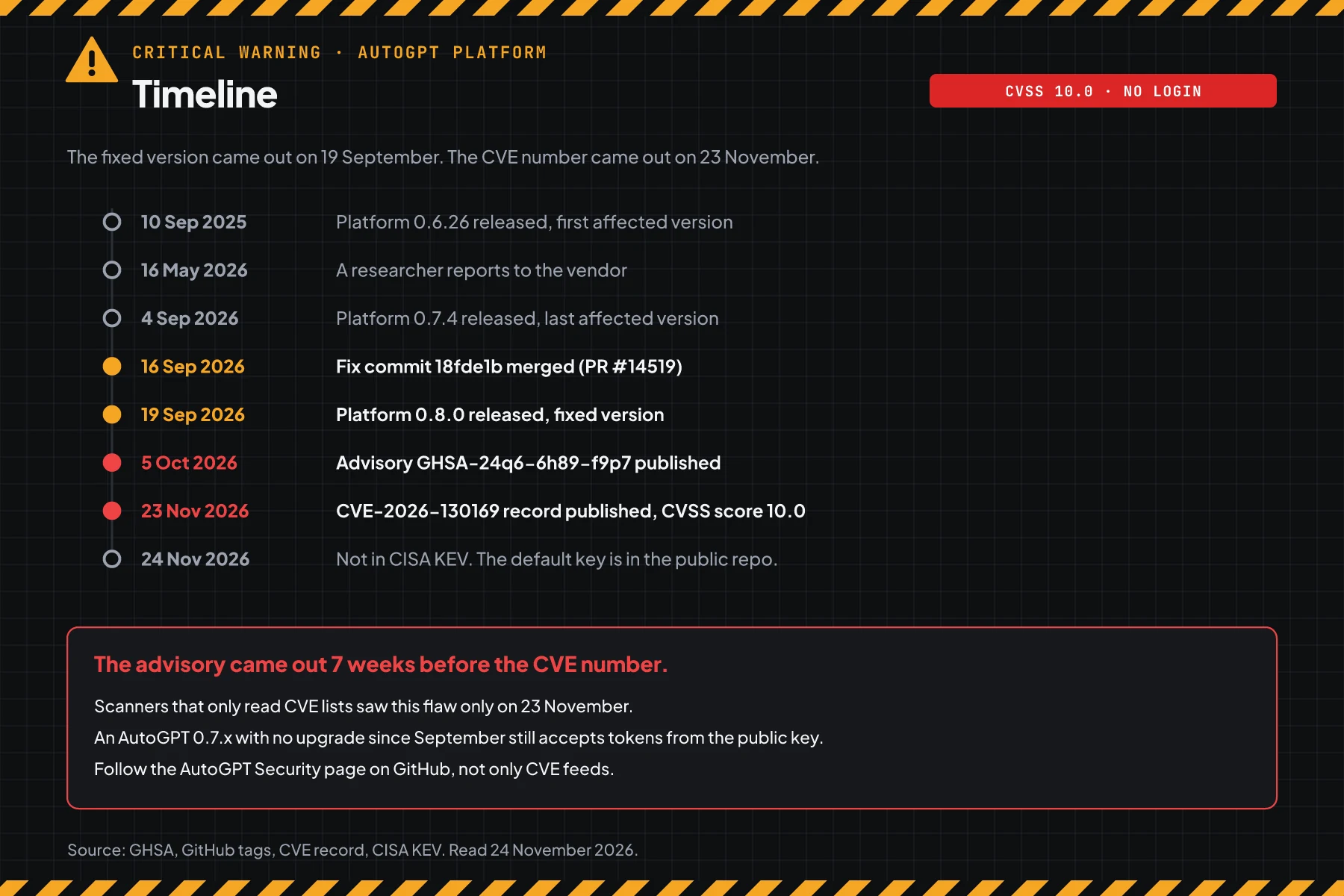
From the GitHub tags, the first affected version is 0.6.26, released on 10 September 2025. The last affected version is 0.7.4, released on 4 September 2026. A researcher reported the flaw to the vendor on 16 May 2026.
Rama Digital analysis: an advisory first and a CVE number later also happened with the Xen Orchestra flaw CVE-2026-133469. So watch the Security page of each product that you install yourself, not only CVE feeds.
How it works: the same JWT key in every install
This part uses the official vendor summary and our code reading. It helps you choose the correct steps. It does not explain how to attack.
The vendor summary
From the GHSA-24q6-6h89-f9p7 advisory, the files backend/.env.default and autogpt_platform/.env.default carry an HS256 JWT verification key. That key value is the same for every install that did not change it.
The backend accepts tokens signed with that key. So anyone who knows the key can make a token for any user, including an admin token. An admin token opens the admin menu, including credits and usage limits.
CVSS 3.1 vector: AV:N/AC:L/PR:N/UI:N/S:C/C:H/I:H/A:H. This means: over the network, low complexity, no account, no victim click, and the impact goes outside the component. Weakness types: CWE-287, CWE-330, and CWE-798.
What we found in the code
- Docker compose 0.7.4 loads
backend/.env.defaultfirst, thenbackend/.envif it exists. The last value applies. So the default key is active even whenbackend/.envdoes not exist. - The SHA-256 fingerprint of the default key is the same in all affected tags that we read, from 0.6.26 to 0.7.4.
- The file
autogpt_libs/auth/config.pybefore the fix readsJWT_VERIFY_KEY. If that variable is not there, the code readsSUPABASE_JWT_SECRET. - After commit 18fde1b, that file only reads
JWT_JWKS_URL. The old HS256 path is gone.
Not only the JWT key
From the vendor guide for secrets, old versions also carry default values for ENCRYPTION_KEY, UNSUBSCRIBE_SECRET_KEY, and BETTER_AUTH_SECRET. Integration credentials are encrypted with ENCRYPTION_KEY.
From the vendor guide for service passwords, the database, RabbitMQ, and FalkorDB passwords also came from .env.default, and their ports were open on all addresses. New versions make all these values per install.
Rama Digital analysis: so an install on default values has more than 1 door. The upgrade in step 3 closes all of them, if you follow the vendor guide to the end.
Exploitation status on 24 November 2026
This status can change. The key is in the public repo, so assume that attackers already know it.
| Source | Status |
|---|---|
| GHSA-24q6-6h89-f9p7 (5 October) | Critical. Official workaround: none. Fix: 0.8.0 |
| CVE record (23 November) | CVSS 3.1 10.0, over the network, no account, no victim click. CWE-287, CWE-330, CWE-798 |
| CISA KEV | Not in the list on 24 November 2026 |
| Attacks in the wild | The GHSA and the CVE record do not report them on 24 November |
| The default key | In the public repo since 0.6.26. We do not write its value |
Who is most at risk
Every AutoGPT Platform 0.6.26 to 0.7.4 installed with Docker Compose needs the upgrade. The order in this table helps you choose which server to do first.
| AutoGPT setup | Risk | Reason |
|---|---|---|
| A vulnerable version, port 8006 or 3000 open to the internet | Highest | With no login, anyone can try from anywhere |
| A vulnerable version, AutoGPT used by many users, clients, or vendors | High | Every legitimate user can also read the key in the public repo |
| A vulnerable version, AutoGPT only on an internal network or VPN | Lower | Still upgrade. 1 hacked laptop or VM can open the API |
| 0.8.0 or later | Safe for this CVE | Look for signs in step 5 if a vulnerable version was ever open |
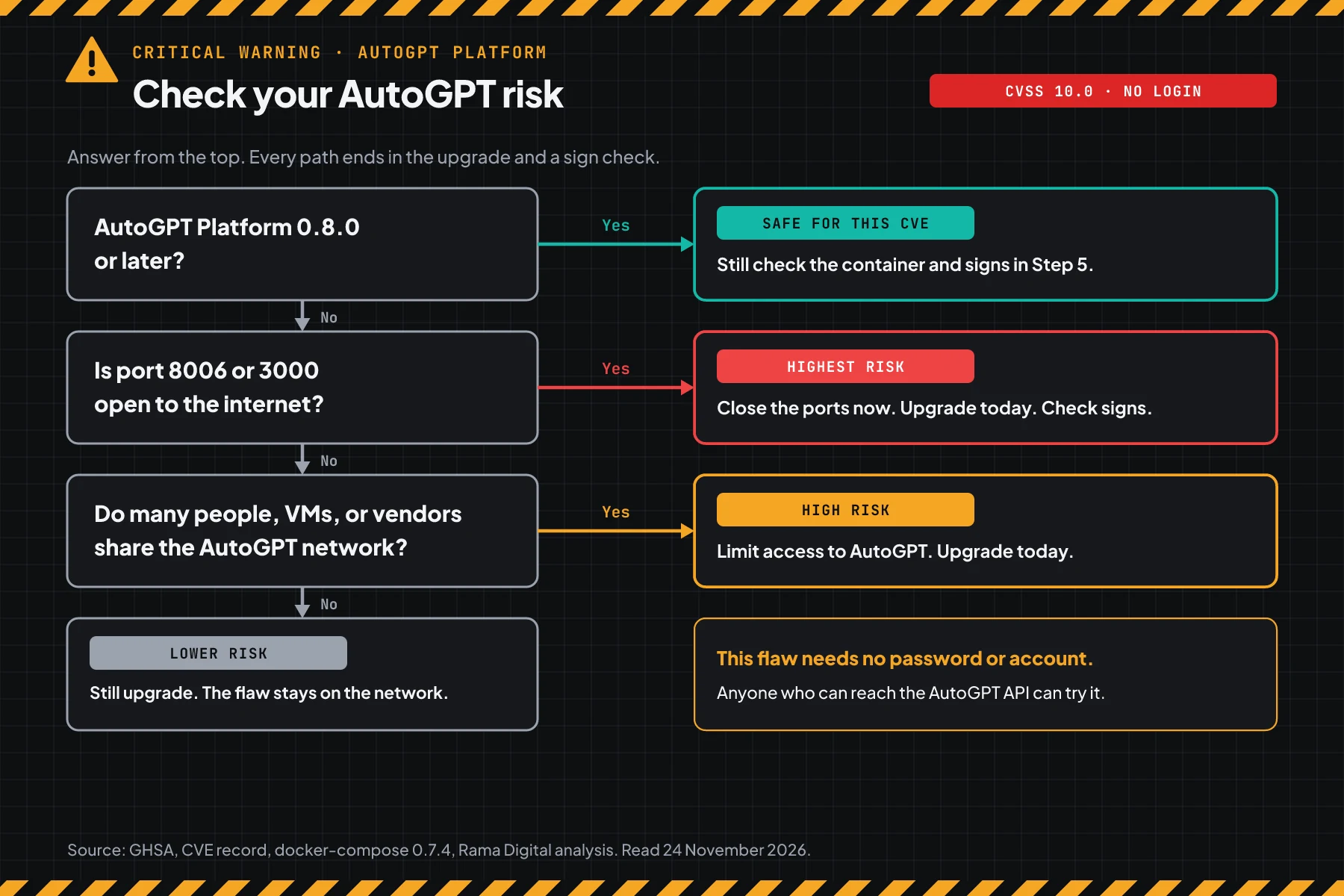
Rama Digital analysis: this flaw needs no password or account. The only condition is network access to the AutoGPT API, usually port 8006, or to the frontend on port 3000.
From the GHSA, the single-container Docker image (from 0.7.1) is not affected, because that image carries no default key. Still run the key check in step 2, because an env can be copied from an old install.
Affected versions and fixed versions
Match the version of each server with this table. Source: the GHSA-24q6-6h89-f9p7 advisory and the CVE-2026-130169 record. The CVE text says "0.6.26 through 0.7.4", and the GHSA gives the range before 0.8.0.
| Platform version | CVE-2026-130169 status | Action |
|---|---|---|
| 0.8.0 to 0.12.0 | Safe | Check the container and the signs (steps 1 and 5) |
| 0.7.0 to 0.7.4 | Vulnerable | Upgrade today, step 4 until the upgrade is done |
| 0.6.26 to the last 0.6.x | Vulnerable | Upgrade, also follow the Supabase part of the vendor guide |
| Before 0.6.26 | Outside the official range | The code also uses a shared key. Check the key in step 2, then upgrade |
| Single-container image (from 0.7.1) | GHSA: not affected | Still check the key in step 2 |
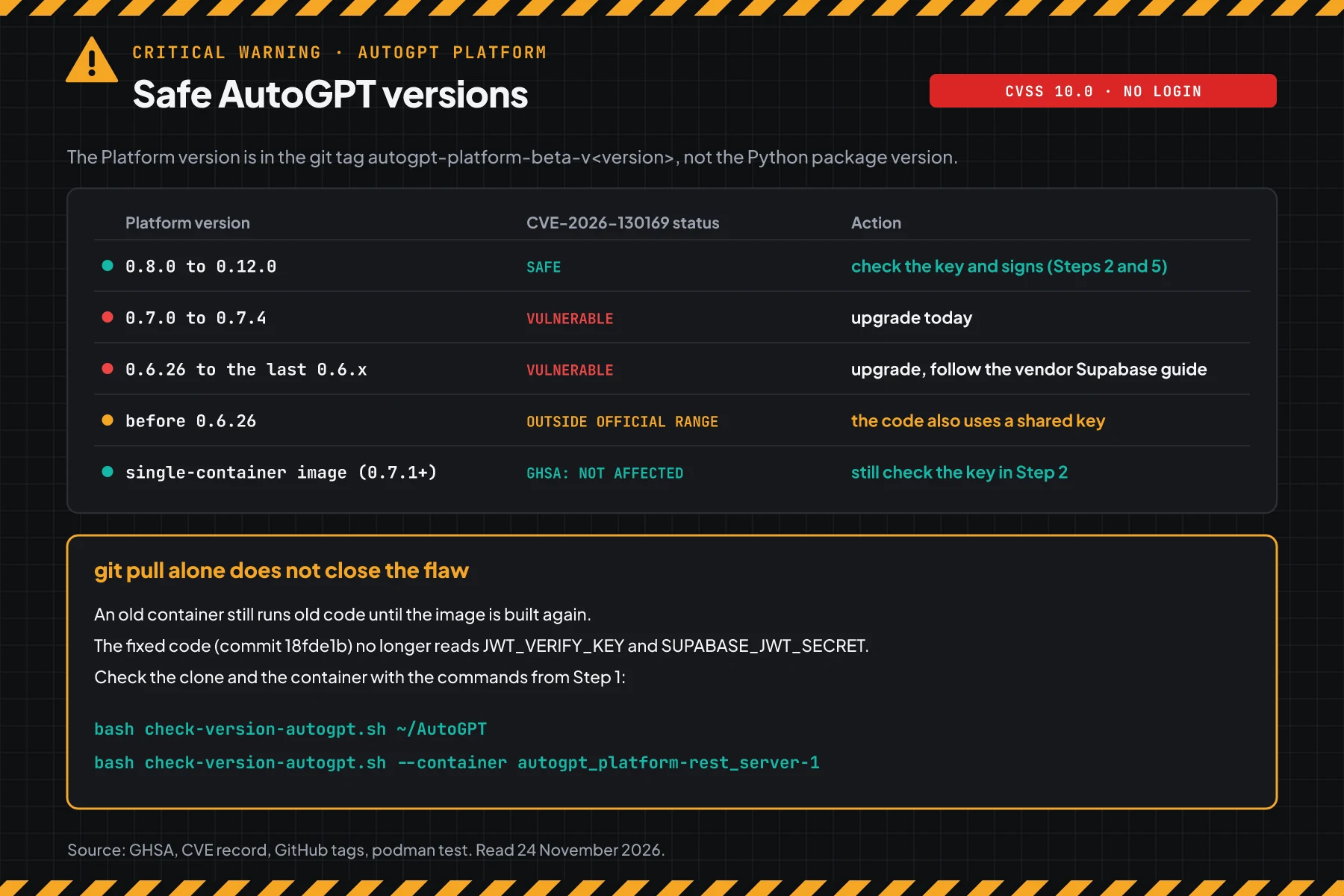
A version number is not proof
- The Platform version is the git tag
autogpt-platform-beta-v<version>. The backend Python package version is a different number. - A clone with a checkout of 0.8.0 still runs old code in the container, until the image is built again.
- The content of
auth/config.pyis more exact. Old code readsJWT_VERIFY_KEYorSUPABASE_JWT_SECRET. Fixed code reads neither.
Rama Digital analysis: so the step 1 script reads the tag and the code in the clone, then the code in the running container.
Before you start
- Shell access to the AutoGPT server, with the right to run
docker. - A list of all AutoGPT installs, including test servers and client servers.
- Access to the cloud firewall or the VPS panel in front of the server.
- A laptop outside the office network, for example on mobile data, for the port check in step 2.
- A list of the credentials stored in AutoGPT: AI API keys, OAuth tokens, the database password, and admin accounts.
- A change window. The upgrade stops the stack. Queued runs can get lost if you do not empty the RabbitMQ queues first.
Step 1: Check the Platform version and the auth code
Manual way: run git -C ~/AutoGPT describe --tags, then read the tag. For containers and for many servers, use the script.
Save this script as check-version-autogpt.sh. The script reads a version, a clone folder, or a container, then compares the result with the GHSA data. The script changes nothing.
#!/usr/bin/env bash
# Check AutoGPT Platform for CVE-2026-130169 (GHSA-24q6-6h89-f9p7, default JWT key, CVSS 10.0).
# Use: bash check-version-autogpt.sh 0.7.4                 (Platform version from the git tag)
#   or: bash check-version-autogpt.sh ~/AutoGPT             (AutoGPT clone folder)
#   or: bash check-version-autogpt.sh --container NAME      (running rest_server container)
# Affected (GHSA and CVE record): Platform 0.6.26 up to before 0.8.0. Fix: 0.8.0.
# The Platform version is the git tag autogpt-platform-beta-v<version>, not the backend Python package version.
# Folder and container modes read auth/config.py. Code before the fix reads JWT_VERIFY_KEY
# or SUPABASE_JWT_SECRET. Code after commit 18fde1b reads neither. Rama Digital analysis.
# Exit code: 0 SAFE, 1 VULNERABLE or CHECK, 2 CANNOT CONFIRM.
set -u
export LC_ALL=C
CFG=autogpt_libs/autogpt_libs/auth/config.py
clean() { local x=${1//[![:print:]]/}; printf '%s' "${x:0:90}"; }
fail() { echo "Result : CANNOT CONFIRM. $1"; echo "         With no proof of the fix, treat AutoGPT as not safe."; exit 2; }
vulnerable() {
  echo "Result : VULNERABLE to CVE-2026-130169. Upgrade to 0.8.0 or later."
  echo "         Until the upgrade is done, check the JWT key in step 2."
}

rate() {
  local a b c
  IFS=. read -r a b c <<< "$1"
  a=$((10#$a)) b=$((10#$b)) c=$((10#$c))
  if (( a == 0 && (b < 6 || (b == 6 && c < 26)) )); then
    echo "Result : CHECK. This version is outside the official range of CVE-2026-130169."
    echo "         Old code also uses a shared key. Run step 2, then upgrade."; return 1
  fi
  if (( a == 0 && b < 8 )); then vulnerable; return 1; fi
  echo "Result : SAFE for CVE-2026-130169. Still run step 2 and step 5."
  return 0
}

# Read config.py from stdin. 1 = old code (shared key), 0 = fixed code, 2 = not an AutoGPT config.
code() {
  local body
  body=$(cat)
  if grep -qE 'JWT_VERIFY_KEY|SUPABASE_JWT_SECRET' <<< "$body"; then
    printf 'Code   : %-30s %s\n' "auth/config.py" "reads a shared key (HS256)"; return 1
  elif grep -q 'JWT_JWKS_URL' <<< "$body"; then
    printf 'Code   : %-30s %s\n' "auth/config.py" "no shared key, JWKS only"; return 0
  fi
  return 2
}

folder() {
  local d=${1%/} cfg tag rc
  if [ -f "$d/autogpt_platform/$CFG" ]; then cfg=$d/autogpt_platform/$CFG
  elif [ -f "$d/$CFG" ]; then cfg=$d/$CFG
  else fail "Folder $(clean "$d") is not an AutoGPT Platform clone."; fi
  echo "Source : folder $(clean "$d")"
  if command -v git >/dev/null && tag=$(git -C "$d" describe --tags --abbrev=0 --match 'autogpt-platform-beta-v*' 2>/dev/null); then
    echo "Tag    : $(clean "$tag")"
  else
    echo "Tag    : not readable. The decision uses the code content."
  fi
  code < "$cfg"; rc=$?
  (( rc == 2 )) && fail "The content of auth/config.py is unknown."
  if (( rc == 1 )) && [[ ${tag:-} =~ v(0)\.([0-9]+)\.([0-9]+)$ ]] && (( 10#${BASH_REMATCH[2]} < 6 || (10#${BASH_REMATCH[2]} == 6 && 10#${BASH_REMATCH[3]} < 26) )); then
    rate "0.${BASH_REMATCH[2]}.${BASH_REMATCH[3]}"; return 1
  fi
  if (( rc == 1 )); then vulnerable; return 1; fi
  echo "Result : SAFE for CVE-2026-130169 in this folder."
  echo "         An old container stays vulnerable until a rebuild. Check with --container."
  return 0
}

box() {
  local c=$1 d=${DOCKER:-docker} body rc
  [[ $d == docker || $d == podman ]] || fail "DOCKER must be docker or podman."
  [[ $c =~ ^[A-Za-z0-9][A-Za-z0-9_.-]{0,127}$ ]] || fail "Container name $(clean "$c") is not valid."
  command -v "$d" >/dev/null || fail "The $d command is missing."
  body=$("$d" exec "$c" cat "/app/autogpt_platform/$CFG" 2>/dev/null) || fail "auth/config.py is not readable in container $c."
  echo "Source : container $c"
  code <<< "$body"; rc=$?
  (( rc == 2 )) && fail "The content of auth/config.py is unknown."
  if (( rc == 1 )); then
    vulnerable
    echo "         If the clone is 0.8.0, this container uses an old image. Build again."; return 1
  fi
  echo "Result : SAFE for CVE-2026-130169 in this container."
  return 0
}

[ $# -ge 1 ] || fail "Give a Platform version, an AutoGPT folder, or --container NAME."
if [ "$1" = "--container" ]; then
  [ $# -ge 2 ] || fail "Give a container name after --container."
  box "$2"; exit $?
elif [ -d "$1" ]; then
  folder "$1"; exit $?
elif [[ $1 == */* ]]; then
  fail "Folder $(clean "$1") does not exist."
elif [[ $1 =~ ^- ]]; then
  fail "Option $(clean "$1") is unknown."
fi
echo "Source : text"
[[ $1 =~ ^(autogpt-platform-beta-)?v?([0-9]{1,3}\.[0-9]{1,3}\.[0-9]{1,3})([+-][A-Za-z0-9.+-]*)?$ ]] || fail "Version $(clean "$1") is not readable."
ver=${BASH_REMATCH[2]}
echo "Version: $ver"
rate "$ver"; exit $?
# 1. Write the Platform version from the git tag or from the release notes
bash check-version-autogpt.sh 0.7.4
# 2. Give the AutoGPT clone folder. The script reads the tag and the auth/config.py content.
bash check-version-autogpt.sh ~/AutoGPT
# 3. Check the running rest_server container. Find the container name with docker ps.
bash check-version-autogpt.sh --container autogpt_platform-rest_server-1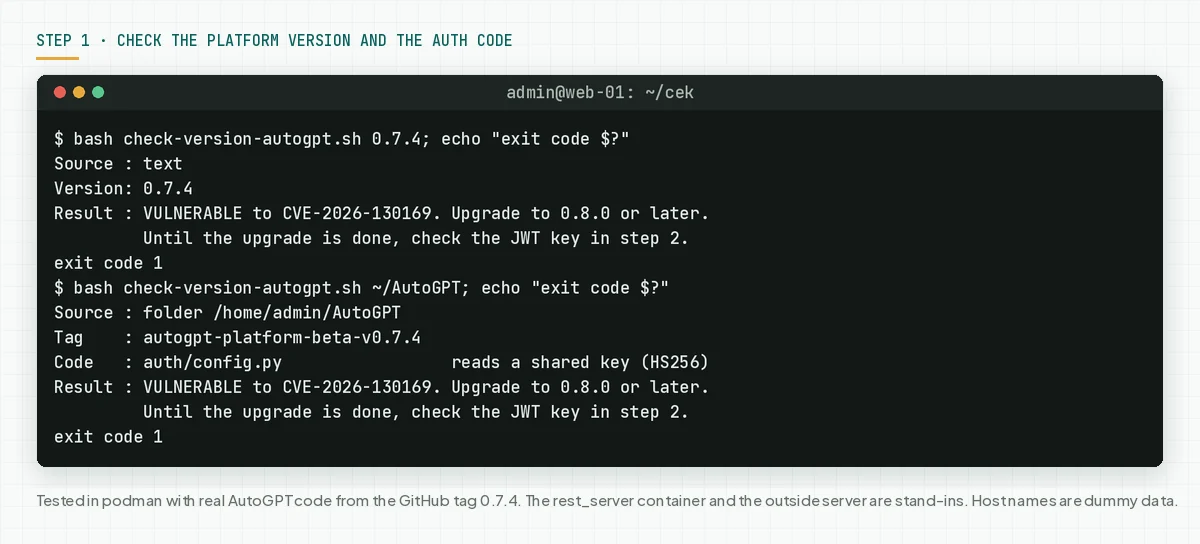
Check the result:
- "VULNERABLE": the code still reads a shared key. Do steps 2 and 4 now, then step 3 today.
- "CHECK": a version below 0.6.26. Old code also uses a shared key. Run step 2, then upgrade.
- "SAFE for CVE-2026-130169": the code reads no shared key. Still check the container and run step 5.
- "CANNOT CONFIRM": the version, folder, or container is not readable. Treat AutoGPT as not safe.
We tested the script with 18 version cases and a set of folder and container cases. The cases include tag prefixes, -beta suffixes, broken text, control characters, a folder with no tag, a 0.6.25 folder, and a bad container name. All results were correct.
Step 2: Check the default JWT key and the open ports
Save this script as check-key-autogpt.sh. The script reads the key values from the env, then compares their SHA-256 fingerprints with the fingerprint of the default key. The script does not print the key.
#!/usr/bin/env bash
# Check if AutoGPT Platform uses the default JWT key from .env.default (CVE-2026-130169).
# Use: bash check-key-autogpt.sh ~/AutoGPT                 (AutoGPT clone folder)
#   or: bash check-key-autogpt.sh --container NAME          (running rest_server container)
# The script compares the SHA-256 fingerprint of each key value with the default key. It never prints a key.
# Docker compose loads backend/.env.default first, then backend/.env. The last value applies.
# Keys it checks: JWT_VERIFY_KEY and SUPABASE_JWT_SECRET (backend), JWT_SECRET (Supabase in 0.6.x).
# Exit code: 0 no default key, 1 default key in use, 2 CANNOT CONFIRM.
set -u
export LC_ALL=C
DEFAULT=1453cea2dc3799e9026e42b3e465e455256d5a149582e4c5b92d4c8d604731a2
NDEF=0
clean() { local x=${1//[![:print:]]/}; printf '%s' "${x:0:90}"; }
fail() { echo "Result : CANNOT CONFIRM. $1"; echo "         With no proof, treat the default key as still in use."; exit 2; }

# Read the last value of KEY from an env file. Output in SET (0 set), VALUE, and FROM. It never prints the value.
read_env() {
  local f=$1 k=$2 line v
  [ -r "$f" ] || return 0
  while IFS= read -r line || [ -n "$line" ]; do
    line=${line%$'\r'}
    [[ $line =~ ^[[:space:]]*${k}[[:space:]]*=(.*)$ ]] || continue
    v=${BASH_REMATCH[1]}
    v=${v#"${v%%[![:space:]]*}"}
    if [[ $v =~ ^\"([^\"]*)\" ]] || [[ $v =~ ^\'([^\']*)\' ]]; then v=${BASH_REMATCH[1]}
    else v=${v%%[[:space:]]#*}; v=${v%"${v##*[![:space:]]}"}; fi
    SET=0 VALUE=$v FROM=$3
  done < "$f"
}

rate() { # label, source
  local s
  if (( SET != 0 )); then printf 'Key    : %-30s %s\n' "$1" "not set"; return; fi
  if [ -z "$VALUE" ]; then printf 'Key    : %-30s %s\n' "$1" "empty$2"; return; fi
  s=$(printf '%s' "$VALUE" | sha256sum | cut -d ' ' -f 1)
  if [ "$s" = "$DEFAULT" ]; then
    printf 'Key    : %-30s %s\n' "$1" "PUBLIC DEFAULT KEY$2"; NDEF=$((NDEF + 1))
  elif (( ${#VALUE} < 32 )); then
    printf 'Key    : %-30s %s\n' "$1" "own key, ${#VALUE} characters, too short$2"
  else
    printf 'Key    : %-30s %s\n' "$1" "own key, ${#VALUE} characters$2"
  fi
}

result() {
  if (( NDEF > 0 )); then
    if (( NDEF == 1 )); then echo "Result : VULNERABLE. 1 key uses the public default value."; else echo "Result : VULNERABLE. $NDEF keys use the public default value."; fi
    echo "         Upgrade to 0.8.0 (step 3). Until then, follow step 4."; exit 1
  fi
  echo "Result : NO DEFAULT KEY. Still upgrade to 0.8.0 or later."; exit 0
}

folder() {
  local d=${1%/} p k f
  if [ -d "$d/autogpt_platform/backend" ]; then p=$d/autogpt_platform
  elif [ -d "$d/backend" ] && [ -f "$d/docker-compose.platform.yml" ]; then p=$d
  else fail "Folder $(clean "$d") is not an AutoGPT Platform clone."; fi
  echo "Source : folder $(clean "$d")"
  [ -f "$p/backend/.env.default" ] || [ -f "$p/backend/.env" ] || fail "backend/.env.default and backend/.env are missing."
  for k in JWT_VERIFY_KEY SUPABASE_JWT_SECRET; do
    SET=1 VALUE= FROM=
    for f in .env.default .env; do read_env "$p/backend/$f" "$k" "backend/$f"; done
    rate "$k" "${FROM:+, from $FROM}"
  done
  SET=1 VALUE= FROM=
  for f in .env.default .env; do read_env "$p/$f" JWT_SECRET "$f"; done
  rate "JWT_SECRET (Supabase 0.6.x)" "${FROM:+, from $FROM}"
  result
}

box() {
  local c=$1 d=${DOCKER:-docker} k
  [[ $d == docker || $d == podman ]] || fail "DOCKER must be docker or podman."
  [[ $c =~ ^[A-Za-z0-9][A-Za-z0-9_.-]{0,127}$ ]] || fail "Container name $(clean "$c") is not valid."
  command -v "$d" >/dev/null || fail "The $d command is missing."
  "$d" exec "$c" true >/dev/null 2>&1 || fail "Container $c is not running or does not exist."
  echo "Source : container $c"
  for k in JWT_VERIFY_KEY SUPABASE_JWT_SECRET; do
    if VALUE=$("$d" exec "$c" printenv "$k" 2>/dev/null); then SET=0; else SET=1 VALUE=; fi
    rate "$k" ""
  done
  result
}

[ $# -ge 1 ] || fail "Give an AutoGPT folder or --container NAME."
if [ "$1" = "--container" ]; then
  [ $# -ge 2 ] || fail "Give a container name after --container."
  box "$2"
elif [ -d "$1" ]; then
  folder "$1"
fi
fail "Folder $(clean "$1") does not exist."
Save the second script as check-exposure-autogpt.sh. The script only opens a TCP connection to each AutoGPT port, then closes it. The script sends no token or data.
#!/usr/bin/env bash
# Check which AutoGPT Platform ports answer from the network where the script runs (CVE-2026-130169).
# Use: bash check-exposure-autogpt.sh agpt.example.test      (run it from outside, for example a laptop on mobile data)
# Ports from the AutoGPT 0.7.x docker-compose. Docker opens ports on all addresses, and UFW rules do not stop it.
# The script only opens a TCP connection, then closes it. It sends no token, cookie, or data.
# CLOSED: the server refuses the connection. UNREACHABLE: no answer in 3 seconds or no route.
# Exit code: 0 all ports closed, 1 a port is open, 2 CANNOT CONFIRM.
set -u
export LC_ALL=C
PORTS=("8006 backend REST API" "3000 frontend" "8001 websocket" "8002 executor" "5432 Postgres" "5672 RabbitMQ" "6380 FalkorDB")
clean() { local x=${1//[![:print:]]/}; printf '%s' "${x:0:90}"; }
fail() { echo "Result : CANNOT CONFIRM. $1"; exit 2; }

[ $# -ge 1 ] || fail "Give the host name or IP of the AutoGPT server."
h=$1
[[ $h =~ ^[A-Za-z0-9]([A-Za-z0-9.-]{0,251}[A-Za-z0-9])?$ ]] || fail "Host $(clean "$h") is not valid. Write only the host name or IP, with no http:// and no port."
command -v timeout >/dev/null || fail "The timeout command is missing."
[[ $h =~ ^[0-9]{1,3}(\.[0-9]{1,3}){3}$ ]] || getent hosts "$h" >/dev/null || fail "Host name $h does not resolve from this network."
echo "Source : $h, from this network"
open=0 far=0
for x in "${PORTS[@]}"; do
  p=${x%% *} name=${x#* }
  err=$(timeout 3 bash -c 'exec 3<>"/dev/tcp/$1/$2"' _ "$h" "$p" 2>&1); rc=$?
  if (( rc == 0 )); then s=OPEN open=$((open + 1))
  elif [[ $err == *refused* ]]; then s=CLOSED
  else s=UNREACHABLE far=$((far + 1)); fi
  printf 'Port   : %-5s %-18s %s\n' "$p" "$name" "$s"
done
(( far == ${#PORTS[@]} )) && fail "The server does not answer on any port. Check the host name, then try again."
if (( open > 0 )); then
  echo "Result : OPEN. $open AutoGPT ports answer from this network."
  echo "         From an outside network, close these ports at the firewall (step 4)."; exit 1
fi
echo "Result : CLOSED from this network. Still upgrade to 0.8.0 or later."; exit 0
# On the AutoGPT server. The script does not print the key.
bash check-key-autogpt.sh ~/AutoGPT
bash check-key-autogpt.sh --container autogpt_platform-rest_server-1
# From a laptop outside the office, for example on mobile data, to the public AutoGPT address
bash check-exposure-autogpt.sh agpt.example.test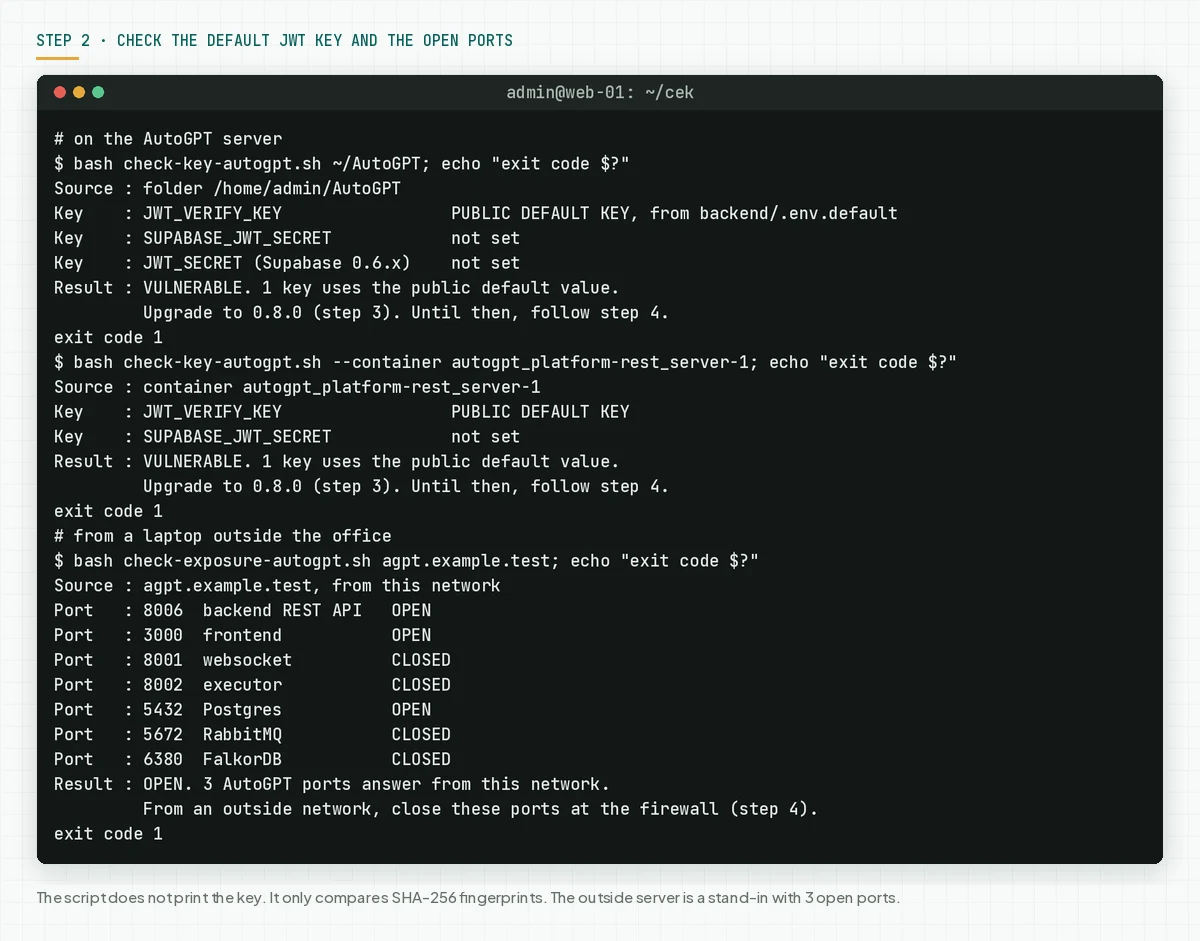
Check the result:
- "PUBLIC DEFAULT KEY": AutoGPT accepts tokens from the public key. Do step 4 now.
- "own key": the team already changed the key. Still upgrade, because a shared HS256 key can leak from an env file.
- Port 8006 or 3000 "OPEN" from outside the office: the highest risk. Close the ports in step 4.
- Port 5432, 5672, or 6380 "OPEN" from outside: the database or the queue is open. Close it now, because old versions use default passwords.
We tested the key script with quoted keys, CRLF line ends, comments, an own 64-character key, a short key, and a Supabase 0.6.x file. The default key did not appear in the test output.
Step 3: Upgrade to 0.12.0, then build the container again
Only the upgrade closes the flaw. Version 0.8.0 removes the old HS256 path, and version 0.12.0 is the latest release on 24 November 2026. Make a backup first.
# 1. Back up the database, backend/.env, frontend/.env, and .env outside the AutoGPT folder.
# 2. Get the release tag. This example uses 0.12.0, the latest version on 24 November 2026.
cd ~/AutoGPT
git fetch origin tag autogpt-platform-beta-v0.12.0
git checkout autogpt-platform-beta-v0.12.0
# 3. Follow the vendor upgrade guide until the stack runs again. The order is below.
# 4. Check the clone and the container. Both results must be SAFE.
bash check-version-autogpt.sh ~/AutoGPT
bash check-version-autogpt.sh --container autogpt_platform-rest_server-1
From the 0.8.0 release notes, the 0.8.0 backend does not start with the default ENCRYPTION_KEY. So an install on default values must follow this vendor order:
- While the old version runs, empty the RabbitMQ queues. Follow steps 1 to 3 of the vendor guide for service passwords.
- Stop the stack, then get the new code.
- Keep the old
ENCRYPTION_KEYin a shell variable. Your integration credentials are encrypted with that key. - Empty the 3 default secrets, then run
make init-env. This command makes new secrets. - Build, run migrate, then encrypt the credentials again. Do a dry run first, then run it with
--apply. - Remove the old token signing key, then start the stack again.
The full commands are in the vendor guide for secrets. From 0.6.x, also follow the vendor guide for Supabase installs first. We did not run these vendor steps in our test.
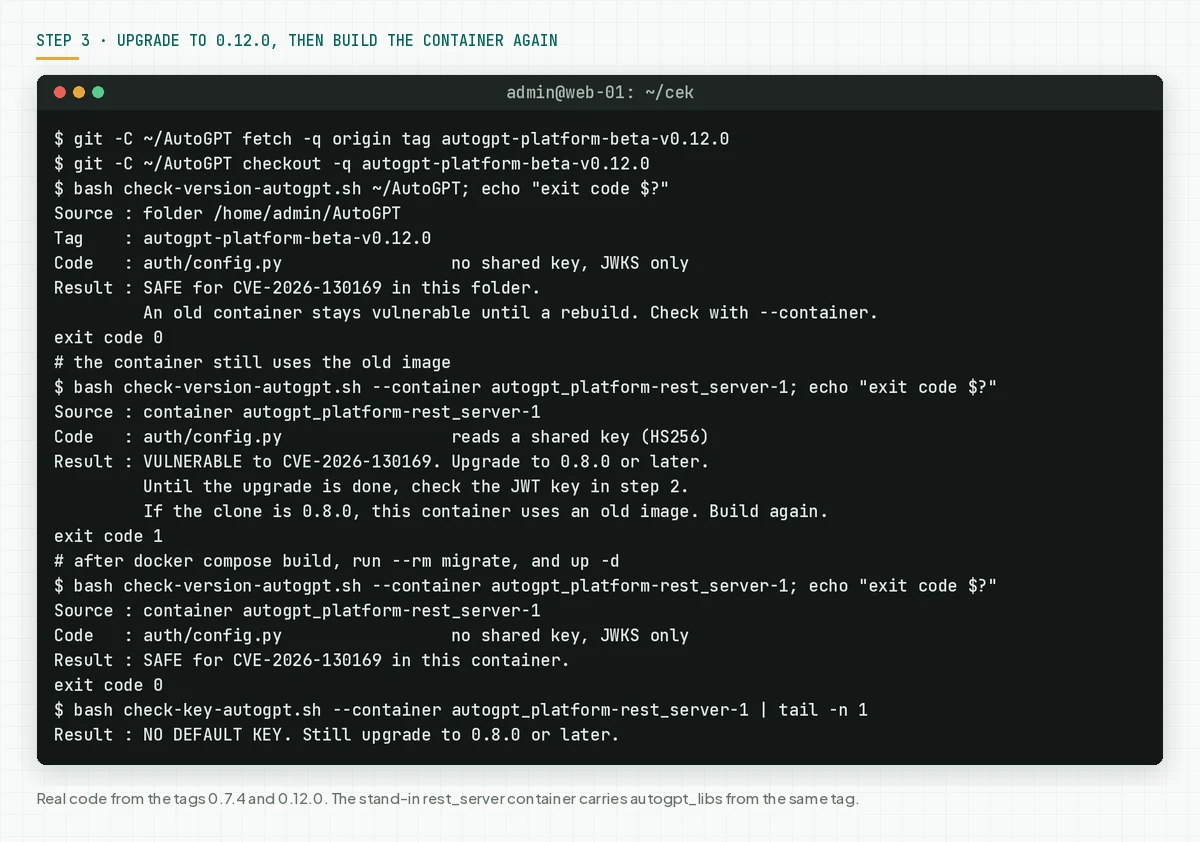
Look at the second block in the image. After the checkout of tag 0.12.0, the folder is SAFE, but the old container is still VULNERABLE. AutoGPT stays vulnerable until the image is built again.
Check the result: run the step 1 script for the folder and the container. Both results must be "SAFE for CVE-2026-130169". Then log in and run 1 agent to make sure that the integration credentials still work.
Rama Digital analysis: a new token signing key makes old tokens stop working. Users can have to log in again.
Step 4: Temporary, empty the keys in backend/.env and close the ports
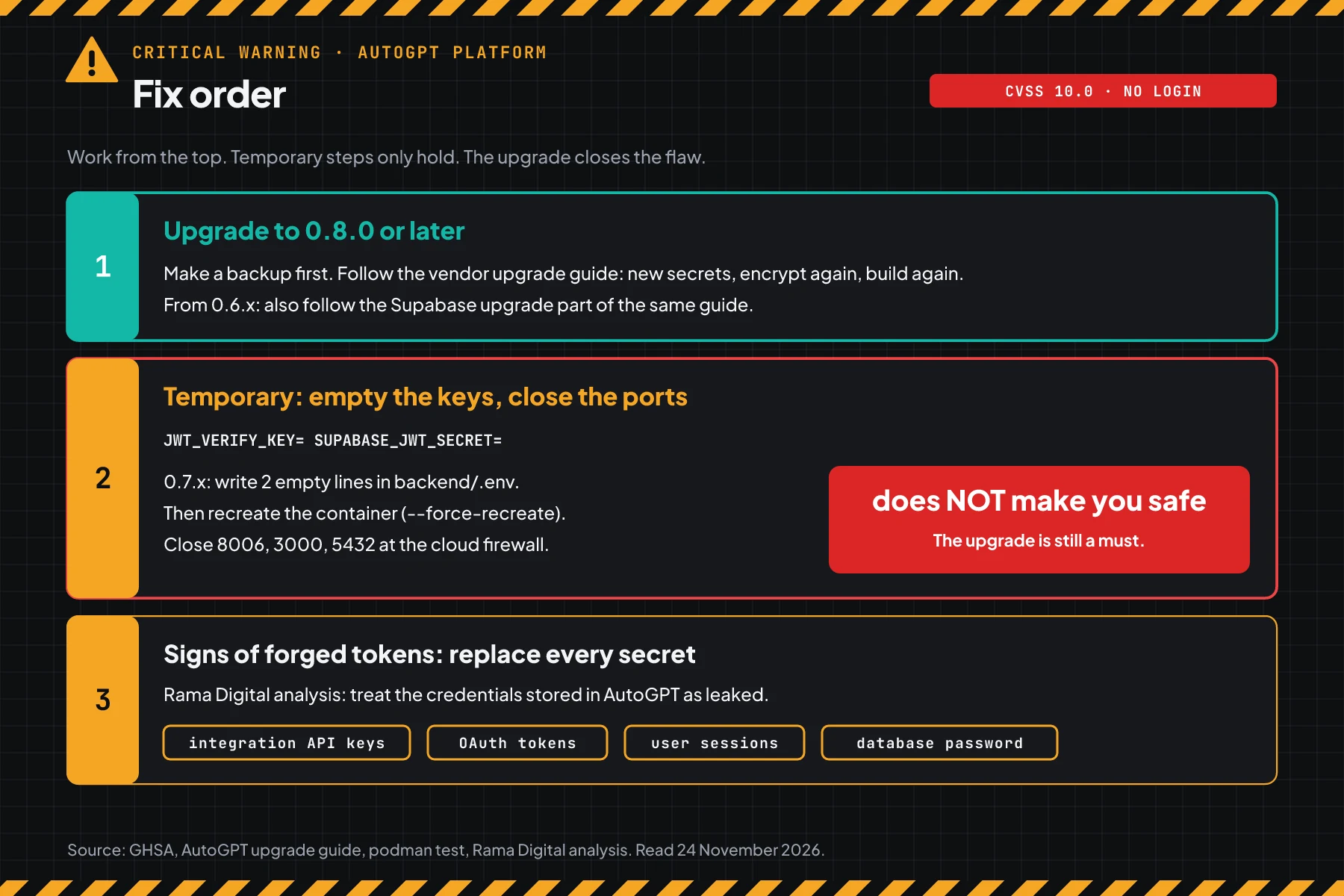
Use this step only until the upgrade is done. This step does NOT make AutoGPT safe. The GHSA gives no official workaround, so this step is Rama Digital analysis.
4a. Empty the JWT keys on 0.7.x
Our code test with the real 0.7.4 code shows 4 results:
- The key is set: HS256 tokens pass.
- Only
SUPABASE_JWT_SECRETis set: HS256 tokens still pass, because the code reads that variable as a fallback. - Both keys are empty: HS256 tokens are rejected.
- The 0.12.0 code: HS256 tokens are rejected.
So write both lines. A vendor comment in the 0.7.4 backend/.env.default says that this key is safe to remove after old Supabase sessions expire.
# Only for 0.7.x. Write 2 empty keys at the end of backend/.env.
# The new line at the start keeps the last line of the file whole.
printf '\nJWT_VERIFY_KEY=\nSUPABASE_JWT_SECRET=\n' >> ~/AutoGPT/autogpt_platform/backend/.env
# Docker compose makes again the containers whose env changed
cd ~/AutoGPT/autogpt_platform && docker compose up -d
# Check again. Both results must be NO DEFAULT KEY.
bash check-key-autogpt.sh ~/AutoGPT
bash check-key-autogpt.sh --container autogpt_platform-rest_server-1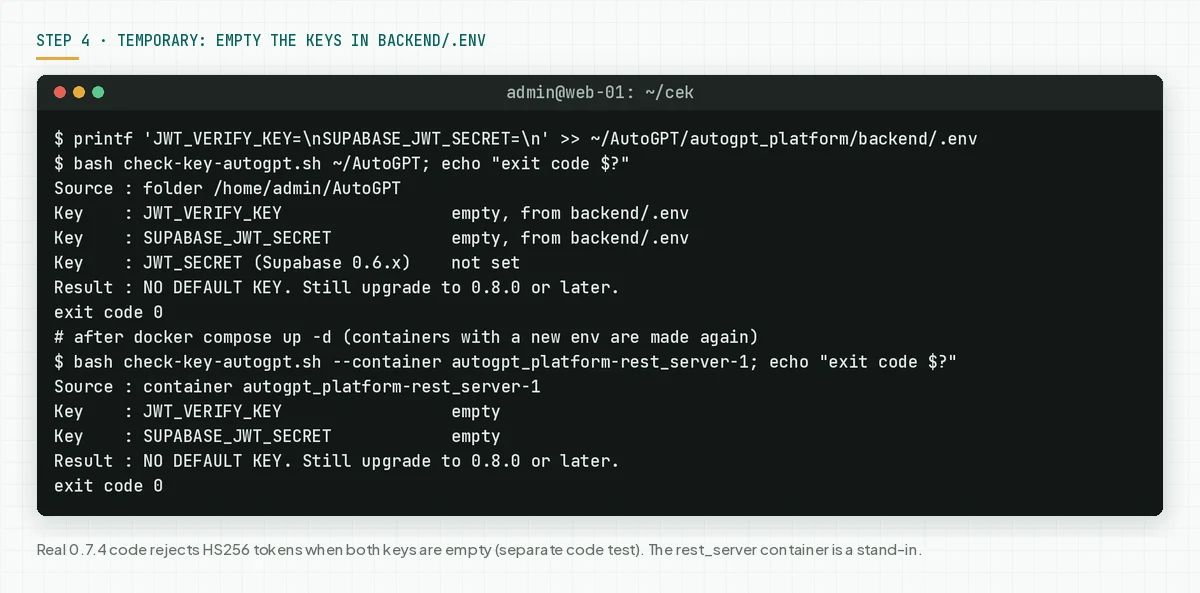
Do not use --force-recreate for all services. From the vendor guide for service passwords, a RabbitMQ that is made again starts with empty queues. If the container check still prints PUBLIC DEFAULT KEY, make again only that backend service.
On 0.6.x, the same key is also the Supabase JWT secret. A change of it also changes ANON_KEY and SERVICE_ROLE_KEY. We did not test this step, so upgrade directly.
4b. Close the ports to the internet
Close ports 8006, 3000, 8001, 8002, 5432, 5672, and 6380 at the cloud firewall or the VPS panel. From the Docker documentation about ufw, Docker makes its own firewall rules, so ufw rules do not stop container ports.
Legitimate users still need access. Use a VPN, or allow only the office IP at the cloud firewall. We did not test cloud firewall rules.
Check the result: run step 2 again. The key script must print "NO DEFAULT KEY". From outside the office, the ports must be CLOSED or UNREACHABLE.
AutoGPT stays vulnerable until step 3 is done.
Step 5: Look for signs of forged tokens in the database and the log
The upgrade closes the flaw, but it does not undo forged tokens that someone already used. The GHSA gives no attack signs. These queries and log patterns are Rama Digital analysis of schema.prisma and the 0.7.4 admin code.
Save these queries as check-signs-autogpt.sql. The queries only read 3 things: accounts with no login identity, credits from the admin menu by a non-admin account, and the current admins.
-- Look for signs of forged tokens in the AutoGPT Platform 0.7.x database (CVE-2026-130169). The queries only read.
-- Use: docker exec -i autogpt_platform-db-1 psql -U postgres -d postgres -f - < check-signs-autogpt.sql
-- Find the database container name with docker ps. Docker compose names it autogpt_platform-db-1.
-- The GHSA gives no attack signs. These queries are Rama Digital analysis. A result is a lead, not proof.
\echo '== 1. Platform accounts with no login identity (a forged token with a new email creates this account)'
SELECT u.id, u.email, u."createdAt" AS created
FROM platform."User" u
LEFT JOIN platform."UserAuthIdentity" i ON i.id = u.id
WHERE i.id IS NULL
ORDER BY u."createdAt" DESC LIMIT 20;
\echo '== 2. Credits from the admin menu, by an account that is not an admin'
SELECT t."createdAt" AS time, t."userId" AS receiver, t.amount,
       t.metadata->>'admin_id' AS admin_id, coalesce(i.role, 'none') AS role
FROM platform."CreditTransaction" t
LEFT JOIN platform."UserAuthIdentity" i ON i.id = t.metadata->>'admin_id'
WHERE t.type = 'GRANT' AND t.metadata ? 'admin_id'
  AND (i.id IS NULL OR i.role IS DISTINCT FROM 'admin')
ORDER BY t."createdAt" DESC LIMIT 20;
\echo '== 3. Admin accounts now (compare with the team admin list)'
SELECT id, email, "createdAt" AS created
FROM platform."UserAuthIdentity"
WHERE role = 'admin'
ORDER BY "createdAt";
# The queries only read. Run them on the AutoGPT server.
docker exec -i autogpt_platform-db-1 psql -U postgres -d postgres -f - < check-signs-autogpt.sql
# Look for 2 log lines from the admin menu
docker logs autogpt_platform-rest_server-1 2>&1 | grep -E "Admin impersonation|is adding [0-9-]+ credits"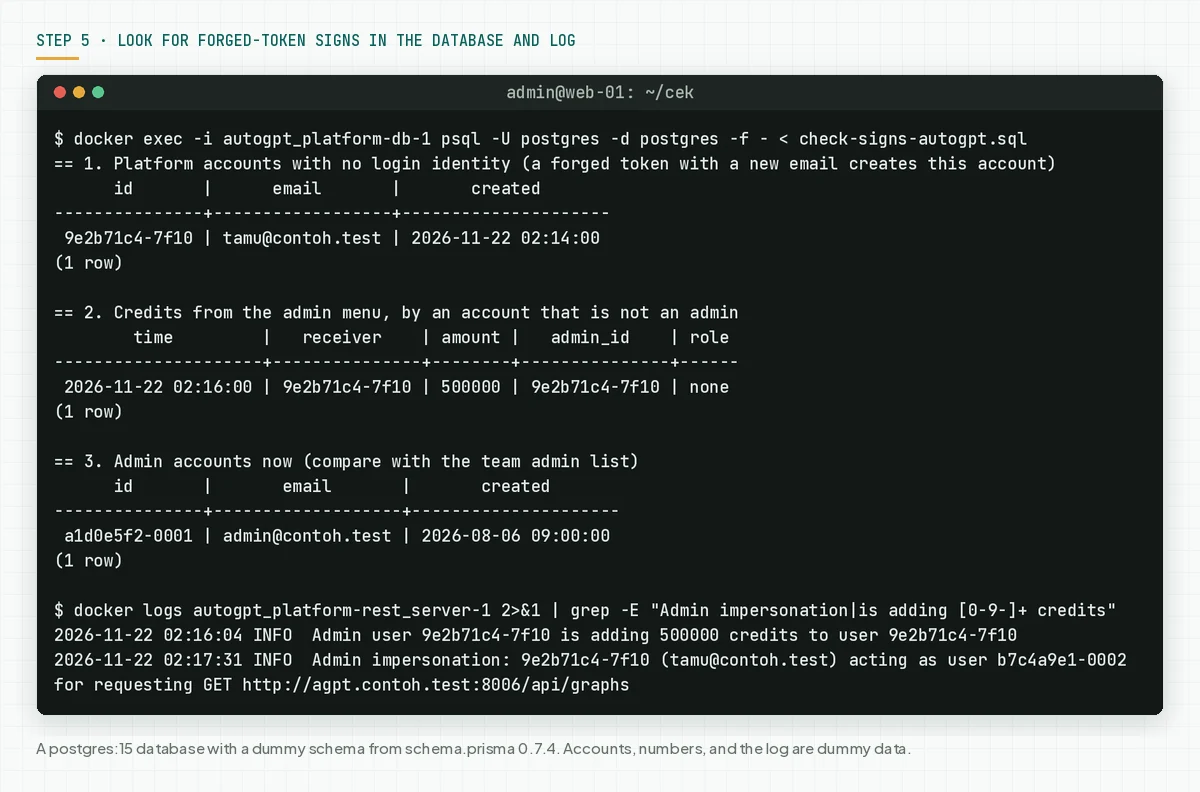
Query limit: a forged token with an old user ID makes no new account. Docker logs also rotate. So a clean result does not prove that the server is clean.
Manual checks in AutoGPT
- Match the admin list from part 3 of the query with the team admin list.
- Look for new agents, graphs, or runs that the team did not make.
- Open the usage dashboard of each AI API provider. Look for a usage jump since the vulnerable version went in.
- Look for new logins on services that connect through OAuth, for example GitHub or Google.
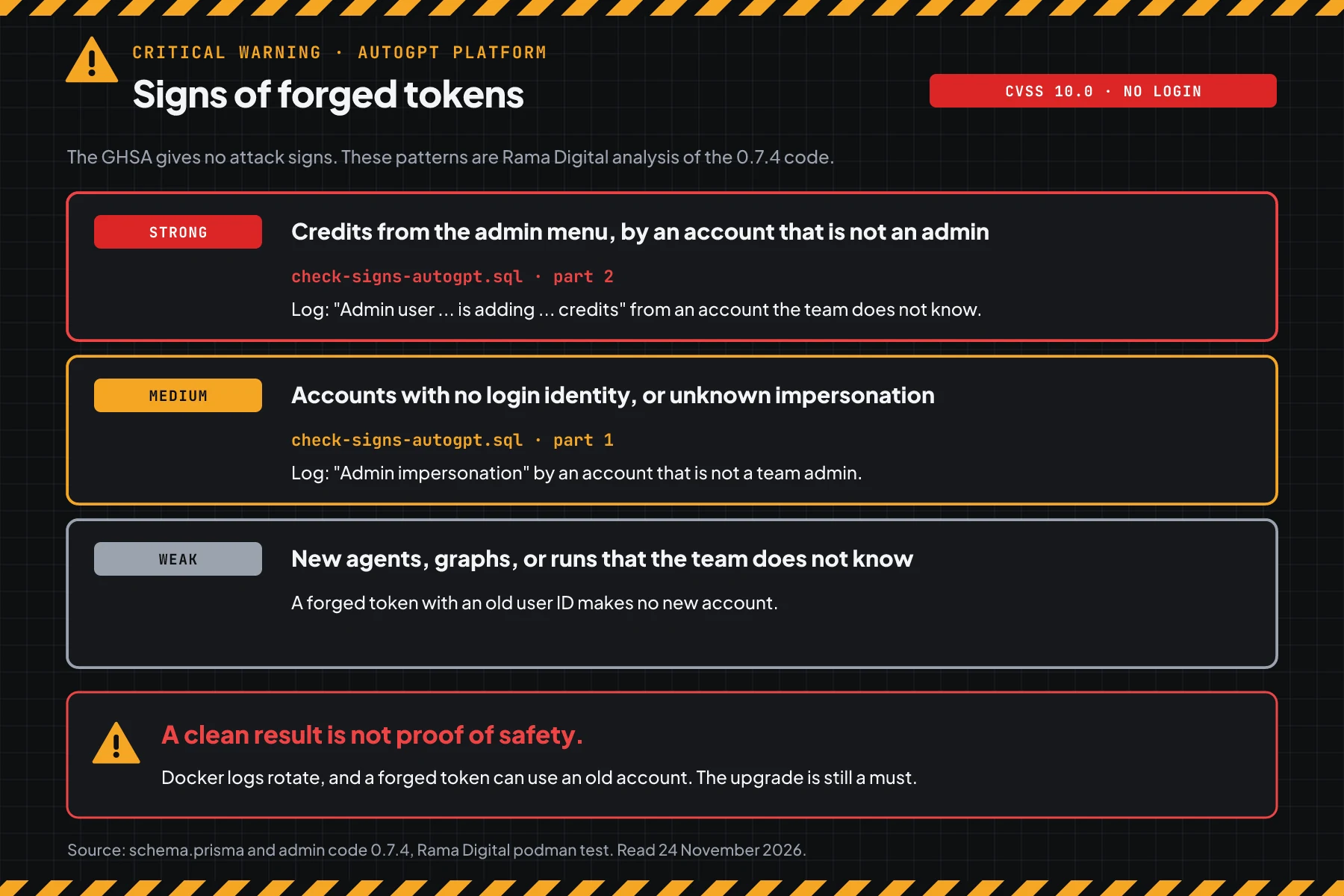
Check the result: each row in parts 1 and 2 must match team work. A row that you do not know is an incident. Follow this order:
- Close the AutoGPT ports to the internet. Do not remove containers yet.
- Keep the Docker logs and a database dump as evidence, before you change anything.
- Upgrade to 0.8.0 or later with step 3.
- Revoke and replace each API key and OAuth token stored in AutoGPT, directly at the service provider.
- Change the database password and the admin account passwords, then revoke all sessions.
- Check agents and schedules that the team did not make, then remove them.
Example: 1 morning of response for 2 AutoGPT servers
This simulation uses dummy data. The server names, times, and results are not customer data.
| Time (WIB) | Dummy server | What was checked | Result | Action |
|---|---|---|---|---|
| 08.30 | agpt-client (0.7.4, port 8006 open) | Steps 1 and 2 | VULNERABLE, PUBLIC DEFAULT KEY, 3 ports OPEN | Empty the keys and close the ports at 08.50 |
| 09.10 | agpt-client | Step 5 | 1 credit of 500000 from a non-admin account | Keep evidence, revoke API keys at the AI provider |
| 10.00 | agpt-client | Step 3 | Upgrade to 0.12.0 with secret rotation | Check again: folder and container SAFE |
| 11.00 | agpt-internal (0.8.0, VPN only) | Steps 1 and 5 | SAFE, no unknown rows | Record the result, check again next week |
Lessons from this simulation: do servers with open ports first. Step 4 holds for a short time, but the upgrade is still a must that day. One unknown credit row means that every API key must be replaced.
Who does the work
The team that installed AutoGPT usually holds the server and Docker. The owner of the AI provider account holds the API keys. The security team or the business owner decides the incident response.
Rama Digital recommendation: record each self-hosted AI agent platform, its version, its open ports, and the credentials that it holds. A flaw in another login layer is in the Keycloak SAML flaw CVE-2026-117691.
Checklist for today
- List all AutoGPT installs. Owner: the technical team. Evidence: a list of servers, versions, and install methods.
- Check the version and the code with step 1. Owner: the server admin. Evidence: the script output.
- Check the key and the ports with step 2. Owner: the server admin. Evidence: the script output from the server and from outside the office.
- Empty the keys and close the ports with step 4. Owner: the server admin. Evidence: the step 2 output after the change.
- Upgrade to 0.8.0 or later with step 3. Owner: the server admin. Evidence: the step 1 output for the folder and the container.
- Run step 5. Owner: the server admin. Evidence: the query and log output.
- Replace API keys and tokens if there are signs or the ports were ever open. Owner: the provider account owner. Evidence: a list of the replaced credentials.
Questions and answers
Only our internal team uses AutoGPT. Must we still upgrade?
Yes. This flaw needs no password. Each device that can open the AutoGPT API can try it, including a hacked laptop or VM.
We already changed JWT_VERIFY_KEY. Are we safe?
For the default key, yes. But a shared HS256 key stays in the env file and can leak. Version 0.8.0 removes that path, so still upgrade.
Why does git pull alone not close the flaw?
The container still runs the old image. The new code is active after a rebuild and a restart. Check the container with the step 1 script.
Why does the backend not start after the upgrade to 0.8.0?
The 0.8.0 backend refuses the default ENCRYPTION_KEY. Follow the vendor guide for secrets. That guide moves the integration credentials to the new key.
Is the single-container Docker image also affected?
From the GHSA, no. That image carries no default JWT key, and it uses a key only during an old auth migration that the operator sets up. Still run the key script in step 2.
This flaw is not in CISA KEV. Is it still urgent?
Yes. The score is 10.0, it needs no login, and the key has been in the public repo since September 2025. KEV can add it at any time.
Must we replace API keys after the upgrade?
Yes, if a vulnerable version was ever open to the internet or step 5 finds unknown rows. Revoke and replace each key directly at the service provider.
Does a clean query result prove that the server is safe?
No. A forged token can use an old account and leave no new trace, and Docker logs also rotate. The upgrade is still a must.
Next step
The limits that still apply: step 4 does not make AutoGPT safe, and the upgrade does not undo access that someone already used. If your server shows signs in step 5, or you need an audit and a fix of an AI application, use Vibe Code Rescue. For 1 urgent problem today, book a 30 minute session.
Sources
- The GHSA-24q6-6h89-f9p7 advisory: the flaw summary, impact, version range, fixed version, the "None" workaround, and the single-container image that is not affected.
- The CVE-2026-130169 record: the CVSS 3.1 score and vector, the CWEs, and the version range text, published on 23 November 2026.
- The fix PR #14519: the removal of the old HS256 path, commit 18fde1b.
- The 0.8.0 release notes: the upgrade change for installs on default values, published on 19 September 2026.
- The vendor guide for secrets, the vendor guide for service passwords, and the vendor guide for Supabase installs: the upgrade order from the vendor.
- CISA KEV: the status on 24 November 2026, this CVE is not in the list.
- The Docker documentation about ufw: Docker and host firewall rules.