Direct answer: CVE-2026-119481 lets a form submission with no login run with admin rights in the JetFormBuilder plugin. The CVSS 3.1 score is 9.8. The flaw is not yet in CISA KEV and has no attack reports, but Patchstack gives it the label "expected to become exploited". Today, check the version, update to 3.6.8.1, then look for signs.
The flaw is in JetFormBuilder 3.6.7.1 and older. The vendor closed the main flaw in 3.6.8 on 30 October 2026, then released 3.6.8.1 on 6 November 2026 with other fixes. Use 3.6.8.1.
Main condition: A form uses the Verification action together with a Register User or Update User action, and an admin clicks Verify manually. Limit: This article has no request contents, field values, payloads, or attack sequence.
We read the CVE-2026-119481 record, the Patchstack advisory, the JetFormBuilder plugin page, and the CVE record API on 8 November 2026, from 13.45 to 14.10 WIB. We tested 3 check scripts, a plugin update, and a draft step in podman containers with the official WordPress, WP-CLI, and MariaDB images. We did not test an attack.
The problem: a guest submission runs as an admin
JetFormBuilder is a form plugin for WordPress from Crocoblock. The plugin page lists 80,000 active installs. Member sign-up forms, contact forms, and profile forms often use it.
According to the CVE-2026-119481 record, this flaw is the CWE-266 class, incorrect privilege assignment. The CVSS vector has AC:L, PR:N, and UI:N, which means that the attack is easy and needs no login. The impact is C:H, I:H, and A:H, which means that the confidentiality, integrity, and availability of the site can be fully affected.
The report reached Patchstack on 24 October 2026 from the finder dzaku. The Patchstack advisory came out on 2 November, and the CVE record came out on 4 November 2026. The vendor shipped the fix before the public advisory.
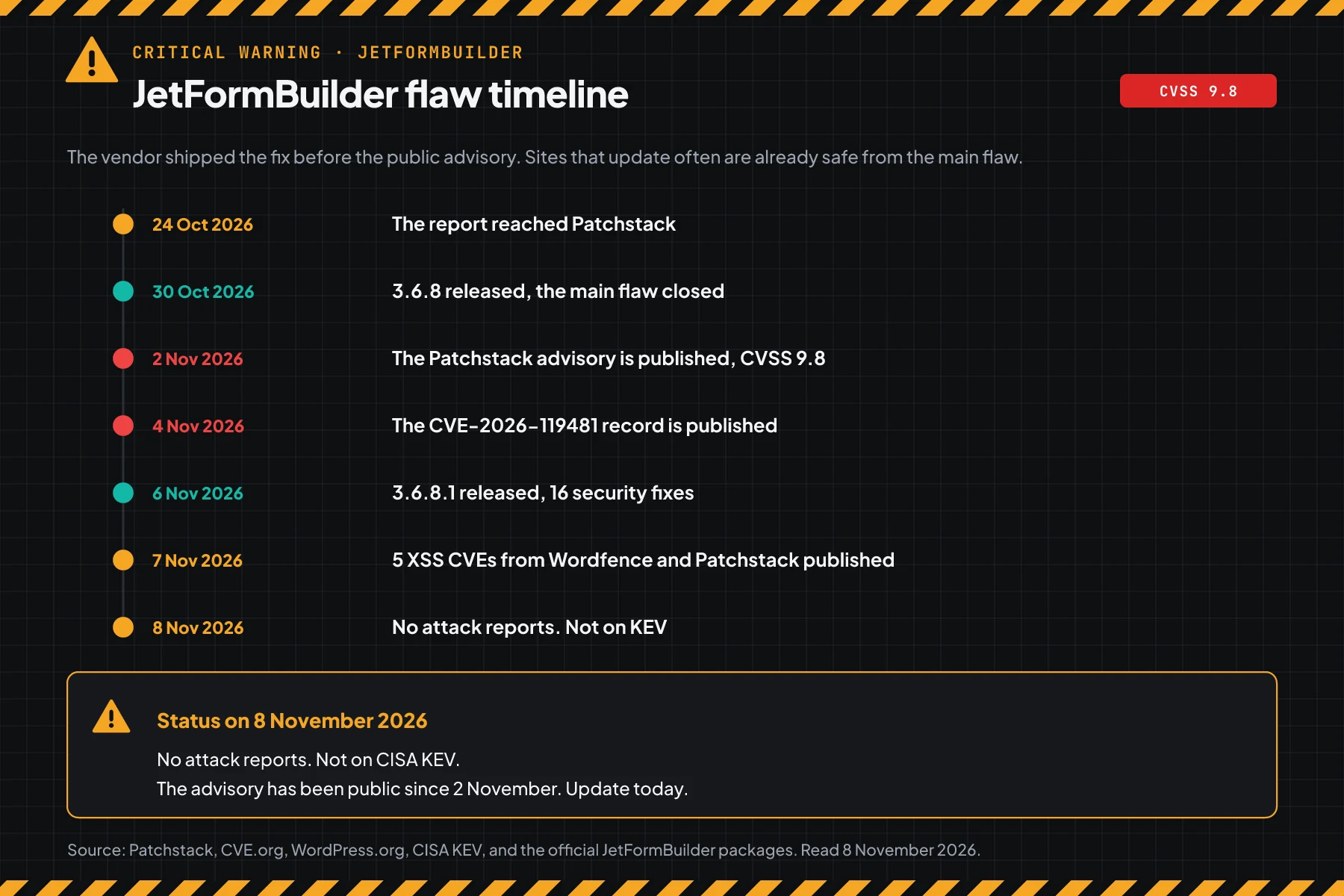
On 8 November 2026, this flaw is not in CISA KEV (catalog 2026.11.06). Patchstack has no attack reports, but it gives the label "expected to become exploited". Patchstack has no virtual mitigation rule for this flaw. Other trackers also report no attacks in the field.
How it works: a replay with the wrong identity
This section uses the official summary and the patch contents. It helps you choose the steps. It does not explain how to attack.
Summary from the vendor notice
The Verification action holds a form submission until the submission is verified. An admin can click "Verify manually" on a held submission in the Form Records menu. That button runs the actions of the submission again.
According to the admin notice in 3.6.8, that replay ran with the identity of the approving admin. So every permission check in those actions passed as the admin. From 3.6.8, the actions run as the original submitter, and a guest stays a guest.
What the patch changes
We compared the code in the official 3.6.7.1 and 3.6.8 packages. The patch makes 3 changes:
- In
modules/verification/jobs/verify-manually.php, the replay uses the submitter identity from the record (0 for a guest), not the admin identity. The code restores the admin identity after the replay and releases the replay hook after 1 record. - In
modules/actions-v2/register-user/register-user-action.php, the admin approval marker comes only from code. The role of a new user still follows the form settings, not the admin role. - The new file
modules/verification/manual-verification-identity-notice.phpshows 1 admin notice that explains this change.
Rama Digital analysis: the main flaw works only through 3 conditions: the form has a Verification action, the form has an action that uses user rights, and an admin clicks Verify manually. Limit: we read the code and did not test an attack.
Exploitation status on 8 November 2026
| Source | Status |
|---|---|
| CISA KEV | Not listed (catalog 2026.11.06) |
| CVE record (CVSS 3.1) | Score 9.8, Critical class, CWE-266 |
| Patchstack | No exploitation reports, label "expected to become exploited" |
| Other trackers (OffSeq, Strix) | No exploitation reports in the field |
| JetFormBuilder | The main flaw is closed in 3.6.8, the current version is 3.6.8.1 |
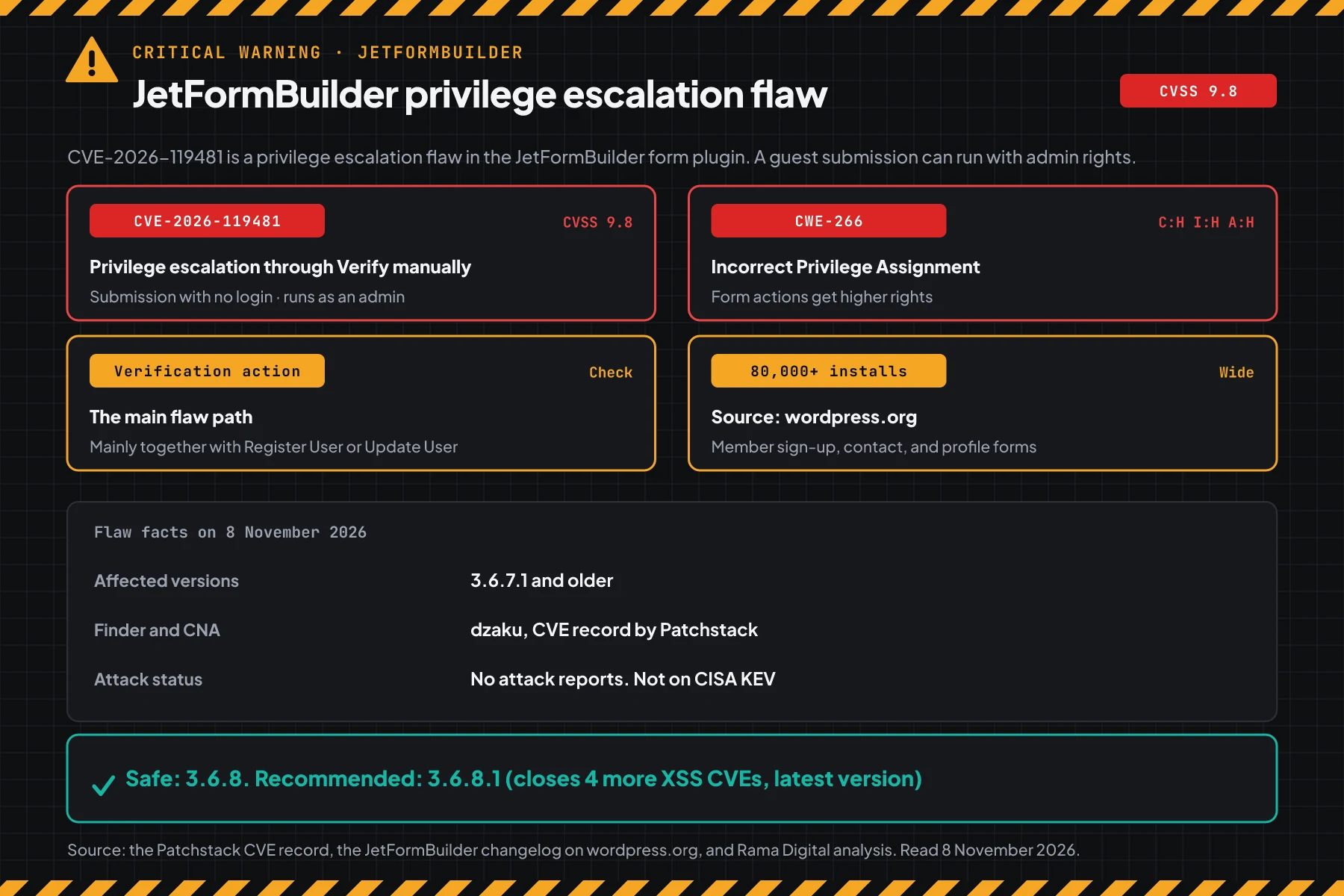
A score of 9.8 is in the Critical class. The impact is an account with higher rights, which can take over the site. We write a critical warning even with no attack reports yet.
Who has the highest risk
The risk depends on the version, the actions in the form, and the held submissions. Patchstack gives PR:N and UI:N because a form submission needs no login. The main path needs 1 admin click. An admin usually cannot tell a harmful submission from a normal one.
| Site condition | Risk | Reason |
|---|---|---|
| A form with the Verification and Register User actions | Highest | The sign-up action runs with admin rights |
| A form with the Verification and Update User actions | High | Actions that use user rights also run as an admin |
Submissions with the status verification_pending | High | 1 click on Verify manually runs the actions of that submission again |
| Still on 3.6.8 | Check | The main flaw is closed, but 4 XSS CVEs stay open |
| Forms with no Verification action | Check | The main path is not used, but other CVEs in the old version stay open |
| Already on 3.6.8.1 | Low | Still look for signs from before the update |
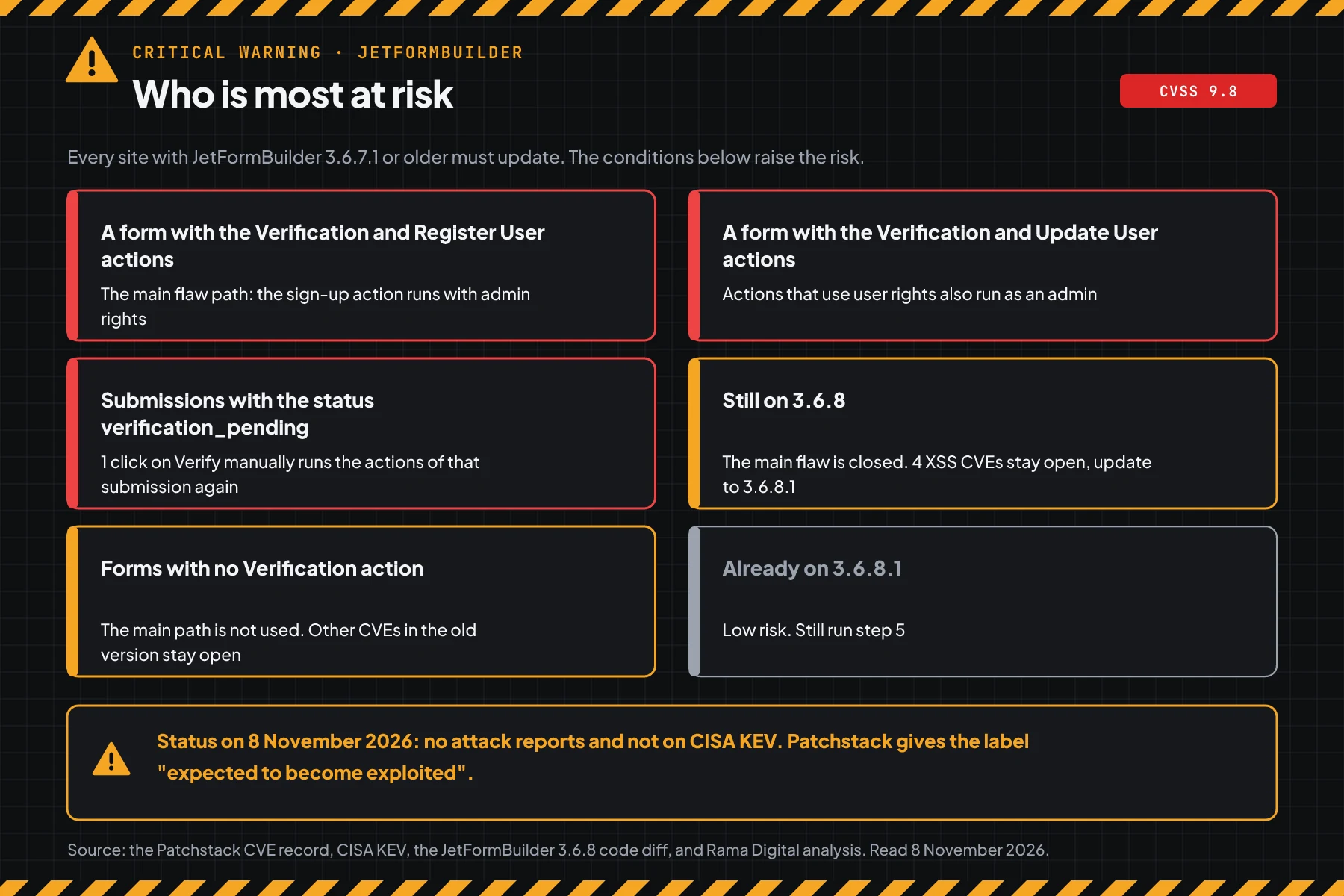
A site with no Verification action does not use the main path. It must still update, because 7 more CVEs also affect version 3.6.7.1. Update other plugins on the same server too, for example the LatePoint booking plugin flaw CVE-2026-118066. Patch the WordPress core too, for example for the WordPress core update flaw CVE-2026-119977, and the hosting panel, for example for the Control Web Panel flaw CVE-2026-77876.
Vulnerable and safe versions
JetFormBuilder 3.6.7.1 and older are vulnerable. Version 3.6.8 closes the main flaw and 3 more CVEs. Version 3.6.8.1 closes the 4 remaining XSS CVEs. Use this table to choose the action.
| JetFormBuilder version | Status on 8 November 2026 | Action |
|---|---|---|
| 3.6.7.1 and older | Vulnerable to CVE-2026-119481 and 7 more CVEs | 3.6.8.1 |
| 3.6.8 | Main flaw closed, 4 XSS CVEs still open | 3.6.8.1 |
| 3.6.8.1 | Safe from 10 CVEs on 8 November 2026 | Use this version |
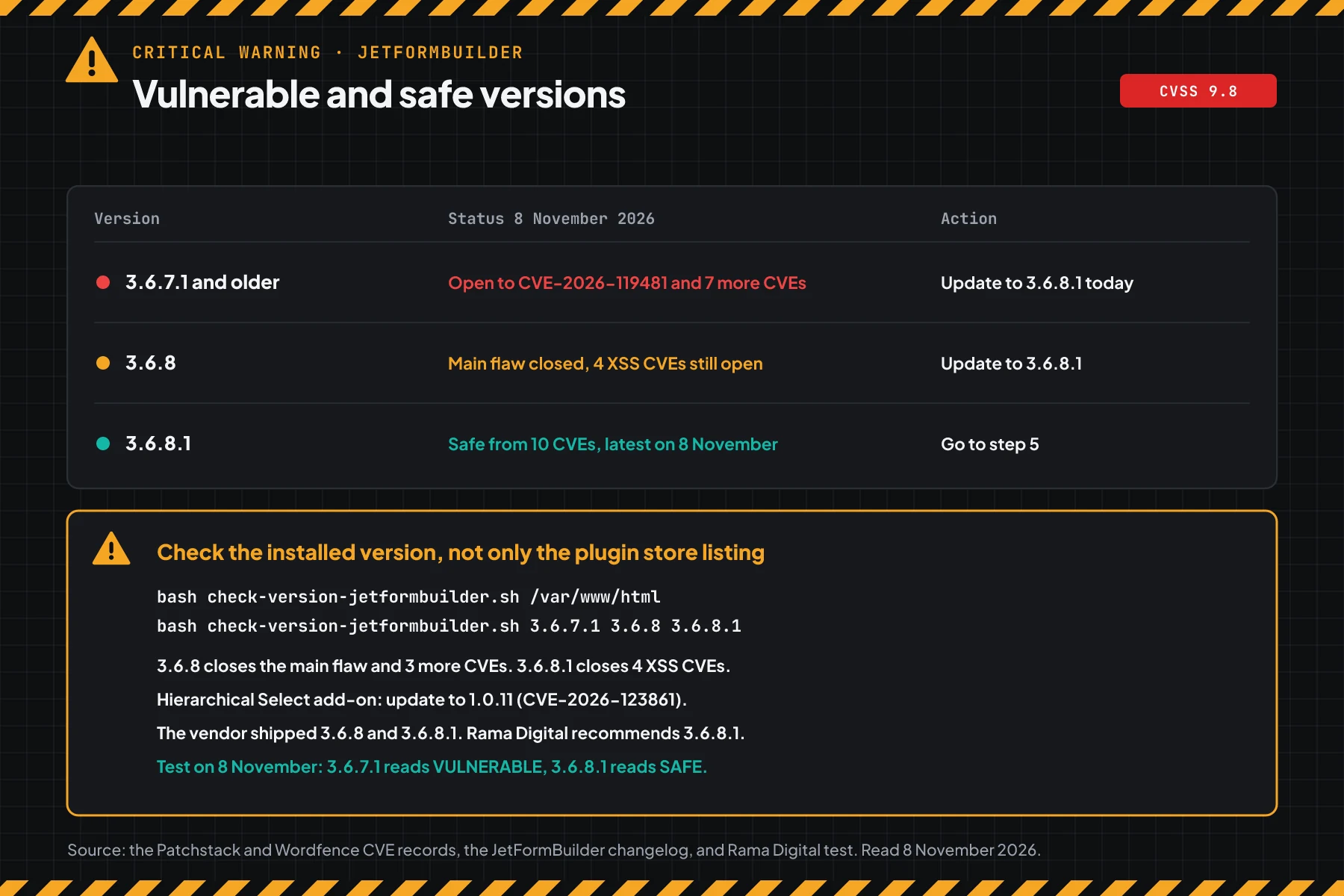
The version data comes from the CVE-2026-119481 record, the Patchstack advisory, and the changelog on the JetFormBuilder plugin page. The 3.6.8 changelog says: "SECURITY: Prevent privilege escalation through manual verification of held submissions".
The 10 JetFormBuilder CVEs to know
This table shows the CNA, the publish date, the score, the class, and the first safe version for 10 recent CVEs. Releases 3.6.8 and 3.6.8.1 close 8 CVEs. Older versions already close 2 CVEs.
| CVE | CNA | Published | CVSS 3.1 | Class | Safe in |
|---|---|---|---|---|---|
| CVE-2026-119481 | Patchstack | 4 Nov | 9.8 | Privilege escalation with no login | 3.6.8 |
| CVE-2026-111317 | Wordfence | 7 Nov | 7.2 | Stored XSS through a form field | 3.6.7.1 |
| CVE-2026-119183 | Wordfence | 7 Nov | 7.2 | Stored XSS through a field to post meta | 3.6.8.1 |
| CVE-2026-119480 | Patchstack | 1 Nov | 6.5 | Path traversal, delete attachment (PR:L) | 3.6.8 |
| CVE-2026-121977 | Wordfence | 7 Nov | 5.4 | Stored XSS through a field to post meta | 3.6.8.1 |
| CVE-2026-119482 | Patchstack | 30 Oct | 5.3 | Missing authorization | 3.6.8 |
| CVE-2026-119479 | Patchstack | 30 Oct | 5.3 | XSS | 3.6.8 |
| CVE-2026-120561 | Wordfence | 3 Nov | 5.3 | Missing capability check (Update Options) | 3.6.3 |
| CVE-2026-123483 | Patchstack | 7 Nov | 5.3 | XSS | 3.6.8.1 |
| CVE-2026-123860 | Patchstack | 7 Nov | 5.3 | XSS | 3.6.8.1 |
The Pro add-on "JetFormBuilder Hierarchical Select" has CVE-2026-123861 (score 5.3). The add-on is safe in version 1.0.11. Update that add-on when your site uses it.
Prerequisites
- SSH access with sudo to the server, or an administrator account in the WordPress dashboard.
- WP-CLI on the server when you use the
wpcommands. Steps 1 and 3 also work in the dashboard. - A recent backup of the database and files, for example a VPS snapshot or a hosting panel backup.
- Access to the web server access log, for example
/var/log/apache2/or/var/log/nginx/. - A list of all WordPress sites that use JetFormBuilder, including staging sites, old sites, and the Hierarchical Select add-on.
Step 1: Check the JetFormBuilder version
Save this script as check-version-jetformbuilder.sh in the ~/cek folder. The script reads the Version header from jet-form-builder.php, then compares it with version 3.6.8 and the recommended version 3.6.8.1.
#!/usr/bin/env bash
# Check the JetFormBuilder plugin version against CVE-2026-119481 (privilege escalation, CVSS 3.1 9.8) and 9 other CVEs.
# Data: CVE records from the CNAs Patchstack and Wordfence, and the official changelog on wordpress.org.
# Use on the server: sudo bash check-version-jetformbuilder.sh /var/www/html
# Use for versions that you copy: bash check-version-jetformbuilder.sh 3.6.7.1 3.6.8 3.6.8.1
# The script only reads files. It changes nothing.

# 3.6.8 closes CVE-2026-119481. 3.6.8.1 closes the 4 remaining XSS CVEs.
SAFE_CRITICAL=3.6.8
RECOMMENDED=3.6.8.1

# lower A B: true when version A is below version B.
lower() { [ "$1" != "$2" ] && [ "$(printf '%s\n%s\n' "$1" "$2" | sort -V | head -n1)" = "$1" ]; }

check() {
  local v="$1"
  if ! [[ $v =~ ^[0-9]+\.[0-9]+(\.[0-9]+){0,2}$ ]]; then
    printf '%-9s UNKNOWN, compare it with the safe version table by hand\n' "$v"
    return
  fi
  if lower "$v" "$SAFE_CRITICAL"; then
    printf '%-9s VULNERABLE to CVE-2026-119481 (9.8) -> update to %s today\n' "$v" "$RECOMMENDED"
  elif lower "$v" "$RECOMMENDED"; then
    printf '%-9s SAFE from CVE-2026-119481, still open to 4 XSS CVEs -> update to %s\n' "$v" "$RECOMMENDED"
  else
    printf '%-9s SAFE from the 10 CVEs in releases 3.6.8 and 3.6.8.1\n' "$v"
  fi
}

DIR=/var/www/html
VERSIONS=()
for x in "$@"; do
  if [ -d "$x" ]; then DIR="$x"; else VERSIONS+=("$x"); fi
done

if (( ${#VERSIONS[@]} > 0 )); then
  for v in "${VERSIONS[@]}"; do check "$v"; done
  exit 0
fi

FILE="$DIR/wp-content/plugins/jetformbuilder/jet-form-builder.php"
if [ ! -r "$FILE" ]; then
  echo "Cannot read the plugin file: $FILE"
  echo "Give the WordPress folder as an argument, for example: sudo bash check-version-jetformbuilder.sh /var/www/html"
  echo "If JetFormBuilder is not installed, this CVE needs no action from you."
  exit 1
fi
v=$(sed -nE 's/^[[:space:]]*\*?[[:space:]]*Version:[[:space:]]*([0-9.]+).*/\1/p' "$FILE" | head -n1)
echo "WordPress folder: $DIR"
check "${v:-unreadable}"
# On the server: read the version from the plugin folder
sudo bash check-version-jetformbuilder.sh /var/www/html
# Check versions that you noted from other sites
bash check-version-jetformbuilder.sh 3.6.6.1 3.6.7.1 3.6.8 3.6.8.1
# Manual check without the script
grep -i "Version:" /var/www/html/wp-content/plugins/jetformbuilder/jet-form-builder.php
cd /var/www/html && sudo -u www-data wp plugin get jetformbuilder --field=version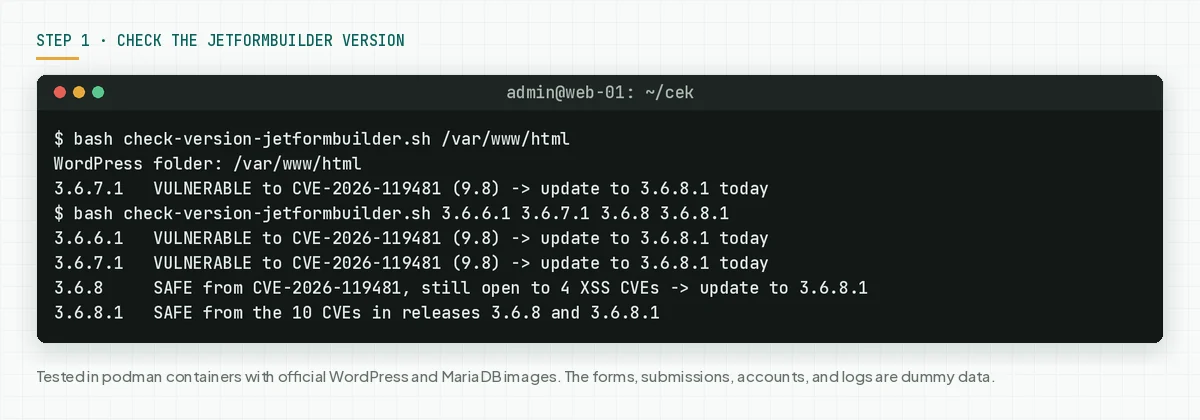
In the dashboard, open Plugins > Installed Plugins. The JetFormBuilder row shows your version.
Check the result: "VULNERABLE" means go to steps 2 and 3 today. "SAFE from CVE-2026-119481, still open to 4 XSS CVEs" means update to 3.6.8.1. "SAFE from the 10 CVEs" still means run step 5, because the advisory was public before you updated.
Step 2: Check the exposed forms
This script answers 4 questions: what are the plugin version and status, which forms use a Verification action, which forms use Register User or Update User, and how many submissions are held.
Save this script as check-exposure-jetformbuilder.sh. The script uses WP-CLI to read the action list of each form and the record table. The script only reads and does not change data.
#!/usr/bin/env bash
# Check the exposure to CVE-2026-119481: the JetFormBuilder version, forms with a Verification action,
# forms with Register User or Update User, and submissions that wait for verification.
# Use: sudo -u www-data bash check-exposure-jetformbuilder.sh /var/www/html
# The script uses WP-CLI to read data. The script only reads. It sends no attack request.

DIR="${1:-/var/www/html}"
# WP-CLI loads the PHP code of the site. On a hacked site, that code can belong to the attacker.
# So the script never runs WP-CLI as root. As root, the script switches to the web user.
# setsid cuts the web user process off from the root terminal, so it cannot inject keystrokes.
# With no setsid, the WP-CLI checks are skipped.
WPUSER="${WPUSER:-www-data}"
AS=()
if [ "$(id -u)" = 0 ]; then
  [ "$WPUSER" = root ] && { echo "WPUSER must not be root."; exit 1; }
  if ! command -v setsid >/dev/null 2>&1; then AS=(false)
  elif command -v runuser >/dev/null 2>&1; then AS=(setsid -w runuser -u "$WPUSER" -- env HOME=/tmp)
  elif command -v sudo >/dev/null 2>&1; then AS=(setsid -w sudo -u "$WPUSER" -- env HOME=/tmp)
  else AS=(false); fi
fi
WP() { "${AS[@]}" wp --path="$DIR" --skip-themes --skip-plugins "$@" </dev/null 2>/dev/null; }
# wp db query prints nothing when stdout goes into a pipe. Capture into a variable first.
Q() { local out; out=$(WP db query "$1" --skip-column-names 2>/dev/null); printf '%s' "$out"; }

if ! command -v wp >/dev/null 2>&1 || [ -z "$(WP option get siteurl)" ]; then
  echo "WP-CLI is missing or cannot read the site. Use step 1 to check the version, then open each form in JetFormBuilder > Forms > Post Submit Actions."
  exit 0
fi

echo "1. JetFormBuilder plugin status"
ver=$(WP plugin get jetformbuilder --field=version)
st=$(WP plugin get jetformbuilder --field=status)
if [ -z "$ver" ]; then
  echo "   JetFormBuilder is not installed. This CVE needs no action."
  exit 0
fi
echo "   Version: $ver  ·  Status: ${st:-unknown}"
if [ "$(printf '%s\n%s\n' "$ver" 3.6.8 | sort -V | head -n1)" != 3.6.8 ]; then
  echo "   CHECK: versions below 3.6.8 are open to CVE-2026-119481. Update in step 3."
else
  echo "   This version is safe from CVE-2026-119481. Still update to 3.6.8.1 for 4 XSS CVEs."
fi

p=$(WP db prefix | tr -d '[:space:]')
# Forms are posts of type jet-form-builder. The action list is in the _jf_actions meta (JSON).
form_sql() {
  cat <<SQL
SELECT p.ID, p.post_status, p.post_title FROM ${p}posts p
JOIN ${p}postmeta m ON m.post_id = p.ID AND m.meta_key = '_jf_actions'
WHERE p.post_type = 'jet-form-builder' AND p.post_status <> 'trash' AND $1 ORDER BY p.ID
SQL
}
VER='m.meta_value REGEXP "\"type\"[[:space:]]*:[[:space:]]*\"verification\""'
USR='m.meta_value REGEXP "\"type\"[[:space:]]*:[[:space:]]*\"(register_user|update_user)\""'

show() { if [ -n "$1" ]; then printf '%s\n' "$1" | awk -F'\t' '{printf "   form %s (%s): %s\n", $1, $2, $3}'; else echo "   none"; fi; }

echo "2. Forms with a Verification action (submissions wait until verified)"
f_ver=$(Q "$(form_sql "$VER")"); show "$f_ver"
echo "3. Forms with a Register User or Update User action"
f_usr=$(Q "$(form_sql "$USR")"); show "$f_usr"
echo "4. Forms with both (the main flaw path)"
f_both=$(Q "$(form_sql "$VER AND $USR")"); show "$f_both"
echo "5. Submissions that wait for verification (status verification_pending)"
tabel=$(Q "SHOW TABLES LIKE '${p}jet_fb_records'")
held=""
[ -n "$tabel" ] && held=$(Q "SELECT form_id, COUNT(*) FROM ${p}jet_fb_records WHERE status = 'verification_pending' GROUP BY form_id")
if [ -z "$tabel" ]; then
  echo "   No record table yet. Form Records never saved a submission, so no submission is held."
elif [ -n "$held" ]; then
  printf '%s\n' "$held" | awk -F'\t' '{printf "   form %s: %s submissions\n", $1, $2}'
  echo "   Do not click Verify manually on these submissions before the update."
else
  echo "   0 submissions."
fi

echo
n_both=$(printf '%s' "$f_both" | grep -c .)
if (( n_both > 0 )); then
  echo "Result: CHECK, $n_both form(s) use the main flaw path. Update today in step 3."
elif [ -n "$f_ver" ]; then
  echo "Result: a Verification form exists, with no Register User or Update User. Lower risk. Still update."
else
  echo "Result: no Verification form. The main flaw path is not in use. Still update to 3.6.8.1 for the other CVEs in old versions."
fi
# Check the version, forms with a Verification, Register User, or Update User action, and held submissions
sudo -u www-data bash check-exposure-jetformbuilder.sh /var/www/html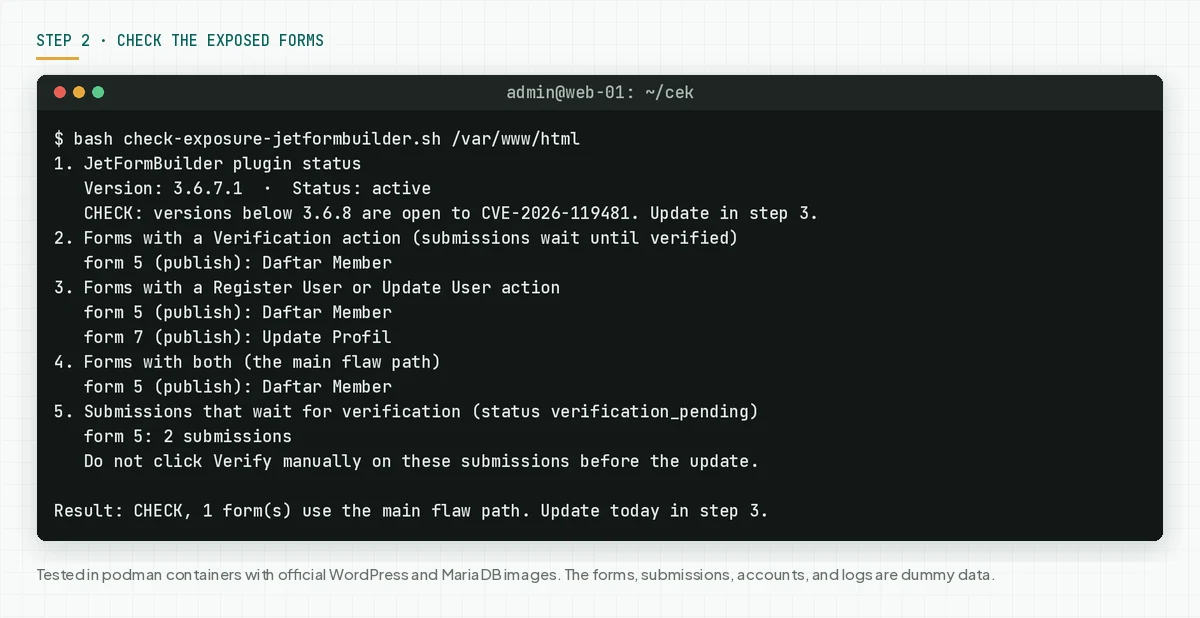
In our test, form 5 "Daftar Member" uses Verification and Register User, so the script marks it as the main path. Form 7 "Update Profil" has only a user action. Form 5 has 2 held submissions. All of this data is dummy.
Check the result: "CHECK" means a form is on the main path, so update today. The list of held submissions shows the records that you must not verify by hand before the update. With no Verification form, you must still update for 7 more CVEs.
Step 3: Back up, then update to 3.6.8.1
Only the update closes this flaw. Make a backup first, then update. Before the update, do not click Verify manually on any held submission.
# 1. Make a database backup first, then move the file off the server.
cd /var/www/html
sudo -u www-data wp db export /tmp/backup-before-update.sql
# 2. Update the plugin to the recommended version (3.6.8.1)
sudo -u www-data wp plugin update jetformbuilder --format=table
# 3. Check the version again
sudo bash ~/cek/check-version-jetformbuilder.sh /var/www/html
# 4. Open the form page, then confirm sign-ups and form submissions work normally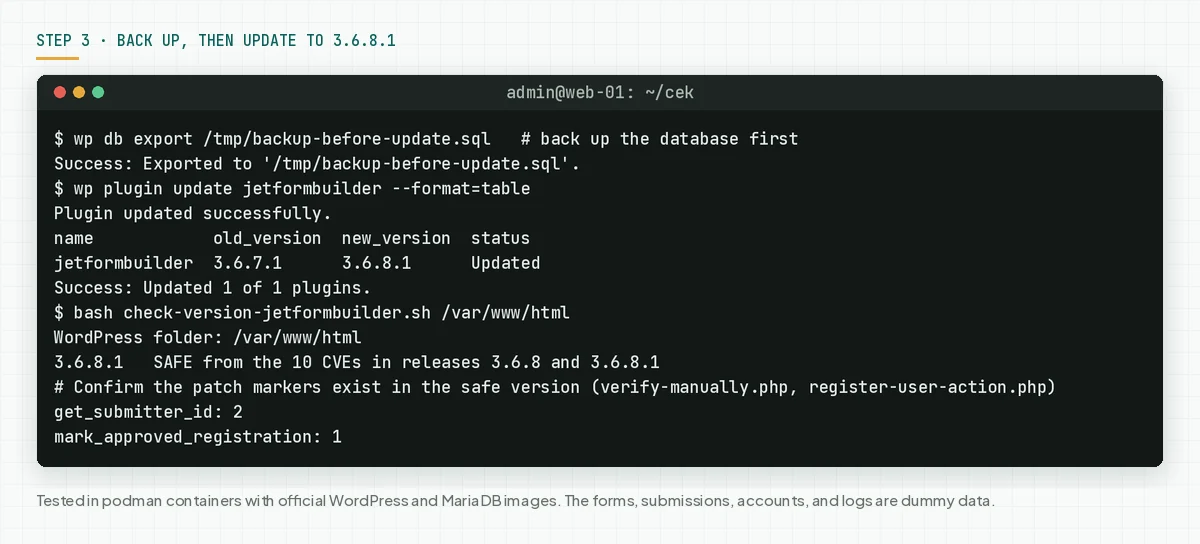
- Make a database backup first, then move the file off the server.
- Update through Plugins > Installed Plugins, or through WP-CLI.
- Run
check-version-jetformbuilder.shagain. The correct result: "SAFE from the 10 CVEs". - Open the form page, then confirm sign-ups and form submissions work normally.
- Repeat on every site, including staging and old sites, then update the Hierarchical Select add-on to 1.0.11 when it is installed.
In our test, the update from 3.6.7.1 to 3.6.8.1 worked through wp plugin update jetformbuilder. After the update, we found the patch markers get_submitter_id (2 times) in verify-manually.php and mark_approved_registration (1 time) in register-user-action.php.
Check the result: the version script prints "SAFE from the 10 CVEs" on every site, and the forms open normally.
Step 4: Set the risky form to draft when the update waits
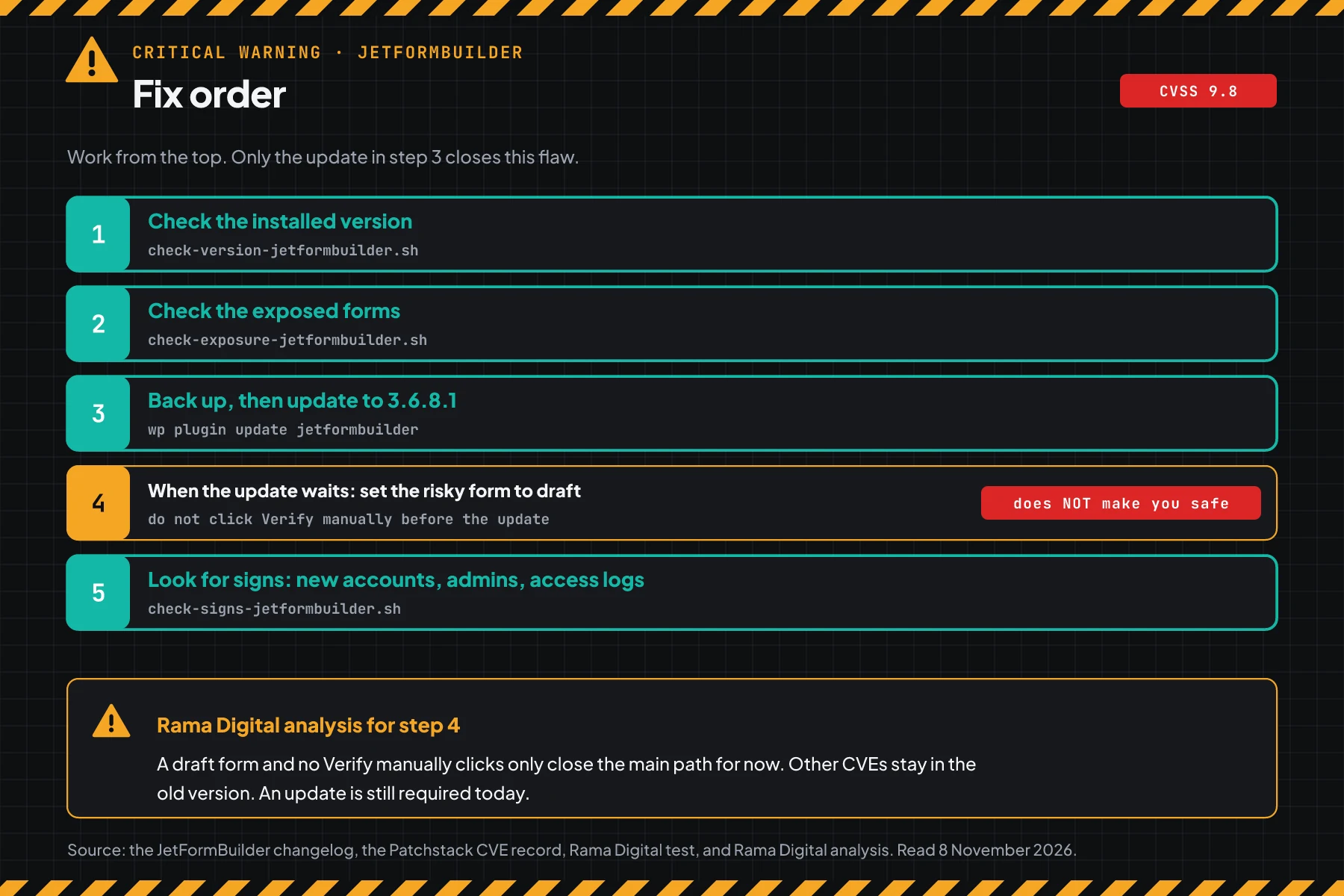
This step does NOT make the site safe. This step only hides the risky form from the page, when you cannot update today. Visitors do not see the form while it has the draft status.
# When you cannot update today: set the risky form to draft (5 is the form ID from step 2)
cd /var/www/html
sudo -u www-data wp post update 5 --post_status=draft
sudo -u www-data wp post list --post_type=jet-form-builder --fields=ID,post_title,post_status --format=table
# Do not click Verify manually on held submissions before the update
# Turn the form on again only after the update to 3.6.8.1
# sudo -u www-data wp post update 5 --post_status=publish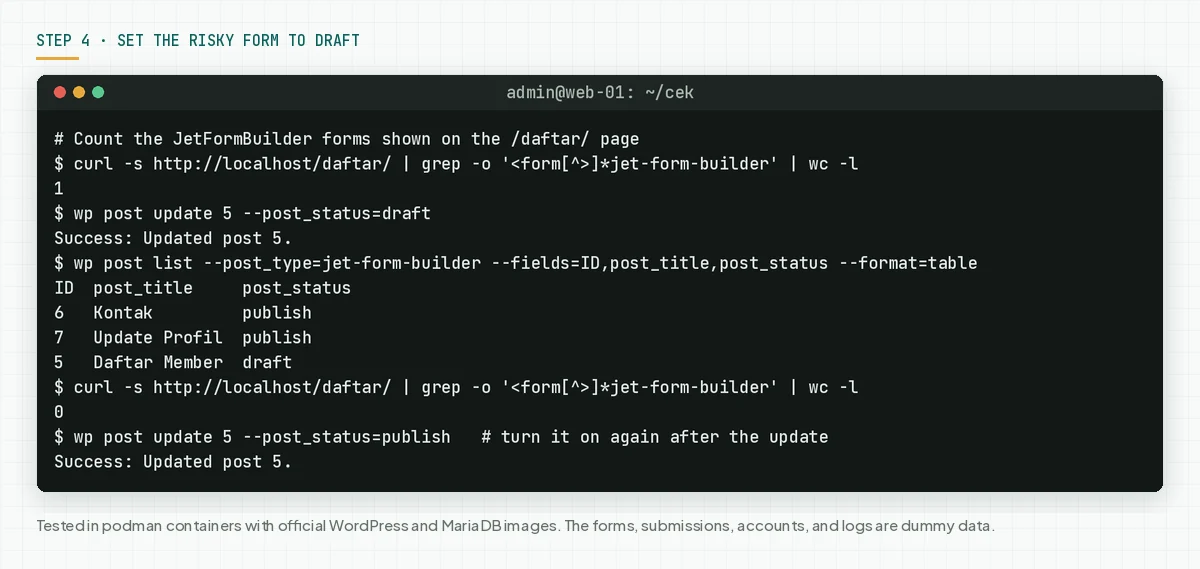
In our test, the /daftar/ page showed 1 form before this step and 0 forms after it. The form list printed "Daftar Member" with the draft status. We turned the form on again after the update.
Rama Digital analysis: a draft form reduces new submissions through the page, but the version stays 3.6.7.1. Submissions that are already held stay in Form Records. We did not test whether an attacker can still post to a draft form, so treat this step as not a fix. Do not click Verify manually on held submissions before the update. The update to 3.6.8.1 is still required today.
Check the result: the form list prints draft for the risky form, and the public page no longer shows it. Turn it on again only after the version is "SAFE from the 10 CVEs".
Step 5: Look for signs of use
The report came in on 24 October, and the advisory has been public since 2 November. Look for signs from 24 October 2026 or earlier, especially when your forms are busy.
Save this script as check-signs-jetformbuilder.sh. The script reads new WordPress accounts, the form records of the last 14 days by status, and the web access log. The script prints counts, times, and IPs, not form submission contents.
Run it with sudo, because the web access log is usually readable only by root. The script still runs WP-CLI as the web user www-data, because the PHP code on a hacked site can belong to the attacker. For another web user, add WPUSER=apache after sudo.
#!/usr/bin/env bash
# Look for signs of CVE-2026-119481 use in WordPress accounts, JetFormBuilder records, and the web access log.
# Use: sudo bash check-signs-jetformbuilder.sh /var/www/html [other log files ...]
# Run it as root, because the web access log is usually readable only by root. WP-CLI still runs as www-data.
# Other web user: sudo WPUSER=apache bash check-signs-jetformbuilder.sh /var/www/html
# The script only reads. It prints counts and times, not form submission contents.

DIR="${1:-/var/www/html}"
shift 2>/dev/null
CAND=("$@")
if (( ${#CAND[@]} == 0 )); then
  for f in /var/log/apache2/access.log* /var/log/nginx/access.log* /var/log/httpd/access_log*; do CAND+=("$f"); done
fi
# Use regular files only. Skip symlinks to devices such as /dev/stdout, so the script does not hang.
LOGS=()
for f in "${CAND[@]}"; do [ -f "$f" ] && LOGS+=("$f"); done
# WP-CLI loads the PHP code of the site. On a hacked site, that code can belong to the attacker.
# So the script never runs WP-CLI as root. As root, the script switches to the web user.
# setsid cuts the web user process off from the root terminal, so it cannot inject keystrokes.
# With no setsid, the WP-CLI checks are skipped.
WPUSER="${WPUSER:-www-data}"
AS=()
if [ "$(id -u)" = 0 ]; then
  [ "$WPUSER" = root ] && { echo "WPUSER must not be root."; exit 1; }
  if ! command -v setsid >/dev/null 2>&1; then AS=(false)
  elif command -v runuser >/dev/null 2>&1; then AS=(setsid -w runuser -u "$WPUSER" -- env HOME=/tmp)
  elif command -v sudo >/dev/null 2>&1; then AS=(setsid -w sudo -u "$WPUSER" -- env HOME=/tmp)
  else AS=(false); fi
fi
WP() { "${AS[@]}" wp --path="$DIR" --skip-themes --skip-plugins "$@" </dev/null 2>/dev/null; }
# With no WP-CLI, or when WP-CLI cannot read the site, the account and record checks do not run.
WPOK=0
command -v wp >/dev/null 2>&1 && [ -n "$(WP option get siteurl)" ] && WPOK=1
Q() { local out; out=$(WP db query "$1" --skip-column-names 2>/dev/null); printf '%s' "$out"; }
signs=0
since=$(date -d '14 days ago' '+%Y-%m-%d' 2>/dev/null || date '+%Y-%m-%d')

echo "1. WordPress accounts above subscriber, registered in the last 14 days"
if (( WPOK )); then
  new=$(WP user list --fields=user_login,user_registered,roles --format=csv | awk -F, -v d="$since" '
    NR>1 { t=$2; gsub(/"/,"",t); if (t < d) next
           # The roles column can hold more than 1 role. Check every role, not only the first one.
           for (i=3; i<=NF; i++) { r=$i; gsub(/"/,"",r); if (r != "" && r != "subscriber" && r != "customer") { print; next } } }')
  if [ -n "$new" ]; then
    echo "   CHECK: new accounts with higher rights:"
    printf '%s\n' "$new" | sed 's/^/   /'
    signs=$((signs + 1))
  else
    echo "   0 new accounts with higher rights."
  fi
  echo "   All administrators:"
  WP user list --role=administrator --fields=user_login,user_registered --format=csv | sed 's/^/   /'
else
  echo "   WP-CLI is missing or cannot read the site. Check by hand: Users > All Users, sort by newest."
fi

echo "2. JetFormBuilder records of the last 14 days by status"
if (( WPOK )); then
  p=$(WP db prefix | tr -d '[:space:]')
  tabel=$(Q "SHOW TABLES LIKE '${p}jet_fb_records'")
  [ -z "$tabel" ] && echo "   No record table yet. There are no records to check."
  rec=""
  [ -n "$tabel" ] && rec=$(Q "SELECT form_id, status, COUNT(*), MAX(updated_at) FROM ${p}jet_fb_records WHERE created_at >= '$since' GROUP BY form_id, status ORDER BY form_id")
  if [ -n "$rec" ]; then
    printf '%s\n' "$rec" | awk -F'\t' '{printf "   form %s  %-22s %s record(s), last %s\n", $1, $2, $3, $4}'
    echo "   Compare the verification times with the new account times in check 1."
  elif [ -n "$tabel" ]; then
    echo "   0 records in 14 days."
  fi
else
  echo "   Check by hand: JetFormBuilder > Form Records, then sort by newest."
fi

echo "3. Verify manually clicks and form submissions in the web access log"
if (( ${#LOGS[@]} == 0 )); then
  echo "   No access log found. Give the log path as an argument."
else
  all=$(zcat -f "${LOGS[@]}" 2>/dev/null)
  ver=$(printf '%s\n' "$all" | grep -F 'jet-form-builder/v1/verification/verify')
  n_ver=$(printf '%s' "$ver" | grep -c .)
  echo "   Verify manually requests from an admin: $n_ver"
  if (( n_ver > 0 )); then
    printf '%s\n' "$ver" | awk '{t=$4" "$5; gsub(/[][]/,"",t); print "   " t "  IP " $1}'
    signs=$((signs + 1))
  fi
  sent=$(printf '%s\n' "$all" | grep -F 'jet_form_builder_submit' | grep -c 'POST')
  echo "   $sent form submissions (POST). This mixes in normal traffic."
  if (( sent > 0 )); then
    echo "   Top 5 sender IPs:"
    printf '%s\n' "$all" | grep -F 'jet_form_builder_submit' | grep 'POST' | awk '{print $1}' | sort | uniq -c | sort -rn | head -n 5 | awk '{printf "   IP %s: %s\n", $2, $1}'
  fi
fi

echo
if (( signs > 0 )); then
  echo "Result: $signs SIGN(S) to check. If a new account is not from your team, start incident response."
elif (( ! WPOK )); then
  echo "Result: checks 1 and 2 did not run, so the site is not proven clean. Check the accounts and Form Records by hand."
else
  echo "Result: no SIGNS from this check. An attacker can delete logs, so still update and monitor."
fi
# Check new accounts, form records by status, and the access log
sudo bash check-signs-jetformbuilder.sh /var/www/html
# Logs in another location, for example a log per site
sudo bash check-signs-jetformbuilder.sh /var/www/html /var/log/nginx/example.com.access.log*
# Check the WordPress admin list
cd /var/www/html
sudo -u www-data wp user list --role=administrator --fields=user_login,user_registered
# Plugin update time: the change time of the plugin file
date -r wp-content/plugins/jetformbuilder/jet-form-builder.php '+%Y-%m-%d %H:%M'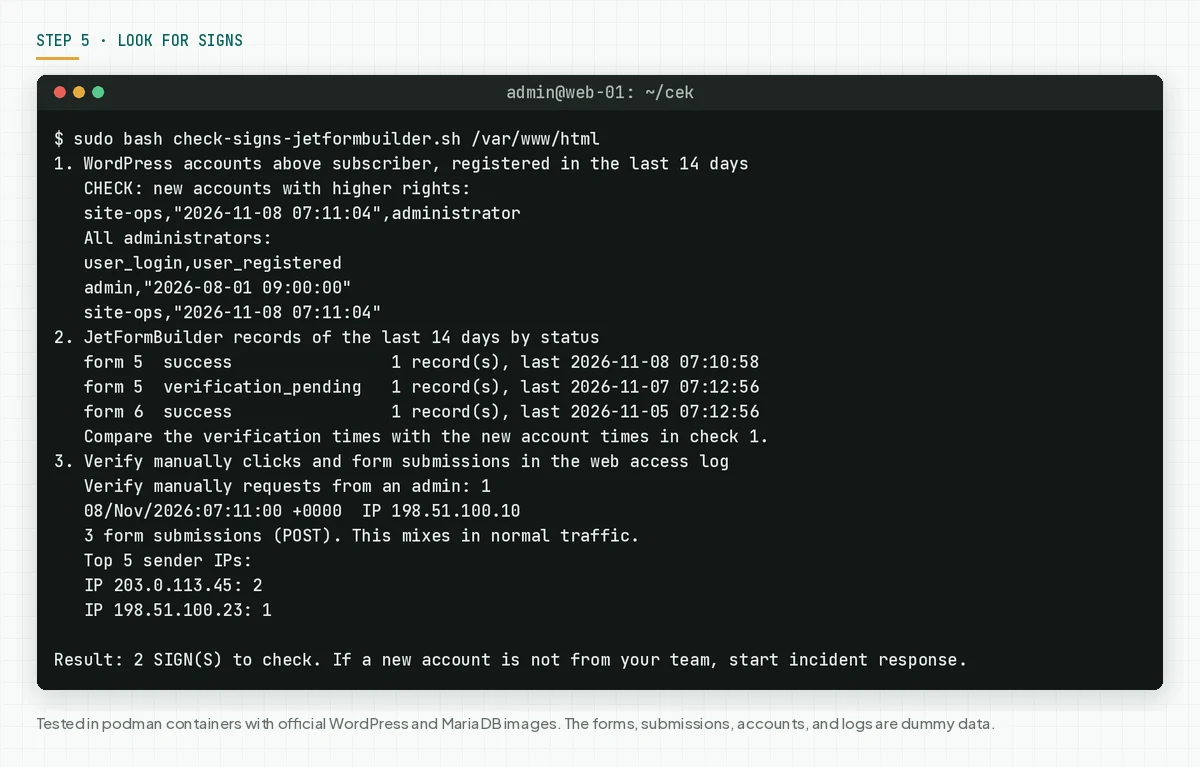
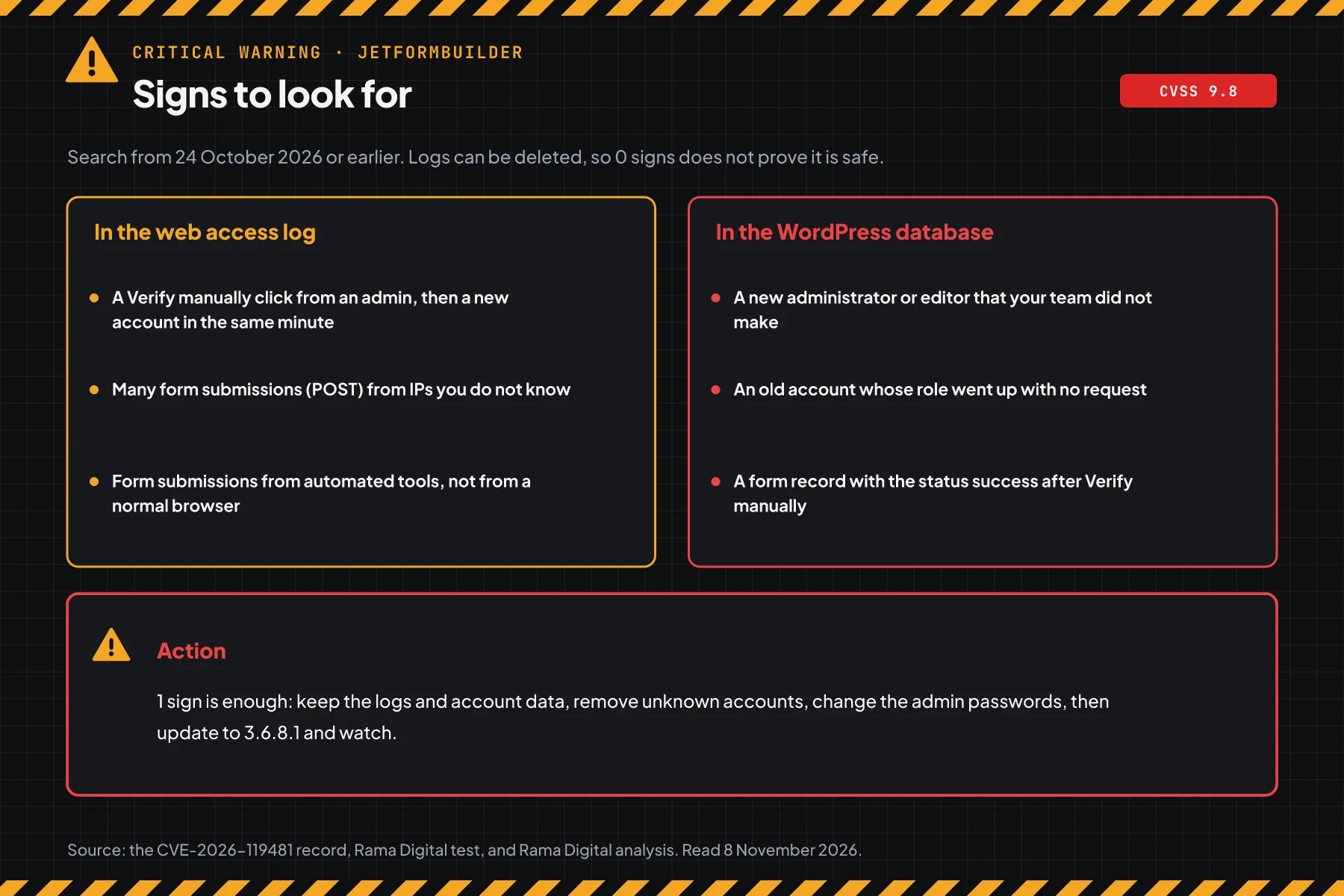
In our test, the script found the new admin site-ops, 1 Verify manually request from an admin in the log in the same minute as the new account, and 3 form submissions from 2 IPs. That is 2 SIGNS. The IPs use RFC 5737 documentation blocks, and all data is dummy.
Normal form submissions mix with normal traffic, so the POST count alone does not prove an attack. Compare the time of the Verify manually click with the time of a new account or a raised role.
Check the result: the script prints "no SIGNS from this check", and the admin list has only people you know. Attackers can delete logs, so no sign does not prove that the site is safe.
When you find even 1 sign, keep the web log and the account data as evidence. Remove unknown accounts, change the admin passwords, and change the salts with wp config shuffle-salts so that all login sessions end. Then update to 3.6.8.1 and monitor.
When the site holds customer data, Indonesian Law 27/2022 on Personal Data Protection requires a written notice within 3 times 24 hours after a personal data leak.
Example: 1 morning of response for 3 JetFormBuilder sites
This simulation uses dummy data. The site names, times, and results are not customer data.
| Time (WIB) | Dummy site | What we check | Result | Action |
|---|---|---|---|---|
| 08.00 | shop-a (3.6.7.1, member sign-up form with Verification) | Steps 1, 2, and 5 | VULNERABLE, 1 form on the main path, 2 held submissions, 1 new admin | Incident response, then update |
| 08.30 | clinic-b (3.6.8, manual update) | Steps 1 and 2 | SAFE from CVE-2026-119481, 4 XSS CVEs open | Update to 3.6.8.1 |
| 09.00 | studio-c (3.6.8.1, automatic update) | Steps 1 and 5 | SAFE from 10 CVEs, clean log | Record the version and the next check date |
The lesson from the simulation: a vulnerable version with held submissions needs step 5 first, not only an update. The update closes the flaw, but it does not remove an account that was already created.
Who installs the patch
Patch responsibility changes with the type of service, so this table shows who must act today.
| Service type | Patch owner | What you do |
|---|---|---|
| Shared hosting with cPanel or another panel | You | Check the version in the dashboard, update the plugin, and ask the provider for the access log |
| Managed WordPress hosting | The provider and you | Update the plugin, then ask for written log proof |
| Your own VPS | Your team | Steps 1 to 5 |
| A site built by an agency or a freelancer | As in the maintenance contract | Ask for the version today, then ask for the update schedule |
For a WordPress site that you maintain yourself, note the update schedule of form plugins like any other plugin. Rama Digital recommendation: turn on automatic updates for the form plugin, because this plugin holds sign-up data. When automatic updates are off, schedule a weekly version check and patch critical flaws within 24 hours.
Checklist for today
- List all sites with JetFormBuilder. Owner: the web team. Evidence: a list of sites and versions.
- Check the version with step 1. Owner: the site admin. Evidence: the script output.
- Check the exposed forms with step 2. Owner: the site admin. Evidence: the script output.
- Do not click Verify manually on held submissions before the update. Owner: all admins. Evidence: a team message.
- Make a backup, then update to 3.6.8.1. Owner: the site admin. Evidence: the version script output after the update.
- When the update waits, set the risky form to draft with step 4. Owner: the site admin. Evidence: the form list with the draft status.
- Look for signs with step 5. Owner: the site admin and the security team. Evidence: the script output and the admin list.
- Turn on form plugin automatic updates when they are off with no written reason.
Questions and answers
Do attackers already use this flaw?
On 8 November 2026, there are no attack reports and the flaw is not in CISA KEV. Patchstack gives the label "expected to become exploited" and the score 9.8, so update today.
My site does not use the Verification action. Am I safe?
The main flaw path is not in use on your site. But 7 more CVEs also affect version 3.6.7.1 or older. Update to 3.6.8.1.
My site is on 3.6.8. Is that enough?
Version 3.6.8 closes the main flaw. But 4 XSS CVEs close only in 3.6.8.1. Update to 3.6.8.1.
Does a draft form close the flaw?
No. A draft form only hides the form from the page, and the plugin version stays vulnerable. Held submissions stay in place. Only the update closes the flaw.
Can a firewall plugin replace the update?
No. Patchstack has no virtual mitigation rule for this flaw. Only the update closes the flaw in the plugin code.
How do I know that someone abused this flaw?
Run step 5. Check for new admins or editors, roles that went up with no request, Verify manually clicks in the log, and records with the status success after that click.
Next step
The limits that still apply: a draft form is not a fix, and an update does not remove an account that an attacker already created. When your site shows a sign in step 5, or you need help with an audit and recovery, use Vibe Code Rescue. For 1 urgent issue today, book a 30-minute session.
Sources
- CVE-2026-119481 record: CVSS 3.1 score 9.8, CWE-266, the vulnerable version range, and the fix version 3.6.8.
- Patchstack advisory: the finder dzaku, the report and advisory dates, and the label "expected to become exploited".
- JetFormBuilder plugin page: the 3.6.8 and 3.6.8.1 changelog, the latest version, and the active install count.
- CVE record API: the raw CVE record data.
- CISA KEV: the CISA KEV status on 8 November 2026.
- RFC 5737: the documentation IP blocks for the dummy data in this article.
- Indonesian Law 27/2022 on Personal Data Protection: the duty to report a personal data leak.