Direct answer: Contact Form 7 versions 6.2 to 6.2.3 have a file upload flaw with no login, CVE-2026-114432, with a CVSS 3.1 score of 9.8. On the default Debian or Ubuntu Apache, this flaw can lead to remote code execution. Today, check the version, update to 6.2.4.1, then look for signs.
The vendor released 6.2.4 and 6.2.4.1 on 29 October 2026. On 9 November 2026, this flaw is not in CISA KEV. WPScan holds back its PoC until 19 November 2026, so update before that date.
Main condition: The vulnerable code runs on forms with a [file] or [file*] upload field. The highest risk is on Apache that shows folder listings and runs .phar as PHP. Limit: This article has no request contents, trigger file names, payloads, or attack sequence.
We read the CVE-2026-114432 record, the WPScan advisory, the Contact Form 7 plugin page, and the CVE record API on 9 November 2026, from 13.30 to 14.30 WIB. We tested 3 check scripts, a plugin update, an Apache block, and an nginx block in podman containers with the official WordPress, WP-CLI, MariaDB, and nginx images. We did not test an attack.
Problem: an upload flaw in the most popular form plugin
Contact Form 7 is a free contact form plugin for WordPress. The plugin page shows more than 10 million active installs. Many business sites use it for contact forms, job application forms, and order forms with attachments.
The CVE-2026-114432 record puts CVE-2026-114432 in the class CWE-434, Unrestricted Upload of File with Dangerous Type. WPScan is the CNA of this record, and Shinya Murakami found the flaw. CISA ADP gives a score of 9.8 with the vector AV:N, AC:L, PR:N, and UI:N, so the attack goes over the network, is easy, and needs no login.
Release 6.2 came out on 6 October 2026 and brought this flaw. The vendor closed it in 6.2.4 on 29 October. The WPScan advisory came out on 5 November, and the CVE record on 8 November 2026.
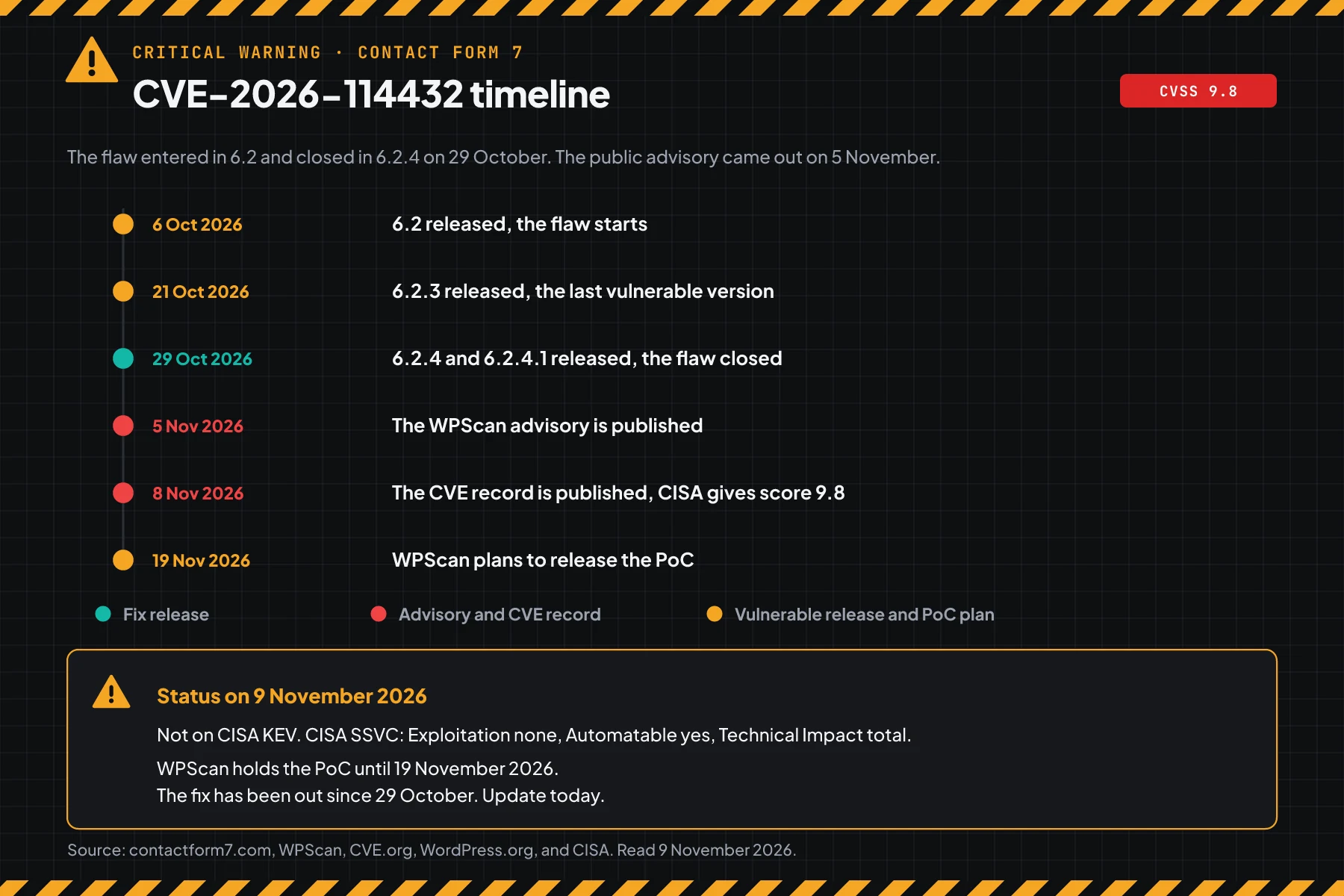
On 9 November 2026, this flaw is not in CISA KEV (catalog 2026.11.06). The CISA SSVC rating shows Exploitation none, Automatable yes, and Technical Impact total. This means that there is no proof of attacks yet, but an attack can run automatically with full impact.
How it works: file uploads and the temporary folder
This section uses the official summary and the patch contents. Its purpose is to help you choose your steps, not to explain how to attack.
Summary from the CVE record
The CVE record says that the plugin does not check the type or the extension of files from a file field. A defect in the cleanup of temporary files keeps that file on the disk. So a person with no login can put any file on the site.
The impact depends on the web server. On the default Debian or Ubuntu Apache, a person can find and run that file. On nginx, or on Apache that reads .htaccess, the impact is an unknown file in the upload folder that can show as HTML or SVG from the site domain.
What release 6.2.4 changes
We compared the code in the official 6.2.3, 6.2.4, and 6.2.4.1 packages from WordPress.org:
- The plugin puts uploaded files in the temporary folder
wp-content/uploads/wpcf7_uploads/, in a subfolder with a random 10-digit name. The plugin writes a.htaccessfile withRequire all deniedin that folder. - In 6.2.4, the function
wpcf7_unship_uploaded_filerecords each file that it moved. So the cleanup also removes files when an error stops the upload. - Release 6.2.4.1 updates the FormDataTree library from 2.0.7 to 2.0.10.
Rama Digital analysis: the .htaccess file from the plugin works only when Apache reads it. Apache with AllowOverride None ignores that file, so the temporary folder can show on the web. Limit: we read the code and tested the server settings, but we did not test an attack.
Exploitation status on 9 November 2026
| Source | Status |
|---|---|
| CISA KEV | Not listed (catalog 2026.11.06) |
| CVE-2026-114432 record (CVSS 3.1 from CISA ADP) | Score 9.8, Critical class, CWE-434 |
| CISA SSVC | Exploitation none, Automatable yes, Technical Impact total |
| WPScan | Advisory public since 5 November. PoC held back until 19 November 2026. |
| Vendor | Flaw closed in 6.2.4, latest version 6.2.4.1 on 9 November 2026 |
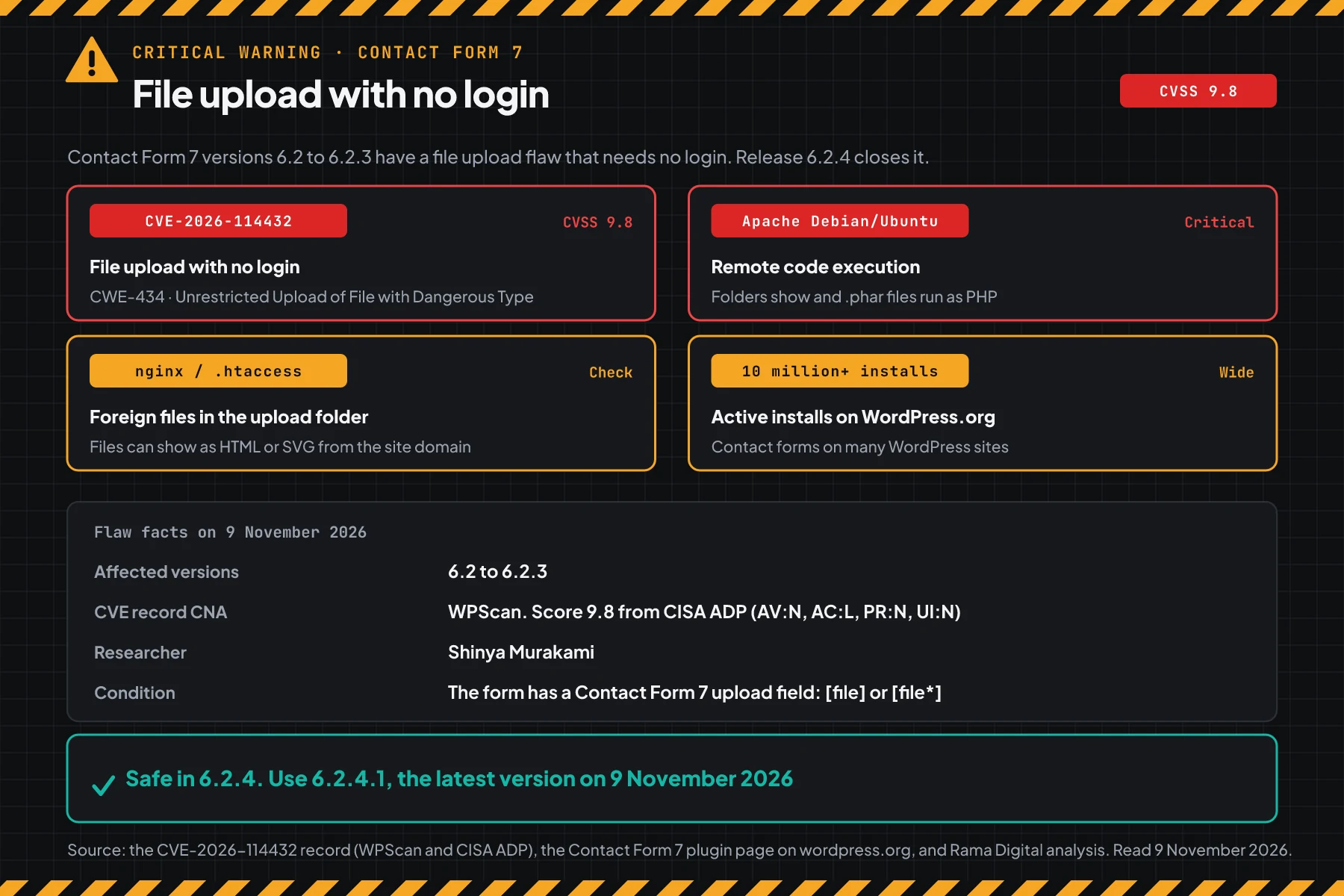
A score of 9.8 is in the Critical class. Business sites use upload forms for CVs, payment proofs, and customer documents, so the impact can reach personal data. We write a critical warning even with no attack reports.
Who is most at risk
The risk depends on the version, the forms with an upload field, and the web server. This table helps you sort your sites when you manage many sites.
| Site condition | Risk | Reason |
|---|---|---|
| Version 6.2 to 6.2.3 with the default Debian or Ubuntu Apache | Highest | The CVE record names remote code execution for this setup |
The wpcf7_uploads folder answers HTTP 200 on the web | Highest | Files in that folder can open through a web address |
| Version 6.2 to 6.2.3 with a form that has an upload field | High | The vulnerable upload code runs on this form |
nginx, or Apache that reads .htaccess | High | Unknown files can land in the upload folder and show as HTML or SVG |
| Version 6.2 to 6.2.3 with no upload field in any form | Low | A new form can add an upload field at any time |
| Already on 6.2.4.1, or still below 6.2 | Low | Still look for signs when the site ran 6.2 to 6.2.3 |
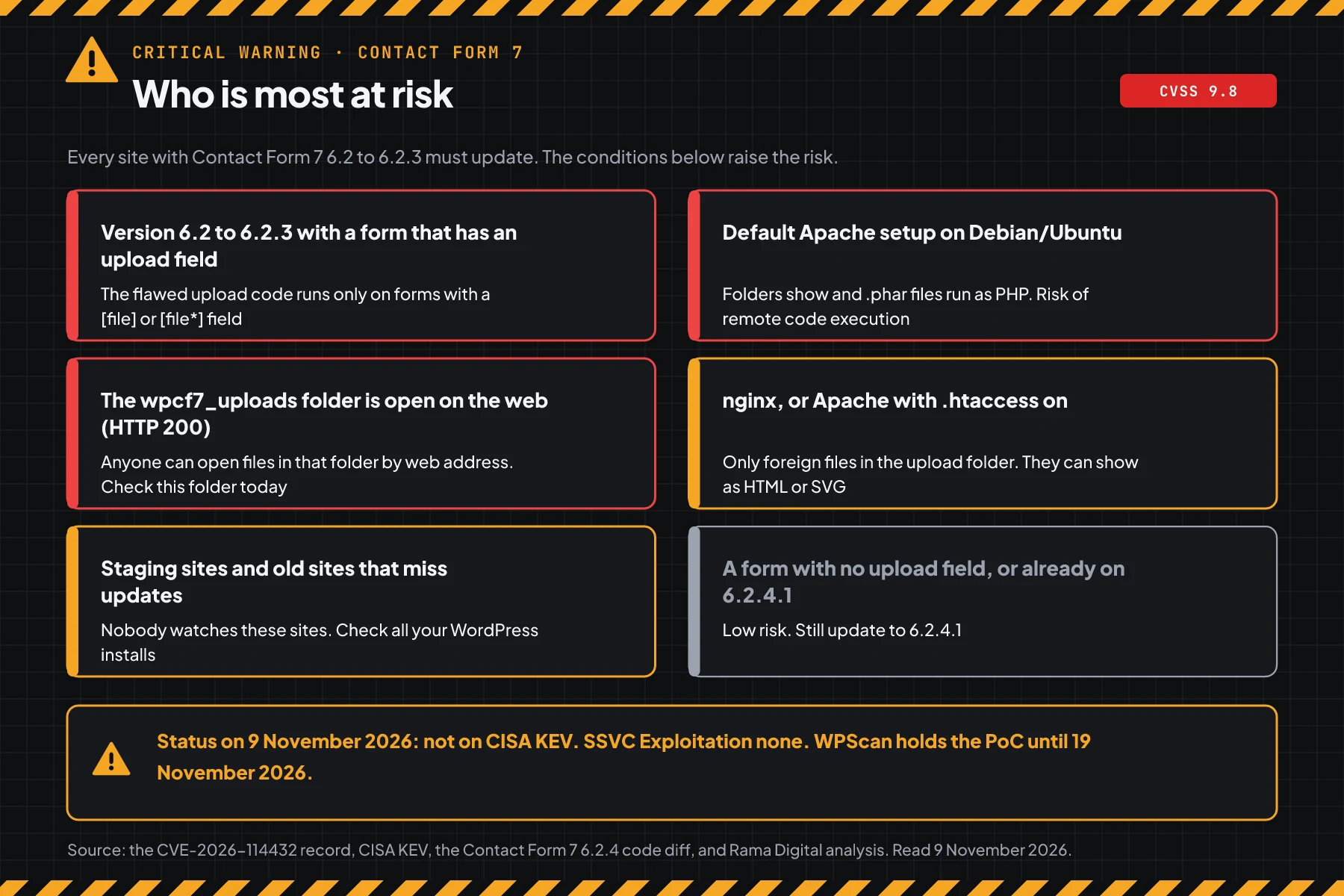
Rama Digital analysis: the official WordPress Docker image for Apache turns off folder listings and reads .htaccess. Shared hosting with cPanel usually also reads .htaccess. These sites are in a lower risk group, but they must still update.
Business sites often use more than 1 plugin that takes visitor data. Also check other form plugins, for example the JetFormBuilder form plugin flaw CVE-2026-119481, and booking plugins, for example the LatePoint booking plugin flaw CVE-2026-118066. Also patch the WordPress core, for example for the WordPress core update flaw CVE-2026-119977, and other plugins from today's warnings, for example the Uncanny Toolkit flaw CVE-2026-65555.
Vulnerable and safe versions
Contact Form 7 6.2 to 6.2.3 is vulnerable to CVE-2026-114432. Version 6.2.4 closes the flaw, and 6.2.4.1 is the latest version. Versions below 6.2 are not affected by this CVE.
| Contact Form 7 version | Status on 9 November 2026 | Update to |
|---|---|---|
| Below 6.2 | Not affected by this CVE | 6.2.4.1 |
| 6.2 to 6.2.3 | Vulnerable to CVE-2026-114432 (9.8) | 6.2.4.1 today |
| 6.2.4 | Safe from this CVE | 6.2.4.1 |
| 6.2.4.1 | Safe, the latest version on 9 November 2026 | Use this version |
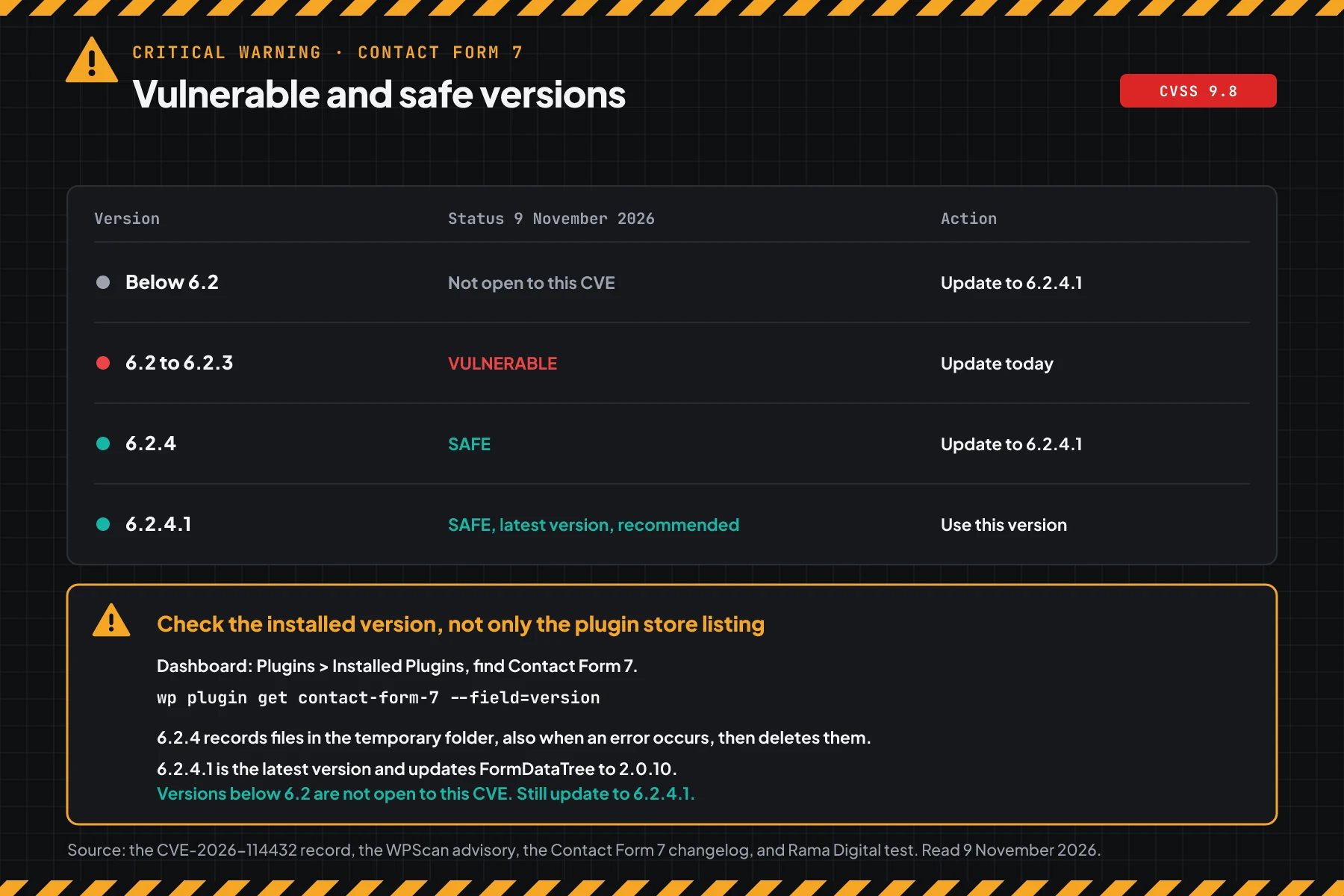
The version data comes from the CVE-2026-114432 record, the WPScan advisory, and the changelog on the Contact Form 7 plugin page. Version 6.2.4.1 needs WordPress 7.1 and PHP 8.3. Check both conditions before you update an old site.
Before you start
- SSH access with sudo to the server, or an administrator account in the WordPress dashboard.
- WP-CLI on the server when you use the
wpcommands. Steps 1 and 3 also work in the dashboard. - A recent backup of the database and the files, for example a VPS snapshot or a backup from the hosting panel.
- Access to the web server settings and access logs, for example
/etc/apache2/and/var/log/apache2/. - A list of all WordPress sites that use Contact Form 7, also staging sites and old sites.
Step 1: Check the Contact Form 7 version
Save this script as check-version-cf7.sh in the ~/cek folder. The script reads the Version header from wp-contact-form-7.php, then compares it with versions 6.2, 6.2.4, and 6.2.4.1.
#!/usr/bin/env bash
# Check the Contact Form 7 plugin version against CVE-2026-114432 (file upload with no login, CVSS 3.1 9.8).
# Data: the CVE record from the CNA WPScan, the score from CISA ADP, and the official changelog on wordpress.org.
# Use on the server: sudo bash check-version-cf7.sh /var/www/html
# Use for versions that you copied: bash check-version-cf7.sh 6.1.7 6.2.3 6.2.4.1
# The script only reads files. The script changes nothing.

# The flaw starts in 6.2. Release 6.2.4 closes the flaw. Release 6.2.4.1 is the latest version on 9 November 2026.
FIRST=6.2
SAFE=6.2.4
ADVISED=6.2.4.1

# lower A B: true when version A is below version B.
lower() { [ "$1" != "$2" ] && [ "$(printf '%s\n%s\n' "$1" "$2" | sort -V | head -n1)" = "$1" ]; }

check() {
  local v="$1"
  if ! [[ $v =~ ^[0-9]+\.[0-9]+(\.[0-9]+){0,2}$ ]]; then
    printf '%-8s UNKNOWN, compare it manually with the safe version table\n' "$v"
    return
  fi
  if lower "$v" "$FIRST"; then
    printf '%-8s NOT AFFECTED by CVE-2026-114432 (the flaw starts in %s), still update to %s\n' "$v" "$FIRST" "$ADVISED"
  elif lower "$v" "$SAFE"; then
    printf '%-8s VULNERABLE to CVE-2026-114432 (9.8) -> update to %s today\n' "$v" "$ADVISED"
  else
    printf '%-8s SAFE from CVE-2026-114432\n' "$v"
  fi
}

DIR=/var/www/html
VERSIONS=()
for x in "$@"; do
  if [ -d "$x" ]; then DIR="$x"; else VERSIONS+=("$x"); fi
done

if (( ${#VERSIONS[@]} > 0 )); then
  for v in "${VERSIONS[@]}"; do check "$v"; done
  exit 0
fi

FILE="$DIR/wp-content/plugins/contact-form-7/wp-contact-form-7.php"
if [ ! -r "$FILE" ]; then
  echo "Cannot read the plugin file: $FILE"
  echo "Give the WordPress folder as an argument, for example: sudo bash check-version-cf7.sh /var/www/html"
  echo "When Contact Form 7 is not installed, this CVE needs no action from you."
  exit 1
fi
v=$(sed -nE 's/^[[:space:]]*\*?[[:space:]]*Version:[[:space:]]*([0-9.]+).*/\1/p' "$FILE" | head -n1)
echo "WordPress folder: $DIR"
check "${v:-unreadable}"
# On the server: read the version from the plugin folder
sudo bash check-version-cf7.sh /var/www/html
# Check versions that you noted from other sites
bash check-version-cf7.sh 6.1.7 6.2.3 6.2.4 6.2.4.1
# Manual check without the script
grep -i "Version:" /var/www/html/wp-content/plugins/contact-form-7/wp-contact-form-7.php
cd /var/www/html && sudo -u www-data wp plugin get contact-form-7 --field=version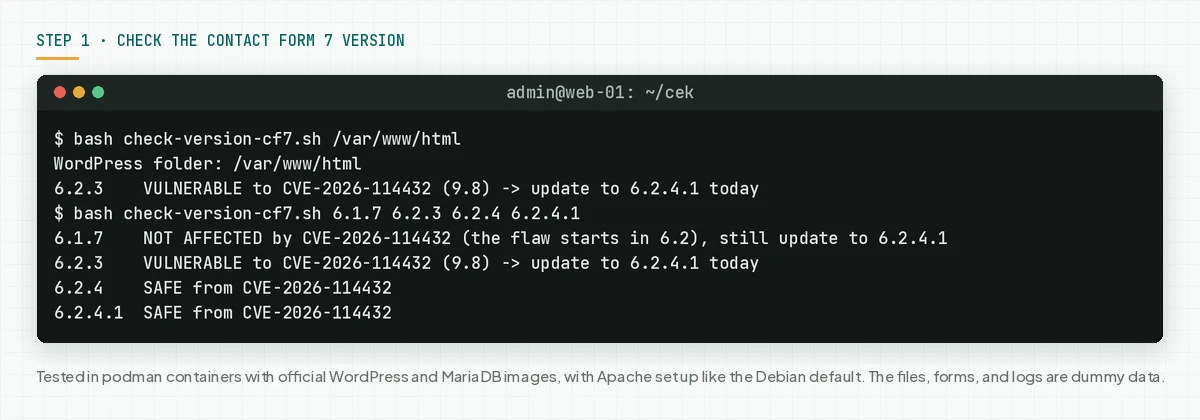
In the dashboard, open Plugins > Installed Plugins. The Contact Form 7 row shows your version.
Check the result: "VULNERABLE" means go to steps 2 and 3 today. "SAFE" still means run step 5 when your site ran 6.2 to 6.2.3 before.
Step 2: Check upload forms and the temporary folder
This script answers 5 questions: the plugin version and status, which forms use an upload field, whether the wpcf7_uploads folder exists, whether the web server serves that folder, and whether Apache runs .phar as PHP.
Save this script as check-exposure-cf7.sh. The script uses WP-CLI and curl to read data. The script sends no files and does not change data.
Run the script as the web user www-data. When you run it as root, the script changes to www-data itself, because the PHP code on a breached site can belong to the attacker. For another web user, add WPUSER=apache after sudo.
#!/usr/bin/env bash
# Check the exposure to CVE-2026-114432: the Contact Form 7 version and status, forms with an upload field,
# the temporary upload folder wpcf7_uploads, and the web server settings.
# Use: sudo -u www-data bash check-exposure-cf7.sh /var/www/html
# The script uses WP-CLI and curl to read data. The script only reads. The script sends no files and no attack requests.

DIR="${1:-/var/www/html}"
# WP-CLI loads the PHP code of the site. On a broken site, an attacker can own that code.
# So the script does not run WP-CLI as root. As root, the script changes to the web user.
# setsid cuts the web user process off from the root terminal, so that process cannot inject keystrokes.
# Without setsid, the script skips the WP-CLI checks.
WPUSER="${WPUSER:-www-data}"
AS=()
if [ "$(id -u)" = 0 ]; then
  [ "$WPUSER" = root ] && { echo "WPUSER must not be root."; exit 1; }
  if ! command -v setsid >/dev/null 2>&1; then AS=(false)
  elif command -v runuser >/dev/null 2>&1; then AS=(setsid -w runuser -u "$WPUSER" -- env HOME=/tmp)
  elif command -v sudo >/dev/null 2>&1; then AS=(setsid -w sudo -u "$WPUSER" -- env HOME=/tmp)
  else AS=(false); fi
fi
WP() { "${AS[@]}" wp --path="$DIR" --skip-themes --skip-plugins "$@" </dev/null 2>/dev/null; }
# wp db query stays silent when stdout goes into a pipe. Catch it in a variable first, then process it.
Q() { local out; out=$(WP db query "$1" --skip-column-names 2>/dev/null); printf '%s' "$out"; }
# Remove control characters from site data before they show in the terminal.
clean() { LC_ALL=C tr -d '\000-\010\013-\037\177'; }

SITEURL=$(WP option get siteurl | clean)
if ! command -v wp >/dev/null 2>&1 || [ -z "$SITEURL" ]; then
  echo "WP-CLI is missing or cannot read the site. Use step 1 to check the version, then open Contact > Contact Forms."
  exit 0
fi

echo "1. Contact Form 7 plugin status"
v=$(WP plugin get contact-form-7 --field=version | clean)
s=$(WP plugin get contact-form-7 --field=status | clean)
if [ -z "$v" ]; then
  echo "   Contact Form 7 is not installed. This CVE needs no action from you."
  exit 0
fi
lower() { [ "$1" != "$2" ] && [ "$(printf '%s\n%s\n' "$1" "$2" | sort -V | head -n1)" = "$1" ]; }
vulnerable=0
if ! lower "$v" 6.2 && lower "$v" 6.2.4; then vulnerable=1; fi
if (( vulnerable )); then echo "   Version $v, status $s: VULNERABLE (6.2 to 6.2.3)"; else echo "   Version $v, status $s: not in the vulnerable range 6.2 to 6.2.3"; fi

echo "2. Forms with a [file] or [file*] upload field"
p=$(WP db prefix | tr -d '[:space:]')
total=$(Q "SELECT COUNT(*) FROM ${p}posts WHERE post_type = 'wpcf7_contact_form' AND post_status <> 'trash'")
list=$(Q "SELECT p.ID, p.post_title FROM ${p}posts p JOIN ${p}postmeta m ON m.post_id = p.ID AND m.meta_key = '_form' WHERE p.post_type = 'wpcf7_contact_form' AND p.post_status <> 'trash' AND (m.meta_value LIKE '%[file %' OR m.meta_value LIKE '%[file* %') ORDER BY p.ID" | clean)
nfile=$(printf '%s' "$list" | grep -c .)
echo "   $nfile of ${total:-0} forms use an upload field."
[ -n "$list" ] && printf '%s\n' "$list" | awk -F'\t' '{printf "   ID %s  %s\n", $1, $2}'

echo "3. Temporary upload folder"
UP="$DIR/wp-content/uploads/wpcf7_uploads"
if [ -d "$UP" ]; then
  if [ -f "$UP/.htaccess" ]; then echo "   $UP exists, .htaccess exists"; else echo "   $UP exists, .htaccess is MISSING"; fi
else
  echo "   $UP does not exist yet (the folder appears after the first upload)."
fi

echo "4. Does the web server serve that folder?"
URL="${SITEURL%/}/wp-content/uploads/wpcf7_uploads/"
open=0
if command -v curl >/dev/null 2>&1; then
  result=$(curl -s --max-time 10 -w '\n%{http_code}' "$URL" 2>/dev/null)
  code=$(printf '%s\n' "$result" | tail -n 1)
  if [ "$code" = 200 ]; then
    open=1
    if printf '%s' "$result" | grep -q 'Index of'; then
      echo "   $URL -> HTTP 200: CHECK, the folder listing shows"
    else
      echo "   $URL -> HTTP 200: CHECK, the folder is open on the web"
    fi
  else
    echo "   $URL -> HTTP ${code:-000}: the folder does not show on the web"
  fi
else
  echo "   curl is missing. Open $URL in a browser. The correct result: 403 or 404."
fi

echo "5. Web server settings"
phar=$(grep -RlsE 'ph\((\?:)?ar\|' /etc/apache2/mods-enabled /etc/apache2/conf-enabled /etc/apache2/sites-enabled /etc/httpd/conf.d /etc/httpd/conf.modules.d 2>/dev/null | head -n 1)
if [ -n "$phar" ]; then echo "   Apache runs .phar files as PHP: yes ($phar)"; else echo "   Apache runs .phar files as PHP: not seen"; fi
if [ -d /etc/nginx ]; then echo "   nginx is installed: nginx does not read .htaccess, so use the block in step 4."; fi

echo
if (( ! vulnerable )); then
  echo "Result: the version is outside the vulnerable range. Still look for signs with step 5."
elif [ "$s" != active ]; then
  echo "Result: VULNERABLE, but the plugin is off. Update to 6.2.4.1 before you turn it on again."
elif (( nfile == 0 )); then
  echo "Result: VULNERABLE, but 0 forms use an upload field. Update to 6.2.4.1 today, because a new form can add an upload field."
elif (( open )) || [ -n "$phar" ]; then
  echo "Result: HIGH EXPOSURE. Update to 6.2.4.1 today. When the update must wait, use step 4 now."
else
  echo "Result: EXPOSED. Unknown files can land in the upload folder. Update to 6.2.4.1 today."
fi
# Check the version, forms with an upload field, the wpcf7_uploads folder, and the web server settings
sudo -u www-data bash check-exposure-cf7.sh /var/www/html
# Check from outside the server (replace example.com with your domain). The correct result: 403 or 404.
curl -s -o /dev/null -w '%{http_code}\n' https://example.com/wp-content/uploads/wpcf7_uploads/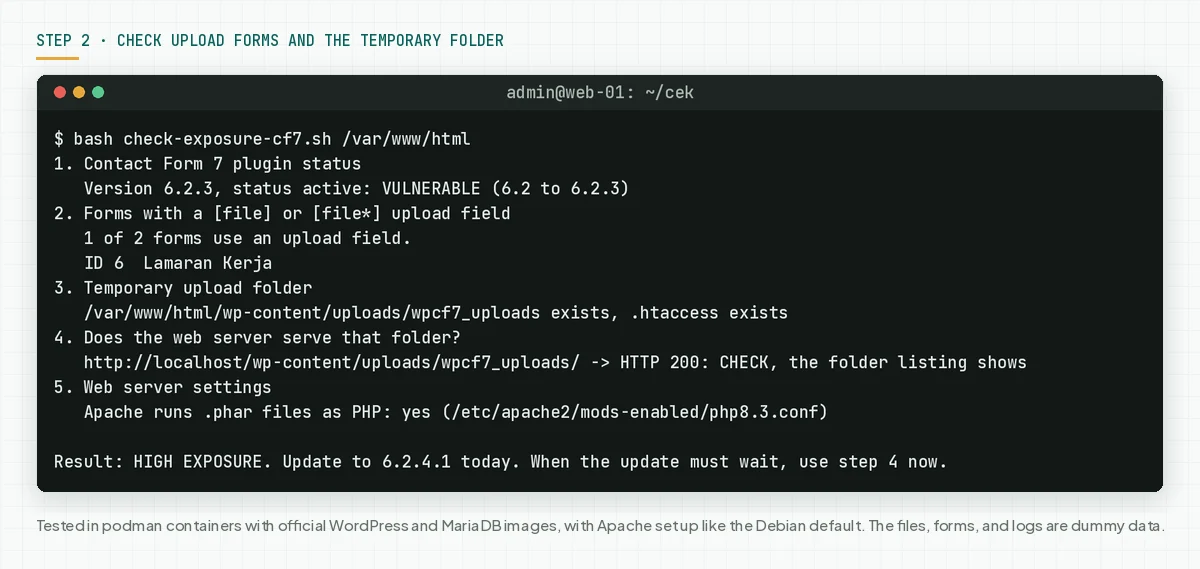
In our test, 1 of 2 forms uses an upload field: the dummy Lamaran Kerja (job application) form with a CV field. The wpcf7_uploads folder answers HTTP 200 with a listing, and Apache runs .phar as PHP. The result is HIGH EXPOSURE.
In the dashboard, open Contact > Contact Forms, then open each form. Look for the [file tag in the form text.
Check the result: "HIGH EXPOSURE" means update within 1 hour, or use step 4 now. "VULNERABLE, but 0 forms use an upload field" still means update today.
Step 3: Back up, then update to 6.2.4.1
Only the update closes the flaw. Make a backup first, then update.
# 1. Make a database backup first, then move the file off the server.
cd /var/www/html
sudo -u www-data wp db export /tmp/backup-before-update.sql
# 2. Update the plugin to 6.2.4.1
sudo -u www-data wp plugin update contact-form-7 --format=table
# 3. Check the version again
sudo bash ~/cek/check-version-cf7.sh /var/www/html
# 4. Send 1 test form with a small PDF file, then confirm that the email arrives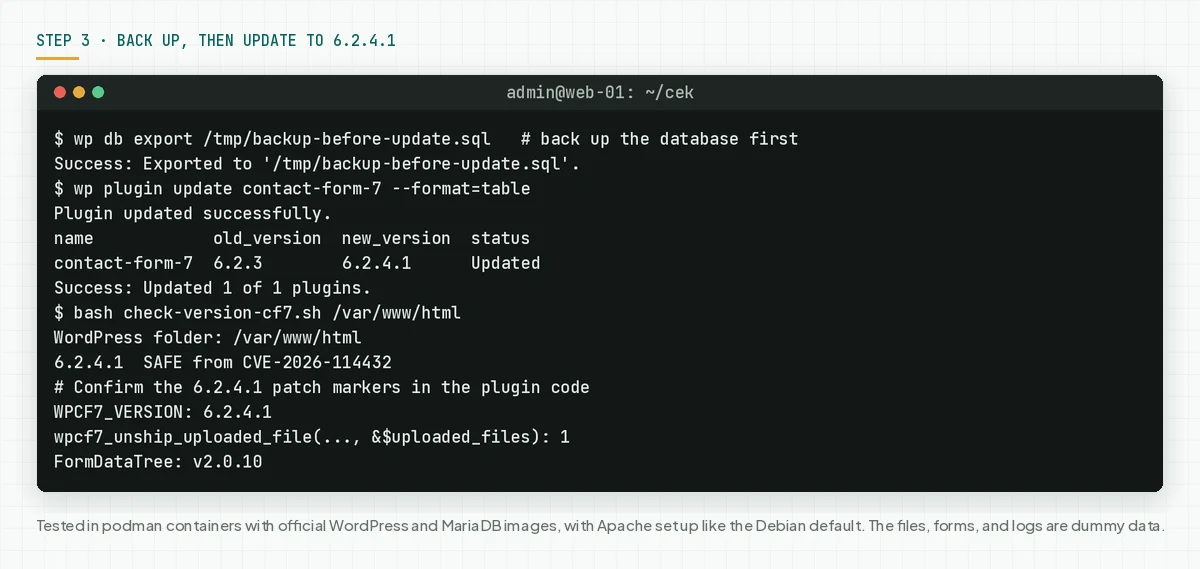
- Make a database backup first, then move the file off the server.
- Update in Plugins > Installed Plugins, or with WP-CLI.
- Run
check-version-cf7.shagain. The correct result: "SAFE from CVE-2026-114432". - Send 1 test form with a small PDF file, then confirm that the email and its attachment arrive.
- Do this again on every site, also staging and old sites.
In our test, the update from 6.2.3 to 6.2.4.1 worked with wp plugin update contact-form-7. After the update, we found WPCF7_VERSION 6.2.4.1, the new parameter &$uploaded_files in includes/file.php, and FormDataTree 2.0.10. Both dummy forms stayed in place.
Check the result: the version script prints "SAFE" on every site, and a test form with a small PDF file still goes through.
Step 4: Block the temporary folder when the update must wait
This step is only a temporary layer. Use it when you cannot update today, for example because you must test on staging first.
For Apache, make 1 server settings file. This block refuses web access to the wpcf7_uploads folder and to PHP files in the upload folder. On CentOS, AlmaLinux, or Rocky Linux, put the file in /etc/httpd/conf.d/, then reload httpd.
# When you cannot update today: block the temporary folder and PHP files in the upload folder (Apache 2.4)
# Replace /var/www/html with the folder of your site.
sudo tee /etc/apache2/conf-available/blok-upload-cf7.conf >/dev/null <<'CONF'
# Temporary block for CVE-2026-114432. Remove it after the update to Contact Form 7 6.2.4.1.
<Directory /var/www/html/wp-content/uploads/wpcf7_uploads>
    Require all denied
</Directory>
<Directory /var/www/html/wp-content/uploads>
    Options -Indexes
    <FilesMatch "\.(?i:php\d?|phar|phtml|pht|phps|shtml)$">
        Require all denied
    </FilesMatch>
</Directory>
CONF
sudo a2enconf blok-upload-cf7
sudo apache2ctl configtest && sudo systemctl reload apache2
# Check from outside (replace example.com with your domain). The correct result: 403, then 200 for the home page.
curl -s -o /dev/null -w '%{http_code}\n' https://example.com/wp-content/uploads/wpcf7_uploads/
curl -s -o /dev/null -w '%{http_code}\n' https://example.com/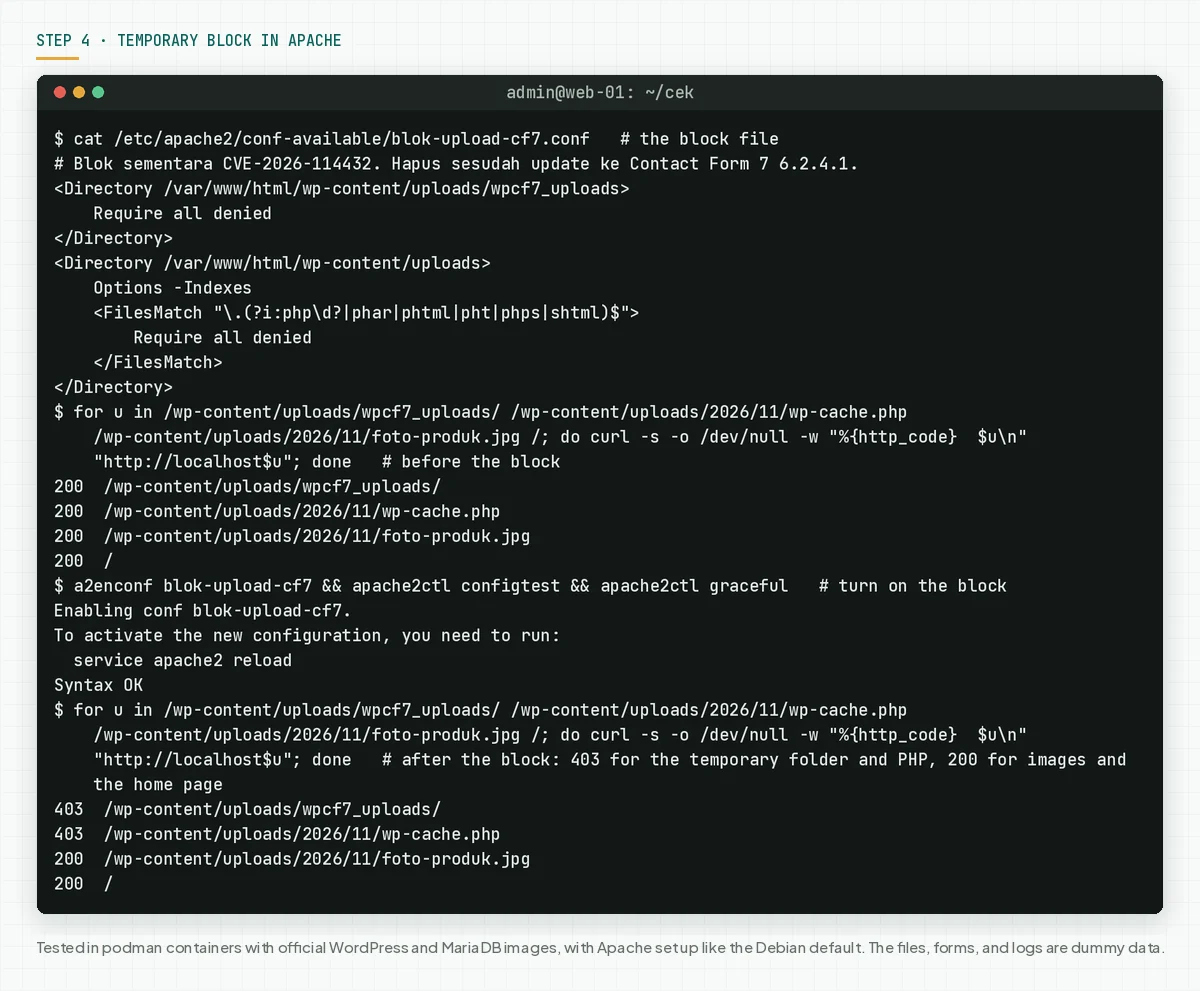
In our test, the temporary folder and the dummy PHP file answered 200 before the block, then 403 after the block. Images and the home page stayed 200. This block works also when Apache uses AllowOverride None.
For nginx, put these 2 blocks in the server block of the site, above the location ~ \.php$ block. In our test with nginx 1.29, the temporary folder, the files in it, and .php or .PHAR files in the upload folder answered 403. Images stayed 200.
# nginx: put these 2 blocks in the server block of the site, above the location ~ \.php$ block
location ^~ /wp-content/uploads/wpcf7_uploads/ { deny all; }
location ~* ^/wp-content/uploads/.*\.(php\d?|phar|phtml|pht|phps|shtml)$ { deny all; }
# Test the settings, then reload nginx
sudo nginx -t && sudo systemctl reload nginx
When you have no access to the server settings, for example on shared hosting, remove the upload field for a short time. Open each form with an upload field, delete the [file tag, save, then ask for files by email.
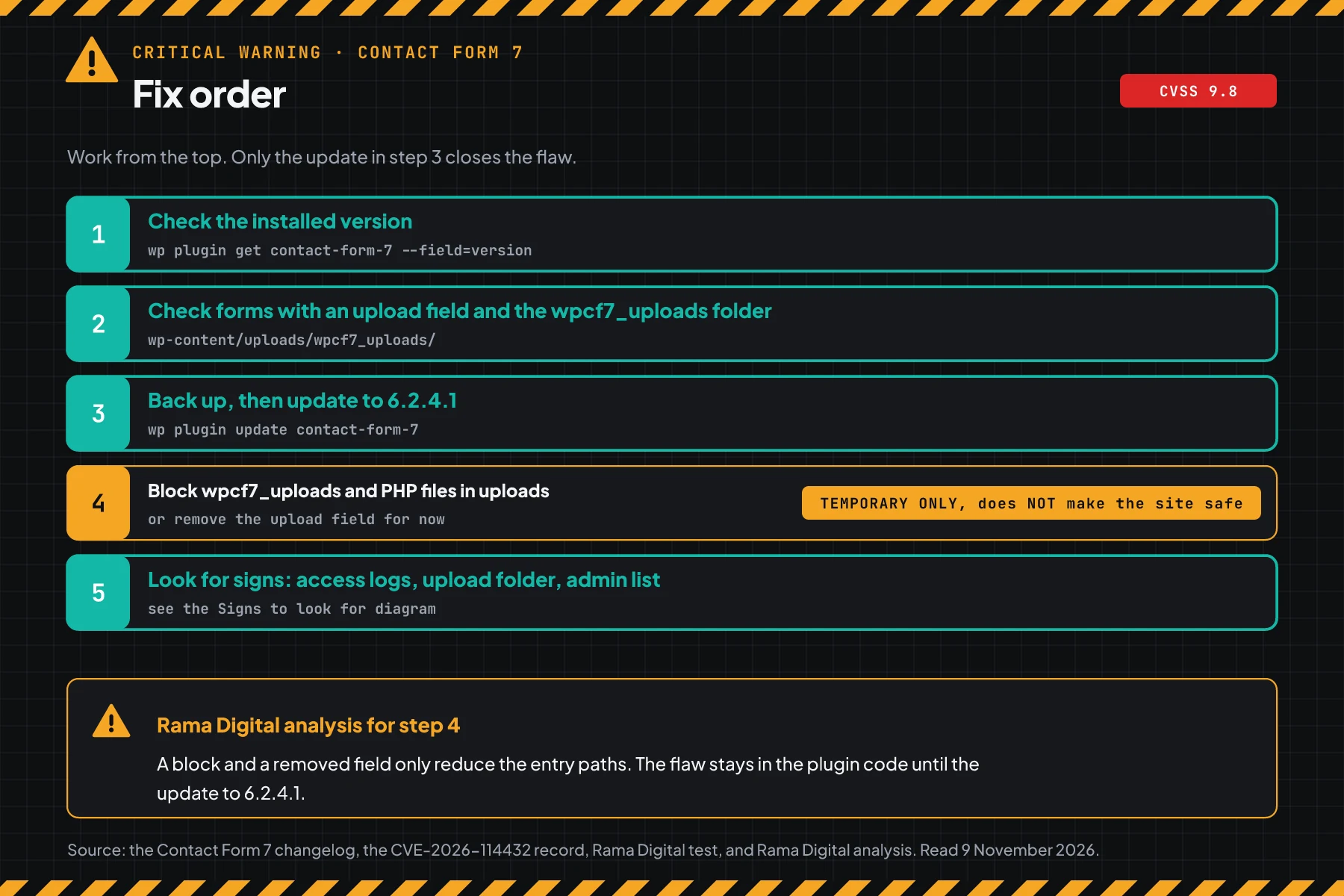
Rama Digital analysis: the block and a form with no upload field only reduce the ways in. The flaw stays in the plugin code until version 6.2.4. After the update, you can remove the block file, or keep the PHP block because WordPress needs no PHP in the upload folder.
Check the result: curl to the wpcf7_uploads folder from outside gives 403 or 404, and the home page stays 200.
Step 5: Look for signs of abuse
Release 6.2 came out on 6 October 2026. Search from 6 October 2026, mainly when your site has a form with an upload field.
Save this script as check-signs-cf7.sh. The script looks for files that can run as code in the upload folder, files left in wpcf7_uploads, and requests to the upload folder in the web access log.
Run it with sudo, because web access logs are usually readable by root only. The script loads no site code, so no WP-CLI and no PHP. The script replaces control characters in file names and log lines with question marks, so that text from an attacker cannot change your terminal.
#!/usr/bin/env bash
# Look for signs of CVE-2026-114432 (Contact Form 7) use in the upload folder and the web access log.
# Use: sudo bash check-signs-cf7.sh /var/www/html [other log files ...]
# Run it as root, because the web access log is usually readable by root only.
# The script loads no site code: no WP-CLI, no PHP. The script only reads files and logs.
# File names and log lines can come from an attacker, so the script replaces control characters with question marks.

DIR="${1:-/var/www/html}"
shift 2>/dev/null
CAND=("$@")
if (( ${#CAND[@]} == 0 )); then
  for f in /var/log/apache2/access.log* /var/log/nginx/access.log* /var/log/httpd/access_log*; do CAND+=("$f"); done
fi
# Use regular files only. Skip symlinks to devices such as /dev/stdout, so that the script does not hang.
LOGS=()
for f in "${CAND[@]}"; do [ -f "$f" ] && LOGS+=("$f"); done
# For file names: replace new lines too.
safe() { LC_ALL=C tr '\001-\037\177-\237' '[?*]'; }
# For logs: keep new lines.
safe_log() { LC_ALL=C tr '\001-\011\013-\037\177-\237' '[?*]'; }
UPL="$DIR/wp-content/uploads"
signs=0

echo "1. Files that can run as code in the upload folder"
if [ ! -d "$UPL" ]; then
  echo "   The folder $UPL does not exist. Give the WordPress folder as an argument."
else
  found=""
  while IFS= read -r -d '' f; do
    # A small index.php with "Silence is golden" is a normal plugin file.
    if [ "${f##*/}" = index.php ] && [ "$(stat -c %s "$f")" -lt 200 ] && grep -q 'Silence is golden' "$f"; then continue; fi
    found+="$(stat -c '%y' "$f" | cut -c1-16)  $(stat -c %s "$f") B  $(printf '%s' "$f" | safe)"$'\n'
  done < <(find "$UPL" -type f -iregex '.*\.\(php[0-9]?\|phar\|phtml\|pht\|phps\|shtml\)' -print0 2>/dev/null)
  if [ -n "$found" ]; then
    echo "   CHECK: the WordPress upload folder needs no PHP files:"
    printf '%s' "$found" | sed 's/^/   /'
    signs=$((signs + 1))
  else
    echo "   0 files."
  fi
fi

echo "2. Files left in wpcf7_uploads for more than 5 minutes"
if [ -d "$UPL/wpcf7_uploads" ]; then
  left=$(find "$UPL/wpcf7_uploads" -type f ! -name .htaccess -mmin +5 -printf '%TY-%Tm-%Td %TH:%TM  %s B  %p\0' 2>/dev/null | safe | tr '\0' '\n')
  if [ -n "$left" ]; then
    echo "   CHECK: the plugin usually removes files here after 60 seconds:"
    printf '%s\n' "$left" | sed 's/^/   /'
    signs=$((signs + 1))
  else
    echo "   0 files."
  fi
else
  echo "   The wpcf7_uploads folder does not exist."
fi

echo "3. Requests to the upload folder in the web access log"
if (( ${#LOGS[@]} == 0 )); then
  echo "   No access log found. Give the log path as an argument."
else
  data=$(zcat -f "${LOGS[@]}" 2>/dev/null | safe_log)
  tmp=$(printf '%s\n' "$data" | grep -F '/wpcf7_uploads')
  n_tmp=$(printf '%s' "$tmp" | grep -c .)
  echo "   Requests to wpcf7_uploads: $n_tmp"
  if (( n_tmp > 0 )); then
    printf '%s\n' "$tmp" | awk '{t=$4; gsub(/\[/,"",t); m=$6; gsub(/"/,"",m); print "   " t "  IP " $1 "  " m " " $7 "  " $9}' | tail -n 10
    echo "   Normal visitors do not open this folder. Check every IP."
    signs=$((signs + 1))
  fi
  code=$(printf '%s\n' "$data" | grep -iE '"[A-Z]+ /wp-content/uploads/[^ "]*\.(php[0-9]?|phar|phtml|pht|phps|shtml)[ ?]')
  n_code=$(printf '%s' "$code" | grep -c .)
  echo "   Requests to PHP files in the upload folder: $n_code"
  if (( n_code > 0 )); then
    printf '%s\n' "$code" | awk '{t=$4; gsub(/\[/,"",t); m=$6; gsub(/"/,"",m); print "   " t "  IP " $1 "  " m " " $7 "  " $9}' | tail -n 10
    signs=$((signs + 1))
  fi
  form=$(printf '%s\n' "$data" | grep -E '"POST [^ ]*contact-form-7/v1/contact-forms/[0-9]+/feedback')
  n_form=$(printf '%s' "$form" | grep -c .)
  echo "   $n_form POST requests to the Contact Form 7 form endpoint. These mix with normal form sends."
  if (( n_form > 0 )); then
    echo "   Top 5 IPs:"
    printf '%s\n' "$form" | awk '{print $1}' | sort | uniq -c | sort -rn | head -n 5 | awk '{printf "   IP %s: %s\n", $2, $1}'
  fi
fi

echo
if (( signs > 0 )); then
  echo "Result: $signs SIGNS to check. When a file or request is not from your team, start the incident response."
else
  echo "Result: no SIGNS from this check. An attacker can delete logs, so still update and watch."
fi
# Check PHP files in the upload folder, files left in wpcf7_uploads, and the access log
sudo bash check-signs-cf7.sh /var/www/html
# Logs in another location, for example a log per site
sudo bash check-signs-cf7.sh /var/www/html /var/log/nginx/example.com.access.log*
# Check the admin list without loading plugin and theme code
cd /var/www/html
sudo -u www-data wp user list --role=administrator --fields=user_login,user_registered --skip-plugins --skip-themes
# Check the WordPress core files against the official checksums
sudo -u www-data wp core verify-checksums --skip-plugins --skip-themes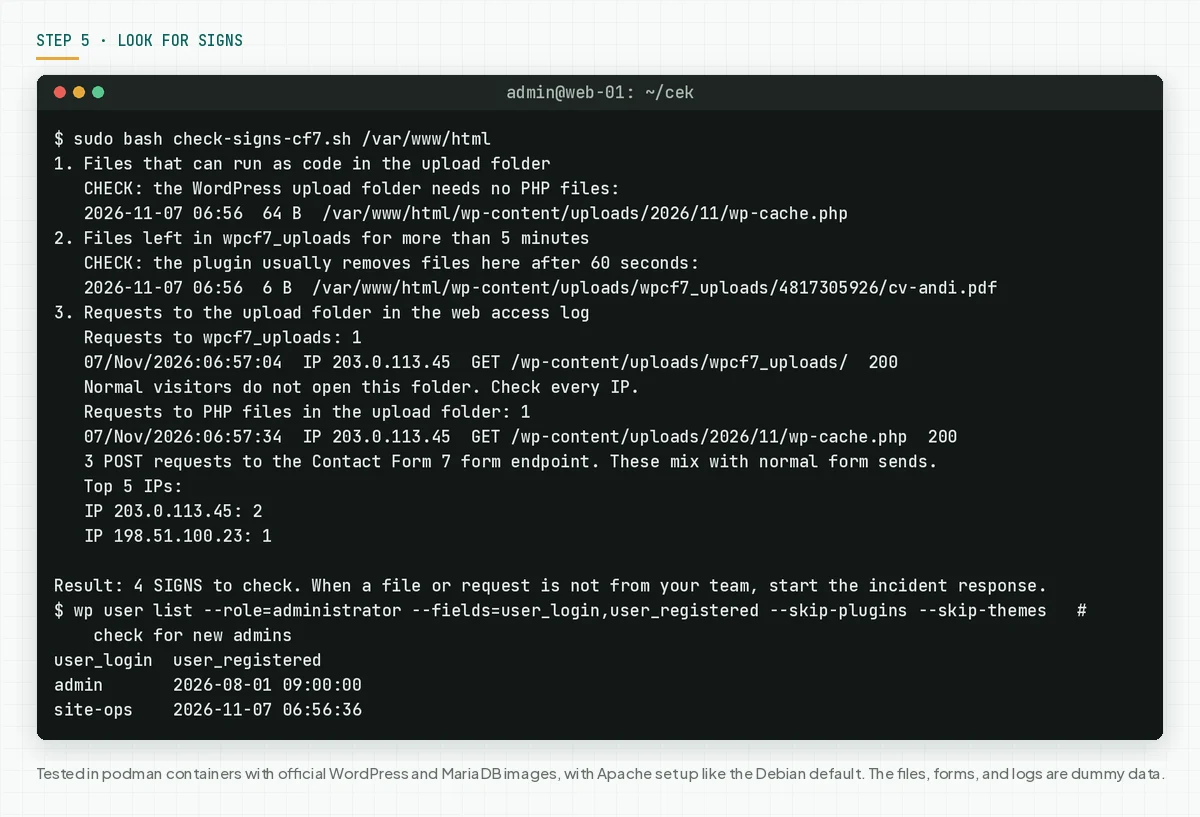
In our test, the script found wp-cache.php in the upload folder, cv-andi.pdf left for 2 days in wpcf7_uploads, 1 request to the temporary folder, and 1 request to a PHP file in the upload folder. That is 4 SIGNS. The admin list also shows the new admin site-ops.
All this data is dummy data. The dummy PHP file holds only a comment, and the IPs use the RFC 5737 documentation blocks.
POST requests to the form endpoint mix with normal form sends, so the count alone does not prove an attack. Compare the request times from 1 IP with the times of new files in the upload folder.
Check the result: the script prints "no SIGNS from this check", and the admin list holds only people you know. Attackers can delete logs, so no signs does not prove that the site is safe.
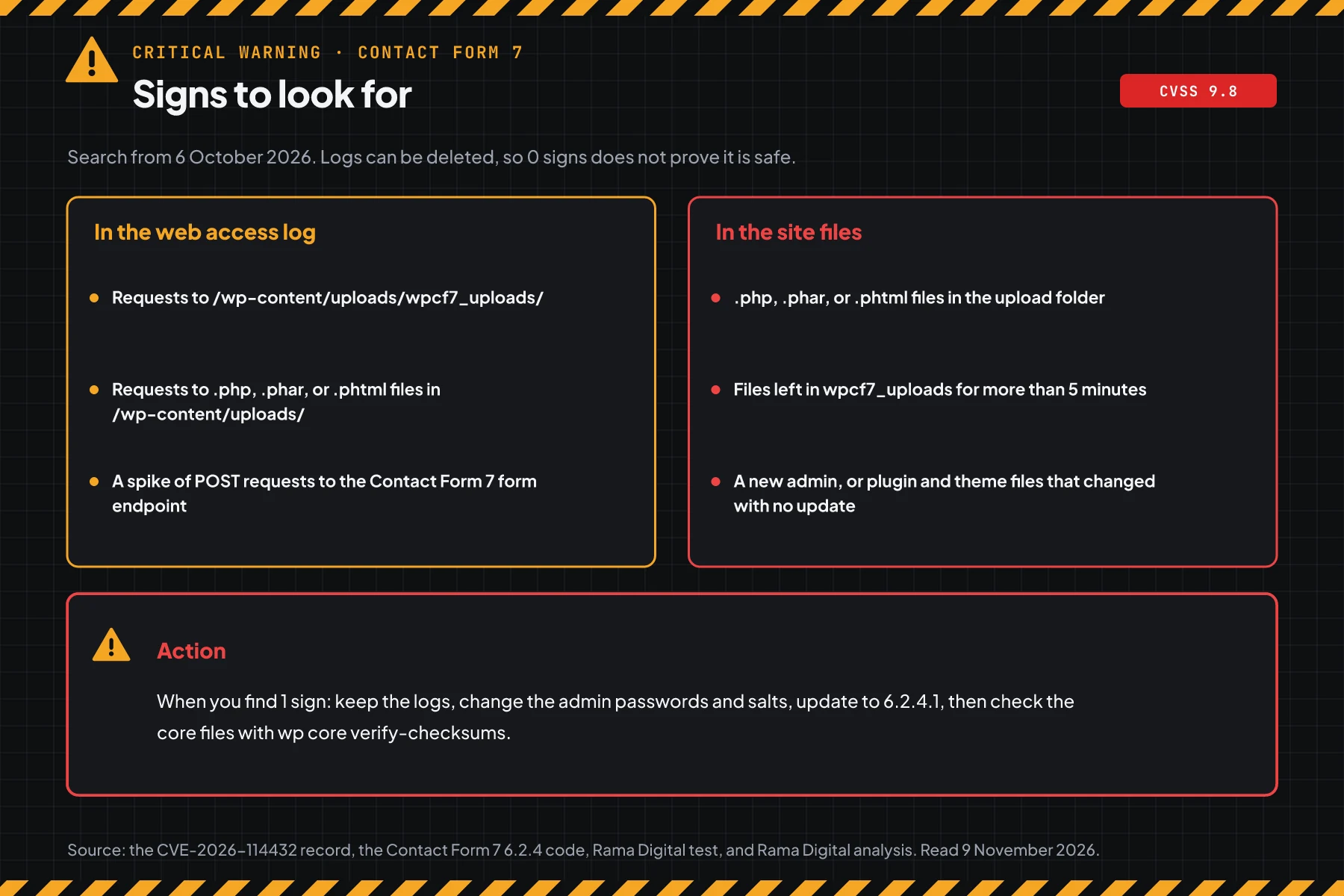
When you find even 1 sign, keep the web logs, the unknown files, and the admin list as evidence. Do not open unknown files in a browser. Change the admin passwords, change the salts with wp config shuffle-salts, check the core files with wp core verify-checksums, then update to 6.2.4.1.
Upload forms often take CVs, ID cards, or payment proofs. When the site holds personal data in Indonesia, Indonesian Law 27/2022 on Personal Data Protection requires a written notice no later than 3 times 24 hours after a personal data leak.
Example: 1 morning of response for 3 business sites
This simulation uses dummy data. The site names, times, and results are not customer data.
| Time (WIB) | Dummy site | What was checked | Result | Action |
|---|---|---|---|---|
| 08.00 | toko-a (6.2.3, job form with CV upload, Ubuntu VPS with the default Apache) | Steps 1, 2, and 5 | HIGH EXPOSURE, 1 unknown .php file in the upload folder | Incident response, then update |
| 08.30 | klinik-b (6.2.2, contact form with no upload, cPanel hosting) | Steps 1 and 2 | VULNERABLE, 0 forms use an upload field | Update to 6.2.4.1 |
| 09.00 | kantor-c (6.1.7, nginx) | Step 1 | NOT AFFECTED by this CVE | Update to 6.2.4.1 after a check of WordPress 7.1 and PHP 8.3 |
The lesson from the simulation: a site with an upload form on the default Apache needs step 5 first, not only the update. The update closes the flaw, but it does not remove files that already landed in the upload folder.
Who installs the patch
The patch duty is different for each service type, so this table helps you know who acts today.
| Service type | Patch owner | What you do |
|---|---|---|
| Shared hosting with cPanel or another panel | You | Check the version in the dashboard, update the plugin, and ask the provider for the access log |
| Managed WordPress hosting | The provider and you | Update the plugin, then ask for written log evidence |
| Your own VPS | Your team | Steps 1 to 5, also the Apache or nginx settings |
| A site from an agency or a freelancer | As in the maintenance contract | Ask for the version today, then ask for an update date |
For a WordPress site that you manage yourself, put form plugin updates on the same schedule as other plugin updates. Rama Digital recommends automatic updates for form plugins, because these plugins take data from strangers. When automatic updates are off, schedule a weekly version check and patch critical flaws in 24 hours.
Checklist for today
- Make a list of all sites with Contact Form 7. Owner: the web team. Evidence: the list of sites and versions.
- Check the version with step 1. Owner: the site admin. Evidence: the script output.
- Check upload forms and the temporary folder with step 2. Owner: the site admin. Evidence: the script output.
- Make a backup, then update to 6.2.4.1. Owner: the site admin. Evidence: the version script output after the update.
- When the update must wait, add the block from step 4. Owner: the server admin. Evidence: a curl result of 403.
- Look for signs with step 5. Owner: the site admin and the security team. Evidence: the script output and the admin list.
- Turn on automatic updates for the form plugin when they are off with no written reason.
Questions and answers
Did attackers already use this flaw?
On 9 November 2026, there are no attack reports, and this flaw is not in CISA KEV. WPScan holds back its PoC until 19 November 2026, so update before that date.
My forms have no upload field. Am I safe?
Our analysis shows that the vulnerable code runs only on forms with an upload field. Still update to 6.2.4.1, because a new form can add an upload field at any time.
My site uses nginx. Am I safe?
No. The CVE record says that nginx limits the impact to unknown files in the upload folder. Those files can still show as HTML or SVG from your domain, so the update is still required.
I still use version 6.1. Am I affected?
Not by this CVE, because the flaw starts in 6.2. Still plan the update to 6.2.4.1, and first check its conditions: WordPress 7.1 and PHP 8.3.
Does the block in step 4 close the flaw?
No. The block only reduces the ways in. The flaw stays in the plugin code until you update to 6.2.4 or newer.
How do I know that someone abused this flaw?
Run step 5. Check for .php or .phar files in the upload folder, files left in wpcf7_uploads, requests to that folder in the log, and new admins.
Next step
The limits that still apply: a server block is not a fix, and an update does not remove files that already landed. When your site shows a sign in step 5, or you need help with an audit and recovery, use Vibe Code Rescue. For 1 urgent issue today, book a 30-minute session.
Sources
- CVE-2026-114432 record: the official summary, CWE-434, the vulnerable range 6.2 to before 6.2.4, and the CVSS 3.1 score of 9.8 from CISA ADP.
- WPScan advisory: the advisory date, the finder, and the PoC date.
- Contact Form 7 plugin page: the 6.2 to 6.2.4.1 changelog, the latest version, the version conditions, and the active install count.
- CVE record API: the raw CVE record data and the CISA SSVC rating.
- CISA KEV: the CISA KEV status on 9 November 2026.
- RFC 5737: the documentation IP blocks for the dummy data in this article.
- Indonesian Law 27/2022 on Personal Data Protection: the duty to report a personal data leak.