Direct answer: WhatsApp APIAPIThe official door 2 systems use to exchange data, without anybody copying it by hand.Open the glossary costs after 1 October 2026 go down through 3 levers. Send fewer messages per resolution, move chats into the free 72 hour window from Click to WhatsApp ads, and choose an AI reply engine with a clear cost per message. Every service message above 1,000 per business number costs Rp356.65 for an Indonesian recipient.
Main condition: these steps help when a number sends over 1,000 service messages per month, or many utility templates in the 24 hour window. Limit: there is no official way to make replies free outside the free tier and the FEP window. A wrong template category saves nothing, and this article does not promise more sales.
We wrote this guide on 21 September 2026 and updated the numbers on 24 September 2026. The sources are the Meta pricing document updated on 10 September 2026 and Insights data from the Rama Digital WhatsApp number. All sample conversations use dummy data.
Chat habits that become expensive in October
Many support teams reply with several short messages: a greeting, a thank you, "one moment", and then the answer. Until 30 September 2026, that pattern adds no Meta cost. From 1 October, every delivered bubble is 1 service message.
On our number, the range 18 to 24 September 2026 held 1,102 incoming messages and 1,940 service messages. So every incoming message got 1.76 service messages on average. That ratio is the start point to measure the result of each step below.
When you do not know the cost of your number yet, calculate it first with the WhatsApp API cost formula per business number. When you are not sure if a message type is charged, check the answers for 12 message cases.
Where service message costs come from
The service message cost follows 4 numbers: resolutions, messages per resolution, the FEP share, and the 1,000 tier per business number. The AI cost from a chatbot vendor comes separately from the Meta bill. The diagram below shows where each lever works.
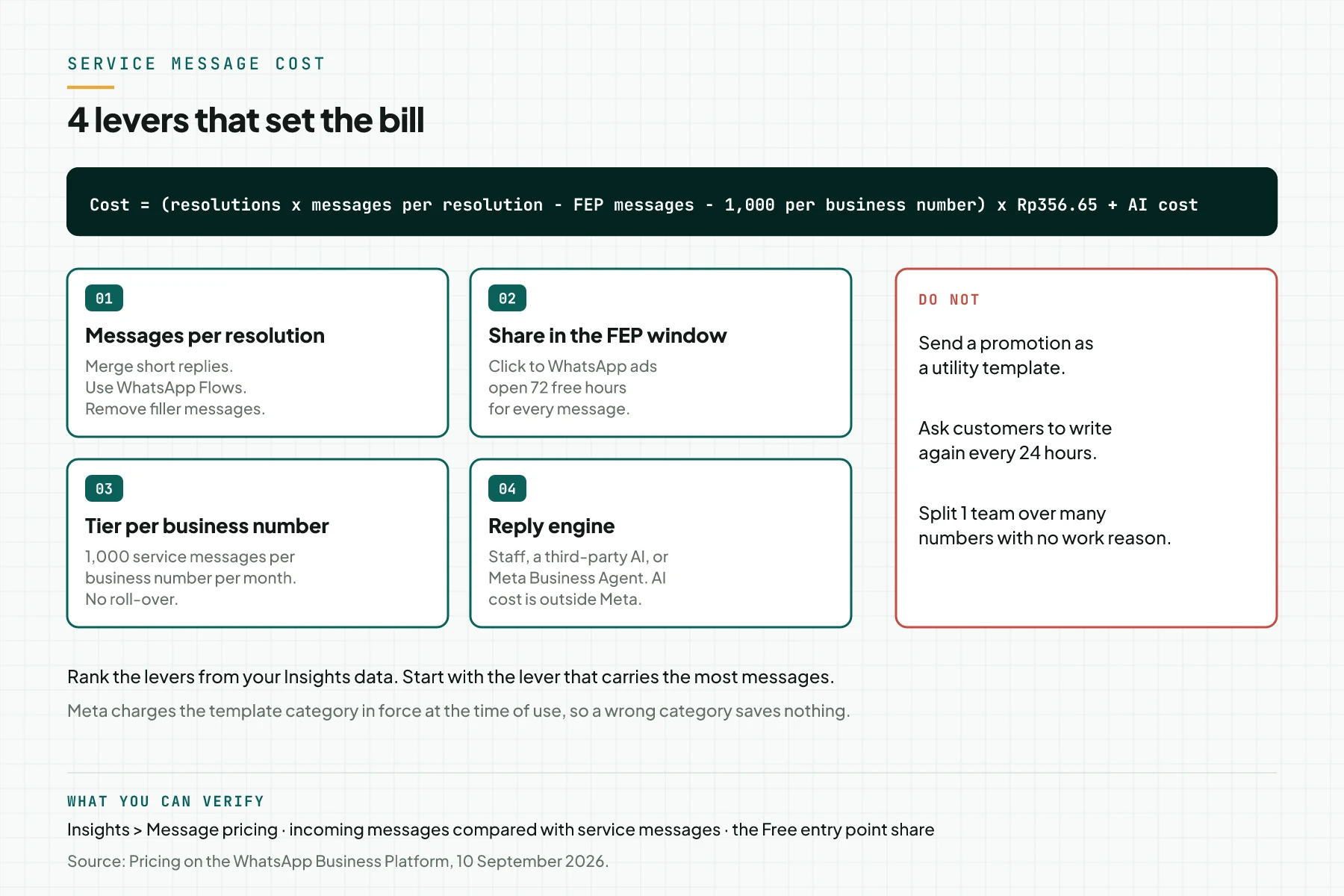
Lever 1: messages per resolution
Meta charges every delivered non-template message, not every conversation. So 1 answer in 1 message costs less than 1 answer in 4 messages. Source: Pricing on the WhatsApp Business Platform, updated 10 September 2026.
Lever 2: share in the FEP window
Chats from Click to WhatsApp ads or Facebook Page buttons on a phone open the 72 hour FEP window when you reply within 24 hours. Every business message in that window is free, templates too.
This rule does not change on 1 October 2026. Source: the Free entry point windows section.
Lever 3: free tier per business number
Every business number has 1,000 free service messages per month, and unused units do not roll over. The business number is the sending number, so every customer of 1 number shares 1 tier. Source: the Service rates effective October 1, 2026 part.
Lever 4: reply engine
Staff replies and third-party AI replies are both service messages. Meta Business AgentAI agentAn AI program that performs work steps by itself, for example reading a message, drafting a reply, and recording the result.Open the glossary uses its own category with a token rate. Source: Upcoming pricing updates for Meta Business Agent, service and utility messages, updated 25 August 2026.
7 ways to cut the cost: effect, effort, and risk
This table sums up 7 ways that follow the Meta rules. The What changes column shows the direction of the change, not an exact number. Measure the effect with the service messages per incoming message ratio from step 1.
| Way | What changes | Effort | Risk |
|---|---|---|---|
| 1. Merge short replies | Service messages per question go down | Low: change the SOP and the chatbot prompt | Long messages are harder to read on a phone |
| 2. Remove automatic messages that are not needed | Double greetings and wait messages go away | Low | The customer does not know the request is in progress |
| 3. Collect data with a WhatsApp Flow | 5 data questions become 1 Flow message | Medium: build and test the Flow | Some customers do not fill in the Flow |
| 4. Point ads to Click to WhatsApp | Replies move into the 72 hour FEP window | Medium: needs an ad budget | The ad cost can exceed the saving |
| 5. Merge utility templates | Confirmation and payment steps in 1 template | Low: submit a new template | The template needs a new approval |
| 6. Split numbers per job | Every number gets 1,000 free messages | High: display names, teams, and customer education | Customers do not know which number to use |
| 7. Choose the AI reply engine | The AI cost per message changes | Medium: test 2 engines | The answer quality differs |
Way number 5 works because utility has no free tier. Every utility template in the 24 hour window costs Rp356.65 from the first message from 1 October 2026.
Prerequisites
- WhatsApp Manager access to open Insights › Message pricing and Flows.
- The list of automatic messages from your chatbot or inbox, including greetings and wait messages.
- A sample of the last 20 anonymised chats, to count messages per question.
- Ads Manager access when you want to use Click to WhatsApp ads.
- The AI vendor bill of the last month, when your chatbot uses a third-party AI.
- 1 worksheet to record the numbers before and after each step.
Step 1: Measure service messages per incoming message
Open WhatsApp Manager › Insights › Message pricing, then select 1 number and the last 7 days. Divide the Service number on the Messages Delivered card by Messages received on the All Messages card. The result is the ratio of service messages per incoming message.
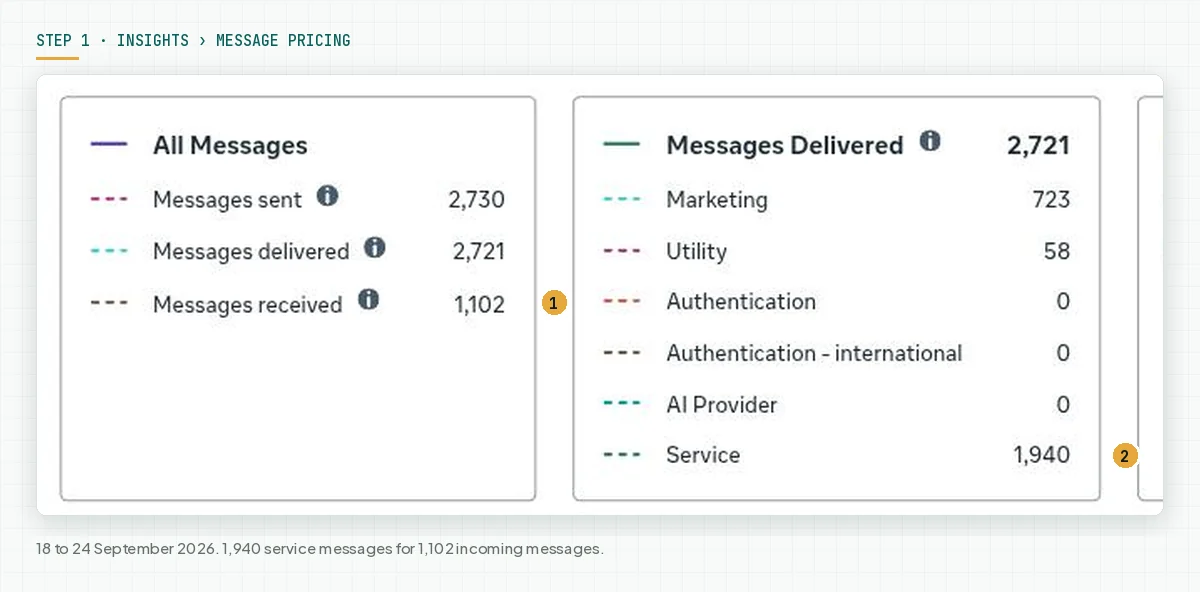
Record this ratio as the start number. Measure again 7 days after each change. A lower ratio means fewer paid messages per customer.
Step 2: Merge short replies into 1 message
Take the last 20 chats, then count the business bubbles for each customer question. Rewrite the most common pattern into 1 or 2 messages. For a chatbot, add a rule to the prompt: answer in 1 message, and send a second message only for buttons or choices.
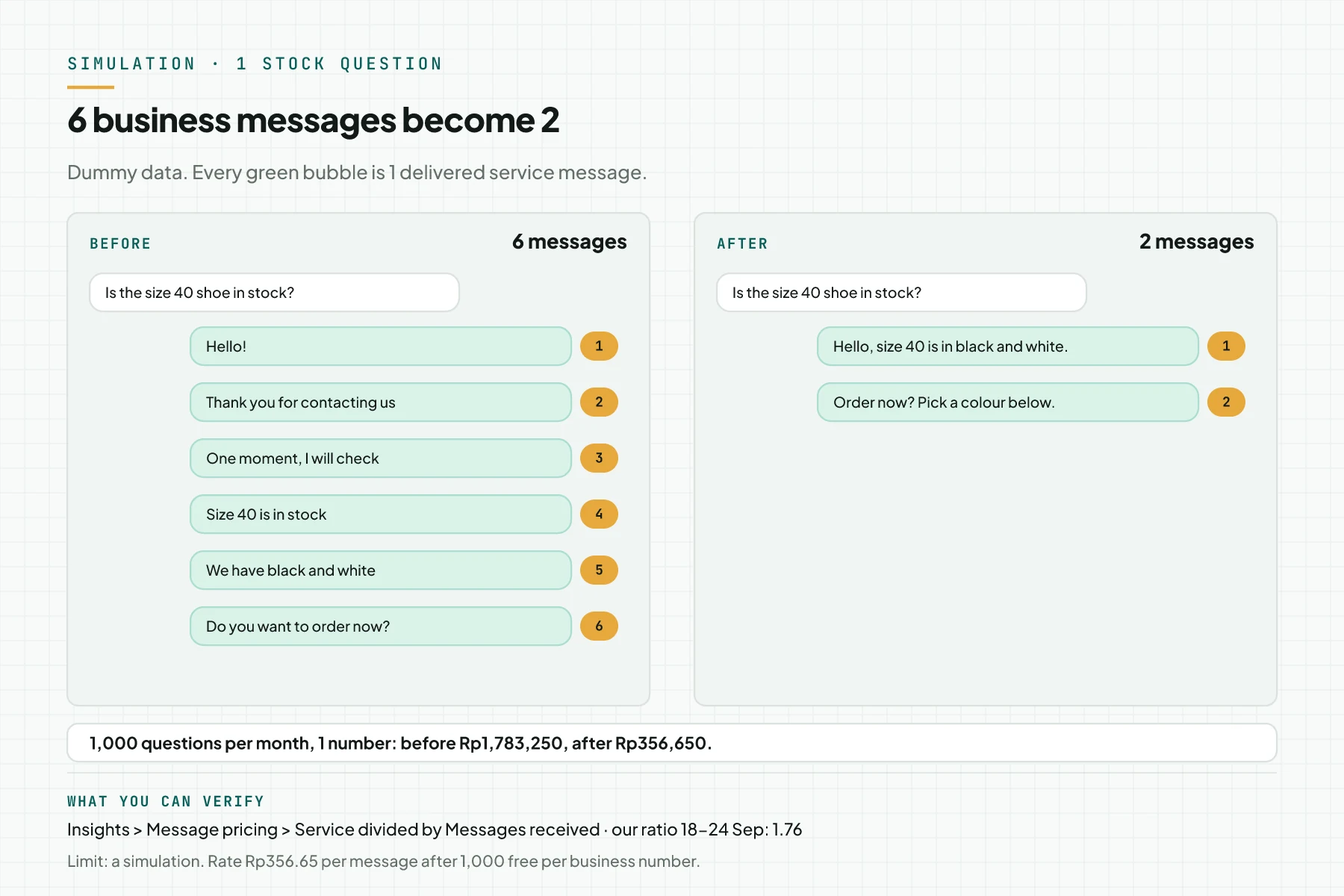
Do not merge everything into 1 message that is too long. Keep the answer and the call to action apart when the call to action uses buttons. Buttons and lists still count as 1 interactive message.
Step 3: Replace data questions with a WhatsApp Flow
Open WhatsApp Manager › Account tools › Flows. Build 1 Flow for the data that you ask one by one, for example name, city, and size. Send that Flow as 1 message in the 24 hour window.
The customer answers inside the Flow are incoming messages, so they are free.
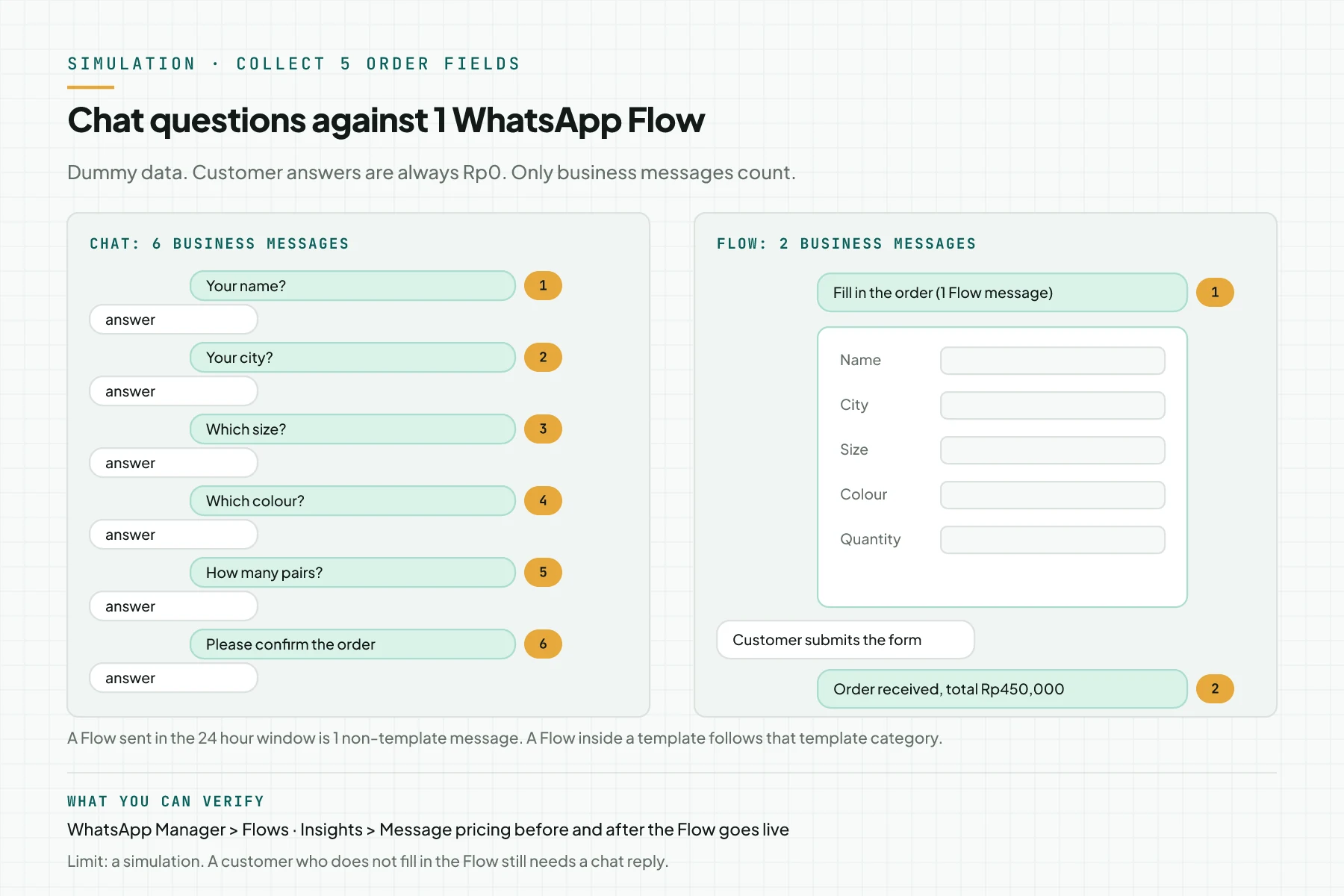
On our number, the assistant Wulan sends 1 WhatsApp Flow for class registration and 1 Flow for a quotation request. A Flow sent inside a template follows that template category. Source: the Meta WhatsApp Flows documentation.
Step 4: Point ads to Click to WhatsApp so replies fall in the FEP window
Create a Click to WhatsApp ad: in the ad set, select WhatsApp as the message destination, then select your API business number. Reply within 24 hours, so the 72 hour FEP window opens. Then open Insights › Message pricing and compare the Free entry point line with Free customer service.
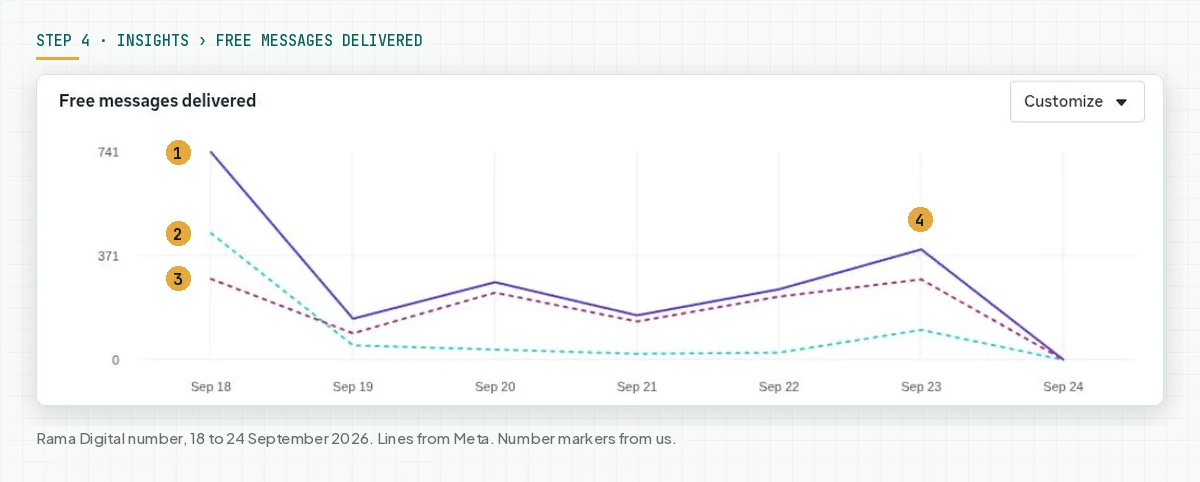
On our number, pricing_analytics recorded 1,286 of 1,965 service messages from 17 to 23 September 2026 in the FEP window, which is 65%. With no FEP, those messages would count against the tier and the Rp356.65 rate.
When your Page connects to more than 1 number, check the destination number of every ad. In our account, ads with no clear destination number landed on another WhatsApp number connected to the Page.
FEP removes the delivery cost, not the ad cost. Calculate the ad cost per chat, then compare it with the value of the service messages that you do not pay. We cover how to measure Click to WhatsApp ads up to the sale in our Indonesian article on click and sales tracking.
Step 5: Compare third-party AI costs with Meta Business Agent
Open the AI vendor bill for 1 month, then divide it by the count of AI replies in the same month. Add the service message delivery cost: 2.5 US cents on the Indonesia USD rate card, or Rp356.65 on the IDR rate card. Compare the result with Meta Business Agent, about 4 to 5 US cents per message.
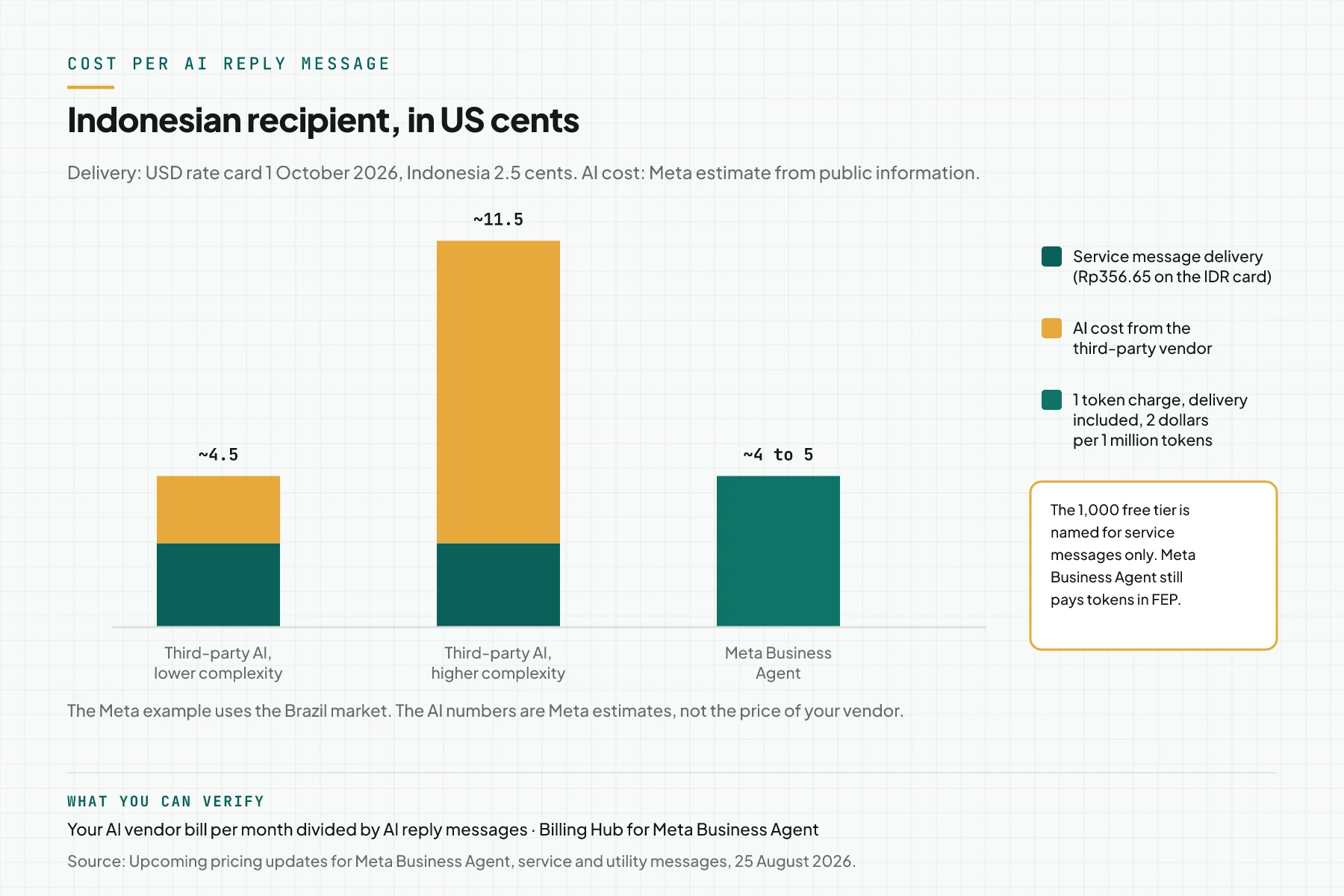
Meta estimates the third-party AI cost at about 2 cents per message for a lower complexity model, and about 9 cents for a higher one. Those numbers are Meta estimates from public information, with a Brazil market example. Source: the Cost comparison part of the Upcoming pricing updates page.
Keep 2 rule differences in mind. Service messages have 1,000 free messages per business number and are free in the FEP window. Meta Business Agent still pays tokens in the FEP window.
Step 6 (optional): Split numbers per job when the teams are really separate
When sales, support, and delivery are answered by different teams, consider 1 number per job. Every business number has its own 1,000 service message tier. Add a number in WhatsApp Manager › Phone numbers, then wait for the display name approval.
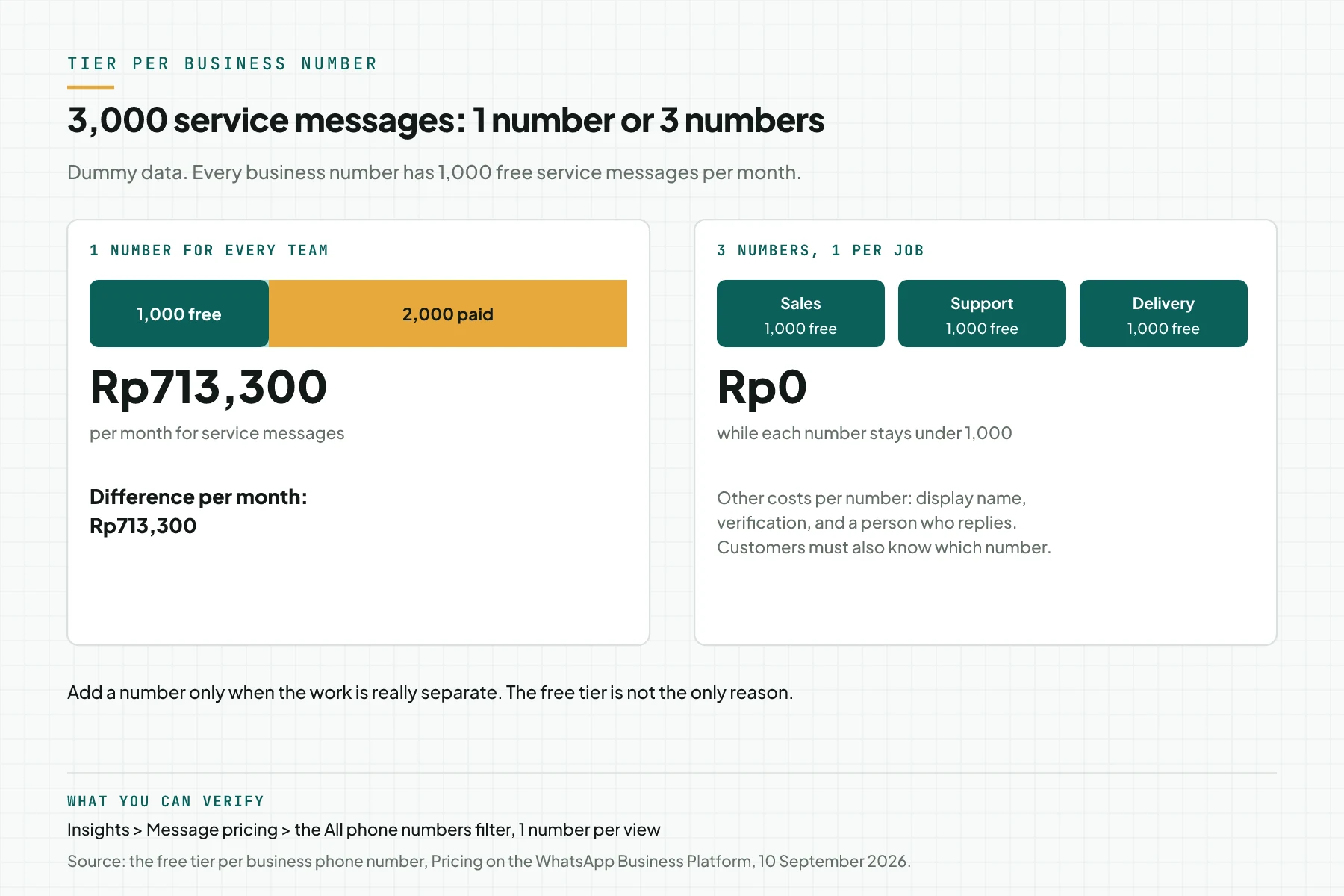
Rama Digital recommendation: add a number only when the work is really separate. The free tier is not the only reason, because customers must know which number serves which job.
Step 7: Set an alarm and limits for automatic sends
Count the delivered service messages per business number since day 1, then send a warning at 800. When the alarm fires, check automatic messages, chatbot reply limits, and group sends. Also make sure a payment method is active, because without one, service messages stop after message 1,000.
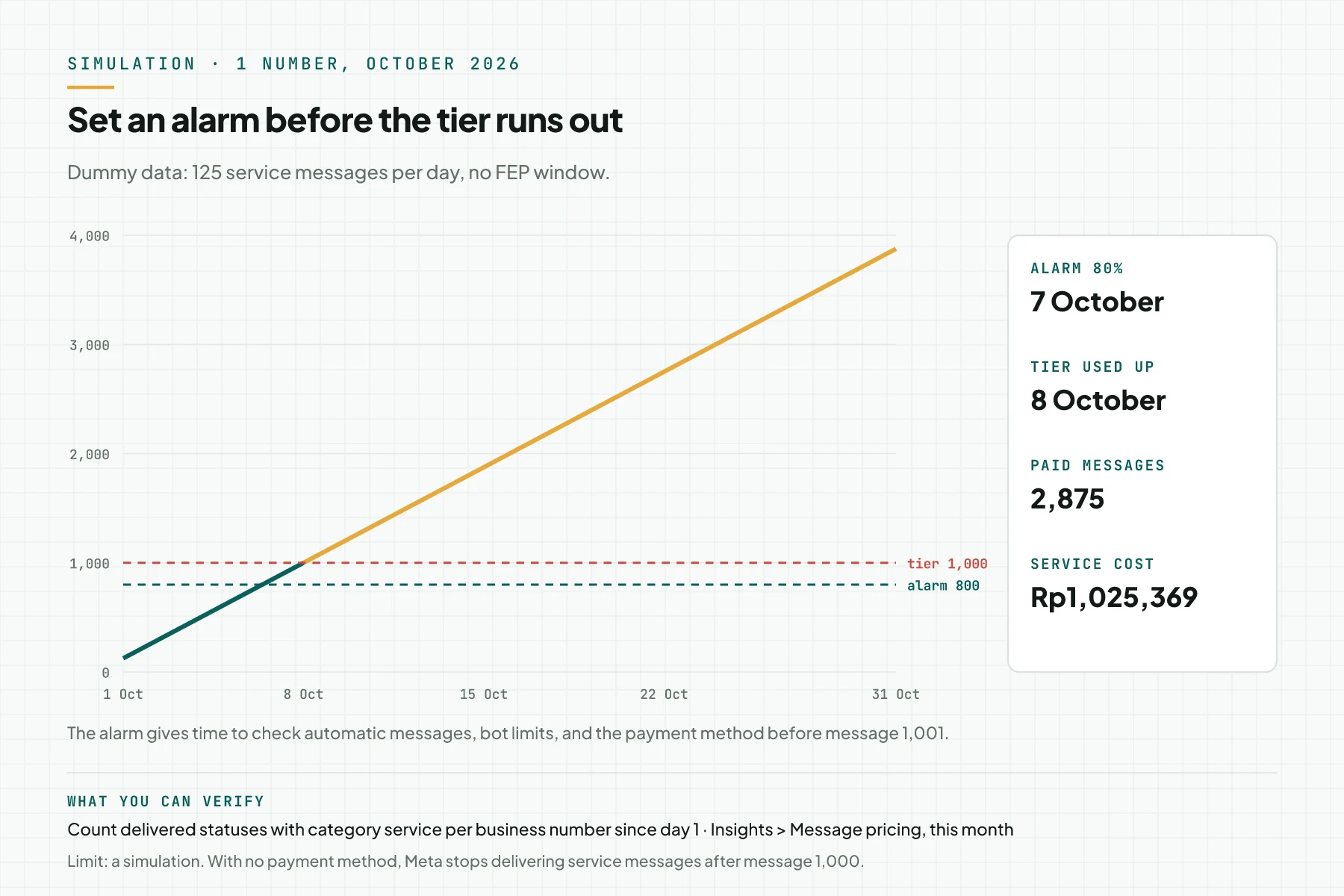
How to set up the counter from the status webhookWebhookAn automatic message one system sends to another the moment something happens, for example an incoming WhatsApp message.Open the glossary is in step 8 of the cost guide. Source of the payment rule: the Service rates effective October 1, 2026 part.
Worked example: 1 online shop before and after 4 changes
The table below is a simulation with dummy data and written assumptions. The shop uses 1 number, with 4,000 service messages and 1,500 utility templates in the 24 hour window per month. The ad cost is not included.
| Stage | Change (assumption) | Service messages in the 24 hour window | Utility in the 24 hour window |
|---|---|---|---|
| Start | No change | 4,000 | 1,500 |
| Merge replies | Service messages drop 30% | 2,800 | 1,500 |
| Use a Flow | 600 data questions go away | 2,200 | 1,500 |
| Click to WhatsApp ads | 30% of chats move into the FEP window | 1,540 | 1,500 |
| Merge utility | Confirmation and payment steps become 1 template | 1,540 | 1,000 |
New cost before the changes: (4,000 - 1,000) x Rp356.65 + 1,500 x Rp356.65 = Rp1,604,925. Cost after the changes: (1,540 - 1,000) x Rp356.65 + 1,000 x Rp356.65 = Rp549,241.
In this simulation, the message cost drops by Rp1,055,684 per month. Your real number depends on the ratio from step 1 and the share of chats from ads.
7 day checklist
- The admin records the service messages per incoming message ratio for each number. Evidence: a Message pricing screenshot.
- The support lead rewrites the 5 most common reply patterns into 1 or 2 messages. Evidence: a new SOP with a date.
- A developer changes the chatbot prompt to answer in 1 message. Evidence: 10 sample replies from a test log.
- The admin builds 1 WhatsApp Flow for the most common data questions. Evidence: the Flow status Published.
- Marketing records the Free entry point share per week. Evidence: the Free entry point and Free customer service numbers.
- Finance compares the AI cost per message with Meta Business Agent. Evidence: a worksheet with the vendor bill.
- A developer sets a 800 service message alarm per business number. Evidence: an alarm log on test data.
- Stop criterion: when the step 1 ratio drops below 1.2 and the new cost per business number is below the finance target, stop the changes and check monthly.
Staff, a third-party chatbot, or Meta Business Agent
This table compares 3 reply engines against the Meta rules. All facts come from the Upcoming pricing updates page (25 August 2026) and the USD rate card effective 1 October 2026.
| Item | Human staff | Third-party AI | Meta Business Agent |
|---|---|---|---|
| Meta category | Service | Service | Meta Business Agent |
| Meta cost per message, Indonesian recipient | Rp356.65 after the tier | Rp356.65 after the tier | 2 US dollars per 1 million tokens, about 4 to 5 cents |
| Other costs | Salary and tools | The AI vendor bill, Meta estimate 2 to 9 cents | Included in the token charge |
| 1,000 tier per business number | Yes | Yes | Not named in the Meta documents |
| Free in the FEP window | Yes | Yes, for delivery | No, tokens are still charged |
Rama Digital recommendation: when most chats come from Click to WhatsApp ads, a third-party AI with a lower complexity model pays Rp0 delivery in FEP. When chats are long and complex outside FEP, compare the AI vendor cost per message with the 4 to 5 cents of Meta Business Agent.
Frequently asked questions
Can a promotion sent as a utility template save money? It is not safe. Meta sets and can change the template category, and the business pays the rate of the category in force when the template is used. Use the category that matches the message content.
Does asking customers to write first make replies free? No. A customer message only opens the 24 hour window, and replies in that window still use the tier and are then paid. Only the FEP window from Click to WhatsApp ads or Page buttons makes replies free.
Does a slower reply lower the cost? No. The rate per message is the same at any time in the 24 hour window. When you wait more than 24 hours, the window closes and you must use a paid template.
Is a WhatsApp Flow free to send? A Flow sent in the 24 hour window is 1 non-template message, so it uses the tier and then costs Rp356.65. The customer answers inside the Flow are incoming messages, so they are free.
Does adding WhatsApp numbers for the free tier break the rules? The Meta pricing document gives the tier per business number and does not forbid extra numbers. Add a number when the jobs are really separate, because every number needs a display name and a person who replies.
How much do Click to WhatsApp ads cost to get the free window? The FEP window removes the message delivery cost, not the ad cost. Calculate the ad cost per chat. Then compare it with the value of the service and utility messages that you do not pay for 72 hours.
Next step
Limits that still apply: the effect numbers come from a simulation, and Meta has not written if FEP messages use the 1,000 tier. Measure every change with the step 1 ratio before you add ad budget.
When you want Click to WhatsApp ads recorded up to the sale, join the Tracking CTWA class. To talk about your chat flow first, book a 30 minute Initial Consultation.
Sources
- Meta for Developers: Pricing on the WhatsApp Business Platform, updated 10 September 2026.
- Meta for Developers: Service rates and Rate cards effective October 1, 2026.
- Meta for Developers: Upcoming pricing updates for Meta Business Agent, service and utility messages, updated 25 August 2026.
- Meta for Developers: Free entry point windows.
- Meta for Developers: WhatsApp Flows.
- Meta for Developers: Template categorization.
- Meta for Developers: Pricing analytics.