Google Ads has 1 feature that asks you to write your own number. Since 18 November 2026, that feature is officially in Demand Gen campaigns.
The feature is called seasonality adjustments. You write the expected conversionConversionThe action you count as a result, for example a paid order, a sign-up, or a chat that becomes a qualified buyer.Open the glossary rate increase during a promotion, and Smart Bidding bids to match that number. Google announced it in the November 2026 Demand Gen Drop post.
The other features in that post come with result numbers from Google case studies, such as Petco and Javvy Coffee. Seasonality adjustments come with no result number. The number must come from you.
That number changes your bids during Harbolnas, the national online shopping days, which run from 10 to 16 December this year, RRI reports. The closest source for that number is already in your account: your 11.11 data.
One number changes your bids during the promotion window
A seasonality adjustment tells Smart Bidding that the conversion rate will go up or down on specified dates, by the percentage that you write.
The Google Ads help page that we read on 23 November 2026 lists Search, Shopping, Demand Gen, and Display. These 4 must use Target CPACPAThe average cost of 1 result, for example 1 order or 1 qualified buyer.Open the glossary or Target ROASROASRevenue from ads divided by ad spend. A ROAS of 4 means each Rp 1,000 of ad spend returns Rp 4,000 of gross revenue.How to calculate ROAS and break-even ROAS. Performance Max and App can use all bid strategies.
Google gives 1 example. If you expect a 50% conversion rate increase during a 3-day sale, create an adjustment of up to 50% for those 3 days. The feature is ideal for events of 1 to 7 days, and can work less well for periods of more than 14 days.
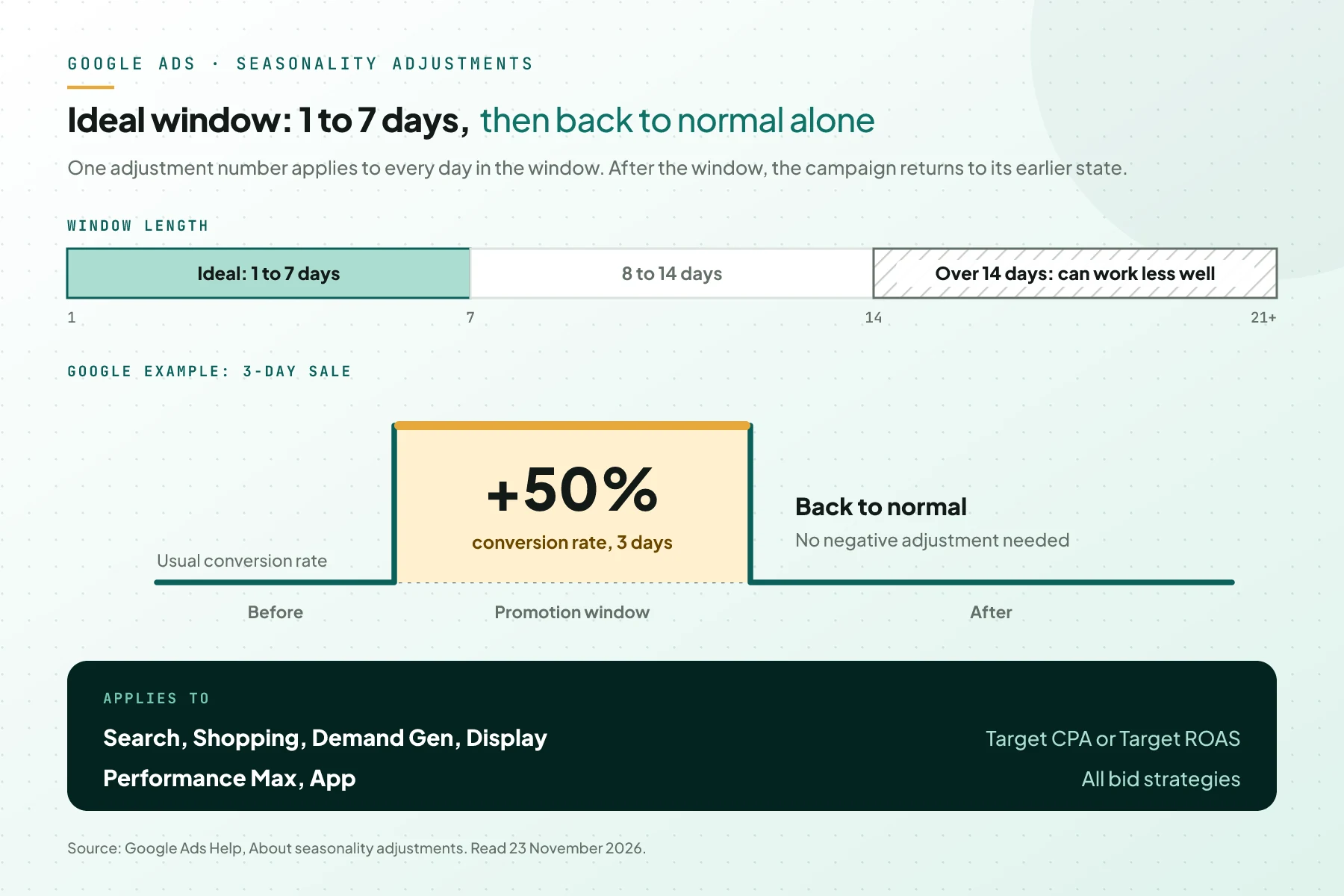
After the window ends, the campaign returns to its performance before the event. You do not need a negative adjustment. The 18 November post says that the feature lets campaigns bid competitively from day 1 of the promotion.
Google itself writes that you may not need it
The Google help page tells advertisers to use this feature only if they expect a major conversion rate change, because Smart Bidding already manages seasons.
Antonio Fernandez, founder and CEO of the agency Relevant Audience in Bangkok, saw this change early. On 24 October 2026, he noted on his agency blog that the help page already listed Demand Gen, with no announcement.
Fernandez adds 1 warning. He calls the lift from a past promotion "an upper bound, not a forecast." The next promotion can have different discounts, stock, and ad creative.
Two Google pages also do not agree yet. The Create a seasonality adjustment page that we read on 23 November 2026 still lists only Search, Standard Shopping, and Display. Fernandez also notes that Google has not explained what occurs with Demand Gen campaigns on Maximize conversions without a target.
A number that is too high shows immediately in your CPA
If the adjustment is higher than the real increase, the system bids too much, and the cost per conversion goes above target.
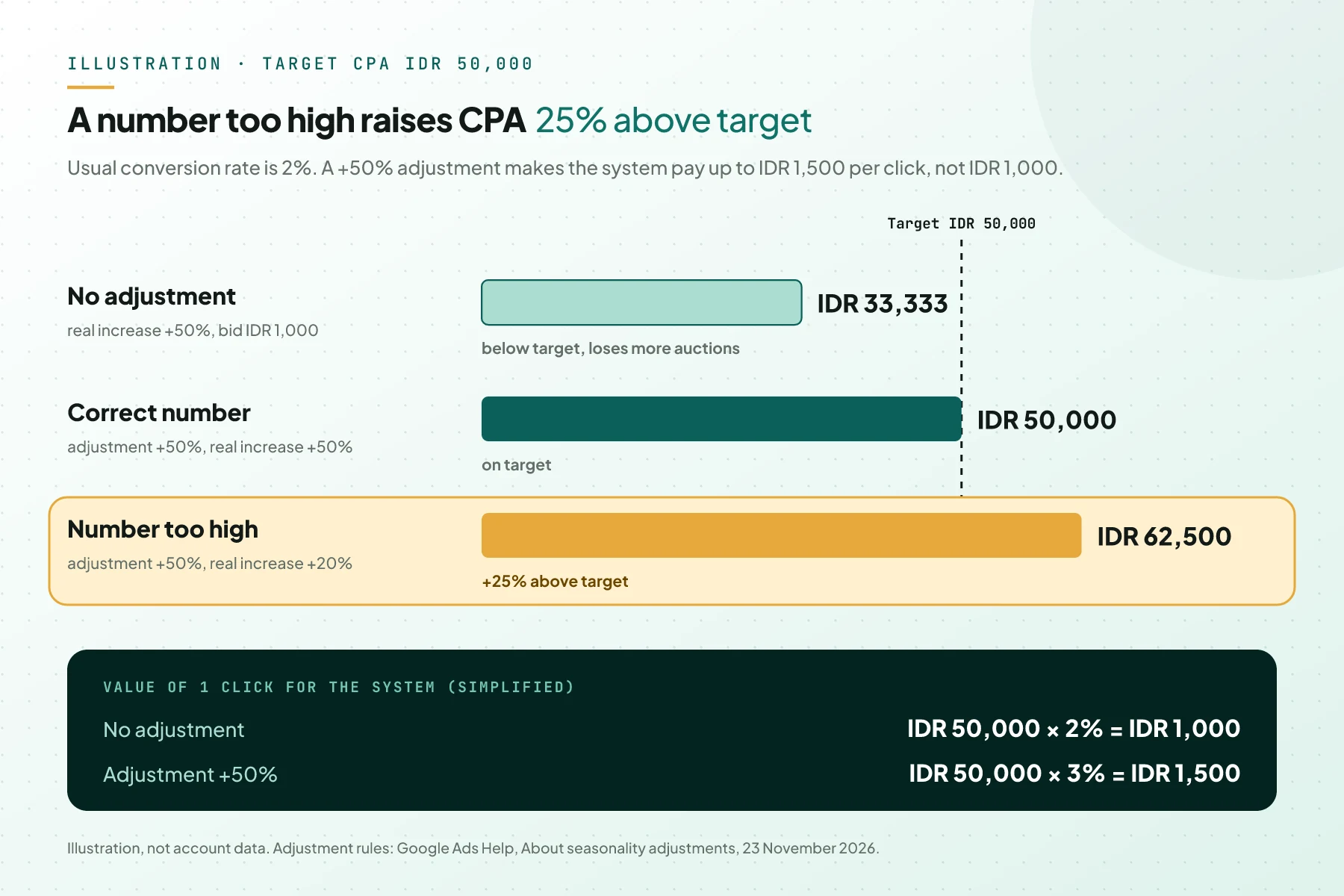
The calculation below is an illustration, not account data. The campaign target CPA is IDR 50,000. The usual conversion rate is 2%, so 1 click has a value of IDR 1,000 for the system.
You write an adjustment of +50%. The system now expects a conversion rate of 3%. It will pay up to IDR 1,500 per click.
- Real increase of +50%: the conversion rate is 3%. The cost per conversion is IDR 1,500 divided by 3%, which is IDR 50,000. That is on target.
- Real increase of only +20%: the conversion rate is 2.4%. The cost per conversion is IDR 62,500, or 25% above target.
- No adjustment, real increase of +50%: the first bids can stay near IDR 1,000. The cost per conversion is IDR 33,333, but low bids lose more auctions.
This calculation makes Smart Bidding simpler than it is. We assume that the cost per clickCPCThe average cost of 1 ad click. Divide the ad spend by the number of clicks.Open the glossary equals the click value, because Google does not publish its bid formula.
The risk pattern stays clear. A number that is too low loses a part of your volume. A number that is too high makes you pay more for each conversion.
Calculate your number from 11.11, not from the peak day only
The adjustment should equal the combined conversion rate increase across the window that you select, because 1 number applies to all days in the window.
Open the daily report of your Demand Gen campaign. Calculate the conversion rate of the 14 days before 11.11 as the baseline. Then add the clicks and conversions of the days in the promotion window.
The table below is an illustration with 500 clicks per day.
| Period | Clicks | Conversions | Conversion rate | Increase from baseline |
|---|---|---|---|---|
| Baseline, 27 October–9 November | 7,000 | 140 | 2.0% | — |
| 10 November | 500 | 12 | 2.4% | +20% |
| 11 November | 500 | 16 | 3.2% | +60% |
| 12 November | 500 | 11 | 2.2% | +10% |
| 3-day window, 10–12 November | 1,500 | 39 | 2.6% | +30% |
For a 3-day window, the correct number is +30%, not +60%. The +60% number is correct only for a 1-day window on the peak day. If your 12.12 window is 11 to 13 December, use the combined 3-day number from 11.11.
Also examine the number of conversions. A change from 3 to 5 conversions per day is already +67%. A number that small can change by chance.
Four checks in your account before 10 December
Do these 4 checks before Harbolnas starts on 10 December 2026.
- Open each Demand Gen campaign. Make sure that the bid strategy uses Target CPA or Target ROAS.
- Open Tools, then Budgets and bidding, then Adjustments, then Seasonal. Make sure that Demand Gen shows in the Scope options.
- Calculate the conversion rate increase from 11.11 for a window of the same length. Use a window of 7 days or less.
- If you use a manager account, examine the client accounts that you linked recently. Those accounts do not get the adjustments that already exist.
If your 11.11 increase is small, or you get only a few conversions each day, do not use an adjustment. Let Smart Bidding do the work.
If the increase is large and your daily conversions are more than a few, set an adjustment with the combined window number. Use that number as the upper limit. After 12.12, compare the cost per conversion during the window with your target.
Demand Gen also has a different change on 1 December. We described it in the article Demand Gen Display moves to ad group level. For Search campaigns, read Search Journey Awareness and secondary conversions.
Three other features come with numbers from Google
The 18 November post gives result numbers for product feeds, creator boosts, and affiliate boosts, all from Google case studies.
| Feature | Example | Google number | Limit |
|---|---|---|---|
| Product feeds | Petco | Purchase intent +6%, store visits +71%, Omni ROAS +30% | Market and period not given |
| Creator partnerships boost | Javvy Coffee | Conversion rate +50% | Market and period not given |
| Affiliate partnerships boost | Shopee | Average ROIROIProfit minus all costs, divided by all costs. ROI counts profit, while ROAS counts gross revenue.Open the glossary of 9x, cost per order 51% lower | Test markets in Southeast Asia, Taiwan, and Brazil, no country numbers |
| Checkout links | — | None | — |
| Seasonality adjustments | — | None | The number comes from you |
The Shopee case study calculates ROI as affiliate GMV divided by ad and commission costs. So 9x is gross sales value per unit of cost, not profit.
What we do not know yet
Google has not published result numbers for seasonality adjustments in Demand Gen, so the benefit for your account is not proven.
- Two Google help pages still disagree about Demand Gen, on 23 November 2026.
- Google gives no country limit. We did not examine the Scope menu in an Indonesian Google Ads account.
- All calculations in this article are illustrations. Your numbers come from your account reports.
- The 11.11 and 12.12 promotions can have different discounts, stock, and ad creative.
Google filled in result numbers for the other features in the 18 November post. For seasonality adjustments, that field is still empty. The number is in your 11.11 report.
Questions and answers
Can I use seasonality adjustments in Demand Gen now?
Google called it newly available on 18 November 2026, for Target CPA and Target ROAS. Examine the Scope menu in your account, because 2 Google help pages still disagree.
What adjustment number is safe for 12.12?
There is no general number. Calculate the combined conversion rate increase from 11.11 for a window of the same length, then use it as the upper limit.
Do I need a negative adjustment after the promotion ends?
No. The Google help page says that campaigns return to their performance before the event without a negative adjustment.
How long should the adjustment window be?
Google gives 1 to 7 days. For periods of more than 14 days, the feature can work less well.
If you want us to calculate your 11.11 number from your Google Ads account, open the Rama Digital managed ads service.