Google released Data Manager in Google Analytics as a beta feature on 6 November 2026, according to the What's new in Google Analytics page. Google also gives 1 warning: the same data pipeline in Google Analytics and Google Ads can record conversionsConversionThe action you count as a result, for example a paid order, a sign-up, or a chat that becomes a qualified buyer.Open the glossary twice.
Data Manager is the data control hub in the Google Analytics Admin menu. There you manage data streams, links to Google products, and first-party data imports, for example CRM data. A data pipeline is 1 fixed path that moves data from a source, for example a CRM, to a destination, for example Google Ads.
We read the Google help pages for this feature on 8 November 2026. The content of a beta feature page can change without notice.
What changed in Google Analytics on 6 November 2026?
Google Analytics now has a Data Manager tab in the Admin menu, directly below the My preferences tab. The help page About Data Manager in Google Analytics (beta) gives 4 benefits:
- Central management: 1 place to set up, manage, and repair the Google Analytics data setup.
- Simpler import: 1 import flow with more connectors.
- Data connection map: a picture of the data flow from source, to property, to final destination.
- Data strength guide: a guide that finds measurement gaps and gives recommendations.
The data connection map puts the Google Analytics property in the center. Data sources come in from the left, for example Google Tag ManagerGTMA tool for installing and changing tracking code without editing the site code every time.What is Google Tag Manager (GTM)?, a CRM platform, a Google Ads link, or an offline file. Destinations go out to the right: the Google products that receive data from your property.
A source with a problem shows a broken state or a red status indicator. You click the source, read the problem on the summary card, and click Fix. Google does not list the problem types that the Fix button can repair.
There is 1 limit. Subproperties and roll-up properties, 2 Google Analytics 360 features, do not support the Data Manager page yet.

Why can a conversion be recorded twice?
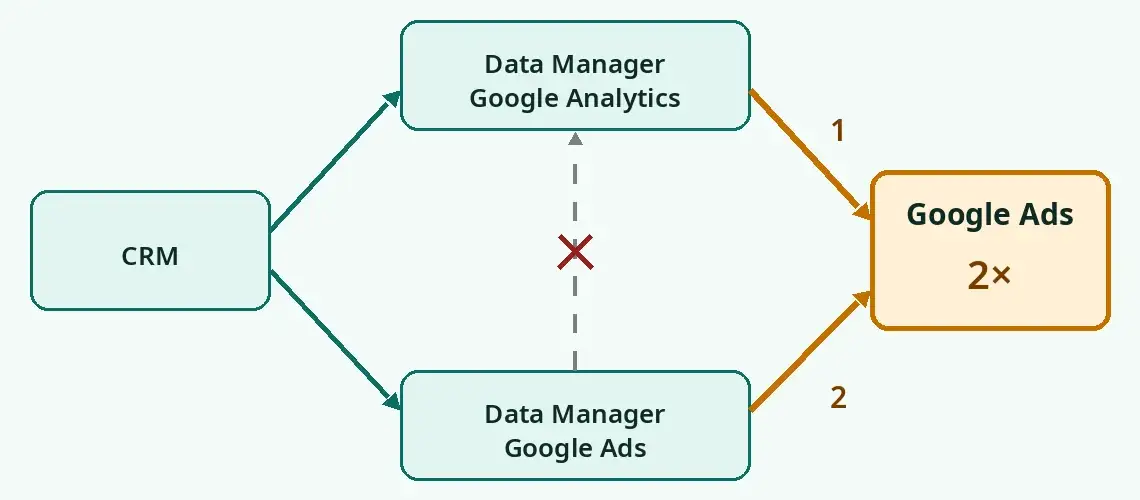
A conversion can be recorded twice because Google Analytics data flows to Google Ads, and Google Ads also has its own import path. According to the Google help page, data from Data Manager in Google Analytics flows to the linked Google Ads and Google Marketing Platform (GMP) accounts. Data does not flow in the opposite direction.
Google gives this warning: "Don't activate an identical data pipeline in both interfaces together." Thus, do not activate the same pipeline in Google Analytics and in Google Ads.
Example: your team already sends sales data from a CRM to Google Ads through Data Manager in Google Ads. Then a different team sees the new tab in Google Analytics and connects the same CRM. Google Ads now receives the same sale through 2 paths.
Google gives 3 paths to prevent duplicate data:
- New connections: start and set them up in Data Manager in Google Analytics. Data then flows to the linked Google Ads or GMP account.
- Existing connections in Google Ads or GMP: keep them there. Do not build the same connection again in Google Analytics.
- Existing imports in Google Analytics: these imports show in Data Manager automatically. You do not need to build them again.
Some data types can only come in through Data Manager in Google Analytics, for example item data and third-party campaign data. Third-party campaign data is the cost, click, and impressionImpressionThe number of times your ad or page appeared on a screen. An impression is not a person and not a search.Open the glossary data from other ad platforms.
Which accounts must you check?
Accounts that import data into Google Ads, for example offline conversions or CRM data, have the highest risk. This table maps each account condition to an action.
| Account condition | Risk of duplicate conversions | Action |
|---|---|---|
| CRM or offline conversion import already runs in Data Manager in Google Ads | High, if a team builds the same connection in Google Analytics | Keep it in Google Ads. Do not connect the same source in Google Analytics. |
| Data import already exists in Google Analytics | Low. The import shows in Data Manager automatically. | Check the connection map. Make sure that Google Ads does not also import the same source. |
| No import yet, a new connection is planned | Low, if there is only 1 path | Start in Google Analytics, as Google recommends. |
| Uses subproperties or roll-up properties (Google Analytics 360) | The Data Manager page is not supported yet | Manage connections as before. |
| An agency and an in-house team control different accounts | High, because 2 teams can build the same path | Give each pipeline 1 owner. |
What is the effect on cost, measurement, and team work?
Duplicate conversions make the cost per conversion in reports look lower than the real cost. The calculation below is an example, not real account data.
An ad spend of Rp10,000,000 gives 50 sales, so the real CPACPAThe average cost of 1 result, for example 1 order or 1 qualified buyer.Open the glossary is Rp200,000. If each sale is recorded twice, the report shows 100 conversions and a CPA of Rp100,000.

- Cost: Smart Bidding, for example Target CPA and Target ROASROASRevenue from ads divided by ad spend. A ROAS of 4 means each Rp 1,000 of ad spend returns Rp 4,000 of gross revenue.How to calculate ROAS and break-even ROAS, uses conversion data to set bids. Duplicate conversions make traffic look more valuable, so the system can bid higher without more sales.
- Measurement: ROAS and lead counts in reports go up, but sales do not. A business owner can increase the budget because of incorrect numbers.
- Team work: if an agency controls Google Ads and an in-house team controls Google Analytics, both teams can build the same path.
To connect an ad click to a bank transfer, read our guide to marketing attribution from ad to transfer.
How do you check your account this week?
Check your account with these 7 steps before a team builds a new connection in the Data Manager tab.
- Open Google Analytics, select Admin, then select Data Manager.
- Open the data connection map. Record each source: tag, Google Tag Manager, CRM, offline file, and Google Ads link.
- Open Google Ads, select Goals, then Conversions, then Summary. Record the source and the primary or secondary status of each conversion action.
- Find the same data from 2 sources. Example: CRM sales that Google Ads imports and that Google Analytics also imports.
- Also check website events. Example: a purchase from the Google Ads tag and a purchase from a Google Analytics import, both set as primary.
- Select 1 path for each conversion. Set the other path to secondary, or stop the duplicate import.
- Compare Google Ads conversions with CRM sales for 7 days. Record the date of the change in your reports.
If you use Performance Max, also read about the brand query change in Performance Max. That change also moves the ROAS report for brand campaigns.
What has Google not explained?
The Google help page does not answer 4 points that are important to ad teams:
- The date when the feature leaves beta.
- How Google finds or merges duplicate conversions that already occurred.
- The user roles that can open Data Manager. The page only says appropriate permissions.
- The problem types that the Fix button can repair.
The release note also does not say if all properties have the tab now. If you do not see the tab, check your property again next week.
What must you do now?
Set 1 path for each conversion data source before anyone builds a new connection in Google Analytics. Keep existing connections in Google Ads, and start new connections in Google Analytics. Do not send the same data through both.
If you are not sure that the conversion numbers in your account are clean, our team can check them with a Data Health Audit. To connect ad data to sales, see Attribution Bridge.
Questions and answers
Is Data Manager in Google Analytics available for all properties?
Google released it as a beta on 6 November 2026. The release note does not give a property limit, but subproperties and roll-up properties in Google Analytics 360 are not supported yet.
Must you move existing Google Ads connections to Google Analytics?
No. Google tells you to keep existing connections in Google Ads or GMP. Do not build the same connection again in Google Analytics, because conversions can be recorded twice.
Does data from Data Manager in Google Ads go into Google Analytics?
No. According to Google, data flows from Google Analytics to Google Ads and GMP, but not in the opposite direction.
How do you know if your conversions are recorded twice?
Compare the conversion count in Google Ads with the sales count in your CRM for the same period. If conversions are near 2 times the sales, find the data that comes in through 2 paths.
What is the difference between Data Manager in Google Analytics and in Google Ads?
Both manage first-party data connections. The Google Analytics version puts the property in the center of the map, and only this version accepts item data and third-party campaign data.
Sources: Google, What's new in Google Analytics, entry for 6 November 2026. Google, About Data Manager in Google Analytics (beta), read 8 November 2026.