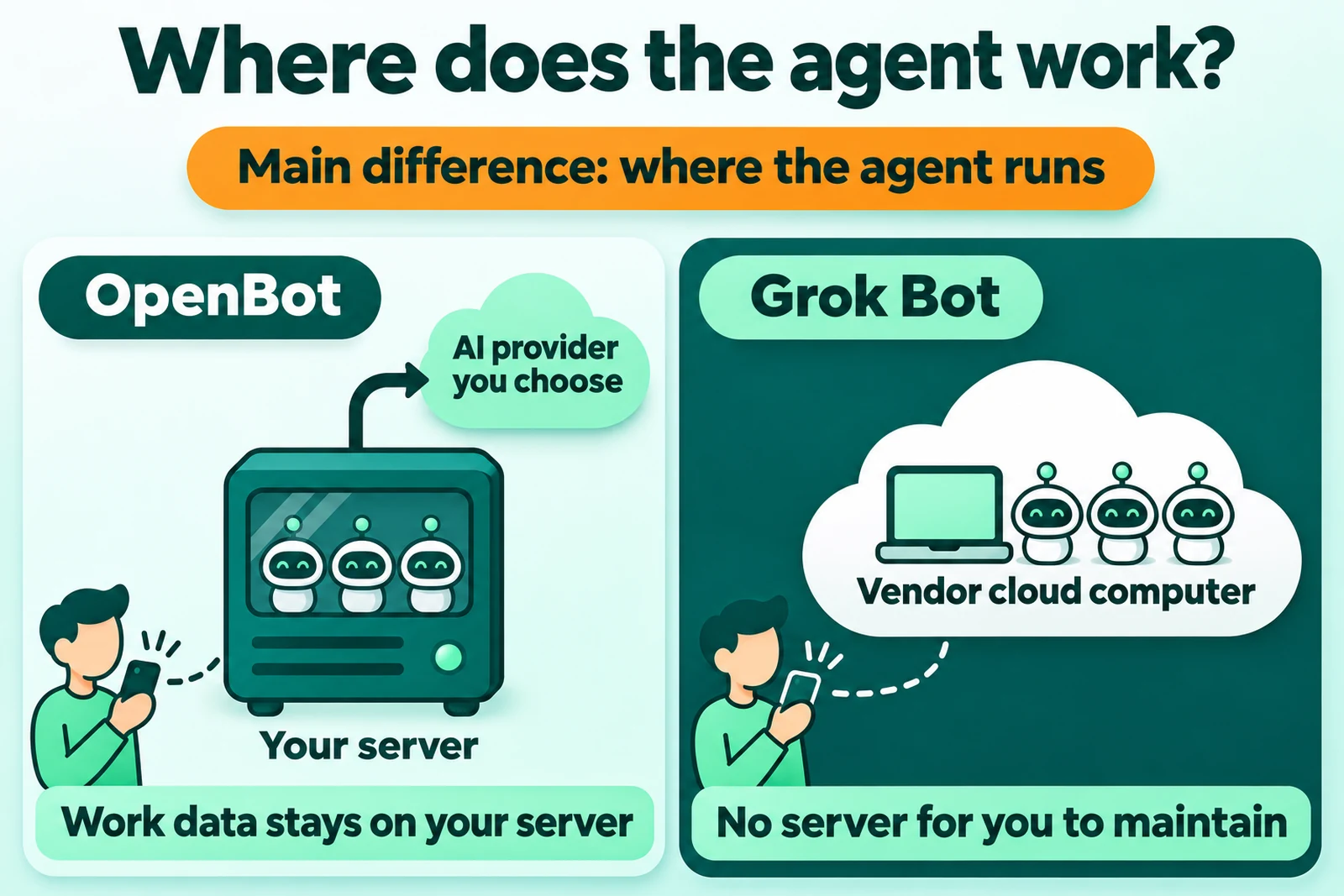
Direct answer: The main difference between OpenBot and Grok Bot is where the agentAI agentAn AI program that performs work steps by itself, for example reading a message, drafting a reply, and recording the result.Open the glossary runs. OpenBot runs on your own computer or server, with the AI provider you choose. Grok Bot runs on a cloud computer of the vendor, so you do not maintain a server.
Short choice: Choose Grok Bot if no person maintains a server. Choose OpenBot if your work data must stay on your server, or if you want to choose the AI provider.
Limit: We did not test the 2 products for this article. The OpenBot facts come from openbot.run, and the Grok Bot facts come from xAI, read 16 November 2026. We mark each claim that appears only on an OpenBot page with "according to the OpenBot comparison page".
Disclosure: Rama Digital sells an OpenBot installation service. Rama Digital is an independent installer and is not part of OpenBot or xAI.
Where the agent runs
OpenBot and Grok Bot both run AI agents that work without an order for each step, but in 2 different places. That place sets who holds the data and who maintains the machine.
OpenBot is an app that runs agents as a team on your computer. The agents use the ChatGPT, ClaudeClaude ProThe paid subscription for the Claude AI assistant from Anthropic. It unlocks connectors to outside tools.Open the glossary, Gemini, or Grok plan that you pay for (OpenBot home page, read 16 November 2026). Its maker calls OpenBot a local-first alternative to Grok Bot (OpenBot announcement, 14 September 2026).
Grok Bot uses a persistent cloud computer with a browser, a filesystem, and a terminal (xAI Grok Bot documentation, read 16 November 2026). xAI assigns that computer per user, not per Bot (Grok Bot FAQ, read 16 November 2026). According to the OpenBot comparison page, Cursor hosts that computer in the United States.
Release status on 16 November 2026: OpenBot version 0.71.0 was released on 14 November 2026 (OpenBot changelog). Grok Bot 1.0 was released on 2 November 2026 (xAI announcement). A full definition of OpenBot is in the article what OpenBot is.
OpenBot vs Grok Bot comparison table
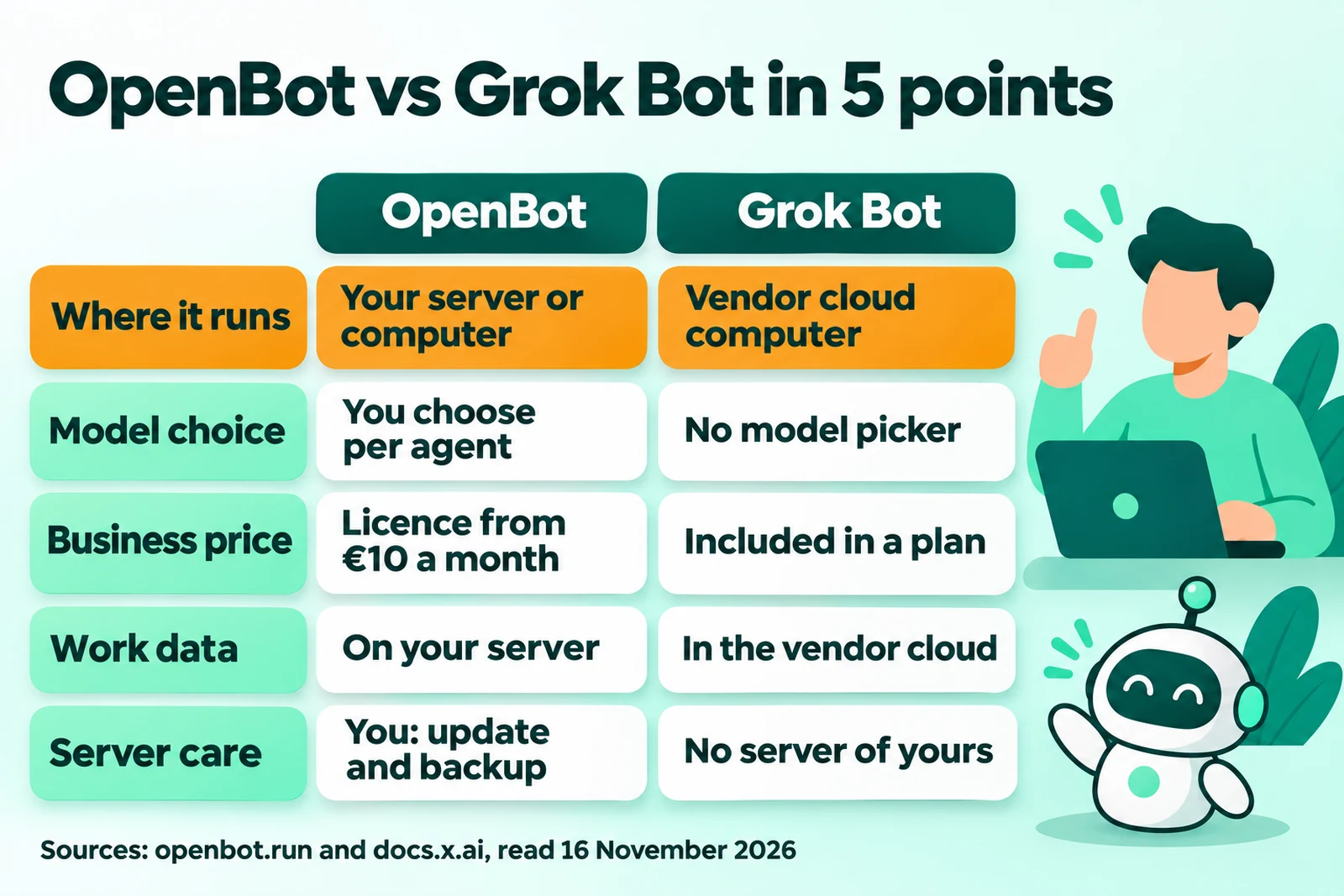
This table compares the 6 points that most often decide the choice of a business owner. Each cell gives its source, read 16 November 2026.
| Point | OpenBot | Grok Bot |
|---|---|---|
| Where it runs | The computer or server that runs OpenBot (OpenBot home page) | A persistent cloud computer, 1 for each user (xAI FAQ). Hosted by Cursor in the United States, according to the OpenBot comparison page |
| Model and AI provider choice | You choose the provider and the model for each agent, for example Codex, Claude Code, Gemini, Grok, or Ollama (OpenBot home page) | There is no model picker. Grok Bot chooses a model for each task (xAI FAQ) |
| Licence and price | Free for noncommercial use. A business needs a work licence, from €10 a month for 1 member (OpenBot pricing) | Included in the Premium, Super, and Ultra plans of The X Subscription, and in some legacy Cursor plans (xAI FAQ) |
| Who holds the data | Work data is in a SQLite database on the computer that runs OpenBot. The AI provider receives the prompts (OpenBot FAQ) | Grok Bot needs cloud data storage. Account data is removed within 30 days after you delete the account (xAI FAQ) |
| How to install | A desktop app, or a server with the Ubuntu 24.04 installer or Docker Compose (OpenBot VPS guide) | No server to install. You work from desktop, phone, Slack, or X (xAI documentation) |
| Maintenance | You run updates, backups, and restarts yourself (OpenBot VPS guide) | No server of yours. Cloud work continues when your laptop is closed, according to the OpenBot comparison page |
The first row sets the other 5 rows. Your own server gives you control of the data and the model. Your own server also gives you maintenance work that Grok Bot does not give you.
When Grok Bot is the better fit
Grok Bot is the better fit if you want agents that work with no server and no maintenance from your side. The OpenBot comparison page itself names 3 conditions where Grok Bot fits better.
- No computer that stays on. You do not want to keep a computer on for your agents, according to the OpenBot comparison page.
- You already have the plan. You already pay for a plan that includes Grok Bot, for example Premium on The X Subscription (xAI FAQ, read 16 November 2026).
- iPad app. You need an iPad app, according to the OpenBot comparison page.
- A team in Slack or X. You work with Bots on desktop, phone, Slack, or X (xAI documentation, read 16 November 2026).
Check 1 item before you pay from Indonesia. According to the OpenBot comparison page, xAI publishes no list of countries for Grok Bot. Grok Bot as an AI worker is in the articles AI assistant vs AI worker and Grok Bot 1.0.
When OpenBot is the better fit
OpenBot is the better fit if your work data must stay on your server, or if you want to choose the AI provider. The 5 conditions below have official OpenBot sources.
- Data on your own server. The licensor does not receive the conversations, files, prompts, or commands that agents run (OpenBot commercial licence, clause 3.7, read 16 November 2026).
- Free choice of provider. You use your ChatGPT, Claude, Gemini, or Grok plan, or your own model through Ollama (OpenBot home page, read 16 November 2026).
- Backup model. When a plan quota runs out, an OpenBot agent can move to a backup model (OpenBot home page). On a legacy Cursor plan, Grok Bot stops when weekly usage runs out, unless on-demand usage is on (xAI FAQ).
- Telegram and Discord. OpenBot agents answer in Slack, Discord, and Telegram, according to the OpenBot comparison page.
- Move from Grok Bot. OpenBot has an official guide to import agents from Grok Bot (import guide, 23 October 2026).
OpenBot also sells a hosted server, from €30 a month (OpenBot pricing, read 16 November 2026). With that option, the server is not yours. A hosted server also gives no commercial licence (commercial licence, clause 2.9).
The costs and the work that come with your own server
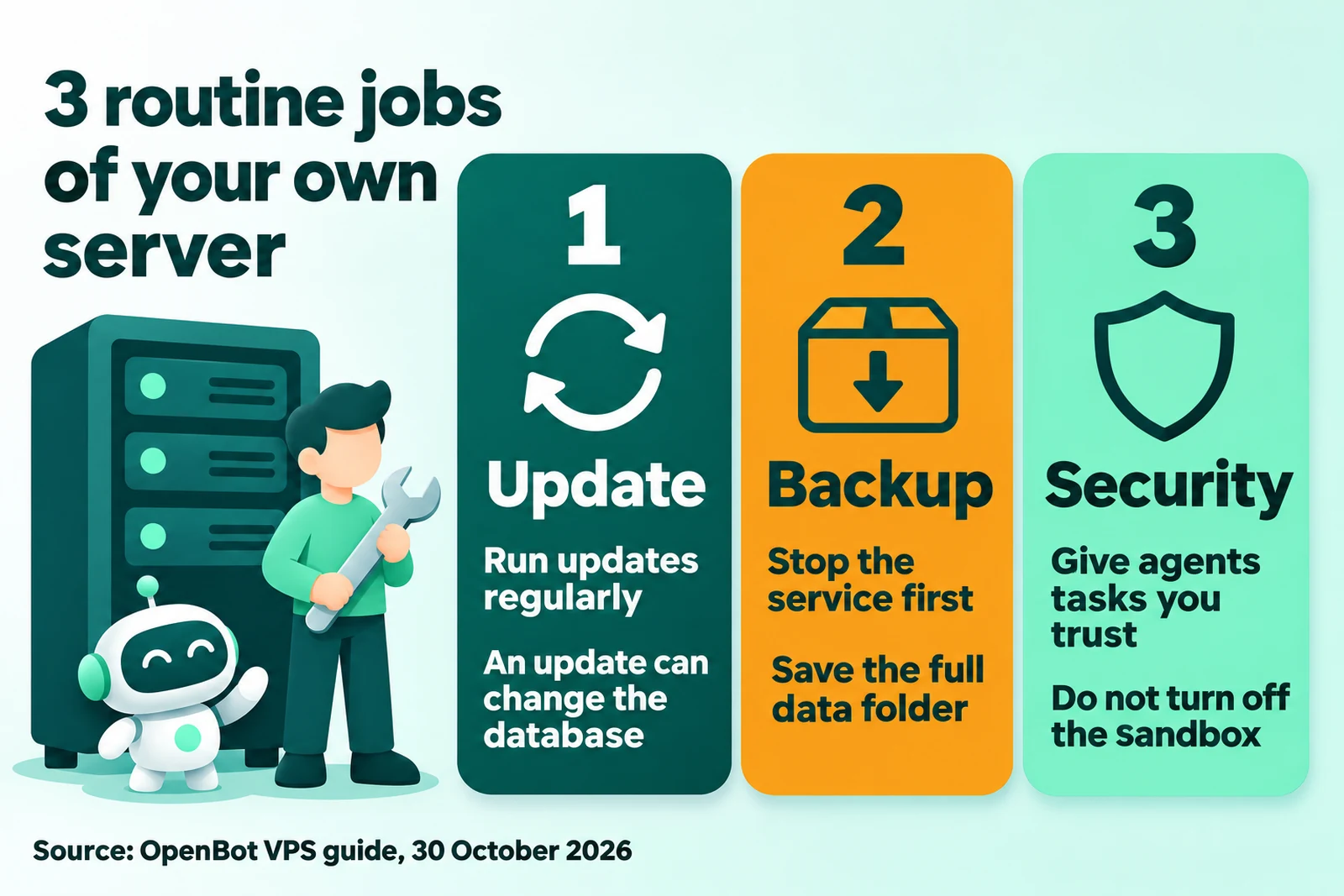
Your own server gives you control of the data, but it also brings 3 types of cost and 3 routine jobs. Grok Bot does not give these routine jobs to you.
3 types of cost
- Work licence. Starter is €10 a month for 1 member. Team is €25 a month with 2 members. The licence is free until 1 December 2026 (OpenBot pricing, read 16 November 2026).
- Server. Your own VPS, or an OpenBot hosted server from €30 a month (OpenBot pricing). The official guide gives no minimum RAM size (VPS guide).
- AI plan. OpenBot adds no charge of its own for AI use. You pay the AI provider through your plan or APIAPIThe official door 2 systems use to exchange data, without anybody copying it by hand.Open the glossary key, according to the OpenBot comparison page.
OpenBot bills in euro, US dollar, zloty, or Brazilian real, with VAT not included (OpenBot pricing). The monthly cost breakdown is in the article OpenBot cost for a business.
3 routine jobs
- Update. Run
sudo openbot updateregularly. An update can migrate the database. Thus a move to an old version is not a safe rollback (OpenBot VPS guide, 30 October 2026). - Backup. Stop the service with
sudo openbot stop, and then save/var/lib/openbotand/srv/openbot-hostedtogether. On Docker, save the full data volume, because it holds the provider logins, the database, and the encryption keys. - Security. Give agents only tasks that you trust, and keep backups. Do not start OpenBot with
--no-sandbox(OpenBot Linux page).
OpenBot writes: "Agents can read and change files, run commands, use the network and control the built-in browser without asking each time." (OpenBot FAQ, read 16 November 2026). Thus the permission rules and the backups are your job.
There are 2 more items to know. If the licence server is not available, OpenBot continues for 24 hours, and then new logins are blocked (commercial licence, clause 3.3). An OpenBot server only connects out, so it needs no open port (official compose.yaml).
A provider login on your laptop does not apply on the server. Connect the provider again on the server (VPS guide). The full installation steps are in the article how to install OpenBot on a VPS.
A note about OpenClaw
OpenClaw is a third option that also runs agents on your own computer with the AI plans you already have. This fact comes from an OpenBot page, so read it as a claim of the OpenBot maker.
According to the OpenBot vs OpenClaw comparison page, choose OpenClaw if you need an assistant in WhatsApp, Signal, or iMessage. That page also says OpenClaw uses the MIT licence for commercial use.
This note is important for a business in Indonesia that serves customers through WhatsApp. The OpenBot pages do not name WhatsApp as an OpenBot chat app, read 16 November 2026.
Choose with 3 questions
Answer these 3 questions in sequence to choose between OpenBot and Grok Bot. The first question has the most effect.
- Does a person maintain a server? If no, choose Grok Bot. If yes, go to question 2.
- Must your work data stay on your server? If yes, choose OpenBot. If no, go to question 3.
- Do you want to choose the AI provider? If yes, choose OpenBot. If no, choose Grok Bot.
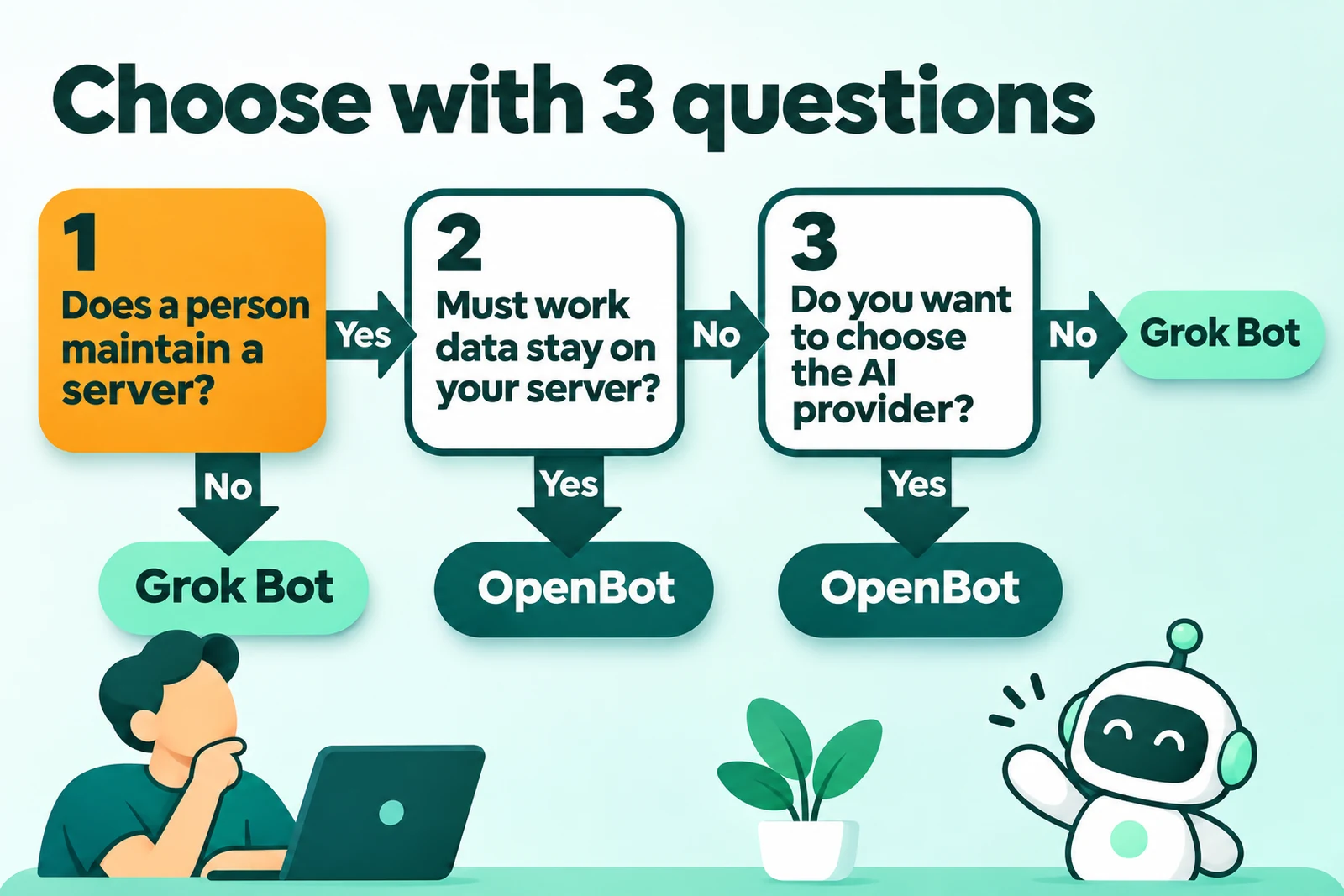
If the answer to question 1 is no, but the data must stay on your server, find a person to maintain the server first. That person can be your staff or an external installer.
Questions and answers
Is OpenBot free for a business?
No. OpenBot is free for personal and noncommercial use. A business needs a work licence, from €10 a month for 1 member, and the licence is free until 1 December 2026.
Does Grok Bot need your own server?
No. Grok Bot works on a cloud computer that xAI assigns to each user. You work from desktop, phone, Slack, or X.
Can OpenBot use the Grok model?
Yes. OpenBot supports Grok through a Grok account or an xAI API key. You pay xAI directly, because OpenBot adds no charge for AI use.
Do OpenBot agents stop when the laptop is off?
Yes, if OpenBot runs on that laptop. Install OpenBot on a server that is always on, so that scheduled routines continue.
Is Grok Bot available in Indonesia?
It is not clear. According to the OpenBot comparison page, xAI publishes no list of countries for Grok Bot. Check your account before you pay.
Can I move agents from Grok Bot to OpenBot?
Yes. OpenBot published an official guide to import agents from Grok Bot on 23 October 2026.
Is Rama Digital part of OpenBot?
No. Rama Digital is an independent installer. We do not work for OpenBot or xAI.
Next step
Start with the 3 questions above, and then write 1 repeated job that you want to give to an agent. Example designs are in the article OpenBot workflow examples for a business.
If you choose OpenBot, Rama Digital installs 1 workflow on your server with the OpenBot installation service. The fixed price is Rp 5.000.000 for each workflow, and the work takes 3 to 5 working days.
- 1 workflow has 1 trigger, a maximum of 4 agents, and a maximum of 3 app connections.
- 1 workflow has 1 human approval step and 1 report channel.
- The price does not include the server, the OpenBot work licence, or the AI plan. You pay these 3 items directly to each provider.
The Rama Digital team uses AI agent workflows every day for its own work.
Sources
- OpenBot, home page and FAQ, pricing, commercial licence (updated 29 October 2026). Read 16 November 2026.
- OpenBot, VPS guide, 30 October 2026. Linux page and GitHub repository. Read 16 November 2026.
- OpenBot vs Grok Bot and OpenBot vs OpenClaw, checked by the maker on 2 October 2026. These are OpenBot pages. Read 16 November 2026.
- OpenBot announcement, 14 September 2026. Changelog 0.71.0, 14 November 2026. Guide to import Grok Bot agents, 23 October 2026.
- xAI, Grok Bot documentation and Grok Bot FAQ. Read 16 November 2026.
- xAI, Grok Bot beta announcement, 11 August 2026. Grok Bot 1.0, 2 November 2026.