Direct answer: OpenBot is an app that runs a team of AI agents on your own computer or server. The agents use your paid ChatGPT, ClaudeClaude ProThe paid subscription for the Claude AI assistant from Anthropic. It unlocks connectors to outside tools.Open the glossary, Gemini, or Grok plan, or your own model (OpenBot home page, read 16 November 2026).
Main condition: OpenBot is free for personal and noncommercial use. A business needs a work license from €10 each month. That license is free until 1 December 2026 (OpenBot pricing page, read 16 November 2026).
Limit: The facts in this article come from the official OpenBot pages and its source code, read 16 November 2026. We did not test an OpenBot installation on a new VPS for this article. Rama Digital is an independent installer and is not part of OpenBot.
OpenBot in 1 table
This table shows the basic facts about OpenBot with their sources. We read all pages on 16 November 2026.
| Item | Fact | Source |
|---|---|---|
| Product type | A desktop app that runs AI agents as a team | OpenBot home page |
| Maker | Synthetify Labs sp. z o.o., Poland | Commercial license, clause 1.2 |
| Announcement | 14 September 2026 | Introducing OpenBot |
| Latest version | 0.71.0, released 14 November 2026 | OpenBot changelog |
| Base license | PolyForm Noncommercial 1.0.0 | PolyForm license text |
| Systems | macOS 13+, Windows 10+ (x64), Linux x64 and arm64 | Linux download page |
| AI model | OpenBot does not sell a model. You use your own AI provider | Introducing OpenBot |
| Personal price | €0, with no locked features | OpenBot FAQ |
| Business price | Work license from €10 each month | Pricing page |
The maker writes that OpenBot does not train its own AI model (OpenBot announcement, 14 September 2026). The source code is on GitHub nightly-labs/openbot, with 8,078 stars on 16 November 2026.
How OpenBot works: 5 parts
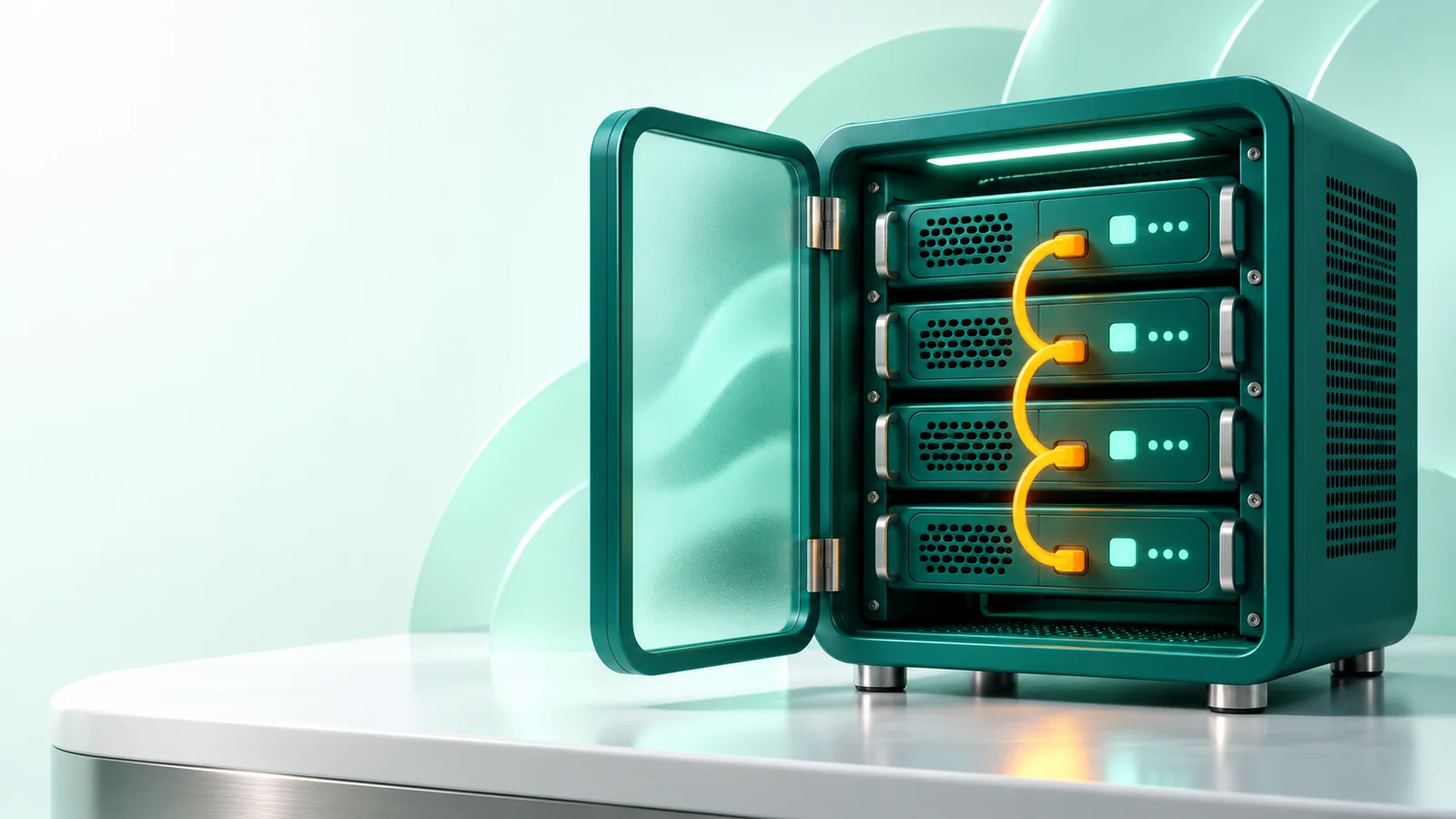
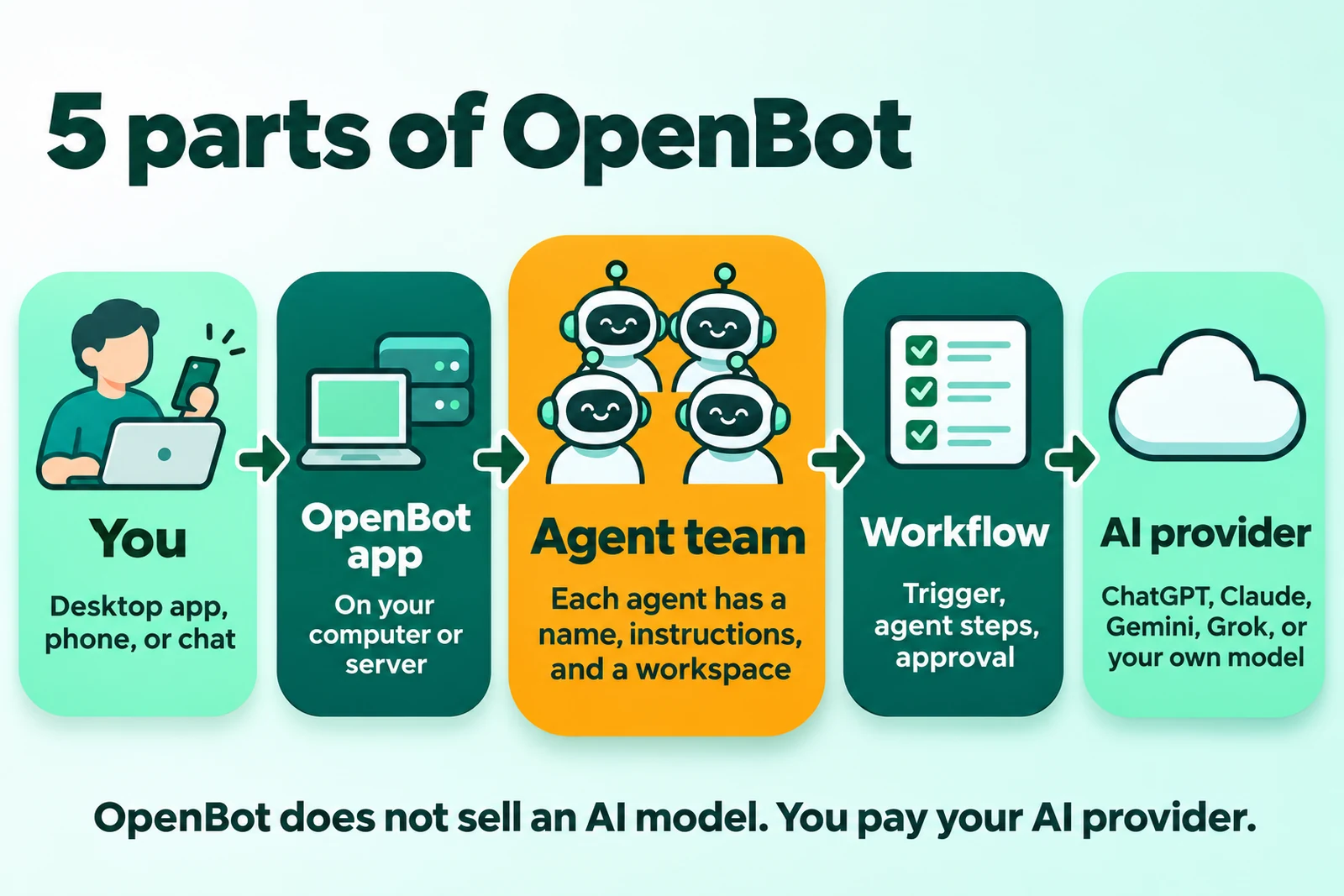
OpenBot has 5 parts: you, the OpenBot app, the agentAI agentAn AI program that performs work steps by itself, for example reading a message, drafting a reply, and recording the result.Open the glossary team, the workflow, and the AI provider. The image below shows the flow of work from left to right.
1. An app on your computer or server
OpenBot runs on the computer or server that you choose. Workspaces, conversations, attachments, and browser data stay on that computer (OpenBot FAQ, read 16 November 2026).
The AI provider still receives the prompts that the agents send. Thus your data does not stay fully in 1 place.
2. The agent team
Each agent has its own name, instructions, and workspace. The agents send messages to each other, hand off tasks, and share files (OpenBot home page, read 16 November 2026).
You can invite coworkers to the server. Roles control which agents each member can see, chat with, or manage.
3. Workflows and routines
A workflow combines agents, models, and approval steps into a flow of steps. The example on the OpenBot home page uses the trigger "Every Monday at 9:00", 4 agents, and then the approval "Post the report?" (OpenBot home page, read 16 November 2026).
A routine starts an agent on a schedule. Routines keep running when OpenBot runs on a server that is always on (OpenBot comparison page, read 16 November 2026). Business examples are in OpenBot workflow examples for business.
4. Desktop, phone, and chat apps
There are desktop apps for macOS, Windows, and Linux. The iPhone, Android, and web apps connect to the computer that runs OpenBot (OpenBot comparison page, read 16 November 2026).
Agents also reply in Slack, Discord, and Telegram. The official pages did not mention WhatsApp on 16 November 2026.
5. AI providers
OpenBot supports many AI providers. The official list on 16 November 2026 includes:
- Codex with a ChatGPT plan, and Claude Code with a Claude plan.
- Gemini with Google AI Pro or Ultra, and Grok with a Grok account or an xAI APIAPIThe official door 2 systems use to exchange data, without anybody copying it by hand.Open the glossary key.
- OpenCode, Cursor, Cline, Muse Code, Pi, and Inception Mercury.
- ACP agents, OpenAI-compatible endpoints, Ollama, and LM Studio.
OpenBot writes "OpenBot adds no charge of its own." (OpenBot comparison page, read 16 November 2026). When the plan quota is empty, an agent can move to a fallback model (OpenBot home page).
How OpenBot is different from a usual chatbot
A usual chatbot answers your message. An OpenBot agent does a task, uses files and commands, and then hands the result to another agent or to you.
| Item | Usual chatbot | OpenBot |
|---|---|---|
| Who starts the work | You send a message | You, a scheduled routine, or a workflow trigger |
| Result | An answer in text | Files, commands, reports, and messages in Slack, Discord, or Telegram |
| Where it works | The server of the chatbot company | Your computer or server |
| Number of workers | 1 assistant | A team of agents that hand off tasks |
| Supervision | You read the answer | You approve the important steps in the workflow |
| Main risk | A wrong answer | A wrong action on your computer |
This table is our reading of the official OpenBot features, read 16 November 2026. We explain the difference between an AI assistant and an AI worker in the AI assistant vs AI worker article.
Where OpenBot runs: 3 options
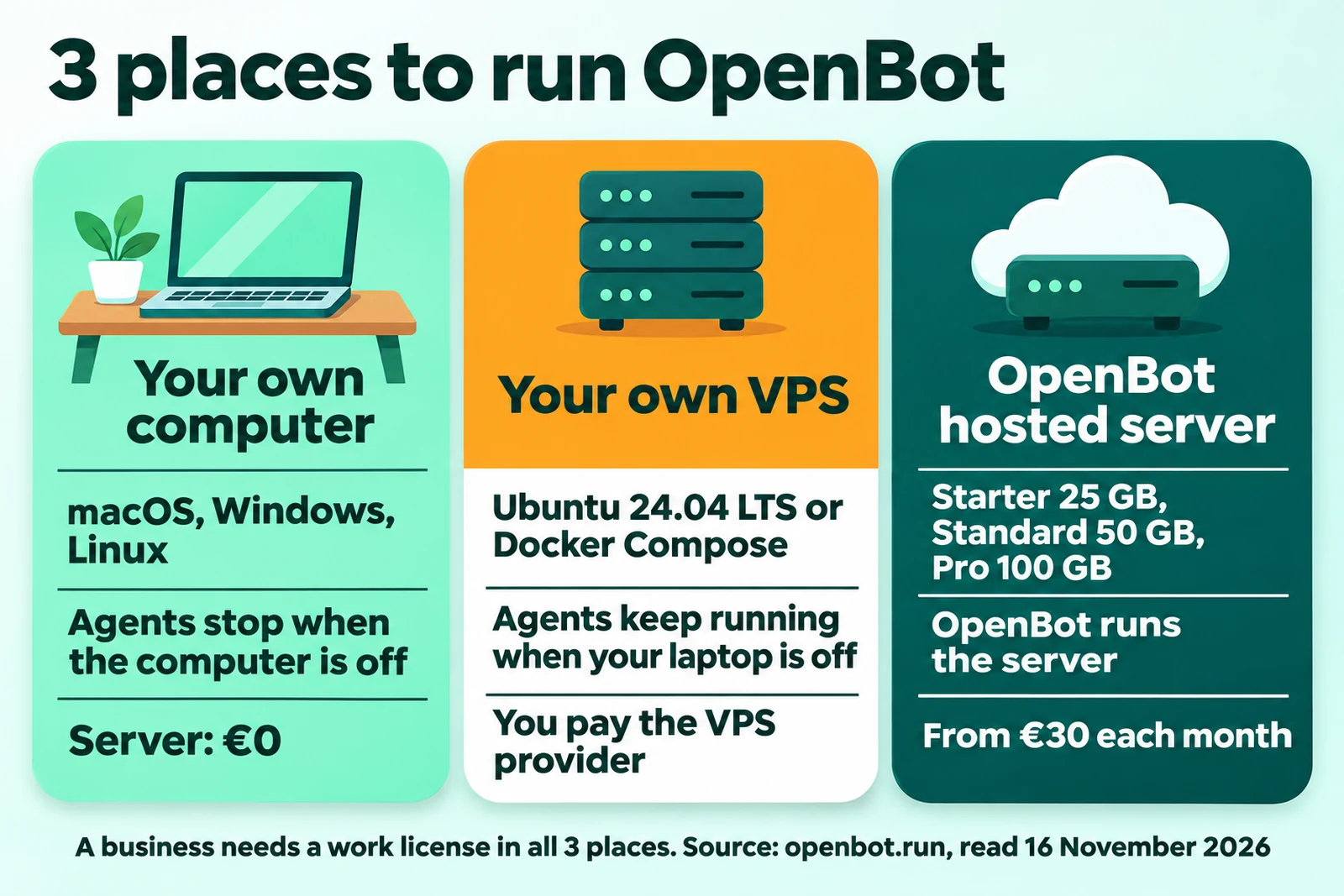
You can run OpenBot on your own computer, on your own VPS, or on a server that OpenBot hosts. This choice decides if the agents keep working when your laptop is off.
| Place | Requirement | When the laptop is off | Server cost |
|---|---|---|---|
| Your own computer | macOS 13+, Windows 10+, or Linux | Agents stop | €0 |
| Your own VPS | Ubuntu 24.04 LTS with the installer, or Docker Compose | Agents keep working | You pay the VPS provider |
| OpenBot hosted server | Starter, Standard, or Pro plan | Agents keep working | From €30 each month |
Table sources: OpenBot comparison page, OpenBot VPS guide, and pricing page, read 16 November 2026.
Your own VPS
The official guide uses a 64-bit VPS with Ubuntu 24.04 LTS, systemd, and sudo (OpenBot VPS guide, 30 October 2026). There are 2 ways to install: the Ubuntu installer or Docker Compose.
The OpenBot server only connects out and needs no open port (official compose.yaml, read 16 November 2026). The guide also writes that you do not need a domain. The full steps are in how to install OpenBot on a VPS.
OpenBot hosted server
The Starter plan is €30 each month for 1 person with 25 GB. Standard is €50 each month for a small team of up to 5 members with 50 GB. Pro is €100 each month with 100 GB (pricing page, read 16 November 2026).
A hosted server does not give a work license. Each person who logs in for work still needs a seat (commercial license, clause 2.9).
OpenBot license: who uses it free and who pays
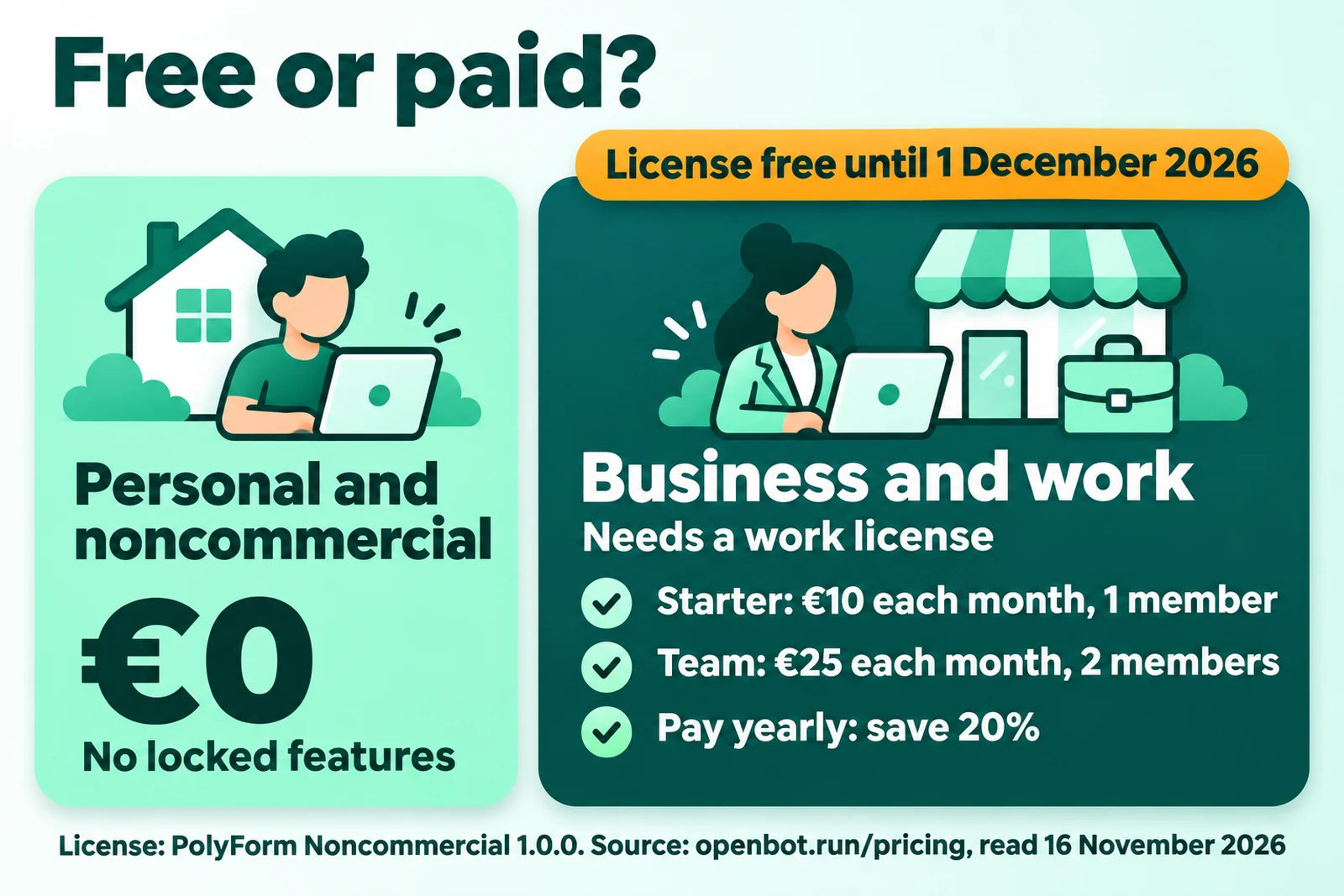
OpenBot is free for personal and noncommercial use, and a business needs a work license. The base license is PolyForm Noncommercial 1.0.0 (OpenBot FAQ, read 16 November 2026).
The official FAQ writes: "Commercial use needs a license." The commercial license gives 4 examples of commercial use (commercial license, clause 1.4, updated 29 October 2026):
- Employees use OpenBot for work.
- A business uses OpenBot for internal operations.
- A person uses OpenBot for client work.
- A business hosts OpenBot for third parties.
1 seat is 1 person, and people cannot share a seat. AI agents do not count as seats (commercial license, clause 1.6).
| License | Monthly payment | Yearly payment, each month | Members |
|---|---|---|---|
| No license | €0 | €0 | Personal and noncommercial use only |
| Starter | €10 | €7.20 | 1 member |
| Team | €25 | €18 | 2 members, +€10.80 for each more member |
Table source: OpenBot pricing page, read 16 November 2026. That page writes "Free until December 1, 2026" for the licenses. A yearly payment saves 20%, and a license bought with a hosted server saves 10%.
Invoices use euro, US dollar, zloty, or Brazilian real, and the prices do not include VAT (commercial license, clause 2.8). We do not show prices in rupiah because the exchange rate changes. The full cost breakdown is in OpenBot cost for business.
2 more rules are important for a business. If the license server is not available, OpenBot keeps running for 24 hours, and then new logins are blocked (commercial license, clause 3.3). The licensor does not receive your conversations, files, prompts, or commands (clause 3.7).
Security risks and how to reduce them
OpenBot agents can change files and run commands without asking each time. Thus the main risk is a wrong action, not a wrong answer.
The official FAQ writes: "Agents can read and change files, run commands, use the network and control the built-in browser without asking each time." OpenBot tells you to give only trusted tasks and to keep backups (OpenBot FAQ, read 16 November 2026).
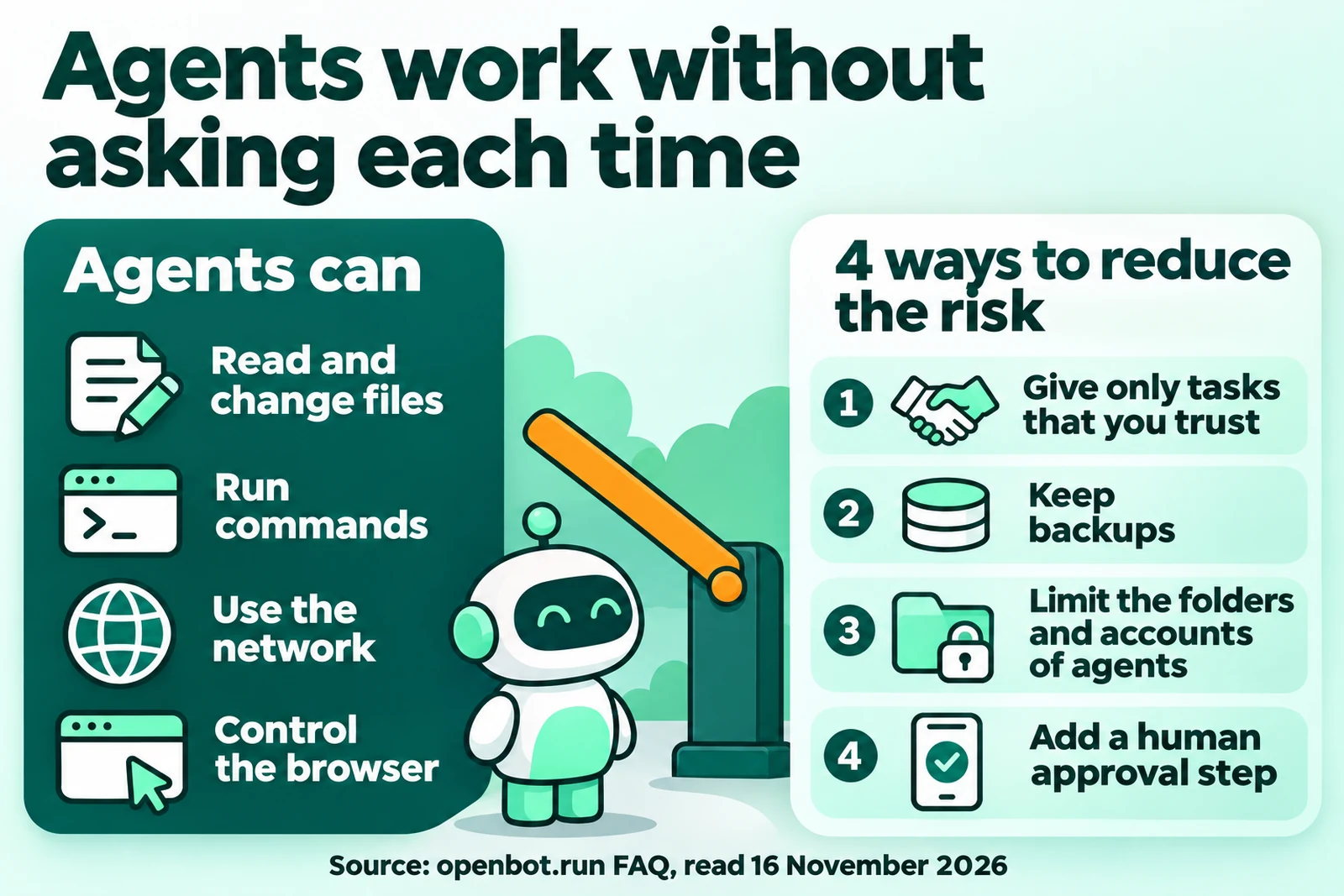
Use these 6 steps before an agent gets business data:
- Give agents only tasks that you trust.
- Back up the OpenBot data regularly. On Docker, stop the service, and then save the full data volume (VPS guide).
- On Docker, mount only the folders that the agents can use (VPS guide).
- Do not turn off the sandbox. The Linux page writes "Do not start OpenBot with --no-sandbox" (Linux download page, read 16 November 2026).
- Add a human approval step before an agent sends, posts, or pays.
- Set roles, so that each member sees and manages only the agents that they need.
The OpenBot vault keeps logins, payment cards, and contacts encrypted on your computer. Agents see only the card name and the last 4 digits (OpenBot comparison page, read 16 November 2026).
Who OpenBot is for
OpenBot fits a business with repeated work that it can split across several agents. OpenBot fits less well if you need WhatsApp or do not want to keep a server running.
A good fit if
- You have fixed weekly work, for example a sales summary or an ads report.
- Your team already pays for a ChatGPT, Claude, Gemini, or Grok plan.
- You want the agent workspaces and conversations to stay on your own server.
- Your team uses Slack, Discord, or Telegram for reports.
- 1 person reads the reports and approves the important steps.
A poor fit if
- You need an agent in WhatsApp, Signal, or iMessage. According to the OpenBot comparison page, OpenClaw fits that need better (OpenBot vs OpenClaw, read 16 November 2026).
- You do not want to keep a computer or server on. According to the OpenBot comparison page, Grok Bot fits that need better (OpenBot vs Grok Bot, read 16 November 2026).
- Your team needs an Indonesian interface. The desktop app has 15 languages, and the official page does not mention Indonesian.
- You need an MIT license for commercial use with no license fee.
The full comparison for business owners is in OpenBot vs Grok Bot.
OpenBot versions and release dates
The latest OpenBot version on 16 November 2026 is 0.71.0, released on 14 November 2026. New releases come almost every day, so record the version that you install.
| Date | Event | Source |
|---|---|---|
| 12 August 2026 | The source code repository was created on GitHub | GitHub nightly-labs/openbot |
| 14 September 2026 | Announcement "Introducing OpenBot" | OpenBot announcement |
| 29 October 2026 | Commercial license updated | Commercial license |
| 30 October 2026 | VPS install guide published | VPS guide |
| 12 to 14 November 2026 | Versions 0.69.0, 0.70.0, and 0.71.0 released in sequence | OpenBot changelog |
An update can migrate the database, so a return to an old image is not a safe rollback (OpenBot VPS guide, read 16 November 2026). Make a backup before each update.
Questions and answers
What is OpenBot?
OpenBot is an app that runs a team of AI agents on your own computer or server. The agents use the AI plan that you already pay for, or your own model.
Is OpenBot free for a business?
No. OpenBot is free for personal and noncommercial use. A business needs a work license from €10 each month. According to the pricing page, read on 16 November 2026, that license is free until 1 December 2026.
Does OpenBot sell an AI model?
No. OpenBot does not train its own AI model. You pay the AI provider with your own plan or API key, and OpenBot adds no charge for it.
Do OpenBot agents keep working when the laptop is off?
Only if OpenBot runs on a server that is always on, for example your own VPS or an OpenBot hosted server. On a laptop, the agents stop when the laptop is off.
Can OpenBot reply to WhatsApp chats?
The official pages mention Slack, Discord, and Telegram, and they did not mention WhatsApp on 16 November 2026. For WhatsApp, the OpenBot comparison page points to OpenClaw.
Does OpenBot send business data to its maker?
According to the commercial license, the licensor does not receive your conversations, files, prompts, or commands. The AI provider still receives the prompts that the agents send.
Is Rama Digital part of OpenBot?
No. Rama Digital is an independent installer. We install OpenBot on the client server, and the client pays for the work license directly to OpenBot.
Next step
Start from 1 repeated job, not from a feature list. Write its trigger, the agents that it needs, and the steps that must wait for your approval.
The Rama Digital team uses AI agent workflows every day for its own work. We install 1 OpenBot workflow on your server with the OpenBot installation service. The fixed price is Rp 5,000,000 for each workflow, and the work takes 3 to 5 work days.
1 workflow has 1 trigger, a maximum of 4 agents, a maximum of 3 app connections, 1 human approval step, and 1 report channel. The price does not include the server, the OpenBot work license, or the AI plan, which you pay directly to each provider.
Sources
- OpenBot, home page and FAQ. Read 16 November 2026.
- OpenBot, pricing page. Read 16 November 2026.
- OpenBot, Commercial License Agreement, updated 29 October 2026. Read 16 November 2026.
- PolyForm Noncommercial License 1.0.0. Read 16 November 2026.
- OpenBot, VPS install guide, 30 October 2026. Read 16 November 2026.
- OpenBot vs Grok Bot and OpenBot vs OpenClaw, OpenBot comparison pages. Read 16 November 2026.
- Introducing OpenBot, 14 September 2026. OpenBot changelog. Read 16 November 2026.
- OpenBot for Linux and source code on GitHub. Read 16 November 2026.