Meta released Graph APIAPIThe official door 2 systems use to exchange data, without anybody copying it by hand.Open the glossary v27.0 and Marketing API v27.0 on 4 November 2026, according to the Graph API v27.0 and Marketing API v27.0 announcement on Meta for Developers. The release brings 4 changes for apps that create ads through the API. 2 changes alter ads without an error message. The other 2 changes make requests fail.
These changes apply to apps, partner tools, and scripts that call the Marketing API. If your team uses only Ads Manager, ask each tool that creates ads or audiences for your account which API version it uses.
What changes in Marketing API v27.0?
Marketing API v27.0 changes 2 default settings and stops 2 old request formats. This table summarizes the Graph API v27.0 and Marketing API v27.0 announcement.
| Change | Result if you do not check | Field or endpoint | Older versions |
|---|---|---|---|
| Product showcase | Meta can add catalog products to a new ad | product_extensions.enroll_status | No change |
| Sales ad set devices | The ad can run on other devices and operating systems | individual_setting.device | Changes about February 2027 |
| Lookalike | Meta rejects requests with a location | lookalike_spec | Changes about February 2027 |
| Catalog sync | Product updates fail on v27.0 | /{catalog-id}/batch | Works until v26.0 support ends |
Existing ads, ad sets, and lookalike audiences do not change. All changes apply to new objects that you create through the API.
How can Product showcase turn on without a request?
Meta can turn on Product showcase for a new ad when the creative has no Product showcase settings. Meta does this only when it has high confidence that a product set in your catalog matches the ad.
Product showcase shows catalog products below the ad. For catalog ads, this can help. For lead ads, WhatsApp chat ads, or ads for 1 service, extra products can pull clicks away from the ad goal.
The change applies to 2 endpoints: POST /{ad-account-id}/ads and POST /{ad-account-id}/adcreatives. To refuse the feature, send this field on the creative:
"degrees_of_freedom_spec": {
  "creative_features_spec": {
    "product_extensions": {
      "enroll_status": "OPT_OUT",
      "action_metadata": { "type": "MANUAL" }
    }
  }
}
The Meta example uses action_metadata with the type MANUAL. Versions before v27.0 do not change. According to the PPC Land report, the Meta announcement does not say whether the same default applies in Ads Manager. In 2025, Meta used the same enroll_status opt-out pattern for dynamic media in Advantage+ catalog ads. The pattern is similar to creative enhancements in ChatGPT Ads: the platform adds ad elements unless you refuse in writing.
When does a Sales ad set expand to other devices?
A new Sales ad set that targets specific devices or operating systems can run on other devices when you do not send the device field. Meta calls this setting Reach more people across other mobile devices.
Example: you sell an iOS app and target iPhone only. On v27.0, a new ad set can also run on Android when the payload has no device field. To stay on your selected devices, send the value 0:
"targeting": {
  "targeting_automation": {
    "individual_setting": { "device": 0 }
  }
}
The setting is not available for the Mobile App conversionConversionThe action you count as a result, for example a paid order, a sign-up, or a chat that becomes a qualified buyer.Open the glossary location and for Special Ad Categories. Existing ad sets do not change. About 90 days after 4 November 2026, this rule applies to all API versions. Meta writes February 2027, but the date is not final.
Why can a lookalike request fail?
The endpoint POST /act_{ad-account-id}/customaudiences rejects a lookalike_spec that contains country or location_spec. A lookalike now takes its location from the ad set that targets it.
Meta gives no replacement field. Remove both fields from the payload. Set the country or city in the ad set targeting. Existing lookalike audiences and their ads continue to run.
This rule applies to v27.0 from 4 November 2026. About 90 days later, it also applies to all supported versions. Staying on v26.0 only delays the error by about 3 months.
What must change in catalog sync?
The /{catalog-id}/batch endpoint does not work on v27.0. Replace it with /{catalog-id}/items_batch before your app changes version.
The old endpoint works on v26.0 and earlier until Meta drops v26.0 support. The problem usually starts when a team changes the version number in 1 constant, and product sync then fails for every item.
Our experience when we moved the Konektor catalog sync: the 2 endpoints use different body shapes. items_batch reads the retailer id from data.id. Meta answers an old body with a top-level retailer_id with a missing-field error for every product. Change the URL and the body shape together.
When do older versions change too?
Older versions delay only 2 changes, device and lookalike, by about 90 days to approximately February 2027. Product showcase and catalog sync change only when you move to v27.0.
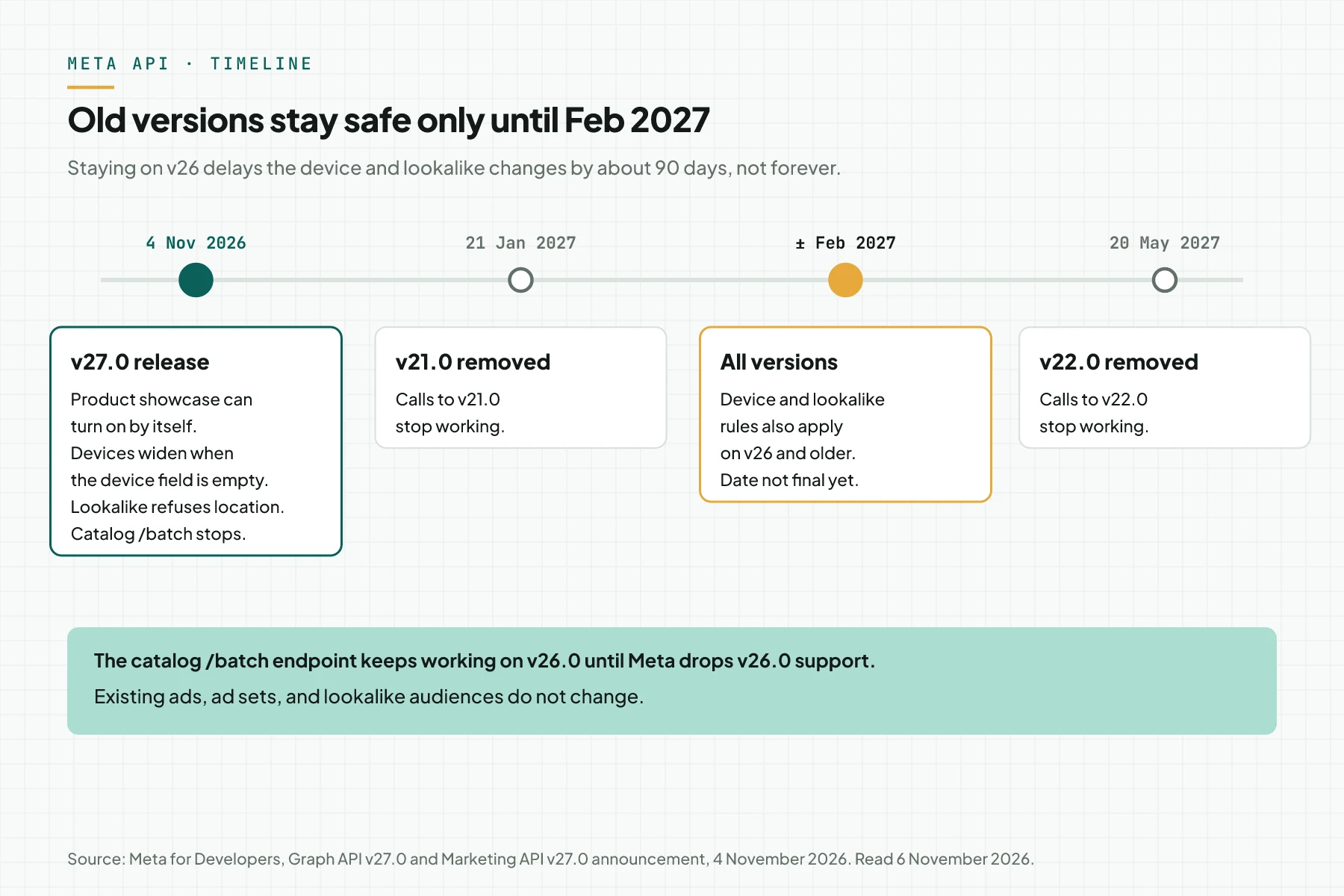
Meta also removes 2 Graph API versions. v21.0 stops on 21 January 2027. v22.0 stops on 20 May 2027. The v27.0 release date is in the Marketing API version history.
What else changes in Graph API v27.0?
Graph API v27.0 also changes 3 items outside ads. These items matter if your app manages Pages or reads video insights.
- When an app edits a Page post, it can send
is_ai_generated. The valuetrueadds the AI content label. The valuefalseremoves it. If you omit the field, the old value stays. - From early November 2026, the metric
total_video_consumption_ratereturns no data on any version. Meta gives no replacement. - New apps cannot use 6 legacy features:
ids,date_format,method,.as(...),callback, andasyncbatch. Existing apps must stop using them before they move to v28.0.
Business SDK v27 also adds the phone_otp_verification_type field for lead forms. This field sets phone number verification to required, optional, or off. The optional setting is available only to eligible ad accounts.
How do you check your integration today?
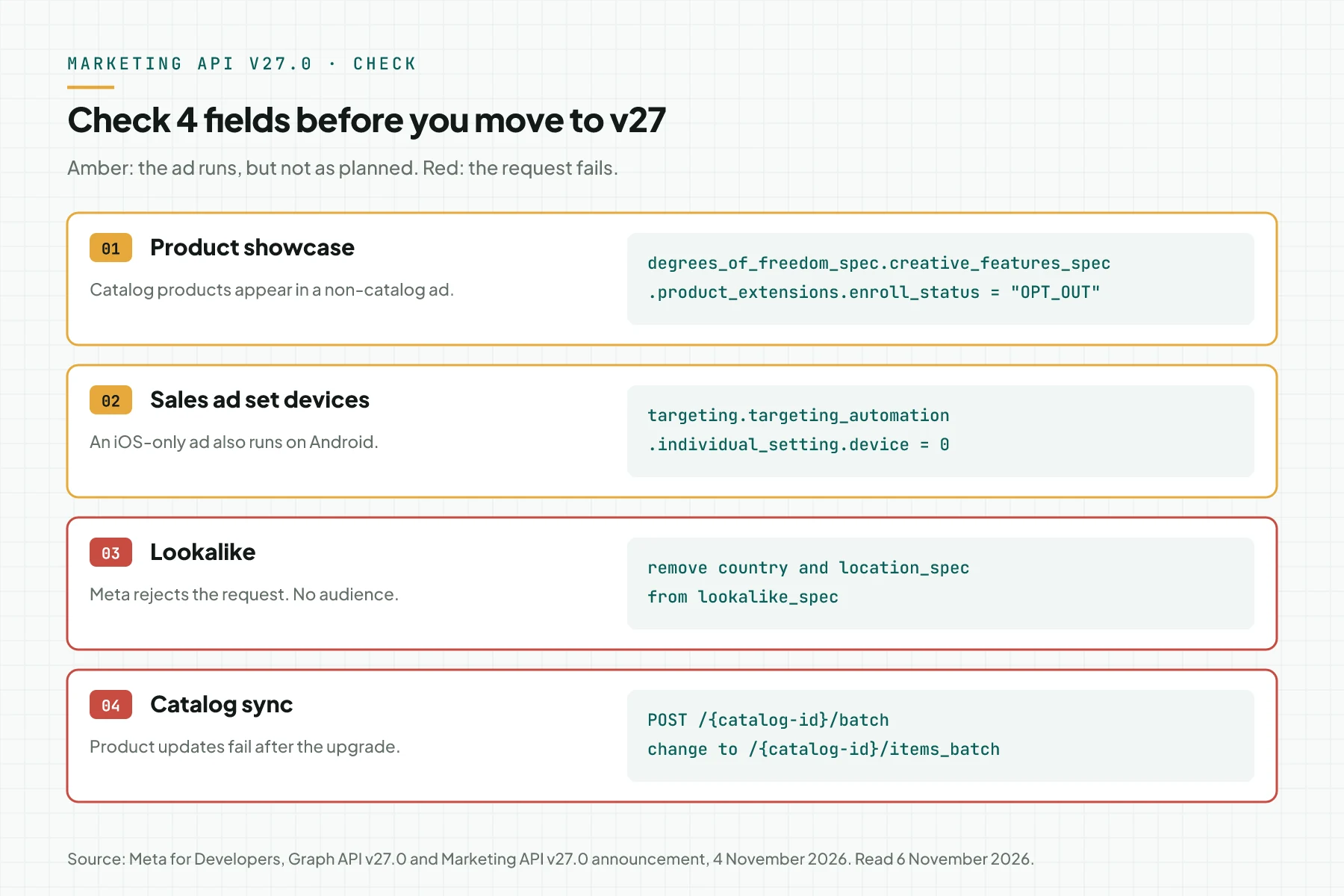
Find the API version number, then check 4 fields in every path that creates ads, ad sets, audiences, or catalog products. This diagram shows the safe value for each field.
- Search your code and configuration for
graph.facebook.com/v. Record each version number that you find. - Add the Product showcase opt-out to the creative of each non-catalog ad.
- Send
devicewith the value0on Sales ad sets that target specific devices or operating systems. - Remove
countryandlocation_specfromlookalike_spec. Move the location to the ad set targeting. - Change the catalog
/batchcall to/items_batch, then update the body shape. - Create 1 test ad on v27.0 with the status PAUSED. Open the preview and make sure that no extra catalog products appear.
If you use a third-party tool, send this list to the vendor. Ask for a written answer about the API version and the 4 fields above.
Does this change your ad strategy?
Not directly, because v27.0 changes defaults, not the auction or how Meta selects audiences. The new defaults still shift ad delivery when your payload is silent.
Meta continues to add automation to ads, as we explain in how the Meta Ads Andromeda algorithm works. The safe approach: write your choice explicitly in each payload. Test automated features as a separate experiment, not as a hidden default.
Do you need help to audit your Meta Ads account and tracking? See Meta Ads Performance Management or book a 30-minute session with our team.
Questions and answers
Do Ads Manager users get the Marketing API v27.0 changes?
Not directly. These changes apply to API requests. But partner tools, CRM apps, or scripts that create ads for your account can be affected. Ask each tool which API version it uses.
Do ads that already run change?
No. Meta writes that existing ads, ad sets, and lookalike audiences do not change. The changes apply to new objects created on v27.0, and for device and lookalike also on older versions from about February 2027.
Is it safe to stay on Marketing API v26.0?
Only for a short time. Product showcase and the catalog endpoint do not change on v26.0. The device and lookalike rules still reach all versions about 90 days after 4 November 2026.
Is Product showcase bad for my ads?
Not always. For an online shop with a clean catalog, extra products can help. For lead ads or WhatsApp chat ads, extra products can pull clicks away. Test the feature separately and measure the result before you use it on all ads.