Direct answer: Use a plain APIAPIThe official door 2 systems use to exchange data, without anybody copying it by hand.Open the glossary when 2 programs exchange data without an AI model, and use a plugin when a feature only needs 1 application. Use RAG when the model needs document fragments to answer. Use MCPMCPA standard that lets an AI program use your tools and data under clear permissions.Open the glossary when AI clients must call tools and read data from your systems through 1 standard method, with approval and logging. MCP and RAG often work together: an MCP tool can run the document search.
Main condition: This article uses "plain API", "plugin", and "RAG" as general patterns, not specific product names. Limit: This article does not rate RAG vendors or plugin marketplaces, and gives no prices. Your final choice depends on the AI client your team uses; check its support in the MCP clients article.
This comparison uses the MCP definition from the MCP 2026-07-28 specification and the Cloudflare tool guidance, read on 13 September 2026. The worked example uses labelled dummy data, not a real customer system.
The problem: 4 terms used for the same request
Business teams raise 1 request: "our AI needs to see company data." Vendors answer with 4 different terms: a plain API, a plugin, RAG, or MCP. The team that asked often cannot tell the difference.
Picking the wrong pattern has 1 concrete cost: the integration gets rewritten when the company switches AI clients, for example from 1 internal chatbot to ClaudeClaude ProThe paid subscription for the Claude AI assistant from Anthropic. It unlocks connectors to outside tools.Open the glossary or OpenClaw. The article what MCP is explains the base terms for a non-technical reader, and the MCP glossary entry holds the short definition. This article compares the 4 patterns on the same attributes, so the choice is not a guess.
A generic example: a team that builds 1 leave-approval plugin inside 1 internal chat app must rewrite that flow in full once the office switches to Claude or OpenClaw a year later. A pattern that stays tied to no single application avoids that rewrite.
4 patterns, 1 sentence each
Each pattern answers a different question. Read the definitions first, before the comparison table.
Plain API
A plain API is a program-to-program contract. Your code makes the call, not an AI model, so the call order stays fixed once written.
Plugin
A plugin is an extension that lives inside 1 application. Moving to another application means rewriting that plugin from scratch.
RAG
RAG fetches document fragments, then places them in the model's context before the model answers. RAG runs no write action.
MCP
MCP is an open protocol. 1 MCP server gives tools, resources, and prompts to any AI client that supports it, like 1 USB-C port for AI applications. Source: the MCP 2026-07-28 specification and the official MCP introduction.
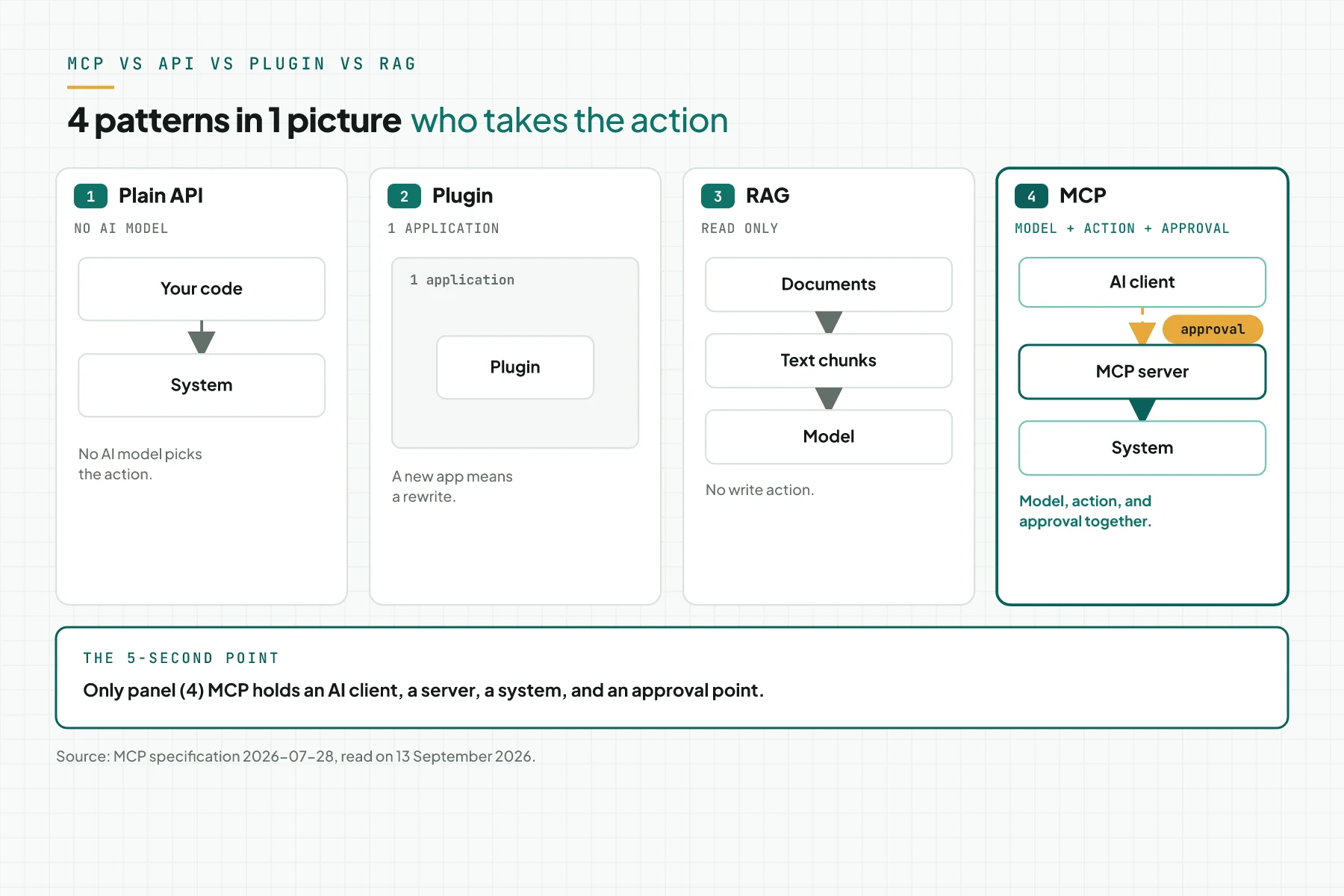
The figure above places the 4 patterns side by side. Only the MCP panel holds an AI client, a server, a system, and an approval point in 1 flow.
Who calls and who approves
In MCP, the AI model picks the tool from context and the user's request. The AI client (the host) still asks for human approval before the tool runs. Source: the MCP tools specification and the MCP specification.
In a plain API, the developer writes the call order in advance. No model picks the action at run time.
In RAG, no action runs. The system only reads documents and places fragments in context.
In a plugin, this limit depends on the host application. Some plugins ask for confirmation; some run without it.
MCP adds 1 more limit: the server cannot see the full conversation between the user and the model, only the arguments sent on 1 tool call. This limit does not apply to a plugin that lives inside the same application as the conversation. Source: the MCP architecture page. The 7-stage flow from a user request to the model's answer is explained in how MCP works.
Table: 6 attributes for 4 patterns
The table below compares a plain API, a plugin, RAG, and MCP on the same 6 attributes. A cell that reads "none" means the pattern genuinely lacks that attribute, not missing data.
| Attribute | Plain API | Plugin | RAG | MCP |
|---|---|---|---|---|
| Who calls | Your code | The host application | The search pipeline | The model, through an MCP client |
| Write action | Yes, no built-in approval | Yes, per application | No | Yes, the host asks for human approval |
| Portability across AI clients | Not relevant | Tied to 1 application | Tied to the pipeline | 1 server for Claude, ChatGPT, OpenClaw, Hermes AgentAI agentAn AI program that performs work steps by itself, for example reading a message, drafting a reply, and recording the result.Open the glossary |
| Built-in approval | None | Depends on the application | None | The host must ask for consent |
| Cost when you switch AI clients | Rewrite the caller | Rewrite the plugin | Reconnect the pipeline | Add a client, keep the server |
| Fitting case | Sync data between systems | A feature in 1 editor or CMS | Document question and answer | Tools and data for an agent, with logs |
Table sources: the MCP specification, the MCP tools specification, the MCP architecture page, the Cloudflare tool guidance, and the MCP clients article for the client row.
MCP and RAG are not rivals: a search tool inside the server
MCP and RAG answer different layers, so they work together in many cases. An MCP server can hold 1 search tool, for example find_document, that runs the step usually called RAG. The search result returns to the model as a tool result, with an execution error the model can use to fix its query. Source: the MCP tools specification.
MCP resources are another path for documents. The host application picks which resource to use, not the model. Source: the MCP resources specification.
Cloudflare states 1 practical limit: do not wrap the whole document index as 1 large tool. Build 1 tool per user goal, for example find_policy and find_invoice, so the server stays easy to audit. Source: the Cloudflare tool guidance. The definitions of RAG, knowledge base, and agent memory this site uses are in RAG vs knowledge base vs agent memory (in Indonesian).
Decision tree: 4 questions before you choose
The 4 questions below use the definitions from the earlier section. Answer from question 1 down. Stop once an answer points to 1 pattern.
- Question 1. Is there an AI model that picks the action? If not, use a plain API. The developer writes the call order.
- Question 2. Does the feature only ever need to live in 1 application? If yes, use a plugin.
- Question 3. Does the model only need to read documents, with no write action? If yes, use RAG; the search can run through an MCP resource or tool.
- Question 4. Do you need tools and data from more than 1 AI client, with approval and logs? If yes, use MCP.
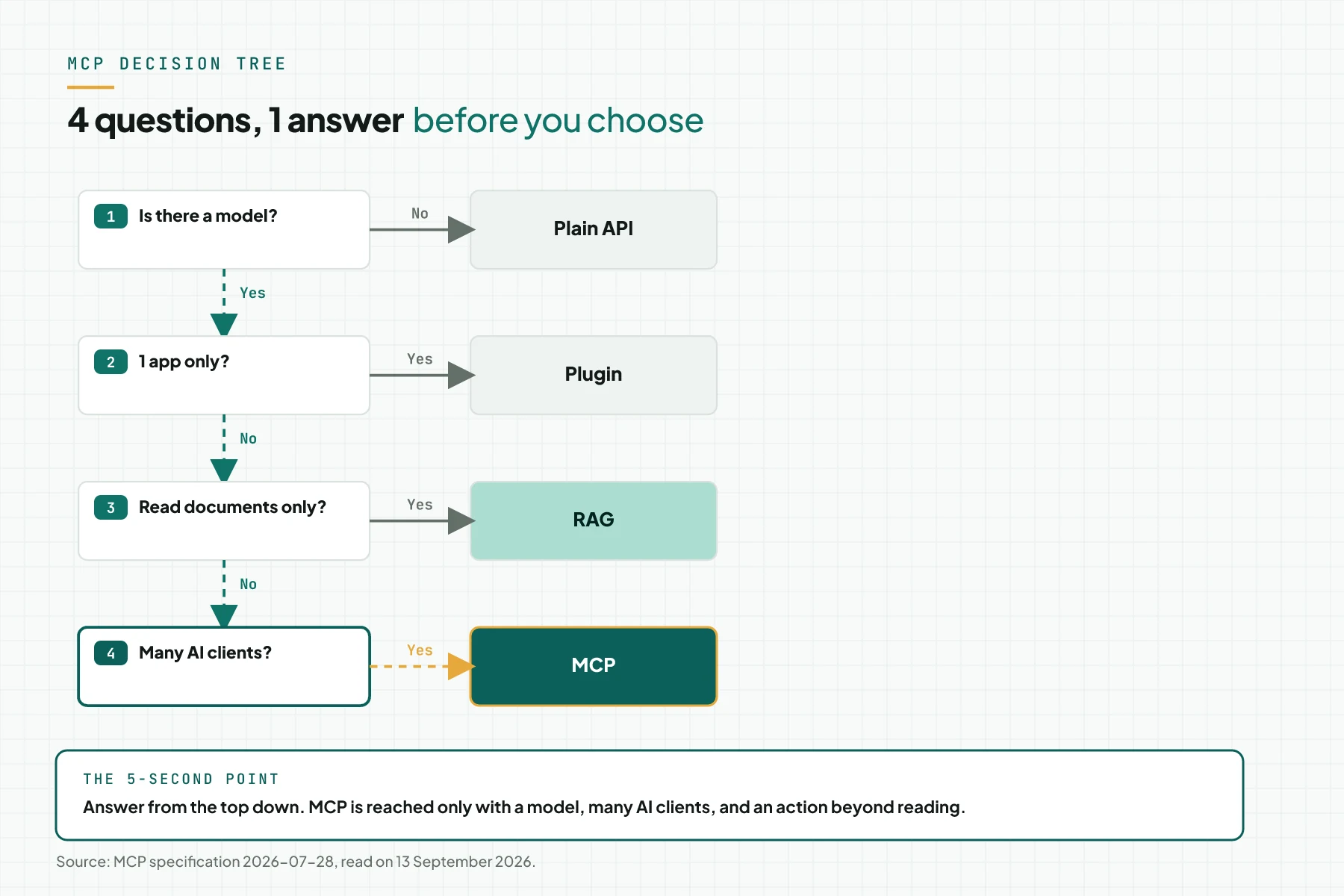
The figure above summarises this order. MCP is reached only when all 4 conditions on its path hold: a model, more than 1 application, an action beyond reading, and more than 1 AI client.
Example: 1 case "find the SOP and file leave" built 4 ways
The simulation below uses dummy data. The tool names, the HR system, and the approval flow are built for comparison, not a real customer system. The case stays the same across the 4 patterns: a staff member wants to ask about the leave policy, then file leave.
| Input (pattern used) | Recorded (what the team builds) | Output (what staff get) |
|---|---|---|
| Plain API | A script calls the HR API; staff use a form, not chat | Leave gets filed; no SOP question and answer |
| Plugin in 1 internal chat app | A plugin built only for that app; 1 custom-built approval step | Works in 1 app; not available in Claude or OpenClaw |
| RAG | An SOP document index; the model answers from text fragments | SOP answers; leave filing stays manual |
| MCP | A server with find_policy (read) and file_leave (write, manager approval); used from Claude and OpenClaw | An SOP answer plus leave filed after manager approval; 2 audit log rows |
Tool names, the HR system, and the approval flow are dummy data for comparison. Only the MCP row gives a write action with approval. Only that row can also be used from 2 AI clients at once, with no integration rewrite.
Checklist to pick a pattern
Use the 6 items below before your team signs any integration proposal. Each item names an owner and evidence, so the decision is not 1 person's opinion.
- Write 1 sentence: who picks the action, a person or the model. Owner: product manager. Evidence: the written sentence.
- List the AI clients your team uses now and in the next 12 months. Owner: IT lead. Evidence: a list of 1 to 4 names.
- Mark whether the case needs a write action. Owner: process owner. Evidence: a list of actions.
- If you pick RAG, decide whether another AI client will call the same search. Owner: IT. Evidence: a written decision.
- If you pick MCP, define tools per user goal, not per API endpoint. Owner: IT. Evidence: a tool list of 8 or fewer.
- Stop criterion: if no model picks the action, stop the MCP discussion and use a plain API.
Frequently asked questions
Does MCP replace an API? No. An MCP server usually calls the source system's API behind it. MCP standardises the AI-client side, as shown in connecting legacy systems to AI agents without a rebuild.
Do I still need RAG when I have MCP? Yes. When the model needs to read documents, the search step stays. You can wrap it as an MCP tool or resource.
What is the downside of MCP versus a plugin? MCP needs an AI client, a host, that supports the protocol. A plugin can use the full application interface. The MCP Apps extension exists, but it stays optional.
Can MCP call a tool without approval? The AI client decides the interface. The specification asks for a human who can always deny a call. Some clients, for example Gemini CLI, offer an Allow always or trust mode that skips per-call confirmation.
Which AI clients support MCP? Claude, ChatGPT/Codex, the Gemini API and Gemini CLI, OpenClaw, and Hermes Agent support MCP, each with its own limits. Support also depends on the protocol era a client uses, as the 5 MCP versions article (in Indonesian) explains. Read the per-client details in the MCP clients article.
Next step
The right pattern does not guarantee a business result. The right pattern only lowers the rewrite cost when your AI client changes. If your answers to the 4 questions above point to MCP, the Send your brief service builds the server, the tools, and the approval step for the scope you choose. If you want to discuss your case first, Book a free consultation.