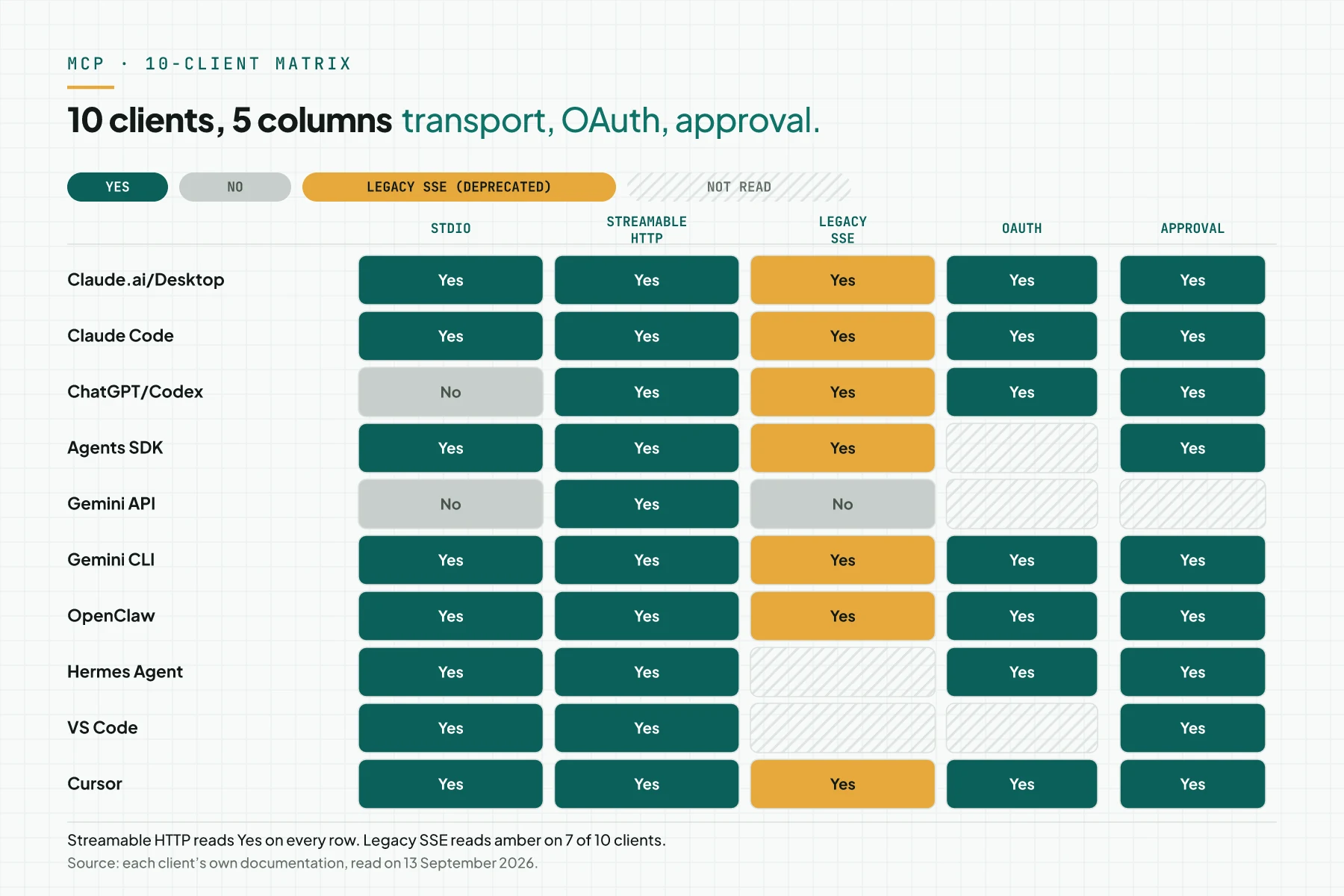
Direct answer: As of 13 September 2026, 10 MCPMCPA standard that lets an AI program use your tools and data under clear permissions.Open the glossary clients have support verified from their own documentation. The list: ClaudeClaude ProThe paid subscription for the Claude AI assistant from Anthropic. It unlocks connectors to outside tools.Open the glossary, Claude Code, ChatGPT and Codex, the OpenAI Agents SDK, the Gemini APIAPIThe official door 2 systems use to exchange data, without anybody copying it by hand.Open the glossary, Gemini CLI, OpenClaw, Hermes AgentAI agentAn AI program that performs work steps by itself, for example reading a message, drafting a reply, and recording the result.Open the glossary, VS Code Copilot, and Cursor. All 10 clients support Streamable HTTP for a remote MCP server. ChatGPT and the Gemini API do not run a local MCP server over stdio. Each client names human approval differently: a permission prompt, require_approval, a tool policy, or trust.
Main condition: every row in this article comes from that client's own documentation, opened on 13 September 2026. Client features change fast, so check again before you decide. A cell marked "not read" means the page does not say it, not that the client lacks it. Limit: this article does not rate model quality, and does not name client plan prices. Each client's MCP revision is not listed, because their pages name no revision date. The consumer Gemini app, JetBrains, Windsurf, and Zed were not opened.
We read the documentation of these 10 clients on 13 September 2026, directly from each product's own site. The source for each client is listed under the table and in the Sources section.
The problem: "supports MCP" means something different in each client
An MCP server that runs in Claude Desktop over stdio does not automatically run in ChatGPT. ChatGPT only connects to a remote MCP server through a URL. A team that builds 1 server often assumes "client X supports MCP" means that client behaves like every other client. That assumption fails on 3 points: transport, authentication, and approval.
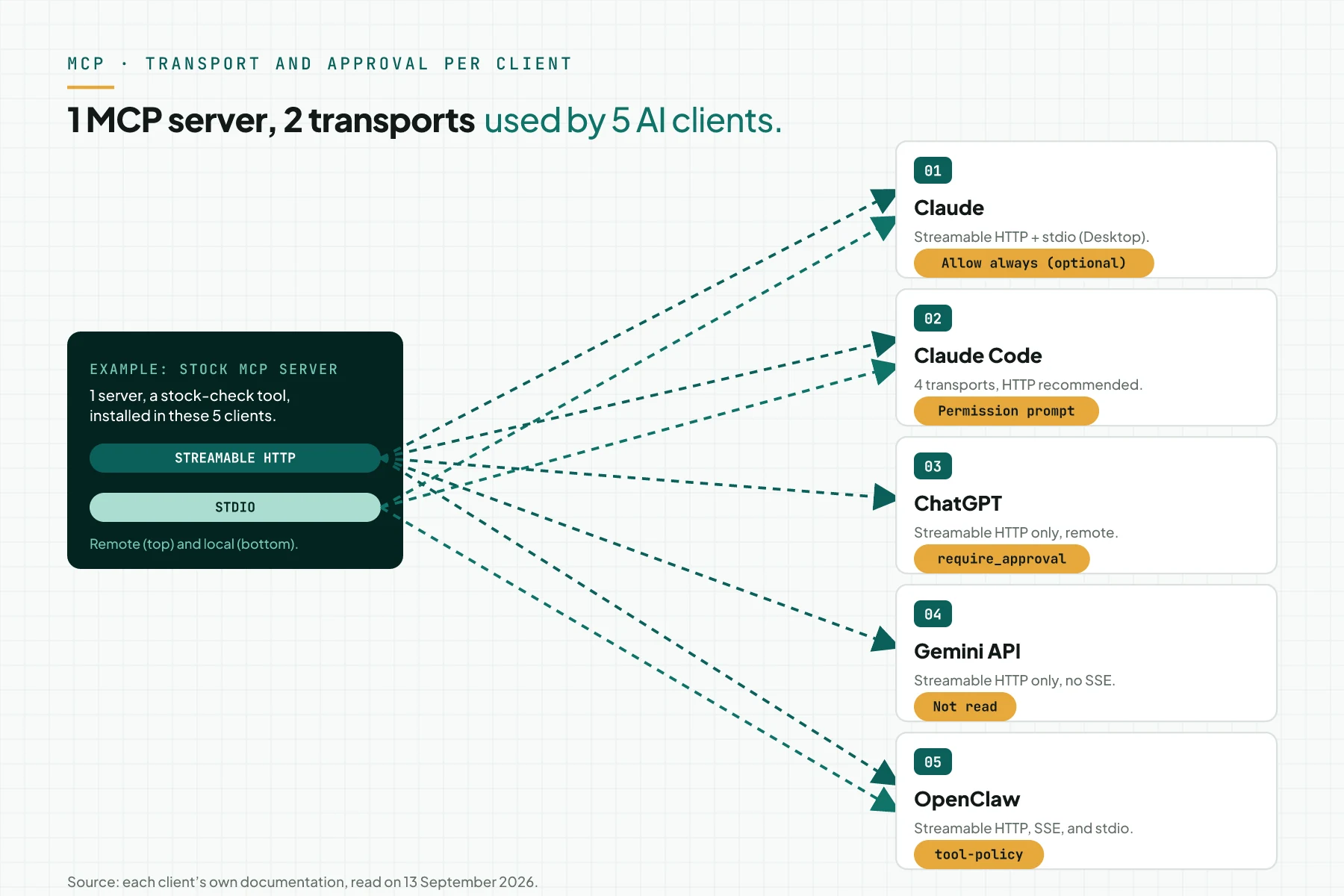
The approval name also differs per client. Claude calls it "Allow always". OpenAI calls it require_approval. OpenClaw calls it a tool policy. Gemini CLI calls it trust. Without a check of each client's documentation, a team can wrongly assume 1 name applies to every client.
For the underlying terms before you read the matrix, read what MCP is and our MCP glossary entry.
3 things that separate clients: transport, authentication, approval
The documentation of these 10 clients agrees on 3 things that separate how they use an MCP server. All 3 decide whether 1 server can serve a given client.
Transport: 2 standards, 1 being retired
MCP has 2 standard transports: stdio for a local MCP server, and Streamable HTTP for a remote MCP server. The legacy HTTP+SSE transport has been deprecated since revision 2026-07-28. All 10 clients in this article support Streamable HTTP. The message flow of 1 tool call from the host to the server is in how MCP works.
Authentication: OAuth for remote, the environment for local
A client that connects to a remote MCP server mostly uses OAuth 2.1. A client that runs a local MCP server over stdio takes credentials from the environment, not from a browser OAuth flow. The hosting choices for Streamable HTTP are in hosting an MCP server.
Approval: always required, named differently
Every write tool needs human approval before it runs. The form differs per client: "Allow always" in Claude, the require_approval parameter in OpenAI, a tool policy in OpenClaw, and trust in Gemini CLI. The figure below sums up transport and approval for 5 clients that use 1 example MCP server.
Claude: claude.ai, Desktop, Cowork, mobile, and Claude Code
Remote custom connectors
Claude.ai, Claude Desktop, Claude Cowork, and Claude mobile support custom connectors to a remote MCP server. The feature is on the Free, Pro, Max, Team, and Enterprise plans. The Free plan allows 1 connector. On Team and Enterprise plans, only an Owner adds a new connector.
Transport and supported features
Claude connectors support Streamable HTTP and the legacy HTTP+SSE transport, which is being deprecated. Authorisation uses OAuth with Dynamic Client Registration. Claude uses tools, prompts, and resources from an MCP server. Claude does not yet support resource subscriptions and sampling.
Tool result limits and local Claude Desktop
A tool result on Claude.ai and Claude Desktop is capped at about 150,000 characters. On Claude Code, the cap is 25,000 tokens, and it is configurable. Claude.ai and Claude Desktop cap 1 tool call at 240 seconds. Claude Desktop runs a local MCP server through a configuration file on the user's computer, per the MCP build-server documentation.
Claude Code: 4 transports and scopes
Claude Code supports 4 transports: HTTP, recommended for remote servers, stdio, WebSocket, and SSE, which is deprecated. The claude mcp add command adds an MCP server with a local, project, or user scope. Claude Code uses OAuth 2.0 for a remote MCP server, and shows a permission prompt before a tool runs.
On our own systems, an MCP write tool for content and quotations asks for explicit confirmation before it runs, and records an audit log. We apply this pattern in the Repliz workflow with Claude and guarded tools (in Indonesian), an example of a guarded write tool on this site.
OpenAI: ChatGPT, Codex, Responses API, and the Agents SDK
ChatGPT, Codex, and the Responses API
ChatGPT, Codex, and the Responses API connect to a remote MCP server through a URL. A user opens Developer mode in ChatGPT Settings, then enters the server URL. OpenAI recommends OAuth with Client ID Metadata Documents. The require_approval parameter sets which tool needs human approval before it runs.
OpenAI Agents SDK
The OpenAI Agents SDK for Python supports 4 server kinds: HostedMCPTool through the Responses API, Streamable HTTP, SSE, which MCP has deprecated, and stdio. Approval uses the require_approval parameter, or an on_approval_request callback in the Python code.
ChatGPT does not run a local MCP server. A custom server for ChatGPT is always a remote MCP server reached through a URL.
Google: Gemini API (Interactions API) and Gemini CLI
Gemini API: Streamable HTTP only
The Gemini API, through the Interactions API, connects to a remote MCP server only over Streamable HTTP. The Gemini API does not support SSE. An MCP server name for the Gemini API must not contain a dash.
Gemini CLI: 3 transports and trust
Gemini CLI supports 3 transports: command for stdio, url for SSE, and httpUrl for Streamable HTTP. Gemini CLI uses OAuth 2.0 for a remote MCP server. Gemini CLI asks for confirmation on every tool call, unless the trust option is on.
What is verified today is only the Gemini API and Gemini CLI. We did not open the consumer Gemini app, so this article does not state MCP support for that app.
OpenClaw and Hermes Agent
OpenClaw: a client and a server at once
OpenClaw connects to an MCP server through the openclaw mcp add command or the Settings menu. OpenClaw supports 3 transports: Streamable HTTP, SSE, and stdio. Remote authorisation uses openclaw mcp login. A tool from an MCP server still obeys the same OpenClaw tool policy as a built-in tool. The toolFilter feature limits which tool is active, and openclaw mcp doctor --probe tests the server connection.
OpenClaw can also act as an MCP server through openclaw mcp serve. This mode uses stdio, and exposes channel conversations plus approval tools to another MCP client.
Hermes Agent: a built-in client and its SDK version
Hermes Agent has a built-in MCP client with stdio and HTTP transports. Its configuration sits in mcp_servers in the Hermes Agent config file. The hermes mcp add and hermes mcp install commands add an MCP server from the built-in catalogue. A hosted remote MCP server mostly needs OAuth 2.1. The hermes mcp serve command runs an MCP server over stdio only.
Hermes Agent 0.20.3 migrated to MCP SDK 2.x, and supports revision 2026-07-28. The migration detail is in Hermes Agent 0.20.3 and MCP SDK 2.x (in Indonesian) on our blog.
Editors: VS Code Copilot and Cursor
VS Code Copilot
VS Code, through GitHub Copilot, supports an MCP server with stdio and HTTP transports. VS Code uses tools, resources, prompts, and MCP Apps from a server. VS Code asks for confirmation on every tool call. A user must state trust in 1 MCP server, before that server starts.
Cursor
Cursor supports 3 transports: stdio, SSE, and Streamable HTTP. Remote authorisation in Cursor uses static OAuth. Cursor asks for approval before it uses an MCP tool by default.
Table: 10 clients, transport, OAuth, approval, limits
The table below sums up the 10 clients from the sections above. A cell marked "not read" means the client's documentation does not say it as of 13 September 2026.
| Client | stdio | Streamable HTTP | Legacy SSE | OAuth | Tool approval | Limit that is documented |
|---|---|---|---|---|---|---|
| Claude.ai / Desktop / Cowork / mobile | Desktop: yes (local config file) | Yes | Yes, being deprecated | Yes (DCR) | Yes; "Allow always" optional | Free 1 connector; tool result about 150,000 characters; 240-second timeout |
| Claude Code | Yes | Yes (recommended) | Deprecated | Yes (OAuth 2.0) | Yes, permission prompt | 25,000-token tool result, configurable; 4 transports including WebSocket |
| ChatGPT / Codex / Responses API | No (remote only) | Yes | A sample SSE flow still exists | Yes (CIMD) | require_approval | Developer mode for the server URL |
| OpenAI Agents SDK (Python) | Yes | Yes | Yes (deprecated in MCP) | not read | require_approval / on_approval_request | HostedMCPTool through the Responses API |
| Gemini API (Interactions API) | No | Yes | No | not read | not read | Server names cannot contain a dash |
| Gemini CLI | Yes (command) | Yes (httpUrl) | Yes (url) | Yes (OAuth 2.0) | Yes, unless trust | trust skips every confirmation |
| OpenClaw | Yes | Yes | Yes | Yes (openclaw mcp login) | tool policy; "Allow Always" | toolFilter; doctor --probe; can act as a server (serve) |
| Hermes Agent | Yes | Yes | not read | OAuth 2.1 for hosted servers | approval tools | serve = stdio only; 0.20.3 on SDK 2.x |
| VS Code Copilot | Yes | Yes | not read | not read | Yes, per call | The user must trust the server before it starts |
| Cursor | Yes | Yes | Yes | Static | Yes (default) | not read |
Source for each client:
- Claude: support.claude.com and claude.com/docs/connectors.
- Claude Code: code.claude.com/docs/en/mcp.
- ChatGPT, Codex, and the Responses API: developers.openai.com.
- The OpenAI Agents SDK: openai.github.io.
- The Gemini API: ai.google.dev.
- Gemini CLI: geminicli.com.
- OpenClaw: docs.openclaw.ai.
- Hermes Agent: hermes-agent.nousresearch.com.
- VS Code Copilot: code.visualstudio.com.
- Cursor: cursor.com/docs/context/mcp.
Example: 1 server used by 3 clients
The simulation below uses dummy data. The server name, tool, and result are not a real client's data. 1 remote stock MCP server, over Streamable HTTP with an API key, is used by Claude, OpenClaw, and ChatGPT. Row 4 shows 1 failed attempt.
| Input (client and connection) | Recorded (at the MCP server) | Output (what happens) |
|---|---|---|
| Claude Desktop: custom connector, server URL, OAuth | OAuth token with this server as audience; tools/list; tools/call check_stock | Stock result shown; approval per tool except "Allow always" |
| OpenClaw: openclaw mcp add with a URL and an API key | Bearer header; the client tool policy allows check_stock | Stock result shown in the channel chat; the server log records the OpenClaw actor |
| ChatGPT: Developer mode, server URL | Streamable HTTP connection; require_approval active | Stock result shown after the user approves |
| Gemini API: legacy SSE server URL | Request rejected; the server accepts only modern Streamable HTTP | Failure: Gemini API does not support SSE; switch to Streamable HTTP |
Attempt 4 fails because the Gemini API accepts only Streamable HTTP, not legacy SSE. Each client's behaviour follows its documentation as of 13 September 2026.
Checklist to pick the client for your server
Before you order the MCP Server Development Service, match your team's clients against the table above.
- List the AI clients your team uses today, and the ones you plan to add. Owner: IT lead. Evidence: a list of 1 to 4 client names.
- Pick a transport: stdio when every client runs locally, or Streamable HTTP when ChatGPT, the Gemini API, or a Claude connector is in the list. Owner: IT. Evidence: a written decision.
- Pick the authentication each client supports: OAuth for a Claude connector, an API key for a team's own OpenClaw or Hermes Agent. Owner: IT. Evidence: 1 line per client.
- Record the approval name in each client, and make sure "Allow always" or trust stays off for a write tool. Owner: security. Evidence: a screenshot of the approval setting.
- Design the tool result to stay under 150,000 characters, and finish under 240 seconds for Claude. Owner: developer. Evidence: a test with the largest tool result.
- Stop criterion: delay the project when your main client only reads legacy SSE, because SSE is deprecated, and the Gemini API refuses it.
Frequently asked questions
Can ChatGPT use an MCP server on my laptop? No. ChatGPT only connects to a remote MCP server through a URL. For a local MCP server, use Claude Desktop, Claude Code, OpenClaw, or Hermes Agent.
Does the Gemini app support MCP? We did not open that page. What is verified today is the Gemini API through the Interactions API, and Gemini CLI.
How many custom connectors does Claude Free allow? 1 connector. On Team and Enterprise plans, only an Owner adds a new connector.
Can 1 server serve all these clients at once? Yes, when the server uses Streamable HTTP with authentication each client supports. 1 MCP client still talks to 1 server at a time.
Which clients already use revision 2026-07-28? Hermes Agent 0.20.3 states this support in its release notes. The other clients in this article name no revision date on their pages. Read the revision detail in the 5 MCP versions article (in Indonesian).
What is "Allow always" and when is it safe? Allow always is a Claude option that skips approval on every tool call. Use this option only for an MCP server and tool you trust to run unsupervised.
Next step
This matrix changes every time 1 client ships a new release, so check again before you settle on a final transport. If your team wants this MCP server built and tested with 1 chosen client, Send your brief. If you want to ask first, Book a free consultation.
Sources
- Claude Support: Getting started with custom connectors using remote MCP
- Claude Docs: Building custom connectors via remote MCP servers
- Model Context Protocol: Build an MCP server
- Claude Code Docs: Connect Claude Code to tools via MCP
- OpenAI Developers: Model Context Protocol (MCP)
- OpenAI Agents SDK: Model context protocol (MCP)
- Google AI for Developers: Function calling with the Gemini API
- Gemini CLI Docs: MCP servers
- OpenClaw Docs: MCP tools
- Hermes Agent Docs: MCP
- Visual Studio Code Docs: Use MCP servers in VS Code
- Cursor Docs: Model Context Protocol (MCP)
- ramadigital.id: Hermes Agent 0.20.3 and MCP SDK 2.x