Direct answer: MCPMCPA standard that lets an AI program use your tools and data under clear permissions.Open the glossary works through JSON-RPC 2.0 messages between 3 roles: the host (the AI application), the MCP client (a connector inside the host), and the MCP server. When the user asks something, the model picks a tool from the list the server advertises, and the host asks for consent. The client sends tools/call, the server runs the function against the source system, and the result returns to the model. Resources and prompts follow a similar path, but the application and the user control them.
Main condition: this flow follows revision 2026-07-28, the modern MCP era. Every request carries its own version and capabilities, and there is no initialize handshake. Legacy-era clients use that handshake; legacy and modern eras across the 5 MCP versions (in Indonesian) explains the difference, so this article does not repeat it. Limit: this article does not teach server code, does not cover OAuth in detail, and does not compare clients one by one. Message examples here are simplified; the official schemaSchemaExtra description inside page code that tells a search engine what the page is, for example an article, a service, or a question and answer.Open the glossary carries more complete fields.
We wrote this article on 13 September 2026 from the official Model Context Protocol specification, revision 2026-07-28, its architecture page, and its official TypeScript schema. This article explains a message mechanism, so it carries no product screenshots. Every claim carries a source link beside it, and the full list is in the Sources section at the end.
The problem: "supports MCP" does not say what happens
Vendors often write "supports MCP" on a product page (see our MCP glossary entry), but that claim does not say who calls what, or where user consent happens.
Without a message-flow map, a team cannot assess the risk of a write tool, or write a correct consent procedure. The team also cannot tell when a server may read data, and when only the model decides.
our MCP introduction article covers the definition and basic vocabulary. This article starts from the next step: the message flow of 1 tool call, from the user question to the answer they receive.
The 3 roles and the 1-client-per-server rule
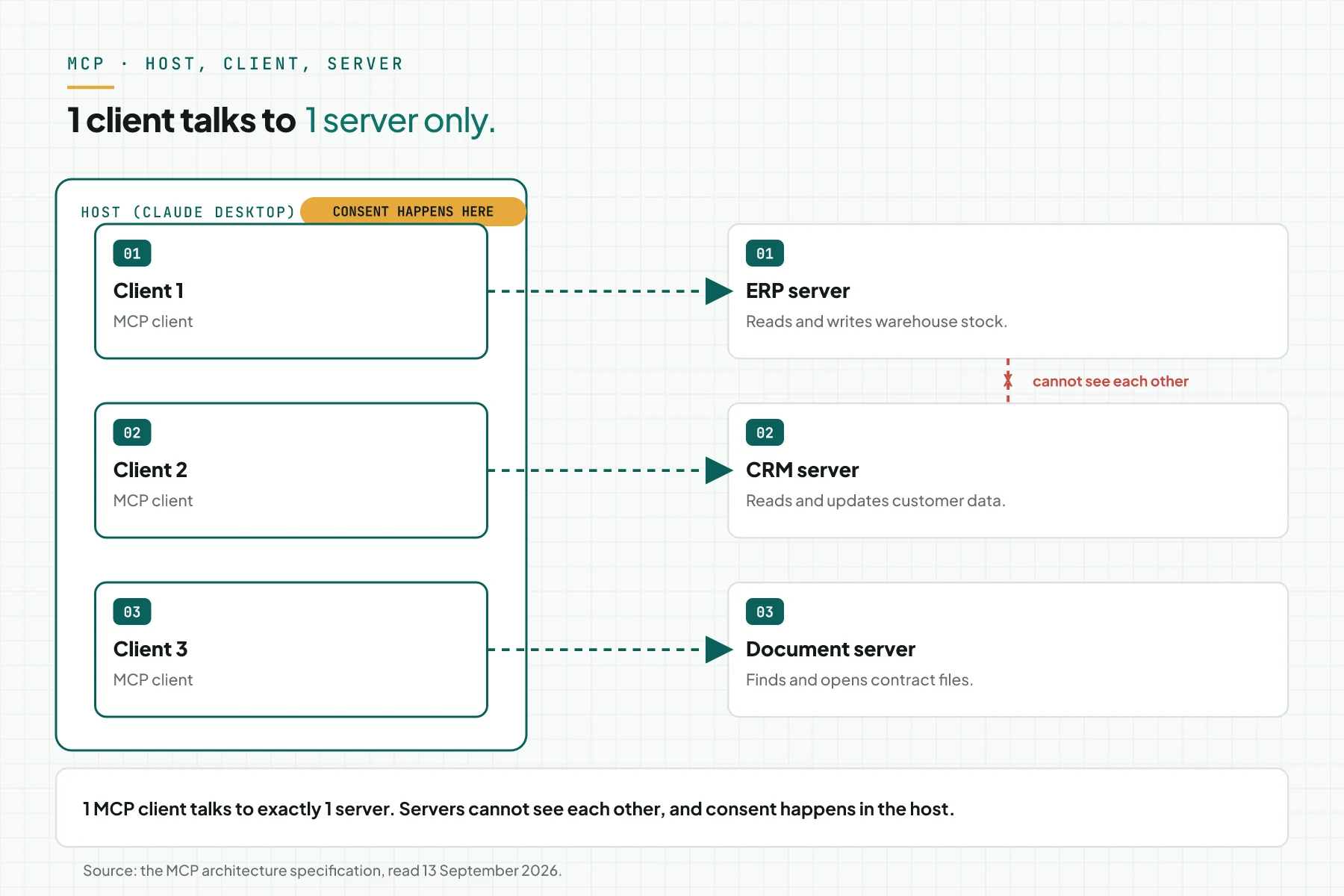
MCP connects 3 roles through JSON-RPC 2.0 messages: the host, the MCP client, and the MCP server. Each role has its own job, and each MCP client talks to exactly 1 server. Source: the official MCP specification.
The host: the AI application that starts the connection
The host is the AI application the user runs, for example ClaudeClaude ProThe paid subscription for the Claude AI assistant from Anthropic. It unlocks connectors to outside tools.Open the glossary Desktop. The host creates and manages several MCP clients at once, and enforces security policy and user consent. Source: the MCP architecture.
The MCP client: a connector inside the host
An MCP client is a connector inside the host. Each client has a 1-to-1 relationship with 1 server; 1 client never talks to 2 servers at once. The host adds 1 new client for each new server it connects to. Source: the MCP architecture.
The MCP server: the provider of tools, resources, and prompts
An MCP server can offer up to 3 features to a client: tools (functions the model runs), resources (context data), and prompts (message templates). Its design principles keep a server from reading the whole user conversation, and from seeing other servers connected to the same host. User consent happens in the host, not in the server. Source: the MCP architecture.
The flow of 1 tool call from question to answer
The simulation below follows 1 user question to the answer they receive, in 7 stages. Each stage moves between the host, the MCP client, and the MCP server.
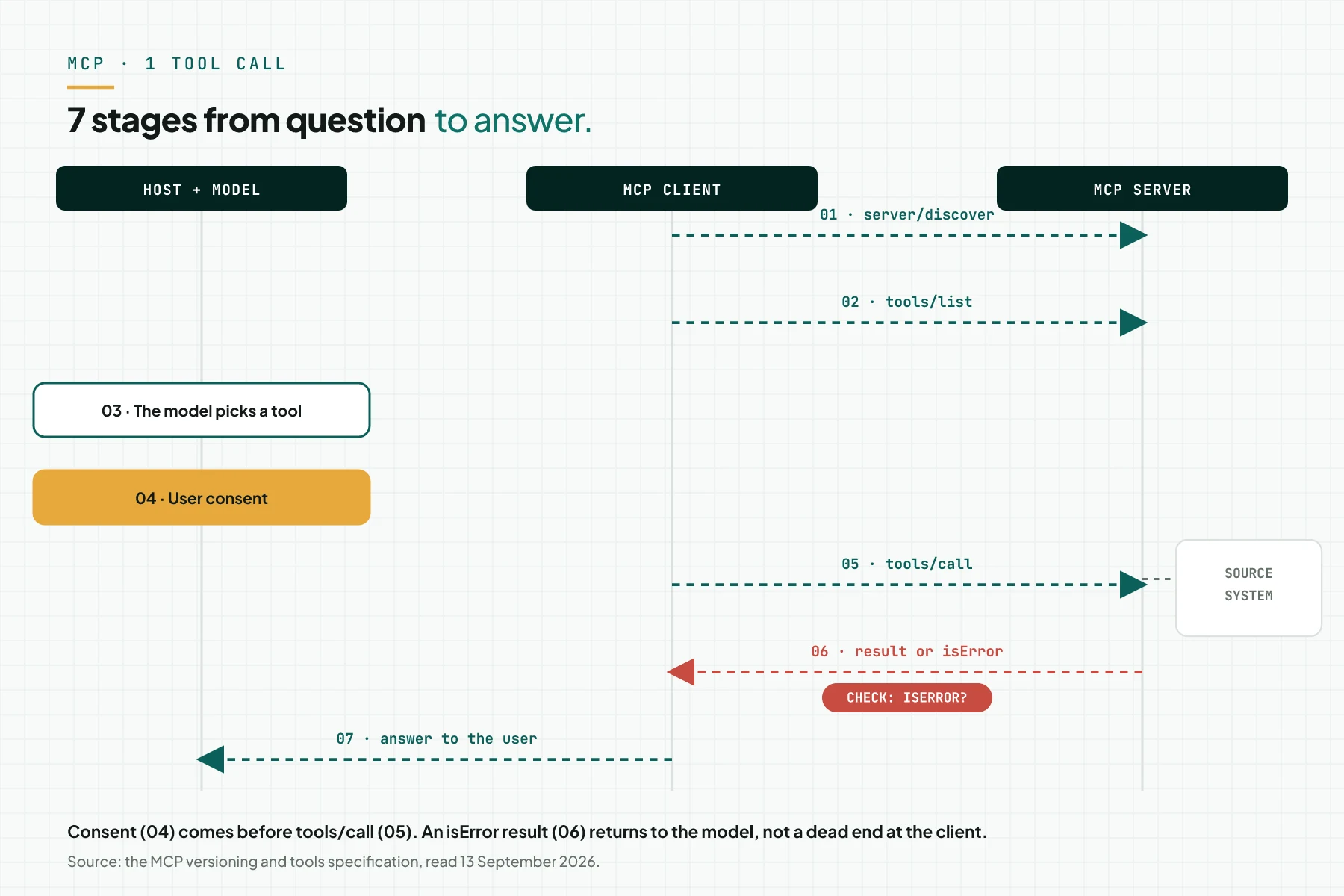
Stage 1: the server announces its version and capabilities
The client calls server/discover to read the protocol version, capabilities, and identity of the server. A modern server must implement this RPC. Source: the MCP versioning page.
Stage 2: the client reads the tool list with tools/list
The client calls tools/list to read the list of tools the server offers, with each tool's name, description, and input schema.
Stage 3: the model picks a tool from the list
Tools are model-controlled: the model discovers and calls a tool from the conversation context and the user prompt. Source: the MCP tools specification.
Stage 4: the host asks for user consent
Before execution runs, there should always be a human in the loop who can deny a tool call. The host shows a confirmation prompt before it sends tools/call. Source: the MCP tools specification.
Stage 5: the client sends tools/call with arguments
The client sends tools/call with the tool name and arguments that match that tool's input schema. The server runs the function against the source system, for example a database or an internal APIAPIThe official door 2 systems use to exchange data, without anybody copying it by hand.Open the glossary.
Stage 6: the server returns a result or isError
A tool result carries 2 error kinds: a protocol error for a malformed message, and a tool execution error with isError: true. An execution error returns to the model, and the model can use it to correct its arguments. Source: the MCP tools specification.
Stage 7: the model composes the answer for the user
The model reads the tool result, then composes an answer in the user's language. If the result is an isError, the model may retry with corrected arguments, or ask the user a follow-up question.
Revision 2026-07-28 removed the protocol session and the initialize handshake; every request now carries its own version and capabilities. MCP also has no protocol-level session, so cross-call state uses an explicit handle passed as a tool argument, not a hidden session. Source: the official MCP changelog and the MCP tools specification.
Anatomy of 1 tool: name, description, inputSchema, annotations
A tool definition has 6 parts: name, title, description, an inputSchema in JSON Schema, and an optional outputSchema and annotations. Source: the MCP tools specification.
A tool name should be 1 to 128 characters: letters, digits, underscore, hyphen, and dot. The name must be unique within 1 server, so the model does not confuse 2 similar tools.
There are 4 tool annotations: readOnlyHint defaults to false, destructiveHint defaults to true, idempotentHint defaults to false, and openWorldHint defaults to true. Annotations are hints only; a client must not base a decision on annotations from a server it does not trust. Source: the official MCP TypeScript schema.
{
  "name": "cek_stok",
  "title": "Check stock",
  "description": "Read the stock quantity of 1 SKU from the warehouse system.",
  "inputSchema": {
    "type": "object",
    "properties": { "sku": { "type": "string" } },
    "required": ["sku"]
  },
  "annotations": { "readOnlyHint": true, "openWorldHint": false }
}
A tool description is not only documentation; it is part of the prompt the model reads before it picks a tool. our AI agent prompt engineering article (in Indonesian) covers how to write a description and schema the model reads correctly.
Tool vs resource vs prompt vs elicitation
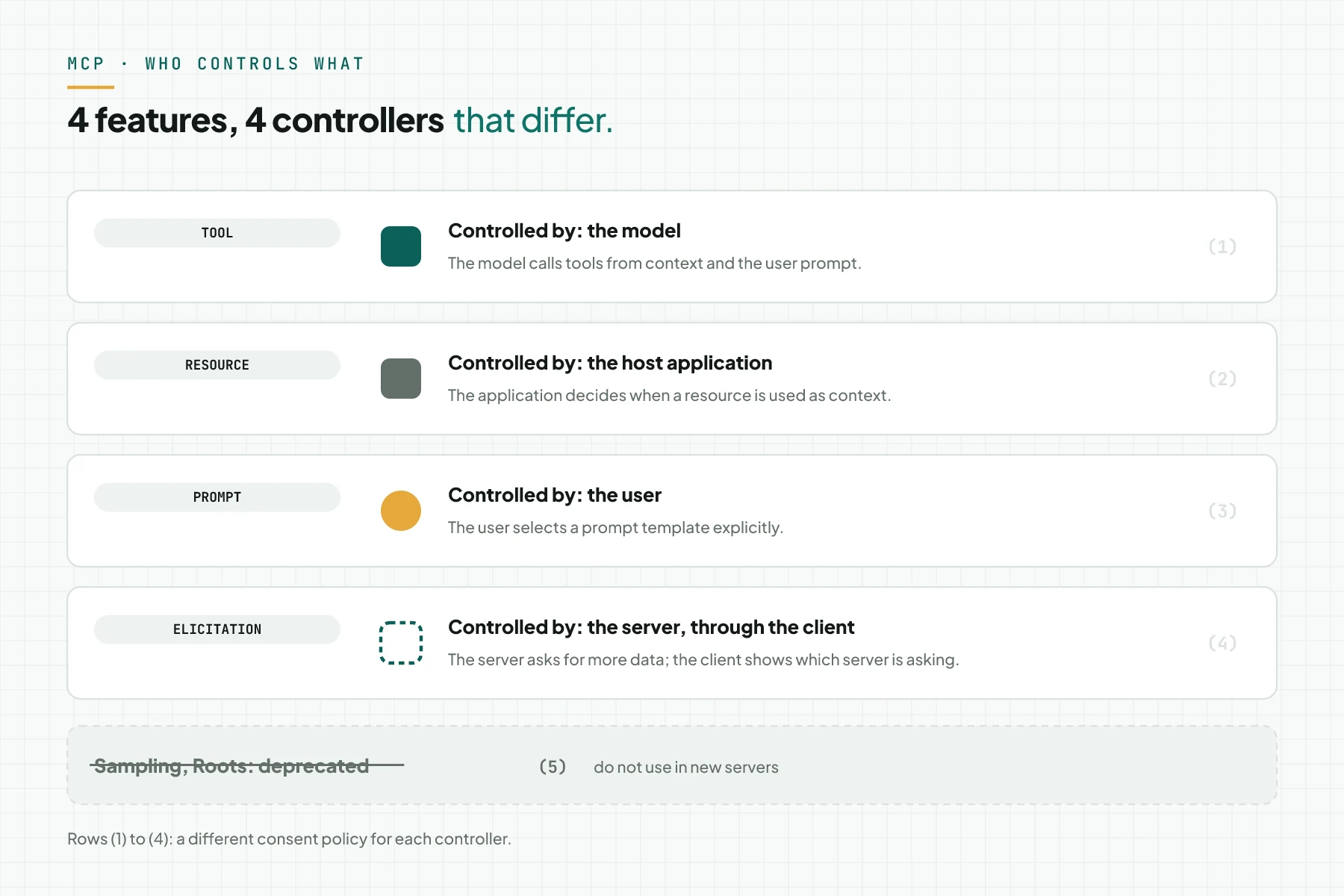
An MCP server can offer 4 features, and a different party controls each one. The table below sums up when each feature applies.
| Feature | Controller | Used when | Data shape | Business example |
|---|---|---|---|---|
| Tool | The model; the host asks for consent | The model needs data or an action | A function with an input schema | cek_stok, draf_invoice |
| Resource | The host application | The application prepares context | Data with a unique URI | a price list, a table schema |
| Prompt | The user | The user picks a template | A message template | summarise a customer complaint |
| Elicitation | The server, through the client | The server needs more data | A form or a URL | ask to confirm a PO number |
Sources: the MCP server feature overview, the MCP tools specification, and the MCP elicitation specification.
Sampling and Roots are deprecated since revision 2026-07-28; new implementations must not use either one. A deprecated feature stays for at least 12 months before it is eligible for removal. Source: the Sampling status and the Roots status.
2 transports: stdio and Streamable HTTP
MCP defines 2 standard transports: stdio and Streamable HTTP. A transport decides how a message travels, not what the message contains. Source: the MCP transports specification.
stdio runs the server as a local subprocess on the user's machine. JSON-RPC messages travel 1 line per message over stdin and stdout. The server must not write anything except MCP messages to stdout; logs must use stderr. Source: the stdio transport specification.
Streamable HTTP uses 1 HTTP endpoint with 1 POST request per message. A modern server answers each request with 1 JSON object or 1 request-scoped stream. Every request must carry the protocol version header and the method name. Source: the Streamable HTTP specification.
Not every client supports both transports the same way. our 2026 MCP clients article compares stdio and Streamable HTTP support across 10 popular clients. Hosting choices for Streamable HTTP live in a separate article, so this one does not repeat them.
Example: 1 cek_stok call from start to finish
The simulation below uses dummy data on the Streamable HTTP transport. The SKU and the numbers in this table are not real customer data.
| Input (message sent) | Recorded in the MCP server | Output (what returns) |
|---|---|---|
| server/discover | Version 2026-07-28, tools capability, server name "stok-toko" | The list of versions and capabilities |
| tools/list | 2 tools: cek_stok and cek_harga, both readOnlyHint true | Tool definitions with their input schema |
| tools/call cek_stok, SKU KA-250, after consent | A query to the stock spreadsheet; result 42; the log records time, tool, and actor | The text result "42 units" for the model |
| tools/call cek_stok, SKU KA-999 | SKU not found; isError true; message "SKU does not exist" | The model asks the user for the correct SKU |
These messages are simplified; the _meta field and HTTP headers are not shown. The last row shows how the model uses isError to correct its arguments, rather than a dead end. Source: the MCP tools specification.
Checklist to understand the flow before you order a server
Review these 6 items before your team orders or builds 1 MCP server.
- The team can draw the 7 stages of a tool call for 1 real case. Owner: product manager. Evidence: 1 diagram or table.
- Every tool has a unique name, a 1-sentence description, and an input schema. Owner: developer. Evidence: the tool list.
- A write tool is flagged
readOnlyHintfalse, and has a consent point in the host. Owner: IT lead. Evidence: a screenshot of the consent prompt. - Cross-call state uses an explicit handle, not a session. Owner: developer. Evidence: a sample handle argument.
- The team picks a transport: stdio for local use, Streamable HTTP for remote use. Owner: IT lead. Evidence: a written decision.
- Stop criterion: when 1 tool cannot be explained in 1 sentence, the team splits or removes that tool.
Frequently asked questions
Can an MCP server read the whole conversation? No. The MCP design principles forbid it. A server only receives the tool arguments the client sends, not the full conversation history.
What is the difference between a protocol error and isError? A protocol error means a malformed JSON-RPC message. isError means the tool execution failed, and the model can use that message to correct its arguments.
Is there a session in MCP? Not in revision 2026-07-28. Cross-call state uses an explicit handle sent as a tool argument, not a hidden session.
Can tool annotations be trusted? Annotations are hints only. A client must not base a decision on tool annotations from a server it does not trust.
What is elicitation? Elicitation is how a server asks the user for more data through the client, in form or URL mode. The client must show which server is asking.
Next step
Understanding these 7 stages is a starting point, not an end point. This article does not teach server code, and it does not compare clients in detail; our MCP vs plain API vs plugin vs RAG article helps you judge when MCP fits your case. If your team wants to order an MCP Server Development Service that follows this flow, Send your brief. If you want to ask first, Book a free consultation.
Sources
- Model Context Protocol: the official specification, revision 2026-07-28
- Model Context Protocol: architecture
- Model Context Protocol: tools specification
- Model Context Protocol: the official TypeScript schema on GitHub
- Model Context Protocol: protocol versioning
- Model Context Protocol: the official changelog
- Model Context Protocol: transports overview
- Model Context Protocol: the stdio transport
- Model Context Protocol: the Streamable HTTP transport
- Model Context Protocol: elicitation
- Model Context Protocol: Sampling status
- Model Context Protocol: Roots status