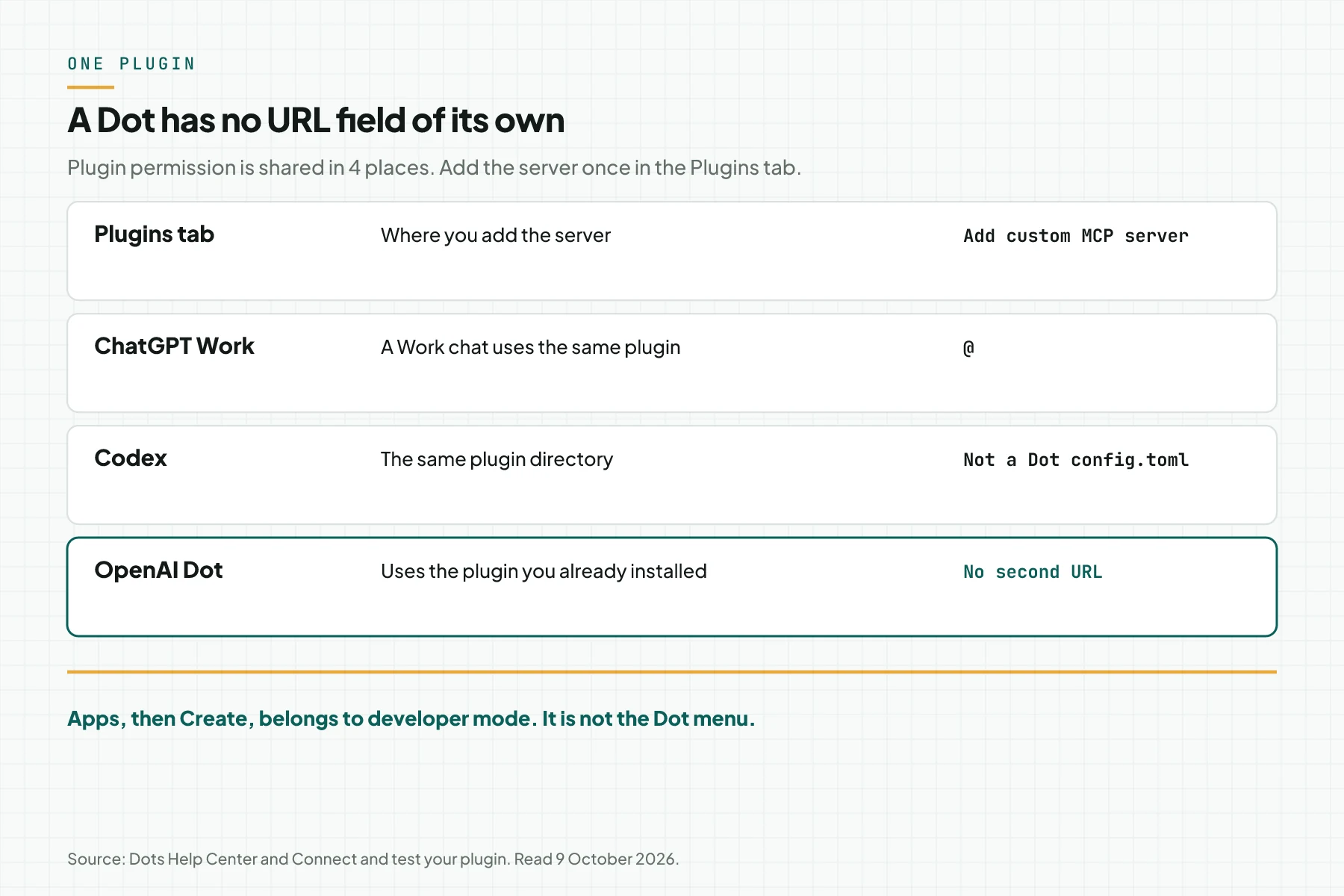
Direct answer: An OpenAI Dot uses a plugin that is already installed in the ChatGPT Plugins tab. That permission is shared with ChatGPT, ChatGPT Work, and Codex. A Dot has no MCPMCPA standard that lets an AI program use your tools and data under clear permissions.Open the glossary URL field of its own.
Main condition: Add the server in ChatGPT Plugins, plus button, Add custom MCP server, then Create as a plugin. On Enterprise, an admin turns on Use dots (Beta) first. Turning a Dot on does not open every app. Plugin controls still choose the apps and the actions.
Limit: We did not click a Dot account on the read date. Apps, then Create, belongs to developer mode. The Dot documents name the Plugins tab, not that menu. Proactive research may read a permitted source. It must not change content through a plugin, send a message, or control a browser. Read what MCP is when the words server and tool still overlap.
The documents were read on 9 October 2026. The main sources are Dots privacy, security, and safety, Getting started with your dot, and Connect and test your plugin. The example uses dummy data for the shop Sumber Jaya. the OpenAI Dots product article covers the Dot product. This article covers its MCP path.
The problem: a URL that landed in the wrong menu
An empty Dot often means the URL went into a Work chat, a Codex file on the laptop, or a developer-mode app draft. The chat you opened is the Dot, and the Dot sees only plugins installed on that account.
Dots privacy, security, and safety says plugin permission is shared across a Dot, ChatGPT, ChatGPT Work, and Codex. Manage the connection in the ChatGPT Plugins tab. A new connection there also appears for the Dot.
MCP for ChatGPT Work locks the plugin install steps for a Work chat. Use the same menu. Do not copy a Codex timeout onto a Dot. The file ~/.codex/config.toml does not fill the Plugins tab.
Developer mode and MCP apps, read on 9 October 2026, places a custom server under Apps, then Create, after developer mode is on. That app appears as a draft, with a Dev label. That document does not say the draft fills a Dot. Do not use that menu as the Dot connection step.
How it works: 1 plugin, 4 places
Connect and test your plugin gives the install order. Open ChatGPT Plugins. Select the plus button, then Add custom MCP server. Enter a name. Under Connection, paste an HTTPS URL that includes the /mcp path, or select Tunnel and enter the tunnel_id. Set authentication. Read the risk warning. Select I understand and want to continue. Select Create as a plugin. Review the tools the server returns.
Account and workspace policy still applies when you add a custom server. A server on the laptop is not reachable from the internet. Use a public HTTPS endpoint, or Secure MCP Tunnel. MCP hosting choices compares where to run that server.
Getting started with your dot names the phone path. Open the Dot profile, then Customize, then Plugins. That screen uses the shared ChatGPT settings. The apps that appear can differ. You cannot create a Dot on a phone yet, and a Dot is not supported on mobile web. Create the Dot in the desktop app or on desktop web.
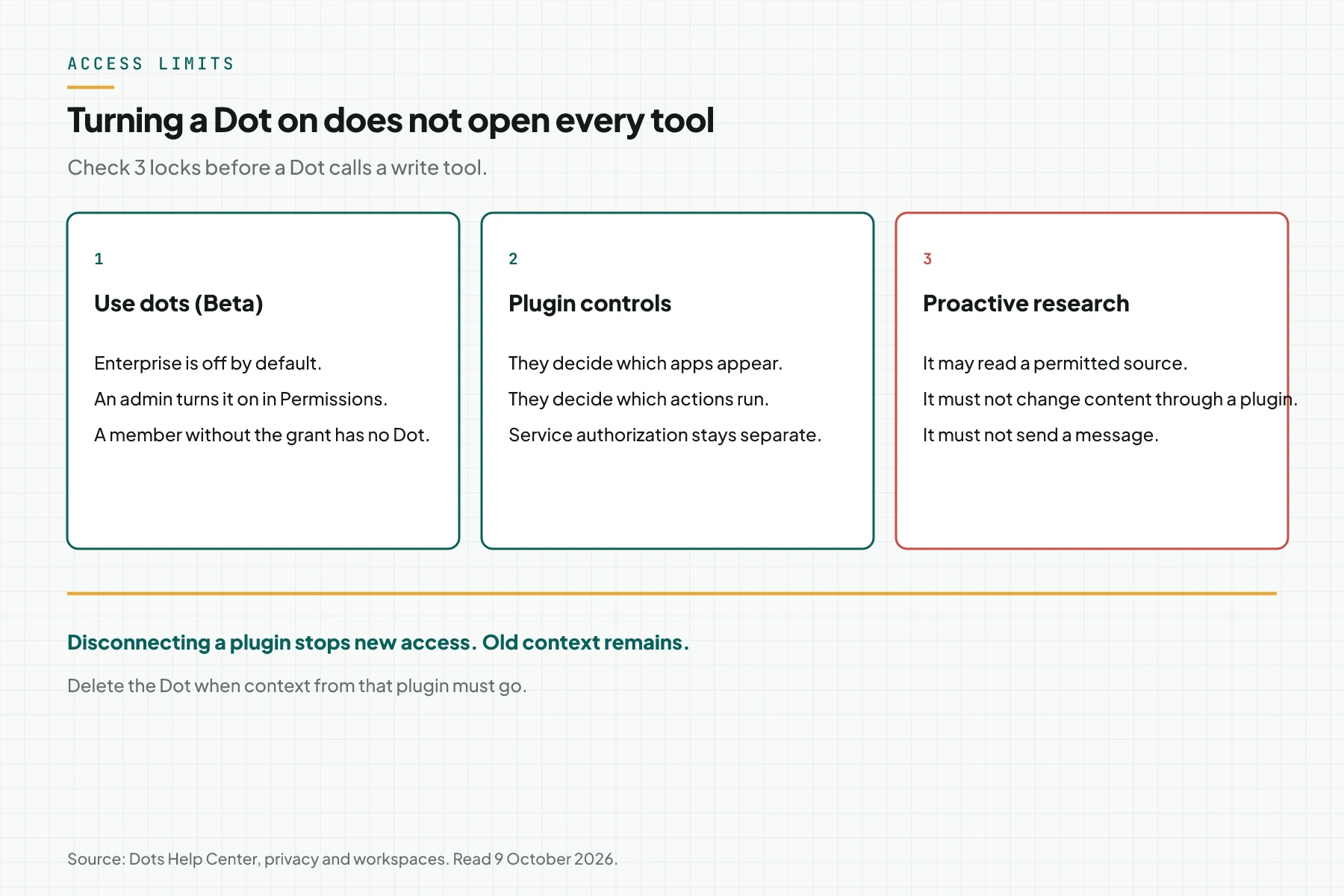
Manage dots in ChatGPT workspaces says that turning a Dot on does not grant access to every app. Plugin controls decide which apps are available and which actions they may run. App permissions decide when an action asks for approval. Each service authorization also limits what the Dot may read or change. Review those 3 items apart from the Use dots switch.
Three menus people mix up
| Menu | What it fills | Does the Dot use it |
|---|---|---|
| Plugins tab, Add custom MCP server | A plugin on the account | Yes. Permission is shared with the Dot, Work, and Codex. |
| Apps, then Create | A developer-mode app draft | The Dot documents do not name this menu. |
| ~/.codex/config.toml | The Codex client on the laptop | Not evidence that the plugin appears on the Dot. |
When a tool appears only in the Codex terminal, add the server again in the Plugins tab. When an app only shows a Dev label under Settings, Apps, it is still a developer-mode draft.
What you need before the test
- 1 ChatGPT account that already has a Dot, or 1 Enterprise workspace that may turn on Use dots (Beta).
- 1 public HTTPS URL that ends in
/mcp, or 1 tunnel with atunnel_id. - 1 test identity that cannot delete production data.
- 1 read tool, such as stock for 1 SKU. Hold the write tool until the read test passes.
- The plugin owner's name and the install date, for the team note.
Step 1: Add the server in the Plugins tab
Open ChatGPT Plugins on desktop. Select the plus button, then Add custom MCP server. Enter a name a person can read, such as Sumber Jaya stock. Paste the URL that includes /mcp. Choose the authentication your server requires. Read the warning, select I understand and want to continue, then Create as a plugin.
The test is done when the tool list appears after the server scan. When ChatGPT cannot connect, check the endpoint with MCP Inspector before you open the Dot. Do not move to the Apps menu in this step.
Step 2: Install the plugin on the account
Open your personal plugins. Select the plus button to install the plugin that came from that server. Start a new conversation. Type @ and select the plugin. Ask for 1 read tool with the test identity. Record the tool name, the arguments, and the answer.
The test is done when the read tool returns 1 answer in a new chat. A Work chat that passes is not automatic proof for the Dot, but the installed plugin is the plugin the Dot will use.
Step 3: Turn the Dot on for the workspace
On a personal account that already has a Dot, skip the workspace switch. On Enterprise, open Workspace settings, then Permissions & roles, then Permissions, then Workspace default, then Workspace capabilities. Find Use dots (Beta). Save. Review any custom role that still removes that grant.
Manage dots in ChatGPT workspaces says Use dots (Beta) is off by default for Enterprise. The other Dot permissions apply only after a member has Dot access. Local computer access is also off by default, and it is unavailable when a Codex or ChatGPT Work policy targets 1 operating system.
The test is done when the test member can open a Dot, and plugin controls still show your server. A Dot switch that is on, with no plugin installed, does not make a tool appear.
Step 4: Test 1 read tool on the Dot
Open the Dot on desktop. Ask for the stock of 1 SKU with the test identity. On a phone, open the Dot profile, then Customize, then Plugins, and confirm the same plugin is listed before you send the request.
The test is done when the Dot returns the test identity's stock number, and your note stores the tool name. The Dot cloud computer does not inherit a member's VPN, browser sign-in, or device policy. When a tool fails only on the cloud computer, record that as a network limit, not as a missing plugin.
Step 5: Lock the write tool before the Dot uses it
Dots privacy, security, and safety names the default limits. Changing a password and transferring money ask you to take over. Permanently deleting data or installing software may ask for approval each time. A custom rule cannot turn those built-in guards off.
On a phone, open Customize, then Custom rules. Describe the action the rule covers. Choose 1 behavior: Take action without asking, Take action if pre-approved, Ask before taking action, or Hand off to you. Pre-approved means you requested that action explicitly in the prompt. For the first write-tool test, choose Ask before taking action.
On Enterprise, Use custom rules for dots is off by default. Default action rules still apply when custom rules are unavailable. Turning custom rules off does not make every action ask for approval.
Proactive research may read a permitted source and save a private note. Those research tools must not send a message, change content through a plugin, or control a browser and a computer. A follow-up action still follows the normal action rules.
The test is done when the write tool does not run without an approval card on the first test, and 1 research request does not change source data.
Worked example: Sumber Jaya stock
This is a simulation. The shop Sumber Jaya has 1 tool, baca_stok, on an HTTPS server. The test identity may read only SKU A-14. The write tool is not installed yet.
| Time | Input | What is recorded | Output |
|---|---|---|---|
| 09:00 | The URL goes to Apps, Create | A draft with a Dev label | Not evidence for the Dot |
| 09:20 | Add custom MCP server, then Create as a plugin | The baca_stok tool appears | The plugin is installed on the account |
| 09:40 | An admin turns on Use dots (Beta) | The test member opens the Dot | The plugin still follows plugin controls |
| 10:00 | Dot: stock for SKU A-14 | 1 call to baca_stok | The number returns to the Dot |
| 10:20 | Disconnect the plugin | New access stops | Old context remains until the Dot is deleted |
Stop at 09:00 when only a Dev draft exists. Stop at 10:00 when the Dot changes data, because the write tool is not in the test. Stop at 10:20 when you need the plugin context gone, then delete the Dot.
Checklist before the team uses the Dot
- The plugin owner keeps the server name, the URL or tunnel_id, and the install date from the Plugins tab.
- The Enterprise admin keeps proof that Use dots (Beta) is on, plus any role that still removes it.
- Plugin controls, action permissions, and service authorization are reviewed apart from the Dot switch.
- The test identity cannot delete production data.
- 1 new chat and 1 Dot request use the same read tool. Record both.
- The write tool uses Ask before taking action on the first test.
- Stop when the server exists only in the Apps menu, or when proactive research changes source data.
When to use the plugin, and when to wait on developer mode
Use the Plugins tab when the Dot, a Work chat, or Codex should use the same server. Dots privacy, security, and safety places permission management in that tab.
Wait on the Apps menu when you do not yet need an app draft for the workspace. Developer mode and MCP apps says MCP apps are not available on mobile, and that only an admin publishes an app after testing. That path does not replace the Dot steps above.
MCP Events says MCP Events is available in Work chats on the web, in desktop Work chats with Cloud selected, and with a Dot. The protocol is 2026-07-28. The supported delivery is a webhookWebhookAn automatic message one system sends to another the moment something happens, for example an incoming WhatsApp message.Open the glossary. One event payload is at most 256 KiB. Connect the server as a plugin first. Test an event on a Dot only after the read tool passes.
Rama Digital recommendation: 1 HTTPS server, 1 read tool, install it in the Plugins tab, turn on Use dots for a workspace that requires it, then test the Dot before a write tool. Do not publish a write tool on the same day as the first read test.
Questions people ask
Does a Dot have its own MCP URL field? No. Dots privacy, security, and safety says a Dot uses plugins you already set up in ChatGPT, within the permissions you granted. Manage plugins in the Plugins tab.
Does an Apps draft fill a Dot? The Dot documents do not name Apps, then Create. That menu belongs to developer mode. Add the server in the Plugins tab when the target is a Dot.
Does disconnecting a plugin delete Dot memory? No. Disconnecting a plugin stops new access. Context already stored remains. Delete the Dot when that context must go. Deleting the Dot does not delete files and conversations stored apart from it.
May proactive research change stock? No. Dots privacy, security, and safety says proactive-research tools must not change content through a plugin, send a message, or control a browser and a computer.
Where are approval rules on a phone? Getting started with your dot points to the Dot profile, then Customize, then Custom rules. Choose 1 of the 4 behaviors that screen shows. A custom rule does not turn off a built-in guard, such as taking over when you change a password.
Do MCP Events run on a Dot? MCP Events says you can test a subscription with 1 Dot, after the server is connected as a plugin. Workspace controls for plugins and event-triggered tasks still apply.
Next step
The limits above still apply. A Dot uses only a plugin in the Plugins tab. Open the MCP Server Development Service when your system does not yet have a public HTTPS URL for that server. The service builds 1 MCP server for systems that already run, with read tools and secrets kept out of the chat. book a technical scoping session when you want to lock the tool list before a Dot uses it.
Sources
- Dots privacy, security, and safety. Read 9 October 2026. Shared plugin permission, and the proactive-research limit.
- Getting started with your dot. Read 9 October 2026. Customize, Plugins, and Custom rules.
- Manage dots in ChatGPT workspaces. Read 9 October 2026. Use dots (Beta) and plugin controls.
- Connect and test your plugin. Read 9 October 2026. Add custom MCP server and Create as a plugin.
- MCP Events. Read 9 October 2026. An event test on a Dot, protocol 2026-07-28.
- Developer mode and MCP apps. Read 9 October 2026. The Apps menu belongs to developer mode, apart from the Dot.