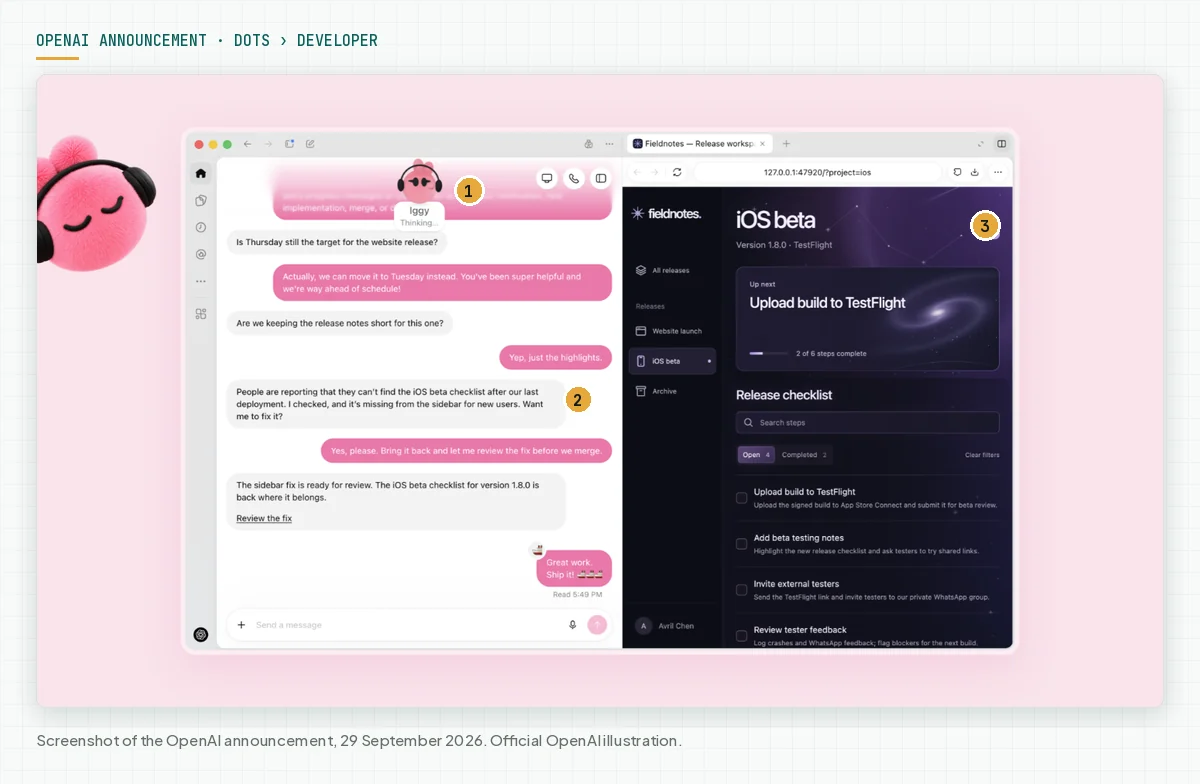
Direct answer: dots are OpenAI ChatGPT agents that work all the time, 24/7, on your behalf. Each dot runs on GPT-6 Astra, has its own cloud computer, and can use more than 4,000 apps through plugins. OpenAI released dots on 29 September 2026 at DevDay 2026.
Main condition: dots come with ChatGPT Pro, from IDR 1,889,000 per month, and with the Business Premium seat, IDR 1,685,000 per month on annual billing. Indonesia is an eligible market. Limit: dots can make mistakes, so review all consequential work. Passwords and money transfers always come back to you.
On 30 September 2026 we read the dots announcement, the dots safety blog, 2 Help Center articles, the DevDay recap, and the ChatGPT pricing page from Indonesia. This article does not include a hands-on test of dots. Product images come from the OpenAI announcement. All capabilities below are OpenAI claims, unless we mark them as a recommendation.
Why dots differ from a normal chat
A normal ChatGPT chat waits for your message, then answers. A dot takes on ongoing responsibility. It keeps working between conversations, also while you sleep. Source: Help Center: Getting started with your dot.
This change brings new risk. An agentAI agentAn AI program that performs work steps by itself, for example reading a message, drafting a reply, and recording the result.Open the glossary that misunderstands a request can change the wrong file or share data you intended to keep private. OpenAI gives these examples in its dots safety blog. So the main question is not "what can dots do", but "what may dots do without you".
Meta also launched a personal agent with a similar pattern. To compare, read our article on Muse, the AI agent from Meta.
How OpenAI dots work
One dot combines 4 parts: the GPT-6 Astra model, a cloud computer with a browser, the apps you connect, and memory. OpenAI calls Astra its most capable and aligned model. For Astra APIAPIThe official door 2 systems use to exchange data, without anybody copying it by hand.Open the glossary pricing and its place in the GPT-6 family, read our GPT-6 pricing and specifications article.
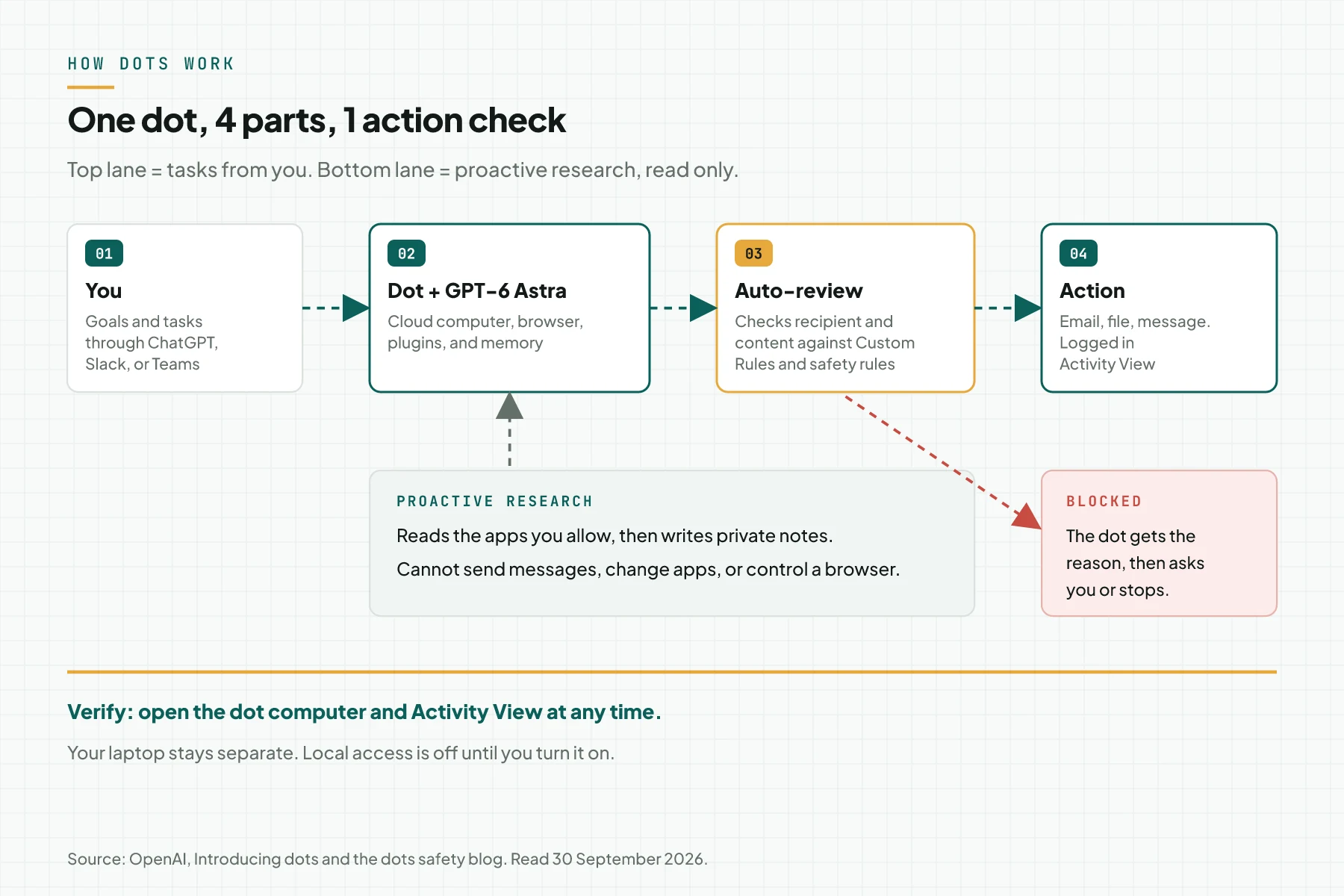
- Its own cloud computer. The dot browses the web, creates files, and runs tools on a Linux computer with Chrome. You can open that computer at any time to inspect its work.
- Your laptop is optional. Local computer access starts turned off. You turn it on through the ChatGPT desktop app, and you can revoke it again.
- Work channels. You can message or call your dot in ChatGPT on desktop, web, and mobile. The dot also takes messages in Slack and Microsoft Teams.
- Parallel projects. One dot can run several projects at the same time without separate threads.
- Learns from feedback. The dot keeps memories and receives memories from ChatGPT, so it learns your work standards over time.
The OpenAI announcement does not list WhatsApp as a channel. Texting is a limited beta for Pro users in the United States. A dot also cannot start a call to you at launch. Sources: the Introducing dots announcement and the Help Center.
Examples of dots use from OpenAI
OpenAI gives 5 example roles in the dots announcement. In each example, the dot does the routine part, then gives you the result to review.
- Developer: the dot reads customer feedback, builds small fixes, tests them, then sends PRs with videos of the changes.
- Product launch lead: when the product scope changes, the dot revises the launch materials and drafts of assets.
- Scientist: when new data arrives, the dot runs the analysis again and updates the figures.
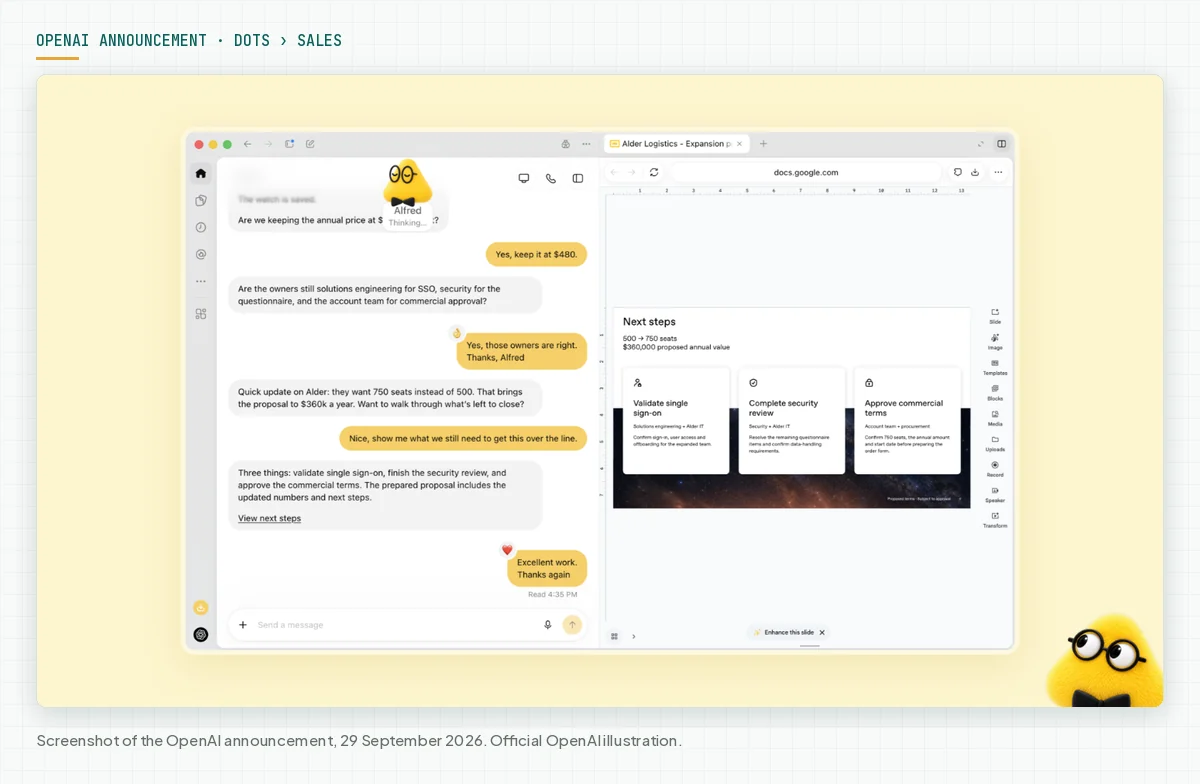
- Sales lead: the dot checks customer requirements against product docs, then updates the proposal and test plan.
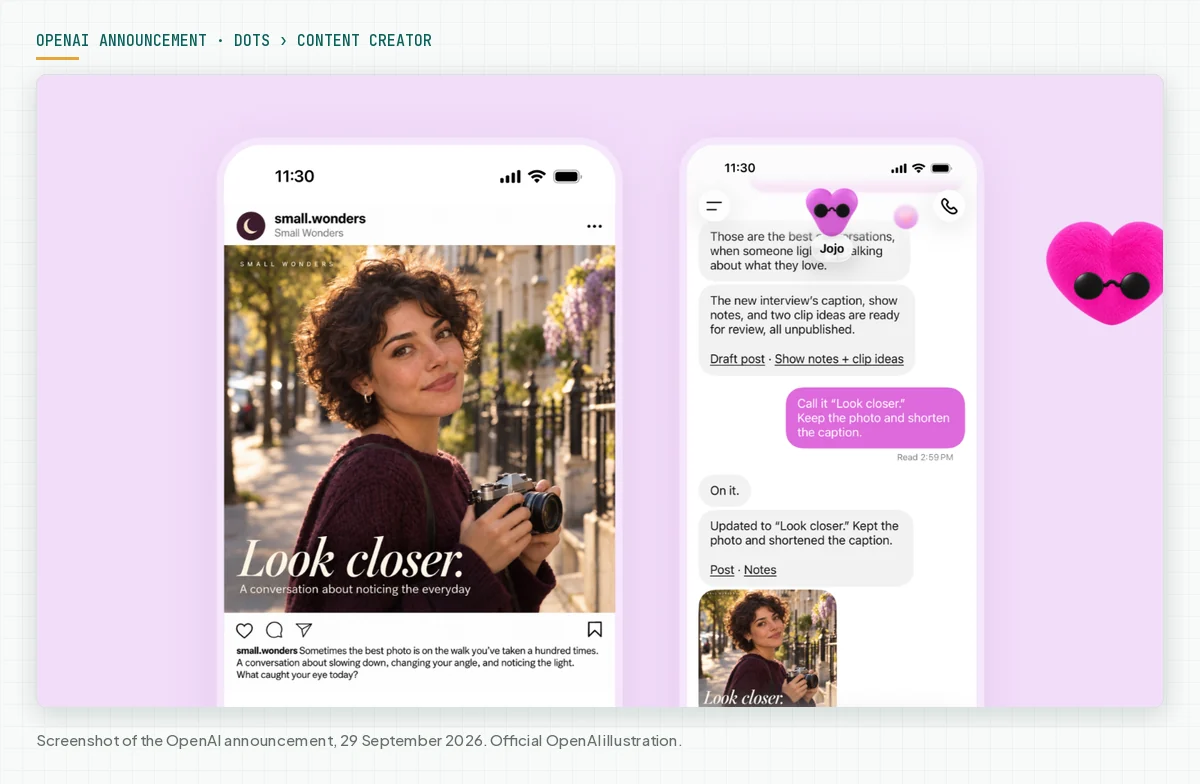
- Content creator: from an interview transcript, the dot picks clip moments, writes show notes, and drafts social posts.
Dots pricing in Indonesia and who can use them
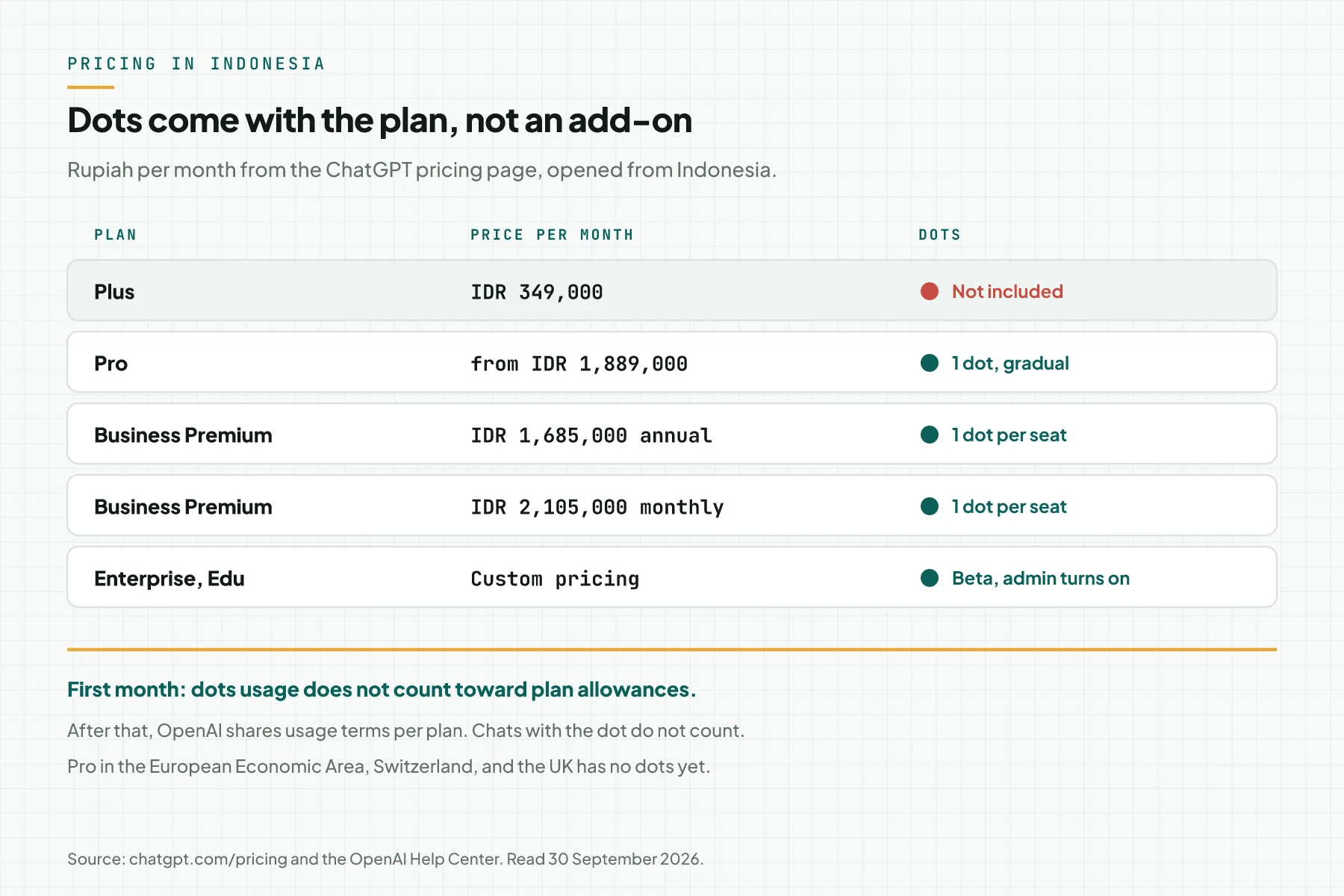
Your first dot is included in the Pro or Business Premium plan at no extra cost. The Plus plan does not include dots. This table uses the prices on the ChatGPT pricing page, opened from Indonesia on 30 September 2026.
| Plan | Price per month | Dots status |
|---|---|---|
| Plus | IDR 349,000 | Not included |
| Pro | from IDR 1,889,000, 3 usage tiers | 1 dot included, gradual rollout |
| Business, Standard seat | IDR 337,000 annual, IDR 421,000 monthly | Not listed |
| Business, Premium seat | IDR 1,685,000 annual, IDR 2,105,000 monthly | 1 dot included |
| Enterprise, Edu, Healthcare | Custom pricing | Beta, off by default, admin turns it on |
Usage rules from the Help Center and the dots announcement:
- For the first month, dots usage does not count toward Pro, Business, and Enterprise plan allowances. After that, OpenAI will share usage terms for each plan.
- Conversations with your dot do not count toward ChatGPT usage limits. Tasks the dot starts in Codex or ChatGPT Work still count.
- Pro users in the European Economic Area, Switzerland, and the UK do not get dots yet. Business Premium is available in all supported ChatGPT regions.
- The rollout is gradual. Access may take several days to reach your account.
- Users under 18 cannot use dots yet.
OpenAI also describes a future plan: add more dots, then raise the speed or the monthly amount of work of each dot. There is no price for those options yet.
Dots action rules and safety
OpenAI puts dot actions into 4 levels. Custom Rules can change some levels, but they cannot turn off the core safety requirements. Source: How we build safety, security, and privacy into dots.
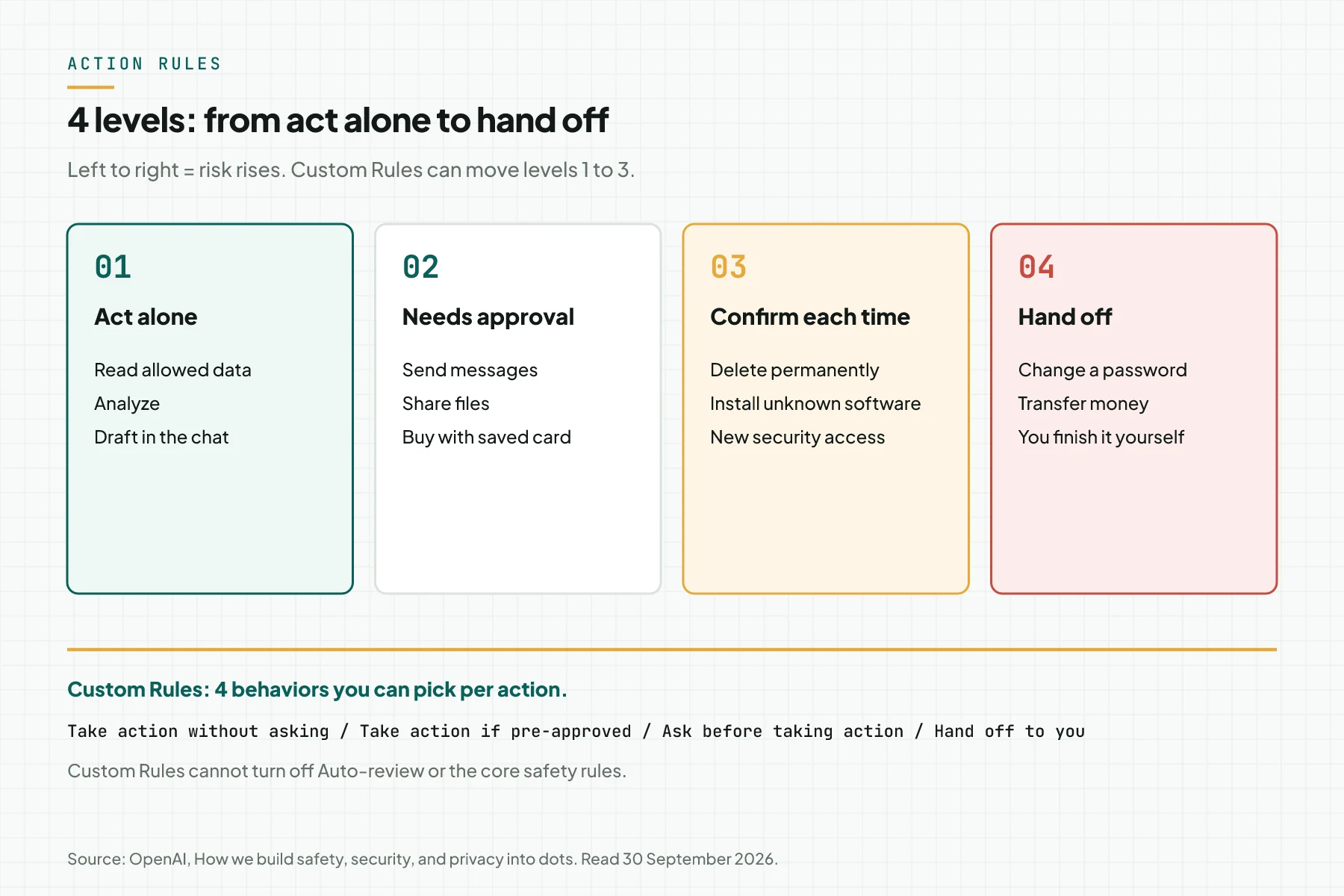
- Act alone: read data the dot may access, analyze it, and prepare drafts in the conversation.
- Needs approval: send messages, share files, and buy with a card saved on a merchant site. Health data always needs a named recipient.
- Confirm each time: delete data permanently, install software from an unrecognized source, and grant new security-sensitive access.
- Hand off: change a password and move money between financial accounts. The dot helps with the surrounding task, then you do that step yourself.
Proactive research can only read
When you are not active, the dot looks for ways to help in the background. OpenAI calls this proactive research. Its research tools are restricted in code: they cannot send messages, cannot change app content, and cannot control a browser or computer. The output is private notes for that dot.
Auto-review before an action
Before a dot sends an email or changes a file, a separate system called Auto-review checks that step. Auto-review compares the recipient and content with your instructions, Custom Rules, and safety requirements. If Auto-review blocks a step, the dot gets the reason, then asks you, tries a permitted alternative, or stops.
Secure sign-in and monitoring
For supported sign-ins, the model pauses while you fill in a secure login form. The password goes to the browser without entering the model context. A password you type in a chat or a document can still be visible to the model. Safety monitoring can pause a dot and show you a warning.
Data, memory, and model training
This part is the most often misunderstood. Disconnecting an app does not delete what the dot already learned from that app. Source: Dots privacy, security, and safety FAQs.
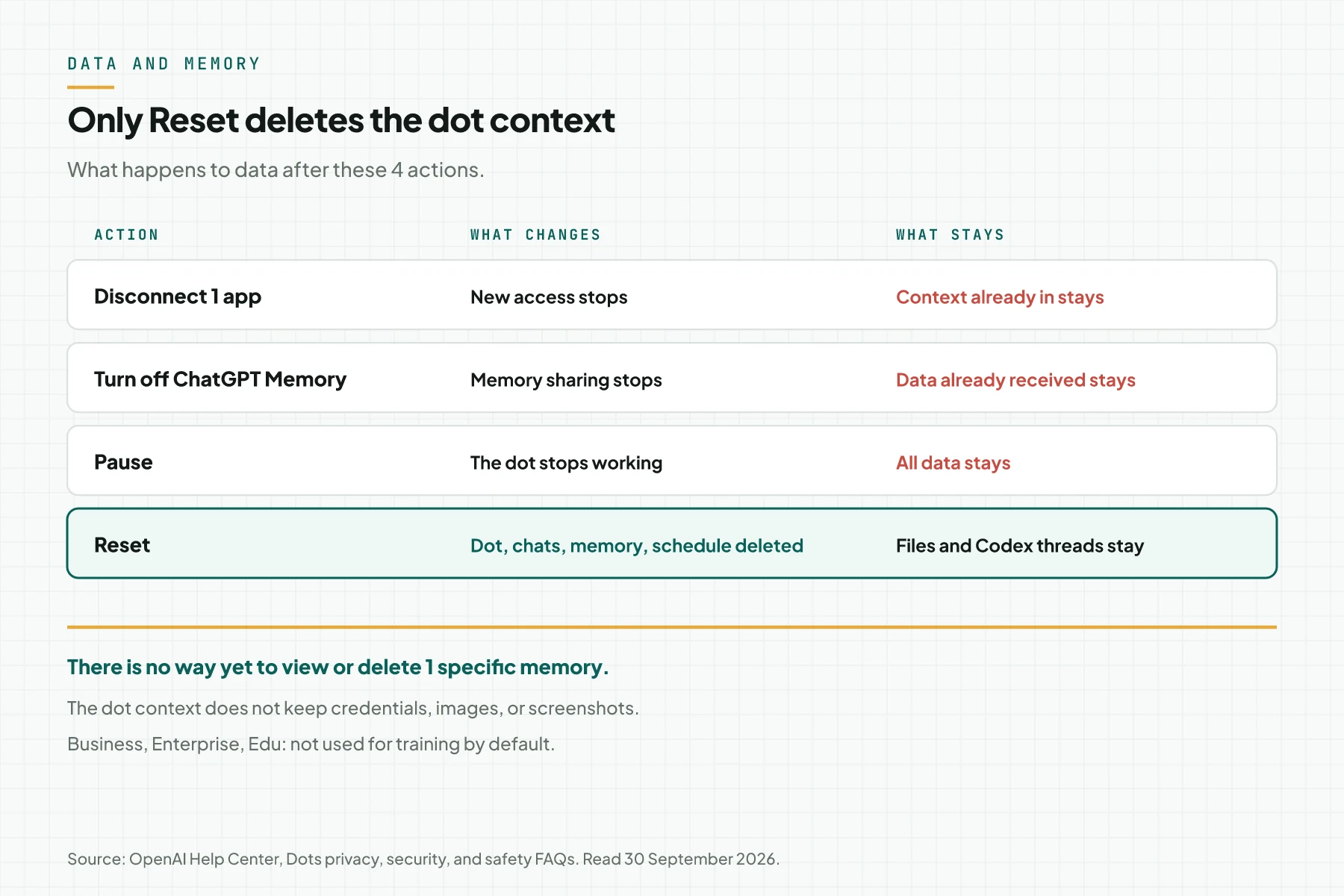
- You cannot yet view, change, or delete 1 specific dot memory. The only way to delete the context is Reset.
- Reset deletes the dot, its conversations, memories, and scheduled tasks. Files, Codex threads, and other ChatGPT conversations the dot created stay stored.
- The dot context does not keep credentials, images, or screenshots.
- OpenAI does not use Business, Enterprise, and Edu workspace content to train models by default.
- On personal plans, the "Improve the model for everyone" setting controls whether dot conversations and work are used for training. The setting is in ChatGPT Data Controls.
- Human review can occur in safety cases, even when model training is off.
Rama Digital recommendation: do not connect apps that hold customer data before you write Custom Rules. Context that is already in can only leave through Reset.
What you need
- A ChatGPT Pro account, or a Business Premium seat in a Business workspace.
- The ChatGPT desktop app on Windows or macOS, or ChatGPT in a desktop browser. You cannot create a dot on a phone yet.
- A list of 1 to 3 recurring tasks with results you can check, for example a morning calendar summary.
- A list of apps the dot may read, and a list of apps that must stay closed.
- A written team rule about who may receive emails or files from the dot.
Step 1: Confirm your plan and dots access
Open ChatGPT on desktop and look for the dots menu. If the menu is not there, wait a few days, because OpenAI rolls out dots gradually. An Enterprise admin must turn on the beta first, because it starts turned off.
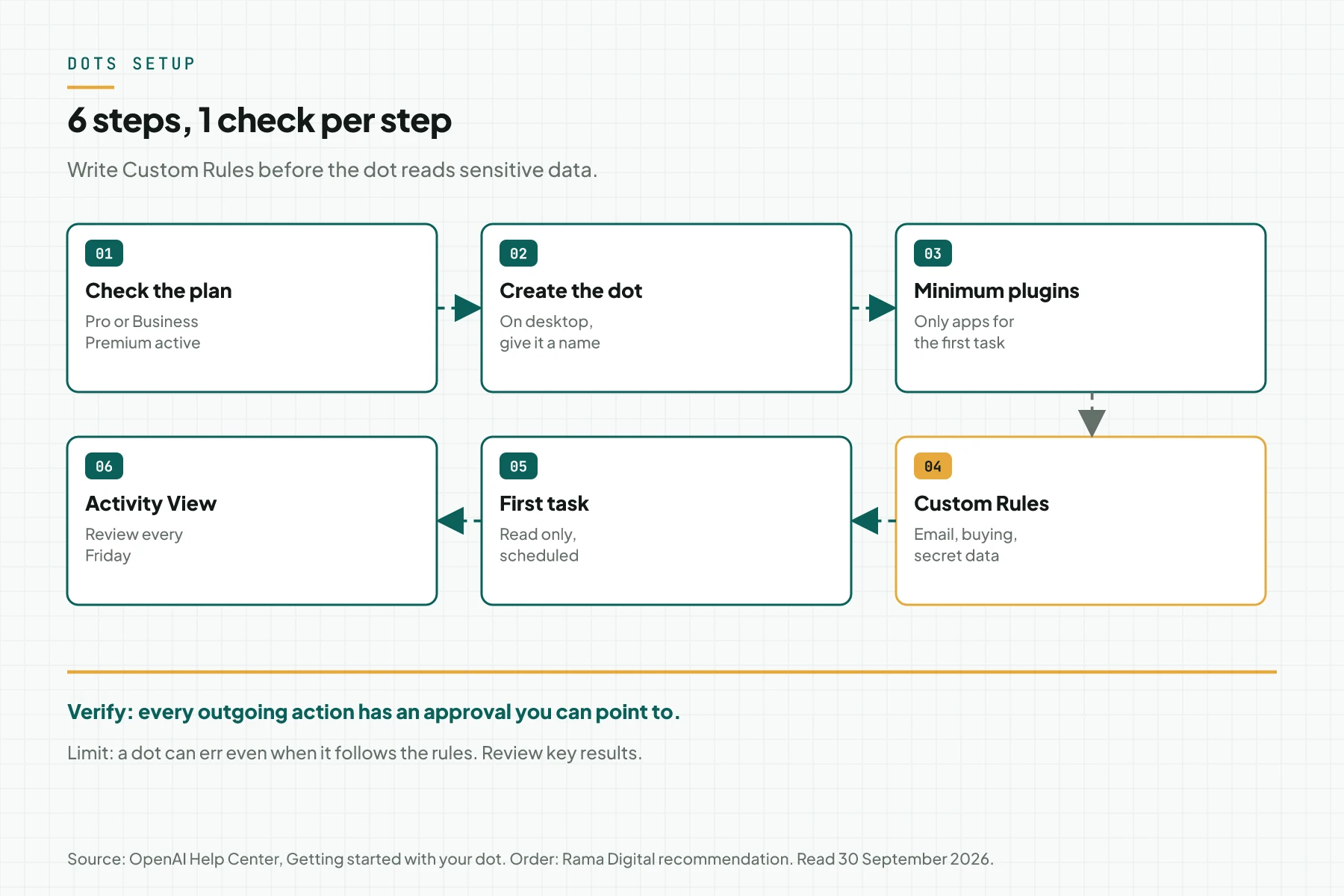
Verify: the dot creation menu shows in ChatGPT desktop, and your plan reads Pro or Business Premium.
Step 2: Create your dot on desktop and name it
Follow the onboarding prompts in the desktop app or desktop web. Name your dot during setup. The default handle is @yourname-dot, and it becomes @yourname-agentname after you name it. You can also pick a character or a pet as the avatar.
After setup, you can talk to your dot in the ChatGPT mobile app. Mobile web is not supported.
Verify: the dot profile shows the In progress, Scheduled, and Completed tabs.
Step 3: Connect as few apps as possible
Open Settings, then Plugins. Connect only the apps your first task needs. Plugin permissions are shared across dots, ChatGPT, ChatGPT Work, and Codex, so your old plugins are available to the dot at once.
Keep laptop access off for now. Turn on laptop access only when a task needs local files, and use Revoke access after the task.
Verify: the Plugins list holds only the apps you connected on purpose. Remove old plugins you do not use.
Step 4: Write Custom Rules before the first task
Open Customize, then Custom rules. Describe the action the rule covers, then pick 1 of 4 behaviors: Take action without asking, Take action if pre-approved, Ask before taking action, or Hand off to you.
Our starting point for a small business:
- Send email to customers: Ask before taking action.
- Send Slack messages to the internal team: Take action if pre-approved.
- Any purchase: Hand off to you.
- Never share revenue numbers or salary data outside the company domain.
"Pre-approved" means you asked for the action explicitly in your prompt. Approval of 1 message does not give ongoing permission to contact other people. Verify: Custom rules shows all the rules above.
Step 5: Give a first task you can check
Start with a recurring read-only task. Example prompt: "Every Monday at 08:00, read this week's calendar and email, then send me a 5-point summary in Slack."
This task tests 3 things at once: a scheduled task, read access, and a channel. There is no outgoing action to other people, so a mistake does not harm anyone else.
Verify: the task shows in the Scheduled tab with the correct time, and the first summary arrives in Slack.
Step 6: Monitor Activity View every week
Open Activity View in the desktop app. Activity View shows ongoing tasks, delegated tasks, and their status. You can add context, correct a misunderstanding, change direction, or ask the dot to stop.
Use Pause in the ••• menu of the dot profile when you are on leave or unsure. Use Reset only when you want to delete all dot context, because Reset cannot be undone.
Verify: every outgoing action in Activity View has an approval you can point to.
Example: a dot catches a forgotten invoice
OpenAI describes 1 early tester. His dot noticed that he forgot to invoice a publication, prepared the invoice, and sent it after his approval. The simulation below uses dummy data to show the same pattern at a small agency.
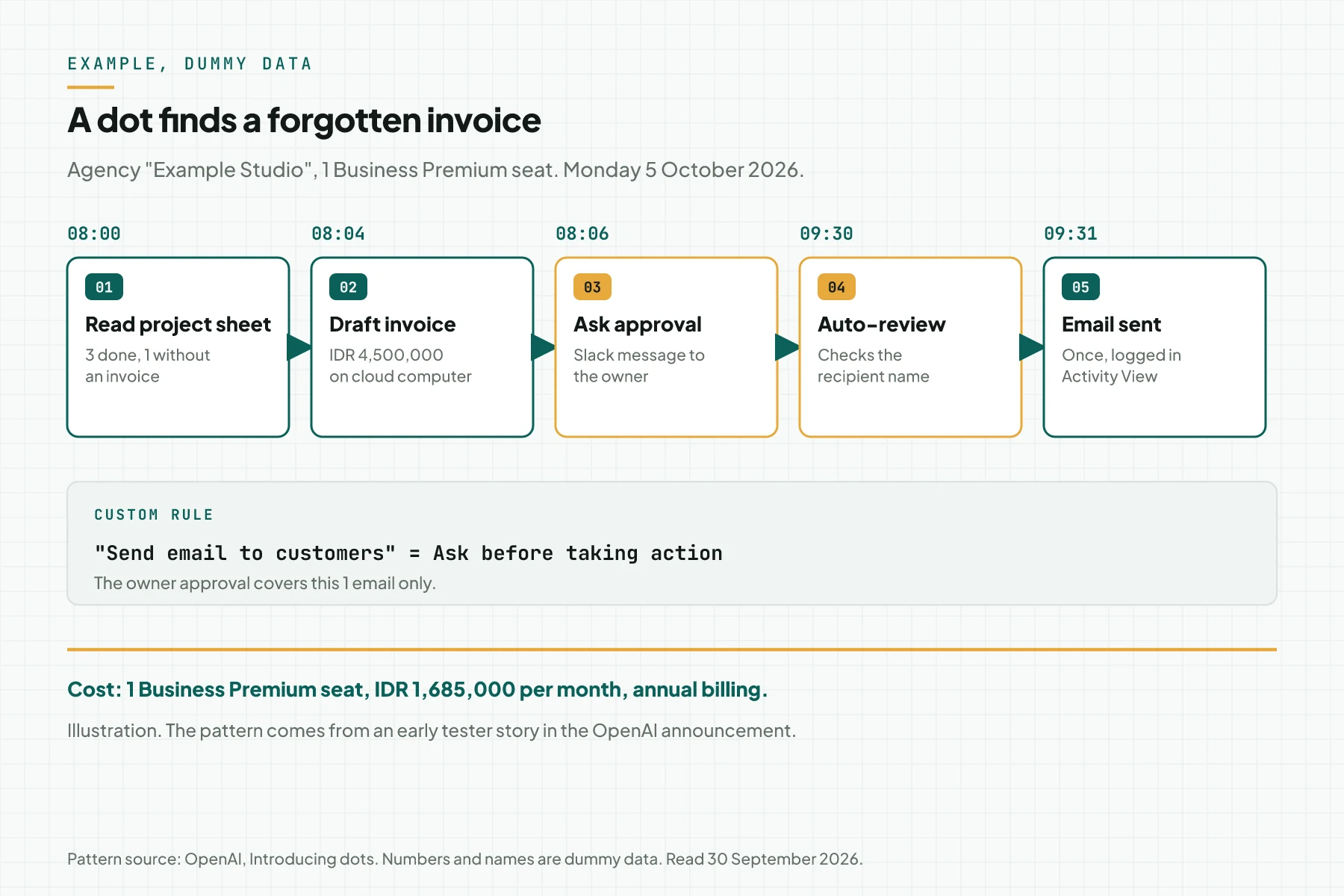
| Time | Event | Rule that applies | Result |
|---|---|---|---|
| Mon 5 Oct 2026, 08:00 | The dot reads the "Example Studio Projects" sheet | Act alone: read data | 3 finished projects, 1 without an invoice |
| 08:04 | The dot drafts an invoice of IDR 4,500,000 on its cloud computer | Act alone: draft | 1 draft file |
| 08:06 | The dot sends an approval request to the owner in Slack | Custom Rule: Ask before taking action | Waiting for an answer |
| 09:30 | The owner approves, with the recipient name | Approval for 1 email only | Auto-review checks the recipient |
| 09:31 | Email and invoice go to the dummy client | Logged in Activity View | Invoice sent once |
Cost of this example: 1 Business Premium seat at IDR 1,685,000 per month on annual billing. Count the benefit from invoices that no longer slip, not from a promise of saved hours.
Dots, a normal chat, or an agent on your own server
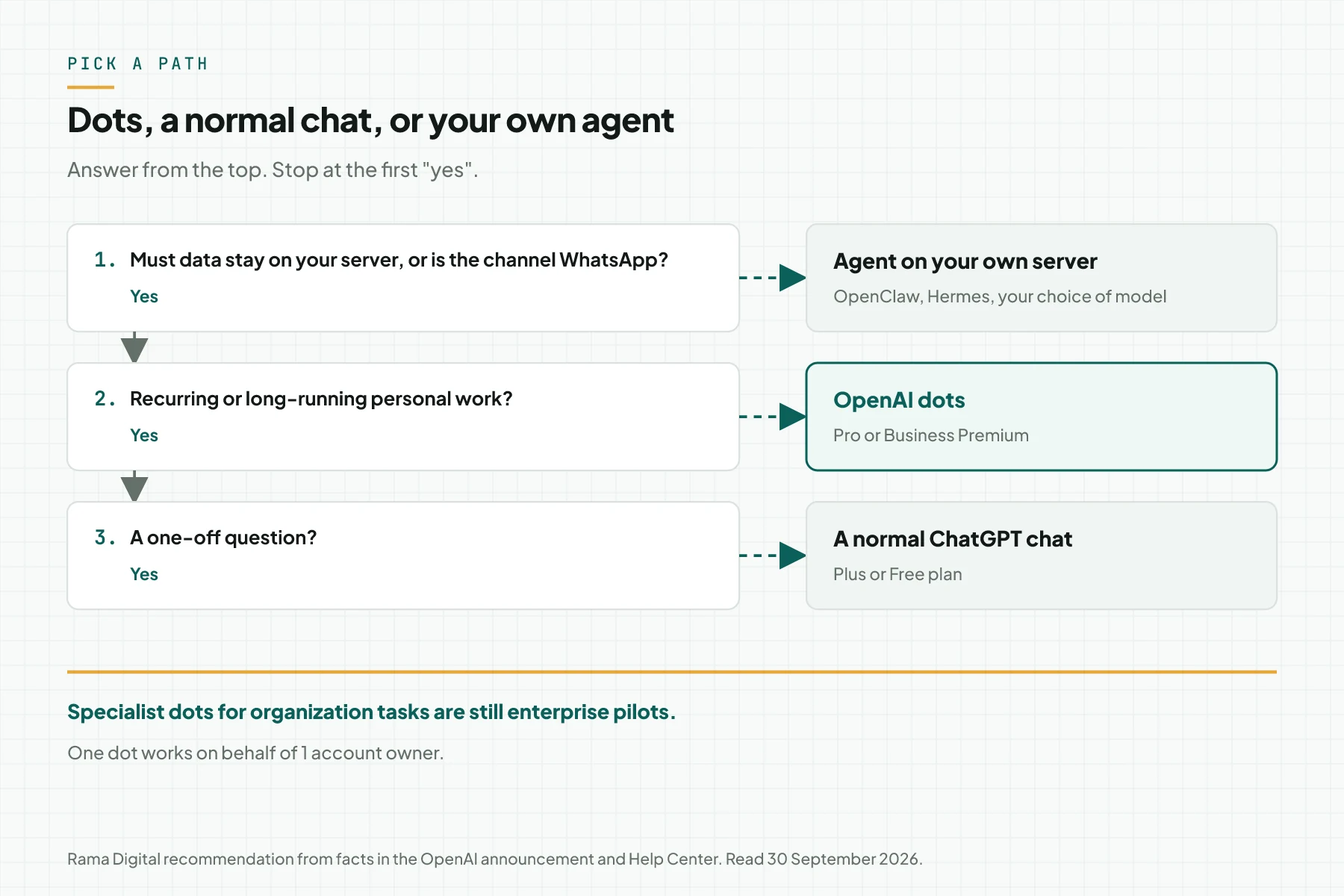
A dot works on behalf of 1 account owner. For organization tasks, OpenAI is building specialist dots with their own identity and credentials. Specialist dots are still enterprise pilots and will connect to Microsoft Agent 365.
| Criterion | OpenAI dots | Agent on your own server |
|---|---|---|
| Where it works | OpenAI cloud computer | Your server or VPS |
| Model | GPT-6 Astra | You pick the model and provider |
| Channels | ChatGPT, Slack, Teams; texting beta in the US only | You pick, for example WhatsApp or Telegram |
| Cost | Included in the Pro or Business Premium seat | Server, model API, and installation |
| Setup time | A few minutes | 1 to 2 weeks with hardening |
| Delete 1 memory | Not yet, only Reset | You control it in your own database |
Rama Digital recommendation: use dots for the personal work of an owner or a manager, such as calendar, research, and drafts. Use an agent on your own server when data must stay on your server or customers reach you on WhatsApp. Compare 2 popular open-source agents in our Hermes Agent vs OpenClaw article.
Checklist before a dot works for you
- Confirm that the Pro or Business Premium plan is active. Owner: account owner. Evidence: billing page.
- Write the list of apps the dot may read. Owner: business owner. Evidence: a written list that matches the Plugins menu.
- Write Custom Rules for customer email, purchases, and confidential data. Owner: business owner. Evidence: screenshot of the Custom rules menu.
- Keep laptop access off unless a task needs local files. Owner: dot user. Evidence: Revoke access status.
- Check the "Improve the model for everyone" setting on personal plans. Owner: dot user. Evidence: screenshot of Data Controls.
- Run 1 read-only task for 1 week. Owner: dot user. Evidence: 1 summary per day in Slack or ChatGPT.
- Review Activity View every Friday. Owner: dot user. Evidence: a weekly note of outgoing actions and their approvals.
- Pause the dot and review it again if 1 outgoing action happens without your approval. Owner: business owner. Evidence: a dated incident note.
Frequently asked questions
What are OpenAI dots? Dots are ChatGPT agents that keep working on your behalf. Each dot runs on GPT-6 Astra, has its own cloud computer, and uses the apps you connect through plugins.
Are OpenAI dots available in Indonesia? Yes. Dots are available for Pro outside the European Economic Area, Switzerland, and the UK, and for Business Premium in all supported ChatGPT regions. The rollout takes several days.
How much do OpenAI dots cost? Your first dot is included in the plan at no extra cost. Pro starts at IDR 1,889,000 per month, and the Business Premium seat is IDR 1,685,000 per month on annual billing.
Can dots send email or buy things without approval? Not by default. Sending messages and purchases need approval. You always complete password changes and money transfers yourself.
How do I delete what my dot remembers? Use Reset in the dot profile menu. Reset deletes context, conversations, memories, and scheduled tasks. You cannot delete 1 specific memory yet.
Next step
The limit that still applies: all capabilities above are OpenAI claims on launch day, and the usage terms after the first month are not published yet. Test 1 read-only task first, then raise permissions after 1 week without mistakes. If data must stay on your server or the agent must serve WhatsApp, see the AI Agent Ops Install service. To discuss an agent for your business, book a technical scoping session.
Sources
- OpenAI: Introducing dots
- OpenAI: How we build safety, security, and privacy into dots
- OpenAI Help Center: Getting started with your dot
- OpenAI Help Center: Dots privacy, security, and safety FAQs
- OpenAI: DevDay 2026 Recap
- ChatGPT: Pricing
- OpenAI Help Center: Data Controls in ChatGPT
- OpenAI: GPT-6 Astra system card