Direct answer: MCPMCPA standard that lets an AI program use your tools and data under clear permissions.Open the glossary on Grok Bot is installed as a plugin. When the server holds a secret, choose the Custom MCP server type Remote HTTPS. Do not put a key in a Command server, because teammates can read its command and arguments.
Main condition: Only the Bot owner and its managers change shared plugins. Team connector policy is not set on the Grok Bot page. Grok Bot for teams and enterprises, read 9 October 2026, points to the Plugins and MCPs page on the dashboard. A blocked plugin shows Disabled by team admin.
Limit: We did not click the Grok Bot app on that read date. The steps follow the documents on docs.x.ai. The Grok web menu and the command grok mcp add do not fill a Bot. Read what MCP is when the words server and tool still blur.
The documents were read on 9 October 2026. The primary sources are Team Bots, Grok Bot for teams and enterprises, and Use the computer and apps. The example uses dummy data for a shop named Sumber Jaya.
The problem: a server that lives on the wrong Grok product
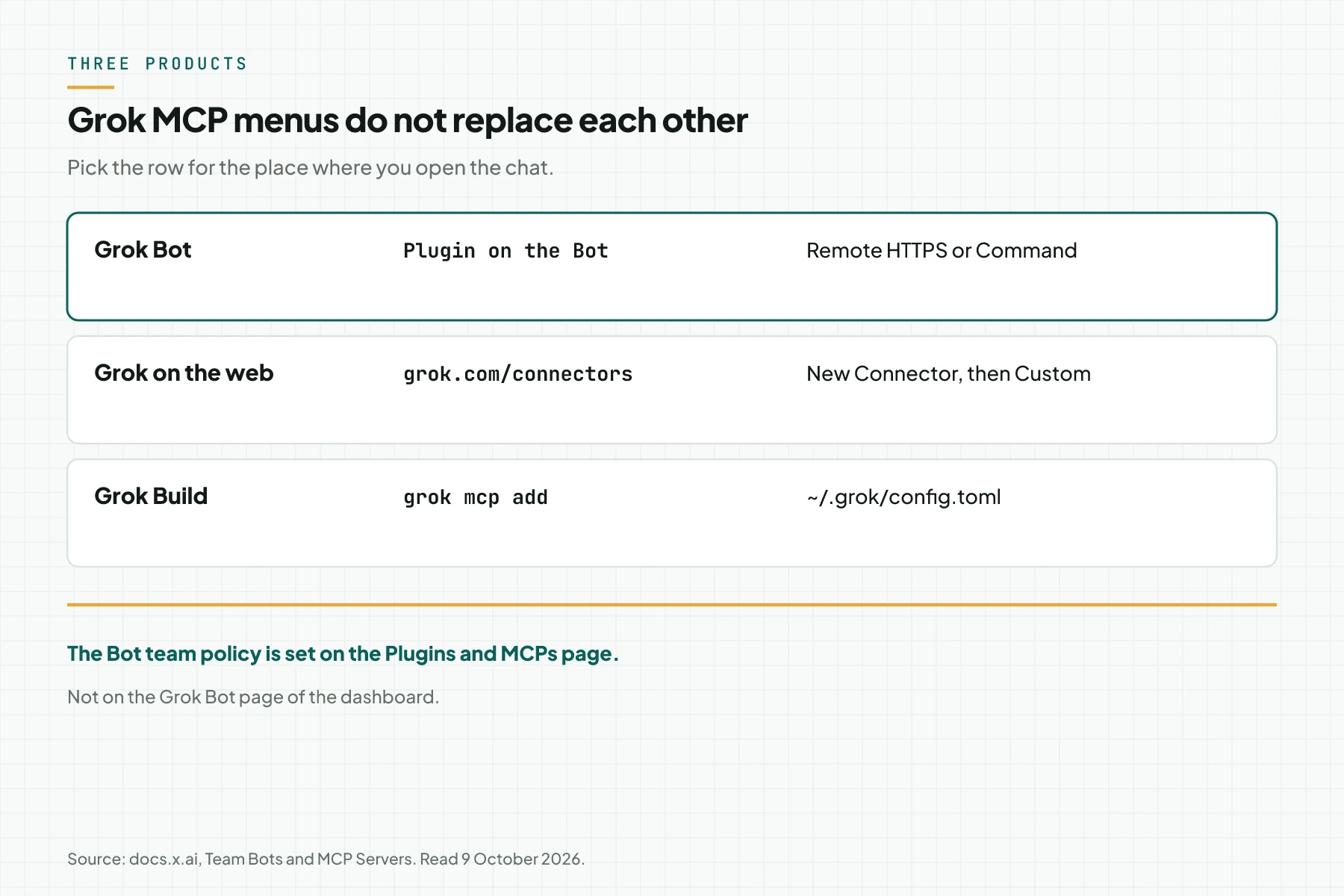
The name Grok is used by three products that add MCP in different places. An empty Bot often means the URL already went to grok.com, or to ~/.grok/config.toml, while the chat you opened is Grok Bot.
Grok connectors writes the web path: open grok.com/connectors, choose New Connector, then Custom, and paste the URL. That server must be reachable from the internet. Localhost is rejected on that web path.
Grok Build MCP servers writes the Grok Build path. The command grok mcp add writes ~/.grok/config.toml. OAuth on that path stores tokens in ~/.grok/mcp_credentials.json. The default start timeout is 30 seconds. The default tool timeout is 6000 seconds. Those two numbers belong to Grok Build, not to a Bot chat.
The articles MCP for Claude Cowork and MCP for ChatGPT Work lock other clients. Do not copy their menus into Grok Bot.
How it works: a plugin, a chat computer, and a team policy
Use the computer and apps says connectors are installed as plugins from Marketplace. An installed connector applies to the account, not to 1 Bot alone. In chat, type @ to attach the connector to the task.
The Bot computer is in the cloud. Connect to private networks says that computer reaches the internet through shared egress addresses. A system on a private network stays invisible unless you route traffic through a member desktop or, on Enterprise, install a networking client through Team Setup.
Grok Bot for teams and enterprises says OAuth tokens stay on the connector backend. The Bot calls tools without receiving those tokens. The team's Cursor MCP policy applies in full. There is no separate connector list inside the Grok Bot page.
Remote HTTPS or Command
Team Bots splits custom plugins into 2 types. Remote HTTPS uses the Bot's own credential, or a per-person sign-in when the server uses OAuth. Command runs on the computer that conversation uses.
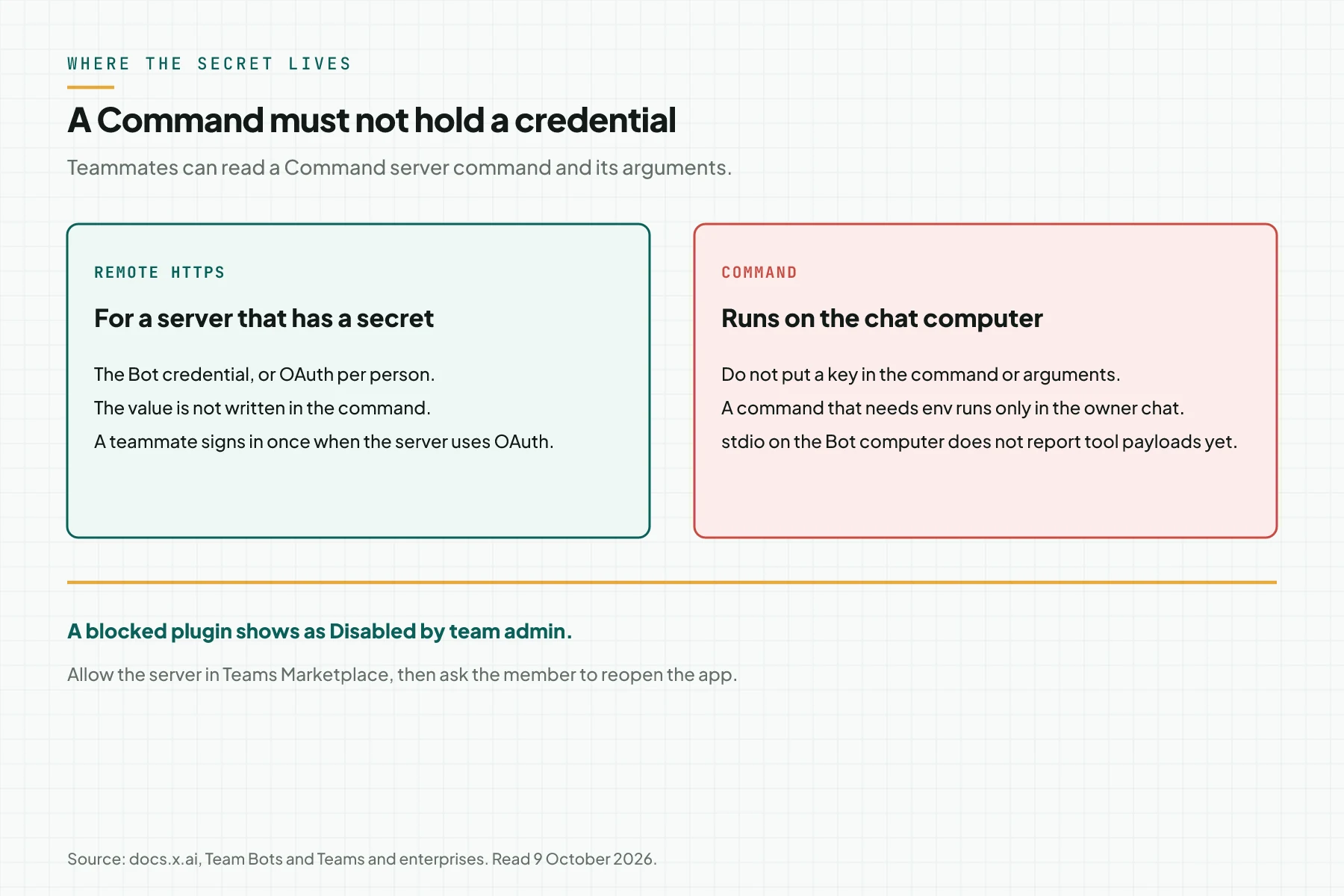
Teammates can use the shell on that computer and read the Command server's command and arguments. Do not put a credential in either. A command that needs environment variables, or whose arguments look like a credential, runs only in the owner's chat. For a server that needs a secret, the document tells you to choose Remote HTTPS.
On a Team Bot, plugins the owner adds are used in every conversation, including Slack channels and group chats, without asking first. An OAuth plugin still uses the account of the person who is talking. The Bot does not lend one person's access to another person.
In a 1:1 chat, the Bot uses that person's own connectors without asking. In a shared conversation, such as a Slack thread, the Bot asks first. The card contains Allow and the plugin name. The choices the document writes are Allow once, Always allow for this Bot, Always allow for all Team Bots, and Skip.
Who changes the setup
| Role | What they can change | What stays with the owner |
|---|---|---|
| Owner | Plugins, secrets, skills, files, Slack | Publish, unpublish, and delete the Bot |
| Manager | The same setup as the owner | Does not delete the Bot |
| Member | Their own chat, their own routines, personal connectors | Does not change shared plugins |
| Team admin | Policy on the Plugins and MCPs page | Not the plugin list inside 1 Bot |
The Bot info pane has a Setup section with cards for Plugins, Secrets, Skills, and Files. Choose that card, or ask the Bot in chat. The Team Bots document does not name a button for pasting a custom URL. Do not invent a dialog name that is not on that page.
A secret has a name, a description, and a value. The name uses uppercase letters, digits, and underscores, and starts with a letter, for example STOK_API_KEY. The value is encrypted. The app shows only the name and the description. The Bot does not see the value. Command output, files, and plugin calls replace the value with [REDACTED].
1 Team Bot holds at most 25 secrets. Each value is at least 8 characters and at most 4,096 bytes. The Bot can use every secret in any teammate's conversation. Treat a secret as access for the whole team. Use a read-only service-account key.
An MCP allowlist exists only on Enterprise. When you use an allowlist, add the server URL there in addition to allowing it in Teams Marketplace. Then ask the member to reopen the app.
Requirements before a plugin is shared
- 1 Bot whose owner can still change the Plugins card.
- 1 HTTPS URL for Remote HTTPS, or 1 command without a credential for Command.
- 1 test identity that cannot delete production data.
- An admin decision: the server is allowed on the Plugins and MCPs page.
- When the system is on a private network, 1 desktop path or Team Setup. MCP hosting choices covers a public address when you choose a Remote HTTPS server that is open.
Step 1: Choose the server type before any key exists
Write 1 sentence: this server holds a secret, or it does not. When it holds a secret, the type is Remote HTTPS. When it does not, Command is allowed, and the command and arguments must be safe for teammates to read.
Test a Remote HTTPS URL from a network outside the office when that server is meant to be public. Grok connectors rejects localhost on the web connector. The Bot Command path is different: the process runs on the chat computer, so it does not need a public URL.
Stop when your only evidence is grok mcp list. That command belongs to Grok Build.
Step 2: Allow the server in the team policy
An admin opens the Plugins and MCPs page, not the Grok Bot page. Allow the server you will use. When an Enterprise plan uses an allowlist, add the same URL.
A member who sees Disabled by team admin has not been rejected by your server. The document tells you to allow the server in Teams Marketplace, add the URL to the allowlist when you have one, then reopen the app.
A permitted connector is available to every Bot that member runs. The document says pushing a mandatory connector to members is not available.
Step 3: Install the plugin and attach it with @
For a service already in the catalog, Use the computer and apps writes this order. Open Marketplace from the sidebar. Browse the plugins. Choose Add. Finish sign-in in the browser when it asks. In chat, type @ and the connector name.
For your own server, the owner opens the Plugins card in Setup, or asks the Bot to add it in chat. Choose Remote HTTPS when there is a secret. A manager may make the same change after the Bot is published. An ordinary member may not.
Until the Bot is published, only the owner sees the Team Bot. A member chat that arrives later does not include the setup conversation. The plugins, secrets, skills, files, and team memory you saved do come along.
Step 4: Test a private chat, then a shared chat
In a 1:1 chat, ask for 1 read tool with the test identity. Record the tool name and the answer. A personal connector is used without an approval card in a 1:1 chat.
Repeat the ask in a shared thread. The document says the Bot asks before it uses that person's own connector. Choose Allow once for the test. Do not choose Always allow for all Team Bots on the first test.
Tool I/O in the Enterprise conversation export covers only connector calls Cursor runs, such as Jira, Slack, and Linear. A stdio server on the Bot computer does not report argument and result payloads yet. Do not treat that export as the audit for a Command server.
The test is done when the test identity's read tool returns in the 1:1 chat, the shared thread asks before a personal connector, and no key is written in a Command.
Worked example: Sumber Jaya stock
This is a simulation. The shop Sumber Jaya has 1 tool, baca_stok, on an HTTPS server. The read key is stored as a Bot secret named STOK_API_KEY, not in command arguments. The warehouse member has their own chat.
| Time | Input | What is recorded | Output |
|---|---|---|---|
| 11:00 | grok mcp list on the laptop | The server is visible in Grok Build | Not evidence for the Bot |
| 11:15 | Admin allows the URL on Plugins and MCPs | The server is not marked Disabled by team admin | The member reopens the app |
| 11:30 | The owner chooses Remote HTTPS | The key is not in the command | The plugin shows in Setup |
| 11:40 | 1:1 chat: stock for SKU A-14 | 1 call to baca_stok | The number returns to the chat |
| 11:50 | A shared Slack thread | An Allow card for the personal connector | Allow once, with no key on screen |
Stop at 11:00 when only the terminal succeeds. Stop at 11:30 when a key is visible in the command or the arguments. Stop at 11:50 when a shared thread uses a personal connector without an Allow card.
Checklist before the team uses the Bot
- The owner keeps the server type, Remote HTTPS or Command, plus the date it was added.
- The admin keeps proof the server is allowed on the Plugins and MCPs page.
- The secret value does not appear in a command, an argument, or a screenshot. Only the secret name is stored in the note.
- The test identity cannot delete production data.
- The 1:1 chat and the shared thread are tested apart. The shared thread uses Allow once on the first test.
- A Command server is not the audit source, because stdio on the Bot computer does not report tool payloads yet.
- Stop when the plugin reads Disabled by team admin, or when a key can be read in the command.
When to use the catalog, and when to use your own server
Use a Marketplace plugin when the service you need is already there. Use the computer and apps calls that path more reliable than clicking through a site in the Bot browser.
Use Remote HTTPS when the system is an internal APIAPIThe official door 2 systems use to exchange data, without anybody copying it by hand.Open the glossary that is not in the catalog and the server holds a secret. Use Command only for a process without a credential on the chat computer.
Rama Digital recommendation: 1 Remote HTTPS server, 1 read tool, an admin grant on the Plugins and MCPs page, then a 1:1 chat test before the Bot is published to the team. Do not publish the Bot on the same day as the first write tool.
Questions people ask
Does grok.com/connectors fill Grok Bot? No. A Grok web connector is added at grok.com/connectors. Grok Bot uses a plugin on the Bot. Grok Build uses grok mcp add.
Where does an admin allow the server? On the Plugins and MCPs page of the dashboard, not on the Grok Bot page. A blocked plugin shows Disabled by team admin.
May a key sit in a Command? No. Teammates can read the command and the arguments. The document tells you to use Remote HTTPS when the server needs a secret.
May a member add a shared plugin? No. The owner and the managers change the shared setup. A member can add a personal connector from their own chat. The Bot's shared plugins do not change because of that.
Does a Slack chat use the same account? Team Bots says the Bot answers only people who have linked their Slack account to Cursor. A person who has not linked sees a Link Account button.
Is the Bot computer on the laptop? Connect to private networks says Grok Bot computers run in Cursor's cloud. The laptop becomes the path only when a member turns on Route traffic through this computer, or when an Enterprise admin installs a networking client through Team Setup.
Next step
The limits above still apply. The Grok web menu and the Grok Build file do not fill a Bot. MCP Server Development Service builds 1 MCP server for systems that already run, with read tools and secrets kept out of the command. book a technical scoping session when you want to lock Remote HTTPS or Command before the Bot is published.
Sources
- Team Bots. Read 9 October 2026. Remote HTTPS, Command, and shared-chat approval.
- Grok Bot for teams and enterprises. Read 9 October 2026. The Plugins and MCPs page, Disabled by team admin, and the stdio limit.
- Use the computer and apps. Read 9 October 2026. Marketplace, Add, and attach with @.
- Connect to private networks. Read 9 October 2026. The cloud computer and the private-network path.
- Grok connectors. Read 9 October 2026. The Custom path on grok.com, separate from the Bot.
- Grok Build MCP servers. Read 9 October 2026. grok mcp add and the Grok Build timeouts.