Direct answer: ClaudeClaude ProThe paid subscription for the Claude AI assistant from Anthropic. It unlocks connectors to outside tools.Open the glossary Cowork uses the same remote MCPMCPA standard that lets an AI program use your tools and data under clear permissions.Open the glossary connector as claude.ai. Anthropic cloud calls your server URL. The laptop where Cowork is open does not. The server must be public HTTPS. The file claude_desktop_config.json does not apply to Cowork.
Main condition: Custom connectors are available on Free, Pro, Max, Team, and Enterprise. Free allows 1 custom connector. On Team and Enterprise, an Owner adds the URL first. A member presses Connect after that URL exists. Anthropic Help Center, custom connectors, read 9 October 2026.
Limit: We did not click through a Cowork account on that read date. The steps below follow the menus Anthropic wrote. A server on localhost, a VPN, or an office firewall fails even when you can open it from your own desk. Research calls connector tools with no extra approval, so turn off write tools before Research.
These documents were read on 9 October 2026. The primary sources are Anthropic Help Center, custom connectors and Build an MCP server for Claude. The example below uses dummy data for a shop named Sumber Jaya. It is not a customer record.
The problem: a laptop server is invisible to Cowork
Teams often install MCP on a laptop because Claude Desktop reads a local config file. Cowork runs on the same computer. The two apps do not use the same path.
The Anthropic Help Center says a remote connector is set through the Claude account. The call leaves from Anthropic servers. This is true for claude.ai, Claude Desktop, Cowork, and the mobile apps.
A URL on http://localhost fails in Cowork. A URL that lives only on the office VPN also fails. A test from your laptop does not prove that Cowork can enter.
Read what MCP is first when the words host, client, and server still blur together. Then read the comparison of 10 MCP clients for the limits of other clients as of 13 September 2026. This article locks the Cowork path only.
How it works: 4 parties, 1 call from the cloud
There are 4 parties. Cowork is the app on the laptop. Anthropic cloud is the MCP client that actually opens the URL. Your MCP server answers on the internet. The source system, such as an ERP or a spreadsheet, stays behind that server.
Build an MCP server for Claude recommends Streamable HTTP for a remote server. Claude still accepts the older HTTP+SSE transport. That SSE transport is being deprecated. Use Streamable HTTP for a new server.
Claude does not see your password when the server uses OAuth. You review the permissions at sign-in. Disconnect the connector in Claude settings, or in the third-party service security settings, when access must stop.
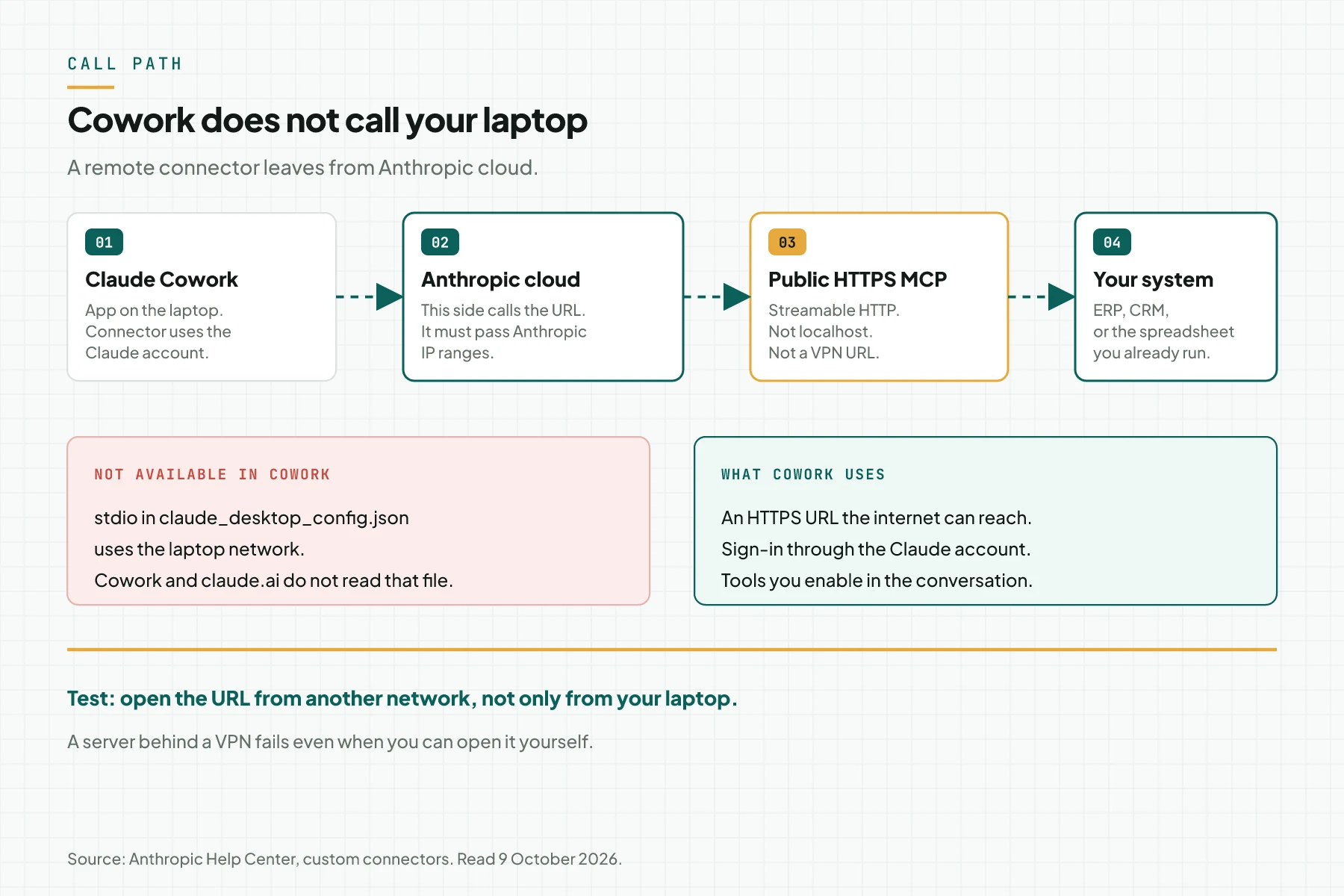
The red card in the diagram is the path Cowork does not read. stdio in claude_desktop_config.json uses the laptop network. The Help Center states that this file is not available in Cowork or on claude.ai.
If the server must stay on a private network, allow Anthropic IP ranges on the firewall. The current ranges are on the page the Help Center links. Do not copy an old list from another article. IP ranges change.
Three paths, and only 1 enters Cowork
Pick the path from where the server lives, not from the product name. This table compares 3 paths in the same documentation.
| Path | Who calls | Enters Cowork | Network requirement |
|---|---|---|---|
| Remote custom connector | Anthropic cloud | Yes | Public HTTPS, or Anthropic IPs allowed |
| Connector directory | Anthropic cloud, after review | Yes | The same remote server |
| stdio in claude_desktop_config.json | Your laptop | No | Claude Desktop local network only |
The directory and a custom connector use the same infrastructure. The difference is discovery. A directory listing appears after Anthropic review. A custom connector appears after someone enters a URL.
If your URL domain matches a directory listing, that listing name and brand appear. The connector is still yours. It uses the URL the Owner entered and the tools from your server. The Help Center says not to remove it only because the brand changed.
Who presses Add
The add button is not the same on every plan. The wrong role means the URL is never stored, even when the server already returns 200.
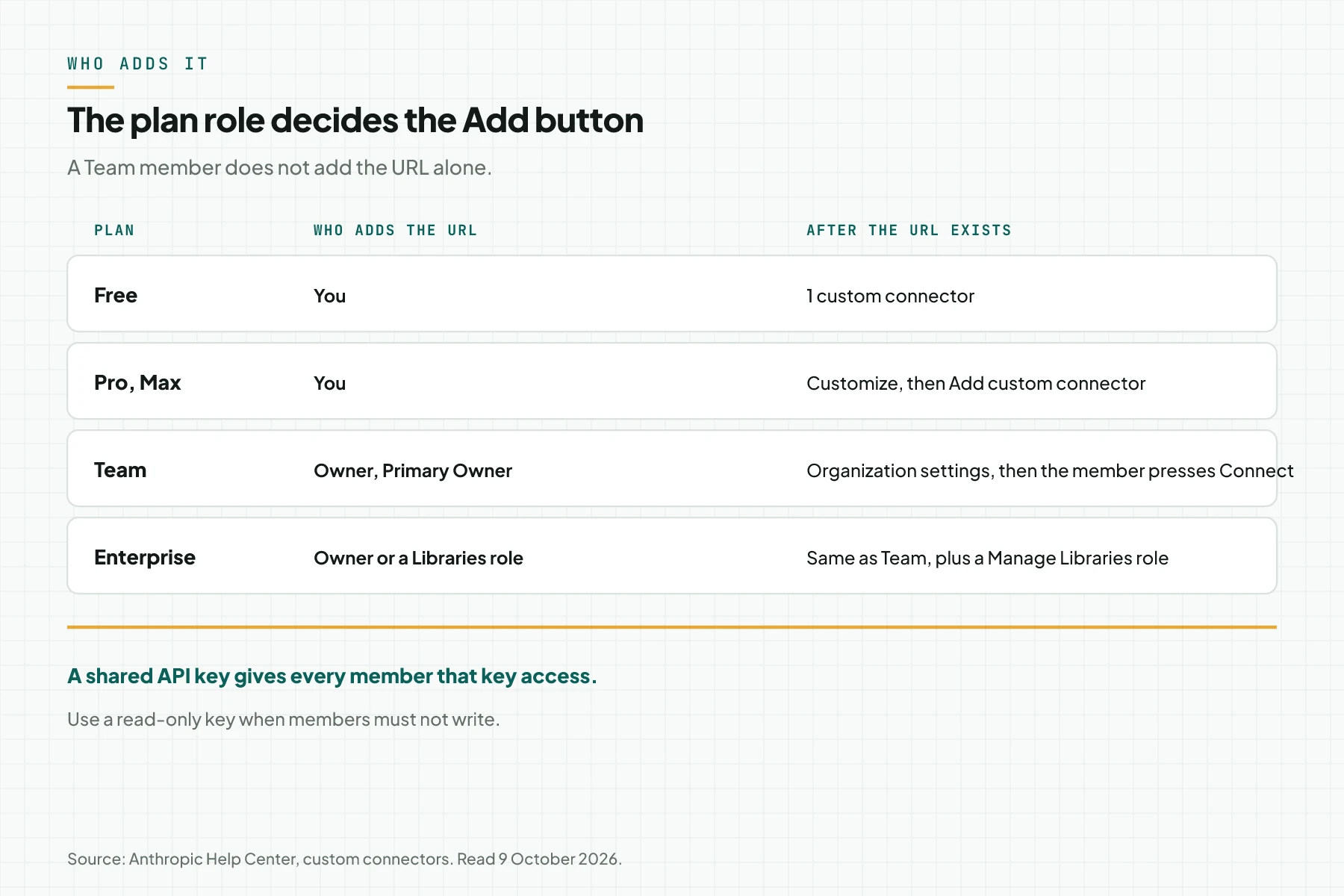
On Pro and Max, open Customize, then Connectors, then + Add, then Add custom connector. Enter the name people see. Paste the server URL. Continue.
On Team, only an Owner or a Primary Owner adds a connector for the organization. The path is Organization settings, Connectors, Add, Custom, then Web. A member opens Customize, Connectors, then presses Connect on the row labeled Custom.
Enterprise adds 1 more role. An Owner, a Primary Owner, or a custom role with Manage access to Libraries may add the URL. Members still connect their own accounts.
Free uses the individual menu, with a limit of 1 custom connector. One wrong URL uses up that limit. Remove the old connector before you add a replacement URL.
You do not edit a connector that already exists. The Help Center tells you to remove the connector, then add it again with the new details.
Requirements before you enter the URL
- 1 Claude account on a plan that is allowed to add a connector.
- 1 HTTPS URL that answers from a network outside the office.
- 1 test identity on the source system, not a production account that can delete data.
- 1 tool list: name, read or write, and the data the tool touches.
- An authentication decision: OAuth per person, or 1 shared key with a narrow right.
Step 1: Prove the URL is visible from the internet
Call the server URL from a network that is not the office VPN. Use a phone on mobile data, or ask a colleague outside the office to open the same URL. Record the response code and the time.
Treat it as a failure when only the laptop on your desk succeeds. Cowork does not use that laptop network card. MCP hosting on Cloudflare Workers, a VPS, or stdio compares Cloudflare Workers, a VPS, and stdio when you do not have a public address yet.
Check the transport too. A new server uses Streamable HTTP, usually on a path that ends in /mcp. Do not rely on legacy SSE for a new install.
Step 2: Add the connector for the plan role
A Team or Enterprise Owner adds the URL in Organization settings. A Pro, Max, or Free user adds the URL in Customize. Do not ask a Team member to paste the URL. That menu is not there for them.
Name the connector after the system, for example Sumber Jaya stock. This is the name that appears in the list. Paste the public URL. Press Continue.
Review the authentication settings Claude detected. Change them when your server uses another method. Then choose when people sign in.
Step 3: Choose sign-in, and narrow a shared key
Authentication has 3 choices: Sign in now, Sign in when needed, and No sign in. Choose Sign in now when each person must sign in with their own account before the connector is used.
When you do not choose No sign in, the OAuth client section appears. The choice the Help Center marks Recommended is Use Claude’s published identity. The other choices are Register automatically and Use your own OAuth client.
An APIAPIThe official door 2 systems use to exchange data, without anybody copying it by hand.Open the glossary key, a bearer token, or another fixed credential goes in Request headers. Claude stores the value encrypted and does not show it again after you save. Header names are limited. The Help Center cites authorization, x-api-key, and x-auth-token.
On Team and Enterprise, every member who uses that connector reaches the service with the same key. Limit the key to read access when members must not change data. Do not put an admin key in a shared header.
Step 4: Enable the connector, then turn off write tools for Research
In the conversation, press the + button at the lower left, then Connectors. Enable the connector for that conversation. Turn off tools that are not relevant in the Search and tools menu.
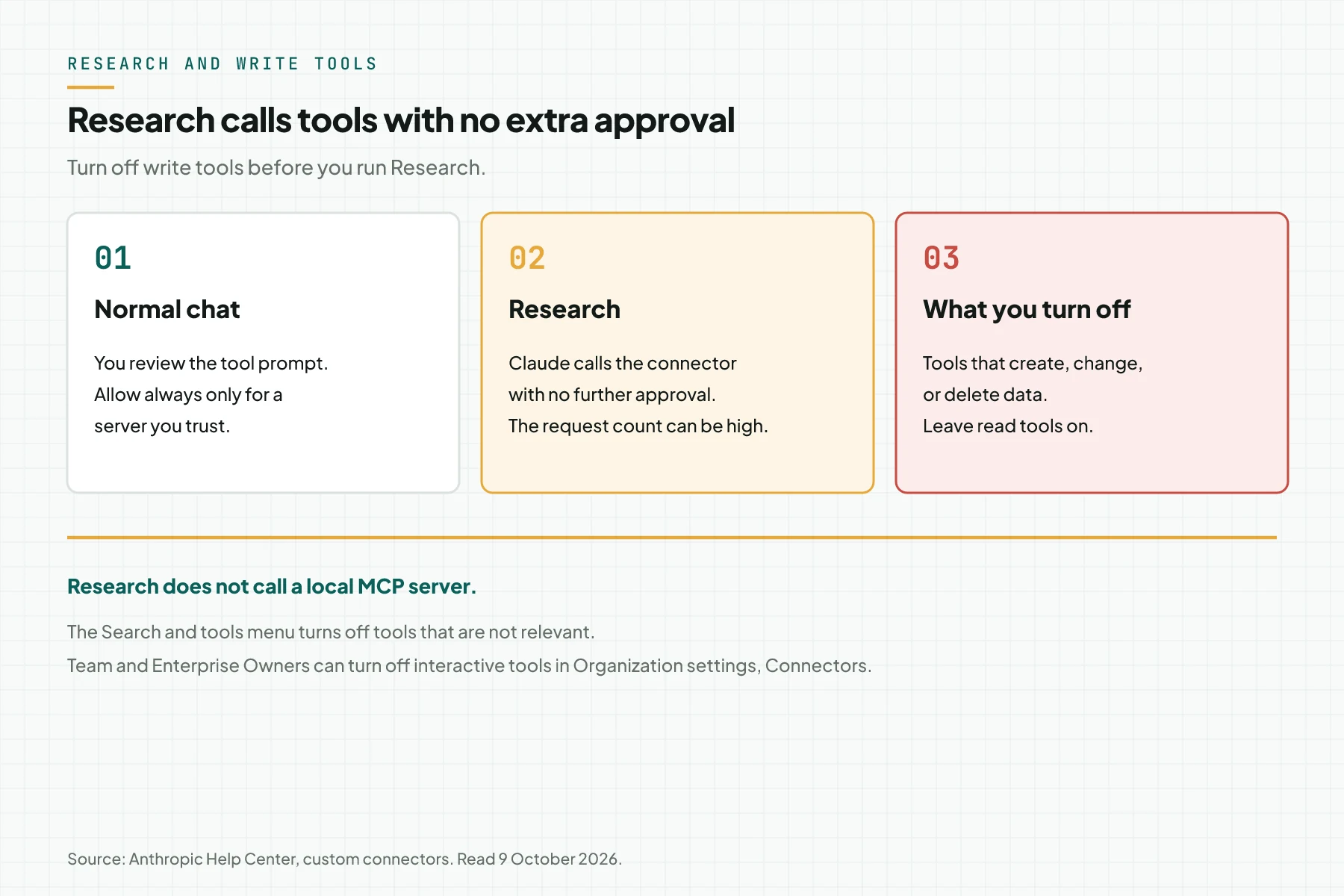
In a normal chat, review the tool approval request. Press Allow always only for a server and a tool that may run without supervision. The Help Center warns about prompt injection from a server you do not trust.
Research is different. The Help Center says Research can call connector tools automatically, with no further approval. Research also does not call a local MCP server. Turn off every tool that creates, changes, or deletes data before Research runs.
Team and Enterprise Owners can turn off tool calls that render an interactive connector. The control is in Organization settings, Connectors. Inline cards and the full-screen view use the same permissions as that connector.
The test is done when the test identity can only read, 1 write tool is refused or waits for approval, and Research does not see that write tool.
Worked example: Sumber Jaya stock
This is a simulation with dummy data. The shop Sumber Jaya has 1 stock spreadsheet. The tool baca_stok only reads. The tool ubah_stok changes a number. Both live on 1 public HTTPS server. Cowork does not hold the spreadsheet file.
| Time | Input | What is recorded | Output |
|---|---|---|---|
| 09:00 | URL tested from mobile data | HTTPS answer from outside the office | Continue and add the connector |
| 09:20 | Team Owner pastes the URL | Connector labeled Custom | Members see the Sumber Jaya stock row |
| 09:30 | Warehouse staff presses Connect | OAuth for the test account, not an admin key | Cowork sees baca_stok |
| 09:40 | Question: stock for SKU A-14 | 1 call to baca_stok | The stock number returns to the chat |
| 09:50 | Research about a supplier | ubah_stok turned off first | No write reaches the spreadsheet |
Stop at 09:00 when the phone gets no answer. Do not paste a URL that lives only on office Wi-Fi. Stop at 09:50 when Research can still see ubah_stok. Turn that tool off, then repeat the test.
Checklist before the connector is used for work
- The server builder keeps proof that the URL answers from outside the office. That proof is a timestamp and a response code.
- The Owner keeps the connector name, the URL, and the date it was added. A member does not keep the URL in a private note as a substitute.
- Each person signs in with their own account, or the Owner records that 1 shared key is in use and what that key can do.
- The tool list separates read and write. Write tools do not join Research.
- The test identity cannot delete production data. Keep the test identity name in the handover note.
- One person tries removing the connector in Customize, or the Owner removes it in Organization settings, then adds it again. Direct edit is not available.
- Stop when the URL fails from outside the office, or when Research can still call a write tool.
When to use the directory, and when to use your own URL
Use a directory listing when the service you need is already there and Anthropic review is enough for your company policy. You do not enter a URL.
Use your own URL when the system is an ERP, a spreadsheet, or an internal API that is not in the directory. Anthropic does not review that custom connector. The Help Center tells you to connect only to servers from organizations you trust.
Rama Digital recommendation: start with 1 public server, read tools for 1 system, and write tools that stay off during Research. Move to the directory only when you want other people to find your server inside Claude.
Questions people ask
Does Claude Cowork read a local MCP server on the laptop? No. The Help Center says the Claude Desktop local config file is not available in Cowork or on claude.ai. Cowork uses a remote connector through the Claude account.
Why does a URL I can open on my laptop fail in Cowork? Because Anthropic cloud calls the URL, not your laptop. A server on localhost or on a VPN is not reachable from there, unless the firewall allows Anthropic IP ranges.
How many custom connectors does Free allow? 1. The Help Center limits Free users to 1 custom connector. Paid plans do not use that limit sentence.
Can a Team member add the URL? No. An Owner or a Primary Owner adds the URL for the organization. A member presses Connect on a connector that already exists. Enterprise adds a role that may manage Libraries.
May Research use a tool that changes data? The Help Center tells you to turn off write tools when you use Research. Research calls connector tools with no further approval, and it can send many requests.
Can one Cowork MCP server serve another client? A server that speaks MCP can be called by another client that supports the same transport. The way you add it is different. Read the client comparison before you assume the Cowork menu applies in ChatGPT or Grok.
Next step
The limits above still apply. A private server with no public path will not show up in Cowork. MCP Server Development Service builds 1 MCP server for systems you already run, then tests it on 1 AI client. book a technical scoping session when you want to lock the source system, the tool list, and the role that adds the connector before work starts.
Sources
- Anthropic Help Center, custom connectors. Read 9 October 2026. Menus, the Free limit, the cloud path, and Research behavior.
- Build an MCP server for Claude. Read 9 October 2026. Streamable HTTP and the status of legacy SSE.
- what MCP is. The host, client, and server definitions.
- the comparison of 10 MCP clients. Limits of other clients as of 13 September 2026.
- MCP hosting on Cloudflare Workers, a VPS, or stdio. Public address choices for the server.