Direct answer: Legacy system AI integration without a rebuild means 1 small MCPMCPA standard that lets an AI program use your tools and data under clear permissions.Open the glossary server in front of the source system. Connect a source system to an AI agentAI agentAn AI program that performs work steps by itself, for example reading a message, drafting a reply, and recording the result.Open the glossary with 1 small MCP server in front of it, not with a rebuild. That server reads and writes through existing doors: an official APIAPIThe official door 2 systems use to exchange data, without anybody copying it by hand.Open the glossary, the database, or a periodic export. It uses screen automation only when the source system has no API. Start with read tools, then add write tools with human approval. Keep the source system ID as an explicit handle, and drop personal data columns before a tool result reaches the model.
Main condition: this pattern holds when the source system has at least 1 door a program can read. The system owner also provides a test account. Limit: this article does not clean up messy data in the source system, and does not replace a vendor licence. A system with no API and no export can only be read through fragile screen automation; we mark that door as the last option.
We wrote this pattern on 13 September 2026 from the official MCP specification, revision 2026-07-28 and the Cloudflare MCP tool guidance. Law 27/2022 (the PDP Law) covers the personal data filter section. The example in this article uses dummy, labelled data, not real customer data.
The problem: "migrate first" stops the AI project
A head of IT wants an AI agent to read stock, order status, or customer data. The system vendor then answers with a proposal to replace the ERPERPOne system that keeps the sales, purchasing, stock, and finance of a company in one set of data.AI-native ERP build or CRM. The AI project stops at the migration budget, not at the actual, smaller need.
8 years of data often live in the source system: an ERP, Odoo, a CRM, an internal database, or a spreadsheet staff use every day. Migrating that much data is risky and takes months. The actual AI agent need is often only reading a few fields and writing 1 or 2 things with approval.
The MCP glossary entry explains the term in short, and what MCP is gives a full explanation for new readers. The pattern in this article needs no migration; it only adds 1 small layer in front of the source system.
This pattern already runs on an accounting system. The Accurate Online integration with OpenClaw (in Indonesian) uses the same pattern. An operational chat creates an invoice without replacing the accounting system already in place.
The adapter pattern: 1 small server in front of the source system
MCP (Model Context Protocol) connects an AI application to existing data sources and tools; MCP does not replace that system. Source: MCP specification 2026-07-28.
The pattern we use puts 1 small server, an adapter, in front of the source system. The adapter exposes a few named tools, not the source system's whole API schemaSchemaExtra description inside page code that tells a search engine what the page is, for example an article, a service, or a question and answer.Open the glossary. Cloudflare states the same practice: build tools per user goal. Split work across several small servers with narrow permissions so each stays easy to audit. Source: Cloudflare MCP tool guidance.
An MCP server is designed to be easy to build and compose. A server cannot see the user's full conversation with the AI agent; it only receives the arguments of the tool it is called with. Clients such as ClaudeClaude ProThe paid subscription for the Claude AI assistant from Anthropic. It unlocks connectors to outside tools.Open the glossary, OpenClaw, or Hermes Agent 0.20.3 and MCP SDK 2.x (in Indonesian) call the same tools the same way. Source: MCP architecture 2026-07-28.
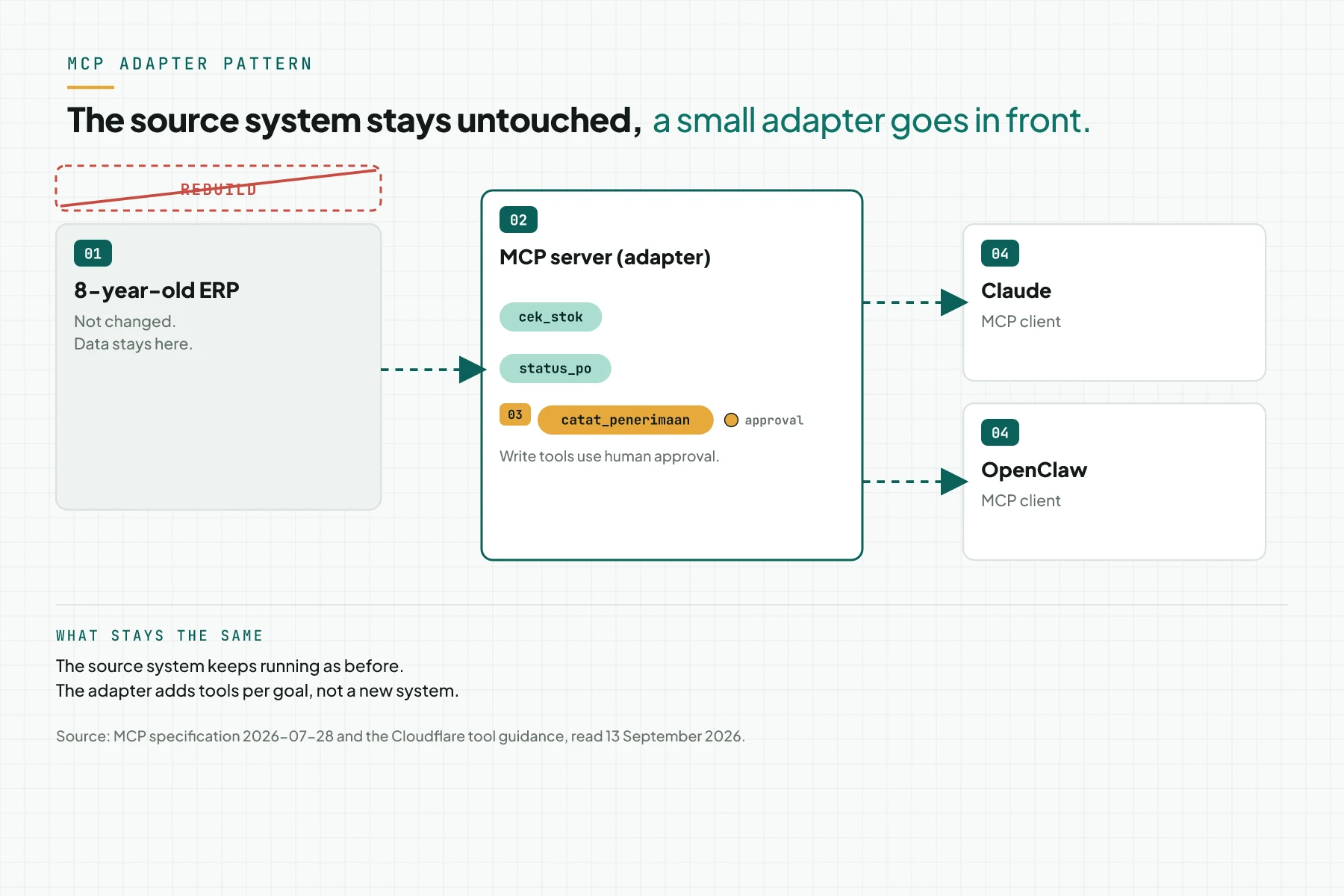
In the figure above, the 8-year-old ERP keeps running with no change. The adapter exposes 3 tools: cek_stok and status_po to read, and catat_penerimaan to write with approval. The source system does not know which AI client is asking; it only answers the same API or database calls as before.
4 access doors into the source system
The adapter picks 1 of the 4 doors to read and write to the source system. The order runs from the freshest data to the most fragile door.
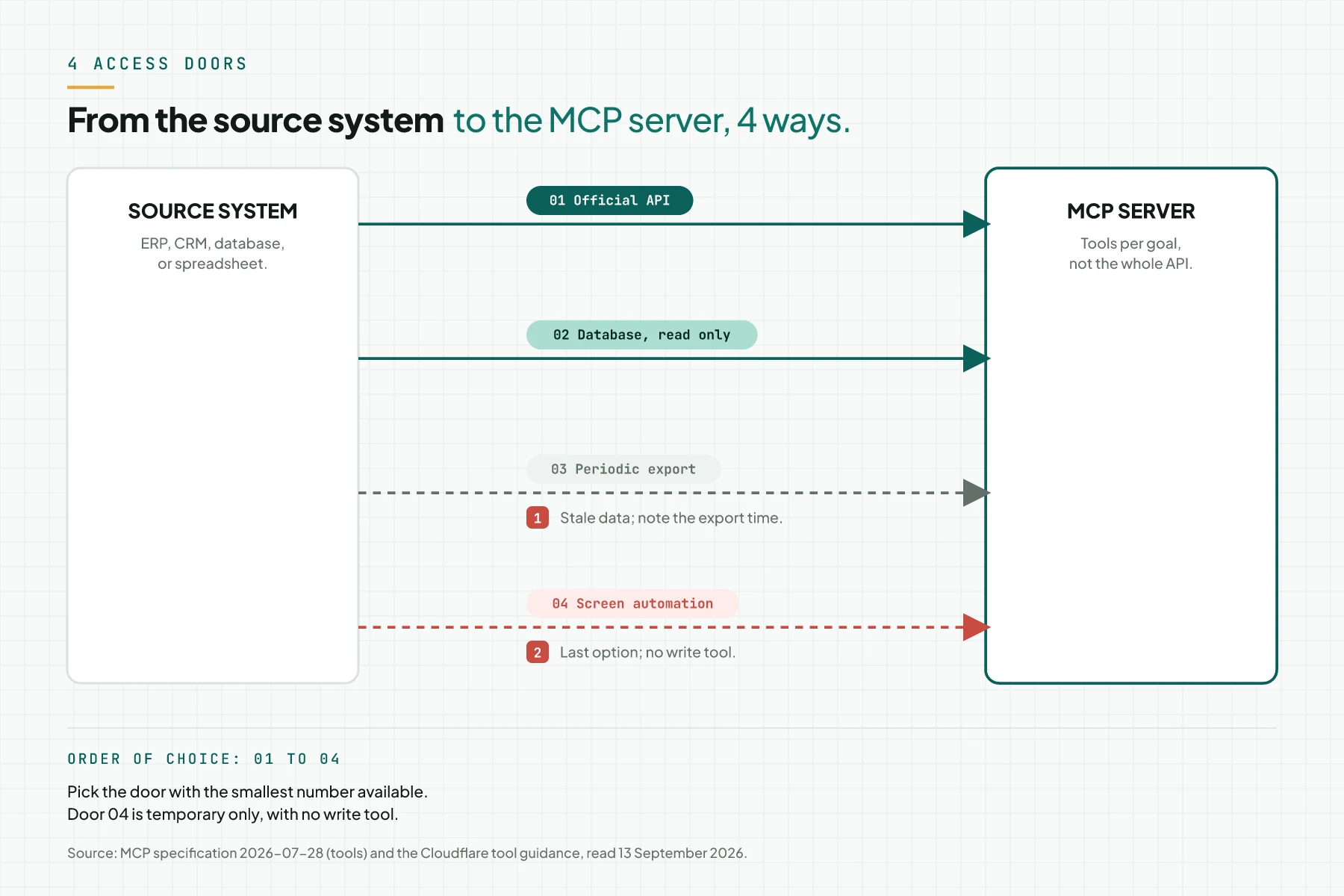
1. Official API
The first door is the source system's official API, for example Odoo, a CRM SaaS, or a point-of-sale app with an API. This door gives live data and supports write tools with approval. The adapter respects the source system's rate limit and validates every input before it calls the API. Source: MCP tools specification, security section.
2. Direct database
The second door is the source system's database directly, for example MySQL or PostgreSQL behind an internal app. Use a read-only account with a limited view, not free SQL access. A database tool takes fixed parameters, for example query_terbatas, with arguments set in advance, not a free-form query from the model.
3. Periodic export (CSV or spreadsheet)
The third door is a periodic export, for example a daily CSV file or a synced spreadsheet. Data through this door is always stale by the export schedule. Write the export time in every tool result, so the user knows the data is not live.
4. No API and no export
The fourth door applies only when the source system has no API and no export: screen automation that reads the app's display. This door is fragile; the automation breaks the moment the screen changes. This door is the last option, and it never gets a write tool.
| Door | Example system | Data freshness | Risk | Write tool? | When to pick it |
|---|---|---|---|---|---|
| Official API | Odoo, a CRM SaaS, a point-of-sale app with an API | Live | Vendor rate limits; API version changes | Yes, with approval | Always first when it exists |
| Direct database | MySQL or PostgreSQL for an internal app | Live | A bad query loads the system; access too broad | Not in stage 1 | When no API exists and the DBA gives a read-only view |
| Periodic export | Daily CSV, a synced spreadsheet | Stale, by schedule | A stale answer; note the export time in the result | No | When the API and database stay closed |
| Screen automation | A desktop app with no API | Slow | Fragile; breaks when the screen changes | No | Last option; temporary |
Order of work: read first, write with approval later
Connect the source system to the AI agent in stages, over 4 weeks. Do not open a write tool on day 1.
- Week 1: 3 read tools. Build 3 tools that read the data staff ask about most, for example stock or order status.
- Week 2: test with staff. Staff use the read tools every day and report any result that is wrong or slow.
- Week 3: 1 write tool with approval. Add 1 write tool. It asks for human approval before it runs, and carries a confirmation argument with an
idempotencyKeyso a repeated call does not write twice. - Week 4: audit log and handover. Log who, when, and what arguments for every write tool call. Hand the SOP to the team once the audit log has run for 1 week.
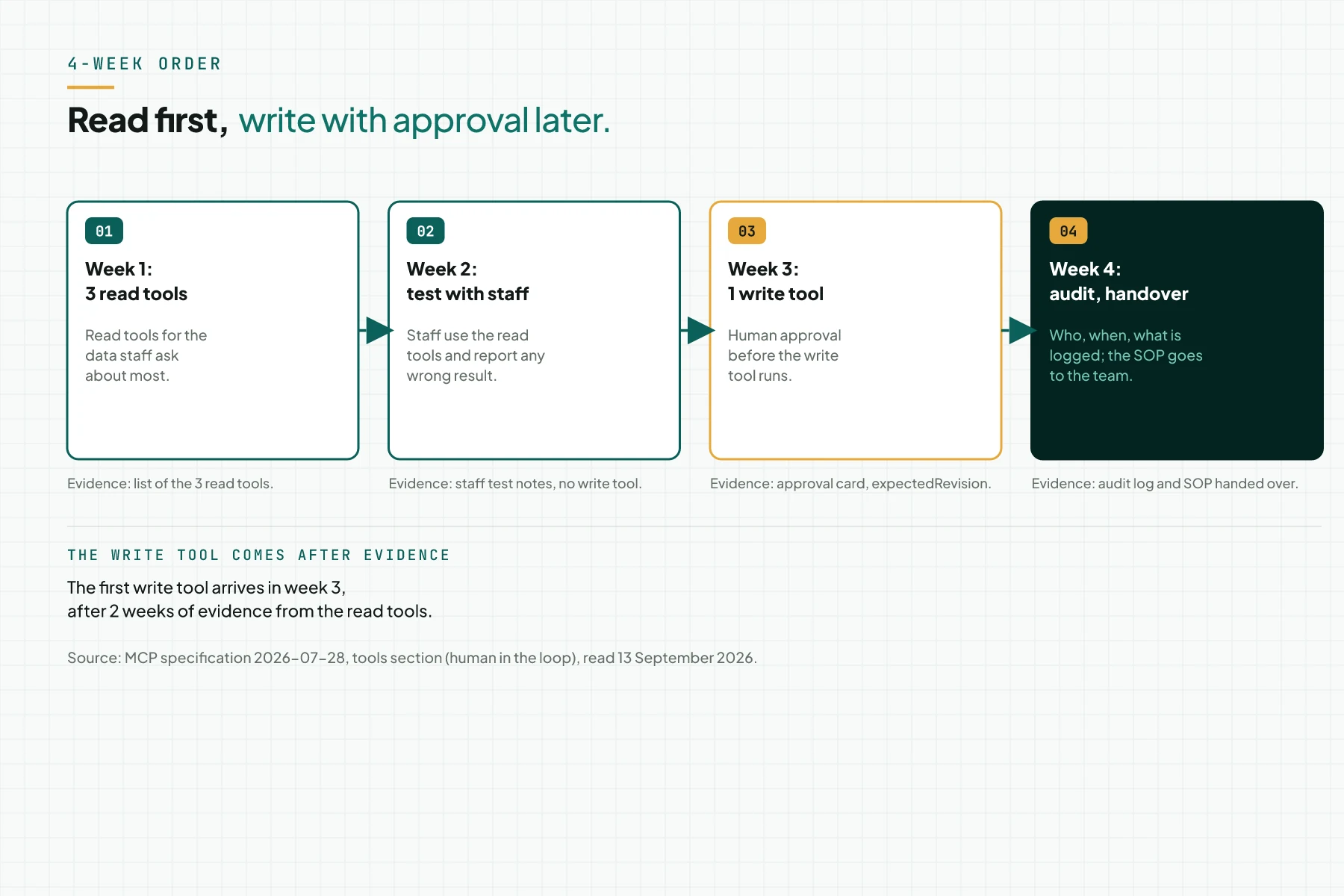
This order follows the official guidance: there should always be a human in the loop who can deny a risky tool call. Source: MCP tools specification, security section.
IDs, versions, and state: explicit handles, not sessions
MCP has no session at the protocol level. Every tool call stands alone; the server does not automatically remember an earlier call. Source: MCP tools specification, stateful tools section and MCP changelog 2026-07-28.
Because of that, the adapter carries state through an explicit handle passed as a tool argument, not through a session. Use an ID that already exists in the source system as the handle: a PO number, a customer code, or a SKU. Do not create a new ID inside the adapter; a new ID adds 1 mapping table that needs constant upkeep.
A write tool should carry an expectedRevision argument. The adapter refuses to write when the source system's revision has changed since the data was last read. This stops 1 write tool from overwriting someone else's change. On our own systems, this pattern of a confirmation argument plus an idempotencyKey stops a duplicate write when 1 call is retried.
If the adapter must create its own handle, for example for a long-running process, make that handle random. Bind it to 1 user, and give it an expiry. Do not treat possession of a handle as proof of identity. Source: MCP security guidance.
Filter personal data before results reach the model
Law 27/2022 (the PDP Law) names display, disclosure, and transfer as parts of personal data processing. A read tool that shows customer data to an AI model falls under that processing. Source: Law 27/2022, Article 16.
When the AI model runs on a server outside Indonesia, a tool result that carries personal data becomes a cross-border transfer. The PDP Law allows that transfer under 1 of 3 conditions. The destination country has equal protection, a binding safeguard exists, or the data subject consents. The simplest way to handle this in the adapter is a column filter. Source: Law 27/2022, Article 56.
The source system owner still acts as the Controller. It must supervise every party that takes part in processing, including the adapter server vendor as a Processor. Source: Law 27/2022, Articles 35 to 39.
Drop the personal data columns a tool result does not need before that result reaches the model. A national ID number, a phone number, an address, and a birth date are the 4 columns to drop most often. Keep those columns in the source system, and let the adapter forward only what the task truly needs.
Example: an 8-year-old ERP with 2 tools
The following simulation uses dummy data: an 8-year-old ERP connected through its API, with 2 read tools and 1 write tool.
| Input (warehouse staff request) | Recorded (MCP server and source system) | Output (what happens) |
|---|---|---|
| "Stock for SKU BRG-0091 in warehouse B?" | cek_stok {sku: "BRG-0091", gudang: "B"}; the ERP API is called; result 130; no purchase price | "130 units in warehouse B, as of 10:42." |
| "Status of PO 2026-0712?" | status_po {po: "2026-0712"}; the handle is the ERP's PO number; result "partly received" | "PO 2026-0712: 2 of 3 lines received." |
| "Record receipt of 50 units of BRG-0091 for that PO." | catat_penerimaan {po, sku, qty: 50, expectedRevision: 7}; status "waiting for warehouse lead approval" | An approval card appears for the warehouse lead |
| The warehouse lead approves | The ERP API writes; the revision moves from 7 to 8; the audit log records the actor, time, and arguments | "Receipt recorded. PO 2026-0712 is complete." |
The SKU, PO number, quantity, and revision number in the table above are dummy data. The ERP vendor name is not named.
Checklist before you connect a source system
This checklist continues into the MCP server checklist before you build, which covers preparation before the project starts.
- List the doors available for each source system: API, database, export, no API. Owner: head of IT. Evidence: a system-by-door table.
- Ask the system owner for a read-only test account. Owner: system owner. Evidence: a test account with minimum rights.
- Write 3 read tools with the handle set to the source system ID. Owner: developer. Evidence: a list of tools and arguments.
- Mark the personal data columns to drop from tool results. Owner: data lead. Evidence: a column list.
- Name the approver for each write tool and its confirmation argument. Owner: department head. Evidence: an approval SOP.
- Record the source system API version and its change schedule. Owner: IT. Evidence: a version number in the tool documentation.
- Stop criterion: if only door 04 (screen automation) is available, limit scope to read tools for now and plan an export.
Frequently asked questions
Do I have to replace my ERP to use AI? No. An MCP server reads and writes through the API or database that already exists. The ERP, Odoo, or CRM keeps running with no migration.
What if the system has no API? Use a read-only database or a periodic export. Screen automation is only the last option, and it never gets a write tool.
Can the AI damage data in the source system? Read tools never change data. Write tools use human approval, a confirmation argument, and expectedRevision before they write.
How does MCP remember the customer being discussed? MCP does not use sessions. A customer ID or another source system ID is sent as an argument on every tool call.
How is this different from a plain API integration? MCP standardises the AI client side and puts approval in the host application. A plain API still runs behind the MCP server, without that client standard.
Next step
This adapter pattern does not clean up messy data in the source system, and does not replace the source system's vendor licence. Read MCP vs plain API vs plugin vs RAG if you are still weighing an integration pattern. Use the MCP server checklist before you build before you start the project. If your team wants us to build this adapter, start with Send your brief, or Book a free consultation to discuss your source system.
Sources
- MCP specification 2026-07-28: connecting AI applications to existing data sources and tools
- MCP architecture 2026-07-28: servers that are easy to build and compose
- Cloudflare MCP tool guidance: tools per goal, small servers with narrow permissions
- MCP tools specification 2026-07-28: human in the loop, rate limiting, input validation
- MCP changelog 2026-07-28: the revision that removed protocol sessions
- MCP security guidance: state handles that are random, user-bound, and expirable
- Law 27/2022 (PDP Law): processing, supervision, Processor, and data transfer