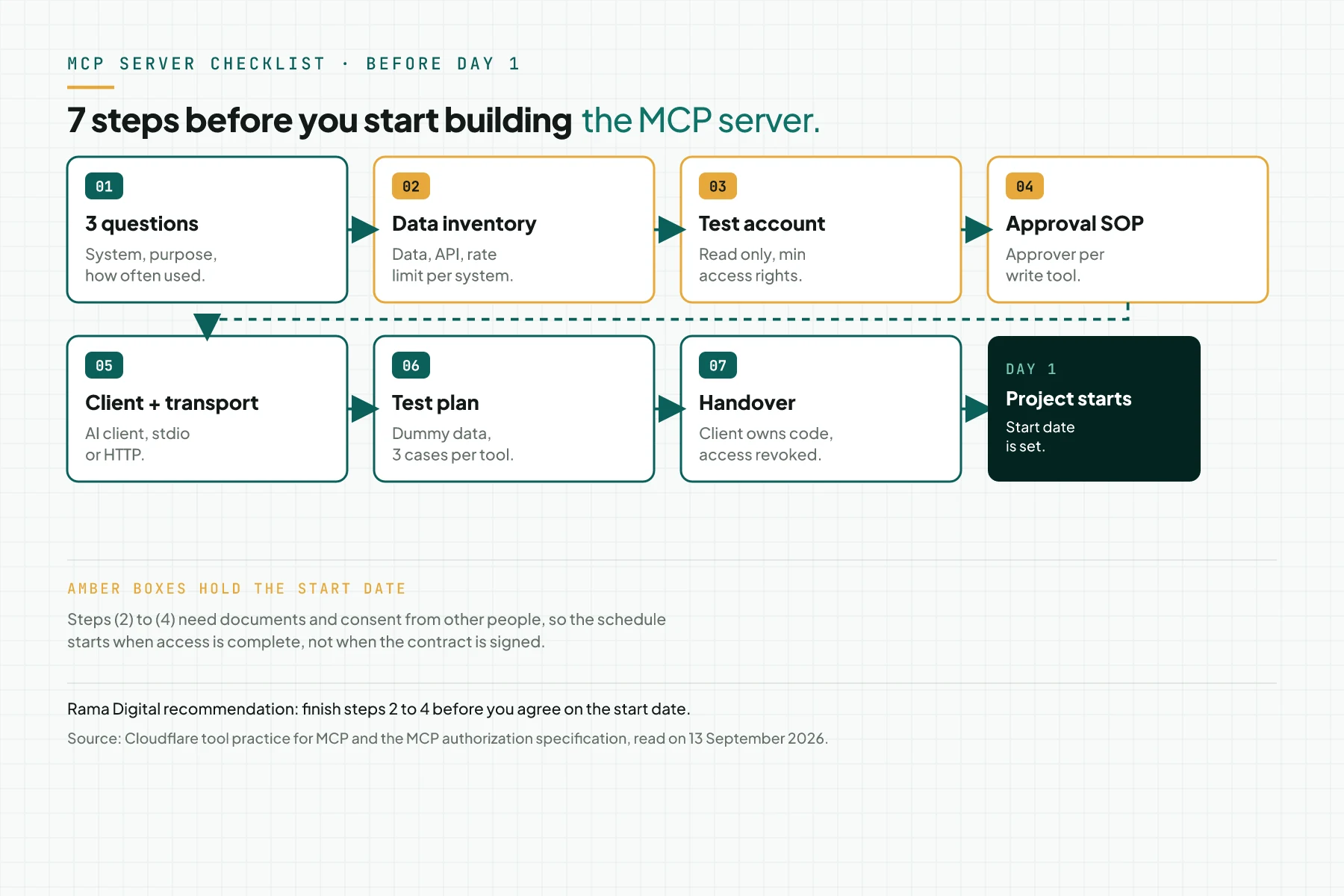
Direct answer: Before you build an MCPMCPA standard that lets an AI program use your tools and data under clear permissions.Open the glossary server, finish 7 preparation steps. Write the 3 questions each tool must answer, and build a data and APIAPIThe official door 2 systems use to exchange data, without anybody copying it by hand.Open the glossary inventory for each source system. Then prepare a test account with minimum access rights, and write the approval SOP for write tools. Choose the AI client and the transport, plan tests with dummy data, and set the handover.
Main condition: this checklist applies to a first MCP server with 1 to 2 source systems. Limit: this checklist does not replace a security audit; read the MCP server security article for the full controls. It also carries no prices; read the MCP server cost article for the scope formula. The project schedule starts when the source system access is complete. Steps 2 to 4 decide the start date, not the day the contract is signed.
We wrote this checklist on 13 September 2026. Sources: the MCP specification revision 2026-07-28, the Cloudflare tool guidance, OWASP for AI agents, and Law 27/2022 (the PDP Law). The examples in this article use labelled dummy data, not client data.
The problem: day 1 is spent waiting for access
In our experience, MCP server projects are delayed by access, not by code. MCP connects existing systems to an AI agentAI agentAn AI program that performs work steps by itself, for example reading a message, drafting a reply, and recording the result.Open the glossary through 1 small server. Read the MCP explanation for business owners if the term is new to you.
Without a checklist, test credentials do not exist yet, API documentation cannot be found, and the data owner is unclear on day 1. A project scheduled for 5 business days turns into 3 weeks. For the underlying terms, also read our MCP glossary entry.
This checklist follows the same pattern as preparation before you install an AI agent on a production server. Read the checklist before installing OpenClaw on a production server (Indonesian source) for a similar pattern on the OpenClaw client.
What you need before you start
- Access to request a test account on each source system, not the test account itself.
- The process owner name for each source system, who can answer the 3 questions in step 1.
- 1 shared, editable document to record the data inventory and the approval SOP.
- A list of roles who can approve write actions, such as a division head or a supervisor.
- Time from each source-system owner to create a test account within 1 to 2 business days.
Step 1: Write the 3 questions or jobs it must answer
Write the 3 questions or jobs the MCP tools must answer, before you write code. Use this format: who asks what, from which system, and how often. Cloudflare recommends 1 tool per user goal, not 1 large tool that wraps the full API schemaSchemaExtra description inside page code that tells a search engine what the page is, for example an article, a service, or a question and answer.Open the glossary of a source system.
Mark which questions need a write action, for example drafting an invoice or changing an order status. Delay write tools to project phase 2 when you can, because a write tool needs the approval SOP from step 4. Evidence for this step: 1 table with the question, the source system, and how often it runs.
Source: the Cloudflare MCP tool design practice, read on 13 September 2026.
Step 2: Inventory the data and API of each source system
Build 1 inventory row for each source system: system name, version, access door (API, database, or an export file), documentation link, and rate limit. Mark the personal data columns on each system, including specific personal data such as health or biometric data, and identity columns such as the national ID.
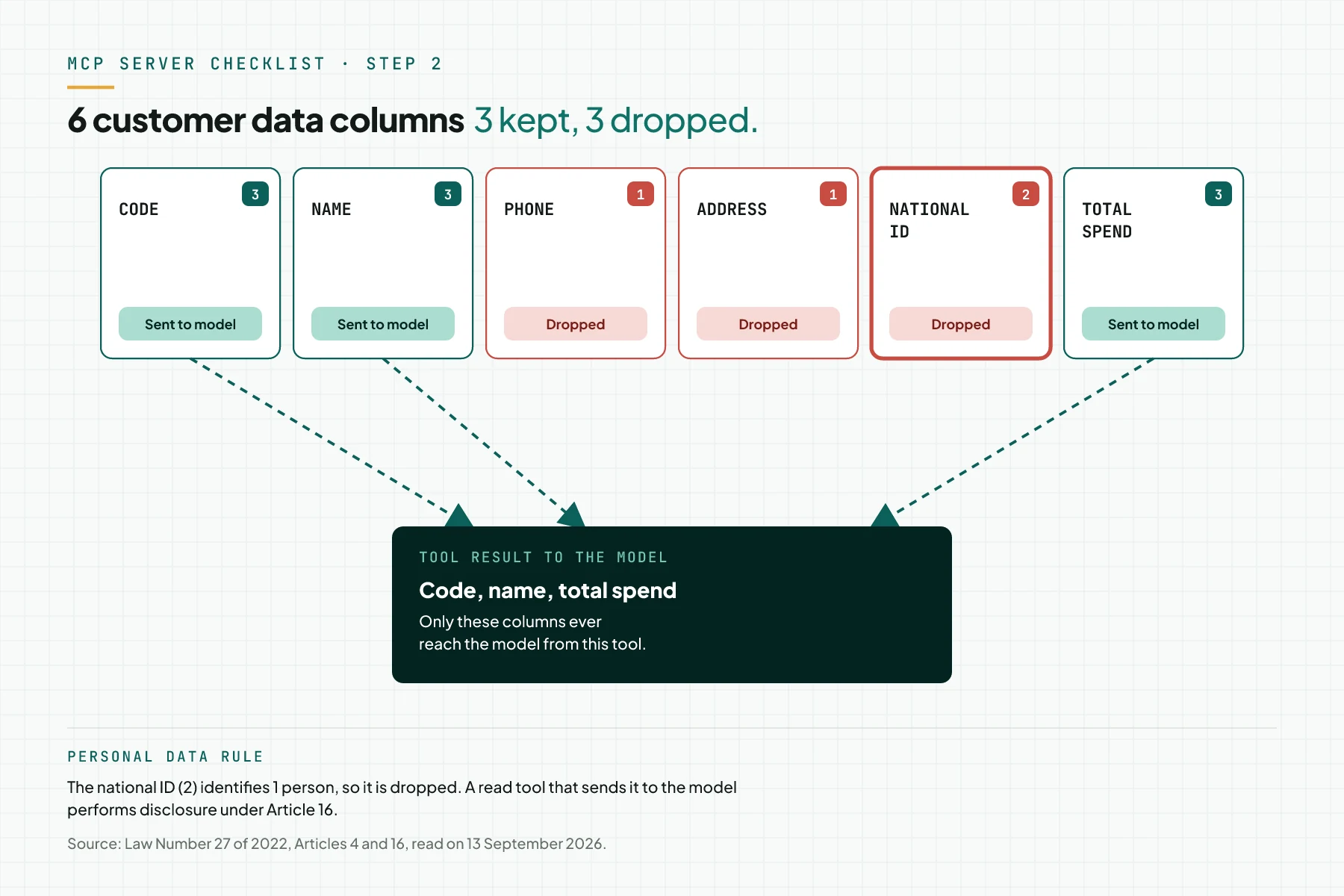
The PDP Law Article 4 splits personal data into specific and general data. Article 16 names the display or disclosure of data to another party as part of processing, and that processing must stay limited and purpose-bound. A read tool that sends a personal data column to the AI model performs disclosure under that article. Mark the column before you build the tool, not after.
When data is static, for example a price list or a product schema, consider a URI-addressed resource instead of a tool. The MCP specification separates the two. Evidence for this step: 1 inventory sheet per system, and 1 list of personal data columns.
Source: Law Number 27 of 2022 on Personal Data Protection, the MCP specification 2026-07-28, Resources section.
Step 3: Prepare a test account and minimum access rights
Create a read-only test account for the first project week, separate from the write account used in phase 2. The MCP specification calls for minimum access rights: the server names the smallest scope it needs, and the client asks for more only when required.
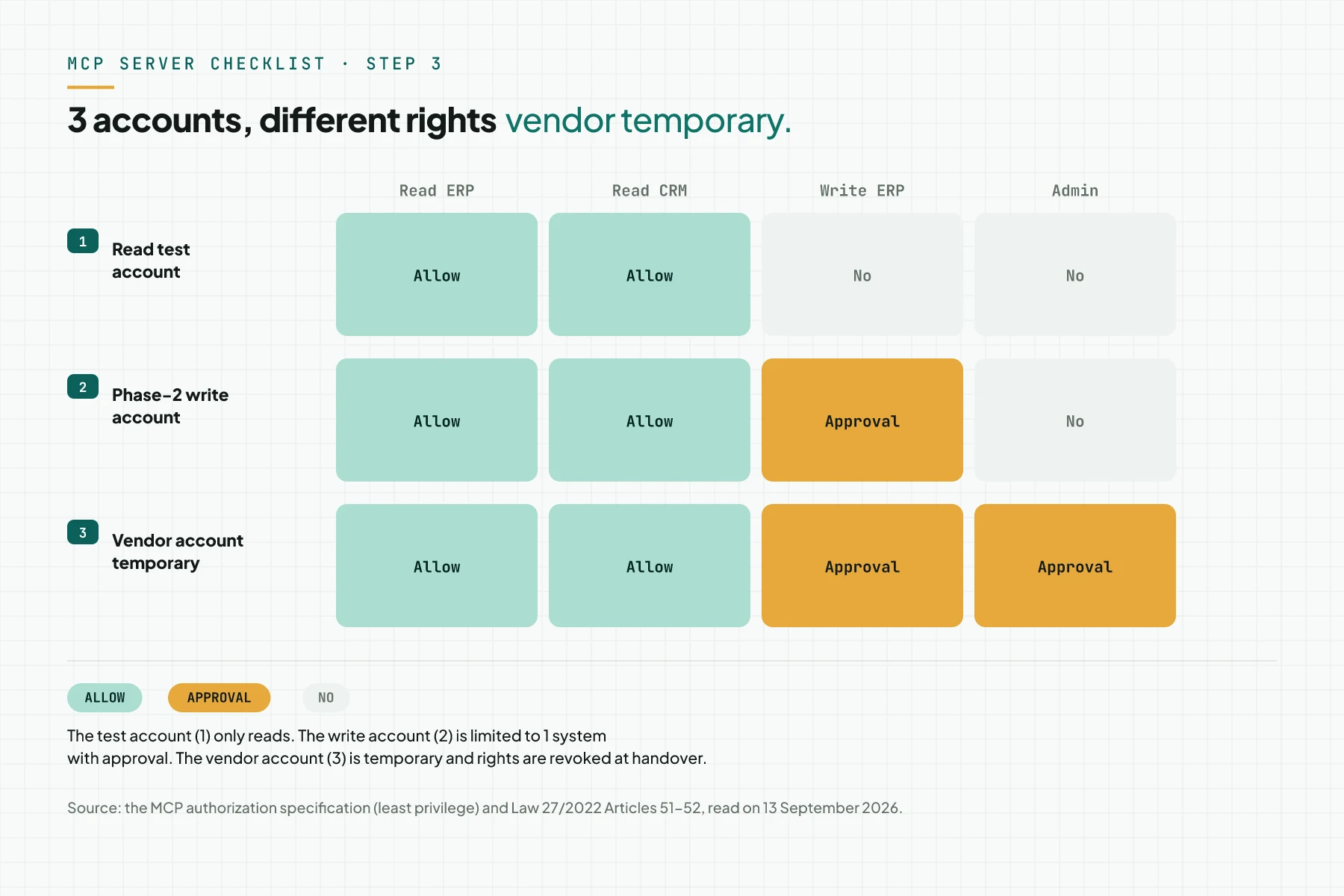
For a stdio transport, credentials pass through environment variables on the server, not through tool parameters. For an HTTP transport, use an API key or OAuth 2.1; this decision joins step 5. If an outside vendor builds your server, Law 27/2022 Articles 51 and 52 name the vendor a Processor that processes data only on your instruction. Put a written agreement in place before you grant access.
Evidence for this step: an active test account tested with a login. Add 1 access matrix that names which account may do what.
Source: the MCP specification 2026-07-28, Authorization section, Law 27/2022 Articles 51-52.
Step 4: Write the approval SOP and the owner of each write tool
The MCP specification states there should always be a human in the loop who can deny a write tool call. OWASP adds that a high-impact action needs human approval before it runs, as a mitigation against excessive permissions and autonomy in an AI agent.
Write 1 SOP page for each write tool. Name the approver by job title, set the approval time limit, and state what the prompt and the audit log show. The MCP tools specification recommends logging tool use for audit; we apply it on the server side.
Law 27/2022 Article 46 sets a notice duty for a data protection failure. The Controller must tell the data subject and the authority within 3 x 24 hours, stating when and how it happened. An MCP audit log helps answer that question if a failure occurs.
Evidence for this step: 1 SOP per write tool, with the approver name and the approval time limit.
Source: the MCP specification 2026-07-28, Tools section, OWASP GenAI, LLM06 Excessive Agency, Law Number 27 of 2022 Article 46.
Step 5: Choose the AI client and the transport
The MCP specification defines 2 standard transports: stdio for a local process on 1 machine, and Streamable HTTP for a remote server through 1 endpoint. Your team's AI client choice, for example ClaudeClaude ProThe paid subscription for the Claude AI assistant from Anthropic. It unlocks connectors to outside tools.Open the glossary, ChatGPT, OpenClaw, or Hermes Agent, decides the transport and the matching authentication method.
MCP has gone through several specification revisions; the client and the server need to sit on a compatible protocol era to talk to each other. Read the 5 MCP versions article (Indonesian source) if your team uses an older client or SDK.
Write the client, transport, and authentication decision on 1 page. Evidence for this step: a written decision the team agreed on, not a verbal discussion that changes mid-project.
Source: the MCP specification 2026-07-28, Transports section, read on 13 September 2026.
Step 6: Plan tests with dummy data
Write 3 test cases for each tool: a normal case, a case where data is not found, and a case with a badly formatted input. The MCP specification separates a protocol error from a tool execution error. It flags the execution error with isError so the model can self-correct its input.
Add 1 prompt injection case for each read tool that returns free text from a source system. An example is a customer note or a product description. OWASP separates direct injection from a user prompt and indirect injection from an external source. It recommends you restrict the model's access rights to the minimum as a mitigation.
On our own MCP systems, we test the server with sample data we create, not client data, before the server serves a production account. Evidence for this step: 1 test case table, and 1 dummy data file approved by the data owner.
Source: the MCP specification 2026-07-28, Tools section, OWASP GenAI, LLM01 Prompt Injection.
Step 7: Set handover, code ownership, and access revocation
Set this before the project starts: the code, the server, and the credentials become yours from handover, not the vendor's. Under our service rules, our access is revoked after a 7-business-day repair period following handover, and 1 round of revision applies within that period.
Prepare the handover documentation: a tool list, the approval SOP for each write tool, and how to add a new AI client. Add how to rotate an API key if one leaks, and a recheck schedule for when a source system changes its API version.
Evidence for this step: 1 handover record, and 1 list of vendor access that has been revoked.
Table: 7 steps, owner, evidence, blocking or not
The table below summarises the owner and the evidence for each step. The last column marks the steps that hold the project start date, because the schedule starts when access is complete.
| Step | Owner | Evidence | Holds the start date |
|---|---|---|---|
| 1. 3 questions or jobs | Process owner | Table of question, system, frequency | No |
| 2. Data and API inventory | Head of IT | Inventory sheet, personal data column list | Yes |
| 3. Test account, minimum access | System owner | Active test account, access matrix | Yes |
| 4. Write-tool approval SOP | Division head | 1 SOP page per write tool | Yes, if a write tool exists |
| 5. AI client and transport | Head of IT | Written decision | No |
| 6. Dummy-data test plan | QA team | Test case table | No |
| 7. Handover, access revocation | Business owner | Handover record, revoked access list | No |
Example: a 1-day kickoff for a distributor with 2 systems
The simulation below uses dummy data for a distributor with an ERP systemERPOne system that keeps the sales, purchasing, stock, and finance of a company in one set of data.AI-native ERP build and a WhatsApp CRM. The system names, frequency, and rate limit are labelled examples, not client data.
| Work step | Recorded | Status that day |
|---|---|---|
| 1. 3 questions | check_stock from ERP, 40 times a day; order_status from CRM, 25 times a day; draft_confirmation from CRM, write, 10 times a day | 2 read tools for phase 1; 1 write tool for phase 2 |
| 2. Inventory | ERP: official API, documentation exists. CRM: official API, rate limit 60 per minute. Phone and address columns marked as personal data | Inventory sheet for 2 systems complete |
| 3. Test account | ERP read account active. CRM test account not created yet, waiting on the CRM admin | Start date delayed 2 business days until the CRM account is ready |
| 4. Approval SOP | The draft_confirmation tool: approver is the CS supervisor, 1-hour time limit, prompt shows the draft confirmation | 1-page SOP approved by the CS supervisor |
| 5. Client and transport | Client OpenClaw on the company server; Streamable HTTP transport; API key authentication for 1 team | Written decision complete; hosting discussed separately |
The 2-business-day gap on row 3 comes from the CRM test account that did not exist yet, not from code that was not ready. This pattern matches our experience: access holds the start date more often than code does.
Short checklist to print
- The 3 questions or jobs are written with the system and frequency. Owner: process owner. Evidence: a 3-row table.
- API documentation for each source system is found, and its version is recorded. Owner: Head of IT. Evidence: the documentation link.
- Personal data columns are marked per system, including specific personal data. Owner: the data lead. Evidence: the column list.
- A read-only test account is active, and has been tested with a login. Owner: system owner. Evidence: a login screenshot.
- The 3-account access matrix is approved. Owner: Head of IT. Evidence: a signed matrix.
- The approval SOP for each write tool is complete, with the approver named by job title. Owner: division head. Evidence: the 1-page SOP.
- The AI client, transport, and authentication are decided. Owner: Head of IT. Evidence: a 1-page decision.
- The dummy data for testing is approved by the data owner. Owner: QA team. Evidence: the dummy data file.
- Stop criterion: if steps 2 to 4 are not done, do not set a project start date. The schedule starts when access is complete.
Frequently asked questions
How long does preparation before day 1 take? The time depends on how fast the source system creates a test account. The other steps often finish in 1 kickoff day. The project schedule starts when access is complete, not when the contract is signed.
Do I need an approval SOP for read tools only? No, not for approval on every tool call. You still need a list of filtered columns from each system, and an audit log that records tool use.
Who provides the dummy data for testing? The data owner on your side provides the dummy data. On our own MCP systems, we test with sample data, not real customer data, and we recommend the same pattern for your project.
Can the vendor account be permanent? No. Vendor access is temporary, and is revoked after a 7-business-day repair period following handover. The code, the server, and the credentials stay yours.
What if the system has no API documentation? Prepare the test account early, so the day-1 audit can map the existing endpoints. A system without an official API can also use read-only database access or a scheduled export file.
Next step
This checklist does not replace a security audit, and carries no prices; read the security and cost articles linked above for those parts. If steps 1 to 3 are already done on your side, our team can start the day-1 audit without waiting on access. Start through the MCP Server Development Service. Send your brief, or Book a free consultation to review your checklist before the project starts.
Sources
- Cloudflare: Model Context Protocol for AI agents
- MCP Specification 2026-07-28: Resources
- MCP Specification 2026-07-28: Authorization
- MCP Specification 2026-07-28: Tools
- MCP Specification 2026-07-28: Transports
- OWASP GenAI: LLM06 Excessive Agency
- OWASP GenAI: LLM01 Prompt Injection
- Law Number 27 of 2022 on Personal Data Protection