Direct answer: Business MCPMCPA standard that lets an AI program use your tools and data under clear permissions.Open the glossary server examples follow 1 pattern: 2–3 read tools that answer daily questions, 1 write tool with human approval, and a personal data filter. The 10 examples here cover CRM, ERPERPOne system that keeps the sales, purchasing, stock, and finance of a company in one set of data.AI-native ERP build, warehouse, finance, WhatsApp CRM, spreadsheet, database, SOP documents, scheduling, and content. On our own systems, 3 servers serve content, quotations, and scheduling with the same pattern.
Main condition: the examples hold when the source system has a readable APIAPIThe official door 2 systems use to exchange data, without anybody copying it by hand.Open the glossary or database. Tool names are proposals; the annotation and approval pattern follows specification 2026-07-28, read on 13 September 2026. Limit: this article has no code, no prices, and no promised results. Examples use dummy data; no client names. Cost per example is in the MCP server cost article.
We wrote this article on 13 September 2026 from the Cloudflare Agents documentation, the MCP tools specification, and Law 27/2022. Every customer name, lead, and code in the examples is labelled dummy data.
The problem: "AI for business" without a clear tool list
AI proposals often stop at the promise "can connect to every system" without naming 1 tool. Without a tool list, a business owner cannot judge scope, risk, or who approves a write action. The article what MCP is explains the host, client, and server concept. This article continues with 10 named MCP server examples, so the comparison becomes concrete. Full terms are in the MCP glossary entry.
The 1-server pattern: 2–3 read tools, 1 write tool, 1 data filter
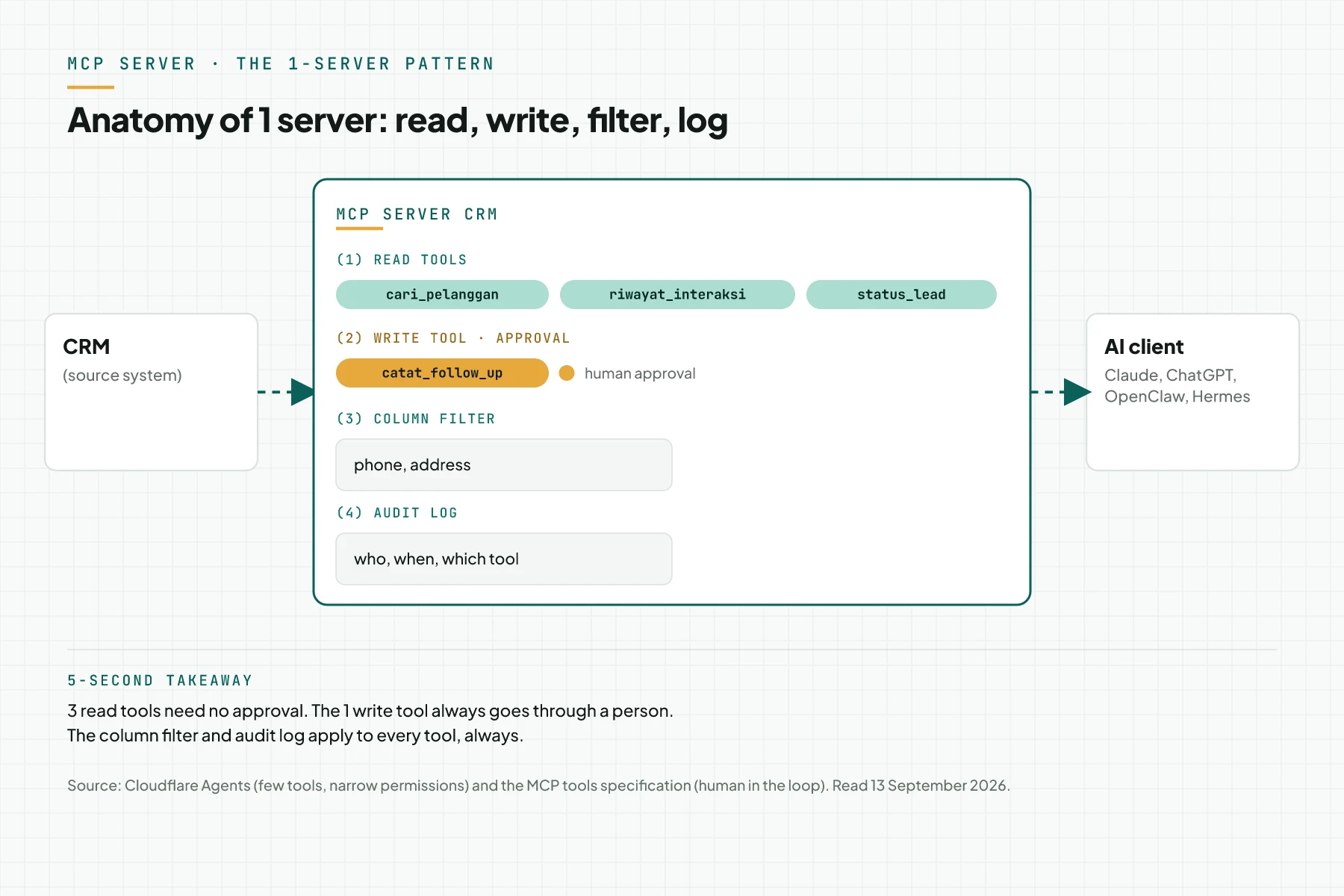
Cloudflare writes that a few well-designed tools outperform many granular ones, and recommends several small MCP servers with narrow permissions over 1 large server. The pattern that repeats across the 10 examples below uses 3 parts: 2 to 3 read tools for daily questions, 1 write tool for 1 risky action, and 1 personal data column filter before the tool result reaches the AI model.
The official MCP tool schema marks read tools with readOnlyHint and write tools with destructiveHint. The tools specification requires a human who can deny every write tool call. A read tool is still a form of data display and disclosure under Article 16 of Law 27/2022, so columns such as a phone number or address need filtering before they reach an AI model abroad.
The 10 examples in the next section use the same pattern, with a different tool name and risk per system.
10 MCP server examples, 1 H3 per system
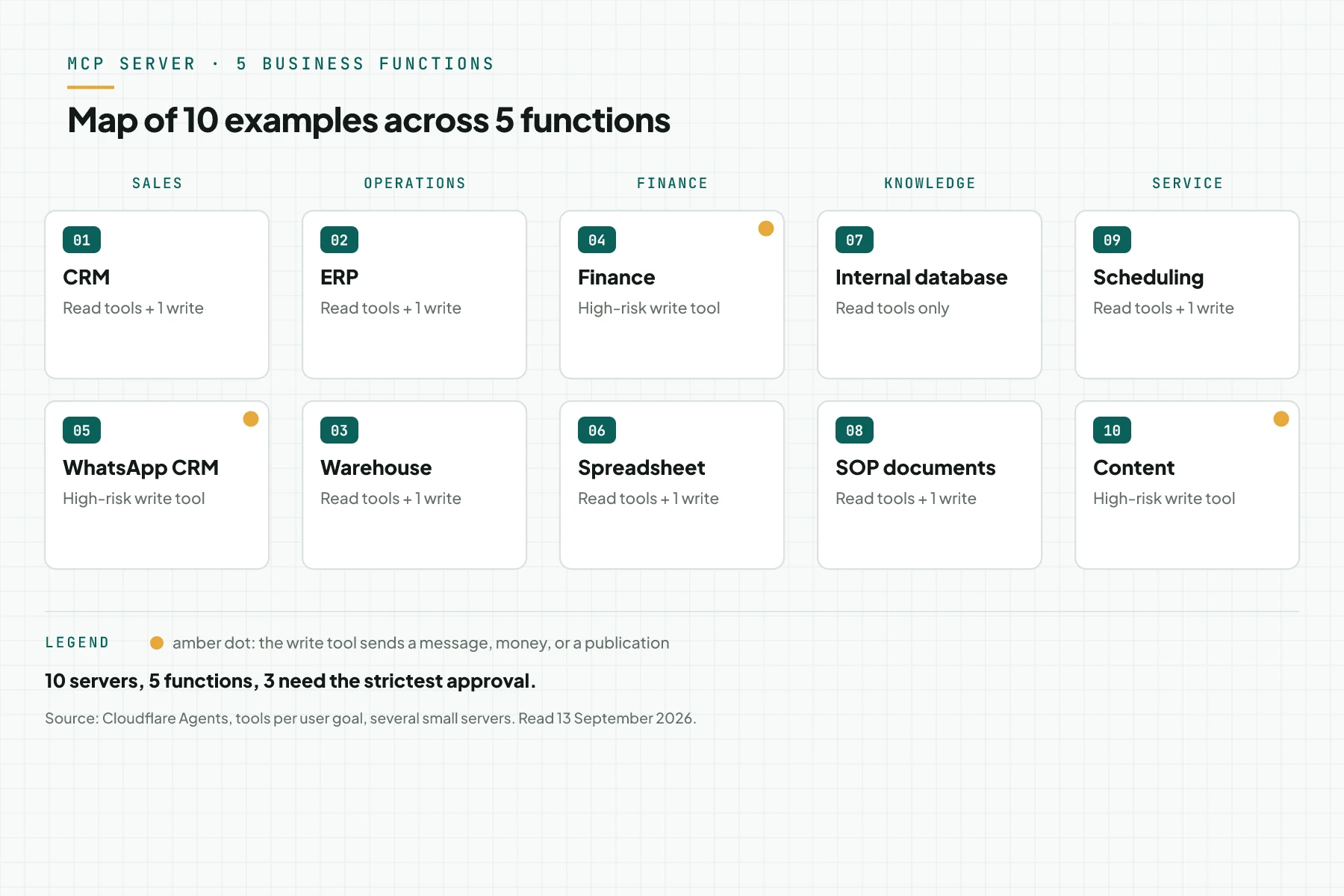
1. CRM
A CRM stores customer history and sales status. The read tool cari_pelanggan finds customer data from a name or phone number. The read tool riwayat_interaksi shows the contact history. The write tool catat_follow_up records a follow-up plan and waits for human approval. Risk: a wrong-target follow-up piles up without approval. Fitting AI client: ClaudeClaude ProThe paid subscription for the Claude AI assistant from Anthropic. It unlocks connectors to outside tools.Open the glossary and OpenClaw.
2. ERP
An ERP answers stock and purchasing questions. The read tool cek_stok reads item quantity per warehouse. The read tool status_po reads a purchase order status. The write tool buat_draf_po drafts a new purchase order and waits for approval before it reaches the supplier. Risk: a wrong-quantity draft strains the budget. Fitting AI client: Claude and ChatGPT.
3. Warehouse
A warehouse system answers stock-per-location questions. The read tool stok_per_lokasi reads item quantity per branch. The read tool mutasi_hari_ini reads that day's stock movement. The write tool catat_penerimaan records incoming stock and waits for the warehouse head's approval. Risk: a wrong-quantity record throws off the stock count. Fitting AI client: OpenClaw and Hermes Agent (in Indonesian), which moved to MCP SDK 2.x in August 2026.
4. Finance
Finance answers receivables and billing questions. The read tool invoice_jatuh_tempo reads overdue invoices. The read tool saldo_piutang reads each customer's outstanding balance. The write tool draf_invoice drafts a new invoice and waits for approval before it goes out. Highest risk: a wrong-amount invoice reaches the customer. We wrote the invoice flow from chat in the Accurate Online integration with OpenClaw (in Indonesian). Fitting AI client: Claude.
5. WhatsApp CRM
A WhatsApp CRM answers lead-stage questions from chat. The read tool ringkas_percakapan summarises a chat without showing the phone number. The read tool status_lead reads the lead stage. The write tool kirim_template sends a message template and waits for supervisor approval. Highest risk: a template reaches the wrong number, or private chat content leaks out. Fitting AI client: OpenClaw.
6. Spreadsheet
A spreadsheet answers daily recap questions. The read tool baca_rekap reads 1 cell range. The read tool cari_baris finds a row by a key column. The write tool tambah_baris adds 1 new row and waits for the sheet owner's approval. Risk: a duplicate row or a swapped column breaks the recap. Fitting AI client: Claude and ChatGPT.
7. Internal database
An internal database answers raw-data questions with no write tool at the first stage. The read tool query_terbatas runs 1 query with fixed parameters, with no free-form SQL. There is no write tool at this stage, because every identity column lives there. Risk: a free-form query opens the whole table to the model. Fitting AI client: Claude Code and Cursor.
8. SOP documents
SOP documents answer work-procedure questions. The read tool cari_sop searches documents by keyword. The read tool baca_versi reads the version in force. The write tool usulkan_revisi writes a revision proposal and waits for the SOP owner's approval. Risk: a revision that takes effect without approval changes the team's procedure. Fitting AI client: Claude and Gemini CLI.
9. Scheduling
Scheduling answers slot and booking questions. The read tool daftar_slot reads open slots. The read tool cek_booking reads 1 booking's status. The write tool buat_booking creates 1 new booking and waits for approval, the same idempotency pattern as our own scheduling server. Risk: 2 bookings land on the same slot. Fitting AI client: Claude and OpenClaw.
10. Content
Content answers article-status questions. The read tool daftar_artikel reads the draft list and publish status. The read tool validasi_draf checks a draft before it goes live. The write tool publish releases the article and waits for explicit confirmation, the same pattern as our own content server. Risk: an article with the wrong publish date reaches readers without confirmation. Fitting AI client: OpenClaw and Claude.
Table: 10 examples, read tools, write tools, approval, personal data
The table below sums up the 10 examples in 1 view: source system, read tools, the write tool with approval, the personal data column to filter, and the fitting AI client. The personal data column uses Article 16 of Law 27/2022: a read tool is still data display and disclosure, so the column needs filtering even when the tool only reads.
| # | Source system | Read tools (examples) | Write tool (approval) | Personal data to filter | Fitting AI client |
|---|---|---|---|---|---|
| 1 | CRM | cari_pelanggan, riwayat_interaksi | catat_follow_up | phone, email | Claude, OpenClaw |
| 2 | ERP | cek_stok, status_po | buat_draf_po | none on this tool | Claude, ChatGPT |
| 3 | Warehouse | stok_per_lokasi, mutasi_hari_ini | catat_penerimaan | staff name | OpenClaw, Hermes AgentAI agentAn AI program that performs work steps by itself, for example reading a message, drafting a reply, and recording the result.Open the glossary |
| 4 | Finance | invoice_jatuh_tempo, saldo_piutang | draf_invoice | billing address | Claude |
| 5 | WhatsApp CRM | ringkas_percakapan, status_lead | kirim_template | phone number, private chat content | OpenClaw |
| 6 | Spreadsheet | baca_rekap, cari_baris | tambah_baris | contact column | Claude, ChatGPT |
| 7 | Internal database | query_terbatas (fixed parameters) | none at stage 1 | every identity column | Claude Code, Cursor |
| 8 | SOP documents | cari_sop, baca_versi | usulkan_revisi | none | Claude, Gemini CLI |
| 9 | Scheduling | daftar_slot, cek_booking | buat_booking | booker name and phone | Claude, OpenClaw |
| 10 | Content | daftar_artikel, validasi_draf | publish (explicit confirmation) | none | OpenClaw, Claude |
Our experience: 3 servers for content, quotations, and scheduling
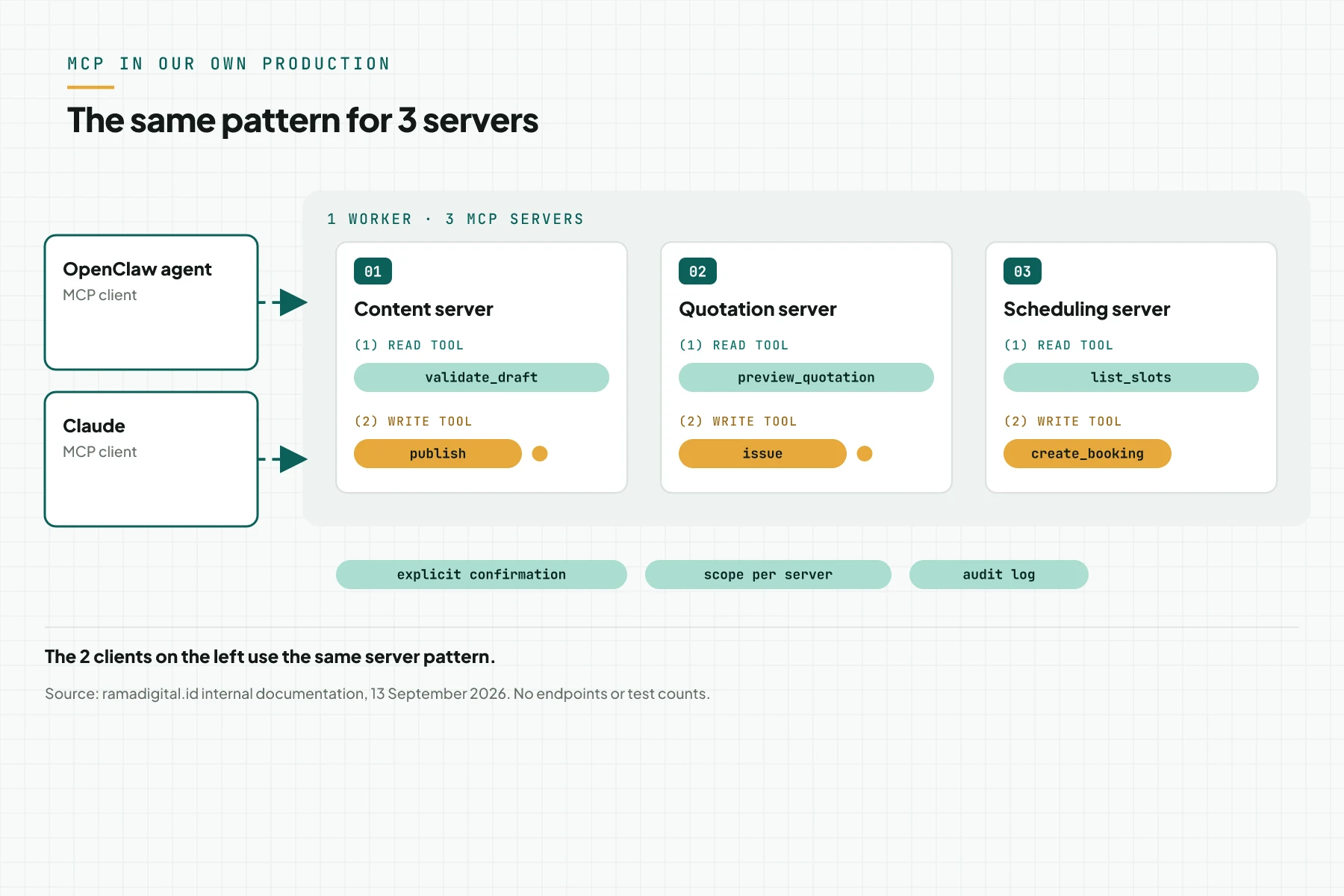
On our own systems, 3 MCP servers serve content, quotations, and scheduling for the OpenClaw agent and Claude. Write actions use explicit confirmation, per-scope access rights, and an audit log. The publish and issue tools each need an explicit confirmation argument before they save. Every write tool, including buat_booking, uses an idempotencyKey so 1 retry does not duplicate the result. Example tool names we use: article_validate_draft, quotation_preview, and scheduling_list_slots.
This pattern matches the 10 examples above: more read tools, 1 write tool, and approval before anything saves. The same pattern is also the shape of the MCP Server Development Service we build for clients.
Example: a support agent asks for a customer history and sends a template
The simulation below uses dummy data: a support agent uses the WhatsApp CRM server through OpenClaw for 1 lead.
| Input (CS request) | Recorded (in the MCP server and audit log) | Output (what CS sees) |
|---|---|---|
| "Summarise the conversation for lead L-1042." | ringkas_percakapan {lead: "L-1042"}; phone number dropped from the result; read logged | A 5-sentence summary with no phone number |
| "What is that lead's status?" | status_lead {lead: "L-1042"}; result "awaiting quotation" | "Awaiting a quotation for 2 days." |
| "Send the quotation template to that lead." | kirim_template {lead: "L-1042", template: "penawaran-v3"}; status "awaiting supervisor approval" | An approval card appears in OpenClaw for the supervisor |
| The supervisor declines: "the price is not final" | The call is cancelled; the write log records "declined", the supervisor as actor, and the reason | "Sending cancelled by the supervisor." |
The lead code, template name, and decline reason are dummy data. The phone number never appears in a tool's output.
Checklist to pick your first server
- Pick 1 source system with the most daily staff questions. Owner: head of operations. Evidence: 1 week of logged staff questions.
- Write 2 to 3 read tools with a working name and 1 goal sentence. Owner: process owner. Evidence: the tool list.
- Set 1 write tool and name who approves it. Owner: department head. Evidence: the approver's job title.
- Mark the personal data columns a tool must never expose. Owner: data owner. Evidence: the column list.
- Pick the AI client your team uses and check its support. Owner: IT. Evidence: the client name and transport.
- Prepare 3 test cases per tool: normal, missing data, wrong input. Owner: QA. Evidence: the test case table.
- Stop rule: if the first write tool sends money or a message to a customer, hold it for stage 2.
Frequently asked questions
How many tools should the first server have? Use 2 to 3 read tools and 1 write tool at most. Cloudflare writes that a few well-designed tools outperform many granular ones.
Can 1 server connect to 2 systems? Yes, but narrow permissions per server are easier to audit. The MCP server cost article explains the effect on scope and price.
What about customer personal data in the WhatsApp CRM? Filter the phone number and private chat content in the tool before the result reaches the AI model. Articles 16 and 56 of Law 27/2022 cover data display and cross-border transfer.
Do these examples need OAuth? Not always. An API key works for a remote server with 1 internal team. OAuth 2.1 makes sense when many users, or a client uses a Claude custom connector.
Can these example servers be used from ChatGPT? Yes, for a remote server through a URL with Developer mode, per OpenAI official documentation. ChatGPT does not run a local or stdio server.
Next step
The 10 examples above are proposed tool names, not a final list. The final tool names and the approver still follow your own source system. A reader who is just starting can read MCP for small business: the first 3 tools for 1 system and 3 read tools, or connecting legacy systems without a rebuild when your source system has no clean API. Limit: this article carries no code and promises no business result. Send your brief reviews your system and proposes a first server. Book a free consultation covers 1 source system and 2 to 3 read tools in 30 minutes.
Sources
- Cloudflare Agents: tools per user goal, several small servers with narrow permissions
- Official MCP schema: 4 tool annotations, including readOnlyHint and destructiveHint
- MCP tools specification: a human who can deny a tool call
- Law No. 27 of 2022 on Personal Data Protection, Articles 16 and 56
- OpenAI: official MCP documentation for ChatGPT and Codex
- Claude: remote MCP custom connector guide
- Rama Digital: Hermes Agent 0.20.3 and MCP SDK 2.x (in Indonesian)