On 16 November 2026, Julius Fedorovicius opened a data stream in Google Analytics and clicked the Configure tag settings link. That link usually opens the Google tag settings. This time it opened a Tag Manager container with a GTM- ID, which Google made automatically for that stream.
Fedorovicius is the founder of Analytics Mania, a site that teaches Google Tag ManagerGTMA tool for installing and changing tracking code without editing the site code every time.What is Google Tag Manager (GTM)?. PPC Land recorded his finding on 17 November 2026. On the same day, Google wrote the change in the Tag Manager release notes: each Google tag becomes a Tag Manager container.
For sites with a standard snippet, the tag on the page works as it did yesterday. Sites with an installation that Google calls unsupported now have a date: January 2027.
In 20 months, Google reversed the relation of the 2 tools
In 20 months, Google reversed the order: a container once loaded a Google tag, and now a Google tag becomes a container.
A release note dated 10 March 2025 said that from 10 April 2025, containers with Google Ads and Floodlight tags load a Google tag first. Google said that this step made Google Ads tracking more reliable.
On 12 October 2026, Google described that extra layer as a load. The release note says that the extra gtag.js can slow data transmission, and that separate Google tag settings made troubleshooting difficult. From that date, a container can send data directly to Google measurement products.
Two more steps came between those dates. On 9 July 2026, Google set the loading ID as the control for what can run in a container. On 8 October 2026, Tag Manager snippets started to run without a wait for the gtag('config') command.
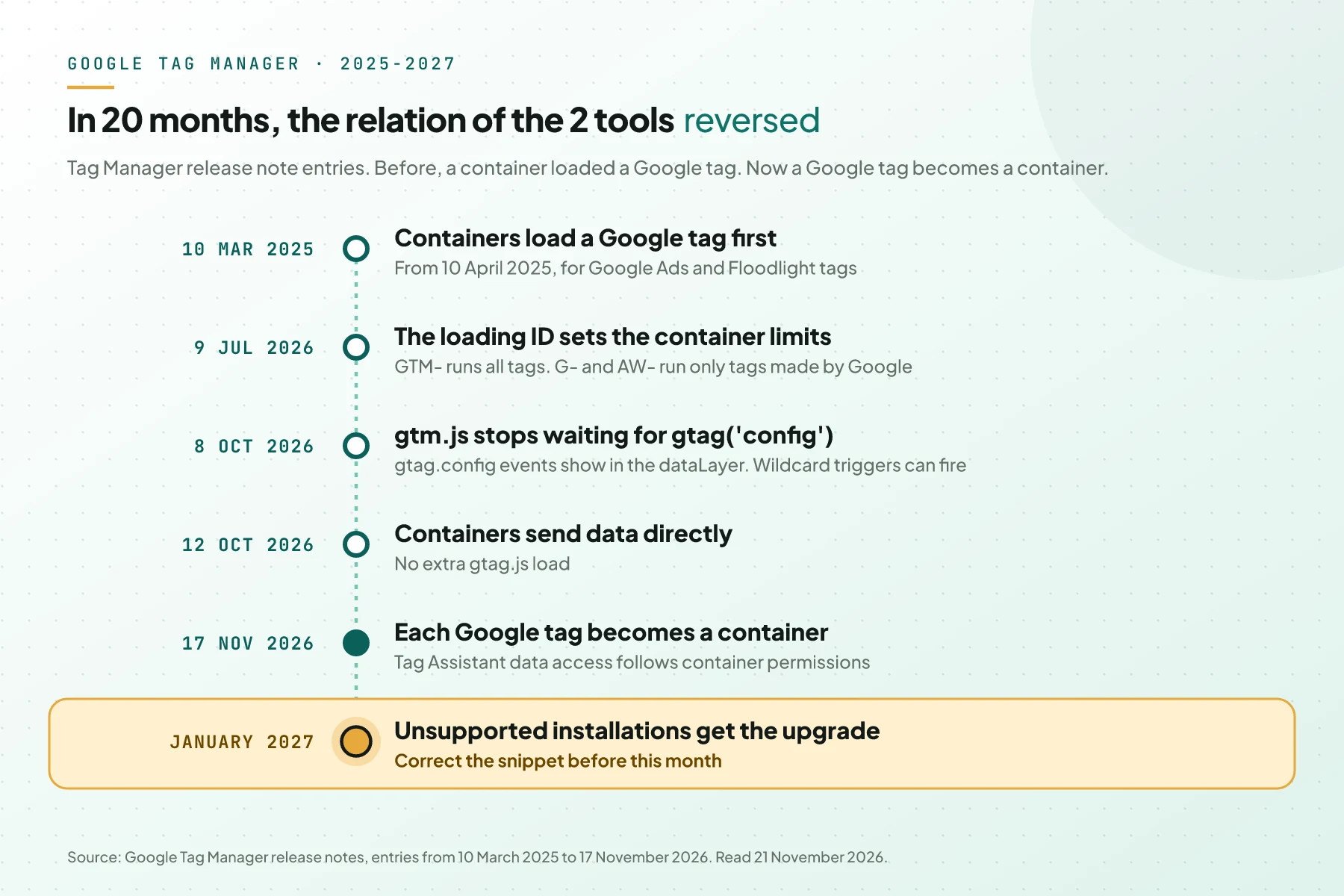
The entry of 17 November 2026 completes that series. The Google tag and the Tag Manager container are now 1 item, with 1 interface and 1 permission model.
For a standard snippet, the in-page tag behavior does not change
Google says that this unification does not change the in-page behavior of the Google tag, and each Google destination keeps its own tag.
So your current settings and triggers continue to operate. Sites that use only the Google tag get Tag Manager features: interface-driven tagging, debugging, and version control. The release note calls those features an option.
Simo Ahava, a co-founder of Simmer, wrote on LinkedIn that this change adds no data collection beyond what the tags could already do. He also admitted one point: "Google Tag vs. Google Tag Manager is still confusing even for experts." PPC Land recorded that quote on 17 November 2026.
Three items still change, also for a standard snippet:
- All new installation snippets are the same, and they no longer contain the
gtag('config')command. Google recommends the Initialization trigger in Tag Manager to set the tag start. - Access to Tag Assistant data now follows the container permissions in Tag Manager.
- Tag Manager users get an offer to optimize their container. Google says that this step does not occur automatically, on the Google tag updates page dated 20 August 2026.
Unsupported installations have a January 2027 date
Sites with an unsupported installation receive the upgrade in January 2027, and Google tells their owners to correct the installation before that date.
The release note links that term to the gtag.js installation help page. That page names 1 pattern as unsupported. In that pattern, a Google Analytics (G-), Google Ads (AW-), or Floodlight (DC-) ID loads through the Tag Manager snippet (gtm.js). The site then uses gtag('config') commands.
The release note of 9 July 2026 also names the opposite pattern: a container that loads through the /gtag/js or /gtag/destination path. For this pattern, the ID sets the result, the container ID help page says. A GTM- ID runs all tag types, while a G- or AW- ID runs only tags made by Google.
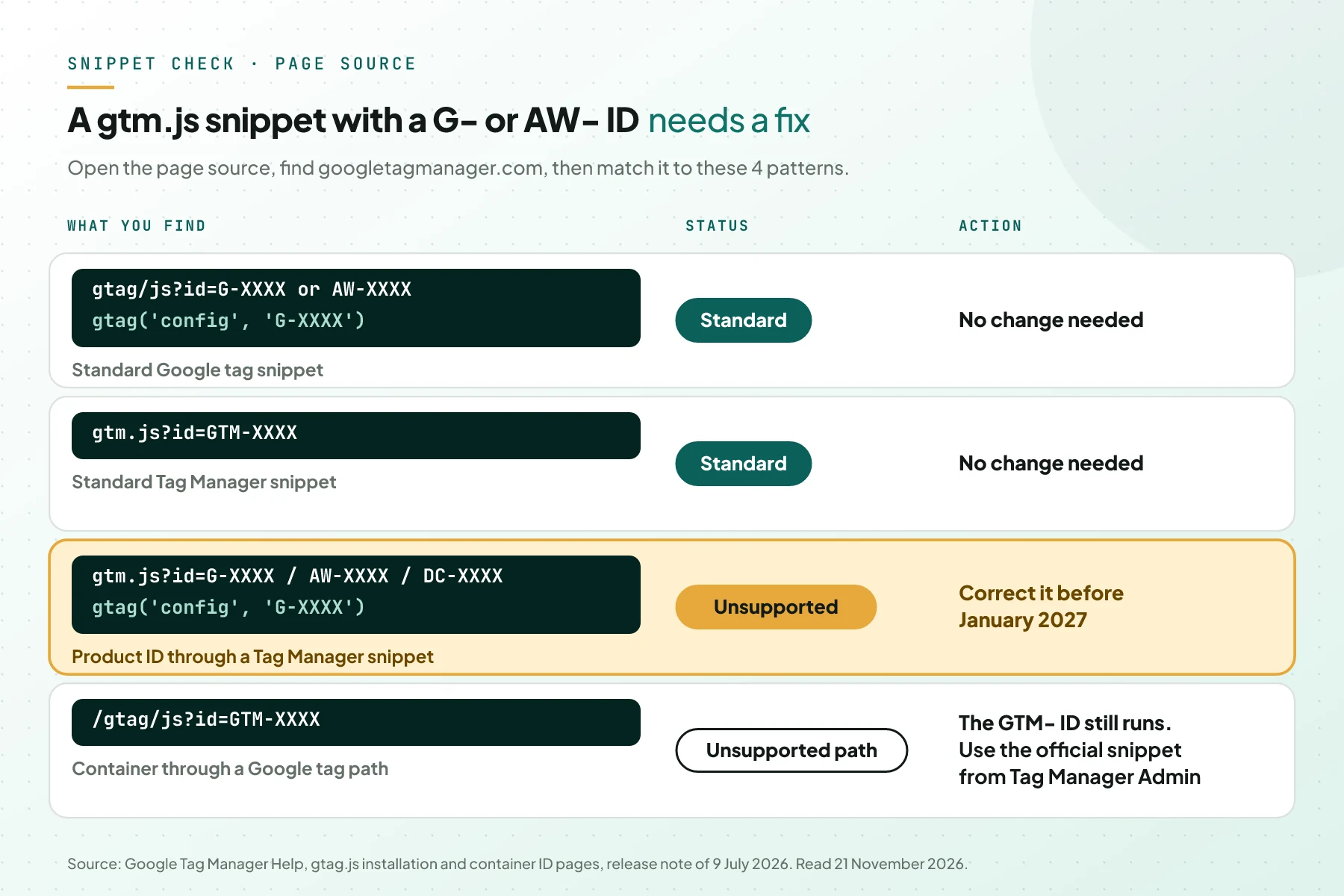
Google does not say what occurs to an installation that is not corrected by January 2027. The release note says only that the installation receives the upgrade. Do not wait until January to see the result in your conversionConversionThe action you count as a result, for example a paid order, a sign-up, or a chat that becomes a qualified buyer.Open the glossary data.
The 8 October change can already add false conversions
Since 8 October 2026, the gtag('config') command shows in the dataLayer as a gtag.config event, and wildcard triggers can fire on that event.
Google gave that warning in the release note of 8 October 2026. The custom event trigger help page says that a trigger with the regex .* fires on all events. That includes the events that Tag Manager and the Google tag send automatically.
If a Google Ads or Meta conversion tag uses such a trigger, that tag can fire more often than it should. Compare your conversion count before and after 8 October 2026. Conversions that increase without an increase in sales are a sign to examine the trigger.
False conversions also go into Google Ads bidding. We described another double conversion risk in the article Data Manager in Google Analytics. The article Search Journey Awareness shows how bidding reads secondary conversions.
Container permissions now decide who sees your tag data
Tag Manager container permissions now control access to Tag Assistant data, so the container user list is the list of people who manage your tags.
Before, the Google tag had its own settings and permissions, separate from the container. After the unification, the two meet in 1 place. If a freelancer or a past agency installed the tags on your site, their accounts can still have access.
Google has not said which Tag Manager account holds a converted container, or who gets access to that container. PPC Land recorded this gap on 17 November 2026. So examine the user list of each container that shows in your account yourself.
Four checks for this week
Do these 4 checks before January 2027, and each check uses a tool that you already have.
| Check | How to check | Action if there is a problem |
|---|---|---|
| 1. Tag loading ID | Open the page source of your site. Find googletagmanager.com, then record the ID after id=. | A G-, AW-, or DC- ID in gtm.js: follow 1 of the 2 correction paths below the table. |
| 2. Snippet and config command | Find gtm.js and gtag('config') on the same page. | Both present for an ID that is not GTM-: the installation is unsupported. Correct it before January 2027. |
| 3. Wildcard triggers | In Tag Manager, open Triggers. Find custom events with the regex .*. | Replace the regex with the exact event name. Compare conversions before and after 8 October 2026. |
| 4. Container users | Open Admin, then User Management in each container. | Remove accounts of people who no longer work for you. Give publish rights only to people you trust. |
The Google help page gives 2 correction paths for checks 1 and 2:
- If the site needs only Google Ads or Google Analytics: remove the gtm.js snippet and the related config commands. Put the standard Google tag (gtag.js) snippet immediately after the opening
<head>tag on each page. - If Tag Manager also manages other tags: keep the gtm.js snippet. Replace the G-, AW-, or DC- ID in that snippet with your GTM- ID, then set up the Google tag inside Tag Manager.
Then open Tag Assistant, select Add domain, and enter your site address. The correct tag ID shows with a green or blue status icon.
In Indonesia, we have no count of affected sites yet
The Google release note gives no country limit for this unification, and we have no data on how many Indonesian sites use an unsupported installation.
The owners who most need these checks are owners who have never seen the snippet on their own site. Examples are sites made by a freelance developer, ready-made themes, or online store plugins.
Visual tagging, which makes events without code, is still a beta for purchase conversions in Google Ads, the Google updates page says. Google gives no country list, and we have not checked it in an Indonesian account. Matteo Zambon, founder of Tag Manager Italia, estimated that the feature answers only the easy 70% to 80% of cases. PPC Land reported his estimate on 22 August 2026.
The Zambon estimate comes from his practice, not from a Google statistic. In his view, the data layer, cross-domain tracking, and consent still need manual work.
What Google has not explained
Google has not stated 4 items that can change your plan, the release note and the PPC Land summary show.
- The start date and the end date of the conversion for standard installations.
- The Tag Manager account that holds a converted container, and the users who get access.
- The effect of the January 2027 upgrade on an unsupported installation that is not corrected.
- The future of the Google tag settings screen. Ahava wrote that the screen will go, but the release note does not say so.
The link that Fedorovicius clicked is in your account too. Open Google Analytics, select a web data stream, then click Configure tag settings. If a GTM- container opens, the unification has reached your account.
Questions and answers
Must I change my Google tag snippet now?
No, if you use the standard gtag.js snippet or a gtm.js snippet with a GTM- ID. Change the snippet only if a G-, AW-, or DC- ID loads through gtm.js with a gtag('config') command.
When do unsupported installations receive the upgrade?
In January 2027, the Tag Manager release note of 17 November 2026 says. Google gives no exact date, and does not say what occurs to installations that are not corrected.
Does this unification add to the data that Google collects?
Google says that the in-page tag behavior does not change. Simo Ahava wrote that this change adds no data collection beyond what the tags could already do.
How do I know if my Google tag is already a container?
Open a web data stream in Google Analytics, then click Configure tag settings. On 16 November 2026, that link opened a GTM- container in the account that Julius Fedorovicius examined.
If your ads lead to WhatsApp and you want to check their conversion tracking yourself, join the Rama Digital CTWA Tracking Class.