Direct answer: CVE-2026-125350 is a use after free flaw in the XML component of Google Chrome. Google knows that an exploit for this flaw exists in the wild. Today, update Chrome to 157.0.8103.78 or Extended Stable 156.0.8078.100, then restart the browser.
CISA gives CVSS 3.1 8.8 and added this flaw to the KEV catalog on 10 November 2026. Microsoft Edge has no patch on the morning of 12 November 2026.
Main condition: your team uses Chrome, Edge, or another Chromium browser on work computers or phones. Limit: this article has no bug details, payloads, or attack sequence.
We read the Chrome Stable notes of 9 November 2026, the Chrome Stable notes of 11 November 2026, the CVE-2026-125350 record, CISA KEV, and Microsoft Edge Security Updates on 12 November 2026, from 06.30 to 06.55 WIB. We tested 3 check scripts in a Debian 12 container with Chrome 157.0.8103.78 from the official Google repository, and in PowerShell 7.4.2 with stand-in install folders. We did not test attacks.
The problem: 1 web page can attack a browser that did not restart
The browser opens email, customer chats, admin panels, and bank apps, so a flaw in the browser is a flaw in your business accounts.
On 9 November 2026, Google released Chrome 157.0.8103.50 with 9 security fixes. The release notes say: "Google is aware that an exploit for CVE-2026-125350 exists in the wild." This means that attackers used this flaw before many computers had the update.
Chrome downloads updates by itself, but the new version becomes active only after the browser restarts. Cashier and admin computers that stay open for days keep the old version.
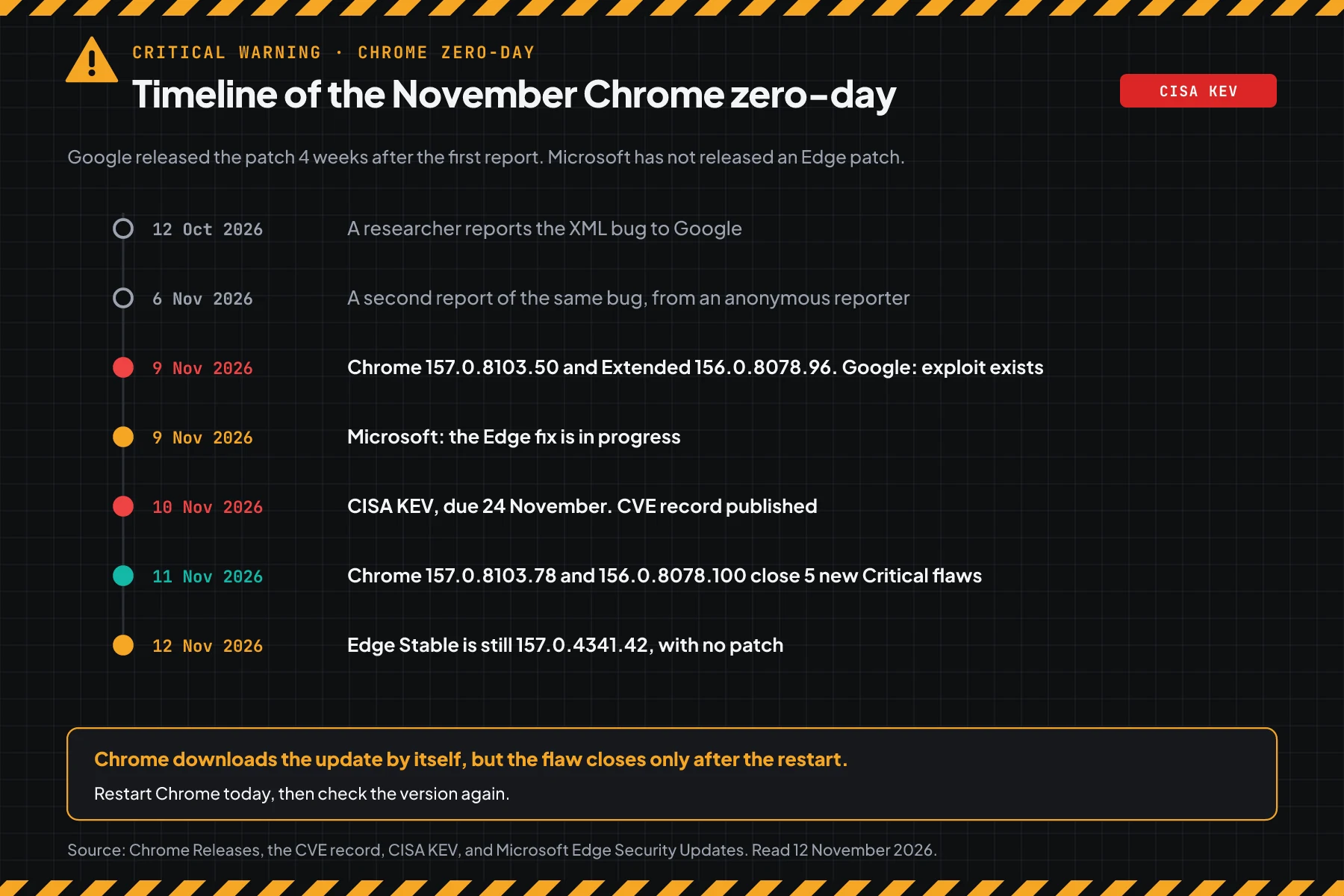
On 11 November 2026, Google released Chrome 157.0.8103.78 with 83 fixes, with 5 flaws rated Critical. This version is the target of this article, because it closes the zero-day and the 5 new flaws together.
How it works: use after free in the XML component
This section uses the official summary from the CVE record, not attack steps. Google keeps the bug details closed until most users have the update.
CVE-2026-125350
The CVE-2026-125350 record says that a use after free in XML in Chrome before 157.0.8103.50 lets a remote attacker run code inside the sandbox through a crafted HTML page. The victim only opens that page. The weakness type is CWE-416.
The sandbox limits code inside the tab process. Rama Digital analysis: real attacks often join a browser flaw with another flaw to leave the sandbox, so do not wait because of the sandbox.
Critical flaws in the 11 November release
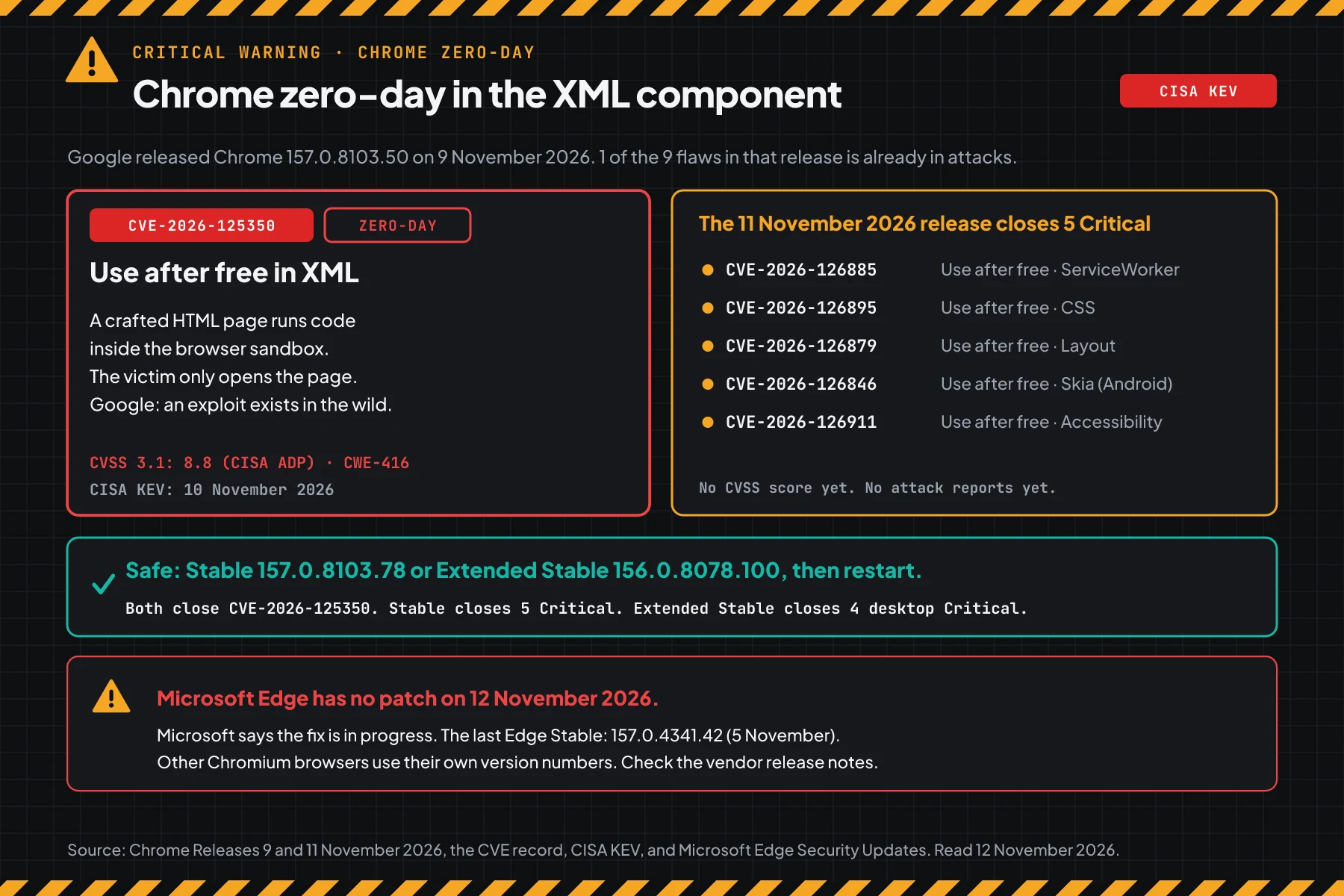
This table shows the zero-day and the 5 flaws rated Critical. On 12 November 2026, the 5 Critical flaws have no CVSS score and no attack reports.
| CVE | Component | Chromium rating | CVSS 3.1 | Closed in |
|---|---|---|---|---|
| CVE-2026-125350 | XML | High, used in attacks | 8.8 (CISA ADP) | 157.0.8103.50 and 156.0.8078.96 |
| CVE-2026-126885 | ServiceWorker | Critical | None yet | 157.0.8103.78 and 156.0.8078.100 |
| CVE-2026-126895 | CSS | Critical | None yet | 157.0.8103.78 and 156.0.8078.100 |
| CVE-2026-126879 | Layout | Critical | None yet | 157.0.8103.78 and 156.0.8078.100 |
| CVE-2026-126911 | Accessibility | Critical | None yet | 157.0.8103.78 and 156.0.8078.100 |
| CVE-2026-126846 | Skia (Android) | Critical | None yet | 157.0.8103.78 (Android) |
Exploitation status on 12 November 2026
Google says that an exploit exists in the wild. CISA KEV has listed CVE-2026-125350 since 10 November 2026, with a fix deadline of 24 November 2026 for US federal agencies. The CISA assessment says "Exploitation: active", "Automatable: no", and "Technical Impact: total".
Who has the highest risk
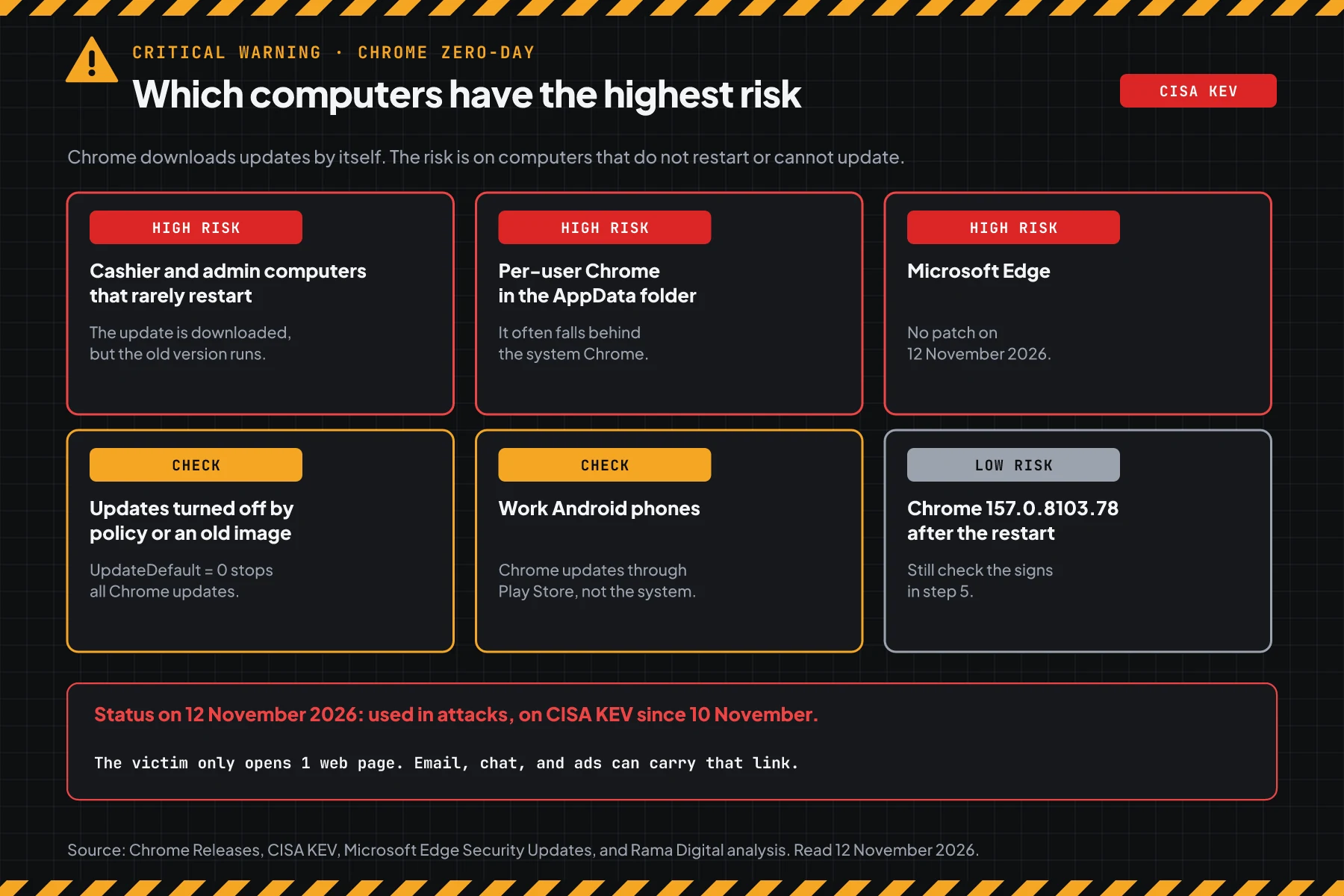
The risk depends on the active version, not on the downloaded version.
| Condition | Risk | Reason |
|---|---|---|
| Cashier, admin, or jump computers that rarely restart | High | The update is downloaded, but the old version still runs |
| Per-user Chrome in the AppData folder | High | This install is separate from the system Chrome and can fall behind |
| Microsoft Edge | High | Microsoft has no patch on 12 November 2026 |
| Chrome updates turned off by policy or an old image | Check | Chrome never gets the new version |
| Work Android phones | Check | Chrome for Android updates through Play Store, not the system update |
| Chrome 157.0.8103.78 after the restart | Low | Still look for signs from the time before the update |
Other critical warnings from this month: the GPUStack CVE-2026-102895 warning and the Puppet CVE-2026-115731 warning. Each one needs its own patch.
Chrome version and status
Google has 2 desktop channels: Stable and Extended Stable. Each channel has its own version limit.
| Version in the browser | Closes | Status | Action |
|---|---|---|---|
| Stable 157.0.8103.78 or later | 125350 and 5 Critical | SAFE | Go to step 5 |
| Extended Stable 156.0.8078.100 | 125350 and 4 desktop Critical | SAFE | Go to step 5 |
| 157.0.8103.50 to 157.0.8103.77 | 125350 only | PARTIAL | Update to 157.0.8103.78 |
| 156.0.8078.96 to 156.0.8078.99 | 125350 only | PARTIAL | Update to 156.0.8078.100 |
| Below 157.0.8103.50 and 156.0.8078.96 | None | VULNERABLE | Update and restart today |
| Microsoft Edge 157.0.4341.42 | No Microsoft patch yet | CHECK VENDOR | Step 4 |
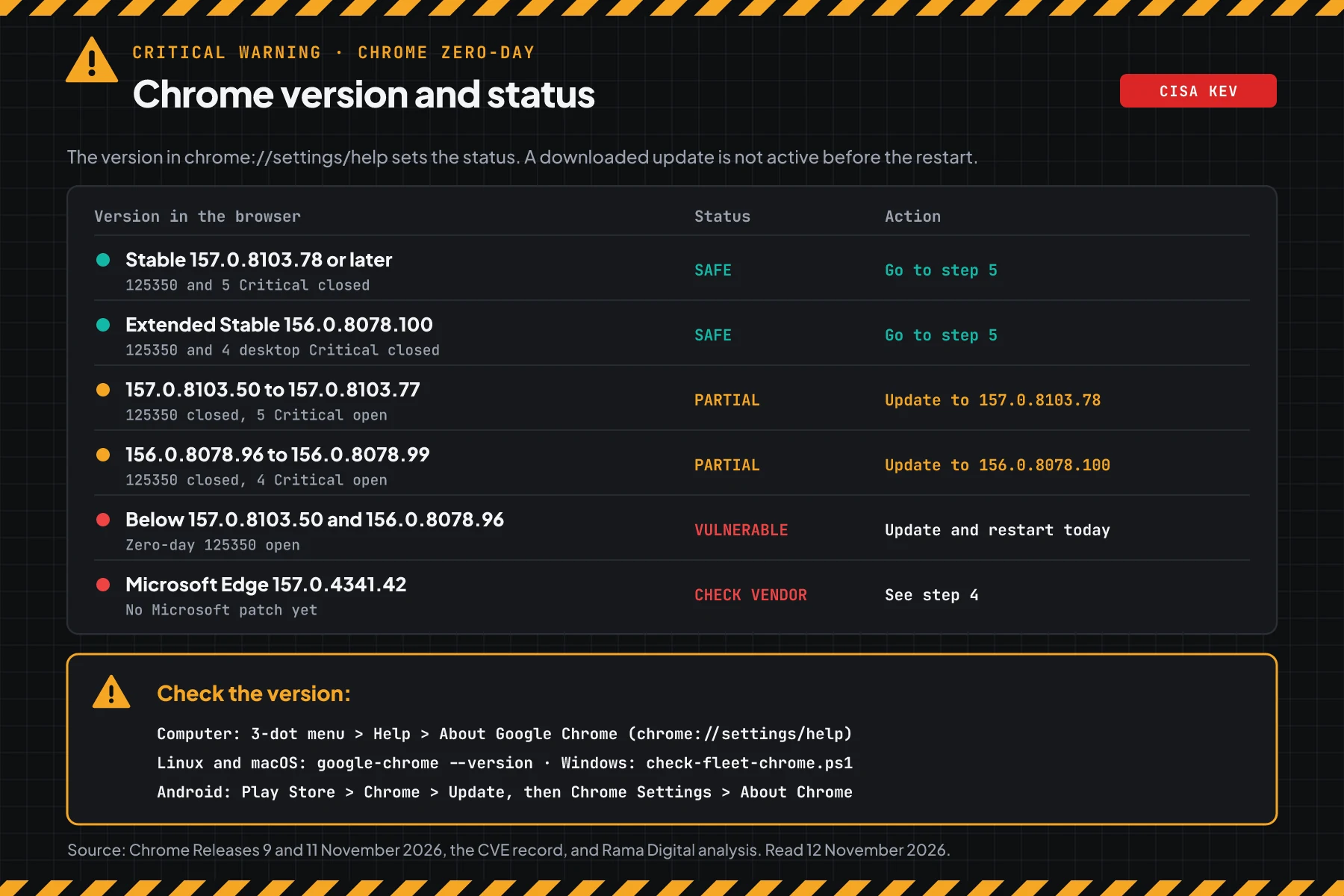
The Extended Stable notes of 9 November say that Extended Stable 156.0.8078.96 closes CVE-2026-125350. The Extended Stable notes of 11 November say that version 156.0.8078.100 adds fixes for 4 desktop Critical flaws. The Chrome Android notes of 9 November and the Chrome Android notes of 11 November show that Chrome for Android uses the same version numbers as Stable desktop.
Rama Digital analysis: Microsoft Edge Security Updates says that Microsoft knows about the exploits and works on a fix. The last Edge Stable is 157.0.4341.42 from 5 November 2026. We do not write a safe Edge version number, because Microsoft has not released one.
Other Chromium browsers such as Brave, Opera, and Vivaldi use their own version numbers. Check the release notes of each vendor. The Chrome iOS notes of 10 November show stability fixes only, without this CVE.
Before you start
- A list of work computers, with the holder name and the operating system.
- Local admin access or access to a management tool such as Group Policy, Intune, or MDM.
- For Linux and macOS: a terminal and bash. For Windows: PowerShell 5.1 or 7.
- Time to restart the browser. Save the work in open tabs before the restart.
Step 1: Check the Chrome version on every computer
The fastest way for 1 computer: open the 3-dot menu, then Help, then About Google Chrome. The address is chrome://settings/help. This page also starts the update download.
For Linux and macOS, save this script as check-version-chrome.sh. The script finds Chrome, Chromium, and Edge, then prints the status of each version.
#!/usr/bin/env bash
# Check the Chrome and Chromium version on Linux or macOS for CVE-2026-125350.
# Safe Stable version: 157.0.8103.78. Safe Extended Stable version: 156.0.8078.100.
# The script only reads versions. The script changes nothing.
# Use: bash check-version-chrome.sh                 (find browsers on this computer)
#      bash check-version-chrome.sh 157.0.8103.50   (check versions that you copied from other computers)
set -u

older() { [ "$1" != "$2" ] && [ "$(printf '%s\n%s\n' "$1" "$2" | sort -V | head -n 1)" = "$1" ]; }

status() {
  case "$1" in
    156.0.8078.*)
      if older "$1" 156.0.8078.96; then echo "VULNERABLE: CVE-2026-125350 is open. Update today."
      elif older "$1" 156.0.8078.100; then echo "PARTIAL: 125350 is closed. Update to 156.0.8078.100."
      else echo "SAFE: Extended Stable with the 11 November 2026 patch."; fi ;;
    *)
      if older "$1" 157.0.8103.50; then echo "VULNERABLE: CVE-2026-125350 is open. Update today."
      elif older "$1" 157.0.8103.78; then echo "PARTIAL: 125350 is closed. Update to 157.0.8103.78."
      else echo "SAFE: Stable with the 11 November 2026 patch."; fi ;;
  esac
}

if [ "$#" -gt 0 ]; then
  for v in "$@"; do printf '%-16s -> %s\n' "$v" "$(status "$v")"; done
  exit 0
fi

found=0
seen=""
for b in google-chrome-stable google-chrome chromium chromium-browser microsoft-edge-stable \
  "/Applications/Google Chrome.app/Contents/MacOS/Google Chrome" \
  "/Applications/Chromium.app/Contents/MacOS/Chromium" \
  "/Applications/Microsoft Edge.app/Contents/MacOS/Microsoft Edge"; do
  p=$(command -v "$b" 2>/dev/null) || p="$b"
  [ -x "$p" ] || continue
  real=$(readlink -f "$p")
  case " $seen " in *" $real "*) continue ;; esac
  seen="$seen $real"
  line=$("$b" --version 2>/dev/null | head -n 1)
  v=$(printf '%s' "$line" | grep -oE '[0-9]+\.[0-9]+\.[0-9]+\.[0-9]+' | head -n 1)
  [ -n "$v" ] || continue
  found=1
  case "$line" in
    *Edge*) printf '%s\n  -> CHECK VENDOR: Microsoft has no Edge patch on 12 November 2026.\n' "$line" ;;
    *) printf '%s\n  -> %s\n' "$line" "$(status "$v")" ;;
  esac
done
[ "$found" -eq 1 ] || echo "No Chrome or Chromium found. Open chrome://settings/help in the browser."
# Linux and macOS: read the browser versions on this computer
bash check-version-chrome.sh
# Check versions that you copied from other computers
bash check-version-chrome.sh 157.0.8103.38 157.0.8103.50 156.0.8078.96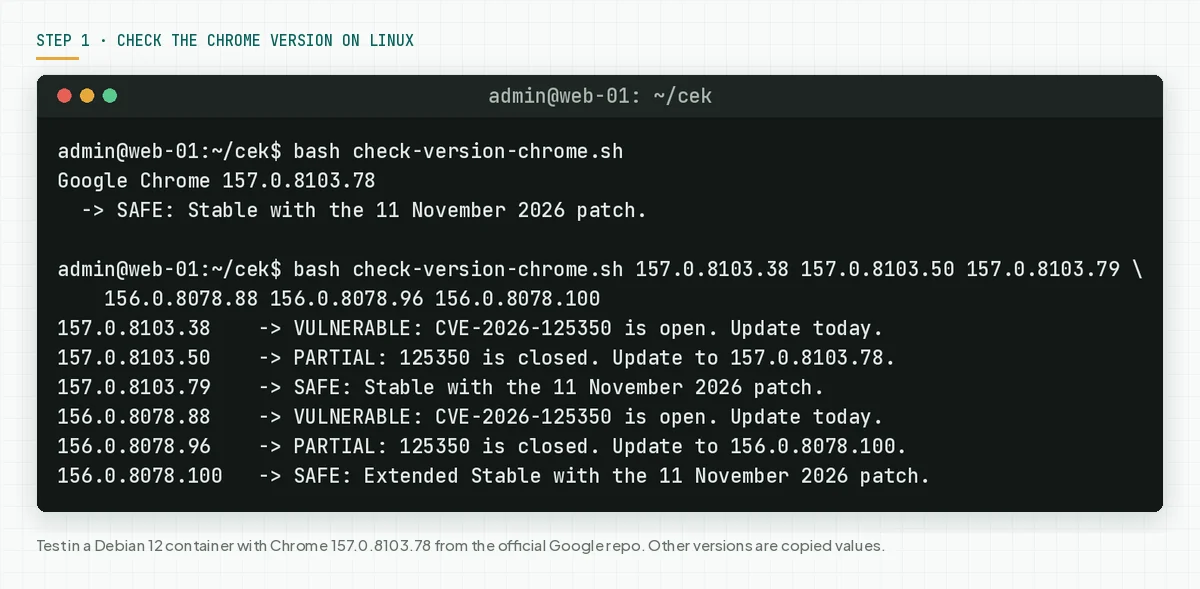
The script only reads versions. It installs nothing and changes no browser setting.
Check the result: "VULNERABLE" means go to step 2 now. "PARTIAL" means the zero-day is closed, but the 5 Critical flaws are still open. "CHECK VENDOR" for Edge means go to step 4.
Step 2: Update, then restart Chrome
Only this step closes the flaw. Follow the Google Chrome update guide.
- Open
chrome://settings/help. Wait until Chrome finishes the update download. - Click the Relaunch button. Chrome opens the open tabs again, except Incognito tabs.
- Open
chrome://settings/helpagain. The correct result: 157.0.8103.78 or later, or 156.0.8078.100 for Extended Stable. - On Android, open Play Store, find Chrome, then tap Update. Check the version in Chrome Settings, then About Chrome.
On Linux with the official Google repository, use these commands. We ran them in a Debian 12 container, and apt said that the package is already the newest version 157.0.8103.78-1.
# Debian and Ubuntu with the official Google repository
sudo apt-get update
sudo apt-get install --only-upgrade google-chrome-stable
google-chrome --version
Check the result: run step 1 again. Every Chrome line must show "SAFE".
Step 3: Check the Windows fleet and the update policy
On Windows, 1 computer can have 2 Chrome installs: the system Chrome in Program Files and the per-user Chrome in AppData. This script reads both.
Save this script as check-fleet-chrome.ps1. The script reads the version folder names, then marks an update that is downloaded but not active.
# Check the Chrome version on Windows for CVE-2026-125350. Run it on 1 computer, or send it through Intune or GPO.
# The script only reads the install folders. The script changes nothing.
# new_chrome.exe present = the update is downloaded, but Chrome did not restart.
param([string[]]$Folder = @(
  "$env:ProgramFiles\Google\Chrome\Application",
  "${env:ProgramFiles(x86)}\Google\Chrome\Application",
  "$env:LOCALAPPDATA\Google\Chrome\Application"))

function Get-Status([version]$v) {
  if ($v.Major -eq 156 -and $v.Build -eq 8078) {
    if ($v -lt [version]'156.0.8078.96') { 'VULNERABLE' } elseif ($v -lt [version]'156.0.8078.100') { 'PARTIAL' } else { 'SAFE' }
  } elseif ($v -lt [version]'157.0.8103.50') { 'VULNERABLE' } elseif ($v -lt [version]'157.0.8103.78') { 'PARTIAL' } else { 'SAFE' }
}

$result = foreach ($f in $Folder) {
  if (-not $f -or -not (Test-Path $f)) { continue }
  $versions = @(Get-ChildItem -Path $f -Directory | Where-Object { $_.Name -match '^\d+\.\d+\.\d+\.\d+$' } |
    ForEach-Object { [version]$_.Name } | Sort-Object -Descending)
  if ($versions.Count -eq 0) { continue }
  $restart = Test-Path (Join-Path $f 'new_chrome.exe')
  $active = if ($restart -and $versions.Count -gt 1) { $versions[1] } else { $versions[0] }
  [pscustomobject]@{
    Computer   = $env:COMPUTERNAME
    Type       = if ($f -match 'AppData') { 'Per user' } else { 'System' }
    Active     = "$active"
    Status     = Get-Status $active
    Downloaded = "$($versions[0])"
    Restart    = if ($restart) { 'NEEDED' } else { '-' }
  }
}
if (-not $result) { 'No Chrome found in the standard folders. Open chrome://settings/help.' }
else { ($result | Format-Table -AutoSize | Out-String -Width 120).Trim() }
# PowerShell, on each Windows computer
powershell -ExecutionPolicy Bypass -File .\check-fleet-chrome.ps1
# Read the Google update policy (read only)
reg query HKLM\SOFTWARE\Policies\Google\Update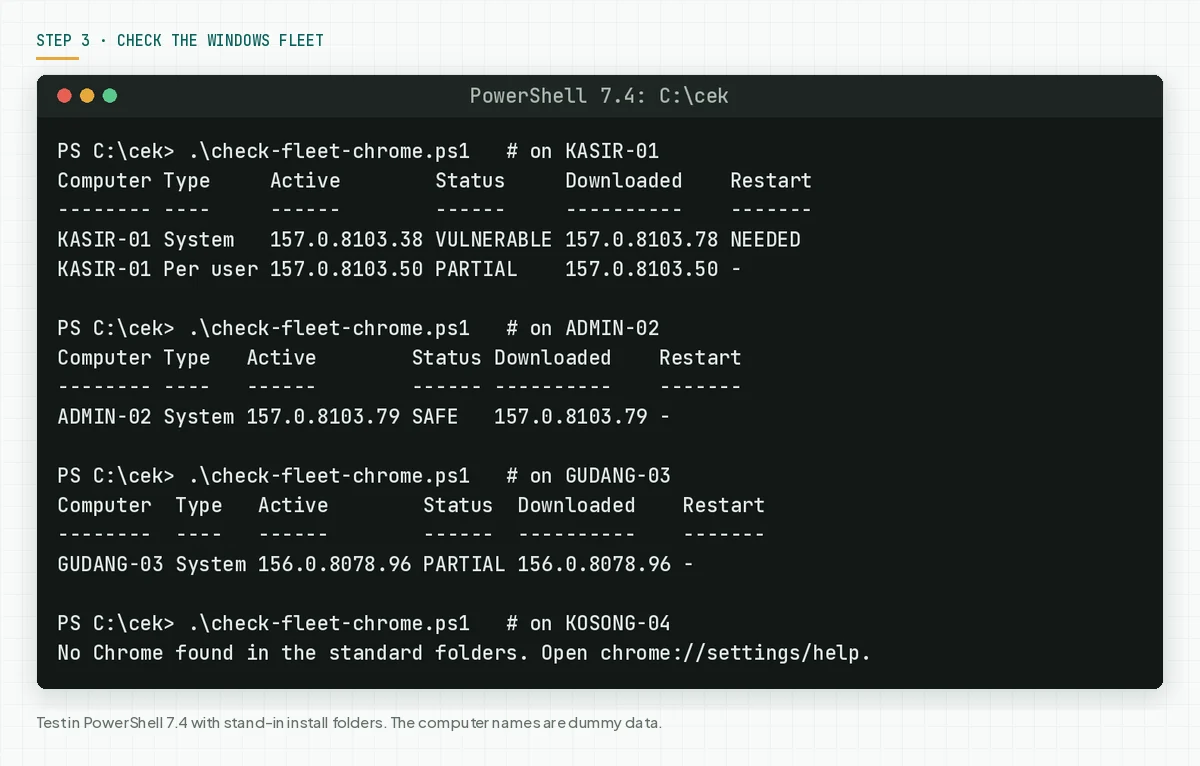
The Restart column shows "NEEDED" when the Chrome folder has new_chrome.exe. That file means that a new version is downloaded and waits for a restart.
The reg query command reads the Google Update policy. The Google guide to manage Chrome updates on Windows says that the "Update policy override default" policy must be "Allow updates". The value UpdateDefault = 0 means that all Chrome updates are off. We did not test this registry command.
3b. Force the restart with a Chrome policy
The RelaunchNotification policy in the Chrome Enterprise policy list asks users to restart. The value 2 makes the restart required after a deadline. RelaunchNotificationPeriod sets the deadline in milliseconds.
On Windows, set both policies through Group Policy or Intune. On Linux, save this JSON in /etc/opt/chrome/policies/managed/ per the Chrome policy guide for Linux. This example gives a 24-hour deadline.
{
  "RelaunchNotification": 2,
  "RelaunchNotificationPeriod": 86400000
}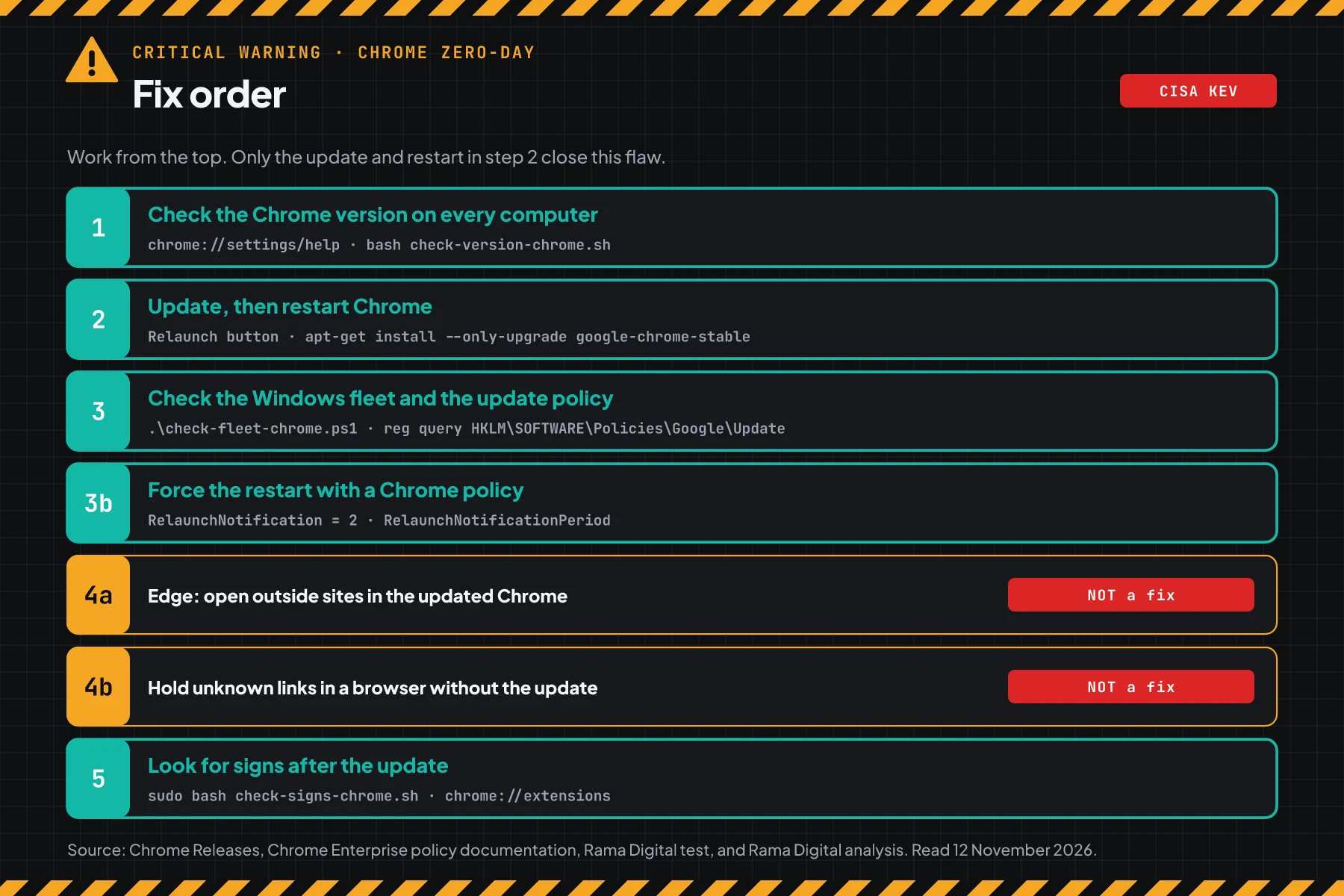
Check the result: the fleet script shows "SAFE" and Restart "-" on every computer. The chrome://policy page shows RelaunchNotification with the value 2.
Step 4: Lower the risk in Edge and browsers without a patch
These steps lower the chance of an attack, but they do not close the flaw.
Rama Digital analysis: the flaw is in the Chromium engine that Edge uses. Condition: Microsoft has no patch on 12 November 2026. Limit: pages inside work apps and ads can still load outside content, so these steps do not make Edge safe.
4a. Open outside sites in the updated Chrome
Use Edge only for internal apps that require Edge. Open email, chat, and outside sites in Chrome 157.0.8103.78. Check Microsoft Edge Security Updates every morning, then update Edge when the patch arrives.
4b. Hold unknown links in a browser without the update
Do not click links from unknown senders in a browser with the status VULNERABLE or CHECK VENDOR. Copy the link to the updated Chrome when the link is important.
Check the result: the team knows which browser to use for outside sites, and no computer has the status VULNERABLE.
Step 5: Find items to check
Google published no attack signs for this flaw. So look for changes that the computer holder does not know.
Save this script as check-signs-chrome.sh. The script finds Chrome processes that still use old files, shells that a Chrome process started, and new extensions from the last 7 days.
#!/usr/bin/env bash
# Look for 3 signs on a Linux computer after the Chrome update for CVE-2026-125350.
# The script only reads the process list and the profile folders. The script changes nothing.
# Run it with sudo, so the script can read the processes of all users.
set -u

echo "== 1. Chrome processes that still use the old files (restart needed)"
n=0
for p in /proc/[0-9]*; do
  exe=$(readlink "$p/exe" 2>/dev/null) || continue
  case "$exe" in
    *chrome*"(deleted)"|*chromium*"(deleted)") echo "RESTART: PID ${p#/proc/} $exe"; n=$((n + 1)) ;;
  esac
done
[ "$n" -eq 0 ] && echo "None. All Chrome processes use the new files."

echo "== 2. Shells or download tools that a Chrome process started"
n=0
for p in /proc/[0-9]*; do
  ppid=$(awk '/^PPid:/ {print $2}' "$p/status" 2>/dev/null)
  [ -n "${ppid:-}" ] || continue
  parent=$(cat "/proc/$ppid/comm" 2>/dev/null) || continue
  case "$parent" in chrome|chromium*) ;; *) continue ;; esac
  name=$(cat "$p/comm" 2>/dev/null)
  case "$name" in
    sh|bash|dash|zsh|python*|perl|curl|wget|nc) echo "CHECK: PID ${p#/proc/} $name, parent $parent PID $ppid"; n=$((n + 1)) ;;
  esac
done
[ "$n" -eq 0 ] && echo "None."

echo "== 3. New extensions in the last 7 days"
n=0
for d in /root/.config/google-chrome /root/.config/chromium /home/*/.config/google-chrome /home/*/.config/chromium; do
  [ -d "$d" ] || continue
  while IFS= read -r e; do
    echo "CHECK: ${e#"$d"/}"; n=$((n + 1))
  done < <(find "$d" -mindepth 3 -maxdepth 3 -path '*/Extensions/*' -type d -mtime -7 2>/dev/null)
done
[ "$n" -eq 0 ] && echo "None."
echo "Compare each extension ID with the list of extensions that you allow."
sudo bash check-signs-chrome.sh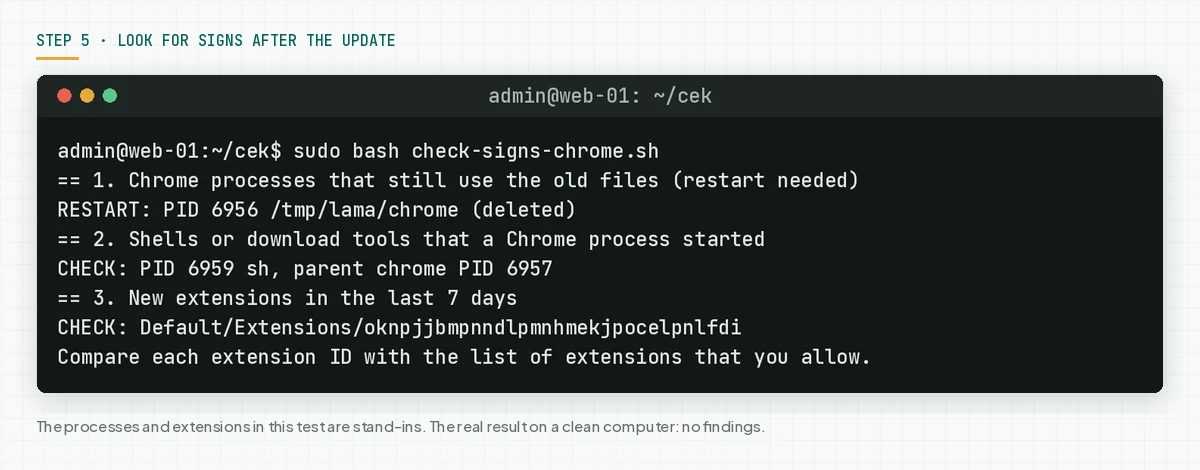
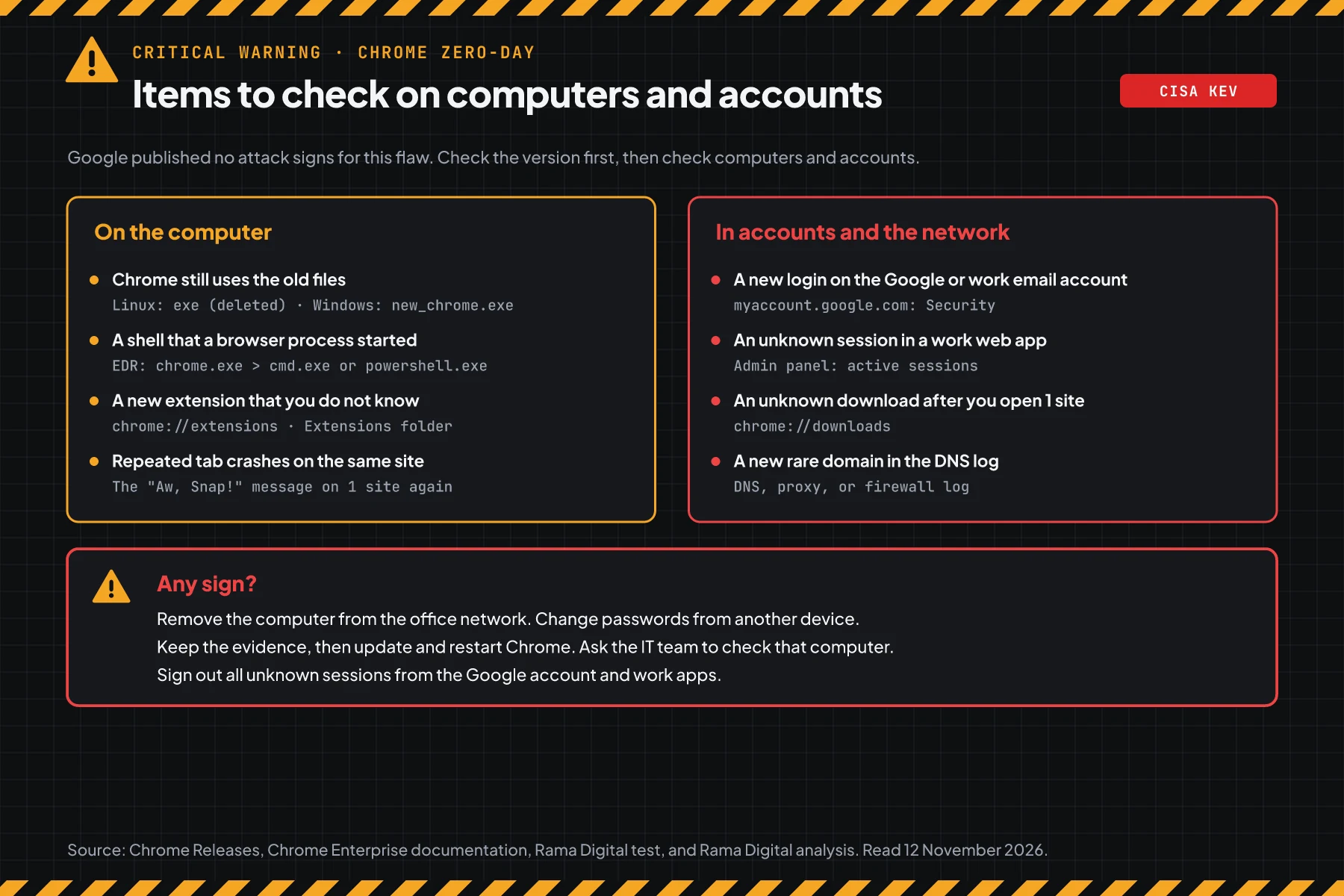
On Windows, use your EDR or Microsoft Defender to find cmd.exe or powershell.exe processes with the parent chrome.exe or msedge.exe. Open chrome://extensions and remove extensions that you do not know.
Check the accounts too: new logins on the Google account and work email, active sessions in work web apps, and unknown downloads in chrome://downloads.
Check the result: every CHECK line has an explanation from the computer holder. Example: the new extension is the official company password manager.
When 1 sign has no explanation, remove the computer from the office network. Change passwords from another device, sign out unknown sessions, then update and restart Chrome. Ask the IT team to check that computer before it goes back to work.
Example: 1 morning for 4 office computers
This simulation uses the dummy data from step 3. The computer names and results are not customer data.
| Time (WIB) | Dummy computer | Result | Action |
|---|---|---|---|
| 08.00 | All 4 computers | VULNERABLE 1, PARTIAL 2, SAFE 1, 1 without Chrome | Send the list to the holders |
| 08.15 | KASIR-01, system Chrome | VULNERABLE, restart NEEDED | Close Chrome, open it again, check the version |
| 08.30 | KASIR-01, per-user Chrome | PARTIAL | Update from chrome://settings/help |
| 08.45 | GUDANG-03, Extended Stable | PARTIAL | Update to 156.0.8078.100 |
| 09.00 | All computers | 24-hour restart policy | Step 3b and step 5 |
The lesson from the simulation: 1 computer can have 2 Chrome installs with different status. Check both installs, not only the desktop icon.
Who installs the update
The update duty differs per device type.
| Device type | Update owner | Your work |
|---|---|---|
| Office computers with Group Policy or Intune | The IT team | Steps 3, 3b, and 5 |
| Personal laptops used for work | The laptop owner | Ask for the version proof from chrome://settings/help |
| Cashier computers from a point-of-sale vendor | The vendor, per the contract | Ask for a written update plan today |
| Work Android phones | The phone holder | Update Chrome through Play Store |
Work phones also have their own system patch this month. Read the Android November 2026 warning.
Checklist for today
- List all work computers and browsers. Owner: the IT team. Proof: a list of names, operating systems, and browsers.
- Check the version with step 1 or 3. Owner: the IT team. Proof: the script output.
- Update, then restart Chrome. Owner: the computer holder. Proof: version 157.0.8103.78 or 156.0.8078.100.
- Set the RelaunchNotification policy. Owner: the IT team. Proof: the
chrome://policypage. - Move outside sites from Edge to the updated Chrome. Owner: all staff. Proof: a team notice.
- Look for signs with step 5. Owner: the IT team. Proof: the script output and an explanation for each CHECK.
Questions and answers
Is this flaw already used in attacks?
Yes. Google says that an exploit for CVE-2026-125350 exists in the wild, and CISA added it to KEV on 10 November 2026.
My Chrome updates by itself. Is it safe now?
It is safe only after the restart. Open chrome://settings/help and make sure that the version is 157.0.8103.78 or later.
I use Microsoft Edge. What do I do?
On 12 November 2026, Microsoft has no patch. Use step 4, then update Edge when the patch arrives.
Are Brave, Opera, or Vivaldi affected?
Rama Digital analysis: these browsers use the Chromium engine, so treat them as affected until the vendor says otherwise. Check the release notes of each vendor.
Is Chrome on Android and iPhone affected?
Chrome for Android got the fix in 157.0.8103.50 and 157.0.8103.78. The Chrome iOS notes of 10 November do not name this CVE.
Does antivirus close this flaw?
No. Antivirus and EDR can find attack signs, but only the Chrome update replaces the vulnerable code.
Do the check scripts change anything on my computer?
No. The 3 scripts only read versions, install folders, processes, and extension folders. Only steps 2 and 3b change something.
Next step
The limits stay: step 4 does not close the flaw, and an update does not remove access that an attacker already used. When you need help to audit computers and web apps that hold customer data, use Vibe Code Rescue. For 1 urgent problem today, book a 30-minute session.
Sources
- The Chrome Stable notes of 9 November 2026, the Extended Stable notes of 9 November, and the Chrome Android notes of 9 November: the CVE-2026-125350 fix and the exploit status.
- The Chrome Stable notes of 11 November 2026, the Extended Stable notes of 11 November, and the Chrome Android notes of 11 November: target versions and the 5 Critical flaws.
- The CVE-2026-125350 record: the official description, CWE-416, and the CISA ADP score.
- CISA KEV: the date added and the deadline.
- Microsoft Edge Security Updates: the Edge patch status on 12 November 2026.
- The Chrome iOS notes of 10 November: the contents of the Chrome iOS release.
- The Google Chrome update guide, the Google guide to manage Chrome updates on Windows, the Chrome policy guide for Linux, and the Chrome Enterprise policy list: how to update and the restart policy.