Direct answer: You can track ads that land in Instagram and Messenger DMs with 3 parts. First, the webhookWebhookAn automatic message one system sends to another the moment something happens, for example an incoming WhatsApp message.Open the glossary carries referral.ad_id on the first message. Second, your CRM stores the ad_id with the PSID or IGSID of that person. Third, your server sends an event to Meta with action_source: "business_messaging" when the chat stage goes up.
Main condition: you have 1 Meta app, admin access to a Facebook Page and an Instagram professional account, and a server that can receive webhooks. Limit: Threads cannot be tracked this way, because the Threads APIAPIThe official door 2 systems use to exchange data, without anybody copying it by hand.Open the glossary has no DM endpoint. Purchase optimisation through CAPICAPIA server path that sends conversion data from your system to the ad platform, without depending on the buyer browser.What is the Conversions API (CAPI)? is available for Messenger and WhatsApp only, not for Instagram yet.
We wrote this guide from 7 Meta for Developers documents and 3 Meta Business Help Center articles that we read on 26 September 2026. The stage to event map equals our WhatsApp lane, which runs in production. All ids, messages, and values in the images are dummy data.
The problem: a DM from an ad has no cookie
A click-to-message ad opens a chat, not a web page. There is no PixelPixelA piece of code on a web page that tells the ad platform somebody opened the page or took an action.What is the Meta Pixel?, no fbclid, and no _fbc cookie. Ads Manager only counts conversations started, so Meta learns to find people who send "hi", not people who pay. For the web version of this problem, read how to track WhatsApp landing page ads in Qontak CRM.
From 1 October 2026, Meta charges WhatsApp service and utility messages above the free quota. The details are in the WhatsApp pricing change of 1 October 2026 (in Indonesian).
So many businesses look at Instagram and Messenger DMs as an extra lane. That lane only helps when you can measure it up to the payment. The diagram below shows 7 checkpoints from the ad click to the return signal.
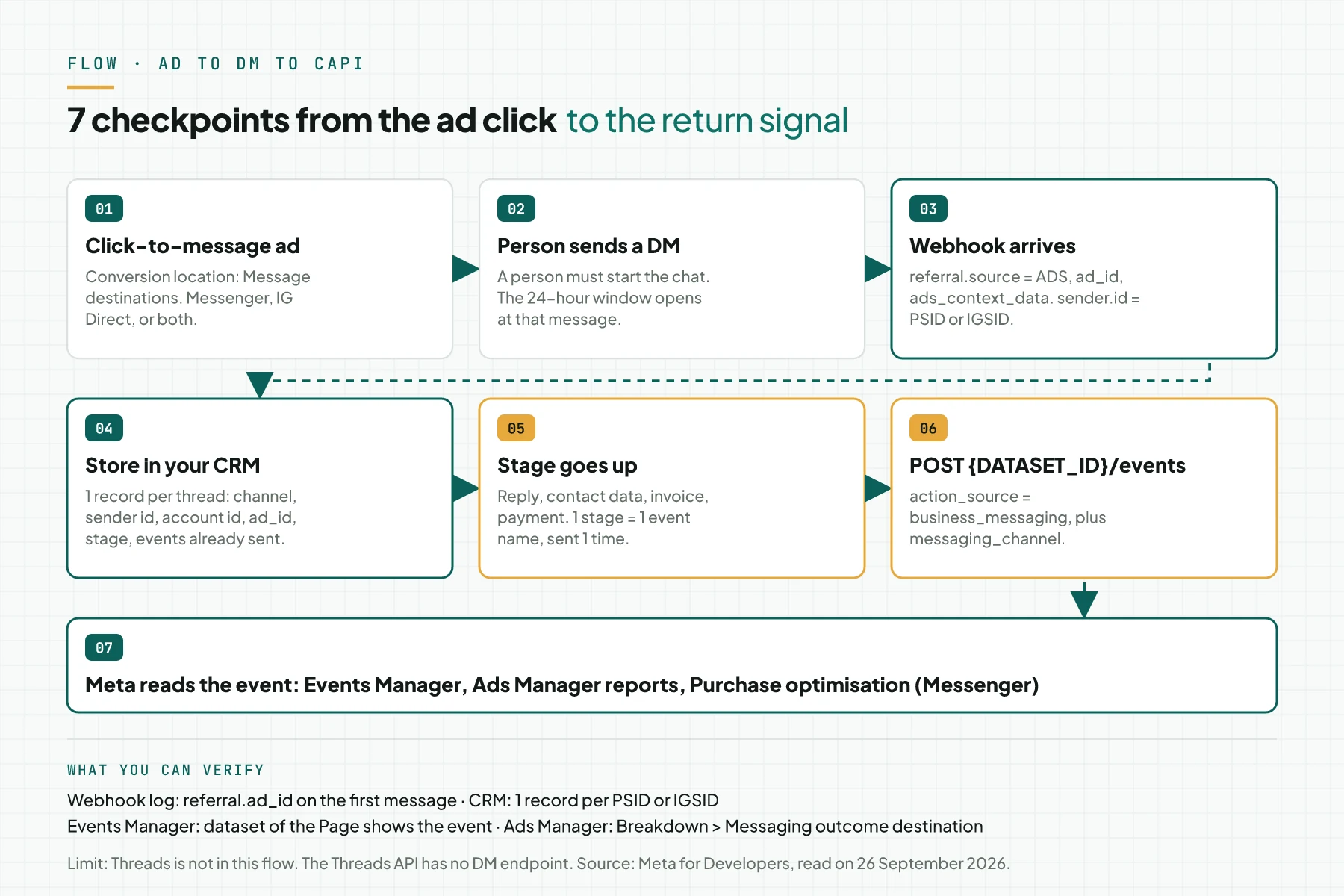
The key point: the identity of the person does not change from the first message to the payment. The PSID or IGSID in the webhook is the same key that Meta asks for in CAPI.
How DM ad tracking works
Click-to-message ads
A click-to-message ad sends people straight into a conversation with your business in Messenger, Instagram, or WhatsApp. The destination sets the placements. A Messenger destination can show on Facebook, Instagram, and WhatsApp. An Instagram Direct destination shows on Instagram only. Source: Meta Business Help Center, about ads that click to message.
Webhook referral
When a person sends a message from an ad, the webhook carries a referral object with source: "ADS", type: "OPEN_THREAD", ad_id, and ads_context_data. Messenger needs subscriptions to messages and messaging_referrals. Sources: Messenger messages webhook reference and Webhooks for Instagram Messaging.
Conversions API for business messaging
CAPI accepts events with action_source: "business_messaging" and messaging_channel. Messenger uses page_id and page_scoped_user_id. Instagram uses instagram_business_account_id and ig_sid. There is no click id like ctwa_clid, so Meta matches the event to the person in the thread. Source: Conversions API for Business Messaging, updated 5 May 2026.
Messenger, Instagram Direct, WhatsApp, and Threads compared
The 4 channels look the same to a customer, but the data is different. This table shows the fields and limits that set the design of your server.
| Item | Messenger | Instagram Direct | Threads | |
|---|---|---|---|---|
| Person id in CAPI | page_scoped_user_id | ig_sid | ctwa_clid | None |
| CAPI permission | page_events | instagram_manage_events | whatsapp_business_manage_events | None |
| Messages after 24 hours | Message tag, one-time notification, sponsored message | Message tag only | Paid template | No DM API |
| Purchase optimisation through CAPI | Yes | Not yet | Yes | None |
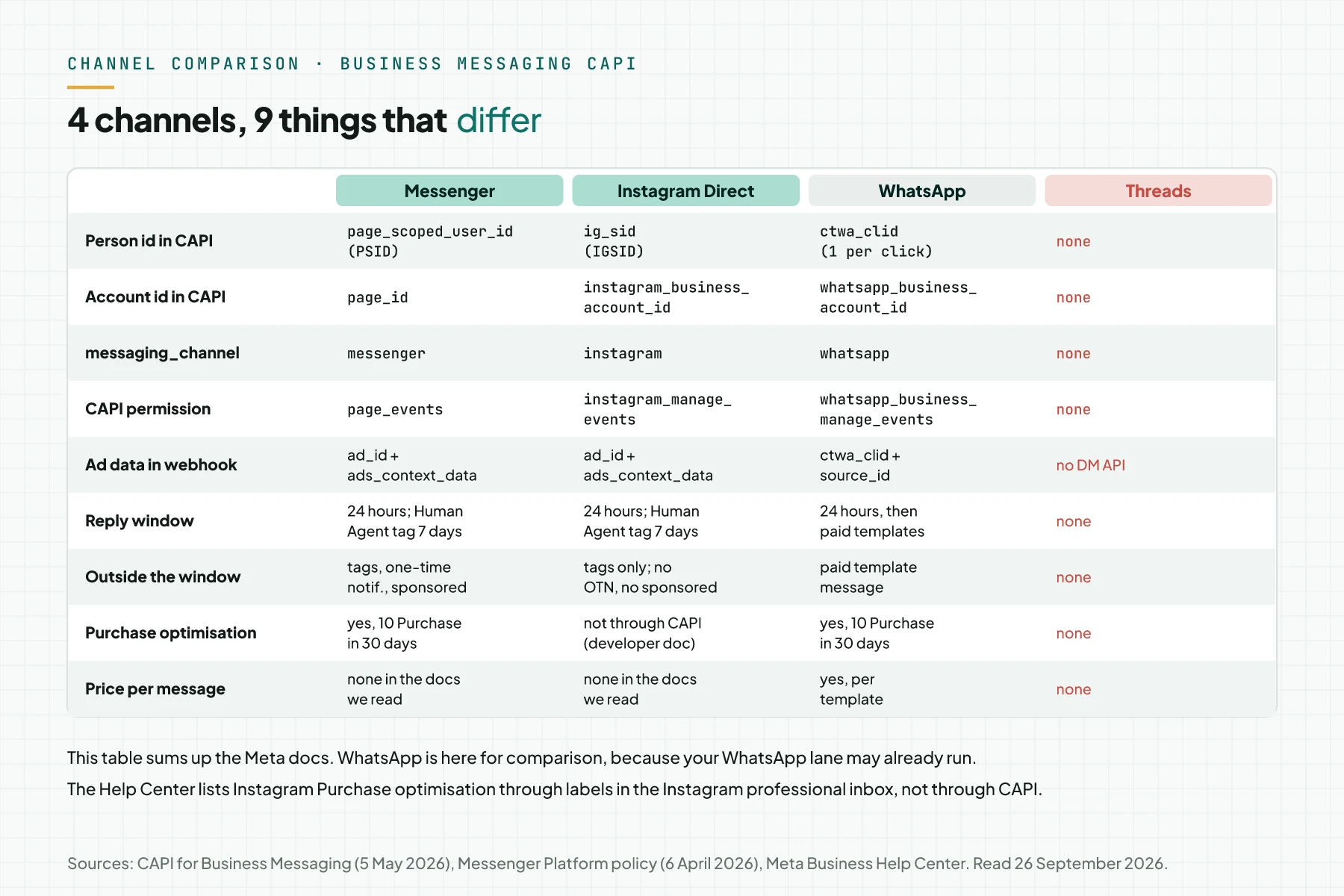
Threads has DMs in its app, but the Webhooks for Threads document (updated 30 June 2026) lists only 4 fields: replies, delete, mentions, and publish. Without a message webhook, your server cannot read Threads DMs.
The Messenger Platform and IG Messaging API documents that we read show no price per message. Prices per message are on the WhatsApp Business Platform pricing page. For the WhatsApp cost math, read how to calculate WhatsApp API costs for service messages.
Prerequisites
- 1 Meta app of the Business type, with an admin role for you.
- A Facebook Page and an Instagram professional account linked to that Page.
- A public HTTPS server for the webhook callback, with a log that keeps the raw JSON.
- 1 CRM or database table for threads, stages, and events already sent.
- Access to Events Manager and Ads Manager in the same Business ManagerBusiness ManagerThe place where Meta holds your business ad assets: ad accounts, Pages, pixels, and people access.Open the glossary.
- 1 personal Facebook account and 1 personal Instagram account for tests. Do not use customer accounts.
Step 1: Prepare the Meta app and permissions
Open App Dashboard, then App Review and Permissions and Features. Ask for Advanced Access on the Messenger and Instagram permissions below. The event permissions get approval faster when the messaging permissions already have Advanced Access. Source: CAPI for Business Messaging.
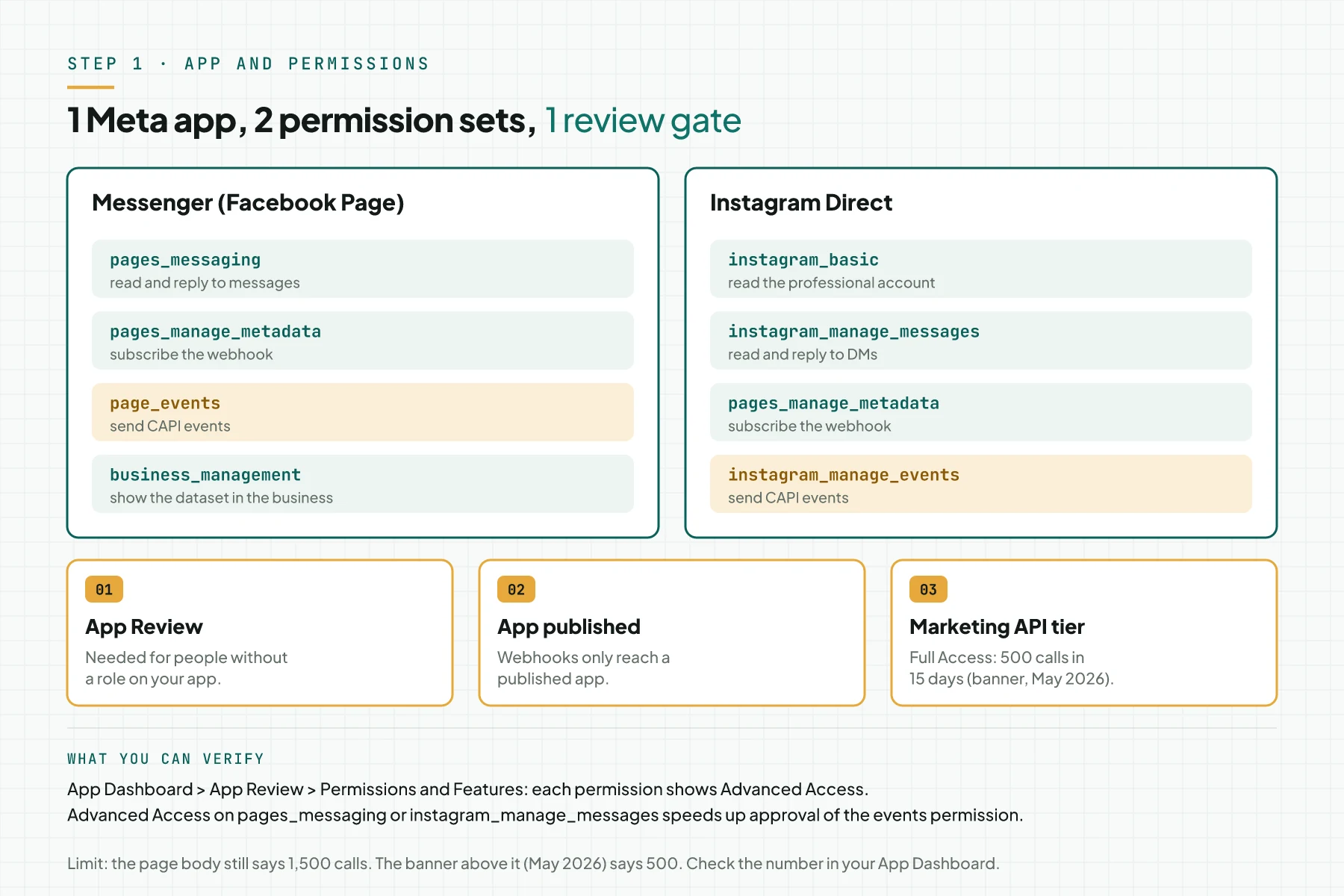
- Messenger:
pages_messaging,pages_manage_metadata,page_events, andbusiness_management. - Instagram:
instagram_basic,instagram_manage_messages,pages_manage_metadata, andinstagram_manage_events. - The Marketing API Access Tier feature. The page banner (May 2026) sets the Full Access threshold at 500 calls in 15 days. The page body still says 1,500.
Verify: every permission shows Advanced Access, and the app is published. Webhooks only reach a published app, per the Instagram webhook document.
Step 2: Subscribe the webhook and capture the referral
In Webhooks on the App Dashboard, subscribe the Page to messages, messaging_postbacks, and messaging_referrals. Subscribe the Instagram account to messages. Ad data arrives in 4 ways, based on the state of the thread.
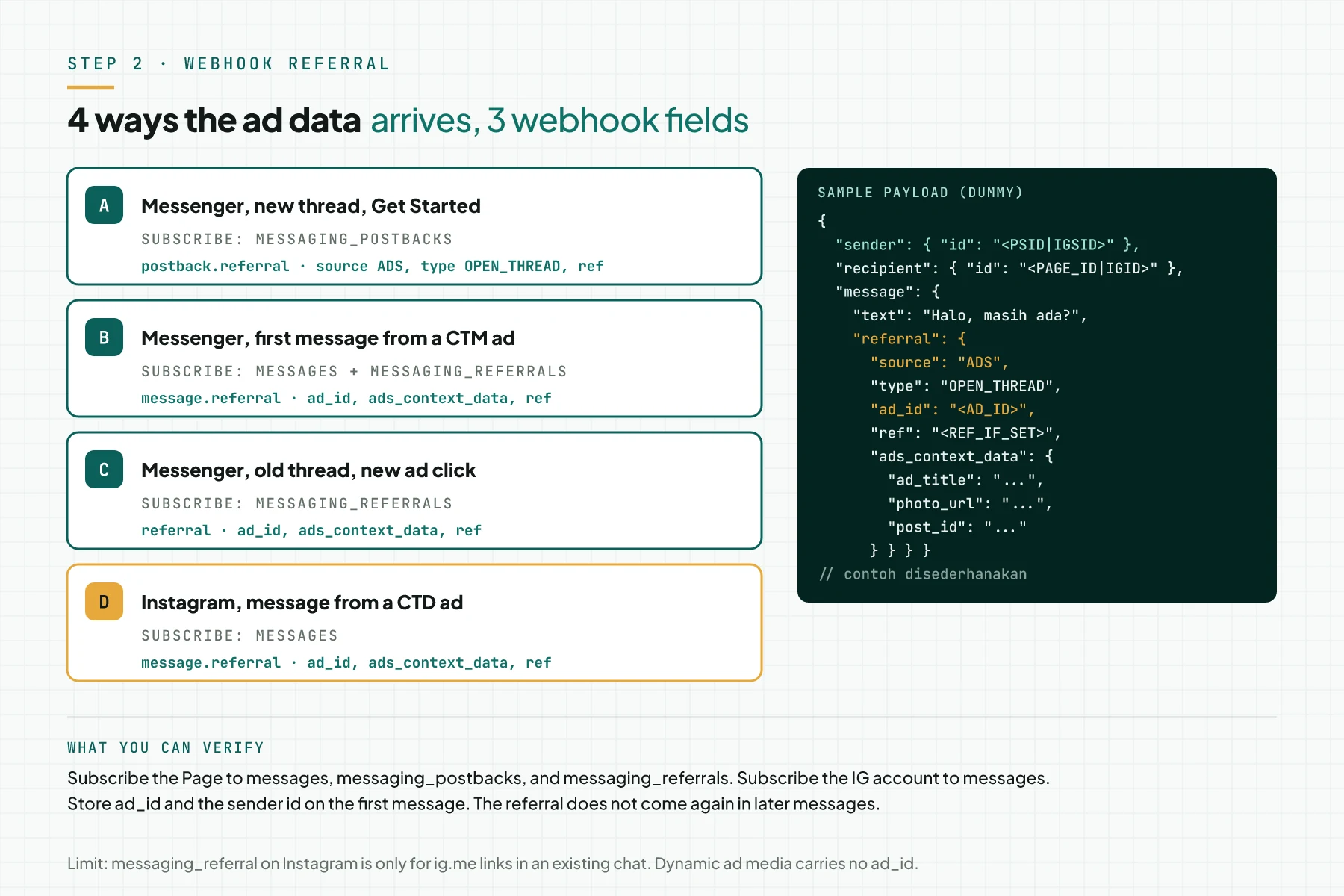
- Way A: a new Messenger thread with a Get Started button. The data is in
postback.referral. Source: messaging_postbacks reference. - Way B: the first Messenger message from a CTM ad. The data is in
message.referral. - Way C: an old Messenger thread, then a click on a new ad. The data is in the
messaging_referralsevent. Source: messaging_referrals reference. - Way D: an Instagram message from a Click to Direct (CTD) ad. The data is in
message.referral.
Verify: send a DM from a test ad with your personal account. The webhook log must contain referral.source = "ADS" and ad_id. On Instagram, messaging_referral is only for ig.me links in an existing chat. Dynamic ad media carries no ad_id.
Step 3: Fetch the dataset for the Page and the Instagram account
Call the Dataset API with POST /{PAGE_ID}/dataset for Messenger and POST /{IG_USER_ID}/dataset for Instagram. When the Page already has a dataset, the API returns the same dataset_id. Store that id in the server config.
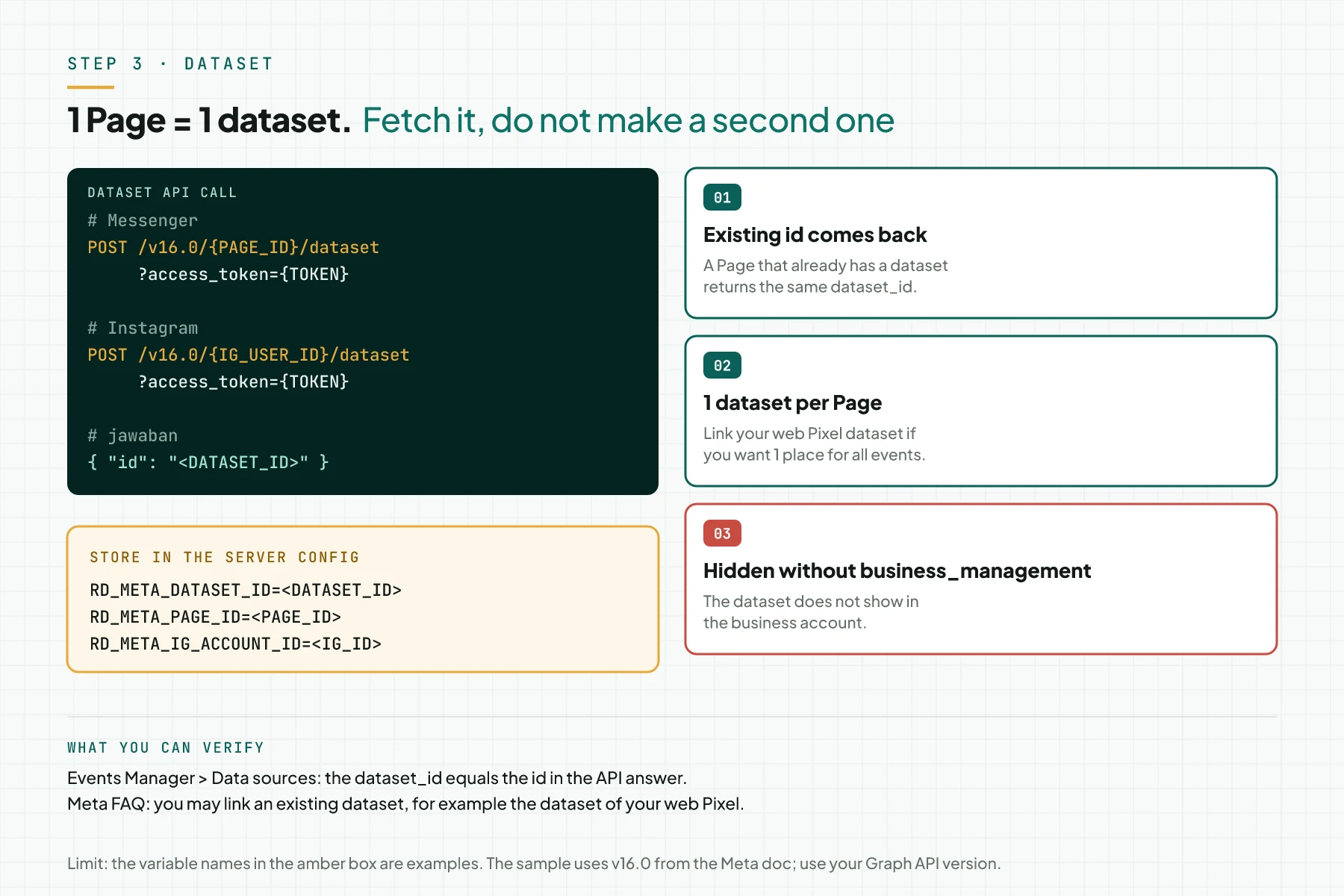
1 Page can have only 1 dataset. You may link an existing dataset, for example the dataset of your web Pixel. Without the business_management permission on the business account, the dataset does not show in the business account. Source: CAPI for Business Messaging FAQ.
Verify: the dataset_id in Events Manager, menu Data sources, equals the id in the API answer.
Step 4: Store the referral and the sender id per thread
Make 1 record for 1 thread. The unique key is the channel, the account id, and the sender id. Write ad_id and ad_title on the first message, because the referral does not come again on later messages.
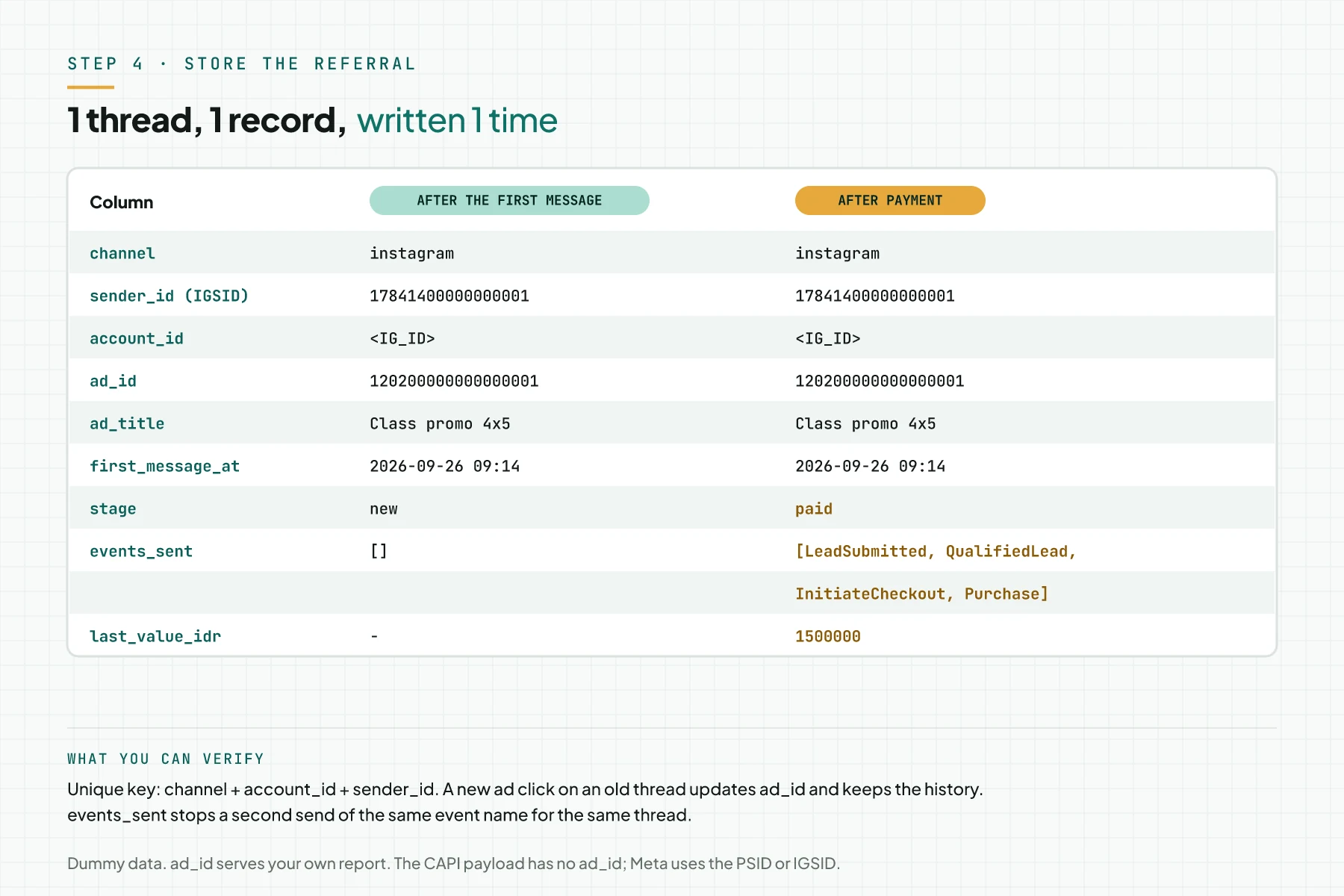
ad_id serves your own report, for example the cost per payment per ad. The CAPI payload has no ad_id, so Meta links the event to the ad through the PSID or IGSID. The events_sent column stops a double send.
Verify: a 2nd reply from the same person does not make a new record.
Step 5: Map chat stages to event names
Pick 1 standard event name for 1 stage. Send events only for interactions in the thread. A conversionConversionThe action you count as a result, for example a paid order, a sign-up, or a chat that becomes a qualified buyer.Open the glossary on your website goes through web CAPI, not business_messaging, per the Meta FAQ.
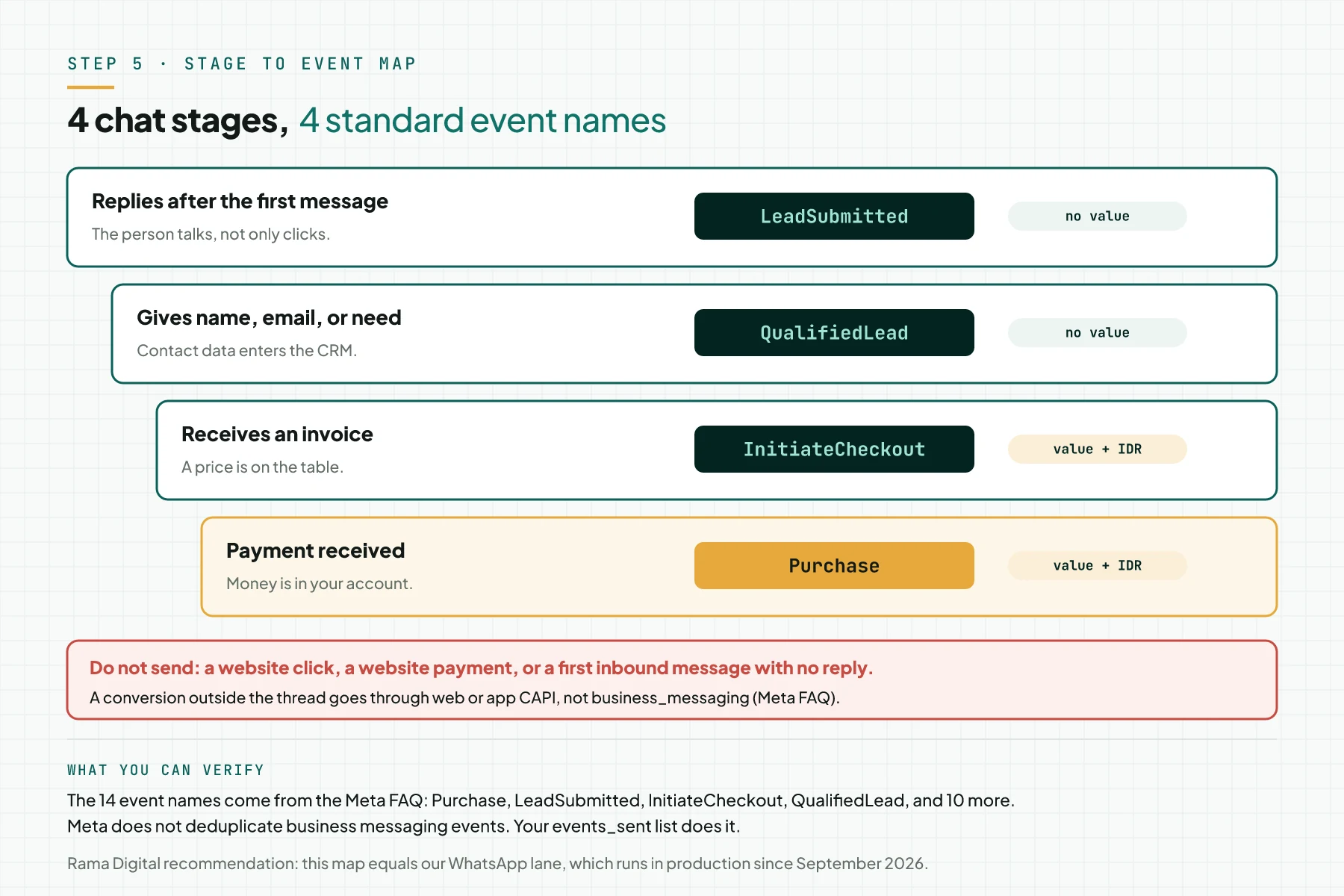
| Chat stage | Event name | value and currency |
|---|---|---|
| The person replies after the first message | LeadSubmitted | No |
| The person gives a name, email, or need | QualifiedLead | No |
| The person receives an invoice | InitiateCheckout | Yes, IDR |
| Payment received | Purchase | Yes, IDR |
Meta supports 14 event names for business messaging, such as OrderCreated and RatingProvided. Meta does not deduplicate these events, so your events_sent list keeps 1 send per stage.
Step 6: Send the event to CAPI
Send POST /{DATASET_ID}/events when the stage goes up, not in a monthly batch. The endpoint is the same for both channels. Only messaging_channel and user_data differ.
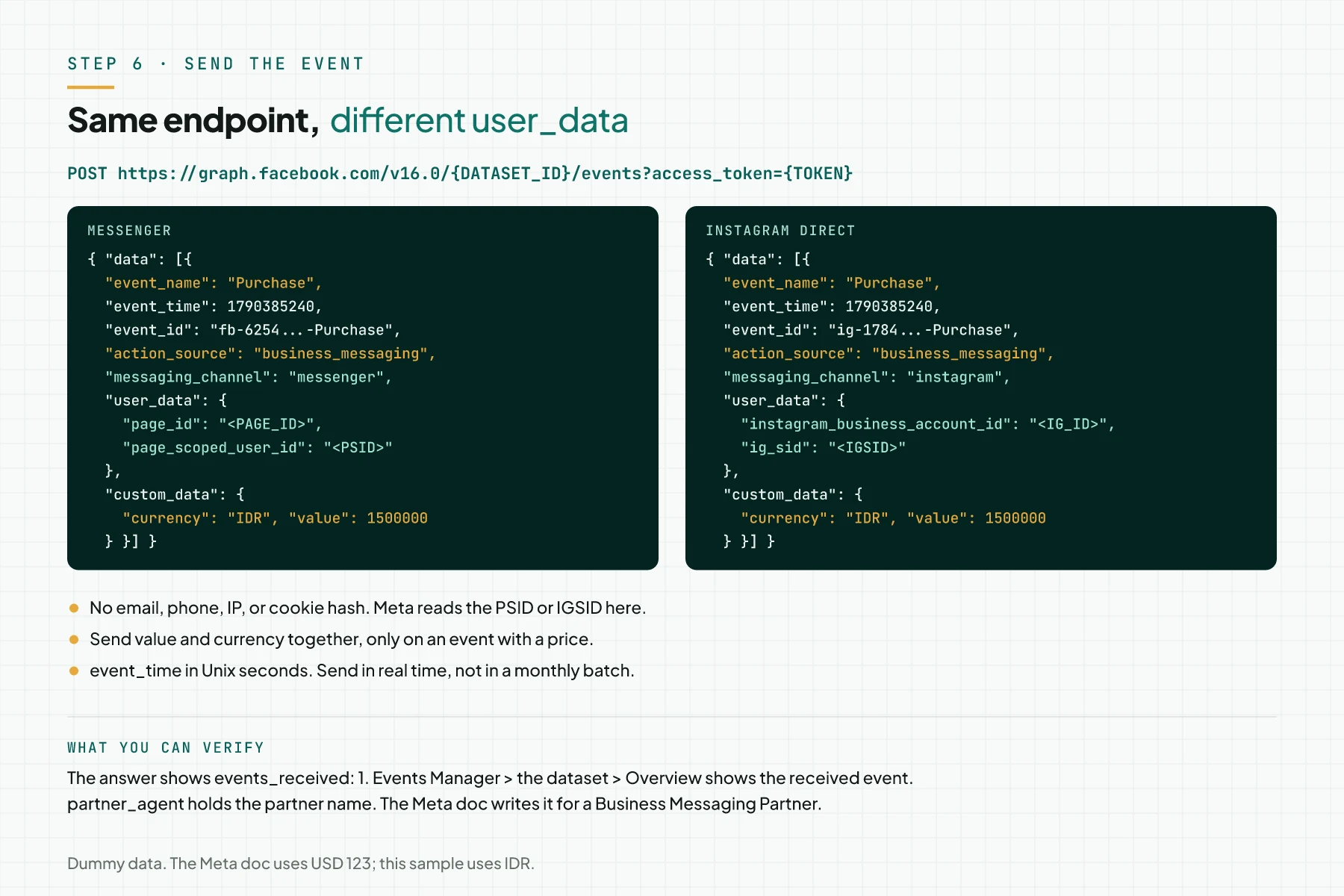
Do not send email, phone, IP, or cookie hashes on this event. Send value and currency together, only on an event with a price. event_time is in Unix seconds.
Verify: the API answer shows events_received: 1. Store the fbtrace_id on the event row for tracing.
Step 7: Build the ad with Message destinations
In Ads Manager, click + Create and pick the Engagement, Traffic, or Sales objective. At Conversion location, pick Message destinations, then pick the Facebook Page. Source: Help Center, create an ad that clicks to multiple message destinations.
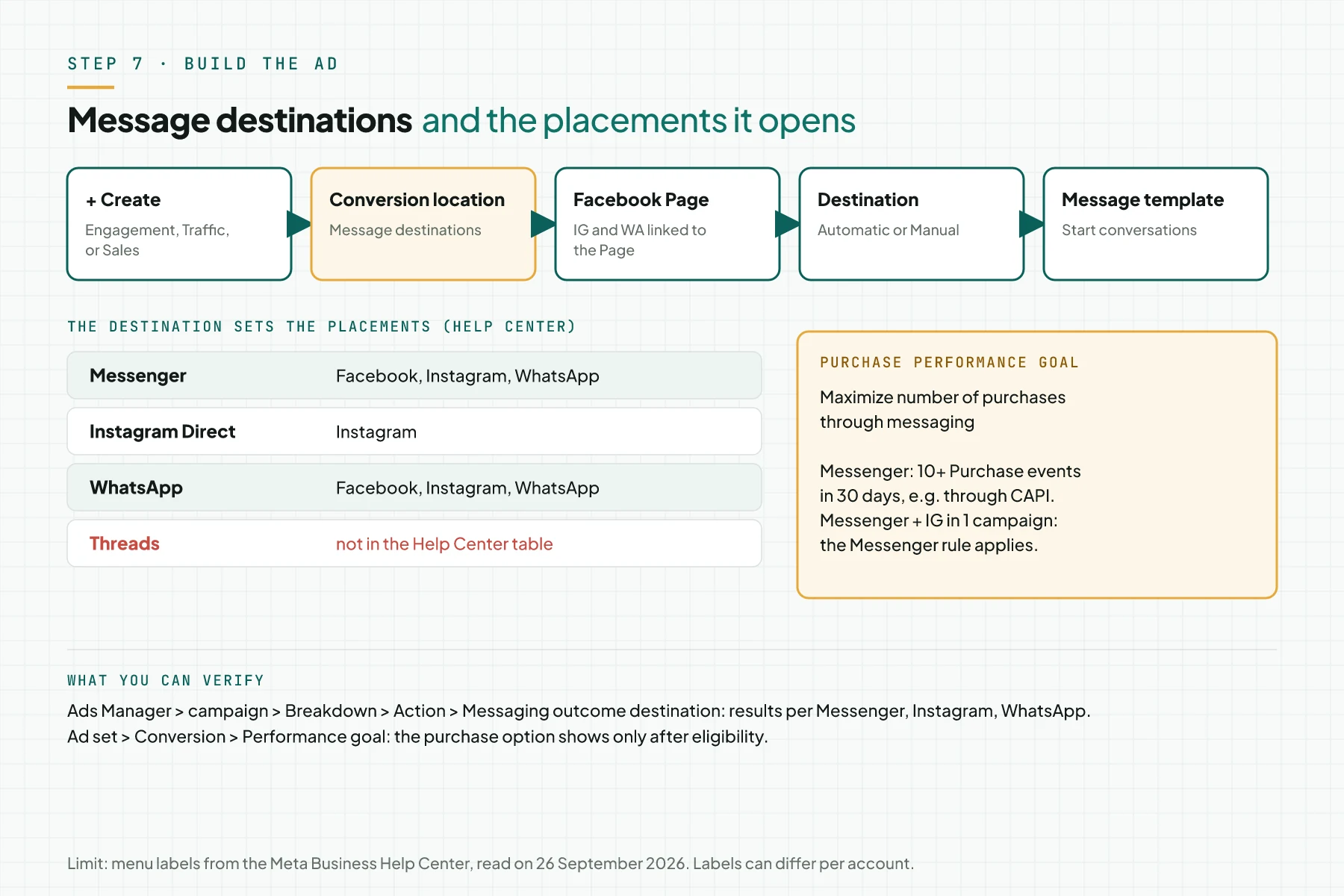
Pick Automatic so Meta sends each person to the channel that person is most likely to use. Pick Manual when you want 1 channel only. The performance goal Maximize number of purchases through messaging for Messenger needs 10 or more Purchase events in 30 days. Source: Help Center, optimize click-to-message campaigns for purchases.
Step 8: Verify from the server to the report
Test 1 full thread with a personal account. Check 4 places in order, and record the date, ad_id, and event_id of each test.
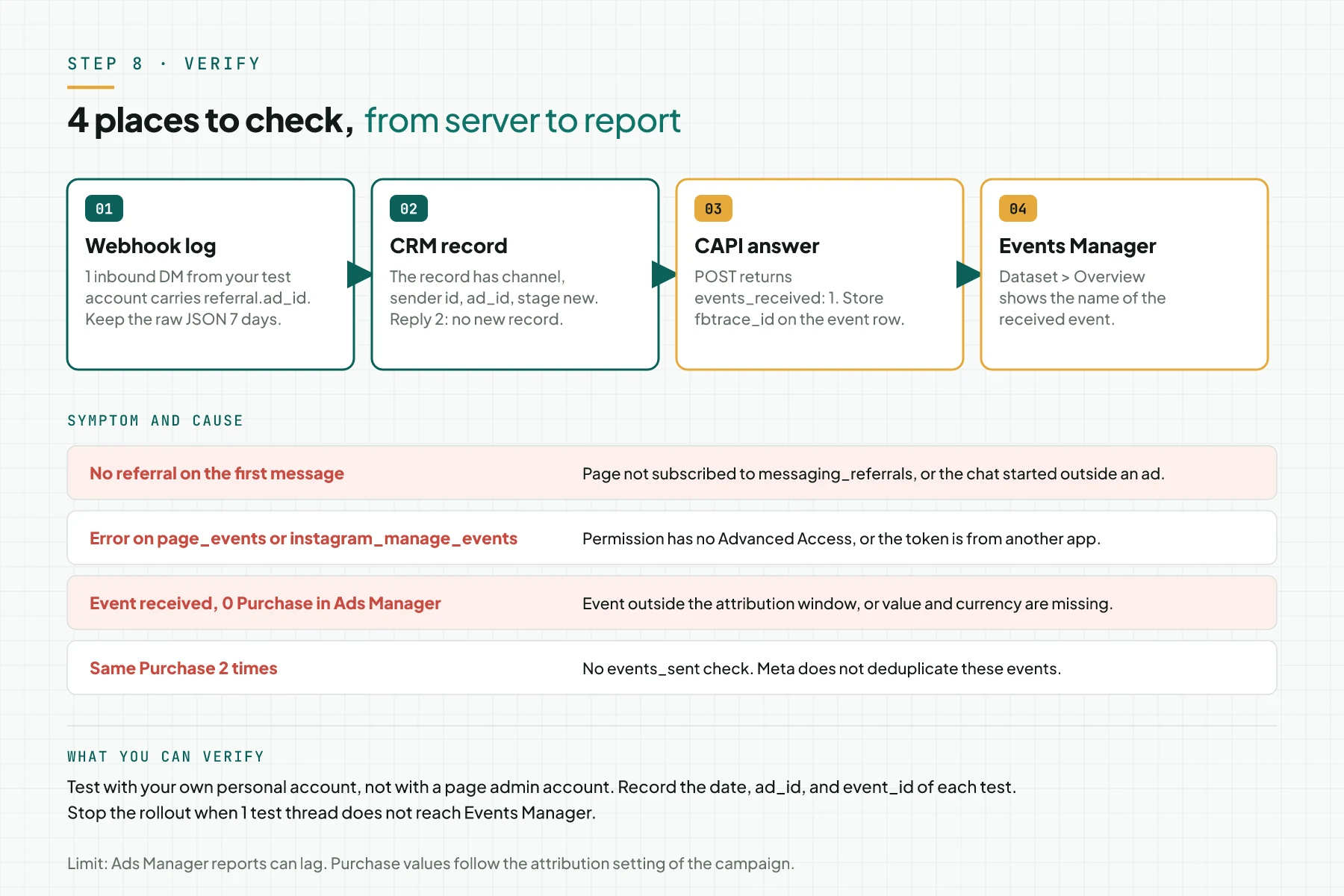
In Ads Manager, open the campaign, then Breakdown, Action, and Messaging outcome destination. That report splits results per Messenger, Instagram, and WhatsApp.
The 24-hour messaging window
The person must start the conversation. After that you have 24 hours to reply, and messages inside the window may contain a promo. Source: Messenger Platform and IG Messaging API policy, updated 6 April 2026.
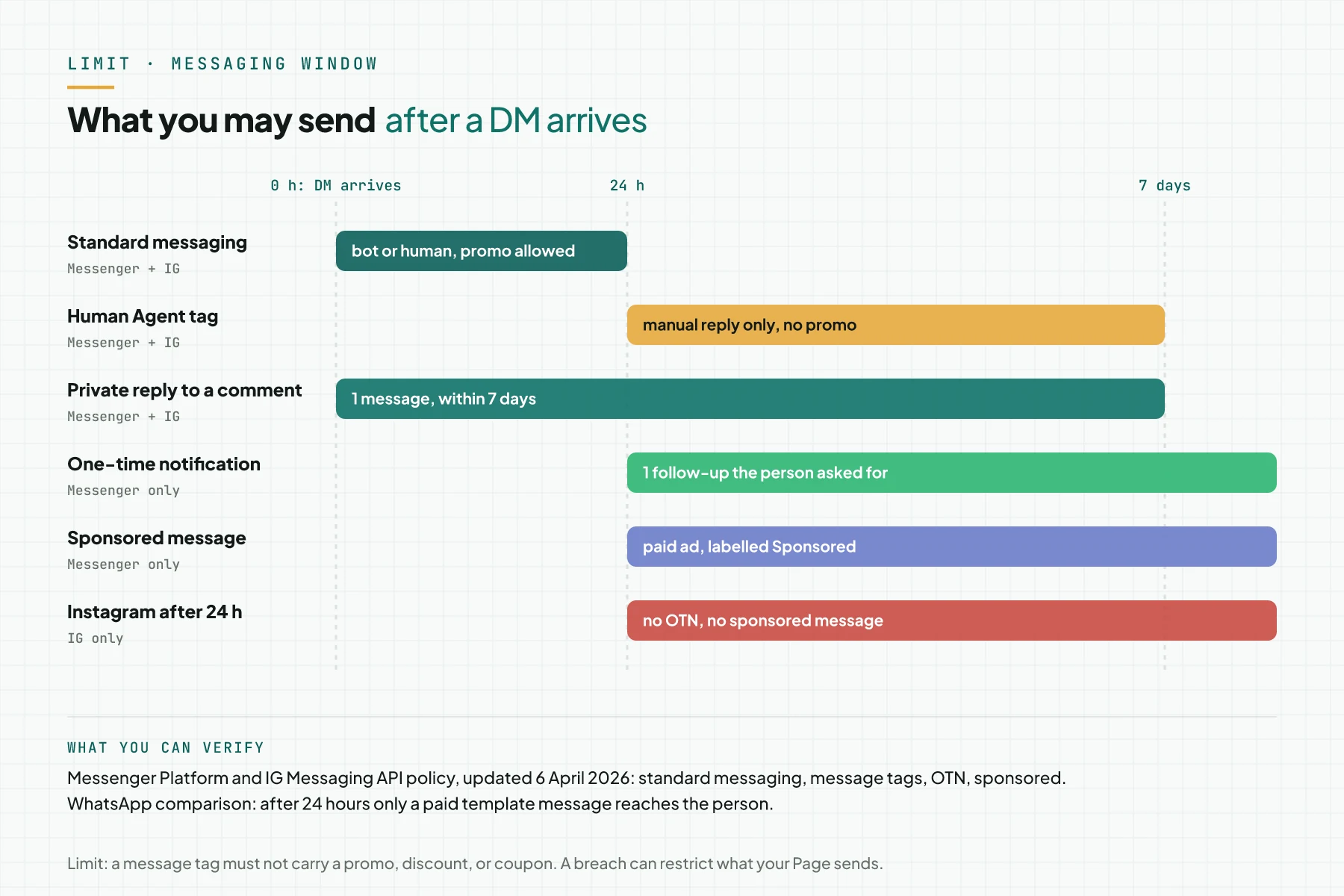
The Human AgentAI agentAn AI program that performs work steps by itself, for example reading a message, drafting a reply, and recording the result.Open the glossary tag opens 7 days for manual replies with no promo. One-time notifications and sponsored messages exist on Messenger only. So automatic follow-up to cold leads is more limited than on WhatsApp, which uses paid templates.
Worked example: 1 Instagram DM up to Purchase
Simulation with dummy data. An online class ad uses the Instagram Direct destination.
| Time (WIB) | What happens | What the server records | Event to Meta |
|---|---|---|---|
| 26 Sep 09:14 | The person clicks the ad and sends "When is the class?" | New record: IGSID, ad_id 120200000000000001, stage new | None |
| 26 Sep 09:20 | The person answers the schedule question | Stage talking | LeadSubmitted |
| 26 Sep 09:31 | The person gives a name and email | Stage identified | QualifiedLead |
| 26 Sep 09:40 | An invoice of Rp 1,500,000 goes out in the chat | Stage invoiced | InitiateCheckout, 1500000 IDR |
| 27 Sep 10:05 | The transfer arrives | Stage paid, events_sent holds 4 names | Purchase, 1500000 IDR |
Output: the internal report counts 1 payment for that ad_id. Meta receives 4 events with the same IGSID.
Checklist before the ad goes live
- Developer: confirm that 8 permissions have Advanced Access. Keep an App Review screenshot.
- Developer: subscribe the Page and the IG account to the webhook fields in Step 2. Keep the field list.
- Developer: store the
dataset_idin the server config. Keep the API answer. - Developer: test 1 ad DM per channel. Keep the raw JSON that holds
ad_id. - Business owner: approve the stage to event map. Keep the table from Step 5.
- Chat admin: mark the invoice and paid stages on the test thread. Keep
events_sent. - Marketer: check the event in Events Manager and the breakdown in Ads Manager. Keep the test date.
- Stop criterion: hold the ad when 1 test thread does not reach Events Manager.
When to use social DMs, when to use WhatsApp
Rama Digital recommendation: use Messenger when you want Purchase optimisation with no price per message, and your team replies within 24 hours. Use Instagram Direct for audiences who spend more time on Instagram, but measure Purchase in your own report, because Purchase optimisation through CAPI is not there yet.
Keep WhatsApp when your business needs scheduled follow-up after 24 hours, for example an invoice reminder. The paid WhatsApp template is the only official lane for that. You can also use the Automatic destination so 1 campaign splits the budget across 3 channels.
Event match quality matters too. Read Event Match Quality (EMQ): what it means and how to raise it for the web lane that runs next to the DM lane.
Frequently asked questions
Can Threads DMs be tracked to CAPI? No. The Threads API only has the replies, delete, mentions, and publish webhooks. There is no webhook or endpoint for DMs, so your server cannot read those messages.
Does Instagram need a click id like ctwa_clid? No. Instagram events use instagram_business_account_id and ig_sid. Meta links the event to the person in that thread, not to 1 click.
Do you pay to send and reply to DMs through the API? The Messenger Platform and IG Messaging API documents that we read on 26 September 2026 show no price per message. Prices per message appear only on the WhatsApp Business Platform pricing page.
What if an old contact comes back through a new ad? Messenger sends a messaging_referrals event with the new ad_id. Update the ad_id on the record and keep the old ad in the history, so your report does not lose the first click.
Does Meta reject duplicate events? No. Meta writes that it does not help deduplicate business messaging events. Check events_sent before each send.
Next step
This flow sends the payment signal from the DM to Meta. Ad results still depend on the offer, the creative, and how fast your team replies. Instagram Purchase optimisation through CAPI is not available yet either. If you want us to install the webhook, CRM, and CAPI for Messenger, Instagram, and WhatsApp, the Attribution Bridge service covers the event map, CAPI, and an ROIROIProfit minus all costs, divided by all costs. ROI counts profit, while ROAS counts gross revenue.Open the glossary dashboard. If you want to talk about the technical scope first, book a Technical Scoping Session.
Sources
- Meta for Developers: Conversions API for Business Messaging
- Meta for Developers: messages webhook reference
- Meta for Developers: messaging_referrals webhook reference
- Meta for Developers: messaging_postbacks webhook reference
- Meta for Developers: Overview for the Messenger Platform
- Meta for Developers: Messenger Platform and IG Messaging API policy
- Meta for Developers: Webhooks for Instagram Messaging
- Meta for Developers: Webhooks for Threads
- Meta Business Help Center: About ads that click to message
- Meta Business Help Center: Create an ad that clicks to multiple message destinations
- Meta Business Help Center: Optimize click-to-message campaigns for purchases
- Meta for Developers: WhatsApp Business Platform pricing