Direct answer: Event Match Quality (EMQ) is a score from 0 to 10 that Meta gives to each server event to show how well the customer information on that event can be matched to a Meta account. A high score means Meta knows who converted, so the conversionConversionThe action you count as a result, for example a paid order, a sign-up, or a chat that becomes a qualified buyer.Open the glossary can be attributed to the ad and used to find similar people. You read it in Meta Events Manager in the Event match quality column, and you raise it by sending more identifiers in the correct format: click ID, email, phone, name, city, and ZIP code.
Main condition: the score exists for website events sent through the Conversions APICAPIA server path that sends conversion data from your system to the ad platform, without depending on the buyer browser.What is the Conversions API (CAPI)? (CAPI) with action_source website, including the events Konektor sends from WhatsApp leads. Limit: the score measures matching, not ad results. A score of 9 does not guarantee a higher ROASROASRevenue from ads divided by ad spend. A ROAS of 4 means each Rp 1,000 of ad spend returns Rp 4,000 of gross revenue.How to calculate ROAS and break-even ROAS, and Meta calculates the score from the last 48 hours of data, so a rare event has no score.
We wrote this guide on 12 September 2026 from the Meta Business Help Centre, the Meta developer documentation, the Konektor Event Match Quality glossary, and Events Manager for the Konektor.id dataset that we manage. Every step has a screenshot. Dataset ids, account ids, and customer data are masked. The Konektor dashboard runs in Indonesian; the English interface has the same layout.
What you lose when the EMQ score is low
An event that does not match a Meta account still arrives in Events Manager, but Meta does not know which person performed it. This has 3 effects: the conversion cannot be attributed to the ad, the algorithm learns from blurred examples, and conversions that the PixelPixelA piece of code on a web page that tells the ad platform somebody opened the page or took an action.What is the Meta Pixel? missed are not counted. On the business side, the symptom is a campaign with many clicks and few closed deals, as we describe in Many clicks, few sales: the problem can be tracking (Indonesian source).
Meta shows the impact directly. On the dataset Overview page, Events Manager writes the amount of ad spend affected by low data quality, then names the outcomes it links to better data quality: Higher ROAS, Lower cost per result, and Increase in additional conversions reported.
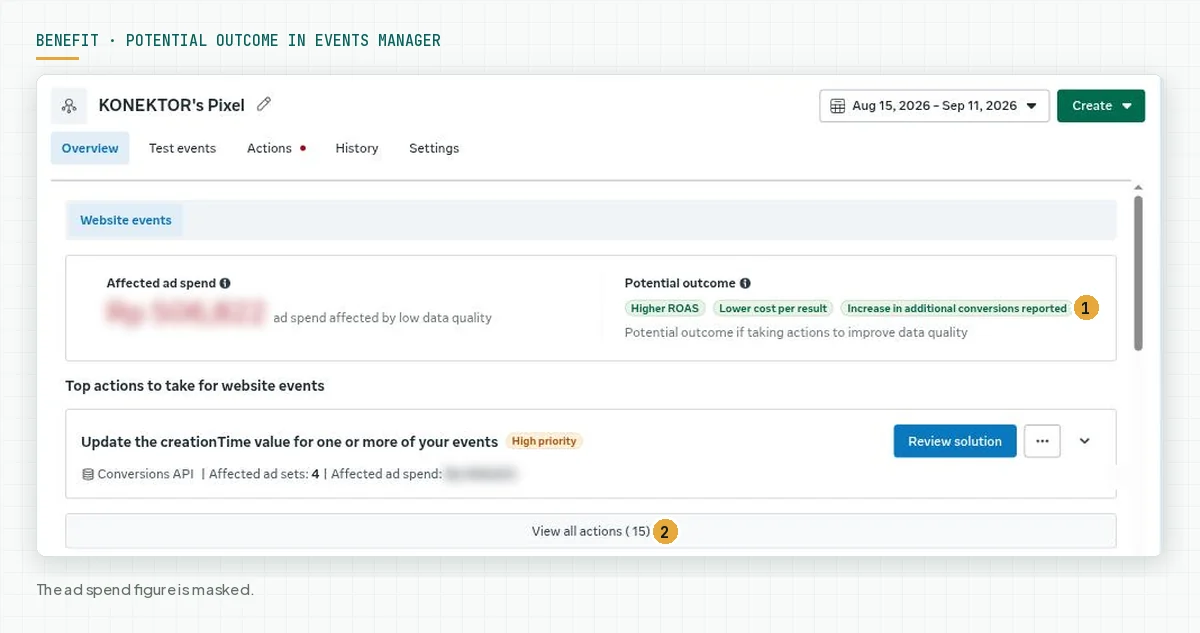
Konektor writes the same limit in its glossary: a high score does not guarantee a higher ROAS, but a low score almost always lowers results, because the auction system learns from blurred examples. Source: Konektor glossary, updated 10 September 2026.
How Meta calculates the EMQ score
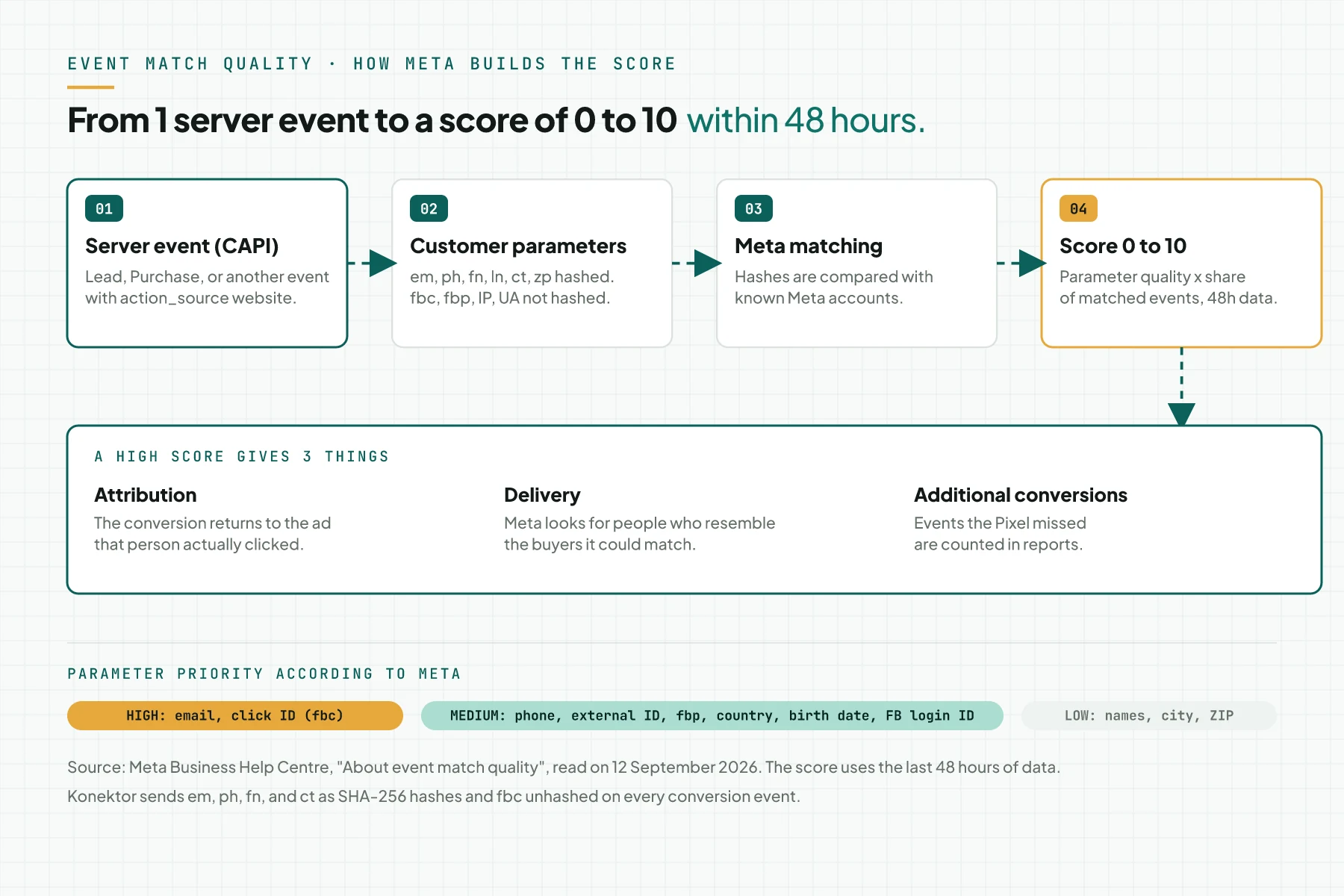
Meta calculates the score from 2 things: the quality of the customer information parameters you send on 1 event, and the percentage of that event's instances that are matched to Meta accounts. The data used is the last 48 hours, so you must send events regularly to keep the score. Source: Meta Business Help Centre, About event match quality.
Parameters and their priority
Meta gives each parameter a different priority. The table below uses Meta's official list as of 12 September 2026 and adds the hashing rules from the developer documentation.
| Parameter | CAPI key | Meta priority | Hash | Format before hashing |
|---|---|---|---|---|
em | High | SHA-256 | Lowercase, no leading or trailing spaces | |
| Click ID | fbc | High | No | fb.1.time.fbclid, 90-day cookie |
| Phone number | ph | Medium | SHA-256 | Digits only with the country code, no leading zero: 62812... |
| Facebook Login ID | fb_login_id | Medium | No | ID from Facebook Login |
| Date of birth | db | Medium | SHA-256 | YYYYMMDD |
| Country | country | Medium | SHA-256 | 2-letter lowercase code, id |
| External ID | external_id | Medium | Recommended | Your own customer id |
| Browser ID | fbp | Medium | No | The _fbp cookie from the Pixel |
| First name, last name | fn, ln | Low | SHA-256 | Lowercase, no punctuation |
| City, ZIP code | ct, zp | Low | SHA-256 | Lowercase, no spaces; ZIP without a dash |
Priority source: About event match quality. Format and hashing source: Customer Information Parameters, Meta for Developers. Konektor ranks the click ID as the strongest identifier, then phone and email; Meta places the phone number at medium priority. Both agree that 1 event with many valid identifiers beats 1 event with 1 identifier.
Hashing is not encryption
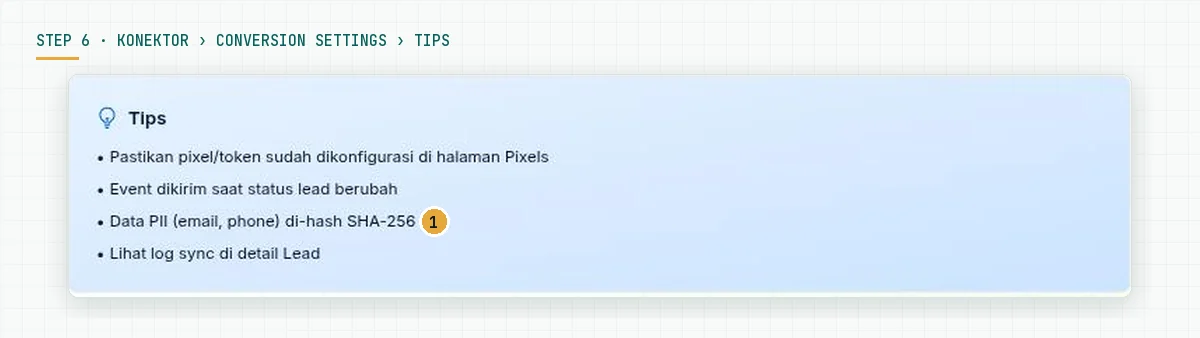
Meta accepts email, phone, names, city, and ZIP code only as SHA-256 hashes of normalised values. A value encrypted with your own method never matches, because Meta compares your hash with the hash it calculates from account data. The parameters fbc, fbp, IP address, and user agentAI agentAn AI program that performs work steps by itself, for example reading a message, drafting a reply, and recording the result.Open the glossary are sent as they are. Konektor hashes these values automatically before it sends an event. Source: Konektor Meta CAPI guide.
Numeric score and labels
Events Manager shows a numeric score, for example 8.2/10, and an Update recommended flag on events that need work. Meta does not publish numeric thresholds for the Poor, Okay, Good, and Great labels in the help articles we read. The Konektor documentation reads 7 to 10 as high and 1 to 4 as low. Rama Digital recommendation: aim for 8 or more on the event you use as the optimisation goal, and fix events below 6 before you add budget. Source: Konektor EMQ guide.
What a higher EMQ score gives you
Meta names 3 direct benefits. First, attributionAttributionHow a system decides which ad or channel receives the credit for 1 sale.High clicks, low sales: the tracking gap: a matched event can be returned to the ad that person clicked. Second, delivery: Meta shows the ad to people who are more likely to take the same action, which Meta says can result in better ad performance and a lower cost per action. Third, reporting: better matching can increase the additional conversions reported from CAPI. Sources: About event match quality and Best practices for Conversions API.
Events Manager also gives numbers for your own dataset. On the Complete registration event in the Konektor.id dataset, Meta writes that similar advertisers who sent a valid phone number saw a 3.14 percent median increase in additional conversions reported, and those who sent a Facebook Login ID saw a 9.56 percent median increase. These numbers are Meta's claims for that event and dataset on 12 September 2026, not a promise for another account.
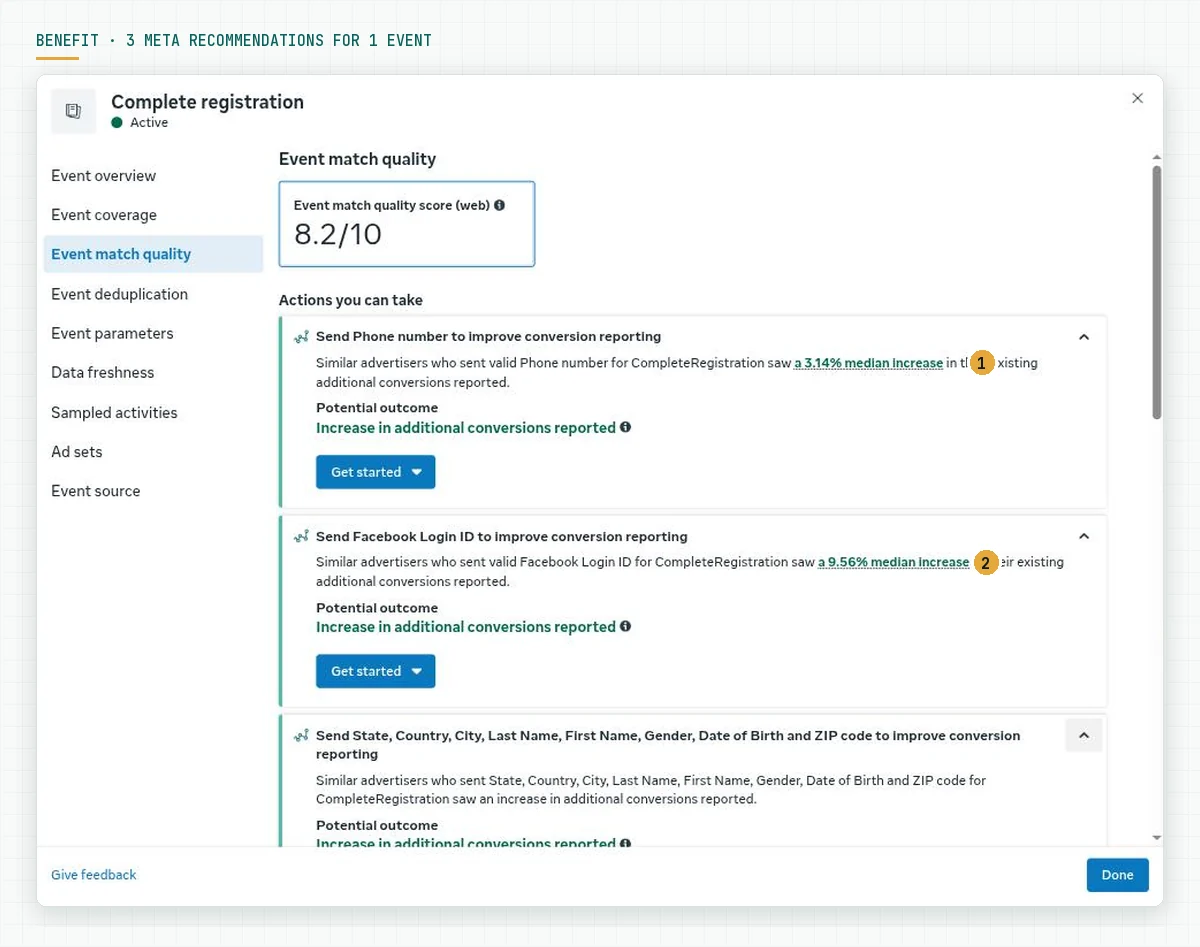
A higher score also changes how you read reports. With a low score, Ads Manager shows fewer conversions than really happened in WhatsApp or the CRM, so you risk stopping a campaign that in fact produces sales. With a high score, the Ads Manager numbers come close to the CRM numbers, and budget decisions use the same data as the sales team. We explain the link between this signal and the learning phase in 7 days of the Meta Ads learning phase (Indonesian source).
5 ways to raise the EMQ score
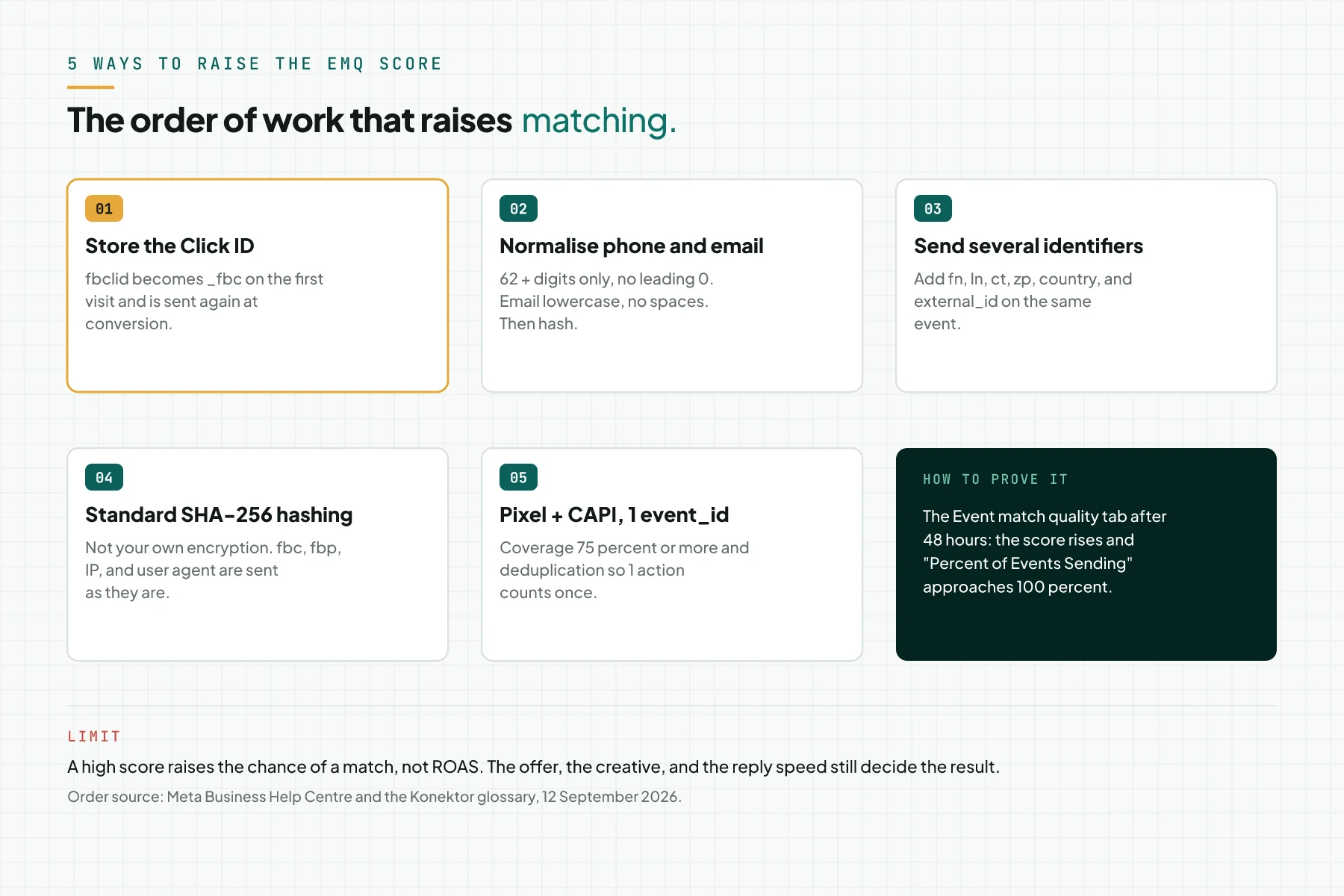
The order below follows Meta's priority and the checklist in the Konektor glossary. In Rama Digital's reading, way 1 gives the largest jump on a landing pageLanding pageThe page an ad points to. It carries 1 offer and 1 action, with no menu pulling the visitor elsewhere.What is a landing page? flow, because the click ID has high priority and only exists when you store it from the first visit.
| Way | What to do | Evidence in Events Manager |
|---|---|---|
| 1. Store the click ID | Store fbclid as _fbc from the first visit and send it as fbc on every conversion event. Konektor stores it on the lead from the WhatsApp button click. | The Click ID (fbc) row approaches 100 percent |
| 2. Normalise phone and email | Phone: digits only with 62 in front, no leading zero and no symbols. Email: lowercase without spaces. Normalise before hashing. | Format diagnostics disappear; the Phone and Email rows rise |
| 3. Send several identifiers at once | Add fn, ln, ct, zp, country, and external_id on the same event. Do not send 1 identifier alone. | More rows in Shared parameters |
| 4. Standard SHA-256 hashing | Use SHA-256 of the normalised value. Do not send values encrypted by your own system, and do not hash fbc, fbp, IP, or user agent. | The score rises with the same number of parameters |
| 5. Pixel and CAPI with 1 event_id | Send the same event from the browser and the server with the same event_id, and keep CAPI coverage at 75 percent or more of the Pixel events. | Event coverage at 75 percent or more, deduplication without warnings |
Sources: the Konektor glossary checklist, Meta best practices, and Meta fbc and fbp documentation.
Prerequisites
- Access to Meta Events Manager for the dataset or Pixel that receives CAPI events.
- An active CAPI integration. For the WhatsApp flow, follow the tutorial on tracking WhatsApp landing page ads in Qontak CRM with Konektor.id up to step 7.
- A Meta Pixel on the landing page, so coverage and deduplication can be checked.
- A customer data source you can complete: a form, a CRM, or Konektor leads.
- Customer permission to use contact data under your privacy policy. Meta requires lawful rights before data is shared.
Step 1: Find the Event match quality column in Events Manager
Open Meta Events Manager, select Datasets, and click your dataset or Pixel. The Overview tab lists events with the columns Events, Status, Used by, Integration, Event match quality, and Total events. The score appears as a link, for example 8.2/10. An event without enough data shows an information icon.
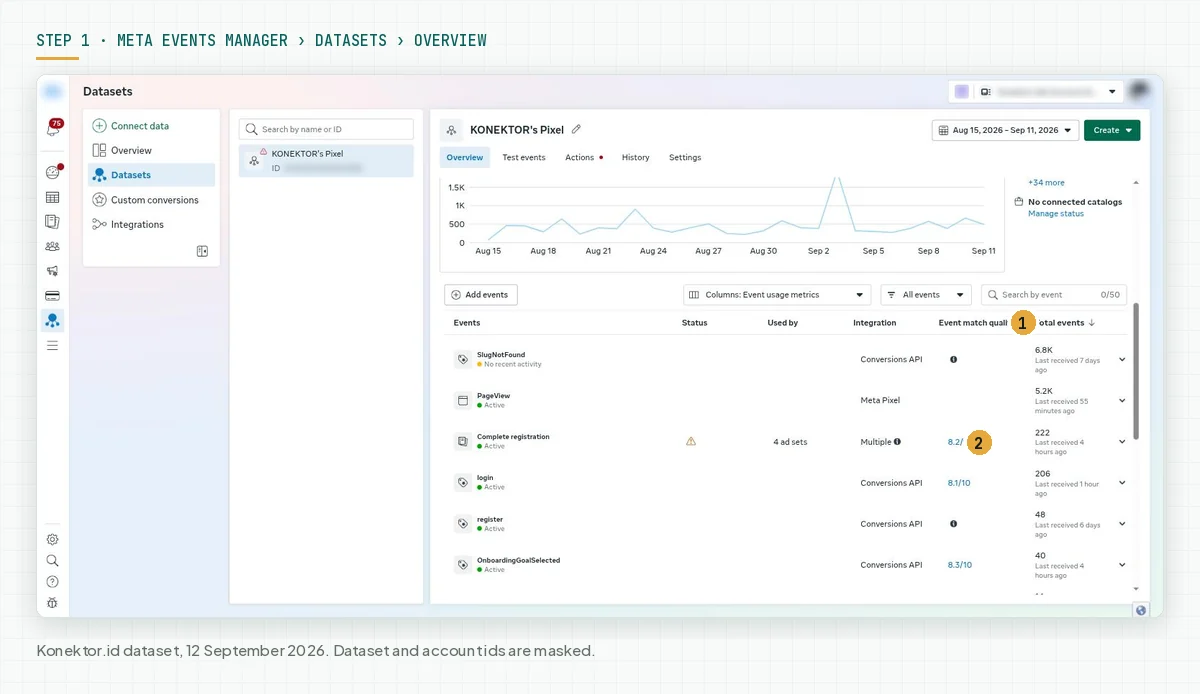
Evidence for this step: you see at least 1 event with a numeric score. If every event only shows the information icon, CAPI has not sent website events, or the volume in the last 48 hours is too low.
Step 2: Read the score and the recommendations on the Event match quality tab
Click the score to open the detail panel, then select the Event match quality tab in the left menu. The first box shows the Event match quality score (web). The information icon beside it explains the benefit and how Meta calculates the score. Source: View server event details in Meta Events Manager.
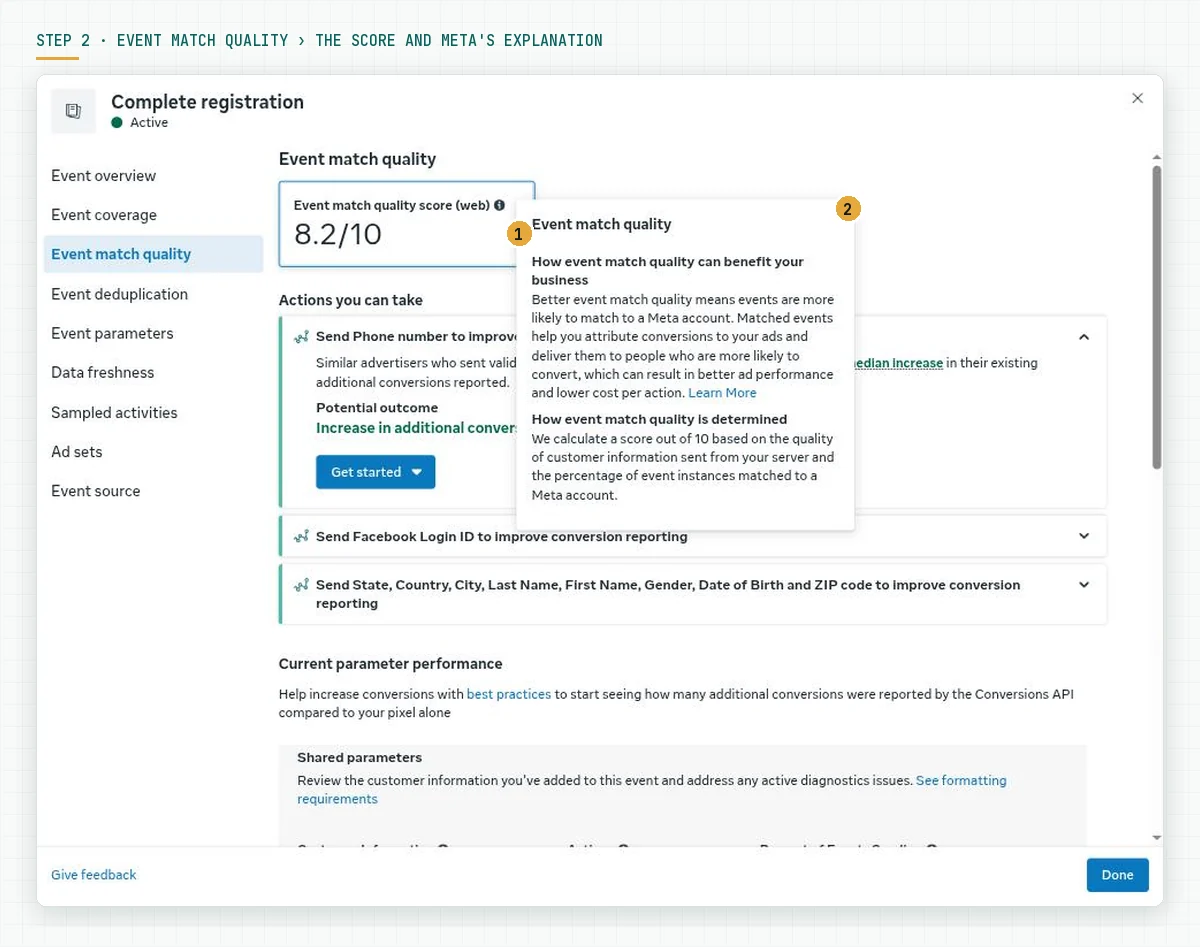
The Actions you can take section ranks the recommendations. Each card names a parameter you do not send yet, the impact Meta observed on similar advertisers, and a Get started button. Work on the top card first.
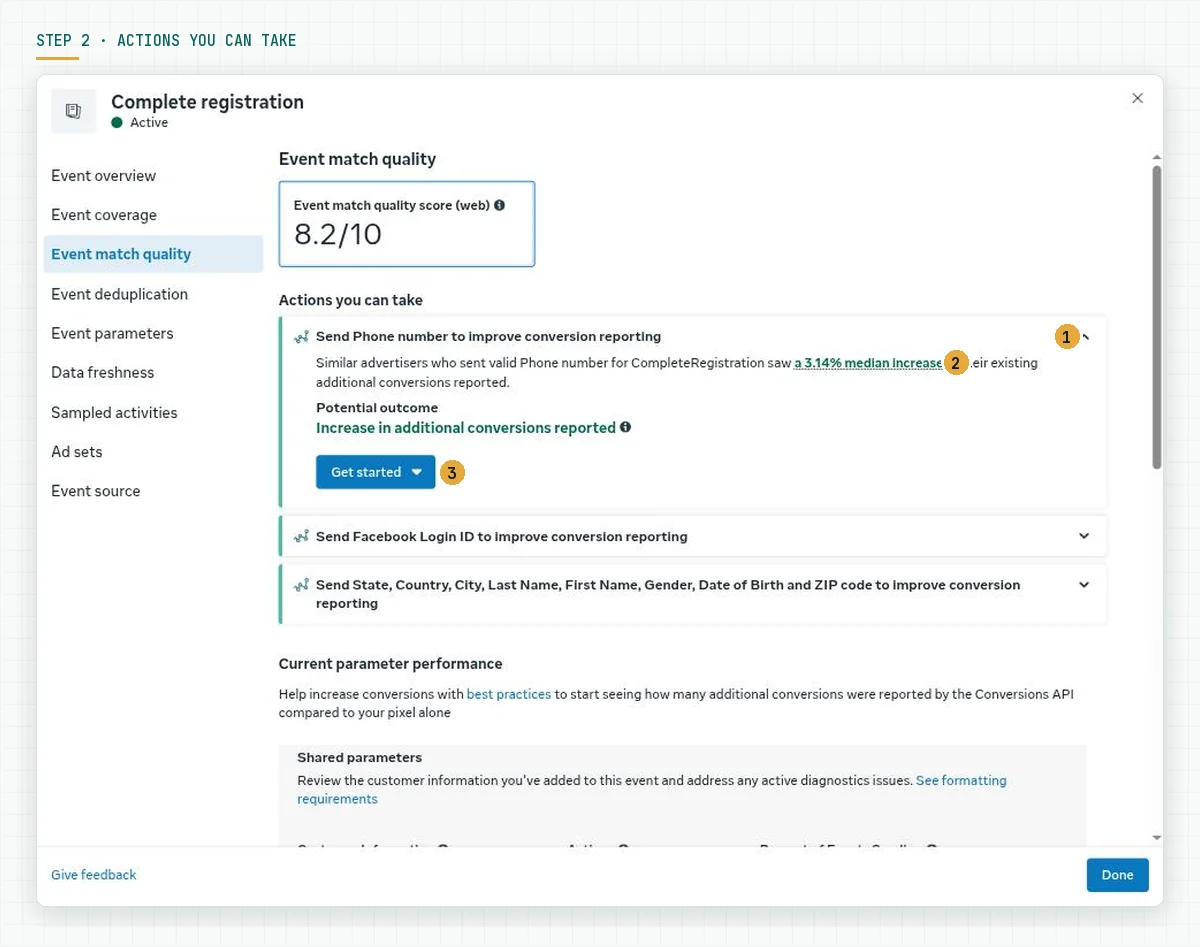
Evidence for this step: you have written down the score and the top 3 recommendations for the event that is the campaign optimisation goal.
Step 3: Check the coverage of each parameter in Shared parameters
Scroll to Current parameter performance. The Shared parameters table lists every parameter you send, whether it is hashed, and Percent of Events Sending, the share of event instances that carry that parameter. Rows with the Increase coverage flag are your work.
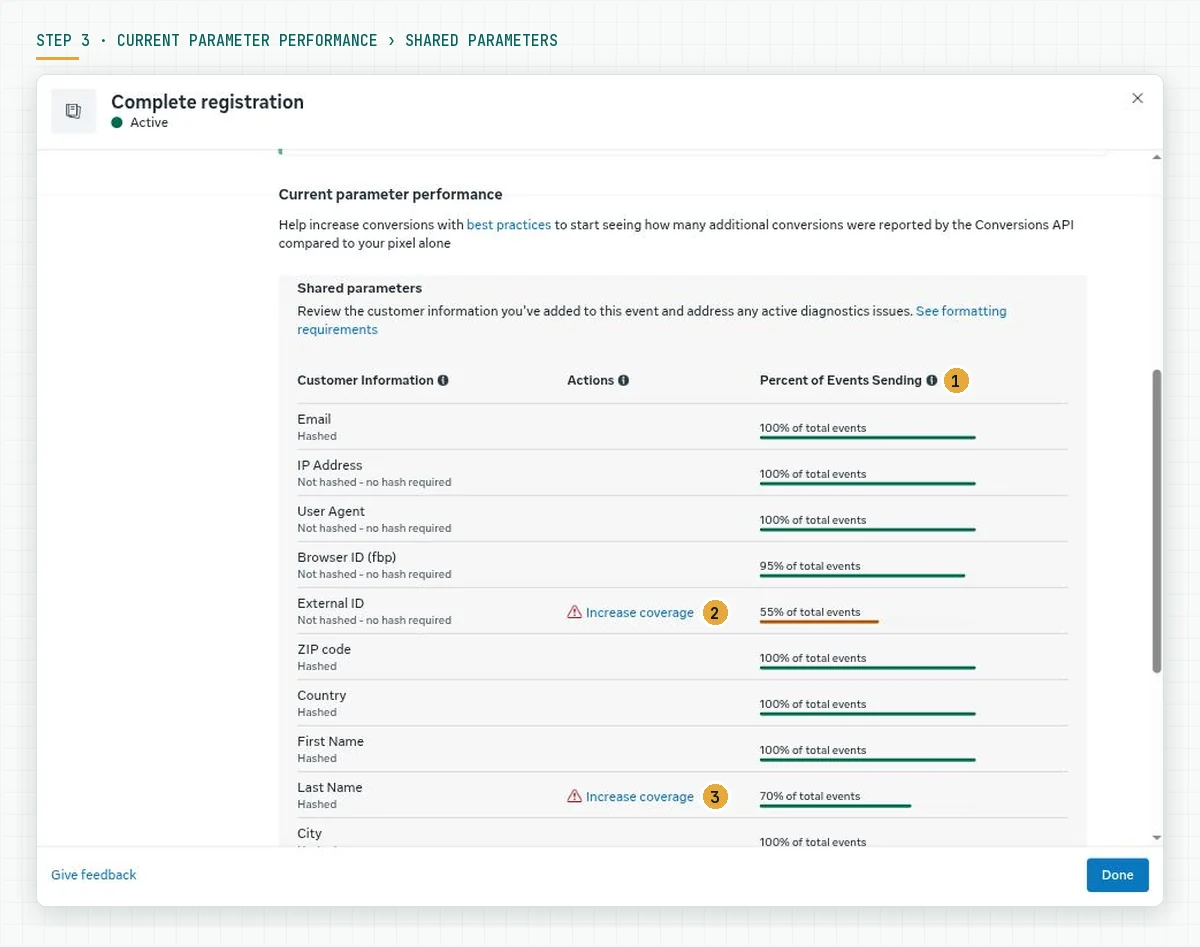
On the Complete registration event in our dataset, email, IP, user agent, ZIP code, country, first name, city, and state are sent on 100 percent of events. Browser ID is at 95 percent, Click ID at 85 percent, last name at 70 percent, and External ID at 55 percent. The score is 8.2. The Other parameters section under the table names the parameters that are not sent at all, with the impact Meta estimates.
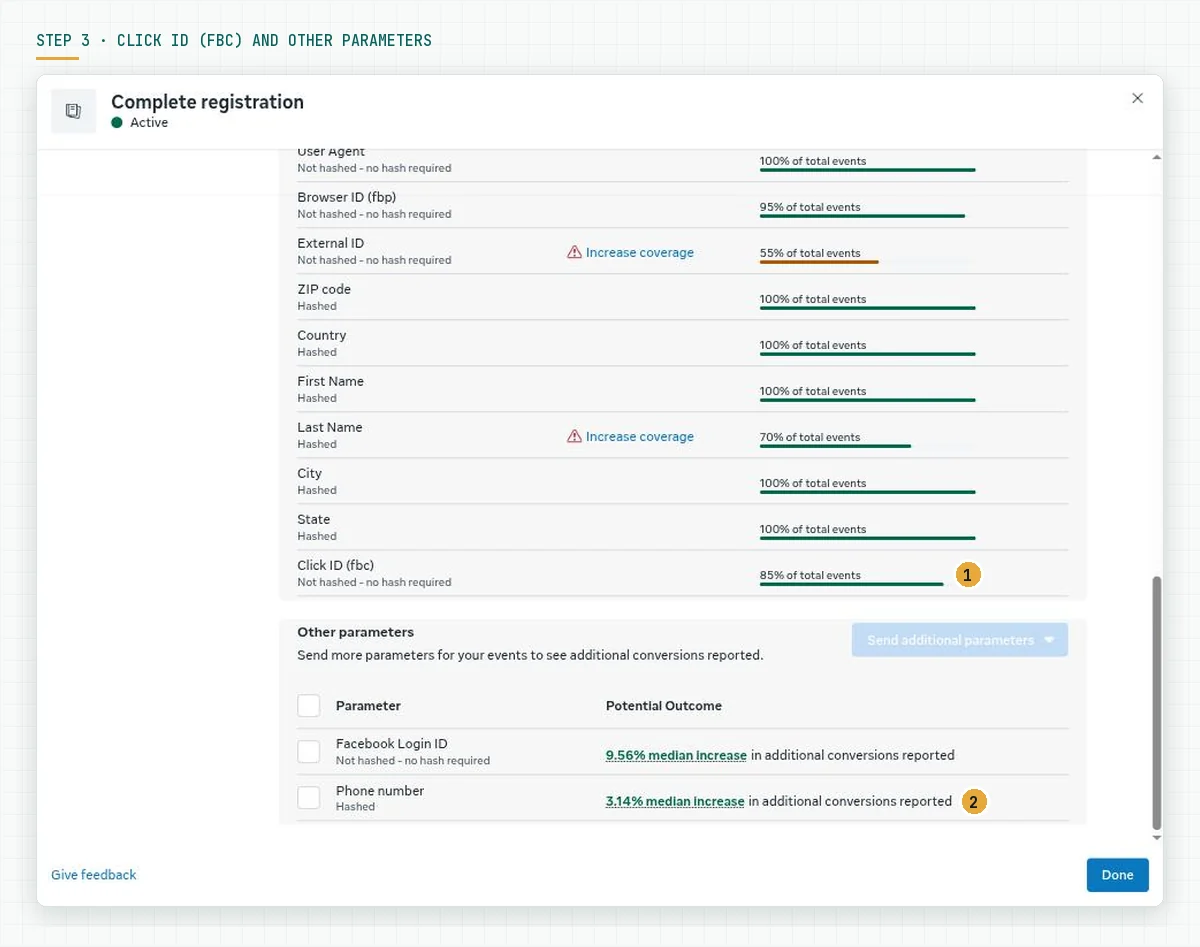
Evidence for this step: you have a list of parameters below 100 percent coverage and of parameters not sent yet, sorted by Meta's priority.
Step 4: Complete email and phone at the lead source
A parameter can only be sent when the data exists. In a WhatsApp flow, the phone number exists from the first chat. Email must be asked for. In Konektor, open WhatsApp › Link WhatsApp (Rotator) › Buat Form (Create form). Core Fields contains Full name and WhatsApp number as required fields, and Email as a field you can enable and require. Source: Konektor Lead Capture Form guide.
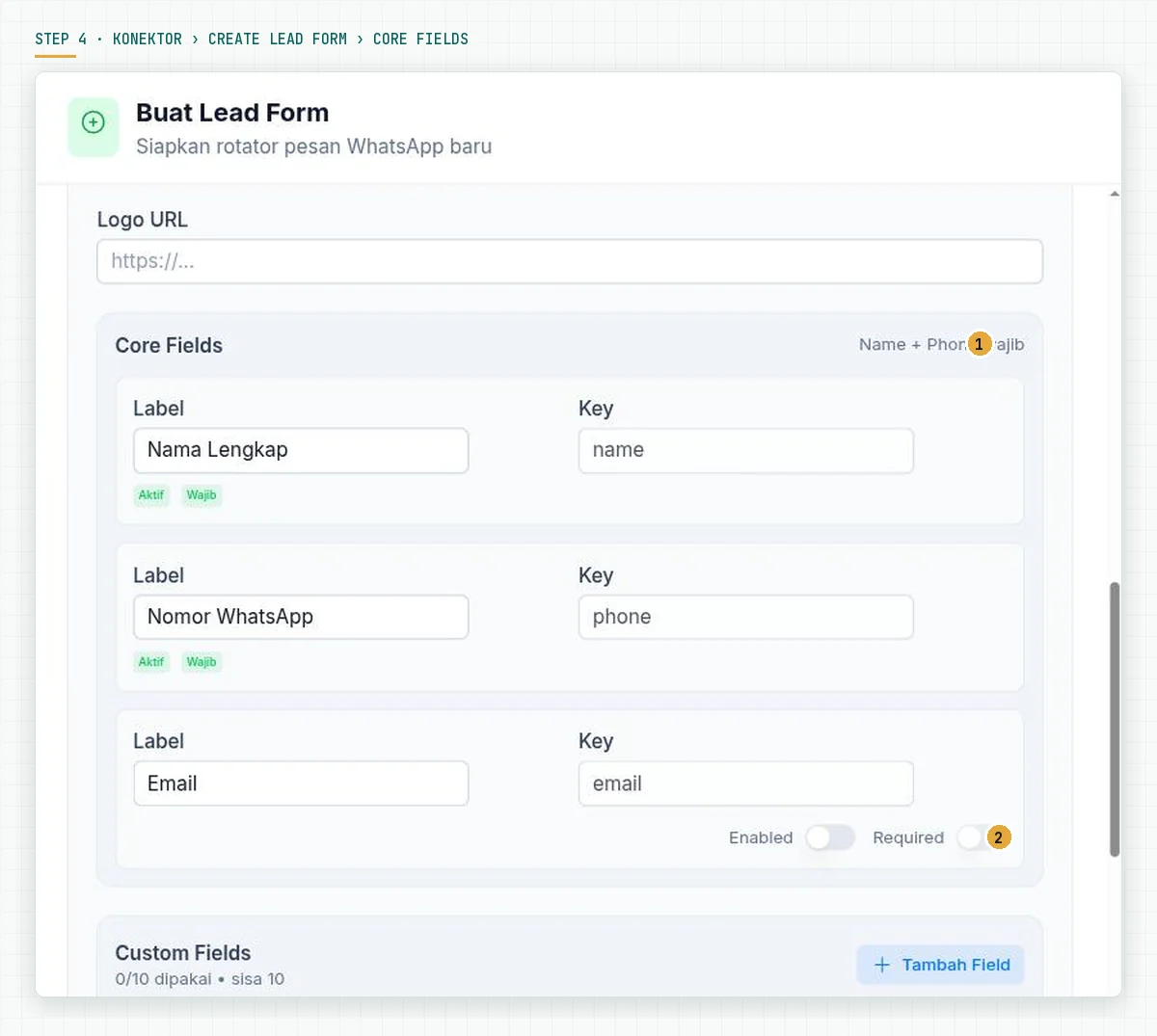
For leads that already exist, the agent completes the data in Leads › Edit Lead: first name, last name, email, phone, and company. Konektor formats the phone number with the country code before it sends to Meta, so the agent does not change 0812 into 62812 by hand. Source: Konektor EMQ guide.
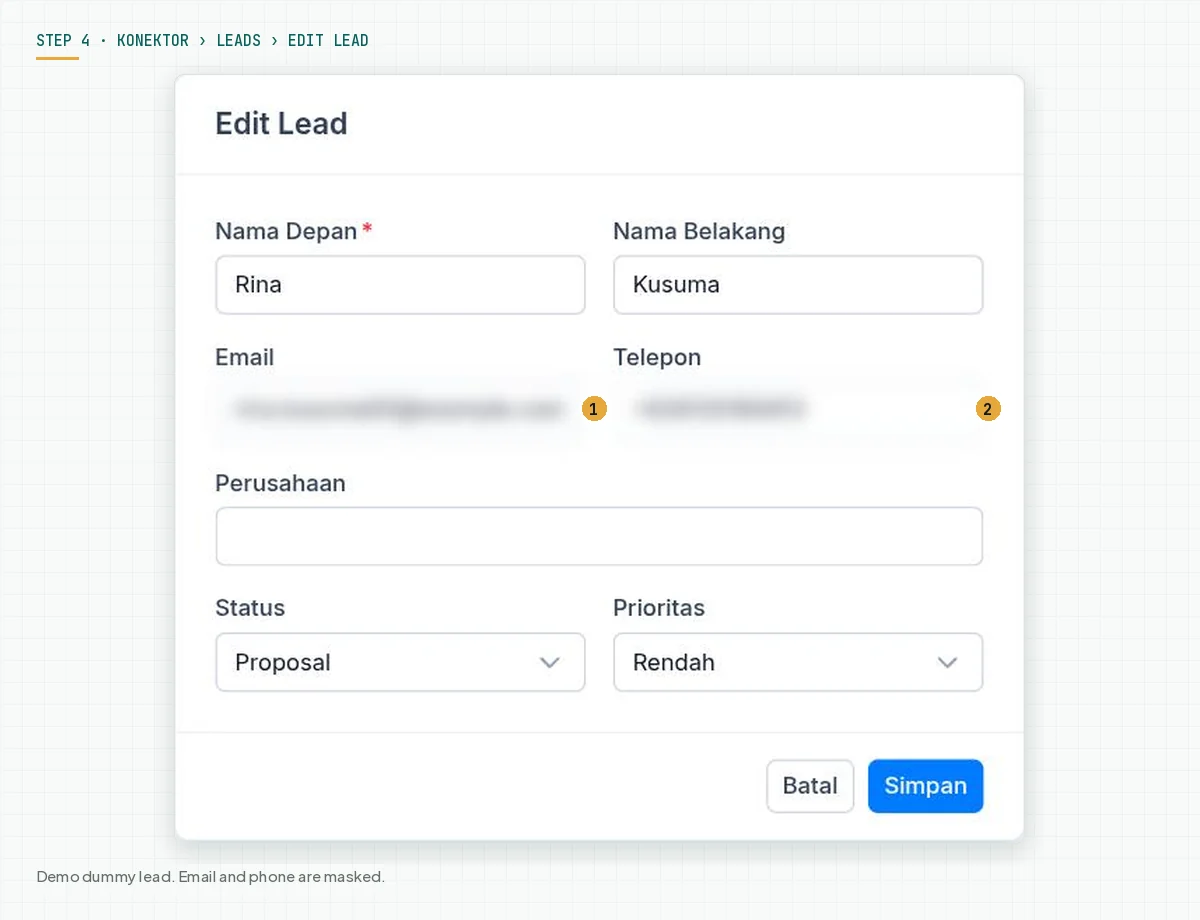
Evidence for this step: a test lead has an email and a phone number, and the next conversion event for that lead appears in the Konektor sync log with the accepted status.
Step 5: Raise Pixel and CAPI coverage to 75 percent with deduplication
Open the Event coverage tab in the event detail panel. Meta calculates the 7-day average percentage of Pixel events that are also sent through CAPI with the same details and deduplication keys. Meta's target is 75 percent or more. Source: Best practices for Conversions API.
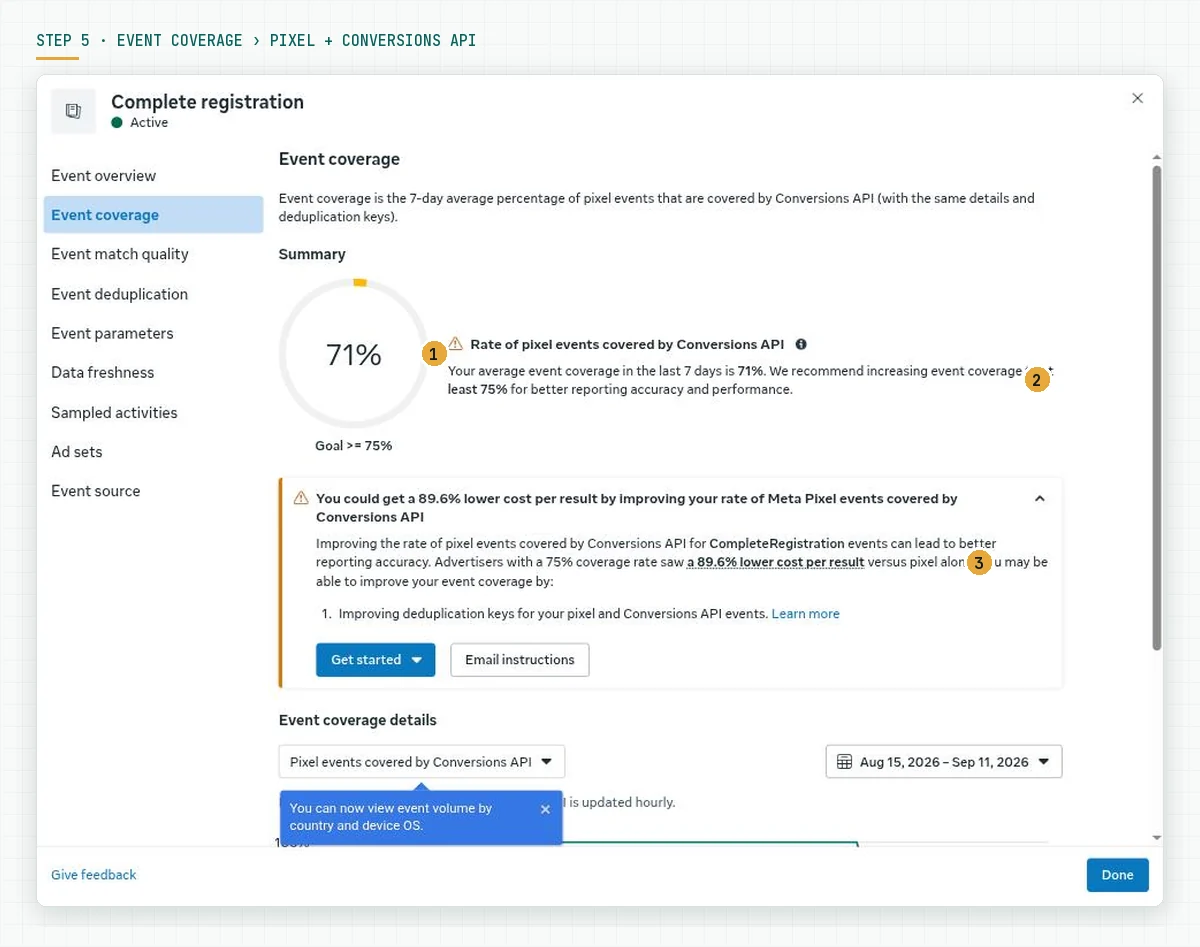
How to raise it: send the same event from the Pixel and CAPI with the same event_id, then check the Event deduplication tab. Konektor sends a unique event_id on every server event; your browser event must use the same id so Meta counts 1 action once. Source: the deduplication section of the Konektor CAPI guide.
Evidence for this step: Event coverage at 75 percent or more and the Event deduplication tab without warnings.
Step 6: Make sure the format and the hashing follow Meta's rules
A low score on an event that sends a lot of data almost always comes from the format. Check 4 things: email in lowercase without spaces, phone as digits only with 62 and no leading zero, names and city in lowercase without punctuation, and SHA-256 hashes of the normalised values. The See formatting requirements link in the Shared parameters table opens the official rules.
If you use your own integration, test 1 event in the Test events tab with a Test Event Code and compare the hash Meta received with the hash you calculate from a sample value. Evidence for this step: the Diagnostics tab shows no format problem on customer parameters.
Step 7: Measure again after 48 hours and record per event
The score uses the last 48 hours of data. After a change, wait 2 days, open the Overview again, and compare each event's score with your earlier note. The Update recommended flag disappears when the top recommendation is met.
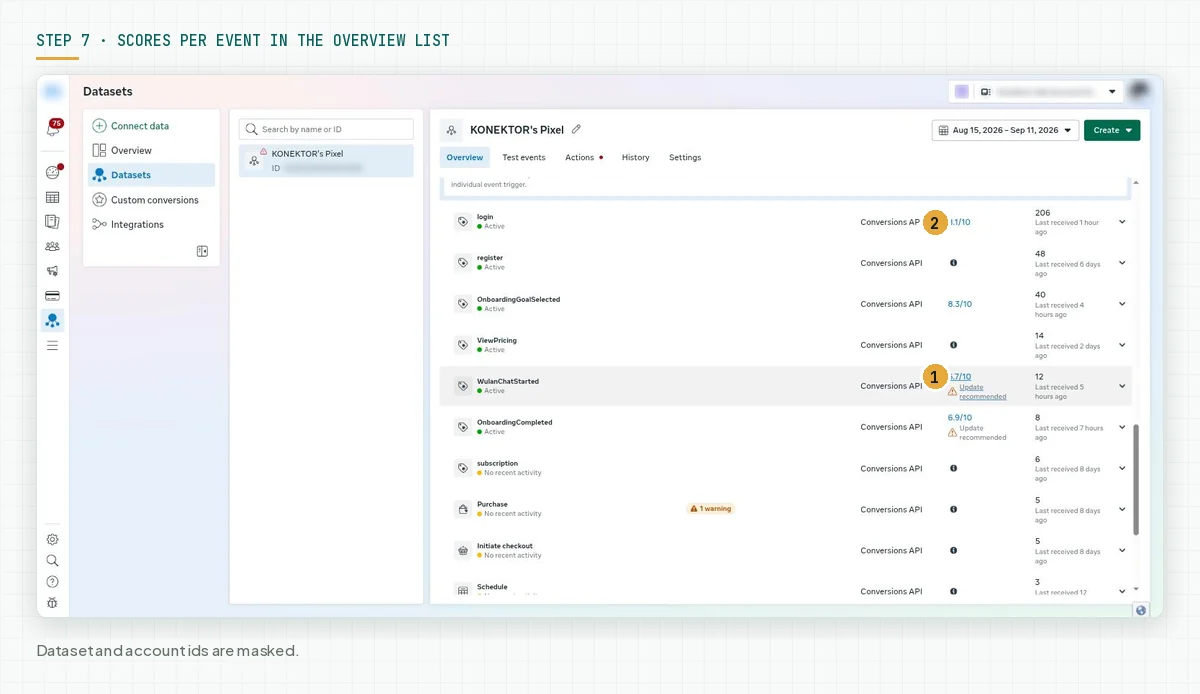
Evidence for this step: 1 record table with date, event name, score, and parameter coverage, updated every week.
Worked example: 2 events in 1 dataset
This example is an observation on the Konektor.id dataset on 12 September 2026. Two events are sent from the same server, but they carry different parameters.
| Item | Complete registration | WulanChatStarted |
|---|---|---|
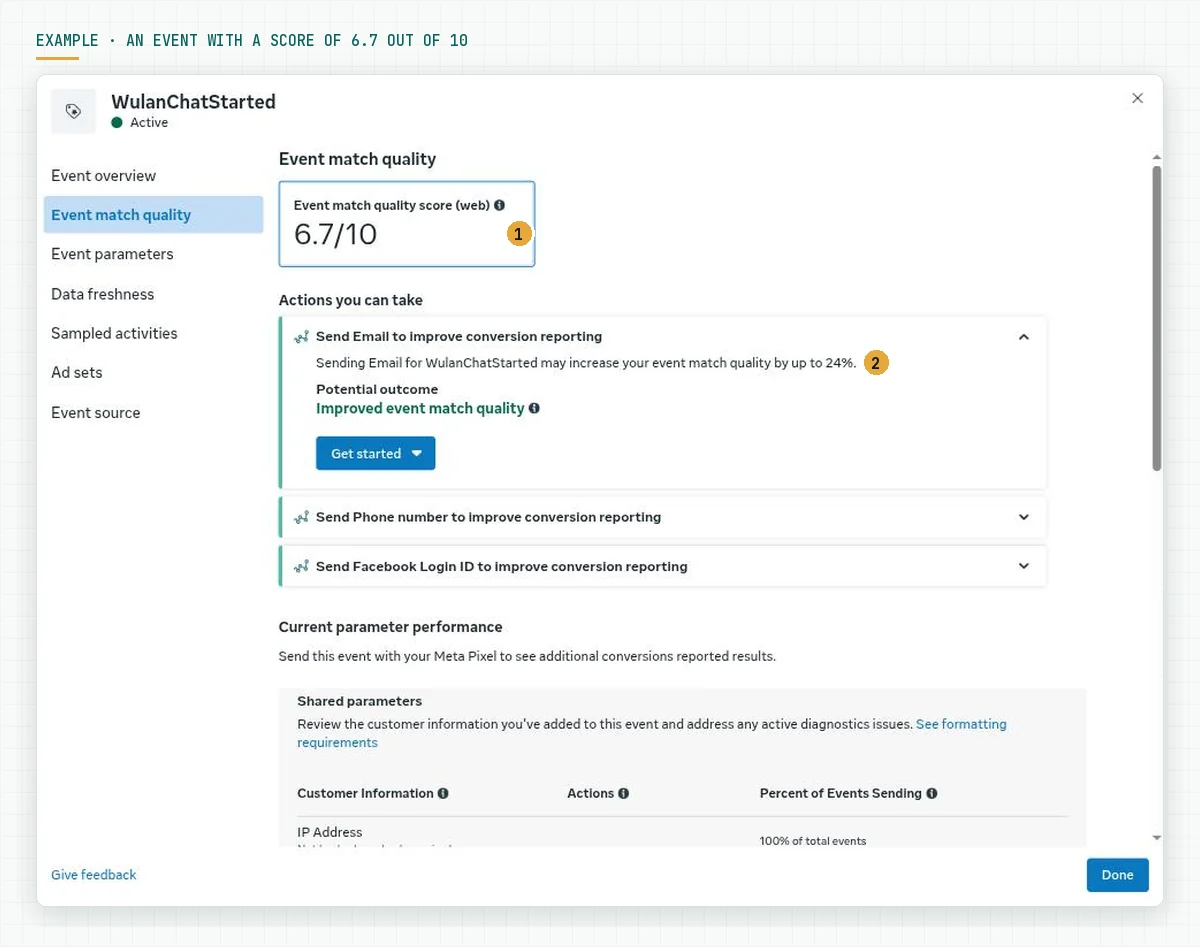
| EMQ score | 8.2/10 | 6.7/10, Update recommended |
| Email (em) | 100 percent of events | Not sent |
| Phone (ph) | Not sent | Not sent |
| Click ID (fbc) | 85 percent | 50 percent |
| Browser ID (fbp) | 95 percent | 100 percent |
| Names, city, ZIP, country, state | Sent, last name at 70 percent | City, ZIP, country, state sent; names not sent |
| Meta's top recommendation | Send the phone number | Send email, estimated score increase up to 24 percent |
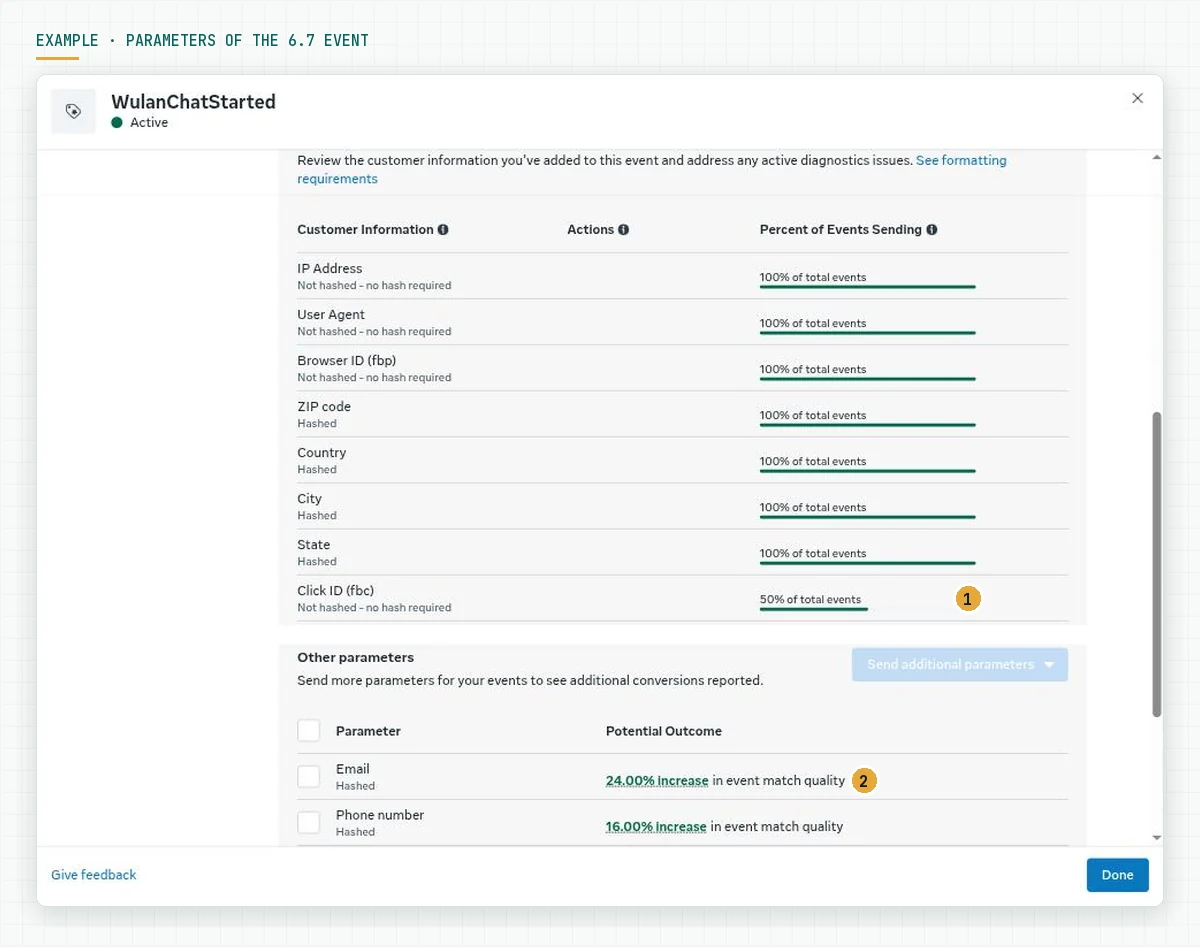
The 1.5-point difference comes from 2 things: the email on the first event and a click ID coverage of 85 percent instead of 50 percent. For the second event, step 4 (ask for email) and way 1 of the 5 ways (store the click ID from the first visit) are the fixes with the largest impact according to Meta's own panel.
Checklist before you add budget
- The optimisation event has a numeric score in Events Manager. Owner: ads admin. Evidence: screenshot of the Event match quality column.
- The optimisation event scores 8 or more, or a written plan covers the top 3 recommendations. Owner: ads admin. Evidence: score and recommendation notes.
- Click ID (fbc) is sent on 80 percent of events or more. Owner: developer or Konektor admin. Evidence: the Click ID row in Shared parameters.
- Email and phone are sent on the main conversion event. Owner: CS lead. Evidence: the Email and Phone rows in Shared parameters.
- The lead form asks for email, and agents complete contact data before they change the status. Owner: CS lead. Evidence: a test lead with an email.
- Event coverage at 75 percent or more and deduplication without warnings. Owner: developer. Evidence: the Event coverage and Event deduplication tabs.
- Diagnostics shows no parameter format problem. Owner: developer. Evidence: the Diagnostics tab.
- The score is recorded every week per event. Stop criterion: a score drop of 1 point or more in 1 week without an explanation.
EMQ in a WhatsApp flow with Konektor
A business that closes deals in WhatsApp has 2 advantages for EMQ: the phone number exists from the first chat, and the click ID can be stored when the visitor taps the WhatsApp button on the landing page. Konektor stores fbclid on the lead from the Rotator link click, then sends events with fbc, phone, email, first name, and city as SHA-256 hashes every time the lead status changes. Sources: Konektor Meta CAPI guide and Konektor Conversion Settings.

What is not automatic: email. Enable the Email field on the Lead Form, or ask agents to fill it in once the lead has responded. For the full flow from the ad click to a closed deal in Qontak CRM, follow the WhatsApp landing page tracking tutorial with Konektor.id. For the other terms around EMQ, read the Konektor glossary and our Knowledge entry on the Meta Pixel.
Frequently asked questions
What is a good EMQ score? Meta shows a score from 0 to 10 without official thresholds for the labels in the help articles we read. Rama Digital recommendation: 8 or more for the optimisation event, and fix events below 6 before you add budget.
Does a high EMQ score raise ROAS? Not directly. The score measures matching. Meta states that better matching can result in better ad performance and a lower cost per action, but the offer, the creative, and the reply speed still decide the result.
Why is my score low when I send a lot of data? Usually the format before hashing is wrong, for example a phone number with a leading zero or an email with capital letters, or the values are sent in your own encryption. A lot of data that does not match does not raise the score.
Is EMQ available for Click-to-WhatsApp ads? The EMQ score applies to website events sent through CAPI with action_source website. Business messaging events use ctwa_clidCTWA CLIDThe unique code Meta attaches to the first WhatsApp message from an ad click. It connects the buyer to the ad.What a CTWA CLID is and the WhatsApp Business Account dataset, so their matching follows other rules.
How long until the score changes after a fix? Meta uses the last 48 hours of data, so measure again after 2 days. An event with a small volume needs more time before Meta shows a score.
Does Konektor send personal data to Meta? Konektor sends email, phone, first name, and city as SHA-256 hashes in the Meta format. The click ID and browser ID are sent without hashing, as Meta requires. Customer consent remains your responsibility.
Next step
The EMQ score is a measuring tool, not a goal. Raise the score of the event that is your optimisation goal, then let campaign data decide the next move. If you want us to install CAPI, the form, and the lead flow while we manage the campaign, the Meta Ads Performance Management service covers Konektor.id, an official WABA CRM, the funnel, creative, and weekly reports. If you only want to see how Konektor sends parameters to Meta, book a 30-minute Konektor.id demo.
Sources
- Meta Business Help Centre: About event match quality
- Meta Business Help Centre: Best practices for Conversions API
- Meta Business Help Centre: View server event details in Meta Events Manager
- Meta for Developers: Customer Information Parameters
- Meta for Developers: fbp and fbc parameters
- Konektor: Event Match Quality glossary
- Konektor: Meta Event Match Quality
- Konektor: Meta Conversions API
- Konektor: Conversion Settings
- Konektor: Lead Capture Form