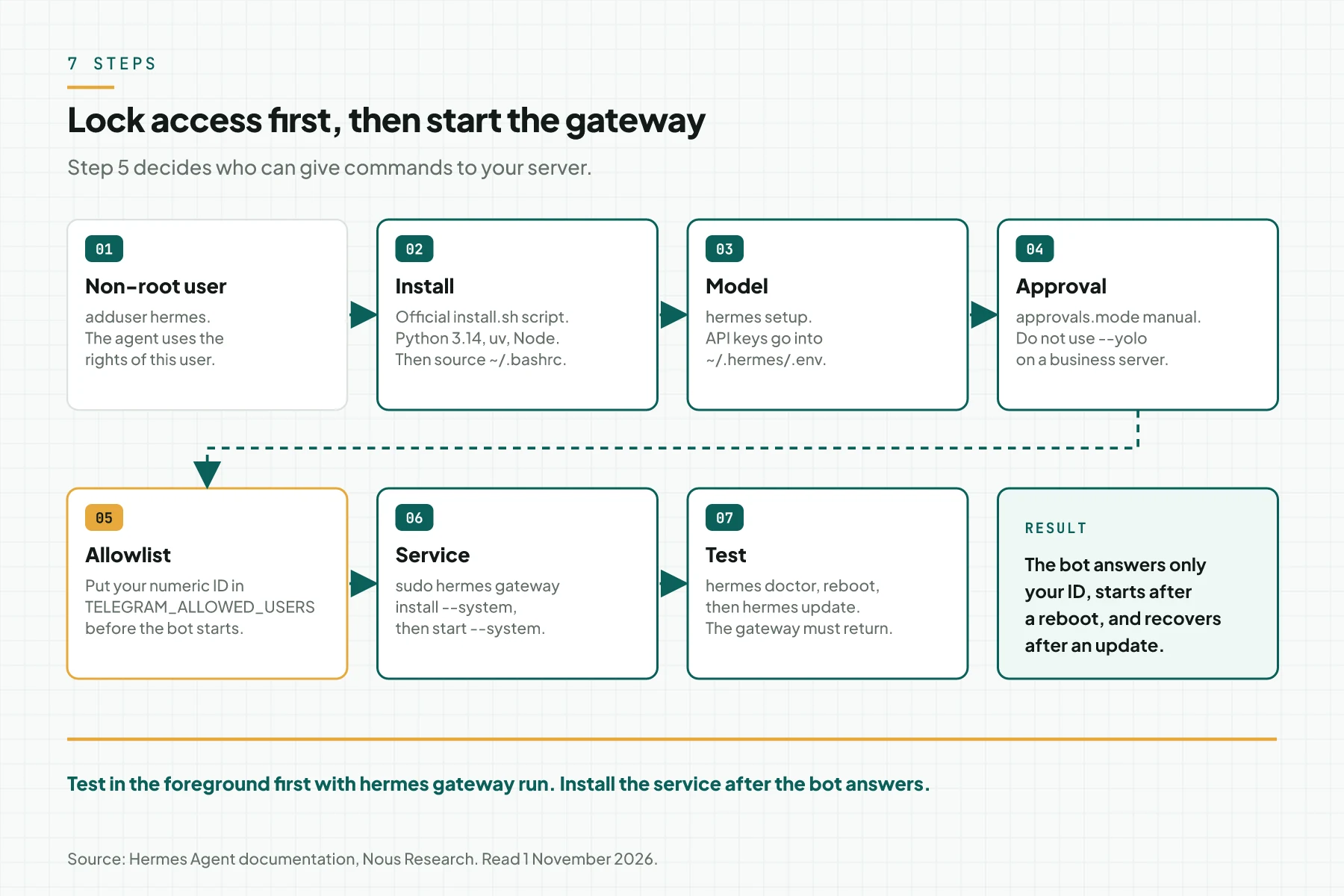
How to set up Hermes Agent on a VPS: install it as a non-root user with the official script, pick a model with hermes model, then set TELEGRAM_ALLOWED_USERS before the gateway starts. After the bot answers, install the gateway as a systemd service, then test a reboot and hermes update, because version 0.23 changed how the gateway restarts after an update.
Hermes AgentAI agentAn AI program that performs work steps by itself, for example reading a message, drafting a reply, and recording the result.Open the glossary is an open-source AI agent from Nous Research. It runs on your machine, takes instructions from a terminal or a chat app, and uses tools such as a terminal and a browser. The gateway is the Hermes process that connects the agent to Telegram, Discord, Slack, WhatsApp, Signal, or email.
We read the official documentation and release pages on 24 November 2026. The latest version on that date was v0.23.3, released 19 November 2026. This guide updates our Hermes Agent VPS setup guide for v0.22.5 from 1 November 2026. Our April 2026 install guide (in Indonesian) uses an old installer URL.
The 7 steps to set up Hermes Agent on a VPS
This table gives 1 main command and 1 result to check for each step.
| Step | Main command | Correct result |
|---|---|---|
| 1. Non-root user | sudo adduser hermes | You work as the hermes user, not as root. |
| 2. Install | curl -fsSL https://hermes-agent.nousresearch.com/install.sh | bash | hermes --version shows 0.23.3 or newer. |
| 3. Model | hermes model | The agent answers 1 short question in the terminal. |
| 4. Approvals | hermes config set approvals.mode manual | A dangerous command asks for approval. |
| 5. Allowlist | TELEGRAM_ALLOWED_USERS in ~/.hermes/.env | The bot answers only your Telegram ID. |
| 6. Service | sudo hermes gateway install --system, or a user service with linger | The service status is active. |
| 7. Test | hermes doctor, reboot, hermes update --backup | The gateway starts again after a reboot and an update. |
What changed since v0.22.5?
Seven items changed between v0.22.5 (22 October 2026) and v0.23.3 (19 November 2026), according to the official release notes and documentation.
| Item | Status on 24 November 2026 |
|---|---|
| Latest version | v0.23.3, released 19 November 2026, with about 370 PRs after v0.23.2. |
| Security | v0.23.2 (16 November 2026) fixed CVE-2026-130164, severity High. The issue affects Bot Desktop when it runs in a docker or ssh terminal backend. |
| Gateway | Since v0.23.0, 1 gateway on each machine serves the CLI, Desktop, chat bots, and cron. The Webapp is off by default. |
| Restart after an update | The gateway restarts when no work is running. Every 30 minutes, the gateway writes a warning to the log and continues to wait. |
| System service | A non-root hermes update cannot restart a system service. The update skips the restart and prints sudo systemctl restart hermes-gateway. |
| Node.js | Node.js needs libatomic.so.1. The installer and hermes update install the libatomic1 package through sudo, or print the command for an admin. |
| Rollback | To go back to an older release, use /snapshot restore or a full backup from hermes update --backup. |
For a new server, do not use a version older than v0.23.2. If you use the Webapp on a VPS, limit access to it with Tailscale or Cloudflare Access. The 0.23.0 details are in our safe upgrade article for Hermes Agent 0.23.0.
Step 1: prepare the VPS and a non-root user
Use a normal user named hermes, because with the local terminal backend the agent runs commands with the rights of that user.
For 2 daily channels, start with 2 vCPU, 4 GB of RAM, and a 40 GB SSD. The model runs at the APIAPIThe official door 2 systems use to exchange data, without anybody copying it by hand.Open the glossary provider, not on the VPS. The 3 tiers are in our VPS specification article for Hermes Agent. To pick a provider, read our VPS provider comparison for Hermes Agent. If your budget is small, read our low-cost hosting options for Hermes Agent.
sudo adduser hermes
sudo usermod -aG sudo hermes
sudo -iu hermes
The sudo group is necessary only to install the system service in step 6. Do not give this user sudo without a password (NOPASSWD) for all commands. If you choose the user service, skip the second line.
Step 2: install Hermes Agent with the official script
Run the official script as the hermes user, then reload the shell and check the installation.
curl -fsSL https://hermes-agent.nousresearch.com/install.sh | bash
source ~/.bashrc
hermes --version
hermes doctor
The script needs Git, curl, tar, and a SHA-256 tool. It installs uv, Python 3.14, Node.js, ripgrep, FFmpeg, and Chromium. A new install uses the latest stable release, which is the same channel that hermes update follows. The code goes to ~/.hermes/hermes-agent/, the data to ~/.hermes/, and the hermes command to ~/.local/bin/.
On a minimal Ubuntu or Debian image, Node.js needs the libatomic1 package. The installer installs that package through sudo, or asks for the sudo password 1 time. If the user has no sudo, the installer prints the command that an admin must run.
If the agent does not use a browser, add --skip-browser to save disk space. Later installs and updates keep this choice.
curl -fsSL https://hermes-agent.nousresearch.com/install.sh | bash -s -- --skip-browserStep 3: pick a model provider and store the API key
Run hermes model, pick 1 provider, then test it with 1 short question.
hermes model
hermes
The hermes model command opens the full provider wizard, with API keys and OAuth login. The full setup wizard is still available in hermes setup.
Hermes keeps secrets in ~/.hermes/.env and other settings in ~/.hermes/config.yaml. The hermes config set command sends an upper-case name, such as OPENROUTER_API_KEY, to .env automatically.
hermes config set OPENROUTER_API_KEY sk-or-...Use 1 model first. Add a fallback after the main path is stable, so that you can find the source of an error easily.
Step 4: set approvals and the terminal backend
Set approvals.mode to manual for the first week, so that each dangerous command asks for your approval.
hermes config set approvals.mode manual| Value | Behavior |
|---|---|
smart (default) | An auxiliary model rates the risk. Low-risk commands pass, dangerous commands are denied, and unclear cases ask you. |
manual | Each dangerous command asks for approval. |
off | All checks stop, the same as --yolo. Do not use it on a business server. |
An approval request that you do not answer in 300 seconds is denied. Cron denies dangerous commands by default.
The documentation recommends a container backend, such as docker, for production gateways. This backend keeps agent commands away from the VPS system. With a container backend, Hermes skips the dangerous-command check, because the container is the boundary.
docker version
hermes config set terminal.backend docker
hermes config set terminal.container_memory 2048
The default container memory limit is 5120 MB. On a 4 GB VPS, lower that limit, for example to 2048 MB. Use v0.23.2 or newer with a docker or ssh backend, because that version fixed CVE-2026-130164.
Step 5: connect Telegram and lock access
Set the bot token and your numeric Telegram ID before the gateway starts, because the gateway denies all users when the allowlist is empty.
- Open @BotFather, send
/newbot, and keep the bot token. - Send a message to @userinfobot to get your numeric ID.
- Run
hermes gateway setupand pick Telegram, or write 2 lines in~/.hermes/.env. - Run
hermes gateway runin the foreground, then send a message to the bot. This gateway stops when the SSH session closes.
TELEGRAM_BOT_TOKEN=123456789:ABCdef...
TELEGRAM_ALLOWED_USERS=123456789
Separate several IDs with commas. Do not set GATEWAY_ALLOW_ALL_USERS=true. The documentation says that this option is not recommended for a bot with terminal access.
Another person who sends a DM to the bot gets an 8-character pairing code. The code expires in 1 hour. Approve only people you know.
hermes pairing list
hermes pairing approve telegram <code>
hermes pairing revoke telegram <user-id>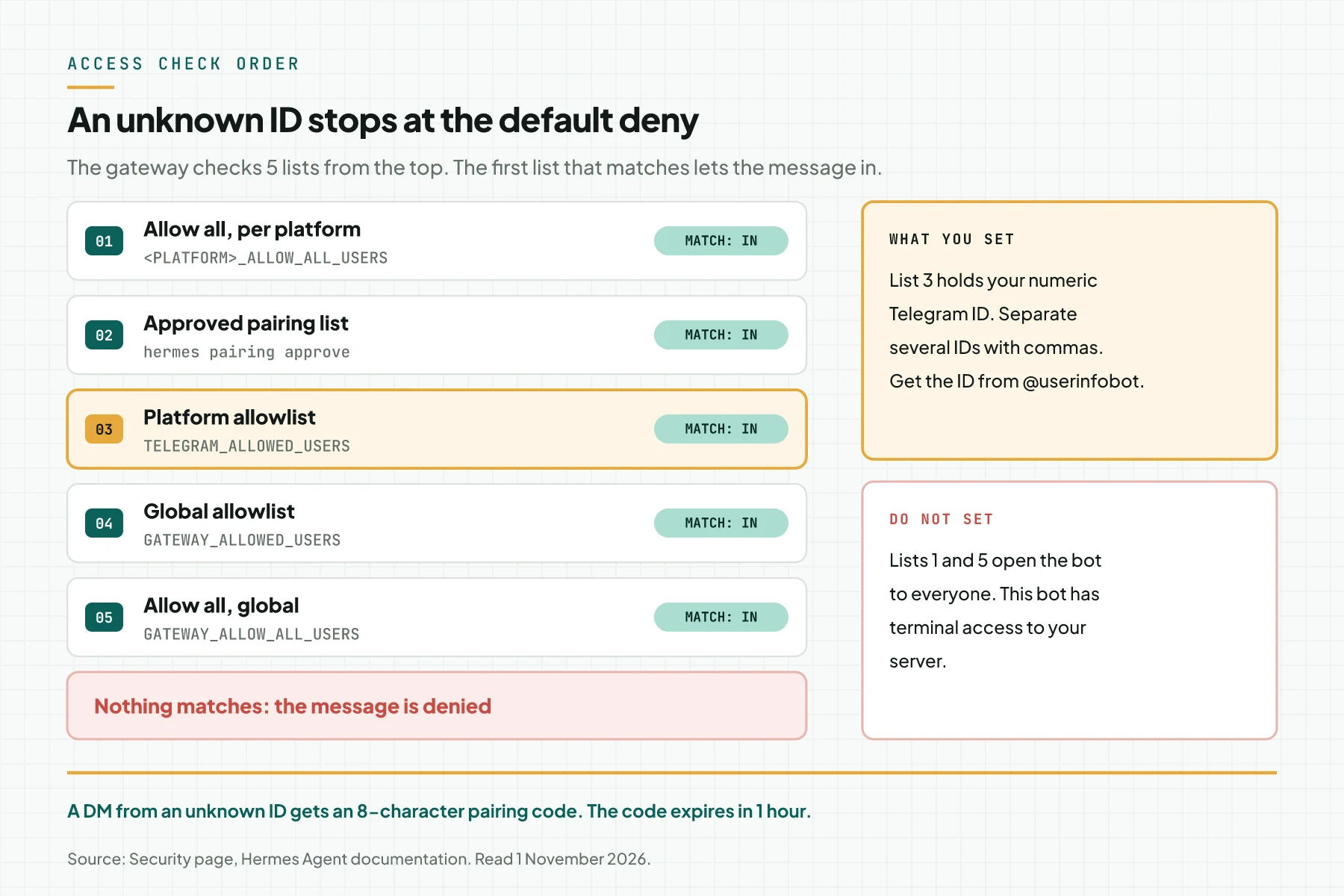
Discord, Slack, and WhatsApp use the same allowlist pattern. For other hosts, read our Hermes Agent setup matrix for Windows, Linux, macOS, and VPS.
Step 6: install the gateway as a systemd service
Choose the service type before you install it, because this choice decides who can restart the gateway after hermes update.
| Option | Command | Restart after an update |
|---|---|---|
| System service | sudo hermes gateway install --system | Needs root. The documentation recommends it for a VPS, and it starts at boot. |
| User service with linger | hermes gateway install, then sudo loginctl enable-linger hermes | No root prompt. Linger keeps the service running after logout and reboot. |
For a system service, run these 4 commands.
sudo hermes gateway install --system
sudo hermes gateway start --system
sudo hermes gateway status --system
journalctl -u hermes-gateway -f
If sudo replies command not found, sudo does not read ~/.local/bin. Use the full path: sudo "$(command -v hermes)" gateway install --system.
With a system service, a non-root hermes update skips the restart. Run sudo systemctl restart hermes-gateway after each update. Another method is a narrow sudoers file in /etc/sudoers.d/hermes-gateway, as the documentation shows. That file allows only start and restart of the hermes-gateway service.
For a user service, read the log with journalctl --user -u hermes-gateway -f. Do not install both service types. Do not add an ExecStopPost drop-in, because the documentation says that it causes a restart loop.
Step 7: test a reboot, an update, and a backup
Test 3 events before your team uses the bot: a reboot, an update, and a backup restore.
hermes doctor
hermes config check
sudo reboot
# after you log in again
sudo hermes gateway status --system
hermes update --backup
The --backup option makes a full backup of the ~/.hermes folder before the update: config, auth, sessions, skills, and pairing data. To make it the default, set updates.pre_update_backup: full in config.yaml.
After the update, the gateway restarts when no work is running. Hermes does not stop running work because of a time limit. Every 30 minutes, the gateway writes a warning to the log and continues to wait.
If hermes gateway status shows a warning that the service unit is old, restart the gateway 1 time. The service then uses the new systemd unit.
An older release cannot run on a state.db that a newer gateway wrote. To go back, stop the gateway, install the older release, then restore a snapshot with /snapshot restore <id> or a full backup with hermes import <backup.zip>. Quick snapshots skip a state.db larger than 1 GiB, so use a full backup for large data. Our Hermes Agent 0.21.5 self-update bug report shows an update that cut a gateway.
Validation checklist after the setup
Mark each row before you give the bot to your team.
| Test | How | Correct result |
|---|---|---|
| Diagnosis | hermes doctor | Exit code 0, no problem left. |
| Version | hermes --version | 0.23.2 or newer. The latest is 0.23.3 on 24 November 2026. |
| Your access | Send a message from an allowlisted ID. | The bot answers. |
| Unknown access | Send a message from another account. | The bot sends a pairing code and does no task. |
| Approval | With the local backend, ask the bot to delete a test folder. | The bot asks for approval. |
| Reboot | sudo reboot | The service is active without a manual start. |
| Update | hermes update --backup | The backup is complete, then the bot answers again after the update. |
| Service unit | hermes gateway status | No warning about an old service unit. |
Questions and answers
What VPS specification does Hermes Agent need?
Start with 2 vCPU and 2 GB of RAM for a 1-channel trial. Use 4 GB of RAM for 2 daily channels, and 8 GB for a small team with several workflows.
Why does the Telegram bot reply unauthorized?
Your numeric ID is not in TELEGRAM_ALLOWED_USERS. Get the ID from @userinfobot, not your username, then restart the gateway.
Which Hermes Agent version is safe for a VPS?
Use v0.23.2 or newer, because v0.23.2 fixed CVE-2026-130164, severity High. The latest version on 24 November 2026 is v0.23.3, released 19 November 2026.
Why does the gateway not restart after hermes update?
A system service needs root to restart. If hermes update runs without sudo, the update skips the restart and prints the command sudo systemctl restart hermes-gateway. Run that command, or use a user service with linger.
Can Hermes Agent run as root?
We do not recommend it. With the local backend, the agent runs terminal commands with the rights of the gateway user. As root, 1 wrong command can change the whole server.
Operational conclusion
Do the 7 steps in order, and do not start the gateway before the allowlist has your ID. Choose a system service or a user service before the first update, then test a reboot and hermes update --backup before your team uses the bot. If you want this setup done with an SOP and a handover, see Hermes Agent Installation Service.
Sources
We read all these sources on 24 November 2026.
- Hermes Agent: Installation
- Hermes Agent: Configuration
- Hermes Agent: Security
- Hermes Agent: Messaging gateway
- Hermes Agent: Telegram
- Hermes Agent: Updating
- Hermes Agent: CLI commands
- Hermes Agent: v0.23.3 release notes
- Hermes Agent: v0.23.2 release notes
- Security advisory GHSA-p22p-9ph6-gmrh (CVE-2026-130164)