How to set up Hermes Agent on a VPS: install it as a non-root user with the official script, run hermes setup, then set TELEGRAM_ALLOWED_USERS before the gateway starts. After the bot answers, install the gateway as a system service with sudo hermes gateway install --system, because the official documentation recommends a system service for a VPS.
Hermes AgentAI agentAn AI program that performs work steps by itself, for example reading a message, drafting a reply, and recording the result.Open the glossary is an open-source AI agent from Nous Research. It runs on your machine, takes instructions from a terminal or a chat app, and uses tools such as a terminal and a browser. The gateway is the Hermes process that connects the agent to Telegram, Discord, Slack, WhatsApp, Signal, or email.
We read the official documentation and release page on 1 November 2026. The latest version on that date was v0.22.5, released 22 October 2026. This guide replaces our April 2026 VPS install guide (in Indonesian), which uses an old installer URL.
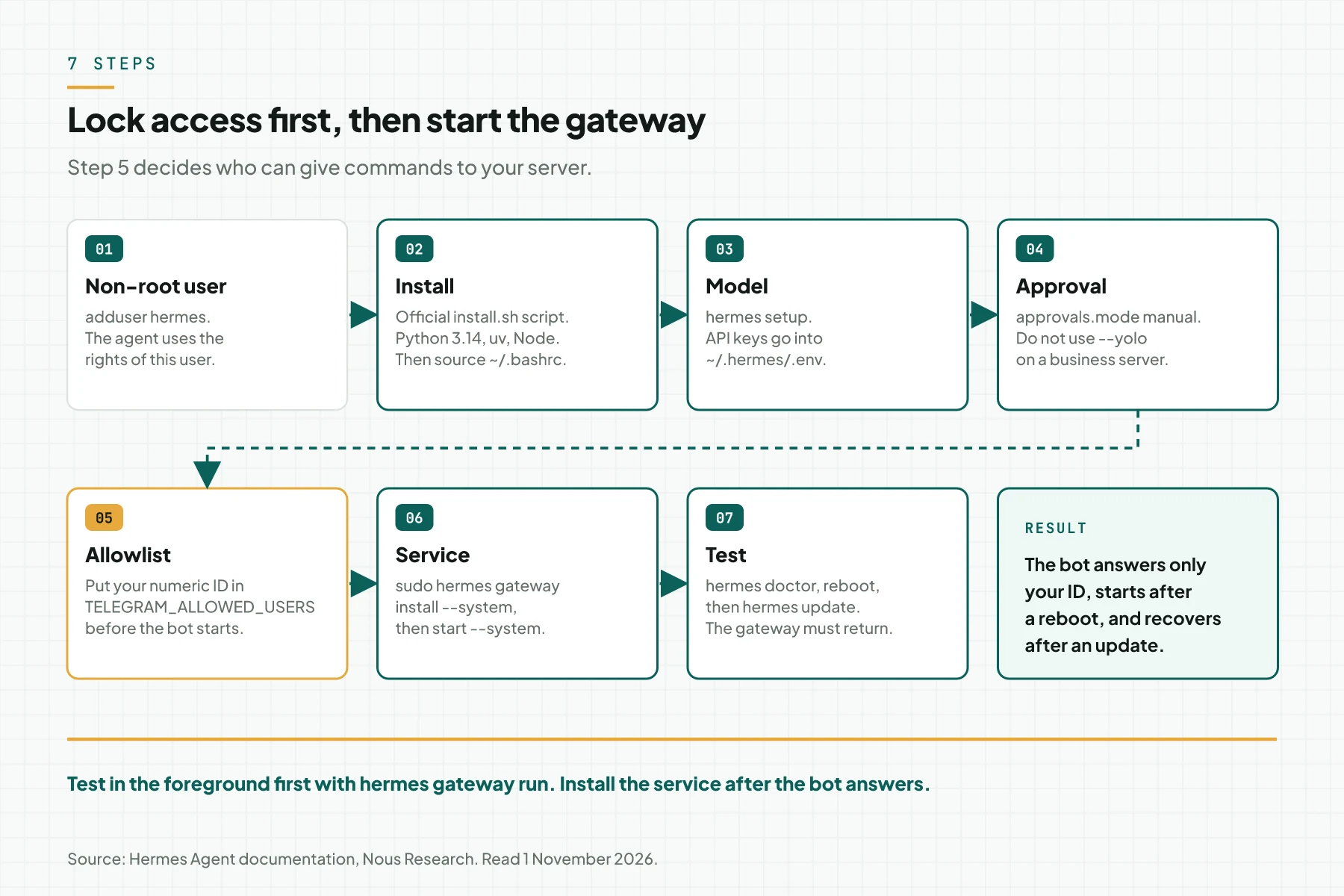
The 7 steps to set up Hermes Agent on a VPS
This table gives 1 main command and 1 result to check for each step.
| Step | Main command | Correct result |
|---|---|---|
| 1. Non-root user | sudo adduser hermes | You work as the hermes user, not as root. |
| 2. Install | curl -fsSL https://hermes-agent.nousresearch.com/install.sh | bash | hermes --version shows a version. |
| 3. Model | hermes setup | The agent answers 1 short question in the terminal. |
| 4. Approvals | hermes config set approvals.mode manual | A dangerous command asks for approval. |
| 5. Allowlist | TELEGRAM_ALLOWED_USERS in ~/.hermes/.env | The bot answers only your Telegram ID. |
| 6. Service | sudo hermes gateway install --system | The service status is active. |
| 7. Test | hermes doctor, reboot, hermes update | The gateway starts again after a reboot and an update. |
What changed since the April 2026 guide?
Four items changed: the installer URL, the Python version, how updates pick a version, and the chat access rules.
| Item | Before | Now, documentation of 1 November 2026 |
|---|---|---|
| Installer URL | raw.githubusercontent.com/NousResearch/hermes-agent/main/scripts/install.sh | https://hermes-agent.nousresearch.com/install.sh |
| Python | The old guide gave no version. | The official installer uses Python 3.14 through uv. |
| Updates | Source installs followed the main branch. | Since v0.22.0, hermes update follows stable releases. |
| Chat access | General rules. | Per-platform allowlists and DM pairing. Without an allowlist, the gateway denies all users. |
Do not use v0.22.1. The v0.22.2 release notes say that v0.22.1 was built from the wrong commit. Release v0.22.2 also fixed systemd gateways that did not start after a reboot.
Step 1: prepare the VPS and a non-root user
Use a normal user named hermes, because with the local terminal backend the agent runs commands with the rights of that user.
For 2 daily channels, start with 2 vCPU, 4 GB of RAM, and a 40 GB SSD. The model runs at the APIAPIThe official door 2 systems use to exchange data, without anybody copying it by hand.Open the glossary provider, not on the VPS. The 3 tiers are in our VPS specification article for Hermes Agent.
sudo adduser hermes
sudo usermod -aG sudo hermes
sudo -iu hermes
The sudo group is necessary only to install the system service in step 6. Do not give this user sudo without a password (NOPASSWD). If you choose the user service, skip the second line.
Step 2: install Hermes Agent with the official script
Run the official script as the hermes user, then reload the shell.
curl -fsSL https://hermes-agent.nousresearch.com/install.sh | bash
source ~/.bashrc
hermes --version
The script needs Git, curl, tar, and a SHA-256 tool. It installs uv, Python 3.14, Node.js, ripgrep, FFmpeg, and Chromium. The code goes to ~/.hermes/hermes-agent/, the data to ~/.hermes/, and the hermes command to ~/.local/bin/.
If the agent does not use a browser, add --skip-browser to save disk space.
curl -fsSL https://hermes-agent.nousresearch.com/install.sh | bash -s -- --skip-browserStep 3: pick a model provider and store the API key
Run hermes setup, pick 1 provider, then test it with 1 short question.
hermes setup
hermes
Hermes keeps secrets in ~/.hermes/.env and other settings in ~/.hermes/config.yaml. The hermes config set command sends an upper-case name, such as OPENROUTER_API_KEY, to .env automatically.
hermes config set OPENROUTER_API_KEY sk-or-...
hermes config set model <provider/model>
Use 1 model first. Add a fallback after the main path is stable, so that you can find the source of an error easily.
Step 4: set approvals and the terminal backend
Set approvals.mode to manual for the first week, so that each dangerous command asks for your approval.
hermes config set approvals.mode manual| Value | Behavior |
|---|---|
smart (default) | An auxiliary model rates the risk. Low-risk commands pass, dangerous commands are denied, and unclear cases ask you. |
manual | Each dangerous command asks for approval. |
off | All checks stop, the same as --yolo. Do not use it on a business server. |
An approval request that you do not answer in 300 seconds is denied. Cron and unattended modes deny dangerous commands by default.
The documentation recommends a container backend, such as docker, for production gateways. This backend keeps agent commands away from the VPS system. With a container backend, Hermes skips the dangerous-command check, because the container is the boundary.
docker version
hermes config set terminal.backend docker
hermes config set terminal.container_memory 2048
The default container memory limit is 5120 MB. On a 4 GB VPS, lower that limit, for example to 2048 MB.
Step 5: connect Telegram and lock access
Set the bot token and your numeric Telegram ID before the gateway starts, because the gateway denies all users when the allowlist is empty.
- Open @BotFather, send
/newbot, and keep the bot token. - Send a message to @userinfobot to get your numeric ID.
- Run
hermes gateway setupand pick Telegram, or write 2 lines in~/.hermes/.env. - Run
hermes gateway runin the foreground, then send a message to the bot.
TELEGRAM_BOT_TOKEN=123456789:ABCdef...
TELEGRAM_ALLOWED_USERS=123456789
Separate several IDs with commas. Do not set GATEWAY_ALLOW_ALL_USERS=true. The documentation says that this option is not recommended for a bot with terminal access.
Another person who sends a DM to the bot gets an 8-character pairing code. The code expires in 1 hour. Approve only people you know.
hermes pairing list
hermes pairing approve telegram <code>
hermes pairing revoke telegram <user-id>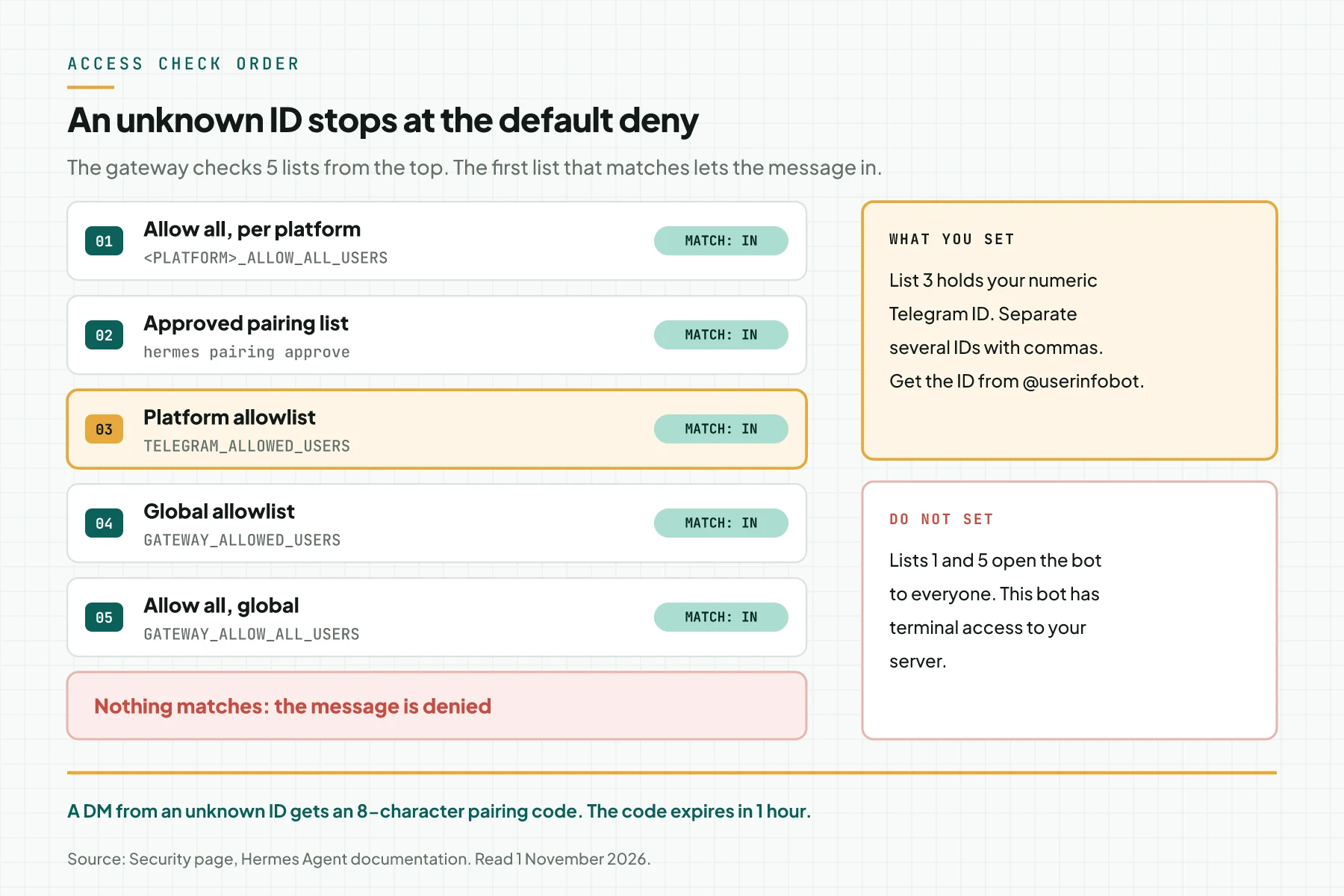
Discord, Slack, and WhatsApp use the same allowlist pattern. For other hosts, read our Hermes Agent setup matrix for Windows, Linux, macOS, and VPS.
Step 6: install the gateway as a systemd service
Install the gateway as a system service, because the official documentation recommends a system service for a VPS or a headless host.
sudo hermes gateway install --system
sudo hermes gateway start --system
sudo hermes gateway status --system
If sudo replies command not found, sudo does not read ~/.local/bin. Use the full path: sudo "$(command -v hermes)" gateway install --system.
| Option | Command | Use it for |
|---|---|---|
| System service | sudo hermes gateway install --system | A VPS or a headless server. The documentation recommends it. |
| User service | hermes gateway install, then sudo loginctl enable-linger hermes | A hermes user without sudo. Linger keeps the service running after logout. |
Read the user service log with journalctl --user -u hermes-gateway -f. Do not install both service types. Do not add an ExecStopPost drop-in, because the documentation says that it causes a restart loop.
Step 7: test a reboot, an update, and a backup
Test 3 events before your team uses the bot: a reboot, an update, and a backup restore.
hermes doctor
hermes config check
sudo reboot
# after you log in again
sudo hermes gateway status --system
hermes backup --quick
hermes update
The hermes update command stops the gateway during the update, then systemd starts it again. The gateway waits up to 30 minutes for running work before the restart. During that time, the bot does not answer.
An older release cannot run on a state.db that a newer gateway wrote. To go back to an older release, stop the gateway, then restore the pre-update backup with hermes import <backup.zip>. Our Hermes Agent 0.21.5 self-update bug report shows an update that cut a gateway.
Validation checklist after the setup
Mark each row before you give the bot to your team.
| Test | How | Correct result |
|---|---|---|
| Diagnosis | hermes doctor | Exit code 0, no problem left. |
| Version | hermes --version | 0.22.2 or newer. |
| Your access | Send a message from an allowlisted ID. | The bot answers. |
| Unknown access | Send a message from another account. | The bot sends a pairing code and does no task. |
| Approval | With the local backend, ask the bot to delete a test folder. | The bot asks for approval. |
| Reboot | sudo reboot | The service is active without a manual start. |
| Update | hermes update | The bot answers again after the update. |
Questions and answers
What VPS specification does Hermes Agent need?
Start with 2 vCPU and 2 GB of RAM for a 1-channel trial. Use 4 GB of RAM for 2 daily channels, and 8 GB for a small team with several workflows.
Why does the Telegram bot reply unauthorized?
Your numeric ID is not in TELEGRAM_ALLOWED_USERS. Get the ID from @userinfobot, not your username, then restart the gateway.
What is the difference between hermes gateway run and hermes gateway install?
The run command starts the gateway in the foreground, and the gateway stops when the SSH session closes. The install command adds a background service that starts again after a reboot.
Which Hermes Agent version is safe for a VPS?
Use v0.22.2 or newer, because v0.22.2 fixed systemd gateways that did not start after a reboot. Skip v0.22.1. The latest version on 1 November 2026 was v0.22.5.
Can Hermes Agent run as root?
We do not recommend it. With the local backend, the agent runs terminal commands with the rights of the gateway user. As root, 1 wrong command can change the whole server.
Operational conclusion
Do the 7 steps in order, and do not start the gateway before the allowlist has your ID. Test a reboot and an update before your team uses the bot. If you want this setup done with an SOP and a handover, see Hermes Agent Installation Service.
Sources
We read all these sources on 1 November 2026.