Direct answer: install Hermes AgentAI agentAn AI program that performs work steps by itself, for example reading a message, drafting a reply, and recording the result.Open the glossary on an Ubuntu 24.04 VPS as a non-root user with 1 command, curl -fsSL https://hermes-agent.nousresearch.com/install.sh | bash, check it with hermes doctor, connect a model provider, lock the approvals and the allowlist, then install the gateway as a service with hermes gateway install plus sudo loginctl enable-linger. This order keeps the agent alive after a reboot without daily root access.
Main condition: this guide is for Ubuntu 22.04 or 24.04 on a VPS with systemd, 1 non-root user with sudo, and a connection to GitHub. Limit: inside a Docker container, hermes gateway install refuses to install a user service and asks for hermes gateway run with a container restart policy. This guide does not cover Windows, macOS, or Termux; for those read our Hermes Agent on Windows install guide (Indonesian) and our Hermes Agent on macOS install guide (Indonesian).
We ran this whole sequence on 19 September 2026 in an Ubuntu 24.04.5 container as the user hermes without root, with Hermes Agent v0.21.3 (2026.9.14). Every terminal screenshot comes from that test. The host name is masked. We read the Installation, Platform Support, Security, and Messaging Gateway documentation on the same day.
The problem: the 1-line install works, 3 days later the agent is dead
The Hermes install command is 1 line. What kills the agent silently is 4 things after it: a gateway that stops when you log out, an APIAPIThe official door 2 systems use to exchange data, without anybody copying it by hand.Open the glossary key left in the wrong place, a * allowlist that opens the bot to everyone, and an update that never runs. This article closes the query "install hermes agent ubuntu", which already showed in our Search Console without a tested step-by-step guide. We wrote the overview of a safe setup order earlier in our article on the Hermes Agent setup order on a VPS (Indonesian); this article is the version we ran and recorded.
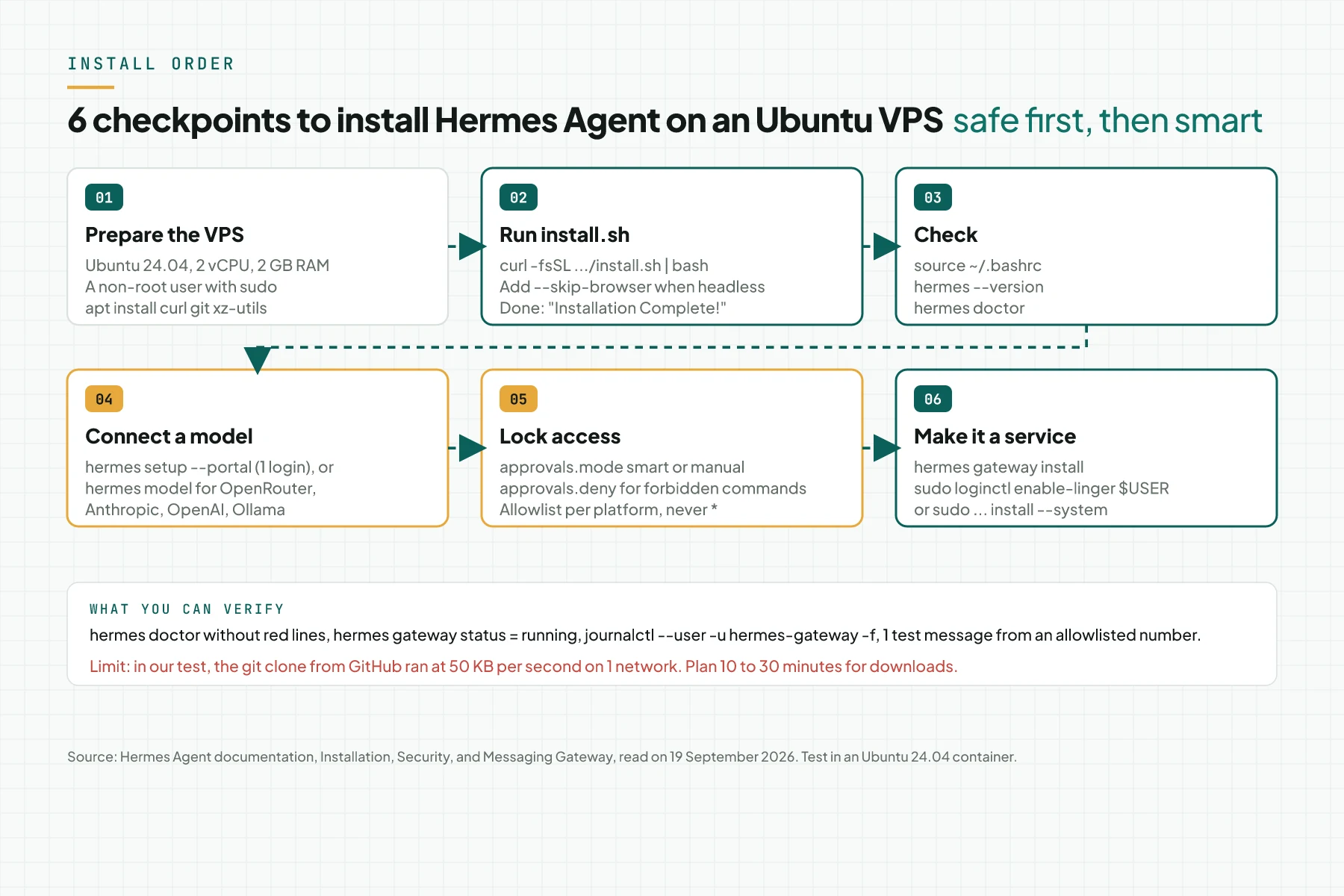
How the Hermes install works on Ubuntu
Layout: per-user or root
Run as a normal user, the installer puts the code in ~/.hermes/hermes-agent/, the hermes command as a symlink at ~/.local/bin/hermes, and the data in ~/.hermes/. Run as root with sudo bash, it uses the FHS layout: code in /usr/local/lib/hermes-agent/, the command at /usr/local/bin/hermes, data in /root/.hermes/. For a 1-team VPS we use per-user so each person's credentials stay apart. Source: the Installation documentation, Install Layout section, 19 September 2026.
What the installer installs
The installer checks and installs uv, Python 3.11 through uv when the system Python does not qualify, Node.js 26 when no Node 22.22 or newer exists, ripgrep, and ffmpeg. In our test the Ubuntu system Python 3.12.3 was used as is, Node.js 26.9.0 could not be read and the installer fell back to Node.js 24.21.0, and the installer added build-essential through apt for native modules. The only prerequisite is git; on Linux add curl and xz-utils.
The gateway as a service: user service plus linger
The documentation gives 2 options on Linux. A user service through hermes gateway install stops at logout unless you enable lingering once with sudo loginctl enable-linger $USER. A system service through sudo hermes gateway install --system starts at boot without linger. The documentation suggests the user service for laptops and the system service for headless VPS hosts, and notes that user service plus linger gives the same result without root. Source: the Messaging Gateway documentation, Service Management section.
The security defaults that are already on
A fresh install uses approvals.mode: smart, a 300-second timeout that denies unanswered prompts, a hardline blocklist for commands such as rm -rf /, write blocks for ~/.ssh/ and .env files, and secret redaction in output. The gateway denies every user without an allowlist or pairing. Source: the guide Running Hermes on a Personal or Work Machine.
3 install methods on Linux according to the documentation
| Method | Support status | Fits | How to update |
|---|---|---|---|
install.sh per-user | Tier 1 | A 1-team VPS, a Linux laptop, WSL2 | hermes update |
install.sh as root | Tier 1 | Shared machines, server images | hermes update |
| Docker container | Tier 1 | Managed deploys, orchestration | Pull a new image; hermes update is not supported |
| Nix and NixOS | Tier 2 | Existing Nix users | Update the flake |
| pip, brew, AUR | Not supported | Do not use | Move to install.sh |
Source: the Platform Support page, 19 September 2026.
Prerequisites
- An Ubuntu 22.04 or 24.04 VPS with systemd. The Team Telegram Assistant documentation says a $5 per month VPS is enough for the gateway. In our test the
~/.hermesfolder used 2.3 GB after the install, including a 1.2 GB git clone. - SSH access as a user with sudo. Root only for 4 commands: apt, adduser, usermod, and loginctl.
- A connection to GitHub and the npm registry. In our test the clone from GitHub ran at 50 KB per second on 1 network; plan 10 to 30 minutes.
- 1 model provider account: Nous Portal, OpenRouter, Anthropic, OpenAI, or an Ollama server.
- 1 Telegram bot token or 1 dedicated WhatsApp number for the gateway.
- 1 real task for the first test.
Step 1: Prepare the VPS and a non-root user
Log in over SSH as a user with sudo. Update the packages, install the 3 prerequisites, create the hermes user, give it sudo, then switch to it.
sudo apt update && sudo apt install -y curl git xz-utils
sudo adduser hermes
sudo usermod -aG sudo hermes
su - hermes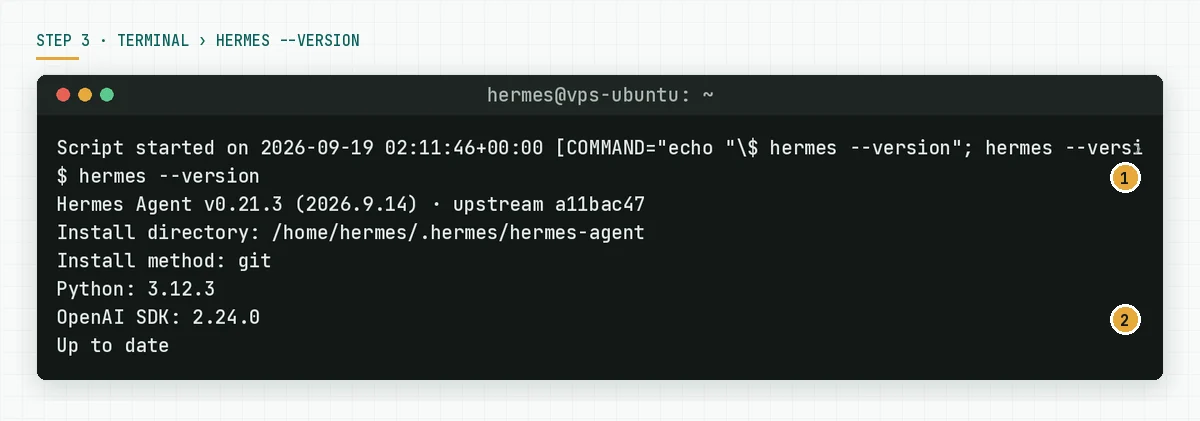
Verify: whoami returns hermes, git --version returns 2.43 or newer, and sudo -n true runs without an error. Source: the Prerequisites and Non-Sudo Installs sections.
Step 2: Run install.sh
Run the official command. When the VPS is headless and you do not need browser automation, add --skip-browser so Playwright and Chromium are not installed; this saves hundreds of MB and avoids an extra apt step.
curl -fsSL https://hermes-agent.nousresearch.com/install.sh | bashThe headless version:
curl -fsSL https://hermes-agent.nousresearch.com/install.sh | bash -s -- --skip-browser --skip-computer-use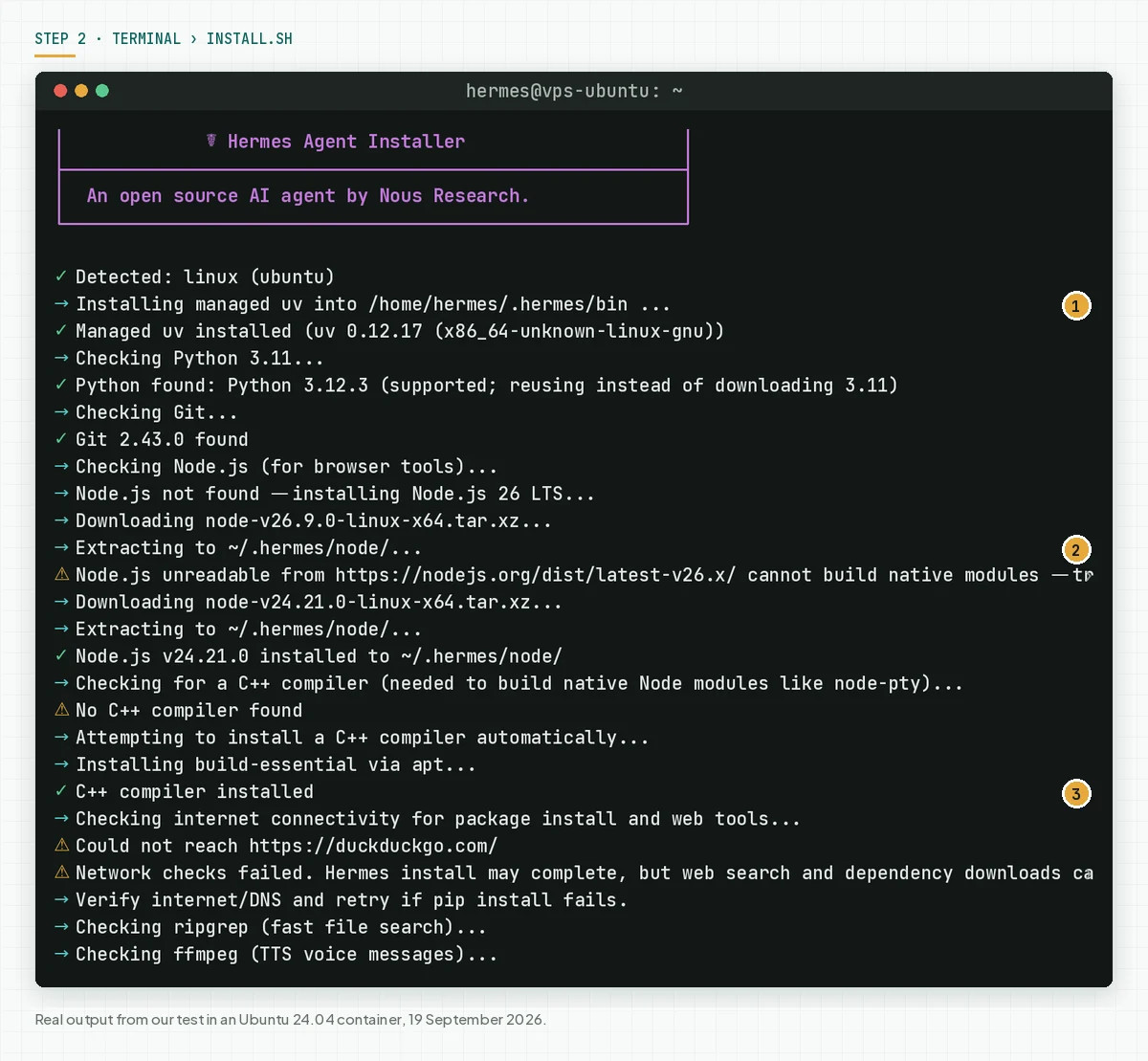
Verify: the Repository ready line appears after the clone, then uv resolved 259 packages in our test. When the clone stalls, check curl -sI https://github.com from the VPS; a slow network to GitHub is the main cause.
Step 3: Finish the install and reload the shell
At the end, the installer syncs the bundled skills, shows the Installation Complete box, and asks you to reload the shell.
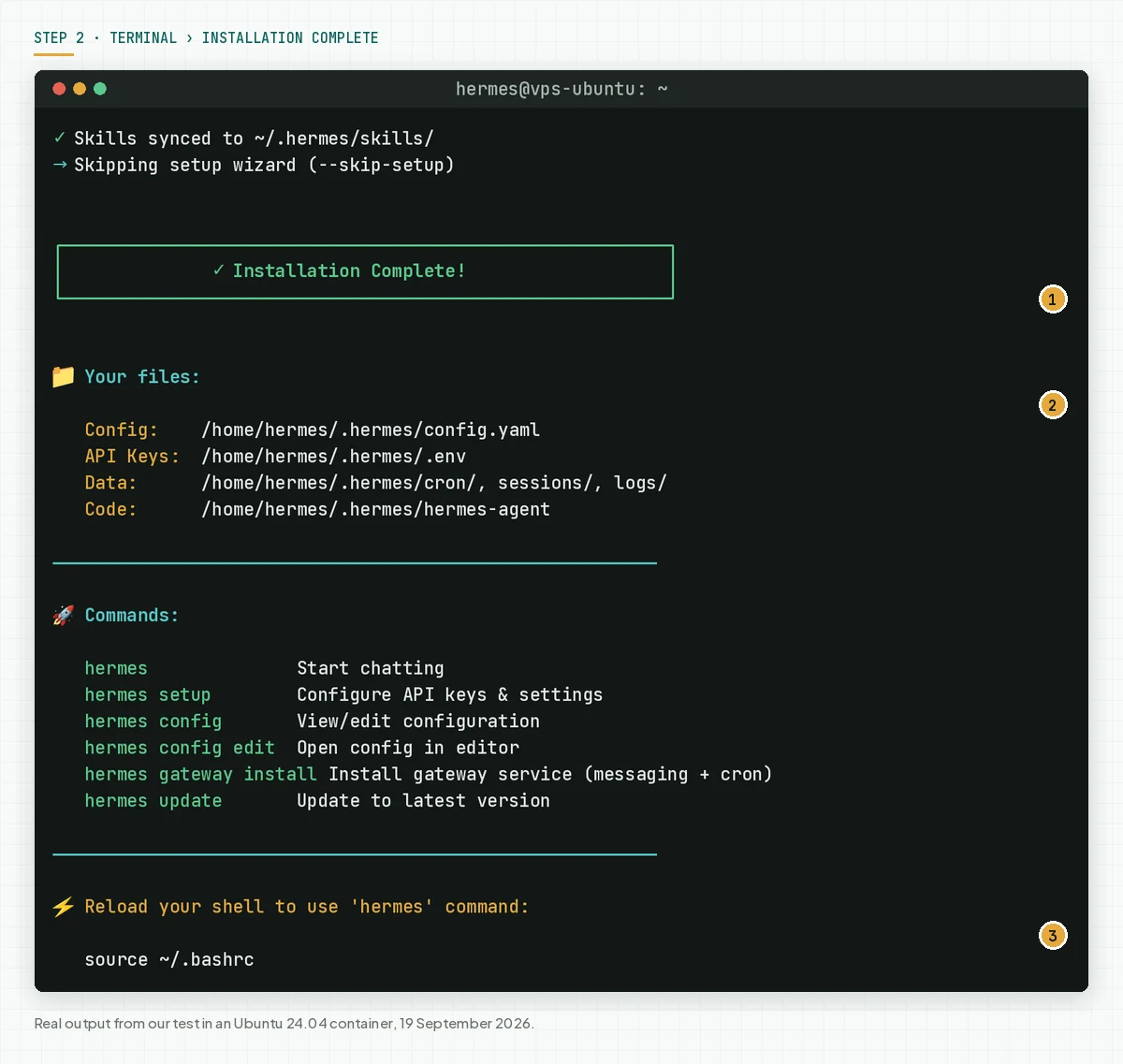
source ~/.bashrc
hermes --version
Verify: hermes --version returns the version, the install path, and Up to date. When you see hermes: command not found, add export PATH="$HOME/.local/bin:$PATH" to ~/.bashrc. Source: the Troubleshooting table in the Installation documentation.
Step 4: Run hermes doctor
This command checks security advisories, SQLite, required packages, configuration files, providers, folders, external tools, and API connectivity in 1 report.
hermes doctor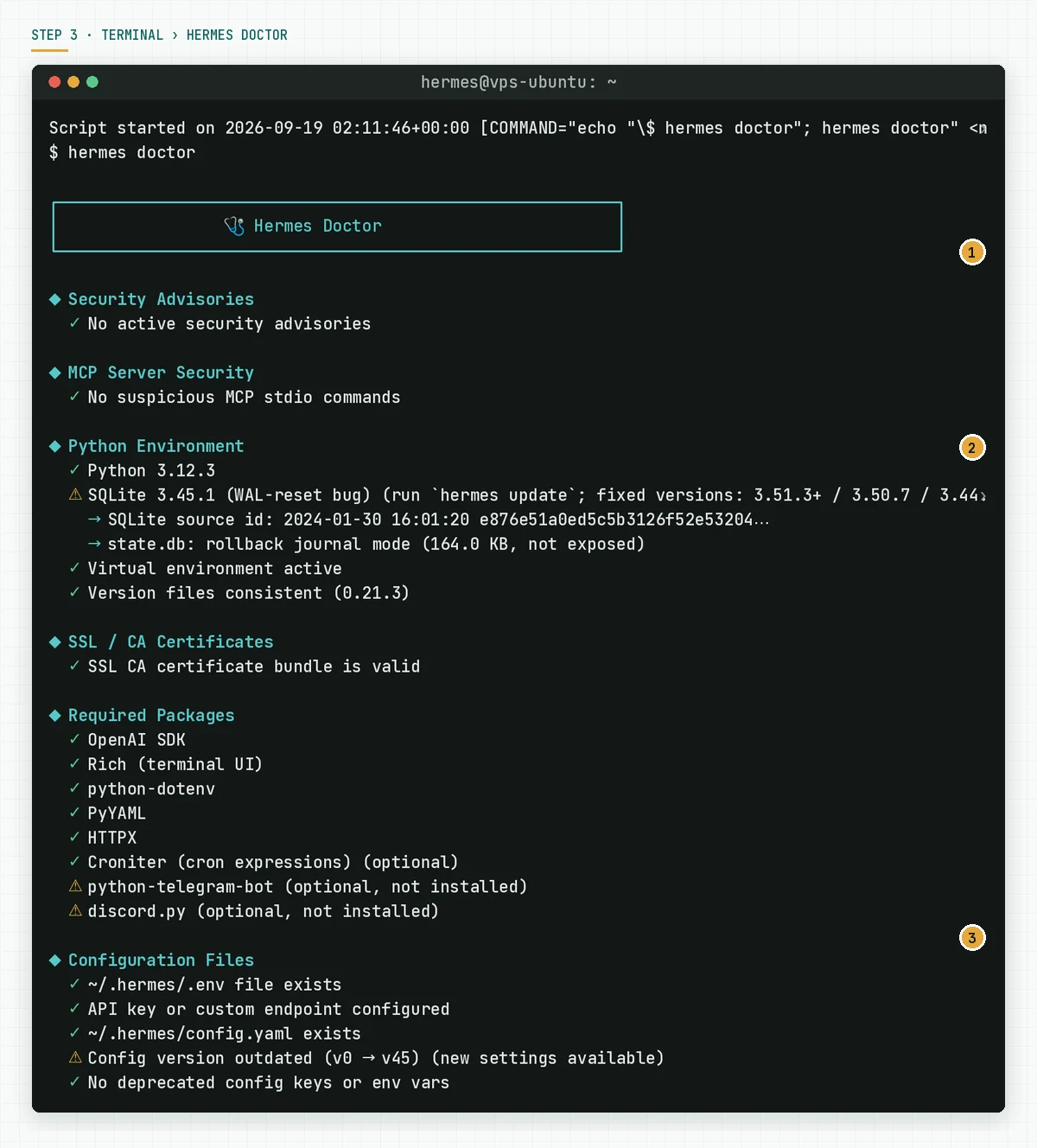
Verify: no red lines. The yellow python-telegram-bot and discord.py warnings disappear after you pick a platform in Step 8. The Config version outdated warning is fixed with hermes config migrate.
Step 5: Check external tools and the active tools
The bottom of the doctor report lists external tools and the tools available to the agent. Here you see what is missing because of --skip-browser.
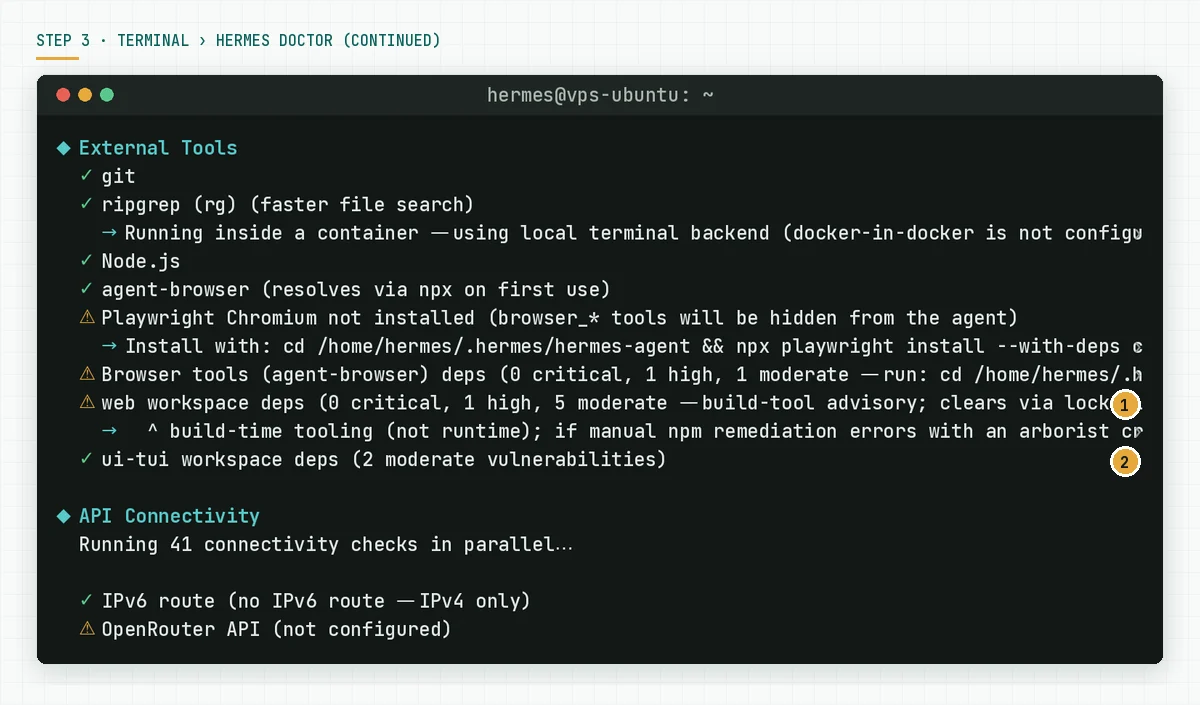
Verify: the cronjob, file, and memory tools appear. When you need the browser later, run cd ~/.hermes/hermes-agent && npx playwright install --with-deps chromium as doctor suggests; the --with-deps step needs sudo.
Step 6: Connect a model provider
Path A for 1 login: hermes setup --portal. On a VPS without a browser, OAuth needs port forwarding: run ssh -L from your laptop to the VPS as the OAuth over SSH guide describes, then open the login link in the laptop browser. Path B for an API key: hermes model, pick the provider, paste the key. The key is stored in ~/.hermes/.env with tight permissions.
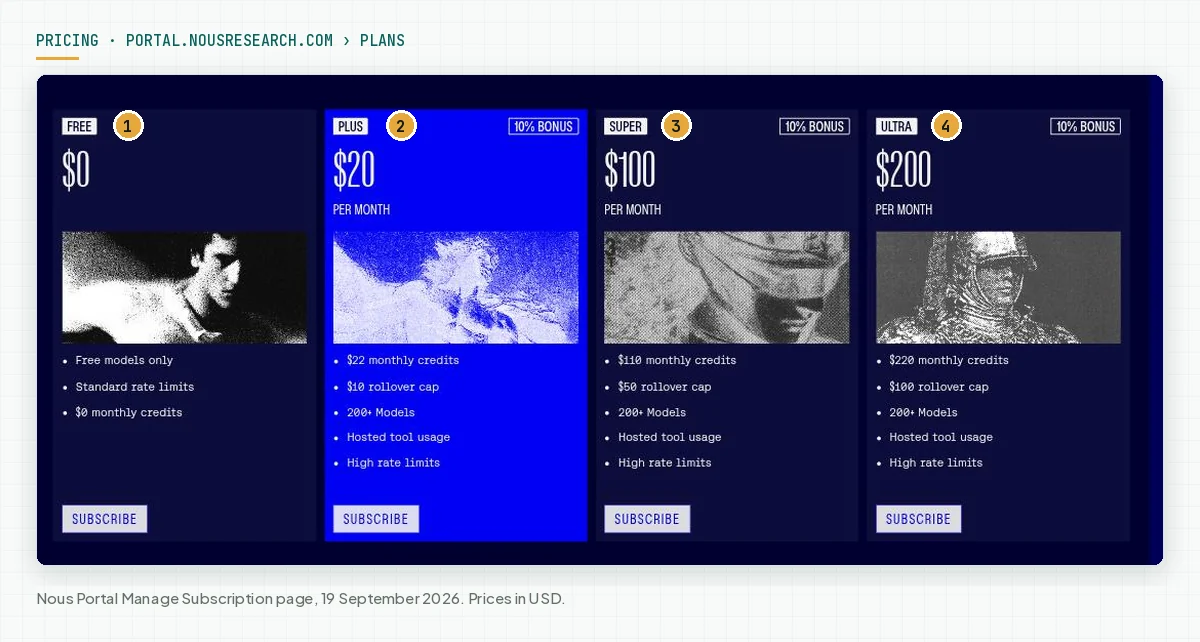
Verify: the Auth Providers section of hermes doctor shows your provider as logged in, and hermes answers 1 test question. Source: the Nous Portal documentation and the Quickstart, Choose a Provider section.
Step 7: Lock approvals and the deny list
For a team VPS, switch the approvals mode to manual and add a deny list. You can set these values with hermes config set or directly in config.yaml. Deny changes apply at once without a restart.
# ~/.hermes/config.yaml
approvals:
  mode: manual                  # smart for personal use, manual for a team server
  timeout: 300                  # an unanswered prompt is denied
  deny:
    - "git push --force*"
    - "*curl*|*sh*"
    - "dd if=* of=/dev/*"
security:
  redact_secrets: true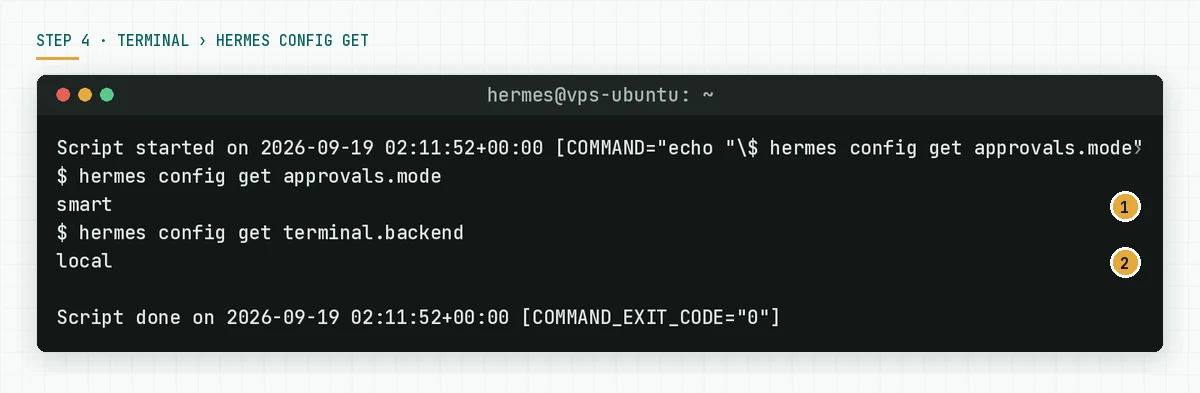
Verify: hermes config get approvals.mode returns manual. When you need real isolation, set terminal.backend: docker with docker_forward_env: [] so host secrets stay out of the container. Source: the Tightening for a Shared or Work Machine section.
Step 8: Install the gateway as a systemd service
Run the platform wizard, install the user service, enable linger once, then check the status and the log.
hermes gateway setup                 # pick a platform, enter the token
hermes gateway install               # systemd user service
sudo loginctl enable-linger $USER    # survives logout and reboot
hermes gateway status
journalctl --user -u hermes-gateway -f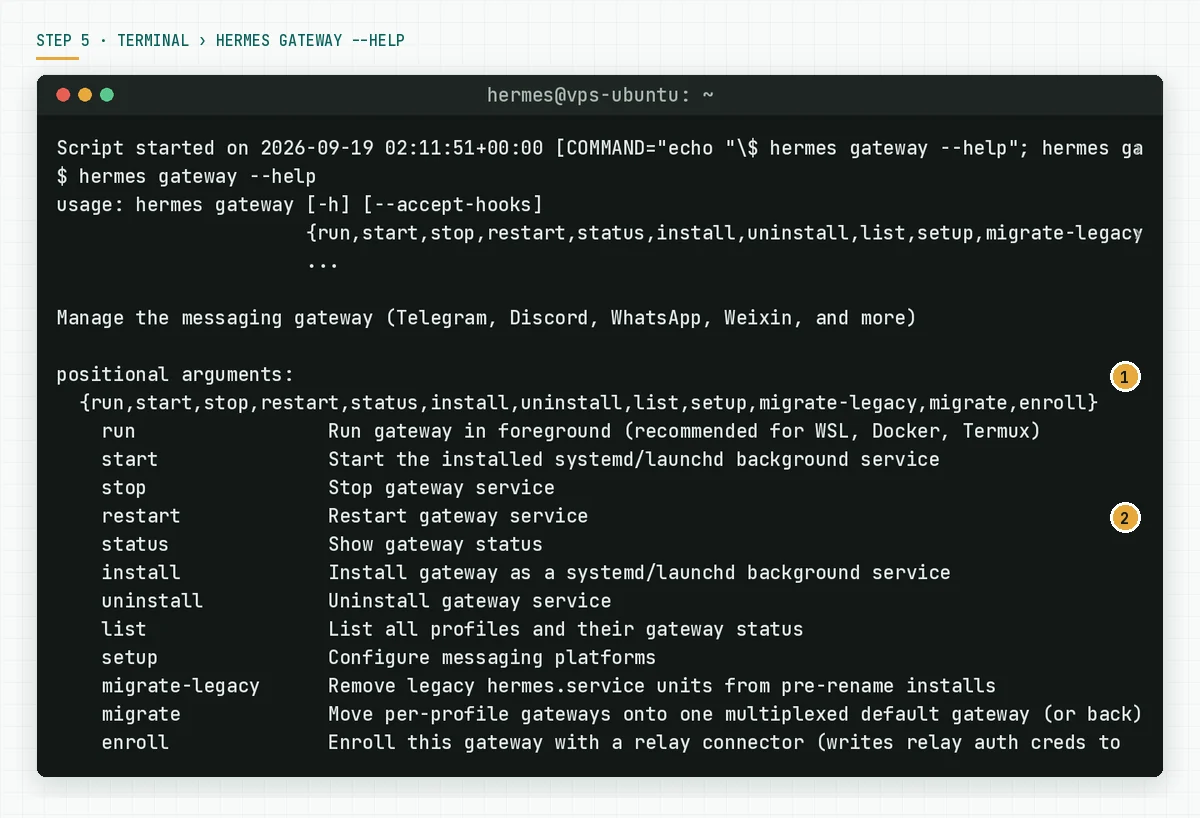
Verify: hermes gateway status shows running, and systemctl --user is-enabled hermes-gateway returns enabled. After a VPS reboot the status stays running thanks to linger. Do not add an ExecStopPost=/bin/kill -9 drop-in; the documentation says it causes a restart loop. Source: the Linux (systemd) section.
Step 9: First test and reading the log
To watch the gateway work before the service, run hermes gateway run in the foreground. The Gateway Starting box says messaging and cron run together. Send 1 message from an allowlisted account and 1 from a stranger.
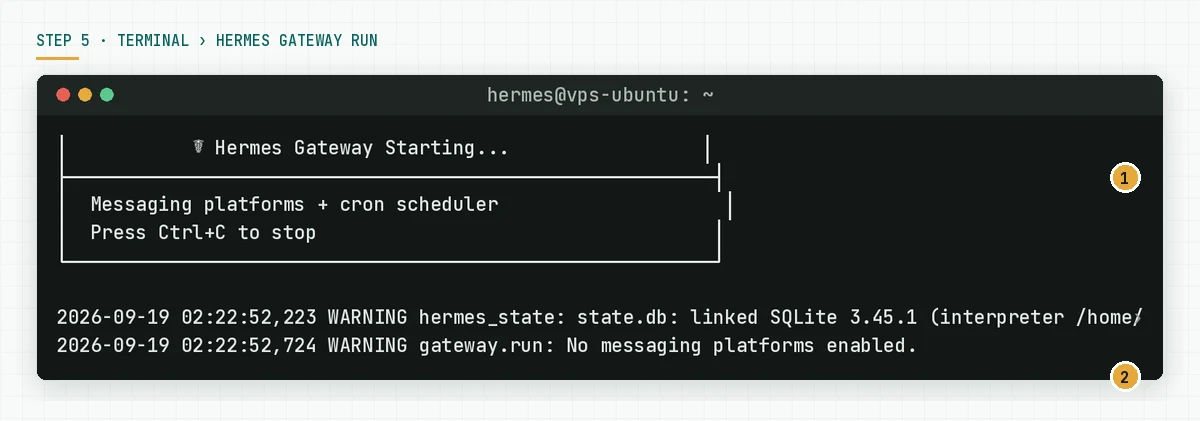
Verify: the allowlisted account gets an answer, the stranger gets a pairing code or silence. Read the service log with journalctl --user -u hermes-gateway -f. The full WhatsApp guide is in our Hermes Agent for WhatsApp article.
Step 10 (optional): Monthly update and re-check
Hermes shipped a new version every week in September 2026. Schedule a monthly update: update, check the configuration, migrate new keys, run doctor, then restart the gateway.
hermes update
hermes config check
hermes config migrate
hermes doctor
hermes gateway restart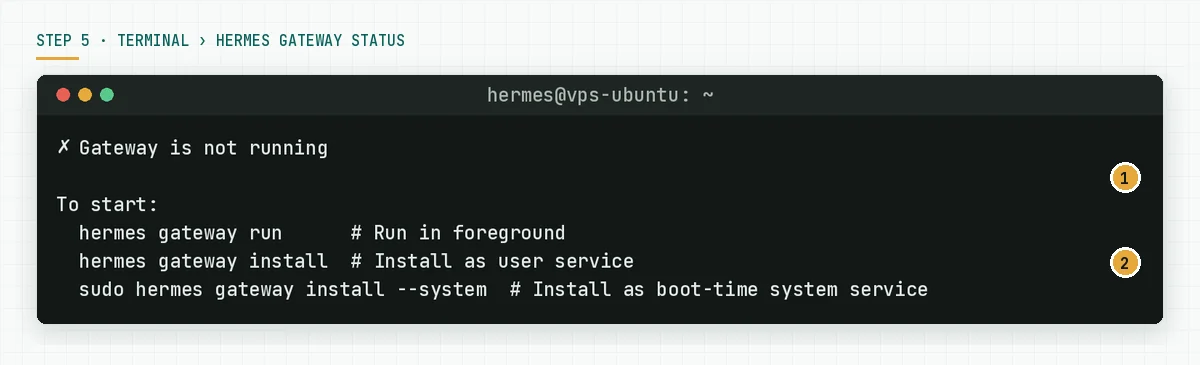
Verify: hermes --version shows the new version and hermes gateway status is running again. When an update breaks something, the Updating documentation names the way back: cd ~/.hermes/hermes-agent, git checkout <commit-or-tag>, uv pip install -e ".[all]", then hermes gateway restart. hermes update itself saves a state snapshot before the update and runs git reset --hard to the previous commit automatically when any of 9 core files fails to parse. Source: the Updating and Uninstalling documentation.
A simulated first day at a fictional agency
This table is a simulation with dummy data. Agensi Rumah Kreatif installs Hermes on a 2 vCPU VPS with Nous Portal Plus and a Telegram gateway for 3 people.
| Time | Event | What the system records | Result |
|---|---|---|---|
| 09:00 | Steps 1 to 3 run | A 1.2 GB clone, 259 packages, 58 skills | hermes --version Up to date |
| 09:35 | hermes doctor | 2 yellow warnings, 0 red | On to the provider |
| 09:50 | hermes setup --portal through ssh -L | A refresh token in ~/.hermes/auth.json | 1 test answer in the CLI |
| 10:10 | approvals.mode set to manual, 3 deny patterns | config.yaml changed | hermes config get returns manual |
| 10:30 | hermes gateway install plus linger | The hermes-gateway unit enabled | Status running |
| 10:45 | A stranger messages the bot | Denied, a pairing code sent | The server owner rejects the pairing |
| 17:00 | The VPS reboots for a kernel update | The service returns through linger | Status running without a login |
The numbers in this table are an illustration, not a customer result. Real timings depend on the network speed to GitHub.
VPS handover checklist
- Hermes runs as a non-root user with limited sudo. Owner: the server owner. Evidence:
whoamiandls -ld ~/.hermes. hermes doctorhas no red lines after the provider is connected. Owner: the server owner. Evidence: a screenshot.- API keys exist only in
~/.hermes/.envwith permission 600. Owner: the server owner. Evidence:stat -c %a ~/.hermes/.env. approvals.modeis manual or smart per a written decision, and the deny list is filled. Owner: the process owner. Evidence:hermes config get.- A per-platform allowlist without
*. Owner: the server owner. Evidence: the*_ALLOWED_USERSlines in.env. - The gateway is enabled, running, and alive after a reboot. Owner: the server owner. Evidence:
hermes gateway statusaftersudo reboot. - The 2-account test passed: allowlisted answered, stranger denied. Owner: the process owner. Evidence: 2 chat screenshots.
- A monthly update schedule and an owner name are in the calendar. Owner: the business owner. Evidence: 1 calendar line.
- Stop criterion: when nobody will answer an approval prompt within 300 seconds during working hours, do not open the gateway to the team.
install.sh, Docker, or Nix for your VPS
This table uses the Platform Support and Installation pages on 19 September 2026.
| Item you can verify | install.sh on a VPS | Docker image | Nix |
|---|---|---|---|
| Support tier | Tier 1 | Tier 1 | Tier 2 |
| How to update | hermes update with rollback | Pull a new image | Update the flake |
| Gateway service | systemd user or system | Container restart policy | NixOS module |
| Daily root access | Not needed | Depends on the host | Depends on the host |
| Extra requirements | git, curl, xz-utils | Docker installed | Nix installed |
Rama Digital recommendation: use per-user install.sh for a 1-team VPS, because updates and rollbacks are simplest. Use the Docker image when your VPS already runs container orchestration and you accept that hermes update does not apply inside it.
Frequently asked questions
Do I need root to install Hermes Agent on Ubuntu? No. The installer supports a user without sudo; only the Playwright --with-deps step needs apt. Run sudo npx playwright install-deps chromium once as an admin, then install as a normal user, or skip the browser with --skip-browser.
How long does the install take? The documentation says under 2 minutes on a normal network. In our test the repository clone from GitHub ran at 50 KB per second on 1 network, so the duration depends on the VPS connection to GitHub. The uv stage takes 1 to 5 minutes according to the installer.
Why does hermes gateway install refuse inside a container? Because a systemd user unit in a home folder mounted from the host can run twice and collide on the same bot token. In a container, run hermes gateway run with a container restart policy, or install a system service in a container that runs systemd as PID 1.
Is a 1 GB RAM VPS enough? The Team Telegram Assistant documentation says a $5 per month VPS is enough because model calls happen outside the server. In our test the ~/.hermes folder used 2.3 GB of disk. Plan 10 GB of disk for sessions and logs.
How do I roll back when an update breaks something? Go to ~/.hermes/hermes-agent, run git checkout to the previous commit or tag, then uv pip install -e ".[all]" and hermes gateway restart. hermes update also saves a state snapshot before the update and reverts the pull automatically when a core file fails to parse.
Does conversation data leave the VPS? According to the official FAQ, only calls to the model provider leave, and Hermes sends no telemetry. Sessions, memory, and skills stay in ~/.hermes/ on your VPS.
Next step
After these 10 steps your VPS runs a Hermes Agent that survives reboots, denies strangers, and asks for approval on risky commands. The limits that stay: security follows the person who owns the approvals, and cost follows the model you pick. When you want us to do these 10 steps on your VPS with the provider, gateway, memory, skills, and a handover SOP, the Hermes Agent Installation Service finishes it in 2 to 5 working days. When you want to settle the scope and the server access first, book a 60-minute Technical Scoping Session.
Sources
- Hermes Agent: Installation
- Hermes Agent: Platform Support
- Hermes Agent: Quickstart
- Hermes Agent: Messaging Gateway
- Hermes Agent: Security
- Hermes Agent: Running Hermes on a Personal or Work Machine
- Hermes Agent: Nous Portal
- Hermes Agent: Team Telegram Assistant
- Hermes Agent: FAQ
- Hermes Agent: Updating and Uninstalling
- GitHub: NousResearch/hermes-agent releases